Low Cost, Cross-language
and Cross-platform Information
Retrieval and Documentation Tools
Nikitas N. Karanikolas
Department of Informatics, Technological Educational Institute of Athens, Greece
In this paper we focus on the design and implemen-tation of low cost, cross language and cross platform information retrieval and documentation tools suitable for the collection, organization and administration of unstructured and semi-structured information imported from various sources. A modular Computer-Assisted Information Resources Navigation (CAIRN) software architecture is proposed and the requirements of each module are presented. A discussion about the imple-mentation is based on the experiments made with a prototype of such a software tool. The technologies that are incorporated into the modern operating systems and the opportunities that they offer for implementing the modules of the CAIRN architecture are also examined and evaluated. Some of these technologies are common
/independent from the operating systems, while some others are distinctive. In this latter case we face barriers
(restrictions)to a straightforward implementation of the CAIRN software systems in the whole range of desk-top operating systems(e.g. Windows, Mac OS, Linux, Solaris). Some alternative technologies are presented to avoid this serious constraint. Evaluation of the imple-mentation effort is also discussed and eventually some conclusions and future plans for further improvement of the CAIRN architecture are given.
Keywords: free text retrieval, document management, automatic classification, application integration, image acquisition, multi-language text extraction.
1. An Outline of CAIRN Systems
Information, in any format, is a strategic re-source and it should be available to the user from the desktop as if it were located in a personal library. In other words, any user needs easily accessible information and tools to exploit it. In this context, the popularity of the Internet has caused an exponential increase in the number of people who use on-line text but the quality and
usefulness of documents varies widely and web search tools are characterised with extremely low precision. In other words, an annoying consequence of information retrieval from the Internet is the fact that there is a vast amount of garbage that surrounds any useful informa-tion. It is even worse to put the users through the annoying process of separating interesting information from garbage, every time they look for(some kind of)information that they had al-ready found in the past. Thus it could be very useful if the users could include the interest-ing information in a personal library and avoid repeatedly separating garbage from useful in-formation. Such information should be easily accessible and digestible. When the users have a question, they should have the means (the software system etc.) to find in their personal library their own previously collected related material and support their own answers / deci-sions/research.
an example, Karanikolas and Skourlas[15] dis-cussed the first framework of a useful Com-puter Assisted Information Resources
Naviga-tion (CAIRN)architecture. It was designed for
storing and organizing in the personal library a whole range of information (as it was defined so far) and introduced the possibility for the user to access information using Natural Lan-guage queries. Such a system could hide infor-mation management procedures and its users needn’t have had any knowledge in librarian’s tasks(e.g. Cataloguing, indexing, abstracting). All these tasks were extremely time and money consuming activities.
During these years, commercial tools appeared, which offered various possibilities for organiz-ing and retrievorganiz-ing information from data sources. We can mention NEXTPAGE[49], HYPERION [41]and AUTONOMY[38]. NEXTPAGE is an antecedent of Folio that simplifies the manage-ment of documanage-ments’ version. Sirsi, provides the HYPERION Digital Media Archive for build-ing, storbuild-ing, and maintaining collections of dig-itally captured material. AUTONOMY[38] ( re-deem Verity)provides applications for making content from the enterprise, entirely searchable. The phrase “content from the enterprise” is as-sumed as content from corporate networks, in-tranets, local data sources and information from the desktop.
Today, end users consider that information is almost anything that they can have on their hard disk. The GOOGLE DESKTOP [40] reflects this perception of information. It offers easy access to information on the local storage and from the web. It is a desktop search application that provides full text search over emails, docu-ment files, digital media and web pages that the users of a computer have already viewed. By making the computer searchable, Google Desk-top prevents the need for manual organization of files, emails and bookmarks.
This fact motivated us to investigate and de-scribe a new family of CAIRN architectures. The requirements for the proposed architecture are the following:
• It should offer the ability to collect informa-tion from different resources: WEB-based documents, bibliographies in machine-readable form, ASCII(plain)text, Office Automation documents(e.g. .doc and .rtf files). It should
also support the storage of personal notes, personal research reports etc. Other poten-tial sources of information are: pdf docu-ments, email docudocu-ments, digitized pictures, images, video captures, etc.
• Information should be accessed using both Natural Language and Field-Based queries (Queries-By-Example approach – QBE). A domain that could benefit from the applica-tion of systems that conform to the new archi-tecture is the medical domain [16]. Medical information can cover patient discharge letters, Computer Tomography (CT), MRI and Ultra-sound images, etc.
In Section 2 we present the new CAIRN archi-tecture. A prototype tool is described in Section 3. In Section 4 some technological solutions are discussed. In Section 5 our evaluation is presented and discussed, and eventually future activities are briefly given in Section 6.
2. A Modular CAIRN Architecture
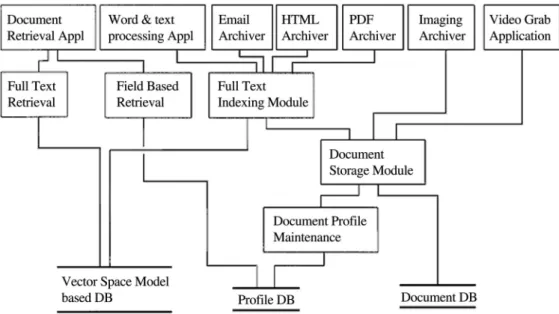
A long list of concrete capabilities must be em-bodied in order to implement such a system. The architecture of CAIRN systems is depicted in Figure 1.
The concrete capabilities of the implementation of a CAIRN system are:
2.1. Text Indexing Capabilities
Text Indexing capabilities can be based on the Vector Space Model (VSM) [20], utilizing al-gorithms for word stemming and the usage of Inverted Files. Other models for Text Index-ing and Document Representation could also be used. However, it has been proven that the VSM is the most popular model. In a recent review [3], the number of systems that use the VSM for Document Representation are twelve (12) of eighteen (18)systems that the authors have knowledge of their technical details. According to the VSM model a vector of k elements rep-resents each document, where each element is the weight of one of the selected indexing terms (word stems). For example, thei-th document is represented by:
Fig. 1.The architecture of CAIRN systems.
where tij is the weight of term j in document
i and k is the number of the selected weights for indexing word stems (terms). The system must be able to stem words [14, 27, 35] for every supported language. By using stems in-stead of words for indexing textual documents we achieve a significant reduction of the over-head and also an improvement to the recall of documents. The usage of Inverted Files[6, 34]is needed for storing the locations and the weights of every stem selected for indexing textual doc-uments. Text Indexing capabilities should be implemented in the corresponding Full Text In-dexing Module.
2.2. Still Image Acquiring Capabilities
CAIRN systems must be able to handle scan-ners and digital cameras in order to acquire im-ages. The problem raised in this case is that the CAIRN systems must be able to “under-stand” and communicate with the driver of each available scanner and digital camera. This re-quires a vast amount of application develop-ment and maintenance for supporting each new released image device. To overcome this dif-ficulty, CAIRN systems must be able to use some abstract (standard) communication with image devices and avoid the need for constant revisions for supporting new and revised de-vices. The still image acquiring capability must
be implemented in the Imaging Application of a CAIRN system.
2.3. Image Acquiring from Video Sources
With “image acquiring from Video sources” we address the capability to connect CAIRN sys-tems to video sources and grab images either by user intervention or in some automated way. In the latter case the system should offer an in-terface where the user is able to define the time interval between two consecutive grabs and start the acquiring process. This process will consist of grabbing a separate image for every multi-ple of the defined time interval and will stop when the user decides to. The problem raised in this case is similar to the problem raised for still image acquiring and there is a need for an abstract(standard)communication between CAIRN systems and Video acquiring devices (usually Video frame grabbers). The image acquiring from video sources capability must be implemented in the Video Grab Application constituent of a CAIRN system.
2.4. Image Storage
(Tagged Image File Format), JPEG(Joint Pho-tographic Experts Group), WMF (Microsoft Windows Metafile), PCX(PC Paintbrush File format), Bitmap(Microsoft Windows Bitmap) and GIF(Graphics Interchange Format). How-ever, CAIRN systems must support at least the most widely acceptable and most appro-priate for cross (software and hardware) plat-form image archiving. Since TIFF plat-format per-mits both MSB(“Motorola”)and LSB(“Intel”) byte order data to be stored, it is a highly flexi-ble and hardware-platform-independent format, which is also supported by numerous image-processing applications. Moreover, because velopers of printers, scanners and monitors de-signed it, TIFF is a very rich space of informa-tion elements for colorimetry calibrainforma-tion, etc. The last TIFF specification[54] is a definition of single and multi page image file format. It supports Black/White, Grayscale, Palette-color and RGB Full color images. It also has support for CMYK, YCbCr and L*a*b* images. It has a trenchant documentation and great acceptance. Consequently, TIFF storage is an obligatory ca-pability for CAIRN systems. Another candidate for image storage is JPEG. JPEG[11, 12] is a definition of single page image file format with great acceptance for storage of photographs. It is used for continuous tone image compression (truecolor (24bit) and grayscale (8bit)). The lossy class (there is also a lossless class) of JPEG provides substantial compression with-out significant degradation of the reconstructed image. The only exception occurs in case of artwork with sharply defined lines.
The storage of video information is another in-teresting topic. The most appropriate format is the MPEG(Moving Picture Experts Group) standard/format. Under the name MPEG, there is a family of international standards that are de-fined for coding audio-visual information in a digital compressed format. The MPEG fam-ily(MPEG organization [48]) of standards in-cludes 1, 2, 4, MPEG-7 and recently MPEG-21. MPEG-1 standard has enabled storage of video on CD-ROMs. MPEG-2 [5] standard has broadened the stor-age of video on DVDs and also made the Dig-ital Television possible. MPEG-4[19]and the subsequent ones are more oriented to more se-mantic representations and therefore, they are of no interest for CAIRN systems. Another alternative/candidate for the storage of Video
information could be the Motion JPEG 2000 (MJ2). MJ2[46]defines a file format for mo-tion sequences of JPEG 2000 images. It also supports storage of associated audio. MJ2 does not involve inter-frame coding and each frame is coded independently using JPEG 2000.
2.5. Image Compression / Decompression
Since the space needed for storage of images is a very significant factor, there is a necessity for compressing images. The CCITT Group 4 compression/decompression algorithm [13] is a standard for compressing/decompressing black/white images and it is supported by TIFF format. For color pictures, the Lempel, Ziv and Welch(LZW)algorithm[37]is a lossless com-pression technique supported by TIFF. Unfortu-nately, to use this technology, an LZW license agreement is necessary (the patent is held by Unisys), regardless of the library used, or even if the code is written from scratch. Another alternative could be the JPEG lossy compres-sion that is also supported by the TIFF file for-mat. The only drawback with JPEG compres-sion in TIFF is the loss of information. Fortu-nately, an alternative, non-proprietary compres-sion scheme has been proposed, based on the ZLIB/Deflation stream. It is a lossless com-pression standard derived from LZ77. Adobe has recently added a deflate compression option for TIFF, referred to as Zip-in-tiff compression. Deflate[4] generally yields better results com-pared to LZW and without any loss of informa-tion.
The latter two capabilities should be imple-mented in both Imaging and Video Grab Ap-plications.
2.6. Application Integration
Another example of application integration is faced for printing a document without even pre-senting the native application to the user. The integration in this case implies invoking the na-tive application in an invisible mode, ordering this application to open the user-selected docu-ment, ordering this application to print the doc-ument and finally ordering the native applica-tion to exit. For applicaapplica-tion integraapplica-tion, the applications can be seen as objects, exposing interfaces that can be invoked by other appli-cations. Here, the term object has a different meaning/ interpretation from the well known one in the case of the object-oriented program-ming languages. It is used to express reusable software entities deployed as binaries, and is also known as components. The significance behind “exposing interfaces” to the world is that these interfaces are the “sockets” into which other components and applications can plug. This behavior contributes to the reusability of software components. The exposed interfaces of components provide services that can be re-quested by clients. Thus, components are(such components act like) Servers. The Clients are applications that can plug into the interfaces ex-posed by Servers and, consequently, they can access their services by issuing requests that contain information about the target component (Server), the operation needed, the parameters for the operation (if any) and any optional re-quest contexts. These rere-quests cause services to be performed.
2.7. Email Archiving
Since email is one of the most utilized meth-ods for personal and business communication, CAIRN systems must be able to collect and archive the information that emails carry. This information can be the email body, but also the documents transferred as email attachments. Thus, CAIRN systems have to communicate with the Email clients and gain access to the incoming messages. However, there are more than one Email clients and, consequently, CAIRN must be able to communicate with all or most (the most proliferated) of them. The prob-lem raised in this case is similar to the afore-mentioned problem for supporting new hard-ware devices for image acquisition. The dif-ference here is that there is the requirement
for supporting new software products and re-leases, instead of new and revised hardware de-vices. In this case, the solution is the same, i.e. to use some abstract(standard) communica-tion between CAIRN systems and email clients. The capabilities for standard communication between CAIRN and email clients, gaining ac-cess to the incoming messages and archiving the information that these messages carry should be implemented in the Email Archive module.
2.8. Extraction of Multi Language Text
Extraction of multi-language text capability re-fers to the necessity for distinguishing the dif-ferent languages used in the body of each textual document and marking down the text every time there is a change in the language used. The way that this capability is accomplished is dependent on the source of information. For example, if the source is a word processor document, the CAIRN system takes advantage of application integration to invoke the native application in invisible mode, orders this application to open the source document, orders to save the source document as an RTF (Rich Text Format) tem-porary file and finally orders to exit. Then, an RTF reader [52]elaborates the RTF tempo-rary file and extracts the Multi-National-Text (on the base of \lang tags found on the tem-porary RTF file). In case that the source is an HTML file, CAIRN system is based on HTML tags and/or Unicode characters [10] instead of usual characters for finding the language changes. Examples of such HTML tags are
<meta http-equiv="Content-Type" content ="text/html; charset=windows-1253">and
<meta http-equiv="Content-Language" con-tent="greek">. An example of a Unicode cha-racter sequence isΤοκα λύτεροand represents the greek phrase “Toκαλυτερο´ ”. The capability for Multi-National-Text extrac-tion is a capability that should be present at least in the Word and Text Processing Application, PDF, HTML and EMAIL Archive.
2.9. Full Text Retrieval Module
This module should provide a graphical user interface where the users will be able to sub-mit their queries using natural language. Nat-ural Language queries allow the users to en-ter a prose statement describing the information they want to find. The similarity of a submitted query against the documents of the system must be calculated with some similarity measurement function [34]. A well known such function is the Nearest Neighbor Matching function [22]. This is a cosine-based similarity measure be-tween a document and a query or bebe-tween two documents.
S(Di,Dj) = k r=1tirtjr
k r=1
t2 ir·
k r=1
t2 jr
A small improvement to the cosine similarity for a medical data collection has been presented by an earlier CAIRN prototype[15]. Other models for Information Retrieval[3, 36] could also be used.
2.10. Document Profile Maintenance Module
This module should provide a graphical user in-terface where the users will be able to provide the values of fields that characterize documents. The most interesting idea that should be imple-mented in this module is that each field can be able to hold more than one value (an infinite number of values) and that each value can be composed of one or more attributes. In this way a field can have a single value, a list of values or a table of values. In the latter case the rows of the table represent the multiple values and the columns represent the attributes of each value (row).
2.11. Field-based Retrieval Module
This module should provide a graphical user in-terface where the users will be able to impose restrictions on one or more fields, in order to
retrieve the documents they are interested in. A new demand is that the user must be able to pro-vide two(or more)values for a field and demand that the retrieved documents must contain both (all) provided values. This is a consequence of the ability of the Document Profile Mainte-nance module to permit more than one value in each field.
2.12. Document Storage Module
This is a mediator that defines an internal file name(never used by users), does the actual stor-age of documents and invokes the Document Profile Maintenance module.
Some of the above capabilities are dependent on technologies that are available in the Operating Systems. Some other capabilities are defined in an abstract level and consequently are in-dependent from the Operating Systems. The ideal solution for cross platform development of CAIRN systems would be to have the same technologies available in most desktop operat-ing systems (Windows, Mac OS, Linux, So-laris). However, this is not a rule. The capa-bilities defined on an abstract level, and conse-quently available for implementation in every operating system, are: text retrieval (Inverted Files, Vector Space Model, Nearest Neighbor Matching, etc), image storage, image compres-sion/decompression, Multi-National text ex-traction. The problem arises for the rest of the needed capabilities. Still image acquiring, Im-age acquiring from Video sources, Application Integration and finally Email archiving are ca-pabilities dependent on the technologies avail-able in the desktop Operating Systems. These technologies have neither common standards nor common APIs and, consequently, different means must be used for implementing the latter capabilities.
3. A CAIRN System Prototype under Windows
The technologies we have used in the devel-opment of CAIRN System prototype, which are tightly coupled with the Windows OS are TWAIN [55, 56, 57], OLE Automation [1], MAPI[45], Video for Windows[60]. TWAIN is an API, maintained by an organization that of-fers a common way for acquiring images from scanners and digital cameras. This API is avail-able only for Windows and Mac OS. OLE Au-tomation stands for Object Linking and Embed-ding Automation and is available only for Win-dows Environments. The same stands for Video for Windows. MAPI is an abstract level of communication between applications and Mail clients(e.g. Eudora, Outlook).
3.1. TWAIN
In the CAIRN system prototype, the Imaging Application is a TWAIN-enabled application. TWAIN(TWAIN Version 1.6[56], TWAIN v1.7 [57]) is an API, maintained by the TWAIN Working Group(TWAIN Organization[55])for simplifying the difficulty of connecting scan-ners and personal computers. TWAIN is an image-capture API for the Microsoft Windows and Apple Macintosh operating systems. That API was introduced in 1992. TWAIN requires three software elements(and hardware) work-ing together to enable image acquisition. These are Host Application, Data Source and Source Manager. The Host Application presents a File menu, with a “Select source” and an “Acquire” menu items for choosing an image-acquisition device and obtaining an image from that device respectively. In response to the user selecting one of those menu items, the application sends messages to TWAIN. When acquiring an image, TWAIN sends messages to the Host Applica-tion that the applicaApplica-tion handles in its message-handling loop. The Data Source is a driver that controls a specific image-acquisition device and is written by the device’s manufacturer to con-form with the TWAIN specification. TWAIN places the graphical user-interface to control the device in the Data Source driver instead of the Host Application. This makes it easy to im-plement a still image acquire application, but it presents some difficulties for other operating systems.
3.2. OLE Automation
OLE Automation [1] is an object technology coming from Microsoft. OLE Automation must not be confused with OLE Object Embedding, OLE Object Linking and OLE In-place Acti-vation. OLE Automation is the formal inter-process communication technique for the Win-dows Operating System. OLE Automation is based on fundamental object-oriented program-ming ideas. It provides the infrastructure and guidelines that let an application share objects calledautomation objects(also called automa-tion servers). Other applications, called au-tomation controllers, communicate with the ap-plication by reading or setting the shared ob-jects’ properties or by calling the shared obob-jects’ methods. Visual Basic is an example of a well-known automation controller. OLE Automation defines standard ways in which an automation object publishes information about what meth-ods and properties it supports. Automation con-trollers provide browsers so programmers can read this information. An impressive example of support for OLE Automation is Microsoft Office. Almost every feature of Word, Excel, and PowerPoint is accessible to end-user pro-gramming. Programs that control Office can be written with Visual Basic[25, chapter 22]or with a special version of Visual Basic included in Office called Visual Basic for Applications. At this point, it is appropriate to make it clear that not only the MS development tools are able to create OLE Automation controllers and OLE Automation servers. In other words, using OLE Automation, someone can integrate two or more applications in a way that appears seamless to the user. Working with OLE Automation ob-jects is very similar to working with obob-jects in the application itself. That means that the
au-tomation controller retrieves some object and
the object’s properties from an OLE Automa-tion server and applies the object’s methods as if they were in the application itself.
text indexing. In this case the Full Text Index-ing module(of the CAIRN system prototype) is the OLE Automation controller, while MS Word is the OLE Automation server.
Another interesting usage of OLE Automation is for the invocation, from the Document Re-trieval Application(of the CAIRN system pro-totype), of the native application for each docu-ment type. In case of a TIFF file we face the case of communicating the Document Retrieval Ap-plication(OLE Automation controller)with the Imaging Application(OLE Automation server) of the CAIRN system prototype.
3.3. Video for Windows
Video for Windows(VfW) [60] is a complete system for maintaining video on Microsoft Win-dows. In the beginning, VfW was a collection of 16-bit windows utilities, dynamic link libraries and other components. Version 1.0 of VfW was released in November 1992. It was followed by version 1.1. An additional letter characterizes the following versions. The most recent version of VfW 1.1 for the operating system Windows 3.x is 1.1e. Microsoft has released a 32-bit ver-sion of VfW for the operating system Windows 95. From the Microsoft’s Internet site, VfW 1.1e can be downloaded in two deployments: Runtime or Development Kit. In contrast with Windows 3.x, Windows 95 includes VfW. A VfW capture driver usually accompanies video capture cards supporting VfW. This driver ex-ports some predefined functions and dialog box-es that every VfW compliant application is able to invocate.
The VfW API is based on the creation of a Capture Window and the connection of this di-alog box with a VfW capture driver(the corre-sponding capture driver for the Capture card). Then, with the submission of messages towards the Capture Window, the VfW API permits the accomplishment of actions, such as cap-turing of a still image, recording a video clip (AVI), projection of video signal through the video capture window(preview), projection of video signal directly to the screen without the intervention of the computer (overlay), con-trol of the attributes of video signal (System:
PAL/SECAM/NTSC, Image Dimensions, Im-age Format: 24-bit RGB/16-bit RGB/8-bit Pal-letized), etc. There are also messages that are used to declare a callback function. This call-back function is defined in the user’s applica-tion and is activated automatically by VfW ev-ery time a specific event happens on the video streaming.
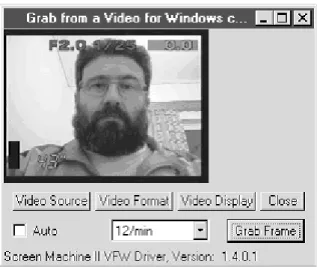
The Video Grab Application of our CAIRN sys-tem prototype is based on VfW and it is pre-sented in the next figure:
Fig. 2.The Video Grab Application of CAIRN system prototype.
This application implements the image acquir-ing from Video sources capability and it is com-plementary to the TWAIN-enabled application, since it permits capturing one or a sequence of still images from a video source, instead of a scanner or a digital camera.
3.4. Messaging Application Programming Interface (MAPI)
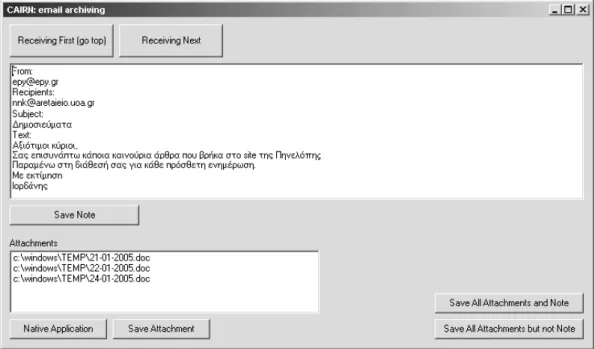
appli-Fig. 3. The Email Archiving module, of the CAIRN system prototype.
cation submits emails to the Mail client and receives emails from the Mail client and does not communicate with the Mail Server. There are actually two sets of functions defined for the complete MAPI library. The first twelve functions are known as Simple MAPI, while the remaining functions constitute the Extended MAPI. The functions of Simple MAPI are enough for sending and receiving emails.
The need for email archiving can now be eas-ily accomplished. Figure 3 presents the Email Archiving module, of the CAIRN system pro-totype based on MAPI, for archiving data of emails.
The navigation through emails is accomplished with the buttons “Receiving First” and “Receiv-ing Next”. For each message, the user can see the mail body and a list of attached files. For each attachment, the user can activate the Native Application. The archiving can be done sepa-rately for the email body and each attachment, but it can also be done collectively.
4. Transition to UNIX / Linux
This section introduces some technologies that could be used for the implementation of the CAIRN Architecture in the Linux and Unix OS.
4.1. SANE
can have one of a variety of interfaces ( con-sole/text mode, GNOME, KDE, X11 or Motif Windows). In contrast, SANE clearly separates device controls from their representation in a user-interface. As a result, SANE has no diffi-culty supporting a variety of interfaces, ranging from command-line interfaces to any Graphical user-interface and the access to the device can happen locally or over the network.
For the above-mentioned reasons, the develop-ment of a still image-acquiring module of a sys-tem, respecting the CAIRN Architecture and designed for UNIX and Linux OSs, must be ex-tended to the development of ascanning inter-face sub-module. This sub-module will be pre-senting the appropriate, for the used GUI win-dow manager (GNOME, KDE, Motif, X11), interface to the user and on the background it will be using SANE negotiations for acti-vating/deactivating the available scanning fea-tures, depending on the selected scanner.
4.2. Bonobo
BONOBO[39]is the GNOME architecture for creating reusable software components and com-pound documents. Bonobo components help reducing the complexity of applications by re-ducing the amount of information a program-mer needs to know about the system. This is achieved by making each software compo-nent implement a very well defined interface. Bonobo components also enable programmers to build larger, more complex applications by gluing different components together into big-ger applications. The key point behind com-ponent programming is in the “interfaces” that components export to the world. Each one of these interfaces is a “socket” other components and applications can plug into. These faces are defined in terms of CORBA inter-faces, specified in the CORBA Interface Defini-tion Language. According to this architecture, the clients submit requests asking for some ser-vices. These requests are transmitted to the object request broker (ORB) who is responsi-ble for forwarding the requests to the adequate server(service provider).
For the Application Integration needed, the mod-ules of CAIRN must be implemented with re-spect to the Bonobo architecture, i.e. as objects
that export interfaces. For example, the Imag-ing module of CAIRN must export an interface that permits: its invocation, the loading of des-ignated documents, etc. There is an obvious question. What about the ready made native, for the archived documents, applications? The an-swer is that Bonobo architecture is a proliferated architecture and it is supported by most shelf applications. For example, Gnumeric Spread-sheet, GNOME postscript viewer and GNOME PDF viewer are Bonobo compatible.
4.3. Video for Linux
Video for Linux[59]is the corresponding Linux technology to the Video for Windows technol-ogy that exists in the Windows OS. Video for Linux(v4l)is the original capture/overlay API of the Linux kernel. It appeared late, in the 2.1.x development cycle of the Linux kernel. Video for Linux Two(v4l2) is the second generation of the video for Linux API. It was integrated into the standard kernel in 2.5.x. V4l2 is a thor-ough overhaul of the API with respect to Video for Linux.
It is obvious that the Image acquiring from Video sources module, of a CAIRN system de-signed for Linux, must be implemented taking advantage of v4l2 API.
4.4. Mail Application Programming Interface for Linux
in section 3.4, we believe that it is enough to replace the MAPI requests with the code that respects Post Office Protocol – Version 3[29]. The next chapter presents the first evaluation based on our effort to design and implement the CAIRN prototype.
5. An Evaluation Based on the Design and Implementation of CAIRN Prototype
In the previous sections we have discussed how the current technological environment can sup-port the development of software that handles unstructured information and CAIRN systems for most desktop operating systems. Unfor-tunately, the technologies used for the differ-ent desktop operating systems are not always compatible and, in specific cases, we have to adapt different technologies for different oper-ating systems.
Some results of the scientific research in In-formation Retrieval(e.g. algorithms for text in-dexing, text retrieval, word stemming, and the use of specific similarity measures) and the standards established by international organi-zations of standardization (e.g. CCITT Group 4 compression) can usually form a basis for cross-platform implementation. However, pro-prietary, de-facto commercial standards must be considered for possible implementation/ inte-gration into such a tool. Some of them could be easily supported independently from the plat-form, the operating system and the tools of soft-ware development that each developer uses. The existence of open source code also facili-tates cross-platform implementation. As an ex-ample, we can mention the incorporation( inte-gration)of free JPEG software(source code)of the JPEG Group [42] with minor changes into the CAIRN prototype.
There are also serious problems in supporting/ integrating into CAIRN tools some commercial standards/ products when in different operat-ing systems we encounter different technolo-gies for the achievement of the same objectives. Thus, for the communication and the utilization of one application by another, a Linux/ Unix-based tool could use Bonobo / CORBA and an MS Windows-based system could use OLE Automation/COM/DCOM[1, 33]. Another
example is that under Linux the applications could communicate directly with mail servers, whereas under Windows the applications could communicate with the Mail client, in order to read and submit email messages.
Proportional differences exist also in the cap-ture of still image and Video signal. In certain cases, this is justified from the philosophy of (or the inheritance from predecessor) operat-ing systems. For example, in Linux there is no standard interface and it is considered al-most mandatory that the application software (the tool) must have access to a scanner that is found in another (remote) system. On the contrary, in the MS Windows there is usually only one interface and the support of remote image acquiring devices is not essential for the developer.
A common sense strategy to overcome the bar-rier of using different technologies for imple-menting the same product for different operat-ing systems is to develop abstract tools ( tech-nologies) that combine only the best features of the different existing technologies. To clar-ify our point of view we can briefly discuss the perspective that the TWAIN working group proceeds, in order to expand TWAIN’s portabil-ity to include UNIX[58]. More precisely, they are redesigning TWAIN in order to operate as a front-end and use SANE as its back-end in the UNIX environments. The application de-veloper will still have the ability of “Linking Images With Applications” easily, which is the TWAIN’s whole purpose. The TWAIN group believes that most applications will rely on the TWAIN driver’s GUI, because the amount of code required is reduced. On the other hand, SANE is an established standard for UNIX and has the benefit of years of Open Source develop-ment work. Therefore, TWAIN does not intend to replace SANE and “reinvent” solutions to fundamental device communication problems.
6. Future activities
classification concept/possibility. Hence, the classification of new documents could be based on their similarity with the existing ones(of a “training” set). Such an Instance-based learning method assumes that similar documents must be classified in the same category or share the same classification code[17]. In a complemen-tary way, the classification of documents could be based on naive rules inducted from train-ing sets of pre-classified documents[18]. Fu-ture extension will elaborate the incorporation of ontologies and lexical tools for text disam-biguation. We also plan to proceed with some experimentation with Cross Language text col-lections, especially for medical texts.
7. Acknowledgments
This project is co-funded by the European So-cial Fund and National Resources –( EPEAEK-II)-ARXIMHDHS.
I would like to thank my colleague, Professor Christos Skourlas, for his continuous support and the discussions we have had over the past eighteen years.
References
[1] K. BROCKSCHMIDT, Inside OLE. Microsoft Press, Printed in the USA, second edition, 1995, ISBN 1-55615-618-9.
[2] C. BUCKLEY, Smart ver. 11.0, 1992.
ftp://ftp.cs.cornell.edu/pub/smart
[3] G. CANFORA, L. CERULO, A Taxonomy of Infor-mation Retrieval Models and Tools. Journal of Computing and Information Technology, 12(2004), pp. 175–194.
[4] A. FELDSPAR, An Explanation of the Deflate Algo-rithm, 1997.
http://www.zlib.net/feldspar.html
[5] C. FOGG, MPEG-2 FAQ: Questions that Should Be Frequently Asked About MPEG, 1996.
http://www.mpeg2.de/doc/mpeg2faq/index .htm
http://www.mpeg2.de/doc/mpeg2faq/faq v38 .htm
[6] M. J. FOLK, B. ZOELLICK,File Structures. Addison-Wesley, Printed in the USA; 1st edition, 1987, ISBN 0-201-12003-8.
[7] J. GOERZEN,Foundations of Python Network Pro-gramming, APress, USA, ISBN 1590593715.
[8] HARMAN, Overview of the fourth text retrieval con-ference(TREC-4).
http://trec.nist.gov/pubs/trec4 /overview.ps.gz
[9] S. HUGHES, PHP Developer’s Cookbook, Sams Publishing, Second Edition, 2001, ISBN-10: 0-672-32325-7.
[10] ISO 10646-1,Information technology – Universal Multiple-Octet Coded Character Set (UCS) – Part 1: Architecture and Basic Multilingual Plane, 1993.
[11] ISO/IEC IS 10918-1, ITU-T T.81,Digital Compres-sion and Coding of Continuous-tone Still Images, Part 1: Requirements and Guidelines.
[12] ISO/IEC IS 10918-2, ITU-T T.83,Digital Compres-sion and Coding of Continuous-tone Still Images, Part 2: Compliance testing.
[13] ITU-T Recommendation T.6, Facsimile coding schemes and coding control functions for group 4 fascimile apparatus, cITU 1988, 1993.
[14] T. Z. KALAMBOUKIS, Suffix stripping in Greek.
Program, 29(1995), pp. 313–321.
[15] N. N. KARANIKOLAS, C. SKOURLAS, Computer-Assisted Information Resources Navigation. Med-ical Informatics and the Internet in Medicine, 25
(2000), pp. 133–146.
[16] N. N. KARANIKOLAS, C. SKOURLAS, Shifting from Legacy Systems to a Data Mart and Computer-Assisted Information Resources Navigation Frame-work. Proceedings of the 5THInternational
Con-ference On Enterprise Information Systems – 5THICEIS,(2003)Angers, France.
[17] N. N. KARANIKOLAS, C. SKOURLAS, A. CHRISTOPOULOU, T. ALEVIZOS, Medical Text Clas-sification Based on Text Retrieval Techniques.
Proceedings of the1STInternational Conference on
Medical Informatics & Engineering – 1STMEDINF,
(2003)Craiova, Romania.Craiova Medicala, vol-ume 5, supplement 3, pp. 375–378.
[18] N. N. KARANIKOLAS, C. SKOURLAS, Naive Rule Induction for Text Classification Based on Key-Phrases.Proceedings of the 6THInternational
Con-ference on Data Mining, Text Mining and their Business Applications, (2005) Skiathos, Greece.
WIT Transactions on Information and Communi-cation Technologies, volume 35, Data Mining VI: Data Mining, Text Mining and Their Business Ap-plications, WIT Press.
[19] R. KOENEN, Overview of the MPEG-4 Standard, 2002.
http://www.chiariglione.org/MPEG /standards/mpeg-4/mpeg-4.htm
[21] O. D. KRETSER, A. MOFFATSEFT, A Search Engine for Text. Software Practice and Experience, 34
(2004), pp. 1011–1023.
http://www.cs.mu.oz.au/∼alistair /abstracts/dm04spe.html
http://www.cs.mu.oz.au/∼alistair /abstracts/dm00:acsc.html
http://www.cs.mu.oz.au/∼oldk/seft/
[22] D. LUCARELLA, A document retrieval system based on nearest neighbour searching. Journal of Infor-mation Science, 14(1988), pp. 25–33.
[23] D. MARSHALL, Using Perl to Send Mail http://www.cs.cf.ac.uk/Dave/PERL /node180.html
[24] D. MARSHALL, Receiving Mail(POP)
http://www.cs.cf.ac.uk/Dave/PERL /node181.html
[25] G. PERRY, Sams Teach Yourself Visual Basic 6 in 24 Hours, Sams Publishing, 1999.
[26] C. PIERCE, Sams Teach Yourself Perl in 24 Hours, Sams Publishing, 1999, ISBN 0-672-31773-7
[27] M. F. PORTER, An algorithm for suffix stripping.
Program, 14(1980), pp. 130–137.
[28] RFC 821: SMTP
http://www.faqs.org/ftp/rfc/pdf /rfc821.txt.pdf
[29] RFC 1939: POP v 3
http://www.faqs.org/ftp/rfc/pdf /rfc1939.txt.pdf
[30] RFC 1730: IMAP version 4
http://www.faqs.org/ftp/rfc/pdf /rfc1730.txt.pdf
[31] RFC 2060: IMAP version 4.1
http://www.faqs.org/ftp/rfc/pdf /rfc2060.txt.pdf
[32] RFC 2683: IMAP4 implementation recommenda-tions
http://www.faqs.org/ftp/rfc/pdf/rfc2683 .txt.pdf
[33] D. ROGERSON,Inside COM. Microsoft Press, USA, 1996. ISBN 1-572-31349-8.
[34] G. SALTON, Introduction to Modern Information Retrieval. McGraw-Hill, USA; 1983.
[35] G. TAMBOURATZIS, C. CARAYANNIS, Automatic Corpora-based Stemming in Greek. Literacy and Linguistic Computing, 16(2001).
[36] D. C. VEAL, Techniques of document management: A review of text retrieval and related technologies.
Journal of Documentation, 57(2001), pp. 192–217.
[37] T. A. WELCH, A technique for High Performance Data Compression.IEEE Computer, 17(1984).
[38] AUTONOMY products:
http://www.autonomy.com/content/Products/ IDOL/
http://www.autonomy.com/content/Products/ IDOL Desktop/
http://www.autonomy.com/content/Products/ Federator/
http://www.autonomy.com/content/Products/ Mobile/
http://www.autonomy.com/content/Products/ IDOL K2/
[39] BONOBO
http://developer.gnome.org/arch /component/bonobo.html
http://ftp.cs.stanford.edu/cs/theory/pub /katiyar/misc/ole vs corba.html
[40] GOOGLE DESKTOP
http://desktop.google.com/about.html http://desktop.google.com/features.html http://desktop.google.com/screenshots .html
[41] HYPERION Technical Overview
http://www.sirsidynix.com/Solutions /Products/digitalarchive.php
http://www.sirsidynix.com/Resources /Pdfs/Solutions/Products/Hyperion
Technical Overview.pdf
[42] IJG(Independent JPEG Group)free JPEG software ftp://ftp.uu.net/graphics/jpeg/jpegsrc .v6b.tar.gz
ftp://ftp.simtel.net/pub/simtelnet /msdos/graphics/
[43] JAVAMAIL
http://java.sun.com/products/javamail/
[44] LIBESMTP(C language SMTP)
http://www.stafford.uklinux.net/libesmtp
[45] MAPI: Messaging (Mail) Application Program-ming Interface
http://www.eudora.com/developers/mapi .html
[46] Motion JPEG 2000(MJ2)
http://www.jpeg.org/jpeg2000/j2kpart3 .html
[47] MOZILLA THUNDERBIRD
http://www.mozilla.org/products /thunderbird/
[48] MPEG Organization http://www.mpeg.org/
http://www.mpeg.org/MPEG/starting-points.html
[49] NEXTPAGE
http://www. nextpage.com/products /features.htm
http://www.nextpage.com/products /technology.htm
[50] PHPMAILhttp://www.phpmail.com
[51] PYTHON SMTP
[52] RTF Version 1.5. Rich Text Format(RTF) Specifica-tion and Sample RTF Reader Program. ApplicaSpecifica-tion Note,Microsoft Technical Support, 1997.
http://www.snake.net/software/RTF/ RTF-Spec-1.5.pdf
http://www.snake.net/software/RTF/ RTF-Spec-1.5.rtf
[53] SANE
http://www.sane-project.org/intro.html http://www.sane-project.org/lj98 /doc000.html
[54] TIFF 6.0 specification.
http://partners.adobe.com/public /developer/en/tiff/TIFF6.pdf
ftp://ftp.faximum.com/pub/documents /TIFF6.pdf
[55] TWAIN Organizationhttp://www.twain.org/
[56] TWAIN Version 1.6, February 5, 1996, Part Number 100-15008.
http://www.twain.org/docs/TWAIN-16-Spec.pdf
[57] TWAIN v1.7, Vision Statement & Functional Specification, Tuesday, September 16, 1997. http://www.twain.org/archive/spec17.doc
[58] Expanding TWAIN’s portability to Include Unix http://www.twain.org/docs/twain 20 unix .htm
[59] VIDEO FOR LINUX
http://www.thedirks.org/v4l2 http://linux.bytesex.org/v4l2 http://www.video4linux.net/
[60] VIDEO FOR WINDOWS(VfW)
http://www.videoforwindows.com/samplecode/ http://www.videoforwindows.com/articles/ http://ej.bantz.com/video
[61] XIMIAN EVOLUTION
http://www.gnome.org/projects/evolution
Received:October, 2005 Revised:April, 2006 Accepted:May, 2006
Contact address: Nikitas N. Karanikolas Technological Educational Institute of Athens(TEI-A)
Department of Informatics Ag. Spyridonos Street Athens Greece
e-mail: [email protected]