Standard Frame
Premium Frame Premium Cab
Standard Cab
SD-13-4863
Bendix
®EC-60
™ABS / ATC Controllers (Standard & Premium Models)
FIGURE 1 - EC-60™ CONTROLLERS
Frame and Cab Mount
INTRODUCTION
Bendix® EC-60™ controllers are members of a family of electronic
Antilock Braking System (ABS) devices designed to help improve
the braking characteristics of air braked vehicles - including heavy and medium duty buses, trucks, and tractors. ABS controllers are
also known as Electronic Control Units (ECUs).
Bendix ABS uses wheel speed sensors, ABS modulator valves, and an ECU to control either four or six wheels of a vehicle. By monitoring individual wheel turning motion during braking, and adjusting or
pulsing the brake pressure at each wheel, the EC-60™ controller is
able to optimize slip between the tire and the road surface. When
excessive wheel slip, or wheel lock-up, is detected, the EC-60™
controller will activate the Pressure Modulator Valves to simulate
a driver pumping the brakes. However, the EC-60™ controller is
able to pump the brakes on individual wheels (or pairs of wheels), independently, and with greater speed and accuracy than a driver.
In addition to the ABS function, premium models of the EC-60™
controller provide an Automatic Traction Control (ATC) feature.
Bendix ATC can improve vehicle traction during acceleration, and
lateral stability while driving through curves. ATC utilizes Engine
Torque Limiting (ETL) where the ECU communicates with the
engine’s controller and/or Differential Braking (DB) where individual
wheel brake applications are used to improve vehicle traction.
Premium EC-60™ controllers have a drag torque control feature
which reduces driven-axle wheel slip (due to driveline inertia) by communicating with the engine’s controller and increasing the engine torque.
TABLE OF CONTENTS PAGE
General System Information
Introduction. . . 1
Components . . . 2
ECU Mounting . . . 2
EC-60™ Controller Hardware Confi gurations . . 2
EC-60™ Controllers with PLC . . . 3
EC-60™ Controller Inputs . . . 3
ABS Off-Road Switch and Indicator Lamp . . . . 4
EC-60™ Controller Outputs . . . 4
Power-Up Sequence . . . 5
ABS Operation . . . 6
ATC Operation . . . 7
Dynamometer Test Mode . . . 8
Automatic Tire Size Calibration . . . 8
ABS Partial Shutdown . . . 9
System Reconfi guration EC-60™ Controller System Reconfi guration . . 10
Troubleshooting General. . . 11
Diagnostic Trouble Codes . . . 12
Using Hand-Held or PC-based Diagnostics . . 13
Diagnostic Trouble Codes: Troubleshooting Index . . . 16
Trouble Code Tests . . . 18 - 27 Connector and Harnesses . . . 28 - 31 Wiring . . . 32 - 34 Wiring Schematics . . . 28 - 31 Glossary . . . 41
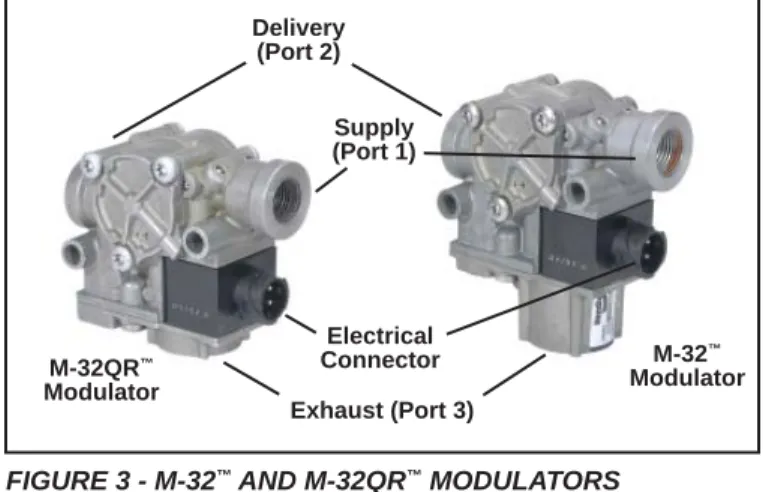
Delivery (Port 2) Supply (Port 1) Exhaust (Port 3) Electrical Connector M-32QR™ Modulator M-32™ Modulator
COMPONENTS
The EC-60™ controller’s ABS function utilizes the following
components:
• Bendix® WS-24™ wheel speed sensors (4 or 6,
depending on ECU model and confi guration). Each sensor is installed with a Bendix Sensor Clamping Sleeve
• Bendix® M-32™ or M-32QR™ Pressure Modulator
Valves (4, 5, or 6 depending on ECU model and confi guration)
• Dash-mounted tractor ABS Indicator Lamp
• Service brake relay valve
• Dash-mounted trailer ABS Indicator Lamp (used
on all towing vehicles manufactured after March 1, 2001)
• Optional blink code activation switch
• Optional ABS off-road switch. (Off-road feature is not
available on all models - See Chart 1.)
The EC-60™ controller ATC function utilizes the following
additional components:
• Traction control valve (may be integral to the service
brake relay valve or a stand-alone device)
• Dash-mounted ATC status/indicator lamp
• J1939 serial communication to engine control module
• Stop lamp switch input (may be provided using the
ECU hardware input or J1939)
• Optional ATC off-road switch
FIGURE 4 - POWER LINE WITHOUT PLC SIGNAL FIGURE 2 - BENDIX® WS-24™ WHEEL SPEED SENSORS
FIGURE 3 - M-32™ AND M-32QR™ MODULATORS FIGURE 5 - POWER LINE WITH PLC SIGNAL
ECU MOUNTING
Cab ECUs
Cab-mounted EC-60™ controllers are not protected against
moisture, and must be mounted in an environmentally protected area.
All wire harness connectors must be properly seated. The use of secondary locks is strongly recommended.
CAUTION: All unused ECU connectors must be covered
and receive any necessary protection from moisture, etc. Cab ECUs utilize connectors from the AMP MCP 2.8 product family.
Frame ECUs
Frame-mounted EC-60™ controllers may be mounted on
the vehicle frame, but only in locations where they will not be subjected to direct tire spray. ECU mounting bolts must be torqued to 7.5 to 9 Nm.
CAUTION: The frame wire harness connectors must be
properly seated with the seals intact (undamaged). All unused connector terminals must be plugged with the appropriate sealing plugs. Failure to properly seat or seal the connectors could result in moisture or corrosion damage to the connector terminals. ECUs damaged by moisture and/or corrosion are not covered under the Bendix warranty.
Frame ECUs utilize Deutsch connectors.
90° Speed Sensors Straight Speed Sensors Sensor Clamping Sleeve
Alternatively, the part number shown on the ECU label can be identifi ed as a PLC or non-PLC model by calling the Bendix TechTeam at 1-800-AIR-BRAKE (1-800-247-2725).
EC-60
™CONTROLLER INPUTS
Battery and Ignition Inputs
The ECU operates at a nominal supply voltage of 12 or 24 volts, depending on the model of the ECU. The battery input is connected through a 30 amp fuse directly to the battery.
The ignition input is applied by the ignition switch through a 5 amp fuse.
Ground Input
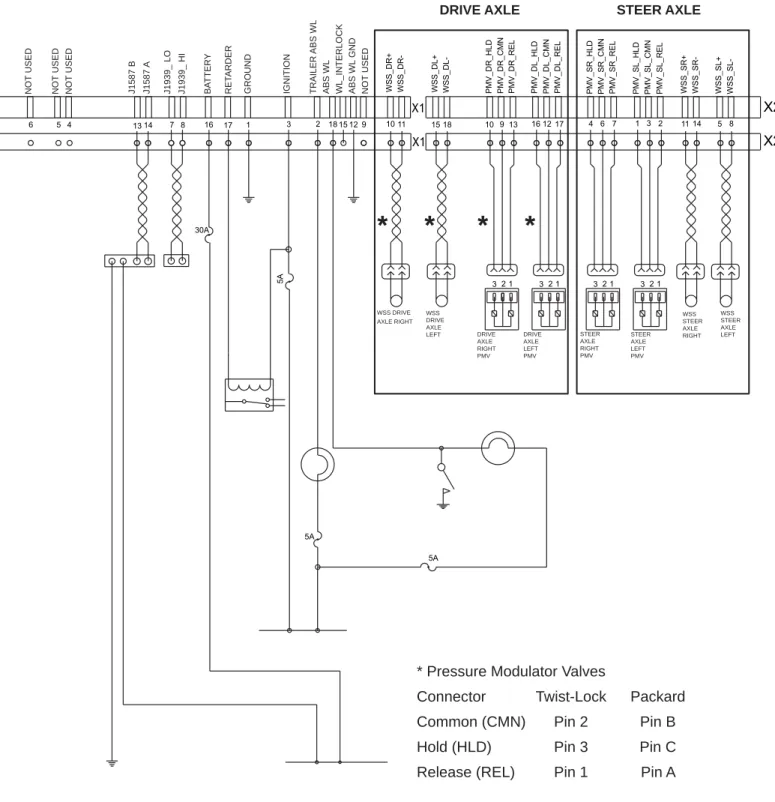
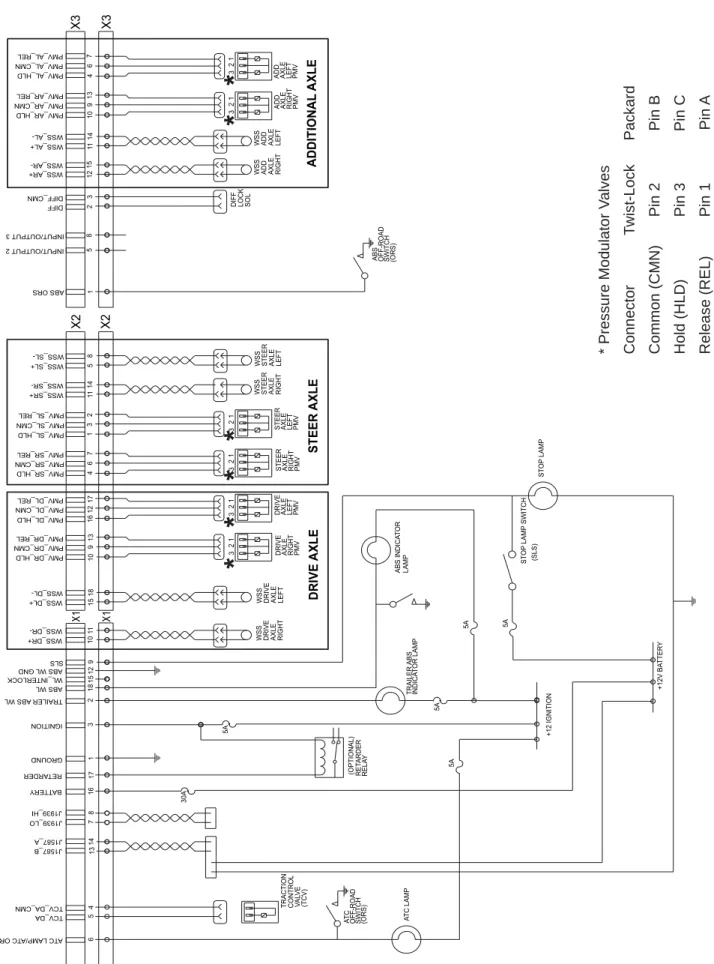
The EC-60™ controller supports one ground input. See
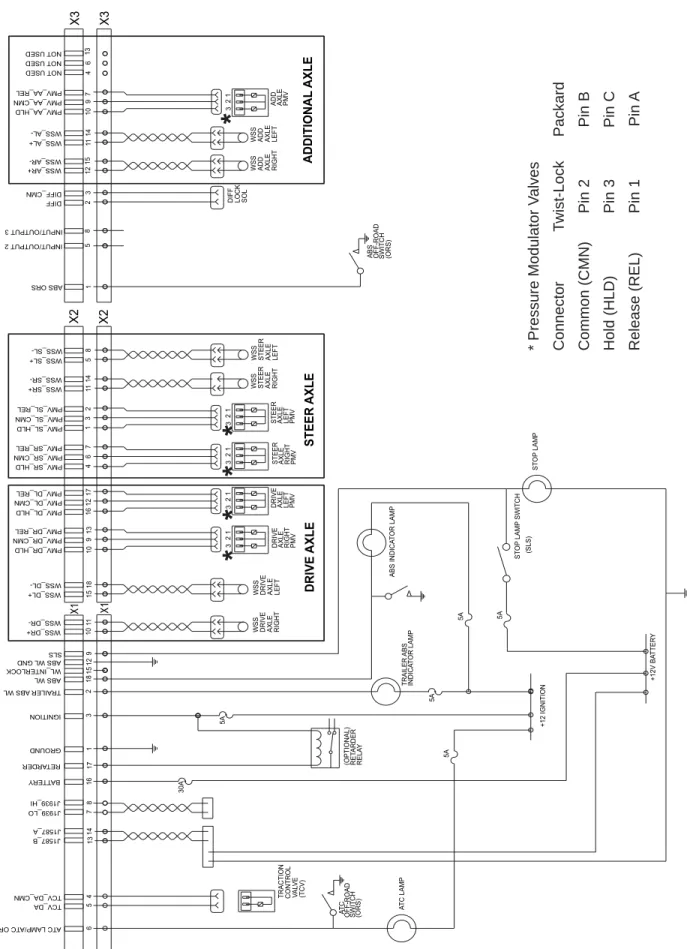
pages 35 to 40 for system schematics.
ABS Indicator Lamp Ground Input (Cab ECUs Only)
EC-60™ cab ECUs require a second ground input (X1-12)
for the ABS indicator lamp. The X1 wire harness connector contains an ABS indicator lamp interlock (X1-15), which shorts the ABS indicator lamp circuit (X1-18) to ground if the connector is removed from the ECU.
Bendix® WS-24™ Wheel Speed Sensors
Wheel speed data is provided to the EC-60™ controller from
the WS-24™ wheel speed sensor (see Figure 2). Vehicles
have an exciter ring (or “tone ring”) as part of the wheel assembly, and as the wheel turns, the teeth of the exciter ring pass the wheel speed sensor, generating an AC signal.
The EC-60™ controller receives the AC signal, which varies
in voltage and frequency as the wheel speed changes. Vehicle axle confi gurations and ATC features determine
the number of WS-24™ wheel speed sensors that must
be used. A vehicle with a single rear axle requires four wheel speed sensors. Vehicles with two rear axles can utilize six wheel speed sensors for optimal ABS and ATC performance.
CHART 1 - EC-60™ CONTROLLERS AVAILABLE
ECU Mounting Input Sensors PMVs ATC Blink PLC ABS ATC Retarder
Model Voltage Codes J1587 J1939 Off-Road Off-Road Relay
Standard Cab 12 4 4 Frame Standard Cab 12 4 4 PLC Frame Premium Cab 12 4/6 4/5/6 Frame Premium Cab 24 4/6 4/5/6 Serial Communication
HARDWARE CONFIGURATIONS
Standard ModelsStandard model EC-60™ controllers support four sensor/
four modulator (4S/4M) applications. Certain models support Power Line Carrier (PLC) communications, with
all models supporting 12 volt installations. See Chart 1
for more details. Premium Models
Premium model EC-60™ controllers support applications
up to six sensor/six modulator (6S/6M) installations with ATC and drag torque control. All 12 volt models support
PLC. 24 volt models do not support PLC. See Chart 1 for
more details.
EC-60
™CONTROLLERS WITH PLC
Since March 1, 2001, all towing vehicles must have an in-cab trailer ABS Indicator Lamp. Trailers transmit the status of the trailer ABS over the power line (the blue wire of the J560 connector) to the tractor using a Power Line Carrier (PLC) signal. See Figures 4 and 5. Typically the signal is broadcast by the trailer ABS ECU. The application of PLC technology for the heavy vehicle industry is known
as “PLC4Trucks.” The Standard PLC EC-60™ controller
and the Premium EC-60™ controller (12 volt versions)
support PLC communications in accordance with SAE J2497.
Identifying an EC-60™ Controller with PLC
Refer to the information panel on the ECU label to see if the controller provides PLC.
An oscilloscope can be used to measure or identify the presence of a PLC signal on the power line. The PLC signal is an amplitude and frequency modulated signal. Depending on the fi ltering and load on the power line, the PLC signal amplitude can range from 5.0 mVp-p to 7.0 Vp-p. Suggested oscilloscope settings are AC coupling, 1 volt/div, 100 µsec/div. The signal should be measured at
the ignition power input of the EC-60™ controller.
Note: An ABS trailer equipped with PLC, or a PLC diagnostic tool, must be connected to the vehicle in order to generate a PLC signal on the power line.
ABS Off-Road Switch and Indicator Lamp Operation
WARNING: The ABS off-road mode should not be used on
normal, paved road surfaces because vehicle stability and steerability may be affected. When the ECU is placed in the ABS off-road mode, the ABS Indicator Lamp will fl ash constantly to notify the vehicle operator that the off-road mode is active.
Premium EC-60™ controllers use a dash-mounted switch
to place the ECU into the ABS off-road mode. In some cases, ECUs may also be put into the ABS off-road mode by one of the other vehicle control modules, using a J1939
message to the EC-60™ controller.
(If you need to know if your EC-60™ controller uses a J1939
message to operate the lamp, e-mail [email protected], specifying the ECU part number, or call 1-800-AIR-BRAKE and speak to the Bendix TechTeam.)
Stop Lamp Switch (SLS)
The Premium EC-60™ controller monitors the vehicle stop
lamp status. Certain vehicle functions, such as ATC and All-Wheel Drive (AWD), use the status of the stop lamp to know the driver’s intention. This can be provided to the ECU via J1939 communications, or hardware input.
EC-60
™CONTROLLER OUTPUTS
Bendix® M-32™ and M-32QR™ Pressure
Modulator Valves (PMV)
The Bendix® M-32™ and M-32QR™ pressure modulator
valves (PMV) are operated by the EC-60™ controller to
modify driver applied air pressure to the service brakes during ABS or ATC activation (See pages 6-8). The PMV is an electro-pneumatic control valve and is the last valve that air passes through on its way to the brake chamber. The modulator hold and release solenoids are activated to precisely modify the brake pressure during an antilock braking event. The hold solenoid is normally open and the release solenoid is normally closed.
Traction Control Valve (TCV)
Premium EC-60™ controllers will activate the TCV during
differential braking ATC events. The TCV may be a separate valve or integrated into the rear axle relay valve.
ABS Indicator Lamp Control with Optional Diagnostic Blink Code Switch (Cab and Frame ECUs)
Cab and frame-mount EC-60™ controllers have internal
circuitry to control the ABS Indicator Lamp on the dash panel.
The ABS Lamp Illuminates:
1. During power up (e.g. when the vehicle is started) and turns off after the self test is completed, providing no
Diagnostic Trouble Codes (DTCs) are present on the
tractor.
2. If the ECU is unplugged or has no power.
3. When the ECU is placed into the ABS off-road mode (the lamp fl ashes rapidly).
4. To display blink codes for diagnostic purposes after the external diagnostic switch is activated.
Certain models of the EC-60™ controller communicate with
other vehicle control modules to operate the ABS Indicator Lamp using serial communications. (If you need to know
if your EC-60™ controller uses serial communications to
operate the lamp, e-mail [email protected], specifying the ECU part number, or call 1-800-AIR-BRAKE and speak to the Bendix TechTeam.)
Indicator Lamp Control Using Serial Communications Links
As mentioned above, depending on the vehicle manufacturer, the dash indicator lamps (ABS, ATC, and trailer ABS) may be controlled using serial communications
links. In these cases, the EC-60™ controller will send a
serial communications message over the J1939 or J1587 links indicating the required status of the lamp(s). Another vehicle control module receives the message and controls the indicator lamp(s).
Retarder Relay Disable Output
The retarder relay disable output may be used to control a retarder disable relay.
When confi gured to use this output, the ECU will energize the retarder disable relay and inhibit the use of the retarder as needed.
SAE J1939 Serial Communications
A Controller Area Network (CAN) data link (SAE J1939) is provided for communication. This link is used for various functions, such as:
• To disable retarding devices during ABS operation • To request torque converter lock-up during ABS
operation
• To share information such as wheel speed and ECU status with other vehicle control modules
Premium EC-60™ controllers utilize the J1939 data link for
ATC and drag torque control functions.
Diagnostic Blink Code Switch
A momentary switch that grounds the ABS Indicator Lamp output is used to place the ECU into the diagnostic blink code mode and is typically located on the vehicle’s dash panel.
Trailer ABS Indicator Lamp Control
Certain models of the EC-60™ controller activate a trailer
ABS Indicator Lamp (located on the dash panel) that indicates the status of the trailer ABS unit on one, or more
trailers, or dollies. Typically, the EC-60™ controller directly
controls the trailer ABS Indicator Lamp based on the information it receives from the trailer ABS.
Alternatively, some vehicles require the EC-60™ controller
to activate the trailer ABS Indicator Lamp by communicating with other vehicle controllers using serial communications.
(If you need to know if your EC-60™ controller uses a serial
communications message to operate the lamp, e-mail [email protected], specifying the ECU part number, or call 1-800-AIR-BRAKE and speak to the Bendix TechTeam.)
SAE J1708/J1587 Serial Communications
An SAE J1708 data link, implemented according to SAE J1587 recommended practice, is available for diagnostic purposes, as well as ECU status messages.
ATC Lamp Output/ATC Off-Road Switch Input
Premium ECUs control the ATC dash lamp. The ATC Lamp Illuminates:
1. During power up (e.g. when the vehicle is started) and turns off after the self test is completed, providing no diagnostic trouble codes are present.
2. When ATC is disabled for any reason.
3. During an ATC event (the lamp will fl ash rapidly). 4. When the ECU is placed in the ATC off-road mode (the
lamp will fl ash slowly at a rate of 1.0 seconds on, 1.5 seconds off). This notifi es the vehicle operator that the off-road mode is active.
Interaxle Differential Lock Control (AWD Transfer
Case) Premium ECUs can control the interaxle differential
lock (AWD transfer case). This is recommended on AWD vehicles, but the ECU must be specially confi gured to provide this feature. E-mail [email protected] for more details.
POWER-UP SEQUENCE
WARNING: The vehicle operator should verify proper
operation of all installed indicator lamps (ABS, ATC, and trailer ABS) when applying ignition power and during vehicle operation.
Lamps that do not illuminate as required when ignition power is applied, or remain illuminated after ignition power is applied, indicate the need for maintenance.
ABS Indicator Lamp Operation
The ECU will illuminate the ABS Indicator Lamp for approximately three seconds when ignition power is applied, after which the lamp will extinguish if no diagnostic trouble codes are detected.
The ECU will illuminate the ABS Indicator Lamp whenever full ABS operation is not available due to a diagnostic trouble code. In most cases, partial ABS is still available.
ATC Status/Indicator Lamp Operation
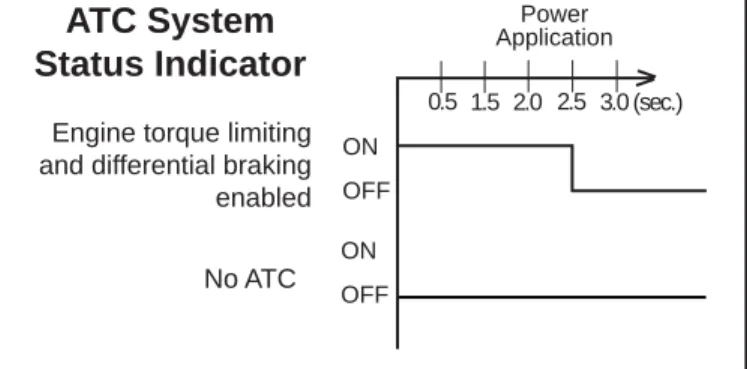
The ECU will illuminate the ATC lamp for approximately 2.5 seconds when ignition power is applied, after which the lamp will extinguish, if no diagnostic trouble codes are detected.
The ECU will illuminate the ATC Indicator Lamp whenever ATC is disabled due to a diagnostic trouble code.
Trailer ABS Indicator Lamp Operation
Certain models of the ECU will control the Trailer ABS Indicator Lamp when a PLC signal (SAE J2497) from a trailer ABS ECU is detected.
Engine torque limiting and differential braking enabled No ATC
ATC System
Status Indicator
FIGURE 7 - ATC INDICATOR LAMP START UP SEQUENCE
ON OFF 0.5 Power Application ON OFF 2.0 2.5 3.0 (sec.) 1.5
FIGURE 6 - ABS DASH LAMP START UP SEQUENCE
*Some vehicle manufacturers may illuminate the trailer ABS indicator lamp at power-up regardless of whether a PLC signal is detected from the trailer or not. Consult the vehicle manufacturer’s documentation for more details.
Trailer ABS Indicator Lamp (PLC Detected)* Trailer ABS Indicator
Lamp (PLC Not Detected) Powered Vehicle ABS Indicator Lamp
ABS System
Status Indicators
Power Application ON OFF 0.5 ON OFF 2.0 2.5 3.0 (sec.) 1.5 ON OFFECU Confi guration Test
Within two seconds of the application of ignition power, the ECU will perform a test to detect system confi guration with regards to the number of wheel speed sensors and PMVs. This can be audibly detected by a rapid cycling of the PMVs. (Note: The ECU will not perform the confi guration test when wheel speed sensors show that the vehicle is in motion.)
Pressure Modulator Valve Chuff Test
After the performance of the confi guration test, the EC-60™
controller will perform a Bendix-patented PMV Chuff Test. The Chuff Test is an electrical and pneumatic PMV test that can assist maintenance personnel in verifying proper PMV wiring and installation.
With brake pressure applied, a properly installed PMV will perform one sharp audible exhaust of air by activating the hold solenoid twice and the release solenoid once. If the PMV is wired incorrectly, it will produce two exhausts of air or none at all.
The EC-60™ controller will perform a PMV chuff test on all
installed modulators in the following order: • Steer Axle Right PMV
• Steer Axle Left PMV • Drive Axle Right PMV • Drive Axle Left PMV • Additional Axle Right PMV • Additional Axle Left PMV The pattern will then repeat itself.
The ECU will not perform the PMV Chuff Test when wheel speed sensors show that the vehicle is in motion.
ABS OPERATION
Bendix ABS uses wheel speed sensors, ABS modulator valves, and an ECU to control either four or six wheels of a vehicle. By monitoring individual wheel turning motion during braking, and adjusting or pulsing the brake pressure
at each wheel, the EC-60™ controller is able to optimize slip
between the tire and the road surface. When excessive
wheel slip, or wheel lock-up, is detected, the EC-60™
controller will activate the Pressure Modulator Valves to simulate a driver pumping the brakes. However, the
EC-60™ controller is able to pump the brakes on individual
wheels (or pairs of wheels), independently, and with greater speed and accuracy than a driver.
Steer Axle Control
Although both wheels of the steer axle have their own wheel speed sensor and pressure modulator valve, the
EC-60™ controller blends the applied braking force between
the two steering axle brakes. This Bendix patented brake application control, called Modifi ed Individual Regulation (MIR), is designed to help reduce steering wheel pull during an ABS event on road surfaces with poor traction (or areas of poor traction, e.g., asphalt road surfaces with patches of ice).
Single Drive Axle Control (4x2 Vehicle)
For vehicles with a single rear drive axle (4x2), the brakes
are operated independently by the EC-60™ controller,
based on the individual wheel behavior.
Dual Drive Axle Control (4S/4M Confi guration)
For vehicles with dual drive axles (6x4) using a 4S/4M confi guration, one ABS modulator controls both right-side rear wheels and the other modulator controls both left-side rear wheels. Both wheels on each side receive equal brake pressure during an ABS stop. The rear wheel speed sensors must be installed on the axle with the lightest load.
Dual Rear Axle Control (6S/6M Confi guration)
For vehicles with dual rear axles (6x4, 6x2) using a 6S/6M confi guration, the rear wheels are controlled independently. Therefore, brake application pressure at each wheel is adjusted according to the individual wheel behavior on the road surface.
6x2 Vehicles with 6S/5M Confi guration
6x2 vehicles can utilize a 6S/5M confi guration, with the additional axle (a non-driven rear axle) having two sensors, but only one Pressure Modulator Valve. In this case, the PMV controls both wheels on the additional axle. The additional axle wheels would receive equal brake pressure, based on the wheel that is currently experiencing the most wheel slip.
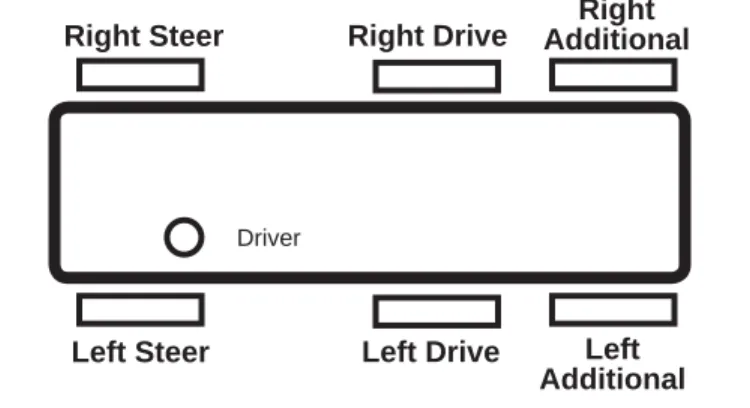
FIGURE 8 - VEHICLE ORIENTATION (TYPICAL)
Driver Right Steer Left Steer Right Additional Left Additional Right Drive Left Drive
Normal Braking
During normal braking, brake pressure is delivered through the ABS PMV and into the brake chamber. If the ECU does not detect excessive wheel slip, it will not activate ABS control, and the vehicle stops with normal braking.
Retarder Brake System Control
On surfaces with low traction, application of the retarder can lead to high levels of wheel slip at the drive axle wheels, which can adversely affect vehicle stability.
To avoid this, the EC-60™ controller switches off the retarder
as soon as a lock-up is detected at one (or more) of the drive axle wheels.
When the ECU is placed in the ABS off-road mode, it will switch off the retarder only when ABS is active on a steer axle wheel and a drive axle wheel.
Optional ABS Off-Road Mode
On some road conditions, particularly when the driving surface is soft, the stopping distance with ABS may be longer than without ABS. This can occur when a locked wheel on soft ground plows up the road surface in front of the tire, changing the rolling friction value. Although vehicle stopping distance with a locked wheel may be shorter than corresponding stopping distance with ABS control, vehicle steerability and stability is reduced.
Premium EC-60™ controllers have an optional control
mode that more effectively accommodates these soft road conditions to shorten stopping distance while maintaining optimal vehicle steerability and stability.
WARNING: The ABS off-road mode should not be used
on normal, paved road surfaces because vehicle stability and steerability may be reduced. The flashing ABS Indicator Lamp communicates the status of this mode to the driver.
The vehicle manufacturer should provide the optional ABS off-road function only for vehicles that operate on unpaved surfaces or that are used in off-road applications, and is responsible for ensuring that vehicles equipped with the ABS off-road function meet all FMVSS-121 requirements and have adequate operator indicators and instructions. The vehicle operator activates the off-road function with a switch on the dash panel. A fl ashing ABS Indicator Lamp indicates to the driver that the ABS off-road function is engaged. To exit the ABS off-road mode, depress and release the switch.
All-Wheel Drive (AWD) Vehicles
AWD vehicles with an engaged interaxle differential (steer axle to rear axle)/AWD transfer case may have negative effects on ABS performance. Optimum ABS performance is achieved when the lockable differentials are disengaged, allowing individual wheel control.
Premium EC-60™ controllers can be programmed specifi cally
for this confi guration to control the differential lock/unlock solenoid in the AWD transfer case. When programmed to do so, the ECU will disengage the locked interaxle/AWD transfer case during an ABS event and reengage it once the ABS event has ended.
ATC OPERATION
ATC Functional Overview
Just as ABS improves vehicle stability during braking, ATC improves vehicle stability and traction during vehicle
acceleration. The EC-60™ controller ATC function uses the
same wheel speed information and modulator control as
the ABS function. The EC-60™ controller detects excessive
drive wheel speed, compares the speed of the front, non-driven wheels, and reacts to help bring the wheel spin under
control. The EC-60™ controller can be confi gured to use
engine torque limiting and/or differential braking to control wheel spin. For optimal ATC performance, both methods are recommended.
ATC Lamp Operation
The ATC Lamp Illuminates:
1. During power up (e.g. when the vehicle is started) and turns off after the self test is completed, providing no diagnostic trouble codes are present.
2. When ATC is disabled for any reason.
3. During an ATC event (the lamp will fl ash rapidly). When ATC is no longer active, the ATC active/indicator lamp turns off.
4. When the ECU is placed in the ATC off-road mode (the lamp will fl ash at a rate of 1.0 seconds on, 1.5 seconds off). This notifi es the vehicle operator that the off-road mode is active.
Differential Braking
Differential braking is automatically activated when drive wheel(s) on one side of the vehicle are spinning, which typically occur on asphalt road surfaces with patches of ice. The traction system will then lightly apply the brake to the drive wheel(s) that are spinning. The vehicle differential will then drive the wheels on the other side of the vehicle. Differential braking is available at vehicle speeds up to 25 MPH.
Disabling ATC Differential Braking
ATC differential braking is disabled under the following conditions:
1. During power up (e.g. when the vehicle is started), until the ECU detects a service brake application.
2. If the ECU receives a J1939 message indicating that the vehicle is parked.
3. When the dynamometer test mode is active. The dynamometer test mode is entered using the diagnostic blink code switch or by using a diagnostic tool (such as
4. In response to a serial communications request from a diagnostic tool.
5. During brake torque limiting to avoid overheating of the brakes.
6. When certain diagnostic trouble code conditions are detected.
Engine Torque Limiting (ETL) with Smart ATC™
Traction Control
The EC-60™ controller uses Engine Torque Limiting to
control drive axle wheel slip. This is communicated to the engine control module (using J1939), and is available at all vehicle speeds.
Bendix® Smart ATC™ Traction Control
The EC-60™ controller has an additional feature known as
Smart ATC™traction control. Smart ATC™ traction control monitors the accelerator pedal position (using J1939) to help provide optimum traction and vehicle stability. By knowing the driver’s intention and adapting the target
slip of the drive wheels to the driving situation, the Smart
ATC™ traction control allows higher wheel slip when the
accelerator pedal is applied above a preset level.
The target wheel slip is decreased when driving through a curve for improved stability.
Disabling ATC Engine Control and Smart ATC™ Traction
Control
ATC Engine Control and Smart ATC™traction control will
be disabled under the following conditions:
1. In response to a serial communications request from an off-board tool.
2. At power-up until the ECU detects a service brake application.
3. If the ECU receives a J1939 message indicating that the vehicle is parked.
4. If the dynamometer test mode is active. This may be accomplished via an off-board tool or the diagnostic blink code switch.
5. When certain diagnostic trouble code conditions are detected.
Optional ATC Off-Road Mode
In some road conditions, the vehicle operator may desire additional drive wheel slip when ATC is active. The
Premium EC-60™ controller has an optional control mode
to permit this desired performance.
The vehicle operator can activate the off-road function with a switch on the dash panel. Alternately, a J1939 message may be used to place the vehicle in this mode. The ATC Indicator Lamp will fl ash continually to confi rm that the off-road ATC function is engaged.
To exit the ATC off-road mode, depress and release the ATC off-road switch.
Drag Torque Control Functional Overview
Premium EC-60™ controllers have a feature referred to as
drag torque control which reduces wheel slip on a driven axle due to driveline inertia. This condition is addressed by increasing the engine torque to overcome the inertia. Drag torque control increases vehicle stability on low-traction road surfaces during down-shifting or retarder braking.
Dynamometer Test Mode
WARNING: ATC must be disabled prior to conducting any
dynamometer testing. When the Dynamometer Test Mode is enabled, ATC brake control and engine control along with drag torque control are turned off. This test mode is used to avoid torque reduction or torque increase and brake control activation when the vehicle is operated on a dynamometer for testing purpose.
The Dynamometer Test Mode may be activated by pressing and releasing the diagnostic blink code switch fi ve times or by using a hand-held or PC-based diagnostic tool. The Dynamometer Test Mode will remain active even if power to the ECU is removed and re-applied. Press and release the blink code switch three times, or use a hand-held or PC-based diagnostic tool to exit the test mode.
Automatic Tire Size Calibration
The ECU requires a precise rolling circumference ratio between steer axle and drive axle tires in order for ABS and ATC to perform in an optimal manner. For this reason, a learning process continuously takes place in which the precise ratio is calculated. This calculated value is stored in the ECU memory provided the following conditions are met:
1. Rolling-circumference ratio is within the permissible range.
2. Vehicle speed is greater than approximately 12 MPH. 3. No acceleration or deceleration is taking place. 4. There are no active speed sensor diagnostic trouble
codes.
The ECU is provided with a ratio value of 1.00 as a default setting. If the automatic tire size alignment calculates a different value, this is used to overwrite the original fi gure in the memory. This process adapts the ABS and ATC function to the vehicle.
Acceptable Tire Sizes
The speed calculation for an exciter ring with 100 teeth is based on a default tire size of 510 revolutions per mile. This fi gure is based on the actual rolling circumference of the tires, which varies with tire size, tire wear, tire pressure, vehicle loading, etc.
The ABS response sensitivity is reduced when the actual rolling circumference is excessive on all wheels. For a 100 tooth exciter ring, the minimum number of tire revolutions per mile is 426, and the maximum is 567. The ECU will set diagnostic trouble codes if the number of revolutions are out of this range.
In addition, the size of the steer axle tires compared to the drive axle tires also has to be within the ABS system design. To avoid diagnostic trouble codes, the ratio of the effective rolling circumference of the steer axle, divided by the effective rolling circumference of the drive axle, must be between 0.85 to 1.15.
ABS PARTIAL SHUTDOWN
Depending which component the trouble code is detected on, the ABS and ATC functions may be fully or partially
disabled. Even with the ABS indicator lamp on, the EC-60™
controller may still provide ABS function on wheels that are
not affected. The EC-60™ controller should be serviced as
soon as possible.
Steer Axle ABS Modulator Diagnostic Trouble Code
ABS on the affected wheel is disabled. ABS and ATC on all other wheels remains active.
Drive Axle/Additional Axle ABS Modulator Diagnostic Trouble Code
ATC is disabled. ABS on the affected wheel is disabled. ABS on all other wheels remains active.
Steer Axle Wheel Speed Sensor Diagnostic Trouble Code
The wheel with the diagnostic trouble code is still controlled by using input from the remaining wheel speed sensor on the front axle. ABS remains active on the rear wheels. ATC is disabled.
Drive Axle/Additional Axle Wheel Speed Sensor Diagnostic Trouble Code
ATC is disabled. In a four sensor system, ABS on the affected wheel is disabled, but ABS on all other wheels remains active.
In a six sensor system, ABS remains active by using input from the remaining rear wheel speed sensor on the same side.
ATC Modulator Diagnostic Trouble Code
ATC is disabled. ABS remains active.
J1939 Communication Diagnostic Trouble Code
ATC is disabled. ABS remains active.
ECU Diagnostic Trouble Code
ABS and ATC are disabled. The system reverts to normal braking.
Voltage Diagnostic Trouble Code
While voltage is out of range, ABS and ATC are disabled. The system reverts to normal braking. When the correct voltage level is restored, full ABS and ATC function is available. Operating voltage range is 9.0 to 17.0 VDC.
Reconfi guring EC-60
™Controllers
SYSTEM CONFIGURATION
The EC-60™ controller is designed to allow the technician to
change the default system settings (chosen by the vehicle OEM) to provide additional or customized features. When replacing an ECU, be sure to use an equivalent Bendix replacement part number so that the standard default set-tings are provided.
Depending on the model, the customizable features include ABS control settings, engine module communication etc. Many of these settings can be reconfi gured using a
hand-held or PC-based software, such as the Bendix® ACom™
Diagnostics program.
ECU RECONFIGURATION
Reconfi guring Standard ECUs
Reconfi guring an EC-60™ controller may be carried out by
using the Blink Code Switch or by using a hand-held or PC-based diagnostic tool.
Note: During the reconfi guration process, and independently from any reconfi guration being carried out by the technician, standard ECUs automatically check the J1939 serial link and communicate with other vehicle modules. In particular, if the serial link shows that the vehicle has a retarder device present, the ECU will confi gure itself to communicate with the retarder device for improved ABS performance. For example, if the ECU detects the presence of a retarder disable relay during a reconfi guration, it will confi gure itself to control the relay to disable the retarding device as needed.
Reconfi guring Premium ECUs
As with standard ECUs, the Premium EC-60™ controller
also carries out, independently from any reconfi guration being carried out by the technician, an automatic check of the J1939 serial link and communicates with other vehicle modules. This includes checking for ATC and retarder disable relay operation. In addition, premium
EC-60™ controllers will determine the number of wheel
speed sensors and PMVs installed and confi gure itself accordingly.
6S/5M Confi guration
Premium EC-60™ controllers will configure for 6S/5M
operation when a reconfi guration event is initiated and the ECU detects that an additional axle PMV is wired as follows:
PMV Connector ECU Connector
Hold Right Additional Axle Hold
Release Left Additional Axle Release
Common Right Additional Axle Common
See 6S/5M System Schematics (pages 37 & 40) for details.
Reconfi guration Using the Blink Code Switch
The reconfi guration event is the same for both Standard and Premium ECUs. With ignition power removed from the
EC-60™ controller, depress the blink code switch. After the
ignition power is activated, depress and release the switch seven times to initiate a reconfi guration event.
Diagnostic Tool
A reconfi guration event may be initiated using a hand-held or PC-based diagnostic tool to communicate with the ECU over the SAE J1587 diagnostic link.
Troubleshooting: General
SAFE MAINTENANCE PRACTICES
WARNING! PLEASE READ AND FOLLOW
THESE INSTRUCTIONS TO AVOID PERSONAL
INJURY OR DEATH:
When working on or around a vehicle, the following general precautions should be observed at all times: 1. Park the vehicle on a level surface, apply the
parking brakes, and always block the wheels. Always wear safety glasses.
2. Stop the engine and remove ignition key when working under or around the vehicle. When working in the engine compartment, the engine should be shut off and the ignition key should be removed. Where circumstances require that the engine be in operation, EXTREME CAUTION should be used to prevent personal injury resulting from contact with moving, rotating, leaking, heated or electrically charged components.
3. Do not attempt to install, remove, disassemble or assemble a component until you have read and thoroughly understand the recommended procedures. Use only the proper tools and observe all precautions pertaining to use of those tools. 4. If the work is being performed on the vehicle’s
air brake system, or any auxiliary pressurized air systems, make certain to drain the air pressure from all reservoirs before beginning ANY work on the vehicle. If the vehicle is equipped with
an AD-IS® air dryer system or a dryer reservoir
module, be sure to drain the purge reservoir. 5. Following the vehicle manufacturer’s recommended
procedures, deactivate the electrical system in a manner that safely removes all electrical power from the vehicle.
6. Never exceed manufacturer’s recommended pressures.
7. Never connect or disconnect a hose or line containing pressure; it may whip. Never remove a component or plug unless you are certain all system pressure has been depleted.
8. Use only genuine Bendix® replacement parts,
components and kits. Replacement hardware, tubing, hose, fi ttings, etc. must be of equivalent size, type and strength as original equipment and be designed specifi cally for such applications and systems.
9. Components with stripped threads or damaged parts should be replaced rather than repaired. Do not attempt repairs requiring machining or welding unless specifi cally stated and approved by the vehicle and component manufacturer.
10. Prior to returning the vehicle to service, make certain all components and systems are restored to their proper operating condition.
11. For vehicles with Antilock Traction Control (ATC), the ATC function must be disabled (ATC indicator lamp should be ON) prior to performing any vehicle maintenance where one or more wheels on a drive axle are lifted off the ground and moving.
REMOVING THE EC-60
™CONTROLLER
ASSEMBLY
1. Turn vehicle ignition off.
2. Remove as much contamination as possible prior to disconnecting air lines and electrical connections.
3. Note the EC-60™ controller assembly mounting position
on the vehicle.
4. Disconnect the electrical connectors from the EC-60™
controller.
5. Remove and retain the mounting bolts that secure the
EC-60™ controller.
INSTALLING A NEW EC-60
™CONTROLLER
CAUTION! When replacing the EC-60™ controller,verify
that the unit you are installing has the correct default settings. Failure to do so could result in a loss of features, such as ATC and PLC, or noncompliance with U.S. regulations such as FMVSS 121. It is recommended to use only the correct replacement part number. However, most confi guration settings can be altered using the Bendix
ACom™ ABS Diagnostic Software program.
Verify correct operation of the EC-60™ controller system
and indicator lamps prior to putting the vehicle back into service. Towing vehicles manufactured after March 1, 2001 must support the trailer ABS indicator lamp located on the dash.
For further information, contact either the vehicle manufacturer, Bendix or your local authorized Bendix dealer.
1. Position and secure the EC-60™ controller in the original
mounting orientation using the mounting bolts retained during removal. On frame-mount ECUs, torque the mounting bolts to 7.5 to 9 NM (66-80 in. Ibs). For cab-mount units use no more torque than is necessary to fi rmly secure the ECU into position. Over-tightening the
mounting hardware can cause damage to the EC-60™
controller.
2. Reconnect the electrical connectors to the EC-60™
controller.
3. Apply power and monitor the EC-60™ controller
power-up sequence to verify proper system operation. See Troubleshooting: Wiring section beginning on page 32 for more information on wiring harnesses.
FIGURE 10 - EXAMPLE OF BLINK CODE MESSAGE
Troubleshooting: Blink Codes and Diagnostic Modes
BLINK CODES
Blink codes allow a technician to troubleshoot ABS problems without using a hand-held or PC-based diagnostic tool. Instead, information about the ABS system is communicated by the ECU using the ABS indicator lamp to display sequences of blinks.
Note: The ECU will not enter the diagnostic blink code mode if the wheel speed sensors show that the vehicle is in motion. If the ECU is in the diagnostic blink code mode and then detects vehicle motion, it will exit the blink code mode.
In addition, by operating the blink code switch as described below, one of several diagnostic modes can be entered. See Diagnostic Modes below.
Blink Code Switch Activation
When activating the blink code switch:
1. Wait at least two seconds after “ignition on.” (Except when entering Reconfi guration Mode - see Reconfi guration section on page 10)
2. For the ECU to recognize that the switch is activated “on,” the technician must press for at least 0.1 seconds, but less than 5 seconds. (If the switch is held for more than 5 seconds, the ECU will register a malfunctioning switch.)
3. Pauses between pressing the switch when a sequence is required, (e.g. when changing mode) must not be longer than 2 seconds.
4. After a pause of 3.5 seconds, the ECU will begin responding with output information blinks. See Figure 10 for an example.
Blink Code Timing
The ECU responds with a sequence of blink codes. The overall blink code response from the ECU is called a “message.” Each message includes, depending on the
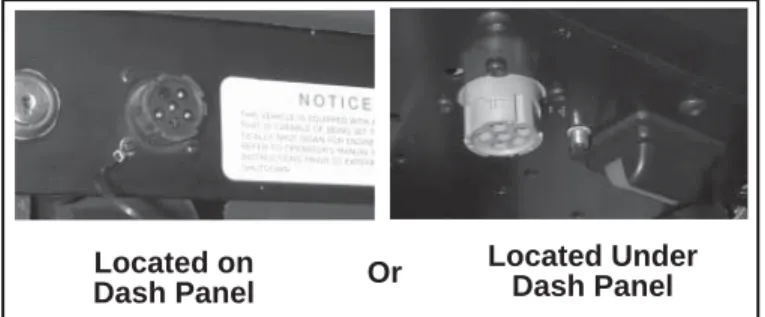
FIGURE 9 - TYPICAL VEHICLE DIAGNOSTIC CONNECTOR LOCATIONS (J1708/J1587, J1939) Located on Dash Panel Located Under Dash Panel Or
ECU DIAGNOSTICS
The EC-60™ controller contains self-testing diagnostic
circuitry that continuously checks for the normal operation of internal components and circuitry, as well as external ABS components and wiring.
Active Diagnostic Trouble Codes
When an erroneous system condition is detected, the
EC-60™ controller:
1. Illuminates the appropriate indicator lamp(s) and disengages part or all of the ABS and ATC functions. (See page 9.)
2. Places the appropriate trouble code information in the ECU memory.
3. Communicates the appropriate trouble code information over the serial communications diagnostic link as required. Hand-held or PC-based diagnostic tools attach to the vehicle diagnostic connector, typically located on or under the dash (see Figure 9).
Active Diagnostic Trouble Code Mode
For troubleshooting, typically the Active and Inactive Diagnostic Trouble Retrieval Modes are used. The technician presses the blink code switch once and the ABS indicator lamp fl ashes a fi rst group of two codes, and if there are more trouble codes recorded, this is followed by a second set of codes, etc. (See page 17 for a directory of these codes.) All active trouble codes may also be retrieved using a hand-held or PC-based diagnostic tool, such as
the Bendix® ACom™ Diagnostics software.
To clear active diagnostic trouble codes (as problems are fi xed), simply clear (or “self-heal”) by removing and re-applying ignition power. The only exception is for wheel speed sensor trouble codes, which clear when power is removed, re-applied, and the ECU detects valid wheel speed from all wheel speed sensors. Alternately, codes may be cleared by pressing the diagnostic blink code switch 3 times (to enter the Clear Active Diagnostic Trouble Code Mode) or by using a hand-held or PC-based diagnostic tool. Hand-held or PC-based diagnostic tools are able to clear wheel speed sensor trouble codes without the vehicle being driven.
Inactive Diagnostic Trouble Code Mode
The ECU stores past trouble codes and comments (such as confi guration changes) in its memory. This record is commonly referred to as “event history.” When an active trouble code is cleared, the ECU stores it in the event history memory as an inactive trouble code.
DIAGNOSTIC MODES
In order to communicate with the ECU, the controller has several modes that the technician can select, allowing information to be retrieved, or other ECU functions to be accessed.
Diagnostic Modes
To enter the various diagnostic modes: mode selected by the technician, a sequence of one or
more groups of blinks. Simply record the number of blinks for each sequence and then use the troubleshooting index on page 17 for active or inactive trouble codes and you will be directed to the page that provides troubleshooting information.
NOTE:
1. Sequences of blinks illuminate the ABS indicator lamp for half a second, with half-second pauses between them.
2. Pauses between blink code digits are 1.5 seconds. 3. Pauses between blink code messages are 2.5
seconds.
4. The lamp remains on for 5 seconds at the end of messages.
Once the ABS indicator lamp begins displaying a sequence of codes, it continues until all blink code messages have been displayed and then returns to the normal operating mode. During this time, the ECU will ignore any additional blink code switch activation.
All trouble codes, with the exception of voltage and J1939 trouble codes, will remain in an active state for the remainder of the power cycle.
Voltage trouble codes will clear automatically when the voltage returns within the required limits. All ABS functions will be re-engaged.
J1939 trouble codes will clear automatically when communications are re-established.
* To enter the Reconfi guration Mode, the switch must
be held in before the application of ignition power. Once the power is supplied, the switch is released and then pressed seven times.
No. of Times to
Press the Blink System Mode Entered
Code Switch
1 Active diagnostic trouble code retrieval 2 Inactive diagnostic trouble code retrieval 3 Clear active diagnostic trouble codes 4 System confi guration check
5 Dynamometer Test Mode 7* Reconfi gure ECU
Using blink codes, the technician may review all inactive
trouble codes stored on the ECU. The ABS indicator
lamp will display inactive diagnostic blink codes when the diagnostic blink code switch is depressed and released two times. See page 17 for the index showing trouble codes and the troubleshooting guide page to read for help. Inactive trouble codes, and event history, may be retrieved and cleared by using a hand-held or PC-based diagnostic
tool, such as the Bendix® ACom™ Diagnostics software.
Clearing Active Diagnostic Trouble Codes
The ECU will clear active trouble codes when the diagnostic blink code switch is depressed and released three times.
System Confi guration Check Mode
The ABS indicator lamp will display system confi guration information when the diagnostic blink code switch is depressed and released four times. The lamp will blink out confi guration information codes using the following patterns. (See Chart 3). In this mode the ECU tells the technician, by means of a series of six blink codes, the type of ABS system that the ECU has been set up to expect. For example, if the fourth blink code is a three, the technician knows that a 6S/5M sensor/modulator confi guration has been set.
Dynamometer Test Mode
The Dynamometer Test Mode is used to disable ATC when needed (e.g. when performing any vehicle maintenance where the wheels are lifted off the ground and moving, including dyno testing). This mode is not reset by power off, power on, cycling. Instead a hand-held or PC-based diagnostic tool must be used to change the setting. Alternatively, depressing and releasing the blink code switch three times will cause the ECU to exit the blink code mode.
Reconfi gure ECU Mode
Vehicle reconfiguration is carried out by using the Reconfi gure ECU Mode. (See page 10.) Note: To enter the Reconfi guration Mode, the blink code switch must be held in before the application of ignition power. Once the power is supplied, the switch is released and then pressed seven times.
1st Number System Power
1 12 Volts
2 24 Volts
2nd Number Wheel Speed Sensors
4 4 Sensors
6 6 Sensors
3rd Number Pressure Modulator Valves 4 4 Modulators
5 5 Modulators
6 6 Modulators
4th Number ABS Confi guration 1 4S/4M or 6S/6M
2 6S/4M
3 6S/5M
5th Number Traction Control Confi guration
2 No ATC
3 ATC Engine Control Only 4 ATC Brake Control Only
5 Full ATC (Engine Control & Brake Control) 6th Number Retarder Confi guration
1 No Retarder
2 J1939 Retarder
3 Retarder Relay
4 J1939 Retarder, Retarder Relay
USING HAND-HELD OR PC-BASED
DIAGNOSTICS
Troubleshooting and diagnostic trouble code clearing (as well as reconfi guration) may also be carried out using hand-held or PC-based diagnostic tools such as the
Bendix® Remote Diagnostic Unit (RDU™), Bendix® ACom™
Diagnostics software, or the ProLink tool.
If the ABS ECU has no active Diagnostic Trouble Codes, only the green LED will remain illuminated.
If the ABS ECU has at least one active Diagnostic
Trouble Code the RDU™ tool displays the fi rst diagnostic
trouble code by illuminating the red LEDs, indicating the malfunctioning ABS component and its location on the vehicle. (See Figure 11.) If there are multiple diagnostic
trouble codes on the ABS system, the RDU™ tool will
display one diagnostic trouble code fi rst, then once that Diagnostic Trouble Code has been repaired and cleared, the next code will be displayed.
Typical Combination Diagnostic Trouble Codes are:
•
Right steer sensor•
Left steer sensor•
Right drive sensor•
Left drive sensor•
Right additionalsensor
•
Left additional sensor•
Right steer modulator•
Left steer modulator•
Right drive modulator•
Left drive modulator•
Right additionalmodulator
•
Left additional modulator•
Traction modulator•
ECU•
Engine serialcommunication
Troubleshooting: Using Hand-Held or
PC-Based Diagnostic Tools
Bendix® RDU™ (Remote Diagnostic Unit)
The Bendix® RDU™ tool provides the technician with
a visual indication of Antilock Braking System (ABS)
component Diagnostic Trouble Code (DTC) information.
The RDU™ tool is specifi cally designed for use with Bendix®
ABS systems and Bendix makes no claims for its operation and/or usability with other brands of ABS systems.
Features of the Bendix® RDU™ Tool
The RDU™ tool attaches to the 9 pin diagnostic connector
in the cab of the vehicle. An adapter cable (Bendix part number 5012793) is available to connect the RDU to vehicles with a 6-pin diagnostic connector. (See Figure 11.)
The RDU™ tool allows the technician to:
•
Troubleshoot ABS system component problems usingDiagnostic Trouble Code reporting via LEDs.
•
Reset Diagnostic Trouble Codes on Bendix® ABS ECUsby holding a magnet over the reset in the center of the
RDU™ tool for less than 6 seconds.
•
Enter the Self-Confi guration Mode used by Bendix®ABS ECUs by holding a magnet over the reset area for greater than 6 seconds but less than 30 seconds.
How the Bendix® RDU™ Operates
See Figure 9 for typical vehicle connector locations.
When the RDU™ tool is plugged into the diagnostic
connector, all the LEDs will illuminate, and the green LED will fl ash 4 times to indicate communications have been established.
•
MOD red LED illuminated, shows the “Common”connection of one or more modulators is shorted to battery or ground
•
VLT (Flashing indicates either over- or under-voltagecondition)
To pinpoint the root cause and to ensure the system diagnostic trouble code is properly corrected the fi rst time, additional troubleshooting may be necessary.
Bendix® RDU™ Reset Function
The magnetic reset switch is located in the center top
of the RDU™ tool. Activation requires a magnet with 30
gauss minimum.
The reset operations are:
1. If the magnet is held over the switch for less than 6 seconds the “clear diagnostic trouble codes” command is sent.
2. If the magnet is held over the switch for more than 6
seconds, but less than 30 seconds, the Bendix® ABS
“self-confi guration command” is sent.
Additionally, it is recommended at the end of any inspection that the user switches off and restores the power to the ABS ECU, then check the ABS Indicator Lamp operation and
RDU™ tool to see if they indicate any remaining Diagnostic
Trouble Codes.
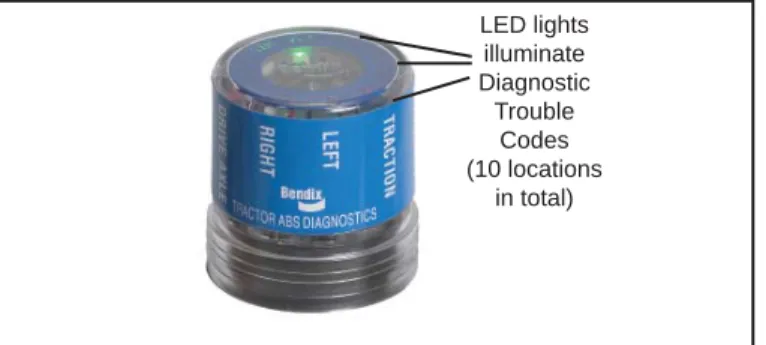
FIGURE 11 - THE BENDIX® REMOTE DIAGNOSTIC
UNIT LED lights illuminate Diagnostic Trouble Codes (10 locations in total)
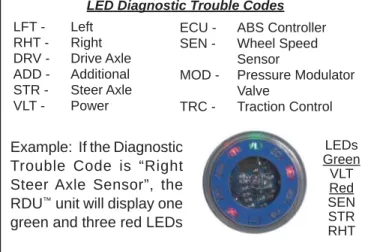
LED Diagnostic Trouble Codes
FIGURE 12 - DIAGNOSTIC TROUBLE CODES
LFT - Left RHT - Right DRV - Drive Axle ADD - Additional STR - Steer Axle VLT - Power
ECU - ABS Controller SEN - Wheel Speed Sensor
MOD - Pressure Modulator Valve
TRC - Traction Control
FIGURE 13 - NEXIQ (MPSI) PRO-LINK TOOL
PC Card MPSI Part Number 805013 Pro-Link Heavy Duty Multi Protocol Cartridge
Bendix® RDU™ Communication Problems
If the ABS ECU does not respond to the RDU™ tool’s
request for diagnostic trouble codes, the RDU™ tool will
illuminate each red LED in a clockwise pattern. This pattern indicates the loss of communication and will continue until the ABS ECU responds and communication has been re-established.
Possible sources of communication problems are: 1. A problem with the J1587 link at the in-cab off-board
diagnostic connector (9 or 6 Pin). 2. The ECU does not support PID194.
3. No power is being supplied to the ECU and/or the diagnostic connector.
4. The J1587 bus is overloaded with information and the RDU can not arbitrate access.
5. A malfunctioning RDU™ tool.
Nexiq Bendix Application Card
Nexiq provides a Bendix application card for use with the
ProLink tool. It can also be used to diagnose the EC-30™,
EC-17™, Gen 4™ and Gen 5™, and MC-30™ ABS Controllers.
For more information on the Bendix application card visit www.bendix.com, Nexiq at www.nexiq.com, or your local authorized Bendix parts outlet.
Bendix® ACom™ Diagnostics Software
Bendix® ACom™ Diagnostics is a PC-based software
program and is designed to meet RP-1210 industry standards. This software provides the technician with access to all the available ECU diagnostic information and confi guration capability, including:
•
ECU information•
Diagnostic trouble codes and repair information•
Confi guration (ABS, ATC, and more)•
Wheel speed information•
Perform component tests•
Save and print informationWhen using ACom™ Diagnostics software to diagnose
the EC-60 ABS ECU, the computer’s serial or parallel port needs to be connected to the vehicle’s diagnostic connector.
For more information on ACom™ Diagnostics software or
RP1210 compliant tools, go to www.bendix.com or visit your local authorized Bendix parts outlet.
See Page 42 for Appendix A: J1587 SID and FMI codes and their Bendix blink code equivalents.
www.bendix.com
Visit Bendix online for the latest information, and ways to fi nd the Bendix contacts you need. Contact technical support, service engineers, Bendix account managers, and more — www.bendix.com is your complete Bendix resource.
Bendix Technical Assistance Team
For direct telephone technical support, call the Bendix technical assistance team at:
1-800-AIR-BRAKE (1-800-247-2725),
Monday through Friday, 8:00 A.M. to 6:00 P.M. EST, and follow the instructions in the recorded message.
Or, you may e-mail the Bendix technical assistance team at: [email protected].
Example: If the Diagnostic Trouble Code is “Right Steer Axle Sensor”, the
RDU™ unit will display one
green and three red LEDs
LEDs Green VLT Red SEN STR RHT
Active or Inactive Diagnostic Trouble Codes:
INDEX
How to interpret the fi rst digit of messages received when Active or Inactive Diagnostic Trouble Code Mode is entered.
1st Blink Code Number
1 ... No faults (1,1) 2 ...Wheel Speed Sensors - page 18 3 ...Wheel Speed Sensors - page 18 4 ...Wheel Speed Sensors - page 18 5 ...Wheel Speed Sensors - page 18 6 ...Power Supply - page 23 7 ...Pressure Modulator Valves - page 20 8 ...Pressure Modulator Valves - page 20 9 ...Pressure Modulator Valves - page 20 10...Pressure Modulator Valves - page 20 11 ...J1939 - page 24 12...Miscellaneous - page 26 13...ECU - page 25 14...Wheel Speed Sensors - page 18 15...Wheel Speed Sensors - page 18 16...Pressure Modulator Valves - page 20 17...Pressure Modulator Valves - page 20 18... Traction Control Valve - page 22
Example: For a message sequence of:
3, 2 12, 4
For the fi rst sequence go to page 18 and for the second sequence go to page 26.
Go Here for Troubleshooting Tests
Troubleshooting Diagnostic Trouble Codes:
Wheel Speed Sensors
2 Left Steer Axle Sensor 3 Right Steer Axle Sensor 4 Left Drive Axle Sensor 5 Right Drive Axle Sensor 14 Left Additional Axle Sensor 15 Right Additional Axle Sensor 1st. Blink
Code
Location
2nd. Diagnostic Blink Trouble Code Code Description 1 Excessive Air Gap 2 Output Low at Drive-off 3 Open or Shorted 4 Loss of Sensor Signal 5 Wheel End 6 Erratic Sensor Signal 7 Tire Size Calibration 10 Confi guration Error
Adjust sensor to contact exciter ring. Rotate wheel and verify a minimum of 0.25 VAC sensor output at ~ 0.5 RPS. Verify condition of sensor head. Verify mounting of exciter ring and condition of teeth. Verify proper bearing endplay. Verify condition and retention of clamping sleeve. Verify sensor lead routing and clamping. Adjust sensor to contact exciter ring. Rotate wheel and verify a minimum of 0.25 VAC sensor output at ~ 0.5 RPS. Verify condition of sensor head. Verify mounting of exciter ring and condition of teeth. Verify proper bearing end-play. Verify condition and retention of clamping sleeve. Verify sensor lead routing and clamping. Verify 1500 – 2500 ohms across sensor leads. Verify no continuity between sensor leads and ground or voltage. Verify no continuity between sensor leads and other sensors. Check for corroded/damaged wiring or connectors between the ECU and the wheel speed sensor.
Adjust sensor to contact exciter ring. Rotate wheel and verify a minimum of 0.25 VAC sensor output at ~ 0.5 RPS. Verify condition of sensor head. Verify mounting of exciter ring and condition of teeth. Verify proper bearing end-play. Verify condition and retention of clamping sleeve. Verify sensor lead routing and clamping. Check for corroded/damaged wiring or connectors between the ECU and the wheel speed sensor.
Verify mounting of exciter ring and condition of teeth. Verify proper bearing end-play. Verify condition and retention of clamping sleeve. Verify sensor lead routing and clamping. Check mechanical function of brake. Check for kinked or restricted air lines.
Adjust sensor to contact exciter ring. Rotate wheel and verify a minimum of 0.25 VAC sensor output at ~ 0.5 RPS. Verify condition of sensor head. Verify mounting of exciter ring and condition of teeth. Verify proper bearing end-play. Verify condition and retention of clamping sleeve. Verify sensor lead routing and clamping. Check for corroded/damaged wiring or connectors between the ECU and the wheel speed sensor.
Verify correct tire size as desired. Verify proper tire infl ation. Verify correct number of exciter ring teeth.
ECU is confi gured for four sensors, but has detected the presence of additional sensors. Verify sensor wiring and ECU confi guration.
Cab-mount ECU: Looking into wire harness connector
Frame-mount ECU: Looking into wire harness connector
Connector Pin Wheel Speed Sensor Location
X1 10 Right Drive Axle (+) 18 Way 11 Right Drive Axle (-)
5 Left Steer Axle (+)
X2 8 Left Steer Axle (-) 18 Way 11 Right Steer Axle (+)
14 Right Steer Axle (-)
15 Left Drive Axle (+)
18 Left Drive Axle (-)
X3 11 Left Additional Axle (+) 15 Way (if Premium 14 Left Additional Axle (-) ECU is confi gured 12 Right Additional Axle (+)
for 6 sensors) 15 Right Additional Axle (-)
Connector Pin Wheel Speed Sensor Location
3 Left Steer Axle (+)
X1 7 Left Steer Axle (-) 15 Way 4 Right Steer Axle (+)
8 Right Steer Axle (-) 1 Left Drive Axle (+) X2 2 Left Drive Axle (-) 18 Way 3 Right Drive Axle (+)
4 Right Drive Axle (-) X3 3 Left Additional Axle (+) 18 Way (if Premium 4 Left Additional Axle (-) ECU is confi gured 5 Right Additional Axle (+)
for 6 sensors) 6 Right Additional Axle (-)
Speed Sensor Repair Tests:
1. Take all measurements at ECU harness connector pins in order to check wire harness and sensor. Probe the connector carefully so that the terminals are not damaged.
2. Wheel speed sensor measurements should read:
Location Measurement
Sensor 1500 - 2500 Ohms
Sensor to voltage or ground Open Circuit (no continuity)
Sensor output voltage >0.25 of VAC sensor output at ~ 0.5 revs/sec.
3. Clear DTC after issue is corrected. The sensor DTC will remain until the power is cycled to the ABS ECU and vehicle is driven above 15 MPH or DTC was cleared using either the diagnostic blink code switch or diagnostic tool.
Troubleshooting Diagnostic Trouble Codes:
Pressure Modulator Valves
7 Left Steer Axle 8 Right Steer Axle 9 Left Drive Axle 10 Right Drive Axle 16 Left Additional Axle 17 Right Additional Axle 1st. Blink
Code
Location
2nd. Diagnostic Blink Trouble Code Code Description 1 Release Solenoid Shorted to Ground 2 Release Solenoid Shorted to Voltage 3 Release Solenoid Open Circuit 4 Hold Solenoid Shorted to Ground 5 Hold Solenoid Shorted to Voltage 6 Hold Solenoid Open Circuit 7 CMN Open Circuit 8 Confi guration Error
Verify no continuity between PMV leads and ground. Verify 4.9 to 5.5 ohms from REL to CMN & HLD to CMN, and 9.8 to 11 ohms from REL to HLD. Check for corroded/damaged wiring or connectors between ECU and PMV.
Verify no continuity between PMV leads and voltage. Verify 4.9 to 5.5 ohms from REL to CMN & HLD to CMN, and 9.8 to 11 ohms from REL to HLD. Check for corroded/damaged wiring or connectors between ECU and PMV.
Verify 4.9 to 5.5 ohms from REL to CMN & HLD to CMN, and 9.8 to 11 ohms from REL to HLD. Check for corroded/damaged wiring or connectors between ECU and PMV.
Verify no continuity between PMV leads and ground. Verify 4.9 to 5.5 ohms from REL to CMN & HLD to CMN, and 9.8 to 11 ohms from REL to HLD. Check for corroded/damaged wiring or connectors between ECU and PMV.
Verify no continuity between PMV leads and voltage. Verify 4.9 to 5.5 ohms from REL to CMN & HLD CMN, and 9.8 to 11 ohms from REL to HLD. Check for corroded/damaged wiring or connectors between ECU and PMV.
Verify 4.9 to 5.5 ohms from REL to CMN & HLD to CMN, and 9.8 to 11 ohms from REL to HLD. Check for corroded/damaged wiring or connectors between the ECU and PMV.
Verify 4.9 to 5.5 ohms from REL to CMN & HLD to CMN, and 9.8 to 11 ohms from REL to HLD. Check for corroded/damaged wiring or connectors between the ECU and PMV.
A mis-match exists between the ECU confi guration and the modulator installation and wiring. Verify PMV wiring and installation. Verify ECU confi guration.
Pressure Modulator Valve Repair Tests:
1. Take all measurements at ECU harness connector pins in order to check wire harness and PMV. Probe the connector carefully so that the terminals are not damaged.
2. Pressure modulator resistance should read:
Location Measurement
Release to Common 4.9 to 5.5 Ohms Hold to Common 4.9 to 5.5 Ohms Release to Hold 9.8 to 11.0 Ohms Release, Hold, Common Open Circuit (no continuity) to Voltage or Ground
Caution: When troubleshooting modulator trouble codes,
check inactive trouble codes and event history for over-voltage or excessive noise trouble codes. If one of these is found, troubleshoot these trouble codes fi rst before the PMV.
Cab-mount ECU: Looking into wire harness connector
Connector Pin PMV Location
1 Left Steer Axle Hold
2 Left Steer Axle Release
3 Left Steer Axle Common
X2 4 Right Steer Axle Hold 18 Way 6 Right Steer Axle Common
7 Right Steer Axle Release 9 Right Drive Axle Common
10 Right Drive Axle Hold
13 Right Drive Axle Release
12 Left Drive Axle Common
16 Left Drive Axle Hold
17 Left Drive Axle Release
4 Left Additional Axle Hold
X3 6 Left Additional Axle Common 15 Way (if Premium 7 Left Additional Axle Release ECU is confi gured 9 Right Additional Axle Common
for 6 sensors) 10 Right Additional Axle Hold 13 Right Additional Axle Release
Frame-mount ECU: Looking into wire harness connector
Connector Pin PMV Location
7 Left Steer Axle Hold 8 Left Steer Axle Release 13 Left Steer Axle Common X2 9 Right Steer Axle Hold 18 Way 10 Right Steer Axle Release
14 Right Steer Axle Common 11 Left Drive Axle Hold 12 Left Drive Axle Release 15 Left Drive Axle Common 16 Right Drive Axle Common 17 Right Drive Axle Hold 18 Right Drive Axle Release
9 Left Additional Axle Hold
X3 10 Left Additional Axle Release 15 Way (if Premium 15 Left Additional Axle Common ECU is confi gured 16 Right Additional Axle Common
for 6 sensors) 17 Right Additional Axle Hold 18 Right Additional Axle Release