Cisco IT Case Study – August 2012 Storage Cloud for Big Data
EXECUTIVE SUMMARY
CHALLENGE
●Cost-effectively store unstructured static files, or big data
●Relieve employee teams from having to continually request new storage SOLUTION
●Built private storage cloud using EMC Atmos software, Cisco Unified Computing System® C200, Cisco Nexus® 5548 Switches, and Cisco ACE Application Control Engine
●Later added nodes on a global, enterprise-class public cloud platform RESULTS
●Lowered monthly cost to store two copies of a 1-TB object by 54 percent compared to network-attached storage
●Reduced video storage costs for Safety and Security team by 76 percent
●Relieved storage teams from having to manually increase capacity for internal users
●Eliminated need for internal teams to wait for more capacity
LESSONS LEARNED
●Implement a chargeback or showback model at the outset, to encourage accountability
●Coordinate the design with the networking team
●Monitor utilization so that new capacity can be provisioned well ahead of need NEXT STEPS
●Add more nodes and more use cases
●Add an archive tier
How Cisco IT Built a Storage Cloud for Big Data
S-Cloud integrates storage arrays, servers, and switches to provide a cost-effective,
policy-driven solution.
Challenge
The Cisco workforce is capturing massive amounts of video for communications, collaboration, training, and physical security.
“Storage requirements have been growing 50 percent year over year,” says Shane Harms, Cisco IT manager. The challenge is part of the larger big-data phenomenon, referring to unstructured files such as video and documents that are too large for
traditional IT tools.
Factors contributing to the growth of big data at Cisco include: ● Adoption of Cisco TelePresence® Recording Studio: Employees can now capture studio-quality video with the touch of a button.
● Growing popularity of video-on-demand for
organizational communications and training: Employees view video on Cisco Show and Share®, a webcasting and video-sharing portal.
● IP video surveillance: Each of thousands of Cisco Video Surveillance IP Cameras can capture up to 35–90 GB of video each month. Storage requirements will increase as Cisco deploys more high-definition IP cameras.
“We know storage requirements will increase significantly, so we wanted to take action well ahead of the crisis point to protect performance and enforce data-retention policies,” says Harms.
Cisco IT uses network-attached storage (NAS) for databases and initially used it for big data, as well. But big data has different usage characteristics than databases. For example, video bits stream in a fixed sequence, making it possible to use less-expensive serial advanced technology attachment (SATA) drives that are not suited for databases requiring high performance. In addition, video content typically is accessed most frequently immediately when it is new, and less so over time. Finally, while databases are accessed by
applications, which are often in the same data center, video content is accessed by people who might be anywhere in the world. Therefore, distributing the content globally improves the user experience by minimizing latency. To efficiently store, manage, and protect big data, Cisco IT needed to overcome several challenges:
● Security: Employees were beginning to use free cloud services to store and share files, and the Cisco security team was concerned about the security implications.
● Demand clearing: With NAS, employee teams formally request additional capacity, which Cisco IT then approves and provisions. “As big data grew even bigger, it became more urgent to automate management because costs were skyrocketing,” says Nagarajan R, Cisco IT architect.
● Information lifecycle management (ILM): Cisco IT previously did not have an efficient way to enforce retention policy, resulting in unnecessary storage costs. “Only a fraction of archived files are retrieved after
the first week,” says Amit Vijairania, Cisco IT architect. “We wanted to develop and automatically enforce
ILM policies to control the explosion of storage and purge unneeded data.”
Cisco IT began planning an internal cloud service for big-data storage. “It’s a common misunderstanding that cloud
storage is a lower-cost form of NAS,” says Katharine Mitchell, storage lifecycle manager with Cisco IT. “But there
are notable differences, and the biggest is that a storage cloud is object-based rather than file-based. In fact, cloud storage is more cost-effective than NAS for big data because it’s built from commodity storage and inexpensive
compute nodes. The software, not hardware, enforces policies, making a storage cloud compelling for the right use
cases.”
Design requirements included automating ILM and efficiently scaling for growth. The strategic plan calls for providing storage for Cisco IT’s private cloud Infrastructure as a Service (IaaS) offering, called Cisco IT Elastic Infrastructure Service (CITEIS).
Solution
Cisco IT built a storage cloud service called S-Cloud to store, manage, and protect globally distributed, unstructured content. “S-Cloud supports Cisco IT’s goal to be the provider of choice for all Cisco infrastructure
needs,” says Shaw-Jen Chang, vice president of Data Center and Platform Services, Cisco. “Our S-Cloud offering provides a cost-effective and comprehensive solution that addresses employee demand for self-service
capabilities, policy-based data governance, and more.”
Cisco IT is educating Cisco clients to use S-Cloud for unstructured, static data, primarily video and virtualized desktops. “We emphasize that databases and other applications with a large number of read-write operations are not suited for S-Cloud,” says Ramya Kandasamy, Cisco IT design engineer.
Architecture
Cisco IT initially developed S-Cloud for Cisco’s private cloud, later adding more nodes on an enterprise public cloud platform. The private S-Cloud currently consists of two nodes, in Cisco’s Allen, Texas and Mountain View,
California data centers. Together these nodes provide 960 TB of raw capacity, of which 830 TB is usable. The S-Cloud infrastructure in the public cloud currently consists of four nodes, in North America, Europe, and Asia Pacific.
“The global deployment allows a TAC [Technical Assistance Center] engineer in India, for example, to save a
“
S-Cloud supports
Cisco IT’s
goal to be the provider of choice for all
Cisco infrastructure needs. Our S-Cloud offering provides a
cost-effective and comprehensive solution that addresses employee
demand for self-service capabilities, policy-based data governance,
and more.
”
customer log file nearby, reducing the time needed for storage and retrieval,” says Kandasamy. Cisco InfoSec approved the security infrastructure for the S-Cloud public cloud, which includes authentication and authorization; encryption at rest and during transfer; and encryption key services.
Table 1 shows current use cases in the public and private cloud. Table 1. Current S-Cloud Use Cases
Sample Private Cloud Use Cases Sample Public Cloud Use Cases Cisco video surveillance:Retaining and retrieving video
from thousands of Cisco Video Surveillance Cameras, each of which can easily capture 35–90 GB of video per month.
Purge and archive: Automating data retention policies for multiple Cisco teams, using the built-in ILM capabilities in S-Cloud
Cisco Technical Assistance Center: Storing large log files and other attachments that customers and partners send when they open service requests
Cisco value chain management: Storing documentation needed for customs with shipping partners
CiscoCloud GamesFace2012: Creating a digital time capsule of visitors’ photos at the 2012 London Olympic Games (Figure 1)
Figure 1. S-Cloud Stores Images Created by Visitors Live at the 2012 London Olympic Games or Uploaded Online;
CiscoCloud GamesFace2012 Interactive
S-Cloud represents a new approach to managing big data that incorporates not only storage, but also servers and switches. It is object-based and uses HTTP as its primary interface, although teams that need to use Common Internet File Sharing (CIFS) or Network File Sharing (NFS) can do so using third-party software.
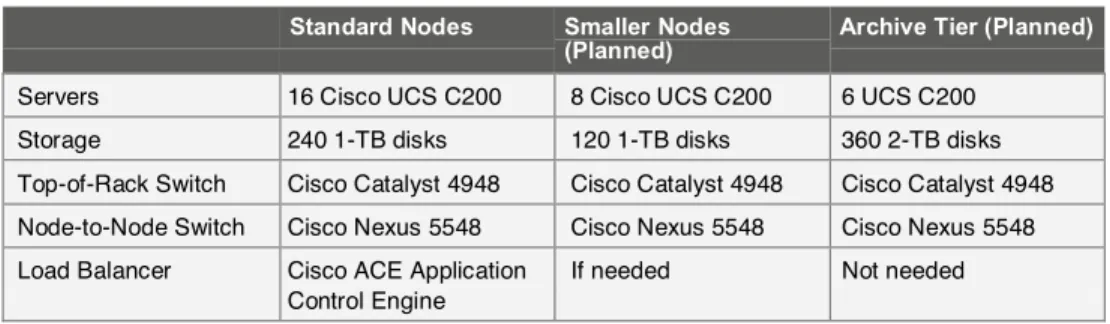
Cisco IT built the private S-Cloud platform by deploying EMC Atmos software on Cisco UCS® C200 Rack-Mount Servers that front-end SATA disk arrays. Each of two current S-Cloud nodes contains 16 servers and 240 1-TB arrays. A Cisco Catalyst® 4948 Switch connects nodes, and two Cisco Nexus 5548 Switches provide top-of-rack connectivity. A Cisco ACE Application Control Engine provides load balancing. Table 2 shows the configuration for the different types of S-Cloud nodes.
Table 2. S-Cloud Node Configuration
c Standard Nodes Smaller Nodes
(Planned) Archive Tier (Planned)
Servers 16 Cisco UCS C200 8 Cisco UCS C200 6 UCS C200
Storage 240 1-TB disks 120 1-TB disks 360 2-TB disks
Top-of-Rack Switch Cisco Catalyst 4948 Cisco Catalyst 4948 Cisco Catalyst 4948 Node-to-Node Switch Cisco Nexus 5548 Cisco Nexus 5548 Cisco Nexus 5548 Load Balancer Cisco ACE Application
Control Engine
If needed Not needed
Using Cisco UCS C-Series Servers in the S-Cloud simplifies operations because the Cisco Unified Computing
System is the standard platform for Cisco’s private cloud, called CITEIS. “An advantage of using Cisco UCS servers in the S-Cloud is that we can centrally manage all nodes from Cisco UCS Manager,” says Vasanth Veeraraghavan, Cisco IT project manager.
The software layer provides:
● Comprehensive ILM based on metadata, such as number of times an object has been accessed and the last access
● Secure multitenancy
● Global namespace with flexible access methods, including HTTP, NFS, and CIFS
● Multisite distribution: The default is two local replicas. For disaster recovery teams can request an additional remote replica.
User Experience: Save and Retrieve Objects as Before
Cisco users retrieve and save objects the same way they do with NAS. “The difference is that after Cisco IT
assigns an NFS share on S-Cloud, they never again have to go through the time-consuming demand-clearing
process,” says Mitchell. Cisco IT offers the same service-level agreements (SLAs) for HTTP, CIFS, and NFS: 99.9 percent availability, 48-hour recovery time objective (RTO), 24-hour recovery point objective (RPO), and 1-hour acceptable data loss. Reliability is best with HTTP. Cisco IT can further increase reliability by adding parity-protected back-end storage, erasure coding, and replication across failure domains.
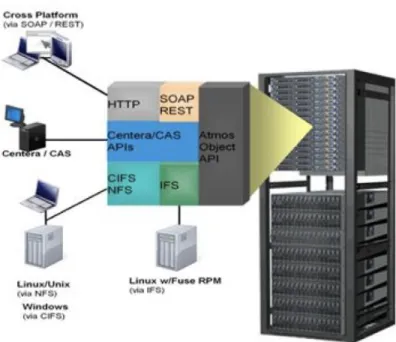
Cisco teams that use S-Cloud can choose from three access methods. The Cisco Safety and Security team, for example, uses Atmos GeoDrive, a lightweight client that makes the S-Cloud appear like any other storage drive on the user’s desktop. Other teams will access the S-Cloud directly through the application, such as Cisco Show and Share. APIs operate behind the scenes to make this possible (Figure 2). Another option is to use third-party middleware that supports CIFS protocol so that employees can access stored objects from any device and any operating system.
Figure 2. Cisco IT Uses an API to Enable Access via NFS and CIFS
To encourage responsible storage use, Cisco IT periodically emails usage reports to S-Cloud users, and later plans to charge for resources used. “We are exploring how to encourage responsible behavior for using cloud storage,” says Kandasamy. “We decided to implement showback from the start, using an EMC reporting tool. If
someone wants three instead of two replicas, for example, they can see the incremental cost.”
Impact on Other Network Traffic
Cloud storage traffic is treated as scavenger class, the lowest quality of service (QoS) level. “Our use cases are not
streaming video from the cloud, which requires very low latency, but rather simply storing and retrieving video,” says Kandasamy. “So far, scavenger class has delivered adequate performance and we haven’t seen any latency issues.”
Results
Lower Storage Costs for Big Data
In mid-2012, the Cisco Global Infrastructure Services team began offering a cloud storage service to any employee who needs to store large unstructured data, such as video. Employee teams pay only about one-third what they would pay for traditional storage solutions such as SAN and NAS.
One reason is that the software, not the hardware, provides the intelligence, enabling Cisco IT to purchase lower-cost arrays. Another economic benefit of cloud storage is lowering data center space, power, and cooling requirements for big data. A cloud storage rack with 400-TB usable capacity occupies only one floor tile, about one-sixth the space needed for a SAN storage rack with the same capacity. S-Cloud is not geared for applications requiring high performance, so it can be denser.
In fact, storing two copies of a 1-TB object on S-Cloud costs US$119 monthly compared to $256 for NAS, a 54
percent savings. The savings compound for teams that need additional replicas. “An additional copy of a 1-TB object would be $256 for NAS, compared to $50 for an additional replica in S-Cloud,” says Mitchell. “And
employees have the option to replicate critical data on S-Cloud nodes in different data centers, increasing
protection.”
The new service also relieves Cisco teams from having to constantly request more storage or give it back. “S
-Cloud eliminates the need for demand clearing because applications can consume as much as they need,” says Kandasamy. “The concept of provisioning is gone. Once I create a user account, that user is free to use as much
storage as needed.”
Seventy-Six Percent Cost Savings for Safety and Security Team
The Cisco Safety and Security team takes an architectural approach to designing its end-to-end video surveillance solution. The initial architecture was based on standalone digital video recorders (DVRs) that stored video captured by analog cameras. The annual cost of these servers storage approached US$125,000 annually. “The older the video, the less likely it needs to be reviewed,” says Carlos Pinel, Cisco security manager. “A standard feature of video surveillance systems is to write over older video to minimize storage requirements.”
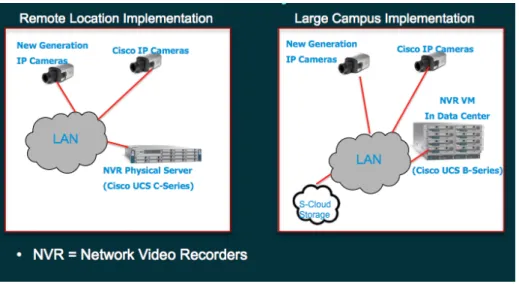
In the current architecture, remote locations use network video recorders (NVRs) and larger campuses use virtualized NVRs in the data center (Figure 3). The Cisco Safety and Security team became the first S-Cloud customer, in January 2012, using it to store archived video from thousands of Cisco Video Surveillance IP Cameras. “The introduction of S-Cloud storage services for video surveillance is an important milestone in the Safety and Security team's architecture journey,” says Nicolas Coulet, Cisco IT Project Manager responsible for IP video security. “Not only is it cost-effective, but it also provides capabilities such as ILM and content tagging that
are required for new business services.”
“
An additional copy of a 1-TB object would be $256 for NAS, compared
to $50 for an additional replica in S-Cloud. And employees have the
option to replicate critical data on S-Cloud nodes in different data
centers, increasing protection.”
—Katharine Mitchell, Storage Lifecycle Manager, CiscoFigure 3. Video Surveillance Solution Architecture
Video is stored locally until the local drive is full, and then written periodically to S-Cloud using HTTP through Atmos GeoDrive. Security personnel conducting investigations use their Windows clients to access archived video. After a defined number of days, S-Cloud automatically purges the files, without any action from Cisco IT.
“Moving IP video surveillance storage from NAS to S-Cloud reduced our storage costs by 76 percent,” says Coulet
“There is no difference in video quality when the video is archived, and our Safety and Security team is using
archived video for daily monitoring of the San Jose campus without any issue.” Accessing video records older than
one day takes only about one minute longer for an eight-hour video. In addition to reducing annual costs by 76 percent, S-Cloud also improves the team’s disaster recovery capabilities because records are stored in two data centers.
The next step for the Safety and Security team will be to synch locally stored video with the cloud using an API and HTTP instead of GeoDrive. This will speed up access and eliminate the inefficiency of GeoDrive having to synch with the cloud. “By adopting our S-Cloud solution, Cisco’s IP Video Surveillance team was able to invest storage cost savings in innovation,” says Chang.
795 TB Reclaimed Through Automated Policy Enforcement
When a Cisco team decides to use S-Cloud, Cisco IT works with the team to define storage policies, including automated purging and archiving. “From fiscal year 2011 though the third quarter of fiscal year 2012, automated
purging in S-Cloud helped us reclaim 795 terabytes of storage, for $8.9 million in cost avoidance,” says
Kandasamy.
“
Moving IP video surveillance storage from NAS to S-Cloud reduced our
storage costs by 76 percent. There is no difference in video quality when
the video is archived, and our Safety and Security team is using archived
video for daily monitoring of the San Jo
se campus without any issue.”
—Nicolas Coulet, IT Project Manager CiscoThe Atmos software automatically enforces storage policies by monitoring metadata about each object, including the number of times it is accessed and the dates the object was created and last accessed. For example, the Cisco Show and Share team defined a policy to automatically create multiple replicas of mandatory team meetings. After 20 days, when viewing typically drops off, replicas are deleted and the video is moved to a lower storage tier, which Cisco IT is currently implementing. If the number of views increases later in the lifecycle, the software automatically creates more replicas for the duration of the viewing spike. After 90 days video is purged automatically unless the
team requests an exception. “When people store objects, they tag them with their department, such as human resources or marketing, so that the appropriate policies can be enforced,” says Mitchell.
Time Savings for Cisco IT
Previously, enforcing storage policy for big data, including moving data to lower tiers and purging it, was a
time-consuming chore for the Cisco IT storage team. “Now we spend 5 minutes to define policy when we create the
account, and don’t have to do anything else,” says Kandasamy. The system sends an alert when storage is
approaching 50 percent of capacity, giving Cisco IT ample warning to add more storage. Mitchell adds, “Although
we want users to think of the cloud as limitless, in reality we need to constantly monitor capacity to make sure we
keep supply well ahead of demand.”
Lessons Learned
Cisco IT shares the following lessons learned with other organizations considering a private storage cloud: ● Communicate with the network design team early. A storage cloud requires reliable, scalable connectivity
between nodes and between users and nodes.
● Educate internal users about which applications are suited for big data. They should be above a certain size and static rather than dynamic.
● Implement a showback or chargeback model to encourage responsible use of storage. ● Monitor utilization to keep supply well ahead of demand.
“If you trust an external cloud provider to protect your intellectual property, you can relieve your IT team of having to manage any infrastructure,” says David Preece, engineer, Cisco IT. “But if you need more trust, an internal storage cloud similar to S-Cloud gives you more control because the objects physically reside in your own data
center.”
Next Steps
Cisco IT continues to refine its storage cloud. “S-Cloud is evolving from a storage service and will become an
integral part of our IaaS program,” says Mitchell. Next steps include:
● Adding use cases: The Show and Share team is conducting a proof of concept, and numerous other teams have expressed interest in S-Cloud.
● Adding more types of objects: Candidates include the document management system and the laptop back-up system. Both generate large, static files and are currently stored on NAS.
● Adding nodes: Locations will include Research Triangle Park, North Carolina as well as Amsterdam, Asia, and Europe.
● Adding an archive tier: This tier can use less-expensive Cisco UCS servers because access will be infrequent.
● Deciding on a standard middleware program
“As we look at use cases, the S-Cloud model could change. The flexibility to configure the Cisco UCS C-Series with different ratios of storage to processing will keep our options open,” adds Mitchell.
For More Information
To read additional Cisco IT case studies on a variety of business solutions, visit Cisco on Cisco: Inside Cisco IT www.cisco.com/go/ciscoit.
Note
This publication describes how Cisco has benefited from the deployment of its own products. Many factors may have contributed to the results and benefits described; Cisco does not guarantee comparable results elsewhere. CISCO PROVIDES THIS PUBLICATION AS IS WITHOUT WARRANTY OF ANY KIND, EITHER EXPRESS OR IMPLIED, INCLUDING THE IMPLIED WARRANTIES OF MERCHANTABILITY OR FITNESS FOR A
PARTICULAR PURPOSE.
Some jurisdictions do not allow disclaimer of express or implied warranties, therefore this disclaimer may not apply to you.