"I just played that a minute ago!:" Designing User Interfaces for
Audio Navigation
J u l i a H i r s c h b e r g ,
John Choi,
C h r i s t i n e N a k a t a n i , a n d S t e v e W h i t t a k e r
AT&T Labs - Research
Florham Park NJ 07932
(j ulia,choi,chn,stevew)@research.att .corn
The current popularity of multimodal information retrieval research critically assumes that consumers will be found for the multimodal information thus retrieved and that interfaces can be designed that will allow users to search and browse multimodal information effectively. While there has been con- siderable effort given to developing the basic tech- nologies needed for information retrieval from au- dio, video and text domains, basic research on how people browse and search in any of these domains, let alone in some combination, has lagged behind. In developing the SCAN (Spoken Content-based Audio Navigation) system to retrieve information from an audio domain, we have attempted to study the prob- lems of how users navigate audio databases, hand in hand with the development of the speech and in- formation retrieval technologies which enable this navigation3
SCAN was developed initially for the TREC-6 Spoken Document Retrieval (SDR) task, which em- ploys the NIST/DARPA HUB4 Broadcast News cor- pus. However, we are also developing a search and browsing system for voicemail access, over the tele- phone and via a GUI interface. To this end, we have built several user interfaces to both the voicemail and news domains, which we are employing in a se- ries of laboratory experiments designed to identify limiting and enabling features of audio search and browsing interfaces. We want to examine the fol- lowing questions: a) how do people want to search audio data? what sort of search and play capabil- ities do they make most use of, when given several alternatives? b) do people search different sorts of audio data (e.g., familiar versus unfamiliar) differ- ently? c) do people perform different types of audio search task (e.g. finding a single fact vs. summariz- ing a longer audio document, or finding an audio) differently? d) what are the major barriers to effi- ciency of audio search? what additional aids might
t T h e SCAN audio browsing and retrieval system has been u n d e r development since June 1997 a t AT&T Labs - Re- search, a n d represents collaborative work by Don Hindle, Ivan Magrin-Chagnolleau, Fernando Pereira, A m i t Singhal, and the a u t h o r s , with much additional help from Andrej Ljolje, Aaron Rosenberg and S. Parthasarathy.
help to overcome these? e) what design principles underly the creation of effective interfaces to audio databases?
In this paper we present a brief overview of the SCAN system, describe several browsing prototypes and the different aspects of audio browsing/retrieval they have been designed to test, and present results of two sets of experiments involving their use. We then describe two novel browsers, developed from the results of these experiments, which employ doc- ument segmentation information and errorful auto- matic speech recognition transcription as aids to au- dio browsing, and briefly outline additional experi- mental work on their use.
1 T h e S C A N S y s t e m
SCAN was developed for the TREC-96 SDR task, a known item information retrieval (IR) task from approximately 47 hours of the NIST/DARPA HUB4 Broadcast News/SDR speech corpus. Like most sys- tems participating in this task, SCAN uses auto- matic speech recognition (ASR) techniques to pro- duce an (errorful) transcription of the speech and then applies text-based IR techniques on the tran- scription to rank the corresponding speech docu- ments as to their relevance to a given text query. Results of the IR ranking are returned to the user via one of several interfaces, speech or text-transcription driven, which are described below.
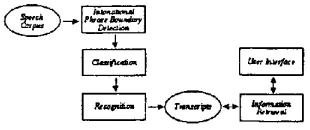
The system architecture is shown in Figure 1. Speech documents, labeled by hand in the SDR
Vzzz
Figure 1: Architecture of the SCAN audio brows- ing/retrieval system.
data, are first run through an intonational phrase
[image:1.612.329.484.586.651.2]detection procedure, to segment stories into princi- pled "chunks" of speech. This initial segmentation provides the ASR engine with manageable units of speech to recognize, and later provides users with manageable units of speech to listen to. Each phrase identified is then classified as to its channel condi- tions, so that the most appropriate acoustic mod- els can be applied during recognition; this classifica- tion is done by assigning log-likelihood scores based upon a partition of the data into 'high', 'medium', and 'low' fidelity speech (corresponding to 'studio 8K speech', '8K speech recorded under other con- ditions', and '4K telephone speech' - all recorded without background noise or music) and noise (all speech recorded with noise or music). The rec- ognizer employs a time-synchronous beam search with continuous density, three-state, left-to-right, context-dependent Hidden Markov phone models. The production of word sequences from phones is implemented using weighted finite-state transduc- ers. Recognition hypotheses are output as word lat- tices. Several language models have been developed from the 116 million word SDR corpus, including standard backoff bigram (6.1 million) and trigam (9.4 million) models and a compacted trigram model which has 16% lower perplexity and which is 60% smaller than the bigram model. We use the SMART IR system, developed for text-based retrieval using the vector space model. SMART tokenizes the tran- scribed audio, removes common stop words (e.g. the,
o]), normalizes word variants (e.g. persons ~ per-
son), and weights term occurrences based upon doc-
ument length and word frequency. SMART scores for 'hits' within a document are made available to the user interface, as well as the ranking of docu- ments retrieved for a query. Two user interfaces cur- rently exist for SCAN, a speech-based interface, and a text-based interface. Both of these interfaces re- flect lessons learned from our earlier audio browsing experiments with simpler prototypes and a voicemail browsing and retrieval task.
2
Audio-Based Browsing and
R e t r i e v a l
In recent years, various systems have been built to enable capture and browsing of spoken conver- sational data from meetings and recorded lectures (Hindus, Schmandt, and Horner, 1993; Kazman et al., 1996; Moran et al., 1997; Wolf, Rhyne, and Briggs, 1992; Whittaker, Hyland, and Wiley, 1994), and personally dictated information (Degen, Man- der, and Salomon, 1992; Stifelman et al., 1993). Other systems allow search of multimedia archives of television programmes (Hauptmann and Witbrock, 1997; Shahraray, 1995) and videomail (Jones et al., 1996). While extensive evaluations of this technol- ogy remain to be carried out, naturalistic studies of
audio browsing systems demonstrate their effective- ness in helping users produce accurate meeting sum- maries (Moran et al., 1997; Whittaker, Hyland, and Wiley, 1994; Wilcox, Schilit, and Sawhney, 1997). These and other studies also showed that indexed audio produces more accurate recall, although users may take longer to retrieve information (Kazman et al., 1996; Whittaker, Hyland, and Wiley, 1994). Several factors that may influence browsing behav- ior have been identified: (a) familiarity with subject matter: knowledgeable users are more likely to skip portions of the audio record when replaying (Moran et al., 1997) and they generate more effective queries when searching the record (Kazman et al., 1996); (b) type of retrieval task: audio search behaviors differ when users are trying to summarize as opposed to extract verbatim information from the audio record (Moran et al., 1997; Whittaker, Hyland, and Wiley, 1994); (c) presence and type of audio indices pro- vided: cue utility is esoteric, with different users re- lying on different types of cue (Kazman et al., 1996); (d) availability of segmental information: users find it easier to navigate the record when structural in- formation is provided (Arons, 1994). However, these studies also identify severe difficulties that users ex- perience with speech browsing and search which may compromise the utility of these systems. The first problem is navigational: users often report losing track of the current audio context (Stifelman, 1996; Arons, 1994), and being unable to determine the se- quence and structure of different elements of the au- dio record (Gould, 1983; Haas and Hayes, 1986). A second set of problems concern search: users seem to be poor at generating effective key word search queries, and find it hard to exploit system-generated key word indices. These problems are exacerbated when search material is unfamiliar (Kazman et al.,
1996).
2.1 T h e E x p e r i m e n t D e s i g n
lationship between memory and search strategies - - do users with more accurate models search audio more effectively, and what promotes good memory? We based our experiments on findings from a naturalistic study of over 800 voicemail users, in which we identified a set of strategies people used to access a real audio archive, and documented the problems users experience in accessing t h a t archive (Hirschberg and Whittaker, 1997; Whit- taker, Hirschberg, and Nakatani, 1998). In our lab- oratory experiments we focussed first on how access is affected by two factors, task type and familiarity of material. While previous research has suggested t h a t these factors affect browsing, no detailed eval- uation has been done. Second, we investigated the impact of two browser features, topic structure and play duration. Although these features have been implemented in previous browsers, their impact on browsing and their interaction with task and famil- iarity has not been systematically tested. Our hy- potheses were that a) search efficiency (i.e. number of search operations and search time) depends on the amount of speech information users must access: s u m m a r y tasks requiring access to an entire topic will less efficient than search for two specific facts, which in turn will be less efficient than search for one fact; b) familiar material will elicit more efficient search; c) providing information about where topics begin will increase the efficiency of search; and, d) short duration fixed play intervals will be used for identifying relevant topics, whereas longer fixed play durations will be used for search within a topic.
Fourteen people were given a speech archive, con- sisting of eight voicemail messages, or topics, ap- pended together in one audio file 236.3 seconds long. We chose this domain for our study, both because we were interested in the specific application, and be- cause Voicemail message retrieval is an example of a real application of audio search and retrieval, which we felt would be familiar to our users. Users ac- cessed the archive to answer sixteen questions about the eight topics. These questions were based on re- trieval tasks identified as common in our naturalistic study of voicemail users. There were three types of task: Four questions required users to access one specific fact, e.g. a date or phone number from a topic ( l f a c t ) , a further four required access of two such facts (2fact), and eight questions required users to reproduce the gist of a topic ( s u m m a r y ) .
The first eight questions required users to ac- cess each of the eight topics once, and questions 9 through 16 required each topic to be accessed again. To investigate the effects of familiarity we compared users' performance on the first eight versus the sec- ond eight of the sixteen questions.
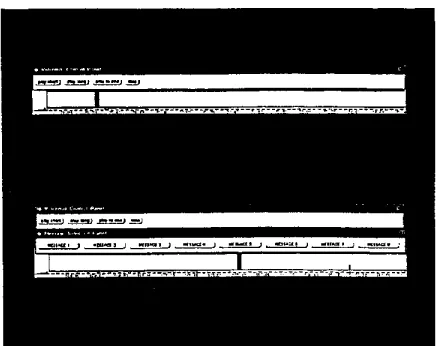
Users were given one of two GUI browsers: b a - sic and t o p i c . These are shown in Figure 2. Both
Figure 2: Basic and Topic Audio Browsers
browsers represent the entire speech archive as a hor- izontal bar and permit random access to it: users can select any point in the archive and play from that point (e.g. inserting the cursor halfway across the bar begins play halfway through the archive). For both browsers, users then select one of three play durations:
play short
(3 seconds),play long
(10 sec- onds) and p l a y t o e n d (unrestricted play until play is manually halted by the user). The t o p i c b r o w s e r further allows the user to select a given topic by se- rial position (e.g. topic, or, message 1); play will then begin at the start of t h a t topic/message.We used a simple GUI for our initial experiments, rather than testing a complex set of possible search features, for three reasons: First, d a t a on accessing a real speech archive indicate that even highly experi- enced users make little use of sophisticated features such as scanning, speed up/slow down, or j u m p for- ward/back (Hirschberg and Whittaker, 1997). Sec- ond, informal evaluations of complex speech UIs re- veal that advanced browsing features are often not well understood by users, and do not necessarily improve search (Arons, 1994; H a u p t m a n n and Wit- brock, 1997). Given the unclear benefits of complex features, we wanted to establish baseline d a t a for speech retrieval using a simple prototype. Finally, the features we tested will most likely be part of any browsing interface, and thus are of general interest.
Users were given 5-10 minutes on practice tasks before the experiment. After it, we gave users a memory test, asking them to recall the content, name of caller and serial position of each topic. We then administered a questionnaire eliciting reactions to browser features and comments about the tasks. We logged the number and type of each play opera- tion, duration and location of played speech within the archive, and time to answer each question. The results for each hypothesis follow and all differences discussed are statistically significant at p i 0.05, us- ing ANOVA.
[image:3.612.308.527.50.223.2]2.2 E x p e r i m e n t a l R e s u l t s
As we had expected, 1 f a c t tasks were answered more efficiently than both other tasks (see Table 1). How- ever, contrary to expectations, s u m m a r y was more efficient than 2 f a c t , despite requiring access to more information. The results indicate t h a t performance depends both on the type and the a m o u n t of infor- m a t i o n users must access. User comments revealed why 2 f a c t were so difficult: with summaries it was possible to remember several pieces of approximate information. 2 f a c t questions required complex nav- igation within topic and the additional precision re- quired to retain verbatim information often meant t h a t users forgot one fact while searching for the second. They then found it hard to relocate the fact they had just forgotten. The user logs reveal prob- lems of forgetting and relocating prior facts. In the course of answering each 2 f a c t usrquestion users ac- tually played the two target facts a combined total of 7.9 times. In contrast target facts for l f a c t tasks were only accessed 1.5 times and topics 2.9 times for s u m m a r y tasks.
As we had suspected, in general, familiar material elicited more efficient search. To investigate more deeply just h o w this effect was produced, we then separated overall search operations into: the identifi- cation of the relevant topic and the actual extraction of the information required to complete the task, i.e., finding the answer within the target topic. We then found that familiarity only improved the speed of topic identification, but had no effect on informa- tion extraction once the relevant source had been identified.
Users made frequent use of topic boundary infor- mation. Although random access was available with the topic browser, users only employed it for 33% of their access operations. Furthermore, users' com- ments about the topic boundary feature were highly positive. Despite this positive feedback however, we found that topic-based access seemed less effi- cient than random access: users with access to topic delimiters took more operations although less time to answer questions than other users. Why might this counter-intuitive result have occurred? Post- hoc tests showed t h a t topic browser users had worse m e m o r y for the eight topics than simple browser users. Users of the basic browser reported mak- ing strenuous efforts to learn a mental model of the archive. In contrast, reliance on topic structure may p e r m i t topic browser users never to do so.
Play duration behavior was independent of whether search was within or outside topic. Further- more, there was little use of either of the fixed play operations: all users preferred unrestricted play. In the final questionnaire, users reported that fixed du- ration options reduced their comprehension by trun- cating topic playback in unpredictable places. They
preferred the greater control of unrestricted play, even though this meant the overhead of stopping play explicitly.
From these experiments we conclude, first, that users were much better at comprehending the over- all structure of the archive, including the order and gist of topics, than they were at navigating more lo- cally, within a given topic, to find particular pieces of information. T h e y were unable, for example, to re- locate previously accessed information within topic for 2 f a c t tasks, and showed no familiarity effects for search within topic. Second, our sampling results suggest t h a t users overwhelmingly reject fixed dura- tion skims of salient speech information, when given an alternative more within their control. Instead of fixed interval skimming, users prefer to access salient speech by controlling the precise playback duration themselves, even though this m a y involve more ef- fort on their part to start and stop play. And third, providing topic boundaries m a y be of limited value: although users all like this feature (and those who participated in the basic browsing condition specifi- cally requested it), heavy use of such signposts may make it more difficult for users to learn the con- tents of the archive. It appeared that the segmenta- tion provided was at too coarse a level of granular- ity to provide much additional navigational power; the general topic structure of the archive as a whole could be learned easily without it.
3 S e g m e n t a t i o n a n d T r a n s c r i p t i o n A i d s t o A u d i o N a v i g a t i o n
The results of our basic and topic browser studies led us to propose two further browser prototypes, providing different types of additional, signposting information t h a t might be helpful in local, as well as global navigation tasks. Since our goal was to permit users to browse much larger databases than eight voicemail messages, we also suspect that in- creasing the size of the database might increase the importance of some form of topic segmentation.
The first browser we developed provided a more sophisticated notion of topic segment than simple message boundaries, and is shown in Figure 3.
Task Number of Operations Solution Time 1fact
2fact summary familiar unfamiliar topic no topic
2.4 4.1 2.9 (F -- 7.43) 2.1 4.1 (F = 35.5) 3.7 2.5 (F = 5.09)
23.0 37.6 32.3 (F = 11.7) 22.5 40.1 (F = 36.6) 30.0 32.5 (F = 6.60)
Table 1: Effects of Task, Familiarity and Topic Structure on Retrieval Efficiency, with Relevant F ANOVA Values
Figure 3: Voicemail Structural Browser
you call Joan and make sure she'll have the num- bers by then?"; and closing "Bye now." While we have tested this interface only informally, the addi- tion of semantic categories as signposts to brows- ing through a series of messages seems much more useful than simply iterating through messages by start of message. A browse through caller identify- ing phrases, for example, quickly identifies messages by caller, while browsing through topics or deliver- ables serves the same function by topic. And playing greeting, caller id, topic, deliverables, and closing provides a very effective summary of many message. Of course, even this outwardly simple identification of topic structure is beyond the capability of exist- ing technology. However, we are currently collecting and annotating a voicemail corpus with the goal of adding this type of structural browsing capability to the retrieval capabilities provided by our ASR/IR search engine.
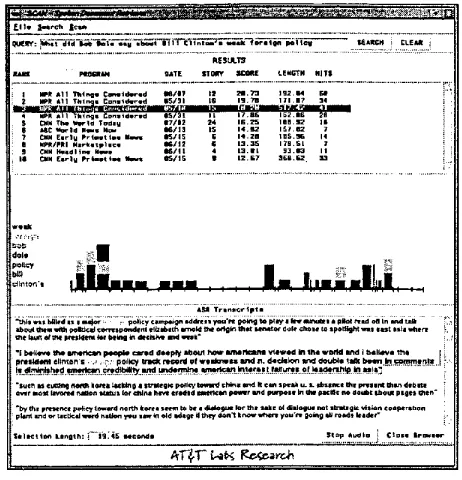
The second browser we developed in order to ex- periment with new types of navigational aids to audio browsing makes use of the (errorful) ASR transcription produced in order to carry out IR in our system. This browser is depicted in Figure 4. The text-aided browser is implemented for the SDR Broadcast News corpus and consists of three main components: a programs overview window, a speech feedback window, and a player window. The pro- grams overview presents the results of the IR search
RZSUtTS
_,T~__ .. . . i . i . + ~ T ... ~ L . _ . . ' : _ _ ~ _ . ~ L . . . Z ~ " ~ ..."_'~ ...
i l ~ P I ~11 T h i n g * .C4ml$41~irld l i 6 / 1 7 I I 21i.73 192.14 611
: MPI 111 T h l • C o n l + d q l r l d I S / S l 16 I g . ? l 171.17 34 4 MPR * I I T h i n g , C O n l l d l r l d 1 5 / 3 [ i i 1"7.85 i + + . 1 1 21
S CNN T ~ + l d T o d l v 1 7 / 1 2 24 ~ S . : S l i B . S 2 I I
l n C ~ I d i ~ , b ~ / l S IS 14.S+ 157.12 7 1 c a E a r l v P r t m t l l l k I S / I S 6 1'4,20 115.96 14 8 I~PR/PR I ~ l r k l l p I l e e I i i ; I 12 G 1 3 , 3 5 178•51 7 n OHM ~ l ~ l l ~ ~ l 1 6 / 1 1 4 1 3 . 1 1 9 3 . 1 3 H
~ , n t o n ' i ~ . . . m . R . i r . i r a . r e . [ I I I . , m . , I , ~ . : H . . | , , I I I & ~ T r a n s h i p 1 s
~ e iluK oJ t h l p r l s i ~ l l l o t b l i n g ks d v c i s l v l iD4 ~ k ° i .. "1 belt0,,* m e ~ 7 . ~ . ~ . ~ p~opk~ c:sr~d 4 e ~ l ~ ~ h o w m ~ w e w e d m ~ w o d d ~ I b ~ l ~ v * m e i p l a l s l d * n t c f i n t a n ' s . , : p : p o i ~ y tllC:K rlclDrCl o f w e l k ~ @ l s IU't¢I Is. Gt41dlks'l'l Imcl d o u b l e t ~ X b 4 e n . ~ , . ~ Q n l l I
~ r ~ t (4voted ~ s~.~u s for ci1JM ~ . ~ d i ~ r k : ~ p4ww~r ~ p ~ o l ¢ tn h i*acl~,~ n o doubt ~,bout plf~e~ m e n " i i " b y me p ~ e ~ ¢ p o l ~ to, yard ~ r m k ~ a s ~ ~ ~ i ~ ~ m e s ~ e d d l ~ N t I ~ t ¢ ~ s ~ n ¢ : @ p z ~ b o n
Figure 4: Text-Aided Audio Browser
on the corpus in the form of a list of stories ranked in order of their relevance to a text input query. The top ten most relevant stories are displayed, in this version of the interface. For each story, the title of the program from which the story comes, the date of the broadcast, and all instances of keywords in the story that were deemed relevant to the query are dis- played. Clicking on one of the program/story but- tons loads the corresponding speech into the speech • feedback window, along with a time-aligned cursor, which shows the location of the story in the speech stream. The player window then provides controls for navigation and play within the displayed pro- gram, permitting the following functionality: a play button with plays from the point selected in the speech feedback window; a stop play button; a move- to-beginning button; buttons which skip forward in the speech by intonational phrase or larger intona- tionally defined units and buttons which skip back-
[image:5.612.177.438.75.172.2] [image:5.612.307.538.215.455.2]ward in the same units. We have devised a series of tasks appropriate to the broadcast news domain but similar to the tasks used in our voicemail study, and will use this interface to test the utility of au- tomatically derived transcription and keyword iden- tification, as well as acoustically identified prosodic units, in aiding local navigation.
4 D i s c u s s i o n
A central problem with current access to large au- dio databases is the need to listen to large amounts of relevant data; the human eye skims much more quickly than is possible for the human ear to do. Also, when skimming text, humans typically are pro- vided with many conventional orthographic and for- matting guides, such as headings and paragraphs. Our study of audio browsing in even a small au- dio corpus demonstrates that, while some kind of navigational aids seem necessary to provide the con- text which permits successful navigation, obvious signposts such as topicimessage boundaries may be less helpful than users expect them to be and per- haps even counter-productive to users acquiring a basic understanding of their data. Given this re- sult, we are exploring alternatives to simple topic markers, including semantic structural information, potentially errorful transcription and key word re- trieval, and acoustic segmentation, particularly as a means of enhancing users' ability to extract the in- formation they seek from the audio data that has been presented to them.
R e f e r e n c e s
Arons, B. 1994. Interactively Skimming Speech.
Ph.D. thesis, MIT Media Lab.
Degen, L., R. Mander, and G Salomon. 1992. Working with audio: Integrating personal tape recorders and desk-top computers. In Human Factors in Computing Systems: CHI '92 Confer- ence Proceedings, pages 413-418.
Gould, J. 1983. Human factors challenges: The speech filing system approach. ACM Transactions on Office Information Systems, 1 (4), October. Haas, C. and J. Hayes. 1986. What did i just say?
reading problems in writing with the machine. Re- search in the Teaching of English, 20(1).
Hauptmann, A. and M. Witbrock. 1997. News-on- demand multimedia information acquisition and retrieval. In M. Maybury, editor, Intelligent Mul- timedia Information Retrieval. AAAI Press. Hindus, D., C. Schmandt, and C. Homer. 1993.
Capturing, structuring, and representing ubiqui- tous audio. ACM Transactions on Information Systems, 11:376-400.
Hirschberg, Julia and Steve Whittaker. 1997. Studying search and archiving in a real audio database. In Proceedings of the AAA11997 Spring
Symposium on Intelligent Integration and Use of Text, Image, Video and Audio Corpora, Stanford, March. AAAI.
Jones, G. J. F., J. T FFoote, K. Sparck Jones, and S. J. Young. 1996. P~etrieving spoken documents by combining multiple index sources. In Proceed- ings of SIGIR 96, Zurich, August. ACM.
Kasman, R., P~. A1Halimi, W. Hunt, and M. Mantei. 1996. Four paradigms for indexing video confer- ences. IEEE Multimedia, 3(1):63-73.
Moran, T. P., L. Palen, S. Harrison, P. Chiu, D. Kimber, S. Minneman, W. Van Melle, and P. Zellweger. 1997. "i'll get that off the au- dio": A case study of salvaging multimedia meet- ing records. In Human Factors in Computing Systems: CHI '97 Conference Proceedings, pages 202-209.
Shahraray, Behzad. 1995. Scene change detection and content-based sampling of video sequences. In Robert J. Safranek and Arturo A. Rodriguez, editors, Proceedings of the SPIE Conference on Digital Video Compression: Algorithms and Tech- nologies, February.
Stifelman, L. 1996. Augmenting real-world objects: A paper-based audio notebook. Human Factors in Computing Systems: CHI '96 Conference Com- panion, pages 199-200.
Stifelman, L., B. Arons, C. Schmandt, and E. Hul- teen. 1993. Voicenotes: A speech interface for a hand-held voice notetaker. In Human Factors in Computing Systems: CHI '93 Conference Proceed- ings, pages 179-186.
Whittaker, S., P. Hyland, and M. Wiley. 1994. Filochat: Handwritten notes provide access to recorded conversations. In Human Factors in Computing Systems: CHI '93 Conference Proceed- ings, pages 271-277, New York. ACM Press. Whittaker, Steve, Julia Hirschberg, and Christine
Nakatani. 1998. All talk and all action: strate- gies for managing voicemail messages. In Human Factors in Computing Systems: CHI '98 Confer- ence Proceedings, Los Angeles.
Wilcox, L. D., B. N. Schilit, and N. Sawhney. 1997. Dynomite: A dynamically organized ink and au- dio notebook. In Human Factors in Computing Systems: CHI '97 Conference Proceedings.
Wolf, C., J. Rhyne, and L. Briggs. 1992. Communi- cation and information retrieval with a pen-based meeting support tool. In Proceedings of CSCW- 92, pages 322-329.