© 2019, IRJET | Impact Factor value: 7.211 | ISO 9001:2008 Certified Journal | Page 6983
METRO BUS TRACKING SYSTEM
Muthukumaravel M
1, Manoj Kumar M
2, Rohit Surya G R
31,2,3
UG Scholar, Dept. Of CSE, Panimalar Engineering College, Tamil Nadu, India.
1
[email protected],
2[email protected],
3[email protected],
---***---Abstract -
In today’s world, it is important to keep trackof things which we use every-day, and this has been made possible using various technology widely available. Technology has been advent from tracking static points to dynamic points, a path less low-efficiency radar to hi-tech map facilities with traffic hot spots, from fixed locations to live locations. When tracking of objects has gone far too beyond imagination, we people in India still cannot know the correct arrival time of a local government buses (MTC) to any particular bus stand and how much time will it take to reach a particular location or destination, another major notable problem is most of the buses are identified by the bus route number rather than the location names, these few issues may lead to a lot of problems like, reaching the destination late, missing the last bus or some time boarding the wrong route bus or the buses which stop at the required and even more. A simple solution to solve these problems could be done by creating two Android apps, one Bus app which will get single click inputs from the driver (bus number) and the route number which will be updated in the database, the live location of this particular bus is shared with all users who will board this bus. On the other hand the Tracking App, with help of Google Maps API, which will get the current location of the user and the endpoint or destination as the inputs, henceforth giving the combination of the straight buses route number to the desired endpoint, and also the live location of the bus in real time with help of posted data in the Json file. With the help of these two apps the overall experience of anyone who will board the bus could be made more simple and efficient.
Key Words: JSON, Live Tracking, post, get, API and Google
maps.
1.INTRODUCTION
The main purpose of the project is to find the best and short route of the bus which the users selects. We propose the application in android which is a handheld device and being used by many people. We used Google Map for the map view for both driver and user. And the location service which is prebuild with Android phones.
We propose a tracking mechanism which displays the live location of the diver and the user. This helps the user to track the bus efficiently.
The necessary hardware is the android phone which is being used by more people. This means that our solution is low cost and easy to deploy. It supports the “Bring your own Device” paradigm; users only need to install an app on the device they already own. From the user viewpoint, enabling the mobile data and location service is enough to fully utilize the application. The same applies for the driver side. The application works well even when user wants to see the status of the two different buses at the same time.
We implemented JSON to store our GPS location of the Bus Driver Application. Our library is designed to run well on different android version and provides a better user interface.
© 2019, IRJET | Impact Factor value: 7.211 | ISO 9001:2008 Certified Journal | Page 6984
2. LITRATURE REVIEW
There is a wide variety of existing solution that attempts to solve the tracking of bus problem. Most of the existing solution primarily aims to show the bus arrival time In an approximate way, and this is carried out without tracking the location of bus and traffic data, this system assumes an average running speed of a bus and all the data are hardcoded accordingly. In this kind of system most of the time the arrival estimation time will not be accurate, in this case, if a new bus is to be added, a whole new data set must be added to the existing model. Another similar system which helps the user to see the various bus routes from one place to another, even this Android app has all the data predefined. Latest way of tracking MTC bus is using cameras and image processing if a bus crosses any major bus depot dial BA camera noting the bus numbers and also the route number which will be automatically updated to the server so that the user can view which location the bus is there. Drawbacks of existing system: Less number of data about each bus, No live tracking of bus & Methods are complicated using login and sign-up.
3. SYSTEM ARCHITECTURE
Fig -1: System Architecture
This system architecture is designed in such a way that the number of components are less and the efficiency is more. The map feature which is provided by Google is the Google Map is a mapping website, and also the name for the technology that it works on. It provides satellite
pictures and road maps for anywhere in the world. Maps can be embedded on other websites via Google Maps API which helps in our project by using Application Programming Interface and their corresponding key. The Bus driver application which is running will make use of Map feature from Google Service which is Google Map and the default GPS feature which is included in their Android Phones. They can interact with the application through a User Interface which is just a click and go process. The data which is being processed by the Bus drive application are all updated in the server which here is the cloud service and the record are all maintained by JSON JavaScript Object Notation is an open standard file format that uses human-readable text to transmit data objects consisting of attribute-value pairs and array data types which is a popular one to that features.
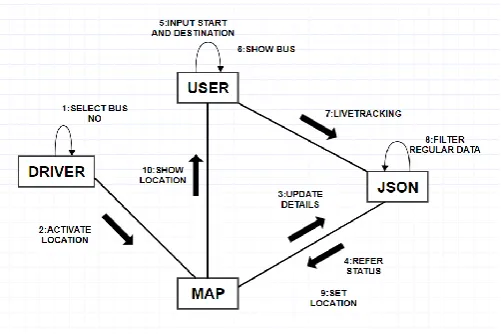
Chart-1: Flow Chart
[image:2.595.309.560.323.490.2]© 2019, IRJET | Impact Factor value: 7.211 | ISO 9001:2008 Certified Journal | Page 6985
When the user wants the bus which he/she want to boardcan just select the route location which the user wants to board and the location of the bus is displayed. If the user wants to see the location of the two alternate buses, user is give features to do that operation for the request given.
4. SYSTEM MODULES
The Android app is designed in such a way that even a layman could use it very easily, sense to maintain the integrity and proper working of application with any number of workload the system has been divided into four main models. Our MTC bus tracking application can be implemented on any Android devices that have internet data connection which should be at least three g for proper working and proper GPS connection for seamless transfer of data. As already said in the introduction the project is divided into two major Android apps oneness driver application and another one is passenger application, initially the flow of our project start from the railway application through which the bear games bus number as input which will at once be saved in the server in JSON format, once respect is done, henceforth the location of the driver that is latitude and longitude of the driver's location are continuously posted to the server backend. After posting the location information of the bus into the server, then comes that passenger app into action. Basically passenger app requires three major inputs wonders the bus starting point and the destination point, once these two data are given as input and the search button is clicked when you pop up opens showing the available bus routes through which the user selects one of the bus route, once when the bus route is selected I get call is made 26 by passing the parameters such as the route number and the starting location so that the best number which is already there in server is compared with the data which is received from the get call, once the sorting procedure is over the latitude and longitude location of the bus this sent as response to the passengers application and those points are mapped onto the map which is visible on the passengers mobile. Detailed explanation of each module are given below.
4.1 MODELS
i. ii. iii.
iv. Search and Locate Required Bus
4.2 DRIVER BUS ROUTE INPUT
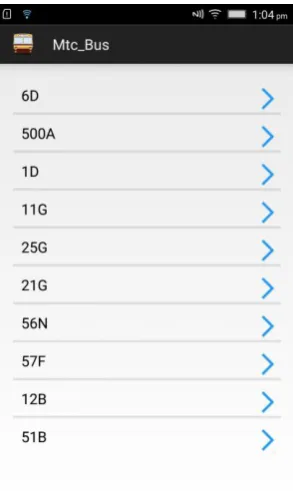
The work of this module not only starts from the driver opening this Android application, but from the time when a driver is assigned with the bus route number, i.e., the major input in the bus driver app Sheraton the bus route number so it is mandatory for a bus driver to remember the 27 bus route number and to board the right bus. once when the driver is going to start the bus the main work of this module comes into existence, if the driver is going to drive a bus called A, the driver of that particular bus should open the driver app and wait for the main screen to load, once the main screen is loaded there are variously available option are displayed those options are the bus numbers, this bus numbers which are displayed are predefined data so if a bus I need to be added it should be done in the source program only and not to the app for some security reasons and apps privacy.
Fig -2: Driver App Initial Screen with all possible bus numbers
[image:3.595.360.507.371.617.2]© 2019, IRJET | Impact Factor value: 7.211 | ISO 9001:2008 Certified Journal | Page 6986
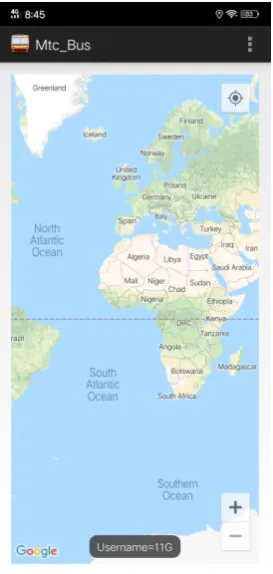
username is created dynamically and that particular username is assigned with the name of the bus with sis selected by the bus driver, once when the username is successfully created a function is called which will create the default structure of the JSON file, the JSON file will contain prototype pieces of information like bus number, current time, latitude and longitude information of the bus. In short, this module will get the input from the driver and initiate the service which is going to post by the drivers mobile to the server
4.3 LOCATION TRACKING OF DRIVER
The second and the last module of the driver's app is Location tracking of the driver. Basically, this model is the continuation of the previous model, all the inputs for this model are received from the previous model and the whole structure for this module depends on what has been created on the previous module. in the previous module, the JSON structure has been framed and the user name that is the bus number has been assigned and saved in the server. Once the above process is over a single task will be running recursively, the first thing will be getting the latitude and longitude information of a bus driver from his mobile phone, which is inside the bus, once the latitude and longitude pieces of information are required from the mobile this data are embedded two variables called latitude and longitude which are related to the JSON data, after these values being assigned to the variables those data are converted to JSON format. after these two values being saved III data is received again from the mobile phone which is the current date and time. Now as we have 3 data we require one major data which is the username or the bus route number which will be added to the current date and time and these two files will be converted to JSON and the previous JSON file will be given inside the JSON which has current date time and the username as a children element.
Fig -3: Driver App Second screen after selecting bus number
[image:4.595.366.503.98.386.2]© 2019, IRJET | Impact Factor value: 7.211 | ISO 9001:2008 Certified Journal | Page 6987
4.4 PASSENGER SOURCE DESTINATION INPUTFig -4: Passenger app initial screen requesting for source destination
The passenger's source and destination input basically deal with the initial user interface of the passenger, the initial screen of the application will have an animation in which a bus will be running in the bottom and the top there will be a logo of MTC. Once the screen is finished loading it will take the user to the main user interface of the passenger app which will contain two text boxes and one responsive button the first text box is there source input and the second textbox is the destination input. Source and destination basically mean the starting and the ending point of the journey of a passenger. Initially, 10 to 15 buses data have been collected and doors status have been predefined in both 30 passenger app and the player app with the name of route number, so once if a passenger starts typing the source. In the first textbox all possible source. Are displayed according to the alphabetical input given by end user, once the user selects one of the inputs which are shown or integer input on his or her own, sorting procedure is taken place depending on the input which is given by the user, that is only the possible destination of the sources selected by the user is shown to the user so that they can select the endpoint or
the destination. Once the source and destination are entered and the search button which is located down to the textbox is clicked another search is performed based on the inputs given by the user that is the bus route number plates is directly related to the source and destination point are displayed to the user in a popup window, once the user confirms the best number and click ok that particular bus number is saved as the passenger bus token and pass to the next layout. Another one important work carried out by this module is saving the bus number for future uses as a global variable which can be accessed anywhere throughout the app as well as in server.
4.5 SEARCH AND LOCATE REQUIRED BUS
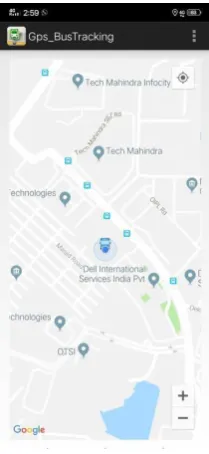
Fig -5: Passenger app Tracking screen where user location and the bus location are displayed
[image:5.595.82.241.119.399.2] [image:5.595.381.486.308.536.2]© 2019, IRJET | Impact Factor value: 7.211 | ISO 9001:2008 Certified Journal | Page 6988
location pieces of information like latitude and longitudeinformation and bus number, if the data in the server and a username which is sent by the passenger is not matching then the search is made for consecutive 10 times. once when the above process is completed and the passenger mobile phone has the latitude and longitude information, using Google maps with plot the latitude information on to the map showing the current location of the bus. one of the complications here is if only one get call is made then the initial position of the bus is only showing to the user since the user should be updated with the live location of the bus the request is been continuously made for each and every second and the above-mentioned process will be the currently working until they get call is correctly hit. and the user interface will be continuously refreshed in a high refresh rate so that the current location of the bus is being continuously updated as it moves. for better convenience of the user zoom in and zoom out button are given to the user so that he or she can relate his own position with the bus position. Another one important task which is done in this module is the current location of the user is also shown, since in this application Google map is used when your bypass pan and all other required information could be seen by the user in or around his location. Initially, the map will be in 10 x zoom and in the coordinate 0,0 the user cannot find his or her phone location so we have given a customized button on the right top corner of the app if it is being clicked the map is a recent addition to the current location of the user. The whole about four parts is the explanation of the different models available in the project since there are only for models it is and simple application which is doing the highly complex task with very simple algorithms and high efficiency. sons all the models are designed in such a way that each and every task are done by simple get and post calls the efficiency of the code increases even more and user-friendliness of the app also increases in a large scale.
5. CONCLUSIONS
Ones this application is brought into use, it will become easy for any passenger to keep track of where their bus is and when they should go to the bus stand. This android application helps in reducing the waiting time. Since no geo-fencing algorithm or geo-tracking algorithm is used the cost of making this application is absolutely zero and when compared with the other methods this method seems to be more effective.
REFERENCES
[1]“An RFID based system for bus location tracking and display”, by
Maria Anu. V, 978-1-4799-8788-7 IEEE, 2015 International Conference
on Innovation Information in Computing
Technologies(ICIICT),Chennai,India
[2]“Google maps based travel planning & analyzing system”, By
W.G.R.M.B.S. Rathnayake, 978-1-5386-3702-9 IEEE 1,Proceeding of 2018 IEEE International Conference on Current Trends toward Converging Technologies, Coimbatore, India
[3]“Improved clustering algorithm of neighboring reference point based
on KNN for indoor localization”, By Weixing Xue, 2018 IEEE
[4]“K-Means nearest point search algorithm and heuristic search for
transportation”, By Wai Mar Hlang, 7th global conference on consumer
Electronics