2008
Cognition and Technology: Effectiveness of
intelligent tutoring systems for software training
Claver P. Hategekimana Iowa State University
Follow this and additional works at:https://lib.dr.iastate.edu/etd
Part of theBusiness Commons
This Dissertation is brought to you for free and open access by the Iowa State University Capstones, Theses and Dissertations at Iowa State University Digital Repository. It has been accepted for inclusion in Graduate Theses and Dissertations by an authorized administrator of Iowa State University Digital Repository. For more information, please [email protected].
Recommended Citation
Hategekimana, Claver P., "Cognition and Technology: Effectiveness of intelligent tutoring systems for software training" (2008). Graduate Theses and Dissertations. 11409.
Effectiveness of intelligent tutoring systems for software training
by
Claver Pierre Hategekimana
A dissertation submitted to the graduate faculty
in partial fulfillment of the requirements for the degree of
DOCTOR OF PHILOSOPHY
Major: Human Computer Interaction
Program of Study Committee: Anthony Townsend, Co-major Professor
Stephen Gilbert, Co-major Professor Ana-Paula Correia
Brian Mennecke James Oliver Kevin Scheibe
Iowa State University
Ames, Iowa
2008
TABLE OF CONTENTS
LIST OF FIGURES ... v
LIST OF TABLES ... vi
ACKNOWLEDGEMENTS ... vii
ABSTRACT ... viii
CHAPTER 1. INTRODUCTION ... 1
1.1 Context of the proposed ITS study ... 2
1.2 Overview of training approaches ... 4
1.3 Indicators of training approach success ... 6
1.4 Learner’s ability to succeed indicators ... 7
1.5 Statement of the Problem ... 8
1.6 Purpose of study ... 9
1.7 Methodology ... 10
CHAPTER 2. REVIEW OF LITERATURE ...12
2.1 Foundation of self-directed instruction ... 12
2.1.1 Book-based instruction ... 15
2.1.2 Computer-based instruction ... 16
2.1.2.1 Software simulation-based instruction ... 17
2.1.2.2 Intelligent tutoring systems ... 18
2.2 Intelligent tutoring system architecture ... 20
2.3 Characteristics of training approaches ... 24
2.4 Training outcomes and assessment measures ... 27
2.4.1 Training success indicators ... 27
2.5 Summary and the way forward ……….. 32
CHAPTER 3. METHODS AND PROCEDURES ... 34
3.1 Participants ... 34
3.2 Design of training curriculum ... 35
3.3 Materials ... 36
3.4 Measures ... 39
3.5 Setting and procedure ... 43
3.6 Data analysis ... 48
CHAPTER 4. RESULTS AND DISCUSSION ... 51
4.1 Handling missing data ... 51
4.2 Impact of training mode on training outcomes ... 53
4.3 Impact of learner’s ability to succeed indicators and training mode on learning outcomes ... 54
4.3.1 Effect of spatial ability and training mode on training outcomes ... 55
4.3.2 Effect of general self-efficacy and training mode on training outcomes ... 57
4.3.3 Effect of computer self-efficacy and training mode on training outcomes ... 59
4.3.4 Effect of state self-efficacy and training mode on training outcomes ... 61
4.4 Results of qualitative measures ... 65
CHAPTER 5. CONCLUSION... 69
5.1 Summary ... 69
5.2 Lesson learned ... 71
5.3 Limitations and direction for future research ... 72
APPENDIX 1. Opening script: Effectiveness of Paint.NET training program ... 83
APPENDIX 2. Informed consent document ... 84
APPENDIX 3. Spatial ability survey: Paper folding ... 87
APPENDIX 4. Demographic questionnaire ... 91
APPENDIX 5. General self-efficacy survey ... 92
APPENDIX 6. Computer self-efficacy survey ... 99
APPENDIX 7. State self-efficacy: Anticipated confidence in the use of Paint.NET ... 94
APPENDIX 8. Paint.NET training system usability survey ... 95
APPENDIX 9. Paint.NET concept acquisition test ... 97
APPENDIX 10. Paint.NET task performance test ... 99
LIST OF FIGURES
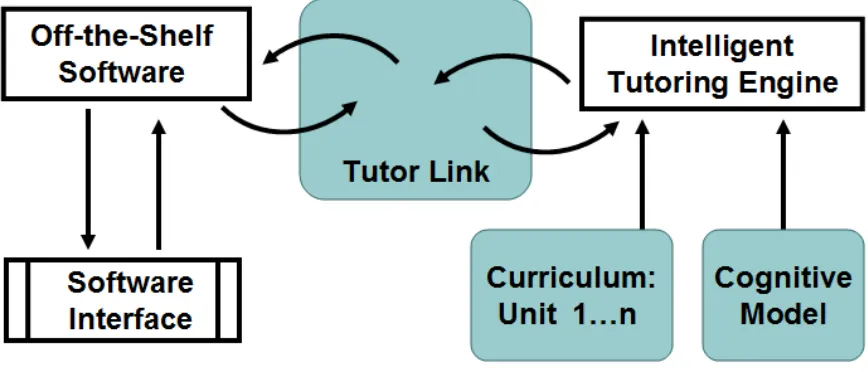
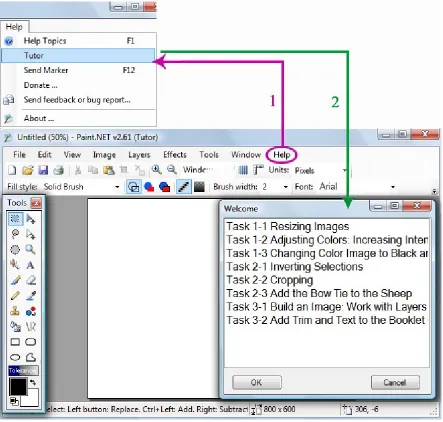
Figure 1. Snapshot view of Clearsighted’s system to offer training through linking target
application and intelligent tutor . ... 3
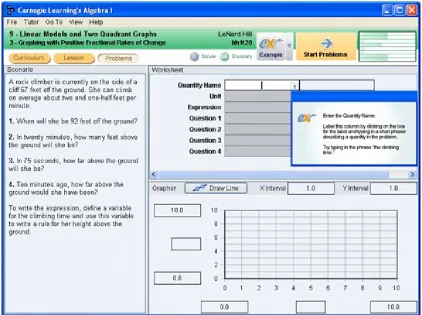
Figure 2. Cognitive Tutor Algebra I and student interaction ... 23
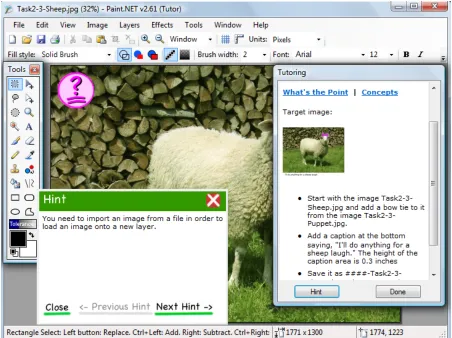
Figure 3. Paint.NET interface enhanced with ITS-tutor ... 45
Figure 4. Paint.NET interface enhanced with ITS-tutor ... 46
Figure 5. Paint.NET interface enhanced with ITS-tutor ... 47
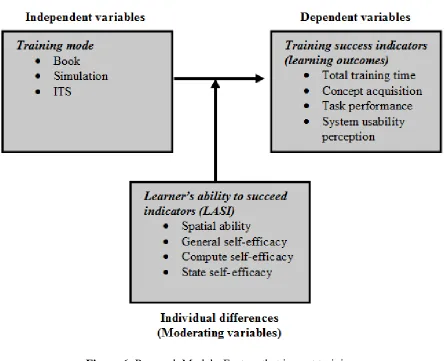
Figure 6. Research Model – Factors that impact training success ... 50
Figure 7. Effect of spatial ability (SA) on task performance ... 57
Figure 8. Effect of general self-efficacy (GSE) on system usability perception ... 59
Figure 9. Effect of computer self-efficacy (CSE) on task performance score ... 61
LIST OF TABLES
Table 1. Benefits of computer based training (example: software simulation and
intelligent tutoring system) versus traditional instructor led training ...14
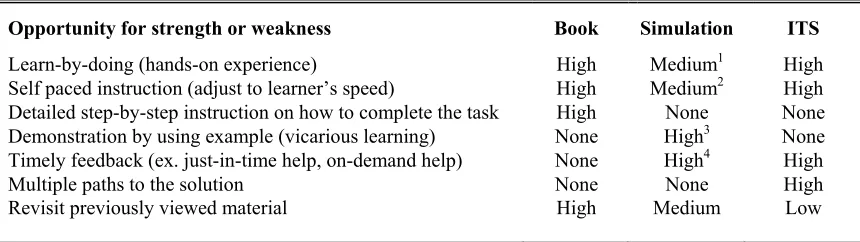
Table 2. Comparison of strengths and limitations of book, simulation and intelligent tutoring system ...24
Table 3. Dynamic training module design: worksheet example ...36
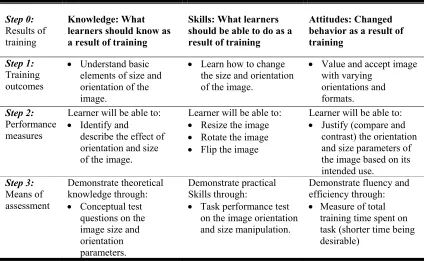
Table 4. Example of training module in Paint.NET training ...38
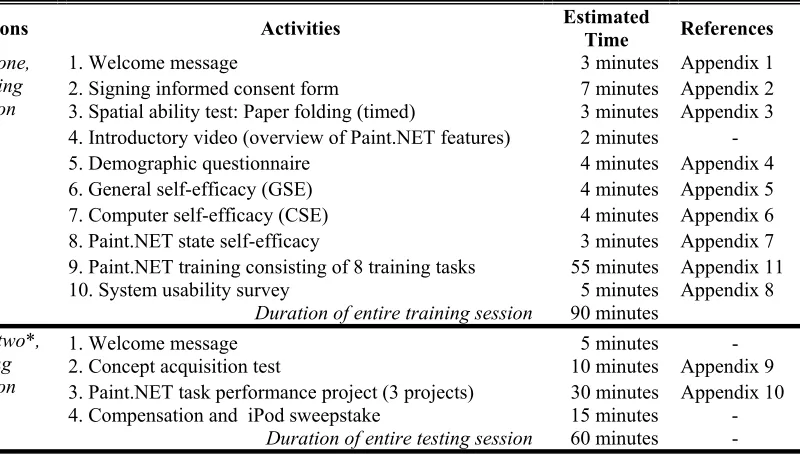
Table 5. Sequence of training and testing activities with estimated times ...48
Table 6. Comparison of participant scores on measures of training mode success ...53
Table 7. Comparison of participant training outcomes based on training mode and Learner’s spatial ability ...55
Table 8. Comparison of participant training outcomes based on training mode and Learner’s general self-efficacy ...58
Table 9. Comparison of participant training outcomes based on training mode and Learner’s computer self-efficacy ...60
Table 10. Comparison of participant training outcomes based on training mode and Learner’s Paint.NET state self-efficacy ...62
Table 11. Parametric and non-parametric test results are compared ...64
Table 12. Comparison of parametric and non-parametric test results ...65
ACKNOWLEDGEMENTS
The work presented in this dissertation holds for more than the culmination of years
of study. It also reflects the relationships with many generous and inspiring people I have
met and worked with since the beginning of my doctoral work at Iowa State University. I
express the deepest appreciation to my advisory committee members for giving me freedom
to pursue independent work. Without their guidance and persistent support this dissertation
would not have been possible. Two co-major professors, Anthony Townsend and Stephen
Gilbert, demonstrated rigorous scholarship and have been instrumental in ensuring my
academic success and financial support. Their work and encouragements demonstrated to
me that modern technology should always transcend academia and provide a quest for our
times. To Brian Mennecke, Keven Scheibe, James Oliver, and Ana Paula Correia for their
thoughtfully criticism, encouraging words, and attention during busy semesters.
Too many people to mention individually have assisted in many ways and have my
sincere gratitude. In particular, I thank John Mayfield and Joseph Munyaneza for their
encouragement to pursue graduate studies. To Pam Shill and Lynette Sherer in the HCI
program for assisting me with the necessary administrative tasks, and to Bridget Egan for
helping with editing this document.
In addition to my mother Julienne Mukabiseruka, brothers, and sisters, my final and
most heartfelt acknowledgement must go to my wife Claudine Musabyemariya and son Kevin
S. Hategekimana. Their encouragement and companionship have turned my journey through
doctoral studies into a pleasure. For all that, and for being everything I am not, they have my
ABSTRACT
This study addresses the potential of using an intelligent tutoring system (ITS) to
tutor on off-the-shelf (OTS) software. ITSs have been successfully used to tutor on a variety
of learning domains, but there has been little research comparing ITS-based training on an
OTS application with traditional software training approaches such as books or interactive
software simulations. The work presented here includes procedures and results for Paint.NET
training and evaluation using three methods: book-based, interactive simulation, and an ITS.
It is reported that there were some associations between the training method and training
experiences. Book-based training exhibited higher scores on both task performance and
system usability perception, while better times were recorded for the simulation approach.
Concept acquisition score was not found to significantly correlate with training method,
however. Additionally, it was found that interactions between training mode and spatial
ability or general self-efficacy (GSE) significantly affected system usability perception. It
was also learned that within ITS high computer self-efficacy (CSE) learners outperformed
these with low CSE on task performance measure. Similar findings were reported for
simulation group where high-spatial learners recorded better training times than low-spatial
learners. Overall, results indicated that four individual characteristics to succeed indicators
explored in this study significantly correlated with total training time and system usability
measures. It is concluded that if an ITS is to be a tutor on OTS application then further
refinements are needed.
CHAPTER 1. INTRODUCTION
Knowledge transfer and cost effective training programs are among the most critical
issues faced by colleges and the field of human resources development today (see
Kirkpatrick, 1998; Seels & Glasgow, 1998; Baldwin, 1992). Educational institutions are not
only interested in the use of technology to effectively train personnel, but they are also
exploring new ways they can provide students with self-directed instruction for software
training that meets educational goals. At the same time, corporations have realized a great
need for human resources development to cope with the gap between the skills of their
personnel and the increasing technological demands of jobs. Perhaps the biggest challenge
within this issue is to find the most effective training programs. Following the work of Carr
(2004) and McCain (2002), the use of computer applications for training is a stepping stone
to competitive advantage when used effectively.
This study seeks to evaluate the effectiveness of a newly developed intelligent
tutoring system (ITS) application that was designed by Clearsighted, Inc. to tutor on a COTS
(commercial off-the-shelf) or third-party software application (see Gilbert, et. al., 2007). ITS
is a broad term used to describe any computer program that contains some intelligence and is
useful for learning. ITS is an outgrowth of the earlier computer-based instruction (Freedman
et al., 2000; Beck, et al., 2004). The ITS of Clearsighted Inc. guides learners through the
process of learning how to use an image manipulation software called Paint.NET. Examples
of combining tutors and existing software applications include a tool-tutor for geometric
construction using Geometer’s Sketchpad (Jackiw & Finser, 1993) and a tool-tutor for
questions are: 1) how does the ITS-based software training system compare with traditional
software training methods, such as book-based training and simulation-based training? As
noted by Corbett and Anderson (1997), one of common errors in technology assessment is to
underestimate its potential consequences and effects on learning. And 2) how do learner’s
ability to succeed indictors affect the relationships between training modality and training
outcomes?
1.1 Context of the proposed ITS study
This study is a small component of a larger project at Clearsighted Inc., a consultancy
focusing on education and technology services in Ames, Iowa. One of the company core
competencies is to leverage the strengths of ITSs to provide a cost effective training program
for off-the-shelf-software. In 2006, Clearsighted received a grant from National Science
Foundation to undertake a project titled: SBIR/STTR Phase II: Developing a Cost-Effective
Method for Creating Models for Cognitive Tutors. The project had two clear objectives: The
first objective was to develop an application that would simplify cognitive model creation.
This would allow people from different areas of expertise to easily create ITS educational
modules. The second objective was to link an ITS to an off-the-shelf software with little or
no modification to the existing software interface (see Figure 1). Achieving these objectives
would result in lower cost and less time when creating ITS modules, and possibly provide
higher learning experiences than currently available software training methods. My
contribution to this project relates to the second objective.
As an intern graduate student at Clearsighted for approximately 18 months, I was
book-based instruction, software simulation, and ITS. My other contribution was to design the pilot
study, full experiment, and evaluation instruments. I am thankful for the flexibility of
Clearsighted that allowed me to explore the effect that the interaction between training mode
and learner’s ability to succeed indicators (spatial ability and self-efficacy) has on training
outcomes. This was in my academic interest more than it benefited Clearsighted.
The primary interest of Clearsighted was to prove that their ITS had potential to yield
a higher return on investment (shorter training time and higher training outcomes) than
currently available training methods, and to identify where ITS improvement opportunities
can be realized. Book and simulation served as the baseline for evaluating the effectiveness
of the intelligent tutoring system. Book-based instruction was chosen because it is a widely
used self-directed method for learning computer applications. Similarly, interactive
simulations built with Adobe Captivate 2 were chosen because they are a cutting edge
[image:12.612.99.533.466.652.2]technology that simplifies the task of creating training demos.
1.2 Overview of training approaches
Many forms of training materials exist, but for the purpose of this study the focus was
on three approaches, which include printed book-based instruction (training manuals) and
two forms of computer-based training (software simulations and intelligent tutoring systems).
These three training modes use self-directed and learn-by-doing approaches, but they differ
in how they present the steps for reaching the goal.
Book-based instruction: or a printed training manual is a document designed to teach
users how to do something, such as using software. Training manuals are widely used in
businesses, schools, and homes. According to Shneiderman (1998), training manuals can be
effective and convenient if prepared properly. The benefits of well-designed manuals include
shorter learning times, better user performance, increased user satisfaction and fewer calls for
support. The book-based instruction is the oldest technology used to support self-directed
instruction. For example, as early as 1873, Anna Ticknor created a volunteer program that
provided paper-based correspondence instruction for the purpose of educational opportunities
for women (Watkins, 1991). With the evolution of educational technology, self-directed
instruction evolved through developments in computer-based instruction (CBI).
Computer-based training (Simulation and ITS): In this study, the terms
computer-based-based training (CBT) and computer-based instruction (CBI) are used interchangeably.
Rational evidence shows that CBT can be a viable alternative to a training manual. For
example, in 2006, CBT counted for 31% of total corporate training, while printed material
only counted for about 4% (Rivera & Paradise, 2006). Even though researchers argue that
CBT is highly desirable, the ability of learners to transfer learning back to the job is
frequently questioned (Baldwin, 1992). Marshall (1998), who saw CBT as a viable training
medium made the same point, but the problem is how to use this delivery system to the best
a) Simulation: Over time, CBT advancement introduced computer simulations (one
of the CBT approaches used in this study) as a way of exposing users to real-life experience.
A computer simulation is a representation of a real-life system, which allows learners to
experience some of the elements of the real world. With simulation, processes are
represented in an abstracted or scaled down form. A good simulation can present facts and
rules of a situation in a highly realistic manner and adjust these factors to respond to
interaction by the learner (see Forcier & Descy, 2005; Lunce, 2004; Marshall, 1988).
However, Lunce (2004) criticized that learners gain little from discovery when studying from
computer simulations. Furthermore, simulations tend to oversimplify the complexity of
real-life giving the learner a false understanding of a real real-life problem.
b) Intelligent tutoring system: By the 1980s, researchers studying CBT began
exploring intelligent tutoring systems (ITSs) to offer personalized, adaptive feedback to
learners. ITS is the second type of CBT used in this study. Sleeman and Brown (1982) coined
the term intelligent tutoring system to describe and distinguish this approach from the
previous CBT. An intelligent tutoring system is differentiated from traditional CBT program
by its artificial intelligence component.
The theoretical basis for the current computer-based intelligent tutors is the cognition
theory of Anderson (1983, 1995) called “adaptive control of thought: ACT*,”more recently
renamed ACT-R (Anderson & Schunn, 2000). According to ACT-R, acquisition of cognitive
skills involves the formulation of rules that relate to goals, tasks, and consequences. This
means that human problem solving is enabled by a set of production rules manifested in “if,
then” processes. Because printed training materials are inherently static, it is not feasible to
integrate production rules within book-based training modules. On the other hand, software
simulations rely on production rules to some extent.
The strengths of an intelligent tutoring system come from its ability to track a
task. An ITS has an expert model component that knows all the information needed to solve
problems within the domain of the tutoring material. The role of the expert model
component is to check the responses of the learner to ascertain whether they are part of an
acceptable path to the learner’s goal. The process of checking student actions using expert
model is know as “model tracing.”
Intelligent tutoring systems have been used successfully to tutor in a variety of
educational learning domains including, but not limited to, mathematics, geometry, and
economics (e.g: Aleven et al., 2006; Bransford et al., 2000; Koedinger, 2004; Arruarte et al.,
1997). Despite notable success stories, the ITSs are not widely used in education and training
programs. There are two main reasons for this slow penetration. First, an ITS is expensive to
develop; second, an ITS is generally evaluated according to its artificial intelligence criteria
rather than with respect to educational effectiveness (Corbett & Anderson, 1997).
1.3 Indicators of training approach success
In this study, four indicators of training success, knowledge, skills, reaction, and total
training time (TTT), were used to evaluate the effectiveness of training approaches (Harrison,
2006; Kirkpatrick, 1998). Knowledge (concept acquisition) can be defined as a broad range
of what someone knows (ideas, information) about a particular subject. On the other hand, a
skill (task performance) can be defined as the ability to do something well (Gheorghe, 2006;
French Ministry of Education, 2006). Task performance measures demonstrate the ability of
the learner to apply new knowledge or skills on the job. Reaction relates to learners’
satisfaction as they interact with the system (perception of system usability, usefulness of the
training approach. Reduced time spent on tasks may be categorized as the most accurate
measureable result that has direct effect on productivity and cost.
The training approach that exhibits higher results in the areas listed above is desirable
to potential adopters of the system. These adopters can make a decision based on how each
method meets the needs of their organization. For example, two approaches may achieve
comparable results on task performance, but the results on concept acquisition and TTT on
tasks may be significantly different. In a scenario like this, an organization would make a
decision based on how they value the concept acquisition versus TTT (with assumption that
other evaluation parameters have the same score for both systems).
1.4 Learner’s ability to succeed indicators
There are two factors considered in the present study that may predict training
success: self-efficacy and spatial ability.
Self-efficacy: Researchers like McQuiggan, et al. (2008) and Bandura (1986, 1997)
hold that self-efficacy is a person’s beliefs about his/her judgment or ability to perform well
in a given situation. This means that the concern is not on an individual’s skills, but the
judgments of what a person can do with whatever skills she/he possesses (Mulkey & O’Noel,
1999; Bandura 1989). In the ITS context, self-efficacy can be described as a judgment of
one’s capability to understand, use, and benefit from the ITS-based training. Three types of
self-efficacy were considered: 1) general self-efficacy (GSE) which captures one’s
confidence to do well in different domains, 2) computer self-efficacy (CSE) which is one’s
which is one’s confidence in completing a specific task in a particular domain (Downey &
McMurtrey, 2006).
Spatial ability: Learner’s spatial ability is another potential predictor of training
success. Some research interpretations indicate that high-spatial learners improve better
through self-guided practice and feedback than low-spatial learners (Kyllonen et al., 1984).
The implication here is that students may learn best with different training strategies,
depending on their spatial ability. This study explored whether the combination of training
method and learner’s ability to succeed indicators (LASI) significantly impacted training
outcomes. The hypothesis was that higher LASI levels would be correlated with training
success across training approaches.
1.5 Statement of the Problem
Globally, many training manuals and computer-based training applications are
developed each year. Both companies and universities have also integrated CBT into
curricula to facilitate training on software applications. Current approaches for software
training are problematic due to the passivity of reading and video, simulations that are
maladapted to learner’s preferences, and the lack real world relevance to the task the trainee
will do with the software. For example, with printed instruction, the trainee does not find out
what he/she is doing wrong until a self-evaluation is performed. Frequently, self-evaluation is
not synchronized with the performance of a wrong action. Similarly, simulations may not
keep pace with learners’ speed. Simulations may not provide the option to speed up or slow
down the transition time between slides and typically do not offer flexibility to refer back to
However, a model-tracing intelligent tutoring system addresses these issues by
relying on artificial intelligence (production rules: if… then…) and cognitive models
embodied in Anderson’s (1983) ACT-R theory. The ITS described here is a tutoring system
that aims to be more effective than traditional training approaches. It aims to offer a timely
and appropriate guidance to the trainee through different levels of help (just-in-time and
on-demand hints). In addition, learners interact with the actual software on which they are being
trained, not a simulation or some other facsimile. Despite these apparent benefits, there has
been little research comparing ITS-based training on an off-the-shelf application with
traditional software training approaches. Similarly, there is very little research on how
interaction between training mode and LASIs affect indicators of training approach success.
The proposed research would study how effectively an ITS meets specific training goals
when compared with two more traditional approaches to training.
1.6 Purpose of study
The purpose of this study is twofold: the first objective is to determine whether the
Paint.NET tutor is a viable alternative to book and software simulation tutoring for
off-the-shelf software. The second objective is to determine whether interaction between the training
mode and learner’s ability to succeed indicators (LASI) correlate to training outcomes. The
LASI parameters include participants’ spatial ability and self-efficacy (general self-efficacy,
computer self-efficacy, and state self-efficacy). Specifically, the research design of this
empirical study is structured by the following research questions:
1. Is there a relationship between:
b. Concept acquisition and the training condition?
c. Total training time and the training condition?
d. System usability perception and the training condition?
2. Is there a correlation between:
a. Task performance and a combination of training condition and self-efficacy?
b. Concept acquisition and a combination of training condition and self-efficacy?
c. Total time on task and combination of training condition and self-efficacy?
d. System usability perception and combination of training condition and
self-efficacy?
e. Task performance and a combination of training condition and spatial ability?
f. Concept acquisition and a combination of training condition and spatial ability?
g. Total time on task and combination of training condition and spatial ability?
h. System usability and combination of training condition and spatial ability?
1.7 Methodology
This empirical study describes the Paint.NET training sessions, assessment, and
findings. The training sessions and assessments were administered at Iowa State University
during the fall semester of 2007. Participants were undergraduate students without previous
Paint.NET and Adobe Photoshop experience (a software with similar features to Paint.NET).
Also, the study excluded subjects from computer science and graphic arts majors.
Participants were randomly assigned to different training modes (book, simulation, or
ITS-based training). While this study attempted to evaluate the impact that training mode and
1. For convenience, the participants in the study were undergraduate college
students. This population is not representative of corporate personnel, who are
potential users of the ITS for software training.
2. Almost all participants were in the 18-24 age range, a young audience who was
acquainted with technology at younger age (digital natives). Older adult learners
(digital immigrate) in the work place may react differently to the Paint.NET
training. “Prensky (2005) has coined the term ‘digital natives’ to refer to the generation
who has grown up with digital technologies so that they are a part of their world view.
Conversely, these generations who have not grown up in these technology-rich worlds
are ‘digital immigrants’ – they can learn the new technologies but considerably more
effort is required than for the digital natives.” See Prensky (2001) and Zevenbergen
CHAPTER 2. REVIEW OF LITERATURE
Educators, researchers in the area of human computer interaction, corporations,
self-employed business people, trainers, and psychologists strive to find training programs that
meet learners’ preferred training environment and to maximize learning experiences (see
Bartley & Golek, 2004). These professionals explore self-directed instruction (SDI) as a path
to achieving effective and efficient training programs. In this literature review, self-directed
instruction is described from both the training mode and learner’s ability to succeed
indicators prospective. The attempt is to answer two general questions: “Which training
method is better?” And “What learner characteristics facilitate success within a particular
modality?” The first part of this literature provides an overview of the foundation of SDI.
Then, a description of a typical ITS architecture is provided. Next, success of self-directed
training programs and assessment measures are explored. The chapter ends with an overview
of expected training outcomes of this study.
2.1. Foundation of self-directed instruction
Self-directed instruction (SDI) is defined as a process by which learners have the
ability to activate and sustain cognitions and behaviors, which are systematically oriented
toward attainment of learning goals and control of learning strategies and process while
involved with learning tasks (Song, 2007 and Abdullah, 2001). With SDI, learning activities
are designed to encourage students to actively participate in their own learning process. SDI
activities have many benefits: They are less expensive to support and offer opportunities in
situations where traditional training is difficult to operate. Often institutions see self-directed
greater number of learners at a minimal cost. As indicated by McCain (2007), large and small
companies are already taking advantage of technology to provide training opportunities to
employees anytime and anywhere. The success of these programs depends on the learner’s
ability to learn new skills of the workforce, technological adaptability, increased
productivity, and cost and efficiency. SDI applications include, but are not limited to, print
media (example: training manual) and computer-based training (example: software
simulations and intelligent tutoring systems). As indicated in the Handbook of
Technology-Based Training by Tucker (1997), computer-based training (CBT) has proven potential to
achieve the same or better training outcomes than traditional face-to-face instruction. See
benefits of computer-based training presented in Table 1. The next section provides a general
description of two popular SDI approaches: book or printed material and CBT. The reasons
mentioned above merit an investigation to whether a newly developed Paint.NET tutor is
comparable to or better than traditional training methods. It is also important to know more
about factors that lead to and sustain learners to become successful, which can help to
provide a framework for acquiring desired training success.
Table 1: Benefits of computer-based training (example: software simulation and intelligent tutoring systems) versus traditional instructor led training.
Benefits type Observation
People learn more through CBT than through traditional training programs.
Traditionally, the trainer and learner do not find out how much learning took place until post-training test, which is often too late for meeting expected level of knowledge. With CBT, the learner is constantly tested to ensure that acceptable knowledge level has been reached. If not, the learner is directed back to the topic where their knowledge is not up to the required level.
People learn faster using CBT than using
traditional training programs.
Trainer-centered approach is tailored to the group, rather than the individual, which has potential to slow down leaning process. With CBT, learners only study in depth those parts of the course where they do not have prior knowledge or where an improvement is needed, and move rapidly through these modules where they have some understanding (work on their own pace). This has proved to reduce training time to by as much as a half.
Retention of knowledge is better through CBT than through traditional training programs.
Studies in knowledge retention proved that learners learn and retain knowledge longer when using CBT than through instructor led training. Learners were immediately given post-training test and again after 3 months. Results were compared with favorable outcomes for TBT training condition.
Flexibility: CBT makes training possible where traditional training is impractical.
Traditional training programs, whether run in-house or externally, are inflexible. They can only be run on a predetermined schedule and the number of attendees may be set to a certain number. Program changes or cancellations have unnecessary opportunity costs. In contrast, CBT is very flexible. Once learning material are purchased, they are available all the time.
CBT can be used as a reference material when a problem arises.
CBT is generally available within the work place, and it only takes a few moments to search back to the appropriate part of the course and find the answer. This is not possible with instructor led training.
CBT is often more cost effective than traditional training.
There is a number of areas where savings can be made by using CBT rather than traditional training programs. CBT reduces training time, it takes place in the most convenient location and time which eliminates travel time, trainer’s compensation, etc.
Offering just-in-time training.
With CBT, training more often takes place when the learner is about to carry out a task. That is when motivation is highest and when most knowledge from the learning translates into the work.
People learn at their own pace.
With traditional training programs, the pace does not meet every learner’s need in the group. The pace is either too slow or too fast, making learning difficult, which has a detriment effect on learning. Even on one-on-one tutoring, the learner may not be prepared to ask the tutor to slow down or speed up. In contrast, with CBT the learner is in total control of his/her learning pace.
Learner makes mistakes in private.
Unlike traditional training environment where learner has fear of looking foolish by giving a wrong answer or asking a question, CBT doesn’t pass judgment--giving the trainee more confidence. This is one of the benefits that is highly rated by trainees.
2.1.1. Book-based instruction
The terms “book-based instruction” or “printed instruction” or “training manuals” are
used interchangeably in this study. A training manual is a document designed to teach the
user how to do something, such as how to use software. They are widely used in business,
schools, and homes. Training manuals are the oldest technology used to support SDI. For
example, in 1873, Anna Ticknor created the educational program to encourage at home
studies for women. Her program provided correspondence instruction (printed self-directed
instruction) to 10,000 members over a 24-year period (Watkins, 1991). By 1883, the state of
New York officially recognized collegiate instruction by correspondence and degrees offered
by Chautauqua College of Liberal Arts (Moore, 2003). SDI that uses training manuals has
benefits: people learn at their own pace and the book can be used as a reference when a
problem arises. Training manual users, however, suffer from lack of help at the moment of
need, which breaks the learning momentum. The trainer and learner do not find out how
much learning took place until post-test, which is often too late for meeting expected level of
knowledge (Tucker, 1997). Additionally, when the learner faces a problem, he/she must wait
for help from a trainer, who, depending on the instructor-to-student ratio, may take awhile to
respond (Ong & Ramachandran, 2000). Currently, SDI has evolved to include
computer-based training (CBT). The CBT is also referred as computer-computer-based instruction (CBI),
computer-assisted instruction (CAI), computer-based learning (CBL), and technology-based
2.1.2 Computer-based instruction
Using CBI or CBT to further educational goals is not a new concept. The history of
CBT can be linked to the first educational machine called ‘Teaching Machine’that was
described by Sydney Pressey in 1926. His machine offered a sequence of multiple-choice
questions, and students selected answers by pressing a button. The machine indicated
whether the given answer was correct or not, and was sometimes referred to as
computer-aided instruction (Marshall, 1988). Some of the early CBT applications are described in the
next paragraph.
The actual first use of computers for teaching and learning can be traced back to 1960
when International Business Machine (IBM) introduced Coursewriter I (Suppes & Macken,
1978). This application was an authoring tool intended to help people lacking programming
skills to develop computer-based teaching materials. In the same year (1960), Donald L.
Bitzer, who had a dream for teaching with computers, originated PLATO (Programmed
Logic for Automated Teaching Operation) at the University of Illinois (VanMeer, 2003). The
PLATO system favored drill-and-practice methodology by incorporating course material into
larger interrelated conceptual packages. That is, if a student found the material easy or
familiar, he/she could “leapfrog” through a course in a minimum of lessons. At the same
time, students who needed more time and explanation found themselves directed back and
forth through the total sequence of lessons until the concept was mastered (VanMeer, 2003).
By the1970s, the use of CBI had reached public schools. In 1971, the TICCIT (Time-shared,
Interactive, Computer Controlled Information Television) project was initiated at Brigham
Young University. The system combined television technology with the computer to deliver
developed a CBT system that involved a computer that provided individualized lessons to as
many as 96 teletype terminals simultaneously. Terminals located at different school sites
were linked to the main computer through telephone lines (Suppes & Mackens, 1978).
Throughout 1975, CBT continually advanced and introduced interactive computer
simulations as a way of exposing users to real-life experience. Similarly, in the 1980s, the
representation of a learner’s knowledge through an intelligent tutoring system (ITS) was seen
as opportunity for CBT improvement. In addition to the training manual, computer
simulations and ITS are of interest to this study.
2.1.2.1 Software simulation-based instruction
An interactive computer simulation is a program that allows instant feedback and the
possibility of an ongoing review of the two-way communication process (Casey, 1999).
Simulations offer many benefits, including allowing learners to experiment with problems
that would be too dangerous or expensive to explore in reality (Luce, 2004). Some
researchers believe that simulation may be best suited to teaching problem-solving or
decision-making skills (Lunce, 2004). Adobe Captivate 2 is one of current innovative
applications that make the development of software simulation possible for learning
purposes, including software training. Simulations have also proven to attain higher learning
goals than traditional methods (Hooper & Thomas, 1991).
As early as the 1960’s, researchers had moved beyond the systems that presented
instruction in a pre-determined pattern based on the history of responses of the learner. That
is, researchers in the area of computer-aided instruction (CAI) employed technology to
(Corbett & Anderson, 1997). These researchers had to anticipate different types of responses
and decide which information the system would then present to the learner in a
drill-and-practice fashion. CAI has been successful in education and training markets because it is very
effective in improving skills and factual recall. Early CAI researchers were the first to model
behavior, but they have been criticized for not modeling learner’s knowledge states (Corbett
& Anderson, 1997).
2.1.2.2 Intelligent tutoring systems
In 1982, Sleeman and Brown (1982) envisioned an advanced CAI system they called
intelligent tutoring system (ITS). Their system’s emphasis was learning by doing and
representing a learner’s knowledge. Sleeman and Brown are credited for coining the term
“intelligent tutoring system” and they were the first to use the term “student model,” used to
describe an abstract representation of the learner within the computer program. ITSs can be
understood as a type of CBT technology called cognitive tutor. Presently, developing an ITS
structure is a daunting task because its work relies heavily on artificial intelligence (AI) and
research from outside the computer science discipline.
In 1982, Anderson (1983 and 1995) developed a theory of cognition called “adoptive
control of thought: ACT*” that has been the basis for current computer-based intelligent
tutors. The underlying theory of ACT* states that all knowledge begins as declarative
information and procedural knowledge that is learned by making references to already
existing factual knowledge (Anderson & Schunn, 2000). The theory holds that cognitive skill
acquisition involves the formulation of rules that relate to goals, task states, actions, and
Then...’ The ACT* theory was successfully implemented and tested in many computer
applications including the LISP Tutor, Geometry Tutor (Koedinger & Anderson, 1993), and
the Algebra Tutor developed for the Pittsburgh School District (Corbett & Anderson, 1997).
In the 1990s, Pittsburgh Advanced Cognitive Tutor (PACT) center created Cognitive
Tutor Algebra. Currently, this intelligent tutoring system for teaching algebra is believed to
be the most successful ITS application for use in K-12 classrooms (see Carnegie Learning,
inc., 2007 and Koedinger et al., 1997). By 1998-1999, the tutor was implemented in75
schools, a number that increased to 1,400 schools by the year 2003. Despite notable success
stories, ITSs are not widely used in education and training. There are two main reasons for
this slow penetration:
First, ITSs are expensive to develop. To produce one hour of an ITS-based
instructional material will take a team of experts about 300-1,000 hours of work effort
(Ainsworth & Fleming, 2006). Creating ITS educational modules is a task that is still beyond
an average computer user. The team needed to create an ITS includes a software developer,
domain experts, a teaching expert, and usability engineers. So far, a number of authoring
tools have been developed to address this issue. See 13 systems described in the book of
Murray and colleagues (2003).
Second, ITSs are generally evaluated according to the artificial intelligence criteria
rather than with respect to educational effectiveness (Corbett & Anderson, 1997). Workplace
professionals and educators worry that ITSs may not reflect their own pedagogic approaches.
A solution is to include teachers in the design and evaluation of ITS application. In this way,
ITS training modules will be developed based on a sound plan that insure learning goals,
2006). The reasons mentioned above merit an investigation to whether a newly developed
Paint.NET tutor is comparable to or better than traditional training methods. It is also
important to know more about factors that lead to and sustain learners to become successful,
which can help to provide a framework for acquiring desired training success.
2.2. Intelligent tutoring system architecture
Many traditional instructor led lessons present learners with information and concepts
followed by assessment questions. These methods are effective in exposing learners to
information and testing their recall. These approaches, however, stimulate a learner’s ability
to recall but may not effectively apply their knowledge and skills in a real-world operational
setting. On the other hand, the ITS system uses a highly interactive learning environment that
requires learners to apply their knowledge and skills the same way they would in an
operational setting. (see Ong & Ramachandran, 2000). Similarly, individual features of
training manual, simulations, and ITS lead to different characteristics in the training
experience. All training methods use a learning-by-doing approach which has potential to
excel because they represent experience as opposed to information communicated as facts
(Hays, 2005). However, these approaches primarily differ in how they present the steps for
reaching the goal. For example, unlike the ITS, book-based instruction does not support
multiple paths to the solution and does not provide help at the point of need (see strengths
and limitations of training approaches in Table 2).
Like any typical ITS architecture, the Paint.NET tutor described has four main
components: domain knowledge (expert model), pedagogical model (instructor model),
Domain knowledge:
The domain knowledge module (also called expert model) presents subject matter
expertise and provides the ITS with knowledge of what it is teaching as well as problem
solving ability. The domain knowledge enables the ITS to compare the action of the learner
against the ITS software reasoning (embedded rules in the subject matter: if…then…).
Basically, course developers create templates that specify an allowable sequence of correct
actions and what to do in case an incorrect action is performed. Domain knowledge is a
repository of production rules that is accessible to other components of the tutor. This
component is the most important because without it there would be nothing to teach.
Pedagogical model:
The pedagogical model encodes instructional strategies (curricula) that are
appropriate for the target domain and the learner. This module selects both the most
appropriate representation of a learning task and the most effective instructional intervention.
Besides presenting learning tasks, the pedagogical model generates three types of feedback:
on-path action (correct answer), off-path action, and on-demand help.
The on-path action feedback is experienced when the learner performs a correct
action. From the learner’s perspective, a correct action is recognized if the tutor does not
comment, but rather the tutor allows the learner to progress with the solution. The off-path
action is experienced when the learner received a just-in-time (JIT), a hint-like message
indicating that a mistake was made. A JIT message may suggest what the learner needs to do
to get back on the right path. A JIT message may also simply indicate that a mistake was
On-demand help can be requested at any time during the problem solving process. The tutor
presents different levels of requested help, which not only provide guidance leading to the
solution, but also offer enrichment with conceptual explanation. The level of on-demand help
increases with each request and generates a more specific message until an acceptable answer
is reached.
Learner model:
The learner model component monitors and evaluates a learner’s sequence of action
at any given moment throughout the problem solving process. The feedback described in a
pedagogical model is carried out as a response to the learner’s actions, giving personalized
feedback. The purpose of the learner model is to provide data for the pedagogical module.
Some complex tutors apply pattern-matching rules to detect sequences of actions that
indicate how well a learner is performing on the material being taught.
Interface model:
The interface model is a graphic representation that enables the learners to interact
with the content they are learning and to receive feedback from the tutor. For example, while
participants in the ITS-based Paint.NET interact with a typical Paint.NET interface, they also
interact with an ITS window that presents the concept ideas and feedback. The interface
deals with how to present the material in the most effective way (see Figure 2, screenshot of
Cognitive Tutor Algebra I and student interaction). As mentioned by Jacko and Sears (2003,
p. 928), “…users interpret what they see in an interface and draw their own conclusions
about how it works (and) that may be different from the designers’ intentions—and then they
input from potential users to ensure they develop an acceptable, successful interface. For
example, one of the techniques used to ensure the quality of a system’s interface is to test a
prototype of the system by using think-aloud protocol (having user talk out loud as they
work). The assumption is that a well-designed interface has the potential to increase learning,
[image:32.612.104.526.255.570.2]while a negatively perceived designed system would break learning momentum.
Figure 2: Cognitive Tutor Algebra I of Carnegie Learning, Inc.. This screenshot shows the screen as it looks to a student in the middle of Algebra I interactive example. If a
student enters incorrect input, he/she will be notified accordingly and have a chance to correct the error. After a few incorrect entries, the cognitive tutor will complete the field
2.3 Characteristics of training approaches
The distinction between three training modes described in this study is more of a
continuum than strict distinctions. The modes have similarities in how they present
instruction, but the natural affordances of each medium have potential characteristics leading
[image:33.612.104.534.317.438.2]to differences in the training experience.
Table 2: Comparison of strengths and limitations of book, simulation, and intelligent tutoring system. This data is based on system architecture, observation, and comments from a December 2006 pilot study at a mid-western university in the United States (Hategekimana,
Gilbert & Blessing, 2008).
Opportunity for strength or weakness Book Simulation ITS
Learn-by-doing (hands-on experience) High Medium1 High Self paced instruction (adjust to learner’s speed) High Medium2 High Detailed step-by-step instruction on how to complete the task High None None
Demonstration by using example (vicarious learning) None High3 None Timely feedback (ex. just-in-time help, on-demand help) None High4 High
Multiple paths to the solution None None High
Revisit previously viewed material High Medium Low
1. Learner interacts with screen shots of Paint.NET rather than the actual Paint.NET software. 2. Learner can not speed up or slow down the transition time between slides.
3. Learner watches a demo that introduces new skills needed to complete the training tasks.
4. People solve problems in different ways. A learner who solves a problem one way gets a different hint than a student who solves in a different way (Hafner, 2004).
Learn by doing approach:
This hands-on experience has enormous potential to increase learning and
understanding of content knowledge. The majority of the hands-on experience for software
training is the actual practice tasks the learners have to do using the target application they
are trying to learn. This is the exact learning experience both the book and model tracing ITS
approaches provide. However, simulation approach mimics these learning experiences rather
misses a complete touch and feel experience proved by the other two training methods.
Self-paced instruction:
All three training approaches described in this study allow learners to work on their
own pace. Book and ITS give the learner total control of the pace, while a typical simulation
developed using a demo application like Adobe Captivate or Camtasia have some built-in
timing functions that have potential to prevent learners from achieving the maximum pace
control. The transition between slides (how long a message is displayed on the screen for
example) can be too fast or too slow, which can break the learning momentum. Book users
decide when to flip to the next page and the ITS users have total control on when to open or
close each window message for example.
Step-by-step instruction:
Printed training manuals provide step-by-step instructions on how to solve a problem.
This key practice allows learners to achieve incremental steps in knowledge, making the
attainment of skills more achievable and less stressful. With this learning environment,
however, learners are often completely unaware of their mistakes while completing a task. In
contrast, learners in simulation and ITS conditions have to use judgment and guesses to
arrive at the solution (exploratory learning). At the same time, ITS provides timely feedback
to discover misconceptions and provides guidance leading to the right path to the solution.
Demonstration by using example:
A typical simulation training module can easily include a demo on how to complete a
task that is similar to the exercise the learner is required to perform (vicarious learning). This
is not possible with self-directed instruction provided by book or ITS.
Timely feedback:
A good computer-based training program has a similar role to a human tutor-teacher.
In this role, computers present lectures, give feedback and remedial explanation to the
effective feedback-hinting strategy in computer based training, but there is research evidence
showing that feedback at point of need positively correlates with learner’s success (see
Matsuda & VanLehn, 2003; Corbett & Anderson, 2001, and Bransford, et al. 2000). It is
technically feasible for the ITS and simulation to accommodate immediate feedback or
just-in-time (JIT) help, and feedback on demand. Similarly, the learner is allowed to proceed to
the next step throughout the problem solving only if a correct solution to the current problem
state is provided. In contrast, learners in the book-based mode receive no feedback on how to
complete the training tasks. Printed training manuals are, by nature, static and give no
opportunity for learners to ask questions. Furthermore, a learner does not find out how well
he/she is doing until a self-evaluation is performed or a test score is received. This is an
important contrast with the other two training conditions (simulation and ITS) in which
learners are required to achieve a correct solution.
Multiple paths to the solution:
Usually there is an ideal solution to any given problem, but different learners solve
problems differently, which implies that multiple paths to the solution are worth exploring.
With book training, a step-by-step instruction to the solution is provide. However, it is
unlikely that if a learner misses a step, the problem solving process will actually reach a
desired solution. Similarly, simulation requires learners to linearly solve their problems
without a chance to explore their own path. In contrast, the ITS allows learners to explore
different ways of solving a problem (exploratory learning). That is, a learner receives
feedback-help not only for the ideal path the designer-developer has envisioned, but for other
paths as well.
Revisit previously reviewed material:
It is typically easier to flip back and forth among pages in a book, for example, than
to refer back to previously viewed video footage. Users in the ITS can only restart and repeat
2.4 Training outcomes and assessment measures
As mentioned earlier, self-directed learning continues to be a mainstream in many
organizations, but the effectiveness of a new self-directed-based system should be
comparable or better to these of traditional training programs (Bartley & Golek, 2004). The
focus must include the evaluation of whether or not the new system is meeting the goals
specified in the planning stage. Without a comprehensive evaluation, it would be difficult to
gain the program acceptance of educators and corporate managers because they are
concerned with net benefits (costs versus benefits -- opportunity cost) or the answer to the
question “Which training approach is better?” Also, in order to help determine the future of
self-directed training programs, this study focuses on both training modality and comparing
learner characteristics that facilitate favorable outcomes within a particular modality. The
emphasis is not only on the training approach, but also the way to increase tutor sensitivity to
the individual learner characteristics by preparing them to facilitate training. The next two
sections describe training success and learner’s ability to succeed indictors.
2.4.1 Training success indicators
a) Conceptual knowledge: Indicates theoretical knowledge gained as a result of
training, including understanding of facts presented in the training material (Harrison, 2006).
For example, teaching the theoretical aspects of the software the learner is being trained
helps to understand how the system works from a high level. This way, learners can adapt
easily to changes in technology because they understand the fundamentals. This is an
important aspect because advancements in technology seem to dictate the technology of the
workplace of tomorrow. Furthermore, learners who have deep acquisition of conceptual
knowledge have potential to utilize their knowledge to stimulate new discoveries (Bransford,
b) Task performance: Indicates the practical application of conceptual knowledge
applied in the real world environment to accomplish tasks similar to these presented in
training (Harrison, 2006). That is, task performance is the efficiency with which learners can
solve problems on their own outside the training environment. A good training program
produces participants who understand not only how the system works from a high level, but
it also produces participants who have good grasp of how it actually works and who are
capable of using it efficiently to meet their job demands (learning transfer). Bransford, et al.
(2000) emphasize that one of common principles of learning transfer is about learning and
then assessing the learner’s ability to apply it to another situation. One of specific focuses of
this empirical study is to whether a training condition makes a difference in learner’s ability
to transfer what they have learned to everyday settings of home, community, and workplace.
c) Total training time: An efficiency measure that indicates the amount of time used
for completion of curriculum. An efficient training system results in shorter learning time
with more material covered. Training time required by an employer is always considered
work time, implying that shorter training time reduces training costs and produces more time
for other projects (McMacain, 2007). The time the learner spends on each of the training
tasks can be recorded, and total training times for individual learners must be computed and
compared to see which system speeds up the training process.
d) System usability: The term usability can be equated to the five-dimensional
definition of learnability, efficiency, memorability, errors, and satisfaction (Nielson 1993).
Usability is a major factor in whether learners will be able to make use of a new technology.
It addresses questions such as how quickly and easily a system can be learned and whether
According to Six Sigma, a statistical-based quality improvement methodology, the most
commonly used usability metrics are task completion, time on task, error counts, and
satisfaction scores (Sauro & Kinklund, 2005).
Given that the focus of this study is primarily to compare the effectiveness of three
training approaches, the attention here is to measure how each system is relative to the other
two products. The assumption is the design and inherent characteristics of training systems
observed in this study will differently impact the overall satisfaction of participants, how
much learning takes place, and how much time it takes to complete training tasks (training
outcomes). This conjecture creates the following hypothesis:
Hypothesis 1: There is a significant relationship between training condition
and training outcomes.
2.4.2 Learner’s ability to succeed indicators
For many years, comparative studies have been devoted to finding the answer to the
basic research question: “Is instruction delivery mode A as good as, or better than,
traditional instruction delivery mode B?” (Where A=ITS, and B=Book or Simulation). At
the present time, the adult learning theory paradigm has shifted to include the constructivist
learning perspective that the learner plays a role constructing new knowledge by relating new
information to prior knowledge and experience. In this view, the tutor (delivery mode) is
regarded as a guide rather than a dispenser of knowledge (Abdal-Haqq, 1998). That is, the
mode of delivery is only important to the extent that it facilitates communication. An
additional emphasis must be on facilitating learning through matching learning activities to
This study will observe how two indicators of abilities to succeed, self-efficacy and spatial
ability, affect the relationship between training approach and training outcomes.
a) Self-efficacy: Self-efficacy precepts suggest that learners may perceive new
educational technology, ITS included, as either an opportunity or a threat. Mulkey and
O’Noel (1999) held that learners with higher levels of computer self-efficacy perform better
than those with lower levels of self-efficacy in computer training situations (see Baldwin,
1990; Gist et al., 1989). In this study, three types of self-efficacy will be explored.
• General self-efficacy (GSE): It captures the perceptions of one’s ability to transfer
his/her confidence among domains. GSE forms over time from a range of activities, it
changes slowly, and it persists in different domains (Downey & McMurtrey, 2006).
See an example of GSE scale of Bosscher and Smit (1998), who modified the original
self-efficacy scale of Sherer et al. (1992).
• Computer self-efficacy (CSE): It is described as individual judgment of one’s
capability to use a computer (Downey & McMurtrey, 2006). Higher computer
self-efficacy offers organizations a proven way to boost technological productivity and
efficiency, enhance the role of technology assets, and gain competitive advantage
(Carr, 2000). See example of computer self-efficacy scale of Compeau and Higgins’
(1995) questionnaire that asked participants about their ability to use an unfamiliar
piece of software.
• State self-efficacy (SSE) or task-specific self-efficacy: SSE is believed to be an
effective predictor of performance (Yi & Im, 2004; Awang-Hashim, et al. 2002;
self-efficacy survey that asks them how they feel about completing a future task
similar to the ones they were trained on.
b) Spatial ability: Some research interpretations indicate that high-spatial learners
improve more through self-guided practice and feedback than low-spatial learners do
(Kyllonen, Lohman, & Snow, 1984). Some spatial visualization tests have shown to be
reliable predicators of achievement in technical training such as aviation, architecture,
and engineering courses. Outside of those fields, however, spatial ability tests have
shown mixed results (Rowe, 1991). Paint.NET training tasks involve altering visual
images (example: changing orientation of an image, colors, size, and layers), which
requires some spatial visualization skills. The implication here is that trainees may learn
best with different training strategies, depending on their spatial ability. This triggers
interest to find correlations between a combination of spatial ability, training conditions,
and training outcomes. An example of spatial ability scale using paper-folding test is
presented in Appendix 3, see Ekstrom et al. (1976). It will be interesting to find out
whether there is any significant relationship between interaction of training mode and
LASI, and training outcomes.
Based on this literature review, it is assumed that the relationship between the two
focal variables, training mode and training outcomes, is stronger when self-efficacy and
spatial ability levels are high. This assumption creates the following two hypotheses:
Hypothesis 2: There is a significant relationship between learner’s ability to succeed
indicators and training outcomes.
Hypothesis 3: Learner’s ability to succeed indicators significantly moderates the
2.5 Summary and the way forward
The above review has described some of the trends in the use of training manuals and
computer-based training. There are some popular self-directed training opportunities that
have not emerged in this account that should be noted in concluding this review. One of these
trends is the use of computer games and the proliferation of web-based training manuals. The
other trend is how to set up the optimum teaching and counseling arrangements in an
environment marked by a highly self-directed instruction. Due to time limitations and cost,
this study chose to use simulation and training manual as a baseline to test ITS effectiveness.
This review highlighted potential benefits of using ITS to tutor in different learning
domains; the main lesson learned is that ITS has proven potential to achieve the same or
better training outcomes than traditional instructor-led courses. However, there is very little
research 1) comparing the effectiveness of ITS and other self-directed training modes, and 2)
describing the effectiveness of ITS for tutoring on off-the-shelf software. Similarly, different
measures of self-efficacy and spatial ability have proven to be successful predictors of
learner’s success. However, there is very little data describing the effect of the interaction
between training mode and LASI has on training outcomes. The next chapter describes an
empirical study with a two-fold goal: 1) comparing the effectiveness of book, simulation and
ITS, and 2) indentifying relationships between LASI and training outcomes based on training
mode.
Findings of this research will make a three-pronged contribution to the ITS studies
and the field of self-directed learning with suggestions from formative and summative
evaluation and new knowledge. Since the ITS for software training is new, formative
Summative evaluation measures will indicate what participants have learned at the end
training activities, which will lead to sound judgment about adoption, continuation or
expansion. Similarly, the primary purpose of this research is to add to the body of knowledge
in the field by contributing to the growth of theories associated with self-directed learning
approaches. This can facilitate learning through matching learning activities to student