TINA manual landmarking tool: software for the
precise digitization of 3D landmarks
Schunke
et al
.
M E T H O D O L O G Y
Open Access
TINA manual landmarking tool: software for the
precise digitization of 3D landmarks
Anja C Schunke
1*†, Paul A Bromiley
2*†, Diethard Tautz
1and Neil A Thacker
2Abstract
Background:
Interest in the placing of landmarks and subsequent morphometric analyses of shape for 3D data
has increased with the increasing accessibility of computed tomography (CT) scanners. However, current computer
programs for this task suffer from various practical drawbacks. We present here a free software tool that overcomes
many of these problems.
Results:
The TINA Manual Landmarking Tool was developed for the digitization of 3D data sets. It enables the
generation of a modifiable 3D volume rendering display plus matching orthogonal 2D cross-sections from DICOM
files. The object can be rotated and axes defined and fixed. Predefined lists of landmarks can be loaded and the
landmarks identified within any of the representations. Output files are stored in various established formats,
depending on the preferred evaluation software.
Conclusions:
The software tool presented here provides several options facilitating the placing of landmarks on
3D objects, including volume rendering from DICOM files, definition and fixation of meaningful axes, easy import,
placement, control, and export of landmarks, and handling of large datasets. The TINA Manual Landmark Tool runs
under Linux and can be obtained for free from http://www.tina-vision.net/tarballs/.
Background
There is an increasing level of interest in morphological
and morphometric analyses, both for combination with
molecular or ecological data and for a more thorough
understanding of forms, e.g. investigations of shape
spaces or functional morphology as well as phylogeny
reconstruction (e.g. [1-7]). This is supported by modern
data acquisition methodologies, mainly high resolution
CT scans, which provide a multitude of characters on
outer and inner surfaces. However, the approaches to
landmark assignments have to be adjusted to the special
situation of 3D data. 2D images of specimens allow for
intersections of a structure, e.g. a suture, and the
back-ground of the image, while 3D objects have more
degrees of freedom in rotation, so the same points
would need a description such as e.g. being the anterior
most point of a suture. A good software tool should
therefore have additional options for navigating in the
3D space, but this is not fully provided by any of the
currently available software packages (see software
eva-luation in Additional file 1). Here we describe such
soft-ware which enables the user to load a stack of DICOM
files, the standard output of medical imaging techniques,
to calculate a volume rendering and to use a number of
convenient tools for finding the optimal position for
each landmark.
Results
Surface rendering versus volume rendering
Most current programs for digitization of 3D landmarks
(e.g. [8]) rely on surface rendering rather than volume
rendering. Surface rendering requires the definition of a
threshold, i.e. a specification of the intensity of the
sur-face of interest, and then renders a smooth sursur-face
pas-sing through all voxels with the defined intensity. This
process is based on the simplified model in which a
sin-gle intensity can be used to specify all points on a
speci-fic surface. When this simplified model fails, for
* Correspondence: [email protected]; [email protected].uk
†Contributed equally
1Max Planck Institute for Evolutionary Biology, Department for Evolutionary
Genetics, August-Thienemann-Str. 2, 24306 Plön, Germany
2Imaging Science and Biomedical Engineering, School of Cancer and
Imaging Sciences, University of Manchester, Stopford Building, Oxford Road, Manchester M13 9PT, UK
Full list of author information is available at the end of the article
example because of varying properties of the surface (e.
g. bone density), errors will be introduced into the
ren-dering. These take typically the form of high noise when
the threshold is too low, or non-physical holes through
the rendered surface (pseudo-fenestrations) where the
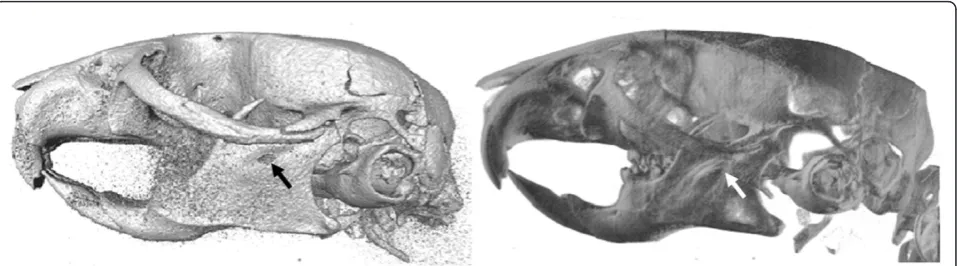
threshold is locally too high (Figure 1, left).
In contrast, volume rendering operates by assigning
each voxel an opacity based on its intensity, and a
reflectivity based on an intensity gradient, and then
modelling the passage of multiple light rays through the
volume. In this way, every voxel is taken into account,
mitigating problems with pseudo-fenestrations and
noise, and providing the user with a more informative
representation of the data (Figure 1, right). Although the
problems of surface rendering are well understood, it is
often preferred, because it requires less computing
power. Volume rendering has traditionally been too
slow to allow real-time user interaction; however,
advances in accelerated 3D graphics hardware and in
rendering techniques, such as the shear-warp algorithm
[9] implemented in the Volpack library [10] used by the
TINA Manual Landmark tool, have largely removed this
limitation.
The working of the software
The TINA Manual Landmarking Tool (described in
detail in Additional files 2 and 3) imports stacks of
DICOM files or any subset thereof. The loaded data can
be down-sampled by averaging across neighbouring
vox-els. For high-resolution datasets, down-sampling
increases both the speed of the volume rendering and,
through noise reduction, the quality of the rendered
images. The scanned specimen can be displayed on four
different windows, so-called Tv
’
s, one giving a 3D
visua-lization and the other three orthogonal 2D
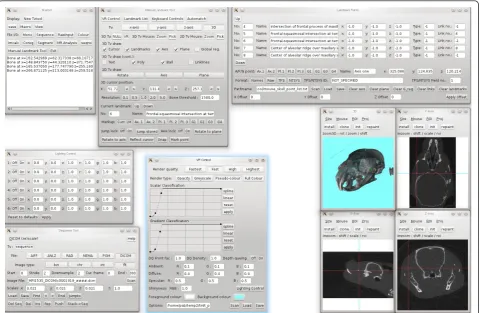
cross-sec-tions (Figure 2, Additional file 4). The 3D Tv has several
options for the volume rendering itself as well as for
additional settings. For example, it is possible to render
any specific surface, or to produce a translucent
render-ing of all surfaces simultaneously, to change the
direc-tion, intensity, and colour of the lighting, set the
background colour, and use several other criteria for the
display of specimens.
The simultaneous display of the three 2D Tv
’
s has an
additional advantage in the use for multilayered
struc-tures, e.g. fish skulls, where the inner structures are
cov-ered by the outer ones, or noisy data, e.g. from
specimens fixed in unbuffered formalin (Figure 3).
If previous landmarks are available, they can be
imported from a text file with running numbers and
descriptions, both being visible during the digitization
process (Additional file 5). Landmarks and their
num-bers can also be displayed in the 3D Tv. For bilaterally
symmetric structures it is possible to load another file
containing information about points on the sagittal
plane and paired points on both sides, thus enabling the
drawing of linking lines between corresponding
land-marks. The latter two options also allow a quick, visual
check that the points have been marked in correct
order.
All four Tv
’
s have a synchronized cursor, indicating
the same position in all of them, which enables the user
to very accurately pick extreme points, like the anterior
most or dorsal most position of any structure, by
mov-ing the cursor into the desired direction in one window
and then marking the first pixels of the structure to
appear or disappear in another Tv. The software also
supports the definition of an arbitrary plane and axis to
increase the precision with which extremal points are
identified (Additional file 6). A plane is defined by three
landmarks, e.g. in the sagittal plane of a bilaterally
sym-metric structure, an axis by two end points that may or
may not also be used as plane points. When both plane
and axis are defined, the object can be rotated
accord-ingly, thus allowing views from precisely defined angles
in all spatial directions, as well as a more reproducible
Figure 1Differences of surface rendering and volume rendering. Two different representations of the same skull rendered with two methods. Surface rendering (left) from Amira 5.2., volume rendering (right) from the TINA Manual Landmarking Tool. Note the
pseudofenestration e.g. at the end of the incisor in the mandible in the surface rendering (arrows).
Schunkeet al.Frontiers in Zoology2012,9:6 http://www.frontiersinzoology.com/content/9/1/6
Figure 2User interface of the TINA Manual Landmarking Tool. Screenshot of the TINA Manual Landmarking Tool during digitizing session. See text for more details.
digitization of extreme points relative to the defined
geometry.
Landmarks identified using the 3D Tv of the TINA
Manual Landmark Tool will automatically be placed
on top of the first structure whose density is above a
user-defined threshold. The default setting
corre-sponds to that of mouse skull bone in a CT scan, but
it can be changed to any desired value. So, if e.g. a
skull is scanned in a live specimen, the landmark
would pass through air and soft tissue and would be
placed on the first bony structure it meets, if the
threshold is set accordingly. Although this is a very
convenient supplementary feature for placing such
landmarks, the use of a threshold in this way could
introduce errors or bias, since the location of the
landmark would be dictated by pixel intensity, with
no account taken of the image noise or local
varia-tions in surface intensity. Therefore, the location can
then be refined using the 2D windows by moving the
cursor with mouse or arrow keys.
After all landmarks are placed, the resulting
coordi-nates can be saved and exported as TPS or NTSYS files,
which allow all further statistical analyses such as
princi-pal component analyses or canonical variates analyses
using e.g. the IMP series [11], MorphoJ [12], or R [13].
The majority of functions can either be conducted
with the mouse buttons or with keyboard shortcuts.
Default options for both are provided, but they can be
customized to a large extent, e.g. for left-handed users.
Discussion
The TINA Manual Landmarking Tool was developed in
collaboration between computational scientists and a
morphologist. This ensures on the one hand that
com-puting power is optimally used and thus allows the
implementation of the computational demanding, but
for practical purposes superior volume rendering
proce-dure on normal PCs. It ensures also that the tools that
are offered reflect the needs of a practicing
morpholo-gist. To assess the performance of the software, we have
compared the time and precision with which landmarks
can be placed in positions corresponding to different
types of landmarks ([14], Additional file 7), using either
volume rendering plus the orthogonal cross-sections
and defined axes in the TINA Manual Landmarking
Tool (Additional file 8) or a typical surface rendering
without defined axes in the commercially available
soft-ware Amira 5.2 [8]. We found that a new user needs
approximately the same time for locating landmarks in
both software tools, but the precision of repeatedly
iden-tifying the same landmark is higher for landmarks
placed at extremal points (type 3 landmarks according
to [14]) with the TINA Manual Landmarking Tool
(Additional files 9, 10).
Availability
A Knoppix CD version for testing purposes (i.e. to be
run directly from the CD - no need for installation) can
be downloaded from
http://www.tina-vision.net/tina-knoppix/iso/ with a demo version including a mouse
skull dataset with all appropriate settings, giving an
impression of how the program works. This version
supports also loading of datasets e.g. from a USB stick,
although necessarily with relatively long loading times.
Nonetheless, this enables a potential user to check
whether the intended datasets work with the tool before
performing a full installation of the software. Further
information on new developments on this software is
continuously updated at http://www.tina-vision.net.
Additional material
Additional file 1: Landmark Analysis Software Review. This includes a comparative evaluation of available landmark analysis software, describing the various features and problems. Written by by H. Ragheb, N.A. Thacker and P.A. Bromiley.
Additional file 2: The TINA Manual Landmarking Tool. This file is the manual for the Manual Landmarking Tool by P. A. Bromiley. It contains detailed information on the download, installation and use of the software. Updates are available at http://www.tina-vision.net/docs/ memos.php, file 2010-007.
Additional file 3: Tina 5.0 User’s Guide. The file gives additional information on the TINA software in general, including features not used for the landmarking procedure.
Additional file 4: Movie of loading and volume rendering procedure. This video shows the process of starting the TINA Manual Landmark tool and loading data. The user first starts the Manual Landmark tool and the Volume Rendering dialog box, opens a number of Tv’s (graphics display windows), and starts the Sequence tool, which is used for loading 3D medical images. Four of the Tv’s are associated with the various 2D graphics output streams of the Manual Landmark tool and the Sequence tool. The user then loads a DICOM image volume containing a 3D micro-CT image of aMus musculusskull with a size of 658 × 658 voxels × 1000 slices, setting the down-sampling factor to 2 on all axes of the volume. Once the data has been loaded, the tool automatically initialises the 3D cursor (the red cross-hair) at the centre of the volume and displays three orthogonal slices through this point, aligned with the major axes of the volume. The user then switches the volume renderer on, and displays its output on the remaining Tv. The parameters of the volume renderer are then adjusted to produce an image showing the bone surface. Finally, two of the volume renderer options files distributed with the software are loaded. The first gives a pseudo-colour output, in which a grey scale rendering is given a coloured background (the foreground colour can also be adjusted in this mode to tint the grey scale rendering). The second gives a full colour rendering with multiple coloured, directional light sources.
Additional file 5: Movie of landmarking procedure. This video follows on from the previous one and shows the process of identifying a landmark point. The user first loads a simple text file containing a list of landmark names and numbers; in this case the list contains only one point. The 3D rendering is then rotated so that the left-hand coronoid process is visible, and the mouse interaction is switched from“zoom” mode, which allows the rendered image to be rotated, into“pick”mode, which allows landmark points to be identified. The user places the mouse cursor approximately above the tip of the coronoid process, and left-clicks on that point. The software calculates the vector passing through the data beneath the mouse cursor, and identifies the first point along this vector with an intensity higher than the threshold specified in the Manual Landmark tool. The 3D cursor (shown by the red cross-hair)
Schunkeet al.Frontiers in Zoology2012,9:6 http://www.frontiersinzoology.com/content/9/1/6
is moved to this point and the three 2D Tvs are automatically updated to show projections through the new 3D cursor position, aligned with the major axes of the volume. The user then selects the 2D Tv’s and, using keyboard interaction, moves the position of the 3D cursor so that it lies exactly on the tip of the coronoid process, before clicking on the
“mark point”button to store the coordinates of the 3D cursor in the list of landmark points. The 3D Tv display options are adjusted so that identified landmark points are displayed, and the 3D cursor is moved to an arbitrary point on the top of the skull so that the landmark point (the green sphere) can be seen clearly. Finally, the landmark point
coordinates are output to a file in TPS format.
Additional file 6: Movie of geometry functions. This video follows on from the previous one and provides a simple example of the use of the geometry functions implemented in the software. The user follows the same landmark point identification procedure demonstrated in the previous video. However, rather than identifying the points in the landmark list, the selection in the“markup”choice list is adjusted so that the coordinates of the identified points are stored in the three“plane points”. The user identifies three points on the plane of bilateral symmetry, and then adjusts the 3D Tv view properties to display the plane points (the three blue spheres) and a grid representing the plane defined by these three points (the blue grid). The user then
demonstrates one possible use of the geometry functions. The 3D cursor is moved to the position previously identified as a landmark point on the tip of the left-hand coronoid process, by selecting“current landmark”in the markup choice list and pressing the“jump stored”button. The 3D cursor is then projected through the plane specified by the three plane points using the“reflect cursor”function, so that it lies on the opposite side of the volume. In this way, the 3D cursor is placed close to the tip of the right-hand coronoid process; this functionality can be used to accelerate the landmark identification process when the landmark point list contains points arranged symmetrically about the plane of bilateral symmetry. The geometry functions also support the definition of an arbitrary axis defined by two“axis points”. The“rotate to plane”and
“rotate to axis”buttons will adjust the viewing direction of the 3D Tv so that it lies along the plane normal and the axis lies along the x-direction of the Tv. These functions facilitate the identification of landmark points that are defined as extremal points on specific structures from a specific viewing direction.
Additional file 7: List of landmarks used for test of accuracy. Landmarks were assigned to the three landmark types 1, 2, and 3 (see text for details). The first three landmarks were used to define the median plane (PL1-3), landmarks 4 and 5 to define the horizontal axis (A1-2).
Additional file 8: Landmarks used for accuracy test. Skulls, landmarks, planes, and axes used in the test for accuracy of repeated
measurements. Left:Microtus(lateral view), middle:Mus(dorsal view), right:Pachyuromys(lateral view).
Additional file 9: Time needed for taking twelve landmarks in ten repetitions. This plot shows the increase of speed in repeatedly taking a set of twelve landmarks on three different skulls for an experienced (left) and an inexperienced user (right). Grey: landmarks taken based on surface rendering (SR), black: landmarks taken using volume rendering (VR). Y-axis: time in minutes.
Additional file 10: Precision of landmarks with different methods. The distance in voxels from the median of the respective landmark position was taken and grouped for each landmark type (see text for details). Left: experienced user, right: inexperienced user; SR: surface rendering, VR: volume rendering.
Acknowledgements
We wish to thank Thomas Kaiser, Zoologisches Museum Hamburg, and Rainer Sonnenberg, Plön, for providing specimens as examples for problematic 3D data sets, and Filipe Oliveira Da Silva for performing numerous measurements of skulls for the analysis of repeatability. The project is funded by the Max Planck Society, Project“Automatic Identification of 3D Landmarks in Micro-CT Mouse Skull Data”.
Author details
1Max Planck Institute for Evolutionary Biology, Department for Evolutionary
Genetics, August-Thienemann-Str. 2, 24306 Plön, Germany.2Imaging Science and Biomedical Engineering, School of Cancer and Imaging Sciences, University of Manchester, Stopford Building, Oxford Road, Manchester M13 9PT, UK.
Authors’contributions
ACS listed the requirements for precise and reproducible placement of landmarks, tested earlier versions of the software and suggested
improvements, and drafted the manuscript. PAB developed the TINA Manual Landmarking Tool. DT and NAT initiated and supervised the project. All authors read and approved the final manuscript.
Received: 21 December 2011 Accepted: 5 April 2012 Published: 5 April 2012
References
1. Boell L, Tautz D:Micro-evolutionary divergence patterns of mandible shapes in wild house mouse (Mus musculu) populations.BMC Evolutionary Biology2011,11:306.
2. Cardini A, Elton S:Does the skull carry a phylogenetic signal? Evolution and modularity in the guenons.Biological Journal of the Linnean Society 2008,93:813-834.
3. Cox PG, Fagan MJ, Rayfield EJ, Jeffery N:Finite element modeling of squirrel, guinea pig and rat skulls: using geometric morphometrics to assess sensitivity.Journal of Anatomy2011,219:696-709.
4. Cramon-Taubadel Nv:Global human mandibular variation reflects differences in agricultural and hunter-gatherer subsistance strategies.
PNAS2011, doi: 10.1073/pnas.1113050108.
5. Marcus LF, Hingst-Zaher E, Zaher H:Application of landmark morphometrics to skulls representing the orders of living mammals.
Hystrix2000,11:27-47.
6. Meloro C, O’Higgins P:Ecological Adaptations of Mandibular Form in Fissiped Carnivora.Journal of Mammalian Evolution2011,18:185-200. 7. Singh N, Harvati K, Hublin JJ, Klingenberg CP:Morphological evolution
through integration: A quantitative study of cranial integration inHomo, Pan, GorillaandPongo.Journal of Human Evolution2012,62:155-164. 8. Amira 5.2.[http://www.amira.com].
9. Lacroute P, Levoy M:Fast Volume Rendering using a Shear-Warp Factorization of the Viewing Transform.Proc SIGGRAPH’94: 24-29 July Orlando: Florida; 1994, 451-458.
10. Volpack Volume Rendering Library.[http://graphics.stanford.edu/software/ volpack].
11. Sheets HD:IMP series.[http://www.canisius.edu/~sheets/morphsoft.html]. 12. Klingenberg CP:MorphoJ: an integrated software package for geometric
morphometrics.Molecular Ecology Resources2011,11:353-357. 13. R Development Core Team:R: A language and environment for statistical
computingR Foundation for Statistical Computing, Vienna, Austria; 2009 [http://www.R-project.org], ISBN 3-900051-07-0.
14. Bookstein FL:Morphometric Tools for Landmark DataCambridge, Cambridge University Press: Geometry and Biology; 1991.
doi:10.1186/1742-9994-9-6
Cite this article as:Schunkeet al.:TINA manual landmarking tool: software for the precise digitization of 3D landmarks.Frontiers in Zoology