Resource Checking
Windows 95/98/NT Resource Checking Manual
for PCI/ISA DAQ card
[For Windows 95/98/NT]Warranty
All products manufactured by ICP DAS are warranted against defective materials for a period of one year from the date of delivery to the original purchaser.
Warning
ICP DAS assumes no liability for damage consequent to the use of this product. ICP DAS reserves the right to change this manual at any time without notice. The information furnished by ICP DAS is believed to be accurate and reliable. However, ICP DAS assumes no responsibility for its use, or for any infringements of patents or other rights of third parties resulting from its use.
Copyright
Copyright 1997-1999 by ICP DAS. All rights are reserved.
Trademark
The names used for identification only maybe registered trademarks of their respective companies.
License
The user can use and backup this software on a single machine. The user may not reproduce, transfer or distribute this software, or any copy, in whole or in part.
Table of contents
1 PCI DAQ card with Windows 95/98 ... 3 2 ISA DAQ card with Windows 95/98 ... 6 3 PCI/ISA DAQ card with Windows NT... 11
1 PCI DAQ card with Windows 95/98
Please follow the following figures to check the resource if it has no conflicts?
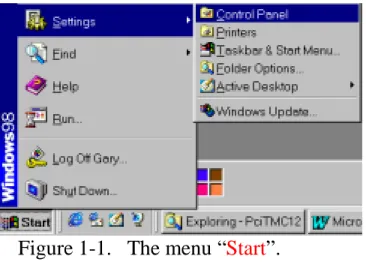
Figure 1-1. The menu “Start”.
• Click the button “Start”.
• Select the menu items “Settings”.
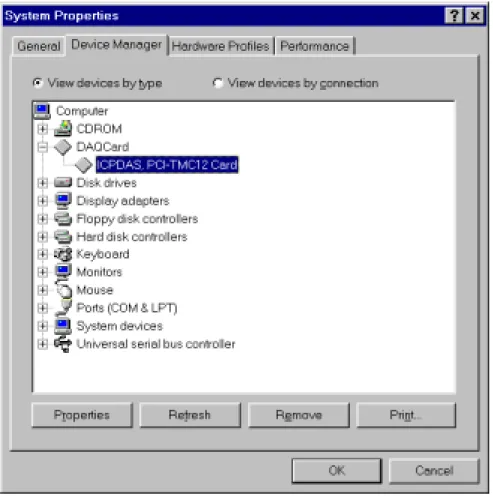
Figure 1-3. The window “System properties”.
• Select the page “Device Manager”.
• Select the device “ICPDAS, PCI-TMC12 Card” under the item “DAQCard”.
• Click button “Properties” to see the detailed information. Some PCI cards may be under item “Other Devices”.
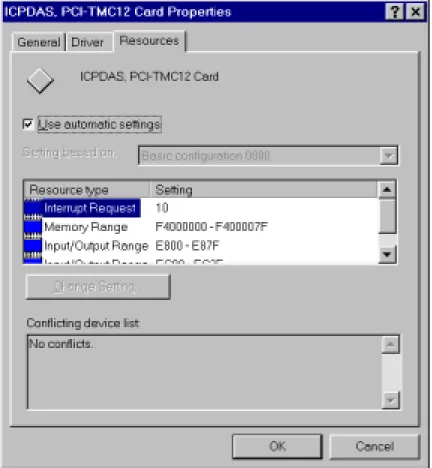
Figure 1-4. The detailed information of PCI DAQ card.
• Select the page “Resources”.
• Please ensure that this device has no conflicts with other devices.
• Refer to the list box “Conflicting device list:” if it is “No conflicts”?
If the IRQ number has conflicts with other devices, the user must not use the function INTERRUPT and DMA with the DAQ card.
If the DMA number has conflicts with other devices, the user must not use the function DMA with the DAQ card.
If the “Input/Output Range” has conflicts with other devices, this DAQ card will not works.
The user may need to free some resource for the PCI DAQ card by unplug some other devices to prevent the conflicts.
2 ISA DAQ card with Windows 95/98
Please follow the following figures to check the resource if it has no conflicts?
Figure 2-1. The menu “Start”.
• Click the button “Start”.
• Select the menu items “Settings”.
• Select the menu items “Control Panel”.
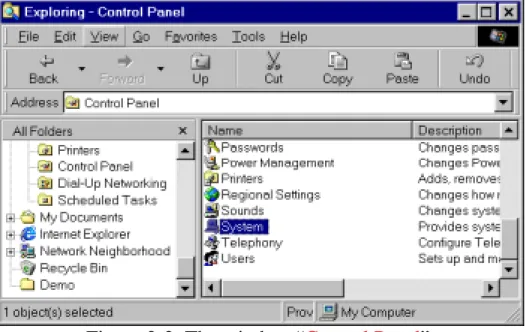
Figure 2-2. The window “Control Panel”.
Figure 2-3. “Device Manager”.
• Select the page “Device Manager”.
• Select the item “Computer”.
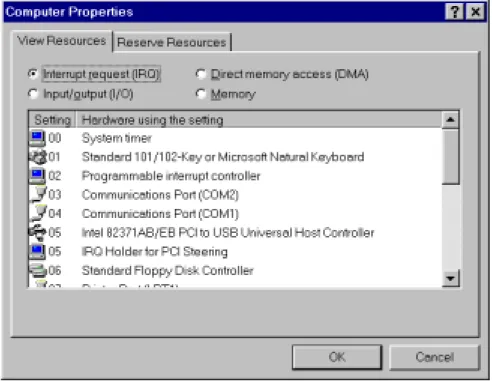
Figure 2-4. “View Resources”.
The user must check the resource IRQ if the ISA DAQ card has no conflicts with other devices?
The IRQ of ISA DAQ card will not shown in the above window. And the user must select the IRQ number of ISA DAQ card by setting the jumper. And the IRQ number must not listed in the above window to prevent the conflicts.
If the Windows 95/98 has no additional IRQ to be used by the ISA DAQ card, the user may need to unplug some other devices to free the IRQ resource. Or, the user must not uses the function INTERRUPT and DMA.
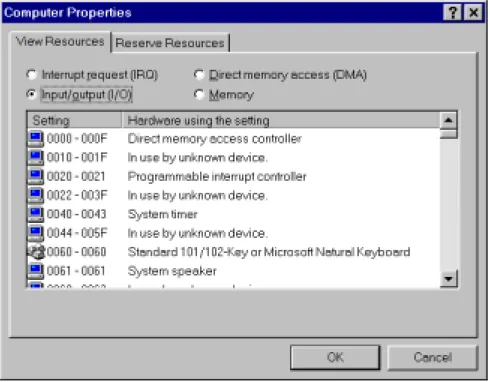
Figure 2-5. “View Resources”.
• Click the item “Input/Output (I/O)” to see the resource.
The user must check the resource “Input/Output (I/O)” address if the ISA DAQ card has no conflicts with other devices?
The “Input/Output (I/O)” address of ISA DAQ card will not shown in the above window. And the user must select the “Input/Output (I/O)” address of ISA DAQ card by setting the switch. And the “Input/Output (I/O)” address must not listed in the above window to prevent the conflicts.
If the Windows NT has no additional “Input/Output (I/O)” address to be used by the ISA DAQ card, the user MUST to unplug some other devices to free the “Input/Output (I/O)” address resource.
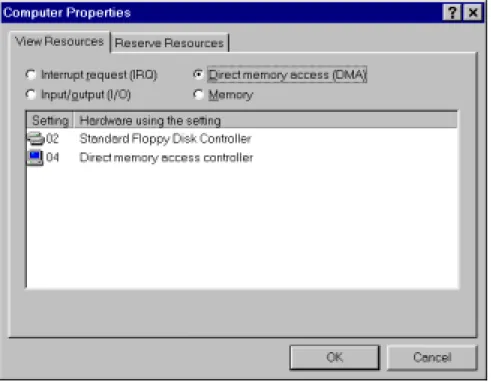
Figure 2-6. “View Resources”.
• Click the item “Direct memory access (DMA)” to see the resource DMA.
The user must check the resource “Direct memory access (DMA)” if the ISA DAQ card has no conflicts with other devices?
The “Direct memory access (DMA)” of ISA DAQ card will not shown in the above window. And the user must select the “Direct memory access (DMA)” number of ISA DAQ card by setting the jumper. And the
“Direct memory access (DMA)” number must not listed in the above window to prevent the conflicts.
If the Windows NT has no additional “Direct memory access (DMA)” to be used by the ISA DAQ card, the user may need to unplug some other devices to free the “Direct memory access (DMA)” resource. Or, the user must not uses the function DMA.
3 PCI/ISA DAQ card with Windows NT
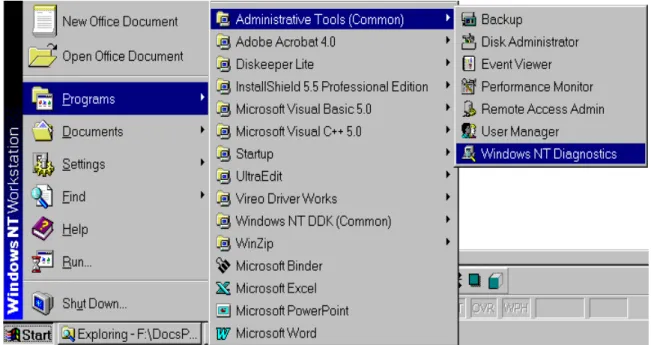
Please follow these figures to check the resource on Windows NT. The user may need to free the resource by unplug some other devices If the DAQ card have been conflicted.Figure 3-1. Click the button “Start”.
• Select the menu items “Programs”.
• Select the menu items “Administrative Tools (Common)”.
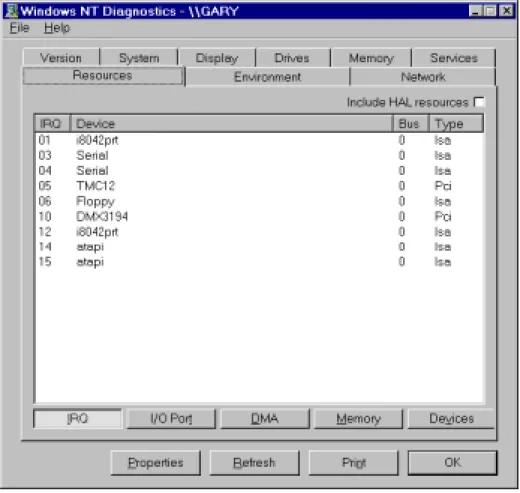
Figure 3-2. Click the page “Resources”.
The user must check the resource IRQ if the PCI/ISA DAQ card has no conflicts with other devices?
The IRQ of ISA DAQ card will not shown in the above window. And the user must select the IRQ number of ISA DAQ card by setting the jumper. And the IRQ number must not listed in the above window to prevent the conflicts.
If the Windows NT has no additional IRQ to be used by the PCI/ISA DAQ card, the user may need to unplug some other devices to free the IRQ resource. Or, the user must not uses the function INTERRUPT and DMA.
Figure 3-3. Click the button “I/O Port”.
The user must check the resource I/O Port address if the PCI/ISA DAQ card has no conflicts with other devices?
The I/O Port address of ISA DAQ card will not shown in the above window. And the user must select the I/O Port address of ISA DAQ card by setting the switch. And the I/O Port address must not listed in the above window to prevent the conflicts.
If the Windows NT has no additional I/O Port address to be used by the PCI/ISA DAQ card, the user MUST to unplug some other devices to free the I/O Port address resource.
Figure 3-4. Click the button “DMA”.
The user must check the resource DMA if the PCI/ISA DAQ card has no conflicts with other devices?
The DMA of ISA DAQ card will not shown in the above window. And the user must select the DMA number of ISA DAQ card by setting the jumper. And the DMA number must not listed in the above window to prevent the conflicts.
If the Windows NT has no additional DMA to be used by the PCI/ISA DAQ card, the user may need to unplug some other devices to free the DMA resource. Or, the user must not uses the function DMA.
Figure 3-5. The window of “Service Control Manager” pops up when some service or driver failed.
In this case, the user must check the “Event Viewer” of Windows NT to find out the problems. Please follows the following figures to see the detailed informations.
Figure 3-6. Click the button “Start”.
• Select the menu item “Programs”.
• Select the menu item “Administrative Tools (Common)”.
Figure 3-7. The window “Event Viewer”.
The user can double-click on the item to see the detailed informations.
Figure 3-8. The window “Event Detail”. The user can refer to the message of the field Description to find out the (other)