January 2009
A Constraint-Based ITS for the Java
Programming Language
A thesis submitted in partial fulfilment of the requirements
for the Degree of Master of Science in Computer Science
in the University of Canterbury by
Jay Holland
Supervisor: Professor Dr. Antonija Mitrovi´c
Associate Supervisor: Dr. Brent Martin
Examiner: Dr. Peter Andreae
1Programming is one of the core skills required by Computer Science undergraduates in tertiary institutions worldwide, whether for study itself, or to be used as a tool to explore other relevant areas. Unfortunately, programming can be incredibly difficult; this is for several reasons, including the youth, depth, and variety of the field, as well as the youth of the technology that frames it. It can be especially problematic for computing neophytes, with some students repeating programming courses not due to academic laziness, but due to an inability to grasp the core concepts. The research outlined by this thesis focuses on our proposed solution to this problem, a constraint-based intelligent tutoring system for teaching the Java programming language, named J-LATTE.
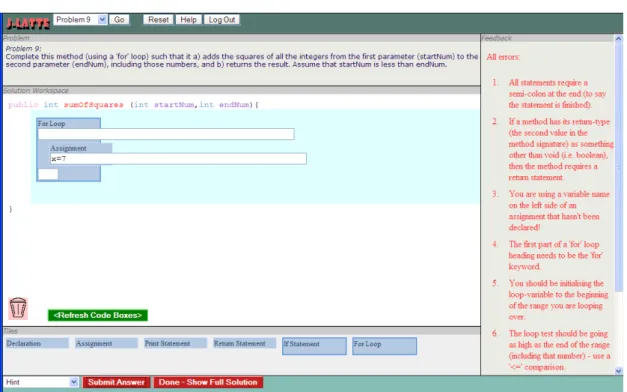
J-LATTE (Java Language Acquisition Tile Tutoring Environment) is designed to solve this problem by providing a problem-solving environment for students to work through programming problems. This environment is unique in that it partitions inter-action into a concept mode and a coding mode. Concept mode allows the student to form solutions using high-level Java concepts (in the form of tiles), and coding mode allows the student to enter Java code into these tiles to form a complete Java program. The student can, at any time, ask for feedback on a solution or partial solution that they have formed.
A pilot study and two full evaluations were carried out to test the effectiveness of the system. The pilot study was run with an assignment given to a postgraduate Computer Science course, and because of the advanced knowledge level of the students, it was not designed to test teaching effectiveness, but instead was useful in determining usability issues and identifying any software errors.
effectiveness of J-LATTE, by comparing the results of using the system against a sim-ulated classroom situation. Unfortunately, the participant base was small, for several reasons that are explained in the thesis. However, the results prove interesting oth-erwise and for the most part are positive towards the effectiveness of J-LATTE. The participants’ knowledge did improve while interacting with the system, and the subjec-tive data collected shows that students like the interaction style and value the feedback obtained.
Abstract i
List of Figures vii
List of Tables ix
Acknowledgements x
Chapter 1 Introduction 1
1.1 Intelligent Tutoring Systems . . . 2
1.2 The Difficulty of Learning Programming . . . 3
1.3 J-LATTE: Teaching Java with Constraints . . . 4
1.4 Thesis Outline . . . 5
Chapter 2 Intelligent Tutoring Systems 6 2.1 Architecture . . . 8
2.2 Student Modelling . . . 10
2.2.1 Model-Tracing . . . 11
2.2.2 Constraint-Based Modelling . . . 13
Chapter 3 Programming 16 3.1 The Java Programming Language . . . 17
3.2 Important Programming Constructs . . . 18
3.3 Programming Environments . . . 23
3.3.1 Text Editors . . . 24
3.3.2 Programming Editors . . . 24
3.3.3 IDEs . . . 26
3.4 Intelligent Programming Tutors . . . 29
3.5 Discussion . . . 35 Chapter 4 Design 39 4.1 Approach . . . 40 4.2 Curriculum . . . 45 4.3 Problem Design . . . 46 4.4 Constraint Design . . . 49 4.4.1 Syntactic Constraints . . . 51 4.4.2 Style Constraints . . . 51
4.5 Verifying Semantic Correctness . . . 52
4.5.1 Ideal Solutions . . . 55
4.5.2 Semantic Constraints . . . 56
Chapter 5 Implementation 57 5.1 Architecture . . . 57
5.2 Problem Solving Interface . . . 58
5.2.1 Loading a Problem . . . 60
5.2.2 Solution Formation . . . 61
5.2.3 Solution Submission . . . 65
5.2.4 User Interaction Process Summary . . . 67
5.4 Client . . . 69
5.4.1 Internal Student Solution Representation . . . 69
5.4.2 Tile Manipulation Implementation . . . 71
5.4.3 Solution Submission . . . 72
5.5 Server . . . 73
5.5.1 Problem Representation . . . 74
5.5.2 Student Solution Representation . . . 78
5.5.3 Constraint Representation . . . 81 5.5.4 Solution Evaluation . . . 84 5.5.5 Student Modeller . . . 85 Chapter 6 Evaluation 87 6.1 Pilot Study . . . 87 6.1.1 Results . . . 88
6.2 Evaluation Study 1 (August 2007) . . . 89
6.2.1 Recruitment of Participants . . . 91
6.2.2 Experimental Design . . . 92
6.2.3 Results and Analysis . . . 95
6.3 Evaluation Study 2 (August 2008) . . . 98
6.3.1 Experimental Design . . . 99
6.3.2 Procedure . . . 100
6.3.3 Results and Analysis . . . 101
Chapter 7 Conclusions 105 7.1 J-LATTE . . . 105
7.2 Evaluation . . . 106
References 110
Appendix A Information Sheet 118
Appendix B Consent Form 120
Appendix C Pre and Post Tests 122
Appendix D Questionnaire 127
2.1 A Typical ITS Architecture . . . 8
2.2 Model-tracing production rule example . . . 12
2.3 CBM constraint examples for the SQL domain . . . 14
3.1 Java Source Code: plain vs syntax coloured and indented . . . 24
3.2 Interface of BlueJ . . . 28
3.3 GREATERP production rule example . . . 31
4.1 Example of an algorithm represented in pseudo-code . . . 43
4.2 Java domain ontology, as developed in CAS . . . 50
4.3 Syntactic constraint design: from grammar to natural-language constraint 51 4.4 Example of multiple valid solutions to a single problem . . . 53
4.5 Semantic constraint example . . . 56
5.1 System Architecture of J-LATTE . . . 58
5.2 J-LATTE Interface Layout (Coding Mode) . . . 59
5.3 Interface - Problem Description . . . 60
5.4 Solution Workspace (initial state) . . . 63
5.5 Solution Workspace (with formed solution) . . . 63
5.6 Interface - Tile Pane . . . 64
5.7 Interface - Dragging Action. . . 64
5.8 Interface - Context . . . 65
5.9 Interface - Feedback Pane . . . 67
5.10 Complete solution for “Predicate” problem in Listing 5.1 . . . 72
5.11 Complete solution for “Printing” problem . . . 74
5.12 Complete solution for “Iteration” problem . . . 75
5.13 Ideal Solution Grammar . . . 79
6.1 Probability of violating a constraint for the 2007 evaluation . . . 97
6.1 Evaluation 2007: System interaction statistics . . . 95
6.2 Evaluation 2007: Pretest and posttest scores . . . 96
6.3 Evaluation 2007: Mean scores from the questionnaire . . . 98
6.4 Evaluation 2008: System interaction statistics . . . 101
6.5 Evaluation 2008: Pretest and posttest scores . . . 103
6.6 Evaluation 2008: Mean scores from the questionnaire . . . 104
Where does one begin? The start (preferably). Better make yourself a cup of coffee, this could take a while.
Firstly, a broad, sweeping, inclusive statement, to which anyone who says “You left me out!” can be referred to: I would like to thank my family and friends, for their support and for putting up with my absence. Excellent! Thanks to my parents, for understanding that “I’m actually quite busy” means I’m actually quite busy. To my long-term housemates, Sean and Tanya, for precisely the same reason (but with having even more patience).
To my research group, ICTG, for all the discussions and feedback. To my partners in (MSc.) crime, Kon Zakharov and Nancy Milik, with whom I now have a large repertoire of inside jokes that nobody else will ever understand, no matter how well we explain them or how many cats we free. To Moffat Mathews, for encouragement, kindness, and showing me the meaning of Christmas. To my associate supervisor, Dr. Brent Martin, whose comments and questions helped make this thesis that-much-better. To everyone else in the group, in no particular order1, Amanda, Pramudi, Amali, Sharon, David,
Aidan, Nilufar, Devon, Martin, and Linda, you guys have increased the fun value by an order of magnitude (maybe more, but my data collection on this issue was a bit imprecise).
To the academic and general staff of CSSE at the University of Canterbury, thanks for creating a great place to do this kind of research. Gillian, Alex, Phil and the pro-grammers, you keep the CSSE world turning! To my many current and former col-leagues in CSSE, for friendship and lunchtime hijinks2 - Jason, Ray, Delio, Sascha,
Andrew(s), Jung, Adrian, Xianglin, Annabel, Taher, Mohammad, Rana, Oliver(s), Amadeus, Rowan, Neha, Tae, The Chia, Pubudini, Eri, Marissa, Sum, Ki, Simon, Kieran, Jarrod, Keji, Ahmed, Marco, Asmeet, and many, many others.
To Nancy (twomentions? You lucky thing), who, with the powers of persuasion that we all know, encouraged me to embark on the adventure that is postgraduate study (and yes, I am thanking you for this!).
And finally, my greatest gratitude3goes to my supervisor, Professor Tanja Mitrovi´c.
There are no words (not even these!) that can express how valuable your guidance and encouragement has been over the last four years, as well as your patience. No matter how busy you have been, you have always had time to address my (and all of our) many questions, and your generosity in so many ways towards us has created something that is more akin to a family than a group. The forthcoming nomination for sainthood is just a small yet insufficient token of our appreciation.Hvala lepo!
2Hijinks = eating lunch and discussing Slashdot. We’re wild and crazy guys! 3Anyone who has been supervised by her will certainly understand.
CHAPTER
1
Introduction
Acquisition of computer programming skill is a core component of the Computer Sci-ence curriculum, a fact reflected by the many first-year tertiary prescriptions that require a student to undertake some kind of programming course. There are many aspects to programming theory, such as program control-flow and scope, and this variety can make it difficult for students already lacking a suitable information technology background. It is generally accepted that the best way to introduce these ideas is through the teaching of a specific language. The Java programming language provides an appropriate introduc-tory programming syllabus. Due to its low-level abstractions and system-independent nature, the student is able to concentrate more on the general programming concepts rather than system idiosyncrasies.
Although programming courses tend to have material taught in lectures, most of the learning reinforcement takes place in laboratories, where practical tasks are carried out. An increasingly popular and effective way of improving student learning is through Intelligent Tutoring Systems (ITSs), which enhance learning by providing feedback personalised to a student. These have been shown to be effective for many different
disciplines and areas, including mathematics [Koedinger et al., 1997], physics [Gertner and VanLehn, 2000], and database design [Suraweera and Mitrovic, 2004].
The J-LATTE (Java Language Acquisition Tile Tutoring Environment) system is our attempt to teach the Java language to students, through a tutor that utilises the constraint-based modelling (CBM) methodology [Ohlsson, 1994]. By using constraints, we do not have to restrict the student to a set path while forming a solution, and with a constraint set that sufficiently covers the domain of Java programming, any solution that is valid for the domain is valid for the system. The only exception to this is that the system, in the interest of teaching good practice as well as syntactic and semantic correctness, also contains constraints that enforce good style (although these are not overly restrictive).
1.1 Intelligent Tutoring Systems
The ideal tutoring situation, in terms of learning effectiveness for a student, is one tutor to one student; it has been shown that these circumstances can have a significant (2 s.d) learning improvement over traditional classroom instruction [Bloom, 1984]. Unfortu-nately, for courses with many students it is not feasible to have one tutor per student due to both the lack of tutors with expertise and the economics involved in supplying each student with a tutor.
One modern solution to this problem is the ITS. ITSs are learning environments that have a goal of achieving tutoring effectiveness close to that of a human tutor. Using research from such diverse areas as artificial intelligence, education, and psychology, ITSs allow computers to be used as learning tools that come close to achieving this goal, which was impossible with earlier computer-based instruction. The core concepts of ITSs include reasoning about solutions to exercises, giving fine-grained feedback to
these solutions, keeping a model of the student’s knowledge of domain concepts, and using this student model to adapt instruction to suit the student’s knowledge.
1.2 The Difficulty of Learning Programming
Unfortunately, given the relative youth of the field compared to other disciplines, the important ideas unique to Computer Science, such as programming, are not widely dis-seminated into the wider human culture; due to this, and several other reasons, people new to the area find many of the concepts both difficult and alien. This is especially true of people who have not grown up with computers, and are having to simultaneously understand both the general concept of computing as well as the foreign nature of pro-gramming. The fact that most of the related technology is relatively fresh means that for many computing neophytes it’s not just a case of learning how to program - to even get to the useful stage where programming knowledge is acquired, software must be installed, compilers must be configured etc. The depth and variety of the field are also large obstacles; there are several different types of programming languages, styles, and methodologies. Just because you can write a simple program doesn’t mean your skills will scale up to larger and more complex tasks, especially if your understanding of the nature of programming is shallow. Also, programming is a complex process; it is not about acquiring facts and figures - to learn to program you must acquirenew cognitive skills.Another large difficulty with learning programming is that the problem is two-part; students have to learn how to design programs, as well as learn the language in which to write them. Often this is done all at once, as it is a ‘chicken and egg’ situation - design theory without the practical side leaves out the relevant context that gives a student a greater understanding, whereas a practical curriculum without the design side leads a
student to know what the ‘tools’ are, but are unable to combine them in a meaningful order. Therefore, learning program design and learning a language itself tend to be taught in a tightly-coupled way; the downside to this is that the student is overwhelmed with information. This is especially true with syntax in programming languages; a student may have a good grasp of the design aspects of programming, but is unaware of the fact because their program will not compile due to syntax errors. We believe that splitting design from coding will make learning easier.
1.3 J-LATTE: Teaching Java with Constraints
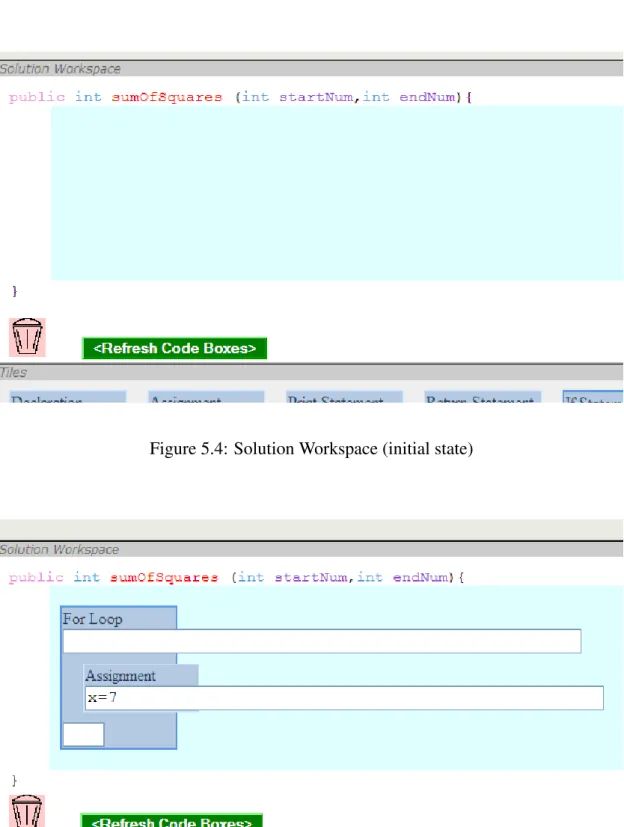
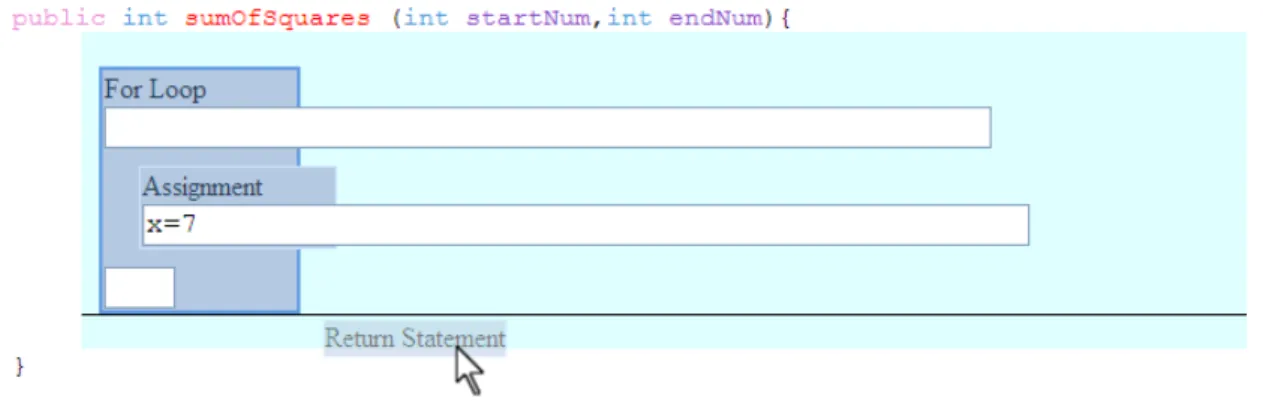
J-LATTE is our solution to tutoring Java programming. The system takes a novel ap-proach to handling the two-part problem of teaching both language and design, whilst reducing transfer problems. The student must form solutions to various programming problems; for this process, we abstract out the statement-level and block-level concepts (such as assignments, loops, and conditionals), so that the student does not need to work immediately with atomic Java elements such as keywords and semi-colons if they do not feel comfortable with them, but can operate at that level whenever they are ready.The environment that the system presents to the student is designed to reduce trans-fer problems while at the same time being easy to use. The final product of any solution the student submits will be a code listing, that will be compatible (with boilerplate code added) with any Java compiler. The abstracted concepts are represented by tiles, each containing a field that a student can complete with actual Java code. These tiles can be inserted and repositioned inside the student’s solution, until the student is happy with the program they have created.
Another reason for our approach is that an ITS in an unconstrained environment (for example, with raw code) would encounter difficulties when it came to diagnosing
solutions, because programming is very open-ended. In our approach the student is defining explicitly some of the higher meaning, therefore aiding the program during solution evaluation, which in turn allows the system to deliver better feedback.
1.4 Thesis Outline
In Chapters 2 and 3, we discuss the background of our research, covering Intelligent Tutoring Systems, Constraint-Based Modelling, and programming. In Chapters 4 and 5, we talk about our solution to the given problem, presenting the design decisions and the implementation details of our system. In Chapter 6 we discuss the evaluation of the system, and present the results of this evaluation. Finally, in Chapter 7, we draw conclusions about our solution from the evaluation results.
CHAPTER
2
Intelligent Tutoring Systems
Personal tutoring is one of the most effective ways of enhancing learning. Due to grow-ing populations, resource constraints, and the complexities of some fields, personal tu-tors are not always readily available, whereas computers are becoming more and more commonplace. From the early days of computing, Computer-Aided Instruction (CAI) and Computer-Based Instruction (CBI) have been prominent fields for research into how to achieve the same effectiveness as a personal human tutor (which often improve stu-dents’ scores over conventional classroom instruction by 2 standard deviations [Bloom, 1984]). CBI and CAI supplement classroom instruction by delivering instructional ma-terial to the student via a computer [Taylor, 1980]. The instructional mama-terials generally consist of selected readings, tutorials, or problems for drill and practice.
The first CAI systems were primitive in terms of how they reacted to the students’ behaviour; there was little or no adaptation to the student’s progress, and they generally just followed a script. The curriculum usually dictated the sequence of concepts or problems in the script and each student tracked the same path through the materials provided. This changed with the advent of ITSs (Intelligent Tutoring Systems).
ITSs are computer-based tutoring systems. Unlike earlier generations of teaching systems, they contain explicitly represented domain knowledge. This domain knowl-edge might be, for example, in the form of domain principles (called constraints) or procedural steps (called production rules). This allows ITSs to reason “intelligently” about the particular domain and provide the student with useful feedback at an appro-priate level of granularity. ITSs also calculate the proficiency of students in various concepts related to the field of the tutor, and use this information to personalise tutor-ing. This skill-tracking is known asstudent modelling, and is described in Section 2.2 in detail. An interdisciplinary field, ITS theory draws from psychology, linguistics, ar-tificial intelligence (AI) and education as well as computer science, as we try to model and understand the cognitive processes.
ITSs supplement classroom instruction by mimicking the actions of a personal tutor. Research in psychology and education has shown that each student is different in the way they learn; this includes their learning styles, their rate of learning a particular concept, and their ability to link concepts in a domain. While older generation systems were static in their delivery of content, ITSs are dynamic, enabling students to work at a level appropriate to their current knowledge. Instead of receiving a general message on submission of a particular solution, students receive feedback that is tailored to their current knowledge level and context. This allows the student to recognise their errors and learn from them [Ohlsson, 1996]. Feedback can also be scaffolded depending on expertise, allowing novices to be guided and instructed more than experts. The choice of material to deliver can be dynamic and individualised, based on suitability to the student’s current knowledge state and history.
ITSs are becoming increasingly popular owing to their effectiveness (students using state-of-the-art tutors can score around 1 standard deviation higher than students in a conventional classroom [Anderson et al., 1995]). In one study, high school students
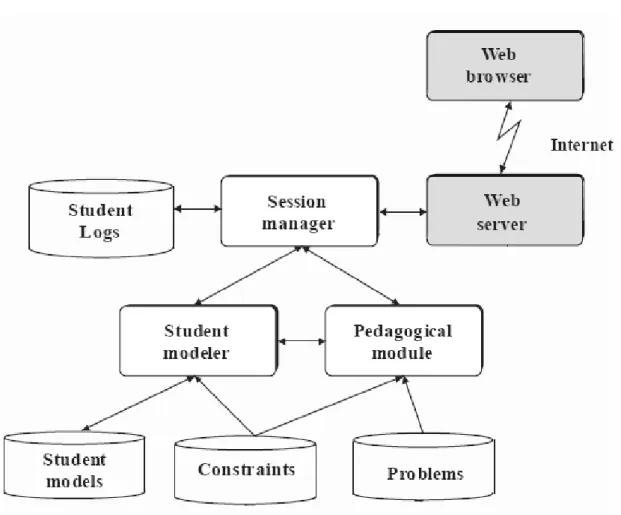
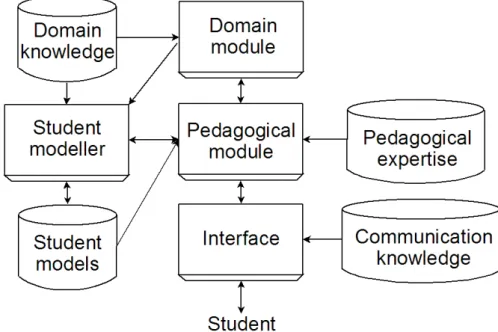
Figure 2.1: A Typical ITS Architecture
became so motivated that they went to extreme measures, such as skipping other classes, in order to use a particular system [Anderson et al., 1995]. ITSs have many advantages over regular CAI and ‘solo’ learning: the time taken for a student to learn is reduced, students may be able to acquire skills otherwise impossible learning ‘on your own’, and there is generally a greater understanding of the material.
2.1 Architecture
ITS architecture design has been specifically researched, with an ideal prototype being proposed [Beck et al., 1996]. Each ITS can be thought of being composed of several dis-tinct parts, which interact in various ways. A typical architecture is shown in Figure 2.1. The modularity of this architecture theoretically allows for switching out components for different versions. The following is a description of the components of an ITS.
The domain module provides an interface to information in the domain knowledge store, where knowledge about the tutor’s domain is stored (such as production rules or constraints, problems/exercises, and solutions). In some ITSs, the domain module is capable of solving problems.
The student modeller records information about the student’s current state of knowl-edge, and stores the information for each student in a student model. It also handles evaluations of student solutions against the domain-model. The student modelling pro-cess is described in Section 2.2.
The pedagogical module (PM) is responsible for all the teaching decisions made in the ITS. Decisions are based on information gathered from each student’s student model. The PM contains teaching strategies to maximise learning. These strategies vary between ITSs and are dependent on educational and learning theories.
Depending on the particular ITS implementation, the PM might decide on when a particular solution should be evaluated. One such strategy might leave the request for evaluation in the hands of the student, while another strategy might force an evalua-tion at particular points in the process (e.g. after each step). Some tutors also use a combination of both.
Problem selection strategies decide on how to select the ‘next best problem’ for a student [Mitrovic and Martin, 2003]. Feedback strategies select the level and type of feedback presented. They also determine the amount of feedback presented; for in-stance, feedback can be scaffolded depending on expertise. Metacognitive strategies se-lect the type of metacognitive instruction to be presented. For example, self-explanation strategies might ask the student to explain why they undertook a certain action [Weeras-inghe and Mitrovic, 2002]. Strategies can also be implemented to cope with various help-seeking behaviours [Aleven and Koedinger, 2000] and gaming [Baker et al., 2005].
Strategies that detect and encourage collaboration in collaborative tutors can also be im-plemented [Baghaei and Mitrovic, 2006].
Finally, the interface of an ITS allows the student to interact with the system, for example retrieving problems to work on, and entering and submitting solutions. A good ITS interface is designed such that it reduces the cognitive load on the student, so that the student can focus on solving the problem rather than trying to understand the representation. An ITS interface can also reduce the working memory load by providing glossaries to concepts in the domain.
2.2 Student Modelling
Student modelling is the process of describing the progress of students on concepts in a given domain, as an attempt to model each student’s cognitive process. By analysing a student’s results from previous problems and tests, a student model can be generated, describing how well a student knows each relevant topic. This information can be used to select the pedagogical method and material to tutor. Due to the amount of knowledge needed to be obtained to generate a comprehensive student model, it is agreed to be an intractable problem [Self, 1990]; research though has shown that a student model need not be complete or accurate to be practical.
A popular method for student modelling is model-tracing [Anderson et al., 1995], where problems are arranged procedurally with goals and subgoals, and the series of correct and incorrect procedures are recorded. A new paradigm, constraint-based mod-elling [Ohlsson, 1994], has recently emerged as a way of overcoming some of the disad-vantages of these established systems. Other student modelling approaches exist [Greer and McCalla, 1994], but model-tracing and constraint-based modelling are the most prominent methods. We now describe and compare these two approaches.
2.2.1 Model-Tracing
Model-tracing (MT) is a method of student modelling based on the ACT-R (Adap-tive Character of Thought-Rational) theory of learning [Anderson, 1996]. This the-ory states that goal-independent declarative knowledge (knowingwhatsomething is) is learnt through observation and instruction; declarative knowledge is later converted into goal-oriented production rules, which represent procedural knowledge (knowinghowto do something). Each production rule can represent part of a domain model; hence aset of production rules can provide varying degrees of coverage of a domain.
This theory has been used to generate eight principles for how to design tutors em-ploying MT, known ascognitive tutors. The first and main principle, related to student modelling, is that as a domain model can be represented by a production rule set, the student’s competence (i.e. student model) can be represented by the union of a) the student’s current correct knowledge, represented by a subset of the domain’s production rules, and b) the student’serroneous knowledge, represented by a set of buggy rules. The production rules represent a path or series of paths from the initial empty solution state to the completed solution state, whereas the buggy rules represent diversions from these paths, which represent possible yet incorrect actions in the context of this domain. A core feature of cognitive tutors is that the system’s domain module can generate, step-by-step, how to complete a problem. Therefore, interaction with such an ITS is dis-tinguished by immediate evaluation, and hence feedback, for each action that a student enters. If a student enters an incorrect action, then the tutor will inform the student that it was incorrect and why, and revert the solution back to after the last valid production rule. The system restricts the student from moving off the set path, meaning the system is in complete control of the possible solutions.
Although a cognitive tutor can still identify erroneous production rules by their ab-sence from the domain model, a bug library must be created in order to generate useful feedback for when an incorrect action occurs (otherwise the feedback would be vague, i.e. “This action is incorrect”). Any incorrect production rule off a valid path is a can-didate for the bug library; hence a bug library can easily become very large.
Each production rule is written as an “If...Then...” pair. The “If” part of the rule contains a goal and/or a state, and the “Then” part contains an action and/or setting of a new goal or state. As an example, Figure 2.2 shows a possible production rule for the algebra domain.
IF the goal is to solve x/a = c for x THEN rewrite the equation as x=a.c
Figure 2.2: Model-tracing production rule example
There have been several successful cognitive tutors developed, covering a wide range of topics, including Algebra [Koedinger et al., 1997] and LISP programming [An-derson and Reiser, 1985]. In one study, students who used the PAT Algebra Tutor scored 1 standard deviation higher on the curriculum’s target tests than non-PAT users.
Despite their success, cognitive tutors have several disadvantages, especially during development. Because all paths through a problem have to be explicitly programmed, the only strategies that a student can use are ones that have been thought of by the de-velopers. If a domain has been poorly defined, then a student may find that his chosen path is rejected by the tutor, and therefore they will only be able to learn pre-specified problem-solving strategies. Even if the domain is well-defined it is still likely to be incomplete, which could mean that left-field “genius” strategies are unlikely to be ac-cepted by the system. Developing a production-rule set that gives sufficient domain cov-erage is also time-consuming (100 development hours per 1 hour of instruction [Woolf
and Cunningham, 1987]). The development time is also exacerbated by the need to also develop a library of erroneous knowledge via the bug library.
2.2.2 Constraint-Based Modelling
Although MT tutors have been proven to be effective, the disadvantages mentioned show that this method of student modelling has several limitations. Constraint-based Modelling (CBM) provides a different way of handling the student modelling problem; it represents all declarative domain knowledge in the form of state constraints. Each constraint is an ordered pair made up of a relevance condition and a satisfaction condi-tion, where each condition checks the state of a solution. A constraint can be stated in natural language as an “If...Then...” statement, i.e. “If condition x is true, then (for this constraint to be satisfied) it must be the case that condition y is also true”.
Evaluation of solutions is as follows: for a given solution, the solution state is checked against all relevance conditions. Any relevant constraints (i.e. constraints whose relevance conditions are met by the student’s solution) must be satisfied to have the solution be evaluated as correct - if the satisfaction condition of a relevant constraint fails, the constraint is violated. Any constraint violations indicate errors in the solution, therefore evaluation gives the system a list of errors in the solution. The history of each relevant constraint for a solution is recorded in the student model, which allows the sys-tem to gauge the student’s knowledge, both in terms of correct understanding (satisfied constraints) and incorrect understanding (violated constraints) of domain knowledge.
All constraints within a particular domain represent a coverage, possibly incomplete, of that domain. Within a domain, constraints can be categorised into syntactic or seman-tic constraints. Syntacseman-tic constraints encode problem-independent syntacseman-tic (structural) knowledge; an example of this knowledge within the domain of SQL is that the NOT
operator, when used in the HAVING clause, must only be applied to conditions. This contrasts with semantic constraints, which encode problem-dependent semantic knowl-edge; an example of this knowledge within SQL is that you must name the tables where information is required from in the FROM clause. Often these semantic constraints use information from the problem statement or an ideal solution and compare it with the student’s solution.
Figure 2.3 shows 2 pseudocode equivalents of constraints implemented by the constraint-based ITS SQL-Tutor [Mitrovic and Ohlsson, 1999], representing the pre-viously stated declarative SQL knowledge.
Syntax constraint example:
Relevance: IF the WHERE clause is not empty, and the HAVING clause contains the NOT operator Satisfaction: THEN it must be the case that the object NOT
is operating on is a condition
Semantic constraint example:
Relevance: IF the SELECT statement is not empty Satisfaction: THEN it must be the case that it contains
references to all tables that the problem statement requests you retrieve information from
Figure 2.3: CBM constraint examples for the SQL domain
CBM is growing in popularity due to its many advantages over other methods, such as its diminished computational complexity due to the fact that the evaluation is essen-tially simple pattern-matching, as well as constraints being easy to write [Mitrovic et al., 2003]. Also, as constraint-based tutors do not require a bug library to be engineered, development time is shorter, as much development effort is taken up with discovering bugs in other types of knowledge modelling approaches. A problem solver is also not
required for CBM, which is advantageous as they are not appropriate for some domains, and difficult to develop for others; a problem solver can be used though if one can be developed. CBM also disassociates the domain knowledge from the problem-solving strategy, allowing a student to choose their own path to the solution.
Several successful constraint-based tutors have already been developed. SQL-Tutor [Mitrovic and Ohlsson, 1999] is a system that teaches the SQL database language, aimed at tertiary-level students in database design courses. It has a domain knowledge base of 700 constraints, and an interface designed with emphasis on reducing cognitive load. Several evaluations of this system have shown that students who use the system perform significantly better than students who do not [Mitrovic and Ohlsson, 1999]. Another successful system is the Language Builder ITS (LBITS) [Martin and Mitrovic, 2002], a tutor for teaching basic English skills to school children at elementary and sec-ondary levels. Despite its short development time, an evaluation has shown it to be very effective, both in performance and motivation. Constraint-based tutors have also been designed for domains with representations other than text. ER-Tutor [Suraweera and Mitrovic, 2004] and Collect-UML [Baghaei et al., 2005] [Baghaei et al., 2007] are ITSs for tutoring ER modelling and UML software modelling respectively. Both of these domains employ a diagram-based representation.
CHAPTER
3
Programming
What is computer programming? At its most general, computer programming is creat-ing a set of instructions that a computer can understand so that a task can be performed by the computer. Of course, the full definition is more complex; often the computer cannot directly understand the instructions that are entered - instead the entity who per-forms the programming (known as theprogrammer) will enter instructions in an inter-mediate language, which occurs at ahigher-levelthan the machine. The machine itself only natively understands machine code; all other languages must be converted into this machine code, either directly through compilation, or indirectly through an interpreter.
‘Programming’ itself is an ambiguous term. It can be used to refer to the act of entering source code, the act of designing a program (either at a high-level or a low-level), the act of testing and debugging a program, or, more commonly, all of the above. For the purposes of this thesis, we see each act as subtasks of programming, which can be separated; for example, programming a single function does not require high-level design, apart from designing the purpose of the function as a whole. The systems discussed later in the chapter are concerned with varied areas of programming; however, we do not cover high-level design, as explained in Chapter 4.
This chapter first looks at Java, the programming language we have chosen to use as our tutoring language, and details the benefits over other languages. We then detail what programming is about, and the various constructs involved with programming. We then look at environments for programming, followed by environments for learning programming. Finally, we discuss what these systems have taught us about teaching programming.
3.1 The Java Programming Language
Java is an imperative, statically-typed, Object-Oriented (OO) language developed by Sun Microsystems, and originally released in 1995. It runs on a virtual machine (VM), by first compiling the Java language to Java VM bytecode.
Java has been hugely popular as an introductory programming language since its inception. It is a system-independent language (facilitated by VM implementations for many platforms), especially suited towards web programming; it has a mantra of “Write once, run anywhere”, meaning that it should run the same way on any system that has the Java VM installed. As it is an OO language, it has also been used extensively in modern software design courses.
Java has many advantages over other languages for the teaching of programming. For one, its features and libraries are extensive, yet as Java code will need to exhibit the same behaviour on many platforms, many low-level operations are purposely ab-stract. These abstractions allow for a more stable and predictable behaviour, which means any errors in the program will be more understandable to the programmer; by this design, Java does not allow certain types of potentially illegal low-level operations (prevalent in languages like C or C++), reducing the chance of the student construct-ing obscure bugs. One of the common causes of bugs amongst novices in a language
like C are memory-allocation bugs (either not allocating enough memory or forgetting to deallocate memory). This can cause the system to behave unpredictably - the cause of program errors may not be immediately identifiable, or it may not even be apparent that the system is in a state of error. The Java language specification [Gosling et al., 2000] requires an automatic “Garbage-Collection” mechanism, precluding the need for manual memory allocation, and therefore preventing these kinds of errors.
There is also a feature of Java that makes it difficult to learn for novice programmers. A complete, working Java program requires what is known as “boilerplate” code; this is mandatory wrapper or template code that verbosely defines the shell of a program, but is essentially the same for each program. In the case of Java, this boilerplate consists of defining a class, with a “main” method with a particular signature defined inside, which contains the actual unique code to run the program. This repetitive code gives the impression of Java being not as “light” as some other languages (for example Python), where a single statement can be a complete program. Despite this, Java is still the language we have chosen to tutor for this project, as the other advantages outweigh this negative. Also, as you will see in Chapter 4, we approach the problem from the method level, not the class level, such that the boilerplate problem is essentially avoided.
3.2 Important Programming Constructs
Listed here are several programming concepts that programmers in an imperative lan-guage like Java should be familiar with once they have passed the novice stage. These are very important concepts for inclusion in an introductory programming curriculum.
• Program
A program is formed, according to a specification (not necessary explicit) from a combination of the language constructs mentioned in this section. Not all are
required; in fact, the smallest program in some languages can consist of just a single statement.
• Statement
A statement is the smallest standalone element that does not return a value. A statement can contain several subelements, including expressions. Some exam-ples of statements includeAssignmentstatements andReturnstatements.
• Statement Block
A statement block, also known as a compound statement, consists of several state-ments and/or nested statement blocks. A statement block can be best thought of as a tree structure, with the statement block itself being the root of the tree, and the elements it contains being the nodes. Some examples includeIf statements andLoops.
• Control Flow
Program Control Flow designates the order that the statements in a language are evaluated once the program is run. Control flow in an imperative language is sequential by default, moving from statement to following statement, but this order can be changed by control flow statements. Such control flow statements include loops and conditional statements.
• Variable
Variables are elements which are named, and can store values. In Java, vari-ables have a type as well, which specifies what the variable can hold. For ex-ample, some common variable types are ‘integer’ (can hold a non-floating-point number), boolean (can hold only a ‘true’ or a ‘false’ value), and string (text). Variables can have values explicitly assigned to them; in Java, this is done in an
assignment statement such as “myNum=88;”, which assigns the value 88 to the variable myNum. Also, a variable must be declared before its use; this is done by specifying the type then the variable name, as in “int myNum”.
• Operator
These are special functions (special in the sense of how they are called compared to regular functions) that are often mathematical in nature, such as + (addition), - (subtraction), and * (multiplication). These often have the property of being called with infix notation (i.e. ‘4 + 5, 8 * 3’, as opposed to a regular function call notation, ‘add(4, 5);’).
• Expression
Expressions are code fragments composed of atomic constructs that return values, and that can be evaluated as a whole to return a value. These atomic constructs can include operators, variables, and method calls (which point to composite struc-tures, but are, in terms of their abstraction within the expression, atomic). An example of this is the right-hand side of the assignment statement “x = square(z) + 12;” - for this expression, the method call ‘square’, with variable ‘z’ as the ar-gument, is evaluated, and the result added to the value ‘12’. This final result (i.e. the “value” of the expression) is assigned to the variable ‘x’.
• Conditional/Branch
A branch, which is a type of control flow statement, allows a program to run or ignore a section of code, and optionally run or ignore one or more other sections of code, depending on a condition. The most common way of performing branching in Java is to use theifstatement. An example is:
doSomething1(); } else {
doSomething2(); }
In this example, when theifstatement is reached, the program will proceed with execution in one of two ways; if the variable x is equal to 7, then the program will call doSomething1() but NOT doSomething2(), whereas if x is not equal to 7, then the reverse will occur. The ‘else’ clause is optional; if it were omitted in this example, then if x were equal to 7, doSomething1() would be called, and no code would be ignored, otherwise if x were not equal to 7, then the call to doSomething1() would not happen.
• Iteration (Loops)
Loops allow the repetition of a section of code, usually repeating until aloop con-ditionis satisfied. This condition depends on the purpose of the loop, and may include iterating over the indices or elements of an array or other sequence, there-fore exiting when the end of the array is reached (i.e. performing an operation on all elements of a sequence); performing the same iteration, but exiting when a certain element is found (a “search” iteration); a ‘main execution’ loop, which will continue iteration indefinitely, performing tasks such a polling for user input and displaying information to the user, which only exits once the user has chosen to quit the program; iterating between two integer values or variables (i.e. 3 to 7), performing a running calculation on each value (an example being calculating a factorial); and many other possible applications.
• Function/Method
in the paradigm ofstructured programming. Methods differ from functions, in that they are associated with objects; i.e. object X is the container of method Y, which when called, will have access to object X’s properties. In Java, functions and methods also have return types which specify the type of value that must be returned from this method once the method has finished processing. Also, methods can have parameters, which allow each method to be specialised on a value passed, e.g. a method cookEgg with the parameter named ‘time’ could cook a (virtual) egg for however long the parameter ‘time’ is set to during a particular call to this function.
• Scope
Scope can apply to a variety of components. With variables, it says where a variable can be seen from. For example if a variable is declared inside a block, then as soon as the program exits from that block, then the variable ‘disappears’, i.e. the program moves outside the variable’s scope. A variable can be seen by anything following it at the same or deeper-nested level.
• Object
Objects are the fundamental data structure at the core of OO programming. An object can contain fields and methods. Fields are properties of an object, i.e. variables, whereas methods are functions that are associated with the object.
• Class
Classes are object blueprints. An object is just an ‘instance’ of a class. These classes contain descriptions of the fields and methods that the object will contain, as well as information about relationships to other classes (such as inheritance).
• Recursion
solving problems that consist of identical (in terms of solving them) subprob-lems; using recursion in this way is known as ‘Divide and Conquer’. A recursive function must have one or more base (terminating) cases, which is a condition the function encounters where it does not need to recurse further; such functions without a base case will descend ad infinitum. Some recursive problems (but not all) can also be redefined in terms of iteration.
An example of recursion can be traversing a tree. Each call to the tree-traversing function falls under two conditions: a) the argument is a subtree, and the function recursively calls itself on all of the subtree’s top node’s children one by one, or b) (the terminating case), the argument is a leaf node, therefore the algorithm has nowhere else to go, and can return. This can be accomplished with a single function. All arguments are either subtrees or leaf nodes (the very first argument, i.e. the whole tree, can be considered a subtree).
3.3 Programming Environments
There are numerous programming environments available, both commercial and non-commercial, with various approaches. We can divide them into three categories: a)Text Editors, which are at their core concerned only with the editing of text, b)Programming Editors, which take text editors and augment them with helpful programming-related text-editing features, and c)Integrated Development Environments(IDEs), which con-tain a suite of tools (usually for program design and compilation), so that several pro-gramming related tasks can be accomplished within the same environment. IDEs are often distinguished by the coupling of design elements (for example, Unified Modeling Language (UML) diagrams) to code. Over time, the distinction between programming editors and IDEs has become blurred.
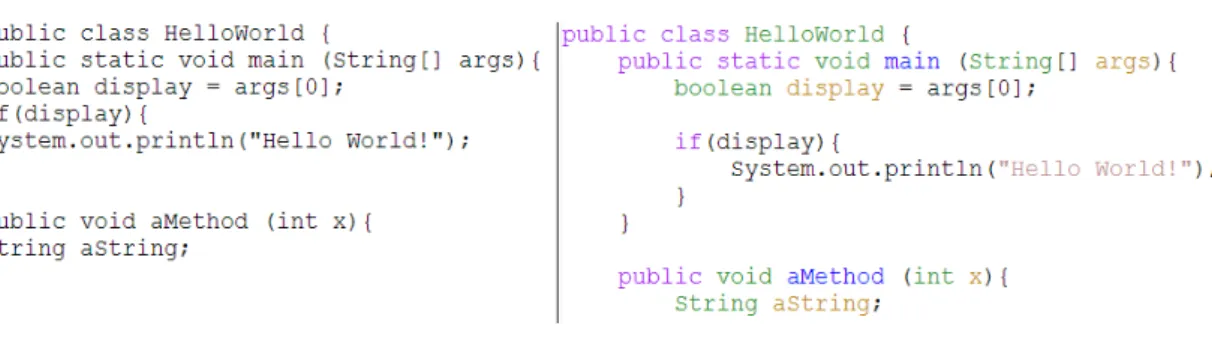
Figure 3.1: Java Source Code: plain vs syntax coloured and indented
3.3.1 Text Editors
Tools such as Microsoft’sNotepadare environments that satisfy the bare minimum re-quirements for a programming editor; as source code is essentially plain text, a basic programming editor requires the ability to enter, edit, and persist this text. Although these tools can be used successfully to enter source code into files and also edit this code, several features that greatly aid writing code and understanding existing source listings (useful because of the potential complexity of programs) are missing from these tools; this is because these tools were not designed to specially cater to source code en-tering. These missing features are now ubiquitous in what people today would consider programming editors.
3.3.2 Programming Editors
Programming editors are specifically targeted towards aiding programming tasks, but still function essentially as a text editor. A programming editor has syntactic awareness of the source code to allow automatic code indentation and source colouring. Figure 3.1 shows a comparison between plain Java source code, and the results of the application of the following features, as displayed in the GNU Emacs editor.
• Syntax Colouring
Syntax colouring involves colouring units of the source code (i.e. identifiers and code ‘punctuation’) differently according to their syntax. The colouring schemes are usually customisable. The right side of Figure 3.1 shows one possible colour-ing configuration for Java source code. With this particular scheme, scope key-words are coloured purple, class names and types are coloured green, method names are coloured blue, and variables in declarations and strings are yellow, whereas method calls and punctuation are black. Contrasting schemes may not just differ in the colour used, but also in how the source code units are divided amongst the colour groups (for example, we could instead distinguish between a parameter type and a declaration type).
• Automatic Indentation
Indentation is primarily used to aid visual distinction of scope of a section of code. In our example, it can be easily seen that “boolean display = args[0];” and “if(display){” both occur as children of the method main, whereas “System.out.println(“Hello World!”);” can be observed as a child of “if(display){”, and therefore a descendant of main. Without indentation, it requires more mental effort to deduce the exact structure.
Although you can indent with simple text editors, this is manual and often error-prone due to the diligence required. With programming editors, automatic inden-tation occurs; when a change in scope occurs (for example, the line immediately after a method signature), then all following lines will be indented by one more ‘level’ (usually a single tab), until the scope ends (by a closing brace) or another level of scope is added (ifstatement etc).
In terms of these features, all programming editors are the same (except maybe for colour schemes and languages supported) - editors are distinguished from one another via more fundamental text-editing capabilities (for example method of input and key-bindings), therefore it is not important to talk in depth about a particular programming editor. Programming editors such as Emacs and VIM are the most popular programming editors, due to their extensive history and widespread inclusion in Unix and Unix-like systems.
3.3.3 IDEs
As full-fledged IDEs are essentially several development-related tools bundled together, they require more computing power, hence they have only become very popular recently as computing power has increased. Systems such as Eclipse and Visual Studio are the standard for software development IDEs, due to features such as Graphical User Interface (GUI) designers, and integrated debuggers.
Microsoft Visual Studio is the most well-known (and largest) IDE, due to it being the flagship IDE of the makers of the most prominent operating system, Microsoft Win-dows. To distinguish it from basic programming editors, Visual Studio has a large set of features, such as code completion, an integrated compiler and debugger, a GUI de-signer, and source-control integration. Other IDEs follow a similar integrated model to Visual Studio, usually with a subset of the features.
DrJava [Allen et al., 2002] is an educational development environment designed as an aid when teaching introductory Java and OO concepts, as well as allowing students to write complete software. DrJava contains an editor, a debugger, as well as a Read-Eval-Print Loop (REPL), similar to LISP, which allows the user to evaluate Java code fragments without compiling. A student can evaluate individual statements to see the
result, without needing to know how to write complete programs; being able to practice these atomic concepts early on provides a lower barrier to learning introductory Java, which is normally hindered by the amount of boilerplate code a programmer is required to write. DrJava also provides a language-level facility, which restricts the scope of Java a student can use in their programs, according to the level selected (Elementary, Intermediate, Advanced, or Full Java), each one building on the previous in terms of concepts allowed. For example, the ‘Elementary’ level allowsifstatements, but does not allow use of thenullvalue, whereas the ‘Intermediate’ level allowsnull, but does not allow the use of loops. This aids a student in building up their knowledge slowly without being overwhelmed by the language features available.
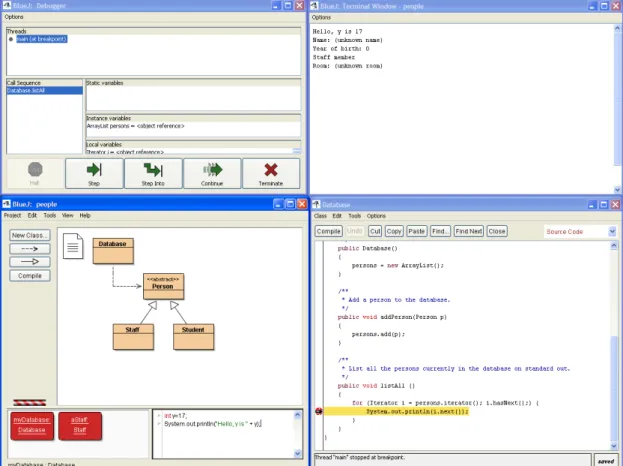
A similar system to this is BlueJ [Van Haaster and Hagan, 2004]. The BlueJ interface is shown in Figure 3.2. BlueJ is similar to DrJava, in terms of the general interface (including the REPL), except that it adds to the environmental complexity with UML diagrams and its own graphical programming interface, whereas DrJava displays its programs using only code. It is argued that the graphical programming interface does not scale up, meaning users are more likely to ‘outgrow’ BlueJ [Allen et al., 2002]. Although neither of these systems contain learning content as such, they have been specifically tailored towards being used in a learning setting.
CAISE [Irwin et al., 2005] is a collaborative software engineering environment that employs a full semantic Java model, generated by a custom tool, JST (Java Symbol Table), and therefore has a semantic awareness of the source code. JST builds the model by identifying all the components in a Java parse tree, such as variables, meth-ods, and classes, and then identifying all the relationships between these components. The model, which semantically describes a program in great detail, is used a) to allow general semantic awareness within the environment, for example accurately locating all calls to a given method, and b) to identify when collaborating users are working on
related components, and can inform users connected in this way when relevant compo-nents are updated.
3.4 Intelligent Programming Tutors
PROUST [Johnson and Soloway, 1984] is an ITS for teaching Pascal programming. Its core feature is the ability to analyse and understand buggy and correct programs, and to understand the program in detail; specifically, the system’s goals are to identify what the bugs are, where they are, the student’s true intention, and the misconceptions the student may be having. The system’s “programming expert” component, which performs this analysis, is built upon the idea that program requirements can be decomposed (although not uniquely) into goals, which in turn are satisfied by the student through the imple-mentation and combination ofprogramming plans, which are procedures for realising intentions. An example of such a plan (as recognised by PROUST) is therunning total loop plan, which is the procedure of computing a total by using a loop. The system at-tempts to recognise which plans the student is using, and interpret them as either correct or incorrect for the context, and whether there are bugs within the plans themselves. When there is ambiguity between which goal decomposition has been implemented (possibly because of an incomplete or buggy implementation), then PROUST uses a set of heuristics to decide which interpretation is more consistent with the rest of the student’s implementation.
The performance of PROUST’s programming expert was tested on 206 different novice solutions to a single programming problem. Of these solutions, PROUST was able to provide a complete analysis (i.e. process all of the code, without discarding any uninterpretable sections) for 142 of them (72%). Within these 142, there were 505 bugs in total, with 478 (95%) of them being correctly identified by PROUST, and the rest
were missed. In addition to these, there were 45 “false positives” (bugs identified that were not really bugs) reported. The authors stated it is not expected for PROUST to ever achieve a 100% overall correct rate, due to the existence of a) unusual and infrequent bugs that will never be in PROUST’s knowledge base, b) novel plans that are hard to predict, and c) some ambiguous cases that can only be clarified by the student.
One of the most popular programming ITSs has been GREATERP (Goal-Restricted Environment for Tutoring and Educational Research on Programming), a LISP tutor de-veloped at Carnegie-Mellon University [Anderson and Reiser, 1985]; it was also one of the first programming ITSs. A model-tracing tutor, it has provided a good starting point for other programming-tutor research. GREATERP contains a domain expert module that can generate complete LISP functions from problem specifications. The system gives the student experience in constructing whole programs, in an environment that resembles a real-world programming editor. As with other model-tracing tutors, the do-main knowledge is represented using production rules; a example of a production rule for the domain of LISP programming, as implemented in GREATERP, is shown in Fig-ure 3.3. The domain expert follows along with the student as they enter each symbol into their solution, validating each step as part of a correct rule, or a buggy rule; if the rule matched is buggy, then the system interrupts the student and gives advice, other-wise the student receives no feedback. The resulting interaction between the student and the tutor represents a dialogue. One kind of advice the system gives is the “planning mode”, which is distinct from the main GREATERP interaction state, “coding mode”. A student enters this mode when they are having difficulty. During “planning mode”, the tutor explains through the algorithm for the problem step-by-step, and then returns the student to “coding mode” with the hope that the student now has the knowledge to continue.
An evaluation of the system showed that its effectiveness approached that of a hu-man tutor; on average, students covered the entire course curriculum in 15 hours, which was only 3.6 hours worse than the average time taken for the students to complete the material with a human tutor (11.4), and 11.5 hours better than learning without either (26.5). Covering the material in a classroom setting takes over 40 hours.
IF the goal is to combine LIST1 and LIST2 into a single list
THEN use the function APPEND and set as subgoals to code LIST1 and LIST2
Figure 3.3: GREATERP production rule example
CITS [Zia et al., 1999] is an intelligent programming tutor for C++. For this system, the user modelling approach is different in the sense that a student model is built by focusing on domain-independent attributes (such as verbal, abstract, and numerical rea-soning) rather than on domain-specific skills. Also, due to this approach, and because student models can sometimes require a lot of information before they stabilise (i.e. be-fore the student model becomes an accurate representation of the student’s knowledge), the authors have implemented stereotypes, which contain information about attributes that often co-occur in groups of people, to make predictions of the actual model of the student before sufficient user-model completion information has been acquired. An ap-titude test is given before a student uses the system to determine which stereotype the student falls into; this stereotype is used to initialise the student model. The lessons themselves are also categorised using the reasoning metrics - this is achieved by divid-ing the C++ concepts into the three categories, and givdivid-ing each lesson a value based on what concepts they contain. For example, one verbal concept is functions, and one numerical concept is operator-overloading.
The stereotype is also used to choose the amount of media to present the lessons to the student. The articulatory distance (the distance between the meaning of an expres-sion in the interface, and its form) for each problem is calculated before each lesson; the higher the distance, the more media is required. For example, if the lesson is textual, and the student has low verbal reasoning, then the articulatory distance is high.
The Java Intelligent Tutoring System (JITS) [Sykes and Franek, 2003] is a Java tutor that allows free-form coding, albeit with no design section. The curriculum is a small subset of the Java language (variables, operators, and looping structures). The system is built around the core of the “intent-recognition algorithm” [Sykes and Franek, 2004]. Several strategies are implemented to attempt to predict what the student was intending to accomplish with his code. One such strategy, the “Syntax Error Correction Strategy”, comes into play if the Java parser does not succeed. This strategy finds unrecognisable tokens in a students submission, and reverses possible error transformations such as the replacement of a symbol by another symbol, or the insertion of an extraneous symbol, to attempt to correct to code; if a more meaningful code chunk is obtained, the system assumes that a syntax error is present, and that the corrected code chunk represents the true intent of the student. JITS will then initiate a dialogue with the student, with feedback being in the form of questioning sections of the code; for example, the system may ask “I see ‘intt’. Do you mean the keyword ‘int’?”. The dialogue continues until the syntax of the code is completely correct, and can be fully parsed.
For semantic errors, JITS breaks down the requirements of the problem into a high-level functional decomposition tree, to divide the problem into discrete sections. From this tree, a decision tree is generated that is used to validate the solution, and also to provide context for feedback (each node of the decision tree is associated with feedback if the concept of the node does not pass). For example, for a problem that requires a for loop, one of the nodes may require the for keyword to be present; if it is not,
feedback is given to the student, otherwise the system traverses the next node in the tree, which checks for the appropriateness of one of the loop variables. This decision tree is only used once the solution can be parsed without syntax errors. The user interface is presented like a simple editor, but with a problem statement and an output window to allow the student to run their solution and see the output.
Kumar’s set of C++ and Java tutors [Kumar, 2004] each focus on a single skill and tailor the interface to that particular skill. They generate three types of problems; de-bugging problems, output prediction, and expression evaluation. Amongst other topics, they teach encapsulation [Kostadinov and Kumar, 2003], scope [Fernandes and Kumar, 2004], for loops [Kumar and Dancik, 2003], and C++ pointers. The tutors use ran-domly generated problems to prevent plagiarism (i.e. students copying other students’ answers to the problems). Also, the generation is adaptive, such that it will only gener-ate problems for topics that the student has not mastered. As an example of a tailored interface, the Parameter Passing tutor [Shah and Kumar, 2002] contains an interface component which quizzes the student on the values of variables pre- and post-method calls. This component lists the values that these variables have been initialised to.
BITS (Bayesian Intelligent Tutoring System) [Butz et al., 2004] is a web-based ITS for teaching Java programming. Despite the name, it is debatable whether it is an intel-ligent tutoring system; a more apt description would be an adaptive courseware system. Using a curriculum mapped to a directed acyclic graph (in the sense of “knowing con-ceptarelies on knowing conceptsb, c,andd”) within a Bayesian network, the system stores how much the student knows about a concept, and the probability that they know other concepts, so that the system can guide the student through the material in an ap-propriate way; the material covered includes elementary programming knowledge, such as variables, assignments, and control structures. The system creates this student-model by asking the student whether they understand the topic or not; if the student is unsure,
then they can request a short multichoice quiz on the concept. There is no real problem-solving, therefore debatable educational value; the student is not required to perform any coding or program design.
RoboProf [Daly and Horgan, 2004] is a Java programming tutor. RoboProf evaluates the solutions by compiling and running the Java programs, and examining the output. For each submission, the system is run against test data, and displays to the student a) this test data, b) the output that the student’s solution actually created, and c) the output that was expected by the system (i.e. the ‘correct’ output). Evaluation entails simply comparing the output values between the actual and expected. An example problem given by the authors showed four sets of test data, i.e. four calls of a method using different data, to produce different output. To prevent students cheating (i.e. submitting once to see the test data, then hard-coding the expected output values), the system can randomly generate the test data. This is a shallow method of evaluation though; exam-ining a limited set of output values does not guarantee that a program is truly valid for the requirements - it may fail on extreme cases, for instance. Also, by not looking at the code itself, the solution may be valid, but it may not be good; it could be ineffi-cient, either in terms of performance and/or space (using several elements to perform a function that has already been captured by another existing language construct). Also, it is unable to give proper feedback about the solution itself; all the system can do is in-form the student that it was incorrect, and show the expected output. As RoboProf does not provide accurate and fine-grained evaluation, and does not keep a student-model to adapt instruction, it cannot be considered an intelligent tutoring system.
CIMEL ITS (Collaborative Constructive Inquiry-based Multimedia E-Learning) [Wei et al., 2005] is an ITS for teaching Java, with a design-first philosophy. It uses a variety of methods, including multimedia instruction. The instruction is split into two sections; during the first section, the student is taught the concepts and given
simple quizzes based on this material, and in the second section the student performs actual coding, solving problems in the Eclipse IDE. These ‘coding’ problems are very specific about what is required, which reduces the range of possible solutions and would simplify evaluation. For each ‘coding’ exercise, the student is first given a set of classes, then they are expected to write code to create objects from these classes. It is not explained how the expert evaluator would semantically validate the solution; this is unfortunate, as static semantic reasoning about solutions is difficult, especially if the system could expect a wide range of solutions from students, and it would be interesting to know their approach. The system also keeps a 3-layered student model, with the different layers recording how well the student understands relevant concepts (Problem-domain Knowledge Model), the historical knowledge state of the student (Knowledge Model), and the student’s general problem-solving patterns and anti-patterns (Cognitive Model).
3.5 Discussion
Programming environments can be multi-functional and powerful, but they overwhelm the user, and do not teach programming itself. Some give help with the available com-mands and library functions, but they don’t explain what programming is about - the language-independent programming concepts are not apparent in the materials the en-vironments give. Instead, this help serves as more of a reference. They give help on languages and functionality extension, not on programming itself. This distinction is important. Also, you can program, but can you program well? Programming environ-ments do not serve to restrict what the user can do in order to make the code better. This is a feasibility issue as well as a freedom issue; with no formal way of specifying to the environment the intent of the project (i.e. the “problem” the developed software is
supposed to solve), the environment cannot understand what code is appropriate or in-appropriate for the project - there is no semantic validation. Software design languages like UML allow the user to specify certain purposes of the program (through use-case diagrams), but it cannot describe in such detail or in an unambiguous way that can be programmatically mapped to code. It would be possible to generate such a language, but the feasibility of unambiguously describing in detail a project, which description can then be used to validate the appropriateness of code for the project, decreases very quickly as projects grow larger. Even the programming environments that are built for educational purposes, such as DrJava and BlueJ, only provide an environment to make it easier to understand language concepts for novice programmers (if they are working on their own projects), but do not provide instruction and semantic validation themselves.
Programming ITSs, and the methods of tutoring, are varied; this is apt for such a domain as complex as computer programming. Also, because of this, there are nu-merous levels you can tutor on, and nunu-merous concepts in each level. Tutors such as PROUST, JITS, RoboProf and GREATERP give the student experience with writing complete programs, taking a real-world approach to the interface, whereas other tutors, like Kumar’s encapsulation tutor, focus the interface on tutoring a particular skill. For the tutors that allow the student to write complete programs, the semantic validation is an interesting area of discussion; semantic validation of programs is, by the very nature of the domain, hard. Solutions to programming problems, except in trivial cases, are not unique: values can be changed, different operators can be used, and even structural changes can be made, and the solution will still be valid and equivalent in terms of sat-isfying the problem requirements. Accepting all the correct solutions (and rejecting all incorrect solutions) is a difficult task, and not one that offers a single obvious answer.
GREATERP solves this problem by not allowing true free-form coding - as with other model-tracing tutors, the path to creating the solution is restricted. A student
![Figure 2.3 shows 2 pseudocode equivalents of constraints implemented by the constraint-based ITS SQL-Tutor [Mitrovic and Ohlsson, 1999], representing the pre-viously stated declarative SQL knowledge.](https://thumb-us.123doks.com/thumbv2/123dok_us/10986871.2986461/27.892.133.756.486.839/pseudocode-equivalents-constraints-implemented-constraint-mitrovic-representing-declarative.webp)