FREE
Article!
Swift for PHP Developers
Ricky Robinett
If you haven’t heard, Swift is Apple’s new programming
language that developers can use to build native iOS and
OSX apps. When Apple announced Swift this summer, I was
immediately intrigued by the prospect of a new way to build
apps for iOS. I started my programming career as a PHP
developer, but a couple years into my life as a developer
I started taking on mobile development work. If you’ve
ever talked to someone who’s had to learn Objective-C,
you’ve probably heard them use words like “difficult,”
“challenging,” and maybe even “painful.” For me, learning
Objective-C was all of those things. Once I started playing
with Swift I realized that it was the beginning of a new era.
It is much easier for PHP developers to learn, and it just
may expose the world of mobile development to a whole
new batch of developers. In this article, I’ll give you a short
introduction to Swift, then we’ll get our environment set up
so we can start writing Swift code and dive into Swift from
a PHP developer’s perspective. We’ll explore the parts that
will make you jump up and down with joy and the parts that
may catch you by surprise.
FEATURE
DisplayInfo()
Other Software:
• Xcode 6.0+Related URLs:
• Xcode - https://developer.apple.com/xcode/downloads/A Brief History
Before we get too far into Swift, let’s take a brief look at the history of native mobile development for iOS and understand why Swift came to be. Prior to the release of Swift, if you wanted to build native iOS apps the Apple way you had to use Objective-C. Many developers (like myself) were first exposed to Objective-C in the context of iOS, but the language was actually created in 1983. Not surprisingly, a language that is over 30 years old carries certain baggage with it. Objective-C is verbose and although it’s great for many things it can be painful at times. Apple created Swift as a reimagining of Objective-C to relieve some of that baggage—an “Objective-C without the C.” The end result is a more modern language that is easier for new developers to pick up.
Laying the Foundation
Before we can start writing Swift code we need to discuss two major dependencies. First, you’ll need a computer running OSX. Don’t have one handy? Don’t stop reading! Getting value out of this article doesn’t require actually running code—it’s just a little more fun if you can. Second, we’ll need the latest version Xcode (see Related URLs). Wait, what?!?! As PHP developers, we’re used to writing our code in a text editor of choice (#vim4lyfe!). Unfortunately, that’s not how it works with Swift. As we navigate into the Apple ecosystem we’re going to have to do some things their way. But don’t worry—Xcode provides a lot of great features that will help us in our path towards mobile development.Swift for PHP Developers
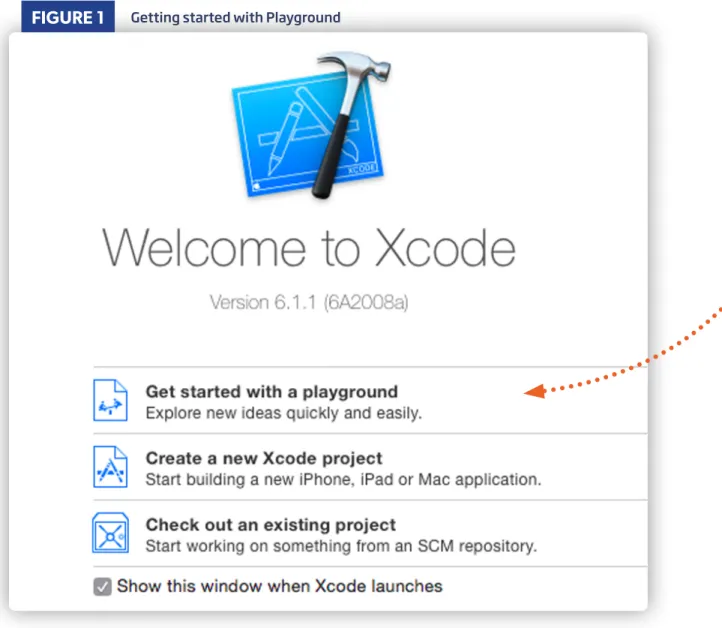
Once you have Xcode installed, launch it and click “Get started with a playground.”
Playgrounds are a quick, easy, and interactive way to write Swift code and see the results in real time. If you’ve used the Boris REPL for PHP, this type of interactive prompt for writing code will probably seem familiar. We’ll need to set a name for a playground; let’s call it “SwiftForPHPDevs.” We’ll also need to pick a platform, but in our case this isn’t as important. Since we’re excited about mobile, let’s stick with “iOS.” Our playground will come pre-populated with a “hello world” app:
FIGURE 1
Getting started with PlaygroundFIGURE 2
Swift for PHP Developers
On the left side is our code, on the right side the output for the corresponding line in code. Switch out “Hello, playground” to “Hello, Swift” and watch the content on the right update. We’ve now written our first Swift code! Feel free to take a moment and do your happy dance. Now that we’ve got our foundation in place, let’s really start looking at Swift as a language.
You Remind Me of Home
Many things about Swift will feel familiar and comfortable to PHP developers—like a warm blanket of 0s and 1s. The easiest way to explore is for us to start writing some code together, so you can see firsthand what I’m talking about. For the sake of creating something somewhat coherent we’ll be writing Swift about (Taylor) Swift. If you don’t know much about (Taylor) Swift, have no fear! You’ll learn as you work through this article. Kicking off with the basics, let’s create a new variable in our playground called name and set it to the string “Taylor Swift”:
var name = "Taylor Swift"
We’ll talk a bit more about variable types in Swift vs. PHP later, but right now this should feel pretty good. We may miss our dollar signs, but this code isn’t too far off. You’d probably be worried if we were one line in and the code was already scary. Let me give a taste of what this would have looked like in Objective-C:
NSString *name = @"Taylor Swift";
Ewww… do you understand why I’m so excited about Swift now? Let’s create two more
variables. We’ll call one ageFeeling and set it to the string "22". The other will be called albums
and set to the array of all the albums Taylor Swift has released:
var ageFeeling = "22"
var albums = ["Taylor Swift", "Fearless", "Speak Now", "Red", "1989"]
We’re still working through the basics, but I hope you’re starting to feel comfortable writing Swift code in Xcode. While we’re setting some variables, let’s take a look at constants. In PHP, we set constants using the define function. In Swift, we can set a constant using the let keyword. Let’s create a new constant called gettingBackTogether and set it to false by using let
instead of var:
let gettingBackTogether = false
Now that we’ve got some basic variables in place, we can quickly take a look at comparison operators. In Swift we have the following comparison operators: ==, !=, >, <, >=, <= (Wondering where === is? You’ll realize why it’s missing a bit later.) To try these out, we can create an if
statement to check to see if gettingBackTogether is equal to false. If so, we’ll output “We are never ever getting back together”:
if gettingBackTogether == false {
println("We are never ever getting back together") }
Swift for PHP Developers
You’re probably
wondering where we can view the output of our
println. We need to open the Assistant Editor to be able to see console output. In the menu bar, go to View -> Assistant
Editor -> Show Assistant Editor. Now instead of
having two panes in our playground, we have three, the third showing our console output (Figure 3).
Feeling good? I am! Let’s keep pushing forward, because there’s still more fun stuff in here. One of my favorite things in PHP is the foreach loop. It’s a really convenient tool to iterate over an array. With Swift we can achieve something similar like this:
for album in albums { println(album) }
If you left the Assistant Editor open you’ll be able to see each album name in the console. If you closed the Assistant Editor, now is a good time to open it back up, since we’ll be using it throughout this post.
While we’re looking at arrays, let’s create a quick associative array (in Swift these are called dictionaries) and then see how to iterate over it:
var awards = [
"MTV Video Music" : 2, "Billboard Music" : 13 ]
Here we have a non-comprehensive collection of awards Taylor Swift has won (there’s a whole Wikipedia article about her awards, if you’re interested). We can iterate over a dictionary like this:
for (award, total) in awards { println(award)
println(total) }
Having Class
You may have noticed that right now we have a collection of random code snippets that seem somewhat related. In PHP, we probably would want to organize some of this code into an object. Lucky us, because in Swift we can do the same. Let’s create a new class called Person:
class Person {
var name = "Taylor Swift" var ageFeeling = "22" }
No surprises here. Of course when PHP developers start thinking about class, we immediately start thinking about the visibility of our properties and methods (public, protected, or private). In Swift, we have public and private access controls as well, which operate similarly. We have another access control called internal, but don’t mistake it for PHP’s protected status. Protected ties security to inheritance, something the designers of Swift have opted not to emulate.
Even though we don’t have inheritance-based visibility in Swift like we do in PHP, you can create classes that inherit from another class. We all know that Taylor Swift is truly in a class of her own. If we wanted our code to better reflect the real world we could create a new TaylorSwift class that inherits from our person class:
class TaylorSwift: Person { }
FIGURE 3
Swift for PHP Developers
What if we wanted to do some initialization when we instantiate a new instance of our class? In PHP we would create a ___construct() function. I’ve got great news to you—with Swift, we can do this by setting an init() method for our class:
class Person { init() {
println("initializer called") }
}
var person = Person()
Doing things at the time of creation is great, but sometimes we need to take action when an object is destroyed. In PHP the ___destruct() function gets called when this happens. In Swift, we can do the same with deinit:
class Person { init() { println("initializer called") } deinit { println("deinitializer called") } }
For now, let’s set aside the code related to our objects and take a look at the other side of the coin—the parts of Swift that aren’t like PHP.
I Knew You Were Trouble
So far Swift may sound a little too good to be true. Now is probably a good time to show you some of the things that may make Swift feel more like that new pair of shoes you have to wear for a couple weeks before they stop giving you blisters. Just remember, much like those shoes, putting in the work to get comfortable will be worth it in the end.One thing that may initially trip you up is variable types. Unlike PHP, Swift is a strongly typed language. What exactly does that mean? Every variable we create in Swift is created as a certain type of variable (for example: String, Integer,
Array). We need to interact with our variables in the way that is appropriate to their type.
Before, we were taking advantage of Swift’s ability to implicitly create variables with the correct type based on their value. Once we start working with those variables we created, we need to make sure we’re aware of their type. Confused? I was at first, too. Let me show you some code to help demonstrate exactly what I’m talking about. We’re going to create a new variable age and set it to the integer 24 (notice: no quotes around our value):
var age = 24
We can see the kind of issues we’ll experience with type by creating a simple conditional statement to see if age is equal to ageFeeling. Oh no! In Figure 4, Xcode is telling us we have an error.
This error is happening because we’re trying to compare an integer with a string. In order to compare two variables they need to be the same type. What’s that old saying about apples and oranges? In this case we can convert age to a string and our conditional will no longer error out:
if String(age) == ageFeeling { println("ya")
}
Classes can have no more than one
denitializer per class.
deinit
does
not take any parameter and is written
without parentheses.
FIGURE 4
Type Error if(age == ageFeeling) { println("ya") } !Swift for PHP Developers
Another situation where typing is important is when we’re writing functions. Let’s create a basic function to see this in practice:
func sing(feeling: String) -> String {
return "I don't know about you but I'm feeling " + feeling + "!"
}
We’ve created a function called sing that accepts a feeling and returns some song lyrics about that feeling. Because Swift is strongly typed, when we create a function we need to explicitly state the type for the arguments of our function and the value we’re going to be returning. In this case, our argument is a String
and we’re returning a String.
What happens if we call this function with an integer instead of String? Again (Figure 5) we’ll get an error. Are you starting to see how working in a strongly typed
language can be a bit difficult to get used to? It’s OK. Like those new shoes we talked about earlier, it’ll start to feel more natural with time. For now, let’s fix the error when we’re calling our sing function by passing it a string:
println(sing(ageFeeling))
Typing is a very distinct way that Swift is different than PHP; now let’s talk about something a bit more abstract—style. It’s hard to talk about Swift without talking about style. Pretend like it’s Throwback Thursday as we take a trip back to the very first variable we created in Swift:
var name = "Taylor Swift"
Notice something missing? If you’ve made it this far without yelling “WHERE ARE MY SEMICOLONS?!?” then I’m impressed. If you’ve subconsciously been adding semicolons to the end of every line then I’m also impressed. In Swift, semicolons are optional. Even though semicolons are optional, if you want to write code the “Swift way” you’re going to have to get used to dropping the semicolons.
Similarly, let’s revisit the first conditional statement we wrote:
if gettingBackTogether == false {
println("We are never ever getting back together") }
If you’re like me, it takes a lot of willpower to not add parentheses here. The good news is that if you add parentheses this code it will still work. The bad news is that adding parentheses will probably drive your Swift developer friends crazy. If you’re OK driving your Swift friends crazy, go for it! But proceed with caution and make sure there aren’t any sharp objects nearby.
FIGURE 5
Another Type Error println(sing(age)) !
Swift for PHP Developers
We’ve Still Got Class
Now that we’ve got an understanding of some of the basic differences between Swift and PHP, we can jump back to classes to see the impact of those differences on how we create and interact with objects. Before, when we were setting properties of our class we were defining their values as we set them. This is a practice we wouldn’t want to use extensively in the real world. Let’s define some properties without setting a value:
class Person {
var name: String var age: Int }
By now you probably realize why we set up our object like this initially: I was trying to avoid the
conversation of type until a bit later. But this far into the article you’re probably starting to wrap your head around the idea that every variable we define needs to have its type defined, either implicitly or explicitly. When we define our property we don’t want to set a value; as a result we must explicitly state what type of value will eventually be stored here.
Now that we’ve set up a class with a couple of properties, let’s instantiate it:
var taytay = Person()
Oops! You should notice we’re getting a “Class ‘Person’ has no initializers” error. When we set properties for an object we need to make sure they get set when that object is initialized. We can do that with the init
function we learned about earlier. Just add this code to your object:
init() {
name = "Taylor Swift" age = 24
}
This should resolve your error, but 99.9% of the time you don’t want to create a bunch of objects with the same property values. Let’s update our init code where we can dynamically set these values:
init(name: String, age: Int) { self.name = name
self.age = age }
In this code we define that our init receives two arguments (name and age) and we set our properties to be the values of those arguments. You’ll notice we’re using the self keyword. We’ve seen self before in PHP objects, but in Swift it means something different. It’s very important to recognize and remember that self
in Swift is like $this in PHP. It means we’re referencing information about this specific instance of this object. Now that we’ve defined our new initializer, we can use it to initialize our object like this:
var taytay = Person(name: "Taylor Swift", age: 24)
Notice that in Swift we used named parameters when calling this function. As you work with Swift you’ll start getting used to name parameters.
Swift for PHP Developers
We’ve got an object and we can initialize it with some data. The most logical thing we’d want to do next is to write a method for our object. We’ve already learned how to write a function in Swift; now let’s use that knowledge to write a method for our Person class:
func sing(words: String) -> String { return words + "!"
}
The code to define our method shouldn’t be too surprising, because it’s basically identical to writing a function outside of a class. Now that we’ve defined our method we can call it with the following code:
var taytay = Person(name: "Taylor Swift", age: 24) println(taytay.sing("The haters gonna hate hate hate"))
The biggest difference in calling our method is the use of the dot notation to call it. As you work with Swift, you’ll find more and more differences from writing code in PHP. Of course, there are many parts of Swift we didn’t cover in this article—someone could write an entire book about Swift for PHP developers! As you start working with Swift, you’ll begin hearing about concepts like tuples, optionals, and ARC. When these concepts come up they may seem hard, but remember to shake off that feeling and push forward. A whole new world of adventure is ahead of you.
What’s Next?
The world of mobile development is unbelievably exciting. In this article we laid a foundation so you can enter that world with Swift and apply your skills as a PHP developer to this new language. We only touched the tip of the iceberg with Swift, but I hope it was enough to get you started.
Feeling inspired to go further into the world of Swift? I’d highly recommend the official Swift documentation (google “Swift Programming Guide” or see Related URLs) or hitting up a local Swift meetup in your community (Brooklyn and London have especially great meetups). If you have any questions or just want to say “hi” you can find me on twitter (@rickyrobinett) or drop me an e-mail ([email protected]).
Twitter: @rickyrobinett
RICKY is a Brooklyn, NY based hacker currently working as a Developer Evangelist at Twilio. He’s focused on creating fun and entertaining apps. His apps have been used by hundreds of thousands of users and covered in multiple media outlets including: CNN, Huffington Post, TechCrunch, Mashable, VentureBeat and the Today Show. You can contact Ricky on twitter @rickyrobinett or via email [email protected].