Global License Auditing Services
SAP SYSTEM
MEASUREMENT GUIDE
MEASUREMENT PROGRAM AND
LICENSE ADMINISTRATION WORKBENCH Version 7.0
©
Copyright 2015 SAP SE. All rights reserved.No part of this publication may be reproduced or transmitted in any form or for any purpose without the express permission of SAP SE. The information contained herein may be changed without prior notice.
Some software products marketed by SAP SE and its distrib-utors contain proprietary software components of other software vendors.
Microsoft, Windows, Outlook, and PowerPoint are registered trademarks of Microsoft Corporation.
IBM, DB2, DB2 Universal Database, OS/2, Parallel Sysplex, MVS/ESA, AIX, S/390, AS/400, OS/390, OS/400, iSeries, pSeries, xSeries, zSeries, System i, System i5, System p, System p5, System x, System z, System z9, z/OS, AFP, Intelligent Miner, WebSphere, Netfinity, Tivoli, Informix, i5/OS, POWER, POWER5, POWER5+, OpenPower and PowerPC are trademarks or
registered trademarks of IBM Corporation.
Adobe, the Adobe logo, Acrobat, PostScript, and Reader are either trademarks or registered trademarks of Adobe Systems Incorporated in the United States and/or other countries. Oracle is a registered trademark of Oracle Corporation. UNIX, X/Open, OSF/1, and Motif are registered trademarks of the Open Group.
Citrix, ICA, Program Neighborhood, MetaFrame, WinFrame, VideoFrame, and MultiWin are trademarks or registered trademarks of Citrix Systems, Inc.
HTML, XML, XHTML and W3C are trademarks or registered trademarks of W3C®, World Wide Web Consortium,
Massachusetts Institute of Technology.
Java is a registered trademark of Sun Microsystems, Inc. JavaScript is a registered trademark of Sun Microsystems, Inc., used under license for technology invented and implemented by Netscape.
MaxDB is a trademark of MySQL AB, Sweden.
SAP, R/3, mySAP, mySAP.com, xApps, xApp, SAP NetWeaver, and other SAP products and services mentioned herein as well as their respective logos are trademarks or registered trademarks of SAP SE in Germany and in several other countries all over the world. All other product and service names mentioned are the trademarks of their respective companies. Data contained in this document serves informational purposes only. National product specifications may vary.
These materials are subject to change without notice. These materials are provided by SAP SE and its affiliated companies (“SAP Group”) for informational purposes only, without representation or warranty of any kind, and SAP Group shall not be liable for errors or omissions with respect to the materials. The only warranties for SAP Group products and services are those that are set forth in the express warranty statements accompanying such products and services, if any. Nothing herein should be construed as constituting an additional warranty.
1 SAP License Audit . . . 7
1.1 Use . . . 7
1.2 Named Users . . . 8
1.3 Engines . . . 8
2 Scope of Validity . . . 9
2.1 Availability of Contractual User Types . . . 9
2.2 Availability of Software Engine Measurement . . . 9
3 Installations, Systems, and System Types . . . 10
3.1 SAP Installation . . . 10
3.2 SAP Software System . . . 10
4 Process Overview: SAP License Audit . . . 11
5 Information and Support. . . 12
6 Measurement Program . . . 13
7 Process Overview: System Measurement . . . 14
8 Classifying Users . . . 18
8.1 Classifying Individual Users . . . 18
8.2 Classifying Users with Reference Users . . . 18
8.3 Classifying Users with User Mass Maintenance . . . 20
8.4 Classifying Users with Central User Administration . . . 21
8.5 Classifying Users with the User Classification List . . . 21
8.6 Performing Mass Changes of Contractual User Types. . . 22
8.7 Migrating Price Lists. . . 23
8.8 Checking User Classification . . . 24
8.9 Analyzing Users . . . 25
9 Performing the System Measurement . . . 26
10 Consolidating Results and Transferring Results to SAP. . . 27
11 Evaluation Information . . . 29
11.1 Evaluation Rules. . . 29
11.2 Special Notes . . . 30
12 Measurement Results . . . 31
12.1 Measurement Statistics . . . 31
12.2 Creating the Measurement Log . . . 31
12.3 SSCR-Registered Users . . . 32
12.4 Results of Engine Measurement . . . 32
13 Definition and Availability of Contractual User Types . . . 33
13.1 User Types in the mySAP Solution Suite/Business Suite Price List (mySAP.com Solution Suite Price List) . . . 33
13.2 User Types in the mySAP Individual Solutions Price List (mySAP.com Individual Solutions Price List) . . . 33
13.3 User Types in the SAP Software Component (R/3 Enterprise) Price List . . . 34
13.4 Special Module User Types . . . 34
13.5 Special User Types . . . 35
13.6 Technical Users . . . 36
14 LAW . . . 37
14.1 Prerequisites for Using LAW . . . 38
14.2 Collecting Measurement Data in the Component System . . . 39
16 Combining Measurement Data in LAW . . . 42
16.1 Loading System Data from a File . . . 42
16.2 Loading System Data for a Non-SAP System from a File . . . 42
16.3 Transferring Measurement Data to LAW by RFC. . . 42
16.4 Copying RFC Destinations of SAP Solution Manager 4.0 . . . 44
16.5 Entering Component Systems. . . 45
16.6 Starting Remote Actions in Component Systems . . . 46
16.7 Deleting a Component System or Measurement Data from LAW . . . 47
17 Combining Users . . . 48
17.1 User Combination . . . 48
17.2 Enhanced Grouping of Users . . . 50
17.3 Grouping Systems . . . 50
18 Consolidating Contractual User Types . . . 51
18.1 Consolidation Result. . . 52
18.2 Correcting User Classification . . . 53
19 Transferring Results to SAP. . . 54
Appendix. . . 55
User Types in the mySAP Solution Suite/Business Suite Price List . . . 55
User Types in the mySAP Individual Solutions Price List. . . 58
User Types in the SAP Software Component (R/3 Enterprise) Price List . . . 61
This system measurement guide contains supplementary infor-mation about SAP SE’s product licensing, providing additional information about the SAP price list and your SAP® software contract.
If there are any contradictions with the terms of your SAP software contract, then the terms of your contract – and the SAP price list that your contract is based on – apply.
SAP® software contains measurement tools that help all systems produce the information necessary for determining usage of the SAP software. This guide describes the procedure for a license audit and how to use the following SAP tools:
•
Measurement program•
License administration workbench (LAW)According to the provisions of the contract, the customer undertakes to support SAP in accordance with SAP’s instructions. In particular, the customer undertakes to prepare the measure-ment log no later than four weeks after SAP’s request. The measurement may be carried out only by using the unaltered tools provided by SAP. The result of the measurement is to be transmitted to SAP immediately and in unaltered form. The measurement program is used exclusively to determine the number of users and the used units of SAP products. The results are evaluated according to the terms of your contract. You classify your users, clients, and systems according to this system measurement guide.
You then consolidate the measurement results of your systems using LAW.
If you have any questions about your SAP software contract or the licensed products, contact your SAP sales executive.
1
SAP LICENSE AUDIT
1.1 Use
Use means to activate the processing capabilities of the Softwa-re, load, execute, access, employ the SoftwaSoftwa-re, or display information resulting from such capabilities. Use may occur by way of an interface delivered with or as a part of the Software, a Licensee or third-party interface, or another intermediary system.
Use of the SAP software is based on the licensing of named users and engines.
Use of the software is restricted in principle to the customer’s own employees. The customer is entitled to allow access to programs to employees of its business partners and to
employees of the business partners of its affiliated companies, as well as to the employees of the affiliated companies, provided the customer acquired a license for this use.
SAP gives express notice that the accessing of a system by more than one person using one and the same named user constitutes a breach.
A named user’s password may be passed on to another person only in exceptional cases (if, for example, the named user is on vacation or is absent due to sickness, or if the employment relationship with the named user has been terminated).
1.2 Named Users
A named user is an employee of a customer, of its affiliated companies, or of third-party companies authorized to access the licensed software directly or indirectly, regardless of the technical interface chosen. All employees who use the SAP software require a license and must be set up as dialog users. SAP is entitled to require that the customer declare the number of external named users and produce a stipulated statement from each external named user concerning compliance with the restrictions applying to licensed use and confidentiality.
1.3 Engines
Engines are software products that are available as options. Except as otherwise expressly stated, every user who accesses any software engine requires a named user license.
Engine licensing depends on key business metrics such as orders, contracts, contract accounts, and patients treated. Engines are either pan-industry, such as Payroll Processing within the mySAP™ ERP application, or industry-specific, such as Billing within the SAP for Utilities solutions.
Engines are to be licensed in addition to named users. Named users may access engines to the extent of their licensed user category.
This system measurement guide is valid for all SAP software contracts.
It is based on the functions of the measurement tools (measure-ment program and LAW) that were revised and enhanced for the SAP NetWeaver® 2004s platform (software component SAP_BASIS 700).
The functions available in the measurement tools depend on the release of your SAP software component SAP_BASIS.
You can find the details of the software component SAP_BASIS in the SAP software system by choosing System → Status →SAP System Data →Component Information. The
component information is specified in this SAP System Measurement Guide.
This measurement guide contains all information about the measurement tools for earlier releases.
Some of the functions are also available for earlier releases through support packages and the Note Assistant (SAP Note 428479 from the SAP Notes tool).
The functions available in the measurement tools depend on your SAP software release. The measurement tools are specified in this guide.
2
SCOPE OF VALIDITY
Platform Software Component
SAP NetWeaver® 2004s SAP_BASIS 700
SAP NetWeaver 2004 SAP-BASIS 640
SAP® Web Application Server 6.20 SAP_BASIS 620 SAP Web Application Server 6.10 SAP_BASIS 610
SAP Basis 4.6D SAP_BASIS 46D
SAP Basis 4.6C SAP_BASIS 46C
For SAP R/3® 4.6B and earlier, the software component SAP_BASIS corresponds to the
2.1 Availability of Contractual User Types Classification of contractual user types depends on the price list on which your contract is based. The available contractual user types are available to you in the measurement program. The user types in the different SAP software price lists, especially those in the mySAP price lists, are available as support packages for releases earlier than SAP R/3 4.6B (SAP Note 428479). You can obtain further contractual user types for the mySAP Business Suite family of business applications and individual applications that are not available in the measurement program for your release by doing the following activities:
•
Obtaining the user types in a support package•
Downloading and installing the user types individually or as a package on the SAP Support Portal:support.sap.com/licenseauditing→ Information about SAP System Measurement→User Classification
2.2 Availability of Software Engine Measurement The measurement program contains counting modules that automatically calculate software engine use (SAP Generic, New Dimension, and IS add-on products).
Measurement programs for software engines are either shipped with the product or are available for earlier releases through support packages.
You can find an up-to-date overview of the programs for engine measurement currently available onSAP Support Portal support.sap.com/licenseauditing→ Engine & Self-Declaration Product Measurement→ Engine Measurement.
Detailed information on engine measurement is also available on SAP Support Portal, including the following information:
•
Description of metricTo be able to measure all users in your SAP installation clearly and precisely, your systems, clients, and users must be classified according to current use and the price list they are based on prior to each system measurement. This classification reflects the terms of your contract.
If you convert from a software components contract to a mySAP contract, users that are already classified must be reclassified according to the newly licensed user types.
3.1 SAP Installation
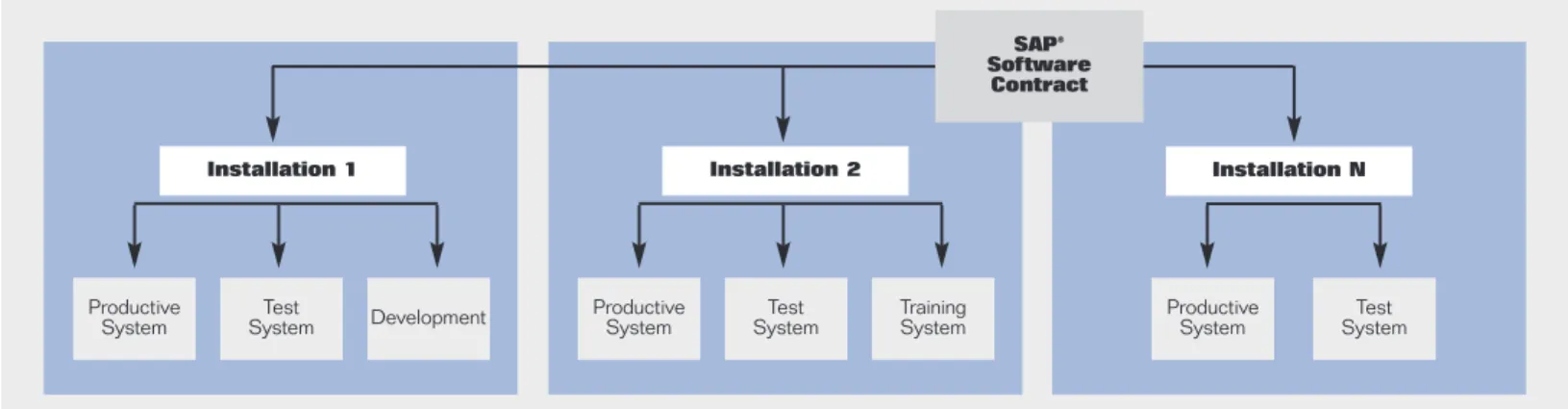
An SAP installationis a set of SAP software systems. The SAP soft-ware system comprises components (for example, an application server and a message server) that have direct or indirect access to one database instance. A database counts as an instance if each database table appears only once.
For each software product, you must register a separate installa-tion in writing with SAP. SAP then gives you a unique installainstalla-tion number.
3
INSTALLATIONS, SYSTEMS, AND SYSTEM TYPES
Installation 1 Installation 2 Installation N
Productive
System SystemTest Development
SAP® Software
Contract
Productive
System SystemTest TrainingSystem ProductiveSystem SystemTest
Figure 1: Overview of Installations and Systems
Note: For legal reasons related to your license agree-ment, changes to SAP installations (deletions, changed contact persons, and so on) and their assignment to SAP contracts must be done in writing through your SAP contracts department.
3.2 SAP Software System
When you measure an installation, you must measure all produc-tion and development systems, with the excepproduc-tion of test systems, Internet demo and evaluation systems (IDESs) and backup systems.
There are different ways of evaluating measurement results, depending on the system type.
Note: You can make changes to your system landscape (deletion, system status, and so on) quickly and easily on the system data maintenance page for customers on SAP Support Portal at
SAP initiates system measurement with the measurement request for your SAP contract. These are the steps for the process:
Your SAP Customer Competence Center location receives an overview of all measurement-relevant installations and systems covered by your contract. You must then take the following actions:
•
Check the provided installation overview and systems•
Forward this measurement plan to the administrators responsible for the installations/systemsEach SAP software system must be measured with the measurement program (see section “7 Process Overview: System Measurement”). You must take the following actions:
•
Activate the price list valid for your contract•
Check the system data and flag the relevant clients•
Classify the users according to how they use the software (see section “8 Classifying Users”)•
Start system measurement•
Check the resultsIf you do not need to consolidate the measurement results using LAW, send the measurement results directly to SAP instead
Consolidate the measurement results with LAW (see section “14 LAW”). To do so, take the following actions:
•
Load the LAW measurement plan into the central LAW system•
Import the measurement results of all systems into LAW•
Group the users using a single criterion•
Consolidate the data and check the results Send the LAW results directly to SAP5. 4. 3. 2. 1.
4
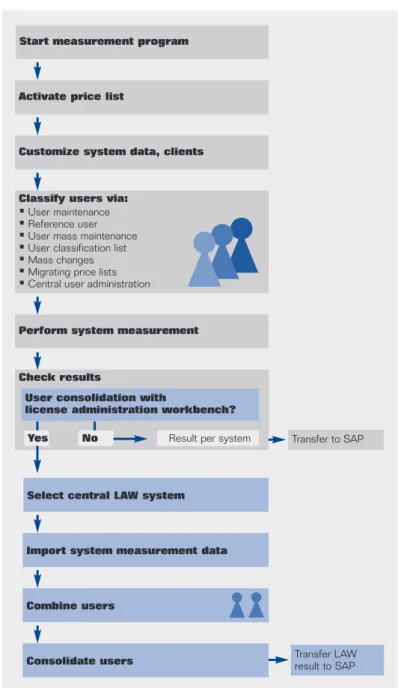
PROCESS OVERVIEW: SAP LICENSE AUDIT
Transfer to SAP
Transfer LAW result to SAP
Figure 2: Process Overview
Start measurement program
Activate price list
Customize system data, clients
Select central LAW system
Import system measurement data
Consolidate users
Perform system measurement
Check results
User consolidation with
license administration workbench?
Classify users via:
•User maintenance •Reference user •User mass maintenance •User classification list •Mass changes •Migrating price lists •Central user administration
Result per system
No Yes
5
INFORMATION AND SUPPORT
You can find current information on the SAP license audit and the SAP measurement tools (measurement program and LAW) onSAP Support Portal atsupport.sap.com/licenseauditing. You can find SAP Notes on the measurement tools on SAP Support Portal under component XX-SER-LAS.
If you have any questions concerning the SAP measurement tools, create a message under component XX-SER-LAS. If you have any questions relating to the contract, contact your sales executive or your contact person in the contracts department of your SAP international subsidiary.
You can find the documentation on the measurement program from SAP_BASIS 640 and on LAW onSAP Support Portalat this location:help.sap.com→ SAP Library→
SAP NetWeaver→ SAP NetWeaver by Key Capability→ Solution Life Cycle Management→ SAP Licenses: System Measurement, License Administration Workbench.
6
MEASUREMENT PROGRAM
With the measurement program (transaction USMM), you determine the number of users and the chargeable objects of the engines of the SAP software for each system. You use the measurement program exclusively to determine the number of users and the used units of SAP products.
Measurement of the SAP engines takes place in the background. The measurement program automatically detects the engines used in the system, measures them in the background, and lists them in the measurement log.
Measurement programs for software engines are either shipped with the product or are available for earlier releases through support packages.
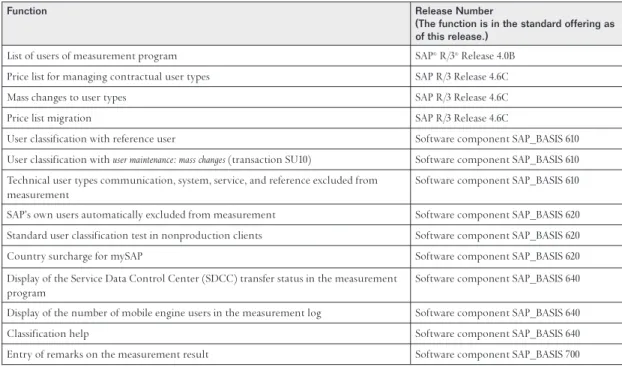
Function Release Number
(The function is in the standard offering as of this release.)
List of users of measurement program SAP® R/3® Release 4.0B
Price list for managing contractual user types SAP R/3 Release 4.6C
Mass changes to user types SAP R/3 Release 4.6C
Price list migration SAP R/3 Release 4.6C
User classification with reference user Software component SAP_BASIS 610
User classification with user maintenance: mass changes(transaction SU10) Software component SAP_BASIS 610 Technical user types communication, system, service, and reference excluded from
measurement
Software component SAP_BASIS 610 SAP’s own users automatically excluded from measurement Software component SAP_BASIS 620 Standard user classification test in nonproduction clients Software component SAP_BASIS 620
Country surcharge for mySAP Software component SAP_BASIS 620
Display of the Service Data Control Center (SDCC) transfer status in the measurement program
Software component SAP_BASIS 640 Display of the number of mobile engine users in the measurement log Software component SAP_BASIS 640
Classification help Software component SAP_BASIS 640
Entry of remarks on the measurement result Software component SAP_BASIS 700
Table 2: Main Functions in the Measurement Program
You may carry out the measurement only by using the unaltered tools provided by SAP. The result of the measurement is to be transmitted to SAP immediately and in unaltered form.
From SAP_BASIS 640 (SAP NetWeaver 2004), information about system measurement (transaction USMM) is also available in
SAP Libraryunder SAP NetWeaver→ SAP NetWeaver by
Key Capability→ Solution Life Cycle Management→ SAP Licenses: System Measurement.
You can find up-to-date information about the measurement program and the programs for engine measurement currently available onSAP Support Portal atsupport.sap.com/licenseauditing→ Information about SAP System Measurement
The following process provides you with an overview of how to prepare for and carry out the system measurement in each of your SAP software systems.
Prerequisites
The following prerequisites are required:
•
Authorization S_USER_GRP•
Authorization S_BTCH_JOB ProcessYou need to take the following steps:
Start the measurement program (transaction USMM) by choosing Administration →Administration →System Measurement
•
For SAP releases earlier than software component SAP_BASIS 610, use this path: SAP Menu → Tools → Administration →Administration →System Measurement•
For SAP releases earlier than SAP R/3 4.6C, use this path:Tools →Administration →Administration →System Measurement
Check system data
The System datatab page contains information on the system’s unique ID.
•
As of SAP R/3 4.0B, a system is automatically identified as productive as soon as one client is identified as productive. You can change this setting only by using the role of the client in the client administration.2. 1.
3.
7
PROCESS OVERVIEW: SYSTEM MEASUREMENT
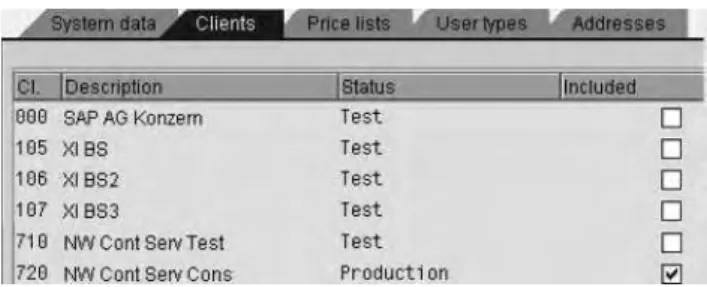
Figure 4: Clients
Activate the price list applicable to your contract by setting the Activeflag on the Price liststab page. The system then displays the user types for the applicable price list on the
User typestab page. The following price lists are available for software component SAP_BASIS 610:
•
SAP Software Component (R/3 Enterprise) price list (SW Component price list)•
mySAP Solution Suite/Business Suite price list (mySAP.com® Solution Suite price list)•
mySAP Individual Solutions price list (mySAP.com Individual Solutions price list)4.
•Check system data •Select relevant clients •Activate price list •Classify users •Start system
measurement •Check results •Send results to SAP
Specify the clients to be measured on theClients tab page by setting theIncluded flag for all clients relevant to
measurement. In the standard system, clients 000 and 066 are excluded. You can also exclude the following clients from the measurement by removing theIncluded flag:
•
Test clients in a production system•
Clients that have been copied for test purposes A client must be included, if license relevant users are created on it, for example users of the ABAP Workbench and/or SAP NetWeaver development tool users.In SAP R/3 releases from 4.6B to 4.5B (inclusive), select the clients to be excluded. In SAP R/3 3.1I and earlier, specify the clients to be excluded with theExclude Clients option.
•
If you use contractually agreed-upon special users, name them clearly. To do this, select the text of a standard special module user type (such as SPECIAL MODULE TYPE 1) and overwrite it with the name of the contractual user type (for example, automobile manager). Then save your entries. These are then offered as F4 input help in the user classification.5.
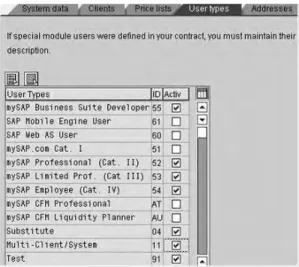
Figure 6: User Types
Figure 7: Customizing of Special Module User Types
Figure 5: Price Lists
The following price lists are available for SAP R/3 4.6C:
•
SAP Software Component (R/3 Enterprise) price list(SW Component price list)
•
mySAP Solution Suite/Business Suite price list (mySAP.com Solution Suite price list)For releases earlier than SAP R/3 4.6B, the contractual user types from the various SAP price lists, especially those from the mySAP.com price list, are available in support packages (SAP Note 428479).
If you require additional user types for mySAP Business Suite and individual applications for user classification that are not yet available in the measurement program for your release, you can download these individually or as a package from SAP Support Portal:support.sap.com/licenseauditing→ Infor-mation about SAP System Measurement→ User Classification
On theUser types tab page, set theActiv flag for the relevant user types.
•
To keep the list of user types as short as possible, deactivate the special module and IS user types if you do not have any contractually defined special module users.•
TheActivflag controls the display of selected users in user classification and input help for user maintenance.If you do not want to further consolidate the measurement results with LAW or transfer them directly, specify the address and fax number of the measurement results recipient on the Addressestab page
Classify the users
•
To be able to measure all users in your SAP software systems clearly and precisely, you must classify your users with the appropriate contractual user type according to current use and the price list the users are based on prior to each system measurement.•
If your contract changes, you must reclassify the users who have already been classified, in accordance with the user types in the new license.•
For security reasons, you can change the user type only in the client in which you are logged on.•
You have the following options for user classification: – Classify the users individually (see section “8.1 ClassifyingIndividual Users”)
– Use a reference user (see section “8.2 Classifying Users with Reference Users”)
– Classify the users by group (see section “8.3 Classifying Users with User Mass Maintenance”)
– Classify the users in central user administration (see section “8.4 Classifying Users with Central User Administration”)
– Use the user lists from the system measurement (see section “8.5 Classifying Users with the User Classification List”)
– Perform a mass change of the user types (see section “8.6 Performing Mass Changes of Contractual User Types”)
– Migrate the price lists (see section “8.7 Migrating Price Lists”)
7.
6. For information about the contractual user types, see the
section titled “13 Definition and Availability of Contractual User Types.”
Notes: In production clients, unclassified users count as the standard user type of the respective price list (see section “11.2 Special Notes.”
As of software component SAP_BASIS 620, unclassified users count as test users in nonproduction clients.
Start the measurement in the measurement program (transaction USMM) by choosing System Measurement. By choosing this, you automatically also start plausibility checks. See the following sections for more information about the data, criteria, and settings of system measurement: “11.2 Special Notes,” “11.1 Evaluation Rules,” and
“12 Measurement Results.”
Check the results by using the measurement statistics. To do this, choose the Measurement Statisticsoption. If there are discrepancies, you must repeat the steps as of the user classification (step 7, above).
•
The measurement statistics contain more data than the measurement log, so that you can more easily investigate discrepancies (see section “8.9 Analyzing Users”).Check the user classification with the User Data Analysesor
List Classification Helpfunction (see section “8.9 Analyzing Users”).
10. 9. 8.
To format the finally determined measurement data into a print format, choose the Create Logoption on the initial screen of the system measurement. The measurement log contains mainly the same data as the measurement statistics; however, it is made anonymous here and combined system-wide. The log contains the following information:
•
Header with date and address data•
System-specific data•
Information and results relevant to the measurement•
Results of background checks•
Measurement results for excluded clientsSpecify the external named defined users that communicate with external software products that bundle, temporarily store, or summarize the communication activities, and then forward them to the SAP software installation
12.
11. If necessary, use the Commentsfunction (enter a comment
or upload a file) to send additional information about the measurement results to SAP. This function is available as of software component SAP_BASIS 620.
Transfer the measurement results to SAP, using one of the following techniques:
•
If you use only one SAP system, transfer the measurement results directly to SAP (see section “10 Consolidating Results and Transferring Results to SAP”).•
If you use multiple SAP installations, first consolidate the measurement results of all systems in LAW (see section “14 LAW”). Then send the consolidated result to SAP.•
As soon as possible after the measurement, transfer the measurement results of the SAP component systems to the central LAW system. This means that the user master records are unlikely to have changed and there are no (or only a few) differences between the user type statistics of the USMM measurement results of the individual systems and the consolidated results in LAW.Check the transfer status
15. 14. 13.
4. 3.
2. 1.
4. 3. 2. 1.
Figure 8: LicenceData
For SAP R/3 4.6C and earlier, do the following activities: Startuser maintenance (transaction SU01) from the SAP software menu by choosingTools→Administration→User Maintenance→ User
Specify a user or an alias, and chooseChange orCreate
ChooseMeasurement Data in change mode Save your entries
In SAP R/3 4.6C and earlier releases, the contractual user type and special version are not copied when you copy a user. The user is initialized with the user type as operational user or mySAP.com Category II/Professional User and must subsequently be maintained manually.
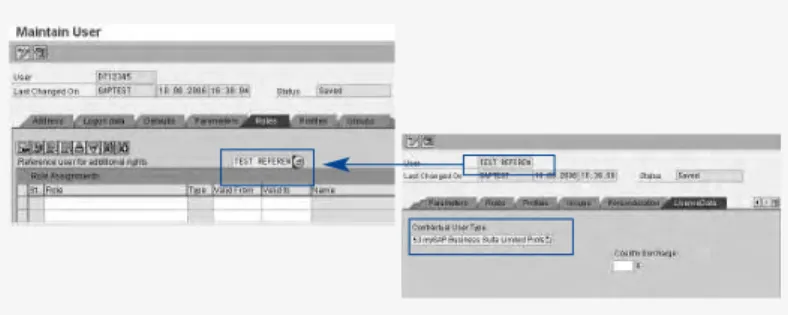
8.2 Classifying Users with Reference Users A reference user is a general, non-person-specific user. You cannot log on to the SAP software system with a reference user; it serves only for additional assignment of authorizations and license data (SAP Note 313585).
You use reference users, for example, to give Internet users identical authorizations and to create users with identical roles and authorizations.
8 CLASSIFYING USERS
8.1 Classifying Individual Users
You can assign a user type to a user when you create the user. This is especially useful if you have already
performed a system measurement and have classified all users that exist when doing so. You also get a useful overview of the individual user profiles.
Procedure
To classify individual users, take the following actions: Startuser maintenance (transaction SU01) by choosing
Tools→Administration→ User Maintenance→ User
Specify a user or an alias, and chooseChange, Create, or
Copy. As of software component SAP_BASIS 610, the contractual user type and the special version are also copied when you copy a user. SelectLicenceData in the functionCopy User.
Choose theLicenceData tab page in change mode Use the input help to select the contractual user type. Alternatively, you can assign a reference user to the user on theRoles tab page (see section “8.2 Classifying Users with Reference Users”).
Result
You have classified the users indirectly using a reference user. You can use the extended list of the measurement program to display a list of all users that inherit their classification using a particular reference user. To use the extended list, take the following actions:
In system measurement (transaction USMM), choose the
User Classificationoption Choose Extended List
Specify the name of the reference user (with the input help), and choose Execute
Use the extended list in the measurement program to check which classification was used in the measurement (see section “8.5 Classifying Users with the User Classification List”)
4. 3. 2. 1.
4. 3. 2. 1.
Figure 9: Reference Users
Figure 10: Reference Users in the Extended List
User classification using reference users is available as standard as of software component SAP_BASIS 610 or in support packages for SAP R/3 4.6C and SAP R/3 4.6D.
You can classify your users by assigning a reference user with an appropriate classification. A user can inherit the classification of the reference user if the following is true:
•
The user does not have any additional roles or profiles•
The user is not manually classified Creating a Reference UserTo create a reference user, do the following activities: Create a user inuser maintenance (transaction SU01)
On theLogon data tab page, choose theReference user type and deactivate the password
On theLicenceData tab page, use the input help to select the contractual user type
Save your entries
Assigning Users a Reference User
Assign the relevant classified reference users to your users inuser maintenance (transaction SU01) oruser mass maintenance
(transaction SU10) on theRoles tab page:Reference user for additional rights.
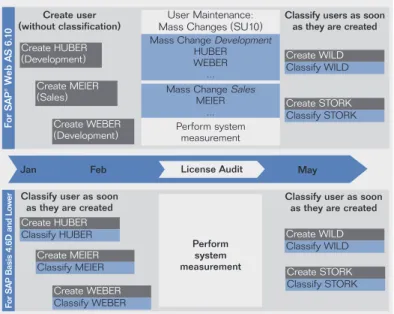
8.3 Classifying Users with User Mass Maintenance As of software component SAP_BASIS 610, you can classify users with User Maintenance: Mass Changes(transaction SU10).
User Maintenance: Mass Changesis well suited to initial user classifi-cation. In this way, you can classify users by group, such as by department or cost center. To avoid accidentally overwriting correct user types, you should later maintain the user types
using user maintenanceor the user list. 6. 5. 4. 3. 2.
Figure 11: Strategy for Classifying Users with User Maintenance: Mass Changes
Figure 13: Classifying Users with User Maintenance: Mass Changes(2)
Create user (without classification)
Classify user as soon as they are created
Classify users as soon as they are created
Classify user as soon as they are created
For S
AP® W
eb AS 6.
10
For S
AP Basis 4.6D and Lo
w
er
Create HUBER
(Development) Create WILD
Classify WILD Create WILD Classify WILD Create HUBER Classify HUBER Create STORK Classify STORK Create WEBER Classify WEBER Create MEIER Classify MEIER Create MEIER (Sales) Create WEBER (Development) User Maintenance: Mass Changes (SU10)
Perform system measurement
Perform system measurement
Mass Change Development
HUBER WEBER ... Mass Change Sales
MEIER ...
Create STORK
Classify STORK
License Audit
Jan Feb May
Figure 12: Classifying Users with User Maintenance: Mass Changes(1)
Procedure
To classify users with user mass maintenance, take the following actions:
Start User Maintenance: Mass Changes(transaction SU10) by choosing Administration →System Administration →User Main-tenance: Mass Changes, and choose the users according to the required criteria, as follows:
•
Address data, for example, by room, department, or cost center1.
On theUser Maintenance: Mass Changes initial screen, select the users whose user type you want to change
ChooseChange
On theLicenceData tab page, choose the contractual user type for the selected users of the group, or assign an appropriate classified reference user to these users
Save your entries. The user classification of the user group is changed.
If you want to create a log of the mass change, chooseMass Change with Log
9. 8. 7. 6. 5. 4. 2. 1.
8.4 Classifying Users with Central User Administration
When you use central user administration, you can process the user types in the central system using user maintenance (trans-action SU01) or user maintenance(transaction SU10). The following prerequisites are required:
•
The central and child systems have release software component SAP_BASIS 620 or later; SAP Note 704412 is installed.•
In transaction SCUM, maintenance of license data is set toglobal. This is the default setting in new installations of central user administration. If you implement the support package in multiple systems in your landscape, we recommend that you do not activate global maintenance until you have set the maintenance of license data to global.
•
You have copied all of the users, including all data (address data, license data, and so on) from the child systems into the central system.Then consolidate the measurement results from all systems with LAW (see section “14 LAW”).
8.5 Classifying Users with the User Classification List
The measurement program generates a list of all users created. With this user classification list, you can classify your users clearly and effectively. Use the following lists:
•
The simple listfor manually classifying users•
The extended listfor checking classifications (as of software component SAP_BASIS 610)The extended list of the user classifications is available in a support package (SP) for the following releases: SAP R/3 4.6C with SP11; SAP R/3 4.6D with SP03.
3.
Classifying Users with the User List
You classify users manually using the simple user list. You can classify users that have not yet been classified or reclassify users that have already been classified.
As of software component SAP_BASIS 610, the measurement program automatically excludes non-dialog users from the measurement (SAP Note 553606). They are no longer displayed in the user list (see section “13.7 Technical Users”).
As of software component SAP_BASIS 700, SP 14, non-dialog users are displayed again in the user classification list. It is possible to classify the non-dialog users manually. If they have a manual classification, they are counted as dialog users.
However, if they have no manual classification, they are disregarded in the system measurement.
In releases earlier than software component SAP_BASIS 610, classify the nondialog users accordingly.
To classify users that have not yet been classified, take the following actions:
Start the measurement program (transaction USMM) ChooseUser Classification and thenSimple List
To display the unclassified users, select theUser Type field on theUser Classification screen, chooseEdit→Selection Options
(F2), selectSingle Value, and chooseCopy
If appropriate, restrict the selection further using the validity period forCurrently Valid Users
ChooseExecute
Select the users to be classified in the list ChooseClassify Selected Users
Use the input help to specify the contractual user type. Save your entries. The user list displays all users of your SAP software system with the assigned contractual user types.
Checking Classification with the Extended List
The extended list enables you to see which of the following classifications was included in the measurement:
•
Manual user classification•
Classification using a reference userYou can obtain a list of all users that are classified by using a reference user with the extended list in the measurement program.
•
Unclassified usersFor more information about the extended list, choose
User Classification →Quick Info: Program Documentationor SAP Note 313585.
The extended list for user classification is available in support packages for the following releases:
•
SAP R/3 4.6C, SP11•
SAP R/3 4.6D, SP038.6 Performing Mass Changes of Contractual User Types
As of SAP R/3 4.6C, you can use the measurement program to perform mass changes of user types of a price list. You can use this function to assign a user type to all users that have not yet been classified and to change the classification of all users of type A to type B. For security reasons, you can change the user type only in the client in which you are logged on.
Mass change of user types is available by download or support package for SAP releases earlier than SAP R/3 4.6C (SAP Note 376252).
Prerequisites
This task requires that you have chosen Environment →Mass Changeon the initial screen of the measurement program and that the software is displaying the dialog box System Measurement: Mass Change of User Types, which offers the following options:
•
Classify Non-Maintained Users•
Change Old ClassificationFor releases earlier than SAP R/3 4.6C, choose Goto →Mass Change.
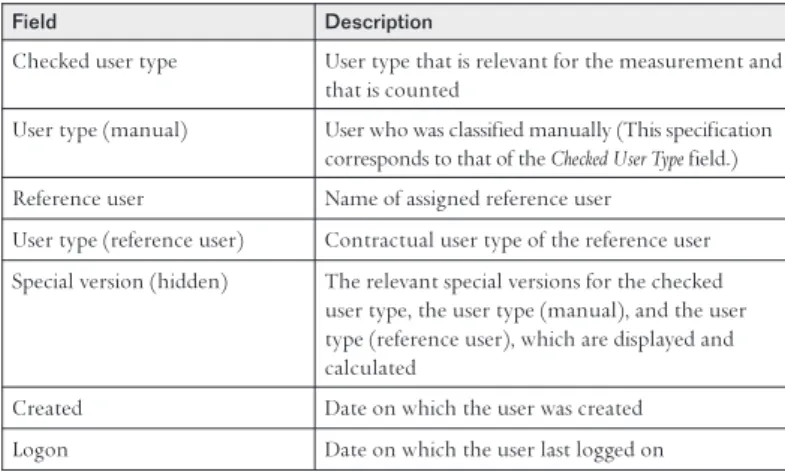
Field Description
Checked user type User type that is relevant for the measurement and that is counted
User type (manual) User who was classified manually (This specification corresponds to that of the Checked User Typefield.) Reference user Name of assigned reference user
User type (reference user) Contractual user type of the reference user Special version (hidden) The relevant special versions for the checked
user type, the user type (manual), and the user type (reference user), which are displayed and calculated
Created Date on which the user was created Logon Date on which the user last logged on
Table 3: Extended List Fields
Procedure
To migrate price lists, take the following actions:
On the initial screen of the measurement program, choose
Environment →Migration Price List
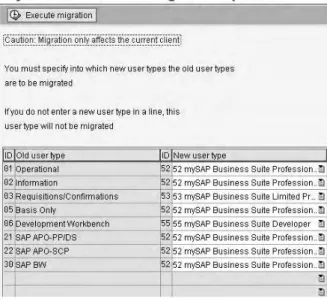
The dialog box System measurement: Migration of price listsappears. Use the input help to specify the new user type for each of the old user types to be changed. If you do not specify a new user type in a row, users with this user type are not migrated.
Choose Execute migration. You receive confirmation that the user type of your user has changed.
Check the new contractual user types of your users
5. 4. 3. 2. 1.
3. 2. 1. 3. 2. 1.
Figure 15: Price List Migration
Classifying Unclassified Users
To classify the unclassified users, take the following steps: Use the input help to specify the new user type ChooseExecute
Check the security query, and confirm the mass change A message in the status bar confirms the change to the users.
Changing Old User Classifications
Use the input help to specify the previous and the future user type
ChooseExecute
Check the security query, and confirm the mass change. A message in the status bar confirms the change to the users.
8.7 Migrating Price Lists
After an active price list has changed, you must adjust the contractual user types (migration). A tool is available in the measurement program for migrating the contractual user types in the SAP Software Component (R/3 Enterprise) price list to user types in the mySAP price lists. You can use this function to change the old user types to new user types in the current price list.
You can migrate user types only in the client in which you are logged on.
8.8 Checking User Classification
As of software component SAP_BASIS 640, the User Data Analyses
or List Classification Helpfunction helps you classify individual user types and provides you with an analysis of the plausibility checks on various users.
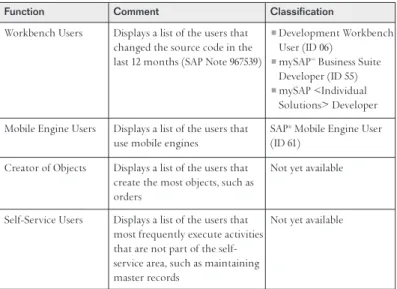
On the basis of the user data, the List Classification Helpfunction provides lists of users that access the related functions and objects and shows the current classification. You can use the list to check the classification of the listed users and correct it if necessary. As soon as you are satisfied with the classification of the users, you can perform the measurement again. Classification help is available for ABAP Workbench and mobile engine users and for checking user types. Classification help for users creating objects and for user self-services is not yet available. The user lists are made anonymous when the measurement results are transferred. That is, the data is transferred to SAP without the user names.
The List Classification Helpfunction provides you with the options in the “Classification Help Functions” table for checking your user classification.
Procedure
To check user classification, take the following actions:
In the measurement program (transaction USMM), choose
User Data Analysesor List Classification Help
In the Existing Measurement Datadialog box, the system displays a table of the previous measurements performed, with the number, date, and time of the relevant mea-surement. The most up-to-date measurement is at the top of the table.
To remove superfluous data from List Classification Help, choose Delete. Ensure that you do not accidentally delete the logs of the measurement that you have transferred to SAP. If you do, you do not have any reference material if there are queries in the future.
Select the measurement to be checked, and choose the desired list option on the Classification Helptab page, such as
Workbench Users
4. 3. 2. 1.
Function Comment Classification
Workbench Users Displays a list of the users that changed the source code in the last 12 months (SAP Note 967539)
•Development Workbench
User (ID 06)
•mySAP™ Business Suite
Developer (ID 55)
•mySAP <Individual
Solutions> Developer Mobile Engine Users Displays a list of the users that
use mobile engines
SAP® Mobile Engine User (ID 61)
Creator of Objects Displays a list of the users that create the most objects, such as orders
Not yet available
Self-Service Users Displays a list of the users that most frequently execute activities that are not part of the self-service area, such as maintaining master records
Not yet available
Table 4: Classification Help Functions
Result
The result list for Workbench Usersdisplays all users that changed the SAP source code in the past 12 months and their classifications. As a rule, only developers change the SAP source code. Therefore, check that these users are classified correctly (SAP Note 967539). The user names are specified for internal use in your organization so that you can investigate these anomalies and, if necessary, reclassify the relevant users.
The analysis information is made anonymous both in the measurement statistics and in the measurement log and trans-ferred to SAP.
8.9 Analyzing Users
As of software component SAP_BASIS 640, you receive the results of the plausibility checks for system measurement using the User Analysisfunction.
As of software component SAP_BASIS 610, however, the results of the plausibility checks are available to you in the measure-ment statistics.
You have the options found in the “User Analysis Functions” table for evaluating the measurement result.
Procedure
To analyze users, take the following actions:
In the measurement program (transaction USMM), choose
User Data Analysesor List Classification Help. In the Existing Measurement Datadialog box, the system displays a table of the previous measurements performed, with the number, date, and time of the relevant measurement. The most up-to-date measurement is at the top of the table.
To remove superfluous data, choose Delete. Ensure that you do not accidentally delete the logs of the measurement that you have transferred to SAP. If you do, you do not have any reference material if there are queries in the future. Select the measurement to be checked, and choose the desired list option on the User Analysistab page, such as
Multiple Logons
3. 2. 1.
Function Comment
Deleted users Displays a list of users that have been deleted in the last week, last four weeks, or last twelve weeks
Expired users Displays a list of users whose validity period expired in the last week, last four weeks, or last twelve weeks before the measurement
Logon after expiration Displays a list of users that have logged on to the system after their validity has expired
Multiple logons Displays a list of users for which there were multiple logons to the SAP® software system during the measure-ment period (see section “1.1 Use”).
User list Displays a list of users that logged on to a client of the
Figure 17: User Analysis
Result
The result lists contain the user names for internal use in your organization so that you can investigate and remove anomalies. The analysis information is made anonymous both in the mea-surement statistics and in the meamea-surement log and transferred to SAP.
The measurement program determines and analyzes the number of users and the used units of the SAP engines in all clients. You can start the report as many times as you like. The measurement program enters the measurement results in a table, overwriting the previous results.
Procedure
Start the system measurement in the measurement program (transaction USMM) by choosing System Measurement. By choosing this, you automatically also start plausibility checks. Take note of any messages before the system measurement, and if necessary, check the related long text.
10 CONSOLIDATING RESULTS AND
TRANSFERRING RESULTS TO SAP
If you use multiple SAP software installations, first consolidate the measurement results of all systems in LAW (see section “14 LAW”). Your SAP Customer Competence Center must check the measurement results for SAP contracts with more than one installation and consolidate them with LAW.
As soon as possible after the measurement, transfer the measure-ment results of the SAP component systems to the central LAW system. This means that the user master records are unlikely to have changed and there are no (or only a few) differences between the user type statistics of the USMM measurement results of the individual systems and the consolidated results in LAW.
Transferring Measurement Results to the Central LAW System You must prepare the measurement results for further pro-cessing with LAW. You do this using the report RSLAW_PLUGIN, which supplements the user data and converts it to an LAW file.
As of software component SAP_BASIS 640, you can export the measurement data to an LAW file directly in the measurement program by choosing System Measurement →Export to LAW File. The report also serves as a kind of RFC module for communication between remote systems.
For SAP releases earlier than software component SAP_BASIS 640, take the following actions:
•
Use SAP Note 766822 to migrate the report RSLAW_PLUGINfor the releases in which the report already exists (SAP R/3 4.6C and 4.6D; SAP Web AS 6.10 and 6.20)
•
Use SAP Note 777163 to create the report RSLAW_PLUGINfor the releases in which the report does not exist (SAP R/3 3.1, 4.0B, 4.5B, and 4.6B)All current and future corrections to the plug-in are based on these two SAP Notes.
Information about creating and activating the report is available inSAP Libraryunder SAP NetWeaver Library → SAP NetWeaver by Key Capability →Solution Life Cycle Management→ SAP Licenses →License Administration Workbench →Prerequisites for Using LAW, Component Systems.
Transferring Measurement Directly to SAP
If you use only one SAP software system, transfer the measure-ments directly from the measurement program (transaction USMM) to SAP.
•
As of SAP R/3 4.0B, you can transfer measurement results online.•
As of software component SAP_BASIS 700, you can use the comments function (enter a comment or upload a file) to send additional information about the measurement results to SAP.Checking the Transfer Status
You can use the all transfersfunction to check the status of the different steps of the system measurement and the data transfer in the measurement program. More information about checking the status of the data transfer is available in SAP Note 623201.
Detailed information about checking the transfer status is available in SAP Libraryunder SAP NetWeaver Library →SAP NetWeaver by Key Capability →Solution Life Cycle Management → SAP Licenses →System Measurement →Process of System Measurement
11.1 Evaluation Rules
The following items are important for you to know when reading the measurement results:
•
All chargeable users (nonchargeable users are, for example, substitute, test, and multiclient/multisystem users) and engines in the production clients of the system•
The number of ABAP Workbench and/or SAP NetWeaver development tool users in all systemsThe relevant number of these users is the total of ABAP Workbench and/or SAP NetWeaver development tool users in all systems.
Recommendation for Users Operating in Multiple Systems Use LAW to consolidate employees with multiple user master records in various systems.
•
Classify users unambiguously according to their job in all systems; that is, assign the users to a contractual user type.•
During the consolidation that then takes place in LAW, the users for a person are listed and assigned one contractual user type.This virtually eliminates the risk of evaluating a person more than once; classification as multiclient/multisystem user is superfluous.
If you do not use LAW to consolidate the users, note the following information when classifying users that operate in multiple clients and systems:
•
A user must be classified only once in the highest group as a chargeable user in a production system (exception: ABAP Workbench and/or SAP NetWeaver development tool users – see section “11.2 Special Notes,” for ABAP Workbench and/or SAP NetWeaver development tool users in nonproduction systems).•
In all other systems, users can then be classified as multiclient/multisystem users (ID 11).ABAP Workbench and SAP NetWeaver development tool users, in particular, can be created in multiple systems, including nonproduction systems.
11.2 Special Notes
Note the following information:
Unclassified users are counted with the standard user type
of the respective price list. The standard user type is assigned on the basis of the client’s status. Note the following
information about client status:
•
If clients have productionstatus, the standard user type from the valid price list is assigned to the as-yet unclassified users.•
For unclassified users of the mySAP Individual Solutions price list or combinations of active price lists, specify a standard user type for unclassified users. You can obtain this function in a support package (SAP Note 896872).•
As of software component SAP_BASIS 620, SP7, if clients have another status (nonproduction), the user type testis assigned to unclassified users as the standard user type. For ABAP Workbench and/or SAP NetWeaver development tool users in nonproduction systems, if you do not use LAW (see section “14 LAW”) to consolidate these users, note the following information when classifying people that operate in multiple clients and systems:•
In nonproduction systems, first use mass change to classify all users as test (ID 91).•
Then classify the people who use ABAP Workbench and/ or SAP development tools as chargeable users once, ideally in the central development system. To do so, use the contractual user type of your contract or of the price list on which your contract is based – for example, mySAP Business Suite Developer (ID 55).2. 1.
•
In all other systems, classify all other users of people already classified as test or multiclient/multisystem users (ID 11).•
Transfer the measurement results of the nonproduction systems to SAP.The measurement program also counts locked users. Users whose validity period has expired should note the following information:
•
As of SAP R/3 4.0B, the measurement program no longer counts users whose validity period has expired.•
In the case of earlier releases, the measurement program counts users whose validity period has expired for another 90 days after the expiry date.As of software component SAP_BASIS 610, the contractual user type (license data) and the special version can also be copied when you copy a user.
As of software component SAP_BASIS 620, particular technical users are automatically excluded from the system measurement (SAP Note 553606).
Classification of the E-ASL surchargefor users of the Oracle database ORACLE 7 Runtime is no longer necessary and has been removed from the measurement program. For earlier releases, ignore the prompt and deactivate the E-ASL indicator.
7. 6. 5. 4. 3.
Activated Price List Standard User Type
SW Component Operational user (ID 01) mySAP.com® Solution Suite mySAP Professional user (ID 52)
mySAP.com Individual Solutions All users must be classified or you must specify a standard user type (SAP Note 896872)
The measurement program enters the measurement results in a table, and the previous results are overwritten.
The checks in the measurement program take place in the background. They determine the following information, depending on the SAP software release, and present it in the measurement log:
•
Deleted users: number of users that have been deleted in the last week, last four weeks, or last twelve weeks•
Users with expired validity periods: number of users whose validity period expired in the last week, last four weeks, or last twelve weeks•
Number of users that have logged on to the system after their validity expired•
Number of measured users of the mobile engine•
Highest number of a user’s multiple logons to the system•
List of users by category: shows the distribution of users to the technical user types•
Automatically excluded, SAP technical users: shows the technical users automatically delivered by SAP that are made available free of charge•
Message about recording the engine measurement: outputs a warning if the recording of the data for time-dependent engine measurements began only after the specified measurement period•
As of SAP R/3 4.6C, number and distribution of the users for which a developer key – SAP Software Change Registration (SSCR) key – was installedYou have measured the system and can now check the results determined with the client-specific measurement statistics. The results determined (measured users and engines) are listed by client in the measurement statistics.
12.1 Measurement Statistics
Check the results using the measurement statistics. To do this, choose the Measurement Statisticsoption. If there are discrepancies, you must repeat the steps as of the user classification.
The measurement statistics contain more data than the measure-ment log, so that you can more easily investigate discrepancies. The results determined (measured users and engines) are listed by client.
Do not send the measurement results to SAP until asked to do so. 12.2 Creating the Measurement Log
To format the finally determined measured data into a print format, choose the Create Logoption on the initial screen of the system measurement.
The measurement log contains mainly the same data as the measurement statistics. However, it is made anonymous here and combined systemwide. The following information is included:
•
Header with date and address data•
System-specific data•
Information and results relevant to the measurement•
Results of background checks•
Measurement results•
Measurement results for excluded clients12.3 SSCR-Registered Users
As of SAP R/3 4.6C, the measurement result shows the number and distribution of user types that have an SSCR key. An SSCR key is a developer key that, as a rule, is required by ABAP Workbench users and/or SAP NetWeaver development tool users. Users for which SSCR keys are used are displayed in the list of users.
12.4 Results of Engine Measurement
SAP ships the measurement modules for the different engines in one of the following ways:
•
As integral parts of the SAP software•
In the form of add-ons (SAP industry solutions)The measurement program automatically recognizes these engines used in the system, counts them in the background, and displays them in the measurement log.
In addition, each named user that accesses an engine must be classified according to its activity.
You can find detailed up-to-date information about engine measurement onSAP Support Portal at
support.sap.com/licenseauditing→ Engine & Self-Declaration Product Measurement→ Engine Measurement.
ID Contractual User Type
52 mySAP Professional (Cat. II) 53 mySAP Limited Prof. (Cat. III) 54 mySAP Employee (Cat. IV) 55 mySAP Business Suite Developer
Table 7: Examples of User Types for the mySAP Solution Suite/Business Suite Price List
13.1 User Types in the mySAP Solution Suite/Business Suite Price List
(mySAP.com Solution Suite Price List)
A detailed description and definition of the contractual user types of mySAP.com Solution Suite are available at the following locations:
•
In the appendix under “User Types in mySAP Solution Suite/Business Suite Price List”•
OnSAP Support Portalatsupport.sap.com/licenseauditing→ Information about SAP System Measurement→ User Classification→ Overview of all available user types•
Users without classification in production systems count as mySAP Professional (ID 52) users.13.2 User Types in the mySAP Individual Solutions Price List (mySAP.com Individual Solutions Price List)
A detailed description and definition of the contractual user types of the mySAP.com Individual Solutions price list are available at the following locations:
•
In the appendix under “User Types in mySAP Individual Solutions Price List”•
OnSAP Support Portalatsupport.sap.com/licenseauditing→ Information about SAP System Measurement→ User Classification→ Overview of all available user types13 DEFINITION AND AVAILABILITY OF
CONTRACTUAL USER TYPES
Classify your users according to their activity, based on their authorization and the contractual agreement and in accordance with the price list on which your SAP contract is based. Note the following information:
•
As of software component SAP_BASIS 610, the contractual user types are listed for each price list on theUser Types tab page.•
As of SAP R/3 4.6C, the selectedprice listcontrols the available contractual user types.•
The contractual user types are available to you as anF4 Help selection listfor SAP releases earlier than SAP R/3 4.6B. For further contractual user types for mySAP Business Suite and individual applications that are not available in the measurement program for your release, note the following information:•
You can obtain contractual user types in a support package.•
You can download and install contractual user types individually or as a package on SAP Support Portal at support.sap.com/licenseauditing→ Information about SAP System Measurement→ User ClassificationFor measurement of contractual user types that may not yet be included in your measurement program, use thespecial module user typesby arrangement with your contact person at SAP for system measurement.
•
Specify or overwrite the available special module user types with the appropriate name.•
Classify all valid users according to the licensed mySAP solution. An error message appears for unclassified users.•
For unclassified users of the mySAP Individual Solutions price list, you can specify a standard user type for unclassified users. You can obtain this function in a support package (SAP Note 896872).ID Contractual User Type
AA mySAP™ CRM Professional AB mySAP CRM Limited Professional BB mySAP CRM Developer AX mySAP ERP Professional AY mySAP ERP Limited Professional AZ mySAP ERP Employee BA mySAP ERP Developer
•
IS users are users who use industry-specific componentsand for whom an individual contractual rule holds (IS user types 81 through 85). Overwrite the IS users used and name them clearly.13.4 Special Module User Types
Special module user types are available to you regardless of the active price list.
Special module usersare users for whom a special individual contractual rule holds.
•
These user types are permitted only if appropriate contractual agreements with SAP are in place or by arrangement with your contact person for system measurement at SAP.•
Overwritethe special module users used and name them clearly.If these user types are used without contractual agreement or by arrangement, these users count as unclassified users, depending on the underlying price list, and evaluated with the standard user type of the relevant price list.
ID Contractual User Type
71-79 Special module types 1 to 9
Table 8: Examples of Contractual User Types for the mySAP Individual Solutions Price List
Table 10: Special Module User Types ID Contractual User Type
01 Operational 02 Information 04 Basis Only
06 Development Workbench
Table 9: Examples of Contractual User Types for Software Component (R/3 Enterprise) Price List
13.3 User Types in the SAP Software Component (R/3 Enterprise) Price List
A detailed description and definition of the contractual user types of the SAP Software Component price list are available in the following locations:
•
In the appendix under “User Types in the SAP Software Component (R/3 Enterprise) Price List”•
OnSAP Support Portalatsupport.sap.com/licenseauditing→ Information about SAP System Measurement→ User Classification→ Overview of all available user types•
Users without classification in production systems count as operational (ID 01) users.Type ID Contractual User Type Comment
04 Substitute A substitute user can be created in the SAP® software system only for a limited period of time (for example, to cover for an absent colleague). During this time, this user can use the functions of another user as a substitute. The absent user may not work actively in the SAP software system during this time. Substitute and substituted users must be created in the same client. The substitute user is free of charge since the other user has already been evaluated according to the assignment.
11 Multiclient/multisystem The multiclient/multisystem user is a contractual user type for users that are already classified in another client or system as chargeable users. Every multiclient/multisystem user that is created in another client or system must be assigned to a chargeable user in the same or another system, and they may use only the functions of that chargeable user. Since the chargeable user is evaluated according to its assignment, the multiclient/multisystem user is free of charge.
91 Test Test users can be created in production systems only in the following instances:
•No test system is available
•Use is exclusively for production preparation of modules that are not yet productive in the production system.
The classification of test users must be agreed on with SAP.
92 External contact The user type “external contact” was deleted from the measurement program by means of a support package (SAP Note 313585). If necessary, use a relevant special module user and name it unambiguously according to use. Your SAP contact person can answer any questions you may have.
Table 11: Special User Types
13.5 Special User Types