The design of inclusive curricula for multi-user
virtual environments: a framework for developers
and educators
Denise Wood
School of Communication, International Studies and Languages, University of South Australia, Adelaide, South Australia
Abstract
Increasing access to Information Communication Technologies and a growing awareness of the importance of digital media literacy have led many educators to seek innovative solutions to harness the enthusiasm of ‘net gen’ learners while also enhancing their ability to collaborate, communicate and problem solve augmented by digital technologies. One of the emergent trends in response to these demands has been the shift away from traditional models of teaching to more flexible approaches such as the use of multi-user virtual environments (MUVEs) designed to facilitate a more collaborative and participatory approach to student learning. At the same time, international initiatives such as the United Nations Millennium Development Goals, Education for All and the United Nations Convention on the Rights of Persons with Disabilities have highlighted the importance of ensuring that such teaching and learning environments are inclusive of students with diverse needs. Many universities are also responding to a widening participation agenda; a policy focus which aims to increase both the access and success rates of students from low socio-economic backgrounds. Educational technology has long been regarded as a means by which students who may be isolated by disability, geographical location and/or social circumstances can gain access to such learning opportunities. The growth in the use of MUVEs combined with increasing access to mobile communications opens up new opportunities for engaging students from diverse backgrounds through virtual learning environments. Yet despite the potential, there are many challenges in ensuring that the very students who are most able to benefit from such e-learning technologies are not further disadvantaged by a lack of attention to both the technical and pedagogical considerations required in the design of inclusive e-learning environments. This paper reports on the findings of research funded through an Australian Learning and Teaching Council Grant, which aims to increase the opportunities for learners to participate more fully in education through an accessible multi-user virtual learning environment. The paper draws on ethnographic research, trials of undergraduate courses and a framework that can guide educators and designers in developing curricula that maximises the pedagogical affordances of e-learning technologies such as MUVEs, while also addressing the needs of diverse learners.
Keywords: diversity, e-learning, ICTs, inclusivity, MUVEs, pedagogical affordances, virtual learning environments, 3D virtual worlds, Web 2.0
Received on 19 June 2011; accepted on 22 June 2011
Copyright 2011 Wood, licensed to ICST. This is an open access article distributed under the terms of the Creative Commons Attribution licence (http://creativecommons.org/licences/by/3.0/), which permits unlimited use, distribution and reproduction in any medium so long as the original work is properly cited.
doi: 10.4108/icst.trans.eeel.2011.e6
1. Introduction
Digital media literacy is regarded as an essential life-long learning skill in a knowledge-based economy. The
combi-nation of technological developments and globalisation, and increasing uncertainty in a complex networked infor-mation economy [1], necessitates fundamental changes in the skills required of graduates entering the workforce today. Moreover, the trend towards a more participatory approach to production along with an increasing demand Email:[email protected]
for graduates who are able to make effective use of new and emerging technologies requires a new paradigm in education [2]. Another significant trend emerging in par-allel with this shift towards more participatory modes of production has been the emergence of a new generation of digitally literate ‘producers’. These ‘net gen’ learners [3] are said to display particular characteristics including the ability to multi-task, a desire for immediacy, a prefer-ence for multi-modal learning and a need to be socially connected through networked activities [4]. Not surpris-ingly, many educators are embracing Web 2.0 technolo-gies such as social networking, blogs and wikis, and 3D multi-user virtual environments (MUVEs) to harness the enthusiasms of these learners [5]. However, evidence is also mounting of the challenges in adapting these tech-nologies to the teaching and learning curriculum [6–9]. One such challenge facing educators at a time when there is increasing global focus on the principles of inclusive education, is how to make these kinds of participatory, media rich learning environments more accessible to a diverse student audience.
This paper reports the preliminary findings of a project funded by the Australian Learning and Teaching Council (ALTC) which seeks to address these concerns. The pro-ject has involved both the design and development of an open source accessible MUVE and associated guidelines to provide a scaffold for developers and educators in the design of inclusive curriculum materials.
The next section of this paper provides a review of the literature. The review begins with a discussion of the prin-ciples of inclusive education and the widening participa-tion agenda, which seeks to increase educaparticipa-tional access for students from diverse backgrounds. The affordances of MUVEs in e-learning are described and their potential for enhancing the learning experiences of students, including those with special needs, explored. The final section of the literature review outlines the accessibility challenges associated with these media rich learning envi-ronments and presents the case for research addressing the identified limitations.
The third section of the paper describes a national funded project that aims to address these issues through the design and development of an accessible MUVE as well as accompanying guidelines for developers and edu-cators. The methodology employed in the research including the preliminary investigations of the accessibil-ity limitations of MUVEs, the design and development of an accessible MUVE platform and the initial testing of the accessibility features of the platform are described in some detail.
The fourth section of the paper discusses the implica-tions of the research, the limitaimplica-tions of the study and out-lines further plans for more comprehensive testing of the platform by users with disabilities.
The concluding section summarises the benefits of MUVES for e-learning and the strategies that need to be
adopted to ensure these learning environments meet the principles of inclusive education. The potential for further research arising from this study and the opportunities for extending the benefits of the research are also explored.
2. Literature review
Online Information Communication Technologies (ICTs) make accessing information any time, any place and using any device a reality for nearly a third of the world’s population. Recent figures on Internet usage sug-gest that in March 2011 there were more than two billion Internet users representing 30.2% of the global popula-tion [10]. Such access can also improve communication and increase the independence of students who have dis-abilities [11] and those who are geographically or socially isolated [12].
Web 2.0 technologies and MUVEs, in particular, have the potential to link users isolated by disability, geograph-ical location and social circumstances through the estab-lishment of virtual communities, and can enable individuals to transcend the limitations of physical life in virtual space [13]. Despite the promises, however, those who can benefit the most from these collaborative, rich media experiences may be further disadvantaged by the social, physical, sensory and technological barriers to accessibility imposed by such platforms. In the context of e-learning, these barriers pose significant challenges that must be overcome if we are to realise the goals of inclusive education and equal access to education for all. The following review of the literature describes the principles of inclusive education, the affordances of MUVEs for e-learning, the accessibility challenges and potential solutions. This literature review highlights the need for research into solutions aimed at enhancing the accessibility of MUVEs for students with disabilities.
2.1. The principles of inclusive education
Inclusive education has become an increasingly important policy issue worldwide in response to international initia-tives such as the United Nations Millennium Develop-ment Goals (MDG) [14], United Nations Educational, Scientific and Cultural Organization (UNESCO) Educa-tion for All (EFA) [15] and the United Nations Conven-tion on the Rights of Persons with Disabilities [16], and its Optional Protocol [17], which was adopted on the 13th December 2006 and opened for signature on 30 March 2007.
In the context of Australian higher education, the Australian Government’s widening participation agenda is a strategic response to the continuing inequalities in access to higher education reported in national reviews undertaken in recent years [20, 21]. The Australian Government’s 10-year reform agenda, which aims to improve the participation of students from low socio-economic backgrounds, is an example of the ways in which the goals of inclusive education are reflected in pol-icy decisions [22]. As universities position themselves to respond to these equity targets, there is growing recogni-tion of the need for educators to adapt their teaching and learning strategies to address an increasingly diverse stu-dent population [23]. Flexible learning options facilitated through the use of Web 2.0 and MUVE technologies can play a key role in expanding the options available for such students, given their ‘. . .potential to include and engage students with multiple and complex needs that typically prevent access to traditional university programs’ [24].
Despite this potential, the very students who can ben-efit the most from such flexible learning options will be further disadvantaged unless the principles of inclusive design are applied to the development of e-learning tech-nologies. Inclusive design, which is also referred to as ‘universal design’ and ‘design for all’, has gained consid-erable momentum in recent years. As Coleman [25] explains, this movement has ‘. . . been accompanied by growing legislation and a convergence of consumer dis-satisfaction, governmental concern and business interest around inclusivity as a social goal and a commercial opportunity’. Inclusive design can be defined as a ‘. . .
socially conscious, general approach to designing in which designers ensure that their products, environment and services address the needs of the diversity of users of products, irrespective of users’ age, ability or cultural background’ [26].
The World Wide Web Consortium (W3C), Web Acces-sibility Initiative’s (WAI) definition of inclusive design reinforces this position stating ‘inclusive design, design for all, digital inclusion, universal usability, and similar efforts address a broad range of issues in making technol-ogy available to and usable by all people whatever their abilities, age, economic situation, education, geographic location, language, etc. [27]. The W3C WAI’s definition also considers accessibility, which focusses more specifi-cally on ensuring that the design of digital technologies is accessible to people with disabilities including those with auditory, visual, speech, physical, cognitive and neu-rological impairments.
The key elements of inclusive design are said to include: (i) interoperability, (ii) accessibility to users with disabili-ties, and (iii) customisation and localisation features for people from different countries and cultures [28]. The techniques for achieving these goals are discussed in fur-ther detail inSection 2.4of this paper.
2.2. The affordances of MUVEs in e-learning
The effective use of e-learning technologies requires an understanding of the different affordances of e-learning technologies [29–31] as well as the knowledge required to ensure the online learning environment is accessible to learners with special needs. For the purposes of this paper, and drawing on the work of Norman [32] and Salomon [33], the term ‘affordance’ is defined as the per-ceived and actual properties of an e-learning technology that determine how that technology may be used effec-tively in online learning.
A 3D MUVE extends traditional web-based online cur-ricula by providing an online three-dimensional con-structed space in which students, represented by avatars (3D visual representations of themselves), can learn, cre-ate, explore, gather information and undertake research collaboratively and individually in their simulated virtual world. MUVEs have attracted growing interest from edu-cators who are keen to engage their students in a game-like environment that offers the potential for increased flexibility, enhanced collaborative opportunities and a safe environment for experiential learning activities [34]. These environments are increasingly being used for a range of activities including presentations, discussions, role plays and simulations, historical re-enactments, games design, dramatic performances, creative arts and business modelling. MUVEs enable learners to interact with information from a first-person perspective [35] and offer unique opportunities for students to engage in simulated learning experiences not easily achieved in a non-mediated learning environment. Such activities can prepare students for future employment without the constraints of ‘real world’ industry placements [36–38]. Moreover, as several authors note, MUVEs such asSecond Life[39] can facilitate communication skills [40], collab-oration and constructivism [41], and can also increase students’ understanding of cultural differences and other aspects of diversity [42].
However, many educators have expressed concerns about the use of MUVEs to merely transfer existing ped-agogical approaches from the classroom to the virtual [43, 44]. As Pfeil et al. [45] suggest, MUVEs should not be used as a substitute for face-to-face interactions, but rather, for activities that are not possible or easy to undertake in actual life. Similarly, Salmon [46] suggests teachers need to experience 3D virtual world environ-ments to fully appreciate the pedagogical affordances they offer beyond traditional approaches to teaching and learning.
2.3. The accessibility limitations of MUVEs
a range of accessibility challenges have been identified in relation to such applications.
A review undertaken by AbilityNet in 2008 [47] reported that most of the social networking websites reviewed were difficult or impossible for people to use. None of the sites were found to satisfy a base level of accessibility. The issues identified include:
(i) Lack of alternative text for images. (ii) Keyboard accessibility limitations.
(iii) Accessibility problems created by the CAPTCHA system used as part of the initial registration process. (iv) No mention of the importance of captions or
tran-scripts for user created video content. (v) Use of fixed font size for text.
(vi) Use of JavaScript for some features that cannot be accessed without JavaScript.
Gibson [48] suggests that while the web will eventually become more accessible with increased accessibility built into web browsers, the next generation of the web (Web 2.0) presents further challenges for people with dis-abilities as these new interaction models are ‘. . .pushing the limits of the technologies of the web and the ability of assistive technologies to interpret the changing face of the web’. Zajicek [49] notes the major challenges imposed by the use of Asynchronous JavaScript and XML (AJAX) to create dynamic Web 2.0 pages and Zajicek identifies several concerns including:
d Increasing use of video content within Web 2.0 sites
to augment or replace web content.
d A reliance on fast download times, which are
unat-tainable for those on lower incomes and/or those liv-ing in remote locations who rely on dial-up.
d The inaccessibility of dynamic websites that rely on
AJAX.
d Use of CAPTCHA to deter bots from accessing sites.
Just as Web 2.0 applications pose accessibility chal-lenges, there is widespread agreement that there are sig-nificant technological barriers associated with highly visual environments such as MUVEs [12,50,51]. These issues are explored further in the Results section of the paper reporting our findings from review ofSecond Life.
2.4. Inclusive design and MUVEs
The release of the W3C Web Accessibility Guidelines (WCAG 1.0) in 1999 [52] led to a new focus on address-ing Web accessibility issues based on an inclusive or uni-versal design approach. These W3C guidelines provide designers with the means for ensuring that the Websites
they create are accessible to a broad range of users, including those with visual impairments, hearing impair-ments, mobility impairments and learning disabilities. The updated Web Content Accessibility Guidelines (WCAG 2.0) became an official W3C standard in 2008 [53]. The WCAG 2.0 guidelines are based on a ‘technol-ogy-neutral’ perspective and can be more readily applied to new and emerging e-learning technologies such as Web 2.0, MUVEs, cloud computing, augmented and gesture-based interfaces and mobile devices. There are four overarching WCAG 2.0 design principles. Online content must be:
(i) perceivable (i.e. information and user interface components must be presentable to users in ways they can perceive);
(ii) operable (user interface components and naviga-tion must be operable);
(iii) understandable (information and the operation of user interface must be understandable); and (iv) robust (content must be robust enough that it can
be interpreted reliably by a wide variety of user agents, including assistive technologies).
The principles of universal design were adapted by the Center for Applied Special Technology and developed into a Universal Design for Learning (UDL) framework [54], which is of particular relevance to the design of inclusive e-learning materials. The UDL framework is based on three primary principles: (i) providing multiple means of representation to accommodate different learn-ing styles and needs, (ii) providlearn-ing the same information through different sensory modalities (e.g. through vision, hearing or touch) and (iii) providing information in a for-mat that will allow for adjustments by the user (e.g. text that can be enlarged, sounds that can be amplified).
The IMS Accessibility Project Group has also devel-oped guidelines more focussed on the needs of the dis-tributed learning community and aimed at specifically addressing the challenges that exist in online education. As Barstow et al. [55] explain, these guidelines are not intended to replace existing standards and guidelines, but rather, to provide additional information and solu-tions, which are more specifically relevant to the design of accessible e-learning curricula. The IMS guidelines are based on six principles:
(i) Allow for customisation based on user preference. (ii) Provide equivalent access to auditory and visual
content based on user preference.
(iii) Provide compatibility with assistive technologies and include complete keyboard access.
(v) Follow IMS specifications and other relevant spec-ifications, standards and/or guidelines.
(vi) Consider the use of XML.
These three sets of guiding principles have formed the basis for the design and development of an accessible MUVE through funding support provided by the ALTC. Our research questions for this project are as follows:
d What are the features and limitations of MUVEs for
people with disabilities?
d What are appropriate techniques for designing usable
and accessible interfaces to MUVEs?
d How can accessibility solutions to MUVEs enhance
the learning experience for students with disabilities?
d What adaptations are required to extend accessibility
solutions in closed MUVEs to open source MUVE platforms?
d What are the challenges and solutions required to
adapt the environment for use in developing coun-tries with limited ICT infrastructure?
The next sections of this paper describe the research design, preliminary findings and the implications for fur-ther research.
3. The research study
The research design has involved several stages. Human Research Ethics approval was obtained prior to the commencement of the research. These stages included:
d Review of the literature to identify the usability/
accessibility challenges (as reported in the literature review section of this paper).
d Ethnographic research undertaken in Second Life
involving participant observation of users’ interac-tions and conducting interviews with individuals who identify as disabled.
d Trials of selected undergraduate courses in Second
Life to identify the pedagogical benefits as well as the accessibility and usability issues relating to these technologies.
d Review of existing accessibility solutions.
d Development of guidelines for interface design based
on the W3C’s WCAG 2.0, IMS Guidelines and UDL Guidelines.
d Designing and developing an open source accessible
MUVE for use in higher education.
d Independent usability/accessibility testing of the
platform.
The findings from each stage of the research process have been used to inform the design and development of the open source accessible platform. In the following sections, both the methods employed and the findings from each stage of the research are reported.
3.1. Ethnographic research
The first stage of the project involved ethnographic research conducted with people who were ‘residents’ of Second Lifeand who identified as having a disability out-side the virtual world.
Method. Participants for the ethnographic stage of the study were recruited via a ‘note-card’ distributed to vari-ous disability groups in Second Life (See Figure 1). Recruitment notice boards were also set up on SIMs (vir-tual regions) associated with these disability groups. The project website provided additional information about the project and could be accessed via a link embedded in the recruitment material.
The main process of data collection involved partici-pant observation and interviews using either text chat or audio-recordings for ease of analysis. The participants were not identified in the transcripts and resulting analysis or research outputs. The data material was made available to any of the participants on request. Participants were also advised that their participation was voluntary and that they could withdraw from the study at any time.
Findings. As reported by Hickey-Moody and Wood [56], our ethnographic research in Second Life provided evidence of a new kind of disablement experienced by people with disabilities within the virtual world. While some of the users who identified as disabled outside Sec-ond Lifereported that they navigate the virtual world very successfully and find the virtual experience to be liberat-ing, others reported accessibility challenges and exclu-sionary practices mirroring those experienced in their actual lives. Some of these accessibility limitations include:
d At the time in which the trials were undertaken, the
log-in screen of Second Life was not accessible for users who are visually impaired and rely on screen reader software.
d The local chat window inSecond Lifeis not accessible
to screen reader software.
d The user interface of the Second Life viewer is not
accessible to screen reader software and there is lim-ited support for alternative accessing devices.
d User-generated content within Second Life is not
accessible to visually impaired users.
d Tab-index needs to be incorporated to provide a
log-ical order between links and options.
d There is need for provision of an audio message and a
text list of avatars in the vicinity of the user’s avatar.
d A simple author solution is required that enables
users to add descriptive labels for all objects and longer descriptions for posters and slides containing text in image format.
d There is a need for synchronised streaming captions
for videos.
d There is also a need for text transcriptions for
stream-ing audio.
3.2. Trials of undergraduate courses
Six undergraduate courses offered in the School of Com-munication, International Studies and Languages at the University of South Australia (From Mickey to Manga: Understanding the Animated Image (coordinated by Associate Professor Gerry Bloustien), Design for Interac-tive Media (DIM), Electronic Publishing on the Internet (EPI) and Accessible Interactive Media (AIM) (coordi-nated by Dr Denise Wood) and Electronic Arts: Visual Theatre (EAVT) (coordinated by Dr Russell Fewster)) were trialled inSecond Lifebetween 2008 and 2009. Method. Several supports were put in place both within Second Lifeand on-campus to aid students in the transi-tion to undertaking study in the MUVE. These supports included: (a) customised login and orientation for stu-dents joining Second Life for the first time, (b) in-world mentoring by former students skilled in the use ofSecond Life, (c) scheduled help sessions both on-campus and in-world and (d) comprehensive written tutorial guides on the basics ofSecond Lifeas well as more specific guidelines relevant to the tasks students were undertaking inSecond Life.
A custom PHP script (beta version) supplied by Linden Labs (the company that owns and manages Second Life) was installed on a University server enabling students to sign-up toSecond Lifevia a University website and to then be teleported directly to the UniSA island orientation
area. The orientation section of the UniSA island includes several customised orientation tutorials introducing stu-dents to basic skills in Second Lifesuch as moving, chat-ting, using IM and customising appearance. Graduate students who were experienced inSecond Life were con-tracted to provide individualised mentoring on-campus and ‘in-world’ at scheduled times.
At the completion of these courses students were invited to complete an online anonymous survey incorpo-rating questions aimed at identifying students’ familiarity with and use of Web 2.0 and MUVE technologies, and to assess the extent to which the Second Life platform of delivery was perceived by students to support the objec-tives of the course and enhance their learning. The ques-tionnaire included a mix of Likert scale (5-point scale ranging from 1 strongly disagree to 5 strongly agree) and open-ended text field questions (see Appendix A).
Detailed case studies prepared by the coordinators of these six courses are published via the project website: [57]. These case studies describe the aims and objectives, the assessment tasks, and the pedagogies employed in each of the courses, as well as the outcomes of student evaluations. The following section provides a brief over-view of these courses. The findings reported in this paper focus primarily on the impact that the usability/accessibil-ity of the MUVE had on the students’ learning experi-ence. More detailed descriptions of the courses and the results are available from the case study section of the pro-ject site and from the final ALTC report [58].
From Mickey to Manga: understanding the animated image. Twenty-eight students were enrolled in From Mickey to Manga: Understanding the Animated Image (MTM) in the 2008 Summer School offering of the course. The course was conducted online in intensive mode over five days with students attending two sessions per day during that period. These seminars included 10 screenings (10· 1 h) of classical animated features from film, television and games to illustrate the full range of animation product. The primary use of the MUVE was to engage students in real-time tutorials and group dis-cussions ‘in-world’ to create a greater sense of presence for students studying externally. Students completed two major assignments: (i) a written essay involving tex-tual analysis and discussion of an animated film; (ii) a group assignment in which students could either prepare a character design and synopsis of a short animated film or produce a machinima piece using either the tools in Sec-ond Life or another games design application.
game. The basic building components and scripts were provided to reduce the cognitive load on students, thereby enabling students to focus more on the narrative of their games and working collaboratively as teams to bring the games to reality. Student assessment incorpo-rated a grade for the project overall (group score) as well as a percentage assigned to each individual team member based on their contribution to the production.
Electronic publishing on the Internet. There were 65 stu-dents enrolled in EPI in the first semester of 2008. The course provides the foundations for understanding the principles of electronic publishing on the Internet and places emphasis on applying the principles and elements of design to the creation of web pages, communication skills, team work and designing a portfolio for online delivery. The topics covered combined theoretical infor-mation presented through a series of readings and reflec-tions on theory with the applied skills required to design and develop a portfolio presence in a 3D virtual world. Guest presenters from businesses presented many of the sessions on-campus and in Second Life. Students were given the option to attend face-to-face sessions on-campus or attend classes virtually viaSecond Life. Students under-took three assignments: (i) a design proposal outlining target audience and design specifications, (ii) a prototype of the final website design created in Photoshop and (iii) a portfolio shop front in Second Life, which linked to their online portfolio. Students undertook peer review of each other’sSecond Lifeportfolio shop fronts as well as the online portfolios.
Electronic arts: visual theatre. Electronic Arts: Visual Theatre is a second-year course that offers students the opportunity to create performance work that integrates visual technologies. Compositional principles are con-veyed through the body and technology and developed via improvisation and team work. Over a four-week per-iod, 21 students (13 male and 8 female) who were enrolled in the second semester 2008 offering of the course undertook one component of the assessment (assessment 1b) requiring them to demonstrate their developing understanding and use of the body and the voice, body language, theatrical space and physical perfor-mance, and the performer’s relationship with an audience in a dual setting of live and virtual performance inSecond Life. The criteria for assessment were similar for all three practical projects and reflected the focus on exploring the play between live and digital or virtual presence.
Accessible interactive media. Accessible Interactive Media introduces students to the principles of usability and accessible web design, understanding the audience, social and ethical implications, legislation relating to accessibil-ity both in Australia and internationally, W3C accessibilaccessibil-ity guidelines and techniques for accessible web design. The assessment tasks involve analysing a website using the
W3C guidelines, developing an accessibility policy for an organisation and designing or re-designing a website that meets accessibility guidelines.
There were 20 students enrolled in the second semester 2009 offering of this online course. Of those students, seven opted to work with Second Life groups including the Health Support Coalition, communities of people with HIV/AIDS and ADD/ADHD, a group of leaders of the various support groups and an organisation known as Virtual Helping Hands Inc. They met with their clients on a regular basis inSecond Life and they also met with the course coordinator on a weekly basis for debriefing sessions. The primary use of the MUVE was as a conduit for communicating with clients and for debriefing. Some students chose to meet their clients via Skype or commu-nicated primarily via email due to the challenges of syn-chronising meeting times, given the different time zones of their clients. Most students attended the weekly debriefing sessions with the coordinator and periodic ses-sions conducted by the facilitator of the Health Support Coalition.
Findings. The detailed findings from these trials have been reported elsewhere [59–61]. However, some of the key issues emerging from the trials of particular rele-vance to the concerns regarding the usability and accessi-bility of the Second Life interface are reported briefly in this section.
Students in all six courses noted the potential benefits of undertaking learning activities in Second Life, as reflected in the following comments: ‘the ‘‘personality’’ that shines through with an avatar’, ‘having a real time discussion was so much better than communicating just through the discussion boards’ (MTM); ‘it was good to expand my knowledge about online environments’ and the experience ‘broadened my horizons’ (DIM); ‘this is a new ball game and the learning process was tremen-dous’ (EPI); gaining an ‘understanding [of] why people might engage in such an environment’ and being able to ‘combine my IT abilities with my artistic passion’ (AIM); ‘I learned a fair bit from using SL in this course because it was a bit different and it developed my experi-ence and understanding of experimentation and the visual aspect of mediatisation in theatre’ (EAVT).
one student commented that ‘It made interaction with others a little less personal and sometimes hard to follow if you were chatting with multiple people from your group at one time’. While some students enjoyed the flexibility of studying off-campus, several were critical of the interface and functionality to support this kind of learning as reflected in a comment that ‘I enjoyed the remote lectures, but the user interface is appalling. The controlling is slug-gish and terrible. . .that I didn’t enjoy’.
While none of the students identified as having a dis-ability, the usability and accessibility challenges experi-enced by many of the students undertaking learning activities inSecond Lifehighlight both the learning curve in mastering the interface and the design issues that need to be addressed if such environments are to be accessible to learners with physical, sensory and/or cognitive impairments. These observations reinforce the concerns identified from the review of the literature and our ethno-graphic research about the accessibility challenges posed by such media rich learning environments.
3.3. Existing accessibility solutions
While Web 2.0 and MUVEs platforms create greater chal-lenges given their use or rich media and their dynamic nature, it is nevertheless possible to apply many of the principles of usable design to the development of such social networking applications. This stage of the research involved reviewing existing literature as well as strategies already adopted to improve the accessibility of such environments.
Method. A review of the literature focussing on tech-niques for improving the accessibility of media rich appli-cations, Web 2.0 technologies and MUVEs identified several strategies that designers can adopt to improve the accessibility of Web 2.0 applications. This review was complemented with desktop research into available alternative accessible viewers (the client application required to connect to MUVEs such asSecond Life) and ‘in-world’ research undertaken in Second Life involving interviews with residents who identified as either pro-grammers designing accessibility solutions, or people with disabilities who use customised solutions to improve their ability to navigate the virtual world. The findings from the review of available solutions are reported in this next section.
Findings. The review of the literature demonstrated the potential for improving the accessibility of Web 2.0 appli-cations. For example, Gibson [48] notes that that while accessibility guidelines were not in place when the web first emerged and there is still much work to be done to make Web 2.0 fully accessible, new specifications can be added to these applications using APIs (extended accessi-bility application interfaces). Moreover, as Gibson elabo-rates, Accessible Rich Internet Applications (ARIA),
which is a specification being brought forward by the W3C WAI’s Protocols and Formats Working Group [62], is designed to enable assistive technologies to better represent user interface components and dynamic interac-tions to the user. Zajicek suggests that the challenges cre-ated by the use of AJAX technologies to create dynamic pages can be addressed by following HIJAX principles, in which AJAX technologies are formed as an additional, optional layer on top of the html mark-up [49].
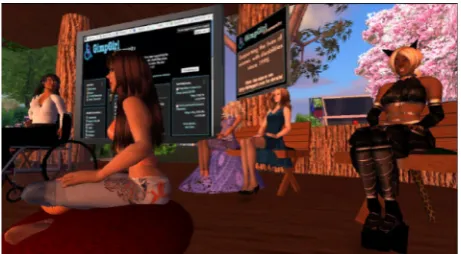
Tim Berners-Lee also points to the potential of ‘mar-shalling the community’ to improve the accessibility of Web 2.0 sites, suggesting in an interview with Out-Law. com [63] that in the spirit of Web 2.0 collaboration, the community could provide captioning for video blogs. There are already several exemplary initiatives such as Pro-ject readon [64], a community committed to making online media content to all, which has created a streaming media caption player and provides professional captioning services. YouTubeTM video now provides users with the ability to caption their videos [65] and GoogleTM has introduced a range of accessibility products and APIs for developers designed to improve user experience [66]. MUVEs such as Second Life can also be made more accessible to those with physical, sensory and cognitive impairments. There have been some important initiatives, many of which have been developed by the residents of the communities themselves. These include the develop-ment of non-graphical based viewers [67, 68] and the use of Internet Relay Channel (IRC) to enable people with disabilities who cannot attend ‘in-world’ meetings to participate using a web-based community chat room. Figure 2 shows a GimpGirl community meeting con-ducted in Second Life, which is relayed via IRC to the GimpGirl community chat room [69].
Interviews with residents inSecond Life also identified the following ‘in-world’ solutions:
d The virtual guide dog and virtual cane [70]
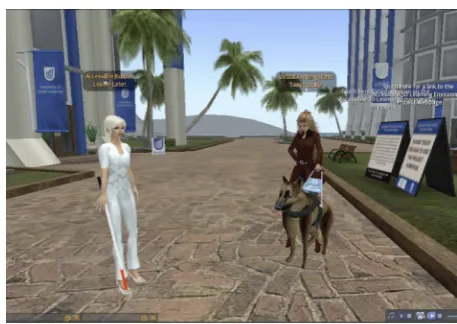
devel-oped by Virtual Helping Hands Inc., which enables users with vision impairments to navigate the virtual world by issuing commands through the chat chan-nel to the virtual dog or cane to find an object or fol-low an avatar.
d The E.V.A. voicechat advancement system, which is
an ‘in-world’ voice based application that narrates text displayed in the chat channel [71].
d Virtual Ability Inc [72] transcription services such as
voice-to-text (V2T) transcription (undertaken manu-ally using typed meaning-for-meaning real-time text) and text-to-voice (T2V) undertaken by transcription-ists who read aloud the text offered by the presenter.
3.4. Design guidelines
Drawing on the research reported in previous sections of this paper, the following essential requirements for the design of accessible MUVEs have been identified:
d interface must be able to support a range of inputting
devices;
d inclusion of styles enabling the customisation of type
according to size and colour;
d tab-index incorporated to provide a logical order
between links and options;
d text-to-voice feature for chat;
d provision of an audio message and a text list of
ava-tars in the vicinity;
d option to turn off graphics;
d requirement for users to add descriptive label for all
objects and longer descriptions for posters and slides containing text in image format;
d providing text note cards for all objects containing
text in graphic format;
d synchronised streaming captions for videos; d text transcriptions for streaming audio;
d conversion of voice to text that is exposed to screen
readers;
d inclusion of user help functions;
d potential to interface with wearable computers; d web browser alternatives to client viewers; d accompanying website must also be accessible.
This review of existing solutions also provided a foun-dation on which we could begin to design and develop an open source accessible viewer. The solution under development and the preliminary testing of the accessibil-ity features are reported in the next section.
3.5. Design of an accessible MUVE
The solution under development aims to incorporate these accessibility features and builds on the Max Voice technology as part of the virtual guide dog project. While
a detailed description of the design solution has been published elsewhere [12], the core components to the accessibility solution are reported briefly in this section.
There are two main components to the system. Firstly, the integration of text to speech and accessible interface controls in the MUVE client viewer (Figure 3).
The second being a web-based interface enabling a user to participate in synchronous sessions held in the MUVE through an accessible web page. Figure 3illustrates the core functionality of the web-based interface.
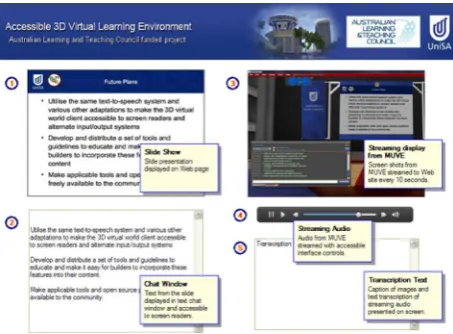
As Figure 4 shows, the web-based interface displays slide show presentations from the MUVE on the web page (1). The slide show text is streamed into the dynamic text chat area of the web page along with any text chat occurring in the MUVE (2). Screen grabs of the MUVE are streamed to the web page every 10 s (3) and any audio playing in the MUVE is also streamed to the web page (4). While the system does not support live
Figure 3. Slide show text presented through text chat that is read aloud to the user.
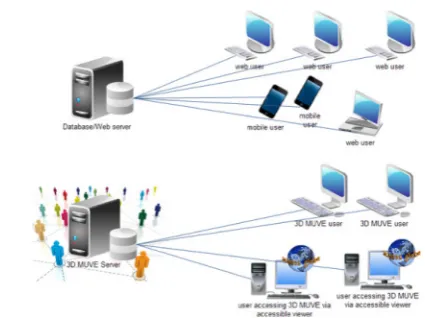
captioning, an area of the web page is provided to enable teachers to display prepared transcriptions of their verbal presentations (5). The process by which the MUVE inter-faces with the website is described in the following section and shown inFigure 5.
Users logged into the MUVE can type text into the chat window within the MUVE interface and they can hear that text read aloud, as well as the text messages from others participating in the chat session. The text chat is sent via http requests to the web server through a Cold Fusion gateway page and the data stored in a MySQL database. Similarly, any slides being displayed ‘in-world’ are sent as images and text equivalents to the server.
On the web side, users log into the site and are authen-ticated. Asynchronous JavaScript and XML is used to poll the database and identify any new content that needs to be displayed via either a refresh or append command to the appropriate element within the page. However, as our initial tests with users with disabilities identified, and as Thiessen and Russell [73] note, it is very difficult for Assistive Technologies (ATs) to understand Docu-ment Object Model events in AJAX applications. To resolve this issue, the W3C’s WAI Accessible Rich Inter-net Applications Suite (WAI-ARIA), which provides a framework for adding attributes to identify features for user interaction, has been implemented. As the WAI-ARIA site explains, WAI-ARIA makes it possible to map con-trols, live regions and events to accessibility application programming interfaces (APIs) [64]. Using ARIA live region markup it is possible to set the priority with which ATs should treat updates to the live regions.
Preliminary accessibility testing of the web interface was conducted by Media Access Australia in 2010. Further testing of the MUVE and web interface involving inde-pendent expert evaluations and testing by users with dis-abilities is planned for July 2011. This next section reports the preliminary findings from the Media Access Australia evaluation.
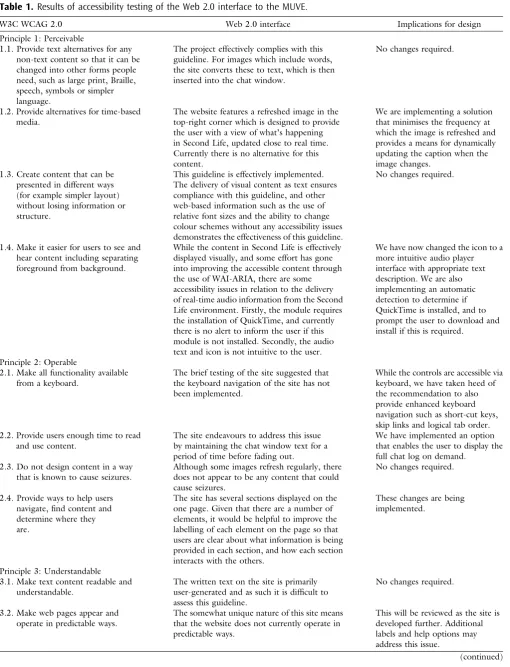
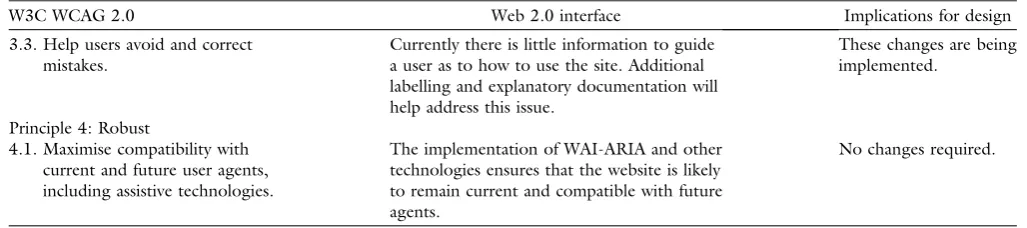
Findings. As reported by Wood [12] the findings from preliminary testing undertaken by Scott Hollier [74] from Media Access Australiaof the Web 2.0 interface based on the WCAG 2.0 principles are shown in Table 1 below. The first column specifies the relevant WCAG 2.0 guide-line, the second column details the outcome of the testing of each feature against the associated WCAG 2.0 guide-line and the third column indicates our proposed solution to identified issues that need to be addressed.
4. Discussion
The previous sections outline a multi-stage, mixed-meth-ods methodology, aimed at identifying both the advanta-ges and the accessibility challenadvanta-ges associated with the use of MUVEs in educational settings. The significant find-ings from each of these stages of the research are dis-cussed in this section, and the limitations of the research are considered. Implications for further research are explored more fully in the concluding section of the paper.
It was evident from our ethnographic research as well as the trials of courses undertaken inSecond Lifethat the af-fordances of MUVEs offer great promise as universities seek solutions that will enable them to more effectively address the needs of a more diverse population of student learners. On the other hand, our research identified sev-eral significant barriers that need to be addressed to ensure that the increasing use of MUVEs as e-learning tools do not exacerbate exiting exclusionary practices.
The research also identified several exemplary initiatives that point to the strategies that can be adopted to ensure MUVEs are more accessible to people with disabilities. The design of an accessible MUVE viewer and Web 2.0 interface is presented as an alternative that addresses many of the accessibility challenges.
While this paper only reports the outcomes from preli-minary testing of the Web 2.0 interface to the MUVE undertaken by Media Access Australia, the results suggest that the implementation of the WAI-ARIA solution addresses some of the challenges in making the Web 2.0 interface accessible for users who are unable to access the virtual world due to bandwidth restrictions or the nat-ure of their disabilities.
There are, however, further areas for development that are required to ensure the MUVE viewer and Web 2.0 application are fully compliant with W3C WCAG 2.0, IMS and UDL guidelines. Some of the remaining chal-lenges include the need for a solution that enables live captioning during verbal presentations in the MUVE (at present this is managed using either a prepared note card that is displayed as the speaker presents or through the aid of a live captioner), the difficulty of ensuring that users (educators and students) who are creating new content label their objects so that the information is available for the audio output and similarly, ensuring that users
Table 1.Results of accessibility testing of the Web 2.0 interface to the MUVE.
W3C WCAG 2.0 Web 2.0 interface Implications for design
Principle 1: Perceivable
1.1. Provide text alternatives for any non-text content so that it can be changed into other forms people need, such as large print, Braille, speech, symbols or simpler language.
The project effectively complies with this guideline. For images which include words, the site converts these to text, which is then inserted into the chat window.
No changes required.
1.2. Provide alternatives for time-based media.
The website features a refreshed image in the top-right corner which is designed to provide the user with a view of what’s happening in Second Life, updated close to real time. Currently there is no alternative for this content.
We are implementing a solution that minimises the frequency at which the image is refreshed and provides a means for dynamically updating the caption when the image changes.
1.3. Create content that can be presented in different ways (for example simpler layout) without losing information or structure.
This guideline is effectively implemented. The delivery of visual content as text ensures compliance with this guideline, and other web-based information such as the use of relative font sizes and the ability to change colour schemes without any accessibility issues demonstrates the effectiveness of this guideline.
No changes required.
1.4. Make it easier for users to see and hear content including separating foreground from background.
While the content in Second Life is effectively displayed visually, and some effort has gone into improving the accessible content through the use of WAI-ARIA, there are some accessibility issues in relation to the delivery of real-time audio information from the Second Life environment. Firstly, the module requires the installation of QuickTime, and currently there is no alert to inform the user if this module is not installed. Secondly, the audio text and icon is not intuitive to the user.
We have now changed the icon to a more intuitive audio player interface with appropriate text description. We are also implementing an automatic detection to determine if QuickTime is installed, and to prompt the user to download and install if this is required.
Principle 2: Operable
2.1. Make all functionality available from a keyboard.
The brief testing of the site suggested that the keyboard navigation of the site has not been implemented.
While the controls are accessible via keyboard, we have taken heed of the recommendation to also provide enhanced keyboard navigation such as short-cut keys, skip links and logical tab order. 2.2. Provide users enough time to read
and use content.
The site endeavours to address this issue by maintaining the chat window text for a period of time before fading out.
We have implemented an option that enables the user to display the full chat log on demand.
2.3. Do not design content in a way that is known to cause seizures.
Although some images refresh regularly, there does not appear to be any content that could cause seizures.
No changes required.
2.4. Provide ways to help users navigate, find content and determine where they are.
The site has several sections displayed on the one page. Given that there are a number of elements, it would be helpful to improve the labelling of each element on the page so that users are clear about what information is being provided in each section, and how each section interacts with the others.
These changes are being implemented.
Principle 3: Understandable 3.1. Make text content readable and
understandable.
The written text on the site is primarily user-generated and as such it is difficult to assess this guideline.
No changes required.
3.2. Make web pages appear and operate in predictable ways.
The somewhat unique nature of this site means that the website does not currently operate in predictable ways.
This will be reviewed as the site is developed further. Additional labels and help options may address this issue.
provide streaming captions for video content, and tran-scripts for audio streams.
Another remaining challenge concerns the Web 2.0 solution, which is designed to provide flexibility for users who are unable to log into the MUVE when away from their computer and for users with low end devices that are unable to render 3D graphics. Despite our best efforts, this alternative does not provide the same sensory experience as participating in the MUVE using the 3D viewer. With the number of mobile phone subscribers predicted to grow to 6.4 billion in 2015 [75], ‘low-threshold’ and ‘light weight’ accessible communications with MUVEs will become increasingly important.
5. Conclusion
This paper has outlined the benefits afforded by MUVEs as well as the challenges for those most likely to benefit from the opportunities these technologies afford. As this paper has outlined, there are already solutions in place and under development, which address some of the iden-tified limitations. The research described in this paper describes our design solution involving the design and development of an accessible MUVE viewer and associ-ated Web 2.0 interface for use in higher education. Preli-minary testing of the Web 2.0 interface has highlighted continuing accessibility issues, which are being addressed in the final revisions to the application.
We are about to commence trials of both the MUVE viewer and the Web 2.0 interface with users who have disabilities. We anticipate that these trials will identify addi-tional accessibility features that will need to be incorpo-rated prior to the final release of the open source platform to the higher education sector in the latter half of 2011.
While the research reported in this paper seeks to address the accessibility challenges of rich media learning environments through the design and development of a more accessible MUVE viewer and Web 2.0 interface, edu-cators will also need to be mindful that the content they develop is adapted to ensure that the learning environment is inclusive of the diverse needs of their students. As both Gibson [48] and Zajicek [49] note, the participatory
nature of Web 2.0 technologies depends on a commitment by the users themselves to creating accessible content. The WCAG 2.0, IMS and UDL guidelines outlined in this paper provide the foundation on which both developers and educators can begin to develop more accessible con-tent for dynamic, media rich e-learning environments.
The challenge as we await future developments of the anticipated intelligent Web 3.0 will be to harness the col-lective power of the users themselves to find technological solutions that can create a more universal virtual world. While we should not underestimate the magnitude of this challenge, the preceding discussion demonstrates that there is already evidence that participants of Web 2.0 and MUVE communities are leading the way in demon-strating the power of collective intelligence in keeping with the participatory nature of the networked informa-tion economy.
As universities reposition themselves in response to the widening participation agenda, which seeks to increase both the access and success rates of students from equity groups, there is an urgent need for developers to continue to focus on inclusive design strategies that ensure that dynamic, media rich environments such as MUVEs are accessible to an increasingly diverse student population. Without such research and the commitment of educators themselves, the goals of inclusive education will not be met.
Acknowledgements. The research reported in this article was supported by The Australian Learning and Teaching Council Ltd, an initiative of the Australian Government Department of Education, Employment and Workplace Relations. The views expressed in this publication do not necessarily reflect the views of The Australian Learning and Teaching Council. The project leaders are Dr Denise Wood (author) and Associate Professor Gerry Bloustien (Adjunct Professor, University of South Austra-lia). Our partner institutions are Flinders University of South Australia, Edith Cowan University, Monash University, Royal Melbourne Institute of Technology, University of Sydney and the University of Sheffield in the UK. Our programmer is Charles Morris, Vice-President of Virtual Helping Hands Inc, and we also gratefully acknowledge the support and contribu-tions of Janyth Ussery, Executive Director of Virtual Helping Hands Inc. and Darren Candler, Founder of Metadas Media. Table 1. (Continued.)
W3C WCAG 2.0 Web 2.0 interface Implications for design
3.3. Help users avoid and correct mistakes.
Currently there is little information to guide a user as to how to use the site. Additional labelling and explanatory documentation will help address this issue.
These changes are being implemented.
Principle 4: Robust
4.1. Maximise compatibility with current and future user agents, including assistive technologies.
The implementation of WAI-ARIA and other technologies ensures that the website is likely to remain current and compatible with future agents.
Appendix A.
Student evaluation instrument
Experiences using 3D virtual worlds such
as Second Life in courses at UniSA
Thank you for agreeing to participate in this survey. Data collected through this survey will be used to improve the quality of teaching and learning at UniSA and could also be used in external publications and presentations. Indi-vidual responses will remain confidential and no individu-als will be identified.
Demographic
1. What is your Program at UniSA? 2. Age Range
3. Gender
(Enter text into this box, maximum 2000 characters) Computer use
4. How often do you use a computer at home?
5. How often do you use a computer at University?
6. How often do you use chat software / instant mes-senger (e.g. AOL, MSN, ICQ, etc.)?
7. How often do you use social networking sites (e.g. Facebook, MySpace, Flickr.)?
8. How often do you use online multi-user computer games (e.g. World of Warcraft, Everquest, etc.)?
9. How often do you use 3D online virtual worlds such as Second Life?
10. How often do you use social bookmarking sites?
11. How often do you use the computer to access pod-casts / webpod-casts?
Internet access
12. Do you use a high speed connection to the Internet from home or dial-up?
Second life student survey
13. What communication tools did you use?
Likert-scale questions
Social Presence(immediacy and intimacy)
15. I felt as if I was communicating with a real person in Second Life.
16. I was able to be expressive in Second Life.
17. I was comfortable interacting with other participants in Second Life.
Engagement
18. I was engaged in the learning experience in Second Life.
19. Second Life was an enriching experience.
20. The learning experiences were active and collaborative in Second Life.
21. Using Second Life was fun and exciting.
22. I was willing to put in the effort needed to complete the learning activities in Second Life.
23. Second Life was a waste of time. Online Learning Community
24. The learning activity encouraged contact between myself and my classmates in Second Life.
Satisfaction
25. I would take another course that used Second Life. 26. I would recommend that the instructor continue
using Second Life.
27. I liked using Second Life as part of my course. 28. Participating in Second Life was a useful experience. 29. It was difficult to access Second Life.
30. Getting into Second Life was easy.
31. Technical support was available when I needed it in Second Life.
32. I would avoid classes using Second Life in the future. 33. I would not recommend this course to a friend. Learning
34. Second Life allowed me to better understand concepts.
35.Using Second Life helped me think more deeply about course material.
36. Second Life did not help my learning in the class. Online learning design (support, design, delivery, assessment)
37. The introductory explanations on how to use Second Life were clear.
38. The activity in Second Life was well-organized. 39. I understood all components of the activity in Second
Life.
40. The instructions for Second Life were clear.
41. The activity offered opportunities for interaction and communication in Second Life.
42. The goals in Second Life were clearly defined. 43. I understood what was expected of me in Second Life. Open-ended questions
44. How did Second Life impact your communication and interaction with others in this course?
45. How was using Second Life different than using tools in a Course Management System, like discussions or chat tools?
46. What was one thing that you would change about your experience in Second Life?
47. What was one thing that you liked about your expe-rience in Second Life?
48. How did Second Life impact your learning for this course?
49. Is there anything else you would like to share with us about your experience?
References
[1] BENKLER, Y. (2006) The Wealth of Networks: How Social
Production Transforms Markets and Freedom(New Haven:
Yale University Press).
[2] WOOD, D., LINDSAY, N.J., GLUTH, S., CORSO, R. and
BILSBOROW,C. (2011) Facilitating creative problem solving
in the marketing curriculum in response to the demands of the networked information society.15thWorld Marketing
Congress, Reims Management School, Reims, Champagne,
France, 19–23 July.
[3] KENNEDY, G., DALGARNO, B., BENNETT, S., GRAY, K.,
WAYCOTT, J., JUDD, T. and CHANG, R. (2009)Educating the Net Generation: A Handbook of Findings for Practice
and Policy. Retrieved 30 December 2010 from http://
www.netgen.unimelb.edu.au/downloads/handbook/Net Gen HandbookAll.pdf.
[4] OBLINGER, D. (2008) Growing up with Google—what it
means to education.Emerg. Technol. Learn.4: 11–30. [5] WOOD, D. and HOPKINS, L. (2008) 3D virtual
environ-ments: businesses are ready but are our ‘digital natives’ prepared for the changing landscape? In ATKINSON, R. J. and
MCBEATH, C. [eds].Hello! Where are You in the Landscape of Educational Technology? Proceedings of ASCILITE 2008.
(Melbourne: Deakin University), 1136–1146.
[6] KENNEDY, G., DALGARNO, B., GRAY, K., JUDD, T., WAYCOTT, J., BENNETT, S., MATON, K., et al. (2007) The net
generation are not big users of Web 2.0 technologies: preliminary findings. InProceedings of the ASCILITE 2007 Conference(Singapore).
[7] MASON, R. and RENNIE, F. (2008)E-Learning and Social Networking Handbook: Resources for Higher Education
(New York: Routledge).
[8] MULHOLLAND, C. (2008) We must get to grips with the
world of our ‘digital native’ students’ (24 January 2008).
Western Mail, 26.
[9] WOOD, D., BARNES, A., VIVIAN, R., SCUTTER, S. and STOKES
-THOMPSON, F. (2010) The future may have arrived, but
engagement with ICTs is not equal among our diverse ‘net gen’ learners. In STEEL, C., KEPPELL, M., GERBIC, P.
and HOUSEGO, S. [eds.] Curriculum, Technology & Transformation for an Unknown Future. Proceedings of the 26th Annual ASCILITE Conference(The University of Queensland), 1107–1118.
[11] COOMBS, N. (2010) Making Online Teaching Accessible: Inclusive Course Design for Students with Disabilities(New Jersey: Jossey-Bass).
[12] WOOD, D. (2010) Communicating in virtual worlds
through an accessible Web 2.0 solution.Telecommun. J. Australia60(2): 19.1–19.16.
[13] WOOD, D. (2009) Real life access to Second Life worlds:
the potential, the problems and the possibilities for a barrier-free future. Int. J. Divers. Organ. Communities Nations8(6): 139–148.
[14] UNITEDNATIONS (2011)Millennium Development Goals. Retrieved 15 June 2011 from http://www.un.org/mil-lenniumgoals/.
[15] UNITEDNATIONSEDUCATIONAL, SCIENTIFIC ANDCULTURAL
ORGANIZATION(UNESCO) (2010)Education for All (EFA) Global Monitoring Report. Retrieved 15 June 2011 from http://www.unesco.org/new/en/education/themes/ leading-the-international-agenda/efareport/.
[16] UNITED NATIONS (2011) Convention on the Rights of Persons with Disabilities: Status of Signatories and Parties. A/RES/61/106 Chapter IV (15).
[17] UNITEDNATIONS(2011)Optional Protocol to the Conven-tion on the Rights of Persons with Disabilities: Status of Signatories and Parties. Doc.A/61/611.
[18] ARMSTRONG, D., SPANDAGOU, I. and ARMSTRONG, A.C.
(2008) One nation globalization and inclusive education.
Paper Presented at the AARE 2008 International Educa-tion Research Conference, Brisbane.
[19] GAAD, E. (2011) Inclusive Education in the Middle East
(New York and London: Routledge).
[20] BRADLEY, D., NOONAN, P., NUGENT, H. and SCALES, B.
(2008) Review of Australian higher Education: Final
Report. Retrieved 19 June 2011 from
http://www.dee-wr.gov.au/he_review_finalreport.
[21] JAMES, R., BEXLEY, E., ANDERSON, M., DEVLIN, M.,
GARNETT, R., MARGINSON, S. and MAXWELL, L. (2008) A review of the participation in higher education of people from low socioeconomic backgrounds and Indigenous people. Report prepared for Universities Australia by the Centre for the Study of Higher Education, University of Melbourne. Retrieved 15 June 2011 from http:// 113.192.24.155:8080/vital/access/services/Download/ ngv:35491/SOURCE2?view=true.
[22] COMMONWEALTH OFAUSTRALIA(2009)Transforming
Aus-tralia’s Higher Education System (Canberra:
Common-wealth of Australia).
[23] CREAGH, T.A., NELSON, K.J. and CLARKE, J.A. (2011)
Acknowledging social justice and equity through good practice for monitoring student learning engagement in FYE.Paper Presented at the 14th Pacific Rim First Year in Higher Education Conference, Freemantle, WA.
[24] ELLIOTT, A. (2010) Equity, pedagogy and inclusion. Harnessing digital technologies to support students from low socio-economic backgrounds in higher education.
Commun. Inf.: A Global d-Journal 6(3) http://www.
ci-journal.net/index.php/ciej/article/view/751/643. [25] COLEMAN, R. (2006)About: Inclusive Design. Retrieved 14
January 2010 fromhttp://www.designcouncil.org.uk/en/ About-Design/Design-Techniques/Inclusive-design/.
[26] TAHKOKALLIO, P. and KOIVUSILTA, M. (2004) D4.1 Report
on update of design for all and design for all related higher education and research policies in EU member countries and USA. International Society Technologies Programme
Report. Retrieved 26 September 2006 from http://
www.idcnet.info/html/IDCnet_D4.1.html.
[27] W3C WAI (2011)Design for Inclusion. Retrieved 14 June 2011 from http://www.w3.org/WAI/users/Overview. html.
[28] Usability First (2004) Retrieved 14 January 2010 from
http://www.usabilityfirst.com/accessibility.
[29] ANDERSON, T. (2008) Towards a theory of online learning.
In ANDERSONT. andELLOUMIF. [eds.]Theory and Practice
of Online Learning (Athabasca, Canada: Athabasca
University), 45–74. Retrieved 14 January 2010 from http://cde.athabascau.ca/online_book/ch2.html. [30] CONOLE, G. and DYKE, M. (2004) What are the
affor-dances of information and communication technologies?
ALT-J12(2): 113–124.
[31] MCLOUGHLIN, C. and LEE, M.J.W. (2007) Social software
and participatory learning: pedagogical choices with tech-nology affordances in the Web 2.0 era. InProceedings of
the ASCILITE 2007 Conference(Singapore).
[32] NORMAN, D. (1999) Affordance, conventions and design. Interactions6(3): 38–43.
[33] SALOMON, G. [ed.] (1993)Distributed cognitions—psycho-logical and educational considerations (Cambridge, Eng-land: Cambridge University Press).
[34] GREGORY, S., LEE, M., ELLIS, A., GREGORY, B., WOOD, D.,
HILLIER, M., CAMPBELL, M.,et al. (2010) Australian higher
education institutions transforming the future of teaching and learning through virtual worlds. In STEEL, C.,
KEPPELL, M., GERBIC, P. and HOUSEGO, S. [eds.] Curric-ulum, Technology & Transformation for an Unknown Future. Proceedings of the 26th Annual ASCILITE
Conference (The University of Queensland), 399–
415.
[35] DICKEY, M.D. (2005) Brave new (interactive) worlds: a
review of the design affordances and constraints of two 3D virtual worlds as interactive learning environments. Inter-act. Learn. Environ.13(1–2): 121–137.
[36] CHEN, S. (2005) Serious Games: Games that Educate,
Train, and Inform. Retrieved 31 October 2010 from
http://www.gamasutra.com/features/20051031/chen_01. shtml.
[37] JARMON, L., TRAPHAGAN, T., MAYRATH, M. and TRIVEDI, A.
(2009) Virtual world teaching, experiential learning, and assessment: an interdisciplinary communication course in Second Life.Comput. Educ.53(1): 169–182.
[38] WOOD, D. (2009) Experiential learning through ‘real
world’ placements undertaken in 3D ‘virtual world’ spaces. In ATKINSON, R.J. and MCBEATH, C. [eds.] Same Places Different Spaces. Proceedings of ASCILITE 2009.
26th Annual ASCILITE International Conference (The
University of Auckland, Auckland University of Technol-ogy, and Australasian Society for Computers in Learning in Tertiary Education), 1121–1129.
[40] ROBBINS, S. (2007) A futurist’s view of Second Life
education: a developing taxonomy of digital spaces. In LIVINGSTONE D. and KEMP J. [eds.] Proceedings of the Second Life Education Workshop Community Convention
(Chicago Hilton: The University of Paisley), vol. 2007, 27–33.
[41] CLARK, S. and MAHER, M.L. (2003) The Effects of a Sense
of Place on the Learning Experience in a 3D Virtual World. In Communities of Practice Research. In Proceed-ings of the 10th Association for Learning Technologies
Conference (ALT-C2003) (Sheffield, UK: University of
Sheffield), 82–101.
[42] LEE, J. and CHRISTOPHER, M. (2006) Ugly in a world
where you can choose to be beautiful: teaching and learning about diversity via virtual worlds. InProceedings of the 7th International Conference on Learning Sciences
(Bloomington, Indiana).
[43] GIRVAN, C. and SAVAGE, T. (2010) Identifying an
appro-priate pedagogy for virtual worlds: a communal construc-tivism case study. Comput: Educ. 55(1): 342–349. doi: 10.1016/j.compedu.2010.01.020.
[44] SAVIN-BADEN, M., GOURLAY, L., TOMBS, C., STEILS, N.,
TOMBS, G. and MAWER, M. (2010) Situating pedagogies,
positions and practices in immersive virtual worlds.Educ. Res.52(2): 123–133.
[45] PFEIL, U., ANG, C.S. and ZAPHIRIS, P. (2009) Issues and
challenges of teaching and learning in 3D virtual worlds: real life case studies.Educ. Media Int.46(3): 223–238. [46] SALMON, G. (2009) The future for (second) life and
learning.British J. Educ. Technol.40(3): 526–538. [47] ABILITYNET(2008) State of the eNation Web Accessibility
Reports: Social Networking Sites. Retrieved 14 January 2010 fromhttp://www.abilitynet.org.uk/docs/enation/ 2008SocialNetworkingSites.pdf.
[48] GIBSON, B. (2007) Enabling an accessible Web 2.0. In Proceedings of the 2007 International Cross-Disciplinary Conference on Web accessibility (W4A)(Banff, Canada). [49] ZAJICEK, M. (2007) Web 2.0: hype or happiness? In
Proceedings of the 2007 International Cross-Disciplinary Conference on Web Accessibility (W4A)(Banff, Canada). [50] QI, S. (2007) Experts Debate How Accessible Virtual
Worlds are to the Disabled. Retrieved 14 January 2010
from http://www.slnn.com/index.php?SCREEN=arti-cle&about=accessibility-in-a-3d-world.
[51] HICKEY-MOODY, A. and WOOD, D. (2010) Ethics in
Second Life: difference, desire and the production of subjectivity. In WANKEL, C. and MALLECK, S. [eds.] Emerging Ethical Issue of Life in Virtual Worlds (Char-lotte, NC: IAP—Information Age Publishing).
[52] WORLD WIDE WEB CONSORTIUM (1999) Web Content
Accessibility Guidelines 1.0 (WCAG 1.0). Retrieved 22
June 2007 fromhttp://www.w3.org/TR/WCAG10/. [53] WORLD WIDE WEB CONSORTIUM (2008) Web Content
Accessibility Guidelines 2.0 (WCAG 2.0). Retrieved 14
January 2011, fromhttp://www.w3.org/TR/WCAG20. [54] UDL Guidelines cited in COOMBS, N. (2010) Making Online Teaching Accessible: Inclusive Course Design for Students with Disabilities(New Jersey: Jossey-Bass).
[55] BARSTOW, C., MCKELL, M., ROTHBERG, M. and SCHMIDT, C.
(2004) IMS Guidelines for Developing Accessible Learning
Applications. Retrieved 9 February 2011 from http://
www.imsglobal.org/accessibility/accessiblevers/index. html.
[56] HICKEY-MOODY, A. and WOOD, D. (2008) Imagining
otherwise: deleuze, disability & Second Life. In Proceed-ings of the ANZCA08 Conference, Power and Place
(Wellington, NZ).
[57] Accessible online 3D virtual learning environment. 3D
virtual learning environment case studies. Retrieved 9 June 2011 from http://www.unisanet.unisa.edu.au/ 3dvle/casestudies.asp.
[58] WOOD, D. and BLOUSTIEN, G. (forthcoming). Facilitating
flexible, enquiry-based experiential learning through an accessible, three-dimensional virtual learning environment (3DVLE). Final Report. Australian Learning and Teach-ing Council, Sydney.
[59] FEWSTER, R., CHAFER, J. and WOOD, D. (2010) Staging
Second Life in real and virtual spaces. In VINCENTI, G. and
BRAMAM, J. [eds.] Teaching through Multi-User Virtual Environments: Applying Dynamic Elements to the Modern
Classroom(Hershey, PA: IGI Global), 217–235.
[60] WOOD, D. (2010) The benefits and unanticipated
chal-lenges in the use of 3D virtual learning environments in the undergraduate media arts curriculum. In VINCENTI, G.
and BRAMAM J. [eds.] Teaching Through Multi-User Virtual Environments: Applying Dynamic Elements to the
Modern Classroom (Hershey, PA: IGI Global), 236–
257.
[61] WOOD, D. (2009) Experiential learning through ‘real
world’ placements undertaken in 3D ‘virtual world’ spaces. In ATKINSON, R.J. and MCBEATH, C. [eds.] Same Places, Different Spaces. Proceedings ASCILITE Auckland 2009. 26th Annual ASCILITE International Conference
(The University of Auckland, Auckland University of Technology, and Australasian Society for Computers in Learning in Tertiary Education), 1121–1129.
[62] WORLD WIDE WEB CONSORTIUM (2009) WAI-ARIA
Overview. Retrieved 14 January 2011 from http://
www.w3.org/WAI/intro/aria.php.
[63] Berners-Lee applies Web 2.0 to improve accessibility |
OUT-LAW.COM. (2006) Retrieved 13 December 2008 from
http://www.out-law.com/page-6946.
[64] Project readon. Access for AllTM. Retrieved 14 January 2011
fromhttp://www.projectreadon.com/.
[65] YouTubeTM. Captions and subtitles. Retrieved 14 June 2011
fromhttp://www.youtube.com/t/captions_ about.
[66] GoogleTM accessibility. Retrieved 14 June 2011 from
http://www.google.com/accessibility/.
[67] Libretto. Retrieved 14 June 2011 from http://wiki.
secondlife.com/wiki/Third_Party_Viewer_Directory/ Libretto.
[68] Radegast.Retrieved 14 June 2011 from
http://wiki.sec-ondlife.com/wiki/Third_Party_Viewer_Directory/Radegast.
[69] GimpGirl Community Chat Room. Retrieved 14 June
[70] Virtual Guide Dog Project. Retrieved 14 June 2011 from http://www.virtualguidedog.com/.
[71] E.V.A.voicechat advancement system. Retrieved 14 June
2011 from http://jarek-dejavu.shop1.cz/menu/prod-ucts/e-v-a-voicechat-advancement-1-32.
[72] Virtual Ability Inc. Retrieved 14 June 2011 fromhttp:// virtualability.org/.
[73] THIESSEN, P. and RUSSELL, E. (2009) WAI-ARIA live
regions and channels: ReefChat as a case example.
Disability Rehab.: Assistive Technol.4(4): 276–287.
[74] HOLLIER, S. (2010) Website accessibility overview: Second
Life accessible web interface. Unpublished Report, Media Access Australia, Ultimo, NSW.