Efficient Marker based Gesture Recognition Technique
Pallab Dutta Aparna B Sridharan B Vipin Tyagi
Team Leader Research Engineer Group Leader Director C-DOT, Electronic City C-DOT, Electronic City C-DOT, Electronic City C-DOT, Mehrauli Bangalore Bangalore Bangalore New Delhi
ABSTRACT
Abstract: Gesture recognition techniques are used in order to achieve spontaneous and natural machine interactions. Normal Hand gesture based recognition techniques using single 2D camera have serious issues in terms of correct tracking; also the false recognition occurrences are higher. In this paper, we present an efficient method of implementing gesture recognition using marker. In this approach we use a single marker for gesture recognition by doing mouse emulation. Tracking is accurate and false recognition occurrences are found to be very low in this method. Also this approach is found to be computationally efficient and better user experience compared to other hand gesture recognition techniques using single 2D camera.
General Terms
Hand Gesture recognition, Marker, 2D camera
Keywords
Marker, Gesture recognition, mouse emulation
1.
INTRODUCTION
With the advancements of computer and Information technologies, way human beings interacts with computers, embedded computing systems and intelligent nodes have changed a lot and is continuously undergoing changes. One of the most intuitive way humans interact among themselves is using gestures; so human interactions with computing systems using gestures is the most natural extension of the same. Hand gesture is the commonly used natural way of humans tends to express them while communicating. Gesture recognition can be seen as a way for computers to begin to understand human body language, thus building a richer bridge between machines and humans than primitive interfaces which still limit the majority of input to conventional keyboard and mouse. Using the concept of gesture recognition, it is possible to point at the computer screen so that the cursor will move accordingly. This could potentially replace conventional input devices such as mouse, keyboards and even touch-screens. The user interface of the computer has evolved from a text-based command line to a graphical interface with keyboard and mouse inputs. However, they are inconvenient and unnatural. This continues to be a major hindrance for computer illiterates to imbibe the technological advancements in computing and information technology. Gesture recognition enables humans to communicate with the machine and interact naturally without any mechanical devices. The use of hand gestures provides an attractive alternative to these non-intuitive interface devices for human-computer interaction. Human beings generally use hand gestures for expression of their feelings and manifestation of their thoughts. In particular, visual interpretation of hand gestures can help in achieving naturalness expected for humans interacting with computing systems. A lot of information can
be carried in a nonintrusive manner and at a low cost through vision/camera, therefore vision based gesture recognition system is considered to be very useful. The complete real time gesture recognition algorithm and system building blocks are discussed in [5]. Bernard Boulay [7] discussed how to recognize the human body postures. There are many applications with hand gesture recognition. Juan Pablo Wachs mentioned few applications with hand gestures in [10]. Kim D [14] discussed how to use gesture recognition to control the house hold work. Normal Hand gesture based recognition techniques using single 2D camera have serious issues in terms of accurate tracking; also the false recognition occurrences are higher. These are annoying to the users and are major impediments of gesture recognition usage in a low cost practical scenario. In this paper, we present an efficient method of implementing gesture recognition using marker. In this approach we use a single marker for gesture recognition by doing mouse emulation that overcomes the limitations of plain hand gesture recognition.
2.
LIMITATIONS OF CAMERA BASED
GESTURE RECOGNITION
TECHNIQUES
2D Camera based Hand Gesture recognition techniques can be divided into two modules. They are:
1. Hand posture Localization 2. Hand Posture Recognition.
In Hand posture localization, hand portion is identified in the entire image. Once the user’s hand has been segmented, its posture is recognized by using the techniques Hidden Markov models [9], [11], Haar Transform [8], Hausdorff matching approach, Fuzzy Logic, Neural Networks and template matching etc. Sushmita [11] discussed survey about gesture recognition.
Hand segmentation can be done by mainly with two techniques
1. Skin Color 2. Hand Movement
method, he used thresholds for Y, Cb and Cr components as 0 to 255, 77 to 127, and 133 to 173, respectively for the skin color region. The results with this technique are not stable because of variety of lighting conditions and skin colors [2].
One more color space is HSV (H-Hue, S-Saturation, V-value) color space. In HSV color space, Hue and Saturation are independent of light intensity. Only Value depends on the light intensity. For skin color identification only Hue and Saturation components are considered. RGB image is converted to HSV color image and given thresholds for skin regions are 0 ≤ H ≤ 15; 20 ≤ S ≤ 120 for natural light and 0 ≤ H ≤ 30; 60 ≤ S ≤ 160 for artificial light [1]. In [6], [8] also used HSV color space for skin color segmentation. Limitation with this approach is only hand should be faced to the camera. If entire body focuses to the camera then it is required to be told which hand is going to be used prior to the recognition process starts. Skin detection techniques detailed description is given in [3].
The other technique for Hand segmentation is based on the hand movements. Algorithm presented in [4] is used for hand tracking instead of face. Here, first hand is moved in front of the camera, by using two consecutive frame subtraction, only moving part is highlighted the remaining background is eliminated. Histogram of the colors is calculated for the moving part. Based on the histogram, CAMSHIFT tracking algorithm always tracks the hand. This algorithm gives good results but the limitation is always hand should be far from the head. If it is near to head then CAMSHIFT algorithm also tracks the head. Back ground should not contain any similar skin color like regions.
The problem with movement based hand segmentation is only hand should move and the back ground parts should not move. If back ground parts (ex: head) are moving then their speed should be slower than he hand movement speed.Lillian Y. Chang [12] recognized hand based on hand pose features from optical markers. But this is complex system.
Thus we see that camera based hand gesture recognition techniques suffers from major draw backs which limits its applicability in a practical scenario.
3.
MARKER BASED GESTURE
RECOGNITION APPROACH
2D barcodes have been widely used in context aware and mobile computing environments. Traditional 2D barcodes (Fig.1a) carry information up to a few hundred bytes. Some research suggests that 2D barcodes can be used to identify the position and orientation of the capturing device to facilitate mobile interaction which often stores an index to online content. Existing 2D barcodes, such as QRcode, MaxiCode or Datamatrix, are typically not designed for the purpose of tracking and are often decoded at a close distance. “Visual Code” and “Spot Code” (Fig.1b) are known as marker, are found to be typically useful for tracking purpose.
Gesture recognition techniques using vision based markers over comes the problems as explained in section 2. Requirements, related work done and our approach is explained in detail in following sub sections.
Fig.1(a) Fig.1 (b)
3.1
Requirements
Single Marker shall be used for doing mouse emulation. Shall be able to emulate mouse cursor movement and
double click.
Cursor movement using the marker shall be smooth and continuous.
Tracking shall be accurate
The required movement of the marker shall be such that it is convenient for the user to move the cursor in the computer screen.
Marker to be small in size so that can be used with a single hand.
Marker to be cheap and easily reproducible
Marker should not require any special maintenance effort.
Marker based gesture recognition approach shall not be computationally heavy.3.2
Related work
There is some literature available on marker based gesture recognition techniques but most of these focuses on different markers being used for different gestures. Also marker based 3D gesture recognition techniques are mentioned in [13]. Each of these suffers from various short comings. [15], requires different color markers for creating gestures, usability and maintainability of such a system is very difficult in a practical scenario. [13], requires a 3D camera and also computationally heavy. As such we could not find any literature which details the gesture recognition technique using a single marker and a 2D camera. Also there is a literature that details the usage of different markers for different gestures. All these approaches suffer from practical usage and maintainability.
3.3
Our Approach
Marker is used to emulate the mouse i.e. the natural movement of marker replaces the usage of a mouse in an intuitive use-case scenarios. Generally gestures can be done by hand, head and body etc. Here marker is used as a gesture interface. System can understand the gestures done by marker like moving forward backward, up, down and bending the marker.
augmented cube can be seen through camera only. This augmented cube is always in track with marker. . Cube with side lengths is as shown in figure 2. Where d0, d1, d2, d3, d4,
d5, d6, d7, d8, d9, d10 and d11 are side lengths.
Fig.2 Cube with Lengths
d0d1d2 and d3 square center point is tracked for doing the
mouse emulation. Here, relative movements are used for mouse simulation. Center point of d0d1d2 and d3 square center
point is centroid of that square. If the marker is moving in front of the camera, identified in which direction (left, right, up, down) marker is moving and also the displacement in that direct. For this old frame center point is saved. Moving direction is identified with respect to the old frame. For mouse cursor movement along with marker, present mouse co-ordinates are noted and to that added/subtracted (depends on direction) a displacement with multiplication factor of 4 in the same direction of the marker. Multiplication factor is used to map the camera resolution and monitor resolution. With this mouse cursor is moving parallel to the marker.
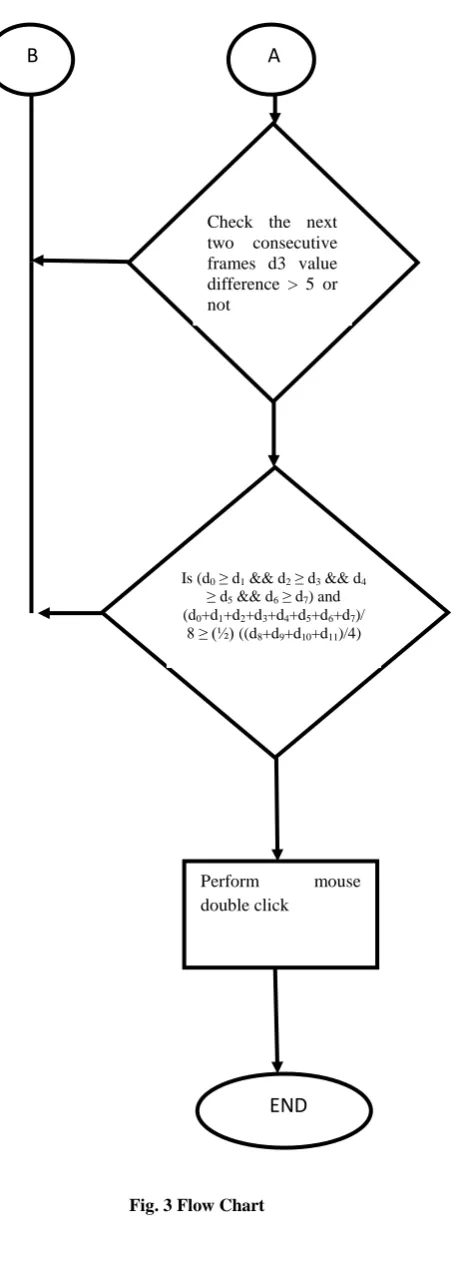
Mouse double click: For doing the mouse double click marker gesture is defined as bending the marker towards the camera around 45 degrees. The bending movement should be slow. Here, assumed that for bending marker it will take around 10 frames. d3 value distinguishes the marker from standing
position to bending position. So, d3 values are stored in a
vector for past frames. At the start of bending verified for the condition var1±n = var2 ±n (n = 0, 1, 2) for 10 frames. Var1 is last frame d3 value and var2 is present frame d3 value. At the
start of the bending hand moves slowly, so for almost 10 frames d3 values satisfies the above condition. At the middle of the bending d3 value difference from the past frame to
current frame will go more than 5. This is the indication for bending. After that, condition is d0 ≥ d1 && d2 ≥ d3 && d4 ≥
d5 && d6 ≥ d7 verified. This condition is because, when
marker is bending due to camera distortions d1, d3, d5, d7 looks
like contracting. If the previous condition satisfies then checked for the condition (d0+d1+d2+d3+d4+d5+d6+d7)/8 ≥ (½)
((d8+d9+d10+d11)/4). This is also happens because of camera
distortions. When this condition also satisfies then that gesture is a bending gesture for double click. Mouse double click is done at the center of the (presentframe-10)th frame. Center of the (presentframe-10)th frame considered because while doing bending centroid also moves from our point of interest.
The flow chart is shown in figure 3.
d
0d
1d
2d
3d
4d
7d
8d
10d
6d
5d
9d
11A
B
Perform contour analysis on the Captured image.
find the four corners of a polygon and refine the four corners without any distortions
Check for rectangularity and convexity
Find the other coordinates of the cube & draw a cube on the marker
When marker is moving, identify in which direction (left/right or up/down) it is moving and also calculates the displacement
Move the mouse cursor position according to the marker direction and displacement
Check for 10 consecutive frames, whether d3 value is almost equal or not NO
YES
NO
YES
Fig. 3 Flow Chart
4.
DEVELOPMENT AND
EXPERIMENTAL SETUP
[image:4.595.317.549.140.294.2]The setup consists of windows vista PC, Microsoft Visual C++ 2010 express edition, Opencv 2.4.3 libraries. Also a marker of image size 10cm X 10 cm.
Fig. 4 Marker Showing in front of the Camera
5.
PERFORMANCE DATA AND
ANALYSIS
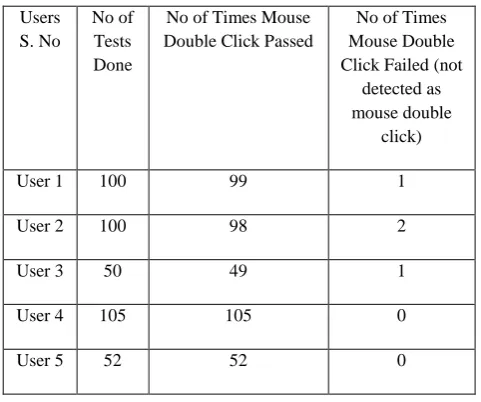
Browser based application is tested with marker as a gesture interface in windows vista machine. In this, marker is used for mouse emulation for the entire monitor screen of resolution 1024x768.
The marker was shown to the camera which instantly does the recognition and tracking. The experiment was repeated a number of times by different users, each time the tracking of the marker is found to be smooth and the mouse cursor movement covering the entire monitor. The performance results of mouse cursor movement and mouse double click by different users are shown in the following tables.
Table 1. Performance Results for Mouse Cursor Movement with Different Users
Users S. No
No of Tests Done
No of Times Mouse Cursor Movement
Passed
No of Times Mouse Cursor
Movement Failed (wrongly
detected as mouse click)
User 1 250 250 0
User 2 250 250 0
User 3 200 199 1
User 4 210 210 0
User 5 110 110 0
END
Check the next two consecutive frames d3 value difference > 5 or not
Is (d0 ≥ d1 && d2 ≥ d3 && d4
≥ d5 && d6 ≥ d7) and
(d0+d1+d2+d3+d4+d5+d6+d7)/
8 ≥ (½)((d8+d9+d10+d11)/4)
Perform mouse double click
A
NO
YES NO
YES
[image:4.595.312.548.512.709.2]Table 2. Performance Results for Mouse Double Click with Different Users
Users S. No
No of Tests Done
No of Times Mouse Double Click Passed
No of Times Mouse Double Click Failed (not
detected as mouse double
click)
User 1 100 99 1
User 2 100 98 2
User 3 50 49 1
User 4 105 105 0
User 5 52 52 0
There are two types of errors (failure cases) those are relevant in this scenario:
I. Type 1 Error – Normal maker movement identified wrongly as mouse click
II. Type 2 Error – Click gesture is not recognized as mouse click.
Type 1 Error: movement gesture identified as a click gesture. This error occurs when user bending the marker while doing the movement gesture. To avoid this error user must hold the marker without any bending. The user should hold the marker straight without any angle. When the experiment was repeated with proper marker holder, the probability of type 1 error is found to be around 0.1%.
Type 2 Error: click gesture identified as a movement gesture. This error occurs when the user does the click gesture very fast. To avoid this error user must not do the movement of the marker very fast. A normal hand speed (0.3 sec from straight to bend position of the marker) is found to be suitable and at this speed, the probability of type 2 error is found to be around 1%.
6.
CONCLUSION
Marker based gesture recognition technique meets the requirements as mentioned in section 3.1. Although in this approach, a marker needs to be held by the user, but this approach overcomes the problems associated with plain hand gesture recognition based on 2D camera. Performance in terms of accurate tracking and low false recognition makes this a suitable candidate for practical application for gesture recognition
7.
REFERENCES
[1] Elena, Luis and Mario, “Hand Gesture Recognition for Human-Machine Interaction”. Journal of WSCG, Vol.12, No.1- 3, ISSN 1213- 6972.
[2] Hoojoon Park, “A Method for Controlling Mouse Movement using a Real-Time Camera”.
[3] Ahmed Elgammal,Crystal Muangand DunxuHu,” Skin Detection-a Short Tutorial” Encyclopedia of Biometrics by Springer-Verlag Berlin Heidelberg 2009.
[4] Gary R. Bradski,” Computer Vision Face Tracking For Use in a Perceptual User Interface”, Intel Technology Journal Q2 ’98.
[5] Burak Ozer, Tiehan Lu, and Wayne Wolf, “Design of a Real-Time Gesture Recognition System” IEEE Signal Processing Magzine, vol[57], May 2005.
[6] Ilan Steinberg, Tomer M. London, Dotan Di Castro, “Hand Gesture Recognition in Images and Video”. [7] Bernard Boulay, Francois Bremond and Monique
Thonnat, “Human Posture Recognition in Video Sequence”.
[8] Ehsan , Syed , Mirza and Hyunchul ,“New Hand Gesture Recognition Method for Mouse Operations”. IEEE Proceedings, 2011.
[9] Nguyen Dang Binh, Enokida Shuichi, Toshiaki Ejima “Real-Time Hand Tracking and Gesture Recognition System” GVIP 05 Conference, 19-21 December 2005, CICC, Cairo, Egypt.
[10] Juan P W, Mathias K, Helman S, Yael E. “Vision-Based and-Gesture Applications”. In communications of the ACM, Febraury 2011, Vol. 54.
[11] Mitra, S., and Acharya, T. “Gesture recognition: A Survey”. IEEE Transactions on Systems, Man and Cybernetics Part C: Applications and Reviews 37, 3 (2007), 311–324.
[12] Chang, L., Pollard, N., Mitchell, T., and Xing, E. “Feature selection for grasp recognition from optical Markers”. In Proc. IROS 2007, IEEE (29 2007-Nov. 2 2007), 2944 –2950.
[13]Goh Chong Yang and Chua Hock Chuan : “Marker -Based 3D Gesture Recognition For Interactive Applications”. In Proceedings of the URECA@NTU 2009-10.
[14]Kim. D, (2006), “An Intelligent Smart Home Control Using Body Gestures”. In the Proceedings of International Conference on Hybrid Information Technology (ICHIT'06), IEEE, Korea.