
ISSN(Online): 2320-9801
ISSN (Print): 2320-9798
International Journal of Innovative Research in Computer
and Communication Engineering
(An ISO 3297: 2007 Certified Organization)
Vol. 3, Issue 9, September 2015
Comparison of CSS and JavaScript Animation
Nishant Panchal
1, Arpit Patel
2, Smit Vasani
3, Neha Katre
4Selenium Specialist, Support Engineering, Browser Stack, Mumbai, India 1 Test Engineer, Quality Assurance, Browser Stack, Mumbai, India 2
Software Engineer, Insights & Data, Capgemini, Mumbai, India 3
Assistant Professor, Dept. of I.T., D. J. Sanghvi College of Engineering, Mumbai, India 4
ABSTRACT: Animations are taking on the internet and are an important aspect of each and every website. They help improve the usability of a website and provide an effective way of interacting with it. Developers use CSS as well as JavaScript to create animations on the website; however, the dilemma of which technique to use is faced by all of them. Both, CSS and JavaScript, are an integral part of every website and are most commonly used by all web developers. This article analysesall the aspects of CSS and JavaScript animations, which will in turn help you select the right technique for your needs.
KEYWORDS: CSS, JavaScript, Animation, jQuery, Website, Keyframe, Animation Performance, Speed.
I. INTRODUCTION
Animations are primarily used for effective presentation of information. They are most commonly used in the entertainment industry for creating 2D and 3D movies. In recent times, animations are also dominantly used for explaining medical concepts around physiology or surgery, architectural visualization, mechanical animations in manufacturing industries, forensic animations and animations for education. These animations provide an effective way of understanding the information presented to people. This importance of animation has now been realized in the web industry, which is the most boosting industry in the computing world. Animations are now used on websites not only for creating videos to convey information, but also to improve the interactivity of the website which provides rich user experience.
According to Netcraft January 2015 Web Server Survey, there were approximately 876 million websites available on the internet [1]. The information available on these websites reach a huge number audience and it is very important for web developers to present this data in an easy and effective way. This is where animations have played an important role in the web industry. The use of animation on the web has given a new direction to the way information is presented to the users. It provides an intuitive, interesting and unique way to the users to grasp this information. In addition to this, improving user experience plays an important role in how comfortable the user feels while interacting with the website. An increasing number of web based companies have understood the importance of animation in improving user experience and are striving hard to retain users for more time on their websites. Animation is one aspect, which if used sensibly and in the right factor, can boost the usability of the website.
ISSN(Online): 2320-9801
ISSN (Print): 2320-9798
International Journal of Innovative Research in Computer
and Communication Engineering
(An ISO 3297: 2007 Certified Organization)
Vol. 3, Issue 9, September 2015
are falsely conflated with jQuery, however, there is a significant difference between both. JavaScript animations are used for 2D and 3D animations and they are very customizable and efficient. Though CSS and JavaScript animations are widely used by developers for same and/or different purposes, there are many differences that might affect the performance of the animation. This article sheds light on various aspects that are considered while running an animation on the web page with the utmost performance.
II. CSSANIMATION
CSS animations work at element level of the web page, and with a single change to its property will gradually change the element from one style to another. Animation is a new CSS property that allows us to animate any HTML element and modify as many CSS properties of the element, for as many times as we want. This provides an easy way to perform simple animation, but the start and end states of the animation are controlled by existing property values, and transitions provide little control to the author on how the animation progresses [2]. At the moment, only WebKit browsers support CSS animations. The unsupported browsers will simply ignore the CSS animation code [13].
A. Working of CSS Animations:
CSS animations compute a new value for element properties that are affected during the execution of the animation. These computed property values are then applied to the respective element to present the new state of the element. The computed property values have the highest priority and they override any other styling system that is applied to that element. The computed property values for CSS animations are controlled by the following CSS properties:
animation-name: This property defines a list of all the animations that apply at a particular keyframe, during the execution of the animation. If multiple animations attempt to modify the same property of an element, then the animation name that appears at the end of the 'animation-name' list, is applied to the property.
Animation-duration: This property defines the length of time an animation takes to complete one cycle. The default value is 0.
animation-iteration-count: This property configures the number of times an animation cycle is played. The default value is 1, which means the animation will play from beginning to end only once. It can be set to 'infinite' if you wish to repeat the animation forever.
animation-delay: This property defines when the animation will start. It allows an animation to delay its execution after it is applied. The default value for this property is 0, that is it initiates the animation as soon as it is applied. Otherwise, the value specifies the offset from the point the animation is applied, till it starts execution.
animation-fill-mode: This property defines what values are applied by the animation, outside its execution time. It allows users to modify the property values between the time it is applied and the time it starts execution, and also after the animation has completed execution. It can be set to 'backwards', 'forwards' or 'both'.
Figure 1 shows how property values are computed while performing CSS Animation:
Fig. 1. Computation of animated property values [2]
As shown in Figure 1, the animation does not affect the computed value in three cases [2]: Before the application of the animation
ISSN(Online): 2320-9801
ISSN (Print): 2320-9798
International Journal of Innovative Research in Computer
and Communication Engineering
(An ISO 3297: 2007 Certified Organization)
Vol. 3, Issue 9, September 2015
After the end of the animation.
The intrinsic style shown at the top of the diagram represents the current style applied to the element that is the style of the element before an animation is run. The computed value is derived from the intrinsic style at the times when an animation is not running and also when an animation is delayed (using 'animation-delay' property). During an animation, the computed style is derived from the animated value.
The start time of the animation is determined by the latter of the two instances [2]:
The time at which the animation that specifies the animation is resolved on the web page. The time at which the web page has loaded completely and fires the "document load" event.
For example, if an animation is specified in the document style sheet (<style> tag), the animation will begin when "document load" event is fired. However, if an animation is specified on an element (inline style properties) by modifying the style properties after the document loads, the animation will start once the computed style is resolved. The end of the animation is defined by the combination of the 'animation-duration', 'animation-iteration-count' and 'animation-fill-mode' CSS properties.
B. Commands and Sample Code for CSS Animations CSS animations are made up of two components [3]:
1. Keyframes:
These define various stages of the animation along with the style property of the element to be animated. Each @keyframes is composed of:
Name of the animation: A unique name that describes the animation, for example, bounceIn.
Stages in animation: Each portion of the animation is presented as percentage. 0% represents the start state and 100% represents the end state of the animation. Many intermediate states can be added in between.
CSS Properties: The CSS properties that are defined for each stage of the animation that modifies the element.
The @keyframes are added to your main CSS file.
2. Animation Properties:
These properties allow us to bindeach @keyframes block to a specific CSS element. The animation properties are added to CSS selectors (or elements), in the main CSS file, that you want to animate. You can add any of the previously discussed CS properties for the animation to take effect.
In the following example, we will add the animation properties to an element with “class=box” that you wish to animate:
@keyframes bounceIn {
0% {transform: scale(0.1); opacity: 0; } 10% {transform: scale(1.2); opacity: 0.5; } 20% {transform: scale(1); opacity: 1; }
100% {transform: translate(500px); color: red;} }
.box {
height: 100px; width: 100px;
background-color: black; left: 300px;
top: 250px; position: absolute;
animation-name: bounceIn; animation-duration: 5000ms; animation-iteration-count: infinite; animation-direction: both;
ISSN(Online): 2320-9801
ISSN (Print): 2320-9798
International Journal of Innovative Research in Computer
and Communication Engineering
(An ISO 3297: 2007 Certified Organization)
Vol. 3, Issue 9, September 2015
III. JAVASCRIPT ANIMATION
JavaScript animations perform gradual changes in the DOM element styles or the canvas objects. The entire animation is split into pieces, and each piece is executed when called by the timer. Since the timer intervals are very small, the animations look continuous and smooth. Creating JavaScript animations is, by comparison, a little more complex than writing CSS animations. But JavaScript animations give more control and power to the developer and the user to dynamically modify the animations on the web page. Most of the modern browsers support JavaScript animations.
A. Working of JavaScript Animation:
JavaScript animations are controlled by timers that execute small pieces of animation such that the animation as an entire looks continuous. The two timers used in JavaScript are 'setTimeout' and 'setInterval'. Most JavaScript animation frameworks use 10-15 ms delay between frames, that is 100 to 67 frames per second (FPS) respectively [14]. Less delay makes the animation look smoother, but it requires more computational power from the browser which might cause the CPU usage to boost up to 100% and degrade the overall performance.
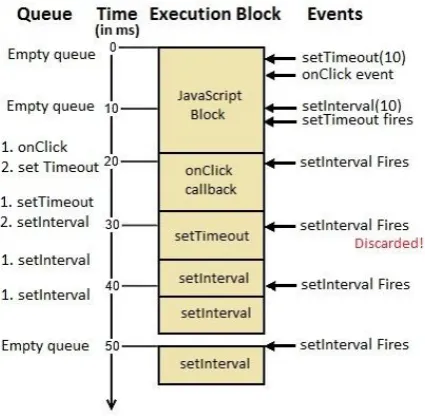
Figure 2 shows the working of JavaScript timers for animations:
Fig. 2. Working of JavaScript timers [4]
In Figure 2, the vertical axis represents time, in milliseconds, and the blue boxes represent the block of JavaScript that is being executed. Since JavaScript has a single threaded execution, it can only execute one block of code at a time. This blocks the execution of other asynchronous events like a mouse click, a timer firing or an AJAX request, and all events get queued up to be executed later.
In the diagram, during the execution of first JavaScript block, two timers are initiated: a 10 ms setTimeout and a 10 ms setInterval. The setTimeout event is fired after 10 ms, but it is queued for execution since the JavaScript block is still under execution. Similarly, the 'Mouse Click' event is also queued for execution. After the initial block of JavaScript finishes execution, the browser immediately checks for the queued events and picks one for execution (the 'Mouse Click' event in the diagram). At this time, the setInterval event is fired but it gets queued since the 'Mouse Click' callback is under execution. At the next available slot for execution, the setTimeout event is executed.
ISSN(Online): 2320-9801
ISSN (Print): 2320-9798
International Journal of Innovative Research in Computer
and Communication Engineering
(An ISO 3297: 2007 Certified Organization)
Vol. 3, Issue 9, September 2015
fired, the second setInterval callback itself is under execution, however, the new setInterval event is queued indiscriminately. This is because, the setInterval events do not check for what is currently under execution, though it would result in the subsequent execution of setInterval callbacks. This results in stuttering of animations since they will not be synchronized to the refresh rate of the screen. To avoid this issue, a new API is designed called requestAnimationFrame (rAF).
The requestAnimationFrame schedules each write to be executed together in the next frame, performing all thereading and computations in the current frame. This ensures that the animation is synchronized with the refresh rate of the screen. Also less computational power is required which balances the CPU utilization and performance of the animations [15].
B. Commands and Sample Code for JavaScript Animations: The following commands are used for developing JavaScript animations [4]:
setTimeout(fn, delay): It initiates a single timer which calls the specified function after the delay defined. The function returns a unique ID using which the timer can be cancelled at a later time.
setInterval(fn, delay): It is similar to setTimeout, but it continually calls the function at the end of the delay time, until it is canceled.
clearInterval(id) and clearTimeout(id): Accepts a timer ID and stops the timer callback from occurring.
requestAnimationFrame(fn): This synchronizes the execution of the commands specified in the called function and runs the animation.
Here is a sample code for moving a box (with "id=box") using requestAnimationFrame:
var AnimationDuration = 1000; function tick() {
currentTime = Date.now();
valueTransform = (currentTime - startTime)/AnimationDuration;
document.getElementById("box").style.transform = 'translate('+ valueTransform*500 +'px)'; if(valueTransform<= 1)
window.requestAnimationFrame(tick); }
function startAnimation() {
startTime = Date.now();
window.requestAnimationFrame(tick); }
startAnimation();
IV. COMPARISON BETWEEN ANIMATION USING CSS AND JAVASCRIPT ANIMATION
A. Browser Support
Table 1 shows a list of all the major browsers andthe animation technique they support. TABLEI
BROWSER SUPPORT FOR CSS AND JAVASCRIPT ANIMATIONS [5]
Browsers & Browser Version CSS Animation JavaScript Animation
IE 11 Yes Yes
Edge 12 Yes Yes
Firefox 40 Yes Yes
Chrome 45 Yes Yes
Safari 8 Yes [ -webkit- ] Yes
ISSN(Online): 2320-9801
ISSN (Print): 2320-9798
International Journal of Innovative Research in Computer
and Communication Engineering
(An ISO 3297: 2007 Certified Organization)
Vol. 3, Issue 9, September 2015
Safari & Chrome for iOS 8.1-8.4 Yes [ -webkit- ] Yes
Opera Mini 5.0-8.0 No No
Android 5.x WebView: Chromium 44 Yes Yes
Blackberry Browser 10 Yes [-webkit-] Yes
Opera 30 for Android Yes Yes
Chrome 44 for Android Yes Yes
Firefox 40 for Android Yes Yes
IE Mobile 11 Yes Yes
UC Browser 9.9 for Android Yes [ -webkit- ] Yes
B. Dependency
This point will touch various aspects of CSS and JavaScript animations presenting how self-contained each technique is:
JavaScript provides complete control over the animations that users develop. They have the correct tools and commands to handle each step of the animation. It provides an easy way to modify the flow of the animation just by altering a few aspects of the animation. It allows you to seek directly to a particular portion in the animation, alter time scale of the animation, add callbacks at certain points of the animation and bind them to a set of playback events [10]. It provides the power to users to directly interact with the animation allowing them to start/stop the animation on user actions such as click, key press, mouse move, etc. The sample code provided in section III-B presents the self-independent nature of the JavaScript animation. The “startAnimation()” function can be called on click of a button.
CSS animations, on the other hand, depend on JavaScript to perform any user specific interactivity. CSS transitions provide a way to define animation effects to be applied to the element at a particular keyframe and CSS animation properties will help attach these effects to a particular element. The start of the animation is dependent on when the web page would load or the element is resolved. There is no way for users to dynamically modify the workflow or interact with the animation. This is where CSS animations are dependent on JavaScript for managing the state of the animations. JavaScript can simply add or remove appropriate classes from the element‟s style properties, leaving the browser to handle animations [10]. Consider the following code for example. This sample defines the initial animation for an element with class “box” and then moves it to a different position when the class “move” is added to it.
.box {
transform: translate(300px, 250px); transition: transform 500ms; background-color: black; height: 100px;
width:100px; }
.box.move {
transform: translate(500px, 250px); }
JavaScript can be used to add and remove the “move” class to and from the element, and this control to toggle the animation can be given to the user on click of a button. The following command can be executed to toggle the above defined CSS animation:
var box=document.querySelector('.box'); box.addEventListener('mouseover', function(){
ISSN(Online): 2320-9801
ISSN (Print): 2320-9798
International Journal of Innovative Research in Computer
and Communication Engineering
(An ISO 3297: 2007 Certified Organization)
Vol. 3, Issue 9, September 2015
Though CSS transition and animation properties have a wide range support for animation effects, it is dependent on JavaScript to provide user interaction and control.
C. CSS vs JavaScript Performance:
It is necessary to consider the performance factor while using any of the two animation technique: CSS or JavaScript. Following are the points by which we can actually determine which one is better in performance:
1. CPU utilization:
To measure the actual use of CPU to perform animation using each of the technique, we will use an animation created by GreenSock (developers of GreenSock Animation Platform (GSAP) JavaScript animation library).
Fig. 3. Animation using CSS and GSAP (JavaScript) to monitor system performance [6]
The animation presented in Figure 3 allows users to perform animation either using CSS or JavaScript by selecting the respective option from “Engine” menu. Users can also select the quantity of boxes and the property of the element to animate. Following are the results of CPU utilization for the above animation:
For CSS animations, considering the animation is run for 60 seconds, the diagram below shows the CPU usage while performing CSS animation. 20 samples are recorded from the below graph and computation of average CPU utilization is as below:
CPUutilization=
51+58+68+61+61+59+63 +77+77+63+70+58+65+63
+77+80+80+80+80+80 − 20∗4
20
=
129120
= 64.55%
ISSN(Online): 2320-9801
ISSN (Print): 2320-9798
International Journal of Innovative Research in Computer
and Communication Engineering
(An ISO 3297: 2007 Certified Organization)
Vol. 3, Issue 9, September 2015
Fig. 4. CPU utilization while performing animation using CSS
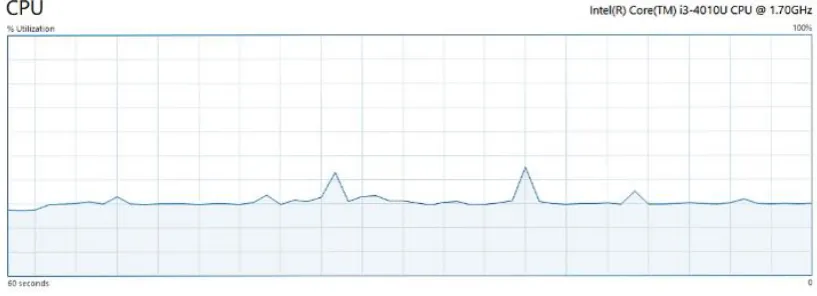
For JavaScript animations, considering the animation is run for 60 seconds, the diagram below shows the CPU usage while performing CSS animation. 20 samples are recorded from the below graph and computation of average CPU utilization is as below:
CPUutilization=
28+30+32+30+30+30+30 +32+32+31+30+30+44+
30+30+30+30+30+30+30 − 20∗4
20
=
53920
= 26.95%
The value 80 (20*4) is being subtracted from total since the CPU utilization was already at 4% before starting the animation. Thus, 4 will be subtracted from each of the 20 samples recorded.The CPU usage for JavaScript animations is shown in Figure 5.
Fig. 5. CPU utilization while performing animation using JavaScript
The above analysis shows that animations using JavaScript are more than 100% efficient and faster than CSS-based animations.
2. Memory Use:
Using the same animation provided in the previous step, the memory usage while performing CSS and JavaScript animations are discussed in this section.
ISSN(Online): 2320-9801
ISSN (Print): 2320-9798
International Journal of Innovative Research in Computer
and Communication Engineering
(An ISO 3297: 2007 Certified Organization)
Vol. 3, Issue 9, September 2015
Considering the memory usage was already at 2 GB before starting the animation, the CSS animations utilize approximately 400 MB of system memory.The memory utilization for CSS animations is shown in Figure 6.
Fig. 6. Memory usage while performing animation using CSS
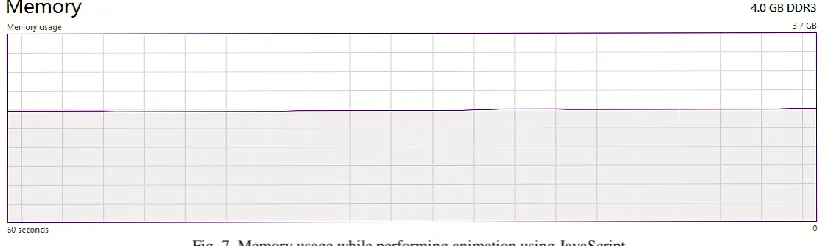
The memory usage for JavaScript animations is as below: 2.2 GB – 2.0 GB = 0.2 GB
Considering the memory usage was already at 2 GB before starting the animation, the CSS animations utilize approximately 200 MB of system memory.The memory utilization for JavaScript animations is shown in Figure 7.
Fig. 7. Memory usage while performing animation using JavaScript
The above analysis shows that JavaScript utilize almost half the system memory than CSS, while performing animations. This provides more bandwidth for another process to run and ensure optimal performance.
3. Graphical Programming Unit (GPU) Utilization:
The GPU is a processor chip that is present in most devices including phones, tablets and computers. It is highly optimized for drawing bitmaps to the screen and applying various transforms to the objects. In order to take advantage of the GPU‟s processing and drawing power, modern browsers offload the tasks involving graphical processing from CPU to GPU. This helps the browsers optimize their performance with more CPU power available at disposal [7]. Though GPU‟s provide a great perspective for improving the performance of how browsers handle animations, GPU is relatively slow in loading bitmaps into their memory.
Most modern browsers use two threads for execution and both work together to render the webpage [8]:
Main thread: This thread is responsible for the processing of all browser activities including running the JavaScript, calculating webpage CSS styles, painting elements into bitmaps and sending the bitmaps to the compositor thread.
Compositor thread: This thread is mainly concerned with drawing bitmaps on the screen using GPU. Additionally, it updates the bitmaps for visible or soon to be visible parts of the webpage and is very sensitive to user inputs.
ISSN(Online): 2320-9801
ISSN (Print): 2320-9798
International Journal of Innovative Research in Computer
and Communication Engineering
(An ISO 3297: 2007 Certified Organization)
Vol. 3, Issue 9, September 2015
CSS transform, CSS opacity and CSS filter benefit greatly from the use of GPU [8]. This is because the above mentioned properties do not change the layout of an element or the elements around it. It treats the element as a whole and scales/rotates/moves the element as a whole. However, while using other CSS properties, the layout of the web page might be modified by a single change in an element. This would require the main thread to re-layout the entire web page and send bitmap data to compositor thread to draw on the screen. Figure 8 represents this behaviour:
Fig. 8. Working of Main and Compositor thread for CSS properties other than transform, opacity and filter [8]
In Figure 8, the orange boxes are potentially time-consuming operations, while the blue boxes are completed quickly.
Animations using JavaScript are by default executed by the browser‟s main thread. Since a single thread is used for executing a wide range of asynchronous requests, the main thread might be busy for long periods of time running other blocks of code. This might also affect the responsiveness of users input. To get around this issue, GPU support has also been extended for JavaScript animations. To do so, you need to set the transform using 3D characteristics like „translate3d()‟ or „matrix3d()‟ [7]. This triggers the browser to create a GPU layer for that element and optimize the performance of the animation.
This clarifies that, though all CSS properties are hardware accelerated using GPU, only a few properties experiencethe actual boost in performance. While in JavaScript, though the entire processing is being done on a single thread, it saves the time of uploading data to GPU and performs faster.
4. Speed
Web animations are limited to the resources allotted by a web browser due to which its performance and speed completely dependent on how they are being processed. This section presents the aspects that affect the speed of animations using CSS and JavaScript [8].
CSS animations face a substantial lag while starting the animation. This is because it computes the complete layout of the web page along with animation properties and uploads the data to GPU for rendering on the screen. On the other end, JavaScript uses the main browser thread for computation and rendering the animation data on the screen. This helps them to initiate quickly without any delay.
ISSN(Online): 2320-9801
ISSN (Print): 2320-9798
International Journal of Innovative Research in Computer
and Communication Engineering
(An ISO 3297: 2007 Certified Organization)
Vol. 3, Issue 9, September 2015
While performing animations that require complex computations and need to modify several element styles, CSS transitions tend to lose their synchronization. This is because, GPU has a limited video memory and uploading data for entire layout with animation data causes it to overload. This degrades GPU‟s performance and rendering animations become slow. However, this is not true for JavaScript. All complex computations are performed by the browser and CPU itself. In addition, JavaScript can use GPU for 3D transforms whenever required.
V. CONCLUSION
CSS transition and animation properties perform best for animations with simple and self-contained state changes. They provide a native solution that allows you to retain animation logic within stylesheets and avoid using JavaScript for modifying animation states.
JavaScript should be used to create stateful animations which require significant control over the flow of the animation. It helps keep the workflow manageable and allows developers to make any modifications quickly.
REFERENCES
[1] “How Many Websites Are There In The World?” Tekeye, 7 Jan. 2014. Web. 12 Sept. 2015. <http://tekeye.biz/2014/how-many-websites-are-there>.
[2] "CSS Animations." Ed. Dean Jackson, David Hyatt, Chris Marrin, Sylvain Galineau, and L. David Baron. 19 Feb. 2013. Web. 14 Sept. 2015. <http://www.w3.org/TR/css3-animations>.
[3] Cope, Rachel. "CSS Animation for Beginners." 4 Dec. 2014. Web. 18 Sept. 2015. <https://robots.thoughtbot.com/css-animation-for-beginners>.
[4] Resig, John. "How JavaScript Timers Work." John Resig - How JavaScript Timers Work. 24 Feb. 2008. Web. 14 Sept. 2015. <http://ejohn.org/blog/how-javascript-timers-work>.
[5] "Can I Use... Support Tables for HTML5, CSS3, Etc." Can I Use... Support Tables for HTML5, CSS3, Etc. Web. 14 Sept. 2015.
[6] "CSS Animations Performance - Rotate/scale/move Separated." CodePen. Web. 15 Sept. 2015. <http://codepen.io/GreenSock/full/2a53bbbcd47df627f25ed1b74beb407d>.
[7] "Myth Busting: CSS Animations vs. JavaScript | CSS-Tricks." CSS-Tricks. 13 Jan. 2014. Web. 20 Sept. 2015. <https://css-tricks.com/myth-busting-css-animations-vs-javascript>.
[8] Vujovic, Max. "Web Platform Team Blog." CSS Animations and Transitions Performance: Looking inside the Browser. 18 Mar. 2014. Web. 15 Sept. 2015. <http://blogs.adobe.com/webplatform/2014/03/18/css-animations-and-transitions-performance/>.
[9] Shapiro, Julian. "CSS vs. JS Animation: Which Is Faster?" David Walsh Blog Atom. 28 Apr. 2014. Web. 15 Sept. 2015. <http://davidwalsh.name/css-js-animation>.
[10] Lewis, Paul, and Sam Thorogood. "CSS vs JavaScript Animations - Web Fundamentals." Web Fundamentals. 8 Aug. 2014. Web. 20 Sept. 2015. <https://developers.google.com/web/fundamentals/look-and-feel/animations/css-vs-javascript?hl=en>.
[11] Baker, Loren. "5 Reasons Not To Use Flash - Search Engine Journal." Search Engine Journal. 27 Oct. 2006. Web. 22 Sept. 2015.
[12] Woollaston, Victoria. "Google and Mozilla Pull the Plug on Adobe Flash: Tech Giants Disable the Program on Browsers following 'critical' Security Flaw." Mail Online. Associated Newspapers, 14 July 2015. Web. 22 Sept. 2015. <http://www.dailymail.co.uk/sciencetech/article-3160644/Google-Mozilla-pull-plug-Adobe-Flash-Tech-giants-disable-program-browsers-following-critical-security-flaw.html>.
[13] Waterhouse, Tom. "The Guide To CSS Animation: Principles and Examples – Smashing Magazine." Smashing Magazine. 13 Sept. 2011. Web. 22 Sept. 2015. <http://www.smashingmagazine.com/2011/09/the-guide-to-css-animation-principles-and-examples/#css-animation-properties>.
[14] Kantor, Ilya. "JavaScript Tutorial." Animation. 2011. Web. 22 Sept. 2015. <http://javascript.info/tutorial/animation>.
![Fig. 1. Computation of animated property values [2]](https://thumb-us.123doks.com/thumbv2/123dok_us/1477148.1180840/2.595.196.418.584.727/fig-computation-animated-property-values.webp)
![Fig. 3. Animation using CSS and GSAP (JavaScript) to monitor system performance [6]](https://thumb-us.123doks.com/thumbv2/123dok_us/1477148.1180840/7.595.180.415.307.485/fig-animation-using-css-gsap-javascript-monitor-performance.webp)
![Fig. 8. Working of Main and Compositor thread for CSS properties other than transform, opacity and filter [8]](https://thumb-us.123doks.com/thumbv2/123dok_us/1477148.1180840/10.595.182.415.233.462/working-main-compositor-thread-properties-transform-opacity-filter.webp)
