Introduction to Python Programming
Course Notes
Phil Spector
Department of Statistics, University of California Berkeley
March 16, 2005
Contents
1 Introduction 7
1.1 What is Python? . . . 7
1.2 The very Basics of Python . . . 8
1.3 Invoking Python . . . 8
1.4 Basic Principles of Python . . . 11
1.4.1 Basic Core Language . . . 11
1.4.2 Modules . . . 12
1.4.3 Object Oriented Programming . . . 12
1.4.4 Namespaces and Variable Scoping . . . 13
1.4.5 Exception Handling . . . 15
2 String Data 17 2.1 String Constants . . . 17
2.2 Special Characters and Raw Strings . . . 18
2.3 Unicode Strings . . . 19
2.4 String Operations . . . 19
2.4.1 Concatenation . . . 19
2.4.2 Repetition . . . 21
2.4.3 Indexing and Slicing . . . 21
2.4.4 Functions and Methods for Character Strings . . . 23
3 Numeric Data 29 3.1 Types of Numeric Data . . . 29
3.1.1 Hexadecimal and Octal Constants . . . 31
3.1.2 Numeric Operators . . . 31
3.1.3 Functions for Numeric Data . . . 32
3.2 Conversion of Scalar Types . . . 33 3
4 Lists, Tuples and Dictionaries 37
4.1 List Data . . . 37
4.2 List Indexing and Slicing . . . 39
4.3 List Operators . . . 42
4.3.1 Concatenation . . . 42
4.3.2 Repetition . . . 43
4.3.3 The in operator . . . 43
4.4 Functions and Methods for Lists . . . 44
4.5 Tuple Objects . . . 48
4.6 Operators and Indexing for Tuples . . . 49
4.7 Functions and Methods for Tuples . . . 49
4.8 Dictionaries . . . 51
4.9 Functions and Methods for Dictionaries . . . 52
5 Input and Output 55 5.1 The print command . . . 55
5.2 Formatting Strings . . . 55
5.3 Using Names in Format Strings . . . 57
5.4 File Objects . . . 57
5.4.1 Methods for Reading . . . 59
5.4.2 Methods for Writing . . . 60
5.4.3 “Printing” to a File . . . 60
5.4.4 Other Methods . . . 61
5.4.5 File Object Variables . . . 61
5.5 Standard Input and Output Streams . . . 62
5.6 Pipes . . . 63
6 Programming 67 6.1 Assignments . . . 67
6.2 Indentation . . . 72
6.3 Truth, Falsehood and Logical Operators . . . 72
6.4 if statement . . . 74
6.5 for loops . . . 76
6.6 for loops and the range function . . . 78
6.7 while loops . . . 80
6.8 Control in Loops: break and continue . . . 82
CONTENTS 5
7 Functions 87
7.1 Introduction . . . 87
7.2 Scoping: How Python finds your variables . . . 88
7.3 Function Basics . . . 92
7.4 Named Arguments and Default Values . . . 93
7.5 Variable Number of Arguments . . . 96
7.6 Functional Programming, and anonymous functions . . . 98
8 Using Modules 103 8.1 Introduction . . . 103
8.2 Namespaces . . . 104
8.3 Functions for working with modules . . . 106
8.4 The string module . . . 106
8.4.1 String Constants . . . 106
8.4.2 Functions in the string module . . . 107
8.5 The re module: Regular Expressions . . . 109
8.5.1 Introduction to Regular Expressions . . . 109
8.5.2 Constructing Regular Expressions . . . 109
8.5.3 Compiling Regular Expressions . . . 110
8.5.4 Finding Regular Expression Matches . . . 111
8.5.5 Tagging in Regular Expressions . . . 113
8.5.6 Using Named Groups for Tagging . . . 115
8.5.7 Greediness of Regular Expressions . . . 116
8.5.8 Multiple Matches . . . 117
8.5.9 Substitutions . . . 119
8.6 Operating System Services: os and shutil modules . . . 121
8.7 Expansion of Filename wildcards - the glob module . . . 125
8.8 Information about your Python session - the sysmodule . . . 126
8.9 Copying: the copy module . . . 127
8.10 Object Persistence: the pickle/cPickle and shelve modules 128 8.10.1 Pickling . . . 128
8.10.2 The shelve module . . . 130
8.11 CGI (Common Gateway Interface): the cgi module . . . 131
8.11.1 Introduction to CGI . . . 131
8.11.2 Security Concerns . . . 134
8.11.3 CGI Environmental Variables . . . 135
9 Exceptions 139
9.1 Introduction . . . 139
9.2 Tracebacks . . . 139
9.3 Dealing with Multiple Exceptions . . . 140
9.4 The Exception Hierarchy . . . 142
9.5 Raising Exceptions . . . 142
10 Writing Modules 147 10.1 Introduction . . . 147
10.2 An Example . . . 148
10.3 Test Programs for Modules . . . 150
10.4 Classes and Object Oriented Programming . . . 151
10.5 Operator Overloading . . . 152
10.6 Private Attributes . . . 153
10.7 A First Example of Classes . . . 153
10.8 Inheritance . . . 158
10.9 Adding Methods to the Basic Types . . . 163
Chapter 1
Introduction
1.1
What is Python?
Python is a high-level scripting language which can be used for a wide variety of text processing, system administration and internet-related tasks. Unlike many similar languages, it’s core language is very small and easy to mas-ter, while allowing the addition of modules to perform a virtually limitless variety of tasks. Python is a true object-oriented language, and is available on a wide variety of platforms. There’s even a python interpreter written entirely in Java, further enhancing python’s position as an excellent solution for internet-based problems.
Python was developed in the early 1990’s by Guido van Rossum, then at CWI in Amsterdam, and currently at CNRI in Virginia. In some ways, python grew out of a project to design a computer language which would be easy for beginners to learn, yet would be powerful enough for even advanced users. This heritage is reflected in python’s small, clean syntax and the thor-oughness of the implementation of ideas like object-oriented programming, without eliminating the ability to program in a more traditional style. So python is an excellent choice as a first programming language without sacri-ficing the power and advanced capabilities that users will eventually need.
Although pictures of snakes often appear on python books and websites, the name is derived from Guido van Rossum’s favorite TV show, “Monty Python’s Flying Circus”. For this reason, lots of online and print documen-tation for the language has a light and humorous touch. Interestingly, many experienced programmers report that python has brought back a lot of the
fun they used to have programming, so van Rossum’s inspiration may be well expressed in the language itself.
1.2
The very Basics of Python
There are a few features of python which are different than other program-ming languages, and which should be mentioned early on so that subsequent examples don’t seem confusing. Further information on all of these features will be provided later, when the topics are covered in depth.
Python statements do not need to end with a special character – the python interpreter knows that you are done with an individual statement by the presence of a newline, which will be generated when you press the “Return” key of your keyboard. If a statement spans more than one line, the safest course of action is to use a backslash (\) at the end of the line to let python know that you are going to continue the statement on the next line; you can continue using backslashes on additional continuation lines. (There are situations where the backslashes are not needed which will be discussed later.)
Python provides you with a certain level of freedom when composing a program, but there are some rules which must always be obeyed. One of these rules, which some people find very surprising, is that python uses in-dentation (that is, the amount of white space before the statement itself) to indicate the presence of loops, instead of using delimiters like curly braces ({}) or keywords (like “begin” and “end”) as in many other languages. The amount of indentation you use is not important, but it must be consistent within a given depth of a loop, and statements which are not indented must begin in the first column. Most python programmers prefer to use an edi-tor likeemacs, which automatically provides consistent indentation; you will probably find it easier to maintain your programs if you use consistent in-dentation in every loop, at all depths, and an intelligent editor is very useful in achieving this.
1.3
Invoking Python
There are three ways to invoke python, each with its’ own uses. The first way is to type “python” at the shell command prompt. This brings up the
1.3. INVOKING PYTHON 9 python interpreter with a message similar to this one:
Python 2.2.1 (#2, Aug 27 2002, 09:01:47)
[GCC 2.95.4 20011002 (Debian prerelease)] on linux2
Type "help", "copyright", "credits" or "license" for more information.
The three greater-than signs (>>>) represent python’s prompt; you type your commands after the prompt, and hit return for python to execute them. If you’ve typed an executable statement, python will execute it immediately and display the results of the statement on the screen. For example, if I use python’s print statement to print the famous “Hello, world” greeting, I’ll immediately see a response:
>>> print ’hello,world’ hello,world
The print statement automatically adds a newline at the end of the printed string. This is true regardless of how python is invoked. (You can suppress the newline by following the string to be printed with a comma.)
When using the python interpreter this way, it executes statements im-mediately, and, unless the value of an expression is assigned to a variable (See Section 6.1), python will display the value of that expression as soon as it’s typed. This makes python a very handy calculator:
>>> cost = 27.00 >>> taxrate = .075 >>> cost * taxrate 2.025 >>> 16 + 25 + 92 * 3 317
When you use python interactively and wish to use a loop, you must, as always, indent the body of the loop consistently when you type your statements. Python can’t execute your statements until the completion of the loop, and as a reminder, it changes its prompt from greater-than signs to periods. Here’s a trivial loop that prints each letter of a word on a separate line — notice the change in the prompt, and that python doesn’t respond until you enter a completely blank line.
>>> word = ’python’ >>> for i in word: ... print i ... p y t h o n
The need for a completely blank line is peculiar to the interactive use of python. In other settings, simply returning to the previous level of indenta-tion informs python that you’re closing the loop.
You can terminate an interactive session by entering the end-of-file charac-ter appropriate to your system (control-Z for Windows, control-D for Unix), or by entering
import sys sys.exit()
or
raise SystemExit
at the python prompt.
For longer programs, you can compose your python code in the editor of your choice, and execute the program by either typing “python”, followed by the name of the file containing your program, or by clicking on the file’s icon, if you’ve associated the suffix of your python file with the python in-terpreter. The file extension most commonly used for python files is “.py”. Under UNIX systems, a standard technique for running programs written in languages like python is to include a specially formed comment as the first line of the file, informing the shell where to find the interpreter for your program. Suppose that python is installed as /usr/local/bin/python on your system. (The UNIX command “which python” should tell you where python is installed if it’s not in/usr/local/bin.) Then the first line of your python program, starting in column 1, should look like this:
1.4. BASIC PRINCIPLES OF PYTHON 11 After creating a file, say myprogram.py, which contains the special comment as its first line, you would make the file executable (through the UNIX com-mand “chmod +x myprogram.py”), and then you could execute your pro-gram by simply typing “myprogram.py” at the UNIX prompt.
When you’re running python interactively, you can instruct python to ex-ecute files containing python programs with theexecfilefunction. Suppose that you are using python interactively, and wish to run the program you’ve stored in the file myprog.py. You could enter the following statement:
execfile("myprog.py")
The file name, since it is not an internal python symbol (like a variable name or keyword), must be surrounded by quotes.
1.4
Basic Principles of Python
Python has many features that usually are found only in languages which are much more complex to learn and use. These features were designed into python from its very first beginnings, rather than being accumulated into an end result, as is the case with many other scripting languages. If you’re new to programming, even the basic descriptions which follow may seem intimidating. But don’t worry – all of these ideas will be made clearer in the chapters which follow. The idea of presenting these concepts now is to make you aware of how python works, and the general philosophy behind python programming. If some of the concepts that are introduced here seem abstract or overly complex, just try to get a general feel for the idea, and the details will be fleshed out later
1.4.1
Basic Core Language
Python is designed so that there really isn’t that much to learn in the basic language. For example, there is only one basic structure for conditional pro-gramming (if/else/elif), two looping commands (while and for), and a consistent method of handling errors (try/except) which apply to all python programs. This doesn’t mean that the language is not flexible and powerful, however. It simply means that you’re not confronted with an overwhelming choice of options at every turn, which can make programming a much simpler task.
1.4.2
Modules
Python relies on modules, that is, self-contained programs which define a variety of functions and data types, that you can call in order to do tasks be-yond the scope of the basic core language by using theimportcommand. For example, the core distribution of python contains modules for processing files, accessing your computer’s operating system and the internet, writing CGI scripts (which handle communicating with pages displayed in web browsers), string handling and many other tasks. Optional modules, available on the Python web site (http://www.python.org), can be used to create graphical user interfaces, communicate with data bases, process image files, and so on. This structure makes it easy to get started with python, learning specific skills only as you need them, as well as making python run more efficiently by not always including every capability in every program.
1.4.3
Object Oriented Programming
Python is a true object-oriented language. The term “object oriented” has become quite a popular buzzword; such high profile languages as C++ and Java are both object oriented by design. Many other languages add some object-oriented capabilities, but were not designed to be object oriented from the ground up as python was. Why is this feature important? Object ori-ented program allows you to focus on the data you’re interested in, whether it’s employee information, the results of a scientific experiment or survey, setlists for your favorite band, the contents of your CD collection, informa-tion entered by an internet user into a search form or shopping cart, and to develop methods to deal efficiently with your data. A basic concept of object oriented programming is encapsulation, the ability to define an object that contains your data and all the information a program needs to operate on that data. In this way, when you call a function (known as a method in object-oriented lingo), you don’t need to specify a lot of details about your data, because your data object “knows” all about itself. In addition, objects can inherit from other objects, so if you or someone else has designed an ob-ject that’s very close to one you’re interested in, you only have to construct those methods which differ from the existing object, allowing you to save a lot of work.
Another nice feature of object oriented programs is operator overloading. What this means is that the same operator can have different meanings
1.4. BASIC PRINCIPLES OF PYTHON 13 when used with different types of data. For example, in python, when you’re dealing with numbers, the plus sign (+) has its usual obvious meaning of addition. But when you’re dealing with strings, the plus sign means to join the two strings together. In addition to being able to use overloading for built-in types (like numbers and strings), python also allows you to define what operators mean for the data types you create yourself.
Perhaps the nicest feature of object-oriented programming in python is that you can use as much or as little of it as you want. Until you get comfortable with the ideas behind object-oriented programming, you can write more traditional programs in python without any problems.
1.4.4
Namespaces and Variable Scoping
When you type the name of a variable inside a script or interactive python session, python needs to figure out exactly what variable you’re using. To prevent variables you create from overwriting or interfering with variables in python itself or in the modules you use, python uses the concept of multiple namespaces. Basically, this means that the same variable name can be used in different parts of a program without fear of destroying the value of a variable you’re not concerned with.
To keep its bookkeeping in order, python enforces what is known as the LGB rule. First, the local namespace is searched, then the global names-pace, then the namespace of python built-in functions and variables. A local namespace is automatically created whenever you write a function, or a module containing any of functions, class definitions, or methods. The global namespace consists primarily of the variables you create as part of the “top-level” program, like a script or an interactive session. Finally, the built-in namespace consists of the objects which are part of python’s core. You can see the contents of any of the namespaces by using the dir command:
>>> dir()
[’__builtins__’, ’__doc__’, ’__name__’] >>> dir(__builtins__)
[’ArithmeticError’, ’AssertionError’, ’AttributeError’, ’EOFError’,
’Ellipsis’, ’Exception’, ’FloatingPointError’, ’IOError’, ’ImportError’, ’IndexError’, ’KeyError’, ’KeyboardInterrupt’, ’LookupError’,
’MemoryError’, ’NameError’, ’None’, ’OverflowError’, ’RuntimeError’, ’StandardError’, ’SyntaxError’, ’SystemError’, ’SystemExit’, ’TypeError’, ’ValueError’, ’ZeroDivisionError’, ’_’, ’__debug__’, ’__doc__’,
’__import__’, ’__name__’, ’abs’, ’apply’, ’callable’, ’chr’, ’cmp’, ’coerce’, ’compile’, ’complex’, ’delattr’, ’dir’, ’divmod’, ’eval’, ’execfile’, ’filter’, ’float’, ’getattr’, ’globals’, ’hasattr’, ’hash’, ’hex’, ’id’, ’input’, ’int’, ’intern’, ’isinstance’,
’issubclass’, ’len’, ’list’, ’locals’, ’long’, ’map’, ’max’, ’min’, ’oct’, ’open’, ’ord’, ’pow’, ’range’, ’raw_input’, ’reduce’, ’reload’, ’repr’, ’round’, ’setattr’, ’slice’, ’str’, ’tuple’, ’type’, ’vars’, ’xrange’]
The __builtins__ namespace contains all the functions, variables and ex-ceptions which are part of python’s core.
To give controlled access to other namespaces, python uses the import
statement. There are three ways to use this statement. In its simplest form, you import the name of a module; this allows you to specify the various objects defined in that module by using a two level name, with the mod-ule’s name and the object’s name separated by a period. For example, the
stringmodule (Section 8.4) provides many functions useful for dealing with character strings. Suppose we want to use thesplit function of thestring
module to break up a sentence into a list containing separate words. We could use the following sequence of statements:
>>> import string
>>> string.split(’Welcome to the Ministry of Silly Walks’) [’Welcome’, ’to’, ’the’, ’Ministry’, ’of’, ’Silly’, ’Walks’]
If we had tried to refer to this function as simply “split”, python would not be able to find it. That’s because we have only imported thestringmodule into the local namespace, not all of the objects defined in the module. (See below for details of how to do that.)
The second form of theimportstatement is more specific; it specifies the individual objects from a module whose names we want imported into the local namespace. For example, if we only needed the two functions split
andjoinfor use in a program, we could import just those two names directly into the local namespace, allowing us to dispense with the string. prefix:
>>> from string import split,join
>>> split(’Welcome to the Ministry of Silly Walks’)
[’Welcome’, ’to’, ’the’, ’Ministry’, ’of’, ’Silly’, ’Walks’]
This technique reduces the amount of typing we need to do, and is an efficient way to bring just a few outside objects into the local environment.
1.4. BASIC PRINCIPLES OF PYTHON 15 Finally, some modules are designed so that you’re expected to have top-level access to all of the functions in the module without having to use the module name as a prefix. In cases like this you can use a statement like:
>>> from string import *
Now all of the objects defined in the string module are available directly in the top-level environment, with no need for a prefix. You should use this technique with caution, because certain commonly used names from the module may override the names of your variables. In addition, it introduces lots of names into the local namespace, which could adversely affect python’s efficiency.
1.4.5
Exception Handling
Regardless how carefully you write your programs, when you start using them in a variety of situations, errors are bound to occur. Python provides a consistent method of handling errors, a topic often refered to as exception handling. When you’re performing an operation that might result in an error, you can surround it with a try loop, and provide anexcept clause to tell python what to do when a particular error arises. While this is a fairly advanced concept, usually found in more complex languages, you can start using it in even your earliest python programs.
As a simple example, consider dividing two numbers. If the divisor is zero, most programs (python included) will stop running, leaving the user back at a system shell prompt, or with nothing at all. Here’s a little python program that illustrates this concept; assume we’ve saved it to a file called div.py:
#!/usr/local/bin/python x = 7
y = 0 print x/y
print "Now we’re done!"
When we run this program, we don’t get to the line which prints the message, because the division by zero is a “fatal” error:
% div.py
File "div.py", line 5, in ? print x/y
ZeroDivisionError: integer division or modulo
While the message may look a little complicated, the main point to notice is that the last line of the message tells us the name of the exception that occured. This allows us to construct anexceptclause to handle the problem:
x = 7 y = 0
try:
print x/y
except ZeroDivisionError:
print "Oops - I can’t divide by zero, sorry!"
print "Now we’re done!"
Now when we run the program, it behaves a little more nicely:
% div.py
Oops - I can’t divide by zero, sorry! Now we’re done!
Since each exception in python has a name, it’s very easy to modify your program to handle errors whenever they’re discovered. And of course, if you can think ahead, you can constructtry/exceptclauses to catch errors before they happen.
Chapter 2
String Data
2.1
String Constants
Strings are a collection of characters which are stored together to represent arbitrary text inside a python program. You can create a string constant inside a python program by surrounding text with either single quotes (’), double quotes ("), or a collection of three of either types of quotes (’’’ or
"""). In the first two cases, the opening and closing quotes must appear on the same line in your program; when you use triple quotes, your text can span as many lines as you like. The choice of which quote symbol to use is up to you – both single and double quotes have the same meaning in python. Here are a few examples of how to create a string constant and assign its value to a variable:
name = ’Phil’ value = "$7.00"
helptext = """You can create long strings of text spanning several lines by using triple quotes at the beginning and end of the text"""
When the variable helptext is printed (using the print command; Sec-tion 5.1), it would display as three lines, with the line breaks at the same points as in the triple-quoted text.
You can also create strings by reading input from a file (Section 5.4.1), or by concatenating smaller strings (Section 2.4.1).
Sequence Meaning Sequence Meaning
\ continuation \\ literal backslash
\’ single quote \" double quote
\a bell \b backspace
\e escape character \0 null terminator
\n newline \t horizontal tab
\f form feed \r carriage return
\0XX octal character XX \xXX hexadecimal value XX Table 2.1: Special Characters in Strings
2.2
Special Characters and Raw Strings
Inside of any of the pairs of quotes described in the previous section, there are special character sequences, beginning with a backslash (\), which are interpreted in a special way. Table 2.1 lists these characters.
Using a single backslash as a continuation character is an alternative to using triple quoted strings when you are constructing a string constant. Thus, the following two expressions are equivalent, but most programmers prefer the convenience of not having to use backslashes which is offered by triple quotes. threelines = ’First\ Second\ Third’ threelines = ’’’First Second Third’’’
The backslashed quote symbols are useful if you need to create a string with both single and double quotes. (If you have only one kind of quotes in your string, you can simply use the other kind to surround your string, since the two types of quotes are equivalent in python.)
As Table 2.1 shows, you can produce a backslash in a string by typing two backslashes; note that only one of the backslashes will actually appear in the string when it’s printed. There are certain situations (most notably when constructing regular expressions (Section 8.5)), when typing two back-slashes to get a single backslash becomes tedious. Python provides what are
2.3. UNICODE STRINGS 19 called raw strings, in which the character sequences shown in Table 2.1 have no special meaning. To construct a raw string, precede the opening quote character with either a lowercase or uppercase “R” (r orR). Note, however that a backslash cannot be the very last character of a raw string. Thus, these two expressions are equivalent:
>>> print ’Here is a backslash: \\ ’ Here is a backslash: \
>>> print r’Here is a backslash: \ ’ Here is a backslash: \
2.3
Unicode Strings
Starting with version 2.0, python provides support for Unicode strings, whose characters are stored in 16 bits instead of the 8 bits used by a normal string. To specify that a string should be stored using this format, precede the open-ing quote character with either a lowercase or uppercase “U”. In addition, an arbitrary Unicode character can be specified with the notation “\uhhhh”, where hhhh represents a four-digit hexadecimal number.
Notice that if a unicode string is combined with a regular string, the resulting string will also be a Unicode string.
2.4
String Operations
The following subsections describe some of the operations that are available with strings.
2.4.1
Concatenation
The addition operator (+) takes on the role of concatenation when used with strings, that is, the result of “adding” two strings together is a new string which consists of the original strings put together:
>>> first = ’black’ >>> second = ’jack’ >>> first + second ’blackjack’
No space or other character is inserted between concatenated strings. If you do want a space, you can simply add it:
>>> first + " " + second ’black jack’
When the strings you want to concatenate are literal string constants, that is, pieces of text surrounded by any of the quotes that python accepts, you don’t even need the plus sign; python will automatically concatenate string constants that are separated by whitespace:
>>> nums = "one " "two " "three " >>> nums
’one two three ’
You can freely mix variables and string constants together — anywhere that python expects a string, it can be either a variable or a constant:
>>> msg = """Send me email ... My address is """ >>> msg + "[email protected]"
’Send me email\012My address is [email protected]’
Notice that the newline which was entered in the triple quoted string appears as \012, the octal representation of the (non-printable) newline character. When you use the print command, the newline is displayed as you would expect:
>>> print msg + ’[email protected]’ Send me email
My address is [email protected]
Remember that python considers the type of an object when it tries to apply an operator, so that if you try to concatenate a string and a number, you’ll have problems:
>>> x = 12./7.
>>> print ’The answer is ’ + x Traceback (innermost last):
File "<stdin>", line 1, in ?
2.4. STRING OPERATIONS 21 The number (x) must first be converted to a string before it can be con-catentated. Python provides two ways to do this: the core function repr, or the backquote operator (‘‘). The following example shows both of these techniques used to solve the problem of concatenating strings and numbers:
>>> print ’The answer is ’ + repr(x) The answer is 1.71428571429
>>> print ’The answer is ’ + ‘x‘ The answer is 1.71428571429
Notice that python uses its default of 12 significant figures; if you want more control over the way numbers are converted to strings, see Section 5.2, where the percent operator (%) for string formatting is introduced.
When you want to concatenate lots of strings together, thejoinmethod for strings (Section 2.4.4), or the join function in the string module (Sec-tion 8.4.2) are more convenient.
2.4.2
Repetition
The asterisk (*), when used between a string and an integer creates a new string with the old string repeated by the value of the integer. The order of the arguments is not important. So the following two statements will both print ten dashes:
>>> ’-’ * 10 ’---’ >>> 10 * ’-’ ’---’
Trying to use the repetition operator between two strings results in a Type Error exception.
2.4.3
Indexing and Slicing
Strings in python support indexing and slicing. To extract a single character from a string, follow the string with the index of the desired character sur-rounded by square brackets ([ ]), remembering that the first character of a string has index zero.
>>> what = ’This parrot is dead’ >>> what[3]
’s’
>>> what[0] ’T’
If the subscript you provide between the brackets is less than zero, python counts from the end of the string, with a subscript of -1 representing the last character in the string.
>>> what[-1] ’d’
To extract a contiguous piece of a string (known as a slice), use a subscript consisting of the starting position followed by a colon (:), finally followed by one more than the ending position of the slice you want to extract. Notice that the slicing stops immediately before the second value:
>>> what[0:4] ’This’
>>> what[5:11] ’parrot’
One way to think about the indexes in a slice is that you give the starting position as the value before the colon, and the starting position plus the number of characters in the slice after the colon.
For the special case when a slice starts at the beginning of a string, or continues until the end, you can omit the first or second index, respectively. So to extract all but the first character of a string, you can use a subscript of 1: .
>>> what[1:]
’his parrot is dead’
To extract the first 3 characters of a string you can use:3 .
>>> what[:3] ’Thi’
If you use a value for a slice index which is larger than the length of the string, python does not raise an exceptrion, but treats the index as if it was the length of the string.
2.4. STRING OPERATIONS 23 >>> start = 3 >>> finish = 8 >>> what[start:finish] ’s par’ >>> what[5:finish] ’par’
Using a second index which is less than or equal to the first index will result in an empty string. If either index is not an integer, a TypeError
exception is raised unless, of course, that index was omitted.
2.4.4
Functions and Methods for Character Strings
The core language provides only one function which is useful for working with strings; thelenfunction, which returns the number of characters which a character string contains. In versions of Python earlier than 2.0, tools for working with strings were provided by the string module (Section 8.4). Starting with version 2.0, strings in python became “true” objects, and a variety of methods were introduced to operate on strings. If you find that the string methods described in this section are not available with your version of python, refer to Section 8.4 for equivalent capabilities through the string module. (Note that on some systems, a newer version of Python may be available through the name python2.)Since strings are the first true objects we’ve encountered a brief descrip-tion of methods is in order. As mentioned earlier (Section 1.4.3), when dealing with objects, functions are known as methods. Besides the terminol-ogy, methods are invoked slightly differently than functions. When you call a function like len, you pass the arguments in a comma separated list sur-rounded by parentheses after the function name. When you invoke a method, you provide the name of the object the method is to act upon, followed by a period, finally followed by the method name and the parenthesized list of ad-ditional arguments. Remember to provide empty parentheses if the method does not take any arguments, so that python can distinguish a method call with no arguments from a reference to a variable stored within the object.
Strings in python are immutable objects; this means that you can’t change the value of a string in place. If you do want to change the value of a string, you need to invoke a method on the variable containing the string you wish to change, and to reassign the value of that operation to the variable in
question, as some of the examples below will show.
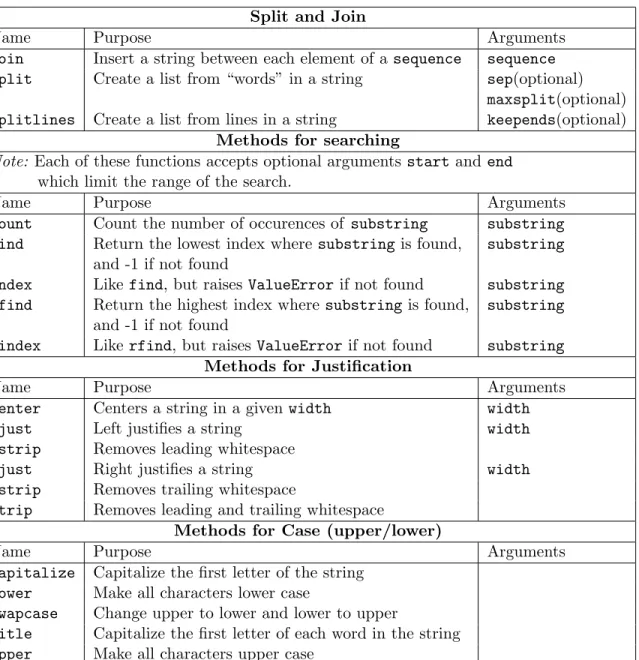
Many of the string methods provided by python are listed in Table 2.2. Among the most useful are the methodssplitandjoin. Thesplitmethod operates on a string, and returns a list, each of whose elements is a word in the original string, where a word is defined by default as a group of non-whitespace characters, joined by one or more non-whitespace characters. If you provide one optional argument to the split method, it is used to split the string as an alternative to one or more whitespace characters. Note the sub-tle difference between invoking split with no arguments, and an argument consisting of a single blank space:
>>> str = ’This parrot is dead’ >>> str.split()
[’This’, ’parrot’, ’is’, ’dead’] >>> str.split(’ ’)
[’This’, ’parrot’, ’’, ’is’, ’dead’]
When more than one space is encountered in the string, the default method treats it as if it were just a single space, but when we explicitly set the separator character to a single space, multiple spaces in the string result in extra elements in the resultant list. You can also obtain the default behavior forsplit by specifying Nonefor the sep argument.
The maxsplit argument to the split method will result in a list with
maxsplit + 1elements. This can be very useful when you only need to split part of a string, since the remaining pieces will be put into a single element of the list which is returned. For example, suppose you had a file containing definitions of words, with the word being the first string and the definition consisting of the remainder of the line. By setting maxsplit to 1, the word would become the first element of the returned list, and the definition would become the second element of the list, as the following example shows:
>>> line = ’Ni a sound that a knight makes’ >>> line.split(maxsplit=1)
[’Ni’, ’a sound that a knight makes’]
In some versions of python, the split method will not accept a named argument for maxsplit. In that case, you would need to explicitly specify the separator, using None to obtain the default behavior.
>>> line.split(None,1)
2.4. STRING OPERATIONS 25
Split and Join
Name Purpose Arguments
join Insert a string between each element of a sequence sequence split Create a list from “words” in a string sep(optional)
maxsplit(optional)
splitlines Create a list from lines in a string keepends(optional)
Methods for searching
Note: Each of these functions accepts optional arguments startand end
which limit the range of the search.
Name Purpose Arguments
count Count the number of occurences of substring substring find Return the lowest index where substringis found, substring
and -1 if not found
index Like find, but raises ValueErrorif not found substring rfind Return the highest index where substring is found, substring
and -1 if not found
rindex Like rfind, but raises ValueErrorif not found substring
Methods for Justification
Name Purpose Arguments
center Centers a string in a givenwidth width ljust Left justifies a string width lstrip Removes leading whitespace
rjust Right justifies a string width rstrip Removes trailing whitespace
strip Removes leading and trailing whitespace
Methods for Case (upper/lower)
Name Purpose Arguments
capitalize Capitalize the first letter of the string
lower Make all characters lower case
swapcase Change upper to lower and lower to upper
title Capitalize the first letter of each word in the string
upper Make all characters upper case
When using the join method for strings, remember that the method operates on the string which will be used between each element of the joined list, not on the list itself. This may result in some unusual looking statements:
>>> words = [’spam’,’spam’,’bacon’,’spam’] >>> ’ ’.join(words)
’spam spam bacon spam’
Of course, you could assign the value of ’ ’ to a variable to improve the appearance of such a statement.
The index and find functions can be useful when trying to extract sub-strings, although techniques using there module (Section 8.5) will generally be more powerful. As an example of the use of these functions, suppose we have a string with a parenthesized substring, and we wish to extract just that substring. Using the slicing techniques explained in Section 2.4.3, and locating the substring using, for example index and rindex, here’s one way to solve the problem:
>>> model = ’Turbo Accelerated Widget (MMX-42b) Press’ >>> try:
... model[model.index(’(’) + 1 : model.rindex(’)’)] ... except ValueError:
... print ’No parentheses found’ ...
’MMX-42b’
When you use these functions, make sure to check for the case where the substring is not found, either theValueError raised by the index functions, or the returned value of -1 from the find functions.
Remember that the string methods will not change the value of the string they are acting on, but you can achieve the same effect by overwriting the string with the returned value of the method. For example, to replace a string with an equivalent version consisting of all upper-case characters, statements like the following could be used:
>>> language = ’python’
>>> language = language.upper() >>> language
2.4. STRING OPERATIONS 27 Finally, python offers a variety of so-called predicate methods, which take no arguments, and return 1 if all the characters in a string are of a particular type, and 0 otherwise. These functions, whose use should be obvious from their names, include isalnum, isalpha, isdigit, islower,
isspace, istitle, and isupper.
Related modules: string, re,stringIO. Related exceptions: TypeError, IndexError.
Chapter 3
Numeric Data
3.1
Types of Numeric Data
Python supports four types of numeric objects: integers, long integers, float-ing point numbers, and complex numbers. In general, python will not au-tomatically convert numbers from one type to another, although it provides a complete set of functions to allow you to explicitly do these conversions (Section 3.2).
To enter numeric data inside an interactive python session or in a script, simply set the value of a variable to the desired number. To specify a floating point number, either include a decimal point somewhere in the number, or use exponential notation, for example 1e3 or 1E3 to represent 1000 (1 times 10 to the third power). Note that when using exponentional notation, numbers are always stored as floating point, even if there is no decimal point.
Long integers can be entered by following an ordinary integer with the letter “L”, either lowercase (e.g. 27l) or uppercase (e.g. 27L). (Since a lowercase “l” looks so much like the number “1”, you may want to get in the habit of using uppercase “L”s in this context.) In python, long integers are actually what are sometimes called “arbitrary precision” integers, since they can have as many digits as you have the patience to type into the computer. On most computers, ordinary integers have a range from about -2 billion to +2 billion. Trying to use an integer larger than this value results in an OverlowError:
>>> x = 2000000000 >>> x = x + x / 2
Traceback (innermost last): File "<stdin>", line 1, in ? OverflowError: integer addition
You’ll never see such an error when using a long integer:
>>> x = 2000000000L >>> x = x + x / 2 >>> x
3000000000L
A further advantage of long integers is that all arithemetic performed with long integers will be exact, unlike floating point numbers which have a limited precision (about 15 or 16 digits on most computers). It comes as a surprise to many people that adding a small floating point number to a very large floating point number will not change the original floating point number. (In the following example, I’ll use some formatted I/O features explained more fully in Section 5.2):
>>> x = 1e16 >>> ’%f’ % x ’10000000000000000.000000’ >>> x1 = x + 1. >>> ’%f’ % x1 ’10000000000000000.000000’
The addition of 1 to such a huge number makes no difference because of the limited precision of floating point numbers. However, all integer arithmetic is exact when using long integers:
>>> xl = long(x) >>> xl
10000000000000000L >>> xl + 1
10000000000000001L
(As explained in Section 3.2, the long function converts its argument into a long integer.) While it might be tempting to store all integers as long inte-gers, remember that, while regular integer arithmetic is supported by most operating systems, python has to perform all its own long integer arithmetic,
3.1. TYPES OF NUMERIC DATA 31 so using long integers will definitely slow your programs down. But if you know your numbers will fall outside the range of a normal integer, long inte-gers can be a very useful tool.
Complex numbers can be entered into python using either the complex
function, or by denoting the complex number as the real portion followed by a plus sign, followed by the imaginary portion with a trailing “J” (ei-ther upper or lower case). There can be no spaces between the imaginary portion and the “J”. Thus 3.2 + 7j is a valid complex number, but 3.2 + 7 j is not. The complex function can be called with either one or two arguments representing the real component or the real and imaginary com-ponents respectively; complex(3.2,7)is equivalent to the previous example. Regardless of how you enter a complex number, both components are stored as floating point numbers.
3.1.1
Hexadecimal and Octal Constants
As an alternative to decimal constants, python allows you to enter numbers as either octal (base 8) or hexadecimal (base 16) constants. Octal constants are recognized by python because they start with a leading zero (0); in particular a number like 012 is interpreted as an octal number (with a decimal value of 10), not as a decimal number with a leading zero, and a number like 09 will generate a SyntaxError exception, since 9 is not a valid octal digit.
Hexadecimal constants start with a leading zero, followed by the letter “x” (either upper or lower case). In addition to the decimal digits, these constants can contain the letters a, b, c, d, e, or f (again, either upper or lower case), representing the extra hexadecimal digits beyond 9.
Note that these constants are numeric values, not string values, and thus should not be surrounded by quotes. Trying to use a string representation of an octal or hexadecimal constants raises a TypeError exception.
Arithmetic performed on octal or hexadecimal numbers will be displayed in decimal form by the python interpreter. The functionshexandoctconvert their arguments into a string representation of the corresponding hexadecimal or octal value, respectively.
3.1.2
Numeric Operators
Python supports the full set of binary arithmetic operators that you would expect in a modern computer language. A binary operator is one which
per-Operator Function Operator Function
+ Addition - Subtraction
* Multiplication / Division
>> Right bit shift << Left bit shift
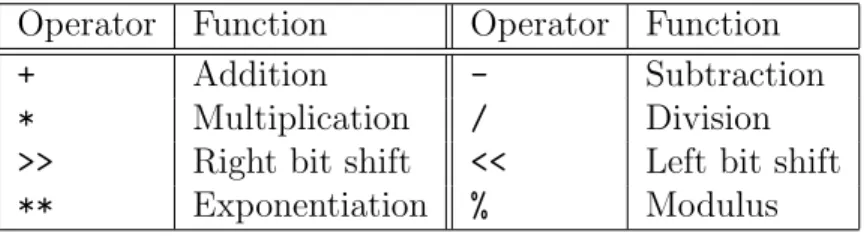
** Exponentiation % Modulus Table 3.1: Arithmetic Operators
forms an operation on exactly two elements, one on each side of the operator’s symbol. Table 3.1 shows the operators supported by python.
When performing operations on integers, be aware that python performs integer arithmetic unless at least one of the operands is a floating point number. See Section 3.2 for further information.
In addition to the binary operators in Table 3.1, python also provides unary operators for plus and minus. Thus any number or expression which returns a single numeric value can be preceded by either a minus sign (-) or a plus sign (+).
3.1.3
Functions for Numeric Data
A few basic mathematical functions are part of python’s core; many more can be found in the mathmodule.
The abs function returns the absolute value of its argument, that is, the value itself if it is greater than or equal to 0, and the negative of the value otherwise. The round function performs rounding on its argument. Unlike integer arithmetic, which simply drops any fractional portion of a number,
round returns a floating point representation of the nearest integer of its argument, truncating when the fraction is less than 0.5, and advancing to the next integer when the fraction is greater than 0.5.
Thedivmodfunction accepts two numeric arguments, and returns a tuple (Section 4.5) containing two floating point values. The first argument is divided by the second argument, and the function returns (in the first element of the tuple) the number of times the second element goes into the first and (in the second element of the tuple) the remainder. The divmod function accepts either integer or floating point arguments:
>>> divmod(21,4) (5, 1)
3.2. CONVERSION OF SCALAR TYPES 33
>>> divmod(25.8,.7) (36.0, 0.6)
Note that, in the first example, 21 = 5 * 4 + 1, and in the second exam-ple 25.8 = 36 * 0.7 + 0.6. The modulus function found in many other languages returns the second element of the tuple returned by divmod.
The pow function is an alternative to the exponentiation operator (**). It accepts two arguments; the first is the numerical expression to be raised to a power, and the second is the power to which the number should be raised. Provided with two integer arguments, powreturns an integer; if either of the arguments is a floating point number, it will return a floating point number. Similarly, if a long integer is provided as the first argument, it will return a long integer, unless the second argument is a floating point number.
Related modules: array, cmath, math, random
Related exceptions: ZeroDivisionError,OverflowError,FloatingPointError
3.2
Conversion of Scalar Types
In general, python will not automatically convert objects from one type to another, but instead provides functions to allow these conversions to be per-formed. One area which requires particular caution is integer arithmetic. When python evaluates arithmetic expressions which contain only integers, it performs its operations using integer arithmetic. For addition subtrac-tion, and multiplicasubtrac-tion, this will not result in any surprises, but for division python truncates its results to the nearest integer smaller than the answer. If at least one of the numbers involved in the expression containing the division is a floating point number, then the integers involved in the computation will be temporarily converted to floating point numbers for the purpose of the computation only. The following example illustrates some of these points, as well as introducing the float conversion function.
>>> x = 3 >>> y = 2 >>> x / y 1 >>> float(x) / y 1.5 >>> float(x/y)
1.0
Since the values of the variablesx and y were entered as integers, any arith-metic operations involving them will be carried out using integer aritharith-metic; thus, when 3 is divided by 2, the (integer) answer is 1. By converting either operand to a float, the expected result of 1.5 can be obtained. Other numeric conversion routines include long and int.
When values in a computation are numbers rather than variable names, it suffices to include a decimal point in any of the operands of an arithmetic expression to insure that the entire computation will be carried out using floating point arithmetic, but there is no harm in including decimal points (or exponential notation) for all the operands. Thus the following expressions all result in the same answer:
>>> 3. / 2 1.5 >>> 3 / 2. 1.5 >>> 3. / 2. 1.5
These conversion routines are also necessary to convert numbers repre-sented as strings into actual python numeric values. If you attempt to use a string value, even if it is a representaion of a number, as a numeric value, it will raise a TypeError:
>>> ’3’ / 2.
Traceback (innermost last): File "<stdin>", line 1, in ?
TypeError: bad operand type(s) for /
Simply pass the string to the appropriate conversion function ( float, int
orlong) to fix the error:
>>> float(’3’) / 2. 1.5
This same technique is required when numbers are read from a file, since in this case they will enter the python environment as strings.
If you have two numeric values and simply want to convert them to a common type, the functioncoercecan be used. If you consider the hierarchy
3.2. CONVERSION OF SCALAR TYPES 35 of integer, long integer, floating point number and complex number, coerce
converts the argument which is lower in the hierarchy to the type of the argument which is higher. The following examples illustrate this point:
>>> coerce(3,5L) (3L, 5L) >>> coerce(3,5.) (3.0, 5.0) >>> coerce(3L,5.) (3.0, 5.0) >>> coerce(3.,2.+1j) ((3+0j), (2+1j))
One other area where explicit conversion is needed is when trying to operate on numbers and strings together. Since python relies on operator overloading to perform many common tasks, it will generate a TypeError
when you ask it to perform such operations on dissimilar types. For example, consider the variablea, with a numeric value of 7, and the variablebwith the string value of “8”. What should python do when you ask to “add” together these two values?
>>> a = 7 >>> b = ’8’ >>> a + b
Traceback (innermost last): File "<stdin>", line 1, in ? TypeError: number coercion failed
Since the answer isn’t clear, python raises the exception. There are two possibilities: treat a as a string, and concatenate it with b, or treat b as a number and add it toa. The builtin functionstrcan be used to temporarily convert a number to its string representation; any of the conversion functions mentioned in the previous paragraphs can be used to convert a string to a number.
>>> str(a) + b ’78’
>>> a + int(b) 15
Python will always be able to convert numbers to strings, but it will raise a
ValueError exception if you attempt to convert a string to a number when that string does not represent a number.
Chapter 4
Lists, Tuples and Dictionaries
4.1
List Data
Lists provide a general mechanism for storing a collection of objects indexed by a number in python. The elements of the list are arbitrary — they can be numbers, strings, functions, user-defined objects or even other lists, making complex data structures very simple to express in python. You can input a list to the python interpreter by surrounding a comma separated list of the objects you want in the list with square brackets ([ ]) Thus, a simple list of numbers can be created as follows:
>>> mylist = [1,7,9, 13, 22, 31]
Python ignores spaces between the entries of a list. If you need to span multiple lines with a list entry, you can simply hit the return key after any comma in the list:
>>> newlist = [7, 9, 12, 15, ... 17,19,103]
Note that the python interpreter changes its prompt when it recognizes a continuation line, and that no indentation is necessary to continue a line like this. Inside a script, your input can also be broken up after commas in a similar fashion. To create an empty list, use square brackets with no elements in between them ([]).
The elements of a list need not be of the same type. The following list contains numeric, string and list data, along with a function:
>>> mixlist = [7,’dog’,’tree’,[1,5,2,7],abs]
Since the tokenabswas entered in the list without quotes, python interprets it as a named object; in this case it represents the builtin functionabs. Since functions and many other objects can’t be displayed in the same fashion as a number or a string, python uses a special notation to display them:
>>> mixlist
[7, ’dog’, ’tree’, [1, 5, 2, 7], <built-in function abs>]
The angle brackets surrounding the phrase “built-in function abs” indicate that that element of the list is a special object of some sort.
To access the individual elements of a list, use square brackets after the list’s name surrounding the index of the desired element. Recall that the first element of a sequence in python is numbered zero. Thus, to extract the
abs function from mylist in the example above, we would refer to element 4, i.e. mylist[4]:
>>> mixlist[4](-5) 5
This example shows that once an element is extracted from a list, you can use it in any context in which the original element could be used; by providing an argument in parentheses to mixlist[4], we call the function abs which was stored in that position in the list. Furthermore, when accessing lists inside of lists, you can simply use additional sets of square brackets to access individual elements: >>> nestlist = [1,2,[10,20,30,[7,9,11,[100,200,300]]],[1,7,8]] >>> nestlist[2] [10, 20, 30, [7, 9, 11, [100, 200, 300]]] >>> nestlist[2][3] [7, 9, 11, [100, 200, 300]] >>> nestlist[2][3][3] [100, 200, 300] >>> nestlist[2][3][3][0] 100
While this is a competely artificial example, it shows that you can nest lists to any level you choose, and that the individual elements of those lists are always extracted in a simple, consistent way.
4.2. LIST INDEXING AND SLICING 39 You may notice a similarity between the way you access elements in a list, and the way you access individual characters in a character string (Sec-tion 2.4.3). This is because both strings and lists are examples of python sequences, and they behave consistently. For example, to find out the num-ber of elements in a list, you can use the built-in function len, just as you would to find the number of characters in a character string. Calling len
with a non-sequence argument results in a TypeError exception, however.
>>> len(mixlist) 5 >>> len(mixlist[3]) 4 >>> len(mixlist[1]) 3 >>> len(mixlist[0])
Traceback (innermost last): File "<stdin>", line 1, in ? TypeError: len() of unsized object
In the first case, calling lenwith the argumentmixlistreturns the number of elements in the list, namely 5. Similarly, refering to mixlist[3], corre-sponding to the list[1, 5, 2, 7]returns 4, the number of elements in that list. Calling len with mixlist[1] (which is the string “dog”) returns the number of characters in the string, but calling len with the scalar argument
mixlist[0] (which is the integer 7), results in an exception.
To convert a string into a list, making each character in the string a separate element in the resulting list, use the list function.
4.2
List Indexing and Slicing
The slicing operations introduced in Section 2.4.3 also work with lists, with one very useful addition. As well as using slicing to extract part of a list (i.e. a slice on the right hand sign of an equal sign), you can set the value of elements in a list by using a slice on the left hand side of an equal sign. In python terminology, this is because lists are mutable objects, while strings are immutable. Simply put, this means that once a string’s value is established, it can’t be changed without creating a new variable, while a list can be modified (lengthened, shortened, rearranged, etc.) without having to store
the results in a new variable, or reassign the value of an expression to the original variable name.
Consider a list with 5 integer elements:
>>> thelist = [0,5,10,15,20]
Now suppose we wish to change the central three elements (5, 10 and 15, at positions 1, 2 and 3 in the list) to the values6, 7, and8. As with a string, we could extract the three elements with a statement like:
>>> thelist[1:4] [5, 10, 15]
But with a list, we can also assign values to that slice:
>>> thelist[1:4] = [6,7,8] >>> thelist
[0, 6, 7, 8, 20]
If the number of elements in the list on the right hand side of the equal sign is not equal to the number of elements implied by the subscript of the slice, the list will expand or shrink to accomodate the assignment. (Recall that the number of elements in a slice is the higher valued subscript minus the lower valued subscript.) The following examples illustrate this point:
>>> words = [’We’,’belong’,’to’,’the’,’knights’,’who’,’say’,’"Ni"’] >>> words[1:4] = [’are’]
>>> words
[’We’, ’are’, ’knights’, ’who’, ’say’, ’"Ni"’] >>> words[1:2] = [’are’,’a’,’band’,’of’]
[’We’, ’are’, ’a’, ’band’, ’of’, ’knights’, ’who’, ’say’, ’"Ni"’]
Note that when we are replacing a slice with a single element, it must be surrounded by square brackets, effectively making it into a list with one element, to avoid a TypeError exception.
Assignments through slicing differ from those done with simple subscript-ing in that a slice can change the length of a list, while assignments done through a single subscript will always preserve the length of the list. This is true for slices where both of the subscripts are the same. Notice the difference between the two expressions shown below:
4.2. LIST INDEXING AND SLICING 41
>>> # using a single subscript
>>> x = [’one’,’two’,’three’,’four’,’five’] >>> x[1] = [’dos’,’tres’,’cuatro’]
>>> x
[’one’, [’dos’, ’tres’, ’cuatro’], ’three’, ’four’, ’five’] >>> # using a slice
>>> x = [’one’,’two’,’three’,’four’,’five’] >>> x[1:1] = [’dos’,’tres’,’cuatro’]
>>> x
>>> [’one’, ’dos’, ’tres’, ’cuatro’, ’two’, ’three’, ’four’, ’five’]
In the final example, we were able to insert three elements into an list without replacing any elements in the list by assigning to a slice where both subscripts were the same.
Another use of slices is to make a separate modifiable copy of a list. (See Section 6.1 to understand why this is important.) In this case, you create a slice without either a starting or ending index. Python will then make a complete copy of the list
>>> x = [’one’,’two’,’three’] >>> y = x[:]
>>> y
[’one’, ’two’, ’three’]
One final use of slices is to remove elements from an array. If we try to replace a single element or slice of an array with an empty list, that empty list will literally replace the locations to which it’s assigned. But if we replace a slice of an array with an empty list, that slice of the array is effectively removed: >>> a = [1,3,5,7,9] >>> a[2] = [] >>> a [1, 3, [], 7, 9] >>> b = [2,4,6,8] >>> b[2:3] = [] >>> b [2, 4, 8]
Another way to remove items from a list is to use the del statement. You provide thedelstatement with the element or slice of a list which you want removed, and that element or slice is removed without a trace. So to remove the second element from the listain the previous example, we would use the
delstatement as follows:
>>> del a[2] >>> a
[1, 3, 7, 9]
The delstatement is just as effective with slices:
>>> nums = [’one’,’two’,’three’,’four’,’five’] >>> del nums[0:3]
>>> nums
[’four’, ’five’]
In the previous example, the same result could be obtained by assigning an empty list tonums[0:3].
4.3
List Operators
A number of operators are overloaded with respect to lists, making some common operations very simple to express.
4.3.1
Concatenation
To combine the contents of two lists, use a plus sign (+) between the two lists to be concatenated. The result is a single list whose length is the total of the length of the two lists being combined, and which contains all of the elements of the first list followed by all of the elements of the second list.
>>> first = [7,9,’dog’]
>>> second = [’cat’,13,14,12] >>> first + second
[7, 9, ’dog’, ’cat’, 13, 14, 12]
Alternatively, you can combine two lists with the expand method (Sec-tion 4.4).
4.3. LIST OPERATORS 43 Note that list concatenation only works when you’re combining two lists. To add a scalar to the end of a list, you can either surround the scalar with square brackets ([ ]), or invoke theappend method (Section 4.4).
4.3.2
Repetition
Like strings, the asterisk (*) is overloaded for lists to serve as a repetition operator. The result of applying repetition to a list is a single list, with the elements of the original list repeated as many times as you specify:
>>> [’a’,’b’,’c’] * 4
[’a’, ’b’, ’c’, ’a’, ’b’, ’c’, ’a’, ’b’, ’c’, ’a’, ’b’, ’c’]
Special care needs to be taken when the list being repeated contains only one element. Note that the expression 3 * 5 is a simple numeric computation, while
>>> 3 * [5] [5, 5, 5]
produces a list containing the element 5 repeated 3 times. By surrounding a list to be repeated with an extra set of square brackets, lists consisting of other lists can be constructed:
>>> littlelist = [1,2,3] >>> 3 * littlelist [1, 2, 3, 1, 2, 3, 1, 2, 3] >>> 3 * [littlelist] [[1, 2, 3], [1, 2, 3], [1, 2, 3]]
4.3.3
The
in
operator
The in operator provides a very convenient way to determine if a particular value is contained in a list. As its name implies, you provide a value on the left hand side of the operator, and a list on the right hand side; an expression so constructed will return 1 if the value is in the list and 0 otherwise, making it ideal for conditional statements (Section 6.4). The left hand side can be a literal value, or an expression; the value on the right hand side can be a list, or an expression that evaluates to a list.
Since python’s lists are so flexible, you need to be careful about how you construct expressions involving the in operator; only matches of the same type and value will return a value of 1. Consider the listsquarepairs, each of whose elements are a list consisting of a small integer and its square:
>>> squarepairs = [[0,0],[1,1],[2,4],[3,9]]
To see if a list containing the elements2and4is contained in thesquarepairs
list, we could use an expression like the following:
>>> [2,4] in squarepairs 1
Python responds with a 1, indicating that such a list is an element of
squarepairs. But notice that neither element of the list alone would be found insquarepairs:
>>> 2 in squarepairs 0
>>> 4 in squarepairs 0
Theinoperator works just as well with expressions that evaluate to elements in a list:
>>> nums = [0,1,2,3,4,5]
>>> [nums[2]] + [nums[4]] in squarepairs 1
Thein operator is also used to iterate over the elements of a list in afor
loop (Section 6.5).
4.4
Functions and Methods for Lists
As mentioned previously thelenfunction will return the number of elements in a list. When called with a single list argument, theminfunction returns the smallest element of a list, and themaxfunction returns the largest. When you provide more than one argument to these functions, the return the smallest (min) or largest (max) element among the arguments passed to the function.
4.4. FUNCTIONS AND METHODS FOR LISTS 45 The functions mentioned above accept a list as an argument, and return the desired result. However, many list operations are performed through methods instead of functions. Unlike strings (Section 2.4.4), lists are mutable objects, so many methods which operate on lists will change the list – the return value from the method should not be assigned to any object.
To add a single element to a list, use the append method. Its single argument is the element to be appended.
>>> furniture = [’couch’,’chair’,’table’] >>> furniture.append(’footstool’)
>>> furniture
[’couch’, ’chair’, ’table’, ’footstool’]
If the argument to the append method is a list, then a single (list) element will be appended to the list to which the method is applied; if you need to add several elements to the end of a list, there are two choices. You can use the concatenation operator (Section 4.3.1) or the extend method. The
extend method takes a single argument, which must be a list, and adds the elements contained in the argument to the end of a list. Notice the difference between invoking the extend andappend methods in the following example:
>>> a = [1,5,7,9] >>> b = [10,20,30,40] >>> a.extend(b) >>> a [1, 5, 7, 9, 10, 20, 30, 40] >>> a = [1,5,7,9] >>> a.append(b) >>> a [1, 5, 7, 9, [10, 20, 30, 40]]
(Since the extend method changes the object on which it operates, it was necessary to reinitializeabefore invoking theappendmethod. An alternative would have been to use the copy function (Section 8.9) to make a copy of
a for the second method.) Note that with extend, the elements of b were added to a as individual elements; thus the length of a is the total of its old length and the length of b, but when using append,b is added to a as a single element; the length of a list is always increased by exactly one when
In many cases we want to create a new list incrementally, by adding one element to the list at a time. As a simple example, suppose we have a list of numbers and we want to create a second list containing only those numbers which are less than 0. If we try to append an element to a non-existent list, it raises a NameError exception:
>>> oldlist = [7, 9, -3, 5, -8, 19] >>> for i in oldlist:
... if i < 0 : newlist.append(i) ...
Traceback (innermost last): File "<stdin>", line 2, in ? NameError: newlist
(Don’t worry if you don’t understand the details of the for and if state-ments; they will be covered in Sections 6.5 and 6.4, respectively.) The solu-tion is to assign an empty list tonewlist before we begin the loop. Such a list will have a length of zero, and no elements; the purpose of the assignment is simply to inform python that we will eventually refer tonewlistas a list.
>>> oldlist = [7, 9, -3, 5, -8, 19] >>> newlist = [ ] >>> for i in oldlist: ... if i < 0 : newlist.append(i) ... >>> newlist [-3, -8]
To add an item to a list at a location other than the end, the insert
method can be used. This method takes two arguments; the first is the index at which the item is to be inserted, and the second is the item itself. Note that only one element can be inserted into a list using this method; if you need to insert multiple items, slicing (Section 4.2) can be used.
To remove an item from a list, based on its value, not its subscript, python provides the remove method. It accepts a single argument, the value to be removed. Note thatremove only removes the first occurence of a value from a list.
The reverse and sort methods perform their operations on a list in place; in other words, when these methods are invoked on a list, the ordering