GRAPH-BASED DATA VISUALIZATION IN VIRTUAL REALITY: A COMPARISON OF USER EXPERIENCES
A Thesis presented to
the Faculty of California Polytechnic State University, San Luis Obispo
In Partial Fulfillment
of the Requirements for the Degree Master of Science in Computer Science
by Paul Sullivan
c 2016 Paul Sullivan
COMMITTEE MEMBERSHIP
TITLE: Graph-Based Data Visualization in Virtual Reality: A Comparison of User Experi-ences
AUTHOR: Paul Sullivan
DATE SUBMITTED: June 2016
COMMITTEE CHAIR: Zo¨e Wood, Ph.D.
Associate Professor Computer Science COMMITTEE MEMBER: Franz Kurfess, Ph.D.
Professor Computer Science COMMITTEE MEMBER: Foaad Khosmood, Ph.D.
ABSTRACT
Graph-Based Data Visualization in Virtual Reality: A Comparison of User Experiences
Paul Sullivan
Virtual reality is currently in the spotlight, attracting intense scrutiny by the press, technology companies, and consumers. After twenty years of dormancy, the technology has experienced a renaissance following advancements in both hardware and software. Most of these developments, and thus press attention, have been centered on entertainment. However, if the technology is going to continue to grow, it must be useful in a wide variety of situations. This paper explores the effectiveness of visualizing data in virtual reality in comparison to traditional presentations.
In this thesis, we present an approach to displaying data in a virtual reality environment. We drew upon various visualization and design principles in two dimensions (2D) and extended and implemented them in three dimensions (3D). Finally, we experimented with animations to highlight how the immersive quali-ties of virtual reality could help direct the user’s attention to important features. To verify our work, we tested users’ ability to understand worldwide eco-nomic data represented as graphs. We measured the speed and accuracy of each subject’s responses as they viewed the economic data in two environments: a vir-tual reality (VR) environment using the Oculus Rift to look at our 3D animated chart, and a more traditional environment with a series of 2D paper charts. We concluded that for newcomers to VR, 2D charts are faster and more accurate. However, 3D visualizations are more engaging and are superior when searching for certain kinds of information such as the highest and lowest values in a set.
ACKNOWLEDGMENTS
TABLE OF CONTENTS
Page
LIST OF TABLES . . . viii
LIST OF FIGURES . . . ix
CHAPTER 1 Introduction . . . 1
1.1 The State of Virtual Reality Technology Today . . . 1
1.2 Data Visualization . . . 3
1.3 Contributions . . . 5
2 Background . . . 7
2.1 History of Virtual Reality . . . 7
2.2 Oculus Rift DK2 . . . 9
2.2.1 Oculus Hardware . . . 9
2.2.2 Oculus Software . . . 10
2.3 User Studies for Virtual Reality . . . 11
3 Implementation . . . 13
3.1 Interfacing with the Rift . . . 13
3.2 Data Processing and Mesh Generation . . . 14
3.3 Graphical Aids to Help Users . . . 16
3.3.1 World Layout . . . 17
3.3.2 Walking on the Graph . . . 17
3.3.3 Animated Points . . . 20
3.3.4 Animated Lights . . . 20
3.3.5 HUD . . . 24
4 Experiment Design . . . 26
4.1 2D Graph Group . . . 26
4.3 Methodology . . . 28 4.4 Survey Questions . . . 30 4.5 Quiz Questions . . . 31 4.6 Expected Results . . . 32 5 Results . . . 33 5.1 Data . . . 33 5.2 User Confidence . . . 37
5.3 Possible Reasons for Findings . . . 39
5.4 Other Observations . . . 40
6 Future Work . . . 43
6.1 Improvements . . . 43
6.2 More Experiments . . . 44
6.3 Suggestions for Similar Work . . . 45
7 Conclusion . . . 46
LIST OF TABLES
Table Page
5.1 User confidence of accuracy. . . 38 5.2 User confidence of speed. . . 38
LIST OF FIGURES
Figure Page
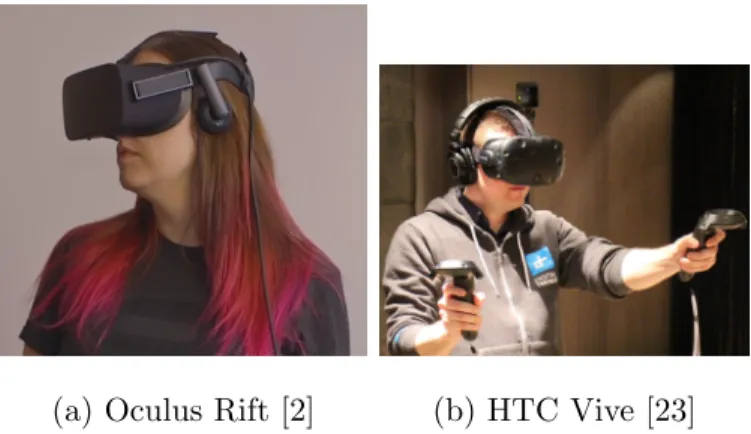
1.1 The first commercial versions of VR hardware. . . 3
1.2 An example of a well designed but information-dense 2D graph [16]. . . 5
3.1 A simple rendering of the data without added features. . . 16
3.2 Overlooking the data on the ledge. . . 18
3.3 Walking around on the data and looking at the animated lights. 21 3.4 Overview of our texture pipeline. . . 22
3.5 Targeting a specific data point. Cursor denotes selected data. Corresponding information is displayed at bottom of screen. . . 23
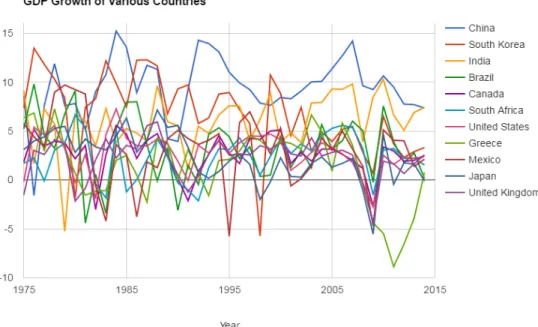
4.1 All of the countries in one 2D chart. . . 27
4.2 Individual charts for select countries. . . 27
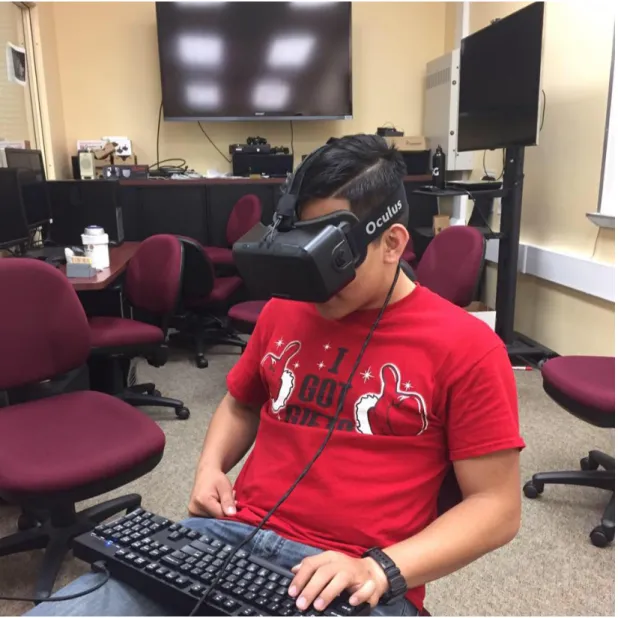
4.3 A user interacting with our application. . . 29
5.1 Accuracy against experience of participants. . . 34
5.2 An example of a difficult to see hole. . . 35
5.3 Accuracy by question. . . 36
5.4 Response time by Question. . . 37
CHAPTER 1
Introduction
Virtual reality technology has been in development for 30 years, but has received a surge of attention by the press, technology companies, and consumers. Over the years, researchers experimented with the technology and have been able to use it in a multitude of contexts. Virtual reality has been used in making visualizations for architecture and has even been used as a tool for therapy [9] [18]. Now, the technology is getting mainstream commercial and media attention [4] [29] [25]. The knowledge that’s been build up is now being put into practice to create new and interesting applications.
Current virtual reality solutions are able to create visual and audio outputs that are good enough to make users feel like they are somewhere else. The resulting “spatiotemporal realism”, or simply “immersion” is very powerful and can allow users to more thoroughly enjoy computer-generated experiences [14].
In this thesis, we explore a new potential application of virtual reality: the use of virtual reality for data visualizations for 3D virtual reality environments. We implemented 3D graph-based visualizations, discuss their technical capabilities and their usefulness as an interactive medium, then conduct a user study to determine the effectiveness of VR.
1.1 The State of Virtual Reality Technology Today
The first modern head mounted device to get the world’s attention was the Ocu-lus Rift. In 2012 the company hosted a Kickstarter campaign that successfully
raised $2.4 million dollars out of their $250 thousand goal [21]. This success was primarily due to PC gamers who wanted a new way to experience games. The company released their first developer kit in 2013. While rough around the edges, the device was light and relatively cheap. More importantly, the success of the Kickstarter campaign summoned the attention of the media. Gamers eagerly awaited the changes the company promised their product would bring to video games and the general media started noticing broader implications. This atten-tion increased dramatically when Facebook bought the company for $2 billion in 2014 [28]. Mark Zuckerberg clearly saw wider value in the technology than simply a high-end gaming peripheral. He has stated that he thinks the technology will allow us “to live in a world where everyone has the power to share and experience whole scenes as if youre just there, right there in person” [4].
Other companies soon started their own projects. Following Oculus’ lead of exploring gaming applications, Sony began work on PlayStation VR (formerly Project Morpheus) [30]. Valve and HTC paired up to develop the Vive headset [31]. Microsoft, which already had done serious work in the tangential field of motion sensing for their Kinect sensor, began working on the HoloLens augmented reality headset [19]. These companies and others also worked on specialized input peripherals, for improved motion tracking and haptic feedback.
The current state of virtual reality hardware is very much in flux. Many of these companies are just beginning to roll out commercial products that will certainly be improved in the upcoming years. It is uncertain which company will gain dominance in the market or just how large that market is. What will remain a constant across all platforms is how application designers must approach making content for this new technology.
(a) Oculus Rift [2] (b) HTC Vive [23]
Figure 1.1: The first commercial versions of VR hardware.
on how people reacted to it psychologically. Research has been able to show that virtual reality experiences can increase users’ retention of knowledge and even make medical patients feel less pain [7] [9] [20]. In a study conducted by the University of Washington, burn patients were placed in a virtual reality world while their bandages were being changed. This is an incredibly painful experience but the patients experienced a 30-50% decrease in pain [18].
1.2 Data Visualization
Data visualization is the explosion of ways to display information in easy to complrehend visual forms such as line charts, plots, pie charts, etc. The use of data visualization predates computers but there are now many computer-aided tools available. The field of data visualization started off as part graphic design. Over the years, the principles for data visualization have emerged [27]. Now that visualizations can be made using computer graphics, these principles are being used by computer scientists.
The goal of data visualization is to present data in ways that allow the viewer to easily understand what is being presented, ask questions about the data and
draw conclusions. To do that, data is encoded into visual information. People are very good at processing visual information and well designed visualizations take advantage of this [13]. Humans are generally able to more accurately understand information that is encoded to position rather than information encoded by area [15]. Color is often used to add another dimension of data to the graph or to draw attention to specific features. It is also important to minimize the amount of redundant data to keep charts clearer. This allows the reader to focus on the data, not the visualization and reduces clutter [32].
One example of a successful 2D graph is in Figure 1.2. It is from a paper that surveys various types of visualizations and is a good example of how large amonts of information can be fit into the same graph [16]. Color is used to show different industries while space is used to show the amount of unenployment in each industry. Users are able to notice seasional changes in some industries as well as overall trends to the data.
Since there are many different types of data, there are also many different ways of presenting it. What makes sense to represent in a line chart may not make sense on a pie graph. One of the most important things for a graph creator to understand is what visualization makes sense for their data.
A three-dimensional environment gives designers more ways to organize data spatially. This can be used to create visualizations that convey more information and are more compelling. The ability to have another dimension in which to organise data is important, since it becomes very difficult to use 2D as datasets get larger [12]. While it has been possible to make 3D charts, we have not seen these kinds of charts become as popular as their 2D counterparts because the data is still being viewed on the 2D medium on a computer screen. By allowing users to finally feel like the computer is projecting a 3D environment, virtual
Figure 1.2: An example of a well designed but information-dense 2D graph [16].
reality provides the a good platform for 3D charts.
1.3 Contributions
In this thesis, we present an technique to show graph-based data in a virtual reality environment. Using economic data for a range of countries for 40 years we constructed a 3D graph and placed it in a virtual world. We then drew upon various visualization and design principles from 2D and implemented them in 3D to help users to understand and interact with the data. This included allowing users to walk along the surface of the graph and to target specific points of data for more information, and animations that draw the user’s attention to points of interest.
data represented as graphs. We evaluated users on the correctness of their answers and the time it took them to answer. Users were given two environments to view the data, a virtual reality environment using the Oculus Rift to look at our 3D animated chart, and a more traditional environment with a series of 2D paper charts. We concluded that for newcomers to VR, 2D charts are faster and more accurate. However, 3D visualizations are more engaging and excel when looking for certain kinds of information such as the highest and lowest values in a set.
CHAPTER 2
Background
The history of virtual reality as well as technical details about the Oculus Rift are relevant to this project.
2.1 History of Virtual Reality
While the commercial viability of virtual reality is in its infancy, the technol-ogy itself is not. Serious research began in the 1980s and created a lot of buzz. NASAs Ames Research center and VPL Research were two of the most successful early research institutions. NASA built a prototype head-mounted device called VIVED and hoped to use it for training and for teleoperation of robots on space-craft [26]. The headset had a 120-degree field of view and allowed the user to rotate their head to look around. VPL Research was the first company to sell headsets and accessories. This initial stage of research laid the foundation for the technology and pioneered the development of stereoscopic head mounted dis-plays, haptic feedback, position tracking and gesture recognition. Virtual reality became something of a pop culture craze due to science fiction movies and over-speculative discussions in the media about what the technology could ultimately do [11]. People were expecting virtual reality to be the new user interface method moving forward and expected even higher levels of immersion. Even the video game company Nintendo released a virtual reality headset called the Virtual Boy in hopes of cashing in on the craze [10].
specula-tion. Head mounted displays were simply too heavy, had low resolution and too often induced motion sickness. VPL filed for bankruptcy in 1990, the Virtual Boy was a commercial failure and Ames focused its research elsewhere [24]. In much the same way that artificial intelligence experienced its AI Winter in the early 90s, virtual reality suffered a frigid wave of disillusionment and ultimately fell out of mainstream appeal. The next two decades saw little research in the field because few companies wanted to take risks with what they saw as a failed technology.
Meanwhile, other areas of computer technology improved tremendously. Vir-tual Reality research took place at the same time the foundations of 3D computer graphics software were being laid. Since then, graphics software has become much more mature as programmers have found efficient ways to create detailed 3D worlds. Graphics card architectures rapidly matured to meet demand from gaming markets while Moores Law facilitated the incredible amount of computa-tional power needed to render vivid scenes. Moore’s Law states that the comput-ing power of computer chips doubles roughly every two years. This has mostly held true over the decades and has allowed engineers to design highly parallel processors. Graphics problems are highly parallel so these advancements greatly increased the fidelity of images computers could produce. Recently, innovations in mobile technology made small, high-resolution screens widely available. All of these developments have greatly improved the quality of virtual reality products. Modern products are just good enough and cheap enough to be commercially viable. Many companies and researchers have noticed the potential of these tech-nologies and are using them to conduct new research in virtual reality.
2.2 Oculus Rift DK2
The Oculus Rift is a head-mounted device for displaying virtual reality images. It is a peripheral that, when attached to a sufficiently powerful computer with the Oculus Runtime, code provided by Oculus that communicates with the hardware, installed is able to provide an immersive VR experience. As of the beginning of this thesis, the retail version of the Rift was not available, so we used the Development Kit version 2 (DK2). The DK2 is a relatively stable platform and is a good example of what virtual reality hardware is capable of delivering.
2.2.1 Oculus Hardware
The DK2 features an OLED screen with 960 x 1080 picel display resolution for each eye. Head tracking and positional tracking are accomplished through the use of a gyroscope, an accelerometer, a magnetometer and a near infrared camera [17]. To create the sense of presence that is so vital to the success of VR, head mounted devices (HMDs) must have head position tracking. This tracking must be very robust because low frequency or high latency position tracking can lead to motion sickness in the user. To overcome these problems the Rift sends data from all of its sensors to the host computer at a frequency of 90 Hz. This means that position tracking data will be accurate for every frame rendered by the Rift. The use of gyroscopes and accelerometers to track the rotation of HMDs is not new and has been used since the 1990s. However, using near infrared light for position tracking is newer. The DK2 HMD has an array of infrared lights under the plastic cover. These shine through and are detected by a camera in front of the user. The positioning of the lights allows the Oculus software to accurately determine where the user’s head is within a volume of about 2 cubic meters.
The OLED displays have high refresh rates and are capable of displaying scenes at 75 frames per second (fps). The displays also have low-persistence, which means that the time it takes for a new image to appear is very low. All of these hardware improvements make the experience more comfortable for users. However, they come with some complications. In order for the screen to fill more of the user’s view, lenses are placed in front of the screen. These lead to distortion. Not only is the image warped, but different frequencies of light are warped to different degrees. To counteract this, the image that is displayed on the screen must be warped so that when it passes through the lens the image appears normally. This is done in drivers provided by Oculus.
The ultimate goal of virtual reality is to have users seamlessly interact with virtual worlds using all of their senses. At the moment, effective hardware exists for only sight and sound. Users are also limited to the space they have available to move in. Touch is the next reasonable sense to emulate and research on the topic has been around since the beginning of virtual reality [6]. Research is now being done to bring touch in the form of haptic feedback to commercial virtual reality. Work is also being done to allow the user to traverse larger virtual rooms than space allows [5] and even full body suits for motion capture and feedback [22]. Smell and taste are not subjects of much research because technologies for synthesizing them are almost completely nonexistent. Perhaps in the future, these routes will be explored.
2.2.2 Oculus Software
All of this hardware is useless if there is not corresponding software to coordinate it. Oculus has a fairly robust set of drivers and runtime software that allow programs to use their hardware. This is made available to developers through an
application programming interface (API) in the Oculus software development kit (SDK).
The amount of abstraction in Oculus’ libraries is thankfully high. All the details of reading and processing data from the sensors as well as distorting images and displaying them on the screen are not exposed to developers. The software also supports several other features such as asynchronous time warp. This feature reduces motion sickness by simulating small changes in movement in between rendered frames without rerendering them [3].
Developers need only integrate the Oculus API with their program. The API also has support for common graphics libraries such as OpenGL or DirectX, making it even easier for developers to use it. For example, to read the position tracking data, one need only call a function that returns a matrix containing the location and orientation of the user’s head. This information can be used to render from the user’s location and for interactions with the world. Once an image has been made using this matrix, it must be saved to a texture. In fact, two textures and matrices are used for each frame since each eye is at a slightly different location. The textures are then used in another Oculus function that adds distortion and sends the image to the screen.
This is a very effective setup and essentially allows developers to make VR applications with little added programming. However, designing an application that plays to the strengths of virtual reality is much harder.
2.3 User Studies for Virtual Reality
All of this technical knowledge is for naught if we can’t use it to improve our experiences. However, to do this we can borrow from the fields of psychology and
statistics to conduct user studies that investigate the effect of virtual reality on its users. While not extensive, there are some existing papers that have successfully shown the impact of virtual reality.
One early and interesting study was conducted in 2002 to help a PTSD victim who survived 9/11 [9]. The usual treatment for PTSD patients is to gradually expose them to images related to the traumatic event to allow them to become comfortable with it. The patient in the paper was not responding to the usual treatment so they tried more immersive methods using VR. Since this study involved a single patient, it was inconclusive, however it showed early promise of the power of VR.
A more recent and in-depth eample is a 2015 study in which participants were evaluated on their ability to learn about airline safety [7]. Participants were either given a notecard with safety instructions or placed in a VR environment simulating a plane crash. The paper analyzed how engagement and knowledge retention were affected by VR experiences and concluded that VR helped with long-term retention of information. However, it showed that there was little difference in short-term retention. Their experimental methodology was robust and showed that users of the Rift were able to retain information longer.
CHAPTER 3
Implementation
There are many different ways to approach data visualization, especially with the Rift. We decided to test uniform data displayed on a 3D surface. This is essentially a 3D version of a line graph. Rather than plotting different lines, we plot one surface in the form of a triangle mesh. The reason we decided to use this type of graph is because it is a higher dimension line graph. This allowed us to make more direct comparisons between it and similar 2D graphs when verifying our work. Other types of VR visualizations are also worth looking into. Many datasets have unstructured data points, which are best displayed in other ways but we leave it to other researchers to look into them.
3.1 Interfacing with the Rift
As mentioned previously, the Oculus software development kit (SDK) gives de-velopers access to a variety of functions that give access to the Rift hardware. The SDK also comes with example projects using DirectX 11 and OpenGL. We decided to build off of the OpenGL version. While OpenGL has many differ-ent implemdiffer-entations, the one we used for our program was the C++ version on Microsoft Windows.
Comfort is an important part of VR experience. The experience is very close to what people usually perceive, so any deviations from that norm are interpreted by our brains as something being wrong. If the image on the HMD is not where our brains expect it to be when we move our heads, then we get headaches, feel
dizzy or even get nauseous. The easiest way for this to happen is for the frame rate of the scene to be too low. The Oculus team employs several techniques to combat this problem including using high refresh rate screens and software features such as asynchronous time warp. However, it is still a duty of application programmers to make sure their code performs well. This means that the application must be able to render two 960 x 1080 images 75 times per second. Throughout the development process, we had several instances where the frame rate dropped. We were able to find the cause and modify our program to remedy them. It is imperative for the developer to maintain the frame rate.
3.2 Data Processing and Mesh Generation
Displaying data as a 3D mesh lends itself well to certain types of data. Data that works well with this kind of graph has one dependent value that is determined by two evenly-spaced independent values. Good examples of independent values are things like time, anything measured at regular intervals and different elements of a set. We decided to use data from the World Bank about Gross Domestic Product (GDP) growth over time from 1960 to 2014. This data has a growth rate for every country for every year [33].
Before discussing how we processed this data, here is a quick description of what the data represents. GDP is a measure of the total value of goods and services produced by a country during a year. It is a measure used to determine the strength of a country’s economy. GDPs are constantly changing, hopefully for the better. If a country’s GDP increases, that means its economy is doing well. If it decreases or increases slowly, then the country is not doing well. Because of this, it is actually more interesting to track the changes in GDP rather than the
total value. The data we used shows the changes, so any change in these values means that the direction of the country’s economy has changed. This makes events like booms and recessions very easy to see.
The data was conveniently available in comma separated value (CSV) format. Each row of the CSV file represented a country and each column represented an attribute such as the country’s name, a code indicating how the GDP was calculated and values for each year. However only the names and GDP values were needed to create the mesh, so the file was processed to remove the unneeded columns and also to remove rows that had missing data. These were countries like Russia that did not exist until the fall of the Soviet Union and entries for regions like Sub-Saharan Africa. Finally, we observed that displaying all these countries made clear visualization impossible, so we selected countries from this list that showed trends that were large enough to be noticable but not large enough to cause problems with the normalised scale. Iraq, for example, had growth rates of as high as 50% and as low as -60% during the Gulf War. Plotting this data would make it very difficult to discern smaller changes rest of the data. This final data from of 11 countries from 1975 to 2015 was used to construct both our 2D and 3D charts.
The data was then used to construct a triangle mesh for the 3D chart. To do this we normalized the size of the mesh to be from 0 to 1. So, for example, the maximum GDP growth of all countries would be 1 in the y-axis and anything lower would be less than one. These new locations were then used as points in the mesh and triangles were constructed between them. This resulting mesh can be rendered like any other object with lighting and shading determined by shader programs. We decided to use Phong shading since it creates enough detail through simple shading without the need to create complex material information
Figure 3.1: A simple rendering of the data without added features.
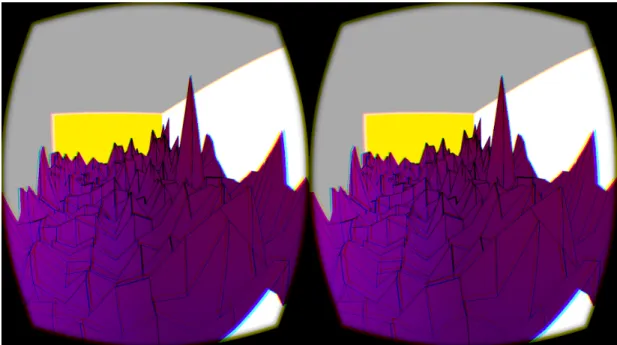
that is needed for physically based rendering. Finally, we added a wireframe so that users could distinguish the points of the data from the connecting mesh. This feature was vital to readability but had some interesting technical issues. A basic rendering of the mesh can be seen in Figure 3.1
3.3 Graphical Aids to Help Users
To have a fully functioning graph we needed more than just a mesh. This brings up the problem of how best to augment the user’s ability to interact with the graph. We decided that the best way to leverage the power of immersion provided by the Rift was to have the user walk around in the data. To create this effect we used several technologies.
An old data visualization mantra is “overview first, zoom and filter, then details-on-demand”[27]. Our application accomplishes this by having the user’s
starting position be above the data. This allows the user to get an overview before dropping down into the data and looking around. We also allow the user to select specific points for more information, allowing them to have details-on-demand.
3.3.1 World Layout
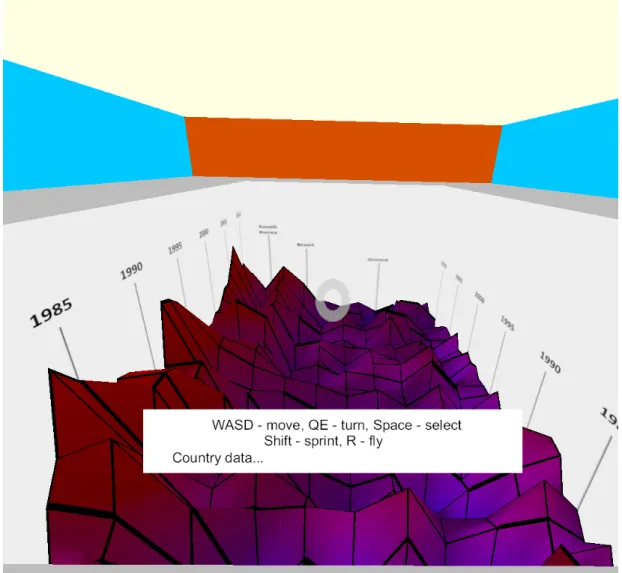
Simply displaying the mesh is not enough to convey what the data is actually representing. To help users identify data values, axis labels are included in the visualization. These labels are created by texture mapping text data onto walls enclosing the 3D graph. The visualization includes overlooks at the tops of the walls, to allow the user to get a view of the data from above before examining the details up close. Figure 3.2 shows the users initial view from one of the these overlooks. These features allow users to get a general understanding of the data and give reference points when moving around in the data. From that vantage point the user can see the years going away from them and the countries to the right and left. Not all of the countries are labeled which we hoped would encourage users to interact with the data by querying specific points go find out which country they belonged to.
3.3.2 Walking on the Graph
We wanted to have users be able to walk around in the world. The user can move “W”, “A”, “S” and “D” keys or by using the arrow keys on a keyboard. This allowed them to explore the virtual world. In order to create the impression that the user was walking on the graph, our program determines what part of the graph they were standing on and then adjust the users’ height based on the height of the mesh. It effectively were using the data as a height map and interpolating
between points. Since the mesh is arranged uniformly, the user will always be standing in a quadrilateral created by four points. The program first tooks the user’s x and y position to determine which quadrilateral they were standing in. Since the quadrilaterals were being rendered as two triangles, it then determined which of these triangles the user was standing in. Finally, it used barycentric interpolation to determine how far the user was from each vertex on the triangle in order to accurately interpolate the height at that point.
This worked well but needed some slight tweaking. Because our data is very jagged, moving through it was not initially comfortable. If the user was too close to a steep change in the mesh, it was possible for them to stick their head through the mesh and see the other side. This happened when the user was simply traversing the mesh. These sharp changes also cause the user to move quickly vertically. Both of these issues caused discomfort in initial testers so we remedied them. We added smoothing on the user’s height changes so that the movement would be more comfortable. This was especially needed for when the user made quick changes like walking off the cliff. In stead of immediately being at the bottom, the smoothing slowed the fall to take about half a second, which is less jarring. We also reduced the scaling on the height of the mesh slightly so that the height changes were less abrupt.
It’s also worth noting that while this makes the experience more engaging, it is a limitation that 2D graphs do not have. In a 2D graph, the user can see all the data at once, while a VR user may have to move around the graph to fully understand the data. This is more complex and cumbersome for the user but we think it is a worthwhile tradeoff for the added immersion.
3.3.3 Animated Points
One of the most basic ways to draw a user’s attention to specific pieces of data is to use motion [8]. To accomplish this, we added the ability to animate the vertices of interesting features of the graph. Ultimately, we animated the two years with the highest values for their change in GDP in order to make this more apparent to users.
This feature was surprisingly time-consuming to implement despite its ap-parent simplicity. We wanted to animate both the mesh and the wireframe so that the readability of the data was maintained. There are several ways to cre-ate a wireframe effect in OpenGL: draw lines over the mesh, calculcre-ate and draw quadrilaterals as lines over the mesh, and coloring the mesh according to a tex-ture that looks like a wireframe. After trying all three of these methods we finally decided that using a texture was the most effective. We simply made an image that showed the wireframe pattern and mapped it to the mesh. When the mesh is deformed, the texture moves with it. The result looks better than the alterna-tives since the lines are directly on the mesh rather than a separate object near the mesh.
3.3.4 Animated Lights
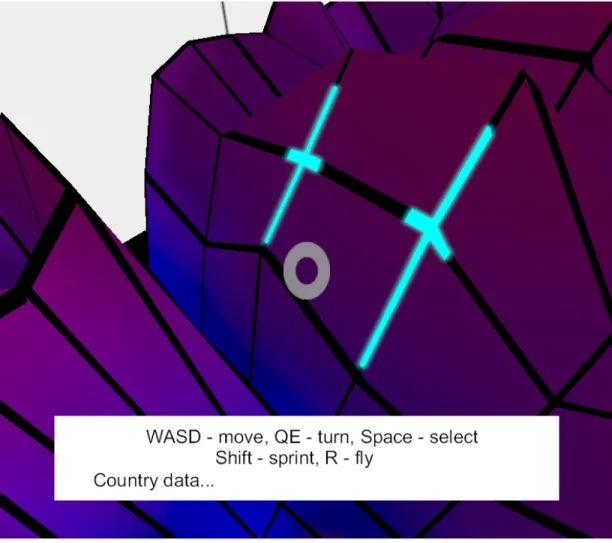
Another feature we wanted to add to the world was the ability to animate the color of the wireframe. This allows us to draw the user’s attention to points by using both color and motion. We decided to use the feature to draw the user’s attention to the recession in 2008. The highlights move away from the user’s original position, travel into the “hole” in 2008, and then reset. They can be seen as two cyan highlights in Figure 3.3.
Figure 3.3: Walking around on the data and looking at the animated lights.
Figure 3.4: Overview of our texture pipeline.
The enhance the effect of the highlights, we added a bloom filter to our graphics pipeline and applied it to the highlights. Bloom is a post-processing technique that gives lights a glowing look [1]. This required a significant change in the pipeline, but the results are more visually striking. To create this effect we made several textures to store intermediate information before merging it with the main image.
The pipeline we used to implement the blur is shown in Figure 3.4. Every object in the scene was sent to a texture, labeled “normal” in the figure. Objects to blur were sent to a texture labeled “highlight”. Since we only wanted to blur the wireframe, this was done in the wireframe shader. The highlight texture was then blurred using two more intermediate textures. The original image was passed between these textures, being progressively more blurred with each pass. Once the blur reacheed the level we wanted, the blurred objects were combined with our normal image using a composite shader. This shader simply added the color values together. The result of the composite shader was sent to a final texture which was sent to the Oculus code to be rendered to the eye.
Figure 3.5: Targeting a specific data point. Cursor denotes selected data. Corresponding information is displayed at bottom of screen.
3.3.5 HUD
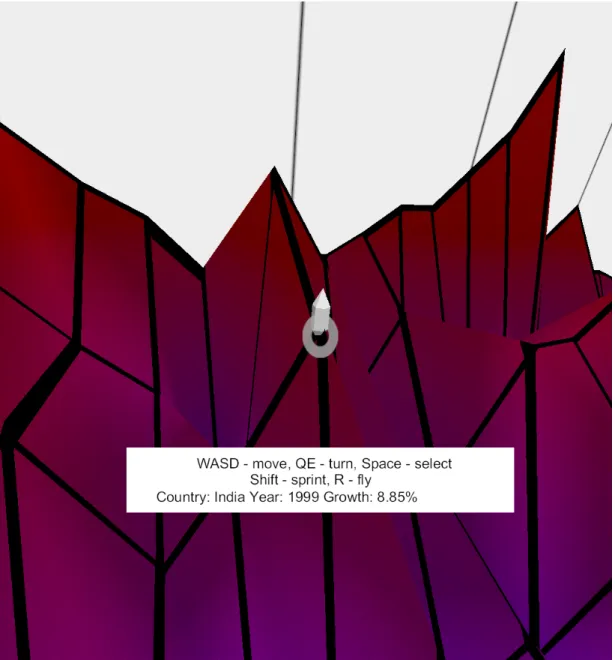
A heads up display (HUD) was added to more fully convey the data. Since only some of the values were labeled on the axes, users needed a way of finding values of specific points on the graph. To do this we added the ability to select specific points. When looking at a point on the graph, the user could press the space bar to select the point. This placed a marker sahped like a hexagonal prism on the selected point and displayed specific information about that point on a simple HUD as seen in Figure 3.5. To help users in selecting points, we also added a reticle to the HUD.
To find what point the user is looking at, our progrm reads in vectors de-scribing the location of each eye and where it is looking from the Oculus SDK. Since the location of each eye is slightly different, it calculates the midpoint of their positions and uses that and the look vector to make a ray. The progrm then queried this ray against each point on the data mesh to determine what point the user was looking at. The location information was then used to place a visible marker so the user could see the point selected, and the raw data was queried for the specific information about the point (country, year and growth rate).
The HUD consists of three elements, a texture for the reticle, a texture for the background of the text box, and dynamic text. To create the first two elements, we simply rendered textured quads directly in front of the camera. To create the text, we used the FreeType and FTGL text libraries. Every frame, a series of strings are read by the text libraries and rendered to the screen. When the user targets a new point, the information about that point is saved to one of the strings then drawn to the screen.
ap-plication and information about the currently selected point. The user is able to move around the world using the “W”, “A”, “S” and “D” keys or by using the arrow keys. To select a point, the user presses space, to sprint the user presses shift and to toggle floating, the user presses “F”. If the user finds the contours of the graph too jarring, they can turn on floating, which will allow them to walk over the graph at a set height.
This interactivity allows the user to do more than simply look around the graph. They could now look at points in space and find specific numeric values corresponding to them. They did not have to estimate the values.
CHAPTER 4
Experiment Design
To test the effectiveness of our graph to convey information, we developed a user study. The goal of this study was to determine the effectiveness of VR in improving a test subject’s accuracy and speed in reading data. We also wanted to determine what kinds of questions were made easier to answer using VR. To do this, we set up two groups of users: those who viewed the data on the Rift and those who viewed the data on 2D line charts. Both groups were presented with the same data and asked to answer the same questions. The only difference was how the data was displayed to them.
4.1 2D Graph Group
The 2D graph group was the control group for our study. We showed the users a series of 2D line charts created in a spreadsheet program. These graphs showed all the same information as our virtual reality program, but it was displayed in a more conventional format. Users were presented with two pieces of paper. One had the larger chart in Figure 4.1 while the other had two graphs detailing specific countries shown in Figure 4.2.
4.2 Virtual Reality Group
The users in the virtual reality group were shown the Rift application described in Chapter 3. Users were first given a few minutes to acclimate to the VR environment and learn the various controls. This was necessary since many users
Figure 4.1: All of the countries in one 2D chart.
(a) (b)
had never experienced virtual reality before and needed some introduction. Once the users felt comfortable, we started asking them the quiz questions.
4.3 Methodology
Each user went through the same procedure, regardless of whether they were looking at the traditional or VR version of the data. Users were seated in a room alone with the proctor. This ensured that users were not distracted and felt comfortable. Users were then asked to read and sign an informed consent form that made them aware of the (albeit unlikely) risks associated with using the Rift HMD. Users then filled out the initial survey in Section 4.4 with demographic information as well as information about their experience with different ways of interpreting data. When that was completed, the proctor either presented users with the 2D charts, or the Rift headset.
If users were required to read and enter their answers, this would penalize the Rift users significantly since they would need to remove the HMD to give their responses. To remove this source of error, the questions were read aloud by the proctor to all participants. The participants then dictated their answers and the proctor recorded them. To help with this, we wrote a basic Python script that prompted the proctor with questions and recorded typed responses for each question. The program also recorded the time it took participants to answer by timing the difference between when a question appears to the proctor to when the proctor entered the answer. If needed, the proctor could reset the timer for a given question. Once all the questions were answered, the program automatically saved the answers and times to a CSV file for later analysis.
several follow-on survey questions and submitted the survey. This survey was in the form of a Google Form. Again, answers were saved to a CSV file. The survey answers were then linked with the quiz answers for analysis but users’ information for both were submitted anonymously.
4.4 Survey Questions
Every participant, no matter what version of the visualization was asked these questions:
• On a scale from 1 to 5 with 1 being no experience and 5 being experienced and comfortable, how experienced are you with reading 2D charts?
• On a scale from 1 to 5 with 1 being no experience and 5 being experienced and comfortable, how experienced are you with navigating 3D worlds such as those in video games?
• On a scale from 1 to 5 with 1 being no experience and 5 being experienced and comfortable, how experienced are you with using virtual reality devices? After they were done answering the quiz questions about the data (4.5), par-ticipants were asked these follow-on questions:
• How comfortable were you with your interactions (motion sickness)? • On a scale from 1 to 5 with 1 being the least accurate and 5 being the most
accurate, how accurately do you think you answered the questions?
• On a scale from 1 to 5 with 1 being the slowest and 5 being the fastest, how fast do you think you answered the questions?
4.5 Quiz Questions
The following questions were asked of the users while they were looking at the data. They were designed to test the user’s ability to look at the data in different ways.
1. Which country had the best average growth over time? In other words, which country did the best for most years?
2. Which country had the highest growth rate and when? 3. Which country had the lowest average growth over time? 4. What was the lowest growth rate Brazil experienced?
5. What overall trend did South Korea’s growth have? Was it better, worse or the same?
6. What year did most countries do the worst? 7. What country did the worst in the 2008 recession?
Questions 1 and 3 asked users to identify trends across time and across the range of countries. The second question asked them to find a global maximum. Questions 4 and 5 focused on identifying information for a specific country. Note that there were separate 2D graphs for these countries. Question 6 asked users to find the worst year across the range of countries and question 7 asked users to find the worst country during a specific period. By covering these different ways of looking at the data, we are able to judge the strengths and weaknesses of 2D and 3D graphs.
4.6 Expected Results
We expected users of the Rift to be much more immersed and excited by the data. Since the different countries were spread out spatially, we expected users to be able to answer questions involving multiple countries better. Furthermore, we expected VR users to be more accurate than those with the basic version, particularly in regards to reading specific values. This is because the selection features give users the exact value while they must approximate values from the 2D chart.
CHAPTER 5
Results
The results of our study differed from the original hypothesis that users of VR would respond more accurately and quickly than the 2D users. On average, VR users correctly answered 3.76 of the 7 questions while chart users had an accuracy of 5.93 out of 7. On average, VR users took 362 seconds to answer all the questions while chart users took 178 seconds. Not only did the 2D users do better, they were significantly better. This large difference was consistant between the groups, which had enough users in them to be statically significant. In this chapter, we will break down our data to show exactly how well the participants performed, then offer possible explanations for these results.
5.1 Data
While the virtual reality users did fare worse overall than the 2D users, it is beneficial to look into the details of how VR experience related to accuracy, and how well users did on the different question types.
In Figure 5.1 we plot the accuracy of participants against their stated expe-rience with the visualization they were given. The size of the bubbles indicates how many participants had that specific combination of experience and accuracy. While 2D experience and virtual reality experience seem to have no correlation with accuracy, there is a positive correlation between experience between 3D worlds and accuracy. This is probably because participants with more experi-ence with games are more familiar with using the controls and moving around in
(a) (b) (c)
Figure 5.1: Accuracy against experience of participants.
3D worlds.
It is possible that similar correlations exist for 2D experience and virtual reality experience. However, this is not supported by our data. The majority of the 2D users were highly skilled with the medium so our did not have enough variety in skill to be able to draw any conclusions. Similarly, the majority of the VR users were very new to the technology: for most of them, it was their first time using it. Again, this resulted in data that did not have enough variety to draw conclusions.
Figure 5.3 breaks accuracy up by each question. For reference, the questions were described in Section 4.5. Here we can see that 2D users were consistently accurate with the one exception of question 2, which asked them to find the highest overall value. This same question is also the one the virtual reality users did the best on. In fact, it’s the only question where virtual reality users did better than 2D users. The worst types of questions for virtual reality users were questions 1 and 3, which ask users to identify the best and worst country in the set, as well as question 4, which asks users to find the lowest value for a specific country. Figure 5.2 shows a very low point that has been selected. It is difficult to even distinguish the cursor because of how far down that point is.
Figure 5.3: Accuracy by question.
Figure 5.4 shows the average time taken to complete each question. Again, the 2D users were much faster overall. However, the difference between the visu-alization types is the smallest for questions that asked users to identify the best and worst country in the set and questions that asked users to find a maximum value. This means that while 2D users ultimately found the correct answer for these questions, it took them longer than it did for them to answer other ques-tions. The question type that the Rift users were slowest to answer was finding the lowest value for a specific country.
Rift users clearly did the worst on question 4. This is likely because we asked users to find the lowest value. Users found high values because they formed “peaks” but low values were difficult to see because they were “valleys”. When asked this question, users would walk along the entire timeline of the country looking at each value, which took time. However, they would also often miss the lowest value because it was obscured, so they answered incorrectly.
Figure 5.4: Response time by Question.
5.2 User Confidence
One final way of analyzing the data is looking at the user’s confidence in their answers compared to their actual performance. Again, we broke this down into accuracy and time. The accuracy data can be found in Table 5.1 and the speed data can be found in Table 5.2. For accuracy, both Rift users and paper users judged their skill correctly. As users’ assessments of their accuracy went up, so did their actual accuracy. For time, a pattern is less discernible. For Rift users, those who rated themselves the fastest did about the same as those who rated themselves the slowest and they both were faster than people who said they had medium speeds. For paper users, those that rated themselves as somewhat fast were, in fact, faster.
Interest-(a) Virtual Reality
Stated Accuracy Average Correct Users
1 2.66 3 2 3 1 3 3.16 6 4 3.75 4 5 6.33 3 (b) 2D Charts
Stated Accuracy Average Correct Users
1 0 0
2 0 0
3 4 3
4 6 11
5 7 1
Table 5.1: User confidence of accuracy.
(a) Virtual Reality
Stated Accuracy Average Time (s) Users
1 353 2 2 319 3 3 395 9 4 223 1 5 356 2 (b) 2D Charts
Stated Accuracy Average Time (s) Users
1 0 0
2 198 7
3 209 2
4 143 6
5 0 0
ingly, the rating distributions for Rift users are roughly Gaussian. The accuracy ratings of paper users clumped around fairly accurate while most people either said they were somewhat slow or somewhat fast.
What we can conclude from this data is that users were much better at judging their accuracy than their speed. Rift users were not good at all at judging their speed. They seemed to generally say they took a medium amount of time regardless of the actual amount of time. This might be because it was difficult for them to judge how quickly they should be answering questions while using this virtual reality. In contrast, the 2D users did better at gauging their speed. This is probably because the Rift users were not that experienced with the medium and had no prior experience to judge their time against.
5.3 Possible Reasons for Findings
Our findings were disappointing to us at first but they do make sense. Virtual reality, like any method of displaying data, is not inherently comprehensible. In order for it to be effective, people must be taught how to use it. It would be interesting to see how accurate users would be if they were given two sessions with the data. This would give users more time to get comfortable with virtual reality as well as this type of visualizations.
It is also possible that the difference in performance was due to our imple-mentation of 3D graph visualizations. A specific reason for lower accuracy on this experiment was how we labeled the countries. Not all countries had labels to keep the axis clean and to encourage users to use the selection feature. Since China was against one of the walls there was no easy way to label the country, so we did not. However, we did label South Korea. This can be observed in Figure
5.5. Since the label was close to China, many users misinterpreted China’s data as belonging to South Korea. While conducting the study, the proctor observed that users were in fact looking at China’s data but answering the question with South Korea. This caused eight users to answer question 1 and one user to answer question 2 incorrectly. In fact, if users had not made that mistake, the accuracy for question 1 would have been 94%, slightly higher than the 2D users. This would have also boosted the total accuracy of VR users, giving them an average of 4.2 correct answers per participant instead of 3.76.
5.4 Other Observations
Almost all of the virtual reality users were excited about the method of visual-ization. This may be because it was the first time they had tried virtual reality and was due purely to novelty. However, if it was caused by the immersiveness and interactivity of the Rift, then this quality is important. Virtual reality might be more useful in teaching environments to make students more excited about learning.
Some users struggled with the keyboard controls. It is obviously difficult to find keys when one has a headset obscuring one’s vision. This may partially explain why people with experience with games did better. Since they were more familiar with the controls and moving in 3D, they were more likely to move around the data to observe it more completely. Using a controller could have helped less experienced users since they would always be holding it. On the other hand, if they were unfamiliar with the buttons of a controller they might still have similar problems.
users either ignored it completely or asked the proctor what its purpose was. Very few users actually followed it to what it was highlighting: the canyon of the 2008 recession. The animation may have been useful for other interactions with the graph such as when the user selects a point.
CHAPTER 6
Future Work
While this is a good initial look into the effectiveness of data visualizations in virtual reality, there are many other kinds of visualizations that could be tried and more intensive ways of studying their effects on users.
6.1 Improvements
There are several improvements that could be made to our application. While we were conducting user studies, participants had several suggestions for new ways to manipulate the visualization.
The users would have liked the ability to select a row or column rather than just a point, to look for trends in a specific year or country. Since this was an area where users in our study struggled, it might lead to large improvements in accuracy. Selecting a set of data could highlight it and make the rest of the surface disappear or become transparent. This would make it easier to distinguish from the rest of the graph and allow users to see the entire line at once.
Users were able to easily identify peaks but not valleys and wished to see under the graph. From that perspective, low points would appear as peaks and would be much more easily identifiable. Similarly, having the ability to view the whole graph from the side would also help users identify extreme points. We decided to not include these features since we wanted to focus on the immersion quality of walking on the graph.
Another useful ability would be the ability to fly free. We added a limited ability to switch from walking on the graph to walking above it at a fixed height. Being able to fly freely would make it easy for users to view the graph from the angles outlined above.
6.2 More Experiments
One improvement could be to simply have more users. Our study had enough users to come to some conclusions but not enough to fully understand the effects of our visualization. We were particularly short on users with high levels of experience with virtual reality. One way to counteract this would be to have two sessions with users. In the first session, they would be presented with a version of our 3D graph. In this session, they would be told the controls, asked to explore some data, and given time to get comfortable with the media. In a seccond session, the users would be presented with a different set of data and asked questions about it. Hopefully in the seccond session users would be more familiar with the medium and would be more accurate.
Another potential area of research is how long users remember information conveyed by the visualizations. As [7] showed, this works for simulated experi-ences. But it remains to be seen what effect viewing a visualization has. A future study could do a study similar to ours, and then have a follow-up interview with participants several weeks later to see if the information was retained.
One could also repeat the experiment with a more restrictive form of VR like Google Cardboard. This would allow comparison between VR features like head tracking to see if the features are beneficial.
6.3 Suggestions for Similar Work
Our first suggestion would be to use a game engine like Unity that supports the Oculus Rift rather than building it from scratch with OpenGL. While the latter made for an interesting and educational experience, it was much slower to develop. We would have liked to try many different kinds of 3D graphs but were limited due to time.
There are many other kinds of 3D graphs that would be interesting to ex-plore. This includes 3D bar charts, allowing the user to walk around a gallery of multiple charts, displaying network graphs and others. We would encourage future researchers to explore creative new ways of visualizing data.
Finally, our unexpected results leave several questions about the potential of virtual reality for data visualization. The most obvious area for further research is the effect experience with virtual reality has on accuracy. We were not able to get enough experienced users to come to any conclusions. In the future, when virtual reality usage is more widespread, this kind of study may be more viable. Alternatively, a study could have multiple sessions with users in order to build up experience.
CHAPTER 7
Conclusion
Virtual reality is an exciting field of research that is evolving from primarily focusing on entertainment to a wider range of applications. One such application is data visualization. Virtual reality allows users to not just look at the data, but to experience and interact with it.
In this paper, we described how we created an interactive 3D application for showing graph-based data in VR. We described our technical contributions and rationale for including various features. We succeeded in showing that it is possible to create 3D graphs in VR. Our application is a good preliminary example of what kinds of visualizations are possible and easily understandable.
Our user study shows that VR visualizations are not inherently intuitive. Most of our users were new to using virtual reality and needed to get accustomed to moving around and interacting with the world. Users with more experience with playing video games moved around the world more and were more accurate in answering questions. We were unable to draw similar conclusions about VR experience due to an inexperienced set of users but suspect that as users become more comfortable with VR, they will be better at interpreting 3D graphs. It is possible that the difference in accuracy was caused by our implementation of the 3D graph. Further research should be done to see if other approaches are more effective. This technology shows promise for the future and is certainly worth pursuing additional research.
BIBLIOGRAPHY
[1] Bloom. http://www.learnopengl.com/#!Advanced-Lighting/Bloom. Ac-cessed: March 19, 2016.
[2] New User Experience - Setting Up the Oculus Sensor. https://www. youtube.com/watch?v=LQe8W40Q1pg. Accessed: May 2, 2016.
[3] Michael Antonov. https://developer.oculus.com/blog/ asynchronous-timewarp-examined/, 2015.
[4] Edward Baig. http://www.usatoday.com/story/tech/columnist/baig/ 2016/02/21/mark-zuckerberg-vr-can-become-most-social-platform/ 80706338/, 2016.
[5] Mark Bolas. Discovering Near-field VR: Stop Motion with a Touch of Light-fields and a Dash of Redirection. In ACM SIGGRAPH 2015 Computer Animation Festival, SIGGRAPH ’15, pages 193–193, New York, NY, USA, 2015. ACM.
[6] Grigore C. Burdea. Haptic Feedback for Virtual Reality.
[7] L. Chittaro and F. Buttussi. Assessing Knowledge Retention of an Immersive Serious Game vs. a Traditional Education Method in Aviation Safety. Vi-sualization and Computer Graphics, IEEE Transactions on, 21(4):529–538, April 2015.
[8] P.R. Desia, Desai P.N, K Ajmera, and K Mehta. A Review Paper on Oculus Rift-A Virtual Reality Headset. Advertising, Promotion and other aspects of Integrated Marketing Communcations, 9, 2013.
[9] Joann Difede and Hunter Hoffman. Virtual Reality Exposure Therapy for World Trade Center Post-tramatic Stress Disorder: A Case Report. Cy-berPsycology and Behavior, 5(6), 2002.
[10] Benj Edwards. http://www.fastcompany.com/3050016/ unraveling-the-enigma-of-nintendos-virtual-boy-20-years-later, 8 2015.
[11] Kyle Fowle. https://killscreen.com/articles/failure-launch/, 2015. [12] Ying-Huey Fua, M.O. Ward, and E.A. Rundensteiner. Hierarchical parallel coordinates for exploration of large datasets. In Visualization ’99. Proceed-ings, pages 43–508, Oct 1999.
[13] FusionCharts. Principles of Data Visualization - What We See in a Visual. [14] E Gobbetti and R Scateni. Virtual reality: past, present and future. Studies
in Health Technology and Informatics, 58, 1998.
[15] Jeffrey Heer and Michael Bostock. Crowdsourcing Graphical Perception: Using Mechanical Turk to Assess Visualization Design. In ACM Human Factors in Computing Systems (CHI), pages 203–212, 2010.
[16] Jeffrey Heer, Michael Bostock, and Vadim Ogievetsky. A Tour Through the Visualization Zoo. Commun. ACM, 53(6):59–67, June 2010.
Effectiveness of Two Mediums of Online Advertising. International Journal of Engineering Trends and Technology, 13(4), July 2014.
[18] Meyer WJ 3rd Arceneaux LL Russell WJ Seibel EJ Richards TL Sharar SR Patterson DR Hoffman HG, Chambers GT. Virtual Reality as an Ad-junctive Non-pharmacologic Analgesic for Acute Burn Pain During Medical Procedures. Annals of Behavioral Medicine, 41(2):183–191, 2011.
[19] Sean Hollister. http://www.cnet.com/products/
microsoft-hololens-hands-on/, 4 2016.
[20] K. Johnsen, Sun Joo Ahn, J. Moore, S. Brown, T.P. Robertson, A. Marable, and A. Basu. Mixed Reality Virtual Pets to Reduce Childhood Obesity. Visualization and Computer Graphics, IEEE Transactions on, 20(4):523– 530, April 2014.
[21] Kickstarter. Oculus Rift: Step Into the Game by Oculus – Kickstarter, 2012. [22] Robert W. Lindeman. Towards Full-Body Haptic Feedback: The Design and Deployment of a Spatialized Vibrotactile Feedback System. In Proc. of ACM Virtual Reality Software and Technology (VRST) 2004, pages 10–12, 2004.
[23] Trevor Mogg. HTCs Vive bursts out of the blocks, sells 15,000 units in first 10 minutes, 2016.
[24] NASA. Whatever happened to...Virtual Reality - NASA Science, 2004.
[25] Tom Risen. http://time.com/3987022/
[26] J. Humphries W. Robinett S. Fisher, M. McGreevy. Virtual Environment Display System. In Proceedings of the 1986 ACM Workshop on Interactive 3D Graphics, 1986.
[27] B. Shneiderman. The eyes have it: a task by data type taxonomy for in-formation visualizations. In Visual Languages, 1996. Proceedings., IEEE Symposium on, pages 336–343, Sep 1996.
[28] Brian Solomon. http://www.forbes.com/sites/briansolomon/2014/03/
25/facebook-buys-oculus-virtual-reality-gaming-startup-for-2-billion/ #452a9f2f4222, 2014.
[29] Joel Stein. http://time.com/3987022/
why-virtual-reality-is-about-to-change-the-world/, 2015.
[30] Scott Stein. hhttp://www.cnet.com/products/sony-playstation-vr/, 12 2015.
[31] Scott Stein. http://www.cnet.com/products/htc-vive-review/, 4 2016. [32] Edward Tufte. 2001.
[33] WorldBank. GDP growth (anual %) — Data — Table. http://data. worldbank.org/indicator/NY.GDP.MKTP.KD.ZG/countries/, 2016.
![Figure 1.2: An example of a well designed but information-dense 2D graph [16].](https://thumb-us.123doks.com/thumbv2/123dok_us/11061817.2992864/14.918.171.768.134.516/figure-example-designed-information-dense-d-graph.webp)