Honeywell
SERES 60 (LEVEL 68)
SOFTWARE
Honeywell
REFERENCE GUIDE
MUL TICS PROGRAWMERS' MANUAL
SERES 60 (LEVEL 68)
SUBJECT:
Reference Guide to the Overall Mechanics, Conventions, and Usage of the Multics System.
SPECIAL INSTRUCTIONS:
This manual is one of four manuals that constitute the Multics Programmers' Manual (MPM).
Reference Guide
Commands and Active Functions Subroutines
Subsystem Writers' Guide
Order No. AG91 Order No. AG92 Order No. AG93 Order No. AK92
This manual supersedes AG91, Rev. O. The manual has been extensively revised; therefore, marginal change indicators have not been included in this edition.
SOFTWARE SUPPORTED:
Multics Software Release 3.0
DATE:
December 1975
ORDER NUMBER:
PREFACE
Primary reference for user and subsystem programming on the Multics system is contained in four manuals. The manuals are collectively referred to as the Multics Programmers' Manual (MPM). Throughout this manual, references are frequently made to the MPM. For convenience, these references will be as follows:
Document
Reference Guide (Order No. AG91)
Commands and Active Functions (Order No. AG92)
Subroutines (Order No. AG93)
Subsystem Writers' ~
(Order No. AK92)
Referred To In Text As
MPM Reference Guide
MPM Commands
MPM Subroutines
MPM Subsystem Writers' Guide
The MPM Reference Guide contains general information about the Multics command and programming environments. It also defines items used throughout the rest of the MPM. And, in addition, describes such subjects as the command language, the storage system, and the input/output system.
The MPM Commands is organized into four sections. Section I contains a list of the Multics command repertoire, arranged functionally. It also contains a discussion on constructing and interpreting names. Section II describes the active functions. Section III contains descriptions of standard Multics commands, including the calling sequence and usage of each command. Section IV describes the requests used to gain access to the system.
The MPM Subroutines is organized into three sections. Section I contains a list of the subroutine repertoire, arranged functionally. Section II contains descriptions of the standard Multics subroutines, including the declare statement, the calling sequence, and usage of each. Section III contains the descriptions of the I/O modules.
Examples of specialized subsystems for which construction would r'equire reference to the MPM Subsystem Writers' Guide are:
• A subsystem that precisely imitates the command environment of some system other than Multics.
• A subsystem intended to enforce restrictions on the services available to a set of users (e.g., an APL-only subsystem for use in an academic class).
• A subsystem that protects some kind of information in a way not easily expressible with ordinary access control lists (e.g., a proprietary linear programming system, or an administrative data base system that permits .access only to program-defined, aggregated information such as averages and correlations).
Several cross-reference facilities help locate information:
• Each manual has a table of contents that identifies the material (either the name of the section and subsection or an alphabetically ordered list of command and subroutine names) by page number.
SECTION I
SECTION II
SECTION III
CONTENTS
Multics Concepts and Characteristics History of Multics
System Concepts • • • • System Characteristics
Segments Virtual Memory Paging • • . • • Process • • • • Selective Sharing •
Access Control List • • • • • Access Isolati6n Mechanism • • • • Ring Structure •• • •
System Administration • • • • • • • • User Interfaces • • • • • • •
Programming Environment • Programming Languages
PLII . • • • FORTRAN • • • • BASIC • • • • • COBOL •
APL • • ALM • • • qed x • • • • runoff
Support Facilities and Tools Remote Access • • • • • . • • • Service to Large and Small Users System Design • • • • • •
Continuous Operation System Reliability Glossary of Multics Terms
Multics Storage System Directory Contents
Entry Attributes Multisegment Files System Directories
Naming, Command Language, and Typing Conventions . • • • • • • •
Constructing and Interpreting Names • • Entrynames •• • • • • • • •
Pathnames . • . • • • Star Names •• • • •
Constructing Star Names • Interpreting Star Names • Equal Names • • • • • • • . • Constructing Equal Names
Interpreting Equal Names . • • • • Reference Names • • • • • • •
Entry Point Names • • • • • • Command, Subroutine, Condition,
SECTION IV
SECTION V
CONTENTS (cont)
Command Language
Command Environment Simple Commands • •
Reserved Characters and Quoted Strings • • • •
Iteration • • • • • • • • Active Strings
Concatenation • • Typing Conventions
Canonical Form
Examples of Canonical Form . • • • • • Erase and Kill Characters • •
Examples of Erase and Kill Processing • ASCII Character Set • • • • •
Escape Characters • • •
Multics Programming Environment • Program Preparation • '. • •
Programming Languages • •
Creating and Editing the Source Segment • • • • • • • • • Creating an Object Segment Object Segment Format • • • •
Debugging Facilities • • • • Writing a Command • • • • • • • • • • • Writing an Active Function
Address Space Management Dynamic Linking • • • • Search Rules • • • • • •
Binding • • • • • • • • • • • • • Making a Segment Known • • • • Address Space Management Subroutines • • Multics Stack Segments
Stack Header • • • • • Stack Frames • • • • • • Combined Linkage Region
Clock Services • • • • • • • • • • • Access to Sy~tem Clocks •
Facilities for Timed Wakeups
Input and Output Facilities • • ' • • • •
Multics InputlOutput System • • • • • • • • System InputlOutput Modules • • • • • • User-Written InputlOutput Modules • How to Perform InputlOutput • • • • InputlOutput Switches • •
Attaching a Switch Opening a Switch Synonym Attachments •
Standard InputlOutput Switches Interrupted InputlOutput Operations Programming Language InputlOutput
Facilities • • • • • • File InputlOutput • • •
Unstructured Files Sequential Files Indexed Files File Opening File Closing
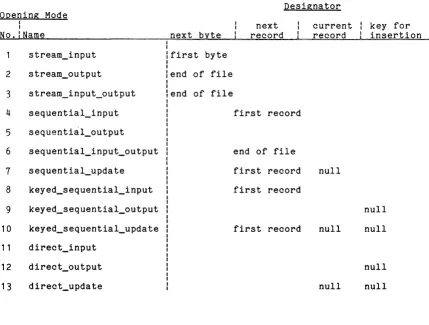
File Position Designators
SECTION VI
SECTION VII
CONTENTS (cont)
Terminal Input/Output • • . Bulk Input and Output • •
Printed Output Punched Card Input Punched Card Output •
Access Control • • • • • • • Types of Access Control Effective Access • • Discretionary Access Control
Access Identifier • •
Access Modes • • • • Structure of An ACL
Matching Entries on an ACL Maintenance of ACLs •
Special Entries on an ACL . • Initial ACLs • • • • . • • • . Maintenance of ~nitial ACLs • Nondiscretionary Access Control • .
AIM Attributes
Relationships Between AIM Attributes AIM Access Rules
Segments •• • • Directories • • •
Interprocess Communication • • • • Message Segment •
Authorizations Access Classes
Segment • • • • Directory •
Message Segment • • • • Maintenance of AIM • • • • • • •
User Commands and Subroutines • Special Situations
Mailboxes • • • • • • • • General Restrictions Intraprocess Access Control •
Valida tion Level • • • •
Segment Ring Brackets • • • • • • Directory Ring Brackets • •
Modification of Segment Attributes Default Values •• • • • • • • • •
Handling Unusual Occurrences Printed Messages
Sta tus Codes • • • •
List of System Status Codes and Meanings • • • • • •
Storage System Status Codes • • • Input/Output System Status Codes Other Status Codes • • • • • • • • Conditions • • • • • • • • • • • • • • Multics Condition Mechanism • • • • Example of the Condition Mechanism On Unit Activated by All Conditions Interaction with the Multics Ring
Structure • • • • • • • • • • • • Action Taken by the Default Handler • • Signalling Conditions in a
User Program • • • • • • • • • • • Obtaining Additional Information About
SECTION VIII
APPENDIX A
APPENDIX B
APPENDIX C
APPENDIX D
APPENDIX E
APPENDIX F
APPENDIX G
Index
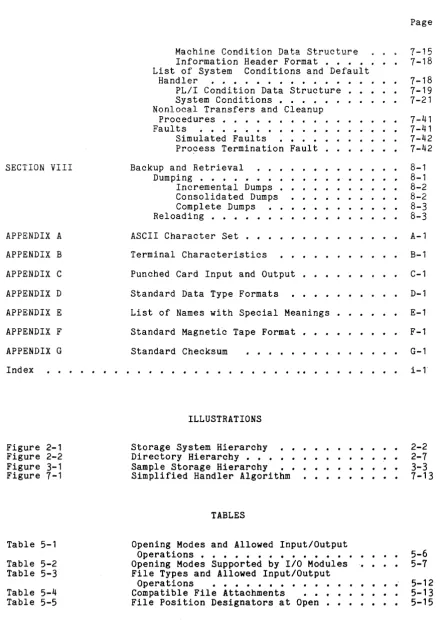
Figure 2-1 Figure 2-2 Figure 3-1 Figure 7-1
Table 5-1
Table 5-2 Table 5-3
Table 5-4 Table 5-5
.
.
.
.
.
.
CONTENTS (cont)
Machine Condition Data Structure Information Header Format • • • • List of System Conditions and Default
Handler • • • • • • • • • • • • PL/I Condition Data Structure •• System Conditions • • • • • • Nonlocal Transfers and Cleanup
Procedures • • • • • •
Faults . . . .
Simulated Faults • • • •
Process Termination Fault • • • • • • •
Backup and Retrieval • . • • Dumping • • • • • • • • • Incremental Dumps • • Consolidated Dumps Complete Dumps Reloading •
ASCII Character Set
. . .
Terminal Characteristics
Punched Card Input and Output
Standard Data Type Formats
.. .. ..
·
. ·
.
·
List of Names with Special Meanings
·
Standard Magnetic Tape Format
Standard Checksum
. . . .
. . .
.
. .
ILLUSTRATIONS
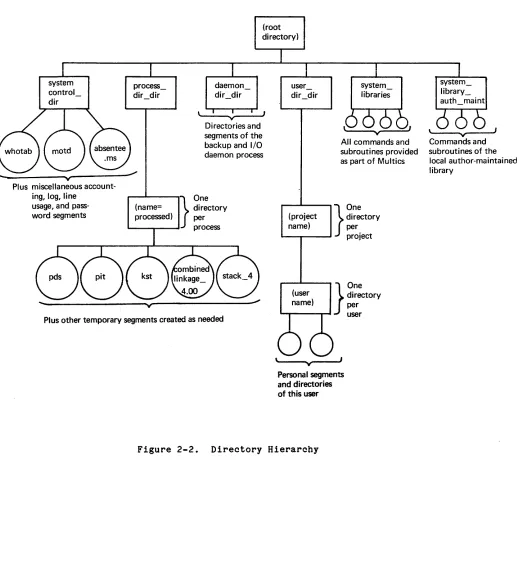
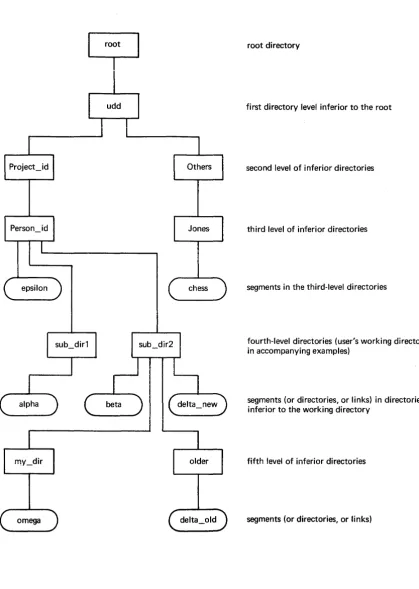
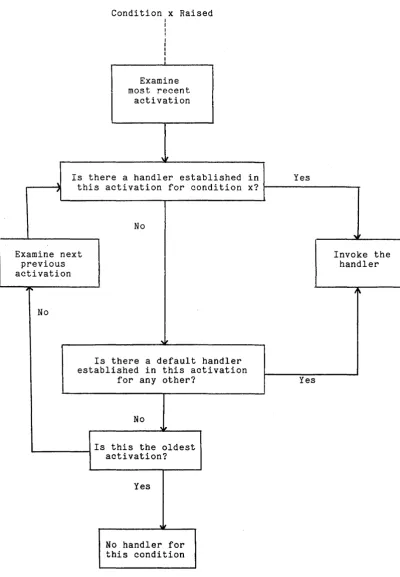
Storage System Hierarchy Directory Hierarchy • • • Sample Storage Hierarchy Simplified Handler Algorithm
TABLES
.
.
.
.
Opening Modes and Allowed Input/Output
·
·
·
Operations • • • • • • • • • • • • • • Opening Modes Supported by 1/0 Modules File Types and Allowed InputlOutput
Operations • • • • • • • • • • Compatible File Attachments • File Position DeSignators at Open •
[image:8.615.83.528.77.714.2]SECTION I
MULTICS CONCEPTS AND CHARACTERISTICS
The first part of this section is a brief introduction to the Multics system. Many items mentioned here are described in detail in other sections of this manual. Refer to the contents and index of this document to locate desired information. When necessary, the user is referred to other manuals.
The second part of this section is a glossary of Multics terms. A reference that refers the reader to either a section of this manual or to another manual is supplied with most of the terms defined.
HISTORY OF MULTICS
The Multics system is a general purpose computer system developed by Honeywell Information Systems. Introduced to commercial markets in January 1973, Multics was then the result of more than 7 years of joint research on the part of the development principals. Continued development and system enhancement is planned to extend well into the future. Multics was implemented initially on the Honeywell Model 645 computer system, an enhanced relative of the Honeywell Model 635 computer system. A transition was later made to the more advanced Honeywell Model 6180 computer system when it became available, and now has been made to Honeywell's top-of-the-line Series 60/Level 68 system.
SYSTEM CONCEPTS
Multics is a unique combination of hardware, software, communications capabilities, and supervisory techniques. The system hardware, particularly the central processor, is specifically designed for the Multics operating system. The system provides capabilities that have long been sought by research, government, academic, and network-oriented computer users -- those sophisticated users who require unique security, system development, and centralized data base features.
An ability to share data within the framework of a general purpose, time-sharing system, is a vital feature of Multics that can be directly applied to administrative problems, applications requiring a multiuser accessible data base, and general application of the computer to very complicated problems. The attention paid to mechanisms to provide and control privacy is of direct interest for many applications dealing with proprietary information.
Multics offers a number of additional capabilities that go well beyond those provided by many other systems. Those which are most significant from a user's point of view are described in this section. Perhaps the most important aspect of all is that a single system comprises all of these capabilities simultaneously. The major design concepts of the Multics system include:
• Virtual memory designed to make addressable memory seem virtually infinite
• Selective sharing of information through controlled access that is regulated by both software and hardware
• Security mechanisms enforced by hardware: this includes the Multics ring structure
•
Structural administration, allowing management of system resourcesdecentralized control and
• Flexible user interfaces, allowing a wide variety of programming environments
• Remote terminals as the normal mode of system access
• Efficient service to all users whether their use of system resources is very large or very small
• Continuous operation through the use of dynamic hardware configuration techniques and online software maintenance and system administration
• Open-ended, modular system design that anticipates the evolution of technological improvements and the expansion of user requirements
SYSTEM CHARACTERISTICS
The following para~raphs describe, in more detaill the major
characteristics of the Mult1cs system. These characteristics are 1ntegral parts of the Multics system and cannot be separated from the system yet in many instances, use of these capabilities is optional to the individual user.
Segments
A user can create a segment by issuing a command (e.g., create) from command level or via a call statement from within a program. A user has control over every segment he creates. The segment attributes mentioned above provide the user with extensive control over the manipulation and sharing of the segments he creates. (See "Selective Sharing" below.) A user may specify the individuals who have access to his segments. Also levels of protection (rings) can be specified as a further control over the same segments.
Virtual Memory
The Multics virtual memory makes all segments in the storage system directly addressable. An address in Multics, as used by the hardware, consists of two components: the first identifies a segment and is called a segment number; the other specifies a location within that segment.
A segment number is assigned by the supervisor and associated with the specified segment by user request, provided the user has the necessary access privileges. This request is often done implicitly as part of some other supervisor function.
Once a segment number has been provided by the supervisor, user software can reference the segment directly with appropriate machine instructions. The data or code of the segment so referenced is automatically brought into main memory, if necessary, so that the processor can use it.
Since the physical movement of information between secondary storage and main memory is totally automatic, it is of no concern to the programmer when he is constructing his application. A user does not have to be concerned with where and on what devices his segments reside. Because of the demand paging technique described below, users need not be concerned about overlaying or partitioning program modules to satisfy limited main memory resources. Since conventional input/output is not required, programming on Multics is greatly simplified.
Paging
Since segments can be different sizes, it may be impractical to have an entire segment in main memory when in use. Therefore Multics segments nre automatically subdivided into fixed-size (1024 words) storage units called pages. when a segment is referenced, the page referenced is automatically retrieved from secondary storage and placed in any available "frame" in main memory. when main memory is filled and more frames are needed, some pages have to be displaced. Pages not used recently are moved to secondary storage so that new pages may be transferred to main memory.
Address mapping at the hardware level allows the system to deter~ine
Process
A process may be defined as how the system is seen by a logged-in user; in essence; a user's process is the user's (virtual) machine. Multiprogramming multiplexes real processors among users' processes. A user's process executes programs sequentially. A user's process also has an address space. Each process can directly reference only those segments that have been assigned a segment number for that process by supervisor calls.
The system creates a process for each user at login time. (For information on logging in and out on the system, see "How to Access the Multics System" in the Multics Users' Guice, Order No. AL40.) Within the constraints imposed by the supervisor, a user may customize his process as desired: the commands, command processor and environment, and translator provided by the system can all be replaced in a user's process by his own code. A project administrator also has the option of enforcing the use of a given process environment upon users in his project.
Each user's process executes programs fairly independent of other users' processes. Information may be shared between processes, allowing sharing of programs and communication between processes (if desired). All processes coexist in the system, and cannot maliciously or accidentally interfere with each other.
SELECTIVE SHARING
Segments are data objects that exist independently of any process. The system manages the physical location of pages of segments. If the pages are in use, they will be in main memory. If several users have the same segment known in their process, they will reference the same physical locations of main memory when referencing it. No per-user "copies" or "images" of segments exist. Hence, several users referencing a given segment may use its contents to comillunicate, given that access has been appropriately granted. Furthermore, several processes using the same program use the same physical pages, contributing to effective use of main memory.
Access Contrel List
Each segment has an access control list (ACL) that names the individuals who have acc~ss to the segment and describes the type of access they have. Through the ACL, a user can grant specific access to individual users or groups ef users to permit easy, controlled sharing of information. Different access rights can be granted to different users of the same segment. The hardware enforces access control during the execution of each individual machine instruction.
Access Isolation Mechanism
Ring Structure
A further refinement to selective sharing is provided by special hardware that implements the Multics ring structure. Ring structure is an advanced form of protection capability that permits the ready construction of protected data bases. Privileged users may have complete access to the data base and can control (by program) the information less privileged users can see.
Logically, the ring structure iR eight concentric rings, each representing the level of privilege accorded to procedure segments executed in that ring.
The highest level of privilege is the innermost ring, designated as ring 0; the
outermost is ring 7. Privileged ring segments, such as a supervisor and special user subsystems, are protected from uncontrolled use by less-privileged rings. These segments can only be used by procedures in less-privileged rings if called via a special "gate" mechanism. The access permission checking is still required, as well.
The Multics ring implementation makes it possible to:
• create protected programs and data bases for controlled use by other users
• implement a supervisor program in rings with differing degrees of privilege
• debug a program in an unprivileged ring and then move it to a privileged ring with no recompilation or modification
SYSTEM ADMINISTRATION
All information stored online on Multics is organized into a tree-structured hierarchy. Within this hierarchy, directories catalog segments residing below them in the tree. (See Section II, "Storage System.rt) The organization of the body of users on Multics is patterned after the organization of the storage system. Users are grouped by the system administrator into projects, which are generally under the control of a project administrator. The project administrator may impose special disciplines on users within his project. For example, the project administrator defines the initial procedure in a process for users under his project. The project administrator also allocates storage quota to individual users based on the quota granted his project by the system administrator. The distribution of authority between the system administrator and project administrator results in a decentralized control of the system. (See the System Administrator's Manual, Order No. AK50 and the Project Administrator's Manual, Order No. AK51.)
US£R INTERFACES
Multics h s an open-ended design with a uniform interface for both user-written an system-provided commands. The user can create or manipulate segments resid ng in various user directories while at command level or from within a program. Users can create commands and subsystems of arbitrary complexity. All of the interfaces available to system-provided commands and subsystems are available to the user and are documented in the MPM Subsystem
~riters' Guide.
Programming Environment
A Multics user is not restricted to the programming environment defined by the standard system but can alter this environment for private use or use an altered environment that a project administrator provides or imposes on him. As an example, the project administrator may offer some of his users only a subset of the full system (a limited service system), or he may create a completely separate environment (a closed subsystem) that bears no resemblance to the standard Multics environment and requires no knowledge of the Multics system itself. These environment changes are made possible by a large number of Multics mechanisms. Primary contributors are:
• Modular system design that allows easy replacement of a specific operating system module without affecting other modules
• Implementation of the system in the PL/I language, which permits easy interfacing with operating system modules
• Project administration features, wll~ch permit the installation and management of a new environment
• Security and protection features, which keep the environment separate from the other users in an atmosphere of mutual protection
Programming Languages
The Multics system includes several language processors. A program written in one of the Multics languages can call programs written in another language by merely following appropriate calling conventions. The Multics compilers optionally generate a symbol table that permits a user to check out his program at the original source level with the aid of the debug, probe, and trace commands. (For detailed information about programming on Multics in the various programming languages, see the language manual and users' guide for the languages in question.)
PL/I
FORTRAN
The Multics FORTRAN compiler conforms to the current American National Standards Institute (ANSI) for FORTRAN. Multics FORTRAN is a superset of the ANSI standard FORTRAN and is source-language-compatible with Series 60/Level 66 FORTRAN.
BASIC
The Multics BASIC is contains all the functional compiler.
compatible with the Dartmouth Version 6 BASIC and capabilities of the Series 60/Level 66 BASIC
COBOL
This compiler is a subset of the ANSI standard COBOL and is source-language-compatible with Series 60/Level 6-6, COBOL-74.
APL
APL is a powerful interpretive language available to Multics users. The Multics APL interpreter is compatible with other common APL implementations.
ALM
ALM is the assembly language on Multics. It is privileged supervisor code, compiler support operations and It is not recommended for general use.
qedx
commonly utility
used for packages.
The qedx editor is used to create and edit ASCII segments. Through its macro capabilities, it also qualifies as a minor interpretive language.
runoff
The runoff command, used for manuscript formatting, also has programmable requests that make it a minor programming language.
Support Facilities and Tools
The debug, probe, and trace commands permit a user to analyze and correct a compiled program at both the original source level and the more specific machine-register level.
Performance-measurement tools permit the user to analyze his program's behavior so that optimum applications software can readily be developed.
Interuser communication facilities, both immediate and deferred, permit online messages to be transmitted among users.
Online documentation facilities provide the user with useful information and document preparation tools.
For easy reference, the standard commands and subroutines provided by the Multics system are listed according to function in Section I of the MPM Commands, Section I of the MPM Subroutines, and Section V of the MPM Subsystem writers' Guide.
REMOTE ACCESS
The primary means of accessing the Multics system is from a remote terminal. The system accepts input from a terminal, interprets the user's request, and invokes the software component to perform the desired function. The software component can be either system or user-supplied: there is no distinction at the command or subroutine level. The command language allows recursive, iterative commands and the embedding of function calls in the command line.
The command processor is a shared, replaceable module, written in PL/I. The deSign of the command processor thus permits an extremely wide range of interfaces to all system facilities either on a controlled or open-ended basis. The project administrator can require a user to interface with a special version of the command processor, thereby limiting the software requests or commands available to him.
The Multics system does not usually differentiate between interactive and batch users, except that a batch user (called absentee in Multics) is not available to answer any questions the system may ask and must therefore anticipate such questions and have prepared answers ready.
SERVICE TO LARGE AND SMALL USERS
SYSTEM DESIGN
The designers of' the Multics system were determined from the very beginning to develop a system that could both evolve as a body of software on a given machine and sustain a movement across hardware generations. To attain this goal, they implemented a modular design, Operating system modules may be easily replaced on a system or individual-user basis. In addition, approximately 95%
of the Multics operating system is written in PL/I, which makes further flexibility and easy modification possible.
Continuous Operation
Various system features contribute to the Multics characteristic of continuous operation:
• Central processors and memory units may be added or subtracted without shutting down the system
• User programs and the system itself need not change structure in any way whatever due to differences in hardware configuration
• Tasks required to manage the system can be performed without interrupting service; these tasks include metering system or user behavior, invoking management subsystems such as accounting and billing, or even updating the bulk of the system software capabilities and facilities
System Reliability
GLOSSARY OF MULTICS TERMS
absentee
A facility for running background jobs (noninteractive processes). (See the enter_abs_request command in the MPM Commands.)
access attributes
See access modes below.
access class
An access isolation mechanism (AIM) attribute that denotes the sensitivity of information contained in a segment, directory, multisegment file, or message in a message segment. An access class is associated with an entry for its lifetime. (See "Nondiscretionary Access Control" in Section VI.)
access control
The mechanism for determining (files) and directories. (See Section VI.)
who may reference or modify segments "Discretionary Access Control" in
access control list (ACL)
A set of access identifiers specifying who may access a segment or directory. Associated with each access identifier is a set of allowed modes of access to that segment or directory. There is an ACL for each segment and each directory. See initial access control list below. (See "Discretionary Access Control" in Section VI.)
access identifier (access_id, access_name)
A character string representing a user or class of users. of three fields: Person_id. Proj ect_id. tag. (See" Access in Section VI.)
It consists Identifier"
access isolation mechanism (AIM)
The mechanism used to guarantee that only authorized persons access certain classes of information. (See "Nondiscretionary Access Control" in Section VI.)
access modes
A way to identify the kinds of access that may be set for a segment or directory. The access modes for segments are read (r), write (w), execute (e), and null (n). Those for directories are status (s), modify (m), append (a), and null (n). See extended access below.
(See "Discretionary Access Control" in Section VI.)
active function
AIM
ALM
A function specified in a command line whose value (a character string) becomes part of an expanded reevaluated command line. (See "Active Strings" in Section III.)
See access isolation mechanism above.
The assembly language on Multics, used primarily for programs that
mus~ closely interface with the hardware. (See the alm command in the MPM Commands.)
alternate name(s)
archive
attach
A segment used to conserve space. When storing a group of segments, the contents of the individual segments can be packed together in an archive to eliminate breakage in the last page of each segment. (See the archive command in the MPM Commands.)
The act of associating an 1/0 switch with another 1/0 switch, file, or device. For example, the normal output switch (user_output) is usually attached to the terminal, but may be attached to a file via the file_output command. (See IOSIM below.)
authorization
backup
bind
bit count
An access isolation mechanism (AIM) attribute that denotes the range of information a process can access. An authorization is associated with.a process for its lifetime. (See "Nondiscretionary Access Control" in Section VI.)
The backup system dumps (copies) user segments and directories onto removable storage (magnetic tape). The dumping is conventionally done using the processes Backup.SysDaemon and Dumper.SysDaemon. The information dumped can be recovered by the operations staff at the user's request. (See Section VIII, "Babkup and Retrieval.")
See bound segment below.
An index to the last bit of useful information in a segment. For example, a segment that contains 43 characters starting at the beginning has a bit count of 387 (9*43). (A segment may, however, contain useful data independent of its bit count.) (See "Entry Attributes" in Section II.)
bound segment
branch
A group of (usually related) object segments bound into one segment to save space and speed up references (calls, etc.) them. The process of binding segments is similar to linkage on other systems and is done by use of the bind command. bind command in the MPM Commands.)
object between editing (See the
An item cataloged in a directory: segment, multisegment file or another directory but not a link. (See entry below.)
canonicalization
"carriage
The conversion of a terminal input line into a standard (canonical) form. This is done so that lines that appear the same on the printed page, but that may have been typed differently (i.e., characters overstruck in a different order), appear the same to the system. (See "Canonicalization" in Section IV.)
return"
A "carriage return" means that the typing mechanism moves to the first column of the oext line. On Multics, this action is the result of the ASCII line-feed character. The terminal type determines which keyes) the user presses to perform the equivalent action (e.g., RETURN, LINE SPACE, or NL).
closed subsystem
command
A program designed to be called by typing its name at a terminal. Most commands are system-maintained, but any user program that takes only character-string input arguments can be used as a command. (See "Command Language" in Section III.)
command level
The process state in which lines input from a user's terminal are interpreted by the system as a command (i.e., the line is sent to the command processor). A user is at command level when he logs in, when a command completes or encounters an error, or is stopped by issuing the quit signal. Command level is normally indicated by a ready message. (See "Command Environment" in Section III.)
command processor
The program that interprets the lines input at command level and calls the appropriate programs, after processing parentheses and active functions. (See "Command Environment" in Section III.)
component (of an archive)
One of the segments placed in an archive. (See the archive command in the MPM Commands.)
component (of an entryname)
A logical part of an entryname. Entryname components are separated by a period. (See suffix below and "Entrynames" in Section III.)
See Person_id.con_msgs below.
control argument
crash
daemon
detach
directory
An argument to a command that specifies what the user wants done, or what information he is interested in. System control arguments begin with a hyphen, such as -all, -long, or -hold. The meaning of each control argument accepted by a specific command is given as part of the description of the command. Many control arguments have standard abbreviations such as -lg for -long. A list of the abbreviations of the most frequently used control arguments is found in Appendix A of the MPM Commands. (System commands are described in the MPM Commands and in the MPM Subsystem Writers' Guide.)
An unplanned termination of system availability caused by problems in hardware and/or software.
One of several system service processes that perform such tasks as process creation, backup, network control, and printing segments on the line printer.
Inverse of attach (see above).
A catalog of segments, multisegment files, links and other subordinate directories. The directory contains information about the attributes of these entries and information about the physical device on which the data is stored. (See Section II, "Storage System.")
directory (home)
The directory that is the working directory of a user when he first logs in to the system (also known as the initial working directory). Usually this directory has a pathname of the form:
>udd>Project_id>Person_id
directory (working)
Identifies the user's current location within the storage system with regard to pathnames. Any pathname the user types that does not begin with a greater-than (» character is considered relative to the working directory. By default, this directory is used by the search rules. (See "Search Rules" in Section IV.)
directory hierarchy
The tree-structured organization of the logical contents of the Multics storage system. (See Section II, "Storage System.")
dprint, dpunch (for Daemon print and Daemon punch)
dump
A queued request to the system to output on a line printer (or card punch) the contents of a segment or multisegment file. (See the dprint and dpunch commands in the MPM Commands.)
See backup above.
dynamic linking
entry
The resolution of symbolic external references at execution time (that is, the first time the symbol is actually referenced). (See link pair below and "Dynamic Linking" in Section IV.)
An item cataloged in a directory: or another directory. (See branch "Entrynames" in Section III.)
segment, link, multisegment file, and file in this glossary and
entry point
An address in an object segment referenced by a symbolic name; e.g., that which would be produced by the PL/I or FORTRAN procedure, subroutine, or entry statements.
entry point name
entryname
The name associated with an entry point in an object segment. The entry point name is found by the dynamic linker. (See "Entry Point Names" in Section III.)
A name given to an item contained in a directory. It may contain one or more components, separated by periods. All names given to entries within one directory are unique, but need not be different from names defined in other directories. (See "Entrynames" in Section III.)
equal convention
A method used by many commands to specify one or more characters in a group of entrynames. (See "Equal Convention" in Section III.)
error codes
See status codes below.
exclamation point convention See unique name below.
exec_com (ec)
A facility for executing a list of commands taken from a segment. It includes argument passing and conditional branching capabilities. (See the exec com command in the MPM Commands.)
extended access
fault
An additional field of access modes used with message segments to further restrict operations on a message segment. (See "Access Modes" in Section VI.)
A hardware signal similar to an interrupt that may signalling of a condition. (See "Faults" in Section VII.)
file
frame
gate
A term that stands for segment and/or multisegment file.
See main memory frame below.
The only point at which a procedure in an outer ring can transfer to a procedure in an inner ring. (See "Intraprocess Access Control" in Section VI.)
hardcore (hardcore supervisor)
help files
The set of routines that perform the supervisory functions of the system. The hardcore executes in ring O.
See info segments below.
home directory
See directory (home) above.
impure procedure
A procedure that modifies itself.
info segments
The segments whose contents are printed by invoking the help command. These segments, sometimes called help files,give information about the system. The system info segments are kept in the directory >documentation>info_segments (>doc>info). The info segments that are peculiar to an installation are kept in >doc>iml_info_segments. (See the help command in the MPM Commands.)
initial access control list
A list that specifies what the access control list of a newly created segment or directory will be. There are separate initial access control lists for segments and directories for each ring. (See "Initial ACLs" in Section VI.)
initial working directory
See directory (home) above ..
Initializer
initiate
The system control process that accounting statistics. This is the destroys other processes. Initializer.SysDaemon.z.
logs only Its
users process
access
in and out and keeps that creates and identifier is
The act of associating a reference name with a given segment in the storage system. The segment must be part of the user's "address space" (made known), and the supervisor entries will do this automatically if necessary. A reference name is said to be initiated for a given segment. (See "Reference Names" in Section III.)
Installation Maintained Library (IML)
liD module
liD switch
The library of programs maintained by the particular installation. It is kept in the directory >system_library_auth_maint (>am). (See Section II, "Storage System.")
A program that processes input and output requests directed to a given switch. It may perform operations on other switches, or call the supervisor.
See switch below.
IO.SysDaemon
IOSIM
Obsolete term. See I/O module above.
library_dir_dir (ldd)
The starting directory of the subtree in which the source and object module of the system are stored. (See Section II, "Storage System.")
limited service system A subset of
administrator. the Multics system imposed (See "Programming Environment" in Section I.) on users by the project
link
link pair
(1) An entry in a directory that specifies the pathname of an entry in another- directory. it allows references to items in other directories as if they were actually contained in the working directory. Links eliminate the need for multiple copies of segments.
(2) An external symbolic reference. See link pair below.
An indirect word in a procedure segment's linkage section thro~gh
which all references to some external data or procedure are maae. Until the link is snapped, it contains symbolic information about the external object. A link pair initially contains a code that causes a fault, and invokes the dynamic linker, when first used in a process. The linking, if successful, puts the actual address of the procedure or data referenced in the link pair.
linkage section
listener
mailbox
(1) The portion of a procedure object segment that is a pure template for impure data needed by the procedure at runtime.
(2) The impure copy made from this template. (See dynamic linking above.)
The program that reads command lines from the terminal and passes them to the command processor.
See Person_id.mbx.
memory units
A measure of the usage a user makes of the system memory resources.
making a segment known
Specifying its pathname to the supervisor, and rece1v1ng a segment number in return. The segment may then be referenced by that segment number in the process. (See "Making a Segment Known" in Section IV.)
main memory frame
A 1024 36-bit word block of main memory that holds a page of a segment. (See "Paging" in Section I.)
message segment
A special type of segment that is managed by Multics supervisor programs and is not directly accessible .to the user. A message segment is simply a permanent place to hold interprocess messages, e.g., dprint and dpunch requests.
Multics Programmers' Manual (MPM)
The primary reference manual for Multics. (See the preface of this document.)
Multics card code (MCC)
multiple names
See alternate names above.
multisegment file (MSF)
A file that occupies more than one segment, i.e., a file larger than 262,144 words. May only be manipulated by certain programs. (See "Multisegment Files" in Section II.)
object segment
page
A procedure or data segment produced as the result of a compilation with a system-defined format. An executable object segment can be directly executed by a process. Object segments may be searched and linked to by the dynamic linking mechanism. (See "Creating an Object Segment" in Section IV.)
A 1024 3b-bit word block of data within a segment.
page control
password
pathname
The routines that manage the
storage and main memory frames. (See "Paging" in Section I.) transfer of pages between secondary
A character string supplied by a user and known only to him and the software that controls access to the system. When supplied with the user's Person_id at log-in time, it validates the true identity of the user. (See Section I, "How to Access the Multics System", in the Multics Users' Guide, Order No. AL40.)
A character string that specifies a segment by its position in the directory hierarchy. The pathname can be relative or absolute (see below). (See "Pathnames" in Section III.)
pathname (absolute)
A concatenation of a segment's entryname with all superior directories leading back to the storage system root. (See "Pathnames" in Section III.)
pathname (relative)
A pathname that uniquely names a segment relative to the working directory. (See "Pathnames" in Section III.)
person name table (PNT)
System table containing all Person ids (persons and fictitious persons) registered on Multics with their encoded password, default project, address, and certain other data.
A unique name assigned to each user of the system. It is usually some form of the user's name and contains both uppercase and lowercase characters. It may not contain blank characters. Associated with the Person_id is a single password. The Person_id and the password can be used to identify a person on several projects. (See Section I, "How to Access the Multics System," in the Multics Users' ~, Order No. AL40.)
Person_id.con_msgs
A segment in the user's home directory used to hold messages sent by the send_message command. (See the send_message and accept_message commands in the MPM Commands.)
Person id.mbx
pointer
An address value. On Multics, an address consists basically of a segment number and an offset within the segment.
primary name
process
The main name associated with a segment, directory, multi segment file, or link. (See the list command in the MPM Commands.)
A program or group of programs in execution: an address space and an execution point. Each logged-in user has his own process. (See "Process" in Section I.)
process directory
A directory containing those segments that are meaningful only during the. life of a process. These segments include the stack(s), free storage, PIT, and various temporary segments.
process initialization table (PIT)
The segment (in the process directory) that contains information about process initialization, i.e., Person_id and Project_id, home directory, attributes, and accounting data.
process overseer
project
The first procedure called in a process. It sets up the environment, then calls the listener to start reading commands.
An arbitrary set of users grouped together for accounting and access control purposes.
project administrator
A person who has the access to specify spending limits and other attributes for the users on a particular project.
project definition table (PDT)
A compiled project master file.
project master file (PMF)
Project_id
An ASCII file giving the names., attributes, and account limits of the users on a particular project. It is compiled into a project definition table.
The name assigned to a project.
pure procedure
A procedure that does not modify itself.
quit request
Several commands that read input from the keyboard use the typed request "quit" or "q" to indicate to them that the user is done. This is not the same as issuing the quit signal.
quit signal
quote
A method used to interrupt a running program. The quit condition is raised by pressing the ATTN, BRK, INTERRUPT, etc. key on a terminal. This condition normally causes the printing of QUIT followed by establishment of a new command level. (See "System Conditions" in Section VII.)
ready message
record
recursion
A message that is printed each time a user is at command level. Printing this message may be inhibited, or the user may define his own ready message. The standard system ready message tells the time of day and the number of CPU seconds, memory units, and page faults since the last ready message plus the current listener level (if greater than 1).
(1) The smallest unit of disk allocation, containing 1024 36-bit words (4096 characters).
(2) In PL/I and FORTRAN, a block of data transferred during input or output
The ability of a procedure to invoke itself.
reference name
When a segment is made known to a process, particular names may be associated with it in that process. This is called initiation. Thereafter, a symbolic reference to this reference name is directed to the associated segment. Reference names need not be the same as any of the segment's entrynames. (See "Reference Names" in Section III.)
relative pathname
retrieval
root
ring
See pathname (relative).
The process of copying a segment or directory back into the directory hierarchy from backup tapes. This is normally done by the operations staff using Retriever.SysDaemon at the request of the user. (See Section VIII, "Backup and Retrieval.")
The directory that is the base of the directory hierarchy. All other directories are subordinate to it. It has an absolute pathname of >.
(See Section II, "Storage System.")
A particular level of privilege at which programs may execute. Lower numbered rings are of higher privilege than higher numbered ones. The supervisor program runs in ring 0, most user programs run in ring 4.
(See "Intraprocess Access Control" in Section VI.)
ring brackets
scheduler
A set of integers associated with each segment that define in rings that segment may be written, read, called, or executed. "Intraprocess Access Control" in Section VI.)
See traffic controller below.
what (See
search rules
segment
A list of directories that are searched to find a command, subroutine, or data item referenced symbolically. Each directory is examined, in order, to find the given external name. This is to be distinguished from addressing a segment by its pathname, which explicitly specifies the directory containing the segment. (See "Search Rules" in Section
II. )
Basic unit of information within the Multics storage system. Each segment has access attributes, (at least one) name, and may contain data, programs, or be null. (See "Segments" in Section I.)
shriek names
snap (to snap a link)
The process of finding that segment (and entry point in the segment) that is referenced by "a link pair and replacing the link pair with a pointer to that entry point. This is part of the· dynamic linking mechanism, by which external symbolic references (subroutine calls,
PL/I external variables) are resolved while the program is running.
standard service system (SSS)
stack
A group of commands and subroutines that are provided as part of the standard Multics system. They are located in the directories >system_library_standard, >system_library_unbundled, and >system_library_1. (See Section II, "Storage System.")
A pushdown list where active procedures maintain private regi.ons used for temporary variables and interprocedure communication. (See "Stack Header" and "Stack Frames" in Section IV.)
star convention
A method used by many commands to specify a group of segments and/or directories using one name (a star name). (See "Star Convention" in Section III.)
start_up.ec
status
An exec_com segment that is invoked automatically when the user logs in. It is often used to execute commands such as mail, abbrev, and accept_messages.
(1) command for printing attributes of a directory entry (2) one of the access modes on directories
(3) a coded state word returned by peripheral devices (See status code below.)
status code
subsystem
suffix
switch
SysDaemon
A value returned by a subroutine indicating either the success of or the reason for failure to accomplish the requested action. Associated with standard system error codes are certain predefined messages that tell what happened. (See "Status Codes" in Section VIII.)
A collection of programs that provide a special environment for some particular purpose, such as editing, calculation, or data management. It may perform its own commarid processing, file handling, and accounting. A subsystem is said to be closed if:
1. all necessary operations can be handled within the subsystem
2. no way exists to use the normal Multics environment from within the SUbsystem
The last component of an entryname (components are separated by a period
(.»
that usually specifies the type of segment. For example, p11, con_msgs, and list. A segment without a suffix is usually an object segment or data segment. (See Appendix E, nList of Names with Special Meanings.")A path in the I/O system through which information is sent. (See attach and detach above and Section V, nlnput and Output Facilities. n )
See daemon above.
system administrator
system_control_dir (sc1, system_control_')
The directory that contains those segments and directories used to control the operation of the system including the answer table, who table, person name table, project PDTs, etc.
terminal 1D
A character string that identifies a particular terminal at an installation.
terminal type
terminate
A character string that identifies the terminal device, e.g., one similar to the GE TermiNet 300. The terminal type is associated with the user's terminal and/or the modes associated with terminal input/output.
The opposite of initiate: to delete reference names for a segment. This is sometimes done to substitute one version of a command or subroutine for another that had been known to the process. (See "Reference Names" in Section III.)
traffic controller
The module in the system that determines when a process is to run and how long it will run. It also notifies processes of events that have occurred such as timers, I/O events, and signals from other processes.
translation (translator)
The process of compiling a source language program or data base into an object segment. (See "Creating an Object Segment" in Section IV.)
user_dir_dir (udd)
The user directory directory, which contains all project directories. Its pathname is >udd, and all user segments and directories are subordinate to it. (See "Pathnames" in Section III.)
Used to refer to a Person_id.Project_id pair. (See access identifier above.)
unique name (shriek name, exclamation. pOint convention)
A name, generated from a system clock value, that is guaranteed to be different from any other name so generated (e.g., !BBBnZNlqLQddRJg).
who table (whotab)
A segment that contains a list of users who are currently logged in together with certain attributes such as log-in time, load, and terminal type.
wired segment
word
A portion of the system that (of necessity) remains resident in the main memory at all times; e.g., page control, teletype buffers, etc.
A unit of information that on Multics is 36 bits.
working directory (working_dir)
SECTION II
MULTICS STORAGE SYSTEM
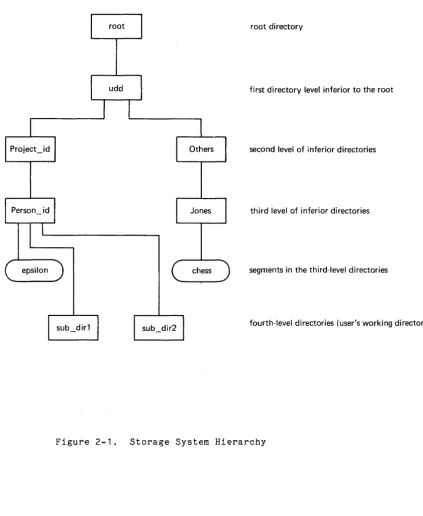
The basic unit of storage in the Multics storage system is a segment. Segments form a tree-structured data base that is organized by a hierarchy of special segments called directories. As shown in Figure 2-1, any segment (directory or nondirectory) in the tree can be located by its entry in the directory immediately superior to it. That directory is located in the same manner by its entry in a superior directory. The immediately superior directory also referred to as the containing directory.
All segment references begin at the root of the tree and consist of a string of entrynames ending with the name of the target segment. Such a string of entrynames is called an absolute pathname. The greater-than character (» is used to separate entrynames and is also used at the beginning of the pathname (by convention, the root directory is never explicitly specified). Using Figure 2-1 as'a reference, the absolute pathname for the segment named "chess" would be:
>udd>Others>Jones>chess
The syntax of entrynames and pathnames is given in detail in "Entrynames" and "Pathnames" in Section III. The following discussion gives the general contents of a directory and describes the system directories that form the basis of the storage hierarchy.
DIRECTORY CONTENTS
root directory
first directory level inferior to the root
second level of inferior directories
third level of inferior directories
segments in the third-level directories
fourth-level directories (user's working directory)
[image:31.615.107.530.145.661.2]Entry Attributes
A branch-type entry serves both to identify and characterize the target segment. Attributes are entered when the segment is created and, in most cases, can be modified later either explicitly or implicitly. As shown below, the attributes maintained in a branch entry differ for the three possible branch entry types: segment, directory, or multisegment file.
Explicit modification of an attribute is achieved using a standard storage system subroutine. Implicit modification is automatic and occurs as a result of some change to the target segment. For example, when data is written into an existing segment, the date-time-modified attribute is changed accordingly.
The types of attributes maintained in a directory and the types of entry to which they are applicable are described below. Multisegment files are treated somewhat differently and are described in "Multisegment Files" (following this attribute list).
access class (segments, directories)
The access class of an entry is established when the entry is created. It is used to restrict access to users who meet specific security requirements. The access class attribute cannot be modified. Access class characteristics are described in detail in "Nondiscretionary Access Control" in Section VI.
access control list (segments, directories)
The access control list (ACL) maintains a list of access names, specifying classes of users who are allowed access to the entry and, for each class, the mode of access permitted. The access specified may be null, indicating that no access is permitted. The ACL attribute is used in conjunction with the access class attribute to determine access rights when a particular process refers to the entry. An ACL can be explicitly modified. See "Discretionary Access Control" in Section VI for a complete discussion of access control.
author (segments, directories, links)
The author attribute of an entry is the access identifier of the process that created the associated entry. This attribute cannot be modified.
bit count (segments)
The bit count attribute gives the length (in bits) of the segment. The bit count can be modified by any process with write access to the segment and is maintained by the user rather than the system. Any procedure that modifies the segment length should also modify the bit count since many system commands and subroutines depend on its accuracy.
bit count author
The bit count author attribute contains process that last set the bit count. This updated when the bit count is set.
(segments)
copy switch (segments)
The copy switch attribute is a mechanism that permits simultaneous executions of an impure procedure by more than one process. If the copy switch is "on"1 each process that refers to the entry is given a copy of the segment rather than the segment itself. The copy switch may also be used to obtain a copy of a data segment. Since a new copy is also generated each time an external reference invokes the segment by a different name, it is recommended that only one name be associated with a segment whose copy switch is on. This attribute can be explicitly modified.
current length (segments, directories)
The current length attribute gives the length in pages of an entry. This attribute is modified by the system when data is stored beyond the existing current length or when the entry is truncated.
date time dumped (segments, directories, links)
This attribute records the time at which a backup copy of the entry was last made by the Multics backup procedures. The date-time-dumped attribute is automatically modified by these procedures.
date time entry modified (segments, directories, links)
This attribute records the last time any attribute of the entry was modified. It is implicitly updated after any modification.
date time modified (segments, directories)
This attribute records the time at which an entry was last modified. It is impliCitly updated as a result of the modification. (This value is approximate and is normally within a few minutes of the time the entry was modified.)
date time salvaged (directories)
This attribute records when the directory was last salvaged. The term salvage refers to the rebuilding of a directory, undertaken either as a corrective or housekeeping measure. This attribute is implicitly modified as a result of the salvaging process.
date time used (segments, directories, links)
This attribute records the last time the target entry was referenced. The date-time-used attribute is implicitly updated when the entry is used. (This value is approximate and is normally within a few minutes of the last time the entry was modified.)
initial access control lists (directories)