ScholarWorks @ Georgia State University
ScholarWorks @ Georgia State University
English Theses Department of English
8-21-2007
Levelling Up: Designing and Testing a Contextual, Web-based
Levelling Up: Designing and Testing a Contextual, Web-based
Dreamweaver 8 Tutorial for Students with Technological Aptitude
Dreamweaver 8 Tutorial for Students with Technological Aptitude
Differences
Differences
Alicia Nicole Hatter
Follow this and additional works at: https://scholarworks.gsu.edu/english_theses Part of the English Language and Literature Commons
Recommended Citation Recommended Citation
Hatter, Alicia Nicole, "Levelling Up: Designing and Testing a Contextual, Web-based Dreamweaver 8 Tutorial for Students with Technological Aptitude Differences." Thesis, Georgia State University, 2007. https://scholarworks.gsu.edu/english_theses/29
This Thesis is brought to you for free and open access by the Department of English at ScholarWorks @ Georgia State University. It has been accepted for inclusion in English Theses by an authorized administrator of
LEVELLING UP: DESIGNING AND TESTING A CONTEXTUAL, WEB-BASED
DREAMWEAVER 8 TUTORIAL FOR STUDENTS WITH TECHNOLOGICAL APTITUDE
DIFFERENCES
by
ALICIA NICOLE HATTER
Under the Direction of Jennifer L. Bowie
ABSTRACT
This thesis examines the user-centered design methods and methodology inherent to
designing and testing a web-based Dreamweaver 8 tutorial for undergraduate and graduate
students who enroll in certain English rhetoric and composition courses at Georgia State
University. The tutorial’s three interfaces were rhetorically designed to support three
corresponding types of user—novices, intermediates, and experts— whose familiarity with
Dreamweaver and student web space determined their starting point of interaction with the
artifact. Three usability tests examined each interface based on four usability attributes.
Findings revealed the novice and expert interfaces to be usable, while the intermediate interface
was more problematic. The analysis of findings indicated the advanced documentation theory to
be sound; however, the practical implementation of the theory to this artifact was comparatively
ineffective. More research is suggested for determining whether a multimodal tutorial design is
the most useful and usable for the target audience(s).
INDEX WORDS: User-centered design, Usability testing, Usability, User groups,
LEVELLING UP: DESIGNING AND TESTING A CONTEXTUAL, WEB-BASED
DREAMWEAVER 8 TUTORIAL FOR STUDENTS WITH TECHNOLOGICAL APTITUDE
DIFFERENCES
by
ALICIA NICOLE HATTER
A Thesis Submitted in Partial Fulfillment of the Requirements for the Degree of
Master of Arts
in the College of Arts and Sciences
Georgia State University
Copyright by Alicia Nicole Hatter
LEVELLING UP: DESIGNING AND TESTING A CONTEXTUAL, WEB-BASED
DREAMWEAVER 8 TUTORIAL FOR STUDENTS WITH TECHNOLOGICAL APTITUDE
DIFFERENCES
by
ALICIA NICOLE HATTER
Major Professor: Jennifer L. Bowie Committee: Elizabeth Lopez
George Pullman
Electronic Version Approved:
Office of Graduate Studies
College of Arts and Sciences
Georgia State University
ACKNOWLEDGEMENTS
Many important people contributed to the completion of this thesis, and for their work
they deserve recognition. I would like to begin my thanking the members of my committee, Drs.
Bowie, Lopez, and Pullman. Without their support, both during the writing and revising of this
thesis, I would not be able to purse my education to the highest level. Thank you all for your
dedicated and wonderful work.
I would also like to thank Tiffany Jones, my Writing Studio colleague and friend, who
coached me through many difficult tutorials and was one of the best readers I have ever worked
with. Thank you, Tiffany, for knowing what to say and for easing me into many rewrites that
only made my writing stronger.
Outside of the academy, several of my dear and longtime friends offered emotional
support. I would like to thank Erin Mullikin, Emily Zimney, Marisa Fagin, and Jess McMillan
for lending both their time and their encouragement to me as I worked through this project.
Thank you all for being the best friends I could ever ask for.
Finally, and most importantly, I would like to thank my parents, Denise and David, and
my godmother, Cheryl. You have helped me in more ways than I can list, and I am more
grateful for your lasting love and support than I can articulate. Thank you for helping me make
TABLE OF CONTENTS
ACKNOWLEDGEMENTS………... iv
LIST OF TABLES………... vii
LIST OF FIGURES……….. ix
LIST OF ABBREVIATIONS………... x
CHAPTER 1 INTRODUCTION………... 1
Research Aim….……….. 2
Method and Methodological Research Context and Terminology…………... 2
Contribution of Knowledge to the Field………... 8
Overview of Thesis Research Method and Methodology……….… 9
Research Design Summary……….. 10
Thesis Overview………... 12
2 USER-CENTERED DESIGN METHODS AND METHODOLOGY………... 14
Research Question and Rationale………. 14
Research Method………. 38
Research Methodology……… 41
Study Design………... 42
Study Design and Response to Research Questions……….……….. 50
3 USABILITY TESTING FINDINGS AND ANALYSIS……… 63
Individual Usability Tests’ Findings and Analyses……… 63
Novice Testing Findings and Analyses……… 65
Intermediate Testing Findings and Analyses…….………. 84
Expert Testing Findings and Analyses……... 102
Analysis of All Testing Levels……… 118
4 CONCLUSION………... 100
Summary of Chapters……….. 121
Study Directions and Implications……… 124
Study Limitations……….………... 128
Recommendations for Artifact Redesign……….………... 132
Future Research………... 135
REFERENCES………. 139
APPENDICES………. 140
A – Pre-Test Questionnaire………. 140
B – Novice Post-Test Questionnaire……… 145
C – Intermediate Post-Test Questionnaire……….. 147
LIST OF TABLES
Table 2.1. Collated novice participants’ demographic information 46
Table 2.2. Collated intermediate participants’ demographic information 47
Table 2.3. Collated intermediate participants’ demographic information 48
Table 3.1. Individual and average task completion times for novice participants 67
Table 3.2. Novice testing expected task completion times vs. actual average completion times and indication of efficiency
71
Table 3.3. Participants’ errors for the novice usability test 74
Table 3.4. Novice users’ error frequency during testing 75
Table 3.5. Errors, error severity levels, and recommended change from the novice testing
78
Table 3.6. Novice participants’ ease of use ratings overall and per task 81
Table 3.7. Individual and average task completion times for intermediate participants 86
Table 3.8. Intermediate testing expected task completion times vs. actual average completion times and indication of efficiency
90
Table 3.9. Participant errors for the intermediate usability test 92
Table 3.10. Intermediate users’ error frequency during testing 92
Table 3.11. Errors, error severity levels, and recommended change from the intermediate testing
97
Table 3.12. Intermediate participants’ ease of use ratings overall and per task 99
Table 3.13. Individual and average task completion times for expert participants 104
Table 3.14. Expert testing expected task completion times vs. actual average task completion times and indication of efficiency
Table 3.15. Participant errors for the expert usability test 109
Table 3.16. Expert users’ error frequency during testing 109
Table 3.17. Errors, error severity levels, and recommended change from the expert testing
113
LIST OF FIGURES
Figure 2.1. The first screen of the D8T’s novice interface 22
Figure 2.2 Step-by-step instructions in the novice D8T 23
Figure 2.3. The secondary novice D8T page 24
Figure 2.4. More step-by-step instructions on the novice D8T 24
Figure 2.5. The D8T’s main intermediate interface 27
Figure 2.6.A. Task-oriented novice instructions for saving local files in Dreamweaver 28
Figure 2.6.B. Goal-based intermediate instructions for saving local files 28
Figure 2.7.A. Novice discussion of student URLs 29
Figure 2.7.B. Succinct intermediate discussion of student URLs 30
Figure 2.8. Brief step-by-step instructions from the intermediate D8T 31
Figure 2.9. Another student URL discussion from the intermediate D8T 31
Figure 2.10. FTP information for expert users 34
Figure 2.11. The top of the D8T’ expert interface 35
Figure 2.12. Expert discussion of student URLs 36
LIST OF ABBREVIATONS
EW&P Electronic Writing and Publishing
DMXT Dreamweaver MX Tutorial
D8T Dreamweaver 8 Tutorial
NU1 Novice User 1
NU2 Novice User 2
NU3 Novice User 3
NU4 Novice User 4
NU5 Novice User 5
IU1 Intermediate User 1
IU2 Intermediate User 2
IU3 Intermediate User 3
IU4 Intermediate User 4
IU5 Intermediate User 5
EU1 Expert User 1
EU2 Expert User 2
CHAPTER 1
Project Overview
As user-centered design methodology and usability theory and testing continue to gain
trans-disciplinary support, rhetoric and composition scholars advance investigations of the
heuristic nature of this contextual, participatory research. Engineering a product with a
user-centered focus often means incorporating usability testing into the product’s development cycle.
Usability studies have undoubtedly expanded over the last two decades. Among a host of other
areas, the purview of usability includes testing computer documentation as well as studying the
relationship between different user groups and system-supported functions (for example, see
Shneiderman, 2003). Also, in a purpose particularly relevant to rhetoric and composition
researchers, user-centered design is being applied to pedagogy in a variety of ways (see, for
example, Johnson 1998; Blythe 2001). In this thesis, I will address issues of usability, pedagogy,
and diverse user groups by conducting usability testing on a classroom documentation artifact
that contextually interfaces with users of different technological aptitudes with respect to a piece
of web development software used by both undergraduate and graduate students in rhetoric and
composition courses at Georgia State University. The findings from this research are relevant
for technical writers who struggle with writing documentation to maximize usefulness for
diverse audiences of users, and who wish to find ways to contextualize an otherwise static genre,
for teachers who incorporate complex computer technology into the composition classroom, and
for researchers interested in examining the application of a user-centered design methodology to
Research Aim
The main purpose of this research project is to determine how usable a computer-based,
user-centered documentation artifact is. In particular, I examine how three attributes of usability
can be used to evaluate the artifact for usefulness. I employ a “discount” form of usability
testing to test the usability of the artifact (Nielson, 1994a), which is a contextual Dreamweaver 8
tutorial I designed and wrote to accommodate three separate audiences or user groups: novices,
intermediates, and experts. These categories are not overarching; they do not attempt to define a
user’s general technological aptitude. Rather, they refer only to users’ familiarity with
Dreamweaver. As a further point of description, each audience’s interface is separate from the
others and is tested as such, with test tasks that are mimetic of the particular interface’s purposes
and goals. Furthermore, each interface is modeled after a distinct documentation writing strategy
that is conceptually related to the user group it is written to accommodate. Once the findings
from the usability tests are presented and evaluated, I suggest design changes that could improve
the tutorial’s usability and its usefulness to all those for whom it was created.
Method and Methodological Research Context and Terminology
Usability is not a new concept. The idea has been around at least since the Second World
War, and has only progressed in scope and complexity as technology use has become
increasingly widespread and diversified. As it has evolved, usability has attracted experts from a
wide variety of fields, and has produced standards and heuristics for myriad usable technology
designs. To get a sense of the breadth of disciplines from which usability experts draw in their
research and practice, the following list specifies a field, and provides the names of scholars
• Computer Science – John Carroll, Alan Cooper, Hugh Beyer, Deborah Hix, Aki Helen
Namioka, Kristen Nygaard
• Human-Computer Interaction – Susanne Bodker, Pelle Ehn, Joanne Hackos, Michael
Levi, Jakob Nielson, Terry Winograd
• Human Factors –Susan Dray, John Gould, Clayton Lewis, Jeffrey Rubin, Dennis Wixon
• Psychology –Karen Holtzblatt, Donald Norman, Stephanie Rosenbaum, Larry Wood
• Technical Communication – Carol Barnum, Stuart Blythe, Horton, Robert Johnson,
Barbara Mirel, Christianne Postava-Davignon, Whitney Quesenbery, Jean Pratt, Deborah
Ray, Eric Ray, Janice Redish, Michael Salvo, Karen Schriver, Clay Spinuzzi
Usability refers to how easy products are to use. Inherent to the definition of usability is
a focus on the user, and on engineering a product that will provide accessible ways for her to
complete her work effectively and efficiently. In the beginning of their seminal usability book,
Joseph Dumas and Janice Redish (1999) define the term as such: “Usability means that the
people who use the product can do so quickly and easily to accomplish their own tasks (p. 4,
italics in original). Three years later, Carol Barnum (2002) adds, “Usability must be understood
as matching the needs of a particular user for a particular use” (p. 6). At the 2001 annual STC
conference, Whitney Quesenbery (2003 p. 100) discussed general usability in terms of five
dimensions, which she calls “the 5 E’s”:
• Effective – The completeness and accuracy with which users achieve their goals
• Efficient – The speed and accuracy with which users complete their tasks
• Engaging – The degree to which the tone and style of the interface makes the product
• Error tolerant – The degree to which the design prevents errors, and helps with error
recovery
• Easy to learn – The degree to which the product supports both initial orientation and
deepening understanding of its capabilities
A short time later, Jakob Nielson (2003) created a similar list of the following five quality
attributes that relate to usability in an online environment:
• Learnability – How easy it is for users to orient themselves and perform vital tasks
• Efficiency – How rapidly users can carry out tasks once they have oriented themselves
• Memorability – How easily users can relearn tasks once they have been absent from the
site for a while
• Errors – How many difficulties users run into when attempting to complete tasks had
how much these difficulties impact task completion
• Satisfaction – How inviting the aesthetics of the site are for users
From all of these definitions, it is clear that usability pays particular attention to usefulness,
which is “defined in terms of the user’s need for the product in the context of the user’s goals
(Barnum, 2002, p. 6) and to user determinations of “when a product is easy to use” (Dumas and
Redish, 1999, p. 4).
The importance of usability has been argued by all those who use the technique to
improve products. Many of those who argue for usability do so in terms of what can happen
when usability is not absorbed as part of a product’s cycle of development. In a classic example,
Ellen Bravo discoursed on the dangers of not considering users at a Participatory Design
conference in 1990. “Leaving out the users isn’t just undemocratic,” Bravo claimed, “It has
process and the bottom line” (p. 4). She goes on to point out many powerful examples to bolster
this argument, but the most memorable of which recalls the lawyers who had new carpet
installed in their office. To keep this new investment as pristine as possible, they had secretaries’
chairs nailed to the floor. Bravo (1993) finishes this story pointedly:
Of course, when the secretaries came to work the next
day, they could not perform their job because they had to
roll from the typewriter to the computer to the telephone.
This is a great example of what happens when you omit the
user. Not only does it incapacitate the user, but think about
what the carpet must have looked like when the lawyers had
to have the chairs unnailed (p. 3).
Barnum (2002) and, even more recently, Randolph G. Bias and Claire-Marie Karat (2005) all
underscore Bravo’s (1993) argument by adding that refusal to incorporate usability into a
product’s development cycle can result in more customer support calls, the need for more
employee training, loss of business to competitors, and the crippling of a company’s image.
Although some persist in claiming that usability techniques are too financially and
temporally costly to include in low-budget projects, studies repeatedly contradict such notions
that usability need be expensive and complex to be incorporated properly (see for example, Karat
& Lund, 2005). Based on a compilation of his and other researchers’ findings, Nielson (1994a)
wrote persuasively that usability testing can be done both quickly and cheaply by paring down
usability techniques such as thinking aloud, complicated heuristic evaluations, and testing large
amounts of users. In fact, Nielson (1994a) argues, “The benefits from user testing are much
achieved when using between three to five users” (p. 251). Nielson (1994a) also asserts that
usability can be moderated by someone in the field with a minimum amount of training in note
taking and task analysis. Thus, with the advent of these “discount” usability methods, there is
almost no excuse for not including at least a certain amount of usability techniques into a
product’s development cycle.
When the decision is made to prioritize and thereby ensure usability, a user-centered
design methodology can be at work. User-centered design places the users’ “perception of
usefulness and feeling of satisfaction” at the heart of design considerations (Barnum, 2002, p. 7).
Further, a user-centered design methodology is “based on the needs and interests of the user,
with an emphasis on making products usable and understandable” (Norman, 2002, p. 188). John
Gould and Clayton Lewis (1985) are often cited as the some of the first researchers to establish
the key principles of user-centered design. Jeffrey Rubin (1994, p. 12) synthesizes these
foundational aspects of user-centered design into three main points:
• Early focus on users and tasks
• Empirical measurement of product usage
• Iterative design whereby a product is designed, modified, and tested repeatedly
Dumas and Redish (1999) highlight several other important methodological points inherent to
user-centered design:
• User involvement throughout the product development cycle
• User needs determine design decisions
• Teams composed of specialists in interface design, technical communication, and
The above discussion encapsulates what user-centered design means to usability
specialists in an industrial setting. For usability scholars interested in user-centered design and
technical communication, it is equally important to note the contribution Robert Johnson (1998)
has made in advancing a rhetorical theory of user-centered design. In addition to calling for user
empowerment through involvement in technologies’ design and usability evaluation, Johnson
(1998) adds to the list of user-centered design principles. Building on earlier work done by
Scandinavian researchers such as Susanne Bodker (1991) and Pelle Ehn (1993), Johnson (1998)
stresses, “The core of the user-centered view…is the localized situation within which the user
resides” (p. 129). User-centered design, then, is a contextual methodology that is both
continually “collaborative” and perpetually “negotiated” (Johnson, 1998, p. 135) to fit the needs
of the situation at hand.
As research designs evolve under the methodological direction of user-centered design,
they are qualitatively and quantitatively evaluated with the method of usability testing. Barnum
(2002) argues for usability testing as an empirical method that involves “learning from users
about a product’s usefulness by observing them using the product” (p. 9). In other words,
usability testing is “a process that employs participants who are representative of the target
population to evaluate the degree to which a product meets specific usability criteria” (Rubin,
1994, p. 25). Although there are established usability heuristics that have been developed both
for general user interfaces (Nielson 1994b), and for documentation (Carroll 1998), it is up to
usability specialists to evaluate the users’ goals, use context, and needs to determine each
usability test’s criteria.
According to Dumas and Redish (1999), who are in almost verbatim agreement with
• Improved product usability is paramount. Each test has goals specific to the improved
usability of the product, and these goals are articulated during test planning
• Participants either are, or are representative of, actual users of the product
• Test tasks are a sample of the tasks users would engage in when using the product for
their real work
• Participant actions are recorded by the usability researcher(s) during the test
• Data are analyzed following the test, and the testing team recommends design changes
that address all problems discovered during the test
Although usability testing can be quite involved (as is evidenced by the fact that many of the
handbooks on the subject exceed 200 pages), research supports low- or no-budget testing with
small sample sizes in non-laboratory settings with manual note-taking and timing as all the
observation needed to produce findings and recommendations that will lead to a more usable
product (Nielson, 1994a; Barnum, 2004). For small business interested in frugality, and for
graduate student research, such “discount” usability testing is ideal.
Contribution of Knowledge to the Field
In the early days of user-centered design, projects usually involved some type of
computer technology. For instance, many of the vanguard user-centered design researchers were
employed by Apple, Xerox, IBM, or other companies specializing in software development
(Wixon & Ramey, 1996). Excitingly, in the last few years, user-centered design projects have
become widely diversified. Computer game testing (Pagulayan, et al., 2007), security software
development (Zurko & Simon, 2007), online pedagogical models (Blythe, 2001) and computer
documentation (Spinuzzi, 2002; Mirel, 2003; Postava-Davignon, et al., 2004) projects all owe
However, as mentioned above, even as user-centered design projects proliferate, there
will always be those who denigrate usability because they do not believe the benefits outweigh
the costs. As Nielson (1994a) points out, one reason many people mistakenly believe usability
testing to be prohibitively costly and time consuming is because the studies that tend to be
published regarding usability casework are often intimidating in scope. That is, published
usability case studies often showcase projects that involve large numbers of participants, expert
usability specialists with extensive training in prototyping, task analysis, and heuristic
evaluation, and the use of sophisticated testing equipment to capture quantitative data that is
mined for statistical significance. Additionally, I encountered case studies in my own reading
wherein teams of researchers were brought in to conduct usability testing or to use other
user-centered design methods like contextual inquiry to collect massive amounts of data for large
user-centered design projects (see, for example, Brown, 1996; Mirel 2003). Even academic
projects like those described by Michael Corry (1997) and Barnum (2002) involve teams people
who work together to design the usability test, recruit participants, schedule and conduct the
tests, evaluate the results, and write the final report.
However, it is not often in an academic setting that funds, even on the order of those
required to conduct Nielson’s discount usability techniques, are readily available. Also, unlike in
an industrial setting, it is not uncommon for academics to work alone or in very small teams on
projects when there is a dearth of both time and money (see, for example, Bowie, 2004;
McGovern, 2007). I offer this project as a further illustration of the malleability of the
user-centered design method of usability testing, and the fluidity of the methodology behind it. If it is
true that the methodology and the methods are readily adaptable to the situations that bear out
methodology of user-centered design drive the construction of a contextual, pedagogical artifact
that is tested for usability using a method that is as adaptable as the methodology it is in service
of.
Furthermore, this study adds to the body of knowledge currently in circulation regarding
web-based tutorials and similar online instruction. The D8T is an attempt to fuse the basic
elements of web design popularized by notable usability experts like Nielson (1999) with the
concept of a functional multi-level GUI as described by Ben Shneiderman (2003). Testing the
tutorial examines the usefulness of the three-level approach as well as the different
documentation strategies that served as rhetorical models for each of the D8T’s interfaces.
Overview of Thesis Research Method and Methodology
The methodology that guided the design and writing of the Dreamweaver 8 Tutorial
(D8T) was user-centered design. The methodology of user-centered design provides viable
methods that can improve designs and ultimately make them more useful and usable for their
target audiences. While there are many user-centered design methods, I have selected usability
testing as the one I will use to evaluate the D8T because, of the methods Rubin (1994), Dumas
and Redish (1999), and Barnum (2004) discuss, usability testing is the only one that allows for
evaluation of an already designed and implemented artifact. Other methods such as contextual
inquiry (Beyer & Holtzblatt, 1996) and design ethnography (Blomberg, 1993; Wood, 1996) are
excellent for collecting data that inform iterative design, but they are not useful for testing a
finished product. Usability testing is further appropriate for this project because it specifies
proven field testing and participant recruitment techniques, as well as ways of observing and
analyzing test tasks that ultimately generate design changes that can contribute to a more useful,
Research Design Summary
The main research question I examine in this project is: How usable is a
contextually-sensitive Dreamweaver 8 tutorial for the three user groups it addresses—novices, intermediates,
and experts? From this inquiry arises the following sub-question, which pertains to specific
usability attributes that can be examined through usability testing: How efficient, error tolerant,
and easy to use is the D8T for each of its user groups? To answer these questions, I conduct
usability testing on each of the D8T’s three interfaces. The purpose of usability testing is to
ascertain the following:
1. How users interact with the web-based tutorial. To examine this, I recorded task
completion times, error frequency, action sequences contributing to task completion, and
verbal and written cues pertaining to user frustration and/or delight during testing.
2. How usable the D8T is from the users’ perspective. To accomplish this, I analyze both
the quantitative data consisting of task completion time and error frequency, and the
qualitative data consisting of narratives describing users’ interaction with the D8T.
These types of data are relevant to determining how efficient, error tolerant, and easy to
use the D8T is.
Participants
Since the D8T has three portals on the homepage that lead to three different interfaces,
users from each of the three designated levels of familiarity with Dreamweaver (novice,
intermediate, and expert) are tested. Nielson (2000) argues that, within the framework of
discount usability methods, testing 15 users will isolate all usability problems. For optimum
usability according to this model, 15 users would test each of the D8T’s three interfaces.
allow for this large number of participants, it is acceptable to proceed with three tests involving
between three to five users each. Therefore, five representative users tested the novice and
intermediate interfaces, and three users tested the expert interface, resulting in 13 total test
participants. At this point, it is necessary to mention that I have undergone Institutional Review
Board testing and have received full approval for the involvement of human subjects in this
research project.
Test Plan
There was a fair amount of interaction between the participants and myself during
usability testing. Participants were greeted, briefed on the purpose of the study, handed the
informed consent document to look over and determine if they wished to proceed; if so, they
were shown to a computer terminal in room 303 of Classroom South. As discussed, the
discount usability testing method allows for testing in a non-laboratory setting. In addition, the
methodology of user-centered design emphasizes familiarity with the context of use as a way of
designing products suited to the use-environment. Therefore, I conducted the testing in the
location in which EW&P, Digital Rhetoric, and Technical Communication classes typically meet
and compose assignments that utilize Dreamweaver 8.
Once seated at the computer terminal, I instructed participants to fill out a pre-
test demographic survey asking about their gender, age, level of education, and familiarity with
Dreamweaver. I used this information to describe the actual participant pool. Next, I explained
that they complete a set of eight tasks that should take approximately 30-45 minutes to finish. I
interacted with participants during testing when they committed errors and needed assistance to
complete tasks. Following testing, participants filled out a post-test survey, which broke tasks
was to use. The post-test survey qualitatively measured users’ reaction to the D8T’s and their
perceptions of its usefulness in helping them complete the tasks.
Thesis Overview
This thesis is comprised of three additional chapters. Chapter 2 will delve into greater
detail with respect to the research method and methodology. I present a full verbal description of
the content and design of each of the D8T’s three interfaces in conjunction with screenshots, and
discuss in more depth the research questions and the rationale behind the design of this study. I
explain the specific application of discount usability testing, and demonstrate how a
user-centered design methodology has been applied to the project as a whole. In addition, I discuss
how the study design responds to the research questions. Chapter 2 concludes with a
presentation of the tools used to gather data from each of the usability tests.
In chapter 3, I present the findings and analysis from the novice, intermediate, and expert
usability tests individually. I discuss the findings from each test in terms of the usability
attributes of efficiency, error tolerance, and ease of use (Quenesbery, 2003; Nielson, 2003).
Triangulation was used to analyze the results and make recommendations for how each interface
might be redesigned to improve the usability of the D8T. I conclude Chapter 3 by definitively
answering the research questions I examined during this study.
Chapter 4 concludes the study. I outline directions for future related research, and
re-contextualize the project in global terms to highlight the implications research of this nature can
CHAPTER 2 Introduction
In this chapter, I explore in detail the method and methodology underlying this thesis.
Here, I reiterate the research question and sub-question, explain the rationale behind the project,
and provide a verbal and visual description of the D8T. I also describe the specific
implementation of discount usability testing as the research method, as well as the application of
the methodology of user-centered design to both usability testing and the creation of the D8T.
Additionally, I explain the research design, and discuss how the design responds to the research
question. Finally, I present the techniques and tools of usability testing used to test the D8T.
Research Question and Rationale
The main research question I investigate in this thesis is:
• How usable is a contextual Dreamweaver 8 tutorial for the three separate user groups it
addresses—novices, intermediates, and experts?
The sub-question specifically related to this inquiry is:
• How efficient, error tolerant, and easy to use is the D8T?
The remainder of this section provides a rationale for this research project by conferring
the specifics surrounding the contextual nature of the D8T. I discuss Dreamweaver usage in the
rhetoric and composition classes in which the program is utilized, the course objectives that
make it difficult to devote much class time to “teaching” this powerful software which point to a
need for a documentation artifact like the D8T, and give an anecdotal account of the tutorial’s
three user interfaces and the practical and theoretical models on which they are based.
Macromedia Dreamweaver 8 is a comprehensive web design and development tool. It is
often used in rhetoric and composition classes at Georgia State University because it is both
powerful and accessible—it is part of a comprehensive Macromedia package that includes
Fireworks, ColdFusion, and Flash. This software package is installed in all English computing
classrooms, the Usability Testing Lab (also an English classroom), as well as the Digital
Aquarium, a state-of-the-art computing area on campus for general student use.
Georgia State students use Dreamweaver to complete course assignments in certain
sections of the undergraduate Electronic Writing and Publishing class, (ENGL 3120), the
graduate version of the same class (ENGL 8121), and Digital Rhetoric (ENGL 8123), which is
also a graduate level class. Additionally, certain sections of both the undergraduate and graduate
levels of Technical Writing (ENGL 3110 and 8115, respectively) also use Dreamweaver for web
design and writing assignments. Finally, Dreamweaver has been used in the rhetoric and
composition special topics course User-Centered Design (ENGL 8900), and could be utilized in
future English topics courses with technology as a focus.
It is important to understand that while no prior knowledge of Dreamweaver is required
for registration in any of the courses mentioned, none of the classes are intended to be “how to”
courses. Although students must demonstrate their ability to design, compose, and upload a
website to complete some assignments, the course’s objective is to familiarize students with
online rhetorical principles such as “audience, purpose and content,” “[I]nternet writing
strategies,” and “[I]nternet ethics, netiquette, and copyright issues” (Bowie, 2007a). Along the
same lines, the graduate course of Digital Rhetoric is intended to teach principles of design and
analysis (Pullman, 2007). Finally, the graduate level of Technical Communication mainly
focuses on the ethics behind and the theoretical principles underlying the field of technical
communication, although one of this course’s main assignments is to compose as a class a
website using Dreamweaver. These courses’ objectives highlight the fact that while
Dreamweaver is sometimes utilized as a way of allowing students to practice implementing web
design principles, none of the courses are designed to provide detailed in-class instruction on
how to use the program (beyond an introduction to the software and its design capabilities).
While the purpose of the courses is to ensure students successfully demonstrate
competency with respect to the various course objectives described above, the fact that a
significant portion of students enter these classes knowing little to nothing about Dreamweaver’s
interface represents a space teachers must negotiate, given that use of the program is sometimes
required. A recent estimate of the Spring 2007 undergraduate EW&P class demographics
figured at least half of the students enter the class with limited web design experience, meaning
that they have customized MySpace sites or other online community accounts where pages can
be edited using HTML, while only about a fourth have previously created basic and/or personal
websites by hand coding or by using either Dreamweaver or similar web design programs such
as Frontpage or EditPlus. The remaining fourth of students are true novices to writing and
designing for the web, although they are comfortable with basic computing functions such as
Internet browsing and email (Bowie, personal communication, May 4, 2007). With so many
students being new to Dreamweaver, teachers often find that they must repeatedly explain
Dreamweaver functions; these how-to oriented deviations take from class time that is better
considering how the rhetorical concepts of audience and purpose are applied to an online
environment.
I created the original Dreamweaver MX Tutorial (DMXT) in the fall of 2005 in response
to the complexities associated with using such a powerful and unfamiliar technology as
Dreamweaver in the rhetoric and composition classroom. I encountered these difficulties
firsthand in Digital Rhetoric when I discovered that no textbook, no matter how thorough, can
cover the contextual issues that arise when publishing websites to student web space on
university servers to fulfill assignment requirements. My classmates and I often needed
reminding when it came to Georgia State’s remote host addresses, our student URLs, and our
host-specific FTP login and password information. I therefore initially designed the DMXT to
be a resource students could refer to on their own for answers to FTP or site definition questions,
since these types of inquires are not, and cannot be, contextualized in either the courses’ required
or supplemental printed texts.
Although intended to be a helpful resource, the DMXT was lacking in its attention to
audience needs, and, in fact, its own purpose as a documentation artifact. Since the specific
circumstances surrounding the nature of the courses described above seemed to indicate the real
need for such an artifact, I began looking into the methodology of user-centered design and the
related method of usability testing as inroads to improving the DMXT and making it a resource
of value to future EW&P students and to students in other rhetoric and composition courses
wherein Dreamweaver is either required or is otherwise utilized to complete assignments.
To improve the usability of the DMXT, I first had to isolate the problem areas within the
artifact. I adopted aspects of the user-centered design method of contextual inquiry (Holtzblatt
to map their activity sequences in completing some of the tasks the DMXT was designed to
support. I also thought about the relationship between the courses’ demographics, their
objectives, and the complexity of not only Dreamweaver itself, but of the process of using the
program to FTP files to Georgia State’s student web space, and of the contextual nature of that
interaction. At the same time, coursework and personal interest led me to research user-centered
design, usability, and documentation strategies.
An article by Candace Soderston and Thyra Rauch (1996) solidified for me the
importance of incorporating a user-centered design process into the development of products that
prioritize usability. In other articles specifically pertaining to documentation, Jean A. Pratt
(1998) and Deborah S. Ray and Eric J. Ray (2001) discuss and review online and embedded
documentation strategies, respectively. Pratt (1998) in particular makes the compelling
argument that “online help systems should be developed for a wide spectrum of users from the
novice who has never seen the software…to the expert who may need a quick little refresher on
infrequently used procedures or shortcuts” (pp. 35-36). Several years later, Shneiderman (2003)
acknowledges the universal usability claim inherent to Pratt’s (1998) assertion that interfaces
should be designed for multimodal interaction (for cautionary remarks on “universalizing” users,
see Bowie, 2003). Shneiderman (2003) makes the key point that, although technically
complicated to code and cognitively complex to compose, multi-level GUIs can advantageously
serve the usability interests of diverse groups by building in a learning curve of sorts that allows
users to expand the interface’s complexity as they become more familiar with its functionality.
Based on the data gathered from the contextual inquiry techniques, my assessment of the
learning objectives of the courses mentioned above juxtaposed with the practical problem of
the importance of addressing the audiences of the courses as disparate user groups with different
degrees of aptitude with respect to Dreamweaver was apparent.
I accordingly redesigned the DMXT to not only reflect the software’s update from MX to
version 8, but also, and more importantly, to account for the different levels of familiarity with
Dreamweaver that both undergraduate and graduate students enter the courses with. The
research indicated that it might be advantageous from a usability standpoint to break the DMXT
into three separate tutorials that would each address different levels of familiarity with
Dreamweaver. This separation would allow the tutorial to specifically accommodate the
different audiences of users who comprise the courses: those who have never used
Dreamweaver before (novices); those who have used Dreamweaver before in a limited capacity
or who are out of practice with the software, but who would recognize the interface when again
presented with it (intermediates); and those who often use Dreamweaver and are current with
regard to their knowledge of the functionality of the program (experts). As students progress
through a semester in any of the courses described, the D8T is designed to support their ascent
from a novice degree of familiarity to an expert understanding of the Dreamweaver functions
that directly pertain to Georgia State students.
Artifact Descriptions
In this section, I describe each of the D8T’s three interfaces. I begin with a general
argument in favor of documentation for multiple user groups, and then move into a discussion of
each of the D8T’s interfaces in turn. I discuss the interfaces in terms of the models on which
they are based, and the discussion is supplemented with screenshots for added richness.
User-centered documentation research suggests certain models exist that guide the
in particular has done much to differentiate between documentation strategies that work for
different user groups. In an articulation of the problem of a single (usually task-oriented)
documentation strategy which I find particularly relevant, Mirel (1998) notes,
On one hand, experts need refresher learning satisfied
by reference materials…On the other hand, novices need to
learn discrete, rule-driven operations and building-block concepts
to develop repertoires of actions incrementally without being
overwhelmed by too many variables…Different from both,
experienced users know many computing repertoires and
shortcuts and are ready to manipulate programs to serve their
purposes, but they are neither as facile nor as intuitive as experts
in finding their way around a program and making it serve their
specific task purposes (p. 13).
While it is usually more difficult, for a number of reasons including cost and size, for a
comprehensive print manual to address different user groups separately, a web-based tutorial can
easily support links to different interfaces for three separate user levels. Thus, in the D8T, each
interface is written and designed for Georgia State students in the aforementioned rhetoric and
composition courses. Furthermore, each of the three interfaces of the D8T is rhetorically based
and draws from established documentation techniques and models.
Novice Interface Description
I utilized a task-oriented documentation strategy to guide the visual design and writing
style of the novice interface. Thomas Barker (1998) explains that task-oriented documentation is
of a process. Additionally, a task-oriented writing style is purposefully direct because, as
Johnson (1998) notes, “Novice users want to become involved with the use of the computer
immediately, and reading becomes a hindrance because it disengages the user from the activity
of computer usage” (p. 82). One reason the D8T is an online artifact (as opposed to a printed
packet attached to course syllabi, for example) is in response to user impatience and in deference
to the use context of the artifact. Pratt (1998) cites prior research by Greg Kearsley (1985) to
make the point that “when training is integrated with the work setting/application,” productivity
consequently increases (p. 33). Johnson (1998) adds that truly user-centered documentation
supports “learning through doing” (p. 142). The D8T in general supports learning through doing
because it allows users to easily switch between screens or to have both the D8T and
Dreamweaver open at once for adept comparison of screens and execution of accompanying
actions.
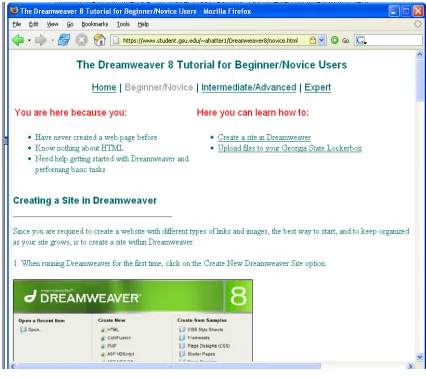
The first page of the novice D8T demonstrates the integration of verbal and visual
elements in task-oriented documentation. Figure 2.1 illustrates the use of headings and color to
direct the eye. It also shows the navigation scheme this interface utilizes. At the top of the page,
there is global navigation to the two other interfaces as well as back to the D8T’s homepage, and
underneath this, separated by headings in red, is navigation within the novice interface, which
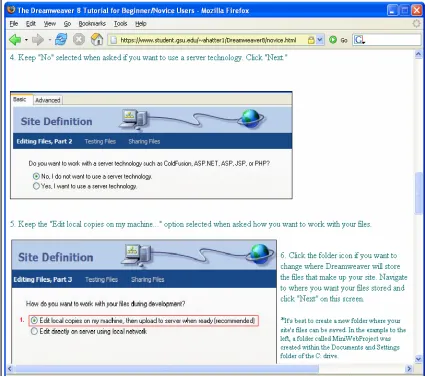
appears as two underlined links. Figure 2.2 shows how each task on the novice interface (in this
screen, for example, the task is creating a site in Dreamweaver) is broken down into numbered
steps. To add a further level of detail to the documentation, the screenshots were edited with red
marks that either set off the part of the screenshot discussed in the step, or that succinctly
describe an action to be taken on that screen. The novice interface is streamlined with this
Figure 2.2. Step-by-step instructions in the novice D8T.
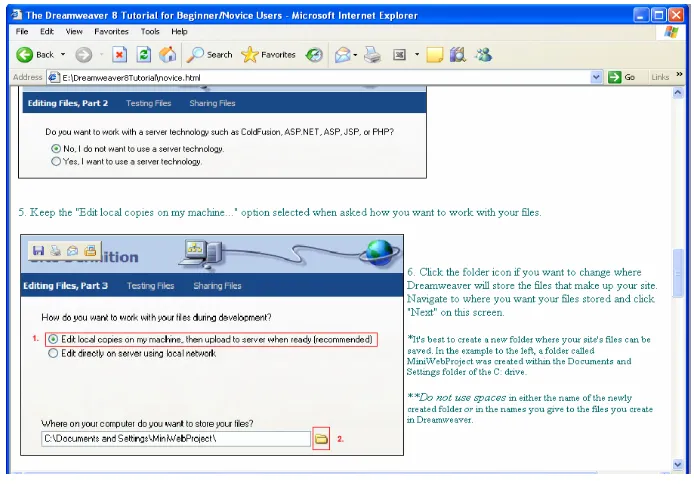
The secondary novice page is as equally detailed as the step-by-step directions on the
main novice page. As shown in Figure 2.3, the second page of the novice tutorial looks very
much like the main page. This page is consistent with the main page’s navigation scheme. It is
also consistent with the use of different types of headings and anchored links, which are
underlined. Figure 2.4 demonstrates, again, the use of step-by-step numbering, rich verbal
Figure 2.3. The secondary novice D8T page.
[image:36.612.72.417.420.671.2]
All of these screenshots are intended to convey the tone and style of the task-oriented
novice interface of the D8T. I offer them as supplementary descriptions of the artifact, and the
strategy behind the design and writing of it.
Intermediate Interface Description
I modeled the writing and design of the D8T’s intermediate interface after the goal-based
documentation technique discussed in Mirel’s (1998) article, “‘Applied Constructivism’ for User
Documentation.” As Mirel (1998) notes early in the article, the task-based style of
documentation that is ideally suited to novice users is ill-equipped to deal with the more complex
issues intermediate users of an application encounter in actual use situations.
Interestingly, Mirel (1998) observes that the human mind operates differently once the
basic concepts of learning a program have been surpassed. Mirel (1998) further explains that as
users move from the novice phase of understanding a product into a more advanced stage, their
minds evolve out of the task-based comprehension stage and into a more profound paradigm that
is characterized by an understanding that “knowing and learning take place in a dynamic system
of people, practices, artifacts, communities, and institutional structures” (Mirel, 1998, p.13).
This audience of users who are neither novices nor experts demands a unique type of
documentation that appeals to both their actual usage needs, and to the work-based goals that
determine those needs. Mirel (1998) alternately terms intermediate documentation “goal-based”
or “constructivist,” and suggests that this type of documentation be structured as either “richly
textured cases or scenarios of work situations” (p. 16). Such conversationally worded scenarios
would “bring context to the foreground of documentation” (Mirel, 1998, p. 20). However, Mirel
(1998) also rightly points out the difficulty that arises when documentation writers consider
between the overly general or basic, which would result in a lapse back into task-oriented
documentation, and the too-specific, which would limit the use of documentation to local
worksites (Mirel, 1998).
Although the limitations of localized documentation are quite real for many industrial
documentation writers, such contextualization is precisely what the D8T aims to do. As course
syllabi demonstrate, there already exist many competent manuals that detail the vast
functionality of Dreamweaver. What these texts cannot account for, however, are the
particular-to-Georgia-State-student tasks of uploading a Dreamweaver site to Georgia State’s sever, of
using the student Lockerbox (which provides access to the public_html folder where uploaded
files are saved) to upload files without Dreamweaver, and of ascertaining the student URL
associated with the remote host information. All of these tasks are written into the intermediate
interface of the D8T using the principles of contextual documentation writing and design.
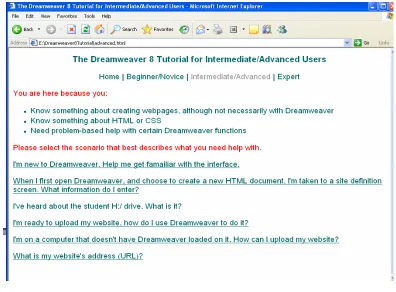
Mirel (1998) argues that contextual documentation should be presented as goal-based
scenarios. To that end, once users click into the intermediate interface of the D8T, they are
greeted with a list of work situations presented as links. I incorporated the linked scenarios
shown in Figure 2.5 to pointedly address the goals of the intermediate D8T, which are to
re-familiarize those who have been absent from Dreamweaver for a period of time, to provide them
with two ways to upload their websites (using Dreamweaver and using the Georgia State student
Figure 2.5. The D8T’s main intermediate interface.
It is important to note that the intermediate D8T does bear some topical resemblance to
the novice interface. For example, both interfaces describe how to set up a site in Dreamweaver,
and how to upload a site using Dreamweaver’s FTP capability. However, the presentation of the
information between levels is purposefully different. For example, the task-oriented
documentation style that guided construction of the novice interface demanded a high level of
both verbal and visual detail. Scenario-based documentation, on the other hand, can be less
detailed, as it assumes a deeper knowledge of the program on the part of the intermediate user.
Figures 2.6.A and 2.6.B are a comparison of the novice and intermediate instructions explaining
screens convey essentially the same information, Figure 2.6.A is more instructionally verbose, as
is typical of the novice interface, while Figure 2.6.B is comparatively laconic.
[image:40.612.69.416.153.395.2]
Figure 2.6.A. Task-oriented novice instructions for saving local files in Dreamweaver.
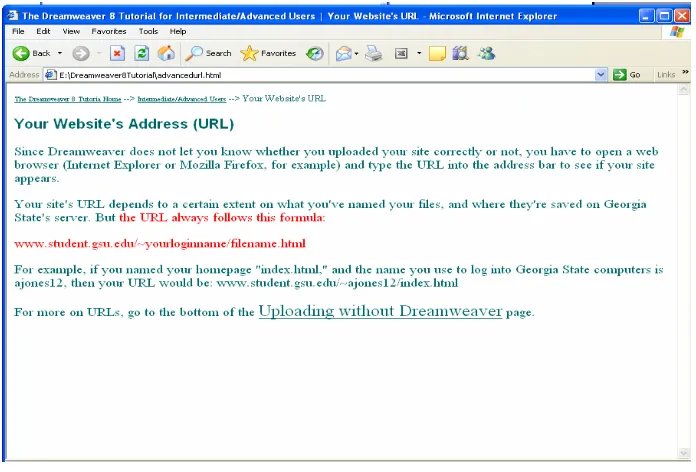
[image:40.612.71.403.462.689.2]Figures 2.7.A and 2.7.B further illustrate the difference between the novice and the
intermediate interfaces of the D8T. In these figures, both screens describe how students can
determine the URL of uploaded sites, but again, the novice description is much more detailed
than the intermediate one. In addition, the navigation on the intermediate interface is less
prevalent than it is on the novice interface. Note that a breadcrumb system of navigation is
shown at the top of Figure 2.7.B. Essentially, the entire novice D8T is only two pages, with
anchor links within each page. The intermediate interface, on the other hand, is comprised of
many short, scenario-based pages that have breadcrumb navigation at the top of each page
leading back to the main intermediate interface and back to the D8T’s homepage. Many short
pages were consistent with the strategy of briefer instructions that could be more pointedly
[image:41.612.72.416.432.658.2]goal-based and organized into relevant linked scenarios.
Figure 2.7.B. Succinct intermediate discussion of student URLs.
Although there is some topical overlap between the intermediate and the novice
interfaces, the intermediate D8T does introduce new information to users. As students proceed
through the classes and utilize Dreamweaver on a regular basis, what was once new to them in
the novice interface will eventually become redundant. At this point, they can explore the
intermediate D8T and learn how to, for example, upload a website without using Dreamweaver.
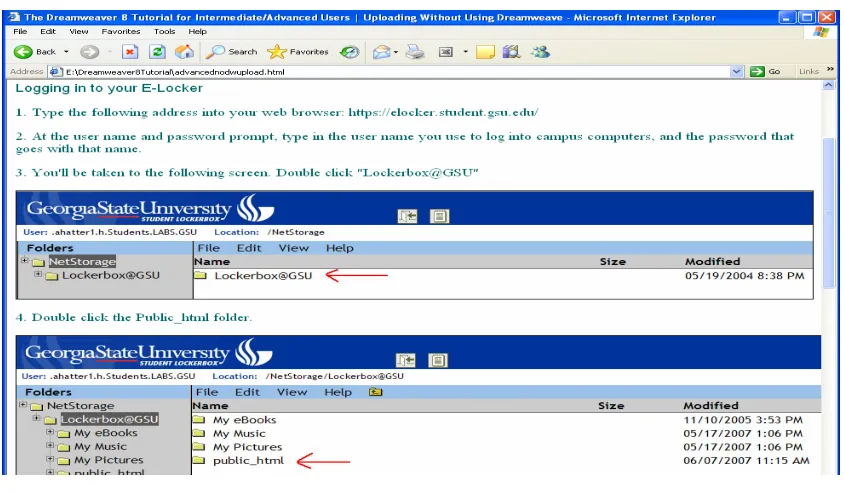
Figure 2.8 shows part of the steps illustrating how to upload a website without Dreamweaver,
and Figure 2.9 is a screenshot of the discussion of URL formulas that is used when a website is
saved in a folder within the public_html folder. These instructions, as well as the discussion of
how to determine the student URL formula when students elect to save their website in a new
folder within their public_html folder, are the additions that are added to the D8T at the
intermediate level.
Figure 2.8. Brief step-by-step instructions from the intermediate D8T.
[image:43.612.72.489.399.665.2]All the above screenshots have been presented as ways of depicting both the style of
goal-based documentation that was behind the writing and design of the intermediate D8T and
the differences between this interface and the novice one previously described. The information
covered by both of these levels of the D8T is contextual in that it is particular to Georgia State
students who choose to take the classes heretofore described.
Expert Interface Description
The expert interface of the D8T is strategically minimal, and it conceptually reflects the
principles of a quick reference guide. The compositional model for the expert interface is John
Carroll’s (1990) book, The Nurnberg Funnel: Designing Minimalist Instruction for Practical
Computer Skill. This resource is cited by Johnson (1998) as one of the first successful efforts
supporting user-centered documentation. Further, Barnum (2002) lauds Carroll’s work in the
area of interface usability heuristics, a research specialty that makes Carroll’s minimalist
documentation strategy a good model to consult when writing for an audience of experts who
need “only enough information to get…started right away on their tasks” (Barnum, 2002, p. 36).
Fittingly, in developing the minimalist documentation style, Carroll and his colleagues
employed what seemed to be contextual inquiry methods for data gathering, although they were
not stated as such. As Carroll (1990) explains, “A key for us in designing better training was to
have immersed ourselves in the world of the new user, observing errors, recoveries, and insights
as they occurred” (p. 10). The data collected using this approach led to the conceptualization of
a documentation strategy that is anti-system-centered, is “strongly example-based” (Carroll,
1990, p. 11), and, I would argue, inherently user-centered.
Not only does minimalist instruction facilitate learning by doing (Johnson, 1998) by
user-centered in that it focuses on documenting real, meaningful user tasks that capitalize on
already-ingrained user knowledge while accounting for errors due to the learning process (Carroll, 1998).
Moreover, the minimalist strategy is ideal for expert users of an application because it builds in
the users’ propensity to “jump the gun” when it comes to immediately beginning to use a
product, whether or not they know what they are doing (Carroll, 1990, p. 26).
The expert level of the D8T encourages the rapidity of learning and doing by assuming a
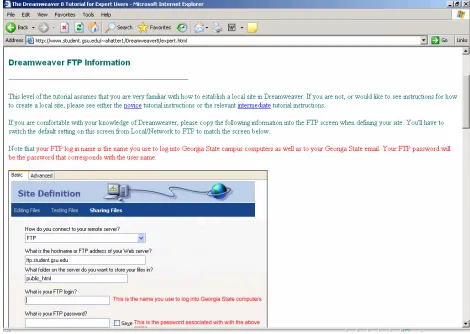
large amount of knowledge on the part of the user. For example, Figure 2.10 shows that the only
aid provided to expert Dreamweaver users when defining a site is a screenshot of the FTP
information that pertains to Georgia State’s remote host address, remote storage folder name
(public_html), and students’ username and password. The expert interface does account for
some user error in judgment, though, by providing standard blue links back to the novice and
intermediate interfaces if it turns out users need more detailed instructions. It should be noted,
however, that in a real classroom environment, users should be moving through each of the
D8T’s interfaces in turn, mastering the novice tasks, then picking up the new knowledge
presented in the intermediate interface, so as to arrive at the expert level by the middle to end of
Figure 2.10. FTP information for expert users.
In addition to catalyzing a “learning through doing” (Johnson 1998) experience by
offering little in the way of introductory material, minimalist documentation is inherently
modular. This characteristic made it ideal for incorporating into a hypertext environment
because it allowed for “reading in any order” (Carroll, 1990, p.149). Unlike the novice interface,
for example, which is comparatively linear in its navigational structure and verbal direction, the
expert D8T does not specify which of the four areas it covers users should explore first. Figure
2.11 displays the information contained in the expert interface. The four underlined green links
information they need to enter into Dreamweaver to connect to Georgia State’s server and
thereby upload files; they can see the more detailed process of uploading files without using
Dreamweaver; they can read short descriptions of student URL formulas; and they can explore
the links that direct them to outside Dreamweaver help.
Figure 2.11. The top of the D8T’s expert interface.
Compared to both the novice and the intermediate interfaces, the expert D8T’s URL
description is the most succinct, as Figure 2.12 illustrates. Two red sub-headings and red body
text quickly point users to key information. An example of each URL described is given for
clarity, but especially unlike the novice interface (see Figure 2.7.A), the expert examples are left
Figure 2.12. Expert discussion of student URLs.
Just as there was some topical overlap between the novice and the intermediate
interfaces, so too is there a point of similarity between the expert interface and the intermediate
one. Specifically, the expert D8T replicates the step-by-step instructions for uploading files
without using Dreamweaver just as they appear in the intermediate interface (see Figure 2.8). I
made this particular aspect of the documentation redundant for two reasons: first, even though
past course demographic data indicate that many users of the D8T will begin at the novice level
(Bowie, personal communication, May 4, 2007), it possible that a student could enter one of the
classes as an expert Dreamweaver user; in such an instance, he would most likely not explore
any of the D8T’s interfaces except the expert one. Secondly, expertise with Dreamweaver does
not preclude knowledge of how to independently access Georgia State’s student web space (the
user will not need the detailed Dreamweaver site definition instructions given in the novice and
intermediate interfaces, he could need the more detailed information pertaining to accessing his
Lockerbox, since this will be new to him.
Finally, Figure 2.13 shows that the expert D8T interface ends with external links to two
Adobe-sponsored destinations for further Dreamweaver help. Although these links are
a-contextual in the sense that they do not address help directed to Georgia State students, they
could nevertheless be useful for the adroit Dreamweaver user who, in the spirit of learning by
doing, can participate in the interactive tutorials that demonstrate Dreamweaver functions that
[image:49.612.72.537.342.704.2]are not intended to be covered by the D8T.
Research Method
The purpose of this project is to evaluate the usability of each of the D8T’s interfaces.
The method of the research is usability testing. Christi-Anne Postava Davignon and her
colleagues (2004) refined the method of usability testing specifically for documentation projects.
Not only does these researchers’ work focus on online documentation, but it also incorporates
the discount form of usability testing that I have adopted (Postava-Davignon, et. al, 2004).
Barnum (2002) refers to the work done by Nielson (1994a) to discuss discount usability testing
techniques that can be incorporated in testing situations in which few monetary and/or temporal
resources are available. As Nielson (1994a) explains, some of the hallmarks of discount
usability testing include, but are not limited to, the following:
• Testing with fewer participants
• Testing outside a formal lab without expensive equipment
• Recoding test times and observations manually
• Discussing findings in terms of metrics that do not necessitate statistical analysis
• Using test facilitators who are adequately trained, but who are not necessarily expert
usability experimenters
Several truths about this project substantiate my adoption of discount usability testing techniques
as the research method. Among these realities are the following:
• The project is not backed by monetary funds of any kind
• The testing occurs during the summer semester, a time when fewer students are present
on Georgia State’s campus
These realities explain the value of usability testing as it pertains to this project. Importantly,
this thesis could not have been written without the research done by Nielson (1994a) and his
colleagues in support of discount methods. The argument that discount usability testing is a less
intimidating, cost effective user-centered design method allowed me to investigate how to make
the D8T as useful and usable as possible. Additionally, discount usability testing is valuable
training for me as a researcher in that it allows me to explore the intricacies of implementing the
method’s techniques in a real-world research setting.
Although the discount method suited this project, it is important to note that some
researchers caution that this no-budget testing is not as rigorous as sophisticated usability testing.
Even Nielson (1994a), one of the method’s most vocal pioneers, claims, “In discount usability
engineering, we don’t aim at perfection…we just want to find most of the usability problems” (p.
251). Nevertheless, there are straightforward techniques that can be used to argue for the
stringency of discount usability test findings. For example, even though it is not discussed in a
discount testing context, Dumas and Redish (1999) and Barnum (2002) all point out that
triangulation, or examining different types of data, can essentially lead to a confidence interval of
sorts in terms of identifying real usability problems. In Dumas’ and Redish’s words, “A long
task time, frequent errors, [and] the participants’ comments may all point to the same problem.
When you triangulate three types of data, you will feel more confident that there is a problem
and that you understand it” (p. 311).
Furthermore, Hughes (1999), who cites the work of other noteworthy researchers like
Carroll (1990), Dumas and Redish (1999), Nielson (1993), Rubin (1994), and Shneiderman
(1987), has compiled a framework for ensuring usability testing methods remain as scientifically