NIMC VTE Prophylaxis Section
Audit and Reporting Tool
NIMC VTE Prophylaxis Section Audit and Reporting Tool User Guide 2 © Commonwealth of Australia 2013
This work is copyright. It may be reproduced in whole or in part for study or training purposes subject to the inclusion of an acknowledgement of the source. Requests and inquiries concerning reproduction and rights for purposes other than those indicated above requires the written permission of the Australian Commission on Safety and Quality in Health Care, GPO Box 5480 Sydney NSW 2001 or [email protected]
Suggested citation
Australian Commission on Safety and Quality in Health Care (2013), NIMC VTE Prophylaxis Audit and Reporting Tool User Guide November 2013. ACSQHC, Sydney.
Table of contents
1.0 Introduction...4
2.0 Conducting an audit of the NIMC VTE prophylaxis section ...4
2.1 Pre-implementation (baseline) audit ...4
2.2 Post implementation audit ...5
2.3 How many patients should be audited?...5
2.4 Who should conduct the audits?...5
3.0 How to use the Excel audit and reporting tool ...6
3.1 Input screen ...7 3.2 Baseline audit ...8 3.3 Post-audit...11 3.4 Data screen ...12 3.5 Report screen ...13 3.6 Comments screen...13 3.7 Definitions ...14 3.8 Repeat audits...15
4.0 NIMC VTE prophylaxis section audit elements...16
4.1 Audit elements, audit definitions and report calculations...17
NIMC VTE Prophylaxis Section Audit and Reporting Tool User Guide 4
1.0
Introduction
An audit tool has been developed to assist healthcare organisations to audit the use of the venous thromboembolism (VTE) prophylaxis section in the 2013 version of the National Inpatient Medication Charts - NIMC (acute) and NIMC (GP e-version).
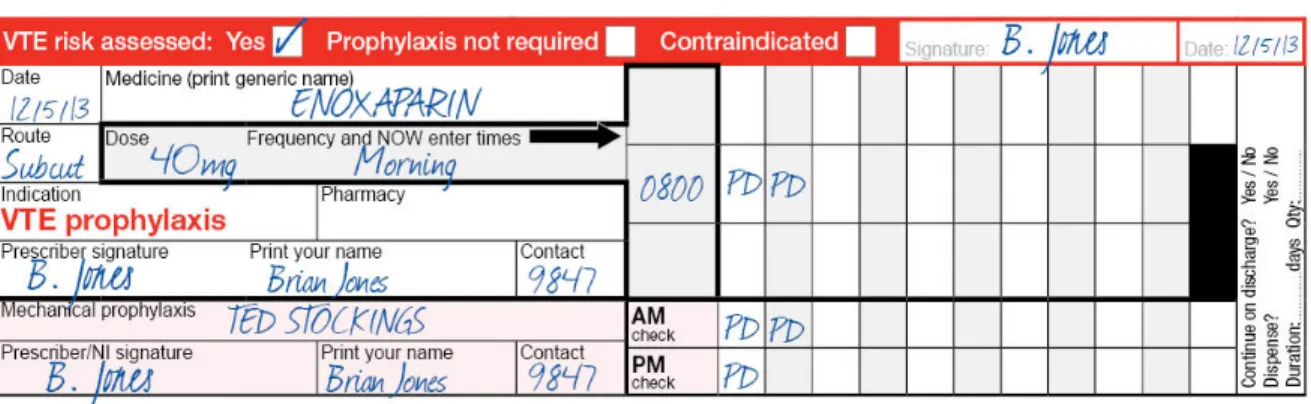
The VTE prophylaxis section has been developed to prompt: • VTE risk assessment
• VTE pharmacological prophylaxis prescribing • VTE mechanical prophylaxis ordering. Figure 1: NIMC VTE prophylaxis section in the NIMC
Audit and Reporting Tool
The electronic audit tool is an automated Microsoft Excel spreadsheet that allows hospitals to collect baseline (pre-implementation) and post-audit data. When the data is entered the Excel tool automatically collates this information into a report for the audit period.
The tool can be used to measure compliance with the elements of the pre-printed VTE prophylaxis section including:
• VTE risk assessment documentation
• pharmacological and mechanical prophylaxis prescribing • anticoagulant therapy administration documentation • recording checks of mechanical devices.
2.0
Conducting an audit of the NIMC VTE prophylaxis section
The tool has two audit functions: baseline (pre-implementation) and post-implementation (hereafter referred to as “post-audit”). This enables health services to complete a
pre-implementation (baseline) audit prior to introducing the NIMC with VTE prophylaxis section (NIMC 2013) and a post-audit at a pre-determined time after introducing the new chart.
2.1 Pre-implementation (baseline) audit
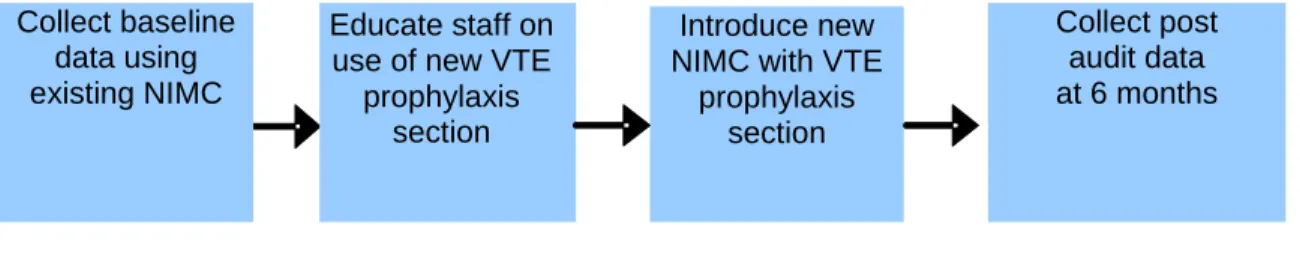
It is recommended that the baseline audit be completed prior to commencing staff education (see Figure 2 below). Conducting a baseline audit provides health services with an opportunity to measure improvement in documentation of VTE risk assessment and prophylaxis prescribing following introduction of the NIMC with VTE prophylaxis section. The audit tool has a separate function for completing the baseline audit and contains fewer questions compared to the post-audit.
Collect post audit data at 6 months 2.2 Post implementation audit
After introducing the NIMC 2013 the post-audit can be used to measure usage of the VTE prophylaxis section and improvements in VTE prophylaxis documentation and prescribing in the organisation. The post-audit contains additional audit elements which can be used to monitor any unintended consequences resulting from use of the VTE prophylaxis section such as co-existing orders for anticoagulation in the VTE prophylaxis section and the regular medicines section of the chart. While the NIMC VTE prophylaxis pilots showed no evidence of duplicate orders of
anticoagulation (orders in the VTE prophylaxis section and the regular medicines section of the chart) an early audit is recommended to ensure the NIMC VTE section is being used correctly. The post-audit tool can be used to re-audit compliance with the features of the VTE prophylaxis section. For example, hospitals using a rapid audit and feedback cycle of quality improvement such as the Plan Do Study Act (PDSA) methodology for implementing the chart can use the post-audit tool to collect post-audit data on a sample of patients every month e.g. 20 patient post-audits a month until they have reached their target.
Hospitals may choose to complete the VTE Prophylaxis section audit at the same time as they undertake an NIMC audit.
Figure 2: Suggested method for conducting baseline and post-audits of VTE prophylaxis prescribing
2.3 How many patients should be audited?
It is suggested that hospitals audit 30 to 60 patient charts over a one month period across both audits. Hospitals may wish to vary this according to the size of the hospital, target patient sample and their own quality improvement methodology. For example, hospitals using continuous quality improvement methodology may choose to continuously audit 10-20 patients a month.
Patients should be randomly selected. The pre and post-implementation audits should include a similar mix of patients e.g. surgical, medical, cancer etc. The patient mix should be representative of the wards/units being audited.
2.4 Who should conduct the audits?
The audit of medication charts should be conducted by a clinician experienced with auditing and quality improvement methodology. Wherever possible, the same auditor(s) should complete both audits.
Introduce new NIMC with VTE
prophylaxis section Educate staff on
use of new VTE prophylaxis
section Collect baseline
data using existing NIMC
NIMC VTE Prophylaxis Section Audit and Reporting Tool User Guide 6
3.0
How to use the Excel audit and reporting tool
1. Download the NIMC VTE prophylaxis section audit tool from the Commission’s web site at:
www.safetyandquality.gov.au/our-work/medication-safety/medication-chart/nimc/vteprophylaxis/ and save the Excel file into a project folder on your computer. 2. Open the Excel file when ready to commence entering data for the audit.
3. Decide which audit to complete, either baseline or post-audit. It is recommended that hospitals complete a baseline audit prior to introducing the new NIMC with VTE prophylaxis section.
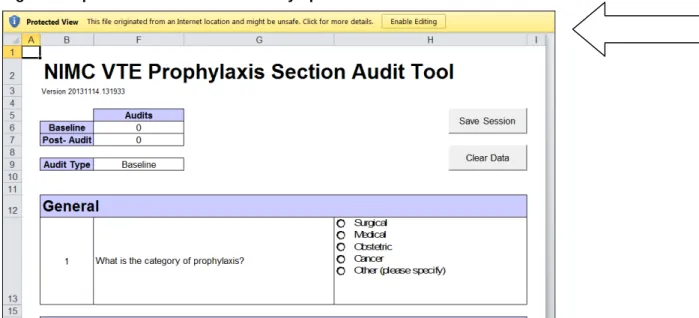
4. If using ExcelVersion 2007 or 2010 when the file opens it will appear with an “Enable Editing” message (see Figure 3). You should click this button to enable the spreadsheet. This
message will not appear in Excel Version 2003
Figure 3: Input screen when file is initially opened in Excel® 2010
5. There are five sheets/tabs in the audit tool: input, data, report, comments and definitions. The function of each of these sheets (screens) is described below.
3.1 Input screen
The input screen allows you to enter data for each type of audit. It has two modes: baseline and post-audit. Prior to undertaking an audit please familiarise yourself with the audit data definitions which are provided in Section 4.0.
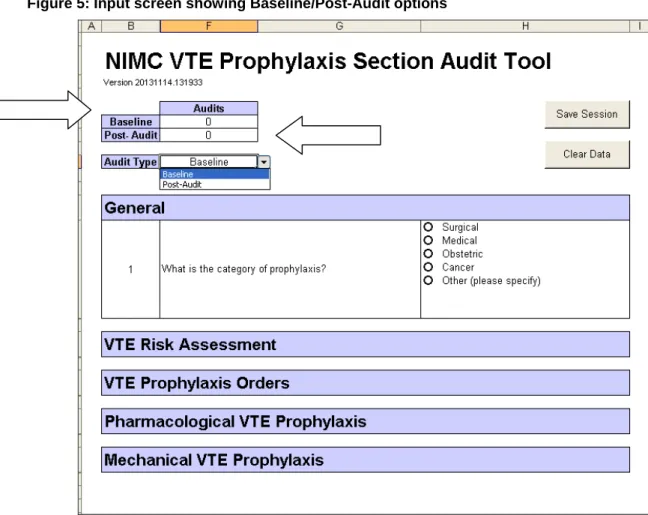
On entering the Input screen choose the type of audit you wish to undertake by clicking on the “Audit Type” button. Choose “baseline” for a pre-implementation (baseline) audit which is undertaken prior to introducing the NIMC with VTE prophylaxis section. Choose “Post-Audit” to undertake an audit of the NIMC with VTE prophylaxis section (see Figure 5 below).
Figure 5: Input screen showing Baseline/Post-Audit options
The audit tool will expand to show additional questions as you progress through the audit, for example, the VTE risk assessment questions will only appear after the Category of Prophylaxis is chosen.
NIMC VTE Prophylaxis Section Audit and Reporting Tool User Guide 8 3.2 Baseline audit
1. After choosing the Baseline Audit, start the audit by choosing the category of prophylaxis e.g., surgical, medical etc. Proceed to answer the questions in chronological order until you get to the end of the audit.
2. Click on the Submit button when all values are entered for one patient. This will copy the data into a separate sheet within the Excel® file and will also reset the spreadsheet for the next patient.
3. As audits are completed the Audit table at the top of the input screen will automatically count the number of audits that have been completed (refer to figure 5 above).
4. Enter subsequent patient audits until the baseline audit is complete.
5. Save Session and Clear Data buttons. The “Save Session” button has the same
functionality as the Excel® save function. Ensure the data is regularly saved during the audit using either of these options. The “Clear Data” button acts to clear any data that has not yet been submitted. If half way through an audit a mistake is made and the auditor wishes to go back to the first question the “Clear Data” button will clear any data for that patient. Please note that once data has been submitted it cannot be cleared.
NOTES
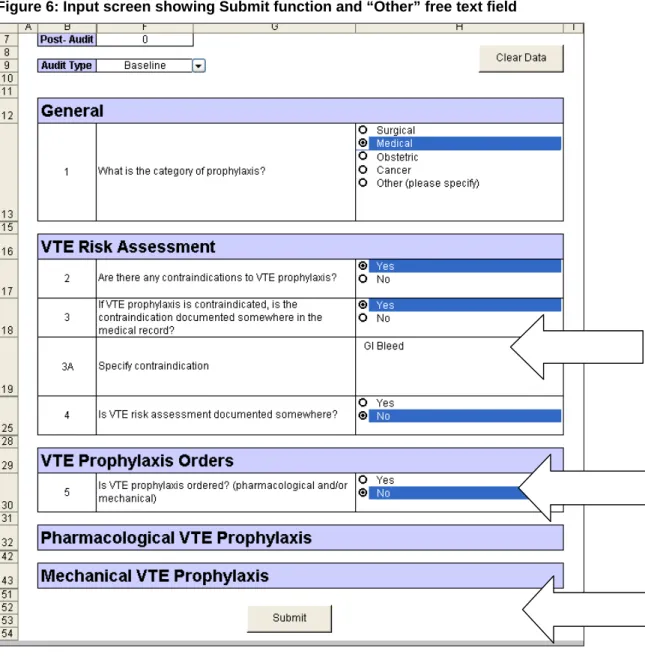
1. In both audits, if the answer to the question “Is VTE prophylaxis ordered?
(pharmacological and/or mechanical)” is “No” , the tool will automatically skip to the submit function to allow you to finish data entry for that patient (see Figure 6 below).
2. In other cases where the answer to a particular question is “No” subsequent questions can be left blank. For example if pharmacological prophylaxis is not prescribed there is no requirement to answer the questions on anticoagulant doses required and doses
documented as given (see Figure 7 below).
3. Some questions have an “Other” or “Comments” field. Where this option is chosen a free text field will appear to allow you to enter more information (see Figure 5 below). If Other (please specify) is selected, users must enter some text in the field to complete data entry for this patient and for the Submit button to appear.
Figure 6: Input screen showing Submit function and “Other” free text field
NIMC VTE Prophylaxis Section Audit and Reporting Tool User Guide 10 Figure 7: Input screen showing blank fields
3.3 Post-audit
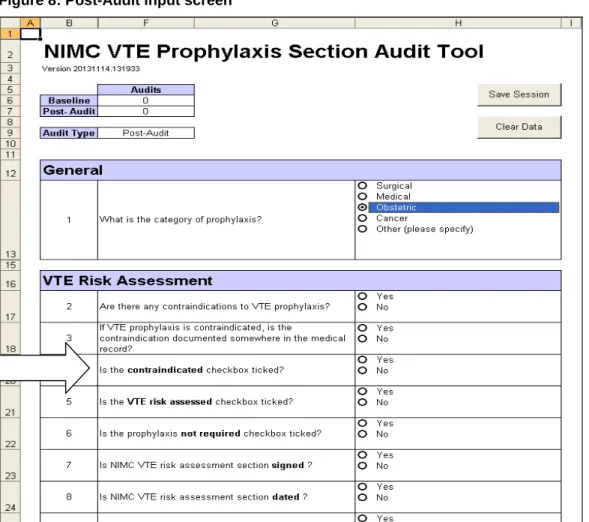
1. To undertake a post-audit, choose the Post-Audit button. You will notice the post-audit has several additional questions which are specifically related to completion of the NIMC VTE prophylaxis section (see Figure 8 below).
2. Click on the Submit button when all values are entered for one patient. This will copy the data into a separate sheet within the Excel® file and will also reset the spreadsheet for the next patient.
3. Enter subsequent patient audits until the post-audit is complete.
4. Save Session and Clear Data buttons. The “Save Session” button has the same functionality as the Excel® save function and should be used regularly during the audit to ensure data is being saved. The “Clear Data” button acts to clear any data that has not yet been submitted. If half way through an audit a mistake is made and the auditor wishes to go back to the first question the “Clear Data” button will clear any data for that patient. Please note that once data is submitted for a patient it cannot be cleared.
NIMC VTE Prophylaxis Section Audit and Reporting Tool User Guide 12 requirement to answer the questions on anticoagulant doses required and doses documented as given (see Figure 7) .
3. Some questions have an “Other” or “Comments” field. Where this option is chosen a free text field will appear to allow you to enter more information (see Figure 6). If “Other (please specify)” is selected, users must enter some text in the field to complete data entry for this patient and for the Submit button to appear.
3.4 Data screen
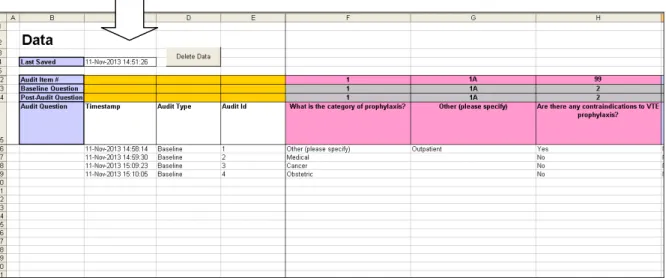
1. The data screen contains the raw data. Each row of data represents one patient audit and allows auditors to determine how many audits have been completed (please note an audit count is also available in the input screen). It is recommended that auditors do not change any data in the data sheet.
2. The raw data has a “Timestamp” column which allows auditors to see when the audit was undertaken (see Figure 9 below). If audits are undertaken over a number of days, each row in the Timestamp column will reflect the date it was entered in the audit tool.
3. The “Delete Data” button allows auditors to delete all data that has been entered in the audit tool. Please note that once data has been deleted it is not recoverable (see section below on Repeat Audits).
3.5 Report screen
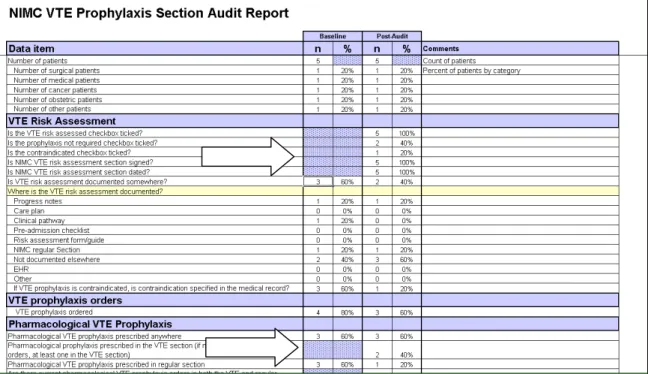
The report screen provides a report of results for both the baseline and post-audits (Post-Audit). The reports are dynamic and build as each new audit is submitted.
Questions that are not included in the baseline audit are shaded out in mauve as indicated in Figure 10 below.
To print a copy of the report at the completion of an audit, use the FilePrint functionality in Excel.
Figure 10: Report screen
3.6 Comments screen
The report on the comments screen lists free text entries that have been submitted for the following questions:
• What is the category of VTE prophylaxis? Lists “Other” category • Where is VTE risk documented? Lists “Other “ category
• If VTE prophylaxis is contraindicated, is the contraindication specified in the medical record? Lists specific contraindications recorded in the comments field
NIMC VTE Prophylaxis Section Audit and Reporting Tool User Guide 14 To produce the Comments Report, click on the “Extract Comments” button at any time.
Figure 11: Comments report showing extract comments function
3.7 Definitions
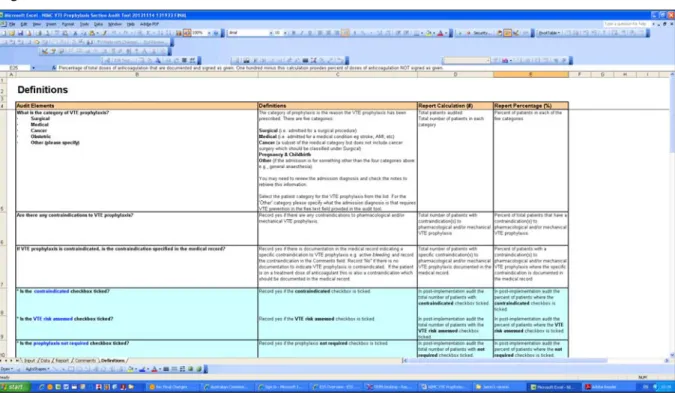
The definitions sheet includes a copy of the table of audit elements, definitions and report calculations available in this user guide to use as a quick reference when using the audit tool (see Figure 12 below).
3.8 Repeat Audits
As noted above, hospitals may want to undertake multiple post-audits following introduction of the NIMC with VTE prophylaxis section, e.g., 20 audits each month.
The audit tool allows hospitals to undertake a baseline audit and one post-audit. To undertake multiple post-audits, follow the suggested method below:
1. Complete the baseline and first post-audit.
2. Click File “Save as” on the Excel® menu and save the spreadsheet with a new file name (e.g. file name could include the date the first post-audit was completed). 3. Go to Commission website and download a new version of the audit tool, save in
project folder or on desktop and undertake a subsequent post-audit.
NIMC VTE Prophylaxis Section Audit and Reporting Tool User Guide 16
4.0
NIMC VTE prophylaxis section audit elements
The audit elements are defined in the table on the following pages. The audit data elements asterisked and shaded in light blue in the table below are only included in the post-audit as they relate to specific areas of the NIMC VTE prophylaxis section. The other (unshaded) audit elements are common to the baseline and post-audits and allow hospitals to compare their pre- and post-audit results including:
• rates of VTE risk assessment documentation (and where VTE risk is documented) • rates of VTE prophylaxis prescribing (pharmacological and mechanical)
• rates of mechanical VTE prophylaxis (and where mechanical prophylaxis is ordered and checked)
• VTE prophylaxis prescription and administration errors i.e., doses of anticoagulant not signed as administered and mechanical prophylaxis not documented as checked. Completion of a post-audit soon after introducing the NIMC with VTE prophylaxis section will allow hospitals to review whether the VTE prophylaxis section is being used correctly. Specifically it will provide information on:
• correct use of the risk assessment section
• pharmacological VTE prophylaxis prescribing in the VTE prophylaxis section • mechanical prophylaxis ordering and checking in the VTE prophylaxis section
While the NIMC VTE Pilot showed no evidence of duplicate prescribing of anticoagulants or co-existing orders for anticoagulation in the VTE prophylaxis section and the regular medicines section of the chart, an early audit is recommended to:
• ensure correct usage of the NIMC VTE section; and • check for any unintended consequences.
4.1 Audit elements, audit definitions and report calculations
Audit Elements Definitions Report calculation (#) Report percentage (%) What is the category of VTE
prophylaxis?
• Surgical
• Medical
• Cancer
• Obstetric
• Other (please specify)
The category of prophylaxis is the reason the VTE
prophylaxis has been prescribed. There are five categories:
• Surgical (i.e. admitted for a surgical procedure)
• Medical (i.e. admitted for a medical condition eg stroke, AMI, etc)
• Cancer (a subset of the medical category but does not include cancer surgery which should be classified under Surgical)
• Obstetric (pregnancy & childbirth)
• Other (if the admission is for something other than the four categories above e.g., anaesthesia) You may need to review the admission diagnosis and check the notes to retrieve this information.
Select the patient category for the VTE prophylaxis from the list. For the ‘Other’ category please specify what the admission diagnosis is that requires VTE prevention in the free text field provided in the audit tool.
Total patients audited Total number of patients in each category
Percent of patients in each of the five categories
Are there any contraindications to VTE prophylaxis?
Record yes if there are any contraindications to pharmacological and/or mechanical VTE prophylaxis.
Total number of patients with contraindication(s) to pharmacological and/or mechanical VTE prophylaxis.
Percent of total patients that have contraindication(s) to pharmacological and/or mechanical VTE prophylaxis.
If VTE prophylaxis is contraindicated, is the
contraindication specified in the medical record?
Record yes if there is documentation in the medical record indicating a specific contraindication to VTE prophylaxis e.g.
active bleeding and record the contraindication in the Comments field. Record ‘No” if there is no documentation to
Total number of patients with specific contraindication(s) to pharmacological and/or mechanical VTE prophylaxis
Percent of patients with contraindication(s) to pharmacological and/or mechanical VTE prophylaxis
NIMC VTE Prophylaxis Section Audit and Reporting Tool User Guide 18
* Is the contraindicated checkbox ticked?
Record yes if the contraindicated checkbox is ticked. In post-audit the total number of patients with
contraindicated checkbox ticked.
In post-audit the percent of patients where the
contraindicated checkbox is ticked.
* Is the VTE risk assessed
checkbox ticked?
Record yes if the VTE risk assessed checkbox is ticked. In post-audit the total number of patients with the VTE risk assessed checkbox ticked.
In post-audit the percent of patients where the VTE risk assessed checkbox is ticked.
* Is the prophylaxis not required
checkbox ticked?
Record yes if the prophylaxis not required checkbox is ticked.
In post-audit the total number of patients with not required
checkbox ticked.
In post-audit the percent of patients where the not required checkbox is ticked.
* Is the VTE risk assessment section signed?
Record yes if the VTE risk assessment section has been signed by an authorised clinician.
In post-audit the total number of patients with VTE risk assessment section signed
In post-audit the percent of patients where the VTE risk assessment section has been signed by an authorised clinician
* Is the VTE risk assessment section dated?
Record yes if the VTE risk assessment section has been dated by an authorised clinician.
In post-audit the total number of patients with VTE risk assessment section dated
In post-audit the percent of patients where the VTE risk assessment section has been dated by an authorised clinician
Is VTE risk assessment
documented somewhere? (If post-audit, is VTE risk assessment documented somewhere else?)
All adult patients admitted to inpatient care must be assessed for risk of VTE. Documentation of the assessment should be easily identified in the patient’s medical record.
Click yes if a VTE risk assessment is documented somewhere in the medical record i.e., not the VTE prophylaxis section of the NIMC. Click no if there is no evidence of a documented risk assessment.
The number of patients with a VTE risk assessment
documented somewhere in the medical record. In post-audit, the number of patients with a VTE risk assessment
documented somewhere else
in the medical record i.e., not
the NIMC VTE prophylaxis section.
.
Percent of total patients with a VTE risk assessment documented somewhere in the medical record. In post-audit, the percent of total patients with a VTE risk assessment documented
somewhere else in the medical record i.e., not the NIMC VTE prophylaxis section.
Where is it documented?
• Progress notes
• Care plan
• Pre-admission checklist
• Risk assessment form
• Clinical pathway
• NIMC regular section or on the chart
• EHR
• Other (please specify)
Select the documentation category from the list provided e.g.
risk assessment form, clinical pathway, electronic health record (EHR) etc
If ‘Other’ is selected record the details in the Comments field.
NOTE: This question allows for multiple responses.
The number of
documentations for each documentation category
Documentation category as a percent of total
documentations.
Note: this percentage calculation is not patient-based.
Example: If there are 40 risk assessment documentations and 10 of these are in a care plan then the percent of care plan documentations is 25%.
Is VTE prophylaxis ordered? (pharmacological and/or mechanical)
Record yes if any VTE prophylaxis is prescribed - pharmacological, mechanical or both.
If no VTE prophylaxis is ordered for the patient, leave the remaining questions in the audit tool blank and click “”Submit” button
The number of patients with VTE prophylaxis prescribed – pharmacological and/or mechanical.
Percent of total patients with VTE prophylaxis prescribed – pharmacological and/or mechanical.
Is pharmacological VTE
prophylaxis prescribed anywhere?
Record yes if pharmacological VTE prophylaxis is prescribed anywhere on the NIMC.
The number of patients with pharmacological VTE prophylaxis prescribed
Percent of total patients with pharmacological VTE prophylaxis prescribed
* Is pharmacological prophylaxis prescribed in the VTE prophylaxis section? (If there are multiple VTE prophylaxis orders, at least one order is in the VTE prophylaxis section)
Record yes if the pharmacological VTE prophylaxis is prescribed in the VTE prophylaxis section of the NIMC.
The number of patients with pharmacological VTE prophylaxis prescribed in the VTE prophylaxis section of the NIMC
Out of patients with pharmacological VTE prophylaxis prescribed, the percent that have
pharmacological prophylaxis prescribed in the NIMC VTE prophylaxis section at least once.
Is pharmacological prophylaxis prescribed in the regular
Record yes if pharmacological VTE prophylaxis is prescribed in the regular medicines section of the NIMC.
The number of patients with pharmacological VTE
Out of patients with pharmacological VTE
NIMC VTE Prophylaxis Section Audit and Reporting Tool User Guide 20
* Are there current pharmacological VTE prophylaxis orders in both the VTE and regular medicines
sections? (i.e. VTE prophylaxis ordered twice in error)
Record yes if there is more than one active order of anticoagulant for pharmacological VTE prophylaxis (i.e. duplicate therapy that has been prescribed in error). Enter details of the orders in the comments field (e.g. enoxaparin 40mg daily + heparin 5000units BD, or heparin ordered twice).
The number of patients with more than one active order of anticoagulant for
pharmacological VTE prophylaxis
The percent of total patients that have pharmacological VTE prophylaxis orders in both the VTE and regular medicines sections? (i.e. VTE prophylaxis ordered twice in error)
* Is pharmacological VTE prophylaxis ordered at the same time as therapeutic anticoagulation in error?
Record yes if there are active orders for both pharmacological VTE prophylaxis and therapeutic anticoagulant therapy on the current medication chart(s).
Enter details of the orders in the comments field (e.g. heparin 5000units BD for prophylaxis + enoxaparin 60mg BD for treatment).
The number of patients with active orders for both pharmacological VTE prophylaxis and therapeutic anticoagulant therapy on the current medication chart(s).
The percent of total patients that have pharmacological VTE prophylaxis ordered at the same time as therapeutic anticoagulation in error.
What is the number of doses of anticoagulant required?
Record the number of doses of anticoagulant ordered for VTE prophylaxis that should have been administered. Count all doses that should have beenadministered from the
commencement of the chart to the time of the audit by counting the number of administration boxes.
Total count of all doses of anticoagulation ordered for VTE prophylaxis that should have been administered.
Example: If the doctor has prescribed enoxaparin 40 mg daily to commence on the 6/8/2013 and the chart was audited on the 10/8/2013 after the daily dose had been given the required number of anticoagulant doses is 5. If the nursing staff has signed in the administration section that the patient was given a dose of enoxaparin each day then the number of doses documented asgiven is also 5.
What is the number of doses of anticoagulant documented as given?
Record the number of doses of anticoagulantordered for VTE prophylaxis that have been signed as administered,
including doses that have a ‘reason for not administering’ code documented. For further information on recording administration of doses and reasons for not administering codes refer to the NIMC User Guide available on the Commission website at www.safetyandquality.gov.au/wp-content/uploads/2012/02/NIMC-User-Guide-PDF.pdf
Total count of all doses of anticoagulation ordered for VTE prophylaxis that have been signed as
administered/given.
Percentage of total doses of anticoagulation that are documented and signed as given. One hundred minus this calculation provides percent of doses of
anticoagulation NOT signed as given.
Is mechanical VTE prophylaxis ordered?
Record yes if mechanical VTE prophylaxis is ordered. The number of patients with mechanical VTE prophylaxis ordered
Percent of total patients with mechanical VTE prophylaxis ordered.
Where is mechanical prophylaxis ordered?
• Progress notes
• Care plan
• Clinical pathway
• NIMC regular section
• NIMC VTE section
• Not ordered
• EHR
• Pre-admission checklist
• Other (please specify)
Select the correct documentation category from the list provided e.g. care plan, clinical pathway etc
If ‘Other’ is selected record the details in the Comments field.
NOTE: This question allows for multiple responses. To select two or more options hold down the Ctrl button while making your selection.
The number of
documentations for each documentation category
Documentation category as a percent of total
documentations.
Note: this percentage calculation is not patient-based.
Example: If mechanical VTE prophylaxis is ordered 50 times and 30 of these orders are in the NIMC VTE prophylaxis section then the percentage is 60%.
Where are mechanical prophylaxis checks documented?
• Progress notes
• Care plan
• Clinical pathway
• NIMC regular section
• NIMC VTE Section
• Not documented
• EHR
• Other (please specify)
Select the correct documentation category from the list provided e.g. care plan, clinical pathway etc
If ‘Other’ is selected record the details in the Comments field.
NOTE: This question allows for multiple responses. To select two or more options hold down the Ctrl button while making your selection.
The number of
documentations for each documentation category
Documentation category as a percent of total
documentations.
Note: this percentage calculation is not patient-based.
Example: If there are 60 mechanical prophylaxis checks documented and 40 of these are in the NIMC VTE prophylaxis section then the percent of checks in the NIMC VTE prophylaxis section is 67%.
NIMC VTE Prophylaxis Section Audit and Reporting Tool User Guide 22
What is the number of mechanical VTE prophylaxis checks
documented?
Record the number of mechanical prophylaxis checks that
have been documented.
Total count of the number of mechanical VTE prophylaxis checks that have been documented.
Percentage of required mechanical prophylaxis checks that have been documented/signed as checked. One hundred minus this percent provides percent of checks not
signed/documented.
5.0
Frequently asked questions
1. If the patient is not prescribed any VTE prophylaxis i.e., the answer to Question 10 is ‘no’, the remaining questions are not applicable. How should I complete the remaining questions?
If you answered ‘no’ to the question “Is VTE Prophylaxis ordered (pharmacological
and/or mechanical)?” the tool will allow you to submit the data without answering further
questions. Click the submit button at the bottom of the screen and proceed to the next audit.
2. In my hospital doctors do not indicate the number of required doses of
pharmacological VTE prophylaxis. How do I answer the question: What is the number
of doses of anticoagulant required?
Doctors are not required to stipulate the number of doses required. The audit requires that you calculate the number of doses of anticoagulant ordered for VTE prophylaxis that should have been administered. To do this you need to calculate all doses that should have been administered from the commencement of the order up to the time of the audit, or until the time the order has been ceased, by counting the number of administration boxes.
Example: If the doctor has prescribed enoxaparin 40 mg daily to commence on the 6/8/2013 and the chart was audited on the 10/8/2013 after the daily dose had been given the required number of anticoagulant doses is 5. If the nursing staff has signed in the administration section that the patient was given a dose of enoxaparin each day then the number of doses documented asgiven is also 5.
3. In my hospital all surgical patients assessed to be at risk of VTE get some sort of mechanical prophylaxis unless it is contraindicated. This is done by the nurses, no order is documented and checking for mechanical prophylaxis is recorded on a clinical pathway. In the audit how do I answer the questions related to mechanical prophylaxis?
For baseline audit: Answer “Yes” to “Is mechanical VTE prophylaxis ordered?”, if mechanical prophylaxis is in use and on the patient. For the question: Where is mechanical
prophylaxis ordered? Choose “Other” and add comment e.g., hospital policy, not
specifically ordered. Choose “Clinical Pathway” for “Where are mechanical prophylaxis checks documented?”
For post-audit: As for baseline audit. The auditor may wish to record that the NIMC VTE prophylaxis section has not been used for mechanical prophylaxis ordering and recording checks, if this is the case.
4. How do I know if there are current pharmacological VTE prophylaxis orders in both the VTE and regular medication sections? (i.e., VTE prophylaxis ordered twice in error?)
NIMC VTE Prophylaxis Section Audit and Reporting Tool User Guide 24
5. How do I know if pharmacological VTE prophylaxis has been ordered at the same time as therapeutic anticoagulation in error?
Therapeutic anticoagulation means a treatment dose of anticoagulant prescribed, e.g., for treatment of a pre-existing DVT. The dose of agent will generally indicate whether the drug is being used for prophylaxis or treatment. If the indication is not documented on the NIMC check if it is documented in the patient’s notes. If you are unsure seek advice from a
pharmacist or doctor. Record yes if there are ACTIVE orders for BOTH VTE prophylaxis and therapeutic anticoagulant therapy on the current medication chart(s). Auditors can enter details of the orders in the comments field (e.g. heparin 5000 units BD for prophylaxis + enoxaparin 60mg BD for treatment). These free text comments will appear in a report in the “Comments” screen.
6. How do I audit a patient on a treatment dose of anticoagulant and not prescribed VTE prophylaxis? Are they considered to not have VTE prophylaxis ordered? Or should these patients be excluded from the audit?
These patients should be included in the audit as contraindicated as they are already on a treatment dose of enoxaprin, warfarin etc. Document clearly in the Comments field of the audit tool that the patient is on a “treatment dose of anticoagulant”. In the post-audit these patients should have the contraindicated box ticked.