A Gentler Introduction to
PHP
and Its Application in Database Programming
Zhizhang Shen
∗Dept. of Computer Science and Technology
Plymouth State University
September 10, 2020
Abstract
This is Part I of the lab notes prepared for the students of CS3600 Introduction to the Database Systemsfor Fall 2020, with many examples being taken from [1], and [9], with revision.
In the lab component of this course, we start with this set of notes to (p)review some basic features ofPHP71
as a general purpose programming language, in Section 1 through Section 4. We then switch to Part II of the labnotes,A Gentler Introduction to MariaDBDatabase Programming,to gain some basic understanding of data retrieving, using the MariaDBdatabase2
, and finally come back to Section 5 of this set of notes to practice database programming with the integration ofPHP, MariaDB,andHTML. In Section 6, we review some debugging practice withPHP.
You can certainly download this document. But, considering the fact that this document is “live”, the most current information is obtained by directly accessing this document from the course site for CS 3600 Database Management Systems.
Every effort has been made to test out the code as contained within this document, but please do let me know if you spot any error./
∗Address correspondence to Dr. Zhizhang Shen, Dept. of Computer Science and Technology, Plymouth State University, Plymouth, NH 03264, USA.E mail address: [email protected].
1
The version that is currently installed onturing.plymouth.eduis 7.2.31. 2
MariaDBis a dialect ofMySQL,a popular database management system. Check out the course page for their history and relationship, and Part II of the labnotes for this course,A Gentler Introduction toMariaDB
Contents
1 An introduction 4
2 A real example 5
2.1 How to run a PHP program? . . . 9
3 PHP basics 9 3.1 Getting things started... . . 9
3.1.1 What will you do? . . . 9
3.1.2 How will you do it? . . . 10
3.1.3 Where is the beef? . . . 10
3.1.4 How to create a directory? . . . 10
3.1.5 How to move files in between? . . . 11
3.2 Everybody starts here . . . 13
3.3 The usual arithmetic operations . . . 14
3.3.1 Are they equal? . . . 17
3.4 The conditional structure . . . 19
3.5 The loop structure . . . 21
3.6 Associative arrays . . . 26
3.7 Strings . . . 33
3.8 Functions . . . 41
3.9 The scope of variables . . . 43
3.10 Recursion . . . 48
3.11 The OOP side of the PHP . . . 49
4 Data passing in PHP 53 4.1 The GETmethod . . . 53
4.2 The Postmethod . . . 55
4.3 How much have you saved? . . . 56
4.4 Are you sure you know the stuff? . . . 60
4.5 More data structures . . . 63
5 Work together with MariaDB 63 5.1 A basic procedure . . . 64
5.1.1 An example: password security . . . 64
5.2 A sign up service . . . 66
5.3 A more general format for data entry . . . 69
5.4 Find out the highest and the lowest... . . 73
5.5 Get result for a general query . . . 80
5.6 What is in that table? . . . 83
1
An introduction
We are living in an increasingly data driven world. In this database course, besides presenting a solid conceptual foundation of this critically important area of relational database, we will also provide a strong practical component of database programming.
MariaDB, as a (partial) implementation of theSQL specification, can be used to define the structure of a database, and generate ad hoc database queries. We will learn something
basic about how to define and populate database tables, as well as how to writeSQLqueries,
using MariaDB in Part (II) of the lab notes, A Gentler Introduction to MariaDB Database
Programming,available on the Course page forCS3600 Introduction to the Database Systems. Nevertheless, to build meaningful database applications, particularly, transaction pro-cessing applications, the power of a full-fledged high-level programming language, such as
Java, C++, or PHP, is needed. Moreover, in this HMTL based web age, lots of database programming are done over the Internet, using web as a platform for data presentation.
In this part of the lab, we discuss PHP 73
, aHypertext Preprocessor,and its relationship with MariaDB, a “free” DBMS, and their connection with HTML. The three products are often used together because of the following reasons:
1. There are tons of DBMS, but only a few “good” ones. With its syntax quite similar
to Oracle, MariaDB has been getting better and better, serving all of our practical
purposes. Moreover, Oracle costs $17,500 per processor (Standard Edition 2) as of
June 19, 2018, whileMariaDB is freefor now.
2. It is only natural to use web as the user interface, which can be written withHTML,
or something similar, e.g.,XML.
3. PHP, with a syntax similar to Java, plays the part of a go-between, i.e., sends the
queries from users to the MariaDBdatabase, and receives result back from it; together
with the control structures that are needed for serious programming.
Indeed, according to [6], “PHP is a popular general-purpose scripting language that
is especially suited to web development. Fast, flexible, and pragmatic, PHP powers
everything from your blog to the most popular web sites in the world.”
To summarize,PHPembedded database programming follows the client/server model in
the sense that, once a .php file with a combination of PHP and HTML code is entered on
the client side with a work station in, e.g., Memorial 312, it will be sent to the database
server, turingin this case, where it is to be executed. The result is then expressed in pure
HTML code, and sent back to your machine to be displayed.
For more details of database programming for such an environment, see [1], referred to
as the Bible henceforth.
3
Notes:
• In a nutshell, we use HTML[4] to write up a web friendly interface, embedded with
database programming code written in PHP[6], which sends queries to, and receives
the result from, (a) MariaDB[5] based database(s).
• We assume a general familiarity with HTML. To further augment your understanding
of HTML, you can simply do a google, and find tons of tutorials, including the one
located in the site of w3schools.com, as given in the sylabus of this course.
• If your code contains anyPHP code, use “.php” as its extension. Otherwise, you may use “.html”.
• We will also assume that bothMariaDB and PHPhave been installed in the machine,
just like in our case. If you want to know how to install them in your own machine, please consult [9].
• For more sophisticated and advanced front-end interface design, web and database
pro-gramming, you can certainly take such subsequent courses as CS 3020 Web
Program-ming, CS 3030 Advanced Web ProgramProgram-ming,and CS 3820 Hum-Computer Interaction,
among others.
2
A real example
We start by showing a real database programming example 4
, which combinesHTML
pre-sentation, and aPHP script, which works with MariaDB to get access to a database.
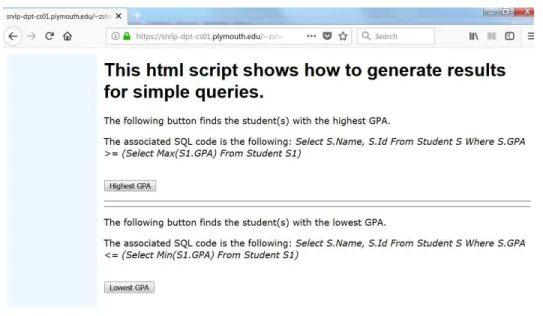
Assume that we have collected some information about students’ grades and would like
to find out who has got the highest and lowest GPA. Below shows an HTML document,
sendSpecificQuery.html, that provides a user interface. Notice that this file does not
contain any PHP code, thus having .htmlas its extension.
<Html>
<!--This is to send a query, which will be picked up and processed by another script.php -->
<Head>
<Style Type="text/css">
<!--Body, P, TD {color: black; font-family: verdana; font-size: 10 pt} H1 {color: black; font-family: arial; font-size:12 pt}
--> </Style> </Head>
4
<!--This lets us make comments within HTML.-->
<!--A table with only one row, consisting of two cells, the first being--> <!--the left edge, taking 1/6 of the width, looking light blue; and--> <!--the other contains the form, 5/6 of the width, looking white.--> <Table Border=0 cellPadding=10 Width=100%>
<!--Now define the row--> <Tr>
<!--The following cell shows the left cushion edge.-->
<Td BGColor="F0F8FF" Align=Center VAlign=top Width=17%> </Td> <!--The following gives the right entry form part.-->
<Td BGColor="FFFFFF" Align=Left VAlign=Top Width=83%>
<H1>This html script shows how to generate results for simple queries.</H1> <p>The following button finds the student(s) with the highest GPA.</p>
<p>The associated SQL code is the following:
<!--We will learn how to write this stuff later.-->
<em> Select S.Name, S.Id From Student S Where S.GPA >= (Select Max(S1.GPA) From Student S1)</em></p>
<!-- The following says that this section is going to be handled --> <!-- by a separate php script, highestGPA.php.-->
<!-- We will learn this stuff in a later section.--> <Form Method="post" Action="highestGPA.php">
<BR><BR>
<!--The submit button, with the name being $_POST[’submit’], --> <!--and the value shown being ’Highest GPA’-->
<Input Type="submit" Name="submit" Value="Highest GPA"> </Form>
<hr><hr>
<p>The following button finds the student(s) with the lowest GPA.</p> <p>The associated SQL code is the following:
<em> Select S.Name, S.Id From Student S Where S.GPA <= (Select Min(S1.GPA) From Student S1</em></p>
<!--php script.-->
<Form Method="post" Action="lowestGPA.php"> <BR><BR>
<!--The sumbit button, with the name being $_POST[’submit’], --> <!--and the value shown being ’Lowest GPA’-->
<Input Type="submit" Name="submit" Value="Lowest GPA"> </Form>
</Td>
<!--end of the row definition> </Tr>
</Table> </Body> </Html>
Notice that the “grave accent” ‘’’, as in ’submit’, that you have found in the above script, and all the scripts as contained in the lab notes, must be replaced with the plain single quote, also known as “apostrophe”, i.e., the one to the left of the Enter key.
Now we show the PHP script, highestGPA.php, to find out the student(s) with the
highest GPA. The other one to get the lowest GPA is almost the same.
Notice that the first part of the script is the same as that of the previous one, so that we have a consistent, or even identical, interface layout: one row consisting of two cells.
This script also includes a workhorse function: “display_db_query”5
, which is used to
display the content of a database table, implemented with the HTML table layout. This
function is defined in the file displayDBQueryField.inc, which can be found at the end of
Section 5.4 of this set of notes.
<?php
//The following brings in the values for $hostname, $user and $password include("phpbook-vars.inc");
//The following brings in a function display_db_query include("displayDBQueryField.inc");
//The database to work with $database="registration"; // Set up the db connection 5
As you learned inJava,when we use something a lot, we put it into a function, or amethodin terms of
$connect=mysqli_connect($hostname, $user, $password); // Connect to the database
mysqli_select_db($connect, $database); ?>
<Html> <Head>
<Title>Student(s) with highest GPA</Title> </Head>
<Body>
<!--The following setting ensures the interface consistency --> <Table Border=0 cellPadding=10 Width=100%>
<!--Now define the row--> <Tr>
<!--The following cell gives the left cushion edge-->
<Td BGColor="F0F8FF" Align=Center VAlign=top Width=17%> </Td>
<!--The following gives the right entry form part, completely white--> <Td BGColor="FFFFFF" Align=Left VAlign=Top Width=83%>
<!--Now the content of this cell--> <?php
//This is the query to get the highest GPA student(s) $query="Select S.Name, S.Id, S.GPA From Student S
Where S.GPA >= (Select Max(S1.GPA) From Student S1)"; print("<h1>The following displays students
with the highest GPA</h1>.<BR><BR>");
//Call the predefined function to print out the cellar table, together //with column titles and an appropriate border
//Set $Head to True if we want the column names
//Set $Board to 1 through 5,depending on the style, 2 should be fine display_db_query($query, $connect,True,2);
//Close the connection mysqli_close($connect); ?>
</Td>
</Tr> </Table> </Body> </Html>
2.1
How to run a
PHP
program?
To run this program in aphp enabled server such asturing,since I have set up the related
database, registration, and my user name is zshen, I just place the triplet in a folder,
e.g.,PhPFiles,under theHomefolder inturing,and enter the following URL in a browser:
https://turing.plymouth.edu/~zshen/PhPFiles/sendSpecificQuery.html.
On the other hand, if you have set up MariaDB in your computer, there should be a
folder htdocs underneath, e.g., Apache, where you should keep all the .php files. When
running such a file, type in the following in the URL line of your browser:
http://localhost/sendSpecificQuery.html.
Labwork 2.1:
1. Read through the code and the comments as given in this section, try to understand
the code, and write down what each and every unit of code doesas much as you could.
In particular, what are the two different syntax forms that we have used to make
comments within the respective environments ofHTMLandPHP? Which part prepares
a user interface? Which part sends back the required information? Why do we want to ensure a “interface consistency”? Why do we have to close a database connection at the end?
2. Click https://turing.plymouth.edu/~zshen/PhPFiles/sendSpecificQuery.html, play
with it, and compare its behavior with the comments that you wrote in Item 1.
3
PHP
basics
We first learn something about the PHP language itself, without touching anything dealing
with databases.
3.1
Getting things started...
We go through some of the very basic skills, and expectation, that we need to work with
PHP all the time.
3.1.1 What will you do?
3.1.2 How will you do it?
You might want to use a simple text editor, e.g.,Notepad++, which has been installed in the
lab 6
. Notice that Notepad++ comes with the PHP Hypertext Preprocessor filetype,
including.php.
To reiterate, if your code includes any PHP pieces, you have to use .phpas its type.
3.1.3 Where is the beef ?
Before you run a PHP program on turing, you have to place that program where it can be
found. It is convenient to collect all the PHP programs in one place, e.g.,PhPFileswithin
the Home directory.
Thus, assuming your turinglog-in name is jDoe, the location where such scripts will be
placed is the following: https://turing.plymouth.edu/~jDoe/PhPFiles/.
Notice that, in the above, although the folder “Home” is physically there within the “jDoe” directory, it does not occur in the above URL path.
3.1.4 How to create a directory?
The puTTY program can be found in all the programming labs in Memorial, and can also
be obtained via https://www.putty.org/.
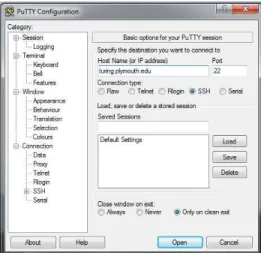
Once you start puTTY, you should enter turing.plymouth.eduinto the “Host Name”
box7
, then click “Open”, as shown in Figure 1. You will then be prompted for your credential,
Figure 1: What doesPuTTy look like?
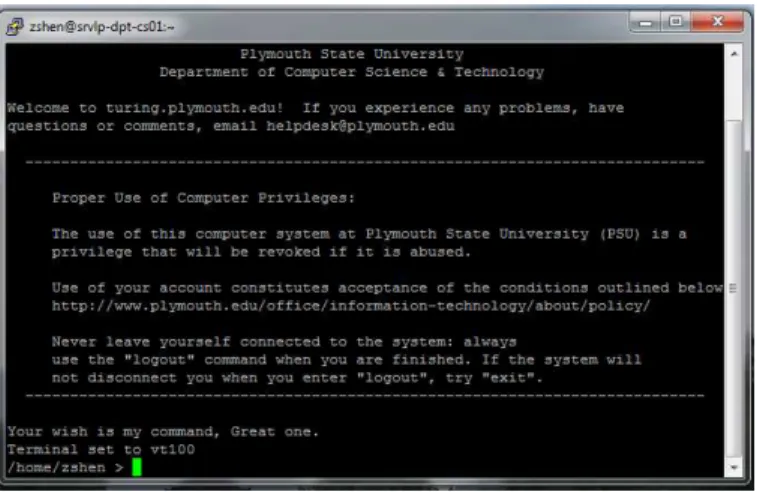
which is the same as what you use to get in my.plymouth.edu. If everything works out, it
should look like Figure 2.
6
It can also be downloaded fromhttps://notepad-plus-plus.org/. 7
Figure 2: How to log into turing?
If you use a MAC, a direct approach is to run theTerminalapp, then enter the following
at the prompt, assuming your log-in bame isjDoe
$ ssh [email protected]
You will then be prompted for yourturingcredential. Proceed as mentioned earlier for the
puTTY case, and then enter something that looks similar to what you saw in Figure 2.
You now should be able to create the directory PhPFilesunder Home 8
. If you need to
refresh your memory about those Unixcommands, have a look at the “Click here”link on
the course page.
Once you have created such a directory, you are ready to place your PHPprograms, and
related files, therethroughout this course.
3.1.5 How to move files in between?
Besides using a turing local text editor such as vim to come up with a script, we can also
use a local editor in your laptop, then transfer the file to a server, e.g., turing. There are a
few ways to do such a transfer.
• One way to do it is to runwinSCP9
underAll Programs/Networkand log in using your
myPlymouth username/password; then transfer the files in between. Figure 3 shows
how to log into WinSCP for a user jDoe.
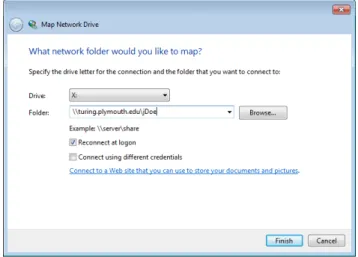
• A more convenient way is to open File explorer, right clickThis PC, then select Map
network drive..., as shown in Figure 4. Assume your log-in name isjDoe,it shows
8
Most likely, you should have theHomedirectory in your home path,/home/zshenas shown in Figure 2; otherwise, you have to create itfirst.
9
This Windows only app does the file transfer thing, and is available at https://winscp.net/eng/download.php.
Figure 3: Use WinSCP to transfer files to turing
how to map “turing.plymouth.edu\jDoe” as a network drive. Once you have done
it, the simpler path of “turing\jDoe” should work in the future, as well.
Figure 4: map turing as a network drive
After this mapping, you can just treat “turing\jDoe”, actually “X” in this case10
, as one of your local drives, and act accordingly.
• If you use a MAC, you can certainly use scp, Terminal app, to directly upload the
file from your MAC to turing 11
. For example, to copy a file “text.txt” from your
current MAC working directory to your “Home” directory on turing, with your log-in
name being jDoe,you just type the following underTerminal:
$ scp test.txt [email protected]:"~\Home/"test.txt 10
You can certainly select another available letter as the name of the drive. 11
You will then be prompted for your turingcredential.Proceed as earlier, and the file will be uploaded there.
3.2
Everybody starts here
Let’s have a look at a simplePHP program, which we call World.php.
<HTML> <HEAD>
<TITLE>My first php file</TITLE> </HEAD>
<BODY> <?php
print("Hello from the PHP world!<BR><BR>\n"); phpinfo();
?> </BODY> </HTML>
Question: What does it do?
Answer: You figure it out... . ,
Question: How does Jane Doe, with her log-in being jDoe, run thisPHP program?
Answer: https://turing.plymouth.edu/~jDoe/PhPFiles/World.php.
Labwork 3.2:
1. Type in the script forWorld.php12
, save it as, e.g.,World.php, under Home\PhPFiles.
2. Test out the script, and revise the script so that it prints out your name, as well as the following line
My first PHP script now works.
3. Comment out, but not delete, the linephpinfo();
4. Test out the revised script.
5. Send me the URL of your script, and the script itself in.txt format, via an email.
12
You can also do a “copy and paste”, but make sure you will replace all the grave accents with single quotes (Cf. The relevant comments as shown inredIn Sec. 2), and remove anything that is not part of the code, including the page numbers.
3.3
The usual arithmetic operations
Database is about number crunching, so we have to do arithmetic operations in our scripts
all the time. Let’s learn something about how to deal with this sorts of stuff in PHP with
some examples.
Let’s start with a simple one, integer.php:
<!Doctype hmtl> <html>
<head>
<title> Integer Data Type </title> </head>
<body>
<h1>How to declare and use a variable?</h1> <?php
$x=1234; echo "x=".$x; echo "<br>";
echo "It is an integer"; ?>
</body> </html>
We do need decimal portion, don’t we? Have a look at the following float.php:
<!Doctype hmtl> <html>
<head>
<title> Float Data Type </title> </head>
<body>
<h1>How about a float?</h1> <?php
$x=12.34; echo "x=".$x; echo "<br>";
echo "It is a float type."; echo "<br>";
?> </body> </html>
Besides variables, we sometimes also want to use constants, as shown in the following
testNumber.php. PHPalso provides all kinds of operators: arithmetic, logic ones, and even bitwise operators.
You should have no issue with them, except the bitwise operators, covered in CS 2470 System Programming in C/C++, which operate on bits. Thus, e.g., 1 && 2 is true, but
1 & 2, the bitwise and of 1 and 2, is false, since 01 & 10=00.13
<HTML> <HEAD>
<TITLE> How to work with numbers, variables and constants? </TITLE> </HEAD>
<BODY>
<p>This segment is to see how PhP evaluates an arithmetic expression,
its concept of precedence. We will also see how to work with constants. </p> <?php
//Some arithmetic expressions $result1=2*2+3*3-10; $result2=2*(2+3*3)-10;
echo "2*2+3*3-10=$result1, while"; echo " 2*(2+3*3)-10=$result2"; echo "<br>";
echo "<br>"; //Some logic ones
$val1=15; //1111 in binary $val2=10; //1010 in binary
echo "Value of \$val1 is $val1"; echo "<br>";
echo "Value of \$val2 is $val2"; echo "<br>";
echo "<h3>Result of Bitwise Operations<h3>"; echo "\$val1 & \$val2=";
//1111 & 1010=1010, which is also 10 in decimal echo $val1 & $val2;
echo "<br>";
echo "\$val1 ^ \$val2=";
//1111 ^ 1010=0101, which is 5 in decimal echo $val1 ^ $val2;
echo "<br>";
echo "\$val1 >> 2=";
//1111 >>2=0011, which is 3 in decimal 13
echo $val1 >>2; echo "<br>";
?>
<p>We will also see how to declare a constant.</p> <?php
//We now define a constant define("myAnswer", 42);
echo "The value of a constant myAnswer is"; echo "<br>";
echo myAnswer; //Outputs the value of myAnswer echo "<br>"; //New line
define("CONSTANT", "Hello world.");
echo CONSTANT; // Output the value of CONSTANT" echo Constant; // What happens here?
?> </BODY> </HTML>
Of course, we can structure together related pieces, as shown in the followingarray.php,
which we will talk, and use, a lot later on.
<!Doctype hmtl> <html>
<head>
<title> array Data Type </title> </head>
<body>
<h1> Sixth PHP program </h1> <?php
$mobile=array("Samsung", "Nexus", "iPhone");
echo "I like", $mobile[0]. ", " . $mobile[1]. " and " . $mobile[2]. "."; echo "<br>";
echo "It is an array type."; ?>
</body> </html>
Since PHP 7, you can also specify the type of a variable, as shown in the following
<!Doctype hmtl> <html>
<head>
<title>Coercive mode </title> </head>
<body>
<h1>What do you want?</h1> <?php
//int $a only works in PHP 7--zs function Cmode (int $a){
echo "Integer=".$a; }
Cmode(12); //Send back 12 echo "<br>";
Cmode(12.1); //Send back 12 echo "<br>";
Cmode(True); //Send back 1 echo "<br>";
echo "It is a function."; ?>
</body> </html>
3.3.1 Are they equal?
When working with the arithmetic, and logical, operations, one often have the need to test
if two quantities are “equal to each other. The followingtestEquality.phpscript will help
us to figure out what we meant by equality.
<HTML> <HEAD>
<TITLE> Are they equal to each other? </TITLE> </HEAD>
<BODY> <?php
//"==" compares values of two variables $val1=10;
$val2="10";
echo "Is \$val1==\$val2?"; echo "<br>";
echo "<br>"; echo "<br>";
//"===" compares values of two variables, also their data type $val1=10;
$val2="10";
echo "Is \$val1===\$val2?"; echo "<br>";
echo "<br>"; if($val1===$val2)
echo "\$val1===\$val2!"; else echo "\$val1!==\$val2!"; echo "<br>";
echo "<br>";
//"!==" compares values of two variables, including their data type echo "Is \$val1===$val2?";
echo "<br>";
echo $val1!==$val2; echo "<br>";
echo "<br>";
//"!=" and "<>" compare values of two variables $val1=10;
$val2=9;
echo "Is \$val1!=\$val2?"; echo "<br>";
echo $val1!=$val2; echo "<br>";
echo "<br>";
//"<=>" compares values of two variables, but not their data type //It is similar to strcmp
$val1=10; $val2="10";
echo "Is \$val1<=>\$val2?"; echo "<br>";
echo $val1<=>$val2; echo "<br>";
echo "Is y<=>y"; echo "<br>";
echo "y"<=>"y"; echo "<br>"; echo "Is x<=>y"; echo "<br>"; echo "x"<=>"y"; echo "<br>"; echo "Is 5<=>4?"; echo "<br>"; echo 5<=>4; echo "<br>"; echo "Is 3<=>4?"; echo "<br>"; echo 3<=>4; ?> </BODY> </HTML> Labwork 3.3:
1. Test out all the above scripts, and really understand them.
2. What is the difference between a variable and a constant? How to declare them, and assign a value to each, respectively?
3. Why does testNumber.php send back a “Warning”, telling us that something is
wrong? Fix it, and send back the revised script, both the URL and the text in .txt
format, but not in .php.
Besides fixing errors, you shall never allow any warning signs, i.e., “Warning”, in your code. I will give you a 0 for your code. /
4. Write something arithmetic of your own for a non-trivial application, e.g., a SUBWAY receipt including the price for the footlong, a meal tax at the rate of 9%, and the total. Another example could be to convert temperatures between the Celsius and the Fahrenheit systems.
5. Test out the above script, then send me the URL of the script, and the script itselfin
.txt format, but not in .php.
3.4
The conditional structure
As you must have learned in an earlier programming course, there are three basic control structures in programming: sequential, conditional and repetitive structures. We just saw
applications of conditional structure in testEquality.php. Below shows yet another
exam-ple of a conditional structure, testCondition.php.
<HTML> <HEAD>
<TITLE> Conditional structure </TITLE> </HEAD>
<BODY>
<p> This segment is to show how the conditional structure, comment mechanism and braces work in PHP.
</p> <?php
//The following shows how the if structure works //and more ways of commenting
# We now test how the single line comment works, and /* multiple line comment work. */
if (True){
echo "<br>Good - I haven’t lost"; echo "<br>";
echo "my mind yet."; }
?> </BODY> </HTML>
Below showstestBranch.php,another program involved with the conditional structure.
Notice the placement of the ‘{’ and ‘}’ brackets.
<HTML> <HEAD>
<TITLE>Test logical comparators</TITLE> </HEAD> <BODY> <?php $first=2; $second=2.3; if($first!=$second){ if($first>$second) $difference=$first-$second; else $difference=$second-$first; echo "The difference is $difference.";
echo "<br>"; }
else echo "There is no difference"; ?>
</BODY> </HTML> Labwork 3.4:
1. Test out and understand the above two scripts.
2. Write a program that prints out the maximum of three numbers stored in three
vari-ables. You may not use the max function. /
3. Come up with a non-trivial application using the conditional structure, e.g., given a household income for 2019, figure out her tax bracket, using the following information:
https://taxfoundation.org/2019-tax-brackets/
Another example could be to decide a student’s status, based on the number of credits that she has achieved, as decided by the following rule:
https://coursecatalog.plymouth.edu/university-policies-procedures/undergraduate-academic-policies/
Write a PHP script to return the correct result.
4. Send me the URL of both scripts, and the scripts themselves in .txt format, but not
in .php.
3.5
The loop structure
The loop, or repetitive, iterative, structure is the remaining piece, initiated by Ada Lovelace
(1815–1852). Let’s begin with an easy one, testWhile.php.
<HTML> <HEAD>
<TITLE>Test the while structure</TITLE> </HEAD>
<BODY> <?php
$count=1;
while($count<=10){
echo "count is ".$count; echo "<br>";
$count=$count+1; }
?> </BODY> </HTML>
The scriptsqRootApproximate.phpshows an application, which is to look for the square
root of a given value, 61 in this case, by applying the Newton-Raphson approximation formula. You should change it to have a better sense.
<HTML> <HEAD>
<TITLE>Test the for an unbounded while loop</TITLE> </HEAD>
<BODY>
<H1>Approximating a square root</H1> <!-- The html commenting style --> <?php
//The value to be squared $target = 61;
//Initial guess $guess = 1.0;
//How good it should be $precision = 0.0000001; //initial estimation
$guess_squared = $guess * $guess; //an abs function should be handy
while (($guess_squared - $target > $precision) or ($guess_squared - $target < -$precision)){
echo "Current guess: $guess is the square root of $target"; echo "<br>";
//another guess with a certain formula, from Newton(?) $guess = ($guess + ($target / $guess)) / 2;
$guess_squared = $guess * $guess; }
echo "<br>";
echo "We are done!"; ?>
</BODY> </HTML>
Question: Do we get the appropriate output format?
Answer: The decimal portion contains too many digits. We need to use printf to print out a more appropriate, restrictive, format.
We also can use the forloop if we know for sure how many times the loop body is going
to run. The following divisionTable.phpsends out a Division table, using the HTML table
structure. We will use this table structure a lot when dealing with database, since it is a collection of tables.
<HTML> <HEAD>
<TITLE>Test for loop</TITLE> </HEAD>
<BODY>
<H2>A division table</H2>
<TABLE border=1 bordercolor=#0099FF> <?php
$start_num = 1; $end_num = 10;
//<TR> starts the first row print("<TR>");
//The first empty data for that row print("<TH> </TH>");
//The header item for the first row, 1, 2, ..., 10.
//Notice that the <TH> tag is the same as <TD>, except that they indicate that //it is for the header, thus in bold face.
for ($count_1 = $start_num; $count_1 <= $end_num; $count_1++) print("<TH>$count_1</TH>");
//end of the first row print("</TR>");
//Now the content of the table, a two level loop
for ($count_1 = $start_num; $count_1 <= $end_num; $count_1++){
//Start another row, with a specific value ranging from 1 to 10, placed //in the first column of this row.
//start yet another column
for ($count_2 = $start_num; $count_2 <= $end_num; $count_2++){ $result = $count_1 / $count_2;
//Now the content for that cell, notice .3f means that exactly //three digits after the decimal point.
printf("<TD>%.3f</TD>", $result); }
//end of this row, and going back to the beginning of the second level loop print("</TR>\n"); } ?> </TABLE> </BODY> </HTML>
If every thing goes well, you should see something like the one in Figure 5.
Figure 5: Division Table
We often want to get out a loop when something happens. Just like in Java, we can use
breakto break out a loop. Below is an example,testBreak.php,which prints out all the prime numbers less than 500.
<HTML> <HEAD>
<TITLE>Test the break statement</TITLE> </HEAD>
<BODY>
<p>Below shows primes less than 500, taken from pp.100 of the Bible </p> <?php
//end of it $limit=500;
//the first candidate $to_test=2;
while(TRUE){
//the very first number that might divide $to_test, //thus making the latter a non-primer
$testdiv=2;
if($to_test>$limit) break;
//We still have to test $to_test while(TRUE){
//if the following test is true, there is no way //$testdiv divides $to_test, thus $to_test is a prime if($testdiv>sqrt($to_test)){
echo "$to_test "; break;
}
//test if $to_test is divisible by $testdiv if($to_test % $testdiv==0) break; $testdiv++; } $to_test++; } ?> </BODY> </HTML> Labwork 3.5:
1. Test out, and understand, the usage of the loop structures in all the above scripts.
2. Write a script that prints out the squares, not square roots, of 1 through 100, e.g.,
32
= 9. (Note: If you print out the whole thing in one line, it is going to be too long. So, print out ten numbers per line.)
3. Write a script that generates the infamous multiplication table for a×b, where 1 ≤
a≤9,1≤b ≤9. You want to use theHTMLtable structure as what I did in coming up
with the division table.
Your print-out should also take care of the commutative law, i.e.,a×b=b×a. Hence,
the table should hold a blank for any pair (a, b) such thatb > a.More specifically, the first two lines of this table should look like the following. Notice that the cell (1,2) is
empty since we have filled (2,1), and, by the commutative law, 1×2 = 2×1.
1 2 3 4 5 6 7 8 9
1 1
2 2 4
You have to print out at least the horizontal line between 1 through 9, and the first vertical line to the right of 1 through 9.
4. Send me the URL of all the scripts and the scripts themselvesin .txt format, but not
in .php.
3.6
Associative arrays
Although quite similar to that in Python, PHP array is a bit nicer in the sense that it also
supports associative array, i.e., its index can be a string, such as $_POST[’Name’]. This is
especially helpful in database programming, where we use names all the time. For example,
when a relational database table, Studentwith four attributes: Id, Name, Address, and
Status, is implemented as an array, it is natural to get to a row using its key value, such as “Name”, but not its numerical index, such as 1.
Let’s go through some of the basic operations related to the associative array type with
the followingtestArrayBasics.php.
<HTML> <HEAD>
<TITLE>This is to test array creation in PHP</TITLE> </HEAD>
<BODY>
<p> The easiest way is simply to assign a value to an array element. </p> <?php
$my_array[1]="The first thing in my array that I just made."; echo $my_array[1];
?>
<p> You can also create one explicitly by using the array() construct. </p> <?php
$fruit_basket=array(’apple’, ’orange’, ’banana’, ’pear’); echo $fruit_basket[1];
?>
<p> We can also set the indices for the arrays created using the array() construction.
</p> <?php $another_basket=array(’red’=>’apple’, ’orange’=>’orange’, ’yellow’=>’banana’, ’green’=>’pear’); echo $another_basket[’green’]; ?>
<p> Another way is to use a function that returns an array to create one. </p> <?php
$my_another_array=range(1, 5); echo $my_another_array[3];
echo "<BR><BR>Question: Why did I just see $my_another_array[3]?"; ?>
<p> Array puts thing together, while list takes things apart.</p> <?php
//Here, we line up the four variables with the four pieces in the array. list($first, $second, $third, $fourth)=$fruit_basket;
echo $first."<BR>".$second."<BR>".$third."<BR>".$fourth; echo "<BR><BR>Question: What did ’.’ do?";
?>
<p> We can also set up multi-d arrays.</p> <?php $cornucopia=array (’fruit’=> array(’red’=>’apple’, ’orange’=>’orange’, ’yellow’=>’banana’, ’green’=>’pear’), ’flower’=> array(’red’=>’rose’, ’yellow’=>’sunflower’, ’purple’=>’Iris’)); echo $cornucopia[’flower’][’purple’]; echo "<BR><BR>"; $kind_wanted=’fruit’; $color_wanted=’yellow’;
//For the {} in the following expression, let’s check out by removing it.
//For more details, check pp.138, interpolation with curly braces, of the Bible
echo "The $color_wanted $kind_wanted is {$cornucopia[$kind_wanted] [$color_wanted]}"; echo "<BR>There are ". count($cornucopia). ’ elements in the array $cornucopia’;
echo "<BR>But, there are ". count($cornucopia[’fruit’]). ’ kinds of fruits.’."<BR>"; ?>
<p> It is easy to delete an element from an array by using the unset function.</p> <?php
echo $fruit_basket[1]. ’<BR>’; unset($fruit_basket[1]);
if(IsSet($fruit_basket[1])) echo $fruit_basket[1];
else echo ’Not found, it is gone... .’;
echo "<br><br>Question: What did IsSet() do?"; ?>
</BODY> </HTML>
PHP provides a special loop structure to work with such associative arraies, namely,
foreach. While both for and while will stop when some preset condition fails, foreach
will repeat a body of statements for each and every element as contained in the associative array.
The syntax of the foreach statement is a little different from that of the normal loops
that you ran into in a previous programming language.
foreach ( $arrayName as $key => $value){ statements
}
It essentially says that, for each element of the associative array, $arrayName, we call the
key $key and its associated value $value and we will do something about each such a pair
with statements.
Note that the operator “=>” represents the correspondence from a key to its associated
value. Similar to what we discussed about the pointers in CS2470 Systeme Programming,
you can imagine that the key points, i.e., “=>”, to its associated value.
For example, the following script testForeach.php is to print out each person’s name
and his/her age. To start with, we use an associative array to store the names of people in
a company as the keys with the values being their age. We then use aforeach loop, for each
$name/$agepair, print out the value of the $name, followed by the value of its associated
$age.
<HTML> <HEAD>
<TITLE>An example of Foreach</TITLE> </HEAD>
<BODY>
<br> <?php $employeeAges[’Lisa’] = "28"; $employeeAges[’Jack’] = "16"; $employeeAges[’Ryan’] = "35"; $employeeAges[’Rachel’] = "46"; $employeeAges[’Grace’] = "34"; echo "<BR>";
foreach( $employeeAges as $name => $age){ echo "Name: $name, Age: $age <BR>"; }
?> </BODY> </HTML>
If you run it, it will print out the following:
A simple example to show how to use foreach with an associate array. Name: Lisa, Age: 28
Name: Jack, Age: 16 Name: Ryan, Age: 35 Name: Rachel, Age: 46 Name: Grace, Age: 34
There is a variance of the syntax, though, when the key is irrelevant14
foreach ( $arrayName as $value){ statements
}
Thus, the following testForeach2.php:
<HTML> <HEAD>
<TITLE>An example of Foreach</TITLE> </HEAD>
<BODY>
A simple example to show how to use foreach with an associate array. <?php
$employeeAges[’Lisa’] = "28"; $employeeAges[’Jack’] = "16"; $employeeAges[’Ryan’] = "35"; 14
$employeeAges[’Rachel’] = "46"; $employeeAges[’Grace’] = "34"; echo "<br />";
foreach( $employeeAges as $age){ echo "Age: $age <br />";
} ?> </BODY> </HTML>
It will lead to the following output.
A simple example to show how to use foreach with an associate array. Age: 28
Age: 16 Age: 35 Age: 46 Age: 34
Theforeachstructure can also be used to work on multi-dimensional arrays. For example,
the following script, testForeachMD.php,prints out the nutrition content of various fruits.
<HTML> <HEAD>
<TITLE>Fruit Nutritional Information</TITLE> </HEAD>
<BODY>
<!-- Table for info -->
<EM>Fruit Nutritional Information</EM> <TABLE border="1" width="50%">
<!-- Create the very first row, consisting of the headings.--> <tr><th>Fruit</th><th>Vitamin A</th><th>Vitamin C</th>
<th>Calcium</th><th>Iron</th></tr> <?php
//Create the array of fruits
$fruits=array(’Apple’=>array(),’Banana’=>array(),
’Grapefruit’=>array(),’Grapes’=>array()); //Populate the fruit info
$fruits[’Apple’][’VitA’]="2%"; $fruits[’Apple’][’VitC’]="8%"; $fruits[’Apple’][’Calc’]="2%"; $fruits[’Apple’][’Iron’]="2%";
//The key ’Apple’ is associated with an array containing four items: //["2%", "8%", "2%", "2%"]], associated with the respective key values //[’VitA’, ’VitC’, ’Calc’, ’Iron’]
//You might think this array, with its name being ’Apple’, as follows: // ’vitA’ ’vitC’ ’Calc’ ’Iron’
// ---// | "2%" | "8%" | "2%" | "2%" | // ---//The others are similar.
$fruits[’Banana’][’VitA’]="2%"; $fruits[’Banana’][’VitC’]="15%"; $fruits[’Banana’][’Calc’]="0%"; $fruits[’Banana’][’Iron’]="2%"; $fruits[’Grapefruit’][’VitA’]="35%"; $fruits[’Grapefruit’][’VitC’]="100%"; $fruits[’Grapefruit’][’Calc’]="4%"; $fruits[’Grapefruit’][’Iron’]="0%"; $fruits[’Grapes’][’VitA’]="0%"; $fruits[’Grapes’][’VitC’]="2%"; $fruits[’Grapes’][’Calc’]="2%"; $fruits[’Grapes’][’Iron’]="0%";
//Fill in the table one array at a time
//Each value of $name is associated with an array, $fruitinfo foreach($fruits as $name => $fruitinfo)
{
print("<tr><td>$name</td>"); foreach($fruitinfo as $info)
//In the second layer of the loop, for each element of the //array, we print it out in the associated cells.
//Notice, we print the entire list, indexed with $fruitinfo, out. //Thus, the individual indices such as ’VitA’ does not matter. {
print("<td>$info</td>"); }
} ?>
</TABLE> </BODY> </HTML>
For more details, check outhttp://php.net/manual/en/control-structures.foreach.php.
You should also check out the file displayDBQueryField.inc, sitting at the end of
Section 5.4, for the usage of foreachwhen we have to print out a database table.
As you have learned in earlier courses, sorting is one of the key operations in data
processing. There are several ways to sort out elements kept in an array in PHP. The
following example,testSort1.php,taken out of [1, Example 11], shows us how to make use
of such operations:
<HTML> <HEAD>
<TITLE>This is to sort out an array...</TITLE> </HEAD>
<BODY>
<p> There are many ways to sort things out. </p> <?php
//Here goes the input echo "<h3>Input</h3>";
$number=array( 1 => "S", 2 => "R", 3=> "P", 4 => "Q", 5=> "T"); foreach($number as $k=> $val)
echo "Index= ".$k . ", Element= " . $val. "<br>"; //Well, sort() does the usual sort in ascending order echo "<h3>sort()</h3>";
$number=array( 1 => "S", 2 => "R", 3=> "P", 4 => "Q", 5=> "T"); sort($number);
foreach($number as $k=> $val)
//This ‘‘$k+1’’ term is required by this sort function. --zs echo "Index= ".($k+1) . ", Element= " . $val. "<br>";
// On the other hand, asort() does the usual sort in ascending order, // and gives back its associated index
echo "<h3>asort()</h3>";
$number=array( 1 => "S", 2 => "R", 3=> "P", 4 => "Q", 5=> "T"); asort($number);
foreach($number as $k=> $val)
echo "Index= ".$k . ", Element= " . $val. "<br>"; // arsort() does the usual sort in descending order, // and gives back its associated index
echo "<h3>arsort()</h3>";
$number=array( 1 => "S", 2 => "R", 3=> "P", 4 => "Q", 5=> "T"); arsort($number);
foreach($number as $k=> $val)
echo "Index= ".$k . ", Element= " . $val. "<br>"; //Finally, ksort() sorts by its index
echo "<h3>kort()</h3>";
$number=array( 1 => "S", 2 => "R", 3=> "P", 4 => "Q", 5=> "T"); ksort($number);
foreach($number as $k=> $val)
echo "Index= ".$k . ", Element= " . $val. "<br>"; ?>
</BODY> </HTML> Labwork 3.6:
1. Play with all the above scripts and understand all the features as mentioned within. 2. Find a non-trivial associative array application, and come up with a script that makes
use of the foreach structure in terms of a 2d array, with a reasonable number, say at
least four, of rows and columns. Examples should be abundant, e.g., temperatures of different months for various cities, pitch-rates for players during different seasons, grades for students in various courses, etc..
3. Send in the URL of the PHP script, and the script itself, in txtformat.
3.7
Strings
We do lots of strings in our work and life, especially database programming. Technically, a
string is any array of characters, ends with ‘/0’, as you should have learned in programming
courses, especially,CS 2470 Systems Programming in C/C++.
The best way to pick them again is just to have another look at them. There are several string based operations, such as substitution, concatenation, etc.. Let’s go through some of
these operations with the testStringOperation.phpscript.
<html> <head>
<Title>Test String Operations</Title> </head>
<body>
<p>Test the concatenation operator.</p> <?php
$my_two_cents="I want to give you a piece of my mind "; $third_cent=" And another thing";
echo $my_two_cents . "..." . $third_cent; ?>
<p>An alternative of .= which adds things to the right</p> <?php
$my_two_cents="I want to give you a piece of my mind "; $third_cent=" And another thing";
//Remember i+=3;
$my_two_cents.= $third_cent; echo $my_two_cents;
echo "<br>"; ?>
<p>Now, we see how to construct large chunk of words using the <<< operator.</p> <?php
$my_string_var= <<<EOT
Everything in this rather unnecessarily wordy ramble of prose will be
incorporated into the string that we are building up inevitably, inexorably, character by character, line by line, until we reach that blessed final line which is this one.
EOT;
echo $my_string_var; ?>
<p>We can use this heredoc feature to construct simple forms.</p> <?php
$firstname=’Zhizhang’; echo <<<ENDOFFORM
<Form Method=Post Action="{$_SERVER[’PHP_SELF’]}"> <Input Type=text Name=FirstName Value=$firstname> <Input Type=SUBMIT Name=SUBMIT Value=SUBMIT> </Form>
<!--the following line must be lined up to the left edge--zs --> ENDOFFORM;
?> </body> </html>
There are also several string based functions, let’s play with them with the following
testStringFunction.phpscript.
<Html> <head>
<Title>Test String Functions</Title> </head>
<body>
<p> Test the inspection operator. Notice the automatic conversion of the result of strlen back to a string.
</p>
<?php
$short_string="This string has 29 characters"; echo "\"$short_string\"";
echo "<br>";
echo "It does have " . strlen($short_string) . " characters"; ?>
<p> Test the strpos function, which returns the position of a
substring in a target string. Notice that location starts with 0. </p>
<?php
$twister = "Peter Piper picked a peck of pickled peppers"; echo "\"$twister\"<BR>";
//Let’s have fun with print...
print("location of ’p’ is " . strpos($twister, ’p’) . ’<BR>’); print("location of ’p’ in the reversed side is " .
strrpos($twister, ’p’) . ’<BR>’);
print("location of ’Piper’ in the reversed side is " . strrpos($twister, ’Piper’) . ’<BR>’);
print("location of ’q’ is " . strpos($twister, ’q’) . ’<BR>’); ?>
<p>Change the content of a string.</p>
<?php
$myString="abcdefg"; echo "\"$myString\"<BR>";
$myString[5]=’X’; echo "\"$myString\"<BR>"; $myString[4]="Y"; echo "\"$myString\"<BR>"; ?> <p>Test strtolower.</p> <?php $myString="Hello User"; echo strtolower($myString); echo "<br>"; ?> <p>Test strtoupper.</p> <?php $myString="Hello User"; echo strtoupper($myString); echo "<br>"; ?> <p>Test str_word_count.</p> <?php
$myString="Welcome to Plymouth State!"; echo $myString;
echo "<br>";
echo "Number of words: ". str_word_count($myString); echo "<br>"; ?> <p>Test strrev.</p> <?php $myString="Hello User"; echo $myString; echo "<br>"; echo strrev($myString); echo "<br>"; ?> <p>Test srReplace.</p> <?php $oldString="Hello"; $newString="Welcome";
$original="Try to replace the word-Hello"; echo $original;
echo str_replace($oldString, $newString, $original); echo "<br>";
?>
<p>Test the comparator.</p> <?php $s1="hey"; $s2="HEY"; $s3="het"; echo "\"$s1\""; echo "<br>"; echo "\"$s2\""; echo "<br>"; echo "\"$s3\""; echo "<br>"; if(!strcmp($s1, $s2))
echo "$s1 ". "is the same as ". "$s2";
else echo "<BR>$s1 ". "is not the same as ". "$s2";
if(strcasecmp($s1, $s2))
echo "$s1 ". "is the same as ". "$s2";
else echo "<BR>$s1 ". "is not the same as ". "$s2";
if(!strcmp($s1, $s3))
echo "$s1 ". "is the same as ". "$S3";
else echo "<BR>$s1 ". "is not the same as ". "$s3"; ?>
<p>Test substr Compare.</p> <?php $oldString="Hello"; $newString="Welcome"; echo $oldString; echo "<br>"; echo $newString; echo "<br>";
echo substr_compare($oldString, $newString, 0, 3, True); echo "<br>"; ?> <p>Test strReplace.</p> <?php $oldString="Hello"; $newString="Welcome";
$original="Try to replace the word-Hello"; echo $original;
echo "<br>";
echo str_replace($oldString, $newString, $original); echo "<br>";
?>
<p>Test the searching function strstr(source, target), which sends back the portion in source that contains the first occurrence of target. </p> <?php $s1="showsuponceshowsuptwice"; $s2="up"; $s3="down";
echo "Result of looking for $s2: ". strstr($s1, $s2); echo "<br>";
echo "Result of looking for $s3: ". strstr($s1, $s2); echo "<br>";
?>
<p> Test the string slicing function substr(source, startPosition, length), which sends back the portion in source that contains length characters, starting from startPosition.
</p>
<p> When startPosition is negative, it means the first character should be counted from the right-hand-side, starting with 1. When the length is negative, it means that the last character should be counted from the right-hand-side, starting with 0.
</p>
<?php
$s1="Take what you need, and leave the rest behind<BR>"; print $s1;
print ( substr($s1, 23));
print (substr($s1, 5, 13))."<BR>";
$alphabetTest="abcdefghijklmnop";
echo "<BR>Given the following string: ". "$alphabetTest<BR><BR>"; print("3: " . substr($alphabetTest, 3). "<BR>"); print("-3: " . substr($alphabetTest, -3). "<BR>"); print("3, 5: " . substr($alphabetTest, 3, 5). "<BR>"); print("3, -5: " . substr($alphabetTest, 3, -5). "<BR>"); print("-3, -5: " . substr($alphabetTest, -3, -5). "<BR>"); print("-3, 5: " . substr($alphabetTest, -3, 5). "<BR>");
?>
<p>Compare strstr($containing, $contained) and substr($containing, strpos($containing, $contained).
</p> <?php
$containing="showsuponceshowsuptwice"; $contained="up";
print("Result of strstr($containing, $contained): ". strstr($containing, $contained). "<BR>");
print("<BR>Result of substr($containing, strpos($containing, $contained): ". substr($containing, strpos($containing, $contained)). "<BR>");
?>
<p>String clean-up functions. Notice that the browser will automatically clean up the mess, but it can be observed by viewing the source sent back by the php.
</p> <?php
$original=" More than meets the eye "; $chopped=chop($original);
$ltrimmed=ltrim($original); $trimmed=trim($original);
print("The original is ’$original’<BR>");
print("Its length is " . strlen($original). "<BR>"); print("The chopped version is ’$chopped’<BR>"); print("Its length is ". strlen($chopped). "<BR>"); print("The ltrimmed version is ’$ltrimmed’<BR>"); print("Its length is ". strlen($ltrimmed). "<BR>"); print("The trimmed version is ’$trimmed’<BR>"); print("Its length is ". strlen($trimmed). "<BR>"); ?>
<p>String replacement functions. Notice that the browser will automatically clean up the mess, but it can be observed by viewing the source sent back by the php.
</p> <?php
$firstEdition="Burma is similar to Rhodesia in at least one way."; $secondEdition=str_replace("Rhodesia", "Zimbabwe", $firstEdition); $thirdEdition=str_replace("Burma", "Myanmar", $secondEdition); print($firstEdition . "<BR>");
print($secondEdition . "<BR>"); print($thirdEdition . "<BR>");
$trickyString="ABA is part of ABABA";
$maybeTricked=str_replace("ABA", "DEF", $trickyString); print("<BR>Substitution result is ’$maybeTricked’<BR>"); ?>
<p>Let’s check out a few other functions, such as
substr_replace(target, replacement, startPosition, length), strrev(toBeReversed), and str_repeat(toBeRepeated).
</p> <?php echo substr_replace("ABCDEFG", "-", 2, 3); echo "<br>"; echo strrev("ABCDEFG"); echo "<br>"; echo str_repeat("ABCDEFG", 3); ?>
<p>Let’s check out a few case related functions, such as strtolower(toBeLowered), strtoupper(toBeUppered), ucfirst(theFirstToBeUppered), and
ucwords(theFirstOfEachWordToBeUppered). </p>
<?php
$original="THEY DON’T KNOW THEY are SHOUTING"; echo strtolower($original);
$s1="make this link stand out"; echo "<br><b>strtoupper($s1)</b>"; echo "<br>";
$s2="polish is a word for which pronunciation depends on it capitalization"; echo ucfirst($s2);
$s3="truth or consequences";
echo "<br>While $s3 is a parlor game, ". ucwords($s3) . " is a town in New Mexico.";
echo "<br>";
sprintf("<br>While $s3 is a parlor game, ". ucwords($s3) . " is a town in New Mexico.<br>");
?>
<p>Test out the quotemeta(string) function, which adds slashes to many special symbols.
</p> <?php
$literalString=’These characters ($ *) are very special to me \n<BR>’; $qmString=quotemeta($literalString);
?>
<p>Test out formatted printing mechanism.</p>
<p>We once talked about it n formatting the values in the multiplication table. Compare the appearance caused by different formatting strings.
</p> <pre>
<?php
$value=3.1415926;
printf("%f, %10f, %-010f, %2.2f\n", $value, $value, $value, $value); ?>
</pre> </body> </Html>
Labwork 3.7:
1. Carefully read through all the above scripts, test them out, and compare the results, under-stand those involved operations and functions so that you can use them in later programming when a need arises. In particular, play with the “heredoc” feature, which we will see and use quite a bit. Remember that it has to start with the very first position of a line.
2. Revise the scripts as you would like to demonstrate your understanding of those string related features, both functions and operations, as used within.
3. Send in the URL of the revised script, as well as the script itself as a .txtfile.
3.8
Functions
A program is a collection of functions, each does one thing. It is indeed awkward to writ up a program with just amain()function.
As you have seen in numerous courses, the common practice is to define various functions, referred to as “methods” in Java, so that we can apply the divide and conquer technique to cut a problem to a bunch of smaller and simpler problems.
Below shows testFunction.php,which shows how to define a function and use it.
<HTML> <HEAD>
<TITLE>Test the basic function composition</TITLE> </HEAD>
<BODY>
<p> Function compostion is essentially the same as that in Java, except the parameter list does not come with types, which could lead to a problem.
This issue is fixed in PHP 7. See coersive.php ini Page 17 of this notes.
</p> <?php
function better_deal($amount_1, $amount_2, $price_1, $price_2){ $per_amount_1=$price_1/$amount_1; $per_amount_2=$price_2/$amount_2; return($per_amount_1 < $per_amount_2); } $liters_1=1.0; $liters_2=1.5; $price_1=1.59; $price_2=2.09;
if(better_deal($liters_1, $liters_2, $price_1, $price_2)){ echo "The first deal is better!";
echo "<br>"; }
else {
echo "The second deal is better!"; echo "<br>"; } ?> </BODY> </HTML> Labwork 3.8:
1. Test out the above function to understand the interaction of functions.
2. Find a non-trivial application using functions. For example, you can implement the correct exponential operation15
, and demonstrate how to invoke this function in calculation. As an example, you can use this exponential function to calculate the balance of your bank account, starting with a principleP, with APR (annual percentage rate)r,after a number of months M. [3]
W hatT oGetAf terM =P
1 + r 12
M
(1) 3. Send in the URL of your script, as well as the script itself as a .txtfile.
15
3.9
The scope of variables
Just as inJava orPython,all the variables defined in a function ofPHParelocal, i.e., itsscopeis only within the function where it is defined. When the execution of the function completes, such a variable no longer exists 16
.
The followinglocal.phpshould make this point clear.
<!Doctype hmtl> <html>
<head>
<title> Local Variable </title> </head>
<body>
<h1> A program about local variables </h1> <?php
//This one is taken from page 4-5 $ls=500;
function local_scope(){ $ls=100; //local
echo "<h2>Value of variable inside function is: $ls</h2>"; }
local_scope(); //function call
echo "<h2>Value of variable outside function is: $ls</h2>"; ?>
</body> </html>
On the other hand, if you want to have something that is accessible anywhere, you have to use a global variable. A unit of memory will be allocated to such a variable, and deallocated when the program terminates normally. The followingglobal.phpserves this purpose.
<!Doctype hmtl> <html>
<head>
<title> Global Variable </title> </head>
<body>
<h1> A program about global variables </h1> <?php
//This one is taken from 4-7 $x=5; //global variable $y=10; //global variable $z=15; //global variable
16
Technically, the space allocated to such a local variable is taken back since such a variable is allocated in a system stack when the function is called; and when the function completes its execution, the space allocated to such a variable is retracted by the system. We might talk about it inCS4250 Computer Architecture.
$sum=12; //global variable
function globalFunction(){
global $x, $y, $z, $sum; //global stuff
echo "<p>Variable x inside function is: $x</p>"; echo "<p>Variable y inside function is: $y</p>"; $sum=$z+$x;
}
globalFunction(); //function call
echo "<p>Variable x outside function is: $x</p>"; echo "<p>Variable sum outside function is: $sum</p>"; ?>
</body> </html>
Global variables stay there all the time, and local ones will be gone as soon as they are out. Sometimes we need something in the middle: Even if, e.g., after a function exits, the values of some of the “local” variables defined within that function still exist. They are thestatic variables.
<!Doctype hmtl> <html>
<head>
<title> Local Variable </title> </head>
<body>
<h1> A program about static variables </h1> <?php
function normalFunction(){ $p=7; $q=3; $p=$p+$q;
echo "<p>Latest value of local variable p is: $p</p>"; }
function staticFunction(){ static $x=5;
$y=4; $x=$y+$x;
echo "<p>Latest value of static variable x is: $x</p>"; }
normalFunction(); //function call normalFunction(); //function call normalFunction(); //function call echo "<br>";
staticFunction(); //function call $x gets the value of 13 staticFunction(); //function call $x gets the value of 17 ?>
</body> </html>
Of course, they are often mixed up in the real life. Let’s check out more stuff, starting with the followingtestFunctionScope.php.
<HTML> <HEAD>
<TITLE>Test the function scope</TITLE> </HEAD> <BODY> <?php function SayMyABC(){ $count=0; while ($count<10){ print(chr(ord(’A’)+$count)); $count++; }
print("<BR>Now, I know my ABC better<BR>"); }
$count=1; SayMyABC();
print("<BR>Now, we have made $count function call.<BR><BR>"); $count++;
SayMyABC();
print("<BR>Now, we have made $count function calls.<BR><BR>"); ?>
</BODY> </HTML>
Labwork 3.9.1 Read and play with the above script. Collect the outputs then explain why this script generates such an output. For example, assume the following is the output, explainhow it is generated by this script.
ABCDEFGHIJ
Now, I know my ABC better
Now, we have made 1 function call.
ABCDEFGHIJ
Now, I know my ABC better
Let’s have a look at the followingtestFunctionScopeGlobal.php, where a global variable is defined within a function.
<HTML> <HEAD>
<TITLE>Test the function scope</TITLE> </HEAD>
<BODY> <?php
function SayMyABC(){
//Now the following variable become global global $count;
while ($count<10){
//Notice the coversion from number to characters and the function chr print(chr(ord(’A’)+$count));
$count++; }
print("<BR>Now, I know $count letters<BR>"); }
$count=1; SayMyABC();
print("<BR>Now, we have made $count function call.<BR><BR>"); $count++;
SayMyABC();
print("<BR>Now, we have made $count function calls.<BR><BR>"); ?>
</BODY> </HTML>
Labwork 3.9.2 Read and play with the above script. Collect the outputs then explain why this script generates such an output. For example, assume the following is the output, explainhow it is generated by this script.
BCDEFGHIJ
Now, I know 10 letters
Now, we have made 10 function call.
Now, I know 11 letters
Now, we have made 11 function calls.
Finally, the testFunctionScopeStatic.phpdemonstrates yet another application of using a static variable, among others.
<HTML> <HEAD>
<TITLE>Test the function scope</TITLE> </HEAD>
<BODY> <?php
function SayMyABC(){
//Now the following variable become static, with its own memory static $count=0;
$limit = $count+10; while ($count<$limit){
//Notice the coversion from number to characters and the function chr print(chr(ord(’A’)+$count));
$count++; }
print("<BR>Now, I know $count letters<BR>"); }
$count=1; SayMyABC();
print("<BR>Now, we have made $count function call.<BR><BR>"); $count++;
SayMyABC();
print("<BR>Now, we have made $count function calls.<BR><BR>"); ?>
</BODY> </HTML>
Labwork 3.9.3 Read and play with the above script. Collect the outputs then explain why this script generates such an output. For example, assume the following is the output, explainhow it is generated by this script.
ABCDEFGHIJ
Now, I know 10 letters
Now, we have made 1 function call.
KLMNOPQRST
Now, I know 20 letters
3.10
Recursion
A function isrecursiveif the same function is used in defining itself. For those recursion fan,PHP does it, too. Below is an example,testRecursion.php,which counts down from 10 to 1.
<HTML> <HEAD>
<TITLE>Test recursion </TITLE> </HEAD>
<BODY>
<?php
function countdown_first($num_arg){ if ($num_arg>0){
echo "counting down (first) from $num_arg"; echo "<br>"; countdown_second($num_arg-1); } } function countdown_second($num_arg){ if ($num_arg>0){
echo "counting down (second) from $num_arg"; echo "<br>"; countdown_first($num_arg-1); } } countdown_first(10); ?> </BODY> </HTML>
Question: What should be the output? Answer:
counting down (first) from 10 counting down (second) from 9 counting down (first) from 8 counting down (second) from 7 counting down (first) from 6 counting down (second) from 5 counting down (first) from 4 counting down (second) from 3 counting down (first) from 2 counting down (second) from 1
Labwork 3.10:
1. Test out the above code and understand the way to do it.
2. Write a recursive function to calculate, correctly, the factorial of a given number, i.e., f ac(0) = 1,
∀n≥1, f ac(n) = f ac(n−1)∗n.
3. Write a complete PHPscript, and print out the factorial of 1 through 20.
3.11
The OOP side of the
PHP
PHPfully supports object oriented programming, which might be useful. Let’s walk through this perspective with an example, taken out of [8, Chapter 3]. Below is a class file, dog.php.
<?php
//Taken out of Example 3.4 class Dog {
private $dog_weight=0;
private $dog_breed="no breed"; private $dog_color="no color"; private $dog_name="no name"; private $error_message="??";
//---Constructor---function __construct($value1, $value2, $value3, $value4){
$name_error=$this->set_dog_name($value1)==TRUE ? ’TRUE,’ : ’FALSE’; $weight_error=$this->set_dog_breed($value2)==TRUE ? ’TRUE,’ : ’FALSE’; $breed_error=$this->set_dog_color($value3)==TRUE ? ’TRUE,’ : ’FALSE’; $color_error=$this->set_dog_weight($value4)==TRUE ? ’TRUE,’ : ’FALSE’; }
//---toString---public function __toString(){
return $this->error_message; }
//---Set up stuff function set_dog_name($name){
$error_message=TRUE;
//$name has to be a string--zs
(ctype_alpha($name) && strlen($name)<21) ? $this->dog_name=$name: $error_message=FALSE;
return $error_message; }
function set_dog_weight($weight){ $error_message=TRUE;
($weight>10 && $weight<120) ? $this->dog_weight=$weight: $error_message=FALSE;
return $error_message; }
function set_dog_breed($breed){ $error_message=TRUE;
(ctype_alpha($breed)) ? $this->dog_breed=$breeE: $error_message=FALSE;
return $error_message; }
function set_dog_color($color){ $error_message=TRUE;
(ctype_alpha($color)) ? $this->dog_color=$color: $error_message=FALSE;
return $error_message; } //---Get methods---function get_dog_name(){ return $this->dog_name; } function get_dog_weight(){ return $this->dog_weight; } function get_dog_breed(){ return $this->dog_breed; } function get_dog_color(){ return $this->dog_color; } function bark(){ print("This is $this->dog_name!"); }
function display_properties(){
print "Dog weight is $this->dog_weight. Dog breed is $this->dog_breed. Dog color is $this->dog_color."; echo "<br>";
}
function get_properties(){
return "$this->dog_weight, $this->dog_breed, $this->dog_color"; }
} ?>
The following is the program,lab.php,based on the above class file.
<?php
//Taken out of Example 3.5 //Include the class file.--zs require_once(’dog.php’);
//Create an object--zs