1
Enabling Text-To-Speech Functionality for Websites and
Applications Using a Content-Derived Model
R. Soic
1, M. Vukovic
1,*and Z. Car
11University of Zagreb Faculty of Electrical Engineering and Computing, Unska 3, Zagreb, Croatia
Abstract
Today’s society is largely dependent on the Internet websites that provide it with access to various information. While most users take accessing information in this way as granted, some user groups have significant issues while trying to access websites by traditional means. In this context, we focus on persons with severe visual impairment that are unable to use websites that are not to-speech enabled. The paper analyses existing solutions and proposes a model for enabling text-to-speech functionality based on deriving tree-like structure from website or web application content. The proposed model is evaluated on two case-studies; institutional website and interactive educational web application.
Keywords: text-to-speech, website content analysis, website structure, web content presentation, web accessibility, visual impairments
1. Introduction
The web provides all of us with numerous information every day. It is changing rapidly; new content is emerging and the size of the web is growing constantly. However, some groups of people are not able to use all that web is offering. In the context of this paper, we focus on people with complex communication needs that are unable to access all the data on the web due to some specific impairment. EU Council adopted the conclusions to which the web accessibility as a prerequisite for the use of ICT and the costs of providing accessibility can be reduced by using "universal design". Moreover, Council adopts first-ever EU-wide rules - in July 2016 the Council formally approved the public-sector web accessibility directive agreed with the European Parliament in May. Initiatives of governments and organizations of the European Union and worldwide aimed at raising awareness of the importance of accessible web-sites, which is currently at insufficient level in Europe, thus violating the rights of individual citizens.
There is an initiative that provides guidelines for websites in this sense. The Web Content Accessibility Guidelines (WCAG) [1] points out how websites should look like, what should their functionalities be and how should the users be able to interact with them. It is a notable initiative that truly tries to bring web to all, regardless of their impairment. However, only a small portion of websites is fully WCAG compliant, especially in Croatia [2]. Nowadays, WCAG is mostly addressed by institutional websites, since the governments throughout the world [3] enforce the WCAG
compliance to their institutions, ministries and similar websites.
The authors of the paper are part of Competence Network ICT-AAC [4], focused on use of assistive technologies and information communication technologies for helping persons with complex communication needs. A subset of the Network’s activities is trying to obtain better web accessibility to its users, and WCAG implementation and awareness has been a part of our previous work [2].
When narrowing down requirements from persons with complex needs to persons with visual impairments, WCAG promotes high-contrast option for websites as one implementation of its design principle that web content should be perceivable. The goal of the high-contrast option is to make the websites more readable to persons with slight visual impairments. However, blind persons or persons with severe visual impairment still cannot use such websites, despite the welcome high-contrast and other functionalities aimed at better visual representation. So according to the WCAG principle of implementing robust web-site able to use assistive agents and devices, the next step towards is enabling text-to-speech capability so that all the relevant information is read to the users.
The aim of this paper is to analyse state-of-the-art in text-to-speech solutions for websites and propose a model that would enable text-to-speech ability for websites and web applications. The proposed model, referred to as SOS-Web, presents a general model that can be applied to various institutional and other websites as well as interactive web applications with specific purposes. The proposed model is focused on deriving important information from raw website
on
Ambient Systems
Research Article
Receivedon20 March 2017;acceptedon 11 May 2017;publishedon 17 May 2017
Copyright© 2017 Marin Vukovic etal.,licensedto EAI.Thisisanopenaccessarticledistributedunderthetermsofthe Creative Commons Attribution license (http://creativecommons.org/licenses/by/3.0/), which permits unlimited use,distributionandreproductioninanymediumsolongastheoriginalworkisproperlycited.
doi:10.4108/eai.17-5-2017.152547
EAI Endorsed Transactions onAmbient
Systems
12 2016 - 05 2017 |Volume4|Issue 13|e
∗
source and generating a generalised tree-like structure. The generated structure is used for text-to-speech synthesis as well as user control of what is being pronounced and navigation through the website.
The rest of the paper is organised as follows. Next section analyses related work in the field with emphasis on solutions in text-to-speech for websites, without addressing the quality of the produced voice itself, since this is out-of-scope of this paper. Section three presents the SOS-Web model for enabling text-to-speech functionality to websites and applications. Case study of model implementation into institutional website and interactive educational web application, followed by evaluation results, is presented in Section four. Finally, the paper is concluded in Section five along with some guidelines regarding future work.
2. Related Work
There are numerous solutions trying to provide Text-to-Speech functionality for websites. They differ both in concepts of audio presentation of the content, and in the way users interact with them. The most popular and most user-friendly tools are mentioned in the following paragraphs. A brief overview of their features is given, with comment of how appropriate they are for users with serious visual impairments. It should be emphasized that the quality of synthesized speech used in each solution is out of scope of this paper, and the focus is on the realisation of text-to-speech solutions. The quality of synthesized speech is a different topic that is highly dependable on the language used.
BrowseAloud [5] provides Text-to-Speech functionality for websites. It has simple and easy to use interface, but it is not intended for people with serious visual impairments. If the reader is in automatic mode, it reads the entire content of the currently viewed web page, including labels, captions, etc. This makes the verbal presentation of the website quite confusing and unusable, since the listener does not know what is being read and in which order. The alternative is to explicitly point the text which should be converted to speech. This mode of operation is more acceptable to a larger audience, without or with slight impairments, but it does not actually help people with serious visual impairments since they are not able to see and select the text to be read.
ReadSpeaker [6] offers experience similar to BrowseAloud, with certain improvements regarding the audio presentation of the website. Not all labels and captions are read, which makes it easier to focus on relevant content. However, regarding people with serious visual impairments, it does not provide significant help when compared to the BrowseAloud solution. ReadSpeaker, besides other languages, supports speech synthesis in Croatian which makes it interesting to the authors, since we are proposing a solution to be used on Croatian websites.
Sitecues [7] introduces a solution in which users are required to use mouse and hover over the desired content to activate reading mode by using keyboard. This makes it unusable for people with serious visual impairments, as there is no automatic presentation, so content needs to be explicitly
selected to start the reading mode. This can prove to be difficult on websites with a lot of content since the text is spoken as the user moves a mouse over the screen. However, it is our opinion that this approach might be applicable to specific interactive web applications that have less content on a single screen.
The described solutions have a few characteristics in common and some similar drawbacks. None of the described solutions provides a way for users to interact with the text-to-speech extension while the content is being read. This may lead to confusion since the users with significant visual impairments do not know what is being read, how long will it take to read the content or how to stop it. This may become frustrating when using news portals with large number of news articles on a single page. In authors opinion, these solutions lack the ability to fully help the people with significant visual impairment, but may be applicable to persons with slight impairments and may ease web browsing for such persons.
Regarding the mentioned solutions, it should also be noted that all the presented solutions are site specific, in a sense that they are integrated with a specific site which does backend processing and provides text-to-speech control through served JavaScript that is executed in user’s web browser. There are also several text-to-speech solutions that are implemented as web browser plugins and are not website specific. They typically offer text-to-speech when selecting a portion of website content. This again leads to the requirement that a visually impaired person needs to locate the content to be read, which may prove to be a problem for persons with significant visual impairments. Notable examples of such solutions are Select and Speak [8] and TTS Reader X [9], offering almost identical functionality. Another, a bit more advanced example, is ChromeVox [10], also a browser plugin focused on accessibility. It provides automatic reading of the website content and user interaction, although users find the interaction unsuitable.
Based on the examined solutions, it can be concluded that the proposed solution should be site-specific and not implemented as a general browser plugin. However, it should be easy customizable and adaptable for various websites. It should also allow user interaction instead of automatic reading of the complete website content, since the automatic reading typically resulted with negative user feedback. Finally, it should try to extract only the important parts of website content for speech conversion so that the users are not overwhelmed with unnecessary information that might be confusing (e.g. reading all links, captions, labels and similar).
3. Model for Text-to-Speech Website
Functionality
3
with focus on people with severe visual impairments. The system should enable people with serious visual impairments to be able to consume the website content in a similar manner as it is being consumed visually. In addition, it was recognized that the extended model could be applied to web applications used for educational purposes, nor just traditional websites. With those goals in mind, several challenges were identified:
(i) How should the website navigation be presented using
the synthesized voice?
(ii) How could users interact with the website and select the
desired content?
(iii) How to cope with specific content such as URL-s, e-mail
addresses, image captions, etc.?
While developing the model, emphasis was placed on consistency, uniformity, and simplicity of the solution, so persons with different levels of visual impairments could use the solution to successfully receive information from the website. During research of related solutions, it was identified that one of the biggest problems is complete or partial neglect of the nature and semantics of webpage content. In order to achieve a solution that could be applicable to all users and
users with the most severe visual impairments, first it is necessary to analyse the complete webpage in order to derive the semantics of each line of raw webpage source. The derived semantics are then used to form a backbone of SOS-Web model: menus and content structure. This data structure consists of extracted content organized for meaningful audio presentation in such a way that the model can precisely navigate the user along the structure and play the synthesized voice of only important and relevant content, according to the derived menu and content structure.
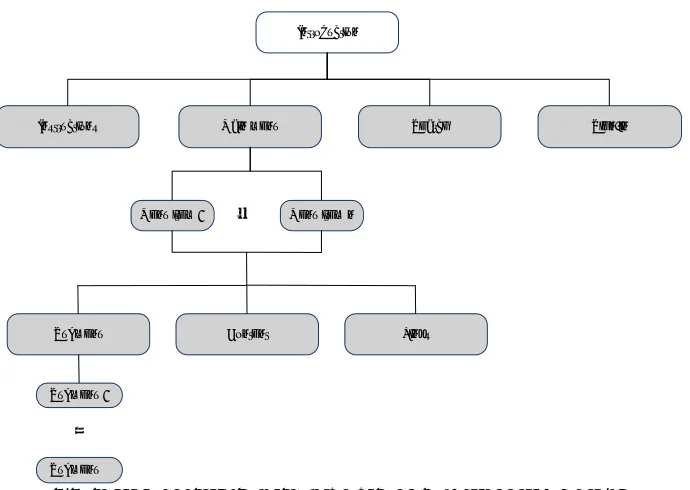
The diagram on Fig.1 shows the elements of the menu and content structure, as well as the process of audio presentation of a web page. The structure is organized as a tree to allow faster traversal through the site and more intuitive navigation to the users, similar to navigating over a real website. During analysis of webpages and web applications it was determined that almost all webpages can be drilled down to some form of the presented structure. This is important since it makes the proposed model applicable to almost all webpages, following the required process of content analysis and semantics derivation from raw source.
Figure 1 - General structure of SOS-Web model enabled website
Audio presentation of the website is performed by traversing the depicted data structure. First, a custom introductory message is read, followed by the sequence of
options. Then, the Instructions option is read, followed by the
Main menu option. If the Search or Sign in features are
available, they will be read next, respectively. These top-level elements, greyed on Figure 1, are active elements: interacting with them while they are being read results with an action
being performed. Selecting Instructions will read the message
explaining how the website is presented and how to interact
with SOS-Web extension. Main menu action will start
reading the main menu items, moving to the next level of the
data structure depicted on Figure 1. Search action will prompt
the search bar and enable input. Sign in action will prompt the
field in which the user credentials are entered. Content will
proceed to read text content on the current page. Links option
will read links found in the current page. These options will be presented in a loop until user activates the desired action
Introduction
Main menu
Instructions Search Sign-in
Menu item 1 … Menu item n
Submenu Content Links
Submenu 1
Submenu n
…
EAI Endorsed Transactions onAmbient
Systems
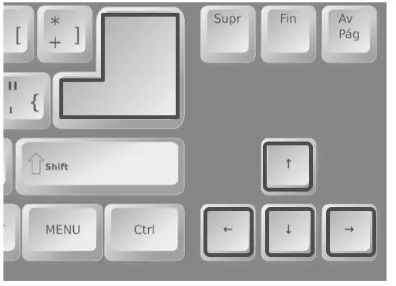
by keyboard input. Users can interact with SOS-Web using a keyboard, with all the control keys displayed in Figure 2.
Figure 2 - Keys for interaction with SOS-Web
Control keys were selected according to their general function, but proximity was also taken into account, so users could interact with SOS-Web using a single hand. Using the cursor keys, users can take control over the sequence in which
the elements are being read, at any time. Keys left and right
will traverse the sequence of elements on the same level of
the data structure, while the up key will move the focus to the
parent node in the data structure, reading its audio sequence.
Enter key activates actions available on active elements
described previously.
When the Main menu action is activated, menu items are
being read in a sequence. If the user decides to immediately select the menu item currently being read, it can be performed
by pressing the Enter key. If no menu item has been selected,
the sequence will be repeated. Users can always use the
cursor keys and Enter to select and activate the desired item.
4. Case Study on Example Institutional
and Educational Web Applications
While SOS-Web model was being developed, it was decided that the solution should not require any additional setup or installation from the users' perspective. It is our opinion that all the preparations should be done on the web server by the content providers and users should not be burdened with installation of additional software. This allows the users to access websites or applications with SOS-Web from any device, without the need for having one special device with preinstalled software for this purpose.
In order to produce synthesized voice, the proposed model needs to communicate with a text-to-speech synthesis service. The complete architecture consists of the following components, as shown on Figure 3:
(i) SOS-Web enabled website
(ii) Client with web browser
(iii) Text-to-speech synthesis service
After accessing the website via web browser, the JavaScript code used for controlling SOS-Web and reproducing synthesised speech is downloaded to the browser. It immediately starts with introductory message and waits for the user input from keyboard in order to continue. As the user navigates through menus and submenus using keyboard, the corresponding text is either converted into speech by text-to-speech synthesis service, or loaded from the local SOS-Web cache. Caching is important in order to reduce unnecessary network traffic and increase speed. For the prototype purposes a text-to-speech synthesis for Croatian language was developed using Festival TTS [11].
Figure 3 - SOS-Web network architecture
When examining integration of SOS-Web with specific, existing, websites, it is obvious that it should be integrated with the existing technology stack used on the target website. Since our initial focus was on Croatian institutional websites, and a large percent of them is built using Drupal [12], the first SOS-Web prototype case study was implemented for integration with that content management system.
4.1. Implementation of SOS-Web on
institutional website
As a first example website we used HAKOM (Croatian Regulatory Authority for Network Industries) [13] site as a target website for development of the model. For the purpose of SOS-Web prototype, a testing instance of the website was set up, with content identical to the original site. After processing the existing content of the website, a specific SOS-Web structure for the specific website was built, as shown on Figure 4.
It should be emphasized that the presented structure is subject to change in any given moment if the website content is updated (e.g. a new menu or article is added or updated). However, this adaptation of the structure is not done automatically since we wanted to avoid possible errors. Therefore, the website administrator runs a script that updates the structure, typically done in a matter of seconds.
Evaluation was done by the project team performing a blindfolded experiment. All participants were wearing a blindfold while trying to follow the instructions presented by
Internet
SOS-Web enabled website
Text-to-speech synthesis
service
Web browser
requests speech synthesis
provides mp3
requests content
provides speech and controls
plays speech enables controls serve speech
5
SOS-Web extension. The goal was to interact with SOS-Web in order to successfully consume the content they were interested in.
The concept proved functional and fairly usable. Feedback from the evaluation group revealed that website content is presented in an understandable and user-friendly way. Interaction with SOS-Web could be performed successfully, with users being able to use the spoken navigation menu and select the content. Some disadvantages were revealed, as well. Most notable was the comment that the pause between
items being read is too short, which sometimes resulted with menu items not being recognized correctly. Furthermore, the text-to-speech synthesis service could not properly synthesize the entire content, with problematic examples being e-mail addresses, abbreviations, and numbers.
The synthesized speech result was described as comprehensible, but lacking natural pronunciation. It was concluded that the reading speed should be slightly reduced, with pauses between sentences more emphasized.
Figure 4 - SOS-Web model applied to institutional website
4.2. Implementation of SOS-Web on
interactive educational web-application
After evaluating the prototype on an example institutional web, there was a need to implement it on an educational web application. The team that developed the SOS-Web is working within the Competence Network ICT-AAC [4], focused on use of assistive technologies and information communication technologies for helping persons with complex communication needs to more easily communicate, learn and integrate. One of the developed web applications
within the project is Vocals [14], used for learning words and
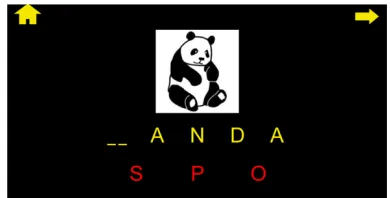
their pronunciation. Since some of our users are visually impaired to various extents, the application has a special high-contrast mode option implemented form the initial development phase, as shown on Figure 5.
Figure 5 - Vocals application with high-contrast mode and text-to-speech capability
However, this mode is still not suitable for users with severe visual impairments, so there was a need to add the text-to-speech capability to this educational application. The same generic SOS-Web model was used for this purpose, with a difference that the text should be read on mouse hover. In order to do so, the model data structure was built using the
Homepage
Instructions Main menu Introduction
Search
Submenu Home
Play Instructions
About us Documents Consumers Com. Netw. RF Spectrum Post
Content Links
Submenu 1
Submenu n
…
Play content Play links Play menu item
Site level segments
Page level segments
EAI Endorsed Transactions onAmbient
Systems
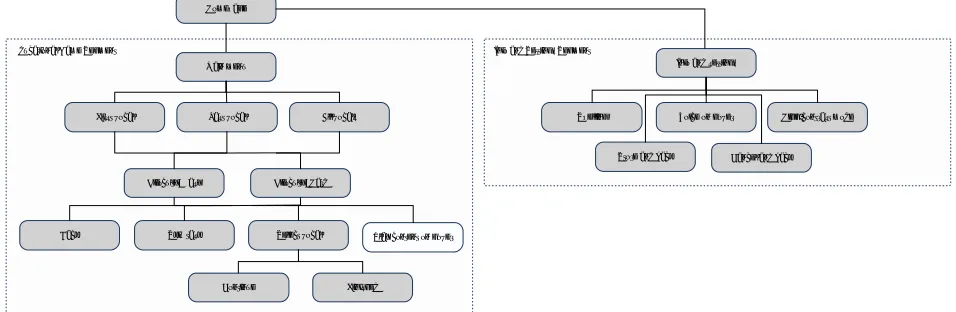
existing web application, but the controls that were used for institutional website were replaced by hover functionality. The SOS-Web data structure for educational application Vocals is presented on Figure 6. When comparing to Figure 4, it is clearly much simpler with lower menu and content depth, but it proves that the generic SOS-Web model can also be applied to this kind of web content.
After development, an initial evaluation with one user who has severe visual impairments was performed. Although the development team presumed the hover solution would be best for this type of application, it proved to be too complex for usage, especially when working on a large screen. This is
because the user had difficulties finding the central symbol (Figure 5) in order to position himself on the screen with a mouse. Although the text-to-speech and SOS-Web model performed well onwards, the initial positioning was frustrating and the conclusion is that keyboard navigation is much more suitable for web applications, as well as websites. It should also be noted that this solution did not use synthesized speech. The required voices were pre-recorded in order to achieve the maximum amount of comprehension by users since they mainly consist of children.
Figure 6 - SOS-Web model applied to educational web application
5. Conclusion
In this paper, a SOS-Web model for adding text-to-speech ability to websites and applications is proposed. Unlike the existing solutions that offer generic text-to-speech capabilities with little or no regards of the web structure, the proposed model is built around specific content of each website or application. Its speciality is that it derives menus and data structure, necessary for usable text-to-speech, from the raw source of the web in question and builds a tree-like structure. This, in turn, allows easier text-enabled navigation through the menus and more segmented pronunciation of the web content which makes it easier to use.
The proposed SOS-Web model is applicable to almost all websites and applications due to the proposed general menu and data structure. The paper presents how the model can be applied to an institutional website and to educational interactive web-application. Furthermore, the presented case studies and preliminary evaluation results on a limited number of users show that the best way of navigation when using text-to-speech is keyboard, as opposed to mouse hover functionality.
At this point in time, the SOS-Web is an early prototype, implemented and tested on a single institutional website and a single educational web application. The proposed
solution could be adjusted to support a greater number of websites, regardless of their technology stack. In order to achieve this, there are several features which would need to be implemented or upgraded. First, the proposed model for detecting structure from raw website source could be updated to detect more unstructured data, such as specific sub-menus and similar. Second, the solution could be expanded to recognize the website language and adapt the text-to-speech synthesis accordingly. Currently, it can work only with a single synthesis service over the web (Croatian was used for evaluation purposes). Some of the more advanced improvements could be related to integrating SOS-Web with web speech API [15] which would make it possible to control the SOS-Web using voice commands. All these improvements will be considered as future work.
References
[1] W3C: Web Content Accessibility Guidelines (WCAG), https://www.w3.org/standards/techs/wcag, web, accessed in March 2017.
[2] Vučak, Ivan, Marin Vuković, and Željka Car. "Analysing e-accessibility on selected web sites from catalogue WWW. HR." 14. CARNetova korisnička konferencija CUC 2012. 2013.
[3] Mark Rogers: Government accessibility standards and WCAG 2, 2016, web,
Homepage
First vocal Last vocal All vocals Main menu
Difficulty: Easy Difficulty: Hard
Back Skip task Select vocal Play content on hover
Continue Finished Educational Game Segment
Info and settings
Spelling Voice on hover High-contrast mode
7
https://www.powermapper.com/blog/government-accessibility-standards/, accessed in March 2017.
[4] Competence Network ICT-AAC, http://www.ict-aac.hr, web, 2017, accessed in March 2017.
[5] BrowseAloud, https://www.texthelp.com/en-gb/products/browsealoud, web, accessed in February 2017. [6] ReadSpeaker, http://www.readspeaker.com, web, accessed
in March 2017.
[7] Sitecues, https://sitecues.com, web, accessed in March 2017.
[8] Select and Speak, http://www.ispeech.org/#/home, web, accessed in March 2017.
[9] TTS Reader X, http://ttsreader.com, web, accessed in March 2017.
[10] Raman, T.V., Chen, C.L., Mazzoni, D., Shearer, R., Gharpure, C., DeBoer, J., Tseng, D.: ChromeVox: A Screen Reader Built Using Web Technology, Google Inc., 2012. [11] H. Zen, T. Nose, J. Yamagishi, S. Sako, T. Masuko, A.W.
Black, K. Tokuda, The HMM-based speech synthesis system version 2.0, Proc. of ISCA SSW6, Bonn, Germany, Aug. 2007.
[12] Drupal – Open Source CMS, www.drupal.org, web, accessed in February 2017.
[13] HAKOM: Croatian Regulatory Authority for Network Industries, www.hakom.hr, web, accessed in February 2017.
[14] ICT-AAC Vocals,
http://www.ict- aac.hr/index.php/en/developed-applications/web-applications/vocals, web, accessed in March 2017. [15] W3C: Web Speech API Specification,
https://dvcs.w3.org/hg/speech-api/raw-file/tip/speechapi.html, web, accessed in March 2017.
EAI Endorsed Transactions onAmbient
Systems