3D PASSWORD-SECURE AUTHENTICATION
Monica Sehrawat
1, Niyati Jaiswal
2UG,
1,2Department of Computer Science Engineering,
Raj Kumar Goel institute of Technology for Women, Ghaziabad,
Gautam Buddh Technical University, Lucknow, (India)
ABSTRACT
The 3D password authentication scheme is based on a combination of multiple sets of factors. A 3D virtual
environment is presented to the user where he navigates and interacts with a multitude of objects which are
present. The 3D password key space is built on the basis of the design of the 3D virtual environment and the
nature of the objects selected. The advantage of the 3D password is that it can combine many existing systems of
authentication, providing an extremely high degree of security to the user... Several techniques like face
recognition, fingerprint recognition, hand geometry, iris recognition, and palm print, vascular pattern
recognition can be used. Pins and passwords may be forgotten and token based identification methods such as
passports and driver licenses may be forged, stolen, or lost.
3D Password is constructed by observing the action and interaction of the user and by observing the sequence
of such action. We assume that user can navigate into the 3D virtual environment and interact with the objects
using any input device such as a mouse, keyboard, fingerprint scanner, card reader and microphone. We
consider the sequence of those action and interaction using the previous input device as the user’s 3D
password.
I INTRODUCTION
The fundamental principle behind graphical passwords is that users would find it easier to remember and
identify pictures as compared to words. Normally the authentication scheme the user undergoes is particularly
very lenient or very strict. Throughout the years authentication has been a very interesting approach.
When a person uses textual passwords, he likely chooses meaningful words from dictionary or their nick names,
girlfriends etc which can be cracked easily. And if a password is hard to guess then it is hard to remember also.
Users face difficulty in remembering a long and random appearing password and because of that they create
small, simple, and insecure passwords that are easy to attack. Graphical passwords can also be used. Their
strength comes from the fact that users can recall and recognize pictures more than words. Token based systems
can also be used as way of authentication in banking systems and for entrance in laboratories. But smart cards or
tokens are susceptible to loss or theft. Biometric scanning is your "natural" signature and Cards or Tokens prove
Human authentication techniques can be classified as:
II TEXTUAL PASSWORD
Recall based techniques require the user to repeat aur reproduce the secret that the user created before. Textual
Passwords should be easy to remember at the same time hard to guess. One major drawback of textual password
is that Full password space for 8 characters consisting of both numbers and characters is 2 *1014.From research
25% of the passwords out of 15,000 users can guessed correctly by using brute force dictionary.
III GRAPHICAL PASSWORD
Graphical password are based on the idea that a users can recall and recognize pictures more than words. But
most graphical passwords are susceptible for shoulder surfing attacks, where an attacker can observe or record
the valid user graphical password by camera. Currently most of the graphical password are in the research phase
and require more enhancement and usability studies to develop them in the market.
IV 3D PASSWORD
The 3D Password scheme is a new authentication scheme that combines RECOGNITION + RECALL +
TOKENS + BIOMETRIC in one authentication system. The system of authentication presents a 3D virtual
environment to the user where in the user navigates and interacts with the multitude of objects that may be Human Authentication
techniques
Textual Password
Graphical Password
ATM cards
Keys
ID cards
Fingerprints, Palmprints
Hand geometry
Face, Iris, Voice, Retina recognition Knowledge Based - What
you KNOW
Token Based -What you HAVE
present. The order in which actions and interactions are performed with respect to the objects constitutes the
user’s 3D password. The 3-D password is constructed by observing the actions and interactions of the user and
by observing the sequences of such actions. It is the user’s choice to select which type of authentication
techniques will be part of their 3-D password. The 3D password key space is built on the basis of the design of
the 3D virtual environment and the nature of the objects selected. Moreover, any user input (such as speaking in
a specific location) in the virtual 3-D environment can be considered as a part of the 3-D password. We can have
the following objects:
i. A computer with which the user can type;
ii. A fingerprint reader that requires the user’s fingerprint;
iii. A biometrical recognition device;
iv. A paper or a white board that a user can write, sign, or Draw on;
v. An automated teller machine (ATM) that requests a token;
vi. A light that can be switched on/off;
vii. A television or radio where channels can be selected;
viii. A staple that can be punched;
ix. A car that can be driven;
x. A book that can be moved from one place to another;
xi. Any graphical password scheme;
xii. Any real-life object;
xiii. Any upcoming authentication scheme.
V EXPECTED FUNCTIONALITIES
i. The user can decide his own authentication schemes. If he's comfortable with Recall and Recognition
methods then he can choose the 3d authentication just used above. ii.
The authentication can be improved since the unauthorised persons will not interact with the same object as a legitimate user would. We can also include a timer. Higher the security higher the timer. Say after 20 seconds a weak password will be thrown out.
iii.
The 3D environment can change according to user’s request. iv.
It would be difficult to crack using regular techniques. Since all the algorithms follow steps to authenticate, our project has no fixed number of steps. Hence to calculate all those possibilities and decipher them is not easy.
v.
Can be used in critical areas such as Nuclear Reactors, Missile Guiding Systems etc. Added with biometrics and card verification, and the scheme become almost unbreakable.
VI WORKING
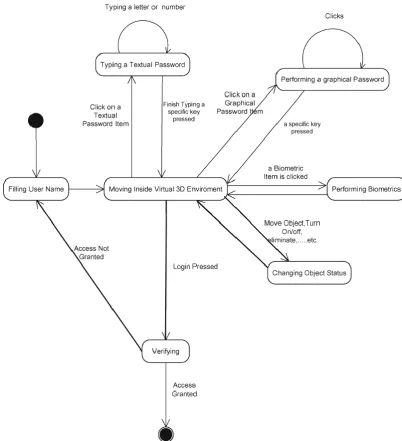
Consider a three dimensional virtual environment space that is of the size G×G×G. Each point in the three
dimensional environment space represented by the coordinates (x, y, z) ∈ [1...G] × [1...G] × [1...G]. The objects
are distributed in the three-dimensional virtual environment. Every object has its own (x, y, z) coordinates.
objects and interact with the objects. The input device for interactions with objects can be a mouse, keyboard,
stylus, a card reader, a microphone…etc. The design of 3-D virtual environments should follow these
Guidelines
.
Fig : State diagram of a possible 3-D password application
VII ENVIRONMENT – CUBE
The second environment presented in this paper is that of a cube. Figure 3 shows a snapshot of environment.
When this environment is selected, the cube is placed at an initial position of (400, 240, 0) co-ordinates with
respect to the x, y and z axis. In addition to this point in the environment, another point known as the camera
It is a reference point, or the point from which the user can see the sequence of actions and interactions that are
being performed on the cube. There are mainly four actions that can be performed within this environment, each
being further divided into six sub actions and as well as an input action which is used to load an image onto each
side of the cube. The four main actions are described below [1]: Move Cube: This is a main move cube action
having the following six sub actions, Left, Right, Up, Down, In, Out. A click on each of these buttons translates
the cube by 45 co-ordinates with respect to the button is clicked. The maximum number of times each button
can be clicked is six. Clicking the button for a seventh time will result in an error message to the user indicating
that the maximum limit has been crossed. Rotate Cube: This main action has the following sub actions, rotate
cube x-direction, y-direction, z- direction and –x-direction, -y-direction, -z-direction. A single click on one of
these buttons will rotate the cube in a 45° direction with respective to which button is clicked. The maximum
number of times each button can be clicked is six. Clicking the button for a seventh time will result in an error
message to the user indicating that the maximum limit has been crossed.
The second environment presented in this paper is that of a cube. Figure 3 shows a snapshot of environment2.
When this environment is selected, the cube is placed at an initial position of (400, 240, 0) co-ordinates with
respect to the x, y and z axis. In addition to this point in the environment, another point known as the camera
point is fixed. The camera position is set at the co-ordinates (400, 240,-500) on the x, y and z axis respectively.
It is a reference point, or the point from which the user can see the sequence of actions and interactions that are
being performed on the cube. There are mainly four actions that can be performed within this environment, each
being further divided into six sub actions and as well as an input action which is used to load an image onto each
side of the cube. The four main actions are described below [1]: Move Cube: This is a main move cube action
having the following six sub actions, Left, Right, Up, Down, In, Out. A click on each of these buttons translates
the cube by 45 co-ordinates with respect to the button is clicked. The maximum number of times each button
can be clicked is six. Clicking the button for a seventh time will result in an error message to the user indicating
that the maximum limit has been crossed. Rotate Cube:
This main action has the following sub actions, rotate cube x-direction, y-direction, z- direction and
with respective to which button is clicked. The maximum number of times each button can be clicked is six.
Clicking the button for a seventh time will result in an error message to the user indicating that the maximum
limit has been crossed.
VIII RESULTS
In environment the suggested scheme creates the password by moving, rotating and performing zoom operations
on the cube. In order to create the codeword there are four different actions i.e., moving cube, rotating cube,
moving camera, rotating camera along the x, y, z axis. And for each action user can perform the six different
interactions. The terms to calculate password space for environment -2 are [1]: G – (G ×G×G) → number of
actions, interactions and inputs. Number of actions = 4 (moving cube, rotating cube, moving camera, rotating
camera) Number of interactions = 6 Number of inputs = 6 (Placing an image on each side of cube) So, G =
G×G×G = 4×6×6 = 144 m → All possible actions and interactions towards all existing objects in environment.
For Proposed scheme environment is, for each action we have total 36 interactions so total possible interactions
are m = 1679616. Lmax → specifies the maximum length of password, for this environment by taking the input
i.e. the images on each side of cube having the name six characters wide then the value for Lmax is 111. G (AC)
→ Count of total number actions and interactions towards virtual environment. For this environment it is 24 (6
× 4) Now, the password space for this environment is [1]: n=Lmax П (Lmax, G) = Σ (m + g (AC)) n n=1 After
placing the values n=111 П (111, 144) = Σ (1679616 + 24) n n=1 The value obtained gives the total amount of
space required in bytes to store passwords for environment.
IX 3D PASSWORDS DIFFERENTIATORS
i. Flexibility: 3D Passwords allows Multifactor authentication biometric, textual passwords can be
embedded in 3D password technology.
ii. Strength: This scenario provides almost unlimited passwords possibility.
iii. Easy to Remember: can be remembered in the form of short story.
iv. Privacy: Organizers can select authentication schemes that respect user’s privacy.
X 3D PASSWORD APPLICATION AREAS
i. Critical Servers: Many organizations are using critical servers which are protected by a textual
password. 3Dpassword authentication scheme proposes sound replacement for these textual passwords.
ii. Banking: Almost all the Indian banks started 3Dpassword service for security of buyer who wants to
buy Online or pay online. How to create 3D password for my master card? Our online payment will
fail, if will create 3Dpassword, so for generating 3D password, we have to goto our bank's website and
then, click 3D secure service and then write our card number, CVV, pin no., and write our password
and rewrite it and then click ok or submit. After this we will get thank you message. LikePNB, SBI
also started 3D secure services for verified byVisa.Verified by Visa is a new service that will let you
use a personal password with your State Bank ofIndiaVisa card, giving you added assurance that only
iii. Nuclear and military Facilities: 3D password has a very large password space and since it combines
RECOGNITION + RECALL+TOKENS+BIOMETRIC in one authentication system, it can be used for
providing security to nuclear and military facilities.
iv. Airplanes and Jetfighters: Since airplanes and jet planes can be misused for religion and political
agendas, they should be protected by a powerful authentication scheme.
v. ATMs, Desktop and Laptop Logins, Web Authentication.
XI CONCLUSION
There are many authentication schemes in the current state. Some of them are based on user’s physical and
behavioural properties, and some other authentication schemes are based on user’s knowledge such as textual
and graphical passwords. Moreover, there are some other important authentication schemes that are based on
what you have, such as smart cards. Among the various authentication schemes, textual password and
token-based schemes, or the combination of both, are commonly applied. However, as mentioned before, both
authentication schemes are vulnerable to certain attacks. Moreover, there are many authentication schemes that
are currently under study and they may require additional time and effort to be applicable for commercial use.
The 3-D password is a multifactor authentication scheme that combines these various authentication schemes
into a single 3-D virtual environment. The virtual environment can contain any existing authentication scheme
or even any upcoming authentication schemes by adding it as a response to actions performed on an object.
Therefore, the resulted password space becomes very large compared to any existing authentication schemes.
The design of the 3-D virtual environment, the selections of objects inside the environment, and the object’s
type reflect the resulted password space. It is the task of the system administrator to design the environment and
to select the appropriate object that reflects the protected system requirements. Additionally, designing a simple
and easy to use 3-D virtual environment is a factor that leads to a higher user acceptability of a 3-D password
system.
The choice of what authentication schemes will be part of the user’s 3-D password reflects the user’s
preferences and requirements. A user who prefers to remember and recall a password might choose textual and
graphical passwords as part of their 3-D password. On the other hand, users who have more difficulty with
memory or recall might prefer to choose smart cards or biometrics as part of their 3-D password. Moreover,
users who prefer to keep any kind of biometrical data private might not interact with objects that require
biometric information. Therefore, it is the user’s choice and decision to construct the desired and preferred 3-D
password.
The 3-D password is still in its early stages. Designing various kinds of 3-D virtual environments, deciding on
password spaces, and interpreting user feedback and experiences from such environments will result in
enhancing and improving the user experience of the 3-D password.
Moreover, gathering attackers from different backgrounds to break the system is one of the future works that
will lead to system improvement and prove the complexity of breaking a 3-D password. Moreover, it will
attacks. Shoulder surfing attacks are still possible and effective against 3-D passwords. Therefore, a proper
solution is a field of research.
REFERENCES
[1] Alsulaiman, F.A.; El Saddik, A., "Three- for Secure, "IEEE Transactions on Instrumentation and
measurement”, vol.57, no.9, pp 1929-1938.Sept. 2008
[2] D. V. Klein, Foiling the cracker: “A survey of and to passwords security in Proc. USENIX Security”, pp.–14
[3] I. Jermyn, A. Mayer, F. Monrose, M. K. Reiter, and A. D. Rubin, “The design and analysis of graphical
passwords, in Proc. 8th USENIX Security Symp”, Washington DC, Aug.1999, pp.1-14.
[4] X. Suo, Y. Zhu, and G. S. Owen, “Graphical passwords: A survey,‖ in Proc”. 21st Annual. Computer
Security Appl. Conf., Dec. 5–9, 2005, pp. 463–472.
[5] D. Weinshall and S. Kirkpatrick, "Passwords You’ll Never Forget, but Can’t Recall," in Proceedings of
Conference on Human Factors in Computing Systems (CHI). Vienna, Austria: ACM, 2004, pp. 1399-1402.
[6] L. Sobrado and J.-C. Birget, "Graphical passwords," The Rutgers Scholar, An Electronic Bulletin” for
Undergraduate Research, vol. 4, 2002.
[7] D. Hong, S. Man, B. Hawes, and M. Mathews, "A password scheme strongly resistant to spyware," in
Proceedings of International conference on security and management. Las Vergas, NV, 2004.
[8] S. Man, D. Hong, and M. Mathews, "A shouldersurfing resistant graphical password scheme," in
Proceedings of International conference on security and management. Las Vegas, NV, 2003.