A Survey on Virtualization Service Providers, Security
Issues, Tools and Future Trends
Pooja Kedia
Amity University Noida, Uttar PradeshRenuka Nagpal
Amity University Noida, Uttar PradeshTejinder Pal Singh
JK Technosoft Noida, Uttar PradeshABSTRACT
Virtualization technology has emerged out as a cornerstone of the IT industries as it has transformed the way the IT infrastructure is deployed in the industries now a days. As virtualization provides a bundle of eye catching features such as flexibility, reduced downtime, cost effectiveness, scalability etc. therefore, it has become the driving force for leveraging IT industries. Hence, it has now become a primary need for an organization to investigate each and every aspect of virtualization before adopting it. This paper discusses the basic virtualization, types of virtualization, virtualization service provides, security issues, comparison among virtualization tools and the upcoming virtualizations trends.
General Terms
Cloud computing, Virtualization
Keywords
Virtual machines, Security, Virtualization Tools
1.
INTRODUCTION
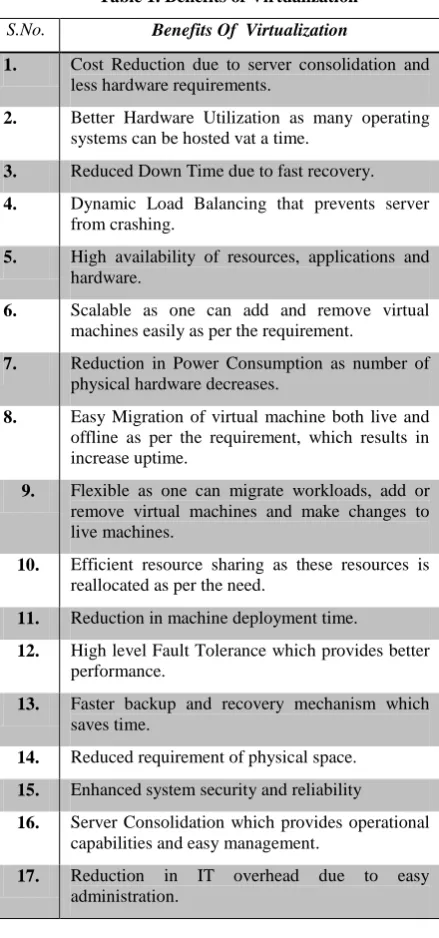
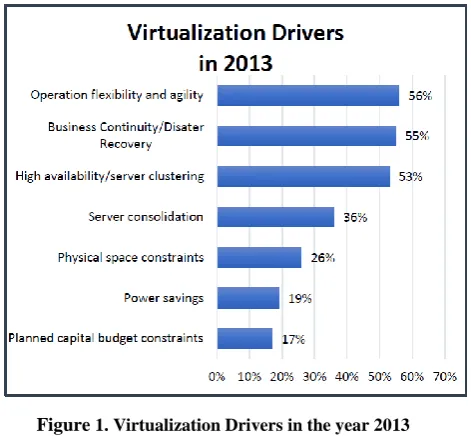
[image:1.595.314.534.205.675.2]Virtualization has emerged as a key technology in exponentially increasing the growth rate of an organization. Virtualization is the foundation of cloud computing and forms the base for offering cloud services therefore, it is very essential for an organization to be aware of the virtualization technology and its benefit. Virtualization is defined as “a framework or methodology of dividing the resources of a computer into multiple execution environments, by applying one or more concepts or technologies such as hardware and software partitioning, time-sharing, partial or complete machine simulation, emulation, quality of service, and many others.”[1]. Day by day virtualization is gaining a lot of popularity as it increases the hardware utilization and provides an easy management of the infrastructure. A survey conducted by „InformationWeek‟ [8] listed the drivers of virtualization for the year 2013 which will act as a catalyst in adopting this technology. These drivers can be seen in figure1. Virtualization renders cost efficient usage of IT Infrastructure. Virtualization enhances flexibility and agility by detaching workloads and data from the functional side of physical infrastructure [4]. Some of the benefits of virtualization are mentioned in table 1 [2]. Virtualization is emerging as a boon to IT industries but there are some issues which can inhibit the growth of virtualization. This paper discusses all the pros and cons of virtualization. It is divided into five sections. In Section 2, we will discuss the types of virtualization. Top virtualization providers are stated in section 3. In section 4 we will discuss the security issues of virtualization. Virtualization tools will be discussed in section 5. Future virtualization trends will be covered in section 6.
Table 1. Benefits of Virtualization
S.No. Benefits Of Virtualization
1. Cost Reduction due to server consolidation and less hardware requirements.
2. Better Hardware Utilization as many operating systems can be hosted vat a time.
3. Reduced Down Time due to fast recovery.
4. Dynamic Load Balancing that prevents server from crashing.
5. High availability of resources, applications and hardware.
6. Scalable as one can add and remove virtual machines easily as per the requirement.
7. Reduction in Power Consumption as number of physical hardware decreases.
8. Easy Migration of virtual machine both live and offline as per the requirement, which results in increase uptime.
9. Flexible as one can migrate workloads, add or remove virtual machines and make changes to live machines.
10. Efficient resource sharing as these resources is reallocated as per the need.
11. Reduction in machine deployment time.
12. High level Fault Tolerance which provides better performance.
13. Faster backup and recovery mechanism which saves time.
14. Reduced requirement of physical space.
15. Enhanced system security and reliability
16. Server Consolidation which provides operational capabilities and easy management.
Figure 1. Virtualization Drivers in the year 2013
2.
TYPES OF VIRTUALIZATION
Virtualization permits segregation and abstraction of underlying hardware and lower level operations which facilitates probability of higher level operations and sharing and/or aggregation of the physical resources. Virtualization technology can be categorized into the following:
2.1
Full Virtualization
In Full Virtualization, the hardware interface provided to hypervisor is almost the same as provided by the hardware‟s physical platform. This means that for virtualization there is no alteration required to the operating systems and applications if they are compatible with the underlying hardware [5]. Full virtualization is categorized into:
2.1.1 Bare metal Virtualization
In this type of full virtualization, there is no host operating system i.e. the hypervisor directly runs on the underlying hardware. It is also known as Native virtualization and uses Type 1 Hypervisor.
2.1.2 Hosted Virtualization
In this class of full virtualization, there is a host operating system which can be any common OS such as Linux, Windows etc. on which the hypervisors runs. Hosted virtualization architectures have an additional layer of software (the virtualization application) running in the guest OS that provides utilities to control the virtualization while in the guest OS, such as the ability to share files with the host OS [5]. . It uses Type 2 Hypervisor.
2.2
Para Virtualization
In contrast to full virtualization, in para virtualization the running guest operating system is altered in order to function in the virtual environment. In this technique, the guest machine knows that they are running in a virtual environment [2]. The main advantage of using this technology is that it reduces the virtualization overheads and provides better performance. Xen, which is an open source, is the example of para virtualization.
2.3
Operating System Virtualization
In Operating system virtualization the kernel of an operating system permits for multiple isolated user-space instances. These instances run over the top of a residing host OS system and render a set of libraries with which applications interact, providing them with the illusion that they are running on a machine dedicated to its use. It is also known as Container based virtualization. [17]
2.4
Desktop Virtualization
Desktop Virtualization is a mechanism to render a PC environment with central applications from a central server. It enables users to run applications for different operating systems on a single host [2]. It offers the flexibility to relocate applications and clients when required.
2.5
Server Virtualization
In server virtualization, base hardware is virtualized, which permits guest operating environments to run directly above the hardware, without the need of complete host OS. Server virtualization is a form of hardware virtualization in which many virtual server runs on a single physical server. [13]
2.6
Application Virtualization
In Application virtualization, a user can run a server application locally with the help of local resources without completely installing the application on the system. It provides an isolated application virtual environment to each user which acts as a layer between the host and the operating system [6]. Example of application virtualization is Java Virtual Machine (JVM) as it acts as an intermediary between the operating system and the Java application code [5].
2.7
Storage Virtualization
Storage virtualization is the technique of completely extracting the logical storage from physical storage and scattering it over network. It is a form of resource virtualization [6]. It is commonly used in Storage Area Network (SAN).
2.8
Network Virtualization
Network virtualization is the process of combining hardware and software resources into a virtual network as a single collection of resources. It helps in gaining better infrastructure utilization in terms of reusing a logical or physical resource for multiple other network resources such as hosts, virtual machines, routers etc. Its help in reducing cost by sharing network resources.
2.9
Resource Virtualization
Resource virtualization is regarded as "storage volumes, name spaces and the network resources" in a virtualized system. All the components may aggregate into a larger resource pool and a single resource such as disk space can partitioned into number of smaller and easily accessible resources of same type [7].
3.
VIRTUALIZATION PROVIDERS
In today‟s era, where every organization wants to be the best, it‟s hard for them to figure out the provider that could completely understand their requirements and provide them the best solution. Hence, before selecting a provider for catering them, it‟s very essential for an organization to gather information about all the providers available and identify who can serve them best. „CRN‟ included 20 virtualization providers in Data Centre 100 list for the year 2013, out of which top 11 virtualization providers are mentioned in table 2
[3]. According to the list, VMware is the global leader and is ranked no. 1 in providing virtualization services. Microsoft which is growing with a faster pace has now become the close competitor of VMware in offering virtualization services. Citrix Systems is also there in the race with VMware and Microsoft providing excellent desktop virtualization services. Beside these virtualization providers there are many other providers too that provides such services.
[image:3.595.51.551.210.743.2]
Table 2. Top Virtualization Providers [3]
S.No. Virtualization Providers
About the Virtualization Provider CEO
1. VMware VMware was founded in 1998 and it is a global leader in providing server virtualization services.
Pat Gelsinger
2. Microsoft Microsoft is the second in server virtualization after VMware. It offers a set of virtualization tools that can manage both physical and virtual environment.
Steve Ballmer
3. Citrix Systems Citrix Systems founded in 1989 is now in the race with VMware and Microsoft. It is stronger in desktop virtualization and also offers server virtualization and Xen open source products.
Mark Templeton
4. AppSense AppSense founded in 1996 is the leading provider of User Virtualization technology.
Darren Antill
5. F5 Networks F5 is a global leader in the application delivery networking and offers VDI and server virtualization.
John McAdam
6. RES Software RES Software leads in workspace virtualization and provides desktop virtualization with easy management.
Klaus Besier
7. Red Hat In 2008 Red Hat entered in the world of virtualization. It offers a complete open source virtualization solution based on KVM
Jim Whitehurst
8. SolarWinds SolarWinds offers variety of services such as configuration management, performance monitoring and prevent VM spawl related issues.
Kevin Thompson
9. Virtual Bridges Virtual Bridges is the father of Virtual Desktop Infrastructure (VDI). It provides End-to-end desktop management solution combining VDI
Jim Curtin
10. Veeam Veeam focuses on data protection and offers virtual infrastructure management.
Rimar Timashev
11. Liquidware Labs Liquidware Labs was founded in 2009, and now it offers innovative solutions for desktop virtualization for the upcoming physical and virtual desktops
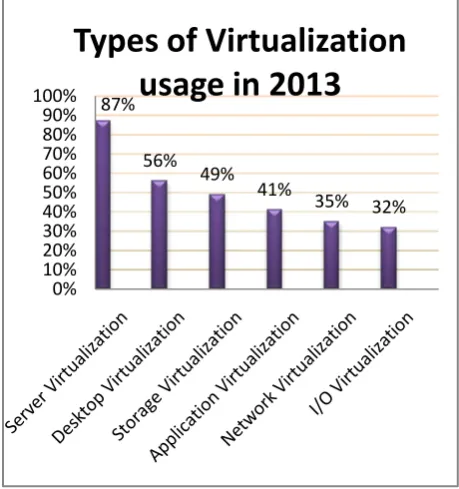
Figure 2. Virtualization usage in the year 2013
4.
VIRTUALIZATION SECURITY
ISSUES
Virtualization today is providing excellent features that enable organizations to simultaneously execute multiple operating systems along with the applications on a single physical server. Along with these positive features, virtualization technology has some negative aspects too. With the evolution of this technology new security issues are arising every day. As virtualization technology is gaining a lot of popularity day by day therefore, it is the ultimate need to discuss the security loop holes of this technology. Some of the virtualization security issues are stated below:
4.1
VM Escape
In an ideal virtualized environment multiple guest virtual machines can run in isolation without interacting with other virtual machine. But organizations compromise isolation in reality which makes room for vulnerabilities to enter. One such types of vulnerability is VM Escape. In VM Escape a program that runs inside a virtual machine will completely bypass the virtual machine layer, and get the full access to the host machine which results into complete breakdown of the system [9].
4.2
Malicious Code Injection:
Malicious code injection is a very common form of security threat in which, the attacker infects the virtual machine either by gaining access to it and injecting the malicious code or by tracing the location of virtual machine by monitoring the network and then inserting the malicious code into it.
4.3
Hypervisor Hyperjacking
In Hypervisor Hijacking, the hypervisor that runs under the host operating system is acquired by the attacker through which he can gain the complete access to virtual environment
by acquiring the guest virtual machines and servers [10]. It is a very critical security issues for a virtualized environment.
4.4
VM Spawl
VM Spawl is the biggest issue that every organization faces. In VM Spawl virtual machines are deployed in an uncontrolled manner as deploying a virtual environment is a quick and simple task [10]. Therefore, it‟s difficult to manage the virtual environment.
4.5
Side Channel Attacks
In side channel attacks, a physical characteristic of the hardware is exploited by the attacker in order to leak the information about CPU usage, memory usage and other resources. These attacks requires direct access to the host therefore, they are difficult to implement [2].
4.6
VM Alteration
There are many critical applications that depend on the infrastructure of virtual machine environment. These virtual machines on which the critical application is running should be trusted. If there is an alteration in the virtual machine, the trust will be broken while the critical applications will still keep on running. A best way to deal with this problem is to sign the virtual machine digitally and validate it before executing critical applications [9].
4.7
Rootkit Attacks
A rootkit is malicious stealthy software that is used by the attacker to hide the presence of various malicious processes or programs from being detected and provides privileged access to the system [11]. Rootkits attacks are serious threats as it attaches other malicious programs with it. Detecting a rootkit attack is difficult as it hides the existence of programs.
4.8
Guest –to-Guest Attack
Preventing host machine from attacks is more important than individual virtual machines. If the administrative privileges of hardware are compromised than the attacker can easily access virtual machines. The attacker can migrate from one virtual machine to another therefore, it is known as guest-to-guest attack [12].
4.9
VM Poaching
VM Poaching is similar to DoS attacks whose main objective is to overburden the hypervisor, drain out all of its resources and make it crash. Virtual machine‟s guest operating system consumes more resources than actually allocated to it and makes other virtual machines starve within the hypervisor. Therefore, it is also known as resource hogging [10].
4.10
Unsecure VM migration
VM Migration is an excellent feature of virtualization but its dynamic nature sometimes can be critical and can harm both the host and the virtual machine if security policies are not mapped properly at the time of migration.
4.11
Denial of service attack
Since all the virtual machines and hosts share the physical resources such as memory, CPU, disk etc. hence, denial of service attack can take place in contrast to other virtual machines existing in the same system. Thus a virtual machine will acquire all the resources and will prevent the other virtual 87%
56% 49%
41%
35% 32%
0% 10% 20% 30% 40% 50% 60% 70% 80% 90% 100%
machine to gain access of the resources. Denial of service attacks can be prevented by limiting the amount of resources
[image:5.595.49.563.92.622.2]allocated [9].
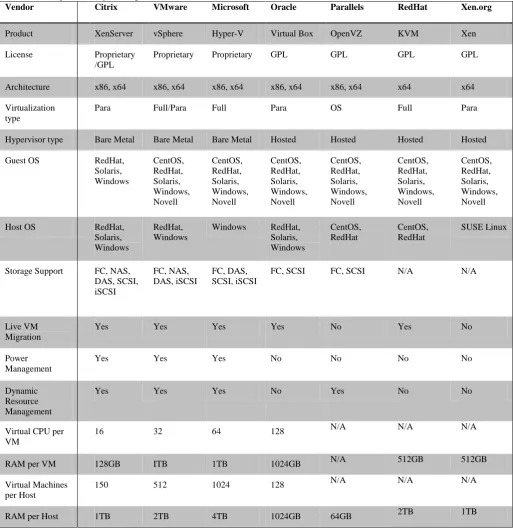
Table 3. A Comparison chart between various Virtualization Tools
5.
VIRTUALIZATION TOOLS
With the rapid evolution of virtualization, a wide variety of virtualization tools are available in the market. Therefore, it is very difficult to identify the best tool which can fulfill one‟s requirement. We have provided an elaborative comparison of various tools such as vSphere, Hyper-V, XenServer, VirtualBox, KVM, OpenVZ and Xen in table 3 [18, 19, 20, 21], on the basis of architecture support, virtualization type,
license type, OS support, storage support, RAM per VM, RAM per host, live migration etc. which will help in simplifying the task of choosing the appropriate tool.VMware is the market leader in delivering virtualization tools with excellent features such as vMotion, VM cloning, Distribued Resource Scheduler (DRS) etc. Its latest product released is
vSphere 5.1. Microsoft is also offering virtualization tools with some eye catching features such as 4TB of RAM support per host, thus giving a tough competition to VMware. Its
Vendor Citrix VMware Microsoft Oracle Parallels RedHat Xen.org
Product XenServer vSphere Hyper-V Virtual Box OpenVZ KVM Xen
License Proprietary /GPL
Proprietary Proprietary GPL GPL GPL GPL
Architecture x86, x64 x86, x64 x86, x64 x86, x64 x86, x64 x64 x64
Virtualization type
Para Full/Para Full Para OS Full Para
Hypervisor type Bare Metal Bare Metal Bare Metal Hosted Hosted Hosted Hosted
Guest OS RedHat, Solaris, Windows
CentOS, RedHat, Solaris, Windows, Novell
CentOS, RedHat, Solaris, Windows, Novell
CentOS, RedHat, Solaris, Windows, Novell
CentOS, RedHat, Solaris, Windows, Novell
CentOS, RedHat, Solaris, Windows, Novell
CentOS, RedHat, Solaris, Windows, Novell
Host OS RedHat, Solaris, Windows
RedHat, Windows
Windows RedHat, Solaris, Windows
CentOS, RedHat
CentOS, RedHat
SUSE Linux
Storage Support FC, NAS, DAS, SCSI, iSCSI
FC, NAS, DAS, iSCSI
FC, DAS, SCSI, iSCSI
FC, SCSI FC, SCSI N/A N/A
Live VM Migration
Yes Yes Yes Yes No Yes No
Power Management
Yes Yes Yes No No No No
Dynamic Resource Management
Yes Yes Yes No Yes No No
Virtual CPU per VM
16 32 64 128 N/A N/A N/A
RAM per VM 128GB ITB 1TB 1024GB N/A 512GB 512GB
Virtual Machines per Host
150 512 1024 128 N/A N/A N/A
latest released product is Hyper-V Server 2012. Products offered by both VMware and Microsoft are licensed.
[image:6.595.55.298.180.407.2]XenServer by Citrix Systems has both proprietary license and General Public License (GPL). It supports para virtualization and its latest release is XenServer 6.1. Some tools such as OpenVZ, KVM, Xen, VirtualBox are open source and have General Public License. According to a survey [8], VMware’s vSphere will be the top ranked tool in the year 2013.
Figure 3. Virtualization tools usage in the year 2013
6.
FUTURE VIRTUALIZATION
TRENDS
Virtualization is the most emerging technology of this decade in which the advancement is taking place exponentially. Most of the organizations are now aware of the advantages of adopting virtualization and thus are deploying virtualization solutions in order to reduce the downtime and to make efficient utilization of power. The future trends of virtualization are very promising. According to Frost and Sullivan [14], the market earned revenues of $48.4 million in 2011 and it is expected to reach $549.6 million in the year 2017. Day by day virtualization technology is gaining popularity. Forrester research analyst Dave Bartoletti [15] believes that by the end of 2013, virtualization usage will grow up to 77% and 6 out of 10 workloads will be running on virtual machines. Upcoming virtualization trends indicate that in order to shrink the size of the datacenters, many organizations will be virtualizing their existing physical servers. Approximately 40% of existing server workloads were virtualized in the year 2011 and Gartner studies predicts that 80% of all server workloads would be virtualized by the end of 2015 [16]. Virtualization technology usage is increasing day by day and so is the risk associated with it. There are many security loop holes in this technology which if compromised, can prove to be very expensive in future. Therefore, end users must be aware of security measures that should be considered while setting up a virtual environment.
7.
CONCLUSION
Virtualization has now become a dominant means of
day by day. The benefits such as reduced downtime, better hardware utilization, high availability etc. offered by this technology act as a catalyst in its growth but security issues and infrastructure complexity are some of the constraints that inhibit the growth of virtualization. This paper focuses on such security issues which makes the organization think that whether or not to move towards virtualization. Therefore, in order to reap the benefits of virtualization, proper security measures should be considered while leveraging a virtual environment. This paper also discusses various virtualization providers and compares the virtualization tools in order to help the organizations in determining the provider and tool that can serve them best. It also provides a clear picture about the upcoming virtualization trends thus, assisting the organization to decide whether to invest in virtualization or not. An Introduction to Virtualization,
8.
REFERENCES
[1] http://www.kernelthread.com/publications/virtualization/
[2] Jyotiprakash Sahoo, Subasish Mohapatra, Radha Lath, 2010, Virtualization: A Survey On Concepts,Taxonomy And Associated Security Issues, 2nd International Conference on Computer and Network Technology, IEEE.
[3] Kevin McLaughlin, 2013, Data Center 100: 20 Virtualization Providers By CRN, http://www.crn.com/ slide-shows/data-enter/240146634/2013-data-center-100-20-virtualization-providers.htm.
[4] Philip Dawson, 2010, Virtualization Key Initiative Overview,
http://www.gartner.com/it/initiatives/pdf/KeyInitiative Overview_Virtualization.pdf. Amit Singh, 2004,
[5] K. Scarfone, M. Souppaya, and P. Hoffman, 2011, Guide to Security for Full Virtualization Technologies, NIST Special Publication, 800-125.
[6] A. Mann, 2007, The pros and cons of virtualization BTQ, http://www.btquarterly.com/?mc=pros-cons-virtualizatio n\&page=virt-view%research.
[7] Li, Y., et al. 2010, A Survey of Virtual Machine System: Current Technology and Future Trends. Third International Symposium on Electronic Commerce and Security, IEEE.
[8] Jake McTigue, November 2012, 2013 Virtualization Management Survey, InformationWeek Reports.
[9] J. Kirch. Virtual machine security guidelines. The center for Internet Security, http://www.cisecurity.org/tools2 /vm/CIS_VM_Benchmark_v1.0. pdf.
[10]Vimal Vaidya, 2009, “Virtualization Vulnerabilities and Threats:A Solution White Paper, RedCannon Security, Inc.
[11]Rootkit, http://en.wikipedia.org/wiki/Rootkit
[12]Jenni Susan Reuben, 2007, A Survey on Virtual Machine. Security, Seminar of Network Security, Helsinki. University of Technology.
[13]Andi Mann, EMA Senior Analyst, August 2006, Virtualization 101: Technologies, Benefits, and Challenges.
[14]APAC Virtualization Security Market To Reach $549 Mn In 2017, September 2012, http://vmblog.com/archive 0%
10% 20% 30% 40% 50% 60% 70% 80%
59%
27% 20%
13%
11% 9% 5%
/2012/09/14/apac-virtualization-security-market-to-reach-549-mn-in-2017.aspx.
[15]Dave Bartoletti, February 2013, 2013 Server Virtualization Predictions: Driving Value Above And Beyond The Hypervisor http://www.zdnet.com/2013- server-virtualization-predictions-driving-value-above-and-beyond-the-hypervisor-700 0010706/.
[16]TeamQ, February 2012, Understanding Virtualization Comes with Challenges but Huge Benefits http://blog.quantum.com/index.php/2012/02/understandi ng-virtualization-comes-with-challenges-but-huge-benefits/.
[17]Rui Natário, November 2012, Operating System-Level Virtualization Explained, http://networksandservers.blog spot.in/2011/11/this-kind-of-server- virtualization-is.html
[18]VMware, vSphere Configuration Maximums, www.vm ware.com/pdf/vsphere5/r51/vsphere-51-configuration-maximums.pdf.
[19]Citrix,XenServer Configuration Limits, https://support.
citrix.com/servlet/KbServlet/download/32312-102-92726 /CTX134789%20-%20XenServer%206.1.0_Configura
tion%20Limits.pdf.
[20]Thomas Maurer, October 2012, Quick: Windows Server 2012 Hyper-V vs VMware vSphere 5.1, http://www.tho masmaurer.ch/2012/10/quick-windows-server-2012-hy per-v-vs-vmware -vsphere-5-1/.
![Table 2. Top Virtualization Providers [3]](https://thumb-us.123doks.com/thumbv2/123dok_us/8078407.781580/3.595.51.551.210.743/table-top-virtualization-providers.webp)