Perception based Cued Click Points
Harsh Kumar Sarohi
Department of ComputerScience Amity University
Noida,India
Farhat Ullah Khan
Department of ComputerScience Amity University
Noida,India
ABSTRACT
A Combination of username and password is most commonly used authentication technique. Graphical password facilitate memorability at the same time provide security against various attacks. In Graphical authentication user performs some events on pictures like clicking, dragging, moving mouse etc. Cued Click Point is one of the existing graphical authentication systems. This paper suggests an enhancement to click point based approach. In the proposed method click points will based on user perception of click points not on the basis of traditional technique like tolerance square .A perceptual hash function will be used for comparing click points made at registration time and login time. In the proposed method the click points will be compared based on the content of click points. This method provides more accuracy and security than any other methods available.
General Terms
Graphical Password Authentication, Graphical Authentication based on Perceptual hashing, Cued Click Point, Perception based CCP, Picture Password.
Keywords
Graphical Password Authentication, Graphical Authentication based on Perceptual hashing, Cued Click Point, Perception based CCP, Picture Password, Graphical User Authentication.
1.
INTRODUCTION
Several graphical authentication schemes have been proposed as an alternative to text-based passwords. It is supported by the fact that Human brain has remarkable ability to remember thousands of images with detail. Whereas it difficult to keep text in memory. Further, using pictures as password provide greater security.
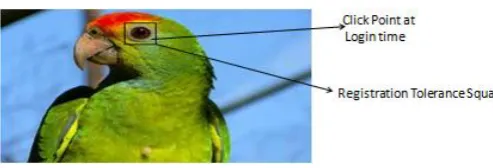
A cued click point approach has been to create first perception based graphical authentication system. In cued click point user has to make one click per image on the images presented to user at registration time same clicks are to be made at login time for authentication. Traditional approaches used tolerance square as the measure to compare click points. For e.g. If a user makes a click on parrot eye (see figure 1) at registration time, than the click made at login time should fall within this tolerance square for successful login. The major drawback is that user perceives that it has made parrot eye as click point but the fact is if someone clicks
[image:1.595.319.540.252.332.2]below the parrot eye (see figure 2) he also gets authenticated because click falls within the tolerance square.
Fig 1: Click Point at registration time
. Fig 2: Click Point at login time
2.
RELATED WORK
[image:1.595.318.565.399.483.2]inside the convex hull formed by objects. To make password space larger 1000 objects were used at login process. However, the display became crowded and it was difficult to find pass-objects. Hong et al. [5] proposed spyware resistant method in which at registration time the user is presented with a login screen divided in to grids each grid containing a icon. Each icon has no of variations (as shown in figure) .user has to select a pass-icons from the login screen .User has to enter a string corresponding to each variation of pass-icons. Dhamiga and Perrig[6] proposed a scheme called “Déjà vu” based on human ability to remember previously seen images. User has to select few images from a set of images. User has to perform same at login time. All abstract Images were generated using Andrej Bauer’s Random Art. User has to identify correct pass-image. It is similar to dhamiga and perrig. The only difference is that it store 20 byte hash code produced by SHA-1 hash function. It takes less memory but space occupied is still larger if compared to text-based password. They suggested using persistent storage for improvement. Jemryn et al. [7] proposed a technique called” Draw-a-secret (DAS)”.In this scheme during registration user has to draw something on a GRID of size Y X Y. The coordinates (X, Y) of the grid were stored in the order of drawing. To log in, user has to redraw such that the drawing touches the registered sequence of coordinates. This technique lead to increased password space, reduced traffic load, since images were not transferred over network. G.E blonder [8] designed a scheme in which a image is presented to user with tap regions, for authentication user has to click within those tap regions and in a sequence. The major drawbacks of this scheme was memorable password space moreover, user cannot click where he wants because of predetermined tap regions. SFR company [9] developed a scheme for mobile devices user has to select an image from the images stored in the device and tap on the spots in sequence this sequence is registered. To login user has to tap at same spots as and should be in registered sequence. The Inputs are within a certain tolerance area around it pre-defined by users, since it is difficult to touch at same exact spots. If input precision is large password will be easy to crack on the other hand if it is small it will be difficult for the user to tap at exact points. In visKey no of spots must be larger to prevent against brute force attacks. Passlogix [10] has proposed various schemes based on repeating a sequence of actions. In their v-Go scheme user has to select a background image e.g. kitchen, bathroom, bedroom and user can perform various actions with items present in image like clicking, dragging etc. Click on item is detected with the help of invisible boundaries on them. For example If kitchen is selected user can prepare meal by clicking and dragging cooking ingredients. The disadvantages of this technique included selecting weak passwords by users. Secondly, password space is small. Wiedenbeck et al. [11, 12] proposed a scheme in which user has to select a background. User can click arbitrarily on the image to register sequence of click points on image to be taken as password. When logging in, the user has to click on points as done during registration time. The click points are acceptable if they are within the predefined level of tolerance. This method has large password space. On doing Comparative study it was found that pass points are difficult to learn and it takes more time to input password as compared to text-based password. In Cued Click Points Unlike pass point rather than making multiple clicks on
password space and it is more resistant to shoulder surfing attack.
3.
METHODOLOGY USED
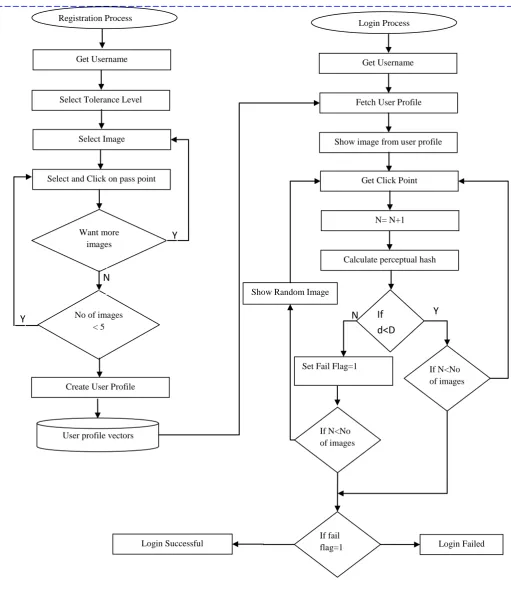
Images to be used during the authentication process are selected by the user. User makes click on each image during registration phase. The proposed system is shown in figure 5.The proposed method creates a user profile as shown in table 1.
3.1
Hash Calculation
3.1.1
Extract Sub Image
10 X 10 portion of the image is extracted where click was made. This 10 X 10 extracted image will now act as image for preparation of perceptual hash.
Fig 3: Extracted 10 X 10 portion
3.1.2
Resize Sub Image
The 10 X 10 image is resized to 8 X 8 to facilitate in DCT transform.
Fig 4: Conversion to 8 X 8
3.1.3
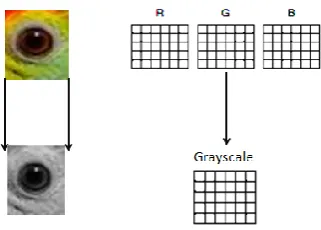
Grayscale Conversion
Fig 5: Flowchart for proposed system
Registration Process
Get Username
Want more images
No of images < 5
Y
Y
N
User profile vectors
Y
N
Select Tolerance Level
Select Image
Select and Click on pass point
Create User Profile
Login Process
Get Username
Fetch User Profile
Show image from user profile
Get Click Point
Calculate perceptual hash
If
d<D
Set Fail Flag=1 Show Random Image
If N<No of images
If N<No of images N= N+1
If fail flag=1
Fig 6: Conversion to Grayscale
3.1.4
Discrete Cosine Transform
A 2D DCT is applied to each block of data to obtain an 8 X 8 array of coefficients. X [m, n] represents the image pixel value in a block, then DCT is computed for each block of image data as follows. The DCT coefficients corresponding to low frequency are usually larger in magnitude and are perceptually more significant.
𝑋 𝑢, 𝑣
=𝐶 𝑢 𝐶 𝑣
4 x[m, n] cos
2𝑚 + 1 𝑢𝜋
16 𝑐𝑜𝑠
2𝑛 + 1 𝑣𝜋 16
7
𝑛=0
7
𝑚 =0
0 ≤ 𝑢, 𝑣 ≤ 7
Where
𝐶 𝑢 =
1
2 𝑢 = 0
1 1 ≤ 𝑢 ≤ 7
3.1.5
Calculate Hash
The average of the DCT coefficients is calculated as
𝐴𝑣𝑒𝑟𝑎𝑔𝑒 = 𝑋[𝑢, 𝑣]
7 𝑣=0 7 𝑢=0
64
The 64 bits of the hash are based on the value of DCT coefficients if a DCT coefficient is greater than average than it is assigned a 1 else it is assigned 0
3.2
Hamming Distance
Hamming distance can be used to compare two hash strings it gives the no of positions at which the bits are different.
3.3
Matching Process
[image:4.595.311.588.79.205.2]There are two main conditions for a click point to be valid. Firstly, click should fall within the tolerance square.
Table 1. User Profile
Username Images
Click-Points Hash
U1 I1 (110,135)
0001010001011011011 0110111010111011110
01110011111 I2 (205,240)
0110110101001001101 1011110010010111010
11001011011 I3 (270,250)
0101111100101001110 0111001110010110111
11101010101
4.
EXPERIMENT AND RESULTS
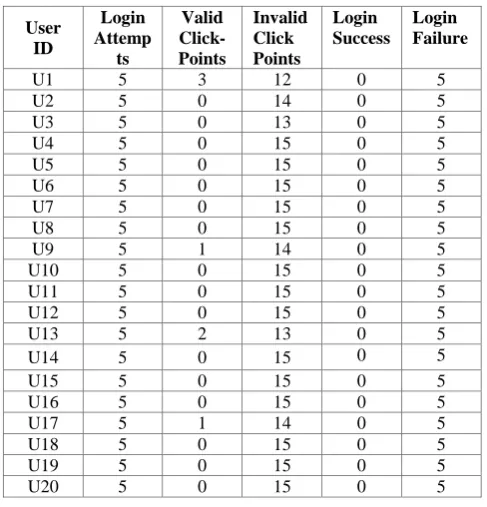
A lab study was conducted with 20 participants. At the time of registration user selects a click points on sequence of images. At login time an image is given to user from user profile. User makes a click point on the image. An algorithm calculates the hash value and measures system tolerance. If the click point is less than the system tolerance, next image is fetched else random image is given to user and login fail flag is activated. Participants were very accurate in entering click points during login phase.
Accuracy =Valid Click PointsTotal Click Points
For Legitimate user accuracy = 296/300=98.67% For imposter accuracy = 7/300 = 2.33%
Users were also asked to login with traditional CCP. Only 3 users preferred tolerance square based click points and 12 users preferred click points with perception.
Table 2. Authentication by legitimate users
User ID
Login Attemp ts
Valid Click-Points
Invalid Click Points
Login Success
Login Failure
U1 5 15 0 5 0
U2 5 15 0 5 0
U3 5 15 0 5 0
U4 5 15 0 5 0
U5 5 15 0 5 0
U6 5 15 0 5 0
U7 5 15 0 5 0
U8 5 15 0 5 0
U9 5 15 0 5 0
U10 5 14 1 4 1
U11 5 15 0 5 0
U12 5 15 0 5 0
U13 5 15 0 5 0
U14 5 15 0 5 0
U15 5 15 0 5 0
U16 5 13 2 4 1
U17 5 15 0 5 0
U18 5 15 0 5 0
[image:4.595.62.223.102.217.2]Table 3. Authentication by legitimate users
5.
CONCLUSION
The proposed Graphical Authentication Scheme is more secure, accurate and reliable than other available schemes. It has better usability as the click points are based on user perception. It increases workload on attackers as it includes tolerance square as well as perceptual hash based matching. No system has been developed so far that has used this approach for graphical authentication.
Future work should include reducing the processing time, and creating perception based click point using perceptual hash based on more image feature like color, shape, texture etc.
6.
ACKNOWLEDGMENTS
The authors would like to thank Amity School of Engineering and Technology (ASET) where the research was carried out.
7.
REFERENCES
[1] Jansen, W. Gavrila, S. Korolev, V. Ayers, R. Swanstrom, “Picture Password: A Visual Login Technique for Mobile Devices”, NISTt NISTIR 7030, 2003.
[2] Real User Corporation, Passfaces TM http://www.realuser.com, Accessed on January 2007. [3] D. Davis, F. Monrose and M.K Reiter, “On User Choice
in Graphical Password Schemes”, In Proceesings of the USENIX Security Symposium, California, 2004. [4] Sobrado, L and Birget, J. “Graphical Passwords”, The
Rutgers Scholar, An Electronic Bulletin of Undergraduate Research, Ruthgers University, New Jersey, Vol.4, 2004.
[5] D. Hong, S. Man, B. Hawes, and M. Mathews, “A password scheme strongly resistant to spyware”, In Proceedings of International conference on security and management, Las Vergas, NV, 2004.
[6] R. Dhamija and A. Perrig. “Déjà vu: A User Study Using Images for Authentication”, In Proceedings of the USENIX Security Symposium, 2000.
[7] I. Jermyn, A. Mayer, F. Monrose. M. K. Reiter and A. D. Rubin, “The Design and Analysis of GraphicalPasswords”, In Proceedings of the 8th USENIX Security Symposium, 1999.
[8] G. Blonder, “Graphical Password”, In Lucent Technologies, Inc., Murray Hill, NJ,United States Patent 5559961, 1996.
[9] SFR IT -Engineering, http://www.sfr-software.de/cms/EN/pocketpc/viskey/, Accessed on January 2007.
[10]Passlogix, http://www.passlogix.com, Accessed on February 2007.
[11]] S. Wiedenbeck, J. Waters, J. C. Birget, A. Brodskiy, and N. Memon, “Authentication Using Graphical Passwords: Basic Results”, In Human-Computer Interaction International (HCII 2005), Las Vegas, NV, 2005.
[12]S.Wiedenbeck, S., Waters, J., Birget, J. C., Brodskiy, A., Memon, N., “PassPoints: Design and Longitudinal Evaluation of a Graphical Password System”, International Journal of Human-Computer Studies, 63, 2005, pp. 102-127.
User ID
Login Attemp ts
Valid Click-Points
Invalid Click Points
Login Success
Login Failure
U1 5 3 12 0 5
U2 5 0 14 0 5
U3 5 0 13 0 5
U4 5 0 15 0 5
U5 5 0 15 0 5
U6 5 0 15 0 5
U7 5 0 15 0 5
U8 5 0 15 0 5
U9 5 1 14 0 5
U10 5 0 15 0 5
U11 5 0 15 0 5
U12 5 0 15 0 5
U13 5 2 13 0 5
U14 5 0 15 0 5
U15 5 0 15 0 5
U16 5 0 15 0 5
U17 5 1 14 0 5
U18 5 0 15 0 5
U19 5 0 15 0 5