7.0
LANGUAGE GUIDE
• LANGUAGE DEFINITION
• STANDARD UNITS
• MEMORY MANAGEMENT
• ASSEMBLY LANGUAGE
Turbo Pasca/®
Version 7.0
Language Guide
Copyright © 1983, 1992 by Borland International. All rights reserved. All Borland products are trademarks or registered trademarks of Borland International, Inc. Windows, as used in this manual, shall refer to Microsoft's implementation of a windows system. Other brand and product names are trademarks or registered trademarks of their respective holders.
c
o
N
T
Introduction 1
What's in this manual ... 2
Part 1 The Turbo Pascal language Chapter 1 What is a Turbo Pascal progrnm? 5 A Turbo Pascal program ... 5
Procedures and functions ... 6
Statements ... 8
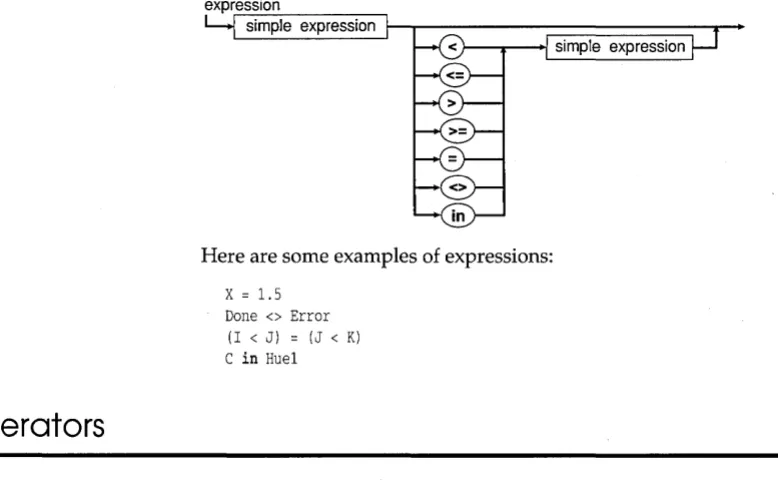
Expressions ... 9
Tokens ... 10
Types, variables, constants, and typed constants ... 10
Putting it all together . . . .. 11
Units ... 13
Syntax diagrams ... 14
Chapter 2 Tokens 15 Special symbols . . . .. 15
Reserved words and standard directives. 16 Identifiers . . . .. 17
Numbers ... 18
Labels ... 19
Character strings . . . .. 19
Comments ... 20
Program lines ... 20
Chapter 3 Constants 21 Chapter 4 Types 23 Simple types ... 23
Ordinaltypes ... 24
Integertypes ... 25
Boolean types ... 25
Char type .. . . .. 26
Enumerated types. . . .. 26
Subrange types ... 27
E
N
T
s
Real types . . . .. 28Software floating point ... 29
80x87 floating point ... 29
String types ... 29
Structured types ... 30
Array types ... 30
Record types ... 32
Object types . . . .. 33
Components and scope ... 36
Methods ... 37
Virtual methods ... 37
Dynamic methods ... 38
Instantiating objects . . . .. 38
Method activations ... 40
Qualified-method activations . . . . .. 41
Set types . . . .. 42
File types ... 42
Pointer types ... . . . .. 43
Type Pointer ... 43
Type PChar ... 43
Procedural types ... 44
Procedural values . . . .. 44
Type compatibility . . . .. 46
Identical and compatible types ... 46
Type identity . . . .. 46
Type compatibility ... 47
Assignment compatibility ... 48
The type declaration part ... 49
Chapter 5 Variables and typed constants 51 Variable declarations ... 51
The data segment ... 52
The stack segment ... 52
Absolute variables ... 53
Qualifiers ... 54
Arrays, strings, and indexes ... 55
Records and field designators . . . . .. 55
Object component designators ... 56
Pointers and dynamic variables .... 56
Variable typecasts . . . .. 57
Typed constants ... 58
Simple-type constants ... 59
String-type constants ... 60
Structured-type constants ... 60
Array-type constants ... 60
Record-type constants ... 62
Object-type constants . . . .. 62
Set-type constants . . . .. 63
Pointer-type constants ... . . .. 63
Procedural-type constants . . . .. 64
Chapter 6 Expressions 65 Expression syntax ... 66
Opera tors . . . .. 68
Arithmetic operators ... 68
Logicaloperators ... 69
Boolean operators ... 70
String opera tor ... 71
Character-pointer operators ... 71
Set opera tors ... 72
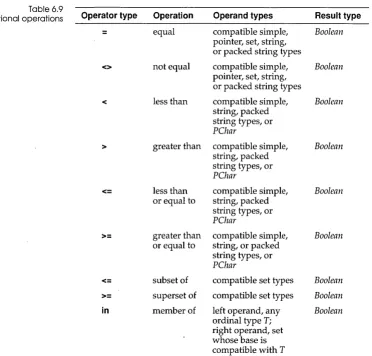
Relational operators ... 73
Comparing simple types ... 73
Comparing strings ... 74
Comparing packed strings ... 74
Comparing pointers . . . .. 74
Comparing character pointers ... 74
Comparing sets . . . .. 74
Testing set membership ... 75
The @ operator ... 75
@ with a variable. . . .. 75
@ with a procedure, function, or method ... 75
Function calls ... 76
Set constructors ... 76
Value typecasts .. . . .. 77
Procedural types in expressions . . . .. 78
Chapter 7 Statements 81 Simple statements. . . .. 81
Assignment statements ... 82
Object-type assignments ... 82
Procedure statements. . . .. 82
Goto statements ... 83
Structured statements ... 83
Compound statements . . . .. 84
Conditional statements ... 84
If statements ... 84
Case statements ... 85
Repetitive statements . . . .. 87
Repeat statements. . . .. 87
While statements ... 87
For statements . . . .. 88
With statements ... 90
Chapter 8 Blocks, locality, and scope 93 Blocks ... '. 93
Rules of scope ... 95
Block scope ... 95
Record scope . . . .. 95
Object scope. . . .. 96
Unit scope ... 96
Chapter 9 Procedures and functions 97 Procedure declarations ... 97
Near and far declarations ... 98
Interrupt declarations ... 99
Forward declarations ... 99
External declarations ... 100
Assembler declarations ... 101
Inline declarations ... 101
Function declarations ... 101
Method declarations ... 103
Constructors and destructors ... 104
Constructor-error recovery ... 106
Parameters ... 107
Value parameters ... 108
Constant parameters ... 109
Variable parameters ... 109
Untyped parameters ... 110
Open-string parameters . . . .. 111
Open-array parameters ... 113
Dynamic object-type variables ... 114
Chapter 10 Programs and units 117 Program syntax. . . .. 117
The program heading ... 117
The uses clause ... 117
Unit syntax ... 118
The unit heading ... 118
The interface part ... 119
The implementation part ... 119
The initialization part. . . .. 120
Indirect unit references ... 120
Circular unit references ... 121
Sharing other declarations ... 123
Part 2 The run-time library Chapter 11 Overview of the run-time library 127 Chapter 12 Standard procedures and functions 129 Flow-control procedures ... 130
Transfer functions . . . .. 130
Arithmetic functions ... 130
Ordinal procedures and functions. 131 String procedures and functions .. 131
Dynamic-allocation procedures and functions ... 132
Pointer and address functions .... 132
Miscellaneous routines ... 133
Predeclared variables . . . .. 133
Chapter 13 Input and output 135 File input and output . . . .. 136
Text files . . . .. 137
Untyped files ... 139
The FileMode variable . . . .. 139
Devices in Turbo Pascal . . . .. 140
DOS devices ... 140
The CON device ... 140
The LPTl, LPT2, and LPT3 devices. 141 The COM1 and COM2 devices .... 141
The NUL device ... 141
Text-file devices ... 141
Input and output with the Crt unit .... 142
U sing the Crt unit . . . .. 142
Windows ... 142
Special characters ... 143
Line input ... 143
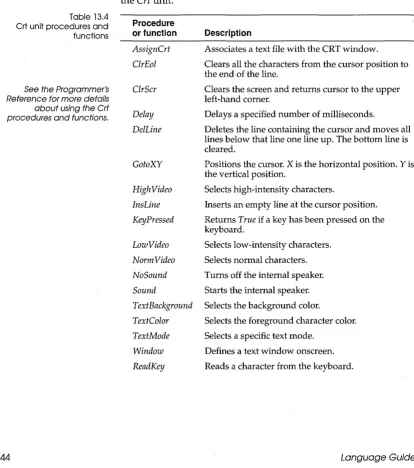
Crt procedures and functions ... 144
Crt unit constants and variables . . . .. 145
Text-file device drivers ... 146
The Open function ... 147
The InOut function ... 147
The Flush function ... 147
The Close function ... 148
Chapter 14 Using the SOx8? 149 The 80x87 data types ... 151
Extended range arithmetic ... 152
Comparing reals . . . .. 153
The 80x87 evaluation stack ... 153
Writing reals with the 80x87 . . . .. 155
Units using the 80x87 ... 155
Detecting the 80x87 ... 155
Emulation in assembly language . . .. 157
Chapter 15 Interfacing with DOS 159 Dos unit procedures and functions .... 160
Dos unit constants, types, and variables. . . .. . . .. 162
Constants . . . .. 162
Types ... 163
Variables ... 163
WinDos unit procedures and functions . 163 WinDos unit constants, types, and variables . . . .. 165
Constants . . . .. 165
Types ... 166
Variables ... 166
Chapter 16 Using null-terminated strings 167 What is a null-terminated string? . . . . .. 167
Strings unit functions ... 167
Character pointers and character
arrays ... 171
Character pointer indexing . . . .. 171
Null-terminated strings and standard procedures ... 173
An example using string-handling functions ... 173
Chapter 17 Using the Borland Graphics Interface 175 Drivers ... 175
IBM 8514 support ... , ... 176
Coordinate system ... 177
Current pointer . . . .. 178
Text ... 178
Figures and styles. . . .. 179
Viewports and bit images ... 179
Paging and colors .... . . .. 180
Error handling ... 180
Getting started ... 181
Heap management routines ... 183
Graph procedures and functions ... 185
Graph unit constants, types, and variables. . . .. 188
Constants .. . . .. 188
Types ... 189
Variables ... 189
Chapter 18 Using overlays 191 The overlay manager ... 192
Overlay buffer management. . . .. 193
Overlay procedures and functions ... 195
Variables and constants ... 196
Result codes . . . .. 196
Designing overlaid programs . . . .. 197
Overlay code generation ... 197
The far call requirement ... 197
Initializing the overlay manager .... 198
Initialization sections ... 201
What not to overlay ... 202
Debugging overlays .. . . .. 202
External routines in overlays ... 203
Installing an overlay-read function .... 204
Overlays in .EXE files . . . .. 205
Part 3 Inside Turbo Pascal Chapter 19 Memory issues 209 The Turbo Pascal memory map ... 209
The heap manager ... 211
Disposal methods . . . .. 212
The free list ... 215
The HeapError variable . . . .. 217
Internal data formats ... 218
Integer types ... 218
Char types ... 218
Boolean types ... 218
Enumerated types. . . .. 219
Floating-point types. . . .. 219
The Real type . . . ... . . .. 219
The Single type ... . . . .. 220
The Double type ... 220
The Extended type ... 220
The Comp type ... 221
Pointer types ... 221
String types ... 221
Set types ... 221
Array types ... 222
Record types ... 222
Object types . . . .. 222
Virtual method tables ... 223
Dynamic method tables . . . .. 225
File types ... 228
Procedural types ... 230
Direct memory access ... 230
Direct port access ... 231
Chapter 20 Control issues 233 Calling conventions ... 233
Variable parameters . . . .. 234
, Value parameters ... 234
Open parameters ... ,. 235
Function results ... 235
NEAR and FAR calls ... 236
Nested procedures and functions ... 236
Method calling conventions ... 237
Virtual method calls . . . .. 238
Dynamic method calls . . . .. 239
Entry and exit code ... 240
Register-saving conventions . . . .. 241
Exit procedures . . . .. 241
Interrupt handling ... 243
Writing interrupt procedures ... 243
Chapter 21 Optimizing your code 245 Constantfolding ... 245
Constant merging . . . .. 246
Short-circuit evaluation . . . .. 246
Constant parameters ... 246
Redundant pointer-load elimination ... 247
Constant set inlining ... 247
Small sets . . . .. 248
Order of evaluation ... 248
Range checking . . . .. 249
Shift instead of multiply or divide ... 249
Automatic word alignment . . . .. 249
Eliminating dead code ... 250
Smart linking . . . .. 250
Part 4 Using Turbo Pascal with assembly language Chapter 22 The built-in assembler 255 The asm statement ... 256
Register use ... 256
Assembler statement syntax ... 256
Labels ... 257
Instruction opcodes ... 257
RET instruction sizing ... 258
Automatic jump sizing ... 258
Assembler directives ... 259
Operands ... 261
Expressions ... 262
Differences between Pascal and Assembler expressions. . . .. 262
Expression elements . . . .. 263
Constants . . . .. 263
Numeric constants ... 263
String constants . . . .. 264
Registers ... 265
Symbols ... 265
Expression classes . . . .. 269
Expression types . . . .. 270
Expression operators ... 272
Assembler procedures and functions .. 274
Chapter 23 Linking assembler code 279 Turbo Assembler and Turbo Pascal . . .. 280
Examples of assembly language routines ... 281
Assembly language methods ... 283
Inline machine code . . . .. 284
Inline statements ... 284
Inline directives ... 285
T
A
B
·2.1: Turbo Pascal reserved words ... 16
2.2: Turbo Pascal directives ... 17
4.1: Predefined integer types ... 25
4.2: Real data types ... 28
6.1: Precedence of operators ... 65
6.2: Binary arithmetic operations ... 68
6.3: Unary arithmetic operations ... 69
6.4: Logical operations ... 70
6.5: Boolean operations .. · ... 70
6.6: String operation ... 71
6.7: Permitted PChar constructs ... 72
6.8: Set operations ... 72
6.9: Relational operations ... 73
12.1: Flow-control procedures ... 130
12.2: Transfer functions ... 130
12.3: Arithmetic functions ... 130
12.4: Ordinal procedures and functions .131 12.5: String procedures and functions ... 131
12.6: Dynamic-allocation procedures and functions ... 132
12.7: Pointer and address functions ... 132
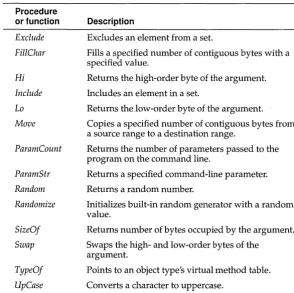
12.8: Miscellaneous procedures and functions ... 133
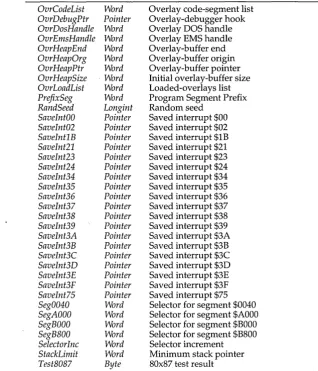
12.9: Predeclared variables in the System unit ... 133
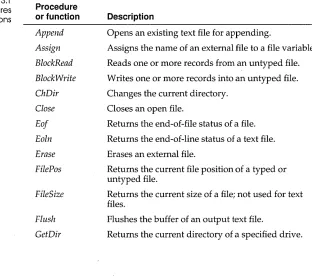
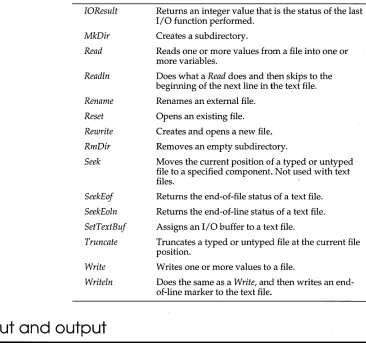
13.1: Input and output procedures and functions ... 135
13.2: Control characters ... 143
13.3: Line input editing keys ... 143
13.4: Crt unit procedures and functions .144 13.5: Crt unit constants ... 145
13.6: Crt unit variables ... 145
14.1: Test8087 variable values ... 157
15.1: Dos unit date and time procedures .160 15.2: Dos unit interrupt support procedures ... 160
L
E
s
15.3: Dos unit disk status functions ... 16115.4: Dos unit file-handling procedures and functions ... 161
15.5: Dos unit environment-handling functions ... 161
15.6: Dos unit process-handling procedures ... 161
15.7: Dos unit miscellaneous procedures and functions ... 162
15.8: Dos unit constants ... 162
15.9: Dos unit types ... 163
15.10: WinDos date and time procedures ... ~163
15.11: WinDos unit interrupt support procedures ... 164
15.12: WinDos unit disk status functions .164 15.13: File-handling procedures and functions ... 164
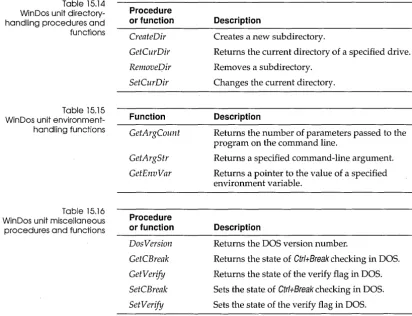
15.14: WinDos unit directory-handling procedures and functions ... 165
15.15: WinDos unit environment-handling functions ... 165
15.16: WinDos unit miscellaneous procedures and functions ... 165
15.17: WinDos constants ... 166
15.18: WinDos unit types ... 166
16.1: Strings unit functions ... 168
17.1: BGI drivers ... 176
17.2: Graph unit procedures and functions ... 185
17.3: Graph unit constant groups ... 188
17.4: Graph unit types ... 189
18.1: Overlay unit procedures and functions ... 196
22.2: String examples and their values .. 265 22.6: Summary of built-in asssembler 22.3: CPU registers ... 265 expression operators ... 272 22.4: Values, classes, and types of 22.7: Definitions of built-in assembler
F
G
u
1.1: Procedure or function diagram ... 6
1.2: Simple Pascal program diagram ... 7
1.3: Statement diagram ... 10
1.4: An expanded Pascal program ... 12
17.1: Screen with xy-coordinates ... 177
18.1: Loading and disposing of overlays .194 19.1: Turbo Pascal memory map ... 210
19.2: Disposal method using Mark and Release ... 212
19.3: Heap layout with Release(P) executed ... 213
R
E
s
19.4: Creating a "hole" in the heap ... 21419.5: Enlarging the free block ... 214
19.6: Releasing the free block ... 215
19.7: Layouts of instances of TLocation, TPoint, and TCircle ... 223
19.8: TPoint and TCircle's VMT layouts .225 19.9: TBase's VMT and DMT layouts .... 227
N T R
Read the Introduction in the User's Guide for an overview of the entire Turbo Pascal documentation set and how to use the Turbo Pascal manuals most effectively.
o
Du
c
To
This manual is about the Turbo Pascal language. It
• Presents the formal definition of the Turbo Pascal language • Introduces the run-time library and tells you how to use the
units that make it up
• Describes what goes on inside Turbo Pascal in regards to memory, data formats, calling conventions, input and output, and automatic optimizations
• Explains how to use Turbo Pascal with assembly language You'll find this manual most useful if you are an experienced Pascal programmer.
Read the User's Guide if
• You want to know how to install Turbo Pascal
N
• You've used Turbo Pascal before and you want to know what is new in this release
• You're not familiar with Borland's integrated development environment (the IDE)
• You want to know how to use the integrated debugger • You want to refresh your knowledge about pointers • You are new to object-oriented programming
Read the Programmer's Reference to look up reference material on • The run-time library
• Compiler directives • Error messages
What's in this manual
This book is split into four parts: language grammar, the run-time library, advanced programming issues, and using assembly language with Turbo Pascal.
Part I, "The Turbo Pascal language," defines the Turbo Pascal language. First you're introduced to the overall structure of a Turbo Pascal program; then you examine each element of a program in detail.
Part II, "The run-time library," contains information about using all the standard units: the System, Dos, WinDos, Strings, Crt, Overlay, and Graph units.
Part III, "Inside Turbo Pascal," presents technical information for advanced users about
• How Turbo Pascal uses memory
• How Turbo Pascal implements program control • Using the 80x87
• Optimizing your code
p
A
R
T
1
c
H A p T E R1
What is
a
Turbo Pascal program?
The next several chapters present the formal definition of the Turbo Pascal language. Each chapter discusses an element of Turbo Pascal. Together, these elements make up a Turbo Pascal program.
It's difficult to gain an understanding of the whole by examining only the parts, however. This chapter presents an overview of a Turbo Pascal program and omits the details. It gives you a brief description of each of the elements of a program and then shows you how they all fit together. You can then refer to Chapters 2 through 10 to find the details of the language.
A Turbo Pascal program
In its simplest form, a Turbo Pascal program is made up of a
program heading, which names the program, and the main program block, which accomplishes the purpose of the program. Within the main program block is a section of code that occurs between two key words: begin and end. Here is a very simple program that illustrates these concepts:
program Welcome; begin
The first line is the program heading, which names the program. The remainder of the program is the code that starts with begin
and stops with end. Although this particular code section contains only one line, it could contain many. In any Turbo Pascal
program, all the action occurs between begin and end.
Procedures and functions
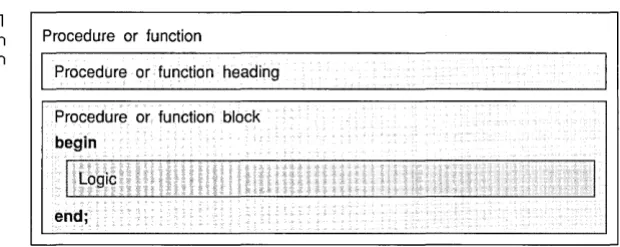
Figure 1.1 Procedure or function
diagram
The code between the last begin and end in a program drives the logic of the program. In a very simple program, this section of code might be all you need. In larger, more complex programs, putting all your code here can make your program harder to read and understand-and more difficult to develop.
Procedures and functions let you divide the logic of a program into smaller, more manageable chunks, and are similar to subroutines in some other languages. All the action in a procedure or function occurs in the code between its begin and end just like in the main program block. Each of these segments of code performs a small, discrete task.
Procedure or function
Procedure or function heading
Procedure or function block begin
!.L09iC
end;
If you find your program does the same thing many times, you might want to put the logic into a procedure or function. You write the code in a procedure or function once and your program can use it as often as necessary.
[image:17.505.156.466.321.444.2]Figure 1.2 Simple Pascal program diagram
function GetNumber: Reali var
Response: Reali begin
Write('Enter a number: ') i Readln(Response)i
GetNumber := Responsei endi
A procedure or function must appear before the main code section in the main program block. The main code section can then use the procedure or function.
Pascal program
Program heading
Main program block
I
Procedures or functions (0 or more)begin
I
Main program logic end.The following example is an outline of a program that uses the
GetNumber function. The programmer has divided the logic of this program into three tasks:
1. Get a number from the user.
2. Perform the necessary calculations with the user-supplied number.
3. Print a report.
The main logic of the program is found between the last begin
Statements
program Report;
var
A: Real;
{more declarations}
function GetNumber: Real;
var
Response: Real;
begin
Write{'Enter a number: '); Readln{Response);
GetNumber := Response;
end;
procedure Calculate{X: Real);
procedure PrintReport;
begin
A := GetNumber; Calculate (A) ; PrintReport;
end.
The primary logic in this program is very simple to understand. All the details are hidden within the bodies of the procedures and functions. Using procedures and functions encourages you to think about your program in a logical, modular way.
The code section between begin and end contains statements that describe the actions the program can take and is called the statement part. These are examples of statements:
A := B + C;
Calculate {Length, Height);
if X < 2 then
Answer := X
*
Y;begin
X := 3; Y := 4; Z : = 5;
end;
{Assign a value}
{Activate a procedure}
{Conditional statement}
Expressions
while not EOF(InFile) do begin
Readln(InFile, Line); Process(Line); end;
{Repetitive statement}
Simple statements can either assign a value, activate a procedure or function, or transfer the running of the program to another statement in the code. The first two examples shown in the examples are simple statements.
Structured statements can be compound statements that contain multiple statements, conditional and repetitive statements that control the flow of logic within a program, and with statements that simplify access to data in a record.
You might compare a Pascal statement to a sentence in a human language such as English, Danish, or Greek. Simple Pascal statements and simple human sentences hold one complete thought. Structured Pascal statements and complex sentences contain more complicated logic.
Just as a sentence is made up of phrases, so is a Pascal statement made up of expressions. The phrases of a sentence are made up of words, and the expressions of a statement are composed of ele-ments called factors and operators. Expressions usually compare things or perform arithmetic, logical, or Boolean operations. Just as phrases in a human language can be made up of smaller phrases, so can expressions in Pascal be made up of simpler expressions. You can read about all the combinations of factors and operators in Chapter 6 that make up expressions. They can be quite complex. For now, it might help to see some examples of expressions:
x
+ Y Done <> Error I <= LengthTokens
Figure 1.3 Statement diagram
Tokens are the smallest meaningful elements in a Pascal program. They make up the factors and operators of expressions. Tokens are special symbols, reserved words, identifiers, labels, numbers, and string constants; they are akin to the words and punctuation of a written human language. These are examples of Pascal tokens:
function
Calculate 9
{reserved word} {special symbol} {special symbol}
{identifier for a procedure} {number}
Here is an illustration of a statement. You can see that statements are made up of expressions, which are made up of tokens.
Statements (1 or more)
Expressions (1 or more)
Tokens (1 or more)
Types, variables, constants, and typed constants
A variable can hold a value that can change. Every variable must have a type. A variable's type specifies the set of values the variable can have.
program Example;
const
var A = 12;
B: Integer = 23;
X, Y: Integer; J: Real;
begin X := 7; Y := 8; X := Y + Y; B := 57; J := 0.075; end.
{Constant A never changes in value} {Typed constant B gets an initial value}
{Variables X and Yare type Integer} {Variable J is type Real}
{Variable X is assigned a value} {Variable Y is assigned a value} {The value of variable X changes} {Typed constant B gets a new value} {Variable J gets a floating-point value}
In this simple and not very useful program, X is assigned the value 7 originally; two statements later it is assigned a new value, Y + Y. The value of a variable can vary.
A is a constant. The program gives it a value of 12 and this value can't change-its value remains constant throughout the program.
B is a typed constant. It's given a value when it's declared, but it's also given a type of Integer. You can think of a typed constant as a variable with an initial value. The program can later change the initial value of B to some other value.
The part of this program that declares the constants and variables is called the declaration part.
If you'll look back at the code example on page 7, you'll see that the function GetNumber has a declaration part that declares a variable. Procedures and functions can contain a declaration part just as a program or unit can.
Putting it all together
Figure 1.4
An expanded Pascal
program Pascal program Program heading
Uses clause (optional)
Main program block Declarations
Procedures or functions (0 or more) Procedure or function heading
begin
Statements (1 or more)
end.
The program heading, the optional uses clause (we'll talk about this in the next section), and the main program block make up a Pascal program. Within the main program block can exist the smaller blocks of procedures and functions. Although the diagram doesn't show this, procedures and functions can be nested within other procedures and functions. In other words, blocks can contain other blocks.
Units
In turn, statements combined with declaration parts make up
blocks, either the main program block or a block in a procedure or function.
A Turbo Pa,scal program can use blocks of code in separate modules called units. You can think of a unit as a mini-program your application can use. Like a program, it has a heading, called a unit heading, and a main block that contains a code section delineated by begin and end.
Any Turbo Pascal main program block can include a line that enables the program to use one or more units. For example, if you are writing a program called Colors and you want to change the color of the text as it appears on your screen, you can specify that your program use the standard Crt unit that is part of the Turbo Pascal run-time library:
program Colors; uses Crt; begin
end.
The uses Crt line tells Turbo Pascal to include the Crt unit in the executable program. The Crt unit contains all the necessary code to change the color of the text in your program, among other things. Simply by including uses Crt, your program can use all the procedures and functions in the Crt unit. If you put all the code required to create the functionality of the Crt unit within your program, it would be a lot more work, and it would sidetrack you from the main purpose of your program.
Syntax diagrams
As you read Chapters 2 through 10, which define the Turbo Pascal language, you'll encounter syntax diagrams. For example,
formal parameter list
To read a syntax diagram, follow the arrows. Frequently, more than one path is possible. The above diagram indicates that a formal parameter list is optional in a procedure heading. You can follow the path from the identifier to the end of the procedure heading, or you can follow it to the formal parameter list before reaching the end.
c
HSeparators can't be part of tokens except in string constants.
Special symbols
A p T E R
2
Tokens
Tokens are the smallest meaningful units of text in a Pascal program. They are categorized as special symbols, identifiers, labels, numbers, and string constants.
A Pascal program is made up of tokens and separators. A separator is either a blank or a comment. Two adjacent tokens must be separated by one or more separators if each token is a reserved word, an identifier, a label, or a number.
Turbo Pascal uses the following subsets of the ASCII character set:
• Letters-the English alphabet, A through Z and a through z
• Digits-the Arabic numerals
a
through 9• Hex digits-the Arabic numerals
a
through 9, the letters Athrough F, and the letters a through
f
• Blanks-the space character (ASCII 32) and all ASCII control characters (ASCII
a
through 31), including the end-of-line or return character (ASCII 13)digit - - - . - - - ,
¢
...~
hex digit
4
digiti
I
$
...cp
A··· F
•
Special symbols are characters that have one or more fixed meanings.
The following single characters are special symbols:
+ _
* /
=
< > [ ] . , () : ; 'A @ { } $# These character pairs are also special symbols:<= >= := .. (* *) (. .)
A left bracket ([) is equivalent to the character pair of left
parenthesis and a period-(., and a right bracket (]) is equivalent to the character pair of a period and a right parenthesis-.). Likewise, a left brace ({) is equivalent to the character pair of left parenthesis and an asterisk-(*, and a right brace 0) is equivalent to the character pair of an asterisk and a right parenthesis-*).
Reserved words and standard directives
Reserved words can'f be
redefined.
Table 2.1 Turbo Pascal reserved words
Reserved words appear in boldface throughout this manual. Turbo Pascal is not case sensitive, however, so you can use either uppercase or lowercase letters in your programs.
Following are Turbo Pascal's reserved words:
and file not then
array for object to
asm function of type
begin goto or unit
case if packed until
const implementation procedure uses
constructor in program var
destructor inherited record while
div inline repeat with
do interface set xor
downto label shl
else mod shr
Table 2,2 Turbo Pascal directives
Identifiers
Units are described in Chapter 5 of the User's Guide and Chapter 10 of this book.
The following are Turbo Pascal's standard (built-in) directives. Directives are used only in contexts where user-defined identifiers can't occur. Unlike reserved words, you can redefine standard directives, but we advise that you don't.
absolute assembler external
far forward interrupt
near private public
private and public act as reserved words within object type declarations, but are otherwise treated as directives.
Identifiers denote constants, types, variables, procedures, functions, units, programs, and fields in records.
virtual
An identifier can be of any length, but only the first 63 characters are significant. An identifier must begin with a letter or an under-score character
U
and can't contain spaces. Letters, digits, and underscore characters (ASCII $5F) are allowed after the first char-acter. Like reserved words, identifiers are not case sensitive. When several instances of the same identifier exist, you may need to qualify the identifier by another identifier to select a specific instance. For example, to qualify the identifier ldent by the unit identifier UnitName, write UnitName.Ident. The combined identifier is called a qualified identifier.identifier
underscore
G
-qualified ~d t'f'
Numbers
Here are some examples of identifiers and qualified identifiers:
Writeln Exit Rea12String System. MemAvail Strings.StrLen WinCrt.ReadText
In this manual, standard and user-defined identifiers are italicized
when they are referred to in text.
Ordinary decimal notation is used for numbers that are constants of type Integer and Real. A hexadecimal integer constant uses a dollar sign ($) as a prefix. Engineering notation (E or e, followed by an exponent) is read as "times ten to the power of" in real types. For example, 7E-2 means 7 x 10⁻²; 12.25e+6 or 12.25e6 both mean 12.25 x 10+6. Syntax diagrams for writing numbers follow:
hex digit sequence
-rl.
hex digittT--digit sequence~
unsigned integer
S i g n w
unsigned real
digit sequence digit sequence
11--;:::========:::;-,+
scale factorscale factor ~ L r ; i 5 t
II
digit sequence ~~
e .
unsigned number
signed number
unsigned integer unsigned real
L@
I
unsigned numberLabels
Numbers with decimals or exponents denote real-type constants. Other decimal numbers denote integer-type constants; they must be within the range -2,147,483,648 to 2,147,483,647.
Hexadecimal numbers denote integer-type constants; they must be within the range $00000000 to $FFFFFFFF. The resulting value's sign is implied by the hexadecimal notation.
A label is a digit sequence in the range 0 to 9999. Leading zeros are not significant. Labels are used with goto statements.
label
As an extension to Standard Pascal, Turbo Pascal also allows identifiers to function as labels.
Character strings
A character string is a sequence of zero or more characters from the extended ASCII character set, written on one line in the program and enclosed by apostrophes. A character string with nothing between the apostrophes is a null string. Two sequential apostrophes within a character string denote a single character, an apostrophe. For example,
'TURBO' 'You"ll see'
{ TURBO } { You'll see}
{ , }
{ null string } { a space }
Comments
The compiler directives are explained in Chapter 2 of the Programmer's Reference.
Program lines
#13#10
'Line l'#13'Line2' #7#7'Wake up!'#7#7
character string quoted string control string
quoted string - ( )
10--q
string characterP
string charactercontrol string
-r0=l
unsigned integert-T-A character string's length is the actual number of characters in the string. A character string of any length is compatible with any string type, and with the PChar type when the extended syntax is
enabled {$X+}. Also, a character string of length one is compatible with any Char type, and a character string of length N, where N is
greater than or equal to one, is compatible with packed arrays of N characters.
The following constructs are comments and are ignored by the compiler:
{ Any text not containing right brace }
(* Any text not containing star/right parenthesis *)
A comment that contains a dollar sign ($) immediately after the opening { or (* is a compiler directive. A mnemonic of the compiler command follows the $ character.
c
HWherever Standard Pascal allows only a simple con-stant, Turbo Pascal allows a constant expression.
A p T E R
3
Constants
A constant declaration declares a constant within the block
containing the declaration. A constant is an identifier that holds a value that can't change. A constant identifier can't be included in its own declaration.
constant declaration
rl
identifier ~ constant ~0-rAs an extension to Standard Pascal, Turbo Pascal allows the use of
constant expressions. A constant expression is an expression that can be evaluated by the compiler without actually executing the program. Examples of constant expressions follow:
100
'A'
256 - 1
(2.5 + 1) (2.5 - 1)
'Turbo' + ' , + 'Pascal' Chr (32)
Ord ( , Z ') - Ord ( , A') + 1
The simplest case of a constant expression is a simple constant, such as 100 or J A'.
constant
-l
expressionf--Because the compiler has to be able to completely evaluate a constant expression at compile time, the following constructs are
For expression syntax, see Chapter 6, "Expressions."
• References to variables and typed constants (except in constant address expressions as described on page 59)
• Function calls (except those noted in the following text) • The address operator (@) (except in constant address
expressions as described on page 59)
Except for these restrictions, constant expressions follow the same syntactical rules as ordinary expressions.
The following standard functions are allowed in constant expressions:
Abs High Low Pred SizeD! Chr Length Odd Ptr Succ Hi La Ord Round Swap
Trunc
Here are some examples of the use of constant expressions in constant declarations:
const Min = 0; Max = 100;
Center = (Max - Min) div 2; Beta = Chr(225);
NumChars = Ord('Z') - Ord('A') + 1; Message = 'Out of memory' ;
ErrStr = ' Error: ' + Message + '. ';
ErrPos = 80 - Length (ErrStr) div 2; Ln10 = 2.302585092994045684; Ln10R = 1 / Ln10;
Numeric = [' 0' .. ' 9' 1 ; Alpha = [' A' .. ' Z', , a' .. ' z' 1 ;
c
HSimple types
A p T E R
4
Types
When you declare a variable, you must state its type. A variable's type circumscribes the set of values it can have and the operations that can be performed on it. A type declaration specifies the
identifier that denotes a type.
type declaration
- I
identifier ~~When an identifier occurs on the left side of a type declaration, it's declared as a type identifier for the block in which the type
declaration occurs. A type identifier's scope doesn't include itself except for pointer types.
type
type identifier
There are five major type classes. They are described in the following sections. .
Chapter 2 explains how to denote constant integer-type and real-integer-type values.
Ordinal types
simple type
real type
-I
real type identifierf-A real-type identifier is one of the standard identifiers: Real, Single, Double, Extended, or Compo
Ordinal types are a subset of simple types. All simple types other than real types are ordinal types, which are set off by six
characteristics:
• All possible values of a given ordinal type are an ordered set, and each possible value is associated with an ordinality, which is an integral value. Except for integer-type values, the first value of every ordinal type has ordinality 0, the next has ordinality I, and so on for each value in that ordinal type. The ordinality of an integer-type value is the value itself. In any ordinal type, each value other than the first has a predecessor, and each value other than the last has a successor based on the ordering of the type.
• The standard function Ord can be applied to any ordinal-type value to return the ordinality of the value.
• The standard function Pred can be applied to any ordinal-type value to return the predecessor of the value. If applied to the first value in the ordinal type and if range-checking is enabled {$R+}, Pred produces a run-time error.
• The standard function Suee can be applied to any ordinal-type value to return the successor of the value. If applied to the last value in the ordinal type and if range checking is enabled {$R+},
Suee produces a run-time error.
• The standard function Low can be applied to an ordinal-type and to a variable reference of an ordinal type. The result is the lowest value in the range of the given ordinal type.
• The standard function High can be applied to an ordinal-type and to a variable reference of an ordinal type. The result is the highest value in the range of the given ordinal type.
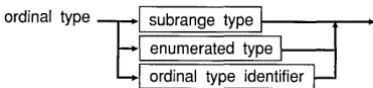
ordinal type
1
subrange type enumerated type ordinal type identifierTurbo Pascal has ten predefined ordinal types: Integer, Shortint, Longint, Byte, Word, Boolean, ByteBool, WordBool, LongBool, and
Char. In addition, there are two other classes of user-defined ordinal types: enumerated types and subrange types.
[image:36.507.165.352.69.113.2]Integer types There are five predefined integer types: Shortint, Integer, Longint, Byte, and Word. Each type denotes a specific subset of the whole numbers, according to the following table:
Table 4.1
Predefined integer types
Typecasting is described in Chapters 5 and 6.
Type
Shortint Integer Longint Byte Word
Range
-128 .. 127 -32768 .. 32767 -2147483648 .. 2147483647
0 .. 255 0 .. 65535
Format
Signed 8-bit Signed 16-bit Signed 32-bit Unsigned 8-bit Unsigned 16-bit
Arithmetic operations with integer-type operands use 8-bit, 16-bit, or 32-bit precision, according to the following rules:
• The type of an integer constant is the predefined integer type with the smallest range that includes the value of the integer constant.
• For a binary operator (an operator that takes two operands), both operands are converted to their common type before the operation. The common type is the predefined integer type with the smallest range that includes all possible values of both types. For example, the common type of Integer and Byte is
Integer, and the common type of Integer and Word is Longint. The operation is performed using the precision of the common type, and the result type is the common type.
• The expression on the right of an assignment statement is evaluated independently from the size or type of the variable on the left.
• Any byte-sized operand is converted to an intermediate word-sized operand that is compatible with both Integer and Word
before any arithmetic operation is performed.
Boolean types There are four predefined Boolean types: Boolean, ByteBool, WordBool, and LongBool. Boolean values are denoted by the
predefined constant identifiers False and True. Because Booleans
are enumerated types, these relationships hold:
• False < True • Ord(False) =
a
• Ord(True)
=
1 .Succ(False)=
True • Pred(True) = FalseBoolean and ByteBool variables occupy one byte, a WordBool
variable occupies two bytes (one word), and a LongBool variable
occupies four bytes (two words). Boolean is the preferred type and
uses the least memory; ByteBool, WordBool, and LongBool exist
primarily to provide compatibility with other languages and the Windows environment.
A Boolean variable can assume the ordinal values
a
and 1 only, but variables of type ByteBool, WordBool, and LongBool can assumeother ordinal values. An expression of type ByteBool, WordBool, or LongBool is considered False when its ordinal value is zero, and True when its ordinal value is nonzero. Whenever a ByteBool, WordBool, or LongBool value is used in a context where a Boolean
value is expected, the compiler will automatically generate code that converts any nonzero value to the value True.
Char type Char's set of values are characters, ordered according to the
extended's ASCII character set. The function call Ord(Ch), where Ch is a Char value, returns Ch's ordinality.
A string constant of length 1 can denote a constant character value. Any character value can be generated with the standard function Chr.
Enumerated types Enumerated types define ordered sets of values by enumerating
the identifiers that denote these values. Their ordering follows the sequence the identifiers are enumerated in.
enumerated type
-CD--I
identifier list ~When an identifier occurs within the identifier list of an enumerated type, it's declared as a constant for the block the enumerated type is declared in. This constant's type is the enumerated type being declared.
An enumerated constant's ordinality is determined by its position in the identifier list it's declared in. The enumerated type it's declared in becomes the constant's type. The first enumerated constant in a list has an ordinality of zero.
Here's an example of an enumerated type:
type
Suit = (Club, Diamond, Heart, Spade);
Given these declarations, Diamond is a constant of type Suit.
When the Ord function is applied to an enumerated type's value, Ord returns an integer that shows where the value falls with
respect to the other values of the enumerated type. Given the preceding declarations, Ord(Club) returns zero, Ord(Diamond)
returns I, and so on.
Subrange types A sub range type is a range of values from an ordinal type called
the host type. The definition of a subrange type specifies the
smallest and the largest value in the subrange; its syntax follows:
subrange type
-I
constant ~o-I constant ~Both constants must be of the same ordinal type. Sub range types of the form A .. B require that A is less than or equal to B.
These are examples of subrange types:
o ..
99 -128 .. 127 Club .. HeartA variable of a sub range type has all the properties of variables of the host type, but its run-time value must be in the specified interval.
Real types
Table 4.2 Real data types
The Comp type holds only integral values within
_2'3+ 7 to 2'3-7, which is approximately-9.2x 7078 to
9.2x 7078•
const X = 50; Y = 10; type
Color = (Red, Green, Blue); Scale = (X - Y) * 2 .. (X + Y) * 2;
Standard Pascal syntax dictates that, if a type definition starts with a parenthesis, it's an enumerated type, such as the Color type in the previous example. The intent of the declaration of scale is to define a subrange type, however. The solution is to reorganize the first subrange expression so that it doesn't start with a
parenthesis, or to set another constant equal to the value of the expression and use that constant in the type definition:
type
Scale = 2 * (X - Y) .. (X + Y) * 2;
A real type has a set of values that is a subset of real numbers, which can be represented in floating-point notation with a fixed number of digits. A value's floating-point notation normally comprises three values-M, B, and E-such that M x BE = N, where B is always 2, and both M and E are integral values within the real type's range. These M and E values further prescribe the real type's range and precision.
There are five kinds of real types: Real, Single, Double, Extended,
and Camp. The real types differ in the range and precision of values they hold as shown in the following table:
Type Real Single Double Extended Camp Range
2.9 X 10-39 .. 1.7 X 1038 1.5 X 10-45 .. 3.4 X 1038
5.0 X 10-324 .. 1.7 X 10308
3.4 X 10-4932 .. 1.1 X 104932 _263+ 1 .. 263-1
Significant digits 11-12 7-8 15-16 19-20 19-20 Size in bytes 6 4 8 10 8
Turbo Pascal supports two models of code generation for
performing real-type operations: software floating point and 80x87
floating point. Use the $N compiler directive to select the
Software floating point
80x8? floating point
For more details on 80x87 floating-point code generation and software emulation, refer to Chapter 74, "Using the 80x87."
String types
Operators for the string types are described in the sections "String operator" and "Relational operators" in Chapter 6.
String-type standard procedures and functions are described in "String procedures and functions" on page 737.
In the {$N-} state, which is selected by default, the generated code performs all real-type calculations in software by calling run-time library routines. For reasons of speed and code size, only opera-tions on variables of type Real are allowed in this state. Any attempt to compile statements that operate on the Single, Double, Extended, and Camp types generates an error.
In the {$N+} state, the generated code performs all real-type calculations using 80x87 instructions and can use all five real types.
Turbo Pascal includes a run-time library that will automatically
emulate an 80x87 in software if one isn't present. The $E compiler directive is used to determine whether or not the 80x87 emulator should be included in a program.
A string-type value is a sequence of characters with a dynamic length attribute (depending on the actual character count during program execution) and a constant size attribute from Ito 255. A string type declared without a size attribute is given the default size attribute 255. The length attribute's current value is returned by the standard function Length.
string type
-c3I--T---:::;:::---;::::==========:::;--;::::-r-l-CD--I
unsigned integer ~The ordering between any two string values is set by the ordering relationship of the character values in corresponding positions. In two strings of unequal length, each character in the longer string without a corresponding character in the shorter string takes on a higher or greater-than value; for example, 'xs' is greater than 'x'. Null strings can be equal only to other null strings, and they hold the least string values.
Characters in a string can be accessed as components of an array. See the section" Arrays, strings, and indexes" on page 55.
Read about open string parameters on page 111.
Structured types
The maximum permitted size of any structured type in Turbo Pascal is 65,520 bytes.
Array types
A variable parameter declared using the OpenString identifier, or using the string keyword in the {$P+} state, is an open string parameter. Open string parameters allow string variables of varying sizes to be passed to the same procedure or function.
A structured type, characterized by its structuring method and by its component type(s), holds more than one value. If a component type is struCtured, the resulting structured type has more than one level of structuring. A structured type can have unlimited levels of structuring.
structured type -or---=~---'r--or--~
~=======::::.--,
In Standard Pascal, the word packed in a structured type's declaration tells the compiler to compress data storage, even at the cost of diminished access to a component of a variable of this type. In Turbo Pascal, however, packed has no effect; instead packing occurs automatically whenever possible.
Arrays have a fixed number of components of one type-the
component type. In the following syntax diagram, the component type follows the word of.
index type
-I
ordinal typer
The index types, one for each dimension of the array, specify the number of elements. Valid index types are all ordinal types except
See "Arrays, strings, and indexes" on page 55.
See "Identical and compatible types" on page 46.
therefore, the number of elements is the product of the number of values in each index type.
The following is an example of an array type:
array[1 .. 100] of Real
If an array type's component type is also an array, you can treat the result as an array of arrays or as a single multidimensional array. For example
array [Boolean] of array[l .. 10] of array[Size] of Real
is interpreted the same way by the compiler as
array [Boolean, 1 .. 10,Size] of Real
You can also express
packed array[l .. 10] of packed array[1 .. 8] of Boolean
as
packed array[l .. 10,1 .. 8] of Boolean
You access an array's components by supplying the array's identifier with one or more indexes in brackets.
When applied to an array-type identifier or a variable reference of an array type, the Low and High standard functions return the low and high bounds of the index type of the array.
An array type of the form
packed array[M .. N] of Char
where M is less than N is called a packed string type (the word
packed can be omitted because it has no effect in Turbo Pascal). A packed string type has certain properties not shared by other array types, as explained below.
An array type of the form
array[O .. X] of Char
where X is a positive nonzero integer is called a zero-based character array. Zero-based character arrays are used to store null-terminated strings, and when the extended syntax is enabled (using a {$X+} compiler directive), a zero-based character array is
compatible with a PChar value. For a complete discussion of this topic, read Chapter 16, "Using null~terminated strings,"
Read about open array parameters on page 773.
Record types
A parameter declared using the array of T syntax is an open array parameter. Open array parameters allow arrays of varying sizes to be passed to the same procedure or function.
A record type comprises a set number of components, or fields, that can be of different types. The record-type declaration speci-fies the type of each field and the identifier that names the field.
record type ~-1--;:======:::;1~'~
Lj
field list~
field list
L'I
-f::-"ix-ed-:--p-art-'L:G)OOT=l
variant partpo
c::o==t
Ifixed part
---c
identifier list ~The fixed part of a record type sets out the list of fixed fields, giving an identifier and a type for each. Each field contains information that is always retrieved in the same way. The following is an example of a record type:
type
TDateRec = record Year: Integer; Month: 1. .12; Day: 1..31; end;
The variant part shown in the syntax diagram of a record-type declaration distributes memory space for more than one list of fields, so the information can be accessed in more ways than one. Each list of fields is a variant. The variants overlay the same space in memory, and all fields of all variants can be accessed at all times.
r,---;::======:;-:::::t-J tag field type
1-Object types
variant~
" , - - - , " I
CD-~Idlist!You can see from the diagram that each variant is identified by at least one constant. All constants must be distinct and of an ordinal type compatible with the tag field type. Variant and fixed fields are accessed the same way.
An optional identifier, the tag field identifier, can be placed in the variant part. If a tag field identifier is present, it becomes the iden-tifier of an additional fixed field-the tag field-of the record. The program can use the tag field's value to show which variant is active at a given time. Without a tag field, the program selects a variant by another criterion.
Some record types with variants follow:
type
TPerson = record
FirstName, LastNarne: string[40]; BirthDate: TDate;
case Citizen: Boolean of
end;
True: (BirthPlace: string[40]); False: (Country: string[201;
EntryPort: string[20]; EntryDate: TDate; ExitDate: TDate);
TPolygon = record X, Y: Real;
case Kind: Figure of
end;
TRectangle: (Height, Width: Real); TTriangle: (Sidel, Side2, Angle: Real); TCircle: (Radius: Real);
These dec/orations are referred to by other examples throughout this chapter.
An object type can inherit components from another object type. If
T2 inherits from Tl, then T2 is a descendant of Tl, and Tl is an
ancestor of T2.
Inheritance is transitive; that is, if T3 inherits from T2, and T2
inherits from Tl, then T3 also inherits from Tl. The domain of an object type consists of itself and all its descendants.
object type
heritage
-cD--!
object type identifier ~component list -r---;==========~~rl-;::::======~""
Lj
object field list~
Lj
method list~
object field list~'--i-d-en-t-ifi-er-lis-t-~ type
t-:O-r
method list
method heading I-y---~
integer constant
method heading
component section
procedure heading I r
-function heading constructor heading destructor heading
}--~+I component list
The following code shows examples of object-type declarations:
type
TPoint = object X, Y: Integer; end;
TRectangle = object A, B: TPoint;
procedure Grow(DX, DY: Integer);
procedure Intersect (var R: TRectangle);
procedure Union(var R: TRectangle);
function Contains(D: TPoint): Boolean;
end;
PString = AString; PField ATField;
TField object private
x, Y, Len: Integer; Name: String;
public
constructor Copy(var F: TField);
constructor Init(FX, FY, FLen: Integer; FName: String);
destructor Done; virtual;
procedure Display; virtual;
procedure Edit; virtual;
function GetStr: String; virtual;
function PutStr(S: String): Boolean; virtual;
private
procedure DisplayStr(X, Y: Integer; S: String);
end;
PStrField ATStrField;
TStrField object (TField)
private
Value: PString;
public
constructor Init(FX, FY, FLen: Integer; FName: String);
destructor Done; virtual;
function GetStr: String; virtual;
function PutStr(S: String): Boolean; virtual;
function Get: String;
procedure Put(S: String);
end;
PNumField ATNumField;
TNumField object (TField)
private
Value, Min, Max: Longint;
public
constructor Init(FX, FY, FLen: Integer; FName: String; FMin, FMax: Longint);
function GetStr: String; virtual;
function PutStr(S: String): Boolean; virtual;
Components and scope
procedure Put(N: Longint); end;
PZipField = ATZipField; TZipField = object (TNurnField) public
function GetStr: String; virtual;
function PutStr(S: String): Boolean; virtual; end;
Contrary to other types, an object type can be declared only in a type declaration part in the outermost scope of a program or unit. Therefore, an object type can't be declared in a variable decla-ration part or within a procedure, function, or method block. The component type of a file type can't be an object type, or any structured type with an object-type component.
The scope of a component identifier extends over the domain of its object type. Also, the scope of a component identifier extends over procedure, function, constructor, and destructor blocks that implement methods of the object type and its descendants. For this reason, the spelling of a component identifier must be unique within an object type and all its descendants and all its methods. Component identifiers declared in the component list that immediately follows the object-type heading and component identifiers declared in public component sections have no special restrictions on their scope. In contrast, the scope of component identifiers declared in private component sections is restricted to the module (program or unit) that contains the object-type declaration. In other words, private component identifiers act like normal public component identifiers within the module that contains the object-type declaration, but outside the module, any
Methods
Methods can be called only through an object instance variable.
Read more about methods
on page 103.
The declaration of a method within an object type corresponds to a forward declaration of that method. This means that somewhere after the object-type declaration, and within the same scope as the object-type declaration, the method must be implemented by a defining declaration.
When unique identification of a method is required, a qualified-method identifier is used. It consists of an object-type identifier, followed by a period (.), followed by a method identifier. Like any other identifier, a qualified-method identifier can be prefixed with a unit identifier and a period, if required.
qualified method identifier
Y
object type identifierK)--/
method identifier ~Virtual methods By default, methods are static. With the exception of constructor methods, they can be made virtual by including a virtual directive in the method declaration. The compiler resolves calls to static methods at compile time. Calls to virtual methods are resolved at run time; this isknown as late binding.
If an object type declares or inherits any virtual methods, then variables of that type must be initialized through a constructor call before any call to a virtual method. Therefore, any object type that declares or inherits any virtual methods must also declare or inherit at least one constructor method.
Dynamic methods Turbo Pascal supports an additional class of late-bound methods called dynamic methods. Dynamic methods differ from virtual methods only in the way dynamic method calls are d!spatched at run time. For all other purposes, a dynamic method can be considered equivalent to a virtual method.
The declaration of a dynamic method is like that of a virtual method except that a dynamic method declaration must include a
dynamic method index right after the virtual keyword. The dynamic method index must be an integer constant in the range 1..65535 and it must be unique among the dynamic method indexes of any other dynamic methods contained in the object type or its
ancestors. For example,
procedure FileOpen(var Msg: TMessage); virtual 100;
An override of a dynamic method must match the order, types, and names of the parameters and the type of the function result of the ancestral method exactly. The override must also include a
virtual directive followed by the same dynamic method index as was specified in the ancestor object type.
Instantiating objects An object is instantiated, or created, through the declaration of a variable or typed constant of an object type, or by applying the
New procedure to a pointer variable of an object type. The
resulting object is called an instance of the object type. For example, given these variable declarations,
var
F: TField; Z: TZipField; FP: PField; ZP: PZipField;
F is an instance of TFieId and Z is an instance of TZipFieId.
Likewise, after applying New to FP and ZP, FP points to an
instance of TField and ZP points to an instance of TZipFieId.
If an object type contains virtual methods, then instances of that object type must be initialized through a constructor call before any call to a virtual method. Here's an example:
var
s:
TStrField; beginS. Put ( 'Frank' ) ; S.Display;
S.Done; end;
If S.Init had not been called, then the call to S.Display causes this example to fail.
Assignment to an instance of an object type doesn't initialize the instance.
An object is initialized by compiler-generated code that executes between the time that the constructor call takes place and when execution actually reaches the first statement of the constructor's code block.
If an object instance isn't initialized and range checking is 'on
{$R+}, the first call to a virtual method of the object instance results in a run-time error. If range checking is off {$R-}, calling a virtual method of an uninitialized object instance results in undefined behavior.
The rule of required initialization also applies to instances that are components of structured types. For example,
var
Comment: array[l .. 5] of TStrField; I: Integer;
begin
for I := 1 to 5 do Comment [I] .Init(l, I + 10, 40, 'Comment');
for I := 1 to 5 do Comment [I] .Done; end;
For dynamic instances, initialization is typically coupled with allocation, and cleanup is typically coupled with deallocation, using the extended syntax of the New and Dispose procedures. Here's an example:
var
SP: PStrField; begin
New(SP, Init(l, 1, 25, 'Firstnarne')); SPA.Put('Frank') ;
SpA.Display;
A pointer to an object type is assignment-compatible with a pointer to any ancestor object type. Therefore, during execution of a program, a pointer to an object type might point to an instance of that type or to an instance of any descendant type.
For example, a pointer of type PZipField can be assigned to
pointers of type PZipField, PNumField, and PField, and during
execution of a program, a pointer of type PField might be either nil
or point to an instance of TField, TStrField, TNumField, or TZipField, or any other instance of a descendant of TField.