Open Research Online
The Open University’s repository of research publications
and other research outputs
Designing for Shareable Interfaces in the Wild
Thesis
How to cite:
Morris, Richard Stuart (2014). Designing for Shareable Interfaces in the Wild. PhD thesis The Open University.
For guidance on citations see FAQs.
c
2014 Richard Morris Version: Version of Record
Copyright and Moral Rights for the articles on this site are retained by the individual authors and/or other copyright owners. For more information on Open Research Online’s data policy on reuse of materials please consult the policies page.
Designing for Shareable
Interfaces In The Wild
Richard Stuart Morris
SUBMITTED TO THE DEPARTMENT OF COMPUTER SCIENCE OF
THE OPEN UNIVERSITY IN PARTIAL FULFILMENT OF THE REQUIREMENTS FOR THE DEGREE OF DOCTOR OF PHILOSOPHY
December 2013
Papers Related to this Research
Part of the work presented in this thesis has also appeared in various forms below. The work is part of the ShareIT project funded by the EPSRC, grant number EP/F017324/1. The papers below and the user-‐studies reported within were the product a collaborative effort between myself and ShareIT team
member Paul Marshall, and my supervisor Prof. Yvonne Rogers. Additional contributions were made by Stefan Kreitmayer and Matt Davies for the creation of one of the prototypes.
My contributions to this collaborative work included the creation of the core concepts, design and development of the prototypes, planning, design, and running of the user studies, and the analysis. The conceptual contributions, analysis, and discussion carried out in this thesis is entirely my own work, and extends the below papers considerably.
Morris, R., Marshall, P. and Rogers, Y. (2008) Analysing Fluid Interaction across Multiple Displays. AVI ’08, May 31 2008. Retrieved from
http://www.hitlab.utas.edu.au/w/images/7/7e/08_ppd.pdf Morris, R. (2009) Designing Technology for Reflection on Experience:
Supporting Collaboration and Reflection with Digital Tabletops. CHI ’09 Workshop. Retrieved from
http://www.comp.lancs.ac.uk/~corina/CHI09Workshop/Papers/Morris.pdf Marshall, P., Morris, R., Rogers, Y., Kreitmayer, S. and Davies, M. (2011)
Rethinking ‘Multi-‐user’: an In-‐the-‐Wild Study of how Groups Approach a Walk-‐Up-‐and-‐Use Tabletop, CHI ’11, ACM, 3033-‐3042.
Abstract
Despite excitement about the potential of interactive tabletops to support collaborative work, there have been few empirical demonstrations of their effectiveness (Marshall et al., 2011). In particular, while lab-‐based studies have explored the effects of individual design features, there has been a dearth of studies evaluating the success of systems in the wild. For this technology to be of value, designers and systems builders require a better understanding of how to develop and evaluate tabletop applications to be deployed in real world settings.
This dissertation reports on two systems designed through a process that incorporated ethnography-‐style observations, iterative design and in the wild evaluation. The first study focused on collaborative learning in a medical setting. To address the fact that visitors to a hospital emergency ward were leaving with an incomplete understanding of their diagnosis and treatment, a system was prototyped in a working Emergency Room (ER) with doctors and patients. The system was found to be helpful but adoption issues hampered its impact. The second study focused on a planning application for visitors to a tourist information centre. Issues and opportunities for a successful,
contextually-‐fitted system were addressed and it was found to be effective in supporting group planning activities by novice users, in particular, facilitating users’ first experiences, providing effective signage and offering assistance to guide the user through the application.
This dissertation contributes to understanding of multi-‐user systems through literature review of tabletop systems, collaborative tasks, design frameworks
and evaluation of prototypes. Some support was found for the claim that tabletops are a useful technology for collaboration, and several issues were discussed. Contributions to understanding in this field are delivered through design guidelines, heuristics, frameworks, and recommendations, in addition to
Table of Contents
1 Introduction ... 1
1.1 Background to this Course of Research ... 1
1.2 Research Objectives ... 3
1.3 Contributions ... 5
1.3.1 Fluidity Framework ... 7
1.3.2 IDEAS Framework ... 7
1.3.3 User Activity Design ... 8
1.3.4 Importance of Context ... 9
1.3.5 Lean Observe-‐Build Design ... 12
1.3.6 In-‐the-‐wild Design and Evaluation ... 12
1.4 Thesis Structure ... 13
2 Literature Review – Tabletop Technologies ... 15
2.1 Background to Tabletop Technologies ... 15
2.1.1 Key Characteristics of Tabletops ... 16
2.2 Important Factors relating to Tabletop Design ... 18
2.2.1 Lab Studies ... 18
2.2.2 Group Work ... 18
2.2.3 Shared References ... 22
2.2.4 Functional Systems and Context ... 24
2.2.5 Collaboration on Tabletops ... 26
2.2.6 Interruption and Recovery from Disturbance ... 34
2.2.7 Reflection ... 36
2.3 Fluidity ... 46
2.3.1 The Fluidity Ratio ... 48
2.3.3 Interactions ‘Inside’ and ‘Outside’ the Interface ... 53
2.3.4 Using the Fluidity Heuristics ... 55
2.3.5 Seamless vs. Seamful Interface Elements ... 58
2.4 Tabletop Applications ... 59
2.4.1 Evolution of Interfaces ... 60
2.4.2 Design Principles for Tabletop Systems ... 62
2.5 Making Sense of Complexity ... 65
3 Literature Review – In the Wild Studies with Tabletops ... 68
3.1 Introduction ... 68
3.2 The Importance of Context ... 71
3.2.1 In-‐the-‐wild Observations ... 73
3.2.2 Shared Interfaces at NASA ... 77
3.2.3 Recommendations for Large Display Groupware ... 79
3.3 Studies in Museums and Exhibitions ... 83
3.3.1 The Tree of Life ... 84
3.3.2 Vancouver Aquarium ... 91
3.3.3 Arctic Choices Table ... 104
3.4 CityWall ... 108
3.5 Summary of In-‐the-‐Wild Studies ... 110
4 Frameworks for Multi-‐User Technologies ... 112
4.1 Social Drivers of Complex Technology ... 113
4.1.1 Intuition and Coping ... 114
4.2 The Technology Complex ... 116
4.3 Designing for Activities ... 120
4.3.1 User-‐Activity Design ... 121
4.3.2 In Support of Goals ... 123
4.4 Mediating Group Interactions through Interface Design ... 127
4.5 Lean Observe-‐Build ... 130
4.6 Summary ... 135
5 Study 1: HealthTable ... 138
5.1 Introduction ... 138
5.2 Brainstorming System Ideas ... 140
5.2.1 ‘Digital Dashboard’ ... 141
5.2.2 ‘Grand Overview’ ... 142
5.2.3 ‘Consultation Workspace’ ... 144
5.3 Background: the Existing Doctor-‐Patient Relationship ... 145
5.3.1 Patient Education ... 146
5.4 Design of HealthTable ... 148
5.5 Eliciting Requirements ... 148
5.5.1 Hardware Choices ... 148
5.5.2 Symmetry and Asymmetry ... 149
5.5.3 Rapid Design ... 150
5.6 HealthTable System Development ... 151
5.7 Consultation with Doctors ... 152
5.8 Emergency Room Patient Discharge Application ... 154
5.8.1 Display Elements ... 154
5.8.2 Environment and Context ... 161
5.9 Feedback from Deployment ... 163
5.10 Discussion ... 173
5.10.1 Future work ... 175
6 Study 2: CamPlan ... 178
6.2 An Agile Approach to the Requirements and Design of the CamPlan Application 181
6.2.1 Introduction to the ‘CamPlan’ Study ... 182
6.2.2 The Cambridge Visitor Information Centre (VIC) ... 184
6.2.3 Observations of Activity in the Visitor Information Centre ... 198
7 CamPlan Design ... 205
7.1 Design Iteration ... 205
7.2 Design Facilitation ... 206
7.3 Lean Observe-‐Build: a Design-‐observation cycle ... 207
7.3.1 Consultation over Initial Sketches with VIC ... 212
7.3.2 Design Workshop ... 217
7.3.3 Building the Requirements into the Interface ... 231
7.3.4 User Testing ... 245
7.3.5 Contextual Help ... 247
7.3.6 Printed Material ... 248
7.4 Deploying the Application ... 248
7.4.1 Signage ... 249
8 CamPlan: In-‐the-‐Wild Analysis and Evaluation ... 251
8.1 Introduction ... 251
8.2 Observations ... 252
8.3 Evaluations ... 255
8.3.1 Time-‐based and Log Analysis ... 256
8.4 Interviews ... 258
8.4.1 Video Analysis ... 260
8.5 Vignettes ... 262
8.6 Themes ... 265
8.6.2 Understanding Value ... 271
8.6.3 Failures to Engage ... 271
8.6.4 Atomic Groups ... 273
8.6.5 Demonstrating (Show and Tell) ... 275
8.6.6 Learning As You Go ... 280
8.6.7 Touch Maps ... 282
8.6.8 Formations around the Table ... 284
8.6.9 Personal Space ... 296
8.6.10 Reading Pose ... 299
8.6.11 Use of the Step ... 300
8.6.12 Expressions of Joy and Surprise ... 301
8.6.13 Interruptions ... 302 8.6.14 Fluidity ... 303 8.6.15 Misunderstandings ... 305 8.6.16 Unanticipated Uses ... 314 8.6.17 Mixed Usage ... 319 8.6.18 Play ... 323 8.6.19 Abandon ... 325 8.6.20 Languages ... 326
8.6.21 Interest in the Tabletop ... 327
8.7 Discussion ... 330
8.7.1 Issues with the System ... 332
8.7.2 The Sign ... 335
8.7.3 Ergonomics ... 336
8.7.4 Extending the Thresholds of Engagement ... 336
9 Discussion ... 337
9.1.1 Contextual Factors affecting Tabletop Design ... 338
9.1.2 The IDEAS Framework ... 339
9.1.3 Application of the Framework ... 344
9.2 The Lean-‐Observe-‐Build Methodology ... 345
9.2.1 Challenges ... 346
9.3 Key Discriminators in Choosing Tabletop Systems and Design Criteria for Tabletops ... 347
9.4 Findings from HealthTable ... 352
9.4.1 User Symmetry: Doctors and Patients ... 352
9.4.2 Embodiment ... 353
9.5 Findings from CamPlan ... 354
9.5.1 The User Funnel ... 354
9.5.2 Coupling Styles ... 356
9.5.3 Lowering the Thresholds ... 357
9.5.4 User Symmetry: Adults and Children ... 360
9.5.5 Interaction Similarity Confusion ... 360
9.5.6 Positive Effects ... 361
9.5.7 Challenges ... 363
10 Conclusions and Future Work ... 365
10.1 What is a User? ... 369
10.2 Future Work ... 369
10.3 Final Conclusions ... 372
11 References ... 375
12 Appendices ... 399
12.1 Tree Map of Potential Applications ... 399
12.3 HealthTable Concepts ... 402
12.4 Questionnaire post-‐HealthTable ... 410
12.5 Tasks Considered in this PhD Project ... 413
12.5.1 Sports Training ... 413
12.5.2 Ambient-‐Interactive Meeting Information Support ... 413
12.5.3 Tourist Office ... 413
12.5.4 Financial / Abstract Dataset Exploration ... 414
12.5.5 Disaster Planning ... 415
12.5.6 Architectural Consultation ... 416
12.5.7 Cycle-‐lane Planning / Public Consultation ... 416
12.5.8 Health Services Consultation ... 416
12.6 Glossary ... 417
Table of Figures
Figure 1.1: People exploring digital information in a collaborative way using. ... 1
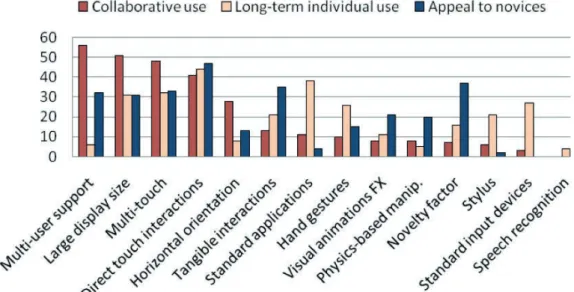
Figure 2.1: Side-‐by-‐side comparison of votes for top-‐five rankings for each ... 17
Figure 2.2: Aggregated top-‐five rankings for each of the three usage ... 18
Figure 2.3: Cognitive focus over time in an interaction for (top) an ... 52
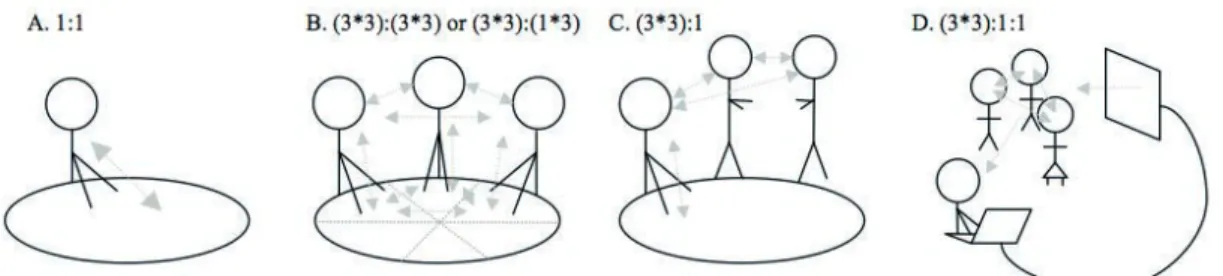
Figure 2.4: 4 examples of interaction matrices describing various ... 55
Figure 2.5: Interface Currents interface concept. ... 61
Figure 2.6: An illustration of the four categories of the Cynefin model ... 66
Figure 3.1: NASA engineers and program manager using a MERBoard ... 77
Figure 3.2: The Tree of Life tabletop in the Berlin Museum of Natural History . 86 Figure 3.3: Some interface elements ... 86
Figure 3.4: The two tabletops in situ at the Vancouver Aquarium. ... 91
Figure 3.5: Examples of re-‐appropriation of a tabletop. ... 94
Figure 4.1: The categories of the Technology Complex, showing how social ... 118
Figure 4.2: Visualizing the categories of the Technology Complex as ... 119
Figure 4.3: A diagram representing how activities are composed of smaller ... 121
Figure 4.4: A cycle reflecting a ‘waterfall’ development process. ... 131
Figure 4.5: A cycle reflecting a ‘lean’ development process. One of the most ... 131
Figure 5.1: A doctor and patient convening over a Surface ... 141
Figure 5.3: The first consultation with the head of emergency medicine ... 153
Figure 5.4: Showing prepared imagery alongside patients’ scans. ... 153
Figure 5.5: Doctors could be given a physical security pass the size of a ... 155
Figure 5.6: The security pass contained a fiducial marker which ... 155
Figure 5.7: The tabletop, when resumed from standby, had a blank ... 156
Figure 5.8: The Surface immediately recognized the card when placed on ... 156
Figure 5.9: The primary screen with the shuffled organization mode and ... 156
Figure 5.10: Buttons for selecting the three viewing modes. ... 157
Figure 5.11: Signatures could be captured using a modified pen in order. ... 159
Figure 5.12: The 3D model is shown with the circulatory system ... 160
Figure 5.13: The Surface unit is positioned against an edge of the nurses’ ... 162
Figure 5.14: The doctor shows the patient her lab results. ... 165
Figure 5.15: The doctor and patient look at the blood count and notice a 3x ... 166
Figure 5.16: The doctor brings up the 3D model. ... 167
Figure 5.17: The doctor is able to use the model to build a connection ... 168
Figure 5.18: The doctor is looking at the patient as she describes where ... 169
Figure 5.19: The doctor is explaining what kinds of sensations discomfort ... 169
Figure 5.20: The doctor uses the table to rest paperwork. ... 170
Figure 5.21: The doctor points out some important information on the ... 171
Figure 5.22: The patient signs the form and indicates that she enjoyed ... 171
Figure 5.24: AnatOnMe, by Ni et al., 2011, showing projected muscle layers .. 175
Figure 6.1: Overhead schematic of the VIC. ... 185
Figure 6.2: Interior of the Cambridge VIC from the entrance. ... 186
Figure 6.3: View from the front of the queue, showing the Information ... 186
Figure 6.4: Wall boards are also used to display brochures and posters of ... 188
Figure 6.5: Information is displayed on wall boards showing current events. 188 Figure 6.6: A large OS-‐style wall map is provided although the scale is not ... 191
Figure 6.7: PC information kiosk, showing default home page. ... 193
Figure 6.8: The kiosk shows the visitcambridge website. ... 193
Figure 6.9: Certain tours, which are a revenue source for the VIC, are ... 196
Figure 6.10: Visitors to the VIC often split up and browse individually ... 200
Figure 7.1: Early sketches of possible interface designs made during ... 208
Figure 7.2: A sketch showing the imagined position of the Surface ... 208
Figure 7.3: A sketch of an interface stage showing positions of attractions ... 209
Figure 7.4: A detailed sketch of the paper printout produced by the ... 209
Figure 7.5: A three-‐dimensional sketch of the tabletop positioned in the ... 209
Figure 7.6: A sketch of a possible interface component in the interaction ... 209
Figure 7.7: A medium-‐fidelity sketch of the initial attract screen. ... 211
Figure 7.8: A medium-‐fidelity sketch of the individual questions delivered .... 211
Figure 7.9: A medium-‐fidelity sketch of the final interactive stage where ... 212
Figure 7.11: An overhead view of the VIC with the entrance top-‐right ... 213
Figure 7.12: Notes are made of important goals for the VIC discussed ... 214
Figure 7.13: The annotated sketch is intended to show a possible ... 215
Figure 7.14: A sketch showing a poster next to the table, illustrating ... 216
Figure 7.15: An overhead schematic of the VIC with the ... 216
Figure 7.16: A visualization of placement of the tabletop presented ... 216
Figure 7.17: The research goals for the application are written on an A0 ... 218
Figure 7.18: Some of the requirements are written down and placed ... 218
Figure 7.19: The user goals and some notes about different types of user ... 218
Figure 7.20: The VIC goals and the details of what artefact the users wish ... 218
Figure 7.21: A fictional family or tourists visiting the VIC, considered ... 219
Figure 7.22: The individual members of the group were also considered ... 219
Figure 7.23: User goals are expressed as questions from the family/group. ... 220
Figure 7.24: A picture showing a group interacting with a tabletop was ... 220
Figure 7.25: Several different interface directions are enumerated and ... 220
Figure 7.26: The user flow is broken down into several stages, crucially ... 221
Figure 7.27: Various sketches were made to support the discussion of the ... 222
Figure 7.28: Rough drawings of the interface were made to allow for an ... 223
Figure 7.29: Here two concepts are considered for allowing different ... 223
Figure 7.30: Several methods of organising the users exploration of the ... 224
Figure 7.32: An experiment in combining two interface approaches ... 226
Figure 7.33: The interface for the group decision phase is considered ... 227
Figure 7.34: A ‘Lazy-‐Susan’ wheel with ‘cards’ representing the city’s ... 228
Figure 7.35: Various interaction metaphors were mocked-‐up with static ... 231
Figure 7.36: The methods for exploring the data sets ... 234
Figure 7.37: Another option for the exploration and selection of options ... 235
Figure 7.38: The group selection phase is considered, with the key ... 235
Figure 7.39: A ‘working’ paper prototype of the exploration phase is ... 236
Figure 7.40: Naïve users were brought in to test our paper prototype ... 237
Figure 7.41: Using on-‐screen mockups to ensure the design worked on ... 238
Figure 7.42: A paper prototype of the group selection phase is mocked up ... 239
Figure 7.43: A version of the ‘deck’ interaction style with selection ... 239
Figure 7.44: A variation of the ‘deck’ interaction style with the selection ... 239
Figure 7.45: A high-‐fidelity mock-‐up representation of the group selection ... 240
Figure 7.46: The workshop room at the end of the second day ... 241
Figure 7.47: A Photoshop render of the multi-‐user stage, showing four ... 243
Figure 7.48: A Photoshop render of the group selection/map stage of the ... 244
Figure 7.49: Whilst the map and information sheets are printing the user ... 244
Figure 7.50: When printing is complete the user is directed to the printer ... 244
Figure 7.51: Designer (myself) and programmer (Stefan Kreitmayer) ... 245
Figure 7.53: A first version of the poster, which was deemed to be too ... 249
Figure 7.54: A second version of the poster showing how four people can ... 250
Figure 8.1: The tabletop is deployed in the VIC. It does not disturb the ... 251
Figure 8.2: A group of student from a nearby college come to investigate ... 253
Figure 8.3: A young girl using the tabletop. The addition of the physical ... 254
Figure 8.4: Diagram showing the C1-‐C4 notation used to identify ... 256
Figure 8.5: Session length in seconds. ... 257
Figure 8.6: Chart showing number of users per session across the study. ... 257
Figure 8.7: A typical approach. ... 266
Figure 8.8: A father and daughter approach the table. ... 266
Figure 8.9: A group of four children use the tabletop simultaneously. ... 267
Figure 8.10: A man arrives at the table with a non-‐committed stance as ... 268
Figure 8.11: The man’s partner arrives from the counter and initially ... 268
Figure 8.12: A woman looks on as a pair use the tabletop. ... 269
Figure 8.13: A woman reads the poster for more information after ... 270
Figure 8.14: A young woman observes from a position behind C4, after ... 270
Figure 8.15: Two young women, who were using C2 and C3, become ... 271
Figure 8.16: A man taps his partner on the back to get her to turn around ... 274
Figure 8.17: A child, who was previously using the tabletop, leans across ... 275
Figure 8.18: A father physically scaffolds his daughter by grabbing her ... 276
Figure 8.20: A group of five men use the tabletop. Frame 1 – two ... 281
Figure 8.21: Touch start ... 282
Figure 8.22: Touch drag ... 283
Figure 8.23: Touch release ... 283
Figure 8.24: Classic user orientation, with user (A) driving C1 and ... 284
Figure 8.25: Example of an observer becoming a user (B), positioning ... 284
Figure 8.26: Six people use the tabletop simultaneously using four carousels.285 Figure 8.27: A group of four people using one carousel (C1). ... 286
Figure 8.28: Young girl’s brother pushes her hand away to take over her ... 286
Figure 8.29: Three users share the table, two positioned at C3 and one at ... 287
Figure 8.30: A woman in a wheelchair and her friend use C4 and move ... 287
Figure 8.31: A group of four women use three carousels and one woman ... 288
Figure 8.32: A pair of users cross over spaces. They initially use C1 and C4 .... 288
Figure 8.33: A child drags cards in to his brother’s boxes in a display ... 289
Figure 8.34: A pair of observers study the review screen whilst one ... 290
Figure 8.35: One person drives the interaction at the review screen ... 291
Figure 8.36: Woman explores application with left hand whilst holding ... 292
Figure 8.37: A young woman drives an interaction at C4 whilst a ... 292
Figure 8.38: A woman moves from observer to driver. Frame 1 ... 293
Figure 8.39: A pair use the tabletop. Frame 1 – the woman joins the ... 295
Figure 8.41: A girl grabs her sister’s arm and moves it away. ... 296
Figure 8.42: A brother attempts to physically dominate the interaction ... 297
Figure 8.43: A woman using C1 prevents her partner from starting a ... 297
Figure 8.44: A brother uses C4 and his sister tries to join in. He ... 297
Figure 8.45: Two brothers interact whilst using the table. Frame 1 ... 298
Figure 8.46: A man adopts the ‘reading pose’ to study the review screen. ... 299
Figure 8.47: A man pauses to consider the carousel at the start of an ... 300
Figure 8.48: A child expressing joy bordering on disbelief. ... 301
Figure 8.49: A young girl swings around to express her delight to her ... 302
Figure 8.50: A woman turns her hand outwards to indicate confusion as to .... 306
Figure 8.51: A mother and son use C3 and C1 respectively. She attempts ... 306
Figure 8.52: A user attempts to pinch-‐zoom the map in the review screen ... 307
Figure 8.53: A man attempts to prevent cards from floating back to the ... 308
Figure 8.54: A man points to the side of the Surface after pressing print ... 309
Figure 8.55: A child taps on the video on the attract screen ... 310
Figure 8.56: A young girl has come over and started using the tabletop ... 311
Figure 8.57: Three unrelated users are using C1, C2 and C4. In the ... 312
Figure 8.58: A young girl uses two hands to overcome finger recognition ... 313
Figure 8.59: The child on the right hits the table with the backs of his ... 313
Figure 8.60: A couple compare the brochure and the tabletop ... 315
Figure 8.62: A couple use the Surface as a table for their map, accidentally ... 320
Figure 8.63: Three girls use the tabletop to study a map printed from ... 321
Figure 8.64: A man compares notes on a printout he has brought with ... 322
Figure 8.65: A couple use the tabletop. The woman, who was previously ... 322
Figure 8.66: A child uses his elbow to drag a card ... 324
Figure 8.67: A child drags four cards at once using four fingers ... 324
Figure 8.68: A man uses three fingers to drag three cards out of the ... 325
Figure 8.69: A child reaches across the tabletop to reset the application ... 326
Figure 8.70: Local television making a segment for the evening news ... 327
Figure 8.71: A woman takes a photo of her friends using the tabletop. ... 328
Figure 8.72: A father takes a photo of his daughters using the tabletop. ... 329
Figure 8.73: A group have their photo taken with the table. ... 329
Figure 12.1: Analysis of olive oil constituents in ‘mocked-‐up’ tabletop ... 414
Figure 12.2: An imagination of a tabletop application for providing ... 415
Figure 12.3: A working prototype of a map-‐based collaborative ... 416
Figure 12.4: Patient education is a major issue in healthcare. ... 417
1
Introduction
1.1 Background to this Course of Research
This thesis explores the problem space of designing applications for digital interactive tabletops, a genre of interactive system characterised by having a large horizontal touchscreen that can be used simultaneously by two or more people. An analysis of prior research reported in Chapter 2 shows that, despite the physical technology becoming more mature, the issues and concepts of designing applications to successfully exploit the potential of this technology are still in their infancy (Remy et al., 2010). In particular, because of their shareable nature, it has been suggested that tabletops are useful for
collaborative activities (Benko et al., 2009). However, very few studies have explored this assertion outside of a laboratory setting (Hornecker, 2008), and it is unclear whether findings from the laboratory transfer easily to in the wild settings (Marshall et al., 2011).
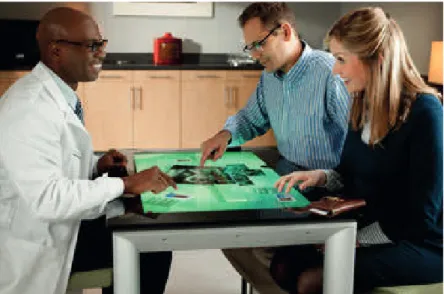
Figure 1.1: People exploring digital information in a collaborative way using a Microsoft PixelSense SUR40.
The most common form of human-‐computer interaction is a single user using a PC, such as a laptop. Given the differences in ergonomics, user configurations and interaction methods between PCs and tabletop computers, the need arises to ask what are suitable applications for these tabletops and how can we best design for them? The technology for tabletop computers continues to mature, but the applications designed for them do not seem to have made an impact on our day-‐to-‐day lives. To date, tabletops have been used as a technology to
support various collocated activities, including games and photo sorting (Rogers et al., 2006), but can tabletops help us work better in planning, problem solving and learning? As one researcher notes:
“Developing good applications is not a trivial enterprise, even if the underlying technology is becoming so.” (Schöning et al., 2009)
And while the technology is fascinating, it is not nearly as important as the possibilities it introduces and the potential world it can create. As often happens in innovation cycles with technology, the vision for how people can collaborate and create together is formed only after the ‘newness’ of the technology has worn off. It is the privilege of this researcher to apply the technology in ways that hopefully lead to insights about our environments and ourselves. Since technology serves humanity it should be our mission to enhance our human systems and augment human experience. The greatest technologies of our time allow us to work in powerful new ways and the most potent promise of
shareable technologies is to enable working in a shared intellectual space. This is as opposed to the Personal Computing era; the large multi-‐user systems of today let us combine our individual creative forces and multiply them through powerful technology and distributed networks.
Compared to PCs, tabletop computers have the additional affordance of allowing multiple users to interact with the same application simultaneously and to use multi-‐touch gestures. The users can also arrange themselves around a tabletop computer in various ways that allow for easy collaboration and the full
awareness of body language, hand and arm gestures, relative position and to make use of good eye contact. What new kinds of software systems can take advantage of all these good collaborative benefits and extend them with digital media and computation?
There are many urgent and meaningful problems for which shareable technology could be a useful solution. However, creating successful tabletop systems is difficult (Baker et al., 2002) and, although becoming more popular, there have not been many examples of real-‐world tabletop systems being
deployed and evaluated outside of the lab. Designers and developers can benefit from a better understanding of the challenges and opportunities of this new technological and social opportunity. Frameworks and design guidelines, as well as experience reports and case studies from real-‐world deployments of tabletop interfaces in public settings can be of value to the next generation of
technologists.
1.2 Research Objectives
This course of research has the following principle objectives:
1. To gain an understanding of the problem space of designing for
collaborative activities with interactive tabletops. Primarily, this means identifying the most important factors that affect tabletop application design. This is approached through a thorough review of related
literature and exploration through first-‐hand observation, design and evaluation of tabletop systems for real-‐world contexts.
2. To propose a framework for the development of tabletop systems for in-‐ the-‐wild contexts which addresses areas of weakness in existing
research and to propose solutions. This is mainly achieved through approaches and heuristics found to be effective when applied to the scenarios chosen for application development in this course of research. This mainly addresses a) the selection of appropriate activities for
support with tabletops and b) the effective support of these tasks with an approach to developing and improving the applications in the wild. 3. To discover the extent to which tabletops can support co-‐located
collaboration and to explore the potential of using this new technology in the wild.
4. To build and evaluate two complementary systems from grounded observation, making design decisions, and providing richly detailed case studies, as a platform for exploring the above frameworks, and to serve as experience reports for future tabletop systems designers.
5. To contribute to the understanding of the important discriminating factors and key issues relating to tabletop systems and propose a set of design guidelines for tabletop applications based on the findings of this course of research.
The contributions described below are the outcome of this course of research, guided by the above objectives. Through the course of two studies and
throughout this course of research, in addressing the concrete problems of building prototypes for the two studies, and in analysis of the results and reflection on the insights garnered in summary.
1.3 Contributions
Tabletop technologies continue to mature and the widespread acceptance of multi-‐touch gestures reduces the gulf of execution for novice users. Tabletop and other multi-‐user systems will continue to migrate from research labs to the commercial arena and this thesis will provide a critical stepping-‐stone between those two worlds. As will be shown, the work in the lab cannot always be successfully transferred into “the wild.” Therefore, it is crucial to evaluate these systems in messy, unpredictable real world settings, and to identify which key features of tabletops will make a robust improvement in the lives of both novice and expert users. Not only does the placement of technology in public settings prove challenging for many reasons, but identifying the common goal of people in a given situated space can be elusive.
A key contribution of this thesis is that it provides in-‐depth coverage of two tabletop studies, design guidelines and heuristics for researchers and system designers, helping them to understand the interplay between the physical characteristics, interface issues, social behaviour, context and design methods which contribute to successful tabletop systems. Key contributions include: Methodological Contributions
This approach includes cross-‐functional pairing and other design mentalities not before applied to tabletop development, bringing together discovery research and design work, followed by rapid iterative development in situ. Conceptual Contributions
• A definition of fluidity and description of fluidity heuristics • Application of Cynefin framework and temporal thinking styles • An application of an Activity-‐Centred Design approach as applied to
multi-‐user technologies and in-‐the-‐wild evaluation • Evaluation of context using Technology Complex
• IDEAS Framework – a scaffold for evaluating context for tabletop systems
Experience Contributions
• Two in-‐depth in-‐the-‐wild studies, from initial ethnographies, through design, deployment, and evaluation.
• Consideration of related work and extension of pre-‐existing findings and frameworks to include the findings of this course of research.
• Empirical findings – these include conceptualizations of how people interact and work together when collaborating at tabletop computers in public settings
In solving the problems that arose from creating the prototypes built for this course of research, a number of new approaches were formed and evaluated.
These approaches were informed by existing and novel frameworks, based on review of the literature and early exploration with the hardware and
applications. The frameworks are presented based on these findings, as described below, that can be generally applied to similar problems, and which can serve as sensitising concepts for designers and researchers of future tabletop systems. Such frameworks are:
1.3.1 Fluidity Framework
It is a challenge creating a system that provides support fort the goals of multiple users. The fluidity framework is a heuristic and a ‘design lens’ for considering how well an interface solution supports the higher-‐level goals of its users. By considering the ultimate objective of the users versus the lower-‐order interactions and operations they must perform to achieve their goal, the
designer or developer of a multi-‐touch system can maintain a better perspective of the usefulness of the system and the success of their interface solution.
The fluidity framework is developed from a review of the literature and an early exploration of the affordances on tabletop systems at the outset of this course of study. It was used in the design, development, and in-‐place evaluation of the two studies described in this thesis and discussed in relation to design principles for tabletop systems in chapter 9.
1.3.2 IDEAS Framework
The IDEAS framework is an acronym standing for: Interface, Device,
Environment, Application, and Social. It is a five-‐factor framework to consider design options and compare design solutions in a systematic and synergistic
fashion. By breaking down the complex factors which contribute to a real-‐world system, the designer or developer can gain clarity and insight into how their application will perform and where it will sit in relation to existing solutions. Breaking down the factors of systems allows for more thorough exploration of the important issues with greater depth and clarity. The interaction between the separate factors is also considered.
The IDEAS framework evolves from review of the related literature and is honed in early work with tabletop systems in the course of this research. It is applied to the development of the two studies described in chapters 5-‐8, and discussed in chapter 9.
1.3.3 User Activity Design
As well as overall guidelines for tabletop design, this thesis details a subtle shift in the user-‐centred design process, with a focus shared between activities and goals. Traditional user-‐centred design approaches are not equipped to deal with these problems and are likely to fail as a design methodology since, when
multiple users are engaging with a system, how do you say who the ‘user’ is? Instead of users per se, it is preferable to focus on activities, which are
composed of tasks, and support those in a lightweight way, taking into account the fact that the users will likely re-‐appropriate the system and use it in
unintended ways, as fits their need. Observing users engaging with system in a live, in-‐the-‐wild setting is crucial in understanding how the system affects the users, how they choose to use it and how best to support them in their goals. Designing for users’ goals may not be sufficient when designing for this class of technology. Users’ goals may be ill-‐defined, and the goals may change in concert
with using the system, on discussion with other people, or for no apparent reason. Therefore, it is best to design for a single, clear activity that allows for robust and flexible interaction.
1.3.4 Importance of Context
The context of a technological system is the wider surroundings and social setting into which this system is placed. When designing interactive software, context plays a less or more important role depending on the particular
demands of the system. The designer of a word processor for a desktop PC, for example, does not need to be particularly sensitive to the context of its use, as the conventions and constraints of the interaction are well defined and
understood. Also, the factors beyond the interface and technology itself do not have a great bearing on the success of the user and the application, typing documents being, usually, a linear single-‐user task.
This is a contributing factor to its success of such applications – they can be used anywhere, regardless of the specifics of the situation, helped by the rigidness of the interactions. However, for a multi-‐user collaborative tool the context is much more important, as the edges of the social environment blur with the collaborative interactions, and can have a profound effect on the success or failure of the goals of the designer, and the users.
Single user PC dialogue-‐based interaction <-‐> Multi-‐user, Casual Touchscreen Insensitive <-‐-‐-‐-‐-‐-‐-‐-‐-‐-‐-‐-‐-‐-‐-‐-‐-‐-‐-‐-‐-‐-‐-‐-‐-‐-‐-‐-‐-‐-‐-‐-‐-‐-‐-‐-‐-‐-‐-‐-‐-‐-‐-‐-‐-‐-‐-‐-‐-‐-‐-‐-‐-‐-‐-‐-‐-‐-‐> Highly Sensitive Figure 1.2: Technology systems and relative importance of context.
As Dey and Abowd (2000) say:
“When humans talk with humans, they are able to use implicit situational information, or context, to increase conversational bandwidth.
Unfortunately, this ability to convey ideas does not transfer well to humans interacting with computers… An understanding of context will enable
application designers to choose what context to use in their applications. An understanding of how context can be used will help application designers determine what context-aware behaviors to support in their applications.” pp.1
Abowd et al. (1999) discuss the importance of context in relation to ubiquitous computing (ubicomp) scenarios. They suggest that, in order to provide the best experience for users, the designers of a technology should consider as many potential factors that can affect a system and its use, and then make decisions about how these should alter the way in which the system works.
Dourish (2004) suggests that this approach is fundamentally problematic, arguing that the resulting experience of the user is a phenomenological thing, and cannot be approached in a positivist manner. He goes on to say that it is difficult, or impossible, to predict how a resulting system will work out, given that it has an impact on its surroundings, and people’s perceptions cannot be predicted. However, he does not make concrete suggestions on how to proceed as a system designer other than to start with lightweight solutions and build out in a reflective and responsive manner.
Multi-‐user systems are challenging to design for, since the nature of co-‐located collaboration is very subtle, and the collaborative work is of a highly dense and
synchronous character. It is difficult to fully predict the nature of collaboration that any set of users will employ, or the nature of interruption, both voluntary and involuntary, that will occur. This is especially true for contexts involving members of the public. As Rogers (2011) states:
“Finally, for the wild approach to be valuable to researchers and designers alike, we need to develop wild theories. This will involve abstracting insights from the emerging body of in-the-wild studies, together with evolving some of the newly imported theories and creating nascent ones.” p.62
The particular context of multi-‐user tabletop systems for collaborative, in the wild use poses several challenges as outlined above. As well making a choices of which activities are appropriate in ambition and scope, there is a need for an effective approach to understanding the goals of the group, the relation of the group’s activities to the situated space, and a way to design and build iteratively, reacting to new insights and the ways in which introducing a technological intervention alters the balance of the socio-‐contextual systems. The Lean
Observe-‐Build approach was developed in the course of building and evaluating the two prototypes in this course of research.
The importance of context is discussed throughout the thesis. Context is
examined in the literature review of in-‐the-‐wild tabletop studies. The social and physical contexts of the two studies are observed and interpreted in detail, and the impacts these had on the resulting solutions are described in chapters 5, 6, and 7. The importance of context is evaluated and its relevance to the topic of this thesis is visited again in chapter 9.
1.3.5 Lean Observe-Build Design
Due to the highly complex nature of designing for multiple users, an approach to developing the systems built in the course of research was employed which married principles drawn from lean manufacturing, extreme programming and ethnography. Ideas for the prototypes were based on solid, ethnographically informed, understanding of the context. From there, ideas were quickly developed, from sketch-‐based concepts, paper-‐prototypes and user testing to deploying a working prototype as quickly as possible to the intended location. The fast iteration of the design in situ allowed a virtuous cycle of gaining
insights through observation of the technology’s use, prototyping ideas quickly and observing their effect. With each iteration of the system, new possibilities and ideas were unlocked and progress to a creative and successful solution could be made. The progress of each iteration of the solution can be validated with a ‘quick and dirty’ round of testing with representative users.
This approach is discussed in detail in chapter 4. It was the main approach applied in the course of the two studies described in this thesis and is evaluated in those chapters and again, overall, in chapter 9.
1.3.6 In-the-wild Design and Evaluation
The core of this thesis is the development of two novel tabletop application prototypes designed in an activity-‐centred fashion and evaluated in the wild. Informed by academic research of tabletop interfaces and multi-‐user systems, and using novel techniques for solving the problems of creating successful multi-‐users systems in real-‐world settings, these prototypes were deployed and evaluated over two years.
The unique methodological approaches above were employed to positive effect in these two case studies, and the development of the tabletop systems is
described along their various stages, with ethnographically-‐informed discovery, rapid development and testing, and in situ iteration and evaluation.
The importance of moving HCI research out of the lab and in to the public sphere is discussed throughout this thesis, and the entirety of chapter 3 is dedicated to reviewing existing literature on this topic. The development and evaluation of frameworks and design principles for the building and assessment of successful in-‐the-‐wild multi-‐user systems continues through both studies (described in chapters 5-‐8) and is discussed in chapter 9.
1.4 Thesis Structure
This thesis is structured as follows: Chapter 2 provides the background to tabletop research, a literature review, analysis of the problem space, identifying gaps in research, and outlining research questions. Leading on from the lack of in-‐the-‐wild studies found in Chapter 2, Chapter 3 explores this aspect in more detail and discusses some methodological points. Chapter 4 details the nascent design frameworks and methodological contributions of the thesis in
preparation for the case studies in the following chapters. Chapter 5 details the research, design, deployment and evaluation of HealthTable, an application developed for collaborative learning in a hospital emergency room setting. Following this, two case studies are reported, beginning in Chapter 6 with a description of the series of ethnography-‐style observations that informed the design of CamPlan, a group planning tabletop application for tourism. The design process for this application is described in Chapter 7 and the evaluation
is contained in Chapter 8. Chapter 9 consists of the thesis discussion, and Chapter 10 contains the conclusions and future work.
2
Literature Review – Tabletop Technologies
This chapter includes a summary of tabletop computer technologies, an overview of the academic literature on shareable interfaces with a focus on tabletops and an overview of the problem space of designing and using tabletop computers. When this research project began in 2006 there was a dearth of in situ research into tabletops. Many studies had been conducted in the lab, investigating issues such as interface demands, and a few studies had looked into the benefits of collaboration through using tabletops. This literature review chapter will provide a detailed overview of studies relevant to tabletop system design. The following chapter will discuss the importance of, and issuessurrounding, in-‐the-‐wild studies.
2.1 Background to Tabletop Technologies
Research on tabletop computing has a history of at least 20 years. In 1991, Wellner developed DigitalDesk, which allowed mixing physical paper with augmented data from an overhead projector. Multi-‐touch interfaces have an even longer history in industrial research. Bill Buxton maintains a list of multi-‐ touch interfaces1 identifying the first as being created in 1982.
However, research into tabletop computers surged with the release of
commercial hardware platforms such as Mitsubishi DiamondTouch (which first appeared publicly in 2004) and Microsoft Surface (first available in 2008). This
timing corresponds with what Buxton calls the ‘long nose of innovation’ (Buxton, 2007), which refers to the manner in which technologies which are being developed in research labs tend to have a 20-‐or-‐so year period from the first publications to them being mature enough to develop commercially. Also, Han (2005) demonstrated how multi-‐touch surfaces could be created cheaply and easily using a Frustrated Total Internal Reflection (FTIR) method in a talk presented at TED in 2006. A key advantage of Han’s method was that it could lead to designs of various shapes and sizes.
2.1.1 Key Characteristics of Tabletops
Tabletop computers have certain distinct properties that differentiate them from other forms of technology such as: having a large horizontal surface allowing for multiple people to interact simultaneously; having a large
touchscreen which allows for direct multi-‐touch interaction with an application. Other features such as object recognition, or tangible interaction are also a feature of some tabletop systems (e.g. reacTIVision: Kaltenbrunner and Bencina, 2007). This aspect is not used in this course of research, primarily due to the public nature of the prototypes developed meaning tangible objects could go missing.
One of the key characteristics of tabletops is that they are large enough for two or more people to interact with simultaneously. The notion of multi-‐user systems was developed into Single Display Groupware (Stewart et al., 1999), where applications were developed for co-‐present users to collaborate using a computer with multiple input devices but a single display.
Groupware of today can