Aalto University School of Science
Degree Programme in Computer Science and Engineering
Agust´ı Pellicer
Museums and ICT.
A green perspective
Master’s Thesis Espoo, June 18, 2014
Supervisor: Professor Antti Yl¨a-J¨a¨aski, Aalto University Advisor: Dr. James Reilly
Aalto University School of Science
Degree Programme in Computer Science and Engineering
ABSTRACT OF MASTER’S THESIS Author: Agust´ı Pellicer
Title:
Museums and ICT. A green perspective
Date: June 18, 2014 Pages: vii + 75
Major: Data Communications Software Code: T-110
Supervisor: Professor Antti Yl¨a-J¨a¨aski Advisor: Dr. James Reilly
A museum is a cultural entity whose aim is to conserve, organise, study and re-search as well as give access to precious tangible and intangible heritage assets of society. The online museums will be realised through the combined use of de-sign, information technology, computing resources, and community collaboration. Through the next generation museums it is also possible to improve our use of energy resources, by focusing on sustainability and allowing us to research and analyse the relationship between the digitisation of cultural heritage and energy consumption. The key target of this thesis is to understand the energy consump-tion of certain museums derived acts such as digitisaconsump-tion, long term preservaconsump-tion and media exhibits. Furthermore the results of a survey collecting the view of 3 museums in Finland about green ICT and museums is presented.
Keywords: green ICT, museums, digitisation, energy, preservation Language: English
Acknowledgements
Thanks to the Data Communications Software research group that allowed me to write this thesis. Specially to my supervisor and advisor Professor Antti Yl¨a-J¨a¨aski and Professor James Reilly. Without their invaluable feed-back I would have not been able to finish my thesis. Also to all the par-ticipants that participated in our survey and those who were able to help me, Samir Bhowmik, Anna Virtanen and Professor Lily D´ıaz who run the digGLAM project, where my work was performed. Finally thanks to Project Gado and Thomas Smith for creating a tool that will help to save our cultural heritage.
I would also like to thanks to friends and family who helped me through the writing of my thesis.
Gr`acies!
Espoo, June 18, 2014 Agust´ı Pellicer
Abbreviations and Acronyms
ICT Information and communications technology
NFC Near Field Communication
GLAM Galleries, Libraries, Archives, and Museums, the cul-tural heritage institutions
LED Light-Emitting Diode
OLED Organic Light-Emitting Diode
CRT Cathode Ray Tube
HVAC Heating, ventilation, and air conditioning OAIS Open Archival Information System
SSD Solid State Drive
VRML Virtual Reality Modeling Language API Application Programming Interface RFID Radio Frequency IDentification
QR Quick Response Code
Contents
Acknowledgements iii
Abbreviations and Acronyms iv
1 Introduction 1
1.1 Motivation . . . 1
1.2 Research questions . . . 2
1.3 Research goals . . . 2
1.4 Structure of the Thesis . . . 2
2 Background and related work 4 2.1 Museums and ICT . . . 5
2.1.1 Virtual museums . . . 5 2.1.1.1 Online collections . . . 5 2.1.1.2 Virtual environments . . . 5 2.1.2 Mobile apps . . . 6 2.1.3 Interactive museums . . . 7 2.1.4 Audio/video technologies . . . 8
2.1.5 Navigation inside museums . . . 8
2.1.6 Open APIs . . . 9 2.1.7 Preservation technologies . . . 10 2.1.8 Energy efficiency . . . 11 2.2 Benefits . . . 12 2.3 Challenges . . . 12 2.4 Related work . . . 13 3 Digitisation 15 3.1 Digitisation materials . . . 15 3.1.1 3D scanning . . . 17 3.1.2 Scanning . . . 17 3.1.3 Digital cameras . . . 18 v
3.1.4 Analogue to digital conversion . . . 18 3.2 State of digitisation . . . 18 3.3 Costs . . . 19 3.4 Challenges . . . 20 3.4.1 Cost . . . 21 3.4.2 Digitisation process . . . 21
3.4.3 Formats and quality . . . 21
3.4.4 Digital access . . . 22
3.4.5 Long-time preservation . . . 22
3.5 A green perspective on digitisation . . . 23
3.6 Case study: Digitisation with the digGLAM assistant . . . 24
3.6.1 Introduction . . . 24
3.6.2 Setup . . . 24
3.6.3 Results . . . 25
3.7 Conclusions . . . 27
4 Long term preservation 29 4.1 Preservation strategies . . . 29 4.2 Storage mediums . . . 31 4.3 Costs . . . 32 4.4 Challenges . . . 33 4.4.1 Copyright issues . . . 33 4.4.2 Data lock-in . . . 34
4.4.3 Discovery and access . . . 34
4.4.4 Migration . . . 34
4.4.5 Metadata . . . 35
4.4.6 Cost . . . 35
4.5 A green perspective on digital preservation . . . 35
4.6 Case study: Long term preservation storage . . . 36
4.6.1 Cloud storage . . . 36 4.6.2 Local storage . . . 38 4.7 Conclusions . . . 38 5 Media exhibits 40 5.1 Display technologies . . . 40 5.1.1 Screens . . . 41 5.1.2 Projectors . . . 42 5.2 Challenges . . . 43 5.2.1 Heating . . . 43
5.2.2 Brightness and illumination . . . 43
5.2.3 Robustness . . . 44 vi
5.3 A green perspective on media exhibits . . . 44
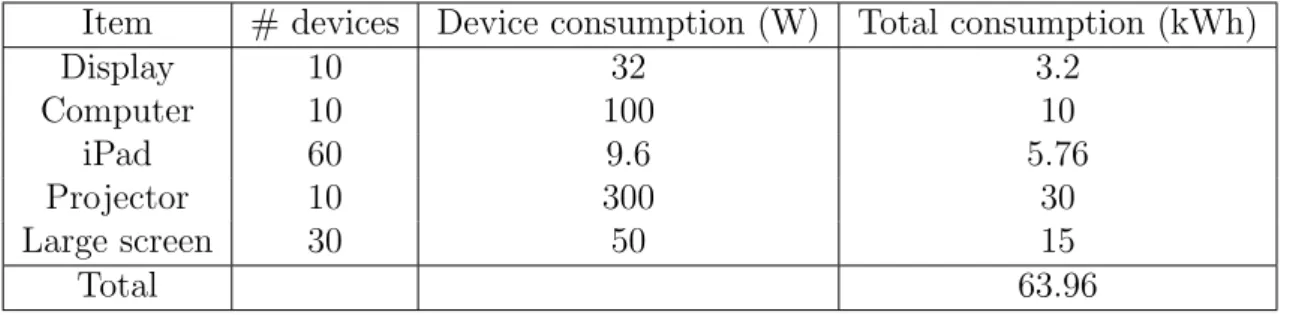
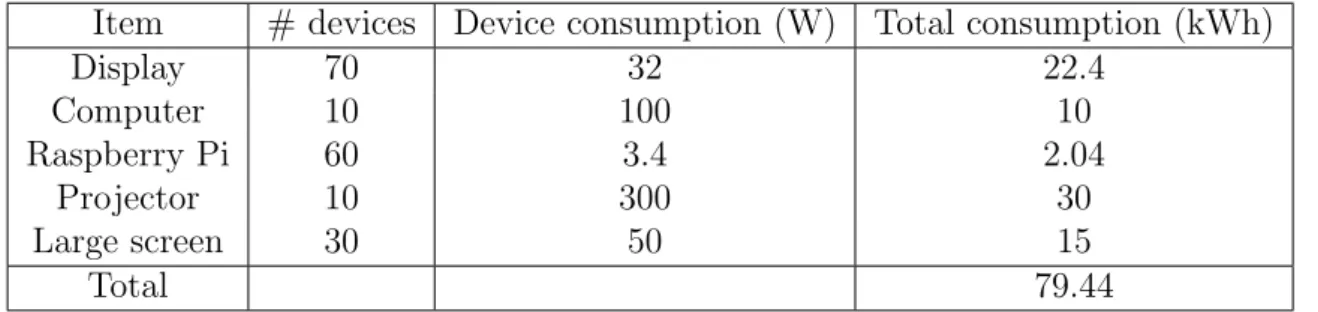
5.4 Case study: Framework for switching to greener media exhibits 45 5.4.1 Case scenario . . . 45 5.4.2 Switching to iPad . . . 46 5.4.3 Switching to Raspberry Pi . . . 47 5.5 Conclusions . . . 48 6 Survey 50 6.1 Summary . . . 50
6.2 Finnish National Gallery . . . 52
6.2.1 Background . . . 52
6.2.2 Interview . . . 53
6.2.2.1 Museum energy consumption . . . 53
6.2.2.2 Sustainability planning . . . 54
6.2.2.3 Digital media exhibits . . . 54
6.2.2.4 Digital media storage . . . 55
6.2.2.5 Web presence . . . 55
6.3 Heureka . . . 55
6.3.1 Background . . . 55
6.3.2 Interview . . . 56
6.3.2.1 Museum energy consumption . . . 56
6.3.2.2 Sustainability planning . . . 56
6.3.2.3 Digital media exhibits . . . 56
6.3.2.4 Digital media storage . . . 57
6.3.2.5 Web presence . . . 57
6.4 Gallen-Kallela Museum . . . 57
6.4.1 Background . . . 57
6.4.2 Interview . . . 57
6.4.2.1 Museum energy consumption . . . 58
6.4.2.2 Sustainability planning . . . 58
6.4.2.3 Digital media exhibits . . . 58
6.4.2.4 Digital media storage . . . 59
6.4.2.5 Web presence . . . 59 6.5 Conclusions . . . 60 7 Conclusions 62 7.1 Future work . . . 64 A Survey appendix 71 vii
Chapter 1
Introduction
A museum is a cultural entity whose aim is to conserve, organise, study and research as well as give access to precious tangible and intangible heritage assets of society. It is a repository of human creations: art, objects, artefacts, books, audio, video etc. With the advent of new technologies museums have adopted technology as a medium to help achieving their goals, mainly edu-cational, but they could also use the technological advancements to improve the energy efficiency of their operations.
1.1
Motivation
The green ICT research project at Aalto University studies energy consump-tion and emissions from the use of Informaconsump-tion and Communicaconsump-tion Tech-nology (ICT) in di↵erent organisations and industries 1.
The energy consumption and emissions from Information and Communi-cation Technology (ICT) is globally equivalent to that of air traffic, and is growing rapidly. The main goal of the green ICT research project within Aalto University’s Energy Science Initiative is to find innovative techno-socioeconomic solutions that could lead to a major energy and environmental impact.
As part of its work, the green ICT research program is interested in study-ing energy consumption patterns in museums. Museums are intereststudy-ing to study because they are long-lived institutions of great importance to society in conserving and presenting cultural heritage, and because sustainability in the energy needed to maintain and present their assets both physically and through the use of ICT technologies into the longer-term future may be an organisationally important objective. Setting sustainability objectives for
1http://energyscience.aalto.fi/en/research/projects/green ict
CHAPTER 1. INTRODUCTION 2 their operations is an increasingly important objective for museums such as the Smithsonian and the Victoria and Albert museums2.
1.2
Research questions
These are some of the research questions this thesis would like to address: • What is the breakdown of energy consumption at examples of several
di↵erent types of museums?
• How does the energy consumption from use of ICT compare to non-ICT energy usage?
• How to quantify and measure energy consumption for ICT-intensive processes such as:
– Content digitisation – Long term preservation
– Electronic media displays and exhibits
1.3
Research goals
The main topic of this thesis is to analyse and study the energy consump-tion on museums and how their derived acts such as digitisaconsump-tion, long term preservation and media exhibits impact their energy consumption. Every issue is then studied and a case study is presented. The goal of the case studies is not to give an exact final outcome on the topic but to give a simple approach to it so they can be studied further and have a solid base. Further-more, to understand more about this topic we conducted a survey on three di↵erent museums that help us to further delve into this topic and see how those example museums view the topic of green ICT in museums.
1.4
Structure of the Thesis
The thesis is composed in di↵erent sections, giving an overview of the di↵er-ent topics:
• Introduction
CHAPTER 1. INTRODUCTION 3 • Background
• Digitisation
• Long term preservation • Media exhibits
• Survey
• Conclusions & Future work
In Chapter 2, an overview is given on how IT has helped museums to enhance and expand their goals and audiences, with emphasis on making a museum visit more accessible and educational for a general audience.
In Chapter 3, a review of the state of the art is presented on the topic of digitisation, detailing the e↵orts made in Europe on this topic and presenting a case study with a semi digitised robot to scan small documents and the energy cost associated to it.
In Chapter 4, long term preservation of artefacts is an important part of the role of museums and other cultural heritage institutions, and an outlook of the challenges and its costs is presented. We also present a case study that compare di↵erent methods to preserve artefacts and their related costs.
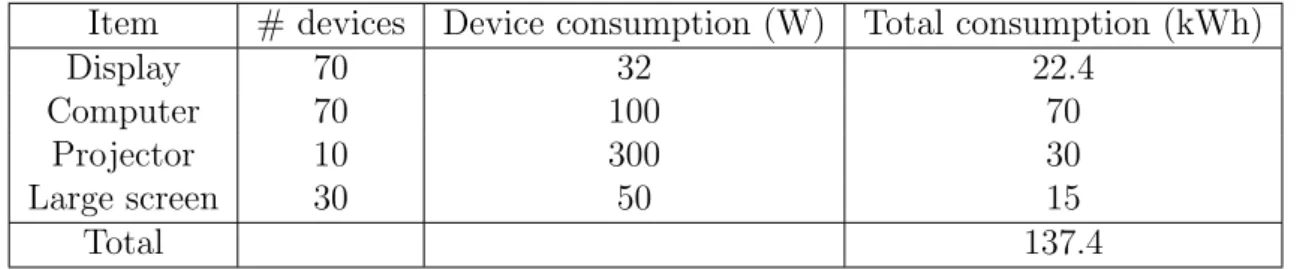
In Chapter 5, we take a look into media exhibits by analysing the di↵erent screen technologies and their energy consumption. We also present a possible model for improved energy consumption in museums that rely on PC-driven media exhibits.
In Chapter 6, we present our results from the 3 di↵erent museums to help us understand how they see this topic.
Lastly in Chapter 7 we present our conclusions on this topic and future work that can be done.
Chapter 2
Background and related work
This chapter contains a brief overview on how museums have approached the use of some new and emerging ICT technologies. It gives an outlook of some the di↵erent technologies that museums have used plus trends in the near future that may be deployed in museums. It serves as basis on how ICT has been already a prominent part in museum activities and also the fields that have been studied in the museum scene.The NMC Horizon Report: 2012 Museum Edition [27] describes some technologies expected to become mainstream in museums in the near future: from mobile apps to Internet of Things. It gives a good overview of the new technologies museums will adopt in the near future. Determining which ones can provide a better experience to museum visitors is also an important research field. Also, one sign of the importance of this topic is the conference MuseumNext1, where trends in museums and case studies on how museums
apply new technologies are discussed.
Over the last few decades, museums have been trying to attract more visitors to their facilities. One of their action plans has been to o↵er new ways for visitors to interact with the museums. By the use of new technologies, visitors can have a more tailored and enriching experience if they choose to do so. It also provides a chance to visitors to have an easy way to be part of the museum experience.
The di↵erent sections of this chapter will focus on di↵erent technologies that have been and can be deployed in museums. It’s not an exhaustive review but is a quick overview on the same main trends that can be seen emerging in museums around the world.
1http://www.museumnext.org/
CHAPTER 2. BACKGROUND AND RELATED WORK 5
2.1
Museums and ICT
2.1.1
Virtual museums
Virtual museums try to emulate the museum experience either by o↵ering part of their collections on their websites or by creating virtual environments that recreate a museum or a place that a visitor can navigate through. 2.1.1.1 Online collections
Recently, one of the most notable e↵orts to provide art collections online is the Google Art Project2. In this case Google has partnered with museums to
o↵er their collections online. The user can easily browse between the di↵erent museums collections, collections created by other users or create her/his own collection. Paintings include extra information such as size, technique used or information behind the depicted scene. Although Google is well known for its search capabilities, in this case the search functionality of this website is rather basic. Search is restricted to keywords and at the time of writing there’s no possibility to have advanced search functions like by art period or other metadata.
Apart from the Google project, another recent outstanding example of virtual collections is the Rijksmuseum museum’s website3. In this case we
can see the paintings with explanations but it also o↵ers advanced search features that allows the user to search for certain periods or locations. It also provides an open API (Application Programming Interface), making accessible their online collection for all of those who are interested. We will review APIs in a corresponding section later.
2.1.1.2 Virtual environments
Another approach to virtual museums is the recreation of a museum in 3D. In the early 1990s it was a popular choice to have a representation of museums and their collections in CD-ROMs [25]. With the advancement of the web and more powerful computing resources, we can find nowadays websites that recreate museums within the web browser [50] thanks to web standards such as VRML, although it’s not widely used. In all of these cases they o↵er a recreation of the museum physical space and the user can walk through the hallways of the museum. This environment provide more information about the artefacts than in the physical museum since space is not an issue. They
2http://www.googleartproject.com/ 3https://www.rijksmuseum.nl/en
CHAPTER 2. BACKGROUND AND RELATED WORK 6 also usually use audio and/or video explanations of the di↵erent artefacts shown.
The use of Virtual Reality (VR) is also a common way to provide users with enticing new experiences. The user wears goggles that make a total immersion into the virtual space. Another technology is Augmented Reality (AR), where a virtual representation of the artefact exists in the real world and the user can interact with it.
The MediaLab laboratory in Aalto has several projects that use these technologies. For example the recreation of the Finnish pavilion at the 1900 world fair in Paris4 is a virtual environment where the users can explore the
inside of the building. Feedback has been very positive and it’s the only way to see the pavilion nowadays.
2.1.2
Mobile apps
Mobile applications, or ”apps”, typically need to meet some organisational objective of a museum: better exhibit presentation, increase visitor engage-ment, o↵er a di↵erent way to explore the collections held, etc.
Before the rise of the new mobile platforms such as Android or iOS, there have been a long history of e↵orts in including handheld devices in museums, so visitors could have a better experience while they visit the museum. One recent example is Tesoriero et al. [53]; they presented a system based on PDAs and its deployment. The PDA devices were interesting but museums normally would have to provide to their visitors these devices, leading to external costs of buying the devices and making the proper maintenance on these devices.
With the rise of the new smart phones and app stores such as the App Store or Google Play, museums often publish companion apps that provide more information for the user. One of the most interesting is the Smithso-nian; dedicated apps for certain exhibitions that complement the information already shown at the museum5 and expand on o↵ering the users more ways
to engage with the exhibits. They are available for iPhone, Android and also have mobile version of their website so they can reach as many people as possible. The general app has information about the exhibition, and it also allows users to share photos or comments about artefacts. They also have more specialised apps that focus on certain exhibitions and can have a dedicated style that suits more the exhibition held. Furthermore they of-fer a scavenger hunt app to discover the museum, so users can have a more
4http://paviljonki.mlog.taik.fi/ 5http://www.si.edu/Connect/Mobile
CHAPTER 2. BACKGROUND AND RELATED WORK 7 interactive and fun way to explore the museum.
Also the American Museum of Natural History has a really well crafted app6. It includes turn-by-turn navigation inside the building. As the
Smith-sonian app it features the di↵erent exhibitions and tours that the visitor can see. It also o↵ers sharing exhibitions through popular social networks.
In [55] there are a few more example of mobile apps in the context of museums. Templeton presents di↵erent example on how engaging museum visitors thorough the use of mobile apps [52].
In my opinion, mobile apps are a great step to have a more exciting relationship with the museum’s visitors. Deployment in these scenarios is cheaper than previously thanks to users willing to use their own devices. The main problem is crafting an app that can catch the attention of the user to download and use it and if it’s useful enough for continued use. Also it can provide sharing opportunities that can promote the museum to other audiences and expand their reach from the usual crowd.
2.1.3
Interactive museums
Kiosks in museums have been an important part for visitors to interact with the di↵erent artefacts displayed in a museum. Vom et al. [58] published a case study in the use of kiosks in The British Galleries at the Victoria and Albert Museum in London. The audience was more engaged to the artefact but it also had some issues. The main drawback was that kiosks are used by few persons at the same time due to space constraints, this creates queues to grab the usage of the kiosk. Also if the kiosk is located on the way to the piece, people who just want to see the piece can be disturbed by those who are using the kiosk. That’s why now museums are creating new experiences that can be used directly in the visitor’s phone, this way there’s no dedicated space to kiosks and users can roam freely.
RFID tags are still used by a large number of museums. Apart from providing location information, it’s usual that they are also used for o↵ering more information about the artefacts. This setup normally assumes that the museum needs to have RFID readers available to lend to their users.
QR codes are comparable to RFID tags but in this case users can use their mobile phones with a camera and an app than can read QR codes. In this case it’s important that museums o↵er their WiFi credentials so users can have a reliable way to access to the Internet.
NFC tags are also a way to have the same functionality as QR codes or 6http://www.amnh.org/apps/explorer
CHAPTER 2. BACKGROUND AND RELATED WORK 8 RFID tags. For example, the Museum of London 7 uses NFC tags so users
can learn more about certain pieces. Having a NFC reader in the mobile phone is not yet as common as a camera (currently iOS devices don’t have a NFC reader) but it’s easier for the users to interact with NFC tags than QR codes. With QR codes the users have to do more steps to get to the information (have their camera active and focus properly on the QR code). Meanwhile with a NFC tag, users just have to tap the NFC tag and they will be able to access to the info.
2.1.4
Audio/video technologies
Audio guides have been a de facto standard in museums. They have been present from 19528. It’s an interesting solution for certain visitors, but many
of the users don’t like the lack of interactivity and the passive approach. Also, users find it difficult to discuss di↵erent pieces of art if they are visiting the museum with her/his friends or family. Still, it’s one of the most populars choices and it has been proved successful for museums.
Videos are also another way to enhance the museum experience where the museums want to provide more information about the artefacts. Like the audio, they could be more interactive and visitors don’t have the chance to decide how much they want to invest in watching the video or if the video content is interesting enough.
2.1.5
Navigation inside museums
Determining the location of a user inside of a building is a real challenge. GPS is not a feasible solution because the reception inside buildings is often lost. Museum visitors rely on paper guides that allow them to plan routes and try to find locations themselves. Recently there have been interesting technological developments in this area which don’t rely on GPS that muse-ums can apply.
One of the most common technologies deployed in museums are RFID tags. Normally users carry an RFID reader (lent by the museum) so if the user wants to know the location he just has to read the nearest RFID tag. Then the location is shown on a 2D map. This approach has been well tested in museums and there are multiple deployments of this technology but it has some drawbacks. First, deploying RFID readers for all visitors is expensive for the museum. Also it doesn’t o↵er any kind of directions to places and just
7http://www.museumoflondon.org.uk/Explore-online/mobile-apps/NFC.htm 8
CHAPTER 2. BACKGROUND AND RELATED WORK 9 shows the location to the user. There have been several deployments in this area [20]. In my opinion, this technology is already outdated and museums are starting to use other alternatives.
Many recent developments have been done using WiFi as an indoor po-sitioning technology, sometimes using the network infrastructure already present in some museums an accurate location can be computed by triangu-lating the WiFi antennas of the access points with known locations. There are several competing technologies: WiFiSLAM, Meridian or Cisco System Services. Disadvantages of this approach are that a network infrastructure is needed. There are many examples of deployments of these technologies in museums, one interesting solution is the Natural Museum of History in New York City that uses the Meridian technology (in conjunction with Cisco System Services) to provide turn-by-turn directions9.
Apart from WiFi, there is a new technology that could be promising in the following years. Bytelight uses LED lighting to o↵er fine-grained location. The light acts a signal that the phone can demodulate via its camera. It doesn’t need any kind of network infrastructure and they o↵er a mobile app that can read the signal. Price of this solution is still expensive (99$ per bulb). There is already a deployment of this technology in the Museum of Science in Boston10. Some drawbacks are that the user has to be located
under the light and transition between the bulbs can be a problematic issue. There’s also a Finnish company that is doing work in this area. In-doorAtlas11 uses magnetic fields to provide indoor location. It doesn’t need
any special infrastructure, but it needs to be set up correctly by walking inside the building (users can create the indoor maps for popular locations). They have an API that provides developers the functionality to add indoor location in their apps (currently they only o↵er an Android API).
Quuppa.com12 is another Finnish startup working on indoor location
us-ing Bluetooth low energy beacons.
2.1.6
Open APIs
Open data is one of the most promising emergent trends in technology13.
Governments and companies are introducing this concept to the information they manage. But it is also a great opportunity for museums to open their
9http://www.meridianapps.com/cisco 10 http://blog.bytelight.com/post/40011523606/bytelight-illuminates-the-museum-of-science 11http://www.indooratlas.com/ 12http://quuppa.com/ 13http://opendatahandbook.org/en/what-is-open-data/
CHAPTER 2. BACKGROUND AND RELATED WORK 10 collections to the public so developers can make new and exciting projects based on the museum’s data. Also it gives the opportunity to create mashups, a web page that uses content from more than one source to create a single new service displayed in a single graphical interface14.
We presented already the website of the Rijksmuseum, apart from the online collection, developers can have access to all the information of the collection by means of an API. There have been already interesting projects like face recognition in the paintings15or a time line of the collection16. These
projects provide new and enticing new ways to consume data. For using the API developers need to request a key, results of the di↵erent calls are in XML. All information of the artefacts are in Dutch.
The Brooklyn museum has also available an API for developers17. As the
Rijksmuseum developers need to request a key and the results of the calls are in JSON.
2.1.7
Preservation technologies
Digital heritage is a new interdisciplinary field of knowledge that brings to-gether information technology, humanities and design. Nowadays with all of the new technological advancements it’s easier to preserve contemporary art, where the pieces are mainly already in a media format (audio, video, etc.). But it’s also important to preserve collections that have been not digitised already and thanks to the digitisation process we can preserve old pictures or other artefacts.
There are di↵erent ways of applying this concept.
Europeana18 is one project for the digital heritage of Europe’s
multilin-gual digital library, museum and archive. It has multiple collections from museums and organisations from the EU. It’s a large repository that include di↵erent multimedia types (pictures, newspapers, books, etc.). They have an open API, the results of the API calls are in JSON. Also anyone can add material by requesting access to it. The national digital library of Finland19
is part of Europeana network. The digitisation process is not done by euro-peana and is the providers who are in charge of digitising their collections. Europeana is intended to serve as a central hub to store all these artefacts.
Another project to digitally preserve old artefacts such as pictures, letters 14http://en.wikipedia.org/wiki/Mashup (web application hybrid)
15http://weblab.ab-c.nl/rijksmuseum 16http://rm.contentecontent.com/tijdlijn
17http://www.brooklynmuseum.org/opencollection/api/ 18http://www.europeana.eu/
CHAPTER 2. BACKGROUND AND RELATED WORK 11 or postcards is Project Gado20. It uses an open source archival scanning
robot. The goal of the project is to develop a robot assistant for under 500$ dollars so small to medium archives can digitise their collections. There are some museums that have been using the robot assistant, such as the Afro American Newspapers, that have been able to digits over 120,000 photos using Project Gado21.
As we said in the previous section, the concept of open museum is get-ting interesget-ting. Crowd sourcing is one of the most interesget-ting ideas. One prime example is Tagger22, an e↵ort between BBC and the Public Catalogue
Foundation in the UK. Allowing users to tag the painting that can be found on galleries around the UK, permits that the visitors are an integral part of the museum experience. If we mix the idea of digitising artefacts that belong to communities and from crowd sourcing there are plenty of interesting ideas that can span and can help to preserve a large amount of old pictures.
Finally, we also have to consider the di↵erent implications; technological and cultural, of storing these artefacts. Which format should be used? Which procedures have to be followed? What artefacts are worth of storing? Who is in charge of preserving all the data? These questions belong the digital heritage field and research and di↵erent projects are trying to understand and find answer to the previous questions.
2.1.8
Energy e
ffi
ciency
Museums generally have special constraints about what can be achieved with respect to energy efficiency. Normally the artefacts have to be kept at certain temperature and humidity conditions in order to preserve them and display them. Recent research shows that certain things could be considered in this respect [35], Mueller et al. presents di↵erent methods to reduce the energy footprint of the Kolumba Art Museum in Cologne, for example skylight with movable shading devices or geothermal cooling and heating .
So if one can’t address all of the big picture, one can take a look at the areas where we can be more efficient and more green. As we saw, with the advent of mobile guides, paper maps or guides can be kept to a minimum so we lower a bit the energy footprint.
Aspects where technology can greatly enhance the energy efficiency of museums:
• Can we make a framework for a comparative study between the energy 20http://www.projectgado.org
21http://projectgado.org/afro-american-newspapers/ 22http://tagger.thepcf.org.uk/
CHAPTER 2. BACKGROUND AND RELATED WORK 12 consumption of a physical museum and a next generation museum (vir-tual, distributed, online, tech-intensive)? In terms of energy efficiency: Where is the energy spent?
• How does a robotic scanner (see Chapter 3) and a participatory mu-seums a↵ect the energy efficiency of a museum? What does deploying new emerging technologies to museums mean and how they a↵ect the sustainability aspects?
• How can we make embedding metadata open and participatory? How would linked content work with museum archives and data from eCom-munities? Does metadata participation and participatory archival pro-cesses entail energy savings?
• Could there be eco tours or more efficient guided visitor flow so there aren’t huge concentrations of people at the same place int a museum at the same time?
Not all of these aspects are considered in this thesis but they can be a starting point for further research in this field.
2.2
Benefits
Applying new technologies is nowadays a crucial part in the goals of a mu-seum. Conferences like MuseumNext show that there’s interesting in re-searching further how to apply new technologies to the museum experience. Also it’s important that more engaged visitors will result from more inter-esting experiences and recurring visits to museums [12]. Certain museums are already applying this to attract more people to their exhibitions with interesting results23.
2.3
Challenges
Embracing new technologies in museums can be difficult because they lack di↵erent factors that can influence the implementation. The technological part is definitely one key issue and museums need guidance and assistance. Small museums that don’t have a lot of funding could be problematic though there are a↵ordable solutions nowadays. We think that one important feature
23
CHAPTER 2. BACKGROUND AND RELATED WORK 13 in the near future is the power of crowd sourcing and developing sustainable practices in museums. Allowing visitors to be part of the museums and to be able to define what they are interested in is a great opportunity for all types of museums.
Having a cross-disciplinary team is an integral part for success, we need people from di↵erent backgrounds to have a good overview on the challenges that we have to overcome. Finally having an immersive user experience is the final touch for having a completely success system. One of the best examples of how museums can embrace technology is the Cleveland museum24; they
rely heavily on large multi touch screens so visitors can interact with the collections in a easy way.
Visitors are the last piece of the puzzle, according to Falk division [18] every visitor has a di↵erent purpose when they go to visit a museum. Recog-nising these type of visitors is difficult. One way to overcome this is to o↵er a wide array of choices so that the visitor can have the experience that she/he wants. Feedback from the visitors is important and getting it right is very useful to improve. We think that having pilot programs is a way to deploy new experiences and have honest feedback from visitors. The biggest prob-lem is the lack of resources to have this continued approach where only big museums can iterate these new ideas.
2.4
Related work
Even though the use of technology in museums has been a very studied subject in academia ([7]), a green perspective hasn’t been extensively studied and reported on so far. Much of the related works we could find were about climate in collections and making HVAC systems more energy efficient ([56] [6]). Others took a holistic view (involving architects, engineers, etc.) to reduce energy consumption [35]. Sadly this approach is very costly and not all the museums can go through such drastic renovations to improve vastly their energy efficiency.
There are some approaches that use wireless sensor networks to improve energy efficiency on museums. In [15] and [57] they have an extensive coverage in real time of the museum’s climate thanks to sensors around the museum facility. The results of their studies help as a baseline to reduce the energy footprint of the museum in the future, helping them to compare di↵erent approaches.
One reason why the literature may have neglected the study of energy 24http://localprojects.net/project/gallery-one/
CHAPTER 2. BACKGROUND AND RELATED WORK 14 usage and ICT energy consumption on particular in museums could be the widely held assumption that museums have very specific energy requirements that have to be met so they are able to preserve their collections and artefacts without damage, and maintained in proper environmental conditions for this purpose. This narrows the areas in which technology could be applied to improve energy efficiency. In this thesis we will take a look on some of those areas that have been not covered extensively in literature.
Chapter 3
Digitisation
Digitising or digitisation is creating an object, image, sound, document or a signal (usually an analog signal) by a discrete set of its points or samples. The result is called ”digital presentation” of the object1.
Digitisation is nowadays a crucial process used in museums. With the goal of preserving their collections, museums have been eager to digitise their collections (e.g. [54], [41], etc.). It also provides them the opportunity to publish their collections publicly on the Internet so researchers or other interested individuals can study the published artefacts easily and with no need to go physically to the museum location.
There have been e↵orts in this area for a long time [51] and with the advent of cheaper scanners and high-quality digital cameras more museums are interested in digitising their inventory either in-house or outsourcing it to other companies.
In this chapter we will give an overview of the subject, trying to answer some basic questions such as what artefacts are digitised, how much it costs and the challenges involved in the process. We will also present an energy view on this subject, that through the surveyed literature, at the moment of writing, it seems to be a somewhat neglected topic. As a case study we present the findings on the energy cost of running a digitisation robot for small museums and other cultural organisations with limited budget.
3.1
Digitisation materials
Museums host a vast number of artefacts and di↵erent materials. We could classify some major types of artefacts a museum can have in the following broad categories:
1http://en.wikipedia.org/wiki/Digitizing
CHAPTER 3. DIGITISATION 16 • Human-made objects
• Natural materials • Works of art • Books
• Photographs, small clippings, postcards, etc. • Video/Audio
Nowadays one goal of a museum is often to digitise all the artefacts in their collections as much as possible but due to the di↵erent nature of the objects, that goal is still often hard to reach. For example, digitising human-made objects (e.g. vases, sculptures, etc.) is hard, it requires special equipment such as 3D scanners that are not still a↵ordable for most museums and sta↵ that has to be trained; it has a high initial investment. Some museums approach the digitisation of such objects with only pictures, but in this case they are not properly digitising the artefact and merely keeping an inventory.
Books have been one field where digitisation has been very prominent [14] [44]. E↵orts such as Google Books2, have tried to digitise entire national libraries.
Most books can be converted to document files since it’s important to be able to search easily, but also some books or written documents have importance on the object itself (due to the handwriting, written notes on it, etc.) so having images of it it’s also a important part of book digitisation.
Digitisation works of art and photographs are now easier to implement than ever due to the better equipment available currently (cameras, etc.) so they can have a better digital representation of the painting or the pho-tographs.
For audio and video, depending on the format is stored in, the only thing to do is to convert it to a digital format. Restoring and correcting some of the visual artefacts that usually appear can also be done, but the quality of the audio or video will generally be similar.
Now we will review the di↵erent techniques used for digitisation currently. We have to take into consideration that with more artefacts already being in digital format these days, digitisation will be not required in the future as much as it is needed today. Also with the current trend of 3D printing, even man made objects will have a perfect 3D model already since one is necessary to print it.
CHAPTER 3. DIGITISATION 17
3.1.1
3D scanning
There have been projects using 3D scanning where they detailed their expe-riences using them such as [30],[28] or [54]. In [13], they already determine that 3D scanning is a mature technology that will improve rapidly over time and cultural heritage institutions should evaluate acquiring 3D scanners for their artefacts.
3D scanners can be divided in:
• Active optical devices: these scanners emit some kind of radiation or light over the object and reconstruct its geometry by checking how the light is reflected. There’s di↵erent techniques such as triangulation or time-of-flight. The the data collected by the lasers is compiled and a 3D model is generated. These devices are expensive since require specific hardware but the quality is very high.
• Passive optical devices: where simple cameras can be used and by taking a lot of pictures of the di↵erent sides of the object by using algorithms the object can be reconstructed as a 3D model. These devices are cheaper since they rely on simple digital cameras but the quality of the 3D reconstruction is not as good as the active optical devices. One advantage of this approach is that it can reconstruct much larger objects or entire buildings whereas active optical devices would be inviable.
Nowadays, active optical devices can be found for around $8003 for
hob-byists and small objects, the energy consumption of that scanner is around 25W. But most sophisticated that can scan furniture or sculpture is around $10.0000-$20.00004, their energy consumption is also around 25W. There are
many more scanners that were not covered.
Passive optical devices are around $4.170 5 including the software and
DSLR cameras for reconstructing from pictures to 3D models.
3.1.2
Scanning
Scanning is more widely available and cheaper than 3D scanning due to the longevity of the technology. There are specific scanners for books or for film negatives. Scanners nowadays have a wide range of resolutions to scan from being for consumer scanners around 1200 dpi or more advanced 2400 dpi.
3http://store.makerbot.com/digitizer
4http://www.artec3d.com/hardware/artec-spider/ 5http://www.shapecapture.com/Soft Sales.htm
CHAPTER 3. DIGITISATION 18 Sometimes, museums need more specific scanners since the normal scanners have problems with fidelity or acquiring range. In [45], Shi et al. developed a specific scanner to overcome some of those challenges. Currently, museums tend not to use scanners anymore and instead tend to use more sophisticated set ups with DSLR cameras that can take pictures with higher resolutions and usually faster than using a scanner.
3.1.3
Digital cameras
Currently with the advancement of DSLR cameras, it’s possible to take high quality pictures of pictures or other material prone to this kind of digitisa-tion. It’s the main approach for museums due to its low cost, easily available equipment and general software such a photo editing tools to correct visual artefacts that could appear on the digitised representation. Also, the work-flow is easier than scanners since pictures taken are immediately available, improving the workflow efficiency and the speed.
3.1.4
Analogue to digital conversion
In this case, we talk about audio or video formats that are stored on particular formats such as vinyl records, phonographs or film reels. For this purpose, organisations need special equipment to do the digital conversion, often is outsourced to other companies specialised in this kind of conversion.
3.2
State of digitisation
The recent survey report on Digitisation in European Cultural Heritage Insti-tutions (2014) [49] gives a good overview on digitisation in Europe. Around 36% percent of the cultural institutions surveyed have written a plan about digitisation. Also more than 50% of artefacts they own have to be still digi-tised and catalogued properly. We are talking about a large quantity of material to be digitised
Europeana is an EU project that acts as central repository for the eu-ropean cultural heritage. Its aim is to aggregate, facilitate, distribute and engage. Currently it has several ongoing projects to digits from contempo-rary art to manuscripts6. It’s one of the main forces in Europe for digitisation
and it’s an e↵ort between di↵erent European projects from the technological field and the humanistic field.
6http://pro.europeana.eu/projects?p p id=projectindexportlet WAR europeanaportlet INSTANCE 1mpE&p p lifecycle=0&p p state=normal&p p mode=view&p p col
CHAPTER 3. DIGITISATION 19 In the U.K., there’s also a large group dedicated to digitising national col-lections7. Their funding comes mostly from institutional organisation across
the U.K. and a smaller amount from private institutions such as universities. In the U.S.A., the Smithsonian museum has been one of the most promi-nent and open about their process since they have been involved in this field during its inception and being one of the early pioneers. They have enforced a digitisation plan [46] from 2010-2015. Though digitisation is expensive and it requires e↵ort, the advantages of it are numerous according to the Smith-sonian report, such as broading access, preserving collections, support for education and enrich context.
3.3
Costs
The average annual budget for European museums’ e↵orts on digitisation is around e98.000 [49] for all the museums that participated in the survey. Half of this budget comes from the institution itself and the other half is from temporary funding from governments or other organisations.
The general costs of digitisation can be divided in two big categories, according to [49]:
• Incidental costs are defined as the costs involved with the initial creation or acquisition of a digital collection. Examples: selection of materials, acquisition of digital born materials, scanning, etc.
• Structural costs are the costs needed for the ongoing maintenance, enhancement and preservation of a digital collection. Examples: activ-ities concerning the preservation of digital collections, licences, main-tenance of web servers, user outreach and support, management. According to the survey those costs are comparable and take the same part of the digitisation budget (50%) of the institution.
Further the incidental costs can be divided in these di↵erent activities [49]: • Analogue to digital conversion
• Metadata creation • Project management
• Web design, software development 7http://www.jisc.ac.uk/whatwedo/projects.aspx
CHAPTER 3. DIGITISATION 20 • Selection of material for digitisation
• Logistics
• Acquisition of digital born material • Copyright clearance
• Other costs
39% of the incidental costs are for doing the digitisation process. 19% are dedicated to the metadata creation.
Table 3.1: Costs of digitising museum collections. Source [39] Material Lower estimate(ebn) Higher estimate (ebn)
Human-made objects 4.76 25.92
Natural material 5.75 26.72
Works of art 1.36 7.39
Photographs 1.89 3.67
Table 3.2: Costs of digitising di↵erent items. Source [39]
Material Lower estimate(e) Higher estimate (e) Mean (e)
Human-made objects - - 121
Natural material 26 121 73
Works of art 25 136 80.50
Photographs 4 15 12
In Table 3.1 there’s an outline on the costs of digitising the di↵erent types of materials that museums have. The individual cost for each kind of item can be further seen in Table 3.2.
3.4
Challenges
As we can see from the previous sections, digitisation is still a costly and difficult process, and as such there’s still challenges that need to be tackled.
CHAPTER 3. DIGITISATION 21
3.4.1
Cost
One of the main challenges is cost, either in time or money. Although the Smithsonian and other cultural institutions highly value digitisation and see that the benefit is more than the cost, small institutions can have a lot of problems implementing digitisation. This can’t be overlooked, although we strongly believe that with the advent of new technologies that digitising processes can improve, so it could be made more a↵ordable for any kind of institution regarding less of its size.
3.4.2
Digitisation process
The digitisation process in itself is also challenging. Most of the organisations have specialised needs and it requires to create tailored software. The diverse array of artefacts that some institutions have is also an enormous problem. Paintings are more easy than objects such as relics that have to be digitised in 3D. Also setting up the proper practices for digitisation is needed such as making sure that the digitised version of the artefact has enough quality and it doesn’t have any errors. Most of the digitisation processes in Europe are done by the institutions themselves, though more specialised objects can be outsourced to companies that have the proper equipment and procedures to manage the objects properly.
On the other hand, thanks to the rapid improvement of technology, each year the hardware becomes more a↵ordable for institutions and new solutions appear that can me make more appealing to the institution start their own digitisation department.
3.4.3
Formats and quality
Another challenge, is the quality of the digitisation. Digitising for the future means trying to store the artefact with the highest quality possible. In the case of books, you can easily store just the text (although in some cases the book itself could be interesting enough to digitise in itself). Pictures or paintings have to be digitised using large resolutions. 3D scanning has also to be done properly and with a high number of polygons to have a good representation of the artefact with the highest fidelity. Having a pipeline in place for a digitisation plan is an important step.
As an example of a digitisation plan and the formats and qualities usually required in such projects, we can take a look to the Partage Plus Project8, an
European project to digitise most of the art nouveau pieces that European 8http://www.partage-plus.eu/
CHAPTER 3. DIGITISATION 22 museum have in their collections. In this project digitisation involves a large array of artefacts from vases to artworks. Uncompressed video and audio is recommended, also open source formats are preferred. 3D artefacts are more complicated since there are no leading standards. In this case the Partage Plus project uses .obj format to save them though to publish them online 3D PDF is used since it allows quick access and small file sizes.
3.4.4
Digital access
One benefit of digitisation is the possibility to publish the digitised artefacts on the Internet as open content, freely accessible and with possibilities to use it. But sometimes it can’t be done due to copyright issues; since not enough years have passed to be copyright free, sometimes they also extend the copyright of certain works. These kind of issues were already brought to the attention when more and more museum published their collection using CD-ROMs [4]. Fair use is usually cited for those who think that works of art should be copyright free but it depends on a case by case approach [32].
Even though the benefits of publishing the collections museum online are well known [47], some institutions can be reluctant to publish their collections online due to fear to cannibalise their own visitors directing them to their digital collections instead of visiting physically the museum.
Regarding how the collections are accessed, in Figure 3.1 we can see the percentage of the cultural institutions whose collections were made accessible through di↵erent access channels across Europe. As we can see o✏ine access is still very prominent (around 40%), followed closely by the institution’s website.
3.4.5
Long-time preservation
As a final challenge, storing and preserving the digitised artefacts is crucial. The formats used for storing the digitised artefacts are critical, due to the long term preservation goal, the format has to be chosen carefully so they can ensure that it can be viewed in the future properly. Also, the digitised artefacts need to be high quality, since digitisation is costly. We will talk more about this on Chapter 4, where a detailed overview on this topic is given.
CHAPTER 3. DIGITISATION 23
Figure 3.1: Percentage of the collection accessible through di↵erent access channels. Source [48] and [49]
3.5
A green perspective on digitisation
As we could see from the survey [49], the costs of digitisation are mainly calculated as incidental costs and structural costs as previously presented. In neither of those, there is a consideration of the energy consumption for the process of digitisation, either in the short term or the long term.
Calculating the energy cost of the digitisation process is relatively straight-forward, although it varies greatly depending on the process used for digitis-ing the artefacts. Installdigitis-ing energy meters on the devices used for digitisdigitis-ing is enough to have a nice estimate on how much energy it cost to digitise an artefact. However the author has not found reports or papers on this subject. Later in this section we present our case study using this technique. The next step is how we can improve the energy efficiency of digitising. One way of considering this issue is using devices that are already certified 9 as energy
efficient. Most scanners have already such certifications in place already. We can also think of digitisation as a way to a greener museum experience. If artefacts that are hard to access or need specific equipment to check them (such as gloves or special rooms) are digitised, researchers and the public wouldn’t need to go to specific museum to study them, lowering the travel footprint. Also with the advancement of 4K screens, museums can share their collections easily and instead of carefully transporting the artefacts with the
CHAPTER 3. DIGITISATION 24 impact for the artefact and the travel that causes, they can just display it in a high resolution screen, giving the same feeling to the audience as from a real painting.
On the other hand calculating the energy impact once an artefact is pre-served is much harder as we will explain more in detail in Chapter 4.
3.6
Case study: Digitisation with the
dig-GLAM assistant
3.6.1
Introduction
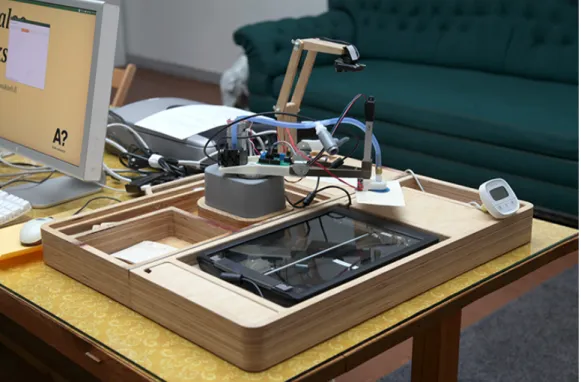
The digGLAM assistant (see Figure 3.2) is part of a joint collaboration be-tween the MediaLab at Aalto and the Data Communication Software depart-ment.
The digGLAM assistant is based on the Project Gado10, a semi automated
robot to digitise printed material items. As a part of my work, a UI was developed to easily interact with the robot so small museums or organisations could easily use it and scan part of their collection with little intervention. Furthermore, functionality was expanded and testing tools were added for a easy setup.
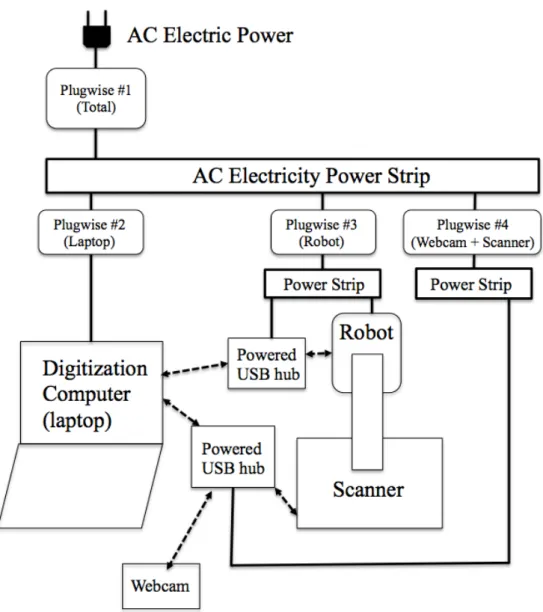
One goal of the project was to quantify the energy used in the robotic assisted digital scanning of artefacts. The measurement setup is shown in Figure 3.3. Four energy meters from a company called Plugwise11were used;
they measured AC electric power at di↵erent points of interest: 1) Total, 2) laptop, 3) robot + powered USB hub for its USB powered components, 4) scanner and webcam powered via a second powered USB hub. In the following sections, we have assumed that the loss at the power strips (kept as short as possible) and at the Plugwise measurement units is negligible.
3.6.2
Setup
In this case, we measure the di↵erent components of the digGLAM assistant and the total. We separated our system in the following parts: the laptop, the robot (including the power source and the USB hub), the scanner and webcam (including the USB hub) and then the total of the previous compo-nents.
10http://projectgado.org/digglam-alpha/ 11http://www.plugwise.com/
CHAPTER 3. DIGITISATION 25
Figure 3.2: The digGLAM assistant
3.6.3
Results
The overall energy consumption of the di↵erent experiments are shown in Figure 3.4. Over the course of a typical digitisation run the laptop consumes about 50W, the robot about 10W and the di↵erent peripherals (webcam, scanner and USB hub) around 8W. The total is around 70W.
One metric that we found interesting to estimate is the energy cost to digitise one artefact; in our case a single postcard using the digGLAM assis-tant.
Helsingin Energia’s price for electricity in January 2014 was about 0.142 EUR / kWh (including 24% VAT). It should be noted that this price con-tains two components that were roughly equal: Electric Energy Cost and Electricity Transfer Cost.
If we constantly run the robot plus laptop for one hour of digitisation, that is about 0.07 kWh for the theme day. Using the Helsingin Energia’s price mentioned before, the energy cost of that one hour of digitisation is then estimated to be about 0.00994 EUR (including 24% VAT). In one hour, the digGLAM robot scanner system can scan around 70 postcards (one-sided) according to our experiments. So the energy cost of digitising each one is then around 0.0001342EUR (including VAT). The cost of digitisation is quite
CHAPTER 3. DIGITISATION 26
Figure 3.3: Setup for the digGLAM assistant minimal.
This estimate does not include any energy costs associated with post-processing of the image or of storing data in the cloud, just the robotic digitisation and saving the image onto the computer.
The results show that digitising using the digGLAM assistant is not ex-pensive and the cost per artefact is quite low compared to other systems that require a more attentive approach. Also the use of consumer devices, makes the system extremely a↵ordable and thanks to the modularity of the system di↵erent scanners and webcams can be used. The robot is the only piece
CHAPTER 3. DIGITISATION 27
Figure 3.4: Energy consumption for the experiment
that is hard to replace if it gets broken and requires repair. We were able to fix the small problems we found along the way. It’s important to notice that consumer devices, such as the ones used in this experiment, are getting more energy efficient so the energy consumption of the laptop, webcam and scanner will decrease over time.
The cost of digitising is an interesting metric and showing the energy consumption and informing the public about it, it’s a good practice; it is important since they can have a good overview of the energy footprint for digitisation. Although one of the main advantages of using the digGLAM assistant is the possibility to run it without any assistance so the sta↵ have more time to work on other duties. Also we have found that is a great tool to bring to museums, audiences were easily engaged due to the nature of the device and the project often caught the attention of the visitors.
3.7
Conclusions
Digitisation is a still ongoing process that will take several years to be fully adopted by most of the museums and other organisations. Although the digitisation process in Europe is strong and there have been a lot of projects
CHAPTER 3. DIGITISATION 28 involving the adoption of this technology, some of the challenges presented in this chapter still have great relevance in the near future. Copyright issues could be an important hurdle for organisations if it’s not studied in detail. Also, long-time preservation will be further studied in Chapter 4.
The case study is a small example how the energy footprint could be studied in this field. Measuring the energy of the di↵erent devices can give a good overview of the energy footprint. The explicit costs were detailed, im-plicit costs such as post-digitisation process and salary of the people working were not taken into account, since it depends on di↵erent parameters that were out of scope for the case study.
Finally, digitisation is the main force for preserving the heritage and arte-facts of older, current and future generations and therefore, in our opinion, one of the most interesting fields for technology to help and enhance the energy footprint.
Chapter 4
Long term preservation
As we described in Chapter 3, one of the main challenges of digitisation is storing and preserving artefacts for future generations so they can be easily accessed and viewed by the general public. Museums and other organisations are in charge to protect and preserve their artefacts. With the advent of new technologies more and more artefacts have been digitised or are digital artefacts to begin with. This results in museums needing new set of principles to store and preserve digitised artefacts so they are preservers properly for future generations.
Digital preservation has been a prominent issue since 1994 when the Task Force on Digital Archiving in the US was born. It acknowledged the impor-tance of preserving the cultural heritage and in 1996 they produced the first report [59]. Most of the early challenges were about what is worth preserving since in those days storage space was still scarce and expensive. Also digiti-sation was expensive and costly [29]. Thankfully, nowadays, we have solved most of the storage space problems thanks to the rapid advancement of tech-nology and we have plenty of storage space to preserve digital artefacts. Still, the green aspect has been currently overlooked.
In this chapter, an overview of di↵erent preservation plans is presented. We will outline the challenges on long term preservation and the energy im-pact of this topic. Finally a case study is presented, where energy consump-tion is studied for two di↵erent approaches local storage and cloud storage.
4.1
Preservation strategies
Feeney et al. in [19] divide digital preservation in the following ways:
• Preserve the original software (and possible hardware) that was used to create and access the information. This is known as the
CHAPTER 4. LONG TERM PRESERVATION 30 ogy preservation strategy. It also involves preserving both the original operating system and hardware on which to run it.
• Program future powerful computer systems to emulate older, obsolete computer platforms and operating systems as required.This is the tech-nology emulation strategy.
• Ensure that the digital information is re-encoded in new formats be-fore the old format becomes obsolete.This is the digital information migration strategy.
Technology preservation and emulation strategy are focused on digital documents or computer programs since you still have to run or read them using special equipment. Museums don’t often follow these strategies since they merely have digital representation of the artefacts. Instead they focus on migration.
There have been several recommendations for preservation system for museums. For example, Yeung et al. [62] give some broader recommendations to museums when outlining their preservation plan. The main focus is to have a policy set that is enforced since technological change are inevitable and commitment to the policy is the only thing that will remain steady through the years.
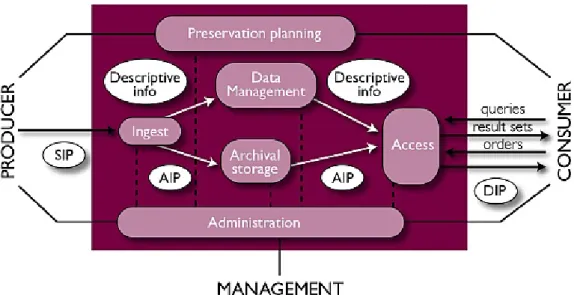
OAIS (Open Archival Information System)1 is the standard used in long
term preservation. It’s a framework that was originated in space agencies but it is now widespread in many di↵erent organisations. For museums and other cultural institutions it has become the standard model for digital preserva-tion. An overview if the system can be seen in Figure 4.1.
There are many projects to preserve digital heritage around the globe. National libraries have been always leading in the field of digital preservation. In [8], Beagrie et al. conducted a survey pointing out future challenges for national libraries, the main issues were formats of the files and having a set of policies for long term preservation implemented.
In Finland, the Ministry of Education and Culture as part of their Na-tional Digital Library project (KDK) is leading the e↵orts with the CSC to o↵er long term preservation2. They are providing the necessary
infrastruc-ture and also direct support to all cultural institutions across Finland so they can submit easily their digitised artefacts. This will be also included in the Europeana project that is being carried across the European Union.
One of the latest e↵orts with the cloud on mind is [40] where Rabnovici et al. present a system that takes advantage of all the cloud solutions currently
1yeung2004digital
CHAPTER 4. LONG TERM PRESERVATION 31
Figure 4.1: OAIS framework overview
available. They provide an interface that is able to interact with most cloud providers so organisation can use the power of the cloud in an easy way. They use the OAIS framework as base for their system, following the rules and principles to o↵er long term preservation.
4.2
Storage mediums
Storing artefacts in a safe way so they can be accessed later if needed is one issue that preservation plans face currently. In this section, di↵erent storage mediums will be compared and what storage mediums are present in digital preservation plans.
In 2008 the National Archives of U.K. made a report on how di↵erent storage mediums compare to each other in terms of long term preservation goals3. They were compared using the following criteria:
• Longevity • Capacity • Viability • Obsolescence
CHAPTER 4. LONG TERM PRESERVATION 32 • Cost
• Susceptibility
Linear Tape Open got the highest score under the previous criteria. Al-though some solutions can carry problems with problems like migration since they have to constantly migrate from one medium to another. Also the dura-bility of medium storages such as CD-R and DVD-R are not suitable for long term preservation. On our literature survey we see that many cultural organ-isations and museums use optical mediums like hard drives since it’s easy to read and write and migration is a bit easier than other storage mediums such tapes. Also, redundant back ups are also necessary in preservation, since it’s not a↵ordable to lose any data.
4.3
Costs
There have been some literature studies about the cost of long term preser-vation. In [11] a comparison of two di↵erent services (Harvard University Library and the Online Computer Library Center, Inc.) is presented, noting that audio and video are the most demanding formats for storage solutions and text as the cheapest format to store.
In [61], Richard Wright et al. describes the best approach for long term preservation: ”Starting with a simple strategy is frequently the best ap-proach. One way to reduce the cost of risk, and hence the best chance for mitigation of loss, is simply not to compress the data. Storing only uncom-pressed data would appear to add cost rather than reduce it - but storage costs are typically a small part of a preservation project or strategy (labour is always the dominant cost), and storage media cost is dropping by 50% every 18 months”. The cost of medium storages will definitely decrease over time thanks to technological advancements.
In [42], Rosenthal et al. compare several providers, concluding that cloud storage is not yet feasible since is much more expensive to have your archive on those services due to retrieval costs and the amount of data to be trans-ferred to the cloud service.
As Figure 4.3 shows, the cost of ownership of a hard drive, electricity is the lowest of all the parameters analysed. Therefore electricity is not a major parameter on long term preservation. Moreover, with more energy efficient storage mediums such as SSDs getting more popular, this will even lower over time. Labor, device and infrastructure are definitely the major decisive costs involved in long term preservation.
CHAPTER 4. LONG TERM PRESERVATION 33
Figure 4.2: The e↵ect of hard drive service lifetime on 10-year cost of own-ership of an archive growing 57%/yr. Source [42]
4.4
Challenges
Digital preservations is a very important topic. Being able to preserve digi-tised artefacts is crucial since losing the digidigi-tised artefact will incur digitising the artefact once again and in some cases where the artefact may even be damaged or lost over time to not being possible to digitise it again.
4.4.1
Copyright issues
As presented in Chapter 3, copyright is still a grey area in most of the preser-vation plans surveyed. The Europeana project, previously commented, de-mands that all artefacts are delivered with a free license. With old artefacts (hundreds of years old), it’s not a problem (although pictures of those arte-facts can have copyright) but with recent artearte-facts (last century) it could be an issue since the copyrights for some artefacts may be in a grey area. In
CHAPTER 4. LONG TERM PRESERVATION 34 some of these cases where the copyright is still a problem, usually organisa-tions are allowed to preserved them but maybe they don’t have the rights to distribute or publish them on the Internet and other formats.
We believe that in the future new regulations and laws will be legislated so these issues can be easily solved by museums and other cultural institutions.
4.4.2
Data lock-in
Data lock-in is an important issue since some organisations can’t provide their own infrastructure for their preservation plans, they have to rely on third parties that provide this service, meaning that the organisation depend entirely on their service providers. This could be a problem if the service provider goes out of business or other potential problems arise. The organ-isation must anyways ensure that they can easily and reliably retrieve their data.
This challenge could be overcome if cloud providers make standardised APIs so customers have the possibility to use them so they can easily move between providers or just recover their data in a systematic way across providers.
4.4.3
Discovery and access
The amount of artefacts stored in preservation systems will definitely increase over time. Managing the amounts of information and being able to make it discoverable for everyone is an important issue that still has to be tackled.
The OAIS framework takes into account discovery and since most preser-vation plans follow this system, it is already considered by most museums.
Since preserved artefacts are rarely accessed and its retrieval could be slow and costly, most museums have low resolution copies of digitised artefacts so they can be easily published in the Internet and accessed by the public.
4.4.4
Migration
Migration is defined as ”...a set of organised tasks designed to achieve the pe-riodic transfer of digital materials from one hardware/software configuration to another, or from one generation of computer technology to a subsequent generation.” [59].
Migration is a critical part of long term preservation. As the storage medi-ums degrade and/or need to upgrade to newer and more powerful medimedi-ums, migration has to be done. The chances of corrupting data while migrating can be quite high and the need for in-place systems are more than necessary.
![Table 3.1: Costs of digitising museum collections. Source [39]](https://thumb-us.123doks.com/thumbv2/123dok_us/1557818.2708917/27.892.169.727.494.605/table-costs-digitising-museum-collections-source.webp)
![Figure 3.1: Percentage of the collection accessible through di↵erent access channels. Source [48] and [49]](https://thumb-us.123doks.com/thumbv2/123dok_us/1557818.2708917/30.892.160.732.254.537/figure-percentage-collection-accessible-erent-access-channels-source.webp)