Cloud Computing:
A Practical Approach
Anthony T. Velte
Toby J. Velte, Ph.D.
Robert Elsenpeter
All trademarks are trademarks of their respective owners. Rather than put a trademark symbol after every occurrence of a trademarked name, we use names in an editorial fashion only, and to the benefit of the trademark owner, with no intention of infringement of the trademark. Where such designations appear in this book, they have been printed with initial caps.
McGraw-Hill eBooks are available at special quantity discounts to use as premiums and sales promotions, or for use in corporate training programs. To contact a representative please e-mail us ATTICA
Information has been obtained by McGraw-Hill from sources believed to be reliable. However, because of the possibility of human or mechanical error by our sources, McGraw-Hill, or others, McGraw-Hill does not guarantee the accuracy, adequacy, or completeness of any information and is not responsible for any errors or omissions or the results obtained from the use of such information.
TERMS OF USE
This is a copyrighted work and The McGraw-Hill Companies, Inc. (“McGraw-Hill”) and its licensors reserve all rights in and to the work. Use of this work is subject to these terms. Except as permitted under the Copyright Act of 1976 and the right to store and retrieve one copy of the work, you may not decompile, disassemble, reverse engineer, reproduce, modify, create derivative works based upon, transmit, distribute, disseminate, sell, publish or sublicense the work or any part of it without McGraw-Hill’s prior consent. You may use the work for your own noncommercial and personal use; any other use of the work is strictly prohibited. Your right to use the work may be terminated if you fail to comply with these terms.
For Ava Holder—A girl so small who should not have to be so strong, but she is.
—ATV
For Dr. Jon Gottesman—A brilliant mind and great mentor who never loses sight of the big picture.
—TJV
For Bryan Reynolds—a fellow writer and great cousin.
About the Authors
Anthony T. Velte, CISSP, CISA, has spent over 20 years in the information systems industry. He is co-founder of Velte Publishing, Inc. and the co-author of more than a dozen books, including the award winning Green IT: Reduce Your Information System’s Environmental Impact While Adding to the Bottom Line and Microsoft Virtualization with Hyper-V. Mr. Velte also works for an industry-leading security software company. He consults with companies large and small, helping them optimize and protect their information systems infrastructures. He can be reached at [email protected].
Toby J. Velte, Ph.D., is an international best-selling author of business technology articles and books. He is co-founder of Velte Publishing, Inc. and the co-author of more than a dozen books, including the award winning Green IT: Reduce Your Information System’s Environmental Impact While Adding to the Bottom Line and Microsoft Virtualization with Hyper-V. Dr. Velte is currently part of Microsoft’s North Central practice focused on helping thriving companies with their technology-based initiatives. He works with large organizations to create IT roadmaps that are business focused and practically implemented. He can be reached at [email protected].
Robert Elsenpeter is an award-winning author and journalist, freelance writer, and author of more than a dozen technology books. He’s co-author of the award-winning book Green IT: Reduce Your Information System’s Environmental Impact While Adding to the Bottom Line. He has a bachelor’s degree in Information Technology.
About the Technical Editor
Contents
Acknowledgments . . . xiii
Introduction . . . xiv
Part I Getting Started
1 Cloud Computing Basics . . . 3Cloud Computing Overview . . . 3
Disambiguation—Just What Is Cloud Computing? . . . 3
Cloud Components . . . 6
Infrastructure . . . 8
Services . . . 11
Applications . . . 16
Storage . . . 16
Database Services . . . 17
Intranets and the Cloud . . . 19
Components . . . 20
Hypervisor Applications . . . 20
First Movers in the Cloud . . . 21
Amazon . . . 21
Google . . . 22
Microsoft . . . 22
2 Your Organization and Cloud Computing . . . 23
When You Can Use Cloud Computing . . . 23
Scenarios . . . 23
When You Shouldn’t Use Cloud Computing . . . 25
Benefits . . . 29
Scalability . . . 30
Simplicity . . . 30
Knowledgeable Vendors . . . 30
More Internal Resources . . . 31
Security . . . 31
Limitations . . . 31
Your Sensitive Information . . . 31
Applications Not Ready . . . 33
Developing Your Own Applications . . . 34
Security Concerns . . . 35
Privacy Concerns with a Third Party . . . 35
Are They Doing Enough to Secure It? . . . 36
Security Benefits . . . 37
Regulatory Issues . . . 39
No Existing Regulation . . . 39
Government to the Rescue? . . . 39
3 Cloud Computing with the Titans . . . 41
Google . . . 41
Google App Engine . . . 42
Google Web Toolkit . . . 43
EMC . . . 45
Technologies . . . 45
VMware Acquisition . . . 46
NetApp . . . 46
Offerings . . . 46
Cisco Partnership . . . 47
Microsoft . . . 48
Azure Services Platform . . . 48
Windows Live . . . 49
Exchange Online . . . 51
SharePoint Services . . . 52
Microsoft Dynamics CRM . . . 53
Amazon . . . 54
Amazon Elastic Compute Cloud (Amazon EC2) . . . 54
Amazon SimpleDB . . . 55
Amazon Simple Storage Service (Amazon S3) . . . 55
Amazon CloudFront . . . 55
Amazon Simple Queue Service (Amazon SQS) . . . 55
Elastic Block Store . . . 56
Salesforce.com . . . 57
Force.com . . . 58
Salesforce.com CRM . . . 59
AppExchange . . . 59
IBM . . . 61
Services . . . 61
Movement to the Cloud . . . 62
Security . . . 63
Partnerships . . . 63
Yahoo! Research . . . 63
SAP and IBM . . . 64
HP, Intel, and Yahoo! . . . 65
C o n t e n t s
vii
C o n t e n t svii
4 The Business Case for Going to the Cloud . . . 69
Cloud Computing Services . . . 69
Infrastructure as a Service . . . 69
Platform as a Service . . . 72
Software as a Service . . . 74
Software plus Services . . . 77
How Those Applications Help Your Business . . . 77
Operational Benefits . . . 77
Economic Benefits . . . 78
Tips for Evaluating SaaS . . . 79
Staffing Benefits . . . 80
Deleting Your Datacenter . . . 81
What You Can Delete . . . 82
What You Should Keep . . . 82
Steps . . . 82
AppZero . . . 82
Salesforce.com . . . 83
Why It’s Good for Business . . . 84
Best Business Practices . . . 84
Thomson Reuters . . . 85
Their Cloud Use . . . 85
Using the Cloud . . . 86
Cloud Computing and Web 2.0 . . . 86
Applications and the Cloud . . . 86
Getting Started . . . 87
Be Realistic . . . 87
Part II Cloud Computing Technology
5 Hardware and Infrastructure . . . 91Clients . . . 91
Mobile . . . 92
Thin . . . 92
Thick . . . 93
Security . . . 93
Data Leakage . . . 94
Offloading Work . . . 94
Logging . . . 95
Forensics . . . 95
Development . . . 95
Auditing . . . 95
Network . . . 100
Basic Public Internet . . . 101
Optimized Internet Overlay . . . 102
Site-to-Site VPN . . . 103
Cloud Providers . . . 103
Cloud Consumers . . . 104
Pipe Size . . . 104
Redundancy . . . 106
Services . . . 107
Identity . . . 107
Integration . . . 108
Mapping . . . 109
Payments . . . 110
Search . . . 110
6 Accessing the Cloud . . . 111
Platforms . . . 111
Web Application Framework . . . 111
Web Hosting Service . . . 114
Proprietary Methods . . . 115
Web Applications . . . 118
Your Choices . . . 118
Sample Applications . . . 119
Web APIs . . . 120
What Are APIs? . . . 120
How APIs Work . . . 121
API Creators . . . 122
Web Browsers . . . 126
Internet Explorer . . . 127
Firefox . . . 127
Safari . . . 130
Chrome . . . 130
7 Cloud Storage . . . 135
Overview . . . 135
The Basics . . . 135
Storage as a Service . . . 136
Providers . . . 137
Security . . . 138
Reliability . . . 139
Advantages . . . 139
Cautions . . . 140
Outages . . . 141
Theft . . . 141
Is Cloud Storage for Me? . . . 142
Cloud Storage Providers . . . 142
Amazon Simple Storage Service (S3) . . . 142
C o n t e n t s
ix
C o n t e n t six
Google Bigtable Datastore . . . 146
MobileMe . . . 148
Live Mesh . . . 149
8 Standards . . . 153
Application . . . 153
Communication . . . 153
Security . . . 156
Client . . . 158
HTML . . . 158
Dynamic HTML . . . 159
JavaScript . . . 160
Infrastructure . . . 161
Virtualization . . . 162
OVF . . . 163
Service . . . 164
Data . . . 165
Web Services . . . 167
Part III Cloud Computing at Work
9 Software as a Service . . . 173Overview . . . 173
Advantages . . . 174
Software Considerations . . . 175
Vendor Advantages . . . 175
Limitations . . . 175
Driving Forces . . . 176
Popularity . . . 176
Virtualization Benefits . . . 177
SaaS and SOA . . . 177
Economic Impact . . . 177
Company Offerings . . . 178
Intuit . . . 178
Google . . . 179
Microsoft . . . 180
IBM . . . 183
Industries . . . 184
Healthcare . . . 184
Collaboration—WebEx . . . 188
Construction—CMiC . . . 188
Retail—Epicor . . . 189
10 Software plus Services . . . 193
Overview . . . 194
Pros . . . 194
Cons . . . 195
Vendors . . . 195
Mobile Device Integration . . . 197
Google Android . . . 198
Providers . . . 202
Adobe AIR . . . 202
Apple iPhone SDK . . . 203
Microsoft Online . . . 205
Hybrid Model . . . 206
Partnership . . . 208
Active Directory . . . 210
11 Developing Applications . . . 213
Google . . . 213
Payment . . . 214
Force.com and Google . . . 215
Google Gears . . . 216
Microsoft . . . 218
Live Services . . . 220
Microsoft SQL Services . . . 221
Microsoft .NET Services . . . 221
Microsoft SharePoint Services and Dynamics CRM Services . . . 221
Design . . . 221
Intuit QuickBase . . . 222
Cast Iron Cloud . . . 224
Bungee Connect . . . 226
Development . . . 228
Google App Engine . . . 228
Salesforce.com . . . 232
Microsoft Windows Azure . . . 243
Troubleshooting . . . 249
Application Management . . . 250
12 Local Clouds and Thin Clients . . . 253
Virtualization in Your Organization . . . 254
Why Virtualize? . . . 254
How to Virtualize . . . 256
Concerns . . . 258
Security . . . 258
Server Solutions . . . 258
Microsoft Hyper-V . . . 259
VMware . . . 263
C o n t e n t s
xi
C o n t e n t sxi
Thin Clients . . . 268
Sun . . . 268
Hewlett Packard . . . 269
Dell . . . 271
Case Study: McNeilus Steel . . . 273
Benefits . . . 273
Making the Sell . . . 274
Equipment . . . 274
Making the Move . . . 275
Doing New Things . . . 275
13 Migrating to the Cloud . . . 277
Cloud Services for Individuals . . . 277
Available Services . . . 277
Skytap Solution . . . 281
Cloud Services Aimed at the Mid-Market . . . 284
Force.com . . . 284
Enterprise-Class Cloud Offerings . . . 288
MS Exchange . . . 288
VMotion . . . 290
VMware vCenter Converter . . . 291
Hyper-V Live Migration . . . 292
Migration . . . 293
Which Applications Do You Need? . . . 293
Sending Your Existing Data to the Cloud . . . 294
Use the Wave Approach . . . 295
14 Best Practices and the Future of Cloud Computing . . . 297
Analyze Your Service . . . 297
Establishing a Baseline and Metrics . . . 297
Tools . . . 298
Best Practices . . . 306
Finding the Right Vendor . . . 307
Phased-in vs. Flash-cut Approaches . . . 308
Be Creative in Your Approach . . . 309
How Cloud Computing Might Evolve . . . 309
Researcher Predictions . . . 309
Responding to Change . . . 313
Get Ready . . . 314
A Glossary, Vendors, and Resources . . . 315
Glossary . . . 315
Cloud Vendors . . . 319
Resources . . . 324
Acknowledgments
W
e were fortunate enough to be able to talk with a lot of very talented people while preparing this book for you. We spoke not only to people who implemented their own cloud solutions, but also those who help develop cloud solutions, as well as officers of several major cloud solution providers.First, we want to thank Darren Boeck of McNeilus Steel. He told us how he was able to build a virtualized environment for the clients on his network, allowing us to summarize his experiences for you.
We also had the pleasure of speaking again with John Engates, CTO of Rackspace Hosting. He talked with us about Rackspace’s cloud computing services and explained their vision of how they see cloud computing as it exists today and how it will continue to evolve.
Steve Fisher, senior vice president of AppExchange at Salesforce.com, was a wonderful resource, talking to us not only about what Salesforce.com brings to the cloud party, but also how businesses are using it and how he sees it evolving.
Ryan Collier, member of Accenture’s Citrix XenServer Capability Group, enlightened us about the merits of the Citrix XenServer, as well as how he sees the cloud developing.
Christopher Crowhurst, Vice President of Architecture & BSI at Thomson Reuters, shared his thoughts on cloud computing. He also shared a case study outlining a very forward-thinking implementation of a cloud-based service at Thompson Reuters that was successfully completed back when the words “Cloud Computing” were rarely uttered.
Charles Babcock, our Technical Editor, helped us keep the facts straight and the overall content aligned with your expectations. We appreciate every edit and suggestion and know that it is a better book because of his input.
We also acknowledge the patience and hard work of the people at McGraw-Hill, notably those involved in the process of bringing this book to fruition. Thanks to
Wendy Rinaldi, Sponsoring Editor and Editorial Director; Patty Mon, Editorial Supervisor; Jean Bodeaux, Senior Production Supervisor; Vipra Fauzdar, Production Project Manager; Joya Anthony, Acquisitions Coordinator; and Margaret Berson, Copy Editor. You can also flip back a few pages to see the rest of the folks who worked their magic throughout the process of creating this book for you. We acknowledge all of them and appreciate their efforts.
Introduction
Who Should Read This Book
This book is targeted at a broad audience, but in a nutshell–to anyone who wants to learn more about cloud computing. Cloud computing has become a hot topic in recent years, and people at different levels in your organization need to understand cloud computing in different ways.
This book is for anyone who may have recently heard the term “cloud computing” for the first time and needs to know what it is and how it helps them. This book is also for C-level executives, managers, analysts, and all manner of IT professionals. The goals of the book range from just wanting to be able to cut through the hype, to evaluating cloud-based solutions against the time, energy, and expense required to leverage them. We have attempted to fill this book with a broad range of resources and information.
This book explains some of the nuts and bolts of cloud computing and how companies can use cloud computing tools. Not only will the IT department find itself using the cloud to support the organization’s objectives, but with properly selected cloud solutions, they will spend less time maintaining servers and clients, running around with patches and service packs, and spend more time on innovative activities that help the organization thrive.
On the front lines, workers may find this book helpful when seeking to understand cloud computing. Moving from a traditional network infrastructure to a cloud solution might be a tough sell for some workers. Understanding the players, the pieces, and why the move is necessary will help with the transition.
What This Book Covers
Cloud computing is the biggest buzz in the computer world these days—maybe too big of a buzz. Cloud computing means different things to different people, and if you are trying to wrap your brain around the topic, asking one question will lead to ten more. This book aims to make the issues more understandable.
Cloud computing is not a small, undeveloped branch of IT. Research firm IDC thinks that cloud computing will reach $42 billion in 2012. Gartner Inc. predicts worldwide cloud-services revenue will rise 21.3 percent in 2009 to $56.3 billion.
Big names that you know are jockeying for position in the cloud. Amazon, for example, offers several cloud sources from its Elastic Compute Cloud (EC2) to its Simple Storage Services (S3), which is part of its Amazon Web Services (AWS). Google has also put a
I n t r o d u c t i o n
xv
number of applications online. At a basic level they are free, but more robust applications can be accessed with a subscription. Microsoft is betting big with massive new data centers to service millions of cloud users.
For all the stuff you can do on the cloud now, we are really just in the cloud’s infancy stage. Think about when the World Wide Web was just picking up in popularity. Every web page had the same HTML look and when frames came along, that was heralded as an innovation. But look where we have come since then. Web pages are exciting, dynamic things that do not look anything like they used to in 1994. We are in that same stage of development with cloud computing. In 10 or 15 years from now, cloud computing is not going to look anything like it does now.
But that does not mean that the cloud of today is not useful. In fact, quite the opposite is true. You can do a lot on the cloud. You can do everything from running applications to storing data off-site. You can run entire operating systems on the cloud. In this book, we will talk about the sorts of things that cloud computing allows you to do.
But for all the usefulness the cloud provides, there are also things you do not want to turn to the cloud for. There are simply some applications that you want to run locally. For instance, mission-critical business processes may best be maintained locally. There is also an issue of security and regulation. Because of government regulations, you simply may not be allowed to store some data on the cloud. This book covers the range of challenges, too.
Security is as much of an issue in the cloud as it is anywhere else. People come to the cloud computing topic from different points of view. Some believe the cloud to be an unsafe place. After all, once you send your data to the cloud, you lose complete control over it and it runs a greater risk of being compromised. But the other side of that coin is that cloud vendors go out of their way to ensure security. Many cloud vendors have teams dedicated to ensuring that their clouds are secure. This only makes sense—all it takes is for one breach to occur before clients start jumping ship. We will talk about security and its cloud considerations in more depth later in this book.
Cloud Computing service providers are those companies that you turn to for cloud services. There are big names like Amazon and Microsoft offering cloud services, and there are smaller companies too. They are all striving to offer cutting-edge, innovative solutions that are compelling enough that you will consider making your move to the cloud. Consider Salesforce.com; it has grown dramatically over the last several years thanks to their widely adopted cloud offerings. We introduce you to a number of cloud computing solutions providers in this book and talk about some innovative partnerships that are helping the cloud evolve.
Part I: Getting Started
Chapter 1: Cloud Computing Basics This chapter sets the stage to explain what is going on in the world of cloud computing. This chapter explains what cloud computing is, what components comprise a cloud solution, and the different applications you can expect, as well as the cloud’s relationship to the Internet. We also talk about cloud infrastructure and how it is built.
lot on the cloud, there are issues you need to consider before making the move. In this chapter we talk about such issues as when you can use a cloud solution, the benefits to your organization (mostly financial, but there are others, too), security issues, regulatory
concerns, and limitations. Honestly, the point of this chapter is not to scare you off, but just to present the counterpoint to the issue.
Chapter 3: Cloud Computing with the Titans Some well-known companies have joined the
cloud computing party with their own offerings. While there are hundreds of vendors offering cloud computing solutions, there are some big names like Google, Microsoft, Amazon, Yahoo, and Salesforce.com that have been able to leverage their names, expertise, and client base to build out their cloud computing services. Whether or not you decide to go with one of these companies is a matter of your organization’s need and business strategy. We are not pushing these big companies over smaller ones, but wanted to share what prominent names are doing. In this chapter we will look at what the big dogs offer and the direction they would like to take the cloud.
Chapter 4: The Business Case for Going to the Cloud Why should you consider making a move to the cloud? What is the business benefit for making the move? In this chapter we will talk not only about some of the monetary savings, but some of the operational and organizational benefits you will realize by putting some of your business functions on the cloud. We will give an overview of Platform as a Service (PaaS), Software as a Service (SaaS), and Software plus Services (S+S), as well as some other cloud services that might benefit your organization. We will also talk about deleting your datacenter and what you should get rid of and what you should keep.
Part II: Cloud Computing Technology
Chapter 5: Hardware and Infrastructure In this chapter we roll up our sleeves and take a closer look at the components used to build your cloud solution. This will include the hardware you will use—mobile clients, thin clients, and fat clients—as well as the security issues surrounding the cloud. We will talk about how you and your vendors can keep your information safe through logging, forensics, and auditing. From there we will talk about the construction of the networks you can use to access your cloud. Finally, we will talk about some of the services that are available to you on the cloud.
Chapter 6: Accessing the Cloud Access to the cloud can be pretty simple; open a web browser and go to the application’s URL. But that said, you can do more than just pop open Internet Explorer or Firefox to get going. In this chapter we will talk about the different platforms you can use, local user interfaces, web applications, and web APIs. We will also talk about some of the most prevalent web browsers out there. While Internet Explorer is the most prevalent browser in the market, it is not the only game in town. We will talk about the merits of Firefox, the Mac’s favorite, Safari, and the browser seemingly being groomed for the cloud—Google’s Chrome.
I n t r o d u c t i o n
xvii
I n t r o d u c t i o nxvii
off-site (many, many miles off-site), then it was all lost. And that is true for any disaster. If key data is not stored in a secure location off-site, then you run the risk of losing it all. But it is not just a matter of data security; there are also issues of workers being able to access the data remotely, and being able to use applications that rely on that data in the cloud. In this chapter we will talk about the basics of cloud storage, some providers, security concerns, reliability concerns, advantages, and cautions. We will also look at some providers and talk about the functionality of such services as Amazon Simple Storage Service (S3), Nirvanix, Google Bigtable Datastore, Apple’s MobileMe, and Microsoft’s Live Mesh.
Chapter 8: Standards It is no shocker that standards make the IT world turn. While cloud computing is still somewhat new, standards exist to make sure that you can work and play well with your vendors. Given the extent to which cloud computing relies on the web, it should be no shock that many of the standards are things like HTTP, HTML, and XMPP. And while we will talk about those standards, we will also delve into the standards that exist for making cloud services, including JSON, SML, REST, and SOAP. We will explain that alphabet soup later in this chapter.
Part III: Cloud Computing at Work
Chapter 9: Software as a Service Software as a Service (SaaS) is, in essence, utilizing an application online. That means you do not need to have the application housed locally on your server or clients. Rather, you access the application through a cloud vendor. In this chapter we will talk about the basics of SaaS: its advantages, software considerations, advantages to vendors, and limitations. From there we will talk about some limitations, and then shift gears to talk about what companies and industries offer in terms of SaaS. While the list is far from comprehensive, we will go below the surface and show you what is out there.
Chapter 10: Software plus Services Going to the cloud is not an all-or-nothing proposal. While you do not need to send all of your applications to the cloud, you also do not need to send an entire application to live solely on the cloud. In the event your connection goes down or there is an outage at the provider, Software plus Services allows you to keep working until everything is back to normal. In this chapter we will discuss the ups and downs of Software plus Services, along with what some vendors are offering. We will also spend a lot of space discussing Microsoft’s Software plus Services model, which is a leader in this field.
Chapter 11: Developing Applications Ideally, the vendor you pick will have exactly the application that you want. Within a few minutes you can be up and running. But the fact of the matter is that they might not have exactly what you want. In this case you can build your own applications. In this chapter we will talk about what prominent vendors offer in terms of application development and then we will walk you through the steps of creating your own applications using the Google AppEngine, Salesforce.com’s tools, and Microsoft’s Cloud OS, Azure.
duties from clients to a local server. Virtualization is another increasingly popular trend with offerings from such companies as Microsoft and VMWare. In addition to the server technology that lets you run your clients’ software in a centralized location, we will also talk about the thin clients that will find homes on your users’ desks. We will also talk about the virtualization efforts that McNeilus Steel underwent to streamline their IT infrastructure.
Chapter 13: Migrating to the Cloud Getting to the cloud is one thing when you are starting from scratch, but it is another thing completely when you need to migrate existing data. In this chapter we will talk about methods to make the move. We will talk about some services for individuals, mid-size organizations, and enterprises. We will look at some tools to migrate to the cloud and some methodology for making a move.
Chapter 14: Best Practices and the Future of Cloud Computing Like anything, there is a right way to do something and a wrong way. In order to mitigate your “wrong way” attempts, this chapter talks about best practices for using a cloud computing solution. We will talk about analyzing your service and some tools, as well as the way to find the best vendor for you. We will also talk about the best way to move your data to the cloud. To wrap it all up, we will look into the proverbial crystal ball and talk about how cloud computing is expected to evolve.
C
HAPTER 1Cloud Computing Basics
C
HAPTER 2Your Organization and Cloud Computing
C
HAPTER 3Cloud Computing with the Titans
C
HAPTER 4The Business Case for Going to the Cloud
I
Getting Started
1
Cloud Computing Basics
C
loud computing is everywhere. Pick up any tech magazine or visit almost any ITwebsite or blog and you’ll be sure to see talk about cloud computing. The only problem is that not everyone agrees on what it is. Ask ten different professionals what cloud computing is, and you’ll get ten different answers. And is cloud computing even worth all the hype? Some people don’t think so. In fact, in 2008 Oracle CEO Larry Ellison chastised the whole issue of cloud computing, saying that the term was overused and being applied to everything in the computer world.
“The computer industry is the only industry that is more fashion-driven than women’s fashion,” he said to a group of Oracle analysts.
So let’s talk about what cloud computing is and tighten up our definition and understanding of this implementation.
Cloud Computing Overview
In this first section, we’ll talk about what cloud computing is, and how it is developed and deployed. We’ll clear up some misconceptions and make sure we all have a common understanding of the topic.
Disambiguation—Just What Is Cloud Computing?
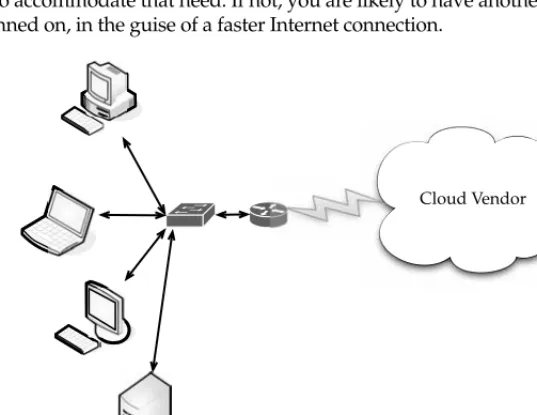
Cloud computing gets its name as a metaphor for the Internet. Typically, the Internet is represented in network diagrams as a cloud, as shown in Figure 1-1. The cloud icon represents “all that other stuff” that makes the network work. It’s kind of like “etc.” for the rest of the solution map. It also typically means an area of the diagram or solution that is someone else’s concern, so why diagram it all out? It’s probably this notion that is most applicable to the cloud computing concept.
N
OTE Applications run on hosted servers as a service. We’ll define that term later in this chapter, and discuss the different types of “as a service” applications that are prevalent.Cloud computing promises to cut operational and capital costs and, more importantly, let IT departments focus on strategic projects instead of keeping the datacenter running.
33
What Works
But there’s more going on under the hood than to simply equate cloud computing to the Internet. In essence, cloud computing is a construct that allows you to access applications that actually reside at a location other than your computer or other Internet-connected device; most often, this will be a distant datacenter. There are many benefits to this. For instance, think about the last time you bought Microsoft Word and installed it on your organization’s computers. Either you ran around with a CD- or DVD-ROM and installed it on all the computers, or you set up your software distribution servers to automatically install the application on your machines. And every time Microsoft issued a service pack, you had to go around and install that pack, or you had to set up your software distribution servers to distribute it. Oh, and don’t forget the cost of all the licenses. Pete down the hall probably uses Word once a month, but his license cost just as much as everyone else’s.
The beauty of cloud computing, as shown in Figure 1-2, is that another company hosts your application (or suite of applications, for that matter). This means that they handle the costs of servers, they manage the software updates, and—depending on how you craft your contract—you pay less for the service.
Don’t forget the equipment that you won’t need to buy—which will result in fewer capital expenditures—thereby causing the CFO to actually smile when she sees you. By having someone else host the applications, you need not buy the servers nor pay for the electricity to power and cool them.
It’s also convenient for telecommuters and traveling remote workers, who can simply log in and use their applications wherever they are.
Internet
Router
Switch
Client PCs
Server
C h a p t e r 1 : C l o u d C o m p u t i n g B a s i c s
5
C h a p t e r 1 : C l o u d C o m p u t i n g B a s i c s5
PAR
T I
PAR
T I
PAR
T I
Weak Links
So it all sounds great, right? Not so fast. As with everything in IT, there are pros and cons. Cloud computing is not exempt. Let’s take a quick look at a few areas of potential trouble. The following illustration shows potential points of failure.
Internet
Your company
Service provider
While an Internet outage or problems with your Internet service provider (ISP) are rare, you may not be able to access your applications and do your work. Not that everyone sits in one office much anymore, but if you currently have the application on your own local
Internet
Your company doesn’t pay for hardware and
maintenance.
The service provider pays for equipment and
maintenance.
servers, and all those who access it are not remote, you’d be at least somewhat assured that an Internet outage wouldn’t affect your application.
But it isn’t your connection to the Internet that can be prone to outages. What if the site you’re accessing has problems? It’s happened already. In July 2008, Amazon’s S3 cloud storage service went down for the second time that year. A lot of applications were hosted by the company and all those services could not be accessed until techs could fix the problem. Some applications were down for eight hours.
Also, there may simply be applications or data that you want located on-site. If you have sensitive or proprietary information, your IT security group may simply mandate that you not store it on someone else’s machines.
Application Integration Issues
You might also find that it’s more difficult to integrate your applications if they are geographically dispersed. That is, it is easier to manage and access your data if it is nearby, and not under someone else’s control.
For instance, if you need two applications to exchange information, it’s easier to do if they both reside in the same place. If you have one application in-house and it has to contact another application on the cloud, it becomes far more complicated, and more prone to failure.
Cloud Components
In a simple, topological sense, a cloud computing solution is made up of several elements: clients, the datacenter, and distributed servers. As shown in Figure 1-3, these components make up the three parts of a cloud computing solution.
Each element has a purpose and plays a specific role in delivering a functional cloud-based application, so let’s take a closer look.
Internet
Client computers
Distributed servers
Datacenter
C h a p t e r 1 : C l o u d C o m p u t i n g B a s i c s
7
C h a p t e r 1 : C l o u d C o m p u t i n g B a s i c s7
PAR
T I
PAR
T I
PAR
T I
Clients
Clients are, in a cloud computing architecture, the exact same things that they are in a plain, old, everyday local area network (LAN). They are, typically, the computers that just sit on your desk. But they might also be laptops, tablet computers, mobile phones, or PDAs—all big drivers for cloud computing because of their mobility.
Anyway, clients are the devices that the end users interact with to manage their information on the cloud. Clients generally fall into three categories:
• Mobile Mobile devices include PDAs or smartphones, like a Blackberry, Windows Mobile Smartphone, or an iPhone.
• Thin Clients are computers that do not have internal hard drives, but rather let the server do all the work, but then display the information.
• Thick This type of client is a regular computer, using a web browser like Firefox or Internet Explorer to connect to the cloud.
Thin clients are becoming an increasingly popular solution, because of their price and effect on the environment. Some benefits to using thin clients include
• Lower hardware costs Thin clients are cheaper than thick clients because they do not contain as much hardware. They also last longer before they need to be upgraded or become obsolete.
• Lower IT costs Thin clients are managed at the server and there are fewer points of failure.
• Security Since the processing takes place on the server and there is no hard drive, there’s less chance of malware invading the device. Also, since thin clients don’t work without a server, there’s less chance of them being physically stolen.
• Data security Since data is stored on the server, there’s less chance for data to be lost if the client computer crashes or is stolen.
• Less power consumption Thin clients consume less power than thick clients. This means you’ll pay less to power them, and you’ll also pay less to air-condition the office. • Ease of repair or replacement If a thin client dies, it’s easy to replace. The box is
simply swapped out and the user’s desktop returns exactly as it was before the failure. • Less noise Without a spinning hard drive, less heat is generated and quieter fans
can be used on the thin client.
Datacenter
The datacenter is the collection of servers where the application to which you subscribe is housed. It could be a large room in the basement of your building or a room full of servers on the other side of the world that you access via the Internet.
A growing trend in the IT world is virtualizing servers. That is, software can be installed allowing multiple instances of virtual servers to be used. In this way, you can have half a dozen virtual servers running on one physical server.
Distributed Servers
But the servers don’t all have to be housed in the same location. Often, servers are in geographically disparate locations. But to you, the cloud subscriber, these servers act as if they’re humming away right next to each other.
This gives the service provider more flexibility in options and security. For instance, Amazon has their cloud solution in servers all over the world. If something were to happen at one site, causing a failure, the service would still be accessed through another site. Also, if the cloud needs more hardware, they need not throw more servers in the safe room—they can add them at another site and simply make it part of the cloud.
Infrastructure
Cloud computing isn’t a one-size-fits-all affair. There are several different ways the infrastructure can be deployed. The infrastructure will depend on the application and how the provider has chosen to build the cloud solution. This is one of the key advantages for using the cloud. Your needs might be so massive that the number of servers required far exceeds your desire or budget to run those in-house. Alternatively, you may only need a sip of processing power, so you don’t want to buy and run a dedicated server for the job. The cloud fits both needs.
Grid Computing
Grid computing is often confused with cloud computing, but they are quite different. Grid computing applies the resources of numerous computers in a network to work on a single problem at the same time. This is usually done to address a scientific or technical problem. A well-known example of this is the Search for Extraterrestrial Intelligence (SETI) @Home project. In this project, people all over the world allow the SETI project to share the unused cycles of their computers to search for signs of intelligence in thousands of hours of recorded radio data. This is shown in Figure 1-4.
Another well-used grid is the World Community Grid—Berkeley Open Infrastructure for Network Computing (BOINC; see www.worldcommunity grid.org). Here you can dedicate as much or as little of your idle CPU processing power as you choose to help conduct protein-folding experiments in an effort to create better and more durable rice crops to feed the world’s hungry. I bet you didn’t know you could feed the needy with your computer.
Grid computing necessitates the use of software that can divide and then send out pieces of the program to thousands of computers. It can be done throughout the computers of an organization, or it can be done as a form of public collaboration.
Sun Microsystems offers Grid Engine software that allows engineers at companies to pool the computer cycles on up to 80 workstations at a time.
Grid computing is appealing for several reasons:
• It is a cost-effective way to use a given amount of computer resources.
• It is a way to solve problems that need a tremendous amount of computing power. • The resources of several computers can be shared cooperatively, without one
computer managing the other.
C h a p t e r 1 : C l o u d C o m p u t i n g B a s i c s
9
C h a p t e r 1 : C l o u d C o m p u t i n g B a s i c s9
PAR
T I
PAR
T I
PAR
T I
Full Virtualization
Full virtualization is a technique in which a complete installation of one machine is run on another. The result is a system in which all software running on the server is within a virtual machine.
N
OTE Full virtualization dates back to 1967 with IBM’s CP-40 research system.This sort of deployment allows not only unique applications to run, but also different operating systems.
FIGURE 1-4 SETI@Home is a well-known use of grid computing.
Internet
Your Company Service Provider
Virtualization is relevant to cloud computing because it is one of the ways in which you will access services on the cloud. That is, the remote datacenter may be delivering your services in a fully virtualized format.
In order for full virtualization to be possible, it was necessary for specific hardware combinations to be used. It wasn’t until 2005 that the introduction of the AMD-Virtualization (AMD-V) and Intel Virtualization Technology (IVT) extensions made it easier to go fully virtualized.
Full virtualization has been successful for several purposes:
• Sharing a computer system among multiple users
• Isolating users from each other and from the control program • Emulating hardware on another machine
Paravirtualization
Paravirtualization allows multiple operating systems to run on a single hardware device at the same time by more efficiently using system resources, like processors and memory.
In full virtualization, the entire system is emulated (BIOS, drive, and so on), but in paravirtualization, its management module operates with an operating system that has been adjusted to work in a virtual machine. Paravirtualization typically runs better than the full virtualization model, simply because in a fully virtualized deployment, all elements must be emulated.
Internet
Your Company
Service Provider
C h a p t e r 1 : C l o u d C o m p u t i n g B a s i c s
11
C h a p t e r 1 : C l o u d C o m p u t i n g B a s i c s11
PAR
T I
PAR
T I
PAR
T I
The trade-off is reduced security and flexibility. For instance, flexibility is reduced because a particular OS or distribution may not be able to work. For example, a new Windows deployment may not be available as a guest OS for the solution. Security can be at risk because the guest OS has more control of the underlying hardware, and there is a risk of impacting the hardware and all the guest systems on the host.
Paravirtualization also allows for better scaling. For example, if a fully virtualized solution requires 10 percent of processor utilization, then five systems are about the most that could be run on a system before performance takes a hit. Paravirtualization requires only 2 percent of processor utilization per guest instance and still leaves 10 percent of the guest OS available. This is illustrated in Table 1-1.
Paravirtualization works best in these sorts of deployments:
• Disaster recovery In the event of a catastrophe, guest instances can be moved to other hardware until the equipment can be repaired.
• Migration Moving to a new system is easier and faster because guest instances can be removed from the underlying hardware.
• Capacity management Because of easier migrations, capacity management is simpler to implement. It is easier to add more processing power or hard drive capacity in a virtualized environment.
Services
The term services in cloud computing is the concept of being able to use reusable, fine-grained components across a vendor’s network. This is widely known as “as a service.”
Offerings with as a service as a suffix include traits like the following:
• Low barriers to entry, making them available to small businesses • Large scalability
• Multitenancy, which allows resources to be shared by many users
• Device independence, which allows users to access the systems on different hardware
Software as a Service
Software as a Service (SaaS) is the model in which an application is hosted as a service to customers who access it via the Internet. When the software is hosted off-site, the customer doesn’t have to maintain it or support it. On the other hand, it is out of the customer’s hands when the hosting service decideds to change it. The idea is that you use the software out of the box as is and do not need to make a lot of changes or require integration to other systems.
Virtualization Type
Guest Instances
Virtualization Overhead
System Processing
Needs Total
Full Virtualization 5 10% (50% total) 10% (50% total) 100%
Paravirtualization 8 2% (16% total) 10% (50% total) 96%
The provider does all the patching and upgrades as well as keeping the infrastructure running.
Internet
Clients
Service provider offering SaaS Application
SaaS provides an application or piece of software from the service provider.
Costs can be sort of a double-edged sword. On the one hand, costs for accessing the software can be an ongoing thing. Rather than pay for it once and be done with it, the more you use it, the more you’ll be billed. On the other hand, in some cases you don’t have to pay as much up front and you are only billed based on your use of the application.
For vendors, SaaS has the appeal of providing stronger protection of their intellectual property as well as creating a continuous stream of income.
There are many types of software that lend themselves to the SaaS model. Typically, software that performs a simple task without much need to interact with other systems makes them ideal candidates for SaaS. Customers who are not inclined to perform software development but have need of high-powered applications can also benefit from SaaS. Some of these applications include
• Customer resource management (CRM) • Video conferencing
• IT service management • Accounting
• Web analytics
• Web content management
SaaS applications differ from earlier distributed computing solutions in that SaaS was developed specifically to use web tools, like the browser. This makes them web-native. It was also built with a multitenant back end in mind, which enables multiple customers to use an application.
SaaS provides network-based access to commercially available software. Since the software is managed at a central location, customers can access their applications wherever they have web access.
As we’ll discuss in the next section—PaaS—SaaS is often used in conjunction with other software. When used as a component of another application, this is known as a mashup or a
C h a p t e r 1 : C l o u d C o m p u t i n g B a s i c s
13
C h a p t e r 1 : C l o u d C o m p u t i n g B a s i c s13
PAR
T I
PAR
T I
PAR
T I
Benefits One of the biggest benefits of SaaS is, of course, costing less money than buying the application outright. The service provider can offer cheaper, more reliable applications than organizations can by themselves. Some other benefits include the following:
• Familiarity with the World Wide Web Most workers have access to a computer and know how to use it on the World Wide Web. As such, the learning curve for using external applications can be much smaller.
• Smaller staff IT systems require the overhead of salaries, benefits, insurance, and building space. The ability to farm out applications reduces the need for as much IT staff.
• Customization Older applications were difficult to customize and required tinkering with the code. SaaS applications are much easier to customize and can give an organization exactly what they want.
• Better marketing A provider who had developed an application for a very narrow market might have had problems marketing that application. However, with SaaS, the entire world is open to the providers.
• Web reliability We talked earlier about how the World Wide Web can be seen as a source of failure. And while that is sporadically true, the fact of the matter is that the Web is generally quite reliable.
• Security Secure Sockets Layer (SSL) is widely used and trusted. This allows customers to reach their applications securely without having to employ complex back-end configurations, like virtual private networks (VPNs).
• More bandwidth Bandwidth has increased greatly in recent months and quality of service improvements are helping data flow. This will allow organizations to trust that they can access their applications with low latencies and good speeds.
Obstacles Like anything, SaaS faces obstacles to its implementation and use. The first is that an organization that has a very specific computational need might not be able to find the application available through SaaS. In that case, they may discover that they need to buy the software and install it on their local machines. That said, companies with unique needs may be able to find some of the components in a SaaS.
There is also an element of “lock-in” with vendors. That is, the customer might pay a provider to use an application, but once they do, they may be unable to port that application to a new vendor. Or, it might be possible to move to a new vendor, but the old vendor might charge a hefty moving fee.
Finally, SaaS also faces challenges from the availability of opensource applications and cheaper hardware. If companies are so inclined, they can put their open source applications on hardware that performs better and costs less than it used to.
Platform as a Service
N
OTE PaaS is also known as cloudware.Internet
Service provider offering PaaS Platform
PaaS allows clients to access a computing platform over a cloud computing solution.
PaaS services include application design, development, testing, deployment, and hosting. Other services include team collaboration, web service integration, database integration, security, scalability, storage, state management, and versioning.
A downfall to PaaS is a lack of interoperability and portability among providers. That is, if you create an application with one cloud provider and decide to move to another
provider, you may not be able to do so—or you’ll have to pay a high price. Also, if the provider goes out of business, your applications and your data will be lost.
N
OTE This was the case with the provider Zimki. The company started in 2006 and by mid-2007was out of business, causing applications and client data they hosted to be lost.
PaaS generally offers some support to help the creation of user interfaces, and is normally based on HTML or JavaScript.
Because PaaS is expected to be used by many users simultaneously, it is designed with that sort of use in mind, and generally provides automatic facilities for concurrency management, scalability, failover, and security.
PaaS also supports web development interfaces such as Simple Object Access Protocol (SOAP) and Representational State Transfer (REST), which allow the construction of multiple web services, sometimes called mashups. The interfaces are also able to access databases and reuse services that are within a private network.
PaaS Options PaaS is found in one of three different types of systems:
• Add-on development facilities These allow existing SaaS applications to be customized. Often, PaaS developers and users are required to purchase subscriptions to the add-on SaaS application.
C h a p t e r 1 : C l o u d C o m p u t i n g B a s i c s
15
C h a p t e r 1 : C l o u d C o m p u t i n g B a s i c s15
PAR
T I
PAR
T I
PAR
T I
• Application delivery-only environments These environments support hosting-level services, like security and on-demand scalability. They do not include development, debugging, and test capabilities.
Trends Toward Adoption PaaS faces the same sorts of factors in its adoption as SaaS did, as it is in its early phase. Some other factors influencing adoption include
• The ability of geographically isolated development teams to work together • The ability to merge web services from multiple sources
• The ability to realize cost savings from using built-in infrastructure services for security, scalability, and failover, rather than having to obtain and test them separately
• The ability to realize cost savings from using higher-level programming abstractions
Hurdles There are two main obstacles that developers face when considering PaaS. Because vendors use proprietary services or development languages, some developers are afraid of being locked into a single provider. The vendor may allow the application to be brought to a different provider; however, the costs are typically higher as compared to moving applications between conventional hosts.
Hardware as a Service
Hardware as a Service (HaaS) is the next form of service available in cloud computing. Where SaaS and PaaS are providing applications to customers, HaaS doesn’t. It simply offers the hardware so that your organization can put whatever they want onto it.
N
OTE HaaS is sometimes also called Infrastructure as a Service (IaaS).Internet
Service provider offering HaaS Clients
HaaS allows service providers to rent hardware resources.
– Memory – Storage – Data processing – CPU cycles
HaaS allows you to “rent” such resources as
• Server space • Network equipment • Memory
• CPU cycles • Storage space
Additionally, the infrastructure can be dynamically scaled up or down, based on the application resource needs.
Further, multiple tenants can be on the equipment at the same time.
Resources are typically billed based on a utility computing basis, so providers charge by how many resources are consumed.
HaaS involves several pieces:
• Service level agreements This is an agreement between the provider and client, guaranteeing a certain level of performance from the system.
• Computer hardware These are the components whose resources will be rented out. Service providers often have this set up as a grid for easier scalability.
• Network This includes hardware for firewalls, routers, load balancing, and so on. • Internet connectivity This allows clients to access the hardware from their own
organizations.
• Platform virtualization environment This allows the clients to run the virtual machines they want.
• Utility computing billing Typically set up to bill customers based on how many system resources they use.
Applications
So now we get to the question—what does cloud computing actually do? Well, we have applications running on our laptops, servers, phones and the like. Cloud computing either has them too or has the potential to bring them to you. So cloud computing brings you applications, a way of viewing, manipulating, and sharing data. Like their desktop
brethren, many “staple” applications exist in cloud computing, but what will differ for you is how you interact with those applications. The most common are storage and database. In this section, we’ll take a closer look at storage and database functionality.
N
OTE We’ll talk about developing your own interfaces to work with storage and databases in Chapter 6.Storage
C h a p t e r 1 : C l o u d C o m p u t i n g B a s i c s
17
C h a p t e r 1 : C l o u d C o m p u t i n g B a s i c s17
PAR
T I
PAR
T I
PAR
T I
from a vendor, you are not responsible to buy equipment, pay to run it, and pay to cool it. That’s all on the vendor.
But there are different options when it comes down to cloud storage.
Database
Databases (which we will talk more about later in this chapter) are repositories for information with links within the information that help make the data searchable.
Distributed databases, like Amazon’s SimpleDB, spread information among physically dispersed hardware. But to the client, the information seems to be located in one place.
The advantages of such a database include the following:
• Improved availability If there is a fault in one database system, it will only affect one fragment of the information, not the entire database.
• Improved performance Data is located near the site with the greatest demand and the database systems are parallelized, which allows the load to be balanced among the servers.
• Price It is less expensive to create a network of smaller computers with the power of one large one.
• Flexibility Systems can be changed and modified without harm to the entire database.
Naturally there are disadvantages, including
• Complexity Database administrators have extra work to do to maintain the system.
• Labor costs With that added complexity comes the need for more workers on the payroll.
• Security Database fragments must be secured and so must the sites housing the fragments.
• Integrity It may be difficult to maintain the integrity of the database if it is too complex or changes too quickly.
• Standards There are currently no standards to convert a centralized database into a cloud solution.
Synchronization
Synchronization, as with Microsoft’s Live Mesh or Apple’s MobileMe, allows content to be refreshed across multiple devices. For instance, if you have a spreadsheet on your computer and then upload it to the storage service, the next time you check your PDA, that file will be downloaded onto it.
Database Services
DaaS offers these benefits:
• Ease of use There are no servers to provision and no redundant systems to worry about. You don’t have to worry about buying, installing, and maintaining hardware for the database.
• Power The database isn’t housed locally, but that doesn’t mean that it is not functional and effective. Depending on your vendor, you can get custom data validation to ensure accurate information. You can create and manage the database with ease.
• Integration The database can be integrated with your other services to provide more value and power. For instance, you can tie it in with calendars, email, and people to make your work more powerful.
• Management Because large databases benefit from constant pruning and optimization, typically there are expensive resources dedicated to this task. With some DaaS offerings, this management can be provided as part of the service for much less expense. The provider will often use offshore labor pools to take advantage of lower labor costs there. So it’s possible that you are using the service in Chicago, the physical servers are in Washington state, and the database
administrator is in the Philippines.
There are a number of providers out there, but let’s take a closer look at two of the biggest players.
MS SQL
Anyone who has worked with databases is no stranger to Microsoft’s premier offering, SQL Server. They announced the cloud extension of that tool in the spring of 2008 by introducing Microsoft SQL Server Data Services (SSDS). It is expected to be in a public beta by spring 2009.
SSDS looks very similar to Amazon’s SimpleDB, with a straightforward, schema-free data storage, SOAP or REST APIs, and a pay-as-you-go payment system. It is also able to start small and scale larger as needed.
While it looks similar to SimpleDB, it varies greatly. First, one of the main selling points of SSDS is that it integrates with Microsoft’s Sync Framework, which is a .NET library for synchronizing dissimilar data sources.
Microsoft wants SSDS to work as a data hub, synchronizing data on multiple devices so they can be accessed offline.
There are three core concepts in SSDS:
• Authority An authority is both a billing unit and a collection of containers. • Container A container is a collection of entities and is what you search within. • Entity An entity is a property bag of name and value pairs.
C h a p t e r 1 : C l o u d C o m p u t i n g B a s i c s
19
C h a p t e r 1 : C l o u d C o m p u t i n g B a s i c s19
PAR
T I
PAR
T I
PAR
T I
SSDS is a bit of a twist because it backsteps from being more complex, rather being simple and flexible.
Oracle
In the fall of 2008 Oracle introduced three services to provide database services to cloud users. Customers can license
• Oracle Database 11g
• Oracle Fusion Middleware • Oracle Enterprise Manager
The products are available for use on Amazon Web Services’ Elastic Compute Cloud (Amazon EC2). Oracle delivered a set of free Amazon Machine Images (AMIs) to its customers so they could quickly and efficiently deploy Oracle’s database solutions.
Developers can take advantage of the provisioning and automated software deployment to rapidly build applications using Oracle’s popular development tools such as Oracle Application Express, Oracle JDeveloper, Oracle Enterprise Pack for Eclipse, and Oracle Workshop for WebLogic. Additionally, Oracle Unbreakable Linux Support and AWS Premium Support is available for Oracle Enterprise Linux on EC2, providing seamless customer support.
“Providing choice is the foundation of Oracle’s strategy to enable customers to become more productive and lower their IT costs—whether it’s choice of hardware, operating system, or on demand computing—extending this to the Cloud environment is a natural evolution,” said Robert Shimp, vice president of Oracle Global Technology Business Unit. “We are pleased to partner with Amazon Web Services to provide our customers enterprise-class Cloud solutions, using familiar Oracle software on which their businesses depend.”
Additionally, Oracle also introduced a secure cloud-based backup solution. Oracle Secure Backup Cloud Module, based on Oracle’s premier tape backup management software, Oracle Secure Backup, enables customers to use the Amazon Simple Storage Service (Amazon S3) as their database backup destination. Cloud-based backups offer reliability and virtually unlimited capacity, available on demand and with no up-front capital expenditure.
The Oracle Secure Backup Cloud Module also enables encrypted data backups to help ensure complete privacy in the cloud environment. It’s fully integrated with Oracle
Recovery Manager and Oracle Enterprise Manager, providing users with familiar interfaces for cloud-based backups.
For customers with an ongoing need to quickly move very large volumes of data into or out of the AWS cloud, Amazon allows the creation of network peering connections.
Intranets and the Cloud
N
OTE Ironically, some organizations use cloud computing to deliver their corporate intranet. Intranets are customarily used within an organization and are not accessible publicly. That is, a web server is maintained in-house and company information is maintained on it that others within the organization can access. However, now intranets are being maintained on the cloud. To access the company’s private, in-house information, users are having to log on to the intranet by going to a secure public web site.In this section we’ll talk about the merits of developing your own in-house “cloud” and what is used in its composition.
Components
There are two main components in client/server computing: servers and thin or light clients. The network map in Figure 1-5 shows how they are deployed.
The servers house the applications your organization needs to run, and the thin clients—which do not have hard drives—display the results.
Hypervisor Applications
Applications like VMware or Microsoft’s Hyper-V allow you to virtualize your servers so that multiple virtual servers can run on one physical server.
These sorts of solutions provide the tools to supply a virtualized set of hardware to the guest operating system. They also make it possible to install different operating systems on the same machine. For example, you may need Windows Vista to run one application, while another application requires Linux. It’s easy to set up the server to run both operating systems.
Internet
Router Switch
Thin clients
Server
C h a p t e r 1 : C l o u d C o m p u t i n g B a s i c s
21
C h a p t e r 1 : C l o u d C o m p u t i n g B a s i c s21
PAR
T I
PAR
T I
PAR
T I
Thin clients use an application program to communicate with an application server. Most of the processing is done down on the server, and sent back to the client.
There is some debate about where to draw the line when talking about thin clients. Some thin clients require an application program or a web browser to communicate with the server. However, others require no add-on applications at all. This is sort of a discussion of semantics, because the real issue is whether the work is being done on the server and transmitted back to the thin client.
First Movers in the Cloud
There are scores of vendors who offer cloud services. What they have to offer varies based on the vendor and their pricing models are different, as well. Let’s take a look at some of the big names in the world of cloud computing and talk, briefly, about what they have to offer.
N
OTE We’ll talk about them in greater detail in Chapter 11.Cloud computing is a growing field, and there will likely be new players in the market in the foreseeable future. For now, let’s look at the names you already know: Amazon, Google, and Microsoft.
Amazon
Amazon was one of the first companies to offer cloud services to the public, and they are very sophisticated. Amazon offers a number of cloud services, including
• Elastic Compute Cloud (EC2) Offers virtual machines and extra CPU cycles for your organization.
• Simple Storage Service (S3) Allows you to store items up to 5GB in size in Amazon’s virtual storage service.
• Simple Queue Service (SQS) Allows your machines to talk to each other using this message-passing API.
• SimpleDB A web service for running queries on structured data in real time. This service works in close conjunction with Amazon Simple Storage Service (Amazon S3) and Amazon Elastic Compute Cloud (Amazon EC2), collectively providing the ability to store, process, and query data sets in the cloud.
These services can be difficult to use, because they have to be done through the command line. That said, if you are used to working in a command-line environment, you shouldn’t have much trouble using the services.
Amazon’s virtual machines are versions of Linux distributions, so those who are experienced with Linux will be right at home. In fact, applications can be written on your own machine and then uploaded to the cloud.
In stark contrast to Amazon’s offerings is Google’s App Engine. On Amazon you get root privileges, but on App Engine, you can’t write a file in your own directory. Google removed the file write feature out of Python as a security measure, and to store data you must use Google’s database.
Google offers online documents and spreadsheets, and encourages developers to build features for those and other online software, using its Google App Engine. Google reduced the web applications to a core set of features, and built a good framework for delivering them. Google also offers handy debugging features.
Groups and individuals will likely get the most out of App Engine by writing a layer of Python that sits between the user and the database. Look for Google to add more features to add background pr