Vol.8 (2018) No. 5
ISSN: 2088-5334
Challenge-Based Programming Learning Design
Rodziah Latih
#, Marini Abu Bakar
#, Norleyza Jailani
#, Noorazean Mohd Ali
#, Syahanim Mohd Salleh
#,
Abdullah Mohd. Zin
##
Center for Software Technology and Management, Faculty of Information Science and Technology, Universiti Kebangsaan Malaysia, 43600 Bangi, Selangor, Malaysia
E-mail: {1rodziah.latih, 2marini, 3njailani, 4aliazean, 5syahanim, 6amzftsm}@ukm.edu.my
Abstract— Computer Science students are expected to acquire good programming skills. Both students and instructors accept that learning programming for first-year college students is fairly difficult. To assist students to achieve this goal, instructors will have to adopt a suitable design for programming courses. This paper reports on the design of a Computer Programming course based on the integrated course design approach, which was conducted by a research group at Universiti Kebangsaan Malaysia from the Faculty of Information Science and Technology. The course is designed to provide relevant teaching and learning activities, feedback, and assessment that will ultimately support the learning goals of students. The design will provide opportunities for preparation time, meaningful feedback, and a competitive feel to the course. The effectiveness of this approach is then evaluated via an online survey that was administered to first-year undergraduate students. The results obtained from 162 first-year students showed that the students were able to improve the results of their the first-year program with the utilization of PC2, as it allowed them to obtain prompt feedback. The use of PC2 also gives them a competitive atmosphere, which motivates them to perform better. The survey results also indicate that the students used their time to prepare for lab sessions via tutorials and self-learning.
Keywords— integrated course design; three-tier course structure; automated feedback; programming exercise; programming assessment.
I. INTRODUCTION
The process of writing computer programs (also known as programming) is a skill that must be honed and applied. Learning and understanding the basic programming structures and elements might be easy; applying this knowledge to solve problems, however, is quite the opposite [1]. Because programming is an applied skill, a programmer must always practice it to become competent [2]. According to Kani and Saad [3, 4], one must practice deliberately by not only repeatedly practicing programming, but also challenging oneself to perform tasks that are ahead of one’s current skill level. This must also be accompanied by correcting mistakes and performance analysis. Another factor that contributes towards the effective learning of computer programming is feedback. Feedback could give clear guidance and assist students in understanding the current topic and improving solutions to programs [5]. However, for a lecturer with a huge number of students, giving prompt feedback and repetitive practice could be especially difficult. The former activity can usually be realized but the latter activity, which involves providing immediate feedback to all students, is nearly impossible to conduct via traditional methods of program marking. Hence,
all these issues have to be addressed when designing a Computer Programming course. This paper reports the efforts of a team of instructors in a university in Malaysia in designing a Computer Programming undergraduate course.
II. MATERIAL AND METHOD
Computer Science is a typical STEM discipline, sharing attributes with Science, Technology, Engineering, and Mathematics. Computer programming has also turned out to be a core subject in the STEM discipline. In most universities, a Computer Programming course is a three-credit course with a two-hour lecture and two or three-hour lab sessions a week [6, 7]. The tutorial session is optional for some universities. The venue for lectures is also different as some universities conduct lectures in a lecture room while others are conducted in a computer lab together with the lab session.
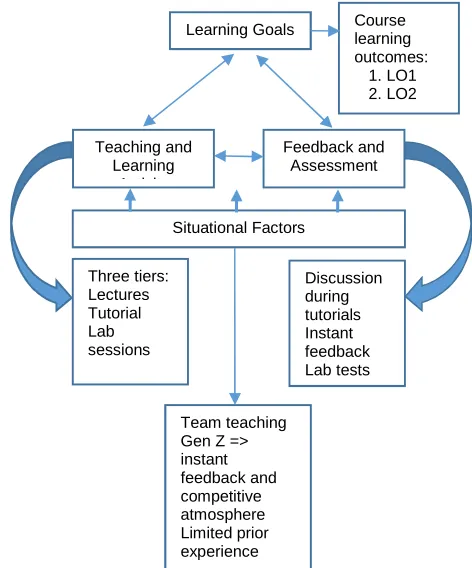
Learning Goals
Teaching and LearningActivities
Feedback and Assessment
Situational Factors
integrated course design. All these elements are influenced by situational factors [9]. This is depicted in Figure 1.
Fig. 1 Integrated Course Design [8]
The ICD approach presents a useful way of looking at the factors, which are important in designing courses. Each of these factors is elaborated as follows:
A. Situational factors
Situational factors are factors that will influence the feedback and assessment process as well as the choice of teaching and learning activities. The computer programming course is a compulsory first-year introductory course. There are about 180-210 students enrolled per academic session. About half of the students do not have any prior exposure to formal programming classes. The last few intakes consisted of students from Gen Z, that is, those born in 1994 onwards. Gen Z is generally motivated by new challenges and is more competitive. An exclusive study conducted by Vision Critical, the world’s leading consumer intelligence platform in 2015, points towards the habit of younger consumers in consuming media, which is continuously changing [10]. Usually, this group is quick to adopt new technologies. Besides having numerous platforms and screens at hand, they also favor new technology over conventional media. This study also shows that Gen Z is the first true digital native; on average, they use smartphones—over other devices—15.4 hours a week [11]. Their two top motivations for engagement are that the activity must be entertaining and fun, and they like to learn new things [12]. This characteristic should be exploited to encourage students to learn in a fun and challenge-based learning environment. Studies conducted on students and teachers show that both agree that Gen Z learns best through doing or hands-on experience [13].
Since this is a first-year course and programming is a very important skill in Computer Science that students must excel in, instructors are feeling the heat from both peers and the faculty management, to make sure that each student has acquired an accepted level of proficiency in programming. B. Learning Goals:
The taxonomy of significant learning is used as a guide to developing the learning goals in this study [8]. As a rule, the taxonomy outlines six types of learning—foundational knowledge, application, integration, human dimension, caring, and learning how to learn—that must be taken into account for the course studied. Those who strongly advocate
significant learning hold by the principle that a course should promote all six types of learning so that the students will enjoy a significant learning experience.
The first two kinds of learning, knowledge, and application are embodied formally in the following learning outcomes of the course, as follows:
LO1: Be able to write programs based on good programming practices
LO2: Be able to trace programs in order to understand the structure and logic of programs
LO3: Be able to develop programs to solve problems C. Teaching and Learning Activities
Based on the situational factors and the learning goals, a three-tier approach to teaching and learning was adopted. The three tiers are lecture, tutorial, and lab sessions (Fig. 2). Lecture sessions are used to deliver course content. It adopts the by-example approach whereby the lecturer will discuss and demonstrate possible approaches to solving a problem. The learning materials for the course can be accessed via an online learning environment.
Fig. 2 Three-tier course structure
Tutorial sessions are conducted after the students have attended the lectures. In these sessions, the students are split into smaller groups, with each group having ten members. Tutorial sessions are conducted to develop program understanding or comprehension and program composition. The role of the students is to discuss possible solutions to problems, in an interactive and collaborative setting. The role of the tutors, on the other hand, is to facilitate the discussions, set directions, and goals for the tutorial session, and encourage and motivate the students.
The lab sessions are held after the students have attended lectures and tutorial sessions. The students are divided into three groups of 60-70 each in the lab sessions. Lab sessions are hands-on sessions where students will hone their programming skills.
D. Assessment and Feedback
In designing the right form of assessment and feedback, and in order to achieve the learning goals, it is important to take note that:
▪ Students must do many exercise questions both during
lab sessions and also via self- learning [14].
▪ Instructors must check the programs submitted by
students and give prompt feedback accordingly. This is important because Gen Z is known to reject anything that does not satisfy their needs and often demand that their learning have relevance and immediacy [15]. Prompt feedback is also imperative for students to recognize their mistakes so as not to disrupt their learning progress. It also assists the lecturers in recognizing course failings [14].
▪ The students can modify their programs and resubmit
them, to be checked by the instructors, as many times as is necessary until they get the right answer [16].
▪ To provide a competitive atmosphere during lab
sessions. This is vital as this generation of students are well acquainted with environments that are based in competitiveness such as gaming. Students can become motivated to sharpen their programming skills and practice coding through competitions. Besides that, it will also benefit them in their future careers [17]. Student motivation has been known to increase due to competitions and other incentives [18].
Feedback to students was given in tutorial and lab sessions. Student performance was assessed via lab tests. Each week, six different problem-solving questions must be prepared to cover the three lab sessions during this time. To prevent students from copying each other, each group is given a different lab exercise consisting of different sets of questions (two questions per set). Overall, this resulted in a minimum of 140 programs for each lab session that must be graded and the feedback obtained from the students. Therefore, giving prompt feedback to the students in each lab session is a key challenge. This study suggests the use of an automatic grading system PC2 [19] to mark student lab assignments as a solution.
California State University, Sacramento (CSUS) developed PC2 (https://pc2.ecs.csus.edu/)—a Programming Contest Control System—to support computer programming contest activities. PC2 is also an open source automatic grading system that is used in many regional and international collegiate programming contests globally. The process involved in PC2 is ideal for training students’ abilities to independently analyze and solve problems. It starts with the students (competitors) submitting programs over a network provided by PC2. Then, the lecturers (judges) will provide feedback to the students after recompiling, executing, and viewing the source code or execution results of the submitted program. The students will use this feedback to attempt corrections and then resubmit the solution. This process starts all over again until the lecturers (judges) accept the student’s answer or when the time stops [20].
PC2 will give out five different kinds of feedback: ‘No (Output Format Error),’ ‘No (Runtime Error),’ ‘No (Compilation Error’)’ and ‘Yes (Accepted).’ Automated
judging mode can also be enabled, where the software will perform the judging. PC2 also provides a competitive atmosphere during lab sessions since the students can view their performance on the scoreboard in real time. The student rankings are computed based on three factors; the solutions, the time the solutions are submitted, and a number of attempts made to solve the problem.
The deliberations from (A) to (D) above resulted in the model for the teaching of programming based on ICD. All of the required elements are captured in Fig 3.
Fig. 3: Elements in a model for the teaching of programming based on ICD
III.RESULTS AND DISCUSSION
The effectiveness of the proposed model described in the previous section is then evaluated by conducting a survey at the Faculty of Information Science and Technology with a group of 162 first-year undergraduates. The following sections present the analysis of the results obtained.
A. Programming Background and Demographics
Fig. 4 shows that the demographics in this study consisting of 25 respondents (15.4%) each from the Software Engineering (Multimedia) program and Information Technology program, 28 respondents (17.3%) from the Software Engineering (Information System) program, and 84 respondents (51.9%) from the Computer Science program.
Fig. 5 shows the programming languages that the students had previously learned before entering UKM; 73 respondents (39.9%) had learned a programming language before entering UKM while 89 respondents (60.1%) had not learned any programming languages. HTML (13.3%), Python (13.3%), C++ or C (68%), and Java (18.7%) are among the programming languages they had learned.
Teaching and Learning
Activity
Learning Goals Course learning
outcomes: 1. LO1 2. LO2 3. LO3
Feedback and Assessment
Situational Factors
Three tiers: Lectures Tutorial Lab sessions
Discussion during tutorials Instant feedback Lab tests
Fig. 4. Student Distribution according to program
Fig. 5. Programming languages that respondents have learned previously.
B. Perception of Student on using PC2
Altogether 19 questions and one reflection were used to measure a student’s perception towards the use of PC2. The questions are grouped into three components, which are the feedback component, the competition component, and preparation and self-study component. There are three categories—Positive, Neutral and Negative—of student responses towards the use of PC2: ‘Strongly Agree’ and
‘Agree’ answers belong to the Positive category. ‘Neither Agree or Disagree’ answers are grouped under the Neutral category, while ‘Disagree’ and ‘Strongly Disagree’ answers fall under the Negative category.
1) Feedback Component
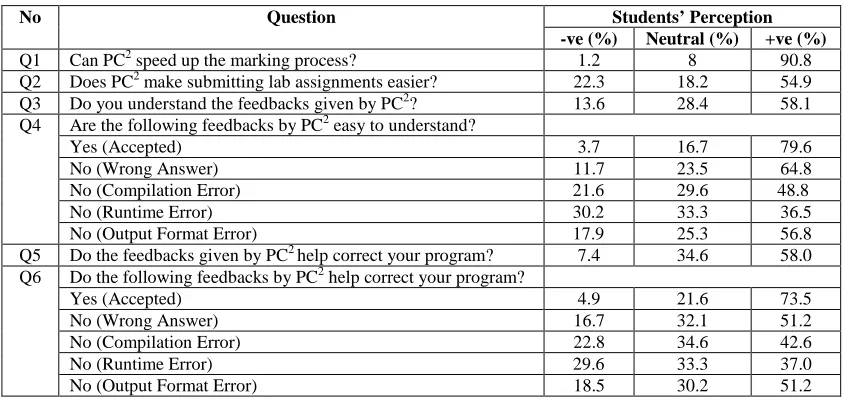
Table I summarizes the results obtained for the feedback component, which consists of Q1 to Q6. In Q1, the respondent had to state whether or not they understood the objective of using PC2, i.e. to speed up the marking process. The majority of the respondents (90.8%) understood the objective while 1.2% of the respondents did not understand. Another 8% were neutral.
The results show that 22.3% of the respondents did not agree with the Q2 statement that PC2 makes it easier for lab assignments to be submitted, while 54.9% respondents agreed. In Q3, respondents had to state whether or not they understood the general or specific feedback given by PC2 (Q4). Generally, only 13.6% of respondents did not understand the feedback whereas 58.1% respondents understood the feedback. From the Q4 results, the respondents felt that the feedback message that was most unclear was ‘NO (Runtime error)’; with many respondents (30.2%) responding negatively to this feedback message compared to other feedback messages.
The respondents had to state in Q5 whether or not the feedbacks helped them to correct their programs. The majority of respondents (58.0%) agreed with this statement. Q6 asked the respondents about the least meaningful feedback to which 29.6% responded that the specific feedback message ‘No (Runtime Error)’ did not help them correct their programs. This finding shows that instructors should explain in more detail the meaning of ‘Runtime Error’ and why it occurs.
TABLEI
STUDENT PERCEPTION ON USAGE OF PC2:FEEDBACK COMPONENT
No Question Students’ Perception
-ve (%) Neutral (%) +ve (%)
Q1 Can PC2 speed up the marking process? 1.2 8 90.8
Q2 Does PC2 make submitting lab assignments easier? 22.3 18.2 54.9
Q3 Do you understand the feedbacks given by PC2? 13.6 28.4 58.1
Q4 Are the following feedbacks by PC2 easy to understand?
Yes (Accepted) 3.7 16.7 79.6
No (Wrong Answer) 11.7 23.5 64.8
No (Compilation Error) 21.6 29.6 48.8
No (Runtime Error) 30.2 33.3 36.5
No (Output Format Error) 17.9 25.3 56.8
Q5 Do the feedbacks given by PC2 help correct your program? 7.4 34.6 58.0
Q6 Do the following feedbacks by PC2 help correct your program?
Yes (Accepted) 4.9 21.6 73.5
No (Wrong Answer) 16.7 32.1 51.2
No (Compilation Error) 22.8 34.6 42.6
No (Runtime Error) 29.6 33.3 37.0
No (Output Format Error) 18.5 30.2 51.2
2) Competition Component
There are only two questions in the competition component, which concern the scoreboard (Q7) and the lab test (Q19). The PC2 scoreboard displays student
motivation to compete with friends increased because of the scoreboard display (Table II).
TABLEII STUDENT PERCEPTION ON USAGE OF PC2C
OMPETITION COMPONENT
No Question Students’ Perception
-ve (%)
Neutral (%)
+ve (%)
Q7 Does the scoreboard
display increase my motivation to compete with other friends?
11.1 24.1 64.8
Q19 The use of PC2 during lab tests can help me get a higher score
13.0 32.7 54.3
3) Preparation and Self Study Component
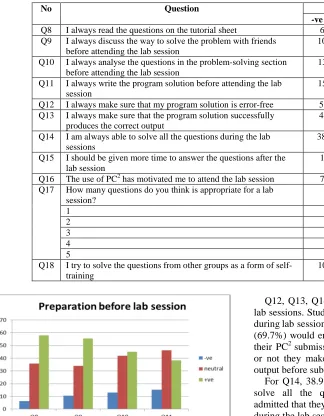
Table III shows the result for the preparation and self-study component, which consists of Q7–Q18. Questions Q8, Q9, Q10, and Q11 relate to the level of student preparation before the lab session, whether they simply read the
question, discussed it with friends, analysed the question to solve the problem, or wrote the solutions down before attending the lab session. Q8 asked students whether or not they read the problem-solving questions in the tutorial sheet. Only 6.2% did not read the questions beforehand, whereas 58.0% would read beforehand. To answer Q9, most of the respondents (55.5%) would discuss the possible problem-solving methods before attending lab sessions. However, for Q10, less than half (45.0%) of the respondents would analyse the problem-solving questions before lab sessions, whereas for Q11, 38.3% of the respondents would write down the program solutions before attending the lab sessions. Fig. 6 shows the result for Q8 to Q11 in the form of a bar chart. Q11 obtained the lowest +ve response, where only 38.3% would write the program solution before attending the lab session. Q8 obtained the highest +ve score amongst the questions, indicating that the majority (58%) of respondents would read the questions before going for their lab sessions.
TABLEIII
STUDENT PERCEPTION ON USAGE OF PC2:PREPARATION AND SELF STUDY COMPONENT
No Question Students’ Perception
-ve (%) Neutral (%) +ve (%)
Q8 I always read the questions on the tutorial sheet 6.2 35.8 58.0
Q9 I always discuss the way to solve the problem with friends before attending the lab session
10.5 34.0 55.5
Q10 I always analyse the questions in the problem-solving section before attending the lab session
13.0 42.0 45.0
Q11 I always write the program solution before attending the lab session
15.4 46.3 38.3
Q12 I always make sure that my program solution is error-free 5.6 24.7 69.7
Q13 I always make sure that the program solution successfully produces the correct output
4.3 19.2 76.5
Q14 I am always able to solve all the questions during the lab sessions
38.9 37.0 24.1
Q15 I should be given more time to answer the questions after the lab session
1.2 14.8 84.0
Q16 The use of PC2 has motivated me to attend the lab session 7.4 29.0 63.6
Q17 How many questions do you think is appropriate for a lab session?
1 6.2
2 56.2
3 30.9
4 4.3
5 2.5
Q18 I try to solve the questions from other groups as a form of self-training
10.5 40.1 49.4
Fig. 6. Preparation before lab session
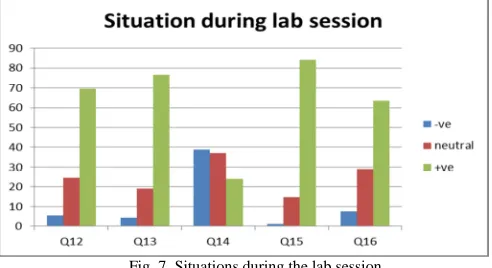
Q12, Q13, Q14, Q15, and Q16 refer to situations during lab sessions. Students will submit their solution through PC2 duringlab sessions, where more than half of the respondents (69.7%) would ensure their program is free of errors before their PC2 submission (Q12). Q13 asks respondents whether or not they make sure their programs produce the correct output before submission to PC2 to which 76.5% agreed.
limited time of two hours to prepare the solution ahead of time.
Interestingly, almost all respondents (84%) agreed with Q15, which states that the students should be given more time to answer the questions before the lab sessions. However, PC2 has also motivated students to attend the lab sessions, as indicated by the responses to Q16.
Fig. 7. Situations during the lab session
Fig. 7 shows the result for Q12 to Q16 in the form of a bar chart. The highest +ve response is Q15, where the majority of students agreed that more time should be given to them to solve the exercises before lab sessions. This is aligned with the response in Q14 where only a handful of students agreed that they could answer all questions during the lab session.
Fig. 8. The appropriate number of questions for a lab session
Q17 asks whether or not the number of problems solving questions given is appropriate for a lab session. 30.9% rated three as sufficient, while the majority (56.2%) rated two questions as sufficient. Only 6.2% thought that one question was appropriate for a lab session (Fig. 8).
Q18 refers to the situation post-lab session. The students were asked if they attempted any self-training by solving questions from other lab groups. 10.5% of the respondents disagreed with the statement, while only 49.4% agreed.
1) Reflection
A final open-ended question (Q20) was given to the student, where they must write their reflection regarding the use of PC2 during lab sessions. The student responses were then categorized into positive, negative, and neutral categories. Only 11.1% of the students gave negative remarks while the majority of students (75.3%) gave positive remarks. The remaining percentage of respondents gave a mix of positive and negative remarks, and a few even suggested improvements to using PC2 in lab sessions.
TABLEIV
AN OPEN-ENDED QUESTION Q20
No Question Students’ Perception
-ve (%)
Neutral (%)
+ve (%)
Q20 Personal opinion on the use of PC2 during the lab session
11.1 13.6 75.3
Some of the student responses to Q20 are listed in Table V. The responses that are positive indicate the positive perception of using PC2 in lab sessions, which have helped the students to learn to programme. Students that gave negative responses struggled with finding the right answer to the problems. The students that gave a mixed positive and negative answer acknowledged the positive impact of using PC2 but still needed assistance determining the errors in their programs.
TABLEV STUDENT RESPONSES TO Q20
Response category
Respondent ID
Respondent’s response
+ve R88 The system helps us identify our
mistakes faster, and thus makes the process of learning faster as well
+ve R19 It is advantageous to use PC2
because it more efficiently and accurately marks our program.
+ve R104 PC2 has boosted my confidence in
answering questions.
+ve R1 PC2 shows me how my coding is
judged in competitions and this will help me in the future as I will be accustomed to this sort of judging.
+ve R50 Through PC2, our coding can be
correctedon the spot.
-ve R55 I find the system difficult because
it demands accurate answers.
-ve R70 The system could sometimes be
buggy. It could still state that my answer is wrong even when I am sure it is correct. Besides that, more input and output should be given so we can practice and test our code in unexpected
conditions.
-ve R139 I think there should not be as
many questions.
Both R108 PC2 gives me fast feedback, but
I’m not sure about my mistakes when I receive an error message.
Both R51 Comments should be given if a
wrong answer is made, which would make it much clearer.
Both R134 PC2 has proven very helpful but
the lab is used by other courses as well, and so is not always open. This makes it difficult for us to practice using the system.
of the respondents agreed that PC2 had enabled them to get prompt feedback, whether their answer was correct or not. “Runtime Error” was the least understood feedback for incorrect answers; it was also not meaningful or helpful. Most of the time, the runtime error happens because the respondents did not test the program using the same type of input or same input data set that the judges used to check the respondents’ answer. On another note, the scoreboard proved to be a hit with the respondents, as most agreed they had benefited from the ranking it displayed, motivating them to keep on trying and competing with their friends.
More than half of the respondents stated that they would discuss the possible solutions and read the questions before lab sessions, but they were not able to solve the questions on time due to failing to write down the program solution beforehand. Most of the students asked for more time to answer the question before the lab’s two-hour session ended, and only 24.1% of the respondents were able to solve all problems correctly within that time. Additionally, 76.5% of the respondents said that they would always make sure that the program solutions successfully produced the correct outputs while 69.7% of the respondents said that they always made sure they submitted error-free solutions, proving that PC2 has successfully pushed students always to output their best and most correct solution. This is because the students must strive for the Accepted (‘Yes’) feedback from PC2 but until then must repeatedly correct and submit their solutions.
IV.CONCLUSION
This paper presents a model for a Programming course that was designed using the integrated course design approach. Using the approach, it was shown that we could systematically consider the important and pertinent factors that must be incorporated into a first-year Programming course. In the case of the Faculty of Information Science and Technology, UKM, due to the identified situational factors, the course was designed such that it allows immediate feedback, presents a competitive atmosphere, and also allows adequate opportunities for students to prepare for their lab sessions. The immediate feedback element was addressed via the utilization of PC2, which also provided the competitive atmosphere required. The three-tier structure, a hierarchical structure of lectures, and tutorials and lab sessions provided the necessary structure that enables students to follow through the content in a structured manner; thus, providing them with an adequate amount of time for discussions and self-study. The results from the evaluation in this study indicate that these design objectives were satisfactorily achieved.
ACKNOWLEDGMENT
We would like to thank the Ministry of Higher Learning, Malaysia, for supporting this work through its research grant fund FRGS/1/2016/ICT01/UKM/02/3.
REFERENCES
[1] Yang, T.-C., Hwang, G.-J., Yang, S. J. H., & Hwang, G.-H. (2015). “A Two-Tier Test-based Approach to Improving Students’ Computer- Programming Skills in a Web-Based Learning Environment,” Educational Technology & Society, 18(1), pp. 198– 210.
[2] Brame CJ and Biel R (2015). “Test-enhanced learning: The potential for testing to promote greater learning in undergraduate science courses,” CBE—Life Sciences Education 14, pp. 1-12.
[3] Kani, U. M., Sa’ad, T. U. (2015), “Drill as a Process of Education,”
European Journal of Business and Management, Vol.7 (21), pp.
175-178.
[4] H. Mohamad Judi, S. Mohd Salleh, N. Hussin, S. Idris (2010), “The Use of Assignment Programming Activity Log to Study Novice Programmers’ Behavior Between Non-Plagiarized and Plagiarized Groups,” Journal Information Technology,9(1), pp. 98-106.
DOI: 10.3923/itj.2010.98.106
[5] N. F. A. Zainal, S. Shahrani, N. F. M. Yatim, R. A. Rahman, M. Rahmat, and R. Latih (2012), “Students’ Perception and Motivation towards Programming,” Procedia - Soc. Behav. Sci., vol. 59, pp. 277-286. https://doi.org/10.1016/j.sbspro.2012.09.276
[6] Sun, W. and Sun, X. (2011). “Teaching Computer Programming Skills To Engineering And Technology Students With A Modular Programming Strategy.” Technical Report (AC 2011-308), Oregon Institute of Technology.
[7] Krpan, D., Mladenović, S. and Rosić, M. (2015). “Undergraduate
Programming Courses, Students’ Perception and Success”, Procedia
- Social and Behavioral Sciences, vol. 174(2015), pp. 3868 – 3872.
[8] Fink, L. D. (2007). “The Power of Course Design to Increase Student Engagement and Learning.” Peer Review, Winter 200, pp. 13–18. [9] M. Mukhtar, Y. Yahya, S. Abdullah, A. R. Hamdan, N. Jailani, & Z.
Abdullah (2009). “Employability and service science: Facing the challenges via curriculum design and restructuring,” Proceedings of
the 2009 International Conference on Electrical Engineering and
Informatics (ICEEI 2009), pp. 357-361. DOI:
10.1109/ICEEI.2009.5254712
[10] Kleinschmidt, M. (2015). “Generation Z characteristics: 5 infographics on the Gen Z lifestyle”, [Online]. Available: https://www.visioncritical.com/generation-z-infographics/.
[11] Mohr, Kathleen A. J., and Mohr, Eric S. (2017). “Understanding Generation Z Students to Promote a Contemporary Learning Environment.” Journal on Empowering Teaching Excellence: vol. 1(1), Article 9. http://doi.org/10.15142/T3M05T
[12] Singh A. (2014), “Challenges and issues of Generation Z,” IOSR
Journal of Business and Management, vol. 6(7), pp. 59-63.
[13] (2016) Gen Z in the Classroom: Creating the Future. [Online]. Available: http://www.adobeeducate.com/genz/adobe-education-genz.
[14] Gupta, S. and Gupta, A. (2018). “E-Assessment Tools for Programming Languages: A Review.” Proceedings of the First
International Conference on Information Technology and Knowledge Management, vol. 14, pp. 65-70. DOI: 10.15439/2018KM31.
[15] White, G. and Kiegaldie, D. (2011). “Gen Y Learners: Just How Concerned Should We Be?,” Clin. Teach., vol. 8(4), pp. 263–266. [16] M. Rahmat, S. Shahrani, R. Latih, N. F. M. Yatim, N. F. A. Zainal,
and R. A. Rahman, (2012). “Major Problems in Basic Programming that Influence Student Performance,” Procedia - Soc. Behav. Sci., vol. 59, pp. 287–296. https://doi.org/10.1016/j.sbspro.2012.09.277 [17] S.A. Sukiman, H. Yusop, R. Mokhtar, and N.H. Jaafar (2016).
“Competition-Based Learning: Determining the Strongest Skill that Can Be Achieved Among Higher Education Learners,” Regional
Conference on Science, Technology, and Social Sciences: Business and Social Sciences, pp. 505-516.
[18] I. Supriana, RD. Agustin, M. A. Bakar, & N.A.M. Zin, (2017). “Serious games for effective learning,” 6th International Conference
on Electrical Engineering and Informatics (ICEEI’2017).
[19] (2017) “Welcome to the PC2 Home Page”. [Online]. Available: https://pc2.ecs.csus.edu/
[20] Keuning, H., Jeuring, J., & Heeren, B. (2016). “Towards a Systematic Review of Automated Feedback Generation for Programming Exercises.” Proceedings of the 2016 ACM Conference
![Fig. 1 Integrated Course Design [8]](https://thumb-us.123doks.com/thumbv2/123dok_us/9993652.1987246/2.595.324.538.303.473/fig-integrated-course-design.webp)