and Software Design of
a Web Based Task Tracking System
2004-01-28
Version 1.0
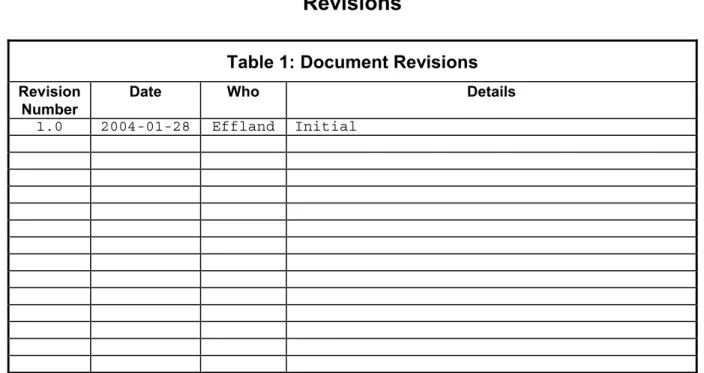
Revisions
Table 1: Document Revisions
Revision Number
Date Who Details
Contents
1. INTRODUCTION... 1
2. HISTORY... 1
3. FEATURES ... 1
4. USING THE TASK TRACKING SYSTEM... 1
4.1 TASK LISTING SCREEN... 1
4.2 INPUT FORM FOR NEW TASKS... 2
4.3 TASK EVENT LISTING SCREEN... 2
4.4 INPUT FORM FOR NEW TASK EVENTS... 2
5. APPENDIX A: SOFTWARE AND DATABASE DESIGN... 1
5.1 DESIGN PHILOSOPHY... 1
5.2 DATABASE SCHEMA... 1
5.3 WEB PAGE SOFTWARE... 3
List of Figures
FIGURE 1: BROWSER SCREEN SHOWING TASK LISTING... 4
FIGURE 2: NEW TASK INPUT SCREEN... 5
FIGURE 3: TASK EVENT LISTING SCREEN SHOWING EVENTS FOR THE TASK SELECTED FROM SCREEN SHOWN IN FIGURE 1... 6
List of Tables
TABLE 1: DOCUMENT REVISIONS...II
TABLE 2: ENTRY FIELDS FOR NEW TASK INPUT FORM... 2
TABLE 3: ENTRY FIELDS FOR TASK INPUT FORM... 3
TABLE 4 : DESCRIPTION OF TABLES IN MYSQL DATABASE FILE DBCDL... 1
TABLE 5 :DESCRIPTION OF TABLE TASKS... 2
TABLE 6:DESCRIPTION OF TABLE TASKEVENTS... 2
TABLE 7:DESCRIPTION OF TABLE TASKPROJECTS... 3
TABLE 8:DESCRIPTION OF TABLE TASKSUBPROJECTS... 3
1. Introduction
A web-based tracking system, based on a similar design for tracking machine shop jobs1, has been developed to
manage the progress of tasks. This system was developed to provide better coordination for tracking tasks involved in building ALMA Band 6 Cartridges but can be enhanced for use with other projects.
This memo provides instructions for using the system and the design methodology is described in an Appendix.
2. History
The present approach for tracking tasks involves managing a list of tasks in two different formats: The tasks are typed or copied into MS Word and discussed at twice-weekly status meetings, and then are updated and e-mailed in plain text formats to all team members. Managing this list is cumbersome and tasks are frequently lost.
The intent of the system described here is to simplify the management of tasks and to get team members to be more active in updating the status of tasks assigned to them.
3. Features
The task tracking system has the following features:
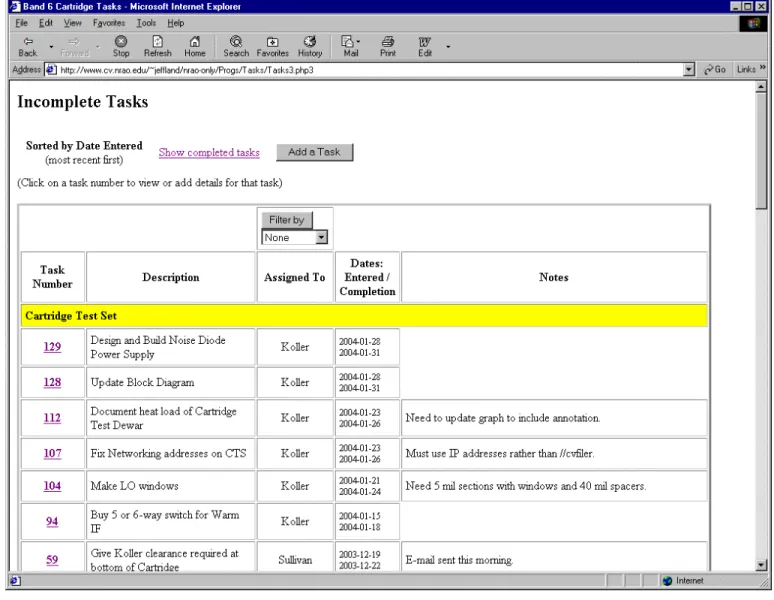
a) All tasks are visible to anyone with a web browser inside NRAO's intranet (Figure 1).
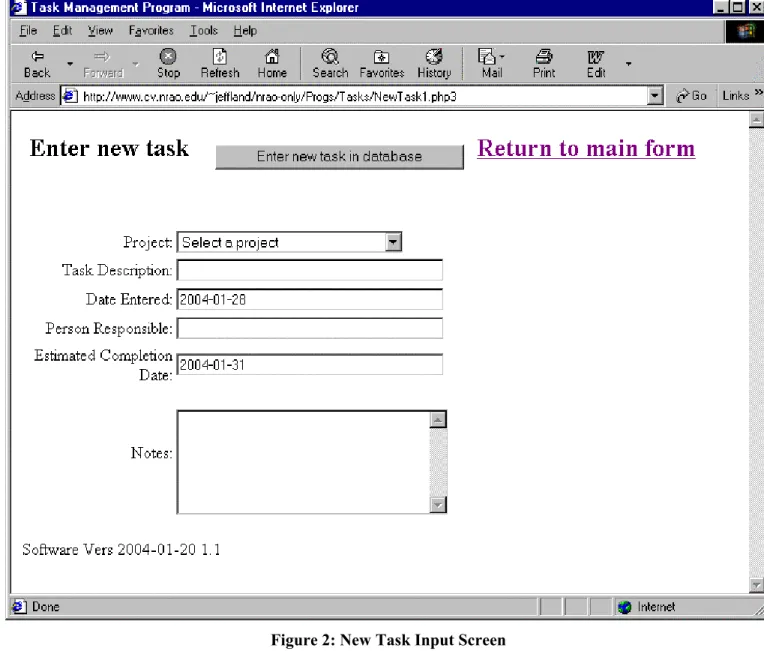
b) Team members can enter new tasks using a web form, by typing a task description and notes (Figure 2). c) Events for a task selected in the main screen are listed by clicking on the task number (see Figure 3) d) Anyone can enter a new event for a selected task (see Figure 4)
4. Using the Task Tracking System
The initial web form that displays the status of all uncompleted tasks, as shown in Figure 1, is available at
http://www.cv.nrao.edu/~jeffland/nrao-only/Progs/Tasks/Tasks3.php3
Table data on the form are stored in a database (see Appendix for details) and a listing of completed tasks is available from a hyperlink at the top of the page.
4.1 Task Listing Screen
From the task listing screen shown in Figure 1, the user can either enter a new task by clicking the appropriate button, see events for a particular task by clicking on the task number, or view a listing of all completed tasks. A list box below the Filter By button allows the user to show just those tasks assgined to a particular person. To use this feature, select the person in the list box and press the Filter By button.
A serious limitation in the existing design is that there is no way for users to change any of the entries once they are entered into the database. I can change things using other programs to access the database.
4.2 Input Form for New Tasks
New tasks are entered using the form shown in Figure 2, which is available by clicking the Add a Task button on the main task listing screen shown in Figure 1. Fill in the fields shown in Table 2, then press the Enter new task indatabase button on the form to add the task to the database.
Table 2: Entry Fields for New Task Input Form Field Name What to enter
Project Select a Project for the task using the list box.
Task Description Enter a brief but descriptive title for the task
Date Entered Automatically filled in
Person Responsible Enter the last name of the person responsible for this task.
Estimated Completion Date Enter the date when the task should be completed. A default date is shown as an aid for entering the correct date format, which is YYYY-MM-DD. Limited format conversion is available but please use the format shown in the field.
Notes Enter short text here. Lengthy notes should be entered in the input form for
Task Events, discussed in Section 4.4. Required Completion Date Not supported in this software version.
Be sure to press the Enter new task indatabase buttonon the form to add the task to the database
4.3 Task Event Listing Screen
Each task has certain events associated with it, and the “Task Event Listing” screen (Figure 3) tabulates events for a selected task. This screen is produced by clicking on the task number hyperlink in the Task Listing screen (Figure 1). Task events include:
a) Notes about the task. The note field can include the text of e-mails associated with this task, as shown in the second event in Figure 3.
b) A change in the person assigned to the task.
c) A change in the estimated completion date for the task.
4.4 Input Form for New Task Events
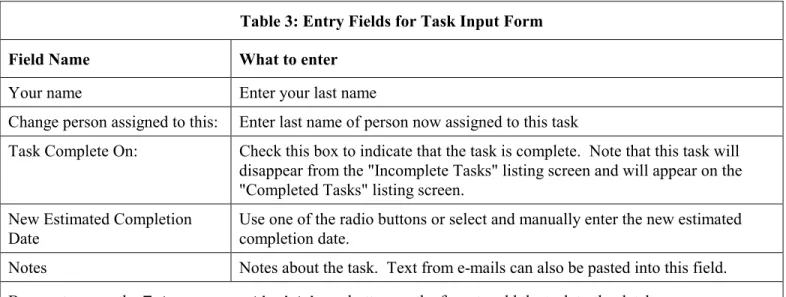
New events for a particular task are entered using the form shown in Figure 4, which is available by clicking the Add an Event button on the “Task Event Listing” screen (Figure 3). Fill in the following fields:
Table 3: Entry Fields for Task Input Form Field Name What to enter
Your name Enter your last name
Change person assigned to this: Enter last name of person now assigned to this task
Task Complete On: Check this box to indicate that the task is complete. Note that this task will disappear from the "Incomplete Tasks" listing screen and will appear on the "Completed Tasks" listing screen.
New Estimated Completion Date
Use one of the radio buttons or select and manually enter the new estimated completion date.
Notes Notes about the task. Text from e-mails can also be pasted into this field.
Be sure to press the Enter new event indatabase buttonon the form to add the task to the database
Events cannot be changed once they are entered into the system, which admittedly is a serious limitation that will be addressed in future software versions. The work-around is to simply enter another event that includes the corrections.
5. Appendix A: Software and Database Design
5.1 Design Philosophy
A database serves to hold the task and event information. Records in the database are displayed and updated with web-based input forms dynamically generated with PHP running on the NRAO's web server.. This allows the task information to be updated by simply adding or modifying records in the database.
5.2 Database Schema
The open source program MySQL is used as the database server because it has been tightly integrated with the Apache web server program and is presently supported by the NRAO for simple access from web pages. The MySQL server is located at sql.cv.nrao.edu.
MySQL lacks many of the advanced features of commercially available databases, such as facilities to graphically display database schemas, so schemas for the tables discussed below were generated manually. The free program “MySQL-Front” (http://www.anse.de/mysqlfront/) was used to manage the database tables.
All database tables reside in the MySQL "database" file dbCDL. The database tables listed in Table 4 store the relevant data using a relational schema described later.
Table 4 : Description of tables in MySQL Database file dbCDL
Table Name Comments Table Describing
Schema
Tasks Holds the task information Table 5
TaskEvents Holds events for tasks Table 6
TaskProjects Top-level project table that holds the project under which the task is assigned Table 7 TaskSubProjects Subproject level table that holds the project under which the task is assigned Table 8
Records in table TaskProjects describe the top level project, and records in the child-table TaskSubProjects are related to TaskProjects in a one-to-many relationship using the foreign-key field fkTaskProjects in table TaskSubProjects to link multiple subproject records with a single project record. Similarly, the foreign key field fkSubProject links records in table Tasks to subprojects.
Table 5 :Description of table Tasks
Purpose: Each record provides information about events related to a particular task
Field Name Field Type Comments
keyTasks int(10) unsigned Auto-incremented key field
fkSubProject int(10) unsigned Foreign key field linked to the parent table TaskSubProjects
Priority tinyint(6) Integer giving task priority (Future use)
AssignedTo varchar(50) Name of person assigned to task DateEntered datetime Date when task was entered into database
Description varchar(255) Description of task
DateRequired datetime Date that task is required to be completed (Future use)
DateEstCompletion datetime Estimated completion date for this task
DateCompleted datetime Date that task was actually completed (note that this is redundant with field
DateCompleted in table TaskEvents)
Notes text Notes about this task
Table 6:Description of table TaskEvents
Purpose: Each record provides information about events related to a particular task
Field Name Field Type Comments
keyTaskEvents int(10) unsigned Auto-Incremented key field
fkTasks int(10) unsigned Foreign key field linked to the parent table Tasks
DateUpdated datetime Date updated
EntryBy varchar(50) Name of person entering this event
AssignedPrev varchar(50) Name of person previously assigned to this task (Person presently assigned is stored in table Tasks.
DateEstCompletionPrev datetime Previous estimated completion date. (Present estimated completion date is stored in table Tasks.
DateCompleted datetime Date that task was actually completed
Effort float Effort required (Future use)
Table 7:Description of table TaskProjects
Purpose: Each record provides information about the top-level project for which the task is assigned
Field Name Field Type Comments
keyTaskProjects int(10) unsigned Auto-Incremented key field
Name varchar(50) Name of top-level project for which the task is assigned
DateEntered timestamp(14) Date task was entered into database EnteredBy varchar(50) Name of person entering this project
Notes text Notes about this task
Table 8:Description of table TaskSubProjects
Purpose: Each record provides information about the subproject for which the task is assigned
Field Name Field Type Comments
keyTaskSubProjects int(10) unsigned Auto-Incremented key field
fkTaskProjects int(6) Foreign key field linked to the parent table TaskProjects Name varchar(50) Name of subproject for which the task is assigned
DateEntered timestamp(14) Date task was entered into database
EnteredBy varchar(50) Name of person entering this project
Notes text Notes about this task
5.3 Web Page Software
The web page and database access software was written using the scripting language PHP. There is an incredible number of scripting languages available for dynamic web page construction, but Pat Murphy recommended PHP. The free program PHPCoder Version 2.3 (http://www.phpide.de) was used to write and edit most of the PHP code.
When a URL pointing to a PHP file is entered using a browser, the web server first executes the PHP statements in the file, and the PHP program then outputs HTML to the browser. A notable limitation is that PHP programs can't be executed from the Window’s explorer because that program somehow circumvents the HTTP protocol. You must type the URL into a browser to run this code, you can't just double-click from Windows Explorer.
Listings will be provided later.
Table 9:Task Management Program File Locations
All files are located in http://www.cv.nrao.edu/~jeffland/nrao-only/Progs/Tasks
File Name Comments
Tasks3.php3 Code to generate main task form
NewTask1.php3 Code to generate task input form Events2.php3 Generates events listing screen.
NewEvent1.php3 Generates the new event input screen.
../taskconst.php3 Holds constants, CdbTask database class, and common functions