Copyright © 2013 by SAP AG or an SAP affiliate company. All rights reserved.
No part of this publication may be reproduced or transmitted in any form or for any purpose without the express permission of SAP AG. The information contained herein may be changed without prior notice.
Some software products marketed by SAP AG and its distributors contain proprietary software components of other software vendors. National product specifications may vary.
These materials are provided by SAP AG and its affiliated companies ("SAP Group") for informational purposes only, without representation or warranty of any kind, and SAP Group shall not be liable for errors or omissions with respect to the materials. The only warranties for SAP Group products and services are those that are set forth in the express warranty statements accompanying such products and services, if any. Nothing herein should be construed as constituting an additional warranty.
SAP and other SAP products and services mentioned herein as well as their respective logos are trademarks or registered trademarks of SAP AG in Germany and other countries. Please see http://www.sap.com/corporate-en/legal/copyright/ index.epx#trademark for additional trademark information and notices.
Agentry SAP Framework ...1
Agentry SAP Framework ...1
SAP Framework ...4
Mobile Exchange Persistent Layer ...5
Delta Detection Routine ...6
Change Detection Configuration Set ...6
Data Object Handler Class Repository ...6
Mobile Integration Configuration Set ...7
Application Authentication Services ...7
BAPI Wrapper ...7
Java Connector ...8
System Monitor ...8
Configuration Module ...8
Working with Push Scenarios ...9
Outbound Trigger Overview ...10
Agentry SAP Framework Administration
Functions in SAP ...10
Java Development for SAP ...28
Set Up the SAP Java Project in Eclipse ...28
Java Architecture ...29
Data Flow ...30
Accessing the Agentry SAP Framework
Configuration Panel ...37
Standard Operations in the Configuration Panel
...40
Agentry SAP Framework Configuration Panel
Overview ...41
Technical Settings ...44
Mobile Application Configuration ...45
Push Scenario Definition ...56
Exchange Object Configuration ...71
EFI Assignment ...81
Mobile Data Object Configuration ...84
BAPI Wrapper Configuration ...97
Security Settings ...100
System Administration ...107
Accessing the Administration and Monitoring
Portal ...110
Administration Portal - Mobile Solution Overview
...113
Administration Portal - Administration ...121
Administration Portal - Monitoring ...135
Administration Portal - Statistics ...152
Copying an Object to the Customer Namespace
...158
Adding a New Downstream Synchronization
Process ...160
Working with BAPI Wrappers ...164
Adding a New Data Table ...167
Adding a New Complex Table ...168
Adding a New Data Object ...169
Adding new Values to be Retrieved for Mobile
Application Definitions ...171
Adding New Fields to an Exchange Object ...174
Working with Push Scenarios ...175
Sending Email Using the Administration &
Monitoring Portal ...178
Agentry SAP Framework
Agentry SAP Framework
The Agentry SAP Framework provides an efficient way to build mobile solutions for SAP®
using SAP Mobile Platform. The framework was developed to address the following business needs:
• Establish a common mobile integration service layer and architecture for the mobile adaptation of enterprise business processes and business object data for enterprise mobile applications.
• Define a consistent integration pattern for mobile data object modeling, change detections, data distribution, delta sync calculation, and data pushes.
• Provide a framework for mobile application logging, tracing, administration, and monitoring.
• Uses a combined coding and configuration approach that enables a comprehensive and flexible application paradigm. Standard objects are configurable and extensible. Partners and customers are able to develop their own integration services using the same integration pattern.
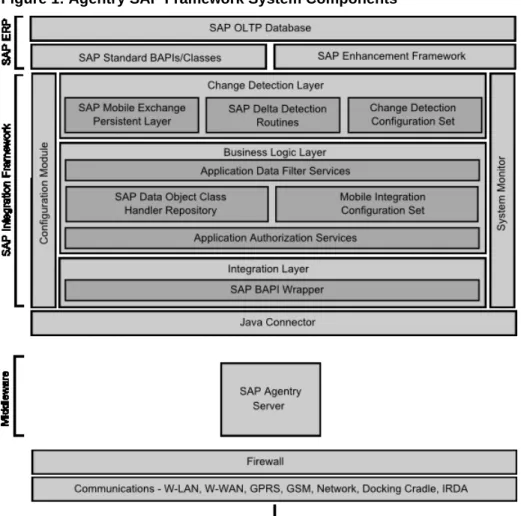
• Uses the latest technology supported by SAP, to protect the return on investment. The framework consists of several components shown in the following diagram.
Figure 1: Agentry SAP Framework System Components
Software Component Layering
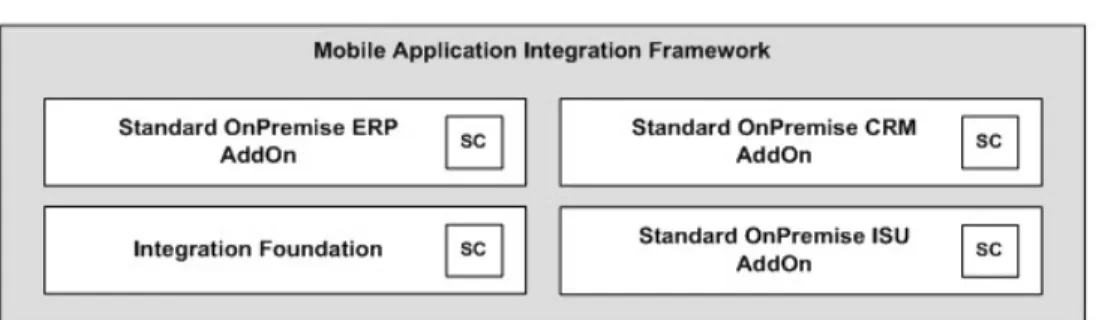
The Agentry SAP Framework uses a layered software component approach; dependency between each software component layer is by design and encouraged in order to provide maximum reusability. There are two categories of software components within the Agentry SAP Framework: the Foundation Add-On Component, and the Application Add-On Components, as shown in the following diagram.
Figure 2: Agentry SAP Framework System Components
The Foundation Add-On Component (SMFND) is designed for a Netweaver ABAP-based system. It can be deployed to any SAP systems based on Netweaver AS ABAPA 7.x. The foundation component defines the standard integration patterns supported by the framework. It provides class libraries, RFC module pools, system programs, utilities, application configuration tools, and system administration tools. Application integration services are developed using the foundation component.
Application add-on components are developed using the integration patterns, services, and tools provided by the foundation component. Application add-on components provide an application level integration support for mobile applications.
A layered approach is used when developing the application add-ons. A standard application add-on is developed for each SAP Business Suite system and supports all mobile applications for the suite system. There is no mobile application-specific add-on using this approach. Each standard application add-on is designed to provide mobile integration support for all standard business processes and business objects within a specific suite system. Mobile integration services are designed and developed to be shared and reused by multiple mobile applications requiring the same business process and business object.
Currently only onPremise SAP ERP systems and SAP CRM systems are supported by the framework. Add-On SMERP supports the SAP ERP system and Add-On SMCRM supports the SAP CRM system.
The two standard application add-ons supported by the framework are SMERP Add-On for SAP ERP Systems and SMCRM Add-On for SAP CRM Systems. SMERP supports ERP-based mobile applications such as SAP Work Manager, SAP Inventory Manager, and SAP Rounds Manager. SMCRM supports CRM-based mobile applications such as SAP CRM Service Manager and SAP Sales Manager.
SAP Industry Solutions provides specialized industry specific business processes and features. To support these processes, specialized application add-ons have been developed. SMISU Add-On for SAP ERP Systems with IS-Utility is currently supported by the framework. It provides additional support for meter management integration services for SAP IS-Utility systems, in addition to the standard plant maintenance processes supported by the SMERP add-on. SMISU add-on has a dependency of SMERP add-on.
SAP Framework
The framework consists of core components. These components are logically grouped in three main layers:
• Change detection layer • Business logic layer • Integration layer
Within the framework, there also exists the configuration module and system monitor. The configuration module provides the interface to the integration framework to allow for the configuration and administration of the various components within it. The system monitor provides an administrative interface to monitor processing related to users, pushes, and other synchronization tasks within the framework.
Change Detection
The change detection layer of the Agentry SAP Framework contains the exchange tables and triggers used to detect and track changes made to the data in the SAP system, and stores exchange information used during synchronization between the mobile application and SAP. Included in the change detection layer are the following:
• Mobile Exchange Persistent Layer - Contains the exchange tables used during
synchronization to compare data on the Client to data in the SAP system, and to support the synchronization of only the differences.
• Delta Detection Routines - Contains the triggers, created in the SAP enhancement
framework, to detect changes to production data of importance to the mobile application. • Change Detection Configuration Set - Configuration tools, including the interface
presented in the Configuration portal, to allow for the creation, configuration, and administration of the components of the change detection layer.
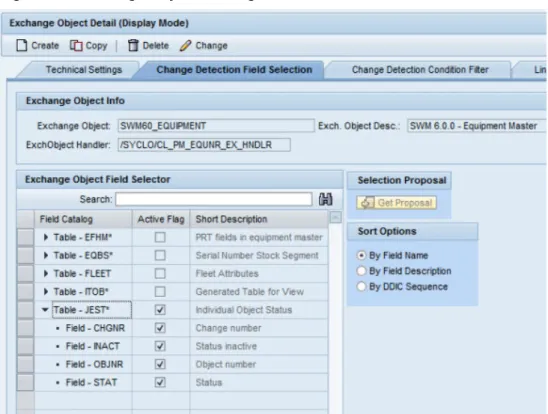
• Exchange Object - Presented in the Configuration Panel, the exchange object
encapsulates the SAP tables, exchange table, class handler, and other components involved in the change detection process. Exchange objects are utilized by the fetch process to determine what data has changed since the last transmit of the mobile device.
Business Logic Layer
The business logic layer contains the logical components to work with the exchange data objects in the change detection layer for downstream synchronization, as well as the logical components to update data from transactions in the mobile application to the SAP system. Included in the business logic layer are the following:
• Application Data Filter Services - Specifies the filtering of data to be retrieved from the
SAP system for transmission down to the mobile application. Not all fields from a given table will necessarily be sent to the mobile application. The application data filter services
allow for the specification of the specific fields from a table to be sent to the mobile application.
• Data Object Class Handler Repository - Contains the logic used by the mobile data
objects to synchronize data. A class handler is created to retrieve data from or update data to the SAP system, making calls to the standard SAP BAPIs.
• Application Authorization Services - Contains the security settings specific to the
mobile user group. Settings for authorization services can be applicable to users of all mobile applications synchronizing data through the Agentry SAP Framework, for a specific application, or for a specific class handler within the business logic layer. • Mobile Integration Configuration Set - Configuration tools, including the interface
presented in the Configuration Panel, to allow for the creation, configuration, and administration of the components of the business logic layer.
• Mobile Data Object - Presented in the Configuration Panel, the mobile data object
encapsulates the class handler, exchange object (in the change detection layer), the application data filtering services, and other components involved in the synchronization of data. The mobile data object references the exchange object in the change detection layer to support its synchronization. It in turn is referenced by the BAPI wrappers within the integration layer.
Integration
The integration layer of the Agentry SAP Framework contains the BAPI wrappers that present the integration point to the mobile application servers. The Java steplets, complex table, and data table classes within the synchronization definitions of the mobile application call into these BAPI wrappers, through the SAP Java Connector (SAP JCo). The BAPI wrappers, in turn, call into the mobile data objects, which include the business logic for synchronization. The architecture and design of the BAPI wrappers is intended to exclude the business logic related to the synchronization of the production data. This structure minimizes the necessity of modifying Java code within the mobile application as the result of changes to the
synchronization processing configured in the integration of the Agentry SAP Framework.
Configuration Module
The configuration module is the web interface for the Agentry SAP Framework Configuration Panel. This interface provides the tools to create, configure, and administer the components of the integration of the Agentry SAP Framework.
System Monitor
The system monitor is the web interface for the Agentry SAP Framework Administration and Monitoring Panel. This monitoring panel is provided to view mobile users’ synchronization activities, including fetches, transactions, and pushes.
Mobile Exchange Persistent Layer
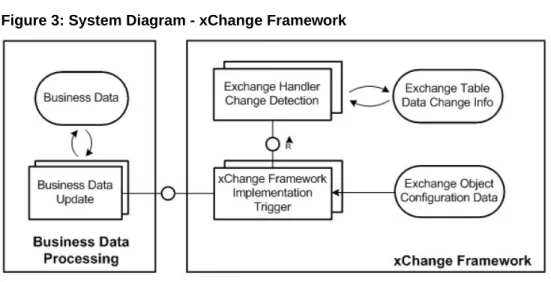
The mobile exchange persistent layer allows the transfer of data from SAP to the mobile client as well as the transfer of data from the mobile client to SAP. This exchange process provides a
consistent way to manage and capture mobile client-related master and transaction data changes within SAP. The mobile exchange persistent layer uses the SAP NetWeaver enhancement framework to implement change detection triggers.
Figure 3: System Diagram - xChange Framework
Delta Detection Routine
The delta detection routines are the triggers within the enhancement framework that detect modifications to data of concern to the mobile application. When changes are made to production data in the back end system, the delta detection routines will capture the change event. If a given change is one that will affect the data in the mobile application, then the routine will update the appropriate exchange table in the mobile exchange persistent layer. Intelligence is incorporated in the delta detection routines to determine if a change is one of concern to the mobile application. If it is not, then the change is ignored by the routine.
Change Detection Configuration Set
The change detection configuration set controls how the change detection should be carried out by the mobile exchange persistent layer. Customer-defined configurations are protected through a reserved customer namespace, such as “Y*” or “Z*”. The change detection configuration set is mobile application-independent. However, it is a set of mobile
application-specific change detection rules. The rules are configurable through the Agentry SAP Framework Configuration Panel.
Data Object Handler Class Repository
The data object class handler repository links BAPI wrappers with mobile data objects and encapsulates all business logic related to mobile applications. Internally standard BAPIs or custom logic can be implemented to provide optimal mobile support. The object-oriented design provides benefits such as reliability, reusability, extensibility and maintainability.
All transaction updates are performed through standard BAPIs in order to ensure data integrity. The repository also supports streamlining multiple SAP transactions or multiple BAPIs for improved business processes. The data objects within the repository are
application-dependent and delivered in the relevant package based on SAP’s hierarchy, such as /SYCLO/MM or /SYCLO/PM.
The mobile data objects contained within the repository support result-set field selection, data filtering and security checks as defined by the integration rules. The mobile data objects also support monitoring and logging applications. Mobile data objects are configurable through the Agentry SAP Framework Configuration Panel. Different rules can be defined for every class handler for each mobile application.
Mobile Integration Configuration Set
The Mobile Integration Configuration Set within the business logic layer contains the user interface components presented in the Configuration Panel. The tools within this
configuration set allow for the creation, configuration, and administration of the components within the business logic layer.
Application Authentication Services
Application authentication services allow you to perform additional mobile-related authentications that are not available using the standard SAP authentications and security profiles. These additional authorizations are configured using the Security Settings screen in the Configuration Panel.
BAPI Wrapper
The BAPI wrapper layer provides a consistent way to expose business logic and data from the SAP system to external mobile applications. The BAPI wrappers are decoupled from the business logic in SAP, making them easy to reconfigure or customize.
The standard BAPI wrapper library consists of a collection of custom developed BAPIs based on the SAP integration framework. BAPI wrappers improve interface consistency with standard naming conventions and development standards. The BAPI wrapper library is application-dependent and delivered in the relevant package based on SAP’s hierarchy, such as /SYCLO/MM or SYCLO/PM. BAPI wrappers set parameters for mobile data objects to post and pull data in the SAP system. When the Server calls to SAP, these calls are encapsulated in a BAPI wrapper to ensure that SAP responds in a consistent manner and performs the actions that Agentry SAP Framework is asking for.
The Configuration Panel is used to configure BAPI wrappers by assigning them to mobile data objects and handler methods (GET, CREATE, UPDATE, or DELETE), function groups, and packages within SAP.
Java Connector
The Java connector is a standard SAP Java connector. See the appropriate SAP documentation for more details.
System Diagram - Java Connector
System Monitor
Administration and monitoring activities that take place behind the SAP Java connector for the Agentry SAP Framework are performed through the System Administration and Monitoring Panel. The Administration Panel is a problem-detection tool utilizing SAP’s standard application log database. It allows administrators to trace who is logging into the mobile applications, what work they’re doing, and the data being transferred between the mobile devices and the SAP system. The Administration Panel speeds problem resolution using real-time data and traceability.
Configuration Module
The Configuration Module is the Agentry SAP Framework configuration web interface panel. The Configuration Panel simplifies modifications to existing mobile applications. It adds a layer of business logic for filtering at a system or user level. Data is mapped to the Agentry SAP Framework and pulled from SAP modules based on the user’s credentials in the SAP
system. Therefore, administrators can allow remote workers to only navigate and see data relevant to their job location or function.
Working with Push Scenarios
A push scenario pushes emergency work orders to the corresponding recipients. Use the following diagram and steps to follow a push instance from generation in SAP to reception on the Client.
Push Process Flow
1. The push exchange process initiates the push trigger based on the push conditions.
Conditions are defined as filter rules in the push exchange object. For instance, work
order priority = 1 is considered an emergency work order in the base product release.
2. The work order that satisfies the push conditions inserts a record into the push register
table /SYCLO/PSH01 with an object key as the work order number and a push status of NEW.
3. The event /SYCLO/BACKGROUND_JOB_EVENT is raised after the work order is
saved, which triggers the background job for the push processer agent.
4. The push processer job /SYCLO/CORE_PUSH_PROC_PROG is triggered, either by
using the event or the time frequency. This trigger is based on specific customer processes.
5. The push processer determines the recipients for the push work order and builds the data
for each recipient as a separate instance. The instance is stored in the outbound message queue /SYCLO/PSH02 with queue ID = PUSH, using the staging database.
6. The push instance displays one of the following statuses, viewable in the push monitor in
the Administration Panel: • NEW
• PROCESS • CANCEL • COMPLETED • SRV_COMP
7. The Agentry application within the SAP Mobile Server calls the push BAPI /SYCLO/
PM_DOPUSHWORKORDER_GET for every predefined time interval and checks the push queue for new items.
8. The Agentry application within the SAP Mobile Server sends the push data to the
respective Clients depending on the user credentials that match the push instance.
9. Once the Client receives the push message, it sends the Client confirmation back to the
Server and the Server calls the BAPI /SYCLO/CORE_PUSH_STAT_UPD to update the confirmation with status CLNT_CONF back to SAP.
Outbound Trigger Overview
An outbound trigger allows a mobile application to interface with external systems such as the Agentry application within the SAP Mobile Server from SAP. Outbound triggers can be integrated into standard mobile application processes, such as push processing. Different types of outbound triggers can be defined, such as an HTTP trigger, file trigger, Web service trigger, etc. You define an outbound trigger definition in the IMG activity.
Requirements
Outbound triggers are configured for each mobile application. Therefore, the mobile application must be defined first. The Outbound trigger handler must be developed before it can be assigned to a trigger. An outbound trigger handler should implement interface / SYCLO/IF_CORE_OUTB_TRIGGER and should be a subclass of /SYCLO/ CL_CORE_OTRIG_BASE.
Agentry SAP Framework Administration Functions in SAP
All components of the Agentry SAP Framework administration in SAP, such as BAPI wrappers and mobile data objects, support logging. Activity logs generated by the Agentry SAP Framework are integrated into the standard SAP application log database.
• Agentry SAP Framework Push Instance Purge Utility • Agentry SAP Framework Data Cache Purge Utility • Agentry SAP Framework Generic Purge Utility • Agentry SAP Framework Exchange Table Purge Utility • Agentry SAP Framework Subscription Queue Purge Utility • Agentry SAP Framework Log Deletion
• Agentry SAP Framework Log Display
• Agentry SAP Framework Statistics Log Purge Utility
The manual process of purging data is important during configuration and modification in a development environment. Be sure to purge data after each test after reviewing it and starting the next test. This way, the data found in the logs is applicable to the newest test activities and will not cause confusion. Periodic purging of data also contributes to an optimum running environment.
Exchange table histories can be set to automatically delete after a set period of days through the Configuration Panel. All other data purges and log deletions must be done through SAP.
Accessing Administrative Functions in SAP
1. Log into SAP.
2. Type /n/syclo/smart into the command field and click the green checkmark to the left of the field, or press Enter.
The Agentry SAP Framework Administration window displays. Expand the SAP menu tree by clicking the arrows to the left of the menu items. Expand as follows: SAP menu >
3. Double-click on the desired administrative function to open the SAP window for that
function.
Agentry SAP Framework Push Instance Purge Utility
The push instance purge utility is used to purge exchange table information that was used during the push processing. Once the push data is pushed to Client devices, the exchange information is no longer needed and can be purged.
Note: The purge utility in SAP performs a manual purge. Automatic purges of push instances
are configured in the Push Scenario Definition panel of the Configuration Panel.
When desired fields are filled, click on the clock icon in the upper left to execute the purge. SAP Administration - Push Instance Purge Utility Program
Runtime Settings
• Mobile Application: Click the box icon to the right of the Mobile Application field to
bring up a window displaying all mobile application choices.
• Push Instance GUID: Use the Push Instance GUID range fields to select GUIDs
contained within the push instance table in SAP to purge.
• Push Status: Use the Push Status range fields to select statuses contained within the push
instance table in SAP to purge. By default, all statuses are included if the fields are not filled in. The push statuses are as follows:
• NEW • PROCESS • SRV_COMP • COMPLETED • CANCEL
• Scenario ID: Use the Scenario ID range fields to select scenario IDs contained within the
push instance table to purge.
• Record ID: Use the Record ID range fields to select record IDs contained within the push
instance table to purge.
• Expiration Date: Use the Expiration Date field to choose a date when the purge utility
operation will expire. The expiration date is automatically filled with the current date. • Expiration Time: Use the Expiration Time field to choose a time when the purge utility
operation will expire.
• Maximum No. of Instances: Type in the maximum number of instances to purge from the
• Test Run: When this box is checked, records are not purged upon execution. Rather, a list
of the records selected for purging displays, in order to determine that the purge parameters are correct. Once records are purged, they cannot be recovered.
Agentry SAP Framework Data Cache Purge Utility
Use the data cache purge utility to manage and purge packages associated with messages and the outbound message queue from SAP. The outbound message queue is the only way SAP communicates with the Client device. Packages are the data attached to outbound messages. In this way, an administrator can send a message to multiple users while referencing only one data package, rather than an individual data package for each outbound message.
SAP Administration - Data Cache Purge Utility Program
Runtime Settings
• Mobile Application: Select the desired mobile application with which the outbound
• Expiration Date: Use the Expiration Date field to choose a date when the purge utility
operation will expire. When used with Expiration Time, this is the maximum expiration timestamp from which to purge messages from the cache (i.e.; purge messages that are set to expire 2013.10.06 at 3 p.m. or earlier). If an expiration date / time are provided, they are converted into a timestamp. The utility will only delete those messages whose expiration, or timestamp, is less than or equal to the provided timestamp. If this timestamp is not provided, deletion will occur without respect to the messages’ expiration.
• Expiration Time: Use the Expiration Time field to choose a time when the purge utility
operation will expire. When used with Expiration Date, this is the maximum expiration timestamp from which to purge messages from the cache (i.e.; purge messages that are set to expire 2013.10.06 at 3 p.m. or earlier). If an expiration date / time are provided, they are converted into a timestamp. The utility will only delete those messages whose expiration, or timestamp, is less than or equal to the provided timestamp. If this timestamp is not provided, deletion will occur without respect to the messages’ expiration.
• Data Handler Name: Use the Data Handler Name range fields to select data handler
names contained within the data cache to purge. Data handlers are responsible for messages within packages to be purged. It limits the purge to the class handler responsible for handling the message.
• Data Handler Method: Use the Data Handler Method range fields to select data handler
methods contained within the data cache to purge. Data handlers are responsible for messages within packages to be purged. It limits the purge to the method of a class handler responsible for handling the message.
• Configuration Object Name: Use the Configuration Object Name range fields to select
configuration object names contained within the data cache to purge. Limits the purge to the configuration object that owns, or is the source of, the message.
Package Deletion Settings
Select the Delete Packages option to purge packages stored in SAP.
Note: If a data package is associated with a message GUID, it cannot be deleted.
• Delete Packages: Select this radio button if you wish to delete the packages found through
the Package Deletion Settings.
• Storage Unit GUID: Each package is associated with a unique storage unit GUID
Message Deletion Settings
Select the Delete Outbound Messages option to purge outbound messages stored in SAP.
Note: All packages associated with outbound messages will also be deleted if the Delete
Outbound Messages option is chosen.
• Message GUID: Each outbound message is associated with a unique message GUID
• Message Status: Use the following available message statuses:
• SEND • RECEIVED • CANCEL • CONFIRMED
• Message Status: Use the Message status range fields to select message statuses contained
within the data cache to purge.
• Message Counter: Use the Message Counter range fields to select message counters
contained within the data cache to purge.
Test Run
When this box is checked, packages or messages are not purged upon execution. Rather, a list of the packages or records selected for purging appears, in order to determine that the purge parameters are correct. Once packages or records are purged, they cannot be recovered.
Agentry SAP Framework Generic Purge Utility
Use the generic purge utility to delete records in SAP pertaining to specific user IDs or middleware server records.
SAP Administration - Purge Utility Program
When a box in the MDW Selections field is checked, additional fields for the selection appear, allowing specific purging criteria to be set for the selection.
• Mobile Application: Select the desired mobile application with which the middleware
server records are associated.
• User GUID: Use the User GUID range fields to select user GUIDs contained within the
middleware server records to purge.
User Registry
When the User Registry box is checked, all records pertaining to that user ID, such as session and object records, are also purged. Each mobile user ID is a user GUID in SAP. Mobile users need a separate user GUID for each mobile application they use.
Generic Purge Utility - User Registry
Check the User Registry box to purge user records according to the following criteria: • User Date Earlier Than: Highlight the field and use the calendar to select a date to purge
user records existing before the selected date.
• User Time Earlier Than: Highlight the field and use the time display window to select a
time to purge user records existing before that time.
Session Registry
Every time a user ID connects to SAP, a session record is created. Each session record has a GUID, a start time stamp and an end time stamp.
Generic Purge Utility - Session Registry
Check the Session Registry box to purge session records according to the following criteria: • Session Date Earlier Than: Highlight the field and use the calendar to select a date to
• Session Time Earlier Than: Highlight the field and use the time display window to select
a time to purge session records created before that time.
• Session GUID: Either type in the GUID or use the Multiple Selection icon to the right of
the field to select a range of GUIDs.
Object Registry
Each object on each Client device has a unique GUID contained within the object registry table. The object registry is used by the fetch process to calculate what data is needed by each Client device based on change detections since last transmit.
Generic Purge Utility - Object Registry
Check the Object Registry box to purge object records according to the following criteria: • Object Date Earlier Than: Highlight the field and use the calendar to select a date to
purge object records created before the selected date.
• Object Time Earlier Than: Highlight the field and use the time display window to select
a time to purge object records created before that time.
• Object GUID: Either type in the GUID or use the Multiple Selection icon to the right of
the field to select a range of GUIDs.
User Push History
When push history is enabled, every time an object is pushed to a user it is recorded to a history table (/SYCLO/PSH05). The user push history purge utility removes old history records, or specific history records, by specifying a date/time or record GUIDs from which to purge.
Note: In order for history records to appear, the push (distribution) handler has to support the
history function.
Check the User Push History box to purge object records according to the following criteria: • Update Date Earlier Than: Highlight the field and use the calendar to select a date to
purge user push history created before the selected date.
• Update Time Earlier Than: Highlight the field and use the time display window to select
a time to purge user push history created before that time.
• Push History Record GUID: Either type in the GUID or use the Multiple Selection icon
to the right of the field to select a range of GUIDs.
Cross Reference
The reference tables contained within SAP facilitate the key mapping process for Agentry applications. When a user creates a local object with a temporary ID and transmits to the system, the object is assigned an object GUID. Agentry can also break down a document into smaller chunks of information, each with its own reference GUID mapped to the object GUID. Generic Purge Utility - Cross Reference
Check the Cross Reference box to purge cross references according to the following criteria: • Ref. Obj. Date Earlier Than: Highlight the field and use the calendar to select a date to
purge reference object records created before the selected date.
• Ref. Obj. Time Earlier Than: Highlight the field and use the time display window to
select a time to purge reference object records created before that time.
• Reference GUID: Either type in the GUID or use the Multiple Selection icon to the right
Server
A system can contain multiple middleware servers within the system. Each server has a unique GUID associated with it.
Generic Purge Utility - Server
Check the Server box to purge server records according to the following criteria:
• Server Date Earlier Than: Highlight the field and use the calendar to select a date to
purge server session records created before the selected date.
• Session Time Earlier Than: Highlight the field and use the time display window to select
a time to purge server session records created before that time.
• Server GUID: Either type in the GUID or use the Multiple Selection icon to the right of
the field to select a range of GUIDs.
• Only Delete Locked Server: Check this box if you only want to purge server records on
the locked server.
Mobile Status
Whenever a technician changes the status of an object and transmits from the mobile device, the status management tables in SAP are updated. Each object has a unique object key associated with that object.
Check the Mobile Status box to purge mobile object records according to the following criteria:
• Status Date Earlier Than: Highlight the field and use the calendar to select a date to
purge mobile status records created before the selected date.
• Status Time Earlier Than: Highlight the field and use the time display window to select a
time to purge mobile status records created before that time.
• Object Key: Either type in the object key or use the Multiple Selection icon to the right of
the field to select a range of object keys.
Test Run
Check the Test Run box in order to have SAP display another window that shows in table format the records that will be deleted based on the criteria selected in the Purge Utility Program screen. Once records are purged from the system, they cannot be recovered. Generic Purge Utility - Deleted Session Table Entries Table
Agentry SAP Framework Exchange Table Purge Utility Program
Use the purge utility for the exchange tables to purge obsolete exchange objects from one or more mobile applications in SAP. Obsolete records are determined based on the purge frequency configured in the Agentry SAP Framework Configuration Panel.
To determine the purge frequency in the Agentry SAP Framework Configuration Panel, navigate to the Exchange Object Configuration menu item under the Mobile Application Settings section. In the tab Technical Settings, set the Days to Keep History field to the desired number of days and click the Save button.
When field selection is complete, click on the Clock icon at the top left of the screen to execute the exchange table purge.
Selection Criteria
• Mobile Application: Use the mobile application range fields to select one or more mobile
applications from which to purge objects from the exchange tables.
Note: Selection choices may vary depending on which mobile applications are available
on the system. If there is only one mobile application, this field does not apply.
• Exchange Object: Use the exchange object range fields to select one or more exchange
objects from which to purge tables.
• Last Changed By: Use the range fields to select one or more user names who made
changes from which to purge tables.
• Object Key: Key of the exchanged object. This ID is governed by how the field OBJKEY
is populated in the relevant exchange table. The keys will vary from object to object. • Exchange Action: Use I for Insert, U for Update, and/or D for Delete.
• Record Status: [blank] is used for the standard purge, D = Delete, and S = Skip.
• Delete All Entries: Select this checkbox to purge all obsolete records from the exchange
tables, regardless of the application or exchange objects.
Agentry SAP Framework Statistics Record Purge Utility
Use the statistics record purge utility to delete statistic records generated by the SAP integration framework. Statistic records for mobile applications and individual mobile users can be purged selectively.
Agentry SAP Framework Log Deletion
Use the log deletion function to delete expired logs from SAP. When desired fields are filled, click on the Clock icon to execute the deletion.
Expiry Date
Click the first radio button to only delete logs which have reached their expiry date. Click the second radio button to delete logs that have reached their expiry date as well as logs that can be deleted before their expiry date has passed.
Selection Conditions
• Object: Select the desired object by either typing it in the field or clicking on the selection
icon. The object is usually set to /syclo/.
• Subobject: Select from the following subobjects if the main object is /syclo/: • ADMIN - Administration portal logs
• BAPI - Client application logs
• CONFIG - Configuration portal logs
• DEFAULT - All logs not covered through the rest of the subobjects
• EXCHANGE - Exchange and transaction process logs
• External ID: Each log entry has an external ID, depending on what the log is for.
• Transaction Code: Not used
• User: SAP user ID that created the logs
• Log Number: Each log entry has a log number associated with it. If the log number or
range of numbers is known, enter them here. • Problem Class: The problem class of the logs
• from (date/time): Select the beginning start date and time of the logs to delete by clicking
in the fields and using the calendar and the time window display to choose the correct date and time.
• to (date/time): Select the end date and time of the logs to delete by clicking in the fields
and using the calendar and the time window display to choose the correct date and time.
Options
• Only calculate how many: Click this radio button to generate a popup window with the
number of table logs that fit the criteria for deletion. Selecting this option does not result in any log deletion.
• Generate list: Click this radio button to generate a list of which table logs fit the field
criteria for deletion. This list opens a different SAP window with multiple options for working within the list, including individual selection of table logs to delete. Selecting this option does not result in any log deletion.
• Delete immediately: Click this radio button to delete all table logs immediately. The
system will still confirm the deletion of logs in a popup window before permanently deleting them.
Delete by Number of Logs
• COMMIT Counter: Type in the number of logs desired to delete.
Agentry SAP Framework Log Display
Use the log display utility to view activity logs based on the criteria selected on the main screen. When all desired criterion are selected, click on the Clock icon at the top of the screen to execute the request and display the desired logs.
SAP Administration - Analyze Application Log
• Object: Select the desired object by either typing it in the field or clicking on the selection
icon to the right of the field. The object is usually set to /syclo/ to view logs. • Subobject: Select from the following subobjects if the main object is /syclo/:
• ADMIN - Administration portal logs
• BAPI - Client application logs
• DEFAULT - All logs not covered through the rest of the subobjects
• EXCHANGE - Exchange and transaction process logs
• External ID: Type the external ID into the field.
Time Restriction
• From (Date/Time): Click on the white square icons to the right of the date and time fields
to select a start date and time of the beginning of the logs chosen for display. The date and time are automatically set for the current date at 00:00:00 hours.
• To (Date/Time): Click on the white square icons to the right of the date and time fields to
select an end date and time of the final logs chosen for display. The date and time are automatically set for the current date at 23:59:59 hours.
Log Triggered By
• User: SAP user ID
• Transaction Code: Standard SAP transaction codes
• Program: Standard SAP programs
Log Class
Select the appropriate standard SAP log class. Log classifications are based on the implementation by the developer.
Log Creation
Select the appropriate log creation setting. These are standard SAP settings based on the implementation by the developer.
Log Source and Formatting
Select the appropriate log source and formatting setting. These are standard SAP settings based on the implementation by the developer.
Enable SAP Solution Manager to Diagnose Agentry Issues
You can use the SAP Solution Manager to diagnose issues with the Agentry SAP Framework. To enable this SAP Solution Manager 7 EhP 1 must be installed.
• OSS Note 1371097 Diagnostics Setup for Agentry Servers • End-To-End Root Cause Analysis System Landscape Setup Guide
available here:
Reporting Issues Using SAP Service Marketplace
You can report issues with the Agentry SAP Framework using the SAP Service Marketplace. Customer issues entered into the SAP Service Marketplace are automatically sent to SAP’s Technical Support team.
Java Development for SAP
In order to modify the communications between the SAP Agentry Server and the SAP system, it is necessary to implement a Java development environment. This section contains some information to aid the developer or implementor in creating this environment.
Set Up the SAP Java Project in Eclipse
Once the Java IDE has been installed, you must set up the development or build project that will allow you to modify, compile, and debug the Java portion of the SAP application. The following items must be a part of your Java development project:
• The Java source files for the SAP application • The jCo.jar file
• The Agentry-level *.class files, provided with the SAP Agentry Server in the sub-directory
Java\Syclo\Agentry. All of the *.class files in this folder should be part of the project.
• Optionally, the junit.jar file, provided with the Eclipse Java IDE.
• Retrieve the Java source files for the SAP application by contacting SAP's Customer Support. Included in these files will be the Java source files for all of the Java classes used by the SAP. These include the steplet classes used in the Java step definitions, and the classes used by the data tables and complex tables of the application. When creating the project in your Java IDE, the Java source files from SAP should be imported to the development project in the IDE.
• The Java files provided by SAP are the source files for your project. The *.class files must also be a part of the project's build path. These are the Java files that make up the Agentry Java API. They are installed with the SAP and can be referenced from the Server's installation location, or they can be copied to a location convenient to the IDE.
• The jCo.jar file for the SAP Java Connector toolkit must be a part of the build path for the project. This can be referenced in the SAP Agentry Server location, or at some other location convenient to the Java IDE. If the Editor is installed to a separate host system from that of the SAP Agentry Server, the JCo.jar file must be extracted from the Java Connector ZIP file. It can be placed in any convenient location. Be sure to note this location as it will be needed in the Java project created in the IDE.
• SAP recommends that you include this junit.jar file in your build path if you are using the Eclipse IDE. The junit.jar file is provided with Eclipse and is a library of Java classes used for debugging purposes, several of which are implemented in the SAP Java classes. If this
is not included in your project, you will receive warnings related to these classes at build time. The junit.jar file can be found in the Eclipse install directory at:
C:\eclipse\plugins\org.junit_4.2.8
Java Architecture
The Java back end uses classes of type SAPObject to represent data objects sent to and from the client. Most of these classes are POJOS (Plain Old Java Objects), meaning they store data in fields, provide accessory/mutator methods, and know how to construct themselves when told to by other code.
SAPObjects
SAPObjects can be composed of other SAPObjects stored as arrays of SAPObjects (e.g., Notifications have NotificationItems, etc). Since fetch BAPIs will now bring down child objects as well, the logic will populate the children using a single BAPI call without the need for read steps.
StepHandler
Stephandler classes provide the calling interface to classes subclassing the Agentry Java API (steplets, data tables, complex tables). Methods in StepHandler classes should be static. StepHandler methods also provide an interface for JUnit test suites.
All of this metadata is encapsulated in the SAPObject class rather than in an external file.
BAPI
The BAPI class encapsulates all of the BAPI processing needed by the Java back end. It is abstract because there are specific kinds of BAPIs:
• FetchBAPI: FetchBAPIs are the type of BAPIs that create SAPObjects from the exchange
process. The SAPObjects are then parsed by Agentry for use on the client. • DataTableBAPI
• ComplexTableBAPI
• TransactionBAPI: TransactionBAPIs take an Agentry transaction on the client and turn it
into one or more JCO.Tables, then run the BAPI passing the tables in order to update SAP.
The BAPI objects that the code will use will be subclasses of FetchBAPI, TransactionBAPI, DataTableBAPI or ComplexTableBAPI. Developers need to write these BAPI classes to call the BAPIs to do the things that the “application” needs to do. A developer-written BAPI is a specific ABAP function call for a particular application (i.e., fetch all work orders for a user, send up a locally added notification, etc.).
Note that there is not necessarily a one-to-one correspondence between BAPI classes and ABAP function names (e.g. /SYCLO/MM_DOPHYSINVDOC_GET).
• Create themselves out of the JCO.Repository when necessary. This is just before they are about to be called, but a developer might make these poolable/cacheable.
• Set input values in JCO.Table parameters, such as search ranges in the case of FetchBAPIs or transaction data in the case of TransactionBAPIs.
• Are executed when called (Get the results or post the data to SAP).
• Report exceptions and errors back to calling code. This includes reading return tables and parsing for error messages when necessary.
Data Flow
The synchronization processes described in the following sections illustrate the default processes as provided by SAP with the application. During implementation, these standard processes may be configured to support implementation-specific needs.
Data Flow - Fetch
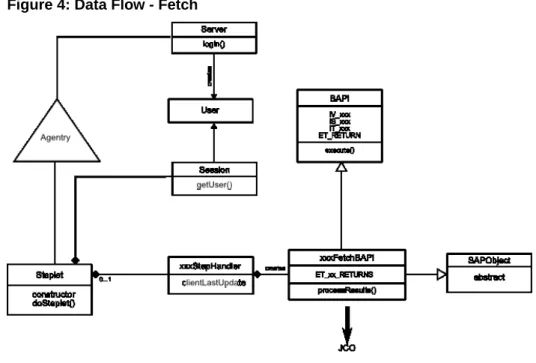
A fetch defines how the SAP Agentry Server synchronizes data for a target object collection. This object collection must be a top-level collection within the module. A fetch is made up of steps that retrieve the data for the collection from the back end system. These steps are grouped into three categories within the Fetch definition: Client Exchange Steps, Server Exchange Steps, and Removal Steps. A fetch may also include properties to store data captured from the user and validation rules for those property values.
The following diagram and steps depict what happens when the Agentry Client must load or reload a fetch.
Figure 4: Data Flow - Fetch
1. A Server exchange steplet defined in a fetch calls the steplet doSteplet() method to fetch objects for the user.
2. The doSteplet() method calls the appropriate method in the appropriate
xxxStepHandler class.
3. The xxxStepHandler method instantiates the necessary appropriate
xxxFetchBAPI object, passing the User object and clientLastUpdate
parameter to it.
4. The xxxFetchBAPI constructor retrieves the JCo function object from the repository, using the connection on User.
5. xxxFetchBAPI class sets BAPI import parameters IV_xxx and/or IS_xxx.
6. xxxFetchBAPI constructor adds IT_xxx records to BAPI import tables for search criteria or other input parameters.
7. xxxStepHandler method calls processResults() method from
xxxFetchBAPI.
8. xxxFetchBAPIprocessResults() calls execute() method on BAPI and checks for exceptions.
9. xxxFetchBAPI processResults() reads appropriate ET_xx_RETURNS table for error messages.
10.xxxFetchBAPI processResults() iterates over ET_xx_RETURNS table and reads records from the table.
11. For each record, xxxFetchBAPI processResults() calls appropriate constructor in the appropriate SAPObject subtype.
12. The SAPObject subtype constructor maps JCo record column names to field names.
13.xxxFetchBAPI processResults() collects these SAPObjects in an array and passes it back to xxxStepHandler.
14.xxxStephandler passes SAPObjects array back to steplet doSteplet().
15. Steplet doSteplet() stores SAPObjects array in _returnData.
16. Agentry application within the SAP Mobile Server parses _returnData and sends object collection up to Client.
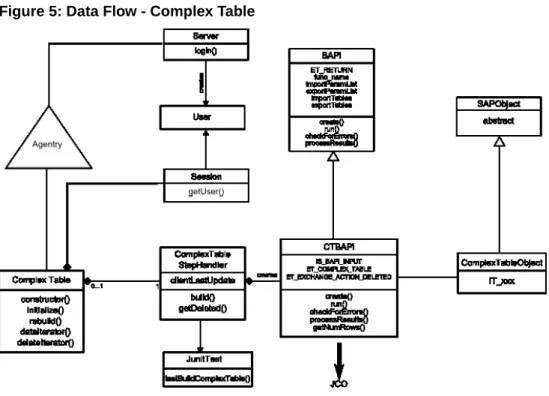
Data Flow - Complex Table
The complex table definition defines a table of records containing multiple fields stored on the SAP Client in a structured and searchable format. A complex table can contain large amounts of data with records numbering in the thousands. Included in the complex table are the fields for its records and indexes on fields to provide search functionality and structure to the overall data in the table. The complex table definition also defines how its data is synchronized. The following diagram and steps depict what happens when the Agentry Client must load or reload a complex table.
1. The complex table's initialize() method is called.
2. The initialize() method calls a ComplexTableStepHandler build()
static method passing the User object.
3. The ComplexTableStepHandler build() method constructs the necessary
CTBAPI class, passing the User object and clientLastUpdate parameter to it.
4. The CTBAPI constructor retrieves the JCo function object from the repository, using the connection on User.
5. CTBAPI sets BAPI import parameter IS_BAPI_INPUT.
6. CTBAPI adds IT_xxx record(s) to ComplexTableObject import tables for search criteria or other input parameters.
7. ComplexTableStepHandler build() method calls getNumRows() method in
CTBAPI.
8. CTBAPI getNumRows() method calls the execute() function and checks for exceptions.
9. CTBAPI getNumRows() method reads ET_RETURN table in the BAPI class for error messages.
10.CTBAPI getNumRows() method iterates over ET_COMPLEX_TABLE and reads records from the table.
11. For each record, CTBAPI getNumRows() method calls the appropriate constructor in the appropriate SAPObject subtype.
12. The SAPObject subtype constructor maps the JCo record column names to field names.
13.CTBAPI getNumRows() method collects the SAPObjects in
ComplexTableIterator and passes them back to
ComplexTableStepHandler.
14.ET_EXCHANGE_ACTION_DELETED is read and follows the same steps as 10 - 13. These SAPObjects populate another ComplexTableIterator.
15.ComplexTableHandler passes the iterators back to ComplexTable dataIterator() and deleteIterator().
16.ComplexTable initialize() stores the iterators in
ComplextTableIterator and returns them to Agentry in dataIterator() and
deleteIterator.
17. Agentry application defined in the SAP Mobile Server parses these iterators and sends
table rows up to Client.
Data Flow - Standard Data Table
The complex table selection property type is used to store a selection made by the user from a complex table. The value stored in a complex table selection property is the key field of the selected record within the complex table. The data type of this value will be a string, integral number, or decimal number, based on the data type of the key field.
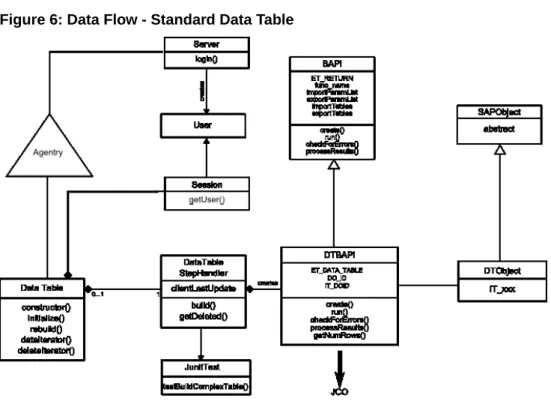
The following diagram and steps depict what happens when the Agentry Client must load or reload a data table.
Figure 6: Data Flow - Standard Data Table
1. The data table’s initialize() method is called.
2. The initialize() method calls a DataTableStepHandler build() static method passing the User object.
3. The DataTableStepHandler build() method constructs the necessary DTBAPI
class, passing the User object, clientLastUpdate parameter, and table name to it.
4. The DTBAPI constructor retrieves the JCo function object for /SYCLO/CORE_DT_GET
from the repository, using the connection on User.
5. DTBAPI sets the table name in the table IT_DOID, in the field DO_ID in the BAPI import parameters.
6. DTBAPI adds IT_xxx record(s) to DTObject import tables for search criteria or other input parameters.
7. DataTableStepHandler build() method calls getNumRows() method in
DTBAPI.
8. DTBAPI getNumRows() calls the execute() function and checks for exceptions.
9. DTBAPI getNumRows() reads ET_RETURN table in the BAPI class for error messages.
10.CTBAPI getNumRows() method iterates over ET_DATA_TABLE and reads records from the table.
11. For each record, DTBAPI getRows() method calls the appropriate constructor in the appropriate SAPObject subtype.
12. The SAPObject subtype constructor maps the JCo record column names to field names.
13.DTBAPI getNumRows() method collects the SAPObjects in DataTable and passes them back to DataTableStepHandler.
14. DataTableStepHandler build() method passes the DataTableObject back to the initialize()
method and is then stored in the appropriate field.
15. Agentry application within the SAP Mobile Server parses these iterators and sends the
table rows to the client.
Data Flow - Transaction
The transaction definition defines data to be captured on the SAP Client. As a part of its definition, the transaction includes a target object type, data values to be captured, client-side data validation, and updating its data to the back end system by the SAP Agentry Server during synchronization. Transactions can add new object instances, edit an existing object, delete an object, or modify a complex table or data table record. Each of these behaviors is exhibited by a different transaction type, selected during the creation of the transaction.
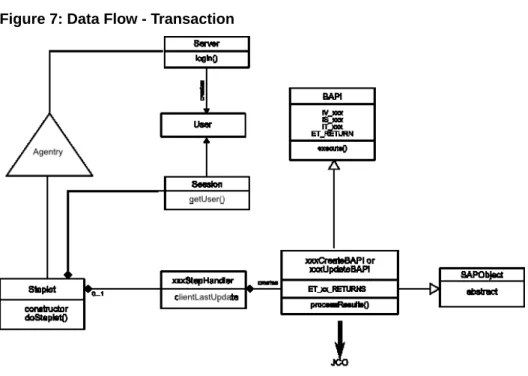
The following diagram and steps depict what happens when the Agentry client must load or reload a transaction.
Figure 7: Data Flow - Transaction
1. A Server exchange steplet defined in a Transaction calls Steplet doSteplet() method to
begin the transaction.
2. Steplet's doSteplet() calls appropriate method in the xxxStepHandler class to create,
update, or delete objects in SAP.
3. xxxStephandler method constructs the necessary SAPObject subtype by passing the User
to the SAPObject's constructor.
4. xxxStepHandler method instantiates the necessary xxxCreateBAPI or xxxUpdateBAPI
object, passing the SAPObject to constructor.
5. The xxxCreateBAPI or xxxUpdateBAPI constructor maps the SAPObject's fields to the
necessary JCO record columns.
6. xxxCreateBAPI or xxxUpdateBAPI constructor retrieves JCO function object from the
repository, using the connection on User.
7. xxxCreateBAPI or xxxUpdateBAPI constructor sets BAPI import parameters IV_xxx
and/or IS_xxx.
8. xxxCreateBAPI or xxxUpdateBAPI constructor adds IT_xxx records to BAPI import
tables.
9. xxxStepHandler method calls add(), update() or delete() method of xxxCreateBAPI or
xxxUpdateBAPI.
10. xxxCreateBAPI or xxxUpdateBAPI calls the execute() method on BAPI and checks for
11. xxxCreateBAPI or xxxUpdateBAPI reads ET_RETURN table for error messages. 12. If successful, control passes back to xxxStepHandler, Steplet, and Agentry.
Accessing the Agentry SAP Framework Configuration Panel
1. Log into SAP.
2. Type the command SPRO into the command box and click the green check mark or click
Enter.
The Customizing: Execute Project screen displays.
3. Click the SAP Reference IMG button.
4. Expand the Agentry SAP Framework Configuration line by clicking on the arrow to the
left of the line.
Agentry SAP Framework submenus display. Expand any one of the submenus to display specific configuration functions and click the clock icon to open the Agentry SAP Framework ConfigPanel.
Note: Clicking the paper icon displays a screen with a brief description of the specific
configuration function.
The SAP NetWeaver Web Application Server log on screen opens in a browser window.
Note: Depending on your configuration, the log on screen may be different than what is
shown.
5. Expand any one of the submenus to display specific configuration functions and click the
clock icon to open the Agentry SAP Framework Configuration panel.
6. Fill in any necessary fields for your specific implementation and click Log On.
The Agentry SAP Framework Configuration portal opens in the browser window. The window that opens corresponds to the submenu line item chosen in SAP.
7. Click the ConfigPanel Home link at the top of the screen to navigate to the main
The Agentry SAP Framework Configuration Panel home page displays.
Standard Operations in the Configuration Panel
While each mobile application configuration is unique, there are certain standard buttons and options available to perform the configurations.
Filtering by Mobile Application
If more than one mobile application is available on the same system, you can use the filter function to only view items for a specific application. The filter option is found on the main portal home page, as well as any other page where multiple application items could be displayed.
To filter by application, click the arrow to the right of the Mobile Application Filter field and select the appropriate mobile application. To remove the selection and view all items for all mobile applications on the system, click in the field again and select the asterisk (*) symbol.
Creating, Copying, Deleting, and Changing Items
There are four standard actions available to configure different components and items within your mobile application setup.
• Create: Creates a new item. All modifiable fields are empty.
• Copy: Copies the item that was highlighted and creates a new item. All modifiable fields
are filled in with the information from the existing item and are available for changes prior to saving.
• Delete: Deletes the highlighted item.
Saving or Cancelling Changes to an Item
Once the Create, Copy, or Change button is clicked, the Save and Cancel buttons appear. After making any changes to the configuration, click Save to save the changes or Cancel to discard the changes.
Note: If the Save and Cancel buttons are active, the ConfigPanel Home main menu link is not
available. You must either save your changes or cancel out of the changes in order to return to the main Configuration portal page.
Message List
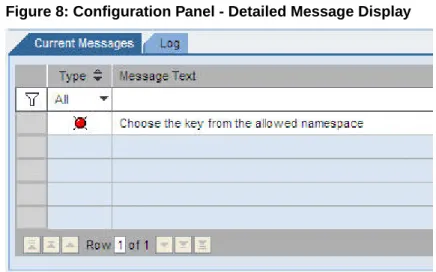
Certain actions can generate system messages. These messages can be error messages or informational messages. If you perform an action that prompts a system message, a message bar appears above the main panel with a brief description of the message.
Click the Show List button to display the detailed view of the message list.
Figure 8: Configuration Panel - Detailed Message Display
Agentry SAP Framework Configuration Panel Overview
All configuration activities for Agentry SAP Framework are performed using the Configuration screen.
Configuration changes made through the Configuration portal have significant impact to the behavior of the framework component and mobile applications. Changes should be made in the development environment and fully tested before they are migrated to the rest of the SAP system landscape.
The following user authorizations are required in order to work with the configuration portal: • Authorization object - S_ICF
• Authorization field - ICF_FIELD - SERVICE • Authorization field - ICF_VALUE - SYCLOADM • Authorization object - S_TCODE
• Authorization field - TCD - /SYCLO/CONFIGPANEL
If you create additional security roles through the Security Settings panel in the ConfigPanel, you must incorporate them into the system as well.
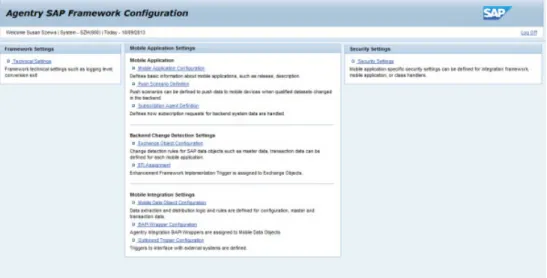
Figure 9: Agentry SAP Framework Configuration Panel Main Screen
Configuration Panel - Technical Settings
Framework technical settings affect all components of the framework, including mobile data objects, BAPI wrappers, and exchange objects.
Figure 10: Agentry SAP Framework Configuration Panel Technical Settings Screen
Configuration Panel - Mobile Application Settings
Mobile application settings are used to define and configure how the mobile application, such as SAP, functions. There are three areas used to configure the mobile application:
• Mobile Application Configuration - Defines basic information about mobile
applications, such as release and descriptions
• Push Scenario Definition - Defines Push Scenarios to push data to mobile devices when
qualified data sets change in the back end
• Subscription Agent Definition - Defines how subscription requests for back end system
data are handled
See the applicable sections in this manual for further information.
Configuration Panel - Back End Change Detection Settings
Back end change detection settings are used to define and configure how the mobile application, such as SAP, communicates with SAP and the object tables contained within SAP. There are two areas used to configure the back end change detection:
• Exchange Object Configuration - Change detection rules for SAP data objects, such as
master data and transaction data, defined for each mobile application
• EFI Assignment - Enhancement Framework Implementation trigger assigned to
Exchange Objects
Note: You must create tables and objects in SAP and Agentry before you can create or
configure information in the Configuration Panel.
See the applicable sections in this manual for further information.
Configuration Panel - Mobile Integration Settings
Mobile integration settings are used to link BAPI wrappers with mobile data objects and encapsulate the business logic related to the mobile application.
There are three areas used to configure mobile integration:
• Mobile Data Object Configuration - Data extraction and distribution logic and rules
defined for configuration of master data and transaction data
• BAPI Wrapper Configuration - Agentry Integration BAPI Wrappers assigned to Mobile
Data Objects
• Outbound Trigger Configuration - Triggers to interface with external systems
See these sections in the manual for further information.
Configuration Panel - Security Settings
Use the Security Settings page in the Configuration Panel to set mobile application security parameters at the following levels:
• System- Security at this level is application-independent and applies to all components
built on the SAP integration framework
• Product - Security at this level is at the SAP application level
• Class Handler - Security at this level is specific to a data object class handler
All security checks are carried out by the SAP integration framework at runtime.
Technical Settings
Use the Technical Settings Detail screen in the Agentry SAP Framework Configuration Panel to change the settings for the application logs viewable in SAP. Here, you can change framework technical settings such as the logging level and conversion exit.
Application Logging Level
Defines the logging level for all framework components. Logging entries are recorded in the SAP application log database under the object /syclo/. The logging levels are:
• No logging • Abort • Error • Warning • Info • Debug • Trace
Enqueue Wait Time (Sec)
If an SAP object is locked and inaccessible during an update by a mobile device, this parameter controls the number of seconds the underlying component should continue to attempt to access the locked object in intervals of 1 second. If accessing the locked object is still unsuccessful after the wait time, the update process is aborted.
Internal Conversion Exit Active
When checked, the framework runtime data manager performs standard SAP external-to-internal format conversion exit for all inbound BAPI parameters. This option is enabled by default. This setting should only be changed by the application developer, as it will have direct impact to the result of the mobile application.