SUBJECT
SERIES 60 (LEVEL 68)
MULTICS
TRANSACTION
PROCESSING
REFERENCE MANUAL
Description of the Multics Transaction Processing Subsystem for Performing Data Base Related Operations
SPECIAL INSTRUCTIONS
This manual is a preliminary edition which describes a basic transaction proc-essing capability for use on a Multics system.
SOFT\V ARE SUPPORTED
Multics Software Release 7.0
ORDER NUMBER
CC96-01 June 1979
PREFACE
Transaction processing in the Multics system can be performed by the subsystem described in this manual. By employing the transaction processing (TP) subsystem, the individual user can process transactions against an extensive database by invoking a set of commands defined by the site. This manual describes the Multics TP subsystem, describes the administrative commands and their usage, and furnishes the practical details of subsystem operation.
Although most TP users will not need to avail themselves of the many other facilities of the Multics system, additional information regarding Multics software concepts and organization as well as specific usage of Multics commands and subroutines can be obtained from the volumes of the Multics Programmers' Manual (MPM). These volumes are:
MPM Reference Guide, Order No. AG91
MPM Commands and Active Functions, Order No. AG92 MPM Subroutines, Order No. AG93
MPM Subsystem Writers' Guide, Order No. AK92 MPM Peripheral Input/Output, Order No. AX49 MPM Communications Input/Output, Order No. CC92
Section 1
Section 2
Section 3
CONTENTS
Introduction . . . • . . . Multics Transaction Processing . List of Features . . .
Overview of Structure.
Security . . . . User Interaction . .
Running and Operation .
Setting Up a TP Subsystem. . The TP Administrator • •
User ids for a TP Subsystem •
TP Process Names . • . . . Set-Up Procedure . . . . A Complete TP Subsystem . • • Operating a TP Subsystem . . . .
Starting Transaction Processing. Managing Transaction Processing . Shutting Down Transaction Processing. Input Queue Maintenance . . . . . Dial and Terminal Use . . . . . . . . Use of the Dial Facility.
Use of Slave Channels . . . . Running TP in Test Environments. Establishing Test Processes . Test Mode . . . .
TP Commands and Subroutines Master Process Commands . .
tp cancel . . . . tp-change deadline • . .
tp-display current xcns, tpdcx . . . . tp-get xcn-status,-tpgxs . . . .
tp-list pending requests, tplpr . . . . . tp -start..
-tp-stop . . . • . . . . • • . tp-who . . • . . . • • . . .
Worker Process Commands and Subroutines . . . tp rollback transaction • .
tp-verify transaction . . . . tp-worker-init tcf . .
-tp-worker-start . 1/0 Process Commands .
signon, s . . . . tp io cancel . . . tp-io-enter test mOde tp-io-exit test mode • . tp-io-get xcn status . .
tp-io-list pending requests . . tp-io-signoff . . : . . • . tp-io-start . . • . • . .
tp-io-who . . • . . . • • . . . • . Commands-Used Outside the TP Subsystem .
tp cvsct • . • . • . • . . . • . . tp-display command table, tpdct . .
tp-display-input queue, tpdiq . tp=display=master_table, tpdmt . •
Section 4
Section 5
Section 6
Figure 1-1 Figure 1-2
CONTENTS (cont)
tp display output queue, tpdoq . . tp-meters : . . .
tp-pre create.ec. tp-reset xcn num. . tp-shrink q : . . . tp:user .-. . . . .
vfile Transaction Interfaces .
-Transactions . . . . Appearance . . • . .
Purpose. . . . Transaction Numbers. Reference Lists . . Files . . . .
Database . . . .
Transaction Control File . Opening Constraints . . . Asynchronous Changes . transaction call, trc . . . . transaction-call . . . .
transactTon call $assign . . transaction-call-$commit . . transaction-call-$number . . . transaction-call-$rollback . . transaction-call-$status . .
transaction-call-$transa~t.
Error Handling and Recovery . . . . Crash Recovery . . . .
Transaction Error Handling .
Guidelines for Writing TPRs . . . . Description of Operating Environment
Calling Conventions. Immediate Commands . Input/Output . . • . Terminal Input . . Terminal Output . .
File Input/Output . . . . Peripheral Input/Output . . . • Using MRDS. .
TPR Languages. . PL/I. . . . COBOL .
FORTRAN
Commitment and Rollback Features
ILLUSTRATIONS
Structure of the Multics TP Monitor . How a Transaction is Processed . . .
[image:4.615.195.513.67.562.2]SECTION
INTRODUCTION
MULTICS TRANSACTION PROCESSING
The Multics transaction processing (TP) subsystem provides a specialized environment for applications requIrIng much activity with a few centralized databases. Within the subsystem only a limited, well-defined set of simple commands are available. Most of these are application programs that interact with a database. The TP user is isolated from the general Multics interactive environment. In this manual, a user is a person who enters transactions from a terminal. He is not expected to know about computers. People who write the application programs are Multics users but not necessarily TP users. Many aspects of the subsystem are table-driven or specified in modifiable modules, so that features can easily be added, changed or deleted. Several independent TP subsystems may run concurrently on a single Multics system.
This manual describes how the Multics TP subsystem is organized, how to run it, how to meter it, and how to write application programs for it. However, both administrators and application programmers may still need to consult various volumes of the MPM, as well as other appropriate manuals for further information concerning the Multics system and its use. Specific TP user requests are site-dependent and therefore are not included.
LIST OF
Features available in the Multics TP subsystem include the following:
• locking of individual database records to allow concurrent database access
•
commitment and rollback concurrency control and interruptionfacilities which allow restoration after an
handling of both error or other
• availability of most Multics languages for application programs • modular construction to facilitate tailoring of the system
•
separation of i~put!output tuningp~ocessing and
• a deadline mechanism for scheduling transactions
•
easily established parallelprograms environments for testing application
OVERVIEW OF STRUCTURE
For the purpose of discussion within this manual, a transaction is defined as the processing of a single user command, from receipt of the input message by the TP subsystem to execution completion. A transaction processing routine (TPR) is an application program. It usually is one that references a large database.
A transaction is a series of modifications to a database that appear to occur atomically and simultaneously to other processes. To ensure that all database changes will appear at the same time, the changes made by a TPR are not visible to other processes until the transaction is finished. When a transaction is finished, the TP subsystem automatically performs an operation called a commitment. A commitment means that this transaction is finished, and all changes to the database since the last commitment should be made visible to other processes. This scheme ensures database consistency. Occasionally a commitment by one process changes data that a transaction in another process depends upon. This is called an asynchronous change. The second process may then have an inconsistent view of the database. A commitment by the second process under these circumstances will fail. When this happens, the TP subsystem rolls back the transaction. This means that all changes made to the database since the last commitment are erased. The transaction usually will be retried.
The Multics TP subsystem is organized to make efficient use of resources by taking advantage of the special characteristics of TP. Typically, many users are all performing similar operations on a fixed set of databases, using a closed environment of their own
environment.
rather than the standard Multics command
Allocating a process per user would entail much duplicated address space overhead and would be difficult to schedule efficiently. Therefore, the TP subsystem's processes are organized differently. They are divided according to function into the following three types:
• Master process--coordinates and communicates with the other processes • I/O process--manages input from and output to terminals
• Worker process--executes the application programs
A TP subsystem consists of one master process, one or more I/O processes, and one or more worker processes.
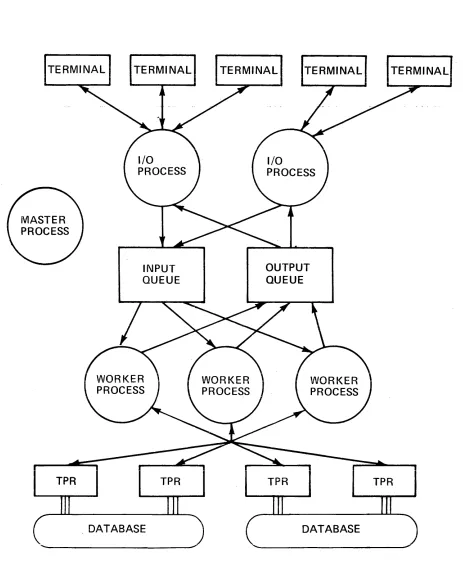
The I/O and worker processes communicate with each other via the input and output queues as well as through a shared table. The input queue contains commands to be processed, and the output queue contains output from TPRs. Figure 1-1 shows a simplified diagram of the relationships of the various processes. These processes are described in more detail below.
TERMINAL TERMINAL TERMINAL TERMINAL
TPR
INPUT
QUEUE
TPR
OUTPUT
QUEUE
TPR
. DATABASE DATABASE
Figure 1-1. Structure of the Multics TP Monitor
1-3
TPR
[image:7.612.75.538.56.625.2]The master process is used by the TP administrator to begin transaction processing. First the master table is initialized. Then the master process logs in all of the other processes. No explicit action is taken if the TP subsystem is being restarted after an abnormal interruption. In that case, any database modifications that were incomplete are automatically rolled back as they are encountered in normal processing. The master process is responsible for coordinating TP shutdown. This includes ensuring that all transactions in progress are completed.
An I/O process handles input/output for a group of terminals. The lines handled may be dedicated or attached to the I/O process by the dial facility. This process also queues and schedules input messages. Transactions are scheduled by deadlines. A deadline is a date-time associated with the transaction. Of two transactions in the input queue at the same time, the one with the earlier deadline will be started first. No attempt is made to execute a transaction by the time indicated as its deadline. Some commands that require little processing and do not involve database references may be executed by the I/O process. These are called immediate commands.
A worker process executes one transaction at a time. Output messages to be printed on the user's terminal are placed into the output queue. Databases are accessed through the standard file I/O module, vfile , in a mode that allows changes to reversed if a transaction is interrupted-because of an error or system crash. Also, if a transaction fails because of a concurrent update to the database by another process, the changes are rolled back and the transaction is re-executed. All databases to be referenced are attached and opened at the beginning of the process to reduce overhead for individual transactions.
SECURITY
I/O and worker processes may have different User ids so that Multics access control may be used to restrict database access to worker processes. Individual users, however, are not logged into Multics while using the TP subsystem; in fact, they need not be registered Multics users at all. They only need to be registered as TP users by the TP administrator. Signing on to the TP subsystem is handled by the I/O processes and involves only the TP subsystem's person-name table. Since the set of commands users can invoke is restricted (e.g., editors or compilers are generally excluded), individual TP users are unable to perform malicious acts.
USER INTERACTION
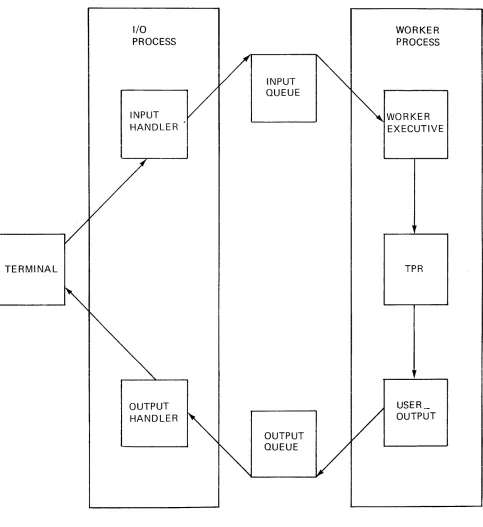
The TP user types input request lines, which cause TPRs to be run. The TPR's output is printed on the terminal. The input line is read by an I/O process and the TPR is executed in a worker process. Figure 1-2 shows conceptually how a transaction is processed. The transaction input is read from the terminal and placed into the input queue. Some worker process then finds the transaction in the input queue and invokes the appropriate TPR. Any output written by the TPR onto the user output I/O switch is placed into the output queue. An I/O process then prints output from the output queue on the user's terminal.
TERMINAL
I/O PROCESS
INPUT HANDLER
OUTPUT HANDLER
INPUT QUEUE
OUTPUT QUEUE
Figure 1-2. How a Transaction is Processed
1-5
WORKER PROCESS
WORKER EXECUTIVE
TPR
,
USER_ OUTPUT
[image:9.612.68.551.60.587.2]A user may wait for the complete output from a transaction to be printed before typing the next transaction. However, the TP subsystem does not enforce serial execution. If the user enters transactions without waiting for previous ones to complete, the following things may happen. The output from an immediate command usually appears before output from any other pending transaction. This is because immediate commands are executed as soon as they are read rather than queued for a worker process. The output from a regular transaction might not be contiguous and might appear before the output from a transaction entered earlier. Aside from deadline considerations, this may occur because the TP subsystem can execute more than one transaction from a single user simultaneously. Although execution of transactions is in deadline order, a later transaction may finish before an earlier transaction. In addition, the output messages are queued as soon as they are generated, not when the TPR finishes.
Since output messages from one transaction may be interspersed with output messages from other transactions, each output message is labeled with the transaction number. The transaction number is printed when a transaction is queued.
SECTION 2
RUNNING AND OPERATION
A Multics TP subsystem is defined by a directory and the control segments contained in it. Following is a list and brief description of the control segments.
Control Segment
tp.tcf
tp.tpinq
tp.tpoutq
Description
contains most of the dynamic information used by the TP processes. This includes information about each terminal, each process, and interprocess communication information.
lists the valid command names for the TP subsystem and their associated attributes. See the description of the tp_cvsct command.
contains commands to open and initialize MRDS databases. This segment is needed only if MRDS is used.
contains the names of registered TP users and their encrypted passwords. See the description of the tp_user command.
starts transaction processing I/O and worker processes enter_abs_request commands.
and starts up the via Multics
is the worker process absentee control segment which initializes the non-MRDS databases to be used by the worker and then turns the process into a worker.
is the I/O process absentee control segment which turns the process into an I/O process, passing it slave channel names and/or a dial id.
is the transaction control file and contains information indicating whether database operations have been committed. See Section 4.
is the input queue and contains, for each queued transaction, its input command line, meters, information about its output destination, and its current state.
is the output queue and contains the transaction output messages to be displayed on terminals.
SETTING UP A TP SUBSYSTEM
The following discussion presents the considerations required to set up a TP subsystem, and lists the necessary procedural steps. To illustrate each step, an example of a typical transaction processing situation, called the Sample TP project, is also included. In this discussion, reference is made to access- control lists (ACLs) and setting of access to segments. See "Access Control" in the MPM Reference Guide for a discussion of the various kinds of access.
The TP Administrator
TP administrator is the term used in this manual for the person who performs the following tasks:
• creating subsystem directories and tables
• starting, stopping, and monitoring transaction processing • making sure databases are consistent after crashes
User ids for a TP Subsystem
All 1/0 processes should use one given User ide processes should use some other User ide
Likewise~ all worker
The master, 1/0, and worker processes should all have User ids different from each other for security reasons. The Sample_TP project has-the following User ids:
Process
Master Process 1/0 Processes Worker Processes TP administrator
TP Process Names
User id
Master.Sample TP IO.Sample TP -Worker.Sample TP PCJones.Sample_TP
Each 1/0 and worker process is given a unique name to identify it within the TP subsystem. This name is independent of the User id of an 110 process or a worker process. The process name is also the first component of the absentee control segment for an 1/0 or worker process. In the Sample TP project, there will be three 1/0 processes named 10 1, 10 2 and 10_3. There will be two worker processes named Worker 1 and Worker
2.
Set-Up Procedure
Following is a list of the steps necessary to establish a TP subsystem: 1. Register the User ids for the TP administrator, master, 1/0 and worker
processes. The -1/0 and worker processes' User ids should have max foreground set to the maximum number of concurrent 110 and worker processes, respectively. If the dial facility is used, the 1/0 process User id should be given the dialok attribute. (See the Multics AdmInistrators' Manual Project Administrator, Order No. AK51, for InformatIon about regIsterIng User Ids.) For the Sample IP p-r-oject., the following User ids -- are registered: PCJones.Sample TP, Master.Sample_TP, IO.Sample_TP and Worker.Sample_IP.
2. Arrange to have the master process be given execute (e) access to the
proxy ACS. This enables it to log in absentee processes for the other processes. For the Sample TP project, the system administrator issues the following command:
-sa >system_control l>proxy>absentee proxy.acs e Master.Sample_TP
3.
Create the TP subsystem's directory. This is the directory in which all the control segments reside. The master process and TP administrator should have sma access to this directory. The 1/0 and worker processes should not have modify access, but should have status and append access to it. In the Sample TP project, the TP administrator issues the following commands:-create dir >udd>Sample TP>tp dir change-wdir >udd>Sample TP>tp dir
set acT [wd] sma Master:Sample TP sa IO.Sample_TP sa Worker.Sample_TP
-The following commands assume the working >udd>Sample_TP>tp_dir.
directory is
4. Create a subdirectory for ~ne commands.
rnlS
must be named5.
"commands". The 1/0 and worker processes should have s access to it. The master process should have sma access. In the Sample_TP project, the TP administrator issues:
create dir commands
set acT commands sma Master.Sample_TP s IO.Sample_TP s-Worker.Sample_TP
Create the master table with appropriate access. have rw access to it. The TP monitor will Sample_TP project:
create tp master table
All processes should enlarge it. For the
set acl tp master table rw Master.Sample_TP rw IO.Sample_TP rw Worker.Sample_TP
-5. Create the transaction cOhtrol file (TeF) with appropriate access. All processes should have rw access to it. The tp pre create exec com makes sure the transaction control file is a multisegment file. -The rCF should never be deleted.
ec >unb>tp pre create tp.tcf
set acl tp:tcf-rw Master.Sample TP rw IO.Sample_TP rw
Worker.Sample_TP
7. Create the input queue with appropriate access. All processes should have rw access to it. For the Sample_TP project:
ec )unb)tp pre create tp.tpinq
set acl tp~tpinq rw Master.Sample TP rw IO.Sample_TP rw
Worker.Sample_TP
-8. Create the output queue with appropriate access. All processes should have rw access to it. For the Sample_TP project:
ec )unb)tp pre create tp.tpoutq
set acl tp:tpoutq rw Master.Sample TP rw IO.Sample TP rw
-Worker.Sample_TP
-9. Create the 1/0 process absentee control segment, io start up.absin, in the TP directory. Each 1/0 process should have r-access to it. For each 1/0 process name, 10 process name, io start up.absin should have the additional name 10 process name.absin. The absentee segment requires one argument, the pathname of the TP directory. The 1/0 process absentee control segment should be similar to the following one for the Sample_TP project:
change wdir &1 &
-& To protect this process against being logged out due to & inactivity, uncomment the next three lines.
& memo -pathname &ec name -on & memo -delete -match nothing
& memo -time "20 minutes" -repeat "20 minutes" -alarm -call nothing
&
&goto &ec name & -&label 10 1
tp io start &ec name [wd] channel1 channe12 channe13
&quit-&
&label 10 2
tp io start &ec name [wd] -registered_dial Sample_TP_system
&quit-&
&label 10 3
tp io start &ec_name [wd] channe14 channe15 -dial TP_system
&quit-10. Create tp init database.ec. This segment is needed only if the Multics Relational Data Store (MRDS) is used. Each worker process must have r access to this segment. This exec com contains commands to prepare a MRDS database for use. It is invoked when the run unit in which TPRs execute is started. The following is the format of a typical tp_init_database.ec.
& Prepare MRDS databases mrds call open dsm paths
mrds-call set tcf switch [mrds get dbi (dsm paths)] tcf mrds-call ready fIle [mrds get-dbi-dsm pathT]
file name1 rdy mode1- ..• file namei rdy modei mrds call set collection-delay time [mrds get dbi-dsm path1]
file name1 delay_time~ - -
-mrds call set collection delay time [-mrds_get_dbi dsm_path~] file namei delay_time!
mrds call ready file [mrds get dbi dsm pathn]
file name1 rdy_mode~-... file_namel rdy_model
mrds call set collection delay time [mrds_get_dbi dsm_path~] file name1 delay_timel
mrds call set collection delay time [mrds_get_dbi dsm_path~] file_namel delay_timel
&quit
To ensure repeatability if an asynchronous change occurs! only the monitor retrieve or update ready modes should be used. The collection delay tIme should be longer than the real time any transaction that uses the file will require. The following is tp_init_database.ec for the Sample_TP project~
& Prepare MRDS databases
mrds call open <databases>people db <databases>inventory
mrds~call set tcf switch [mrds get dbi «databases>people db
- <databases>inventory)] tCf
-mrds call ready file [-mrds get dbi (databases>people db]
people monitor retrieve
-mrds call set collection-delay time [-mrds get dbi <databases> people db people 90]-
-mrds call ready Tile [-mrds get dbi <databases>inventory] inventory update-
-mrds call set collection delay time [-mrds_get_dbi <databases> inventory inventory JOO]
&quit
11. Create the worker process absentee control segment, worker start up.absin, in the TP directory. Each worker process should- have- r access to it. For each worker process name, worker_process_name, worker start up.absin should have the additional name worker process name.absin. The absentee control segment requires one argumenI, the pathname of the TP directory. All segments in the commands directory are explicitly initiated to reduce overhead. All files accessed through language 1/0 facilities or through iox directly should also be attached and opened with io call to eliminate this overhead from TPRs. The worker process absentee control segment should be similar to the one for the Sample_T? project:
change wdir &1
initiale commands>([segments commands>**] [links commands>**]) -all -force
tp worker init tcf [wd]
& -
-& Attach and open 1/0 switches
io call attachparts vfile <databases>parts -stationary -transaction tcf- -share
10 call open parts keyed sequential update
io-call control parts set_wait_time--collection_delay_time 300
&
& To protect this process against being logged out due to & Inactivity, uncomment the next three lines.
& memo -pathname &ec name -on & memo -delete -match nothing
& memo -time "20 minutes" -repeat "20 mi~utes" =alarm =call nothing
&
tp worker start &ec name [wd] &quit
For a file that is attached above to be protected by the commitment mechanism, the vfile attach description must include "-stationary -transaction tcf -share". The collection delay time should be longer than the real time any transaction that uses the file will require.
12. Create the TP subsystem's start up exec com, tp_start_up.ec. The master process should have r access to it. The exec com requires one argument, the pathname of the TP directory. The tp start up.ec segment should be similar to the one for the Sample_TP project:
-&command line off &if [nequal &n 1] &then &goto start
&print Usage: ec tp start up tp_dir
&quit
-&
&label start change wdir &1
answer-yes -brief do """rename &(1) [strip_entry &(1)].old.absout""" ([segments *.absout])
tp start [wd] &
-ear 10 1 -foreground -proxy IO.Sample TP -arguments [wd] ear 10-2 -foreground -proxy IO.Sample-TP -arguments [wd] ear 10=3 -foreground -proxy IO.Sample=TP -arguments [wd]
&
ear Worker 1 -foreground -proxy Worker.Sample TP -arguments [wd] ear Worker-2 -foreground -proxy Worker.Sample=TP -arguments [wd] &quit
3. Create tp command table. See the description of the tp cvsct command. Toe master, worker and 1/0 processes should have r access to it. This segment lists all commands, including 1/0 process immediate commands, that TP users may type.
4. Write the transaction processing routines (TPRs). See Section 6. Put all TPRs, or links to them, in the "commands" directory contained in the TP directory. 1/0 processes must have re access to commands that they can execute. Worker processes must have re access to commands that they execute.
5. Create tp person name table. The master process should have rw access to It, the-worker and-I/O processes should have r access to it. For the Sample_TP project:
create tp person name table
set acl tp person name table rw Master.Sample TP r-IO.Sample_TP r Worker.Sample_TP.
5. Prepare and distribute TP user documentation.
7.
Use the tp user command to enter TP users and their passwords into tp_person_name_table_.3. Create all databases needed by the worker processes. All keyed sequential vfiles must be multisegment files before transaction processing is started. The tp pre create exec com creates an empty multisegment keyed sequential vfile. Worker -processes must have access to the databases they will use. See the MRDS Reference Manual, Order No. AW53, for information about initializing MRDS databases.
A Complete TP Subsystem
After setting up the TP subsystem for the Sample_TP project, a listing of the TP directory is as follows:
Segments
=
7, Lengths=
9.r w
r w r w r w
r w
r w 3
2 1 1
tp person name table tp-command table tpstart up.ec -worker start-up.absin Worker-1.absIn
Worker-2.absin tp init database.ec io-start up.absin 10-1 . absTn
IO-2.absin IO-3.absin r w
a
tp-master tableMultisegment-files
=
3, Lengths=
21. r w 7 tp.tpoutqr w 7 tp.tpinq r w 7 tp.tcf Directories
=
1.sma commands
OPERATING A TP SUBSYSTEM
This section describes how to run a TP subsystem once it has been set up. It also describes how to attach terminals to the TP subsystem.
Starting Transaction Processing
To start transaction processing, log in the master process and issue the following command in the master process:
ec tp_start_up tp_dir
where tp dir is the pathname of the TP directory. For the Sample_TP project the command would be:
In tp start up.ec, the tp start command turns the process into a master process. The 170 and-worker procesies are then logged in.
Managing Transaction Processing
If another 1/0 process or worker process is required after transaction processing has started, an enter abs_request command similar to the ones in tp start up.ec can be issued in the master process. The 1/0 or worker process name of the ne~ process must not be the same as an existing process's name.
If the master process should be destroyed while transaction processing is running, invoke the tp start command with the -new master control argument to establish another process as the master process.- Periodically a program automatically runs in the master process and makes sure all the 1/0 and worker processes still exist. If one has been destroyed, a message is printed and an enter abs request command is automatically issued to restart it. If an 1/0 process is destroyed and restarted, all TP users that were connected to it must sign on again. Check the 1/0 and worker process's absentee output segments for error messages.
Shutting Down Transaction Processing
Transaction processing is shut down by issuing the tp stop command in the master process; the rest is done automatically in two stages. In the first stage, the 1/0 processes stop accepting input and the worker processes either finish all pending transactions or, if the -immediate control argument was specified, just finish their current transactions. The worker processes then log out. In the second stage, the 1/0 processes finish processing all accumulated output and log out. Thus, when a shutdown is complete all the output from completed transactions has been processed. If the -immediate control argument was specified, there may be some transactions left in the input queue to be processed when transaction processing is resumed. A message is printed by the master process when the shutdown has completed.
Input Queue Maintenance
The input queue may be placed databases used by the TP subsystem. contain a link to the input queue.
on a different In this case,
logical the TP
volume than the directory should As transactions are entered into the TP subsystem, they are placed into the input queue where worker processes obtain transactions to execute. When a transaction is finished, its entry is not deleted from the input queue. Instead, the entry is changed to indicate that the transaction has completed. The input queue therefore keeps getting larger. Several things can be done to keep the input queue from growing indefinitely:
• The tp shrink q command may be used to delete records from the input queue.- This may be done while the TP subsystem is running. Records may be copied to any device. Records of successful transactions may be separated from those of unsuccessful ones.
• The input queue may be renamed. This should only be done when the TP subsystem is not running and there are no pending transactions. Using this method, a different multisegment file may be used each day as the input queue. The tp meters command may be used to obtain statistics from a previous input- queue. The old input queues may be deleted or copied to a backup device as needed. A new input queue must be created before resuming transaction processing.
• The input queue may be deleted. This should only be done when the TP subsystem is not running and there are no pending transactions. This method naturally leaves no record of processed transactions. A new input queue must be created before resuming transaction processing.
Dial and Terminal Use
In Multics TP, each 1/0 process possible for a particular terminal time. An 1/0 process handles all including user signons. Terminals through the dial facility or through controls the terminals and therefore
manages a group of terminals. It is not to be used by more than one process at a the input and output for its terminals are connected to an 1/0 process either specified slave channels. !ne l/U process controls the users' access to Multics and to the TP subsystem. A TP user need not be a registered Multics user.
Use of the Dial Facility
The Multics dial facility allows several terminals to be attached to the same process. A terminal is connected to an existing process by the dial access request. (See MPM Commands, Section 4 for a description of the dial access request.) In order for an 1/0 process to accept dials, the tp io start command must be given the -dial or -registered dial control argument. See the description of tp_io_start in Section
3
of this manual.The dial facility should be used when there are login service type channels that use the TP subsystem, i.e., when some channels need to be able to access the TP subsystem at some times and to log in to Multics at other times.
Use of Slave Channels
An 1/0 process may manage channels that are specified when the command tp io start is invoked. These channels must be of the slave service type. See the Multics Administrators' Manual -- Communications Order No. CC75, for a description of the channel definition table (CDT), the slave service type, and for instructions on using the slave service type.
RUNNING TP IN TEST ENVIRONMENTS
Parallel TP subsystems subsystem requires creating a as for a real TP subsystem. subsystem, the TP subsystem's link in the test TP directory.
Establishing Test Processes
may be used for testing. Setting up a test directory and the necessary control segments, just If databases are used in common with another TP transaction control file must also be used via a
Once a test environment has been created, test processes must be set up. A~y process with access to the test T? directory a~d control segments ca~ be used. One way is to use special test Person ids within the TP project. Once tp start has been invoked in the test TP subsystem's master process, the 1/0 and worker processes can be logged in. A process becomes an 1/0 or worker process by invoking the tp io start or tp worker start commands, respectively. The test processes can be -interactive or- foreground absentee processes. However, an interactive worker process will require a terminal that it ignores.
One process may, with restrictions, serve more than one function within the TP subsystem. If one process is serving as both the master process and an 1/0 process, and the terminal is connected to the TP subsystem, then the command table must contain any desired master process commands as immediate commands.
Combining the master process and a worker process is not recommended because a worker process ignores all input from the terminal. An interactive process may serve as an 1/0 process and a worker process. In this case, the tp io start command must precede the tp worker start command, and the terminal may not be connected to the TP subsystem~
-Test Mode
Any user may use a TP subsystem in test mode. Transactions are processed and produce output in test mode but databases are not changed. To enter this mode, use the tp io enter test mode immediate command. To return to normal TP processing, use tne tp_io_exit_test_mode immediate command.
See Section 3 of this manual for descriptions of the transaction processing commands mentioned in the preceding paragraphs.
SECTION
3
TP COMMANDS AND SUBROUTINES
The commands and subroutines available to the user and TP administrator for transaction processing are described in this section. They are presented in a format consistent with that described in the Multics Programmers' Manual (MPM).
The TP commands and subroutines may be classified according to the context in which they may be invoked. The contexts in which a TP command or subroutine may be invoked are:
• in the master process • in the worker process • in the 1/0 process
• outside the TP subsystem or in the master process
The commands and subroutines are described in four subsections, according to the context in which they are invoked. Within each subsection, the commands and subroutines are presented alphabetically. The following is an alphabetical list of all the commands and subroutines described in this section together with designation of the context in which they may be invoked.
Command or Subroutine tp cancel
tp-change deadline tpcvsct
-tp-display command table tp-display-current-xcns tp-display-input queue tp-display-master table tp-display-output-queue tp-get xcn-status-tp-io cancel
tp-io-enter test mode tp-io-exit test mode tp-io-get xcn status
tp-io-list pending requests tp-io-sign~ff
-tp-io-start tp-io-who
tp-list pending requests tp-meters
-tp-pre create.ec tp-reset xcn num
tp-rollback transaction
tp-shrink q-
tpstart -tp-stop tp-user
tp=verify_transaction
Context
master process master process outside TP outside TP master process outside TP outside TP outside TP master process 1/0 process 1/0 process 1/0 process 1/0 process 1/0 process 1/0 precess 1/0 process 1/0 process master process outside TP outside TP outside TP worker process outside TP master process master process outside TP worker process
tp who
tp-worker init tcf tp=worker=start
master process worker process worker process
MASTER PROCESS COMMANDS
This subsection contains descriptions of commands that may only be invoked in the master process. The master process commands are presented in alphabetical order within this subsection and include the following:
tp cancel
tp=change_deadline tp display current xcns tpget xcnstatus
-tp-list pending requests
tp-start
-tp-stop tp=who
Name: tp_cancel
The tp cancel command removes one or more transactions from the input queue to prevent -them from being processed. The transaction must not have started executing.
tp_cancel transaction nums
where transaction nums are the numbers of the transactions to be canceled.
The tp change deadline command changes the deadline of the specified transaction.- The transaction must not have started executing.
tp_change_deadline transaction num DT
where:
1. transaction num
2. DT
is the transaction number of the transaction whose deadline is to be changed.
is the new deadline time of the transaction. It is a string acceptable to the convert date to_binary_ subroutine described in the MPM Subroutines.
The tp display current xcns command prints information about the transactions currently executIng. The worker process name, transaction number, TP command name and TP user id are printed.
The tp get xcn status command prints information about one or more
transactions~ IT the transaction has not yet been processed, the TP user id of
the TP user who submitted it, the TP command name, its deadline, its positIon in the queue and the time it was sU,bmi t ted will be pr inted. I f the transact ion is currently being processed, the above information and the time it was started are printed. If the transaction has finished, except possibly for output, all the above information, the time it finished, whether there were any errors, real and cpu time used, page faults, and total real time, not including output processing are printed.
tp_get xcn status transaction nums {-control_arg}
where:
1. transaction nums
are the transaction numbers of the desired transactions. 2. control arg
may be -brief or -bf to cause only the state of the transaction to be printed.
The tp list pending_requests command lists the transactions that have not been completed.
where control args may be chosen from the following list: -total, -tt
prints only the total number of pending transactions for the TP subsystem and for each TP user.
-long, -lg
prints the transaction number, deadline, time submitted, position in the queue, and the user's TP user id of each pending transaction. The default is to print the transaction number and the position in the queue.
-before DT, -be DT
prints information about transactions with deadlines before the specified time. DT is a string acceptable to the convert_date_to_binary_ subroutine described in the MPM Subroutines. -after DT, -af
Dr
prints information about transactions with deadlines after the specified time. DT is a string acceptable to the convert_date_to_binary_ subroutine described in the MPM Subroutines. -user STR
prints information only about transactions for the TP user whose TP user id is specified by STR.
Name: tp_start
The tp start command starts transaction processing by initializing the TP master table. The process it is used in becomes the master process.
tp_start path {-control arg}
where: 1 . path
is the pathname of the directory that contains the control segments for the TP subsystem.
2. control arg
may be the following: -new master
-to make the current process the master process of a runn\~ng TP subsystem. This should be used if the original master proc~ss is destroyed while the TP subsystem is running.
Notes
The subsystem databases, transaction be consistent, both internally and with command is used.
control file and input queue must all respect to each other, before this
This command does not be issued before other commands.
start up the other TP processes. This command must processes issue the tp_worker_start or tp_io_start
The tp stop processes are told to log out either they have run out has been printed.
command shuts down transaction processing. First the 1/0 to stop accepting input. Then the worker processes are told when they have finished their current transactions, or when of work. Finally, the 1/0 processes log out after all output
When the 1/0 processes stop accepting input, a message is printed on all terminals that the TP subsystem is shutting down. All further input is ignored. The tp stop command does not wait for the worker or 1/0 processes to finish, but returns to command level. After the last 1/0 process has logged out, a message is printed on the master process's terminal indicating that TP shutdown is complete.
tp_stop {-control arg}
where control arg may be -immediate or -im to specify that the worker processes should log out after finishing their current transactions. The default is for the worker processes to log out when the input queue is empty.
The tp_who command prints the names of the current users of a TP subsystem.
where:
1 . TP user ids
are the TP user ids of TP users. 2. control args
may be chosen from the following list: -long, -lg
prints the channel name and information about a user's terminal as well as the TP user id and I/O process name. The default is just to print the TP_user_id and I/O process name.
-io process STR
- prints information only about users connected to I/O process STR. STR is the I/O process name as used within the TP subsystem.
WORKER PROCESS COMMANDS AND SUBROUTINES
This subsection contains descriptions of commands and subroutines that may be invoked in a worker process. The commands are used in the worker process absentee control segment and the subroutines may be used by TPRs. The worker process commands and subroutines are presented in alphabetical order within this subsection and include the following:
tp rollback transaction tp-verify transaction tp-worker-init tcf tp=worker=start
The tp rollback transaction subroutine is called by a TPR to abort a transaction and roll back all changes made during the transaction. It should be called if acommitment-woul-d fail. This can be det-ermined- by calling either transaction call$status with the verify refs switch on or tp verify transaction. The TPR is automatically reinvoked if the TPR's retry limit has not been -exceeded. This subroutine returns only if there is no transaction in progress. See the appropriate TPR language section in Section 6 for information about closing files and other tasks that may have to be done before this subroutine is called.
declare tp_rollback_transaction_ entry (); call tp_rollback_transaction_;
The tp_verify_transaction subroutine may be called by a TPR to check if a commitment would succeed. A- commitment may fail because of an asynchronous change made by another transaction. If an asynchronous change is detected, the TPR should call tp rollback transaction. Calling this subroutine has the same effect as calling transaction call $status with the verify refs switch on. It is not necessary for TPRs to -call-this subroutine. It may be called between phases of a TPR to see if further processing would be worthwhile. A zero status code from tp_verify_transaction_ does not guarantee that a commitment would succeed.
declare tp_verify_transaction_ entry (fixed bin(35»; call tp_verify_transaction_ (code);
where:
1 • code (Output)
is a standard status code. It may be: error table $asynch change
If an asynchronous change was detected
Name: tp_worker init tcf
The tp worker init tcf command attaches and opens the TP subsystem's transaction -control file (TCF) on the tcf 1/0 switch. This command must be invoked in a wQrker process before tp worker start and before any databases are opened because the TCF 1/0 switch, tcf, must be specified in the attach description of any file that is to be protected by the commitment mechanism.
where path is the pathname of the directory containing the control segments for the TP subsystem.
tp_worker start
Name: tp_worker start
The tp worker start command turns a then starts- processing transactions. tp_worker_init_tcf.
process into a TP This command must
tp_worker start worker process name path where:
1. worker process name
tp_worker start
worker process and be invoked after
is the name of the worker process as used within the TP subsystem. 2. path
is the pathname of the directory containing the control segments for the TP subsystem.
1/0 PROCESS COMMANDS
This subsection contains descriptions of commands that may be invoked in an 1/0 process. All of these commands except tp io start are TP user commands and must be entered in the command table as immedIate commands. Links to them must be placed in the commands directory. They should be invoked with the tp call strings af call convention. The names used by TP users may be chosen by-the TP adminIstrator.
The 1/0 process commands are presented in alphabetical order within this subsection and include the following:
tp io cancel
tp-io-enter test mode tp-io-exit test mode tp-io-get xcn status
tp-io-list pending requests tp-io-signoff
-tp-io-start tp=io=who
Access to the TP Subsystem
This section describes how a TP user starts a transaction processing session. The user must first connect a terminal to the 1/0 process. This is done by using a terminal connected to a slave channel, or by using the dial access request. The signon TP access request is then used to start a transaction processing session.
Name: signon, s
The signon TP access request is It is a request to the 1/0 process transaction processing procedures.
used to gain access to start the user
to the TP subsystem. identification and
The signon request asks for a password from the user, and attempts to ensure that the password does not appear at all on the user's terminal or that it is thoroughly hidden in a string of cover-up characters. The password is a string of one to eight letters and lor digits associated with a TP user ide
After the user responds with a password, the 1/0 process looks up the
TP user id and the password in the TP person-name table and verifies that the given password matches the password registered for the user.
If the TP user is permitted to sign on, a transaction processing session is started, and the user may enter transactions.
signon TP user id
where TP user id is the TP user's registered personal identifier.
Name: tp_io cancel
The tp io cancel command removes one or more transactions from the input queue to prevent them from being processed. The transaction must not have started executing . . Only the user's own transactions
may
be canceled.tp_io cancel transaction nums
where transaction nums are the transaction numbers of the transactions to be canceled.
The tp io enter test mode command causes the TP subsystem to execute and then automatically roll oack all transactions entered by the user until the tp io exit test mode command is given. This does not affect the output generated by the transaction.
tp_io enter test mode
Name: tp_io exit test mode
The tp io exit test mode command subsequent transactions are processed rolled back).
tp_io exit test mode
removes a user from normally (committed
3-21
test mode. instead of
All being
The tp io get xcn status command returns information about one or more transactions- submitted- by the user. If a transaction has not yet been processed, the TP command name, its deadline, its position in the queue, and the time it was submitted will be printed. If a transaction is currently being processed, the above information and the time it was started are printed. If a transaction has finished, except possibly for output, all the above information, the time it finished, whether there were any errors, real and cpu time used, page faults, and total real time, not including output processing, are printed.
where:
1. transaction nums
are the transaction numbers of the desired transactions. 2. control arg
may be -brief or -bf to print only the state of the transaction.
The tp io L1SL penalng requests command lists the transactions submitted by the user that nave not been-completed.
where control_args may be chosen from the following list: -total, tt
prints only the total number of pending transactions for the TP subsystem and for the user.
-long, -lg
prints the transaction number, deadline, and time submitted and the position in the queue of each pending transaction. The default is to print the transaction number and the position in the queue.
-before DT, -be DT
prints information about transactions with deadlines before the specified time. The DT argument is a string acceptable to the convert_date_to_binary_ subroutine described in the MPM Subroutines. -after DT, -af DT
prints information about transactions with deadlines after the specified time. The DT argument IS a string acceptable to the convert_date_to_binary_ subroutine described in the MPM Subroutines.
The tp_io_signoff command terminates a TP user's transaction processing session.
tp_io signoff {-control arg}
where control arg may be -hold or -hd to retain communication with the TP subsystem. Another TP user may then immediately sign on. The default is to end communication with the TP subsystem.
The tp io start command turns a process into a TP 1/0 process. It attaches any specified channels and sets itself up as a dial server.
tp_io start io_process_name path {channels} {-control_args}
where:
1. io process name
- is the name of the 1/0 process as used within the TP subsystem. 2. path
is the pathname of the directory containing the control segments for the TP subsystem.
3. channels
are the names of slave channels. The channel names must be of the slave service type in the system channel definition table.
4. control args
Notes
may be chosen from the following list: -dial dial id
establishes a dial line for dial ide This allows terminals to be connected to the liD process via the dial access request.
-registered dial dial id
similar to -dial-but allows users to omit specifying the User id of the 1/0 process when invoking the dial access request.
-switch terminal to tp
swItches the handling of terminal 1/0 from Multics command level to the TP subsystem. This may be used for debugging. In an absentee process, the tp input 1/0 switch is opened for stream input. Lines read from this 1/0 switch are interpreted by the TP subsystem. The tp input 1/0 switch must already be attached. This allows prepared scripts of a TP session to be run.
The -dial and -registered dial control arguments are incompatible. Only one -dial or -registered_dial control argument may be given.
If a slave channel or -registered dial is being used, the 1/0 process must
have access to the appropriate ACS. See the
Multics Administrator's Manual -- System Administrator, Order No. AK50, for more information about access control segments.
The tp io who 1/0 process command has the same function as the tp who master process command. See the description of the tp_who command in the master process command subsection.
COMMANDS USED OUTSIDE THE TP SUBSYSTEM
This subsection contains descriptions of commands that are used outside the TP subsystem or in the master process. The TP administrator is the typical user of the commands in this subsection. The commands are presented in alphabetical order within this subsection and include the following:
tp cvsct
tp-dis~lay command table
tp-display-input queue tp-display-master table tp-display-output-queue tp-meters -
-tp-pre create.ec tp-reset xcn num tpshrink q tp=user
Name: tp_cvsct
The tp cvsct command is the TP source command table compiler. It converts a source language command table to the binary form usable by the TP subsystem.
where: 1. path
Notes
is the pathname of the source command table. table must have the tpsct suffix. This suffix given.
The source command is assumed if not
The binary command table is created in the working directory. Its entryname is that of the source segment with the tpbct suffix. It can be installed as tp_command_table_ in the TP directory only when the TP subsystem is not running.
Description of the Command Table Source Language
The source language for the command table consists of a list of statements. There may be a global section specifying default values that differ from the system-provided defaults, and then a section for each command.
The syntax of a statement is: <keyword>: <parameter>;
Comments are started with "1*" and ended with "*1".
GLOBAL SECTION
The global section consists of statements whose values are to be applied to all commands as default values. It appears at the beginning of the command table source segment and is terminated by the first name statement.
The statements in the global section may be any of the statements described in the command section with the exception of the name and entry point name statements. The values specified in the global section may be overridden by statements in the command section.
The global section may specify a default call convention for only queued commands or immediate commands. If an immediate statement is present in the global section, this specifies to which type of command a g~oDal sec~lon ca~~ convention statement applies. If an immediate statement is not present in the global section, a global section call convention statement applies to queued commands.
COMMAND SECTION
There must be a section in the source command table for each command available to the TP users. Each command section begins with a name statement and must also contain an entry_point_name statement. The other statements are optional.
The statements are as follows:
name: name1, name2, ••• namen;
The -parameter namei
IS
a name by which a TP user can invoke the command.entry point name: STR;
- STR Is the entry point name of the command. It may be of the form entryname or entryname$entry point name. All commands or links to them must be in a directory ~amed -"commands" in the TP subsystem's directory.
call convention: STR;
- STR is the entry point name of a subroutine that is used to invoke the command. It converts the input line into arguments for the TPR.
It may be of the form reference name or
reference name$entry point name. The search rules are used to find reference-name. The-default is the tp call strings subroutine for queued commands and the tp call strings-af subrouti~e for immediate commands. See the "Standa~d Call Conve~ti~ns" section below.
cpu_time limit: N;
The parameter is a decimal integer specifying the maximum amount of cpu time, in seconds, that the command is to use on a single transaction. If the time limit expires, the transaction is aborted. The default is zero (no time limit).
deadline interval: N;
The parameter is a decimal integer specifying the offset in seconds from the time a transaction was queued to its deadline. Of two transactions in the queue at the same time, the one with the earlier deadline will be started first. No attempt is made to execute a transaction by the time indicated as its deadline. The deadline is only used to order the execution of transactions. The default is 60. It may be negative.
immediate: STR;
If STR is "yes", the command is executed in the 1/0 process. If STR is "no", the command is queued as a transaction. This is the default.
real time. limit: N;
- The parameter is a decimal integer specifying the maximum amount of
real time, in seconds, that the command is to use on a single invocation. If the time limit expires, the transaction is aborted. The default is zero (no time limit).
retry_limit: N;
The parameter is a decimal integer specifying the maximum number of times a transaction is to be re-executed if commitment fails. After N+1 tries, the transaction is aborted. The default is 3.
Standard Call Conventions
The following call convention subsystem software:
subroutines are supplied with the TP
processes the input line and invokes the command like the Multics command processor. Each argument, as separated by white space, is passed as a character string. No active function, quoting or iteration set processing is done.
similar to tp call strings except called as an active function:
the command is
Modifying the Source Command Table Compiler
This section describes the steps necessary to add new items to the command table.
1. Add the new items to tp_command_table.incl.p11.
2. Change the source command table compiler. See the description of reduction compiler in Multics System Programming Tools, Order No.
AZ03.-3. Recompile all TP subsystem programs that use
tp command table.incl.p11, making appropriate changes to use the new items.
The tp display command table command prInts tne internal representation of a TP binary-command-table in put data format. The user should be familiar with the internal representation of a TP binary command table.
tp_display_command_table {path}
where path is the pathname of a binary command table. tp_command_table_ in the working directory.
3-31
The default is
The tp display input queue command prints the internal representation of a TP input queue in-put data format. The user should be familiar with the internal structure of a TP input queue.
tp_display_input_queue {path}
where path is the pathname of a TP input queue. The tpinq suffix is assumed if not given. The default is tp.tpinq in the working directory.
The tp display master table command prints the contents of a IP master table in put data -format: The user should be familiar with the internal representation of a TP master table.
where path is the pathname of a TP tp_master_table_ in the working directory.
3-33
master table. The default is
Name: tp_display_output queue, tpdoq
The tp display output queue command prints the internal representation of a TP output queue in put aata format. The user should be familiar with the internal structure of a TP output queue.
tp_display_output_queue {path}
where path is the pathname of a TP output queue. The tpoutq suffix is assumed if not given. The default is tp.tpoutq in the working directory.