Mobile OS Security
Manasvi Kalra (MTech Cse), Indrajeet
Genesis Futuristic Technologies Ltd. Noida, India
Abstract— the usage of smart phone is growing very fast. For that case security of data on mobiles is of keen importance. There are certain cases where OS needs to be customized in order to fulfill certain requirements. The “SecureOS” is a tool which has been compressed for the security reason. It acts as an optional formulation so that certain issue like data sharing through internet has been demolished. Additionally, there is a SecureMessaging app for encryption and decryption of messages which are sent and received within the closed group of OS users’ .This app has been developed and installed in this customized OS. This feature has been provided in SecureMsg app been installed in SecureOS. In SecureOS the internet facility, camera, GPS, GPRS and Bluetooth etc. has been removed permanently. This could not be installed from USB or any external device.
Keywords— Mobile Application, Security, breaches, utility, SEA, AES, encryption, decryption, SecureOS, SecureMsg, Smart Phone
I. INTRODUCTION
The biggest concern in any technology providing internet is security. The hackers are the emerging power to enter into the process and steal information. This stealing is performed in order to earn money, getting famous, embarrassing people, breaking out of restrictive application licensing and functionality or breaking out of restrictive platforms[11].
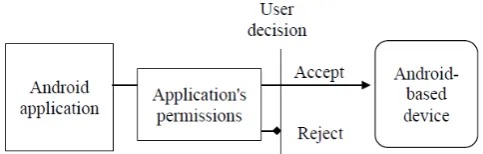
A mobile app is a basic computer programming technique mainly designed to run on mobile devices which includes smart phones, tablets etc. which consist of well defined OS that allows the working of mobile app to it[1]. Mobile apps require Integrated Development Environment for its development. They are first tested within the development environments i.e. emulators and later moves forward to field testing. Its front end includes UI (User Interface) consisting of context, screens, input, mobility etc. on the other hand, backend include database connectivity for its management support, security, authentication, authorization, working offline and services provider. In figure 1[6] the installation process of android device is shown. In this case, if any user doesn’t accept the permissions required by the applications the installation process will end otherwise the application will be installed on the device[9].
Fig. 1. Android applications installation process
II. SECURITY AND NEED
On the vast pace, Security is the degree of resistance to, or protect from harm. It applies to any vulnerable and valuable asset such as a person, community, nation or organization. Mobile apps delivered from google play store, apple app store or any third party marketplaces are in a complete doubt of being hacked. Building a secure application without any mobile malware vulnerabilities or bugs in the designing and coding of mobile apps is essential[12]l. Rooted device and rogue application is also a risk factor. The data security from theft and leakage is a major concern. The transaction processes and insecure payment gateway can result in data loss therefore encryption of personal data is preferred.
1. Security Report
According to Trustwave Global Security Report 2015 [8], Across 15 countries 574 data compromises were investigated. Where, 43% of cases were in retail industry, 42% of cases were of ecommerce breaches, 40% of Point of Sale (POS) breaches and concluding all of these there was the biggest devastation after learning that 81% of the victims did not detect the breach themselves. There are various such reports which are based on hundreds of real-life data breach investigations and proprietary threat intelligence. As per their knowledge, the less you know about your enemies, the slower you can respond to them and the more effective they will be against you.
IJISET - International Journal of Innovative Science, Engineering & Technology, Vol. 2 Issue 12, December 2015. www.ijiset.com
ISSN 2348 – 7968
• 68 % of healthcare security breaches were due to loss or theft of mobile devices
• 48% loss was on laptop, desktop computers or any such kind.
• Henceforth, only 23% of the cases were due to
hacking not connected directly to the loss or theft of a mobile device.
After looking into this number, HCO i.e. Health Care Organization[10] and their business partners decided to protect PHI i.e. Personal Health Information. They ensured that PHI is always encrypted and IT administrators should remotely remove data on loss or stolen of device.
III. DESCRIPTION OF APPLICATION
In our utility, the SecureOS has been taken into consideration. This OS is basically rooted and molded for the defense usage. We have taken the baseband of 4.0.4 which is icecream sandwich for rooting. Rooting[13] provides the ability to alter or replace system applications and settings. It also performs other operations that are inaccessible to a normal android user. As per the requirement of military personnel they have asked to block certain functionalities including GPS, camera, WIFI, Bluetooth, Mobile Data (3G, 4G, GPRS) etc. Users can save / delete data like Pictures / Videos to the gallery only using PC connectivity, but Gallery would be password protected. User can also install other apps through USB cable. However, the apps which require internet connectivity will not work
.
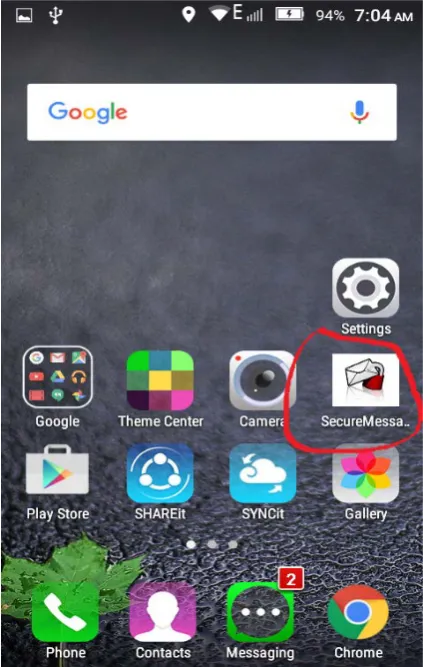
The SecureMessaging app has also been embedded in the OS itself to encrypt and decrypt the useful messages in order to reduce the poor consequences and for the ultimate security.IV. ALGORITHM USED
The algorithm which has been used is Symmetric Encryption Algorithm (SEA)[14] which allows encrypt or decrypt of arbitrary messages by the help of Symmetric Ciphers online. There are various types of SEA such as AES, 3DES, or blowfish etc. The comparison of various popular encryption algorithms can be seen in the table[2] below:-
Table 1: Comparison of Encryption algorithms
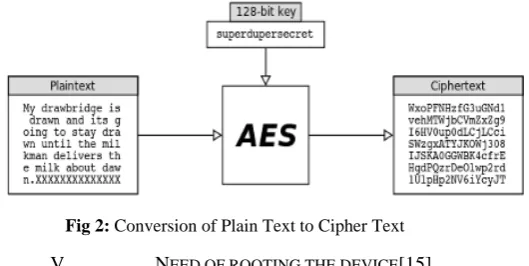
For our SecureMessaging app we have used AES i.e. Advanced Encryption Standard algorithm in Figure 2 which uses 128 bit-blocks[2]. The AES algorithm uses the block ciphers which takes a number of bits and encrypt them as a single unit. In the case of block processing mode, if the blocks were encrypted completely independently the encrypted message might be vulnerable to some trivial attacks. Obviously, if there were two identical blocks encrypted without any additional context and using the same function and key, the corresponding encrypted blocks would also be identical. This is why block ciphers are usually used in various0T0T33Tmodes of operation33T. This cipher uses number of
encryption rounds which converts plain text to cipher text.
Fig 2: Conversion of Plain Text to Cipher Text
V. NEED OF ROOTING THE DEVICE[15]
Need of Rooting an android device can be felt when you find that the available apps are not up to the mark as required. The main reasons that may lead to rooting[15] includes:-
1. The rooting process can help in getting more reliable apps which were blocked somewhere in permissions and also the apps which are accessed now can go way down better[16].
2. The new OS updates which are provided months
before the carrier releases the updates, often along with the few bonus features. Once you are rooted you just have to find the OS version that you want and it’s generally extremely easy to install the latest and greatest.
Fig 4: Titanium backup of icecream sandwich OS
5. Rooting allows the installation of customized kernels which boosts the power backup as seen in figure 4[15]. For example you can set your processors to overdrive when you are playing any over intensive game.
Fig 5: Power backup boost up
VI. APPLICATION SNAPSHOTS
Some of the snapshots of the application are shown below. It should be noted that due to obvious reasons we are not sharing the entire layout of the application[4]. However, few of the important snapshots are given below.
The snapshots showing blocking of certain options in SecureOS:-
IJISET - International Journal of Innovative Science, Engineering & Technology, Vol. 2 Issue 12, December 2015. www.ijiset.com
ISSN 2348 – 7968
Fig 6: Mobile Data connection button not visible
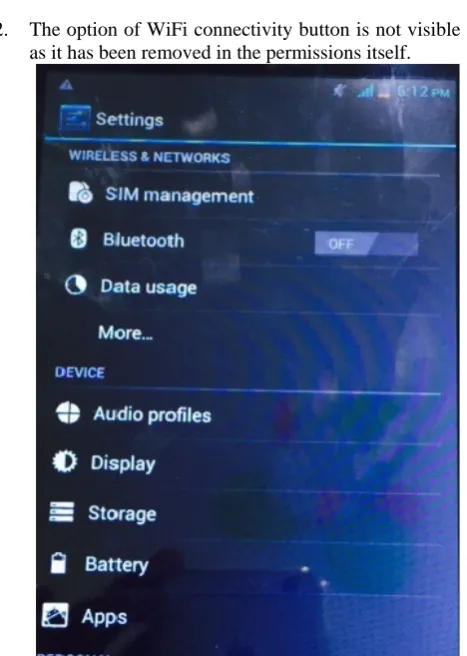
2. The option of WiFi connectivity button is not visible as it has been removed in the permissions itself.
Fig 7: WiFi connection button not visible
3. Internet connectivity loss takes place no matter mobile data connectivity is provided to it
Fig 8: Internet connectivity not available after mobile data connection provided
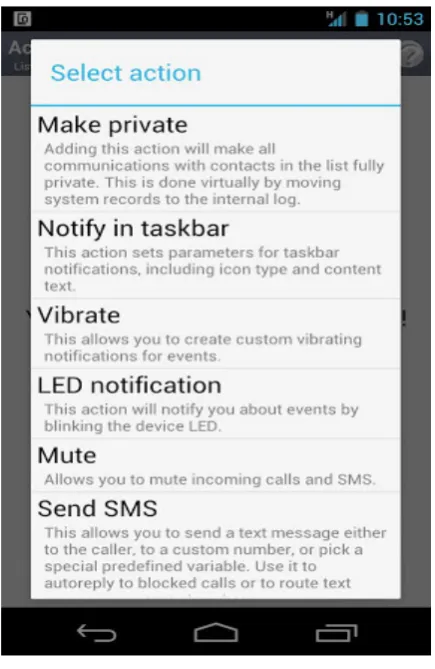
The snapshots of SecureMessaging app which has been embedded in SecureOS
Fig 8: App Present in customized OS
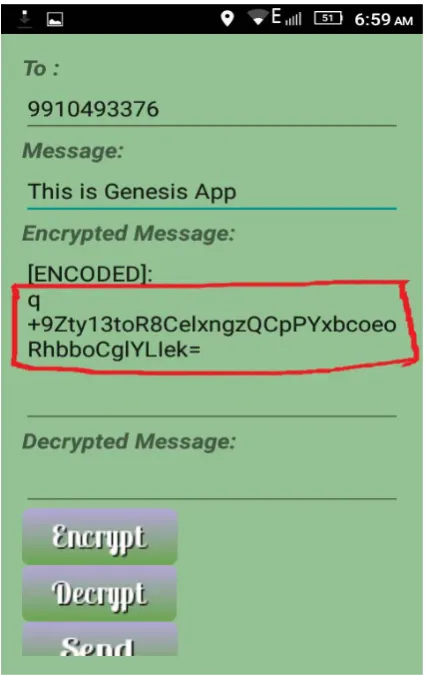
2. Front Page of app showing the text area for sender mobile number, plain text, encrypted text and decrypted text.
Note: This page has been prepared to show all the features in one page. Else these features will be implemented with the encryption and decryption process on two different pages as per the requirement of defense and attain complete security.
Fig 8: Front Page of app
IJISET - International Journal of Innovative Science, Engineering & Technology, Vol. 2 Issue 12, December 2015. www.ijiset.com
ISSN 2348 – 7968
Fig 9: Plain Text shown in encrypted form
VII. GOAL OF THE APP
SecureOS is a remarkable formulation in the history of Android. Blocking certain options for the security purpose can help abolishing spy and hacking. Without internet, cyber punks can no longer enter into the world of your mobiles. Most importantly, the loss and theft of mobiles can also be of no use because encryption and decryption of messages have been accessed in the messaging app. This app have been embedded in each and every person in defense so that they can send their personal message encrypted to other person and the receiver can decrypt it and give a reply in the encrypted form only. This utility is completely supporting the security purpose in mobile phones.
cyber attacks and theft of personal information which goes in hands of irrelevant people who could misuse it very easily. The effectiveness of the utility cab be felt when all the ways of spy has been blocked internally and strong encryption algorithm has been implemented for messages security. In the case of future work, we are working on customizing OS and developing a new OS with innovative features and facilities for branding our company.
Acknowledgment
An indebted gratitude is expressed to Genesis Futuristic Technologies Ltd., Noida who has encouraged to visualize the plan through paper. We would wish to acknowledge the same which has helped us to great extent for the design and development of this utility.
References
[1] Manasvi Kalra, Priyanka Singh, Indrajeet, “Security ads in Mobile apps,” MECIT’15, JNU, Delhi.
[2]G Obaida Mohammad Awad Al-Hazaimeh, “A New Approach for complex encryption and decrypting data” Department of Information Technology, Al-balqa Applied University,AL-Huson University College, Irbid, Jordan. (IJCNC) Vol.5, No.2, March 2013
[3] Prashant Kumar Gajar, Arnab Ghosh and Shashikant Rai, “Bring your own device (BYOD): Security risks and mitigating strategies,” Volume 4, No.4, April 2013 Journal of Global Research in Computer Science.
[4] Denis Feth, Alexander Pretschner, Flexible Data-Driven Security for Android,” 2012 IEEE Sixth Intl. Conf. on Software Security and Reliability, SERE ’12.
[5] Rohan Rayarikar, Sanket Upadhyay, Priyanka Pimpale, “SMS Encryption using AES Algorithm on Android,” International Journal of Computer Applications (0975 – 8887) Volume 50– No.19, July 2012.
[6] Paul POCATILU, “Android Applications Security,” Informatica Economica, vol. 15, no.3/2011.
[7] Avik Chaudhuri, “Language-Based Security on Android,” PLAS ’09 June 15, Dublin, Ireland.
[8]2015 Trustwave Global Security Report. [9]https://source.android.com/security/
[10] http://developer.android.com/training/articles/security-tips.html [11] http://www.informationweek.com/mobile/8-android-security-concerns-that-should-scare-it/d/d-id/1319412
[12] https://securityintelligence.com/how-to-protect-mobile-apps-essentials/
[13] http://www.cnet.com/how-to/how-to-easily-root-an-android-device/
[14]http://aes.online-domain-tools.com/