Realizing Pico: Finally No More Passwords!
Jens Hermans and Roel Peeters
KU Leuven, ESAT/COSIC and iMinds [email protected]
Abstract
In 2011 Stajano proposed Pico, a secure and easy-to-use alternative for pass-words. Among the many proposals in this category, Pico stands out by being creative and convincing. However, the description as published leaves some de-tails unspecified, and to the best of our knowledge the complete system has not yet been tested. This work presents detailed specifications and future-proof se-curity protocols for Pico. Moreover, we present the first robust and efficient Pico implementation. Our implementation allows to further mature the Pico concept and can be used for large scale usability evaluations at negligible cost.
1
Introduction
It is generally acknowledged that passwords are problematic. The situation is even worse when inputting passwords on soft keyboards of the smartphones and tablets that are ever more frequently being used: opposed to tradional keyboards, it takes considerable more time and results in more frequent errors [12]. While passwords are very inexpensive to deploy, they suffer from major security and usability problems. Nevertheless passwords are widely used and are likely to remain so in the near future. This is mainly because password-based authenti-cation is cost-effective, widely supported by appliauthenti-cations and accepted by users as a security mechanism.
Inspired by the Pico concept, we set forward to realize it in practice. Concretely, our contributions are:
– We define a comprehensible user interaction model for the Pico in Section2 taking Human-Computer Interface (HCI) design principles into account. – In Section3we define a concrete communication architecture with detailed
cryptographic protocols to ensure a high level of security. Provisions are made to smoothen future security upgrades.
– We implemented a robust Android application (Section 4), allowing Pico to reach maturity at negligible cost per user and making it possible to do extensive usability testing.
– In Section5we evaluate our Pico instantiation and show its efficiency.
2
User Perspective
We first discuss the overall architecture of the system. Then, we go deeper into the user interactions in general, taking HCI design principles into account. Fi-nally, we discuss the specifics of our Pico demonstrator with respect to usability.
2.1 System Architecture
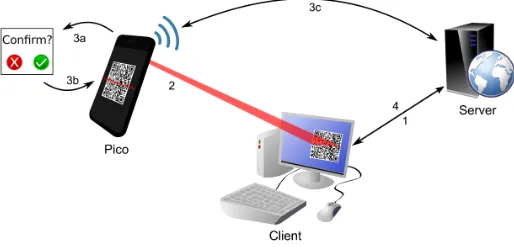
Instead of a user logging in to a website (server) by typing his password into the browser (client) on his computer or smart phone, a Pico will be used to authenticate the user, together with the client, to the server directly. As a result the user will be logged in at the client. Figure 1 gives an overview of how the user will authenticate to a server with the aid of a Pico. The Pico will also be used to create an account with a server or even authorize transactions, using a similar process.
To ensure that our instantiation of Pico will be easy to adopt, one must be able to use it with any available client without having to install add-ons: i.e., no browser extensions, hardware add-ons, drivers . . . This means that the Pico should be able to communicate directly to the server and get all necessary infor-mation from the client (server identifier and a server-generated session identifier for the client). This information can be acquired by the Pico, for instance, by scanning a QR code.
2.2 User Interactions
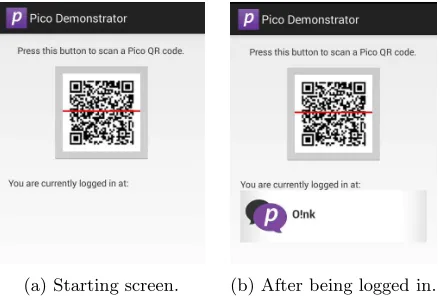
Molich and Nielsen [10] provided ten usability recommendations, among others to be consistent and that preventing errors in the first place is better than good error handling. In order to prevent users from accidentally registering instead of logging in to a server, the Pico will only offer a single button to start the authentication process (see Figure 2a). By clicking this button, the Pico will start its camera to capture a 2D visual code. The provided QR code will encode additional information that allows the Pico to determine the purpose: logging in with an existing account, creating a new account, or authorizing a transaction for an existing account at the server. Different QR codes for every purpose is also consistent with current practices,e.g., the entry web page for a server has distinctly marked locations for logging in and creating a new account.
(a) Starting screen. (b) After being logged in.
Fig. 2: Main screen.
when pointing your Pico to a QR code for all these different purposes without requiring any further user interaction. Yee’s key principles for secure interaction design [15] require users to provide explicit authorization and visibility of all active sessions.
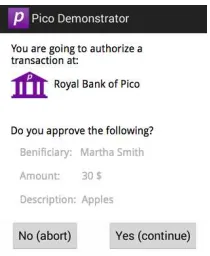
For the user to establish context and give explicit authorization, the user will be presented with a confirmation screen after scanning the QR code, before the Pico authenticates to the server (step 3a in Figure1). Depending on the purpose a different confirmation screens will be shown to the user. Examples are given in Figure3,5 and6.
Visibility of all active sessions means that from the Pico, the user should be able to see to which servers he is currently logged in and have the possibility to log out (see Figure 2b). To keep track of all active sessions, there will be continuous authentication between the Pico and the server, after logging in. To log out, we choose to have the user swipe a label off the screen to avoid logging out by accidental tapping. A helper text is displayed the first time the user logs in using his Pico.
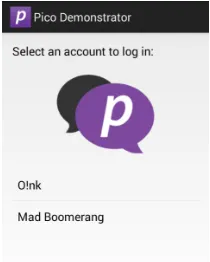
Login After scanning the QR code, the user will be asked to confirm his login, by selecting the desired account (see Figure3). This approach works as well for one as for multiple accounts exist with a given server.
Fig. 3: Selecting an account to log in with.
A visual hash converts a given input to an image, for which small differences in the input lead to very distinctive images (see Figure 4). As such it will be difficult for an attacker to alter the server parameters while tricking the user into believing it generated the same image. As a visual hashing scheme, here we made use of Vash [7].
Fig. 4: Vash images for minimal changes in the input.
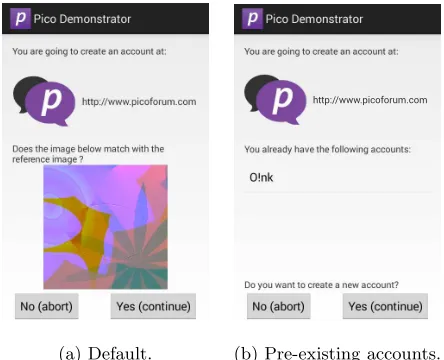
We assume that creating a new account is started from within the client, where the user first enters some basic account information, e.g., a user name. Then the user will be shown a QR code, which also contains the necessary parameters of the server and the selected user name, to be scanned with the Pico. On the Pico, the user will first need to confirm the creation of a new account. This confirmation screen displays the server’s logo and url location, to help the user with establishing context. The server parameters will be verified by the user by comparing the displayed visual hash with the server’s reference image (see Figure 5a). However, if the user already has other accounts at the same server, he can be relieved from this burden. The Pico will check that the received server parameters correspond with the ones of the existing accounts. In this case, the user is presented with a different screen, as depicted in Figure5b.
(a) Default. (b) Pre-existing accounts.
While an account is created in the background, the user will be requested to provide an account name, which can be useful to later identify different accounts at the same server. As default account name, we used the user name that was provided through the client.
Transaction For transactions we foresee two scenarios. The first one is online banking, where transactions need to be approved after the user logged in to the bank’s server. In this case, the transaction information can be send over the same secure channel as the one that is used for continuous authentication. The moment the Pico receives this information, a confirmation screen (see Figure 6 ) is presented to the user. The user can verify the transaction specifics and confirm these on his Pico. As a second scenario, we consider small payments in stores, where the merchant presents to the user a QR code containing the transactions details. Given that the user authorised one banking account as the default payment account from his Pico, he will be presented with the same confirmation screen. In case of multiple payment accounts (e.g., a personal and a business banking account), the user will first need to select with which account he wants to pay.
Fig. 6: Confirming a transaction.
2.3 Demonstrator
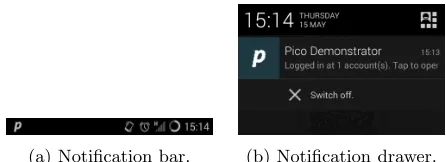
When browsing on the same device as our Pico application is installed on, it is possible to transfer the data in the QR code, directly to the Pico by clicking on the QR code. This will open the Pico application, do the authentication, and go back to the mobile browser. At the same time the Pico application will keep on running in the back, as will be apparent from the Pico icon in the notification bar (see Figure 7a). This icon will be visible as long as the user is logged in at some server, keeping Yee’s [15] principle of visibility of all active sessions in mind. From the notification drawer (see Figure 7b) it is possible to go directly to the Pico application, and even to close the Pico application, logging out of all currently logged in sessions.
(a) Notification bar. (b) Notification drawer.
Fig. 7: Using Android’s notification capabilities.
3
Security Perspective
In this section, we will present a detailed description of the cryptographic pro-tocols and introduce the specification of the messages to be exchanged.
3.1 Server - Client - Pico Linking
We need to establish a link between the client-server session and the Pico-server session. This link will be established indirectly by having the server communicate with the user’s client, the client with the Pico and finally the Pico with the server. The client will set up a connection with the server, and receives a message
To avoid unnecessary user interaction and minimize the potential of user error, we need to differentiate between logging in (existing account) and enrolling (creating a new account) at the time of establishing this link. This will be done by also encoding a type (LOGINorENROLL) in theSCP message:
SCP =serverID, H(sessionID), type .
The Pico uses the server identifier in its account database to uniquely identify the server. The server identifier remains static even when the server updates its key in the future. In the case of enrolling, the server is not yet known to the Pico and requires the essential parameters from the server, such as the server’s public key and its validity period, the actual URL for connecting to the Pico server (not necessarily the same as the URL where the user connects to with its client), the name and logo of the server as it is communicated to the general public . . . . To keep the data that is transferred over the authenticated channel between the client and the Pico small, only the (tiny) URL to retrieve the server parameters and a hash of the server’s public key will be encoded in the SCP
message in case of enrolling:
SCP =serverID, H(sessionID),ENROLL, U RL, H(serverP K).
The server parameters will be requested by the Pico by sending a IN IT
message to the receivedU RL. The server will reply with anIN IT message that contains the server parameters. The Pico checks that the received public key of the server is correct by checking it with the hash value received in theSCP
message. To protect against phishing attacks, the user will be asked to confirm the server parameters by verifying the visual hash of these parameters.
By having the Pico scan a QR code displayed by the client, one constructs an authenticated channel without requiring modifications to the client. If this requirement is abandoned, the above data can also be send through any other communication channel, such as a Bluetooth, NFC or USB link between the Pico and client. However, one still needs to ensure that the communication channel is authentic (especially for wireless connections) to provide proper binding between the client and Pico, necessary to avoid session hijacking.
3.2 Mutual Authentication
After the Pico established to which server (with which account) the user wants to authenticate, the Pico selects the corresponding private/public key pair from its database and authenticates to the server.
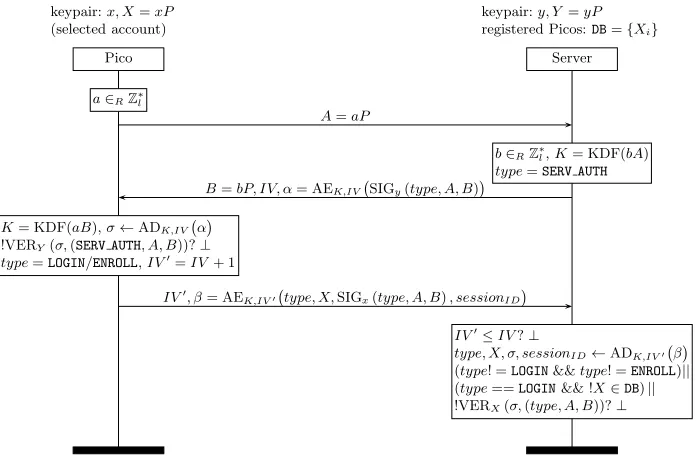
an unauthenticated Diffie-Hellman key agreement (here instantiated with the elliptic curve variant). By having each party sign (SIG and VER) the exchanged Diffie-Hellman values, the origin of the messages is established. As suggested by Krawczyk, we use an authenticated encryption (AE and AD) mode [8] to optimize the protocol.
Because we use the same protocol for different purposes (login, enroll ...), the purpose will explicitly be encoded in the type that is part of the signed message. Since the Pico already knows the identity of the server, this value can be omitted from the protocol. For the identity of the Pico, we use the selected public key (or a newly generated public key if enrolling). Before accepting the Pico, the server will also verify that the provided credentials are registered in it’s database (unless enrolling). The providedsessionIDallows the server to link its Pico session to its client session. This concludes the 3-way handshake, with messagesP S1,SP2 andP S3.
keypair:x, X=xP (selected account)
Pico
keypair:y, Y=yP registered Picos:DB={Xi}
Server
a∈RZ∗l
A=aP
b∈RZ∗l,K= KDF(bA)
type=SERV AUTH
B=bP, IV, α= AEK,IV SIGy(type, A, B)
K= KDF(aB),σ←ADK,IV α
!VERY(σ,(SERV AUTH, A, B))?⊥
type=LOGIN/ENROLL,IV′=IV+ 1
IV′, β= AE
K,IV′type, X,SIGx(type, A, B), sessionID
IV′≤IV?⊥
type, X, σ, sessionID←ADK,IV′ β
(type! =LOGIN&&type! =ENROLL)|| (type==LOGIN&& !X∈DB)|| !VERX(σ,(type, A, B))?⊥
Fig. 8: Handshake protocol between the Pico and server with public key Y.
The derived keyKduring the handshake can later on be used for subsequent messagesM SG between the Pico and the server,i.e., for continuous authenti-cation. These messages are of the form:
M SG=IV,AEK,IV type, body
where type indicates the type of message and body the optional body of the message. Authenticated encryption requires a unique initialization vector IV
for each message. This will be enforced by incrementing the IV each time a new message is encrypted. AnIV that has not been increased will lead to the termination of the connection.
3.3 Continuous Authentication
After establishing a secure channel the Pico and the server engage in a continuous authentication protocol. The server sends aM SGwithtypePINGand a timeout value to the Pico. The Pico needs to reply with aM SGoftypePONGwithin the specified time frame. Otherwise, the client session will be closed and the user logged out.
The user can also end a session directly through the client, in which case the server attempts to send the Pico a M SG with type BYEto alert the Pico that the user is no longer logged in. Likewise, the user can close a session on the Pico, in which case the Pico attempts to sendBYEto the server.
When the user is logged out, this session will be removed from the list of servers the user is currently logged in (see Figure2a).
With this secure channel between the Pico and server, it is also possible to have transactions directly authorized through the Pico. The server sends aM SG
with typeTRANSACTIONand a human readable description of the transaction to the Pico (e.g., description of a money transfer). This message also contains a transaction identifier and a time out, by which the server should receive an an-swer or abort the transaction. After receiving user confirmation on the Pico, the Pico confirms the transaction by sending aM SGwith typeAPPROVEDtogether with the transaction identifier. Alternatively, the Pico can send aDECLINEDwith the transaction identifier in case the user declines the transaction. Confirming transactions directly on the Pico ensures that the end user is always aware of the transaction being confirmed. When confirming a transaction through the client there is always the risk of an insecure client displaying a fake description of a transaction.
3.4 Future Proof Security
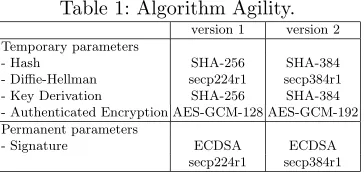
Algorithm Agility Popular cryptographic protocols allow for negotiation of the parameters. Even though this is great for backwards compatibility, this comes with the risk of an adversary negotiating both parties in the weakest protocol parameters. We have opted for a different approach, by strictly limiting the num-ber of protocol parameters. In essence, we only want to allow a single protocol and associated parameters, which should maximally satisfy all security require-ments. The only reason to allow multiple (in this case: two) parameter sets is to allow for fast upgrading in case one of the ciphers or protocols is broken.
We make a distinction between the temporary and permanent parameters. The temporary parameters are set by the server: the hash function, the elliptic curve and key derivation function for key agreement, the authenticated encryp-tion scheme. The permanent parameters define the signature scheme that is used. For both the temporary and permanent parameters we define two versions, one to be used initially and one to enable migration in the future to a more secure set of parameters. There is no intent to maintain an extensive list of broken parameters for backward compatibility.
The server determines which version of the temporary parameters (tV ersion) are used, there is no margin for negotiation on the Pico side. This allows for a very fast migration of the temporary parameters, which is possible since no long term keys are involved. The Pico should reject weak temporary parameters. The version of the temporary parameters is passed on to the Pico as part of theSCP
message.
For the permanent parameters a similar approach is desirable, but due to long term keys being involved it is impossible to do instantaneous upgrades. Using theSCP message the server indicates the preferred permanent parameter set. During the transition of the server switching from one version to the next, it is possible for the Pico to set the permanent version (pV ersion) to the previous version. Afterwards, it will no longer be possible for the user to upgrade his account and instead will be forced to create a new account using enroll. This means that we have to augment the handshake to set up the secure connection as follows:
a ) the Pico sends the version of the permanent and temporary parameters along with its first message to the server (P S1);
b ) upon receiving P S1, the server checks if this version is allowed (previous permanent version, within transition period) or aborts otherwise;
c ) inSP2, the server will put a signature on (SERV AUTH, A, B, pV ersion, tV ersion); d ) inP S3, the Pico will put a signature on
(type, A, B, pV ersion, tV ersion).
The last two modifications will prevent man-in-the-middle attackers from ex-ploiting a version mismatch between the Pico and server.
Directly after the handshake the server will request that the Pico updates its key according to the new version. This is done by sending aM SGwith type
and the following message is now set to the version as selected by the server. The Pico will get the server’s new public key and validity period by requesting the server parameters through a separate request to the server with an IN IT
message (see Section3.1).
The Pico generates a new key pair and makes a new entry in its database, using the received parameters and server public key.1The Pico will send aM SG to the server of the type UPDATE with its new public key and a signature with this public key on (UPDATE, A, B, pV ersion, tV ersion). Upon validation of the signature, the server overwrites the existing database entry for this user. The server will send a confirmation (M SG of type CONFIRM UPDATE) to the Pico, that can now remove the old account from its database.
Key Agility A similar protocol will be used for the server to update its public key without migrating to a new version of algorithm parameters. This allows the server to update its key before it expires or to replace its key if there is doubt about the private key being compromised. For this we will augment the handshake by the server sending two signatures (during the transition period) in
P S2, one with the new key and one with the old key. The Pico will try to validate the first signature, and upon failure the second signature. When both signatures fail to verify, the connection will be terminated. Given that the second signature verifies, the Pico requests the new server parameters (by sending a separate
IN IT message) and checks the first signature, using the new public key of the server. If this signature verifies, the Pico updates the selected account in its database. Even if this signature does not verify, the Pico will still continue by sendingP S3 but not update its database.
3.5 Server
In order to support authentication with a Pico, server changes are needed. First of all, a Pico module needs to be installed at the server. Second, a reference image containing a visual hash of the server parameters (see Section2.2), needs to be made public.
Third, for existing users at servers that already have authentication mecha-nisms (e.g., passwords) in place, a transition mechanism needs to be foreseen to change authentication mechanisms. This could be done securely as follows:
1. the user authenticates to the server, using the current authentication mech-anism;
2. after being logged in, the user is provided with a QR code for enrollment; 3. the user enrolls using his Pico;
4. the server couples the received public key from the Pico with the user’s account.
In comparison with a traditional password based authentication mechanism, supporting the Pico will require more computational effort. However, at the same time the server’s security is enhanced. For a password based authentication mechanism, a compromise of the users database gives adversaries an advantage to log in as genuine users (even at other servers in case the user reuses his password). The only way to recover from this, is by informing users and have them pick new passwords. This is not the case with Pico based authentication, because the stored public keys do not leak any information that can be used to the attacker’s advantage to log in at the server as a genuine user.
4
Implementation
The main goal of this paper is providing a more detailed specification of the Pico and demonstrating that this specification results in a practical implementation. As such, we have limited ourselves to a demonstrator on the Android platform which does not have any application security features in place. We also did not implement database level security with a locking mechanism since keys remain largely unprotected anyway on a smartphone. Additional security can however be leveraged by using a secure execution environment such as SIM, secure element, Trustzone . . .
The implementation was done using Java, with a native library (ZBar) for processing the QR code. The Vash library [7] was ported to Android.
On the server side we use a mix of a Java application and a PHP web applica-tion for the demonstrator server (a simple message board). The Java applicaapplica-tion implements the Pico server module, which takes care of the connection with the Pico and performs all cryptographic operations.
All protocol messages are encapsulated using Google protocol buffers and sent over an HTTP connection between the Pico and the Java application. HTTP was mainly selected for simplicity of the implementation and to easily pass through firewalls. This however implies that all protocol round-trips must be initiated by the Pico and require a connection identifier. For this connection identifier we chose the Diffie-Hellman keyB since this is randomly generated by the server. For efficiency we however do prefer a dedicated, permanent TCP connection. In case of loss of connection, it can be recovered usingB.
Table 1: Algorithm Agility. version 1 version 2 Temporary parameters
- Hash SHA-256 SHA-384
- Diffie-Hellman secp224r1 secp384r1 - Key Derivation SHA-256 SHA-384 - Authenticated Encryption AES-GCM-128 AES-GCM-192 Permanent parameters
- Signature ECDSA ECDSA secp224r1 secp384r1
We experimented with the displaying of the QR code and concluded that only a small amount of redundancy was required. As such, we can limit the display size of the QR code, making it easier to incorporate in websites. For mobile browsing, we also implemented a direct link on the QR codes in the HTML source, and made sure that the Pico application listens for Intents. This way a user can simply click on the QR code to launch the Pico application and pass on the data needed to start authenticating to the server.
5
Evaluation
5.1 Properties
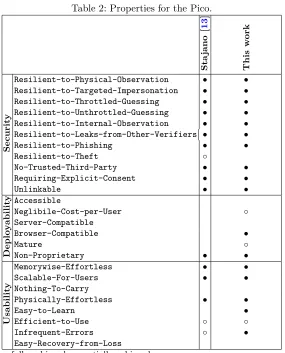
Bonneau et al. [5] performed an extensive comparison of several password re-placements, including the original Pico description by Stajano. They also de-scribe a general Usability-Deployability-Security evaluation framework, using a concise list of properties. Table2shows the properties attributed to the original Pico description by Stajano [13] and the properties of our implementation. Note that most of the security properties directly follow from the use of public key authentication.
When it comes to security the Pico clearly outclasses passwords. Our imple-mentation of Pico achieves all the listed security properties with the exception of Resilient-to-Theft. Due to the secure connection which is based on public key cryptography, impersonation of a user without obtaining the Pico device or somehow extracting the keys is impossible. We also protect against phishing by embedding the server identity in the QR code. Our implementation even goes one step further by also preventing phising at the time of creating an account by having the user compare visual hashes. Explicit user consent is built into the Pico user interface and all accounts are unlinkable since they use different keys.
Resilient-to-Theft is not achieved due to the lack of a locking mechanism and the chosen platform. In order to deploy the Pico, this obviously needs to be solved.
is Negligible-Cost-per-User: this is the case for an Android app, but when moving to a dedicated hardware devices this is no longer achieved.
Regarding usability, a more thorough usability evaluation is advisable, but at first sight our Pico instantiation achieves all the properties attributed to the original Pico description: Memorywise-Effortless,Scalable-For-Users,
Physically-Effortless,Efficient-to-Useand partiallyInfrequent-Errors. On top of those, our implementation also achieves theEasy-to-Learnand fully
Infrequent-Errorsproperty due to a different design for user interaction,i.e., only one button to start, explicit confirmation.
Table 2: Properties for the Pico.
S ta ja n o [ 1 3 ] T h is w o rk S e c u ri ty
Resilient-to-Physical-Observation • •
Resilient-to-Targeted-Impersonation • •
Resilient-to-Throttled-Guessing • •
Resilient-to-Unthrottled-Guessing • •
Resilient-to-Internal-Observation • •
Resilient-to-Leaks-from-Other-Verifiers • •
Resilient-to-Phishing • •
Resilient-to-Theft ◦
No-Trusted-Third-Party • •
Requiring-Explicit-Consent • •
Unlinkable • •
D e p lo y a b il it y Accessible Neglibile-Cost-per-User ◦ Server-Compatible Browser-Compatible • Mature ◦
Non-Proprietary • •
U sa b il it y
Memorywise-Effortless • •
Scalable-For-Users • •
Nothing-To-Carry
Physically-Effortless • •
Easy-to-Learn •
Efficient-to-Use ◦ ◦
Infrequent-Errors ◦ •
Easy-Recovery-from-Loss
5.2 Performance
Extensive performance testing was done with different users and a range of devices running at least Android 4.0. Using our demonstrator website, both the login and enrollment procedures were tested. The overall login takes around 5 seconds to complete, the more involved enrollment around 10 seconds. Most of the time is taken up by interacting with the user, there is hardly any perceivable delay due the underlying communication and computations2. There are small variations due to varying communication times, also depending on the used wireless connection: WiFi, 3G or EDGE. All the following reported timings are averages.
When excluding user interaction, logging in takes 1.3 seconds. Of this time, only 0.9 seconds are spent on computations, the remaining 0.4 seconds is com-munication overhead. Similarly, creating a new account takes 1.5 seconds, with roughly the same communication overhead. By using precomputations,i.e., gen-erating elliptic curve key pairs beforehand, it is possible to shave off 0.4 seconds for both the login and enrollment.
User interactions require far more time than the actual protocols. Scanning a QR code takes 3.1 second for login, respectively 3.6 seconds for enrollment. This is due to more information contained by the enrollment QR code, which requires a better alignment of the camera and QR code. Confirming a login takes 2.3 seconds, also depending on the number of accounts to select from. Confirming the creation of a new account takes 5.3 seconds. Directly after this enrollment, the user is asked to input a name to identify his account on the Pico. By providing a default user name (the one the user entered at the website to create a new account), inputting an account name only takes 1.7 seconds.
For continuous authentication, Pico needs to send and receive messages over the authenticated channel that was set up during login. One round of communi-cation (PONG-PING,PONG-BYEorBYE-BYE) takes 0.2 seconds and is dominated by communication overhead. Please note that continious authentication happens in the background and as such does not affect the user.
6
Related Work
Bonneau et al. [5] performed an extensive comparison of several password re-placements, including several two-factor authentication methods. In this section, we only discuss work directly related to Pico and our implementation.
We deliberately chose not to base our main security protocol on SSL/TLS (as is the case for Stajano [13]) but instead adapted the SIGMA-I protocol for the Pico. This is mainly based on the poor security track record of the SSL/TLS protocols which be believe are overly complex and do not reflect recent advances in protocol design. This can clearly be seen from the algorithm agility
2 While interacting with the user, part of the handshake protocol can already be run
perspective: SSL/TLS relies on negotiation of the algorithm suite, allowing for a myriad of algorithms of which several are sub-optimal security-wise.
Another major difference with [13] is the way a link between server, client and Pico is established. Stajano uses a static QR code to identify the server and hence requires a secure wireless link between client and Pico to associate the client. To differentiate between logging into and creating an account, the user has to select one of the two dedicated buttons to start the process. The secure wireless link also acts as a gateway for communication between Pico and the server. This approach requires changes to the client which will hurt adoptability as it does not allow the user to just use any client available: the user first needs to install a browser plugin and possibly a hardware dongle for setting up a secure short range communication. Additionally it might not be possible for the user to make any changes to the client as he does not have sufficient rights, e.g., computers at work or at an internet cafe. This approach is also more prone to errors, as the user might accidently hit the wrong button when scanning the QR code and does not need to confirm his choice.
The work of Stajano also resulted in a Bachelor’s and a Master’s thesis with partial implementations. Tian [14] augmented the static QR code with a session identifier and the MAC of the bluetooth device of the client in order to create the wireless link. This however seems to limit the scope to local logins where the client is also the server. Bentzon [1] implemented the Pico on a Raspberry Pi. This implementation has one button to scan specific QR codes that differentiate between logging in and enrolling and also contain session identifiers. The specified TLS-alike protocol does not offer forward secrecy and lacks key agreement since the Pico chooses the session key. We consider both of these properties crucial for setting up a secure communication channel.
7
Conclusions and Future Work
We realized Pico by providing a detailed specification of the user interface and cryptographic protocols with provisions for future security upgrades. Our robust Android implementation demonstrates that our design is feasible, allows to fur-ther mature the Pico concept and allows to evaluate its usability at negligible cost.
NIST curves. Also ECDSA can be replaced by Schnorr signatures, which are less vulnerable to leakage of the secret key in the case of bad randomness.
As already indicated the current HTTP communication layer can be replaced by a permanent TCP connection. Regarding the overall platform the major challenge for future research lies in moving away from a smartphone to dedicated hardware or at least add a secure element to the smartphone. This seems to be the only way to rule out vulnerabilities in a complex software platform such as Android. Provided that a sufficient adaption of the technology can be achieved, the cost for a separate device is considered reasonable.
References
1. A. Bentzon. Security architecture and implementation for a tpm-based mobile authentication device. Master’s thesis, 2013.
2. D. J. Bernstein. Curve25519: New diffie-hellman speed records. In M. Yung, Y. Dodis, A. Kiayias, and T. Malkin, editors, Public Key Cryptography, volume 3958 ofLecture Notes in Computer Science, pages 207–228. Springer, 2006. 3. D. J. Bernstein, T. Lange, and P. Schwabe. The security impact of a new
cryp-tographic library. InLatinCrypt, volume 7533 ofLNCS, pages 159–176. Springer, 2012.
4. J. Bonneau, C. Herley, P. C. van Oorschot, and F. Stajano. The Quest to Re-place Passwords: a Framework for Comparative Evaluation of Web Authentication Schemes. In2012 IEEE Symposium on Security and Privacy, pages 553–567. IEEE Computer Society, 2012.
5. J. Bonneau, C. Herley, P. C. van Oorschot, and F. Stajano. The Quest to Re-place Passwords: a Framework for Comparative Evaluation of Web Authentication Schemes. Technical Report UCAM-CL-TR-817, University of Cambridge, Com-puter Laboratory, 2012.
6. R. Canetti and H. Krawczyk. Security Analysis of IKE’s Signature-Based Key-Exchange Protocol. In M. Yung, editor,Advances in Cryptology – CRYPTO 2002, volume 2442 ofLecture Notes in Computer Science, pages 143–161. Springer Berlin Heidelberg, 2002.
7. T. Cole. Vash - The Visual Hash, 2011. http://www.thevash.com.
8. C. S. Jutla. Encryption Modes with Almost Free Message Integrity. In B. Pfitz-mann, editor,EUROCRYPT, volume 2045 ofLecture Notes in Computer Science, pages 529–544. Springer, 2001.
9. H. Krawczyk. SIGMA: The ’SIGn-and-MAc’ Approach to Authenticated Diffie-Hellman and Its Use in the IKE-Protocols. In D. Boneh, editor, Advances in Cryptology – CRYPTO 2003, volume 2729 ofLecture Notes in Computer Science, pages 400–425. Springer, 2003.
10. R. Molich and J. Nielsen. Improving a human-computer dialogue.Communications of the ACM, 33(3):338–348, 1990.
11. J. Saltzer and M. Schroeder. The protection of Information in Computer Systems.
Proceedings of the IEEE, 63(9):1278–1308, 1975.
13. F. Stajano. Pico: No More Passwords! In B. Christianson, B. Crispo, J. A. Malcolm, and F. Stajano, editors,Security Protocols Workshop, volume 7114 ofLecture Notes in Computer Science, pages 49–81. Springer, 2011.
14. B. Tian. Pico: a security token to replace passwords, 2012. https://code.google.com/p/pico/.