UNIVERSITY OF TWENTE
How to improve the performance of BIM training toolkits,
with a focus on software learning
A systematic analysis and comparison
2
ABSTRACT
As Building Information Modelling (BIM) becomes increasingly standard practice in the Architecture, Engineering and Construction industry. Organizations and universities are trying to seek best way to provide BIM software learning by using BIM training toolkits. This study was initiated to look for insight into the current BIM training toolkits and to provide a baseline for possible improvements to cope with their disadvantages. This research examined four BIM training toolkits focusing on the components or services they consist of and their characteristics. This study illustrates various approaches that the BIM training toolkits are undertaking to provide BIM software learning. A systematic comparative analysis also reveals the similarities and differences and specific advantages and disadvantages of particular toolkits. The findings reinforce the notions that there are disparities in these training toolkits, which need realignment to improve the performance of BIM training toolkits in the future that will meet learners’ expectations.
DEFINITIONS
Just-in-time training: the learner can pick up any module of toolkit anytime and go through that module independently. The just-in-time training provides exact amount of BIM knowledge needed to perform specific tasks and solve problems in real-life situations. After the training, the learner can practice in the daily working environment. It can reduce the gap between learning, practicing and applying. It avoids refresh training that reminds learners what everything was when they need to use them currently but learners had already learned several weeks or months ago Therefore, the learning time is as close as possible to the time when learners applying BIM knowledge.
3 CONTENTS
Abstract ... 2
1. Introduction ... 4
2. Theoretical points of Departure ... 5
3.1 BIM training barriers and concepts... 5
3.2 Criteria to evaluate BIM training toolkits ... 6
3. Research Methodology ... 10
4.1 Selection of the toolkits ... 10
4.2 Data collection and analysis ... 11
4. Overview of the toolkits ... 12
4.1 Toolkit 1: United Kingdom– White Frog ... 13
4.2 Toolkit 2: United States - BIMtopia ... 15
4.3 Toolkit 3: Autodesk Education Community ... 16
4.4 Toolkit 4: China mainland –bim.voedu.cn ... 20
4.5Comparing the toolkits ... 22
5. Discussion ... 30
6. Conclusions ... 33
Acknowledgement ... 34
Reference ... 35
Appendix A: Course structure of White Frog ... 37
Appendix B: Course structure of BIM Curriculum (BIMtopia) ... 38
Appendix C: Course syllabus of MOOCs (BIMtopia) ... 39
4
1.
INTRODUCTION
Building Information Modelling, as one of the most promising technologiesin the architecture, engineering and construction (AEC) industry was introduced in the last decades. It changes building information from traditional 2D drawing to extensive architectural nD modelling. BIM makes a reliable digital representation of the building, which is available for design decision making, high-quality construction documentation, construction planning, performance predictions, cost estimation and facility management. Therefore, with the awareness of BIM benefits, industry and academic members now demand individuals capable in and comfortable with BIM concepts and processes.
Though the usage and awareness of BIM are widely acknowledged, the development of BIM education and training are different worldwide. There are three challenges in BIM education and training: difficulty in learning and using BIM software (large time commitment), misunderstanding of the BIM process and issues related to the circumstances of the academic environment [1]. Training organizations provide BIM training toolkits to reduce learning time and improve learning outcomes in order to overcome the difficulties in learning and using BIM software. However, BIM training toolkits are heterogeneous, especially in the adoption of training methods and implementation of resources (e.g. tutorial materials). Besides, it is difficult to find established studies that explain how toolkits performed and what the differences and similarities between different toolkits are.
Nowadays, BIM training has become increasingly popular among practitioners and individuals since they want to enhance their working competence and efficiency. Although the benefits from BIM training toolkits have been recognized by many learners, it is still difficult to find a suitable toolkit to meet learners’ expectations. It is mainly due to insufficient cognition to design appropriate training toolkits. In particular, there are no established researches that provide systematic analysis of training toolkits. Also, it is common that learners use various online BIM training toolkits to learn BIM software application skills without geographic limitation. As a result it is necessary to understand the performance of BIM training toolkits from different countries. A worldwide review of BIM training toolkits was conducted by the researcher in order to conclude improvement suggestions with a high applicability. In this way, training organizations will be able to take into account not only the cost and learning contents but also the potential factors that could affect the learning outcomes and improve the service delivery of toolkits.
5 differences and similarities among those training toolkits; 3) what measures can be taken to improve the performance of BIM toolkits.
This research presents the performance of BIM training toolkits from different countries and identifies the measures that could be taken to improve the service delivery of BIM toolkits for practitioners and individuals. The section 2 presents a review of the BIM training and criteria derived from literature used in this research. The next section (section 3) explains the research methods the researcher followed. Next (section 4), the researcher describes each toolkit and makes the systematic comparisons to discover differences and similarities. In section 5, the researcher discusses the findings derived from analysis and comparisons, and the contributions and limitations of the research also include in this section. The section 6 summarizes some useful suggestions that can be used to improve the performance of BIM training toolkits.
2.
THEORETICAL POINTS OF DEPARTURE
The following literature review is the starting point of this research. First, the researcher describes the main BIM training barriers. In the existing literature, there are several researches[2],[3],[14],[16],[17],[18]conducted quantitative studies to make ranking lists about BIM adoption rate and their related issues. Current studies[1],[19],[20],[21]pay more attention on BIM education in universities instead of BIM training in training organizations. Most of training criteria derived from literature are not included or fully included into current BIM training toolkits and consequently the toolkits has some disadvantages that could have been avoided. The main challenge is the insufficient cognition of BIM training toolkits and it hampers the abilities of toolkits to perform better that meet learners’ expectations. This research is to mitigate this gap by analyzing four toolkits from three countries to conclude baseline for possible improvements so that organization could improve the performance of toolkits. The part two of this section is concluded with five criteria that have been applied in other kinds of training in order to achieve similar learning purposes but in different domains, which can be used in this research.
3.1 BIM TRAINING BARRIERS AND CONCEPTS
6 celebrating BIM champions and success, encouraging BIM career development and creating a clear vision and goals for BIM business [4]. There is little effort invested into personnel BIM training. The adequate BIM training is essential to promote AEC industry into the BIM age. In general, most of the companies follow a common trajectory: starting with a few specialized staff members who work on specific BIM projects or administer a central BIM unit; they become internal trainers, who gradually train more staffs to become BIM capable rather than merely depending on a few specialists. This trend not only indicates that there is a demand of BIM capable personnel, but also the continuing need of BIM specialists [3].
In the last few years, the concept of just-in-time has begun to be considered by Human Resource Development professionals [5],[6],[7][8]. The employees demand critical information to be available immediately when they need it, at or near their job site [5]. Furthermore, business pressure and competition make it difficult for organizations to allow their staff members to attend a training class last several hours because productivity levels will fall. The learner retention rates are also limited unless immediate and frequent reinforcement opportunities are provided [8]. Therefore, it is necessary to make learning/training and working more seamless than ever before, and just-in-time training is an emerging concept which emphasizes attaining a greater proximity between the need and the delivery of training. The mind-set of just-in-time training (JIT training) is that the employee realizes that he/she cannot complete the work because a lack of competence during the work, and a JIT training program is provided at that point with the exact amount of information to address the need [5], [7], [9].
3.2 CRITERIA TO EVALUATE BIM TRAINING TOOLKITS
There are several studies in different research fields that introduce principles to formulate appropriate skill-based training courses in general. The skill-based training includes a goal orientation and a linking of behaviours in a sequentially and hierarchically organized manner[11]. Therefore, these principles could also be suitable and become the baselines for BIM training toolkit performance. However, it is beyond the scope of this research to discuss all the possible principles. The researcher pays special attention to the principles that according to the literature are more important in BIM training and have direct effect on the learning outcomes. The researcher concludes five criteria that shown in Figure 1 to guide readers.
Criteria Sub-criteria/options
1. Information organization Based on practical workflow Based on topics
Based on disciplines
2. Module arrangement Module structure
Hands-on exercises
7 4. Tutorial video performance Length of tutorial video
Narrative and action Attention guiding 5. Self-assessment of learning outcomes Initial skill acquisition
[image:7.595.67.510.72.158.2]Skill compilation FIGURE 1: FIVE CRITERIA DERIVED FROM LITERATURE
Criteria 1: information organization
Regarding skill-based learning, learners begin to focus less on declarative knowledge and more on procedural knowledge. Concurrent with an increase in procedural knowledge is the development of meaningful structures for organizing knowledge [11]. Each toolkit has its own way to process and organize information. It is essential that the toolkit provides a meaningful structure for organizing BIM knowledge. There are mainly three structure options used by four toolkits to organize BIM knowledge:
a) Based on practical workflow: the BIM knowledge is organized according to constructability order;
b) Based on topics: the BIM knowledge is organized according to BIM topics;
c) Based on disciplines: the BIM knowledge is organized according to professional fields, such as architecture and structural engineer.
Training approaches can be defined as the instructional methods that support training process. It might be a self-study approach or trainer-driven approach. For instance, a self-study approach allows individuals mainly control the learning process and content. These courses are often narrow in scope and cover subject matter that is not likely change to through time [10]. It is interesting that the skills and knowledge being taught in two versions of certain course are similar but the training media being used are different and sometimes instructional methods such as demonstration and practice are formatted differently within the same training medium. Criteria 2: module arrangement
The learners purchase BIM training toolkits with different BIM knowledge backgrounds. Each module of toolkit carries different amount of BIM knowledge. The presentation of BIM knowledge can be divided into two types: descriptions and demonstrations [12]. Description, for example, includes providing a narrative of the outcomes of the task and the process of accomplishing the tasks. Demonstration involves showing how the task is accomplished, which is mainly approached by tutorial videos. The practice is the essential part of BIM training as well. It allows learners apply learned BIM knowledge.
8 purposes. For instance, the independent module structure makes learning more flexible that can realize just-in-time training;
b) Hands-on exercises: hands-on exercises can be ‘scenario-task based’ that is part of project or small chunks of larger tasks. It also can be ‘whole-task based’ that allows learner applying as much as possible of what is learned. Meanwhile, exercises can be seen as a diagnosis method and/or guidance of self-monitoring to uncover the errors and problems during practicing [12].
Criteria 3: BIM-related information load
The amount of information provided from training toolkits can be fixed from low to high or varied based on the individual needs. It is difficult to anticipate how much information will be needed. Giving too much information may make it hard for learners to distinguish what is the most relevant for the task. It may reduce the motivation of self-directed learning when limiting the amount of information. Webb (1997) [13],[14]developed four depth of knowledge levels that required to complete the task. This four DOK levels were used as objective criteria to evaluate BIM knowledge provided by training toolkits in this research.
a) BIM information load of each toolkit: the amount of BIM-related software that provided by training toolkit;
b) Depth of knowledge (DOK):
- DOK level 1- recall/reproduction of information& procedure: BIM knowledge and/or skills can be recalled/reproduced to complete basic tasks. There is little transformation or extended process of knowledge required to complete task;
- DOK level 2- working with skills and concepts: BIM knowledge is beyond a description and explanation of recalled BIM knowledge, which need to be transformed/processed before applying, such as summarize and organize;
- DOK level 3- short term strategic thinking& reasoning: BIM knowledge and skills from multiple topic/concept-matter areas need to be integrated, then they can be applied to complete a project-based setting task. It focuses on in-depth understanding of one topic/concept. The BIM knowledge under this level demands the use of planning, reasoning and short-term higher order thinking process, such as analysis and evaluation ;
- DOK level 4- extended strategic thinking: BIM knowledge from multiple concepts and disciplines need to be integrated to reach a solution or create a final project. The BIM knowledge of this level demands extended and integrated use of higher order thinking process, such as synthesis and reflection.
9 Criteria 4: tutorial video performance
Although there is a considerable body of training media used in software training, the tutorial video has become the most popular means for delivering ‘how to’ information about a wide variety of software learning. Experienced users have begun producing and editing thousands of videos that are published on website to instruct software learners. With tutorial video rapidly becoming a major instructional method, the question arises of their effectiveness of software training. There are four levels to evaluate the quality of tutorial video performance, namely very low, low, high and very high. For the further illumination, it can be divided into three sub-criteria to evaluate their effectiveness for software training. They are summarized based on Meij & Meij (2013) [15]:
a) Length of tutorial videos: there is no consensus on the optimal length of video. Plaisant and Shneiderman (2005) suggested a length between 15 to 60 seconds and Chan et.al, (2013) mentioned a 3-minute average as the usual length of a video in problem-based learning. However, whatever the length of tutorial video is, it is important that it has a clear beginning and end that introduce and demonstrate learning content clearly and completely;
b) Narrative and action: the narrative supports trainer’s action that tells the learner what to do and what happens on the screen, and a brief background information is also necessary ; c) Attention guiding: with the demonstration of tutorial videos, learners may still difficult to
follow and understand narrative properly. Therefore, some extra techniques should be used to draw learners’ attention, such as highlights and subtitles.
Criteria 5: self- assessment of learning outcomes
Training assessment usually is conducted to answer either of two questions: whether training objectives were achieved, and whether accomplishment of those objectives results in enhanced performance on the job [14]. Four levels were used to evaluate the learning outcomes, which are very easy, easy, difficult and very difficult.
Since the research is mainly around BIM-related software training, the criteria of skill-based learning outcomes can be applicable here. The sub-criteria used in assessing each toolkit in the research based on Kraiger et al., (1993).
a) Initial skill acquisition: the declarative BIM knowledge transforms to procedural knowledge. The procedural knowledge enables the reproduction of trained behaviors. The BIM skills learned in this process is relatively basic and fundamental;
b) Skill compilation: continued practice beyond initial successes at reproducing trained behavior. There are two levels of skill compilation:
10 - Advanced skill compilation: learner builds smaller, discrete steps into a domain-specific production or routine. The learner is able to group steps by linking previously learned procedures into a more complex production.
3.
RESEARCH METHODOLOGY
A qualitative study was conducted to achieve the research goal. Four training toolkits were chosen to investigate their performance. The reason to choose these four cases is that they cover a broad range of different BIM implementation positions in the world and different kinds of BIM training approaches. They can give readers an impression of BIM training toolkits performed in their own domains.
The researcher used these four training toolkits respectively in order to identify the adopted training media and coordinated training approaches. An overall analysis of BIM training toolkits from three countries is illustrated, and then a systematic comparison is conducted to find similarities and differences among four toolkits based on defined criteria. The criteria defined beforehand were examined among four toolkits respectively. In the end, the researcher formulated recommendations to improve the performance of BIM training toolkits. Moreover, the economic and social contexts of each toolkit that have influence on the situation are elaborated to enable readers to determine the applicability of the conclusions.
There are various kinds of software developed to realize Building Information Modeling, Revit Architecture is one of the most demanded application skills and current market leader [3],[22]. The model created by Revit Architecture can also be used for structuring, managing and modeling building systems. Since the researcher conducted this research from June to November of 2015 and the latest online free trial is 2015 version, Revit Architecture 2015 was chosen as the specific training courseware in this research.
4.1 SELECTION OF THE TOOLKITS
According to the Building Information Modelling Market (Forecast 2015-2022) [23] published by Transparency Market Research, the global BIM market based on geography is segmented into North America, Europe, Asia Pacific, Latin America, and Middle East and Africa. Geographically, North America is the largest market for BIM and is expected to maintain its dominant position throughout the forecast period. Asia Pacific is expected to witness the fastest growth during the forecast period. China, India, Japan, Australia and South Korea are the major markets for BIM in this region. Therefore, the researcher selects four toolkits from top three regions of global BIM market to conduct analysis.
11 White Frog and bim.voedu.cn are developed by professional BIM training organization, but use different training approaches and media. BIMtopia is found by an instructor comes from Stanford University, which is more academic comparing with others. Autodesk Education Community, as original software developer, provides an open platform for BIM software learning.
BIM toolkit Name of institution Type of institution Country White Frog eTeach White Frog Training organization United Kingdom
BIMtopia Stanford University University United States of America Autodesk Education
Community
Autodesk Inc. Software developer United States of America
[image:11.595.71.529.164.277.2]Bim.voedu.cn VENCI Inc. Training organization China
FIGURE 2: FOUR SELECTED BIM TRAINING TOOLKITS
4.2 DATA COLLECTION AND ANALYSIS
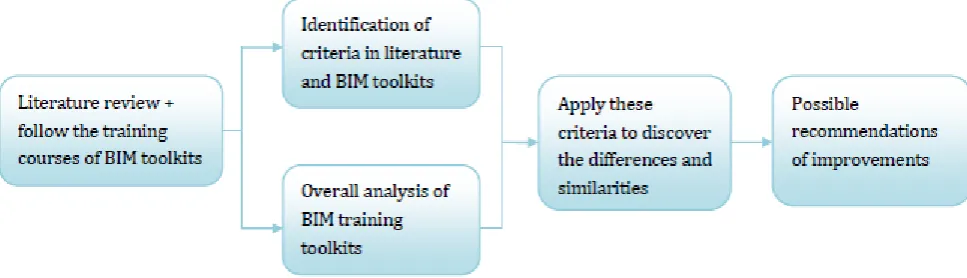
In particular, the researcher used two different methods to collect the necessary data: 1) literature review and 2) conducted training courses of BIM toolkits. The researcher decided to use this methodological triangulation and combine these methods of data gathering in order to ensure the validity of the research. The figure below shows the process the researcher followed.
FIGURE 3: SYSTEMATIC FRAMEWORK OF QUALITATIVE RESEARCH
Literature review + follow the training courses of BIM toolkits
identification of criteria + overall analysis of BIM toolkits
[image:11.595.78.562.427.566.2]12 researcher used two columns to take notes distinguishing objective observation and subjective preliminary interpretation. In this way, the researcher was able to conduct following data analysis on a relatively objective basis. Additionally, the document review allows the researcher to check if the observation is generalized or recognized. For example, the researcher read ‘review’ from the website of toolkit, not only to get a general opinion from regular learners’ perspective, but also check if regular learners have the similar opinions about toolkits. The researcher experienced each toolkit by following the tutorial instructions and finishing hands-on exercises. The researcher wrote down the feelings and characteristics of the toolkits. These notes provides the researcher valuable information for further comparison.
In this process, the entire datasets were perused several times to get a sense of what it contains as a whole. When following the courses, the researcher took down the instant comments and transferred them into formal digital forms. During this procedure, the preliminary interpretations were generated and initial impressions were documented in different colors. Next, the researcher gave further interpretations to the data and categorized each piece of data into groups. It is easier for the researcher to accommodate these groups into the principles found in the literature and then formulate criteria for further comparison.
Apply the criteria to discover the differences and similarities possible
recommendations to improve the performance of BIM training toolkits
The next step was to combine these criteria to make systematic comparison in order to discover the differences and similarities. The criteria were used to assess the performance of each toolkit. Based on the comparison, their advantages and disadvantages can be discovered, which as a baseline to conclude possible recommendations to improve the performance of BIM training toolkits. The comparison is ‘criteria-leading’, which gives a clear differentiation among four toolkits.
The final step was to illustrate recommendations for organizations to optimize BIM training toolkits. Based on the findings of analysis and comparison, the researcher derives factors that organizations should pay attention to. In this way, they are able to take them into account to provide better BIM training toolkits not only meet learners’ requirements but also improve learning outcomes.
4.
OVERVIEW OF THE TOOLKITS
13
4.1 TOOLKIT 1: UNITED KINGDOM– WHITE FROG
White Frog is a group of independent consultants and recognized experts-in-practice who are pushing the boundaries of the Revit Suite training from a customer perspective. Several members of the team have been involved with Revit Suite since the very early days, as product specialists, users, trainers and consultants. These cumulative experiences allow White Frog providing a thorough understanding of BIM-related software embedded real-world practices and industry-recognized best know-how. Importantly, the real-world task based exercise that embeds industrial best practices is the key aspect distinguishes White Frog from other traditional training organizations, since most training organizations are focused on software functionality.
The White Frog provides BIM instructional resources for both trainers and learners, but with the emphasis on the trainers. From experiences of White Frog, they found that the trainer’s BIM knowledge understanding was not as good as they thought. In order to maintain the consistency of training delivery, White Frog provides instructional resources for trainers and requires them to stick to the content in order to maintain the consistency of training.
During the research, White Frog provided its Revit Architecture training toolkit for the researcher to comprehend its learning content and training approaches. The toolkit has two units, eTeach and eTeach File Store (shown in Figure 4). The eTeach is an eBook in PDF format. It includes all the text BIM knowledge of modules mingled with trainer’s notes, images and screenshots of Revit Architecture to explain terminology and demonstrate operations.
4-a 4-b
14 FIGURE 4: SCREENSHOTS OF OPERATION INTERFACE (4-A IS OPENING OPERATION INTERFACE. 4-B IS AN IMAGE OF EBOOK, 4-C IS THE OPERATION INTERFACE OF ETEACH FILE STORE)
The eBook covers most aspects of 3D modelling shown in Appendix A. The trainers’ notes provide useful tips for learners. However, by following the course, the researcher found some issues related to the eBook provided in this training toolkit. For instance, there is no function to direct to a certain page or certain content. For instance, when a learner is learning ‘Stairs, Ramps and Railings’ module, and he/she needs to review operations in ‘Floors, Roofs and Ceilings’ module, it will take some time to find them. Therefore, the hyperlink could be helpful and useful for learners. Secondly, since it is software training toolkit, a large amount of images and screenshots of Revit Architecture demonstrate operations of software, such as what data should be edited (e.g. solid or void) and where to draw a new component. Hence, it might be confused for learners to follow which image responses to which paragraph or description. Thirdly, the ‘Find’ function provided by eBook does not work unfortunately. In general, the eBook is more completed and meaningful when combing with the other two training media. It means some issues of eBook mentioned above could be compensated by ‘Exercise Videos’.
It is worth mentioning that White Frog developed an electronic, animated digital eBook to support classroom training. The most significant character of this animated eBook is that it is a ‘living’ book. The eBook has a clear catalogue and pages can be easily flipped. The images of eBook can be enlarged by clicking. Some images are dynamic and shown in a new window after clicking. In this new window, learners can modify the component by choosing different items. For instance, a cube can change immediately when learners choose ‘hide the line’ or ‘shaded’ to understand the meaning of the terminology vividly. The short tutorial videos are included to explain difficult and obscure concepts. However, the main challenge for White Frog to make it widespread is the format of eBook. It requires HTML5 to operate, which currently does not have good compatibility with certain electronic equipments.
The eTeach File Store consists of three databases: Delegate Datasets, Exercise Drawings and Exercise Videos. The Delegate Datasets have two datasets: one is an opening file that enables learners to perform exercise, and another is a completed exercise file that enables learners to compare their work with trainers’. For instance, the WFP-RAC2015-13-StairsA.rvt is the open file allows learners to draw stairs, and the WFP-RA2015-13-StairsZ.rvt is the completed file to compare.
The ‘Exercise Drawing’ provides an image of the completed exercise in PDF format. The toolkit developer said that the real-world based exercises are very useful, which allows learners apply practical practices into real working place. The ‘Exercise Videos’ are the tutorial videos that demonstrate every exercise how to operate.
15 providing practitioners just-in-time training. The training toolkits need to be purchased to get a license or an activation code.
4.2 TOOLKIT 2: UNITED STATES - BIMTOPIA
BIMtopia is created by an instructor in the Civil & Environmental Engineering Department at Stanford University The founder of BIMtopia has developed and taught a wide variety of classes focusing on Building Information Modelling. Therefore, BIMtopia provides BIM training in a traditional way such as presentations and lectures, which distinguishes BIMtopia from other BIM training toolkits.
The BIMtopia is made up of five components. The first component is the installation instruction of BIM software. It introduces required computer settings and troubleshooting tips for software installation. The second one is massive open online course (MOOC) of Stanford University, which is the most significant component of BIMtopia. BIM curriculum is the BIM software tutorial videos that more specific and software-driven. ‘BIM buzz’ provides BIM-related news and useful tips to make BIM software application more efficient. ‘Design journals’ is designed for learners to upload and share their models. In fact, it was used by Stanford students to upload their assignments.
Since massive open online courses and BIM curriculum are playing a main role, the researcher puts more attention on these two components. BIM curriculum was divided into seven units shown in Appendix B. The seven units cover different topics regarding different BIM-related software, such as Revit MEP and Revit Structure for multidisciplinary collaboration (i.e. Unit 4) and Navisworks Manage for integrated project delivery (i.e. Unit 5).
There are three Stanford massive open online courses (MOOCs) available on BIMtopia and the syllabus of courses can be found in Appendix C according to [24],[25],[26]:
1. Building Information Modelling Workshop (CEE120A/220A): the foundational Building Information Modelling course introduces techniques for creating, managing and applying building information models in the building design and construction process. The course covers processes and tools for creating, organizing, and working with 2D and 3D computer representation of building components and geometries to produce models used in architectural design, construction planning and documentation, rendering and visualization, simulation and analysis.
16 topics include building envelops, access systems, structural systems modelling and analysis, mechanical/ HVAC system, plumbing and fire protection systems, electrical systems and systems integration/ coordination.
3. Parametric design and optimization (CEE 120C/220C): this course explores tools and techniques for computational design and parametric modelling as a foundation for design optimization. Class sessions will introduce several parametric design modelling platforms and scripting environments that enable rapid generation of 3D models and enable rapid evaluation of parametrically-driven design alternatives. The topics include n-principles of parametric design versus direct modelling, design exploration using parametric modelling platforms (Revit/Formlt, Rhino), visual scripting languages and environments (Dynamo, Grasshopper, DesignScript), single- and multi- dimensional optimization techniques and guidance strategies.
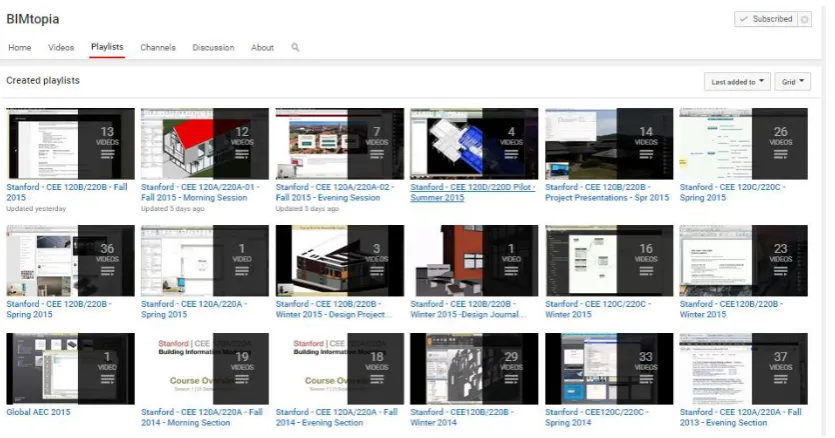
[image:16.595.96.514.402.621.2]There is a hyperlink that learners can be directed from BIMtopia website to BIMtopia YouTube Channel (shown in Figure 5). It is a free internet portal supporting BIM-related technologies training in traditional coursework, which makes students become main audience. It is difficult to find Stanford BIM MOOCs from other online learning platforms. In general, the training courses provided BIMtopia are university lectures, unlike regular training organizations, it is not merely focus on one specific piece of BIM software within one courseware, but covers a broad range of BIM topics and techniques.
FIGURE 5: SCREENSHOT OF BITOPIA YOUTUBE CHANNEL
4.3 TOOLKIT 3: AUTODESK EDUCATION COMMUNITY
17 Meanwhile, Autodesk Inc. derives educational versions of its software freely available to qualified students and faculties through Autodesk Education Community.
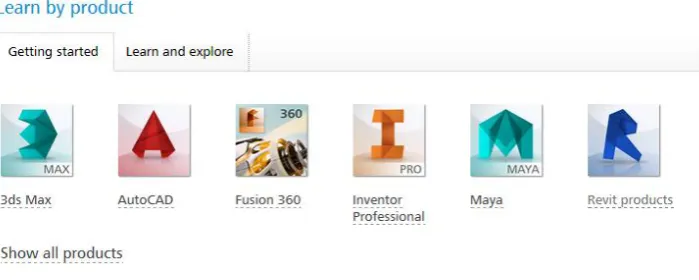
[image:17.595.80.430.196.336.2]The Community basically can be divided into two main services, namely ‘learn by product’ and ‘design workshops by discipline’ shown in Figure 6. The ‘learn by product’ is designed as a reference guide for first–time users, and ‘design workshops by discipline’ is for individuals to explore more complex tasks and functionalities of software.
FIGURE 6: TWO SERIES OF AUTODESK EDUCATION COMMUNITY
‘Learn by product’ provides ‘getting started’ and ‘learn & explore’ services for individuals to learn Autodesk products. The tutorial videos and texts related to BIM knowledge can be found under both service categories.
18 tutorial videos are illustrated above tutorial videos. Additionally, the hyperlink of related concepts and information are stated under the tutorial videos (shown in Figure 7).
7-a: The concepts and preview introduced before the video
19 FIGURE 7: THESCREENSHOT OF ESSENTIAL SKILLS FROM AUTODESK EUDCATION COMMUNITY
[image:19.595.71.529.260.329.2]The contents of ‘learn & explore’ are similar with ‘Getting started’, mostly remaining fundamental training of Revit Archiecture and some contents overlap between two sessions. The two subsections ‘Video Library’ and ‘Tutorials and Courses’ stand out. Both consist of diverse tutorial videos to demonstrate how to use Revit Architecture. However, by using the toolkit, the researcher found the former one is more flexible. The ‘Video Library’ not only shows new features in the released version of Revit Architecture, but also provides more tutorial videos to learn about how to use different features and capabilities of software. The ‘Video Library’ also links to YouTube Channel. Although the Community divides ‘tutorials and courses’ into three levels (shown in Figure 8), most contents are fundamental level in regular training organizations.
FIGURE 8: ADCANVED LEVEL OF ‘TUTORIALS AND COURSES’
The ‘Design Workshops by discipline’ is a public platform that allows experienced BIM practitioners to upload their projects and tutorials. Furthermore, in order to encourage and inspire individuals share their BIM knowledge, Autodesk developed a piece of software called Autodesk Screencast, which provides a free and simple way for individuals to document and share their own software operation workflow. It can capture and showcase application buttons, dialog boxes during operation. It not only reduces efforts for individuals who might lack of video editing techniques to record their videos easily, but also records every detail of operations that make learners easy to follow by showing these application buttons in videos.
The projects provided by ‘Workshops’ are real-world projects and scenario-based examples. These projects cover different topics of Revit Architecture and suitable from beginners to advanced learners. The researcher followed two courses uploaded from Autodesk Education Community and individuals respectively. Both project resources are well-structured, and it is a self-contained unit contains datasets, software tutorials, and instructor manual. The datasets are the project files in RVT. format that learners operate projects or project tasks. The software tutorials mostly are tutorial videos to show how to complete project tasks. The instructor manuals are the text files that introduce the background and demonstrate projects or tasks.
20 problem-setting. The projects uploaded by individuals are more flexible, either real-world projects or scenario-based examples. The purposes of projects are also different. The real-world projects can be designed to introduce BIM concepts and explain the BIM capabilities, or designed to teach BIM software skills useful in working place. Furthermore, because of the videos are produced by individuals, they are less structured comparing to Community. The ‘Workshops’ series are the finishing touch of Autodesk Education Community and it is very considerable that most projects have both metric and imperial formats.
Autodesk Education Community is the only toolkit that individuals can upload tutorials and share their BIM knowledge. The members of Community are also the main force of sharing BIM knowledge, since most of them are experienced BIM practitioners and educators. As a result, especially under ‘learn and explore’ service, it has a large amount of tutorial texts and videos. It could make learners ‘dazzled’ and difficult to select wanted tutorials. However, in ‘workshops by discipline’, the multiple filters are added and learners are able to narrow down the selections and choose the suitable ones. The Autodesk Education Community is a free learning and supporting platform both for practitioners and individuals to access a broad range of BIM software knowledge and help users to get the most essential skills.
4.4 TOOLKIT 4: CHINA MAINLAND –BIM.VOEDU.CN
Bim.voedu.cn Inc. is committed to provide BIM-related software online training. Most trainers are involved in Chinese BIM projects, which make them not only familiar with BIM software application, but also able to accommodate it to Chinese construction standards.
There are four training services provided by bim.voedu.cn, including ‘courseware’, ‘download’, ‘training’, and ‘forum’. The ‘courseware’ is mainly about BIM-related software skill training, which is demonstrated via tutorial videos. The ‘download’ component provides ‘family’ download, such as bicycle storage racks, fountain and concrete truck, except software installation. BIM software application tips can also be found under ‘download’. The ‘training’ component is totally different from the ‘Courseware’, which emphasizes BIM job skill training. The ‘training’ courses are designed to make the learner become a BIM software engineer or BIM technical manager. Furthermore, bim.voedu.cn provides training course aiming at helping learners pass National BIM Application Test or National BIM Skill Level Test. The latest news of AEC industry related to BIM and BIM seminars information and workshops are shared in ‘Forum’.
21 tools. The advanced-level training, using a real-world project as a core case, aims at making a construction plan by using Revit Architecture. It includes preliminary planning, model and building elements creating, design and plan detailing, elevation and sectional view creating and layout.
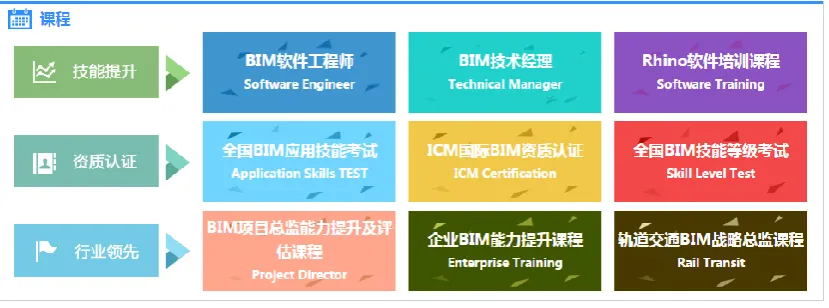
FIGURE 9: THE THREE ASPECTS OF TRAINING
The ‘training’ can be divided into three programs shown in Figure 9. The first program is ‘job skill improving’, including BIM software engineer, BIM technical manager, and BIM software training. The second one is ‘certification acquiring’, including National BIM Application Skills Test, National BIM Skill Level Test and ICM (International Construction Management Institute) BIM Certification. The third one is ‘Enterprise improving’ that provides BIM training for the management and whole enterprise to improve competitive advantages of companies. The construction companies in China had already received benefits of BIM implementation from previous complex projects, such as Shanghai Tower. For the executives and management, they may not need to learn specific BIM software skills, but they must understand the capability of BIM and use BIM to achieve effective project management. In particular, a specific program of ‘Enterprise improving’ focuses on rail transit, which using ‘Guangzhou Subway Project, the first BIM subway project in enterprise level and leading by client, to illustrate BIM implementation in rail transit projects. In 2006, only 10 subways operate in China, and the amount increases to 37 in 2009. In 2015, it became 86 due to urban expansion and development. There have been an increasing number of large and medium-size cities in China are constructing or going to construct subways to release traffic pressure. Therefore, ‘rail transit’ program is properly fit current Chinese rapid development and meets construction industry demands.
22 ‘MEP design’ assesses modelling of equipment and pipelines, load calculation and analysis method, and a comprehensive BIM analysis of pipeline collision and detection. ‘Construction design’ assesses modelling of construction process. It includes building structure, the arrangement among construction machinery, temporary facilities and construction materials, and simulation and optimization of BIM process-based construction plan.
National BIM Application Skills Test Outline was published on the 1st of September, 2014 by Chinese BIM Education Community. Therefore, the Community is still exploring what should be included in test. In general, the test has three levels, namely BIM modeller, BIM application engineer, and BIM manger. Only the second-level is assessed based on speciality, including architecture design, structure design, MEP design, MEP management and construction management. The third-level, BIM manager should be able to integrate BIM knowledge of five specialities from second-level and deliver an integrated BIM project.
Bim.voedu.cn covers BIM software application skill training, accreditation and enterprise training. Therefore, both practitioners and individuals can find the courseware suitable for their situations. The training arrangement is in line with demands and standards of Chinese AEC industry. The software skill training also includes the know-how, such as how to batch change elevation to improve efficiency. Most training courses need to be purchased and all courses are taught in Chinese. However, it has free trial that learners can follow to familiar with training approaches and trainer’s teaching style. The courseware of Revit Architecture still remains in 2014 version. On the contrary, the training contents of tests updates timely.
4.5COMPARING THE TOOLKITS
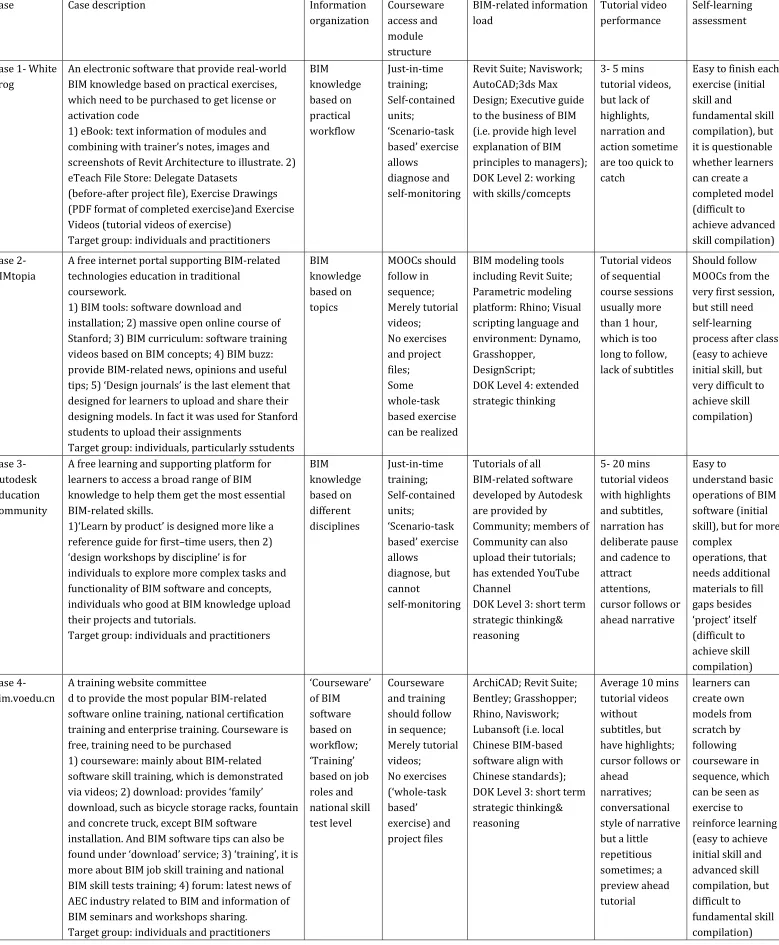
FIGURE 10: THE RESULTS OFCOMPARISON
Case Case description Information
organization Courseware access and module structure BIM-related information load Tutorial video performance Self-learning assessment
Case 1- White Frog
An electronic software that provide real-world BIM knowledge based on practical exercises, which need to be purchased to get license or activation code
1) eBook: text information of modules and combining with trainer’s notes, images and screenshots of Revit Architecture to illustrate. 2) eTeach File Store: Delegate Datasets
(before-after project file), Exercise Drawings (PDF format of completed exercise)and Exercise Videos (tutorial videos of exercise)
Target group: individuals and practitioners
BIM knowledge based on practical workflow Just-in-time training; Self-contained units; ‘Scenario-task based’ exercise allows diagnose and self-monitoring
Revit Suite; Naviswork; AutoCAD;3ds Max Design; Executive guide to the business of BIM (i.e. provide high level explanation of BIM principles to managers); DOK Level 2: working with skills/comcepts
3- 5 mins tutorial videos, but lack of highlights, narration and action sometime are too quick to catch
Easy to finish each exercise (initial skill and
fundamental skill compilation), but it is questionable whether learners can create a completed model (difficult to achieve advanced skill compilation) Case 2- BIMtopia
A free internet portal supporting BIM-related technologies education in traditional
coursework.
1) BIM tools: software download and
installation; 2) massive open online course of Stanford; 3) BIM curriculum: software training videos based on BIM concepts; 4) BIM buzz: provide BIM-related news, opinions and useful tips; 5) ‘Design journals’ is the last element that designed for learners to upload and share their designing models. In fact it was used for Stanford students to upload their assignments
Target group: individuals, particularly sstudents
BIM knowledge based on topics MOOCs should follow in sequence; Merely tutorial videos; No exercises and project files; Some whole-task based exercise can be realized
BIM modeling tools including Revit Suite; Parametric modeling platform: Rhino; Visual scripting language and environment: Dynamo, Grasshopper,
DesignScript;
DOK Level 4: extended strategic thinking
Tutorial videos of sequential course sessions usually more than 1 hour, which is too long to follow, lack of subtitles
Should follow MOOCs from the very first session, but still need self-learning process after class (easy to achieve initial skill, but very difficult to achieve skill compilation) Case 3- Autodesk Education Community
A free learning and supporting platform for learners to access a broad range of BIM knowledge to help them get the most essential BIM-related skills.
1)‘Learn by product’ is designed more like a reference guide for first–time users, then 2) ‘design workshops by discipline’ is for
individuals to explore more complex tasks and functionality of BIM software and concepts, individuals who good at BIM knowledge upload their projects and tutorials.
Target group: individuals and practitioners
BIM knowledge based on different disciplines Just-in-time training; Self-contained units; ‘Scenario-task based’ exercise allows diagnose, but cannot self-monitoring
Tutorials of all BIM-related software developed by Autodesk are provided by
Community; members of Community can also upload their tutorials; has extended YouTube Channel
DOK Level 3: short term strategic thinking& reasoning
5- 20 mins tutorial videos with highlights and subtitles, narration has deliberate pause and cadence to attract
attentions, cursor follows or ahead narrative
Easy to
understand basic operations of BIM software (initial skill), but for more complex
operations, that needs additional materials to fill gaps besides ‘project’ itself (difficult to achieve skill compilation) Case 4- bim.voedu.cn
A training website committee
d to provide the most popular BIM-related software online training, national certification training and enterprise training. Courseware is free, training need to be purchased
1) courseware: mainly about BIM-related software skill training, which is demonstrated via videos; 2) download: provides ‘family’
download, such as bicycle storage racks, fountain and concrete truck, except BIM software
installation. And BIM software tips can also be found under ‘download’ service; 3) ‘training’, it is more about BIM job skill training and national BIM skill tests training; 4) forum: latest news of AEC industry related to BIM and information of BIM seminars and workshops sharing.
Target group: individuals and practitioners
‘Courseware’ of BIM software based on workflow; ‘Training’ based on job roles and national skill test level Courseware and training should follow in sequence; Merely tutorial videos; No exercises (‘whole-task based’ exercise) and project files
ArchiCAD; Revit Suite; Bentley; Grasshopper; Rhino, Naviswork; Lubansoft (i.e. local Chinese BIM-based software align with Chinese standards); DOK Level 3: short term strategic thinking& reasoning
Average 10 mins tutorial videos without subtitles, but have highlights; cursor follows or ahead
narratives; conversational style of narrative but a little repetitious sometimes; a preview ahead tutorial learners can create own models from scratch by following courseware in sequence, which can be seen as exercise to
Criteria 1: information organization a) Based on practical workflow
The BIM knowledge of White Frog is organized based on project workflows. For example, it starts with an introduction of BIM and user interfaces, then column and grids, followed by architectural elements (e.g. walls, doors and windows, floors, roofs, ceilings and stairs, and rooms), and then customized editing to make personalized models. Certain modules intersperse among them, but the overall structure complies with such sequence. Furthermore, BIM knowledge of White Frog does not separate into three levels. According to the perspective of White Frog, some BIM knowledge is intermediate for some learners but basic for others. However, according to Appendix A, it integrates beginner and intermediate levels into one courseware. White Frog keeps updating their toolkits to catch up with industrial development. The updating not only includes the new features added in new released version of BIM software, but also new BIM knowledge followed with industry changes.
The bim.voedu.cn has two independent BIM knowledge organizations comparing to other three. The BIM knowledge of ‘Courseware’, similar to White Frog, is organized by real workflows of project. The difference is that bim.voedu.cn separates BIM knowledge into three levels, namely beginner, intermediate and advanced level. In advanced level, bim. voedu.cn uses a real project to apply Revit Architecture into training. In terms of ‘Training’, it is organized by job roles and national test skill level. The updating of ‘Courseware’ has fallen behind comparing to three toolkits.
b) Based on topics
BIM curriculum units of BIMtopia are organized by BIM topics. The shortage of this knowledge organization is that the distinction between the parts of a topic may become blurred [27]. For instance,BIM curriculum unit 1 ‘BIM basics’ starts with architectural elements (i.e. walls, doors, and windows, roofs and floors, stairs), and finished with exterior and interior renderings. The columns and grids are demonstrated in Unit 4 ‘multidisciplinary collaboration’. It increases difficulty for learners to follow the courses due to lacking consistency of BIM knowledge. Based on the course description of MOOCs, BIM knowledge is also organized based on topics. The Building Information Modelling Workshop (CEE 120B/220B) is based on BIM multidisciplinary collaboration. The Parametric Design and Optimization (CEE 120C/220C) is based on parametric modelling for design optimization. The BIM-related software and techniques are taught combining with conceptual knowledge in both courses.
c) Based on disciplines
25 Building Information Models. Construction management learners develop schedules and plan logistic and materials ordering by using models export from other disciplines. Since different disciplines use Revit Architecture for different purpose, BIM knowledge organized by disciplines could help learners understand inputs and outputs from others within the same software. Although Autodesk Education Community divides tutorial videos of ’Learn by product’ into three levels, most contents are fundamental level in regular training organizations. Autodesk Education Community is the developer of BIM software, so it is very convenient for them to update their BIM knowledge adapting to new versions.
Criteria 2: module arrangement a) Module structure
White Frog adopts training module with a self-contained unit. The unit consists of an eBook, tutorial videos and hands-on exercises that align with UK BIM standards. Learners can choose modules that are necessary for their needs or interest and realize just-in-time training. Furthermore, considering time pressure of project, White Frog has to come up with internal trainings on single module which are suitable for practitioners and meet market requirements. It makes training program more flexible to adjust learners’ situation. Autodesk Education Community provides modules with self-contained unit as well, including tutorial video, exercise file, and instruction manual. Learners can pick up modules by searching disciplines and BIM software to bridge knowledge gap they need. It can also realize just-in-time training. However, by following the modules, the researcher found some issues related to the self-contained unit of Autodesk Education Community. For example, a figure could be added to show the completed exercise in the exercise guide or instructional manual. The operations that necessary to complete the exercise are not demonstrated in the tutorial video or instruction manual. The learners have to search extra materials to complete the exercise.
Only tutorial videos are provided by BIMtopia. Since there are no other training media combined with tutorial videos, MOOCs have the function of instructional manuals, which are provided in other toolkits. The tutor describes the design topics at the beginning, and each session is designed to complete that design topic. In addition, MOOCs should be followed in sequence not only to avoid skipping any useful BIM knowledge but also easier for learners to keep up with courses. BIM curriculum cannot be considered as an independent and formal courseware, but a supplement of MOOCs. Therefore, the missing BIM knowledge of MOOCs can be found in BIM curriculum. Similar with BIMtopia, bim.voedu.cn has tutorial videos exclusively. The trainer has to describe the problem-setting and operation clearly to compensate the drawbacks of lacking instructional manual.
b) Hands-on exercises
26 learners’ errors and problems. Through Delegate Datasets (i.e. before-after project files) and Exercise Drawings (i.e. image of completed exercise), learners can see the detailed information by checking ‘Properties’ and ‘Project Browser’ to find the source of errors. Moreover, within the Delegate Datasets, learners do not need to create a new model. They can directly work on targeted tasks. Although Autodesk Education Community and White Frog both provide scenario-task based exercise, some differences can be found based on the modules the researcher followed. The exercise provided by ‘Workshops’ does not have diagnose function, since it is merely an exercise file related to task problem-setting. It allows learners to practice learned knowledge and find the problems during practicing. The tutorial videos can also be the guidance to help learners to monitor their performance.
Regarding the MOOCs of BIMtopia, the tutor uses BIM 360Glue to share project files with students. Online learners have no access to these project files, so it requires learners to create their own models to follow the course. It is whole-task based exercise that allows learners applying as much as possible of what is learned, which in return suggests that MOOCs should be followed in sequence. Also, the researcher suggests following bim.voedu.cn ‘courseware’ in sequence so that learners can create models step by step as whole-task based exercises considering BIM knowledge is organized by workflow and no exercise is provided. The ‘training’ should be followed by sequence as well, since it is based on test level and question sequence of real national tests. After the training, learners can solve test questions by themselves to discover knowledge gap. The mock examinations could also diagnose the learning gaps and errors. Criteria 3: BIM-related information load
a) BIM information load of each toolkit
White Frog provides Revit Suite, Naviswork, AutoCAD, 3ds Max Design and Executive guide to the business of BIM (i.e. provide high level explanation of BIM principles to the management). Each of them formulates an independent toolkit and provides BIM training specifically towards certain BIM software. Regarding MOOCs and BIM curriculum, it provides BIM modelling tools including Revit Suite, and parametric modelling tools consisting Rhino, Dynamo, Grasshopper and DesignScript. Unlike other toolkits in this research, learners can learn more than one piece of BIM software by following one MOOC. The tutorials of all BIM-related software developed by Autodesk are provided by Community. It is the only toolkit that individuals could upload tutorials and share their BIM knowledge. Therefore, there are enormous amount of tutorial manuals and videos shared by Autodesk Education Community, which makes learners difficult to choose the suitable one. Bim.voedu.cn provides BIM-related software training, including ArchiCAD, Revit Suite, Bentley, Grasshopper, Rhino, Naviswork and Lubansoft (i.e. native Chinese BIM-based software align with Chinese standards). Similar to White Frog, each piece of software formulates a courseware specifically designed for that software skill training.
27 The depth of knowledge of White Frog remains in Level-2 working with skills and concepts. The main character of self-contained unit is that learners can apply learned BIM knowledge directly because of every necessary component is contained in unit. From following the course, the researcher only needs to summarize and organize learned knowledge to complete tasks since tutorial videos are demonstrated how to complete the exercise step by step. Autodesk Education Community can realize just-in-time training and provide self-contained unit like White Frog, but BIM knowledge is more diverse. Learners can understand Revit Architecture regarding one concept with multiple aspects. Therefore, the depth of knowledge of Autodesk Education Community remains level-3 short term strategic thinking& reasoning.
The depth of knowledge of BIMtopia remains in Level-4 extended strategic thinking. The whole-task based exercise requires learners applying what they learned as much as possible and create the model from scratch. Furthermore, BIM knowledge taught by BIMtopia covers different topics, disciplines and techniques. It needs to be integrated to create a final project. In order to complete an integrated project, learners need to summarize and analyze what they learned from MOOCs. The depth of knowledge of bim.voedu.cn remains level-3 short term strategic thinking& reasoning. Although it covers different topics and concepts, its BIM knowledge still emphasizes Revit Architecture itself and by analyzing what is learned, learners can have an in-depth understanding. During creating whole-task based exercise, learners can analyze acquired BIM knowledge and apply them to solve real-world problems.
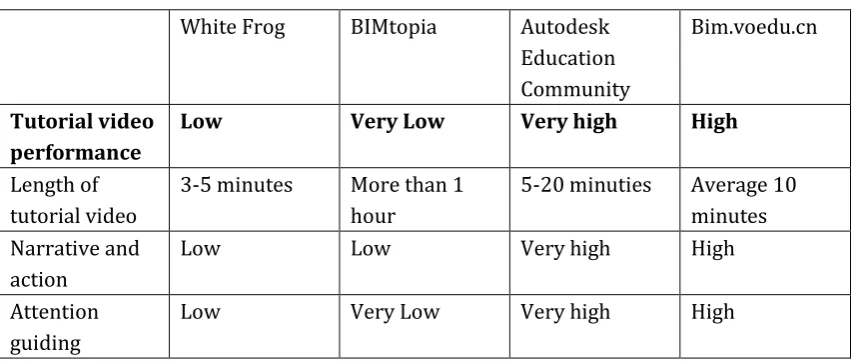
Criteria 4: tutorial video performance
White Frog BIMtopia Autodesk Education Community
Bim.voedu.cn
Tutorial video performance
Low Very Low Very high High
Length of tutorial video
3-5 minutes More than 1 hour
5-20 minuties Average 10 minutes Narrative and
action
Low Low Very high High
Attention guiding
[image:27.595.66.495.425.607.2]Low Very Low Very high High
FIGURE 11 THE TUTORIAL VIDEO PERFORMANCE OF EACH TOOLKIT
a) Length of tutorial videos
28 easily to lose concentration after 15 minutes. The learners are likely to divide the courses into several parts to follow not only because of the length of videos but also to follow tutor’s operations, which might have negative effects on learning outcomes. Since it is the record of university lectures, the quality of sound is low. It increases the necessity of subtitles. The tutorial videos of bim.voedu.cn are average 10 minutes. The margin besides to video allows learners to take notes when watching videos, and questions could also be wrote down and send to trainers directly.
b) Narrative and action
The performance level of narrative and action from Autodesk Education Community and bim.voedu.cn is high and very high respectively. At the beginning of tutorial, the trainer gives a preview of the whole module and introduces the main task or problem-setting. The narrative from both toolkits supports demonstration synchronously that shows learners what to do and what happens on the screen. The speed of narrative from the Community is appropriate for the researcher to catch. The instructional messages in bim.voedu.cn are presented conversationally, which increases learners’ interest comparing to a formal style. When the action is completed, the tutorial videos have before-after displays that allow learners to see the differences.
Overall, the performance level of narrative and action regarding White Frog and BIMtopia is low. Adding subtitles will be very helpful for learners to follow and understand. The narrative of BIM curriculum from BIMtopia is lacking consistency. For instance, first half video demonstrates how to define and display areas and rooms, and the latter part shows how to demolish and renovate walls. The narrative of MOOCs is good. At the beginning of every session, the tutor explains the structure and design tasks. During the session, the tutor gives the description and demonstration of software operation.
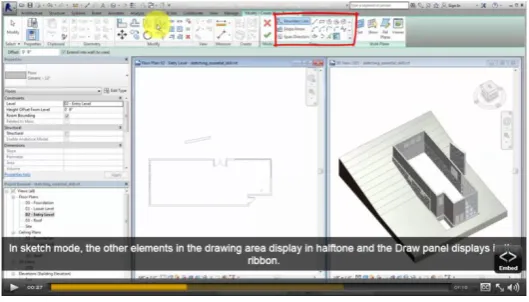
c) Attention guiding
29 FIGURE 12: SCREENSHOT OF TUTORIAL VIDEO FROM AUTODESK EDUCATION COMMUNITY
Criteria 5: self- assessment of learning outcomes a) Initial skill acquisition
After following all four toolkits, the researcher found it is easy to achieve initial skill acquisition. The researcher can easily finish the selected modules independently from White Frog and Autodesk Education Community. Since the module is a self-contained unit, the researcher had an extensive reading of eBook or instructional manual to get an overview of tasks and problem-settings, and then went through tutorial videos and completed exercises. It is easy for the researcher to finish the selected modules from bim.voedu.cn as long as they are followed in sequence. It is difficult for the researcher to finish the selected sessions of MOOCs due to the underperformance of tutorial videos. Furthermore, tutorial video is the only training medium used in BIMtopia, which means the researcher cannot find other instructional materials to compensate its disadvantages.
b) Skill compilation
30 The depth of BIM knowledge level in BIMtopia is the highest among four toolkits and most design tasks cannot be completed because of lacking project files. Consequently, the researcher is unable to practice. Therefore, it is very difficult to achieve skill compilation. When the researcher followed courseware in sequence from bim.voedu.cn, the researcher could analyze and apply the learned knowledge as much as possible to create whole-task based exercise. By creating a simple complete building model, the researcher could mentally group learned routines to achieve advanced skill compilation. However, it is unable to repeatedly practice what is learned, which makes it difficult to achieve fundamental skill compilation.
5.
DISCUSSION
The relative lack of researches on BIM software training is a fact in BIM training research. The analysis study on BIM training toolkits is even rare. In the existing literature, different authors show the general principles to design skill-based training. However, up to now, there was little or none exploration of how to improve the performance of BIM training toolkit for software learning. The good BIM training toolkits can yield more favourable appraisals for motivations, higher skills proficiency immediately after training and better skill retention.
Now training organizations provide BIM training toolkits consist of different training media, such as videos, eBooks, to increase the richness of toolkits. However, it is easy to neglect their consistency and completeness. It is meaningless if the content of videos does not support and supplement the content of eBook. Therefore, it requires training organizations to have a mindset that considers BIM training toolkits as a whole. The added training medium or media should compatible with others. The demonstration files such as tutorial videos should be structured identically in presentation file such as instruction manual. Also, one of lessons learned from BIMtopia and bim.voedu.cn is that a training toolkit can perform better if have two training media to support each other. Once the learners find the drawbacks of one training medium, another one could back up to compensate the disadvantages. In addition, the information organization of BIM knowledge should be chosen wisely. If the target group of toolkit is practitioners or individuals have time pressure, self-contained units based on disciplines or topics are suggested to make toolkits convenience for learners. If the target group is individuals have enough time, project workflow becomes applicable. Meanwhile, the organizations should keep updating their training toolkits with the industrial developments.
31 practitioners who have time pressure and require having certain or specific BIM software skills in short period, then Autodesk Education Community and White Frog that provide self-contained units are suggested. Since bim.voedu.cn is taught in Chinese, Chinese learners who want to get national BIM skill certification and acquire BIM job skills in line with Chinese construction industry, bim.voedu.cn is highly advised.
All four toolkits adopt tutorial videos as the main training medium to demonstrate software skills. However, as the researcher described in the theoretical section, there are also more principles that could derive from the toolkits, which could be included in the recommendations. For instance, by following the courses of BIM curriculum from BIMtopia, it is important that the tutorial videos have clear beginning and end. It would be better that the videos contain two different topics are separated into two independent ones, otherwise it increases difficulties for learners to follow the courses. In the comparison to the performance of video, the results show that not the shorter the videos are, the better performance they can achieve. The long tutorial videos (i.e. more than 30 mins) can also achieve better performance by using deliberate pause to create segments within a video. Pausing involves stopping the videos at key moments to give learners extra time to absorb information that has been presented. Temporal cueing could also be used to create boundaries for segments.
Based on the results of tutorial video performance, it also suggests that signalling mouse cursor, adding circles around screen objects and spotlighting features should be employed to attract learners’ attention. The text files such as eBook is quite useful to compensate the disadvantage of tutorial videos. The text files should have a clear catalogue to guide learners. The screenshots and images should be clearly responded to demonstration texts. Furthermore, the hyperlink is useful to connect similar and related learning contents. A preview of the module ahead introduces background of tasks could help learners develop a general schema for task completion. It also can direct learners’ attention to the main goal of modules and increase awareness before beginning the task. A summary or review is helpful as well to help learners have deeper understanding of operations. The review at the beginning of the module can reduce learners’ cognitive load and reinforce learned BIM knowledge.