HTML 4.01 Specification
W3C Recommendation 24 December 1999
This version:
http://www.w3.org/TR/1999/REC-html401-19991224
(plain text [794Kb], gzip’ed tar archive of HTML files [371Kb], a .zip archive of HTML files [405Kb], gzip’ed Postscript file [746Kb, 389 pages], gzip’ed PDF file [963Kb]) Latest version of HTML 4.01: http://www.w3.org/TR/html401 Latest version of HTML 4: http://www.w3.org/TR/html4 Latest version of HTML: http://www.w3.org/TR/html Previous version of HTML 4.01: http://www.w3.org/TR/1999/PR-html40-19990824 Previous HTML 4 Recommendation: http://www.w3.org/TR/1998/REC-html40-19980424 Editors:
Dave Raggett <[email protected]> Arnaud Le Hors, W3C
Ian Jacobs, W3C
Copyright ©1997-1999 W3C® (MIT, INRIA, Keio), All Rights Reserved. W3C liability, trademark, document use and software licensing rules apply.
Abstract
This specification defines the HyperText Markup Language (HTML), the publishing language of the World Wide Web. This specification defines HTML 4.01, which is a subversion of HTML 4. In addition to the text, multimedia, and hyperlink features of the previous versions of HTML (HTML 3.2 [HTML32] [p.356] and HTML 2.0
[RFC1866] [p.356] ), HTML 4 supports more multimedia options, scripting languages, style sheets, better printing facilities, and documents that are more accessible to users with disabilities. HTML 4 also takes great strides towards the internationalization of documents, with the goal of making the Web truly World Wide.
HTML 4 is an SGML application conforming to International Standard ISO 8879 --Standard Generalized Markup Language [ISO8879] [p.353] .
Status of this document
This section describes the status of this document at the time of its publication. Other documents may supersede this document. The latest status of this document series is maintained at the W3C.
This document specifies HTML 4.01, which is part of the HTML 4 line of specifications. The first version of HTML 4 was HTML 4.0 [HTML40] [p.353] , published on 18 December 1997 and revised 24 April 1998. This specification is the first HTML 4.01 Recommendation. It includes non-editorial changes since the 24 April version of HTML 4.0 [p.312] . There have been some changes to the DTDs, for example. This document obsoletes previous versions of HTML 4.0, although W3C will continue to make those specifications and their DTDs available at the W3C Web site.
This document has been reviewed by W3C Members and other interested parties and has been endorsed by the Director as a W3C Recommendation. It is a stable document and may be used as reference material or cited as a normative reference from another document. W3C’s role in making the Recommendation is to draw attention to the specification and to promote its widespread deployment. This enhances the functionality and interoperability of the Web.
W3C recommends that user agents and authors (and in particular, authoring tools) produce HTML 4.01 documents rather than HTML 4.0 documents. W3C
recommends that authors produce HTML 4 documents instead of HTML 3.2
documents. For reasons of backward compatibility, W3C also recommends that tools interpreting HTML 4 continue to support HTML 3.2 and HTML 2.0 as well.
For information about the next generation of HTML, "The Extensible HyperText Markup Language" [XHTML] [p.357] , please refer to the W3C HTML Activity and the list of W3C Technical Reports.
This document has been produced as part of the W3C HTML Activity. The goals of the HTML Working Group (Members only) are discussed in the HTML Working Group charter (Members only).
A list of current W3C Recommendations and other technical documents can be found at http://www.w3.org/TR.
Public discussion on HTML features takes place on [email protected] (archives of [email protected]).
Available languages
The English version of this specification is the only normative version. However, for translations of this document, see
Errata
The list of known errors in this specification is available at: http://www.w3.org/MarkUp/html4-updates/errata
Quick Table of Contents
. . . . . . . . . . . . 151. About the HTML 4 Specification
. . . . . . . . . . . . . . 19 2. Introduction to HTML 4 . . . . . . . . . . . . . . 27 3. On SGML and HTML . . . . . . . 37
4. Conformance: requirements and recommendations
5. HTML Document Representation - Character sets, character encodings, and . . . . . . . . . . . . . . . . . . 41 entities
6. Basic HTML data types - Character data, colors, lengths, URIs, content types, . . . . . . . . . . . . . . . . . . . 49 etc.
7. The global structure of an HTML document - The HEAD and BODY of a . . . . . . . . . . . . . . . . . 59 document . 79 8. Language information and text direction - International considerations for text
. . . . . . . . . . 89
9. Text - Paragraphs, Lines, and Phrases
. . . . . . . . 103
10. Lists - Unordered, Ordered, and Definition Lists
. . . . . . . . . . . . . . . . . . 111 11. Tables . . . . . . . . 145
12. Links - Hypertext and Media-Independent Links
. . . . . . . . . . . . 159
13. Objects, Images, and Applets
. . . . . . . . 183
14. Style Sheets - Adding style to HTML documents
. . . . . . . . . 195
15. Alignment, font styles, and horizontal rules
. . . . . . . . 205
16. Frames - Multi-view presentation of documents
. .
. 219
17. Forms - User-input Forms: Text Fields, Buttons, Menus, and more
. . . . . . . . 251
18. Scripts - Animated Documents and Smart Forms
19. SGML reference information for HTML - Formal definition of HTML and
. . . . . . . . . . . . . . . . . 261 validation . . . . . . . . . . . . 263 20. SGML Declaration of HTML 4 . . . . . . . . . . . . . 265
21. Document Type Definition
. . . . . . . . . . 279
22. Transitional Document Type Definition
. . . . . . . . . . . 297
23. Frameset Document Type Definition
. . . . . . . . . . 299
24. Character entity references in HTML 4
. . . . . . . . . . . . . . . . . 311 A. Changes . . . . . . . . 333
B. Performance, Implementation, and Design Notes
. . . . . . . . . . . . . . . . . 353 References . . . . . . . . . . . . . . . 359 Index of Elements . . . . . . . . . . . . . . . 363 Index of Attributes . . . . . . . . . . . . . . . . . . 375 Index
Full Table of Contents
. . . . . . . . . . . . 151. About the HTML 4 Specification
. . . . . . . . . . 15
1. How the specification is organized
. . . . . . . . . . . . . 16 2. Document conventions . . . . . . . . . . . 17
1. Elements and attributes
. . . . . . . . . . . . 17
2. Notes and examples
. . . . . . . . . . . . . . 17 3. Acknowledgments . . . . . . . 18
1. Acknowledgments for the current revision
. . . . . . . . . . . . . . 18 4. Copyright Notice . . . . . . . . . . . . . . 19 2. Introduction to HTML 4 . . . . . . . . . . . 19
1. What is the World Wide Web?
. . . . . . . . . . . . 19 1. Introduction to URIs . . . . . . . . . . . . 20 2. Fragment identifiers . . . . . . . . . . . . . . 20 3. Relative URIs . . . . . . . . . . . . . . . 21 2. What is HTML? . . . . . . . . . . . . 21 1. A brief history of HTML . . . . . . . . . . . . . . . . 22 3. HTML 4 . . . . . . . . . . . . . 22 1. Internationalization . . . . . . . . . . . . . . 22 2. Accessibility . . . . . . . . . . . . . . . . 23 3. Tables . . . . . . . . . . . . 23 4. Compound documents . . . . . . . . . . . . . . 24 5. Style sheets . . . . . . . . . . . . . . . 24 6. Scripting . . . . . . . . . . . . . . . . 24 7. Printing . . . . . . . . . . 24
4. Authoring documents with HTML 4
. . . . . . . . 25
1. Separate structure and presentation
. . . . . . . 25
2. Consider universal accessibility to the Web
. . . . . . . 25
3. Help user agents with incremental rendering
. . . . . . . . . . . . . . 27 3. On SGML and HTML . . . . . . . . . . . . . 27 1. Introduction to SGML . . . . . . . . . . . 28 2. SGML constructs used in HTML . . . . . . . . . . . . . . . 28 1. Elements . . . . . . . . . . . . . . . 29 2. Attributes . . . . . . . . . . . . 30 3. Character references . . . . . . . . . . . . . . . 30 4. Comments . . . . . . . . . . . . 31
3. How to read the HTML DTD
. . . . . . . . . . . . . 31 1. DTD Comments . . . . . . . . . . . 31
2. Parameter entity definitions
. . . . . . . . . . . . 32 3. Element declarations . . . . . . . . . . 33
Content model definitions
. . . . . . . . . . . . 34 4. Attribute declarations . . . . . . . . 35
. . . . . . . . . . . . 36 Boolean attributes . . . . . . . 37
4. Conformance: requirements and recommendations
. . . . . . . . . . . . . . . . 37 1. Definitions . . . . . . . . . . . . . . . . . 39 2. SGML . . . . . . . . . . . . 39
3. The text/html content type
5. HTML Document Representation - Character sets, character encodings, and . . . . . . . . . . . . . . . . . . 41 entities . . . . . . . . . . . 41
1. The Document Character Set
. . . . . . . . . . . . . 42 2. Character encodings . . . . . . . . . . . . 42 1. Choosing an encoding . . . . . . . . . 43
Notes on specific encodings
. . . . . . . . . 43
2. Specifying the character encoding
. . . . . . . . . . . . . 45 3. Character references . . . . . . . . . . 45
1. Numeric character references
. . . . . . . . . . . 46
2. Character entity references
. . . . . . . . . . . . 47 4. Undisplayable characters
6. Basic HTML data types - Character data, colors, lengths, URIs, content types, . . . . . . . . . . . . . . . . . . . 49 etc. . . . . . . . . . . . . . . 49 1. Case information . . . . . . . . . . . . . . 50 2. SGML basic types . . . . . . . . . . . . . . . . 50 3. Text strings . . . . . . . . . . . . . . . . . 51 4. URIs . . . . . . . . . . . . . . . . . 51 5. Colors . . . . . . . . . . . . 52
1. Notes on using colors
. . . . . . . . . . . . . . . . 52 6. Lengths . . . . . . . . . . . . 53
7. Content types (MIME types)
. . . . . . . . . . . . . . 53 8. Language codes . . . . . . . . . . . . . 53 9. Character encodings . . . . . . . . . . . . . . 53 10. Single characters . . . . . . . . . . . . . . 54
11. Dates and times
. . . . . . . . . . . . . . . . 54 12. Link types . . . . . . . . . . . . . . 56 13. Media descriptors . . . . . . . . . . . . . . . . 57 14. Script data . . . . . . . . . . . . . . 57
15. Style sheet data
. . . . . . . . . . . . . . 57
16. Frame target names
7. The global structure of an HTML document - The HEAD and BODY of a . . . . . . . . . . . . . . . . . 59 document . . . . . . 59
1. Introduction to the structure of an HTML document
. . . . . . . . . . . . 60 2. HTML version information . . . . . . . . . . . . . . 61 3. The HTML element . . . . . . . . . . . . . 62
4. The document head
. . . . . . . . . . . . . 62
1. The HEAD element
. . . . . . . . . . . . 62
. . . . . . . . . . . . 63
3. The title attribute
. . . . . . . . . . . . . . . 64 4. Meta data . . . . . . . . . . . 64
Specifying meta data
. . . . . . . . . . . . 65
The META element
. . . . . . . . . . . . 68
Meta data profiles
. . . . . . . . . . . . . . 69
5. The document body
. . . . . . . . . . . . . 69
1. The BODY element
. . . . . . 71
2. Element identifiers: the id and class attributes
. . . . . . . . . . 73
3. Block-level and inline elements
. . . .
. 73
4. Grouping elements: the DIV and SPAN elements
. . . . . . 75
5. Headings: The H1, H2, H3, H4, H5, H6 elements
. . . . . . . . . . . . 76
6. The ADDRESS element
. 79 8. Language information and text direction - International considerations for text
. . . .
. 79
1. Specifying the language of content: the lang attribute
. . . . . . . . . . . . . 80 1. Language codes . . . . . . . . . . 81
2. Inheritance of language codes
. . . . . . . . . . 81
3. Interpretation of language codes
. . .
. 82
2. Specifying the direction of text and tables: the dir attribute
. . . . . . . 82
1. Introduction to the bidirectional algorithm
. . . . . . . . 83
2. Inheritance of text direction information
. . . . . . . . 84
3. Setting the direction of embedded text
. . .
. 85
4. Overriding the bidirectional algorithm: the BDO element
. .
. 87
5. Character references for directionality and joining control
. . . . . . . 88
6. The effect of style sheets on bidirectionality
. . . . . . . . . . 89
9. Text - Paragraphs, Lines, and Phrases
. . . . . . . . . . . . . . . 89 1. White space . . . . . . . . . . . . . . . 90 2. Structured text
1. Phrase elements: EM, STRONG, DFN, CODE, SAMP, KBD, VAR, CITE, . . . . . . . . . . . . 90
ABBR, and ACRONYM
. . . . . . 92
2. Quotations: The BLOCKQUOTE and Q elements
. . . . . . . . . . . 93 Rendering quotations . . . . 94
3. Subscripts and superscripts: the SUB and SUP elements
. . . . . . . . . . . . . 94
3. Lines and Paragraphs
. . . . . . . . . . . 95
1. Paragraphs: the P element
. . . . . . . . . . . . 95
2. Controlling line breaks
. . . . . . . 96
Forcing a line break: the BR element
. . . . . . . . . . . 96
Prohibiting a line break
. . . . . . . . . . . . . . 96 3. Hyphenation . . . . . . . . . 97
4. Preformatted text: The PRE element
. . . . . . . . . . 98
5. Visual rendering of paragraphs
. . . .
. 99
4. Marking document changes: The INS and DEL elements
. . . . . . . . 103
10. Lists - Unordered, Ordered, and Definition Lists
. . . . . . . . . . . . . . 103 1. Introduction to lists
. . .
. 104
2. Unordered lists (UL), ordered lists (OL), and list items (LI)
. . . . . . . . 106
3. Definition lists: the DL, DT, and DD elements
. . . . . . . . . . . . 108
1. Visual rendering of lists
. . . . . . . . . . . 109
4. The DIR and MENU elements
. . . . . . . . . . . . . . . . . . 111 11. Tables . . . . . . . . . . . . . 111 1. Introduction to tables . . . . . . . . . . . 113
2. Elements for constructing tables
. . . . . . . . . . . . 113
1. The TABLE element
. . . . . . . . . . . . 115 Table directionality . . . . . . . . 115
2. Table Captions: The CAPTION element
. . .
. 116
3. Row groups: the THEAD, TFOOT, and TBODY elements
. . . .
. 118
4. Column groups: the COLGROUP and COL elements
. . . . . . . . . . 118
The COLGROUP element
. . . . . . . . . . . . 120
The COL element
. . . .
. 121
Calculating the number of columns in a table
. . . . . . . . 122
Calculating the width of columns
. . . . . . . . . . 124
5. Table rows: The TR element
. . . . . . . . 125
6. Table cells: The TH and TD elements
. . . . . . . 128
Cells that span several rows or columns
. . . . . . . . . 130
3. Table formatting by visual user agents
. . . . . . . . . . . . . 130
1. Borders and rules
. . . . . . . . . 132
2. Horizontal and vertical alignment
. . . . . . . 133
Inheritance of alignment specifications
. . . . . . . . . . . . . . 134 3. Cell margins . . . . . . . . 136
4. Table rendering by non-visual user agents
. . . . . . 136
1. Associating header information with data cells
. . . . . . . . . . . . . 139 2. Categorizing cells . . . . . . . . 142
3. Algorithm to find heading information
. . . . . . . . . . . . . . . 143 5. Sample table . . . . . . . . 145
12. Links - Hypertext and Media-Independent Links
. . . . . . . . . . 145
1. Introduction to links and anchors
. . . . . . . . . . . 145
1. Visiting a linked resource
. . . . . . . . . . . . 147
2. Other link relationships
. . . . . . . . . . 147
3. Specifying anchors and links
. . . . . . . . . . . . . . . 148 4. Link titles . . . . . . . . . . 148
5. Internationalization and links
. . . . . . . . . . . . . . . 149 2. The A element . . . . . . . . . . . 152
1. Syntax of anchor names
. . . . . . . . . . . . 152
2. Nested links are illegal
. . . . . . . . . . 152
3. Anchors with the id attribute
. . . . . . . 154
4. Unavailable and unidentifiable resources
. . . . . . . . 154
3. Document relationships: the LINK element
. . . . . . . . . . . 155
. . . . . . . . . . 155
2. Links and external style sheets
. . . . . . . . . . . 155
3. Links and search engines
. . . . . . . . . . 157
4. Path information: the BASE element
. . . . . . . . . . . . 158
1. Resolving relative URIs
. . . . . . . . . . . . 159
13. Objects, Images, and Applets
. . . . . . . . 159
1. Introduction to objects, images, and applets
. . . . . . . . . 160
2. Including an image: the IMG element
. . . . . . . . . 162
3. Generic inclusion: the OBJECT element
. . . . . . . . . . . 165
1. Rules for rendering objects
. . . . . . . . 167
2. Object initialization: the PARAM element
. . . . . . . . . 169
3. Global naming schemes for objects
. . . . . . . . 169
4. Object declarations and instantiations
. . . . . . . . 171
4. Including an applet: the APPLET element
. . . . . . . . . . . 173
5. Notes on embedded documents
. . . . . . . . . . . . . . . 173 6. Image maps . . . . 174
1. Client-side image maps: the MAP and AREA elements
. . . . . . . . 176
Client-side image map examples
. . . . . . . . . . . 179
2. Server-side image maps
. . . . . . 179
7. Visual presentation of images, objects, and applets
. . . . . . . . . . . . . 179
1. Width and height
. . . . . . . 180
2. White space around images and objects
. . . . . . . . . . . . . . . 180 3. Borders . . . . . . . . . . . . . . . 180 4. Alignment . . . . . . . . . . . . 181
8. How to specify alternate text
. . . . . . . . 183
14. Style Sheets - Adding style to HTML documents
. . . . . . . . . . . . 183
1. Introduction to style sheets
. . . . . . . . . . . . . 185 2. Adding style to HTML . . . . . . . . 186
1. Setting the default style sheet language
. . . . . . . . . . . . 186
2. Inline style information
. . . . . . 187
3. Header style information: the STYLE element
. . . . . . . . . . . . . . 189 4. Media types . . . . . . . . . . . . . 190
3. External style sheets
. . . . . . . . . 190
1. Preferred and alternate style sheets
. . . . . . . . . . 191
2. Specifying external style sheets
. . . . . . . . . . . . . 192
4. Cascading style sheets
. . . . . . . . . . 192 1. Media-dependent cascades . . . . . . . . . . . 193
2. Inheritance and cascading
. . . . . . . . . . 193
5. Hiding style data from user agents
. . . . . . . . 194
6. Linking to style sheets with HTTP headers
. . . . . . . . . 195
15. Alignment, font styles, and horizontal rules
. . . . . . . . . . . . . . . . 195 1. Formatting . . . . . . . . . . . . . 195 1. Background color . . . . . . . . . . . . . . . 195 2. Alignment
. . . . . . . . . . . . . 197 3. Floating objects . . . . . . . . . . . . . 197 Float an object . . . . . . . . . . 198
Float text around an object
. . . . . . . . . . . . . . . . . 199 2. Fonts
1. Font style elements: the TT, I, B, BIG, SMALL, STRIKE, S, and U . . . . . . . . . . . . . . . 199 elements . . . . . . 200
2. Font modifier elements: FONT and BASEFONT
. . . . . . . . . . . . . 202
3. Rules: the HR element
. . . . . . . . 205
16. Frames - Multi-view presentation of documents
. . . . . . . . . . . . . 205 1. Introduction to frames . . . . . . . . . . . . . . 206 2. Layout of frames . . . . . . . . . . . 206
1. The FRAMESET element
. . . . . . . . . . . . 207
Rows and columns
. . . . . . . . . . . . 208
Nested frame sets
. . . . . . . . . . 208
Sharing data among frames
. . . . . . . . . . . . 209
2. The FRAME element
. . . . . . . 210
Setting the initial contents of a frame
. . . . . . . . . . 212
Visual rendering of a frame
. . . . . . . . . . 212
3. Specifying target frame information
. . . . . . . . . 213
1. Setting the default target for links
. . . . . . . . . . . . . 214 2. Target semantics . . . . . . . . . . . . . . 214 4. Alternate content . . . . . . . . . . . 214
1. The NOFRAMES element
. . . . . . . . . . . 215
2. Long descriptions of frames
. . . . . . . . . . 217
5. Inline frames: the IFRAME element
. .
. 219
17. Forms - User-input Forms: Text Fields, Buttons, Menus, and more
. . . . . . . . . . . . . 219 1. Introduction to forms . . . . . . . . . . . . . . . . 220 2. Controls . . . . . . . . . . . . . . 221 1. Control types . . . . . . . . . . . . . . 222
3. The FORM element
. . . . . . . . . . . . . . 224
4. The INPUT element
. . . . . . . . . 226
1. Control types created with INPUT
. . . . . . 227
2. Examples of forms containing INPUT controls
. . . . . . . . . . . . . 228
5. The BUTTON element
. . . . . . . 230
6. The SELECT, OPTGROUP, and OPTION elements
. . . . . . . . . . . . 231 1. Pre-selected options . . . . . . . . . . . . . 234
7. The TEXTAREA element
. . . . . . . . . . . . . 236
8. The ISINDEX element
. . . . . . . . . . . . . . . . . 237 9. Labels . . . . . . . . . . . . . 237
1. The LABEL element
. .
. 239
10. Adding structure to forms: the FIELDSET and LEGEND elements
. . . . . . . . . . . . 241
11. Giving focus to an element
. . . . . . . . . . . . . 241 1. Tabbing navigation
. . . . . . . . . . . . . . 242 2. Access keys . . . . . . . . . . . 243
12. Disabled and read-only controls
. . . . . . . . . . . . . 244 1. Disabled controls . . . . . . . . . . . . . 244 2. Read-only controls . . . . . . . . . . . . . . 245 13. Form submission . . . . . . . . . . . 245
1. Form submission method
. . . . . . . . . . . . . 245 2. Successful controls . . . . . . . . . . . . 246
3. Processing form data
. . . . . . 246
Step one: Identify the successful controls
. . . . . . . . . 246
Step two: Build a form data set
. . . . . . . 246
Step three: Encode the form data set
. . . .
. 247
Step four: Submit the encoded form data set
. . . . . . . . . . . . . 247
4. Form content types
. . . . . . . 247 application/x-www-form-urlencoded . . . . . . . . . . . . 248 multipart/form-data . . . . . . . . 251
18. Scripts - Animated Documents and Smart Forms
. . . . . . . . . . . . . 251 1. Introduction to scripts . . . . 252
2. Designing documents for user agents that support scripting
. . . . . . . . . . . . 252
1. The SCRIPT element
. . . . . . . . . 253
2. Specifying the scripting language
. . . . . . . . . 253
The default scripting language
. . . . . . 254
Local declaration of a scripting language
. . . . . . 254
References to HTML elements from a script
. . . . . . . . . . . . . . 254 3. Intrinsic events . . . . . . . . . 258
4. Dynamic modification of documents
. .
. 258
3. Designing documents for user agents that don’t support scripting
. . . . . . . . . . . 258
1. The NOSCRIPT element
. . . . . . . . . 259
2. Hiding script data from user agents
19. SGML reference information for HTML - Formal definition of HTML and
. . . . . . . . . . . . . . . . . 261 validation . . . . . . . . . . . . . 261 1. Document Validation . . . . . . . . . . . . . 262 2. Sample SGML catalog . . . . . . . . . . . . 263 20. SGML Declaration of HTML 4 . . . . . . . . . . . . . . 263 1. SGML Declaration . . . . . . . . . . . . . 265
21. Document Type Definition
. . . . . . . . . . 279
22. Transitional Document Type Definition
. . . . . . . . . . . 297
23. Frameset Document Type Definition
. . . . . . . . . . 299
24. Character entity references in HTML 4
. . . . . . . . 299
1. Introduction to character entity references
. . . .
. 299
2. Character entity references for ISO 8859-1 characters
. . . . . . . . . . . . 300
1. The list of characters
3. Character entity references for symbols, mathematical symbols, and Greek . . . . . . . . . . . . . . . . . 303 letters
. . . . . . . . . . . . 304
1. The list of characters
4. Character entity references for markup-significant and internationalization . . . . . . . . . . . . . . . . 308 characters . . . . . . . . . . . . 308
1. The list of characters
. . . . . . . . . . . . . . . . . 311 A. Changes
1. Changes between 24 April 1998 HTML 4.0 and 24 December 1999 HTML . . . . . . . . . . . . . . . 312 4.01 versions . . . . . . . . . . 312
1. Changes to the specification
. . . . . . . . . . . . 312 General changes . . . . . . . . . . . 312 On SGML and HTML . . . . . . . . 312 HTML Document Representation . . . . . . . . . . 312
Basic HTML data types
. . . . . . . 313
Global structure of an HTML document
. . . . . . 313
Language information and text direction
. . . . . . . . . . . . . . . 313 Tables . . . . . . . . . . . . . . . 313 Links . . . . . . . . . 314
Objects, Images, and Applets
. . . . . . . . 314
Style Sheets in HTML Documents
. . . . . . . . . . . . . . 314 Frames . . . . . . . . . . . . . . . 315 Forms . . . . . . . . . . . . 315 SGML Declaration . . . . . . . . . . . . . . 315 Strict DTD . . . . . . . . . . . . . . . 315 Notes . . . . . . . . . . . . . . 316 References . . . . . . . . . . . 316
2. Errors that were corrected
. . . . . . 318
3. Minor typographical errors that were corrected
. . . . . . . . . . . . . . 322 4. Clarifications . . . . . . . . . . . 322
5. Known Browser problems
. . 322 2. Changes between 18 December 1997 and 24 April 1998 versions
. . . . . . . . . . . 323
1. Errors that were corrected
. . . . . . 325
2. Minor typographical errors that were corrected
. . 327 3. Changes between HTML 3.2 and HTML 4.0 (18 December 1997)
. . . . . . . . . . . . 327 1. Changes to elements . . . . . . . . . . . . . 327 New elements . . . . . . . . . . . 327 Deprecated elements . . . . . . . . . . . . 328 Obsolete elements . . . . . . . . . . . . 328 2. Changes to attributes . . . . . . . . . . . 328
3. Changes for accessibility
. . . . . . . . . . . . 328
4. Changes for meta data
. . . . . . . . . . . . . 328
5. Changes for text
. . . . . . . . . . . . . 328
6. Changes for links
. . . . . . . . . . . . . 328
. . . . . . . . . . . . . 330
9. Changes for forms
. . . . . . . . . . . 330
10. Changes for style sheets
. . . . . . . . . . . . 330
11. Changes for frames
. . . . . . . . . . . . 330
12. Changes for scripting
. . . . . . . . . . 330
13. Changes for internationalization
. . . . . . . . 333
B. Performance, Implementation, and Design Notes
. . . . . . . . . . . . 334
1. Notes on invalid documents
. . . . . . . . 334
2. Special characters in URI attribute values
. . . . . . 334
1. Non-ASCII characters in URI attribute values
. . . . . . . . . 335
2. Ampersands in URI attribute values
. . . . . . . . . . . 335 3. SGML implementation notes . . . . . . . . . . . . . . 335 1. Line breaks . . . . . . . . . . . 336
2. Specifying non-HTML data
. . . . . . . . . . . . 336 Element content . . . . . . . . . . . . . 337 Attribute values . . . . . . . . . 337
3. SGML features with limited support
. . . . . . . . . . . . . 337 4. Boolean attributes . . . . . . . . . . . . . 338 5. Marked Sections . . . . . . . . . . . . 338 6. Processing Instructions . . . . . . . . . . . . . 338 7. Shorthand markup . . . . . 339
4. Notes on helping search engines index your Web site
. . . . . . . . . . . . . . 340 1. Search robots . . . . . . . . . . . . 340
The robots.txt file
. . . . . . . . . 341
Robots and the META element
. . . . . . . . . . . . . . . 342 5. Notes on tables . . . . . . . . . . . . . 342 1. Design rationale . . . . . . . . . . . 342 Dynamic reformatting . . . . . . . . . . . 342 Incremental display . . . . . . . . . . 343
Structure and presentation
. . . . . . . . . . 344
Row and column groups
. . . . . . . . . . . . . 344 Accessibility . . . . . . . . . 344
2. Recommended Layout Algorithms
. . . . . . . . . . . 345
Fixed Layout Algorithm
. . . . . . . . . . . 345 Autolayout Algorithm . . . . . . . . . . . . . . . 347 6. Notes on forms . . . . . . . . . . . . . 347 1. Incremental display . . . . . . . . . . . . . . 348 2. Future projects . . . . . . . . . . . . . . 348 7. Notes on scripting . . . . . . . 348
1. Reserved syntax for future script macros
. . . . . . . . 348
Current Practice for Script Macros
. . . . . . . . . . . . . . 350 8. Notes on frames . . . . . . . . . . . . . 350 9. Notes on accessibility . . . . . . . . . . . . . . 350 10. Notes on security
. . . . . . . . . . . 350
1. Security issues for forms
. . . . . . . . . . . . . . . . . 353 References . . . . . . . . . . . . . 353 1. Normative references . . . . . . . . . . . . . 355 2. Informative references . . . . . . . . . . . . . . . 359 Index of Elements . . . . . . . . . . . . . . . 363 Index of Attributes . . . . . . . . . . . . . . . . . . 375 Index
1 About the HTML 4 Specification
Contents . . . . . . . . . . . 151. How the specification is organized
. . . . . . . . . . . . . . 16 2. Document conventions . . . . . . . . . . . . . 17
1. Elements and attributes
. . . . . . . . . . . . . . 17
2. Notes and examples
. . . . . . . . . . . . . . . 17 3. Acknowledgments . . . . . . . . 18
1. Acknowledgments for the current revision
. . . . . . . . . . . . . . . . 18 4. Copyright Notice
1.1 How the specification is organized
This specification is divided into the following sections:
Sections 2 and 3: Introduction to HTML 4
The introduction describes HTML’s place in the scheme of the World Wide Web, provides a brief history of the development of HTML, highlights what can be done with HTML 4, and provides some HTML authoring tips.
The brief SGML tutorial gives readers some understanding of HTML’s
relationship to SGML and gives summary information on how to read the HTML Document Type Definition (DTD).
Sections 4 - 24: HTML 4 reference manual
The bulk of the reference manual consists of the HTML language reference, which defines all elements and attributes of the language.
This document has been organized by topic rather than by the grammar of HTML. Topics are grouped into three categories: structure, presentation, and interactivity. Although it is not easy to divide HTML constructs perfectly into these three categories, the model reflects the HTML Working Group’s experience that separating a document’s structure from its presentation produces more effective and maintainable documents.
The language reference consists of the following information: What characters [p.41] may appear in an HTML document. Basic data types [p.49] of an HTML document.
Elements that govern the structure of an HTML document, including text [p.89] , lists [p.103] , tables [p.111] , links [p.145] , and included objects, images, and applets [p.159] .
Elements that govern the presentation of an HTML document, including style sheets [p.183] , fonts, colors, rules, and other visual presentation [p.195] , and frames for multi-windowed presentations [p.205] .
Elements that govern interactivity with an HTML document, including forms for user input [p.219] and scripts for active documents [p.251] .
The SGML formal definition of HTML:
The SGML declaration of HTML [p.263] .
Three DTDs: strict [p.265] , transitional [p.279] , and frameset [p.297] . The list of character references [p.299] .
Appendixes
The first appendix contains information about changes from HTML 3.2 [p.311] to help authors and implementors with the transition to HTML 4, and changes from the 18 December 1997 specification [p.322] . The second appendix contains performance and implementation notes [p.333] , and is primarily intended to help implementors create user agents for HTML 4.
References
A list of normative and informative references.
Indexes
Three indexes give readers rapid access to the definition of key concepts [p.375] , elements [p.359] and attributes [p.363] .
1.2 Document conventions
This document has been written with two types of readers in mind: authors and implementors. We hope the specification will provide authors with the tools they need to write efficient, attractive, and accessible documents, without over-exposing them to HTML’s implementation details. Implementors, however, should find all they need to build conforming user agents.
The specification may be approached in several ways:
Read from beginning to end. The specification begins with a general
presentation of HTML and becomes more and more technical and specific towards the end.
Quick access to information. In order to get information about syntax and
semantics as quickly as possible, the online version of the specification includes the following features:
1. Every reference to an element or attribute is linked to its definition in the specification. Each element or attribute is defined in only one location. 2. Every page includes links to the indexes, so you never are more than two
links away from finding the definition of an element [p.359] or attribute [p.363] .
3. The front pages of each section of the language reference manual extend the initial table of contents with more detail about that section.
1.2.1 Elements and attributes
Element names are written in uppercase letters (e.g., BODY). Attribute names are written in lowercase letters (e.g., lang, onsubmit). Recall that in HTML, element and attribute names are case-insensitive; the convention is meant to encourage
readability.
Element and attribute names in this document have been marked up and may be rendered specially by some user agents.
Each attribute definition specifies the type of its value. If the type allows a small set of possible values, the definition lists the set of values, separated by a bar (|).
After the type information, each attribute definition indicates the case-sensitivity of its values, between square brackets ("[]"). See the section on case information [p.49] for details.
1.2.2 Notes and examples
Informative notes are emphasized to stand out from surrounding text and may be rendered specially by some user agents.
All examples illustrating deprecated [p.38] usage are marked as "DEPRECATED EXAMPLE". Deprecated examples also include recommended alternate solutions. All examples that illustrates illegal usage are clearly marked "ILLEGAL EXAMPLE".
Examples and notes have been marked up and may be rendered specially by some user agents.
1.3 Acknowledgments
Thanks to everyone who has helped to author the working drafts that went into the HTML 4 specification, and to all those who have sent suggestions and corrections. Many thanks to the Web Accessibility Initiative task force (WAI HC group) for their work on improving the accessibility of HTML and to T.V. Raman (Adobe) for his early work on developing accessible forms.
The authors of this specification, the members of the W3C HTML Working Group, deserve much applause for their diligent review of this document, their constructive comments, and their hard work: John D. Burger (MITRE), Steve Byrne (JavaSoft), Martin J. Dürst (University of Zurich), Daniel Glazman (Electricité de France), Scott Isaacs (Microsoft), Murray Maloney (GRIF), Steven Pemberton (CWI), Robert Pernett (Lotus), Jared Sorensen (Novell), Powell Smith (IBM), Robert Stevahn (HP), Ed Tecot (Microsoft), Jeffrey Veen (HotWired), Mike Wexler (Adobe), Misha Wolf (Reuters), and Lauren Wood (SoftQuad).
Thank you Dan Connolly (W3C) for rigorous and bountiful input as part-time editor and thoughtful guidance as chairman of the HTML Working Group. Thank you Sally Khudairi (W3C) for your indispensable work on press releases.
Thanks to David M. Abrahamson and Roger Price for their careful reading of the specification and constructive comments.
Thanks to Jan Kärrman, author of html2ps for helping so much in creating the Postscript version of the specification.
Of particular help from the W3C at Sophia-Antipolis were Janet Bertot, Bert Bos, Stephane Boyera, Daniel Dardailler, Yves Lafon, Håkon Lie, Chris Lilley, and Colas Nahaboo (Bull).
Lastly, thanks to Tim Berners-Lee without whom none of this would have been possible.
1.3.1 Acknowledgments for the current revision
Many thanks to Shane McCarron for tracking errata for this revision of the specification.
1.4 Copyright Notice
For information about copyrights, please refer to the W3C Intellectual Property Notice, the W3C Document Notice, and the W3C IPR Software Notice.
2 Introduction to HTML 4
Contents . . . . . . . . . . . . 191. What is the World Wide Web?
. . . . . . . . . . . . . . 19 1. Introduction to URIs . . . . . . . . . . . . . . 20 2. Fragment identifiers . . . . . . . . . . . . . . . 20 3. Relative URIs . . . . . . . . . . . . . . . . 21 2. What is HTML? . . . . . . . . . . . . . 21 1. A brief history of HTML . . . . . . . . . . . . . . . . . . 22 3. HTML 4 . . . . . . . . . . . . . . 22 1. Internationalization . . . . . . . . . . . . . . . 22 2. Accessibility . . . . . . . . . . . . . . . . . 23 3. Tables . . . . . . . . . . . . . 23 4. Compound documents . . . . . . . . . . . . . . . 24 5. Style sheets . . . . . . . . . . . . . . . . 24 6. Scripting . . . . . . . . . . . . . . . . . 24 7. Printing . . . . . . . . . . . 24
4. Authoring documents with HTML 4
. . . . . . . . . . 25
1. Separate structure and presentation
. . . . . . . . 25
2. Consider universal accessibility to the Web
. . . . . . . . 25
3. Help user agents with incremental rendering
2.1 What is the World Wide Web?
The World Wide Web (Web) is a network of information resources. The Web relies on three mechanisms to make these resources readily available to the widest possible audience:
1. A uniform naming scheme for locating resources on the Web (e.g., URIs). 2. Protocols, for access to named resources over the Web (e.g., HTTP). 3. Hypertext, for easy navigation among resources (e.g., HTML).
The ties between the three mechanisms are apparent throughout this specification.
2.1.1 Introduction to URIs
Every resource available on the Web -- HTML document, image, video clip, program, etc. -- has an address that may be encoded by a Universal Resource Identifier, or "URI".
1. The naming scheme of the mechanism used to access the resource. 2. The name of the machine hosting the resource.
3. The name of the resource itself, given as a path.
Consider the URI that designates the W3C Technical Reports page: http://www.w3.org/TR
This URI may be read as follows: There is a document available via the HTTP protocol (see [RFC2616] [p.354] ), residing on the machine www.w3.org, accessible via the path "/TR". Other schemes you may see in HTML documents include "mailto" for email and "ftp" for FTP.
Here is another example of a URI. This one refers to a user’s mailbox: ...this is text...
For all comments, please send email to
<A href="mailto:[email protected]">Joe Cool</A>.
Note. Most readers may be familiar with the term "URL" and not the term "URI".
URLs form a subset of the more general URI naming scheme.
2.1.2 Fragment identifiers
Some URIs refer to a location within a resource. This kind of URI ends with "#" followed by an anchor identifier (called the fragment identifier). For instance, here is a URI pointing to an anchor named section_2:
http://somesite.com/html/top.html#section_2
2.1.3 Relative URIs
A relative URI doesn’t contain any naming scheme information. Its path generally refers to a resource on the same machine as the current document. Relative URIs may contain relative path components (e.g., ".." means one level up in the hierarchy defined by the path), and may contain fragment identifiers [p.20] .
Relative URIs are resolved to full URIs [p.158] using a base URI. As an example of relative URI resolution, assume we have the base URI
"http://www.acme.com/support/intro.html". The relative URI in the following markup for a hypertext link:
<A href="suppliers.html">Suppliers</A>
would expand to the full URI "http://www.acme.com/support/suppliers.html", while the relative URI in the following markup for an image
<IMG src="../icons/logo.gif" alt="logo">
In HTML, URIs are used to:
Link to another document or resource, (see the A and LINK elements).
Link to an external style sheet or script (see the LINK and SCRIPT elements). Include an image, object, or applet in a page, (see the IMG, OBJECT, APPLET and INPUT elements).
Create an image map (see the MAP and AREA elements). Submit a form (see FORM).
Create a frame document (see the FRAME and IFRAME elements).
Cite an external reference (see the Q, BLOCKQUOTE, INS and DEL elements). Refer to metadata conventions describing a document (see the HEAD element). Please consult the section on the URI [p.51] type for more information about URIs.
2.2 What is HTML?
To publish information for global distribution, one needs a universally understood language, a kind of publishing mother tongue that all computers may potentially understand. The publishing language used by the World Wide Web is HTML (from HyperText Markup Language).
HTML gives authors the means to:
Publish online documents with headings, text, tables, lists, photos, etc. Retrieve online information via hypertext links, at the click of a button. Design forms for conducting transactions with remote services, for use in searching for information, making reservations, ordering products, etc.
Include spread-sheets, video clips, sound clips, and other applications directly in their documents.
2.2.1 A brief history of HTML
HTML was originally developed by Tim Berners-Lee while at CERN, and popularized by the Mosaic browser developed at NCSA. During the course of the 1990s it has blossomed with the explosive growth of the Web. During this time, HTML has been extended in a number of ways. The Web depends on Web page authors and vendors sharing the same conventions for HTML. This has motivated joint work on specifications for HTML.
HTML 2.0 (November 1995, see [RFC1866] [p.356] ) was developed under the aegis of the Internet Engineering Task Force (IETF) to codify common practice in late 1994. HTML+ (1993) and HTML 3.0 (1995, see [HTML30] [p.355] ) proposed much richer versions of HTML. Despite never receiving consensus in standards discussions, these drafts led to the adoption of a range of new features. The efforts of the World Wide Web Consortium’s HTML Working Group to codify common practice in 1996 resulted in HTML 3.2 (January 1997, see [HTML32] [p.356] ). Changes from HTML 3.2 are summarized in Appendix A [p.311]
Most people agree that HTML documents should work well across different browsers and platforms. Achieving interoperability lowers costs to content providers since they must develop only one version of a document. If the effort is not made, there is much greater risk that the Web will devolve into a proprietary world of incompatible formats, ultimately reducing the Web’s commercial potential for all participants.
Each version of HTML has attempted to reflect greater consensus among industry players so that the investment made by content providers will not be wasted and that their documents will not become unreadable in a short period of time.
HTML has been developed with the vision that all manner of devices should be able to use information on the Web: PCs with graphics displays of varying resolution and color depths, cellular telephones, hand held devices, devices for speech for output and input, computers with high or low bandwidth, and so on.
2.3 HTML 4
HTML 4 extends HTML with mechanisms for style sheets, scripting, frames,
embedding objects, improved support for right to left and mixed direction text, richer tables, and enhancements to forms, offering improved accessibility for people with disabilities.
HTML 4.01 is a revision of HTML 4.0 that corrects errors and makes some changes since the previous revision. [p.311]
2.3.1 Internationalization
This version of HTML has been designed with the help of experts in the field of internationalization, so that documents may be written in every language and be transported easily around the world. This has been accomplished by incorporating [RFC2070] [p.356] , which deals with the internationalization of HTML.
One important step has been the adoption of the ISO/IEC:10646 standard (see [ISO10646] [p.353] ) as the document character set for HTML. This is the world’s most inclusive standard dealing with issues of the representation of international characters, text direction, punctuation, and other world language issues.
HTML now offers greater support for diverse human languages within a document. This allows for more effective indexing of documents for search engines,
higher-quality typography, better text-to-speech conversion, better hyphenation, etc.
2.3.2 Accessibility
As the Web community grows and its members diversify in their abilities and skills, it is crucial that the underlying technologies be appropriate to their specific needs. HTML has been designed to make Web pages more accessible to those with physical limitations. HTML 4 developments inspired by concerns for accessibility include:
Better distinction between document structure and presentation, thus
encouraging the use of style sheets instead of HTML presentation elements and attributes.
Better forms, including the addition of access keys, the ability to group form controls semantically, the ability to group SELECT options semantically, and active labels.
The ability to markup a text description of an included object (with the OBJECT element).
A new client-side image map mechanism (the MAP element) that allows authors to integrate image and text links.
The requirement that alternate text accompany images included with the IMG element and image maps included with the AREA element.
Support for the title and lang attributes on all elements. Support for the ABBR and ACRONYM elements.
A wider range of target media (tty, braille, etc.) for use with style sheets. Better tables, including captions, column groups, and mechanisms to facilitate non-visual rendering.
Long descriptions of tables, images, frames, etc.
Authors who design pages with accessibility issues in mind will not only receive the blessings of the accessibility community, but will benefit in other ways as well: well-designed HTML documents that distinguish structure and presentation will adapt more easily to new technologies.
Note. For more information about designing accessible HTML documents, please
consult [WAI] [p.357] .
2.3.3 Tables
The new table model in HTML is based on [RFC1942] [p.356] . Authors now have greater control over structure and layout (e.g., column groups). The ability of designers to recommend column widths allows user agents to display table data incrementally (as it arrives) rather than waiting for the entire table before rendering.
Note. At the time of writing, some HTML authoring tools rely extensively on tables
for formatting, which may easily cause accessibility problems.
2.3.4 Compound documents
HTML now offers a standard mechanism for embedding generic media objects and applications in HTML documents. The OBJECT element (together with its more specific ancestor elements IMG and APPLET) provides a mechanism for including images, video, sound, mathematics, specialized applications, and other objects in a document. It also allows authors to specify a hierarchy of alternate renderings for user agents that don’t support a specific rendering.
2.3.5 Style sheets
Style sheets simplify HTML markup and largely relieve HTML of the responsibilities of presentation. They give both authors and users control over the presentation of documents -- font information, alignment, colors, etc.
Style information can be specified for individual elements or groups of elements. Style information may be specified in an HTML document or in external style sheets.
The mechanisms for associating a style sheet with a document is independent of the style sheet language.
Before the advent of style sheets, authors had limited control over rendering. HTML 3.2 included a number of attributes and elements offering control over alignment, font size, and text color. Authors also exploited tables and images as a means for laying out pages. The relatively long time it takes for users to upgrade their browsers means that these features will continue to be used for some time. However, since style sheets offer more powerful presentation mechanisms, the World Wide Web Consortium will eventually phase out many of HTML’s presentation elements and attributes. Throughout the specification elements and attributes at risk are marked as "deprecated [p.38] ". They are accompanied by examples of how to achieve the same effects with other elements or style sheets.
2.3.6 Scripting
Through scripts, authors may create dynamic Web pages (e.g., "smart forms" that react as users fill them out) and use HTML as a means to build networked
applications.
The mechanisms provided to include scripts in an HTML document are independent of the scripting language.
2.3.7 Printing
Sometimes, authors will want to make it easy for users to print more than just the current document. When documents form part of a larger work, the relationships between them can be described using the HTML LINK element or using W3C’s Resource Description Framework (RDF) (see [RDF10] [p.356] ).
2.4 Authoring documents with HTML 4
We recommend that authors and implementors observe the following general principles when working with HTML 4.
2.4.1 Separate structure and presentation
HTML has its roots in SGML which has always been a language for the specification of structural markup. As HTML matures, more and more of its presentational
elements and attributes are being replaced by other mechanisms, in particular style sheets. Experience has shown that separating the structure of a document from its presentational aspects reduces the cost of serving a wide range of platforms, media, etc., and facilitates document revisions.
2.4.2 Consider universal accessibility to the Web
To make the Web more accessible to everyone, notably those with disabilities, authors should consider how their documents may be rendered on a variety of platforms: speech-based browsers, braille-readers, etc. We do not recommend that authors limit their creativity, only that they consider alternate renderings in their design. HTML offers a number of mechanisms to this end (e.g., the alt attribute, the accesskey attribute, etc.)
Furthermore, authors should keep in mind that their documents may be reaching a far-off audience with different computer configurations. In order for documents to be interpreted correctly, authors should include in their documents information about the natural language and direction of the text, how the document is encoded, and other issues related to internationalization.
2.4.3 Help user agents with incremental rendering
By carefully designing their tables and making use of new table features in HTML 4, authors can help user agents render documents more quickly. Authors can learn how to design tables for incremental rendering (see the TABLE element).
Implementors should consult the notes on tables [p.342] in the appendix for information on incremental algorithms.
3 On SGML and HTML
Contents . . . . . . . . . . . . . . 27 1. Introduction to SGML . . . . . . . . . . . . 28 2. SGML constructs used in HTML . . . . . . . . . . . . . . . . 28 1. Elements . . . . . . . . . . . . . . . . 29 2. Attributes . . . . . . . . . . . . . 30 3. Character references . . . . . . . . . . . . . . . . 30 4. Comments . . . . . . . . . . . . . 313. How to read the HTML DTD
. . . . . . . . . . . . . . 31 1. DTD Comments . . . . . . . . . . . . 31
2. Parameter entity definitions
. . . . . . . . . . . . . 32 3. Element declarations . . . . . . . . . . . 33
Content model definitions
. . . . . . . . . . . . . 34 4. Attribute declarations . . . . . . . . . 35
DTD entities in attribute definitions
. . . . . . . . . . . . . 36 Boolean attributes
This section of the document introduces SGML and discusses its relationship to HTML. A complete discussion of SGML is left to the standard (see [ISO8879] [p.353] ).
3.1 Introduction to SGML
SGML is a system for defining markup languages. Authors mark up their documents by representing structural, presentational, and semantic information alongside content. HTML is one example of a markup language. Here is an example of an HTML document:
<!DOCTYPE HTML PUBLIC "-//W3C//DTD HTML 4.01//EN" "http://www.w3.org/TR/html4/strict.dtd"> <HTML>
<HEAD>
<TITLE>My first HTML document</TITLE> </HEAD>
<BODY>
<P>Hello world! </BODY>
</HTML>
An HTML document is divided into a head section (here, between <HEAD> and </HEAD>) and a body (here, between <BODY> and </BODY>). The title of the document appears in the head (along with other information about the document), and the content of the document appears in the body. The body in this example contains just one paragraph, marked up with <P>.
Each markup language defined in SGML is called an SGML application. An SGML application is generally characterized by:
1. An SGML declaration [p.263] . The SGML declaration specifies which characters and delimiters may appear in the application.
2. A document type definition (DTD) [p.265] . The DTD defines the syntax of markup constructs. The DTD may include additional definitions such as character entity references [p.30] .
3. A specification that describes the semantics to be ascribed to the markup. This specification also imposes syntax restrictions that cannot be expressed within the DTD.
4. Document instances containing data (content) and markup. Each instance contains a reference to the DTD to be used to interpret it.
This specification includes an SGML declaration [p.263] , three document type definitions (see the section on HTML version information [p.59] for a description of the three), and a list of character references [p.30] .
3.2 SGML constructs used in HTML
The following sections introduce SGML constructs that are used in HTML.
The appendix lists some SGML features [p.337] that are not widely supported by HTML tools and user agents and should be avoided.
3.2.1 Elements
An SGML document type definition [p.265] declares element types that represent structures or desired behavior. HTML includes element types that represent paragraphs, hypertext links, lists, tables, images, etc.
Each element type declaration generally describes three parts: a start tag, content, and an end tag.
The element’s name appears in the start tag (written <element-name>) and the
end tag (written </element-name>); note the slash before the element name in the end tag. For example, the start and end tags of the UL element type delimit the items in a list:
<UL>
<LI><P>...list item 1... <LI><P>...list item 2... </UL>
Some HTML element types allow authors to omit end tags (e.g., the P and LI element types). A few element types also allow the start tags to be omitted; for example, HEAD and BODY. The HTML DTD indicates for each element type whether the start tag and end tag are required.
Some HTML element types have no content. For example, the line break element BR has no content; its only role is to terminate a line of text. Such empty elements never have end tags. The document type definition [p.265] and the text of the specification indicate whether an element type is empty (has no content) or, if it can have content, what is considered legal content.
Element names are always case-insensitive.
Please consult the SGML standard for information about rules governing elements (e.g., they must be properly nested, an end tag closes, back to the matching start tag, all unclosed intervening start tags with omitted end tags (section 7.5.1), etc.).
For example, the following paragraph: <P>This is the first paragraph.</P>
...a block element...
may be rewritten without its end tag: <P>This is the first paragraph.
...a block element...
since the <P> start tag is closed by the following block element. Similarly, if a paragraph is enclosed by a block element, as in:
<DIV>
<P>This is the paragraph. </DIV>
the end tag of the enclosing block element (here, </DIV>) implies the end tag of the open <P> start tag.
Elements are not tags. Some people refer to elements as tags (e.g., "the P tag").
Remember that the element is one thing, and the tag (be it start or end tag) is another. For instance, the HEAD element is always present, even though both start and end HEAD tags may be missing in the markup.
All the element types declared in this specification are listed in the element index [p.359] .
3.2.2 Attributes
Elements may have associated properties, called attributes, which may have values (by default, or set by authors or scripts). Attribute/value pairs appear before the final ">" of an element’s start tag. Any number of (legal) attribute value pairs, separated by spaces, may appear in an element’s start tag. They may appear in any order.
In this example, the id attribute is set for an H1 element: <H1 id="section1">
This is an identified heading thanks to the id attribute </H1>
By default, SGML requires that all attribute values be delimited using either double quotation marks (ASCII decimal 34) or single quotation marks (ASCII decimal 39). Single quote marks can be included within the attribute value when the value is delimited by double quote marks, and vice versa. Authors may also use numeric character references [p.30] to represent double quotes (") and single quotes ('). For double quotes authors can also use the character entity reference [p.30] ".
In certain cases, authors may specify the value of an attribute without any quotation marks. The attribute value may only contain letters (a-z and A-Z), digits (0-9), hyphens (ASCII decimal 45), periods (ASCII decimal 46), underscores (ASCII decimal 95), and colons (ASCII decimal 58). We recommend using quotation marks even when it is possible to eliminate them.
Attribute names are always case-insensitive.
Attribute values are generally case-insensitive. The definition of each attribute in the reference manual indicates whether its value is case-insensitive.
All the attributes defined by this specification are listed in the attribute index [p.363] .
3.2.3 Character references
Character references are numeric or symbolic names for characters that may be
included in an HTML document. They are useful for referring to rarely used
characters, or those that authoring tools make it difficult or impossible to enter. You will see character references throughout this document; they begin with a "&" sign and end with a semi-colon (;). Some common examples include:
"<" represents the < sign. ">" represents the > sign. """ represents the " mark.
"å" (in decimal) represents the letter "a" with a small circle above it. "И" (in decimal) represents the Cyrillic capital letter "I".
"水" (in hexadecimal) represents the Chinese character for water. We discuss HTML character references [p.45] in detail later in the section on the HTML document character set [p.41] . The specification also contains a list of character references [p.299] that may appear in HTML 4 documents.
3.2.4 Comments
HTML comments have the following syntax: <!-- this is a comment -->
<!-- and so is this one,
White space is not permitted between the markup declaration open delimiter("<!") and the comment open delimiter ("--"), but is permitted between the comment close delimiter ("--") and the markup declaration close delimiter (">"). A common error is to include a string of hyphens ("---") within a comment. Authors should avoid putting two or more adjacent hyphens inside comments.
Information that appears between comments has no special meaning (e.g., character references [p.30] are not interpreted as such).
Note that comments are markup.
3.3 How to read the HTML DTD
Each element and attribute declaration in this specification is accompanied by its document type definition [p.265] fragment. We have chosen to include the DTD fragments in the specification rather than seek a more approachable, but longer and less precise means of describing an element’s properties. The following tutorial should allow readers unfamiliar with SGML to read the DTD and understand the technical details of the HTML specification.
3.3.1 DTD Comments
In DTDs, comments may spread over one or more lines. In the DTD, comments are delimited by a pair of "--" marks, e.g.
<!ELEMENT PARAM - O EMPTY -- named property value -->
Here, the comment "named property value" explains the use of the PARAM element type. Comments in the DTD are informative only.
3.3.2 Parameter entity definitions
The HTML DTD [p.265] begins with a series of parameter entity definitions. A
parameter entity definition defines a kind of macro that may be referenced and
expanded elsewhere in the DTD. These macros may not appear in HTML
documents, only in the DTD. Other types of macros, called character references [p.30] , may be used in the text of an HTML document or within attribute values.
When the parameter entity is referred to by name in the DTD, it is expanded into a string.
A parameter entity definition begins with the keyword <!ENTITY % followed by the entity name, the quoted string the entity expands to, and finally a closing >. Instances of parameter entities in a DTD begin with "%", then the parameter entity name, and terminated by an optional ";".
The following example defines the string that the "%fontstyle;" entity will expand to.
<!ENTITY % fontstyle "TT | I | B | BIG | SMALL">
The string the parameter entity expands to may contain other parameter entity names. These names are expanded recursively. In the following example, the "%inline;" parameter entity is defined to include the "%fontstyle;", "%phrase;", "%special;" and "%formctrl;" parameter entities.
<!ENTITY % inline "#PCDATA | %fontstyle; | %phrase; | %special; | %formctrl;">
You will encounter two DTD entities frequently in the HTML DTD [p.265] :
"%block;" "%inline;". They are used when the content model includes block-level and inline elements [p.73] , respectively (defined in the section on the global structure of an HTML document [p.59] ).
3.3.3 Element declarations
The bulk of the HTML DTD consists of the declarations of element types and their attributes. The <!ELEMENT keyword begins a declaration and the > character ends it. Between these are specified:
1. The element’s name.
2. Whether the element’s tags are optional. Two hyphens that appear after the element name mean that the start and end tags are mandatory. One hyphen followed by the letter "O" indicates that the end tag can be omitted. A pair of letter "O"s indicate that both the start and end tags can be omitted.
3. The element’s content, if any. The allowed content for an element is called its
content model. Element types that are designed to have no content are called empty elements. The content model for such element types is declared using
the keyword "EMPTY". In this example:
<!ELEMENT UL - - (LI)+>
The element type being declared is UL.
The two hyphens indicate that both the start tag <UL> and the end tag </UL> for this element type are required.
The content model for this element type is declared to be "at least one LI element". Below, we explain how to specify content models.
This example illustrates the declaration of an empty element type: <!ELEMENT IMG - O EMPTY>
The element type being declared is IMG.
The hyphen and the following "O" indicate that the end tag can be omitted, but together with the content model "EMPTY", this is strengthened to the rule that the end tag must be omitted.
Content model definitions
The content model describes what may be contained by an instance of an element type. Content model definitions may include:
The names of allowed or forbidden element types (e.g., the UL element contains instances of the LI element type, and the P element type may not contain other P elements).
DTD entities (e.g., the LABEL element contains instances of the "%inline;" parameter entity).
Document text (indicated by the SGML construct "#PCDATA"). Text may
contain character references [p.45] . Recall that these begin with & and end with a semicolon (e.g., "Hergé’s adventures of Tintin" contains the character entity reference for the "e acute" character).
The content model of an element is specified with the following syntax. Please note that the list below is a simplification of the full SGML syntax rules and does not address, e.g., precedences.
( ... )
Delimits a group.
A
A must occur, one time only.
A+
A must occur one or more times.
A?
A must occur zero or one time.
A*
A may occur zero or more times.
+(A)
A may occur.
-(A)
A must not occur.
A | B
Either A or B must occur, but not both.
A , B
Both A and B must occur, in that order.
A & B
Both A and B must occur, in any order. Here are some examples from the HTML DTD: <!ELEMENT UL - - (LI)+>
<!ELEMENT DL - - (DT|DD)+>
The DL element must contain one or more DT or DD elements in any order. <!ELEMENT OPTION - O (#PCDATA)>
The OPTION element may only contain text and entities, such as & -- this is indicated by the SGML data type #PCDATA.
A few HTML element types use an additional SGML feature to exclude elements from their content model. Excluded elements are preceded by a hyphen. Explicit exclusions override permitted elements.
In this example, the -(A) signifies that the element A cannot appear in another A element (i.e., anchors may not be nested).
<!ELEMENT A - - (%inline;)* -(A)>
Note that the A element type is part of the DTD parameter entity "%inline;", but is excluded explicitly because of -(A).
Similarly, the following element type declaration for FORM prohibits nested forms: <!ELEMENT FORM - - (%block;|SCRIPT)+ -(FORM)>
3.3.4 Attribute declarations
The <!ATTLIST keyword begins the declaration of attributes that an element may take. It is followed by the name of the element in question, a list of attribute definitions, and a closing >. Each attribute definition is a triplet that defines:
The name of an attribute.
The type of the attribute’s value or an explicit set of possible values. Values defined explicitly by the DTD are case-insensitive. Please consult the section on basic HTML data types [p.49] for more information about attribute value types. Whether the default value of the attribute is implicit (keyword "#IMPLIED"), in which case the default value must be supplied by the user agent (in some cases via inheritance from parent elements); always required (keyword
"#REQUIRED"); or fixed to the given value (keyword "#FIXED"). Some attribute definitions explicitly specify a default value for the attribute.
In this example, the name attribute is defined for the MAP element. The attribute is optional for this element.
<!ATTLIST MAP
name CDATA #IMPLIED >
The type of values permitted for the attribute is given as CDATA, an SGML data type. CDATA is text that may contain character references [p.45] .
For more information about "CDATA", "NAME", "ID", and other data types, please consult the section on HTML data types [p.49] .
The following examples illustrate several attribute definitions:
rowspan NUMBER 1 number of rows spanned by cell http-equiv NAME #IMPLIED HTTP response header name --id ID #IMPLIED -- document-w--ide unique --id -- valign (top|middle|bottom|baseline) #IMPLIED
The rowspan attribute requires values of type NUMBER. The default value is given explicitly as "1". The optional http-equiv attribute requires values of type NAME. The optional id attribute requires values of type ID. The optional valign attribute is constrained to take values from the set {top, middle, bottom, baseline}.
DTD entities in attribute definitions
Attribute definitions may also contain parameter entity references.
In this example, we see that the attribute definition list for the LINK element begins with the "%attrs;" parameter entity.
<!ELEMENT LINK - O EMPTY -- a media-independent link --> <!ATTLIST LINK
%attrs; %coreattrs, %i18n, %events charset %Charset; #IMPLIED char encoding of linked resource href %URI; #IMPLIED URI for linked resource
hreflang %LanguageCode; #IMPLIED language code
type %ContentType; #IMPLIED advisory content type rel %LinkTypes; #IMPLIED forward link types rev %LinkTypes; #IMPLIED reverse link types
media %MediaDesc; #IMPLIED for rendering on these media >
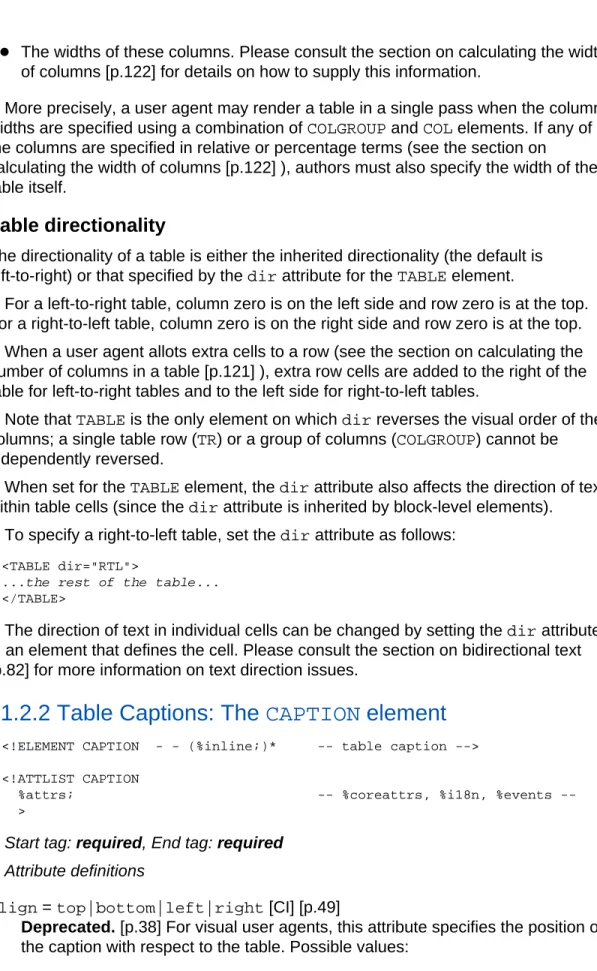
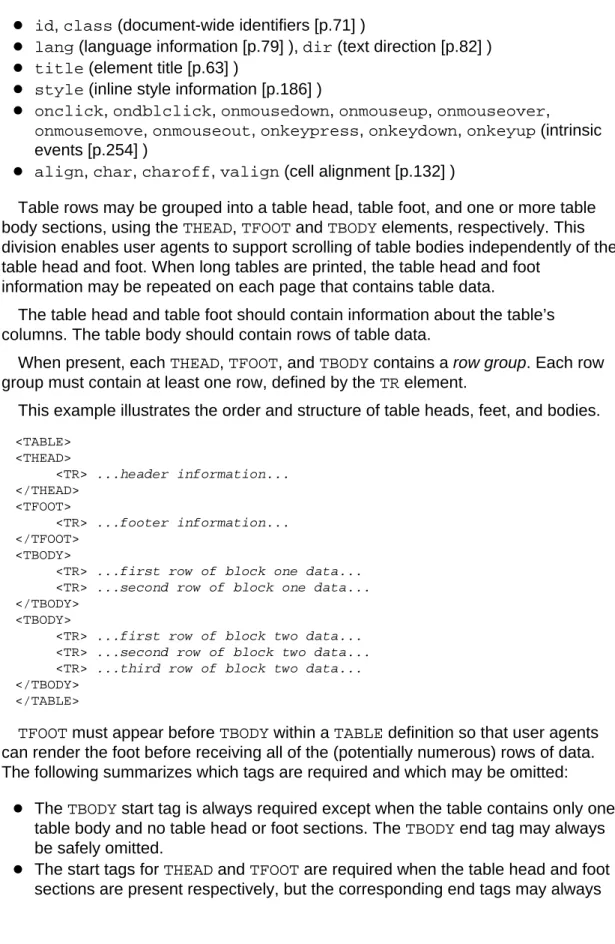
![Table rows [p.116] may be grouped into a head, foot, and body sections, (via the THEAD, TFOOT and TBODY elements, respectively)](https://thumb-us.123doks.com/thumbv2/123dok_us/792756.2600212/111.918.165.612.220.970/table-grouped-sections-thead-tfoot-tbody-elements-respectively.webp)