An Experimental Study of Workflow and Collaborative Document
Authoring in Medical Research
Venkata ~ a l l a ~ a r a j u ~ Gitesh
K
R.aikundaliat Caroline ~ r a n d Christopher ~ a i n ~ Ana ~ u t c h i n s o n ~'~chool of Computer Science and Mathematics
Victoria University
PO Box 14428
Melbourne City MC 800
1
Australia
5~linical
Epidemiology and Health Service Evaluation
Melbourne Health
Parkville, Melbourne 3050 Australia
vgd28 Gitesh. Raikundalia Caroline. Brand Christopher. Bain Anastasia. Hutchinson @yahoo. com @vu. edu. au @mh. org. au @mh. org. au @mh. org. au
Abstract Workjlow is asynchronous technology widely used in the automation o j organisational processes. Workjlow provides benefits such as greater eflciency in an organisation, better worker productivity and greater process control. Synchronous collaborative authoring tools are technologies that allow a group o j dispersed authors to write a document at the same time. These tools are beneficial in assisting authors to write some proportion, ijnot all, of a document simultaneously.
This paper presents findings from an experiment combining both workjlow and collaborative authoring tools in a medical research environment. Studies investigating the combination of these tools are few, resulting in a lack of understanding of how this combination can effectively assist organisations in document-based processes. Overall, the combined wor~ow/collaborative authoring solution was found effective in the generation of a medical research paper.
Keywords Workflow, collaborative document authoring, medical research, experimental study.
1
Introduction
The Workflow Management Coalition (WfMC) is a major international organisation that promotes workflow by development of standards for workflow systems. The WfMC defines a workflow system as a system "that defines, creates and manages the Proceedings of the 10th Australasian Document Computing Symposium, Sydney, Australia, December 12, 2005. Copyright for this article remains with the authors.
execution of workflows through the use of software, running on one or more workflow engines" [ I ] where a workflow is the automation of a process. Numerous workflow systems have been developed over several years for the purpose of assisting humans in business and other processes. For instance, the processing of a home loan application in a bank is an obvious multiple-stage problem where automation of the process with technology assists greatly. The workflow allows the bank to track the required application documents and forward them to the appropriate staff members, thereby making the whole process more efficient.
Collaborative authoring tools are tools that allow multiple dispersed users to create and work on a document simultaneously. The benefit of such a tool is that members of a group may collaborate on the document from their own computers. Also, a group member does not have to wait for another member to finish their current work on the document before they can contribute to the document. The members can work efficiently on the document at the same time, assisting each other in writing its contents. Fpr instance, two university lecturers could write and finish an assignment handout (specifications of the assignment) together simultaneously, from their own computers.
where multiple authors may wish to work jointly and simultaneously.
Documenting and publishing of findings in medicine is a process that is often highly collaborative, involving many medical researchers, often taking many stages to complete. Given there are many stages in the process, where at least some of the stages would require more than one researcher to cooperate at the same time, this process can benefit highly from automation. Automation of this process should reduce human intervention as much as possible. For instance, researchers do not have to email the research paper to one another, and do not have to keep track of who has to work on the paper at which stage. Clearly, workflow tools are designed to launch either single-user or multiple-user tools as required by users. This project explores the effectiveness of collaborative word processing in a document-based process automated by workflow.
The combination of workflow and collaborative authoring tools in the support of document authoring has not been addressed sufficiently. A small number of systems exist that support collaborative creation of content assisted by workflow. For instance, Ho, Leong and Lam [2] describe a CORBA-based workflow framework that integrates a collaborative editor. Therefore, to the authors' knowledge, there is indeed a tremendous lack of research regarding experimental results for this combination in a real- world setting.
This paper describes an experiment on the combination of workflow and collaborative authoring in the generation of a medical research paper by a team of medical researchers. The medical researchers are from Anonymous Medical Organisation (AMO) in City, Country. The researchers work in an environment in which research papers and reports are frequently under development and require iterative input from multiple colleagues. Traditionally, group members work on the document contents separately. They may work on different sections of a document or on the same sections of the document, but will cany almost all of this out at different times from one another. Thus, one researcher is required to merge all contributions, once they have all been received, at the end of the entire process. Since documents often undergo a number of drafts, this effort can be time consuming and laborious as well as confusing.
The medical researchers have not been exposed to automating this document production process using workflow. Nor have they been exposed to the use of a collaborative word processor in enabling them to work together on the document simultaneously. This experiment required the researchers to write a research paper using the collaborative word processor, CoWord [3], and the workflow tool, TrackNShare [4], was used to automate the entire paper generation process.
For space reasons, screen captures of TrackNShare and CoWord have not been included in this paper. However, the CoWord user interface is very easy to understand: it is the same as the user interface of Microsoft Word since CoWord operates by using the version of Microsoft Word on the user's own computer! The purpose of the CoWord system is to take over the user's own installation of Microsoft Word and make it collaborative. However, for certain technical reasons known to the developers of CoWord, the software does not provide all Microsoft Word functionality when Microsoft Word is made collaborative (e.g., full table creation functionality is not available). TrackNShare operates generally in the same way as standard centralised workflow tools.
Timely and well-written medical research papers contribute to dissemination and uptake of new information that is of considerable public benefit. A
research paper is highly relevant to this research based on workflow and collaborative authoring because:
A research paper is a frequently developed document of considerable importance to medical researchers who wish to disseminate their ideas and research findings and improve their career prospects. The researchers in this experiment have experience in producing this document type, and therefore, the researchers' comments in this experiment are appropriate and substantiate the findings of this paper. A research paper requires brainstorming of
ideas, as attested by the medical subjects, which is one of the task types that collaborative editors and word processors are designed to support.
Research paper authoring is collaborative and is a process that can be automated naturally with workflow.
The medical researchers who participated in this experiment need to publish their work in various journals, such as Health Services Research or the Journal of Health Services Research & Policy, and conferences, such as the Health Services & Policy Research Conference or the International Conference on the Scientific Basis of Health Services. The research paper the subjects wrote in this experiment was a conference paper about approaches and techniques to ensure that patients interact successfully with a health care system. The researchers were particularly interested in writing about successful interactions with hospitals, and are aiming to submit the paper to one of the above conferences.
and small groups are the group size usually expected workflow systems and technologies have indeed been to use a collaborative word processor or editor. used widely in various different domains. For instance, domains such as banking [I I], law [I21 and
2
Related work
pharmacy [13].A number of collaborative authoring systems have This section covers related work regarding the types also been produced over the last-few decades of technologies that are used in this project. The three (although there are not as many of these systems forms of related work cover workflow, collaborative compared to workflow systems). Systems include authoring, and lastly, combined workflow and those such as SASSE [14], JAMM [IS] and collaborative authoring. MoonEdit [16]. In order to implement such systems, Various types of workflow systems exist and are certain issues have had to be addressed. An example widespread in use. Web-based workflow tools have of an issue is that of inconsistency. Inconsistency can increased in number since the rise in popularity of the occur in the form of divergent results where a Web. IBM Lotus Domino [5] is a well-known, document is replicated at different sites. A solution to commercial system incorporating different this inconsistency problem is a consistency model as collaboration technologies, including workflow. The explained in [17].
most recent versions of this system provide Web user ' Some systems may have specific applications
interfaces for using the system. WWWorkflow [6] is rather than being general document editors. Clay [I81 a system that is distinguished by its "careful is a collaborative environment that allows separation of process mediation from product data geographically distributed software developers to management". Fakas and Karakostas [7] present peer- work together synchronously. Qingzhang, Zangyin to-peer technology for managing dynamic workflow and Kezhen [I91 present work on simultaneous using Web Workflow Peers. collaboration on XML documents.
Another type of workflow is that of component- As stated earlier, very few systems exist that based systems. A generic workflow framework, automate a document-based process using workflow BPAFrame, is presented in [8] that uses business whilst supporting collaborative authoring. This may objects in modelling processes and resources. likely have been because any relevant tool can be W A S A ~ [9] suppork flexible workflows in a integrated with a workflow system. Thus, apart from heterogeneous environment and is built from the the related work covered next, there may have been CORBA framework. Yongyi and Weishi [I01 no great need to specifically integrate a collaborative describe the component-based architecture of authoring tool than any other tool. Workflow systems Betterprocess, which-is a distributed software process are usually generic and allow use of any appropriate management system. tool during task execution. However, experimental Apart from the Web and components, other bases results for combined workflow and collaborative and perspectives exist from which workflow systems authoring are lacking. The following will therefore are developed. However, there are too many bases cover the few known systems that combine both and perspectives to cover here. Workflow systems
I---'
I I
I I
I I
I I
I
L
- - -
-
- - -
L - J
MR
1,
MR2
and
MR3
asynchronous collaboration only are not covered here. Ho, Leong and Lam [2] present a system where the documents a group works on are converted into XML format. Storage of general document content in XML format means that the attributes of XML can be applied to assist in document processes. For instance, the fragment nature of XML assists in access control and resource locking of contents. [20] describes a prototype, WoTel, that integrates a multimedia collaboration system to allow dispersed users to conduct audiolvideo conferencing whilst working on documents. Hodel, Gall and Dittrich [21] describe their TeNDaX architecture that supports synchronous editing, but stores the document contents within a database unlike approaches of other research. The researchers cover an evaluation of their system. However, this is not a trial of any form from which results can be applied to combined workflow and collaborative editing. Finally, Joeris [22] explains the use of synchronous collaboration and workflow in support of engineering domains.
3
Experimental Design
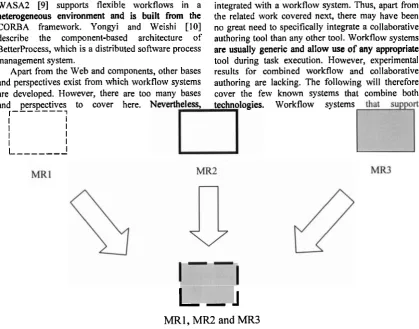
Figure 1 shows the current procedure in A M 0 for collaborative authoring of research papers. This is the way in which A M 0 researchers, MRJ, MR2 and MR3, have always authored a paper before their involvement in the experiment. The word processor used throughout is Microsoft Word. The Figure shows that medical researchers work on their own contributions to the paper independently of one another. For instance, MRl will work on the abstract, introduction and methodology sections of the paper. Once all researchers have completed their contributions to the paper, the separate contributions are merged together into the final version. The researchers will work together on the same computer tojnalise the paper. In this case, all three researchers will be "huddled around" one researcher's computer, discussing the paper.
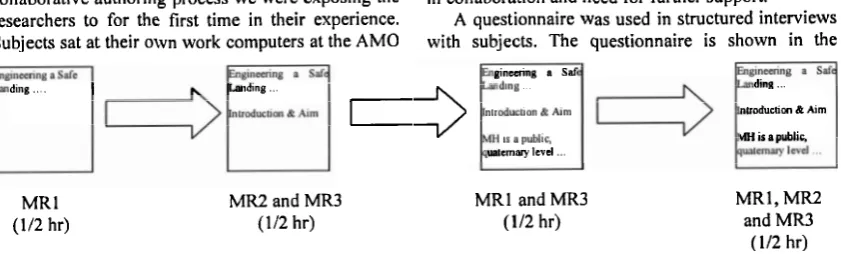
Figure 2 shows the experimental workflow, configured with TrackNShare, which the researchers followed in authoring a research paper using CoWord. This was the workflow-driven form of the collaborative authoring process we were exposing the researchers to for the first time in their experience. Subjects sat at their own work computers at the A M 0
ding ... iding ...
I
MR I (112 hr)
MR2 and MR3 (112 hr)
site. Unlike in Figure 1, there is simultaneous collaboration on the document, using CoWord, almost all the way throughout the entire process. The first task is where MRl initiates the paper (using either CoWord as a single user or Microsoft Word). The A M 0 researchers felt that in this new configuration it was more effective for one of them to begin the paper so that others can work on the paper later-there was simply no need for more than one researcher to begin the paper together. Apart from the first task, all tasks in the workflow involved two or three researchers working on the paper at the same time using CoWord. Subjects spent half an hour on each of the tasks as shown in Figure 2.
Before the experiment, the subjects decided on the paper they would write in the experiment, through simple, informal, verbal discussion. The subjects discussed the content of the paper, deciding who would contribute which content to the paper. They also decided who would be involved in which of the tasks shown in Figure 2. The conference paper the subjects wrote was, "Engineering a Safe Landing: attitudes, knowledge and participation of medical clinicians in organisational patient safety systems". This paper was about patients' potentially successful interactions with health care systems, particularly hospitals. When the experiment finished, the paper ended up being just over six pages in length.
A subject would use a specific TrackNShare user interface to forward the document to the next subjects. When subjects were configured to work next on the document in the wol.kflow, TrackNShare informed them by presenting a special user interface. One of the subjects would open the document, and all that the other subject(s) had to do was to use a specific CoWord window to join the session. The other subject(s) collaborating simultaneously with the first subject would therefore view the same document on their screen(s) in CoWord. The subjects would work on the document and one of them would forward the document onto the next subjects. However, the subjects were allowed no forms of communication at all (such as telephone, chatlinstant messaging tools, etc.) with one another. It was hoped that the subjects may flag any difficulties they found in collaboration and need for further support.
A questionnaire was used in shuctured interviews with subjects. The questionnaire is shown in the
gincuing a Saf
3
ualcrnary levd ...
MRl and MR3 ( 112 hr)
ding ...
nlrodudcin & Aim
i s a public,
MRl, MR2 and MR3
Appendix. The questionnaire contains open-ended questions where many of the questions address use of:
workflow only
collaborative word processor only
both workflow and collaborative word processor
Open-ended questions are used because they allow the subjects to describe their experience in carrying out the task, and they can capture what actually happens when using the tools. These results reflect how effective or ineffective the tools were in supporting research paper generation, and therefore, generation of many other similar documents types. Quantitative results were not sought because there were three subjects in the experiment. The intention of the study was to provide some initial insights into the use of these technologies in this medical domain. Such insights can guide further research into usage or even development of these tools.
Some questions of the questionnaire can be clarified at this point (see Appendix):
Question 3 compared the usual situation the researchers experienced when jnalising a paper where all researchers were "huddled around" the same computer using Microsoft Word with the experimental situation where researchers were seated at their own work computers using CoWord (represented by the last task in Figure 2).
Question 4 sought the researchers' responses to collaborating on the document with another researcher in the experiment (the two central tasks in Figure 2) compared to the previous situation where they worked on their own. Question 5a. determined if the subject found using CoWord an overall success. If CoWord was found successful overall, Question 5b. determined what problems and difficulties were experienced, despite overall success. Note that Question 7a and 7b, and 9a and 9b are similar in nature to Question 5a and 5b. The first author of this paper interviewed each subject individually using structured interviews. The subjects wrote their responses onto their own copies of the questionnaires during the interviews (self- completed questionnaires), and were questioned by the author to clarify any issues related to their responses. The qualitative contents of these questionnaires were analysed to determine the findings presented in the next section.
4 Results of Analysis
Questionnaires were analysed by summarising and synthesising the written responses of subjects. The results from the questionnaires are covered in this section. The purpose of this paper is not to cover
responses to all questions of the questionnaire, but to focus on major results found.
Firstly, in response to the "Background" question in the questionnaire, the years of experience of subjects in electronic word processing and electronic mail were: 6 years, 8-10 years and 20 years. Hence, it is clear that our subjects had sufficient expertise in the basic tools of email and Microsoft Word.
4.1 Question
3
-
Finalising the Paper
One subject stated that it was "Effective working on your own computer in contrast to all sitting around a single computer" and that this "increased work speed and efficiency" in writing the document.
Another subject stated that it was better to work in this way because all subjects were able to work together at the same time. However, this subject stated that it was important for all the researchers to have a strategy in order for all of them to work at the same time most effectively. The subject gave the example of the three researchers carrying out possibly different tasks: one researcher works on content of the document, one researcher verifies spelling of the document and the last researcher makes suggestions or comments on the content of the document.
The final subject commented that the finalisation task depicted in Figure 2 was easy to carry out, apart from the software "glitch" in CoWord where there was "jumping" of the page when multiple users worked on the same page. The subjects complained about this problem of "jumping" a few times-a software-specific bug that is not found across collaborative editors and word processors, but happens to exist in the current version of CoWord.
4.2 Question
4
-
Collaborative Authoring
Sessions
One subject's response to this question was that the new way of collaborating simultaneously "worked smoothly and decreased issues around emailing multiple copies of the same document. As all users were working on a single file it is easier to keep track of workflow [the subject means: the flow of work]
-
and document changes" and was "more time efficient, potentially as do not need to wait for one person to finish for the next to start". The complaint this subject wrote in their response, which did not relate to this question, was that there were "Some limitations in the actual 'word' software: decreased functionality. E.g., lack of copy-and-pasteltable options". The subject was indicating that the current version of CoWord has some deficiencies regarding copy-and-pasting and creation of tables in documents. Again, these are difficulties with the current version that CoWord developers need to address, and are not peculiar to all collaborative editors or word processors.
performed very easily. This subject found no difficulties in collaborating with another researcher and that the software did not provide any major barriers to collaboration.
The remaining subject stated that there was 'Wo problem at all doing this phase", and that problems did not occur since the researchers were working on different sections during the sessions.
4.3 Question 5a and 5b
-
General
Success and any Difficulties in using the
Word Processor
The first subject indicated it was generally successful to use CoWord to author the paper. However, the main problem faced by this subject was that there was "some lack of synchronicity between views seen by multiple users" that "led to some edits being performed multiple times as viewer saw different versions of the document". This response reflects a bug in CoWord. For instance, given the word "Summary", one subject deletes "Su" from the word and another subject adds "Su". The first researcher doesn't see "Summary", but sees "mmary".
The second subject gave hisher own personal rating of 6/10 to reflect the success of CoWord in the authoring process. Overall, the subject was satisfied with using CoWord, and the reasons for giving a lower-than-expected rating include the following examples:
"insufficient Word functionality, e.g., right click functions, paragraph control/formatting, bullets and numbering"
"jumpiness [of the page when multiple users worked on the same page]"
"word chopping" [parts of words being cut as mentioned above by the first subject]
It can be seen that the problems of the current CoWord version have been the major factor in reducing the overall satisfaction that the researchers had in using the tool for collaborative authoring.
The final subject stated that CoWord was "Overall v. [very] successful. It is extremely useful to have one document rather than multiple copies which become v. [very] confusing".
Because all subjects answered Question 5a and 5b, there was no response to Question 6 about lack of success of CoWord.
4.4 Question 7a and 7b
-
General
Success and any Difficulties in using
Workflow
A response to this question was that "Collaborative workflow has great potential to assist preparing an entire document with multiple authors". This subject was simply indicating that they found the workflow tool was able to achieve the purpose of driving the
collaboration over a document by a group of medical researchers.
Another subject stated that they found workflow was very successful in achieving the goal of automating the entire authoring process and gave the tool a personal rating of 8/10. The subject suggested that it would be even better "if users can be automatically notified by email or when they log on that a doc[ument] was ready for them to work on". We had pursued the integration of email with TrackNShare to carry out this email notification before the experiment was conducted, however, we were unable to achieve this.
The final response to this question by a subject was that the software was "simple and to use and there were no problems in saving, forwarding or opening documents".
Because all subjects answered Question 7a and 7b, there was no response to Question 8 about lack of success of CoWord.
4.5 Question 9a and 9b
-
General
Success of Workflow and Word
Processor
The subjects gave reasonably simple responses to these questions, reflecting that workflow fulfilled its purpose in providing access to the document whilst simplifLing the effort of the authors. The first subject stated that the workflow system %works fine", but that the problems experienced were associated with CoWord (e.g., "jumping" and "synchronicity of content"). The second subject remarked that together these tools were effective generally and gave a rating of 6/10 because of the problems with CoWord (e.g., limited functionality of CoWord). The final subject responded that the combination was generally very successful and "would use it again".
Because all subjects answered Question 9a and 9b, there was no response to Question 10 about lack of success of the combination of the tools.
5 Discussion
From our results, there was major success in using a workflow system and a collaborative authoring system together to write a very important document in medical research. It can be seen that workflow facilitated distributed, synchronous collaboration (workflow was "making it all happen"). Workflow provided relief in avoiding confusion over multiple copies of the paper. Given the subjects worked only on one version of the paper, workflow also assisted the subjects by preventing them from dealing with the routing of the document, and from being concerned about its storage and versioning.
the usual way of working where all researchers were positioned at the one, same computer to finalise a paper together, CoWord presented no problem in working simultaneously from separate computers. This new way of working was seen as more efficient as stated by one of the researchers. Of course, this is all contingent upon an agreed group strategy for collaboration. The researchers were pleased to replace working at the same computer using Microsoft Word with working from their own computers using CoWord.
This experiment had been carried out on the basis that there were four tasks involved in authoring a paper. This number of tasks was deliberately fixed in advance; we were more interested in the effectiveness of the tools in canying out the process rather than completing the entire document using the two tools. In reality, authoring a medical research paper would clearly involve more than four tasks. Indeed, the exact number of tasks a particular team would require would not be known in advance and would be dynamic. Hence, flexible workflow would be relevant to this process. It is future work to investigate usage of flexible workflow for such a process. The idea of the current experiment was to use a simple scenario so that a pre-determined, relatively small number of tasks would be used to focus upon the usefulness and effectiveness of the combination of workflow and collaborative authoring.
5
Conclusion
This paper presented an experiment on authoring of a medical research paper using workflow and collaborative authoring systems. Findings of the experiment, based on a questionnaire used in structured interviews, were presented. These two types of tools proved sucessful in assisting researchers to achieve their goal. Some annoyance was caused because of small-scale bugs and unimplemented Microsoft Word functionality in the collaborative authoring system. However, this is not a tremendous problem and requires further effort from the developers of the system.
We are interested in investigating the use of these collaborative tools in other medical document processes and determining how effective they are in supporting such processes. Collaboration is an important component in medical applications, not only between researchers, but between doctors, patients and administrators. Hence, investigating the usefulness of collaborative tools in medicine is an interesting avenue to pursue.
References
[I] Workflow Management Coalition. Workflow Management Coalition Terminology & Glossary. Retrieved 31 May 2005, from
htt~:/lwww.wfmc.or~lstandards/docs~TC-
10 1 1 term glossary v3.~df.
[2] K. Ho, H. Leong and W. Lam. A collaborative word processing systems using a CORBA-based workflow system. In 3rd International Symposium on Distributed Objects &
Applications, pages 176- 1 85, Rome, Italy, 17-20 September 200 1.
[3] S. Xia, D. Sun, C. Sun, D. Chen and H. Shen. Leveraging single-user applications for multi- user collaboration: the CoWord approach. In CSCW '04, pages 162
-
171, Chicago, USA, 6- 10 November 2004.[4] Memetex, Inc. TrackNShare Real Time Business Process Manager. Retrieved 28 July 2005, from httr,://www.memetex.net.
[5] IBM. Lotus Sofhvare. Retrieved 2 June 2005, from http:lhvww-
306.ibm.com/so~are/lotus/sw-atoz/index.html.
[6] C. Ames, S. Burleigh and S. Mitchell S. WWWorkflow: World wide workflow. In HICSS 1997, pages 397-404, Maui, Hawaii, 7-
10 January 1997.
[7] G. Fakas and B. Karakostas. A peer to peer architecture for dynamic workflow management. Information and Software Technology, Volume 46, Number 6, pages 423-43 1,2004.
[8] A. Schill and C. Mittasch. A generic workflow environment based on C O M A business objects. In Middleware198, pages 18-34, The Lake District, England, 15-1 8 September 1998. [9] G. Vossen and M. Weske. The WASA2 object
oriented workflow management system. In ACM SIGMOD International Conference on Management of Data, pages 587-589, Philadelphia, USA, 1-3 June 1999.
[lo] X. Yongyi and Z. Weishi. Component-based workflow architecture of a distributed software process management system. In 3rd International Conference on Quality Sofhuare, pages 204-210, Dallas, USA, 6-7 November 2003.
[ l l ] FINEOS Corp. Ltd. Technology
-
Workflow manager. Retrieved 2 June 2005, fromhttr,://www.fineos.com/technolosrv/workflow ma nager/index.htm.
[I21 A. Abrahams, D. Eyers and J. Bacon. An asynchronous rule-based approach for business process automation using obligations. In 2002 ACM SIGPLAN Workshop on Rule-based Programming, pages 93-103, Pittsburgh, Pennsylvania, 5 October 2002.
Experiment
Symposium on Applied Computing, pages 235- 239, USA, 9- 12 March 2003.
[14] R. Baecker, D. Nastos, I. Posner and K . Mawby. The user-centred iterative design o f collaborative writing software, I n InterCHI'93, pages 399-405, Amsterdam, 24
-
29 April 1993.[IS] J. Begole, C. Struble, C. Shaffer and R. Smith. Transparent sharing o f Java applets: a replicated approach. I n 10th Annual ACM symposium on User Inledace Sofhvare and Technology, pages 55
-
64, Alberta, Canada, 14 -17 October 1997. [I61 T. Dobrowolski. MoonEdit. Retrieved 3 June2005, from htt~://moonedit.com/
[17] Y. Yang, C. Sun, Y. Zhang and X. Jia. Real-time cooperative editing on the Internet. IEEE Internet Computing, Volume 4, Number 1, pages
18-25,2000.
[I81 M. Locasto, M. Hulme, R. Gladysiewicz, J. Tracy and U. Wolz. Clay: synchronous collaborative interactive environment. The Jolrrnal of Computing in Small Colleges,
Volume 17, Number 6, pages 278-281,2002. [19] C. Qingzhang, H. Zangyin and Y. Kezhen.
XML-based collaborative documents model design, I n 8th International Conference on Computer Supported Cooperative Work in Design, pages 24-28, Volume 1, Xiamen, China, 2003.
[20] M. Weber, G. Partsch, S. Hock, G. Schneider, A. Scheller-Houy and J. Schweitzer. Integrating synchronous multimedia collaboration into workflow management. I n International ACM SIGGROUP Conference on Supporting Group Work, pages 28 1-290, Phoenix, Arizona, 16-1 9 November 1997.
[21] T. Hodel, H. Gall and K. Dittrich. Dynamic collaborative business processes within documents. I n SZGDOC 2004, pages 97-103, Memphis, USA, 10
-
13 October 2004.1221 G. Joeris. Cooperative and integrated workflow and document management for engineering applications. I n Eighth International Workshop on Database and Expert Systems Applications,
pages 68-73, Toulouse, France, 1-2 September 1997.
Appendix
Questionnaire
Background
How long have you been authoring documents using e-mail and Microsoft Word?
1. How successfullunsuccessful did you find editing the document when other users are also editing at the same time?
2. How did you find forwarding the documents using workflow instead of e-mail?
3. Scenario 1: Editing a document with Microsoft Word, all users sitting at one computer.
At the final phase, you finalize a document at the same time while sitting at your own computer. How did you find finalizing a document at this phase using the collaborative word processor sitting at your own computer when compared to Scenario 17
4. Scenario 2: Editing the document all alone with Microsoft Word, and then forwarding to the next user.
Before the last phase of finalization of documents, there were two phases of authoring the documents sitting at your own computer. How did you find two of you editing the documents using the collaborative word processor during these phases when compared to Scenario 27
Collaborative word Drocessor: 5.
a. How generally successful was it editing the documents using a Collaborative word Processor?
b. If there were any problems/difficulties, what are they?
6. If using the collaborative word processor was not generally successful what were the reasons for this?
Workflow: 7.
a. How generally successful was workflow software in assisting users to carry out the entire process of authoring a document?
b. If there were any problemsldifficulties, what are they?
8. If using workflow was not generally successful what were the reasons for this?
Workflow and collaborative word Drocessor:
9.
a. How generally successful was it authoring documents using a collaborative word processor and workflow?
b. If there were any problemsldifficulties, what are they?
10. If using collaborative word processor and worktlow was not generally successful what were the reasons for this?