A plugin-based approach to data analysis for the AMS
ex-periment on the ISS
Valerio Formato1,∗
1INFN - Sezione di Perugia, Via A. Pascoli s.n.c., 06123 Perugia (PG)
Abstract.In many HEP experiments a typical data analysis workflow requires each user to read the experiment data in order to extract meaningful information and produce relevant plots for the considered analysis. Multiple users access-ing the same data result in a redundant access to the data itself, which could be factorized effectively improving the CPU efficiency of the analysis jobs and
relieving stress from the storage infrastructure. To address this issue we present a modular and lightweight solution where the users code is embedded in dif-ferent "analysis plugins" which are then collected and loaded at runtime for execution, where the data is read only once and shared between all the diff
er-ent plugins. This solution was developed for one of the data analysis groups within the AMS collaboration but is easily extendable to all kinds of analyses and workloads that need I/O access on AMS data or custom data formats and
can even adapted with little effort to another HEP experiment data. This
frame-work could then be easily embedded into a "analysis train" and we will discuss a possible implementation and different ways to optimise CPU efficiency and
execution time.
1 Introduction
In a typical High-Energy physics (HEP) experiment the analysis of the collected data is often organised into different groups of people who collaborate towards a single measurement of a
particular physics topic. This workflow usually results in people tackling different problems
of the same analysis concurrently, in order to efficiently split the workload and to obtain a
meaningful physics result quicker. Also, to avoid biases and to ensure the reproducibility of the result, people in the same analysis group share the same exact dataset to work on.
A common realization of this kind of workflow is the one where the people involved in the analysis will all read from the same dataset, perform some operations on the data they read, and write out the result of such operations on some new files. The underlying issue with this approach is in the fact that the data access is completely replicated between people in a redundant manner. Combined with the fact that in HEP analysis processes I/O access to
data on disk constitutes a significant fraction of the wall-clock time, this usually results in a inefficient use of the computing resources allocated for the analysis.
In this work an analysis framework developed for the data analysis of the AMS-02 [1] collaboration is presented, that allows people involved in the analysis to share the data-access at runtime.
2 The framework
In our framework a clear separation is made between the process of loading the AMS data from file and the execution of user code on the data that has been loaded. The user code is encapsulated in a “plugin” which is dynamically loaded by the main executable which, in turn, has the only task of reading the event data and feeding it to the various plugins.
The framework is heavily based on theROOT[2]TSelectorclass: in the main executable a manager class, derived fromTSelector, handles the registration and execution of all the user plugins (also derived fromTSelector).
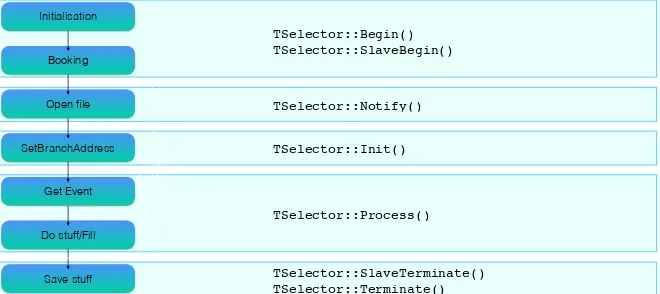
The choice of theTSelectorclass was adopted because it enforces a modular approach to the analysis, and maps very well to the most common steps in HEP data analysis (see Figure 1).
Initialisation
Booking
Open file
SetBranchAddress
Get Event
Do stuff/Fill
Save stuff
iFile++
iEv++
TSelector::Begin() TSelector::SlaveBegin()
TSelector::Notify()
TSelector::Init()
TSelector::Process()
TSelector::SlaveTerminate() TSelector::Terminate()
Figure 1.Parallelism between the common steps in HEP data analysis (left) and the TSelector structure (right).
2.1 The plugin manager
The core of the framework is theTSAnaPluginManagerclass (hereafter also called “plugin manager”), a custom class derived fromTSelector. It serves mainly two functions: it loads and stores in memory the data to be processed, and it serves the data to the user plugins it has registered for execution.
In this particular case study the data is stored in standard ROOT files using a standard
TTree where each TBranch holds a data container each specialised to hold data from a particular subdetector. TheTSAnaPluginManageralso inherits from a customEventclass, which internally holds pointers to all the data structures in the tree branches. The idea behind this double inheritance is to merge the data-holding behaviour of theEventclass with the logic of how the event has to be processed. This is particularly useful in simplifying the process of writing the user analysis code since it presents the user with a common and familiar interface to the data.
2 The framework
In our framework a clear separation is made between the process of loading the AMS data from file and the execution of user code on the data that has been loaded. The user code is encapsulated in a “plugin” which is dynamically loaded by the main executable which, in turn, has the only task of reading the event data and feeding it to the various plugins.
The framework is heavily based on theROOT[2]TSelectorclass: in the main executable a manager class, derived fromTSelector, handles the registration and execution of all the user plugins (also derived fromTSelector).
The choice of theTSelectorclass was adopted because it enforces a modular approach to the analysis, and maps very well to the most common steps in HEP data analysis (see Figure 1).
Initialisation
Booking
Open file
SetBranchAddress
Get Event
Do stuff/Fill
Save stuff
iFile++
iEv++
TSelector::Begin() TSelector::SlaveBegin()
TSelector::Notify()
TSelector::Init()
TSelector::Process()
TSelector::SlaveTerminate() TSelector::Terminate()
Figure 1.Parallelism between the common steps in HEP data analysis (left) and the TSelector structure (right).
2.1 The plugin manager
The core of the framework is theTSAnaPluginManagerclass (hereafter also called “plugin manager”), a custom class derived fromTSelector. It serves mainly two functions: it loads and stores in memory the data to be processed, and it serves the data to the user plugins it has registered for execution.
In this particular case study the data is stored in standardROOT files using a standard
TTree where each TBranch holds a data container each specialised to hold data from a particular subdetector. TheTSAnaPluginManageralso inherits from a customEventclass, which internally holds pointers to all the data structures in the tree branches. The idea behind this double inheritance is to merge the data-holding behaviour of theEventclass with the logic of how the event has to be processed. This is particularly useful in simplifying the process of writing the user analysis code since it presents the user with a common and familiar interface to the data.
Before starting to process the data the plugin manager loads all the user plugins and replaces the user plugin data pointers with its own. The data processing is then performed
according to the usual steps in aTSelectoranalysis, with the only caveat that in each of the classicTSelectormethods theTSAnaPluginManager takes care of calling the same method for each of the user plugins.
Listing 1.The plugin manager schedules execution of the user plugins
1 Bool_t TSAnaPluginManager :: Process ( Long64_t entry) {
2 _bench ->Start(" PluginManager :: GetEntry ");
3 GetEntry (entry );
4 _bench ->Stop(" PluginManager :: GetEntry ");
5
6 // ... 7
8 Bool_t retValue = kTRUE , tempret ;
9
10 for (auto &pl : _plugins ) {
11 _bench ->Start (( std :: string )(( TNamed *)pl.get ())-> GetName () + ":: Process ");
12 tempret = pl -> Process (entry );
13 retValue = retValue && tempret ;
14 _bench ->Stop (( std :: string )(( TNamed *)pl.get ())-> GetName () + ":: Process ");
15 }
16
17 return retValue ; 18 }
A set of custom stopwatches measures the execution time of each user plugin as well as the time required to load the data in memory, to profile and possibly spot bottlenecks in the user code.
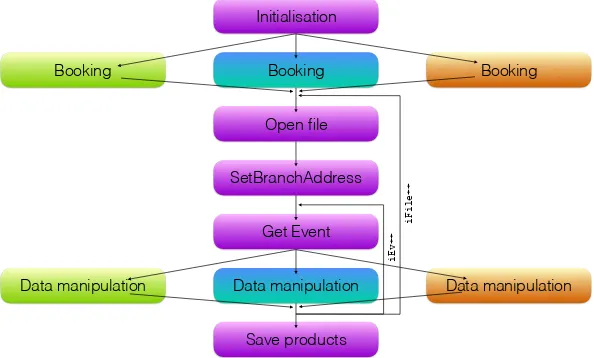
The resulting execution flow is summarised in Figure 2: the purple blocks show all the tasks that are handled by the plugin manager, and thus only executed once per event, while specialization is delegated to the user plugins only where needed.
Booking
Data manipulation
Booking
Open file
SetBranchAddress
Get Event
Data manipulation
Save products Initialisation
Booking
Data manipulation
iFile++
iEv++
2.2 The user plugins
The classTSAnaPlugindefines a base interface for user plugins. It inherits from both the
TSelectorand the customEventclass, same as for the plugin manager, and it will be the
one from which all user plugins shall inherit.
TheTSAnaPluginclass implements all theTSelectormembers and it exposes to the
user an additional hook where the user can book the desired output objects (see Sec. 2.3). The two main methods where the user will write his analysis code are:
• TSAnaPlugin::BookHistos()
This member function is called by the plugin manager as soon as the user plugin is first cre-ated, in the initialization phase. Here the user can declare all the analysis objects that must be created or initialized before the event loop. Special care has been given to the creation ofROOThistograms and trees, which is handled by two dedicated managers (described in Sec. 2.3).
• TSAnaPlugin::Process()
This member function is called by the plugin manager each time a new event is loaded in memory. It contains the main body of the analysis, such as event selections, vari-ables manipulation, histogram/tree filling and so on. As a design choice, the fact that
theTSAnaPluginclass inherits from the analysis customEventclass means that in this
method all the pointers to the internal data structures are already available to the user for utilization without the need to redefine/redeclare them. The user can, then, simply write
the same kind of analysis code he would have written in his custom programs or macros.
Listing 2.Example user analysis code
1 Bool_t ExamplePlugin :: Process ( Long64_t entry ){ 2 // ...
3 if( Tof ->z != 1 ) return kFALSE ;
4 if( Tof -> z_like <= 0 || Tof -> z_like > -log10 (0.98) ) return kFALSE ; 5 if( nTrHitsY < 5 ) return kFALSE ;
6 if( nTrHitsXY < 3 ) return kFALSE ; 7 return kTRUE;
8 }
One small detail worth mentioning is that theProcess()method needs to return aBool_t
even if this return value is not used in theTSelectorscheme, we chose to follow the orig-inal implementation by theROOTteam. This means that if a user wants to skip processing an event he should just returnkFALSE.
Inheriting fromTSelectormeans that in principle a user plugin can be run in “standalone mode”,i.e. without a plugin manager. The framework allows for this possibility: if a plu-gin manager is not present then the user pluplu-gin will take care of the data loading, other-wise the plugin manager will override all the pointers to the internal data structures in the
TSAnaPluginobject with its own (in this way no data is actually moved, and it is still owned
by the plugin manager). Standalone execution is especially useful if the user wants to test his own code before scheduling it for execution.
2.3 Output handling
The most common analysis workflow in HEP is looping on a given set of events, discard those not considered interesting for the analysis, and then either filling a set of histograms with the distribution of some relevant observables or save a golden subset of events in aROOT
2.2 The user plugins
The classTSAnaPlugindefines a base interface for user plugins. It inherits from both the
TSelectorand the customEventclass, same as for the plugin manager, and it will be the
one from which all user plugins shall inherit.
TheTSAnaPluginclass implements all theTSelectormembers and it exposes to the
user an additional hook where the user can book the desired output objects (see Sec. 2.3). The two main methods where the user will write his analysis code are:
• TSAnaPlugin::BookHistos()
This member function is called by the plugin manager as soon as the user plugin is first cre-ated, in the initialization phase. Here the user can declare all the analysis objects that must be created or initialized before the event loop. Special care has been given to the creation ofROOThistograms and trees, which is handled by two dedicated managers (described in Sec. 2.3).
• TSAnaPlugin::Process()
This member function is called by the plugin manager each time a new event is loaded in memory. It contains the main body of the analysis, such as event selections, vari-ables manipulation, histogram/tree filling and so on. As a design choice, the fact that
theTSAnaPluginclass inherits from the analysis customEventclass means that in this
method all the pointers to the internal data structures are already available to the user for utilization without the need to redefine/redeclare them. The user can, then, simply write
the same kind of analysis code he would have written in his custom programs or macros.
Listing 2.Example user analysis code
1 Bool_t ExamplePlugin :: Process ( Long64_t entry ){ 2 // ...
3 if( Tof ->z != 1 ) return kFALSE ;
4 if( Tof -> z_like <= 0 || Tof -> z_like > -log10 (0.98) ) return kFALSE ; 5 if( nTrHitsY < 5 ) return kFALSE ;
6 if( nTrHitsXY < 3 ) return kFALSE ; 7 return kTRUE;
8 }
One small detail worth mentioning is that theProcess()method needs to return aBool_t
even if this return value is not used in theTSelectorscheme, we chose to follow the orig-inal implementation by theROOTteam. This means that if a user wants to skip processing an event he should just returnkFALSE.
Inheriting fromTSelectormeans that in principle a user plugin can be run in “standalone mode”,i.e. without a plugin manager. The framework allows for this possibility: if a plu-gin manager is not present then the user pluplu-gin will take care of the data loading, other-wise the plugin manager will override all the pointers to the internal data structures in the
TSAnaPluginobject with its own (in this way no data is actually moved, and it is still owned
by the plugin manager). Standalone execution is especially useful if the user wants to test his own code before scheduling it for execution.
2.3 Output handling
The most common analysis workflow in HEP is looping on a given set of events, discard those not considered interesting for the analysis, and then either filling a set of histograms with the distribution of some relevant observables or save a golden subset of events in aROOT
TTreefor a more detailed analysis.
For this reason the framework provides an interface to handle histogram and tree creation and manipulation in a quick and transparent way. The plugin manager holds two objects: a histogram manager and a tree manager. The user plugins will then forward all the requested operations on histogram/trees to the plugin manager.
Listing 3.Example user analysis code 1 void ExamplePlugin :: BookHistos (){
2 AddHisto ( new TH1D(" nParticle ", ";nP; Counts ", 6, -0.5, 5.5) ); 3 AddHisto ( new TH1D(" nTrTrack " , "; nTrack ; Counts ", 10, -0.5, 9.5) ); 4 }
5
6 Bool_t ExamplePlugin :: Process ( Long64_t entry ){ 7 // ...
8 Fill(" nParticle ", Header -> nparticle ); 9 Fill(" nTrTrack " , Header -> ntrtrack ); 10
11 return kTRUE; 12 };
Histogram and trees are addressed by name and, to avoid collision, the plugin manager com-bines the histogram/tree name with the user plugin name in order to create a unique name
for each objects it needs to store and access. At the end of the event loop the objects created by each plugin are saved in a dedicatedTDirectoryinside the outputTFile. This is done to ease the file management in batch jobs, in this way there is no need to know how many plugins have been run and how many files were created: the output file is always one and the compartmentalization happens inside theTFileitself.
2.4 The selection store
Data loading is the most time-consuming task in the analysis that should not be replicated by all the users, but it is not the only one. Event selection is typically another task that is performed in the same way by different users and that could benefit from a shared approach.
It is very likely that two or more users share part of the selections they use to perform their analysis, especially the more basic ones that are usually related to ensure a good recon-struction quality for the events under study.
The framework offers to the users an infrastructure that allows defining and creating
se-lections in such a way that they will be
1. Possibly visible and usable by all the other users. 2. Automatically cached.
This is implemented by a chained class structure where the most basic entity is the
CutAction, which is basically a named, parametrised lambda function that accepts anEvent
object and return aboolexpressing wether the event passes the selection or not.
Listing 4.TheCutActionclass 1 class CutAction {
2
3 public:
4 CutAction ( // full constructor
5 std :: string name , // cut name
6 std :: vector <double> defParams , // default parameters 7 std :: function <bool(Event*, std :: vector <double>)> cut // lambda function 8 ) : _name(name), _defParams ( defParams ), _cut(cut) {}
10 virtual ~ CutAction (){}; 11
12 // ... 13
14 bool Check( Event* Ev , std :: vector <double> params ){ return _cut(Ev , params ); } 15
16 private:
17 std :: string _name;
18 std :: vector <double> _defParams ;
19 std :: function <bool(Event*, std :: vector <double>)> _cut; 20 };
The most common and used selections have already been implemented but if the user needs to define a very specific selection he can easily write his ownCutAction.
Listing 5. An exampleCutActionwhich checks is the event contains exactlyntracks. The default value fornis 1.
1 CutAction * cut; 2
3 // ========================================================================== 4 // NTrTrack == n
5 // ========================================================================== 6 cut = new CutAction (
7 " NTrTrack_Eq ", // cut name
8 {1}, // cut default parameters
9 // [ ntracks ]
10 []( Event* Ev , std :: vector <double> params ){ // cut body function 11 return Ev ->Header -> ntrtrack == (int) params [0] ? true : false;
12 }
13 );
CutActionobjects are not directly exposed to the user during the event loop, but rather
they are hidden behind aCutProxyobject that handles the chaching of theCutActionresult for the same combination of event and parameters.
The realisation of a specificCutActionwith a given set of parameters defines a specific
CutInstance.CutInstanceobjects are the ones available to the user during the event loop
and there might be one or moreCutInstancesharing the sameCutProxybut evaluated with different parameters.
CutInstancescan be chained inCutListobjects. These lists and instances are held
inCutMgrobjects that handle the requests by the users during the event loop. Each user
plugin holds aCutMgrthat stores the user-defined selections. If at runtime the user requests a list or selection to be evaluated which is not present in the plugin CutMgr, then it will automatically fall back to theCutMgrobject in the plugin manager. If the selection is missing from the plugin managerCutMgras well, the final fallback is made on a precompiled list of selections, called “selection store”, held in a globalCutDBobject. The idea behind this logic is that the most common selections should be available to everyone in the “selection store” while selections needed only by one or few plugins should be put in the plugin manager
CutMgr. On top of this each user can actually reimplement a given selection in a custom
way by creating and adding the correspondingCutActionandCutInstanceto the plugin
CutMgr. This fallback mechanic allows a user to replicate an entire analysis flow adding the
10 virtual ~ CutAction (){}; 11
12 // ... 13
14 bool Check( Event* Ev , std :: vector <double> params ){ return _cut(Ev , params ); }
15
16 private:
17 std :: string _name;
18 std :: vector <double> _defParams ;
19 std :: function <bool(Event*, std :: vector <double>)> _cut;
20 };
The most common and used selections have already been implemented but if the user needs to define a very specific selection he can easily write his ownCutAction.
Listing 5. An exampleCutActionwhich checks is the event contains exactlyntracks. The default value fornis 1.
1 CutAction * cut;
2
3 // ========================================================================== 4 // NTrTrack == n
5 // ==========================================================================
6 cut = new CutAction (
7 " NTrTrack_Eq ", // cut name
8 {1}, // cut default parameters
9 // [ ntracks ]
10 []( Event* Ev , std :: vector <double> params ){ // cut body function
11 return Ev ->Header -> ntrtrack == (int) params [0] ? true : false;
12 }
13 );
CutActionobjects are not directly exposed to the user during the event loop, but rather they are hidden behind aCutProxyobject that handles the chaching of theCutActionresult for the same combination of event and parameters.
The realisation of a specificCutActionwith a given set of parameters defines a specific
CutInstance.CutInstanceobjects are the ones available to the user during the event loop and there might be one or moreCutInstancesharing the sameCutProxybut evaluated with different parameters.
CutInstancescan be chained inCutListobjects. These lists and instances are held inCutMgr objects that handle the requests by the users during the event loop. Each user plugin holds aCutMgrthat stores the user-defined selections. If at runtime the user requests a list or selection to be evaluated which is not present in the plugin CutMgr, then it will automatically fall back to theCutMgrobject in the plugin manager. If the selection is missing from the plugin managerCutMgras well, the final fallback is made on a precompiled list of selections, called “selection store”, held in a globalCutDBobject. The idea behind this logic is that the most common selections should be available to everyone in the “selection store” while selections needed only by one or few plugins should be put in the plugin manager
CutMgr. On top of this each user can actually reimplement a given selection in a custom way by creating and adding the correspondingCutActionandCutInstanceto the plugin
CutMgr. This fallback mechanic allows a user to replicate an entire analysis flow adding the ability to replace or redefine a subset of selections without modifying everything.
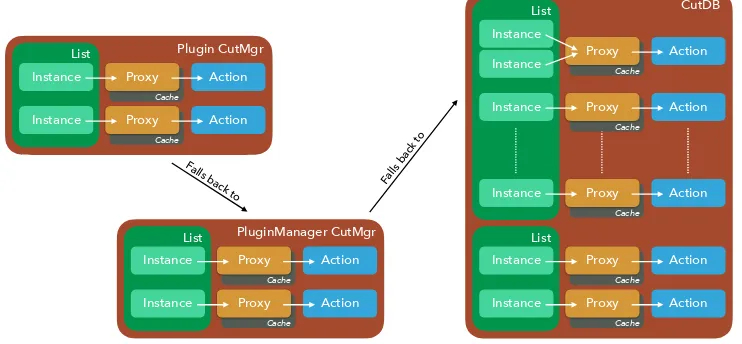
The final scheme for the selection logic handling is depicted in Figure 3.
Plugin CutMgr List Action Proxy Instance Cache Action Proxy Instance Cache PluginManager CutMgr List Action Proxy Instance Cache Action Proxy Instance Cache CutDB List Action Proxy Instance Cache Action Proxy Instance Cache List Action Proxy Instance Cache Action Proxy Instance Cache Action Proxy Instance Cache Instance List
Falls back to
Falls back to
Figure 3.Logic diagram for accessing selections from a user plugin.
3 Conclusions
A framework is being developed within the AMS-Alpha dbar analysis group to encapsu-late code from each user and share all the I/O operations. The framework leverages the TSelectorstructure to encapsulate code into dynamically linked libraries that can be loaded at runtime by a plugin manager that loads the data and runs each plugin on said data.
Users can easily define and fill histograms and trees which are then managed and saved by the plugin manager. Furthermore users can apply parametric selections to each event, and for each unique selection the result is calculated only once and then cached for following calls.
This work should allow the setup of nightly analysis trains to allow for day-scale iteration on the analysis and optimize user time.
Future improvements and addition to this framework are being planned and might in-clude automatic performance checks (per-plugin cpu efficiency and memory usage), a web-dashboard to monitor the status of the analysis train and much more.
References
[1] S. Ting, Nucl. Phys. B, Proc. Suppl. 243–244, 12 (2013)