Durham E-Theses
Multi-Touch Table for Enhancing Collaboration during
Software Design
BASHERI, MOHAMMED,ZAID
How to cite:
BASHERI, MOHAMMED,ZAID (2013) Multi-Touch Table for Enhancing Collaboration during Software Design, Durham theses, Durham University. Available at Durham E-Theses Online:
http://etheses.dur.ac.uk/8496/
Use policy
The full-text may be used and/or reproduced, and given to third parties in any format or medium, without prior permission or charge, for personal research or study, educational, or not-for-prot purposes provided that:
• a full bibliographic reference is made to the original source • alinkis made to the metadata record in Durham E-Theses • the full-text is not changed in any way
The full-text must not be sold in any format or medium without the formal permission of the copyright holders. Please consult thefull Durham E-Theses policyfor further details.
Academic Support Oce, Durham University, University Oce, Old Elvet, Durham DH1 3HP e-mail: [email protected] Tel: +44 0191 334 6107
http://etheses.dur.ac.uk
Multi-Touch Table for
Enhancing Collaboration
during Software Design
A thesis presented for the degree of Doctor of
Philosophy
Mohammed Zaid H. Basheri
School of Engineering and Computing Sciences
Durham University
I
Abstract
Encouraging collaborative software design through the use of Multi-touch interfaces has become increasingly important because such surfaces can accommodate more than one user concurrently, which is particularly useful for collaborative software design. This study investigated the differences in collaborative design among groups of students working in PC-based and Multi-touch table conditions to determine the potential of the Multi-touch table to increase the effectiveness of collaboration during software design.
The literature includes several interesting studies reflecting the role of Multi-touch tables in enhancing collaborative activities. Research has found that Multi-Multi-touch tables increase group interaction and therefore increase the attainment of group goals. Although many research efforts have facilitated collaboration among users in software design using Unified Modelling Language (UML), these studies examined distributed collaboration and not face-to-face collaboration. However, existing research that studied facilitating co-located collaborative software design has some limitations such as using technologies that prevent parallel design activities.
Collaborative software design using Multi-touch table has not been widely explored. A structured literature review revealed that no Multi-touch collaborative UML design tool is available. Thus, a Multi-touch enabled tool called MT-CollabUML was developed for this study to encourage students to work collaboratively on software design using UML in a co-located setting. Eighteen master’s level students enrolled in the Software Engineering for the Internet module were selected to participate in the study. The participants formed nine pairs. The experiment followed a counterbalanced within-subjects design where groups switched experiment conditions to ensure each group used the Multi-touch table and PC-based conditions. All collaborative UML diagramming activities were video recorded for quantitative and qualitative analysis.
Results show that using the MT-CollabUML tool in the Multi-touch table condition enhanced the level of collaboration among the team members and increased their shared contribution. It also increased the equity of participation; the individuals contributed almost equally to the task, and single-person domination decreased in the Multi-touch condition. Results also show that the Multi-touch table encourages parallel-participative design where both group members work in a parallel manner to accomplish the final agreed-upon design. The analysis of verbal communication shows that both experiment conditions encouraged subjects to use collaborative learning skills.
II
Definition of Terms
Collaboration: Working together in a small or large group to complete a task (Rajamoney and Stapa 2005).
Collaborative design: An activity that requires a group of individuals for sharing information and organising design tasks and resources (Chiu 2002).
Collaborative learning: A learning method in which learners work together to achieve common educational objectives (Gokhale 1995).
MT-CollabUML application or tool: A Multi-touch UML editor.
Multi-touch (table, tabletop, surface): This refers to “a surface on which input sensing and output displays are superimposed, and on which multiple touches can be detected simultaneously” (Ryall et al. 2006).
Parallel-participative design: A type of collaborative design in which people perform design activities in parallel.
Sequential-participative design: A type of collaborative design in which people perform design activities successively.
SynergyNet lab: A special laboratory at Durham University that consists of a set of Multi-touch tables, furniture and software that are specially designed to foster an environment in which people can work collaboratively together.
Unified Modelling Language (UML): An object-oriented system development tool that “provides a visual modelling language that enables system builders to create blueprints that capture their vision” (Schmuller 2004).
III
Table of Contents
Abstract ... I Definition of Terms ... II Table of Contents ... III List of Figures ... VIII List of Tables ... XI Statement of Copyright... XIII Declaration ... XIV Acknowledgments ...XV Dedication ... XVI Chapter 1 Introduction ... 1 1.1 Introduction ... 1 1.2 Background ... 1 1.3 Research Objectives ... 4 1.4 Research Scope ... 5 1.5 Research Methods ... 6
1.5.1 Main Research Questions ... 7
1.6 Criteria of Success ... 8
1.7 Thesis Outlines ... 8
Chapter 2 Literature Review ... 10
2.1 Introduction ... 10
2.2 Collaboration in an Educational Context ... 11
2.2.1 Characteristics of Good Collaboration ... 12
2.2.2 Characteristics of Effective Collaborative Learning Group ... 14
IV
2.3 Computer-Supported Collaborative Work ... 18
2.3.1 CSCW Matrix ... 20
2.3.2 Collaborative Design ... 20
2.4 Software Design ... 22
2.5 Unified Modelling Language ... 23
2.5.1 Difficulties in Learning UML ... 25
2.6 Technologies for Collaborative UML Diagramming ... 26
2.6.1 COLER ... 26
2.6.2 COLLECT-UML ... 28
2.6.3 CoLeMo ... 30
2.6.4 AUTO-COLLEAGUE ... 31
2.6.5 Calico ... 32
2.7 Multi-Touch Table Technology ... 34
2.7.1 Multi-touch Tablet Architecture ... 37
2.7.2 Multi-Touch Table for CSCW ... 38
2.8 Chapter Summary ... 43
Chapter 3 Research Methodology ... 46
3.1 Introduction ... 46
3.2 Research Questions ... 47
3.3 Research Approach and Design... 49
3.4 Experiment Lab ... 49
3.5 Sampling Criteria ... 50
3.6 Data Collection Methods ... 50
3.7 Experiment Tasks ... 51
3.8 Statistical Analysis ... 52
3.9 Pilot study: Multi-touch Table vs. Paper-Based Experiment ... 52
3.10 Main Experiment ... 56
3.10.1 Subjects ... 56
3.10.2 Experiment Instruments ... 56
3.10.3 Experiment Design and Procedure ... 58
3.11 Variables ... 61
3.12 Data Analysis Method ... 62
3.12.1 SynergyView Application ... 62
3.12.2 Collaboration Patterns Analysis Method ... 65
V
3.12.4 Amount of Talk and Physical Interaction ... 70
3.12.5 Equity of Participation ... 72
3.12.6 Collaborative Learning Skills ... 73
3.12.7 Collaboration Logs ... 77
3.12.8 Quality of Design ... 81
3.12.9 Subjective Analysis ... 82
3.13 Research Ethics ... 83
3.14 Chapter Summary ... 84
Chapter 4 MT-CollabUML Tool ... 85
4.1 Introduction ... 85
4.2 Why MT-CollabUML? ... 85
4.3 User Interface ... 86
4.3.1 MT-CollabUML in the PC-Based Condition ... 90
4.4 MT-CollabUML Architecture ... 91
4.5 Chapter Summary ... 92
Chapter 5 Results ... 93
5.1 Introduction ... 93
5.2 Collaboration Patterns ... 94
5.2.1 Collaboration Patterns in the pilot study ... 95
5.2.2 Collaboration Patterns in the main experiment ... 96
5.3 Time on Task ... 99
5.4 Amount of Talk and Physical Interaction ... 105
5.4.1 Amount of Talk ... 105
5.4.2 Amount of Physical interactions ... 107
5.5 Equity of Participation ... 109
5.5.1 Equity of physical interaction ... 109
5.5.2 Equity of verbal interaction ... 113
5.6 Using Collaborative Learning Skills ... 115
5.7 Sequential-Participative Design vs. Parallel-Participative Design ... 117
5.8 Collaboration Log ... 120
5.9 Quality of Design ... 142
5.10 Subjective Analysis... 144
5.10.1 Open Questions Results ... 148
VI
- “Easy to use the keyboard and the mouse.” ... 150
5.11 Chapter Summary ... 151
Chapter 6 Evaluation ... 152
6.1 Introduction ... 152
6.2 Collaboration Patterns ... 152
6.2.1 Pilot Study: Multi-Touch Table vs. Paper-Based ... 152
6.2.2 Main experiment: Multi-Touch Table vs. PC-Based ... 154
6.2.3 Collaboration Patterns Summary ... 156
6.3 Time on Task ... 157
6.4 Amount of Talk and Physical Interaction ... 158
6.5 Collaborative Learning Skills ... 161
6.6 Quality of Design ... 162
6.7 User Satisfactions and Experience ... 164
6.7.1 Subjects’ Feedback ... 165
6.8 Chapter Summary ... 167
Chapter 7 Discussion ... 168
7.1 Introduction ... 168
7.2 The Enhancement of Collaboration ... 168
7.3 Seven Factors for Evaluating Collaborative Design ... 172
7.4 Threats to Validity ... 178
7.4.1 Threats to internal validity ... 178
7.4.2 Threats to the External Validity ... 181
7.5 Chapter Summary ... 181
Chapter 8 Conclusion and Future Work ... 182
8.1 Introduction ... 182
8.2 Summary of Findings ... 184
8.3 Research Contributions ... 186
8.3.1 Filling the Literature Gap ... 186
8.3.2 New Collaboration Patterns ... 187
8.3.3 Effective Method to Analyse Collaborative Design ... 187
8.3.4 Collaborative Learning Skills in Collaborative Design ... 187
8.3.5 Multi-Touch Tool for Collaborative Software Design ... 188
VII
8.5 Limitations ... 191
8.6 Further Work ... 192
Appendix A - Consent Form ... 195
Appendix B – Sample of SynergyView Output ... 196
Appendix C – Questionnaires ... 197
Appendix D – Sample of Final Diagrams ... 201
VIII
List of Figures
Figure 1-1: Children using a Multi-touch table for learning ... 2
Figure 1-2: Using the MT-CollabUML tool on a Multi-touch table ... 6
Figure 2-1: The topics related to this research ... 10
Figure 2-2: The Collaborative Learning Conversation Skills Taxonomy (Soller 2001) .. 18
Figure 2-3: CSCW matrix (Skaf-Molli et al. 2007) ... 20
Figure 2-4: COLER Group Session Interface (Constantino-González et al., 2000) ... 28
Figure 2-5: The COLLECT-UML students’ interface (Baghaei and Mitrovic 2006) ... 30
Figure 2-6: CoLeMo shared workspace and chat window (Chen et al. 2006) ... 31
Figure 2-7: AUTO-COLLEAGUE main form (Tourtoglou et al. 2008) ... 32
Figure 2-8: Calico, a whiteboard-based software design tool ... 33
Figure 2-9: Grid of Calico session (Mangano and Hoek 2012) ... 34
Figure 2-10: TouchLight prototype (Wilson 2004) ... 35
Figure 2-11: FTIR Multi-touch table (Han 2005) ... 36
Figure 2-12: DiamondTouch table (Dietz and Leigh 2001) ... 37
Figure 2-13: Multi-touch architecture ... 38
Figure 2-14: WordPlay (Hunter and Maes 2008) ... 41
Figure 2-15: Working together on DigiTile (Rick and Rogers 2008) ... 41
Figure 2-16: WebSurface tool (Tuddenham et al. 2009) ... 42
Figure 2-17: Using NumberNet on the Multi-touch environment ... 43
Figure 3-1: SynergyNet lab ... 50
Figure 3-2: Paper-based condition (Pilot Study) ... 54
Figure 3-3: Multi-touch table condition (Pilot Study) ... 55
IX
Figure 3-5: PC-based condition ... 57
Figure 3-6: Multi-touch table condition ... 58
Figure 3-7: Experiment procedure ... 61
Figure 3-8: SynergyView application for videos transcription and coding ... 63
Figure 3-9: The Collaborative Learning Conversation Skills Taxonomy (Soller 2001) .. 76
Figure 3-10: Example of a collaboration Log of design activities ... 79
Figure 3-11: Example of a timeline for discussion ... 79
Figure 3-12: Sample timeline of an actual collaborative design process ... 80
Figure 4-1: MT-CollabUML workspace ... 86
Figure 4-2: Main menu of the MT-CollabUML tool ... 87
Figure 4-3: Adding nodes to the workspace ... 87
Figure 4-4: Rotate and zoom gestures ... 88
Figure 4-5: Linking nodes gesture ... 88
Figure 4-6: Linking nodes and using the touch keyboard ... 89
Figure 4-7: Using the MT-CollabUML tool in the Multi-touch table condition ... 90
Figure 4-8: SynergyNet architecture ... 92
Figure 5-1: Boxplot for total Time on task in the PC-based condition ... 101
Figure 5-2: Boxplot for total time on task in the Multi-touch table condition ... 102
Figure 5-3: Percentage of time spent using keyboards during the tasks in both conditions ... 104
Figure 5-4: Percentage contribution of individuals to the task in the PC-based ... 111
Figure 5-5: Percentage contribution of individuals to the task in the Multi-touch ... 112
Figure 5-6: Using Collaborative Learning Skills ... 116
X
Figure 5-8: Timeline of individual contribution to the task in the Multi-touch ... 119
Figure 5-9: Screenshot of minute six in the Multi-touch table condition (Group 3) ... 119
Figure 5-10: Collaboration log for Group 1 in the Multi-touch table condition ... 126
Figure 5-11: Collaboration log for Group 1 in the PC-based condition ... 127
Figure 5-12: Collaboration log for Group 2 in the Multi-touch table condition ... 128
Figure 5-13: Collaboration log for Group 2 in the PC-based condition ... 129
Figure 5-14: Collaboration logs for Group 3 in the Multi-touch table condition ... 130
Figure 5-15: Collaboration logs for Group 3 in the PC-based condition ... 131
Figure 5-16: Collaboration log for Group 4 in the Multi-touch table condition ... 132
Figure 5-17: Collaboration log for Group 4 in the PC-based condition ... 133
Figure 5-18: Collaboration log for Group 6 in the Multi-touch table condition ... 134
Figure 5-19: Collaboration log for Group 6 in the PC-based condition ... 135
Figure 5-20: Collaboration log for Group 7 – in the Multi-touch table condition ... 136
Figure 5-21: Collaboration log for Group 7 in the PC-based condition ... 137
Figure 5-22: Collaboration log for Group 8 in the Multi-touch table condition ... 138
Figure 5-23: Collaboration log for Group 8 in the PC-based condition ... 139
Figure 5-24: Collaboration log for Group 9 in the Multi-touch table condition ... 140
Figure 5-25: Collaboration log for Group 9 in the PC-based condition ... 141
Figure 5-26: Subjects’ satisfaction ... 145
Figure 7-1: Seven factors used to evaluate collaboration in design activities ... 172
XI
List of Tables
Table 3-1: Research Methods overview ... 46
Table 3-2: Research questions ... 48
Table 3-3 List of hypotheses ... 49
Table 3-4: Groups and scenarios ... 59
Table 3-5: Collaboration styles coding scheme ... 69
Table 3-6: Description of Collaborative Learning Skills ... 75
Table 3-7: Example of applying the CLCST on subjects’ conversion... 77
Table 5-1: Percentage of time spent in each collaboration style (Pilot study) ... 96
Table 5-2: Percentage of time spent in each collaboration style (Main Experiment) ... 97
Table 5-3: Time on task per group in the Multi-touch table and PC-based conditions .. 101
Table 5-4: Total time and total time using keyboard in both conditions ... 102
Table 5-5: Time on task per group in the Multi-touch table and PC-based conditions .. 103
Table 5-6: Descriptive statistics on the amount of talk per subject in both conditions .. 106
Table 5-7: Descriptive Statistics of amount of talk per subject in both conditions ... 107
Table 5-8: Amount of physical interaction per subject in both conditions ... 108
Table 5-9: Descriptive statistics of the amount of physical interaction ... 108
Table 5-10: Equity of physical interaction per group in both conditions ... 110
Table 5-11: Means and standard deviations for equity of participation ... 111
Table 5-12: Equity of verbal interaction per group in both conditions ... 114
Table 5-13: Collaborative Learning Skills in the Multi-touch and PC-based ... 116
Table 5-14: Design activities per subject in the Multi-touch table condition ... 122
Table 5-15: Design activities per subject in the PC-based condition... 123
XII Table 5-17: Quality of design in both conditions... 143 Table 5-18: Subjects’ comments regarding the Multi-touch table condition ... 149 Table 5-19: Subjects’ comments regarding the PC-based condition ... 150
XIII
Statement of Copyright
The copyright of this thesis rests with the author. No quotation from this thesis should be published without prior written consent. Information derived from this thesis should also be acknowledged.
XIV
Declaration
No part of the material provided has previously been submitted by the author for a higher degree at Durham University or at any other University. All the work presented here is the sole work of the author and no one else. The following publications were produced during the course of this thesis:
[1] BASHERI, M., BURD, L., MUNRO, M. & BAGHAEI, N. Enhancing Engagement and Collaborative Learning Skills in Multi-touch Software for UML Diagramming. 10th International Conference on Computer-Supported Collaborative Learning (CSCL), 2013 University of Wisconsin - Madison, USA. [2] BASHERI, M., BURD, L., MUNRO, M. & BAGHAEI, N. (2013) Collaborative
Learning Skills in Multi-touch Tables for UML Software Design International Journal of Advanced Computer Science and Applications 4, 60-66.
[3] BASHERI, M., BURD, L. & BAGHAEI, N. (2012) A Multi-touch Interface for Enhancing Collaborative UML Diagramming. ACM Annual Conference of the Australian Computer-Human Interaction Special Interest Group (OZCHI). Melbourne, Australia.
[4] BASHERI, M., BURD, L. & BAGHAEI, N. (2012) Collaborative Software Design Using Multi-touch Tables. 4th IEEE International Congress on Engineering Education (ICEED). Penang, Malaysia.
[5] BASHERI, M. & BURD, L. (2012) Exploring the significance of multi-touch tables in enhancing collaborative software design using UML. 42nd ASEE/IEEE Frontiers in Education Conference. Seattle, Washington, USA.
[6] BASHERI, M. (2010) Collaborative Learning of UML diagrams using Multi-Touch Technology. Research Day 2010. Durham University, UK, School of Engineering and Computing Science.
[7] BASHERI, M. (2010) Collaborative Learning of UML-State diagrams using Multi-Touch Technology (Technical Report). Durham University, UK
XV
Acknowledgments
First and foremost, I thank Almighty Allah, the most merciful and gracious, for reasons too numerous to mention.
I take immense pleasure in expressing my sincere and deep sense of gratitude to my supervisor, Professor Liz Burd, for her sustained enthusiasm, continued support and exemplary guidance throughout this academic endeavour. Likewise, I am highly thankful to Professor Malcolm Munro for his invaluable support, creative suggestions and motivation during my research.
I also thank my colleagues and friends in the Technology Enhanced Learning Research Group, Durham University; in particular, Dr Iyad Alagha for his suggestions and technical assistance, and Dr Emma Mercier for reviewing some of my papers.
I also thank Dr Nilufar Baghaei for her helpful suggestions and support. My thanks to the students who participated in the experiments during 2010 and 2011 and provided me with useful feedback.
I would also like to extend my acknowledgement and thanks to the Saudi Ministry of Higher Education and King Abdulaziz University, which funded this research and the Saudi Cultural Bureau in London for their continued support.
I would like to acknowledge that the hardware for this research has been provided by the Engineering and Physics Research Council (EPSRC) under grant research number RES-139-25-0400.
XVI
Dedication
This thesis is dedicated to my parents for their unconditional love and support throughout my life and for the sacrifices they have made to give me a brighter future. Without their prayers, wholehearted support and continuous encouragement, I would have never been able to stand at this point in my life.
I also dedicate this thesis to my lovely wife Khadijah who has surrounded me with love and continued support; thanks for all the sacrifices you have made for me, encouraging me to complete my studies. Thanks to my lovely children, Amal, Khalaad and Ghadah, and my regrets for all the time that I was not able to be with you.
I dedicate this thesis to my brothers and sisters who supported me in my academic pursuits, especially Ali and Norah. I dedicate this thesis to my parents in law who encouraged and supported me during my studying abroad. I dedicate this thesis to my close friends who keep asking about me and wishing me all the best.
1
Chapter 1
Introduction
1.1 Introduction
This chapter presents background information on this research study, followed by the research objectives, a summary of the research methods, the criteria of success and the research questions. It also presents definitions of terms that are used in this thesis and concludes with the thesis outline.
1.2 Background
One promising learning technology that facilitates collaborative work among students is the Multi-touch table (Figure 1-1). Several projects have introduced Multi-touch surfaces to enhance collaboration (Dohse et al. 2008; Hunter and Maes 2008; Rick and Rogers 2008; Tuddenham et al. 2009; Hansen and Hourcade 2010; Clifton et al. 2011; Higgins et al. 2012). Multi-touch interfaces can accommodate more than one user concurrently, which is particularly useful for learning through large, shared display systems such as tables (Harris et al. 2009; Higgins et al. 2012). Using such systems encourages students to collaborate and to create an environment where they can discuss their findings and integrate their ideas. In addition, such systems can enhance students’ interaction skills and promote teamwork.
2 Figure 1-1: Children using a Multi-touch table for learning
Multi-touch environments offer new possibilities for interaction between humans and computers. Researchers from different educational backgrounds have explored this area and have found that Multi-touch environments can be successful because interaction through touch is both intuitive and natural (Westerman et al. 2001). The literature includes several interesting studies reflecting the role of Multi-touch tables in enhancing collaborative activities. Morris et al. (2010) conducted a study to investigate the effectiveness of Multi-touch tables in enhancing cooperation during group functions and tasks. The study found that Multi-touch tables were particularly useful in enhancing team member awareness.
Collaborative learning has become popular in computer education. The literature has examined the advantages of collaborative learning over individualised learning (Baghaei et al. 2007; Laakso et al. 2010). Collaborative
3 problem solving, for instance, has numerous advantages. It facilitates cooperation among students, encourages them to ask questions and even encourages them to develop and consolidate their own knowledge (Webb et al. 1995; Soller 2001; Rummel and Spada 2005).
Some studies have explored the enhancement of collaboration through Unified Modelling Language (UML) diagramming (Wu et al. 2005; Baghaei et al. 2007; Cook 2007; Tourtoglou and Virvou 2008; Cataldo et al. 2009). UML is used as the principal notation in software analysis and design (Baghaei et al. 2007). Object-oriented analysis and design is a difficult task requiring familiarity with requirements analysis, design and UML. The texts of the problem are often vague and deficient, and they can only be solved by students who are experienced in analysis. The UML modelling language is complex, and students face many problems in becoming proficient in it. Furthermore, UML, similar to most design tasks, is an ill-defined process; there are often multiple solutions of equal validity for solving the problem presented by a task (Baghaei et al. 2007).
Several research attempts have been made to facilitate collaborative software design using UML, such as COLLECT-UML (Baghaei and Mitrovic 2006; Baghaei et al. 2007), CoLeMo (Chen et al. 2006), CAMEL (Cataldo et al. 2009) and AUTO-COLLEAGUE (Tourtoglou et al. 2008). Unlike COLLECT-UML and CoLeMo, the AUTO-COLLEAGUE system does not support collaborative drawing for UML diagrams. Instead, it relies on a chat system as the collaborative tool. What all these systems have in common, however, is that they have been designed solely to aid in distributed collaborative work and they are not face-to-face systems. Some research has shown that collaborative design in a
4 distributed setting does not facilitate informal interaction and awareness. Therefore, it is important to support co-located rather than remote collaborative design (Wu et al. 2003). Similarly, some research attempts have been made to facilitate collaborative software design in a co-located setting, such as Calico (Mangano and Hoek 2012). However, Calico has limitations that prevent parallel work. In particular, it only supports single-user input.
In light of the advantages of the Multi-touch table in facilitating co-located collaboration, and based on the limitations of the current distributed and co-located collaborative design systems, this research will explore the potential of the Multi-touch table to enhance collaboration during software design.
1.3 Research Objectives
This study investigates, by examining the collaboration patterns adopted, the differences in the collaborative design process among groups of students working in PC-based and Multi-touch table conditions to determine the potential of the Multi-touch table to increase the level of collaboration during software design. It also investigates enhancement of collaboration during software design by studying individual contributions to design tasks. Furthermore, this study examines the advantages, disadvantages and limitations of using the Multi-touch table for collaborative software design.
5
1.4 Research Scope
The research investigates the enhancement of collaboration during software design when using Multi-touch tables. The investigation was carried out in a laboratory setting with nine groups of pairs. The subjects were master’s students studying a module called Software Engineering for the Internet at the time of conducting the experiments. In this module, students studied and practised software design using the UML modelling language. In the experiment conducted for this study, subjects were given a task which required creating just one diagrammatical notation from the UML, specifically the State diagram. The Multi-touch tool, which was developed for the purpose of this study, allowed the creation of a simple design for the State diagram.
6
1.5 Research Methods
Software collaborative design using Multi-touch technology has not been widely explored. The literature review revealed that no Multi-touch collaborative Unified Modelling Language (UML) design tool is available. Therefore, a Multi-touch enabled tool called MT-CollabUML (see Figure 1-2) was developed for this study to enable students to work collaboratively to develop software designs using UML in a co-located setting. Eighteen master’s level students who were enrolled in the Software Engineering for the Internet module were selected to participate in the study. The subjects formed nine pairs. The experiment design was based on a counterbalanced repeated measure study where the groups switched experimental conditions to ensure that each group used both Multi-touch table and PC-based conditions. All the collaborative UML diagramming activities were video recorded for quantitative and qualitative analysis.
7
1.5.1 Main Research Questions
The main research question is whether the Multi-touch table enhances collaboration during software design. This study will addresses the following sub-questions to evaluate collaboration during software design.
Q 1 Does the Multi-touch table condition encourage closer collaboration than the paper-based condition?
Q 2 Does the Multi-touch table condition encourage closer collaboration than the PC-based condition?
Q 3 Does the Multi-touch table condition help subjects complete the task faster than the PC-based condition?
Q 4 Does the Multi-touch table condition encourage subjects to talk more than the PC-based condition?
Q 5 Does the Multi-touch table condition encourage subjects to physically interact more than the PC-based condition?
Q 6 Does the Multi-touch table condition increase the equity of physical interaction more than the PC-based condition?
Q 7 Does the Multi-touch table condition increase the equity of verbal interaction more than the PC-based condition?
Q 8 Does the Multi-touch table condition encourage the use of collaborative learning skills more than the PC-based condition?
Q 9 Does the Multi-touch table condition encourage parallel-participative design more than the PC-based condition?
Q 10 Does the Multi-touch table condition encourage subjects to engage in different design activities more than the PC-based condition?
Q 11 Does the PC-based condition encourage single-subject domination?
Q 12 Does using the Multi-touch table condition for collaborative software design enhance the quality of design more than the PC-based condition?
Q 13 Are subjects more satisfied with the Multi-touch table condition than the PC-based condition?
8 Q 14 Is the Multi-touch table condition was easier to use than the PC-based
condition?
1.6 Criteria of Success
This research aims to investigate the enhancement of software design collaboration using Multi-touch tables. The success of this research will be judged against the following criteria:
a) Review the current literature that focuses on enhancing the collaboration in software design in a co-located setting
b) Explore the impacts of the Multi-touch table on teamwork collaboration in a co-located setting
c) Obtain qualitative and quantitative data to measure the effectiveness of collaboration during software design using Multi-touch tables
d) Apply an effective method to analyse the qualitative data to study the co-located collaborative design process
e) Identify the collaboration patterns adopted by the subjects when using the Multi-touch tables for collaborative software design
f) Develop a tool that facilitates the collaboration of UML diagramming on the Multi-touch tables
1.7 Thesis Outlines
Chapter 2 presents a review of the literature about collaboration in an educational context and discusses the characteristics of good collaboration. It provides a background on computer-supported collaborative work (CSCW) and the meaning of software design. It also gives a brief overview of UML and its
9 learning difficulty. Moreover, it discusses some collaborative design tools for UML diagramming used in distributed and co-located settings, as well as the limitations of these tools. Finally, it provides an overview of the Multi-touch table technology and shows its potential in facilitating collaborative activities.
Chapter 3 presents the research methodology used in the pilot and main experiments of this study. It discusses the experiment design, data collection methods, experiment environment, instruments and data analysis method. Chapter 4 presents the Multi-touch software called MT-CollabUML, which was developed for this study. This chapter explains the tool interface, features and architecture.
Chapter 5 presents the results of the pilot and main experiments, while Chapter 6 discusses the results presented in the previous chapter. Chapter 7 discusses the research findings overall and explains how collaboration during software design was enhanced using the Multi-touch table. It also presents the effective method used in this research to evaluate the collaborative design. Finally, it discusses some issues raised in this research.
Chapter 8 concludes the thesis by providing a summary of findings, main research contributions, accepted and rejected hypotheses, limitations and suggestions for further research on this area.
10
Chapter 2
Literature Review
2.1 Introduction
This chapter reviews previous research about collaboration and software modelling languages such as UML. It reviews the existing tools for collaborative software design. It explains what a Multi-touch table is and discusses related studies on the use of Multi-touch tables to facilitate collaboration. Figure 2-1 shows the topics related to this research.
Figure 2-1: The topics related to this research
Multi-touch
table
UML
Collaboration
11
2.2 Collaboration in an Educational Context
Collaboration involves peers who are more or less at the same level, who can perform the same actions and who have a common goal and work together (Dillenbourg 1999). Collaboration refers to two or more persons working together to achieve an agreed-upon goal (Chiu 2002). Working together and sharing activities among students can help teachers achieve certain aims in the environment of collaborative learning (Zurita and Nussbaum 2004). Collaborative learning encourages the students’ thinking processes and helps them understand the material much better. It also gives the students the opportunity to analyse, create and evaluate ideas together, as well as developing communication skills such as discussion skills. In this approach to learning, students can learn other skills and gain knowledge from each other. As Gokhale (Gokhale 1995) explained, “The shared learning gives students an opportunity to engage in discussion, take responsibility for their own learning, and thus become critical thinkers”.
Critical thinking was described by Fisher and Scriven (1997) as “skilled and active analysis and evaluation of observation and communications, information and argumentation” (Fisher 2001). Critical thinking, one of the vital skills in academic life, can be gained through collaborative learning interaction via the active exchange of ideas (Gokhale 1995). Kreijns and Kirschner (2003) agreed with Gokhale that collaborative learning leads to critical thinking. They argued that collaborative learning can help students achieve a deeper level of learning and a better understanding of the materials (Kreijns et al. 2003).
12 Collaborative learning can provide not only academic benefits, but also social benefits such as fostering social relationships and helping students see learning as a social habit (Gillet et al. 2006). In a collaborative environment, learners learn by discussing and debating and by asking questions and teaching each other (Stahl et al. 2006). They also learn when sharing their experiences and viewpoints to achieve their learning goals (Wang 2009). Sorensen and Takle (2001) noted that the process of knowledge building in the collaborative learning environment involves sharing ideas, investigating arguments, exploring issues together and engaging in agreements and disagreements about issues (Sorensen et al. 2001).
However, collaboration has some disadvantages that should be considered to prevent the failure of the learning process. For instance, group members might discuss irrelevant topics, resulting in inefficient work. In addition, group members work at different speeds, and the experience might be different for each learner (Blezu 2008). Moreover, during collaboration, conflicts may occur often due to personal tensions, particularly disagreement points. This type of conflict leads to friction, frustration and personality clashes, which results in collaboration failure (Jehn 1997; Rentsch and Zelno 2003).
2.2.1 Characteristics of Good Collaboration
Successful collaboration requires not only engagement in discussion or in problem-solving activities (Veerman 2000) but also effective communication (Spada et al. 2005). According to Rummel et al. (2005), the characteristics of good collaboration serve as evidence for facilitating all approaches that lead
13 towards successful collaboration. Good collaboration has to be seen from both macro and micro aspects. Each aspect plays an essential role in shared work coordination. While the macro aspect might involve characteristics such as dividing labour, managing time, balancing joint work and individual phases, pooling unshared knowledge and integrating individual contributions, the micro aspect includes feedback, mutual understanding and turn-taking. Generally, communication plays an important role in the micro-level aspects of good collaboration. Rummel et al. (2005) explained the characteristics of good collaboration, which will be discussed in the following sections.
2.2.1.1 Macro level: Coordination
Many scholars have emphasised the importance of an appropriate method to coordinate a collaborative process. Coordination has to accomplish a number of goals. These goals include specifying the work objectives, reaching a shared task alignment, separating one task from another when the division is mandated due to the existence of multiple partners, managing temporal synchronisation of these tasks and making sure that different activities are set in a chronological order. The central goal to be accomplished through coordination is to ensure that the joint work product is handled consistently. This, when seen in the context of partners, involves integrating partial solutions.
2.2.1.2 Micro level: Communication
The exchange of questions paves the way for the retrieval of unshared information, which when pooled among individual group members plays an important role in the decision-making and problem-solving aspects of a successful
14 collaboration. When the unshared information is not pooled among group members, the results are often destructive and detrimental in a situation where each member has some level of dependence on such information. Asking questions and getting relevant answers is not a simple task to accomplish. Sacks et al. (1974) stated that the manner in which two people take turns in communicating has a great impact on the collaboration quality. If the communicative transition between two speakers is smoother and less interruptive, then the results will improve.
2.2.2 Characteristics of Effective Collaborative Learning Group
Soller (2001) presented the five characteristics of effective collaboration learning groups, which are described in the following sections.
2.2.2.1 Individual Participation
With every student actively participating in group discussions, the entire team’s learning potential is maximised simply because building involvement in group discussions increases the amount of information available to the group, enhancing group decision making and thereby improving the students’ quality of thought during the learning process (Jarboe 1996). To increase the likelihood of all the group members learning the subject matter as well as decrease the possibility of only a few members understanding the material content, active participation should be strongly encouraged. However, relying on participation statistics alone may be a poor indicator of student learning.
15
2.2.2.2 Social Grounding
According to Teasley and Roschelle (1993), a shared understanding of meanings is established and maintained by teams with social grounding. In this setting, the students in the teams are involved in taking turns as they ask questions, seeking clarification as well as offering rewards to the comments of their peers, thus deepening their understanding of the interpretation of the problem, in addition to that of the solutions proposed.
2.2.2.3 Active Learning Conversation Skills
The learning experiences and achievements of the team members are highly influenced by the quality of the communication in the group (Jarboe 1996). An important skill in learning collaboratively is knowing when and how to ask questions, as well as how to inform and motivate teammates. It is also important for the student to understand the mechanisms of mediating and facilitating conversations as well as dealing with conflicting opinions. A creative conflict is achieved through arguing the suggestions and comments from teammates constructively; in the event the members cannot reach a convincing solution, intervention should be sought from the instructor. The students who encourage others to offer justification for their opinions as well as explain and articulate their own thinking are generally the ones who most benefit from collaborative learning situations.
2.2.2.4 Performance Analysis and Group Processing
When groups discuss their progress and are able to decide to continue or change their behaviour appropriately, then group processing exists. Facilitation of
16 group processing can be achieved by offering the students the opportunity to assess their performance individually as well as collectively. When such self-evaluation occurs, each student thereby learns how to effectively collaborate with the teammates overall and reflect on the group’s performance.
2.2.2.5 Promotive Interaction
Promotive interdependence is achieved when a group of students perceives that their goals are positively correlated and recognises that an individual can achieve his/her goal only if the team members also achieve their goals. In collaborative learning, these goals correspond to the needs of each student to understand the team members’ ideas, questions, explanations and problem solutions. “Students who are influenced by promotive interdependence engage in promotive interaction; they verbally promote each other’s understanding through support, help and encouragement” (Soller 2001).
2.2.3 Collaborative Learning Conversation Skills Taxonomy
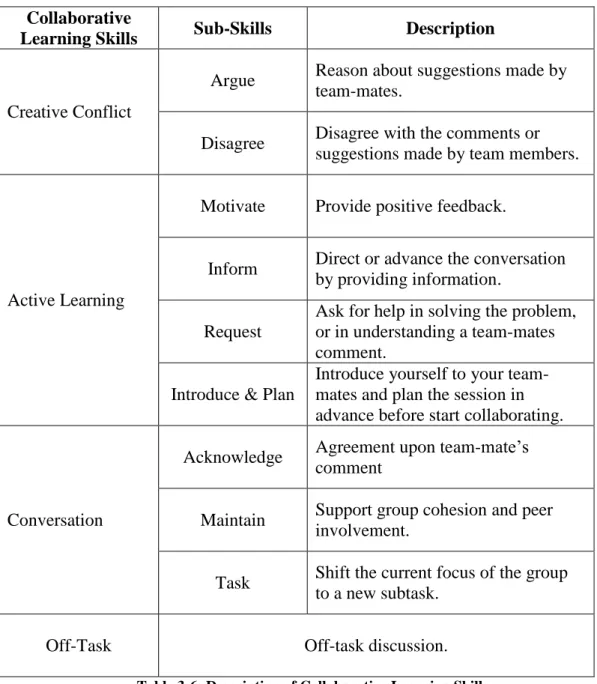
According to Soller (2001), the Collaborative Learning Conversation Skills Taxonomy (CLCST) “is designed to help recognition of active learning conversation”. The CLCST is important in assessing the enhancement of group discussion and learning. CLCST breaks down conversation during collaborative learning into three main skills, which are creative conflict, conversation and active learning. These main skills break down into sub-skills. Figure 2-2 shows the attribute explains the intention of a conversation and is introduced by a sentence opener or an introductory phase (Soller 2001). It involves understanding how to communicate in a manner that will result in group members’ encouragement,
17 gaining the capacity to handle conflicting ideas and opinions and understanding the appropriate manner of questioning or phrasing a question (Soller 2001). It is an explanation of the commonly exhibited skills during problem-solving processes and collaborative learning.
The idea of collaborative learning conversation skills has been applied in enhancing collaborative learning through the use of computers and the application of concept mapping. More importantly, collaborative learning conversation skills are applicable in web-based applications that involve the sharing of knowledge because they enhance the learning process, as in the case of web-based bulletin boards such as Stisy (2012). Collaborative learning conversation skills are also important in evaluating the characteristics of students and their communication (Song and McNary 2011). Song and McNary (2011) find that the CLCST is useful in coding online discussion postings.
18 Figure 2-2: The Collaborative Learning Conversation Skills Taxonomy (Soller 2001)
2.3 Computer-Supported Collaborative Work
Computer-supported collaborative work (CSCW) is a multi-disciplinary research field that emphasises the tools and techniques to support a group of people working together on shared tasks. CSCW provides multiple people with support for group collaboration in distributed or co-located settings to accomplish agreed-upon goals (Eseryel et al. 2002). Computers progressively facilitate
19 collaborative activities between users (Billinghurst et al. 1998). The collaboration can be successful only when the goal is achieved and accomplished by a group, not an individual (Kvan 2000). In CSCW, the word “cooperation” is the same as the word “collaboration” and can be used interchangeably (Kvan 2000). CSCW, also known as groupware, has gained momentum since the 1980s (Lyytinen and Ngwenyama 1992). Groupware tools have been developed with the view that shared works are distributed among different users either in the same place or in different places (Saad and Maher 1996).
Shared activities require three elements: mutual responsiveness, commitment to the shared activities and commitment to mutual support. Group members should show responsiveness to the other members in the group, taking up, elaborating, working together in which each person of the group understands the problem and direction the group are taking to come to the goal (Bratman 1992).
However, along with the benefits of facilitating and enhancing group activities, face-to-face CSCW tools also pose new challenges. Allowing co-located individuals to concurrently access a shared display gives rise to certain types of conflicts. For example, one user may change a tool setting that influences the activities of others. The ease of “reach out and touch” on co-located devices such as Multi-touch tables allows some users to reach into another user’s space or manipulate another user’s documents, which may affect the collaboration (Morris et al. 2004).
20
2.3.1 CSCW Matrix
One categorisation of collaborative work is the CSCW matrix of time and space illustrated in Figure 2-3. Collaborative work may occur at the same time (synchronous) or at different times (asynchronous). It may occur at the same place (co-located or face-to-face) or in different places (distributed or remote).
Figure 2-3: CSCW matrix (Skaf-Molli et al. 2007)
2.3.2 Collaborative Design
According to Peng (1994), collaborative design is a field of study that has been the focus of attention of a number of computer scientists engaged in CSCW. Chiu (2002) describes collaborative design as “an activity that requires participation of persons to share information and to organize design tasks and
21 resources. Chiu sees collaborative design as often involving different persons working together in generating the form of a particular idea.
According to Chiu (2002), collaborative design aims to share experiences, resources, concepts and responsibilities. In the development of a design, communication is a critical process in ensuring that designers share relevant information and coordinate design tasks to aid in decision-making (Chiu 2002). Saad et al. (1996) support this description by Chiu, attesting that collaborative design requires members of the design team working together to reach the final solution.
Saad et al. (1996) adds that, in an environment where collaborative design is present, there is sharing of the workspace, which becomes the medium through which all interactions among different participants pass through and which enables the people to collaborate on tasks easily. When the environment is computer supported, the workspace becomes a multipurpose platform that facilitates the design process (Saad and Maher 1996). The authors believe that the nature of the workspace makes its role critical in sharing information, facilitating communication, managing the process and exploring the use of space.
Wu et al. (2003) claimed that the implications of their study results are crucial for many large companies engaged in team-based design. They stated that “a tool that supports only asynchronous communication, via e-mail or document repositories, does not address the predominantly synchronous interactions in which designers engage.” This means that, for a tool to be effective in collaborative design, it must help find harmony in the various interactions
22 between and among design team members. In effect, they supported the observation made by (Saad and Maher 1996) that a workspace used for collaborative design is a platform for sharing information and facilitating communication.
The study of Wu et al. (2003) points to the importance of the flexibility of tools that support collaboration. The authors observed that changes in the physical setting and synchronicity occur very frequently, yet most current tools in collaborative design are not primed to accommodate such changes. For instance, they found that location and synchronicity changes would need a modality change, which implies greater expenses for designers who decide to utilise them. They suggested that one way to accommodate the different changes in the design factors is to make the tools adaptable towards facilitating communication. In this way, not only is greater flexibility achieved in the style of collaboration, but the interaction among the design team members is also enhanced.
2.4 Software Design
Software design is described as a problem-solving activity for software solution (Curtis et al. 1988). Software design includes needs analysis, specification, high-level and low-level design, modularisation, coding, integration, debugging, testing, verification, validation and maintenance (Robinson 2004). Software design provides opportunities for creative problem solving and the conversion of imaginative ideas into real systems (Robinson 2004).
Writing computer programs means considering problems and solutions. When a program’s static structure is complete, the dynamic behaviour correctness
23 must be confirmed. Software technology advances in the 1970s improved the development, control and visualisation of computer programs with higher-level programming languages, better compilers, structured programming practices and symbolic debugging facilities. The concept of abstraction was central in developing better programming techniques, allowing the consideration of a program’s structure and behaviour without addressing detailed issues determining the implementation form. The benefits mainly involved programming activities. They also realised the need for better practices for programming in the large, which concerns the design and development of systems as a whole (Budgen 2003).
2.5 Unified Modelling Language
Unified Modelling Language (UML) is an object-oriented modelling language that enables software engineers to identify, create, visualise, document and facilitate the communication of ideas and designs (Schmuller 2004). Its goals are to provide support for object-oriented design and for the implementation of frameworks and models by integrating good software engineering practices and industry standards (Alhir 2003). The UML models represent the classes and objects and how they interact with each other in a system. UML diagrams provide graphical descriptions of the system being modelled (Schmuller 2004). They can be classified into three categories: the structural diagrams, the behavioural diagrams and the interaction diagrams (Booch et al. 2005).
Among the many methods for diagramming software systems, the most popular today is UML, which provides nine different kinds of diagrams within a
24 formal object-oriented framework (Robinson 2004). According to Booch et al. (Booch et al. 2005), the structural diagrams are essential to the UML modelling of a system and show its static structure. The structural diagrams include the following:
Class diagram
Component diagram
Composite structure diagram
Deployment diagram
Object diagram
Package diagram
The Behavioural Diagrams represent the system’s functions and include the following:
Use Case Diagram
Activity Diagram
State Machine Diagram
The Interaction Diagrams represent the flow of data in the system which is being modelled and include the following:
Communication Diagram
Sequence Diagram
UML Timing Diagram
25
2.5.1 Difficulties in Learning UML
The object-oriented (OO) approach to software development is now commonly used (Luff et al. 1992; Scott et al. 2002), and developing good quality OO software is a core topic in computer science and software engineering curricula. OO analysis and design structures exist independently of any programming language; consequently, many notational systems have been developed for representing OO models without the need for source code. UML is the popular notation in use today (Baghaei et al. 2007). OO analysis and design can be a complex task, as it requires sound knowledge of requirements analysis, design and UML. The text of the problem is often ambiguous and incomplete and students need a lot of experience to be successful in analysis. UML is a complex language and students have many problems mastering it. Furthermore, UML modelling, like other design tasks, is not a well-defined process. A problem has no single best solution, and several alternative solutions often exist for the same requirements.
Although UML has emerged as the most popular OO modelling language, it is not easy to understand or learn. The difficulties in learning it have been widely researched (Simons and Graham 1999; Siau and Loo 2006). UML has added many new concepts, and beginners find it especially difficult to comprehend its concepts. Possible reasons for this difficulty range from inherent difficulties in the OO design to problems in learning the OO modelling language and methods (Siau and Loo 2006).
UML is also criticised for problems such as semantic inconsistencies, vagueness and conflicting notations. Other problems encountered by students
26 while learning UML are inappropriate and limited coursework, crowded classrooms, confusion about the linkages between various diagrams and the user-unfriendliness of Computer-aided software engineering (CASE) tools (Siau and Loo 2006). In addition, the traditional teaching of UML modelling in a classroom environment typically consists of only an introduction to the concepts of OO analysis and design. Students cannot gain expertise in the domain just by attending lectures; they need active practical experience to understand it (Baghaei 2007).
2.6 Technologies for Collaborative UML Diagramming
Tourtoglou (2008) argued that educational institutes that teach software engineering and enterprise would save money by providing a computer-supported collaborative learning (CSCL) environment for learning UML (Tourtoglou et al. 2008). Some studies, which will be discussed later, have focused on learning class diagrams (Baghaei and Mitrovic 2006; Chen et al. 2006; Tourtoglou et al. 2008) by developing an intelligent tutoring system that helps individuals and small groups learn the class diagrams of UML (Baghaei and Mitrovic 2006).
The following CSCL systems provide a learning environment for modelling languages such as UML.
2.6.1 COLER
COLER is a web-based collaborative learning environment for entity relationship (ER) modelling. Its objectives include improving the students’ performance in database design. In particular, COLER aims to develop students’
27 collaborative and critical thinking skills. Figure 2-4 shows the COLER student/group interface. The problem statement of an ER is presented in the problem description window, and students can try their solutions in the private workspace. Then, they can share solutions in the shared workspace, which is controlled by any student who takes the pencil. When this student leaves the pencil, any other student can take hold of it and control the shared workspace. Students can communicate with each other via the chat window to discuss possible solutions for the given problem. If they need help, they can press the help button, which gives them some information about ER modelling. When the students agree on a solution, they press the “OK” button. If any student does not agree, they can press the “NOT” or “?:” button and state their opinion in the chat window (Constantino-González and Suthers 2000).
However, COLER has deficiencies in interactive learning. It does not examine the chat window’s information in evaluating students’ interactions. It compares the student’s solution to the group’s solution, and not to an ideal solution. Thus, students may learn a wrong method if the group’s solution is incorrect. The system does not provide them with the perfect solution so they can see the differences between it and their own solution, so it is not an ideal method of solving ER problems. In addition, the system only counts the action of inserting objects in the group diagram as a contribution; other actions such as updating and deleting are not considered contributions (Baghaei 2007).
28 Figure 2-4: COLER Group Session Interface (Constantino-González et al., 2000)
2.6.2 COLLECT-UML
COLLECT-UML is a collaborative intelligent tutoring system (ITS) that relies heavily on constraint-based modelling (CBM) in its approach to problem solving and collaborative learning. It was the first system in the series of constraint-based tutors that required higher collaboration skills. In its simplest form, COLLECT-UML is a single-user version of a constraint-based ITS that teaches UML class diagrams. It has been developed to assist programming students during problem solving by giving feedback. As such, COLLECT-UML is a student-centred collaborative learning environment.
COLLECT-UML contains all the possible solutions to system problems; these depend on the model being used, which in turn depends on the constraints defined for the system. Typically, the domain of the system has 133 constraints that the system can use to check the students’ solutions by checking the types of relationships that exist between the solution and the constraint. Students are given individual tasks and their solutions are individually entered in the system to check
29 for consistency and reliability. The results are then pooled to create group solutions. COLLECT-UML is effective in prompting students to work on a common project while allowing them to work individually, thus meeting a number of desirable educational goals and objectives (Baghaei and Mitrovic 2006). The COLLECT-UML multi-user version gives the student the opportunity to solve a problem individually and then to join other students in a small group to create a group solution.
Figure 2-5 shows the COLLECT-UML student interface. It shows two workspaces for drawing: the right-hand workspace allows the student to create his or her own solution to problem, which is defined at the top of the interface, while the left-hand workspace enables the group to create the solution collaboratively. Students can communicate with each other by using the chat window. The group workspace is disabled during individual practice time and then enabled for group members to work together. The name of the student who is controlling the group workspace is displayed to other students while they wait for their turn (Baghaei and Mitrovic 2006).
30
Figure 2-5: The COLLECT-UML students’ interface (Baghaei and Mitrovic 2006)
2.6.3 CoLeMo
CoLeMo is a CSCL environment for learning the UML modelling language. It was developed to allow students to collaborate on building UML models. It enables students to learn from each other and is a helpful educational tool, especially for beginners in UML. CoLeMo is based on three technologies and methods: CSCW and two types of pedagogical agents, namely the domain agent and the facilitator. Both agents support collaborative learning and provide text-based advice to students. The domain agent is responsible for the knowledge of the rules of UML diagrams and for providing advice to students when they break the rules. The advice on collaboration is managed by the facilitator agent, which supervises the activities of both individuals and groups to provide them with advice to improve their participation and collaboration. Figure 2-6 shows the
31 CoLeMo shared workspace where students can collaborate to build UML diagrams and the chat function where they can discuss issues (Chen et al. 2006).
Figure 2-6: CoLeMo shared workspace and chat window (Chen et al. 2006)
2.6.4 AUTO-COLLEAGUE
AUTO-COLLEAGUE is a CSCL system that was built on a user modelling component based on stereotypes for learning UML. It is similar to the COLER, COLLECT-UML and CoLeMo systems discussed earlier, but with unique differences. It is based on users’ personality and performance, which are evaluated and taken into account to come up with advice for the learners and teachers. The advice is given dynamically to help students achieve the most efficient and productive formation of group membership (Tourtoglou and Virvou 2008). The advice also helps teachers divide students into groups.
AUTO-32 COLLEAGUE helps students draw use case diagrams for UML (Tourtoglou et al. 2008). Under the teacher’s supervision, students can draw use case diagrams in the workspace window, as shown in Figure 2-7, and can communicate with each other via the “Message Board” window on the left. The “Active Users” window shows the online students who are working currently on the system. Students can ask for help by clicking on the “Request Help” button. The most effective function of AUTO-COLLEAGUE is that it offers advice to students according to their learning progress and their needs (Tourtoglou et al. 2008).
Figure 2-7: AUTO-COLLEAGUE main form (Tourtoglou et al. 2008)
2.6.5 Calico
Calico (Figure 2-8) is a whiteboard-based software design tool developed by Mangano et al. (2012) that supports co-located and distributed collaborative software design. It offers a grid of partitions to manage multiple canvases in the workspace, as shown in Figure 2-9. It is a stylus-based input; designers use a
33 stylus to make scraps of sketched content. Users can work synchronously on the same canvas or asynchronously on different canvases. It allows both group and individual design. Users can copy their drawing on another canvas to work on it individually (Mangano and Hoek 2012). However, Calico has its limitations. For instance, it only supports single-user input, which prevents parallel work.
Figure 2-8: Calico, a whiteboard-based software design tool (Mangano and Hoek 2012)
34 Figure 2-9: Grid of Calico session (Mangano and Hoek 2012)
2.7 Multi-Touch Table Technology
The technology of touch sensing such as the Multi-touch surface has become quite common these days. Multi-touch technology allows users to use the system through multiple finger touches (Han 2005). Devices with Multi-touch technology also have the ability to provide access to the system to multiple users at the same time. Such technology is especially useful in learning or working through large display systems such as tables and interactive walls (Harris et al. 2009).
Microsoft has developed a Multi-touch technology called TouchLight that uses outputs from two video cameras behind a transparent plane. The outputs from these cameras are then combined to provide an image on the surface of the
35 display. The resulting image shows objects that are on the plane, as shown in Figure 2-10 (Wilson 2004).
Figure 2-10: TouchLight prototype (Wilson 2004)
This technology has been further exploited by Han (2005). Han’s technology uses rear projection and tracking cameras. This technology works by breaking the LED light’s passage through the display screen. Han uses the phenomenon of frustrated total internal refraction (FTIR), which lets the system identify the location of the fingers on the screen (See Figure 2-11).
36 Figure 2-11: FTIR Multi-touch table (Han 2005)
Another Multi-touch technology that has gained prominence is DiamondTouch, which allows group collaboration and provides users with separate space to work on their individual modules. This technology lets various users use the same surface concurrently without interference from each other. DiamondTouch works by transmitting signals through built-in antennas that identify the parts of the table each user is touching (Dietz and Leigh 2001) (see Figure 2-12).
37 Figure 2-12: DiamondTouch table (Dietz and Leigh 2001)
2.7.1 Multi-touch Tablet Architecture
Figure 2-13 shows the architecture of the Multi-touch table. The hardware level corresponds to the physical structure of the table, computer, and sensing devices. The Multi-Touch Interface (MTI) is used to obtain data from the sensors, detect user touch inputs, interpret them, and send instructions to the front-end software. The MTI and front-end applications communicate via a Communication Layer, which exploits tangible user interface protocol (TUIO), the widely used communication protocol. (Ciocca et al. 2012).