University of Central Florida University of Central Florida
STARS
STARS
Electronic Theses and Dissertations, 2020-2020
Navigating Immersive and Interactive VR Environments With
Navigating Immersive and Interactive VR Environments With
Connected 360° Panoramas
Connected 360° Panoramas
Samuel CosgroveUniversity of Central Florida
Find similar works at: https://stars.library.ucf.edu/etd2020 University of Central Florida Libraries http://library.ucf.edu
This Masters Thesis (Open Access) is brought to you for free and open access by STARS. It has been accepted for inclusion in Electronic Theses and Dissertations, 2020- by an authorized administrator of STARS. For more information, please contact [email protected].
STARS Citation STARS Citation
Cosgrove, Samuel, "Navigating Immersive and Interactive VR Environments With Connected 360° Panoramas" (2020). Electronic Theses and Dissertations, 2020-. 201.
NAVIGATING IMMERSIVE AND INTERACTIVE VR ENVIRONMENTS WITH
CONNECTED 360◦ PANORAMAS
by
SAMUEL COSGROVE JR B.S. University of Central Florida, 2014
A thesis submitted in partial fulfilment of the requirements for the degree of Master of Science
in the Department of Computer Science in the College of Engineering and Computer Science
at the University of Central Florida Orlando, Florida
Summer Term 2020
ABSTRACT
Emerging research is expanding the idea of using 360-degree spherical panoramas of real-world environments for use in “360 VR” experiences beyond video and image viewing. However, most of these experiences are strictly guided, with few opportunities for interaction or exploration. There is a desire to develop experiences with cohesive virtual environments created with 360 VR that allow for choice in navigation, versus scripted experiences with limited interaction. Unlike standard VR with the freedom of synthetic graphics, there are challenges in designing appropriate user interfaces (UIs) for 360 VR navigation within the limitations of fixed assets. To tackle this gap, we designed RealNodes, a software system that presents an interactive and explorable 360 VR environment. We also developed four visual guidance UIs for 360 VR navigation. The results of a pilot study showed that choice of UI had a significant effect on task completion times, showing one of our methods, Arrow, was best. Arrow also exhibited positive but non-significant trends in average measures with preference, user engagement, and simulator-sickness. RealNodes, the UI designs, and the pilot study results contribute preliminary information that inspire future investigation of how to design effective explorable scenarios in 360 VR and visual guidance metaphors for navigation in applications using 360 VR environments.
ACKNOWLEDGMENTS
Thanks to my thesis advisory committee – Dr. Joseph LaViola, Dr. Hassan Foroosh, and Dr. Charlie Hughes. Additional thanks to the members of UCF’s Interactive Sytems and User Experience Lab, whose help and resources were vital to the completion of this work.
TABLE OF CONTENTS
LIST OF FIGURES . . . ix
LIST OF TABLES . . . xii
CHAPTER 1: INTRODUCTION . . . 1
Reader’s Guide . . . 4
CHAPTER 2: LITERATURE REVIEW . . . 5
Navigation Techniques . . . 5
Assisted Focus and Guidance for Wayfinding . . . 11
Effective Visual Transitions . . . 15
Narrative Experience . . . 16
Integration of Interactive Elements . . . 18
Stereo/3D Reconstruction Techniques . . . 19
CHAPTER 3: SOFTWARE DESIGN - REALNODES . . . 21
Content Capture . . . 22
Input and Display . . . 23
Software Design Overview . . . 25
Scene Hierarchy . . . 26
Assets . . . 28
Scripts and Shaders . . . 29
Video Manager . . . 31
Render Pipeline . . . 31
Transitions . . . 35 Animations . . . 41 SkyboxPanoramicBlended Shader . . . 43 Walking-in-Place Implementation . . . 45 SensorDataManager . . . 46 WalkInPlaceScript . . . 47
Visual Guidance User Interface Methods . . . 54
Target . . . 55 Ripple . . . 56 Path . . . 57 Arrow . . . 58 Interaction Objects . . . 62 Action Tool . . . 62
Collectible Page Objects . . . 65
Metrics Recording . . . 65
Scenario Development . . . 66
Planning and Filming . . . 68
Importing and Video Editing . . . 70
Manual Creation of Node, Waypoint, and Interaction Objects . . . 72
Update State Transitions in Scripts . . . 73
CHAPTER 4: PILOT USER STUDY . . . 78
Procedure, Design, and Analyisis . . . 78
Results . . . 80
Completion Times . . . 80
SSQ . . . 82
UES SF . . . 83
Discussion . . . 83
CHAPTER 5: FUTURE WORK . . . 87
CHAPTER 6: CONCLUSION . . . 90
APPENDIX A: SAMPLE QUESTIONNAIRES . . . 91
APPENDIX B: IRB APPROVAL LETTER . . . 97
LIST OF FIGURES
Figure 1.1: Images from the RealNodes software displaying the four types of visual guidance UI. (Top-left) Target; (Top-right) Arrow; (Bottom-left) Path; (Bottom-right) Ripple. . . 1 Figure 3.1: Side and top view of Insta360 One X. Illustrates the viewing angle for
each lens. . . 23
Figure 3.2: HTC Vive HMD and Vive Controllers. . . 24
Figure 3.3: Simple instructions image produced for participants in our study, il-lustrating how to use the Vive controller in the software. . . 25 Figure 3.4: View of the RealNodes software project development environment in
the Unity3D game engine. . . 27 Figure 3.5: High-level architecture diagram of the different script modules in
Re-alNodes and their inputs/outputs to each other. . . 30 Figure 3.6: The Video Manager render pipeline, illustrating the high-level process
of how the 360 VR environment is made. . . 32
Figure 3.7: Example of an equirectangular image from one of the location videos.
This defines the background of the 360 VR environment. . . 34
Figure 3.8: Example of an equirectangular image from one of the transition videos. Note the masked out black region removes the cameraperson from view. 36 Figure 3.9: Example of an equirectangular image from one of the animation videos.
The green mask covers everything except the desired animating feature of the environment. . . 42 Figure 3.10: Performing WIP controls playback of transition videos, creating the
Figure 3.11: Example of Target UI. . . 55 Figure 3.12: Example of Ripple UI. . . 56 Figure 3.13: High-level pipeline illustrating the MaskedRipple shader pipeline, which
creates the final animation of the Ripple visual guidance UI. . . 58 Figure 3.14: Example of Path UI. . . 59 Figure 3.15: Example of Arrow visual guidance UI, indicating the direction of the
closest waypoint in relation to rotation distance. . . 60 Figure 3.16: Arrow curving to nearest waypoint, changing color when nearly facing
it. . . 61 Figure 3.17: Footage of closet being opened with Action Tool, showing how the
masked video shown below it is applied to the background and manip-ulated. . . 63 Figure 3.18: Sliding the switch on the Action Tool across the rail manipulates the
360 VR environment, such as opening a book. . . 64
Figure 3.19: Left is original state of drawer and Action Tool; right is after activating
Action Tool, with drawer open and Page object revealed. . . 66
Figure 3.20: Various scenes from the House Scenario developed for RealNodes. . . 67
Figure 3.21: Simple map showing House Scenario environment. Circles in node graph indicate locations that could be navigated to. Yellow circles indicate locations of hiding spots. . . 69 Figure 3.22: Insta360 Studo software, for exporting from proprietary video format
to MP4. . . 70 Figure 3.23: View of DaVinci Resolve video editing software. This image shows the
Figure 3.24: (Top) Equirectangular frame from transition video before editing show-ing the cameraperson. (Bottom) same frame after a mask was added to crop the cameraperson out. . . 74 Figure 3.25: (Top) Someone pulling a string to lift the carpet up. (Bottom) Same
as above, except all but the lifted carpet is masked in green. . . 75 Figure 3.26: Wireframes of the Waypoint objects in Unity3D editor. Note the large
quad perpendicular to the ground plane. This is the target surface for raycasting to detect which waypoint is being faced. . . 76 Figure 3.27: Action Tool and Page objects in the editor environment in front of a
Waypoint object. . . 77 Figure 4.1: Average scenario completion times (in seconds) with 95% confidence
error bars (lower is better). There is a significant difference between Arrow (fastest average), and Path (slowest average). . . 81 Figure 4.2: Mean Preference (lower is better). Arrow is lower than Target, but by
only a small margin. . . 82 Figure 4.3: Average scores for SSQ, including sub scores (lower is better). Arrow
has lowest scores in total and sub scores. . . 84 Figure 4.4: Average scores for UES SF sub scores and total scores (higher is
bet-ter). Arrow had the highest scores in all categories except FA, where Path has the highest. . . 85
LIST OF TABLES
Table 4.1: Results of Wilcoxon Signed Rank Test on all possible condition pairs. 80
Table 4.2: Mean and standard deviation of SSQ scores and sub scores. T=total
score, N=Nausea, O=Oculo-motor (lower is better). . . 83
Table 4.3: Mean and standard deviation of UES SF total scores and sub scores (higher is better). . . 84
CHAPTER 1: INTRODUCTION
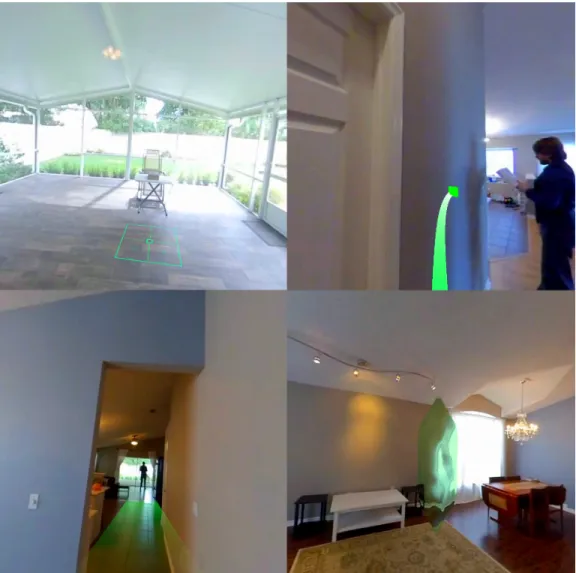
Figure 1.1: Images from the RealNodes software displaying the four types of visual guidance UI. (Top-left) Target; (Top-right) Arrow; (Bottom-left) Path; (Bottom-right) Ripple.
Recent virtual reality (VR) research has reignited interest in producing 360-degree spherical panoramas of real-world environments to incorporate into “360 VR” experiences. Modern commodity 360-video camera technology makes it easier to capture real-word data
for use in VR experiences. However, using images mapped as panoramas for a 360-degree VR experience dates back decades to technologies like QuickTime VR [8]. In the late 90’s and early 2000s, commercial video games like Myst III and The Journeyman Project 3: Legacy of Time experimented with making worlds with synthetic 360-degree environment maps, occasionally composited with actors or real props, organized such that if a user clicked in certain directions, they would teleport to another location through either a fade transition or a prerendered transition video[4, 36]. Only recently with affordable consumer 360-video cameras can we combine these past ideas with modern technologies to research new kinds of 360 VR experiences with explorable, interactive worlds made with real-world data. Rather than simple video and image viewing, research is expanding beyond simple applications, exploring technological and human factors challenges of enhancing immersion beyond guided experiences.
Prior research in traditional VR applies to any exploration of 360 VR, such as navi-gation, wayfinding, and improved visualization. Some unique research has begun to explore the unique possibilities and challenges of 360 VR compared to traditional VR, like applying Walking-In-Place (WIP) locomotion to control 360-video playback [27], focus assistance in viewing 360-video [21], and visual transitions when navigating 360 VR environments [24].
However, there remains a gap with emerging applications in 360 VR being unable to combine these methods into a realistic approximation of an explorable and interactive holistic virtual environments (VEs). The feeling of truly walking within a 360 VR environment compared to one fixed video, or the ability to interact directly with the environment rather than it being a distant video background, and the ability to have integrated synthetic objects and alterations of the environment, would benefit emerging 360 VR applications. Training systems with navigation-based decision-making would be possible. Virtual tours can have the freedom of someone taking branching paths in a natural locomotive way, rather than a menu selection. Improved fitness applications can provide multiple routes and backtracking during
runtime, instead of a menu. New kinds of commercial games are possible that combine real-world 360-video and real actors with synthetic objects and characters for unique experiences. This gap motivated us to develop RealNodes, a software engine for creating and pre-senting scenarios combining pre-filmed 360-video and virtual assets to create 360 VR location waypoints connected in a cohesive interactive environment. RealNodes is a fully functional system combining WIP locomotion for multi-path navigation between different video loca-tions, real-time composited 360-video rendering, interactivity with cut-out sections of the video for animation, and support for integration of interactive virtual objects accurately lit with Image Based Lighting (IBL) based on the 360-video background.
Additionally, there remains a problem with emerging applications in 360 VR needing better designs for navigation user interface (UI). Applying traditional VR UIs to 360 VR does not account for unique limitations. Synthetic environments have the freedom of granular user position and geometry, while 360 VR is limited by fixed assets for environments. There is a lack of comparative evaluation of navigation UIs in 360 VR research and how they can affect the user experience. This leaves a gap for best practices in designing appropriate UI for visual guidance, wayfinding, and navigation for 360 VR. We felt this was necessary to explore alongside the development of RealNodes, as otherwise taking a na ¨ıve approach to UI did not appropriately meet the goals of RealNodes being an engaging user experience.
This gap additionally motivated us to create four visual guidance UI designs for indicating waypoints in 360 VR: Target, Ripple, Path, and Arrow (pictured in Figure 1.1). We developed and integrated these designs into RealNodes. Additionally, we performed a pilot study on these four UIs to test the efficacy of the system and the strengths and weaknesses of the UI types on user experience. Preliminary results of the study show one of our methods, Arrow, had a statistically significant difference in scenario completion times.
In summary, our contributions are the following. We present the RealNodes system for creating and presenting 360 VR scenarios. We present four visual guidance UI designs.
We additionally present the results of a pilot study of the UIs. These contributions provide feedback for research into creating interactive and explorable 360 VR environments with effective navigation UIs.
Reader’s Guide
Chapter 2 - A review of the relevant literature from the fields of VR, computer graphics, and human computer interaction (HCI). We categorize the relevant literature into several thrust categories relevant to the emerging exploration of experiences incorporating 360-degree images and video.
Chapter 3 - Technical description of the prototype software RealNodes, including implementation and feature details. The four visual guidance UI techniques we developed are also described.
Chapter 4 - Description of a pilot user study comparing the four visual guidance UI methods. This section provides details on the demographics of participants, technical setup, experimental procedure, and statistical design and analysis methods used. The preliminary results and discussion of the user study are presented with statistical analysis described.
Chapter 5 - Description of plans for refinement, further investigation, and future work.
Chapter 6 - The conclusion for our work.
Appendix A - Examples of all the questionnaires presented to participants for collec-tion of demographic informacollec-tion and qualitative metrics.
CHAPTER 2: LITERATURE REVIEW
Past and emerging research in traditional VR regarding topics covering navigation, wayfinding, improved visualizations, and narrative experience applies to the evolving research of 360 VR. RealNodes iterates on this work to create a fully functional system combining 360-video, WIP multi-path navigation, virtual object integration, and composited 360-video rendering in a way we have not seen in prior literature. Additionally, we were unable to identify previous studies evaluating visual guidance UI for 360 VR. The context that has led us to our research is described below.
Navigation Techniques
Navigation in VR has been widely researched to tackle the challenge of providing effective options for users to explore virtual environments (VEs). An earlier example of research in interaction and navigation techniques is from Tomozoe et al. [39] who developed a gesture-based interaction system where the same gestures can be performed on objects that are strictly defined as moveable (interactable objects) and unmovable (navigation targets), such that performing the same basic gestures have different behavior. This is as opposed to strict gestures strictly for interaction and strictly for navigation, or mode switching. For example, a “waving-away” or “beckoning” gesture will move a moveable object further or closer from the player, while the same gestures on an unmovable object will move the player closer or farther to that object. Additionally, they proposed a “tunnel-window” tool for creating portals in the environment that show a remote area out of normal field of view (FOV). This allows both interaction with long range moveable objects, and teleportation to the scene in the window by interacting with unmovable objects. RealNodes also has gesture-based interaction and navigation actions as part of its system, though the control
mechanisms for them are distinct from each other compared to this system. Although a remote view like the “tunnel-window” proposed here is not implemented in RealNodes, future work could explore using alternate views like that or World-In-Miniature for alternative navigation modes.
Machuca et al. [6] devised a user interface called Fluid VR to perform navigation and selection task controls with a seamless transition between modes. They compare their system to traditional VR applications that have explicit button or gesture toggles for mode switch-ing. They claim that unconstrained interaction and navigation modes have the propensity for mode errors, which can frustrate users. Fluid VR presents three constraint-based inter-action techniques: manipulation, pre-programmed interinter-action-based navigation, and a flying method. By having these constrained systems, they claim a high accuracy and ease of use, allowing for fluid changes between modes. Manipulation of moveable objects is constrained by an extension of the Shift-Sliding algorithm, where the object moves along the surface of the object it is touching based on virtual cursor motion. For selection and use of repetitive action objects (example: ladder climbing), Fluid VR prevent false inputs by waiting until the controller is stationary before allowing further actions. For navigation tasks, a button press explicitly selects the object to navigate to, and a gesture stroke determines distance and direction of either a “fly-to” or orbiting method based on the kind of object. Though there is still an aspect of switching between modes and points of interest through button and gesture press, they take advantage of constraints for each point of interest to switch between modes fluidly, rather than an explicit mode switch. RealNodes has two modes: navigation and interaction. This does have an explicit button press toggle. However, there is a clear visual indication with the Visual Guidance UI. This helps prevent false mode input and makes clear what mode the user is in.
Mas et al. [25] developed Indy, a VR training software system for workers in industrial facilities to train them on navigation and searching tasks in their job. It is a multi-player
game with asynchronous collaboration. An instructor/trainer manages the scenario, while trainees are split into two groups: “Hunters” and “Radios”. Hunters explore the environ-ment in VR to find the objective, while Radios use desktop software to see floor maps and 360-degree photographs to guide the Hunters. The design of Indy is geared toward develop-ing environment familiarity as part of navigation. They discuss the challenge of developdevelop-ing spatial understanding of large complex environments such as an industrial building are con-strained by not just design decisions that need to instill learning, but also time and schedule constraints. They propose that active navigation and decision-making leads to forming a mental model of a place, instilling better spatial knowledge. Indy proposes to develop these spatial skills for navigating the industrial building being trained against. This occurs by having Hunters actively explore 3D environments while verbally collaborating with Radios who inspect the maps and 360-images to aid in the search task. Indy is unique in that it presents two different networked applications simultaneously as part of its system, where one is a synthetic VE for VR exploration, while the other includes 360-degree images of the real environments from select locations. This is a unique two-pronged way to present data enhanced by 360-degree panoramic content. RealNodes does not implement a map system but could benefit from a map tool in the future to aid in wayfinding and searching tasks.
A study developed by Powell et al. [33] evaluated three methods to navigate VR us-ing low-cost mobile VR: Continuous forward motion with only steerus-ing control, a magnetic toggle switch directly on the head mounted display (HMD) where travel can be stopped and resumed, and a Bluetooth controller with direct control of forward and backward motion. Results showed that direct control with the controller was a faster task and was preferred technique. Participants disliked the lack of control of movement and the inability to tightly turn. Compared to our research and the capabilities or RealNodes, their research was con-cerned with a purely synthetic environment with motion primarily on one axis. RealNodes presents 360 VR with a capability for multiple path choices and freedom to backtrack.
Lorenz et al. [23] developed two navigation methods for natural walking (Wii Balance Board and Kinect) targeting two different VE displays (CAVE style system called Powerwall, and Mixed Reality glasses). A comparative user study was performed on the four possible conditions between the walking method and the VE display. Results indicated that Kinect and Powerwall had benefits compared to the other systems. Kinect felt more realistic to move in the environment compared to Wii Balance Board. This seems to indicate that real locomotion is preferred over stationary locomotion on a step sensing board. Users of Powerwall felt the experience was more enjoyable, felt more like parts of the environment were responding to them, and that they were participating in the environment. Though the authors claim that the Kinect and Powerwall combination is promising, the same combination was significantly more nausea inducing. RealNodes uses a VR HMD for VE display, compared to either of the methods used in the work of Lorenz et al. While RealNodes uses limited real-world locomotion within waypoint locations, navigation between locations is primarily done with WIP. Compared to the methods here, it lies between full locomotion and requiring a peripheral under the feet like the Wii Balance Board. This is part of why we chose it as a compromise to the feeling of walking while working in a small physical space.
Tanaka et al. [38] devised a large-scale experiment to test a novel input interface for navigating 360 VR on a mobile touch device compared to a conventional on-screen button-based method. Their “Motive Compass” was a slide pad interface. surrounded by arrows indicating the direction of a branching path and allowing for velocity control. It was com-pared in a “large-scale demonstration experiment in a real exhibition” with a more standard “Ground Arrow” method, where arrow icons would only be visible over a visible pathway with only one choice of velocity. Their results show that their interface better presents acces-sible directions compared to conventional methods. RealNodes has taken inspiration from both their visual guidance metaphors as well as the ability to control speed of navigation.
large virtual worlds in the constraint of a smaller physical space and their effect on presence and spatial memory. Two of the methods were reorientation techniques, which more directly influences the user to face a direction that allows for continued walking. One is reorientation using artificial rotational gain, which alters the speed of the virtual rotation and makes it look like the user turned too much. The user is instructed to turn around until they are facing a direction that allows for continued travel. The other method is reorientation with distractors. When reorientation is required, the user is instructed to follow a distractor object while induced rotation of the world is occurring. The third method is a redirected walking system, where the user’s rotation is subtly changed from the real-world rotation speed, forcing them to correct for perceived misalignment. This results in them being repositioned appropriately. The first user study compared the three methods and their effect on presence and spatial memory. Participants performed a navigation task where they were specifically directed to objects, then asked to memorize a location and identify targets out of their FOV. The results indicated that scenarios with the distractor reorientation gave greater presence than those with the redirected walking. Their reorientation method had issues in the first experiment and pilots for the second, causing enough simulator sickness for participants to drop out. The second study was reformatted to compare only the two reorientation methods, this time allowing free exploration. Results indicated a significant effect on learning the environment, with scenarios using rotational gain reorientation taking less time than the distractor method. RealNodes has discrete, user-centered locations that don’t require much real-world locomotion. And the navigation system uses a WIP method. So redirected walking or reorientation doesn’t have direct use in the current version of the system. However, a similar system could be developed that ties navigation transition videos to real locomotion for use in a larger physical space, at which point reorientation or redirection should be considered.
navigation methods appropriate for different physical interfaces. The WIP technique has been investigated in the literature for both traditional VR and 360 VR. One method requiring only an HMD with an accelerometer is described by Lee et al. [20], based on work by Zhao on 3-axis pedometer design [42].
Muhammad et al. [27] explored using WIP to navigate 360 VR by actively control-ling playback of a video in 360 VR on a smartphone HMD. They found that compared to passive interfaces that merely played back the video, simulator sickness was reduced. One problem the authors had was that rotation caused false positives inn their step algorithm. We overcame that problem in RealNodes implementation by allowing steps only when ro-tated towards a navigable path. Another limitation that Muhammad et al. had was that the application was limited to linear playback, compared to RealNodes which allows for choice in direction.
Similarly, Tregillus and Folmer [40] developed a WIP interface for navigating a syn-thetic VR environment on a smartphone HMD. They ran a comparative study with WIP against a gaze-direction based Look Down to Move (LDTM) method. They found that WIP was more immersive and intuitive. This strengthened the idea for RealNodes incorporate WIP compared to other physical interfaces.
Though not exactly a WIP implementation, Lopez-Gulliver et al. [22] developed a related 360 VR experience paired with a treadmill to provide interactive environment for exercise. Based on the user’s speed on the treadmill, key frames of the video are synthesized and interpolated to smoothly slow down or speed up the video displayed. Navigation tasks in 360 VR can benefit from a smoother visual transition between locations. The information from this research was relevant to our solution of developing an image-based playback and interpolation of transition videos based on user speed when performing WIP. However, the “navigation” task in their software is a one-axis movement on a treadmill, compared to RealNodes which adds a second dimension of navigation with multiple paths the user can
choose based on orientation.
Habgood et al. [17] performed an evaluation of three locomotion techniques in VR: arc-based teleport, free movement with an analog stick, and a rapid node-based shift ac-tivated by gazing at a waypoint icon and pressing a button. Results indicate that rapid node-based locomotion reduced motion sickness compared to free motion. Additionally it took less time to navigate a scenario with node-based compared to the other methods. Re-alNodes also presents scenarios in a node-based manner with active movement. However, our system presents a video transition timed to WIP, rather than rapid shift transition or free movement independent from real motion. Additionally, our study explored multiple wayfinding UIs in a node-based system instead of locomotion modes.
Assisted Focus and Guidance for Wayfinding
In the realm of 360-video, a constant challenge is encouraging focus on intended targets in the video and not letting the viewer feel like they missed something important. This has led to work on UIs that either directly change focus or more gradually guide viewers to points of interest in the video. To do this effectively, we need to look at prior literature for wayfinding in VEs. Smith and Hart [37] developed a model of distributed resources in a human-computer cognitive system for navigation tasks. Out of this, they produced several wayfinding aids fundamental for HCI design. They discuss the concept of distributed cognition, a hybrid approach to the study of cognition involving people and artifacts versus just the individual. They discuss thinking about design of HCI applications with distributed cognition. This facilitates reduction of cognitive load by externalizing representations and concepts and building them into the user interface or the environment.
For human-computer interaction, the authors propose a resource model with two components: abstract information structures and interaction strategies. Abstract
informa-tion structures can be divided into six items to classify informainforma-tion that informs interacinforma-tion: plans, goals, current state, interaction history, action-effect model, and affordances. Inter-action strategies can be divided into four categories: plan following, plan construction, goal matching, and history-based selection/elimination. These strategies and resources interre-late with each other and should be considered as part of HCI design. Smith and Hart make a distinction between motion/travel, navigation, and wayfinding. They pull from the literature to form a definition of navigation as an aggregate of the strict action of moving through the environment (motion/travel) and the cognitive process of defining a path through an envi-ronment by using acquired knowledge and envienvi-ronment cues (wayfinding). Five wayfinding aids are presented by the authors as being fundamental components to easing the cognitive load by separately fulfilling some of the abstract information structures for informing navi-gation. Those are a simple distance metric (goal, action-effect), compass (goal, affordance, action-effect), dead reckoning directional instructions (goal, affordance, action-effect), maps for route planning (goal, plan, action-effect), and plan following tools such as a graphical path rendered in the environment (plan).
A user study was performed by Smith and Hart to evaluate the five proposed wayfind-ing aids for use in a desktop VE. Participants were tasked with findwayfind-ing all landmarks in the environment. The results indicated that dead reckoning was the only method with low cognitive load, while distance only had medium load, and the rest had high load. This con-tradicted the expected cognitive load of all methods except for dead reckoning. Besides the limited amount of participants in the study, the authors indicate three other factors were determined to contribute to the mismatch between expected and actual results: impact of resource allocation on artifacts was optimistic; implementation of the aids had notable prob-lems; and that the only measure of cognitive load used was usability problems rather than a combination of that and other measures (ex. Completion time for task, spatial knowledge of environment, etc.).
RealNodes presents multiple visual guidance UIs for wayfinding in a search task like this example of early research on wayfinding in VEs. Our designs needed to follow the fundamentals of designing for cognitive load in VEs to be successful. However, by nature of the design of RealNodes, the user must stop and evaluate the new waypoint they have reached. This makes the cognitive load situation somewhat different from a traditional free-movement VE with more continuous evaluation of navigation.
Freitag, Weyers, and Kuhlen [11] devised an interactive assistance interface that ex-tends any free exploration system with ground-based travel. The system guides the user to unexplored areas on request, factoring in analysis of what the user has already seen, where they have already explored, and what places will be interesting based on viewpoint qual-ity. They propose from the literature that designing a scene to support good wayfinding contributes to “exploration success”, which they define as seeing all important areas in an environment. Traditional wayfinding aids like compasses or maps they say are merely sup-port tools that do not necessarily ensure that all imsup-portant areas are seen in an environment. Virtual tours with automated paths and camera positions are referenced as an example of exploration success. Their criticism of virtual tours is the automated nature with limited to no interaction, and that most tour systems do not consider where the user has already ex-plored. Their method is purely computational and automatic for a scene. When requested, three suggestions are computed and presented to the user. A photo of each location is pre-sented along with the distance to the location, and colored tube paths on the ground are shown for each location. When paths followed the same waypoints, the paths were laid side-by-side, which combined with different colorization makes clear which split off points are for which path. These paths are computed on a navigation mesh for the environment, prioritizing viewpoint quality based on a visibility histogram computed across all objects. Viewpoint quality on this histogram utilizes an object uniqueness metric to favor new and unique objects in a scene, reducing weight based on how well that object is seen at a large
visual size. Based on prior literature claiming that users often want to visit close locations before new locations, the three locations suggested are computed based on the two closest locations with high quality, followed by the globally highest quality viewpoint as the third. A user study was performed to determine if the proposed method added a benefit compared to free exploration without the interface. They found an improvement in knowledge of the environment and higher exploration success, and participants experienced the interface as helpful and easy to use.
The solution of Freitag et al. was designed for arbitrary scenes where they don’t have the ability to modify a synthetic scene with landmarks. Meanwhile RealNodes has a stricter but similar restriction by only having real-world video data for the environment and no geometry. RealNodes is concerned with exploring effective graphical assisted guidance for exploration success like the work of Freitag et al. Our Arrow method is in part inspired by their method of always indicating direction of close by waypoints.
Lin et al. developed focus assistance user interfaces and ran an experiment to de-termine methods for visually guiding users better while they watch a 360-video [21]. The challenge of continuous focus and refocus on intended targets was what they wanted to tackle with their two techniques: “Auto Pilot”, which directly changes the view to the target, and “Visual Guidance”, which indicates the direction of the target in the UI. They found that their focus assistance techniques improved ease of focus overall, but any other effects focus assistance has depended on both the video content and the goals for watching the video. This content was developed for standard 360-video streaming, but lessons learned from this can benefit navigation and interaction tasks in 360 VR. This inspired our development of RealNodes to improve navigation and interaction tasks in 360 VR with our pilot study on methods targeted at a multi-path navigation and searching task. Exploration in RealNodes scenarios can happen at the user’s pace, with indicated waypoints encouraging focus and preventing the feeling of missing something important.
YouTube and Facebook have some tools for their 360-video distribution such as Face-book Guide, which allows for setting hotspots of interests in a video [31]. This provides a method of visual guidance to viewers in the content but does not give the viewer ways to interact or engage with the content. Even more advanced commercial software packages for developing 360 VR experience such as Pixvana [35] are limited toolkits that produce what is still plain video content with just a few dialogue choices, again with few opportunities for creating the feeling of direct interaction or exploration.
Effective Visual Transitions
One of the challenges of creating any kind of VR world is having effective methods of visually presenting transitions between locations. 360 VR adds the additional challenge of not being able to rely on a fully available virtual world with all its geometry.
Moghadam and Ragan [26] conducted a comparative study on three visual transition types for movement in VR: Teleportation, Animated interpolation, and Pulsed interpolation. Teleportation is an instant change in position/rotation with three sub-types: Instant Change, Fade to Black, and Blurred Fade. Animated interpolation is a smooth viewpoint change with three speeds. Pulsed interpolation is a series of intermediary teleportations leading up to the final state, with three choices of intermediate points. The results show the faster transitions are preferred by participants with more VR experience, while slower transitions are preferred by those who do not. Based on their findings, we made considerations about speed and interpolation for RealNodes system of visual transitions that blends 360-video of the current location with a manually filmed transition to the next waypoint.
MacQuarrie and Steed [24] developed VEs made from 360-degree images connected into different locations that could be navigated through by pointing with a wand controller at a waypoint sphere and pressing a button. The authors conducted a comparative study
on visual transitions types for navigating this kind of environment: instantaneous teleport, a linear movement through a 3D reconstruction of the real-world scene, and an image based ”M¨obius” transformation. Results indicate that there was no significant difference in spatial awareness between transition types, while significant differences were found in other mea-sures. Movement profiles were longer for teleport than other transitions. 3D model and M¨obius transition were better for feeling of motion. Model and teleport had a higher prefer-ence compared to M¨obius. These indicate that different visual transitions have a variety of trade-offs relying on what the goal of the experience being made is. Taking inspiration from this work, RealNodes implements manually filmed transition videos in lieu of a 3D model to aid in better feeling of motion. While their system only had one kind of waypoint object metaphor (a floating sphere), we implemented four visual guidance UIs.
Cho et al. [9] developed a novel method to integrate multiple 360-images into a VE. They combine simple image interpolation and warping into a method to simulate movement from different image locations as a player moves using controller input. They organized their images into a virtual data map using commercial photogrammetry pipeline software. They performed synthetic experiments with their novel image synthesis method compared to ground truth images. Results showed that as the synthesized image location gets closer to a real image location, the interpolation is more accurate. Our method differs in having a VE made from videos connected with ground truth filmed transitions, compared to many images mapped together in their environment.
Narrative Experience
360 VR experiences are being developed to convey narrative in a unique way compared to traditional film and VR, with its own unique challenges. Aitamurto et al. [5] presented ‘Uturn”, a novel 360-video about gender inequality from a male and female perspective,
simultaneously presented as two halves of a 360-video in a HMD. A comparative user study showed that the split view increased the feeling of presence, embodiment, and understanding of the characters more than a traditional view. The role of the viewer becoming an implied actor in the experience has been explored by Bindman et al. [7] in a CGI VR film called “Invasion” about interacting with a bunny dealing with alien antagonists. Their study found that viewers felt more like they were a character (often another bunny) when viewing in 360 VR version compared to a traditional view. Pope et al. [32] tackled the opposite topic: how actors behave differently when filming for 360 VR. They presented a play in two configurations: immersive theater in which an audience member sits in a swivel chair in the center of the stage, and 360-video where the camera is in the center. They found actors gave less personal space to the camera compared to a human, indicating that personal space needs to be accounted for when filming for 360-video.
More generalized research exists for the presentation of “interactive films” that can feed into creating 360 VR experiences. Verdugo et al. [41] proposed a novel design framework for interactive storytelling called ”Coconstruction”. Compared to common frameworks from video games, Coconstruction is a “detour framework” with decision points that are either on the “Backbone” of the story or are “detours” that, instead of creating more branches, are designed to return right back to the “Backbone”. Rather than many branching paths or infinite choice within a limited scope, an author lays out pieces for the viewer to “co-construct” with them into a story, defined by both the planning of the author and the viewer’s perception. Two studies are discussed. The first is an exercise where four pictures were given to participants without context, and participants were asked to write stories out of them. It was found that despite many possible combinations, most stories fit into three similar main themes. The second study involved developing an interactive movie, “The Crime or Revenge of Fernando Moreno”, and presenting it to participants. The film was designed so the backbone would not change, regardless of what detours were made. Instead,
the study showed that any difference in perception of events in the backbone were influenced by the viewer’s choices.
Though the scenarios developed for our study do not have an overt narrative, we do have a non-player character (NPC) present in many locations within the environment to aid in immersion and engagement in a unique way. RealNodes is additionally designed to present videos based on event triggers, making it a prime target for future work making scenarios with branching storylines and decision making.
Integration of Interactive Elements
Authoring 360 panoramic images and video content together with virtual elements into a cohesive 360 VR experience is an emerging research challenge. Understanding methods to realistically merge interactive virtual elements with 360 panoramic content is relevant to creating options for interaction in 360 VR.
Felinto et al. [10] developed a production framework for combining captured 360 im-ages with synthetic elements. They incorporated IBL to light the synthetic objects, including incorporating reflections and shadows, to integrate the objects. “Support” objects are cre-ated to match the exact position of a real-world object in the panorama, texture mapped to blend into the scene, and augmented to add effects like deformation when colliding with a synthetic object (ex. purely synthetic object deforms a couch augmented with Support geometry). They developed a Blender plugin to augment the authoring process of placing synthetic and Support objects in the environment, properly aligned with the 360-degree panorama.
Rhee et al. developed a software system called MR360 to demonstrate real-time integration of accurately lit interactive virtual objects in a live stream of a 360-video [34]. It uses the input video to apply IBL, including realistic soft shadows from perceived generated
light sources, to the virtual objects. A user study was conducted showing an improved sense of presence in MR360 compared to conventional 360-videos without interaction.
RealNodes employs IBL to light any static and interactive virtual objects like MR360 to match the environment. MR360 was designed to generate VEs with live 360-videos, compared to the RealNodes system which uses prerecorded images and video. Though RealNodes requires manual authoring of scenarios compared to the framework made by Felinto et al., it does so with video and image data compared to just panoramic image data.
Stereo/3D Reconstruction Techniques
Stereo 3D 360 cameras exist that allow for a brute-force method of creating stereo 360-degree images and video. Systems like the Samsung 360 Round [13] and Insta360 Pro series [28] are similarly designed. An array of multiple cameras is arranged in a circle at a known separation, sometimes with a camera pointing up to compensate for missing information above the camera. The knowledge of the camera properties and orientation allows for the use of known 3D computer vision methods for stereo matching. This allows for two panoramas to be stitched together, one for each eye, that are stereo matched. These systems target professional filmmakers and are considerably more expensive than standard consumer 360 cameras, with prices ranging from around $5,000-15,000 (as of early 2020). They also tend to rely on offline server-based computation methods for the stitching, often a proprietary step done by the camera manufacturer.
Some work has been done to perform 3D reconstruction of an environment solely with 360-degree panoramas. Huang et al. [15] developed a novel view algorithm that warps a monoscopic 360-degree panorama view into a stereo view. This is enabled by offline calculation of Structure from Motion (SfM) from a 360-video, then warping the image based on data from the dense reconstruction (as opposed to displaying the dense reconstruction
directly). This warping algorithm had a low computational footprint on their tested GPUs, enough for greater than 120 frames per second (FPS) performance. Based on feedback from a user study performed, the stereo view did not cause discomfort compared to the monoscopic view when looking at close objects but did cause discomfort when moving far away from objects due to higher distortion.
Work by Im et al. [16] proposed a method using Small SfM on monoscopic 360-video frames to generate a dense depth map for a location. Their solution uses a bundle adjustment method tailored to the spherical camera model of a consumer 360 camera. They developed a “sphere sweeping” method, a dense matching method that looks at overlapping regions on the two fisheye lenses of the camera system to assist in matching. The video only required small jittery movements of the camera in place for the reconstruction to work. Their resulting algorithm on both synthetic and real-world environments resulted in low reprojection error compared to traditional bundle adjustment methods and ground truth.
RealNodes can use a panoramic depth map to perform a shader-based geometric displacement of the panorama centered on the user. The depth map produced used an at-tempted version of the method described by Im et al. This is different from the method proposed by Huang et al. which involves distortion of the left and right eye view separately based on an acquired point cloud. Though implementing a structufrom-motion 3D re-construction for RealNodes was out of scope of this Thesis work, we acknowledge a need to explore it for future research.
CHAPTER 3: SOFTWARE DESIGN - REALNODES
RealNodes is a software system for creating immersive and interactive 360 VR scenar-ios, developed to explore the challenge of effective navigation in 360 VR. It presents separate locations as their own 360-video, each logically connected with 360-video transitions facili-tating multi-path, bidirectional traversal. By allowing scenarios of real-world pre-recorded location and transition videos, we balance realism and immersion with lower cost and time to create than synthetic environments or photogrammetry/reconstruction.
Our system allows for additional virtual assets, all lit with correct IBL. These can be static or dynamic, adding interactivity otherwise absent from simple 360-video. A video manager system performs real-time dynamic loading, playback, and compositing of 360-video. This allows for a variety of locations, transitions, and interactivity with animated cut-out sections of background. Additionally, our WIP system is tied to playback of transition videos for locomotion. This adds additional realism, comfort, and engagement with the environment by simulating truly walking in the environment. The visual guidance UI system clearly indicates what waypoints a user can navigate to based on facing direction. This completes the capability we sought to develop for enabling scenarios with free, user controlled, multi-path navigation in 360 VR.
This chapter is organized into the following sections:
Content Capture - Describes the hardware used for capturing 360-degree video and the specifications of the data produced.
Input and Display - Describes the hardware used for RealNodes software control and display, and the basic controls of the software.
Software Design Overview – Describes the high-level design of the RealNodes software, including scene hierarchy and scripts/shaders.
the state management and rendering of the 360-degree video environment.
Walking-in-Place Implementation – Detailed description of the WIP implementation. Visual Guidance User Interface Methods – Detailed description of each of the Visual Guidance UIs we developed for RealNodes.
Interaction Objects – Detailed description of the interaction systems in RealNodes. Metrics Recording – Detailed description of the metrics recording system built into RealNodes for data collection purposes.
Scenario Development – Detailed procedural description of the process of authoring a scenario for the RealNodes system.
Content Capture
Commodity 360-degree multi-camera systems incorporate two synchronized wide-angle lenses that capture raw images and video. These camera systems usually have au-tomated image stitching software built into the camera or provided external to the device. The resulting data is projected to a flat equirectangular format image, a 2:1 ratio image where the pixel horizontal and vertical axes map to spherical coordinates.
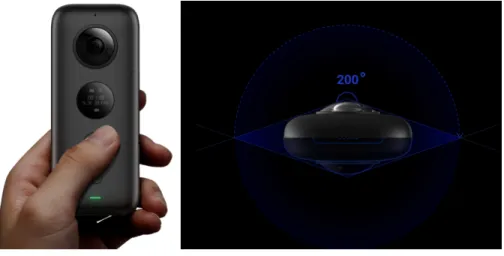
For our work, we utilized the Insta360 One X (See Figure 3.1) [1]. It is a two-lens multi camera system in a small form factor. Each wide-angle lens captures 200 degrees FOV, providing a 10-degree buffer of overlap around each lens to aid in stitching. It has onboard buttons for configuration and recording, but we used the official Android app to allow remote start/stop of recording, which avoids having the cameraperson in the videos.
The highest 360-image resolution the camera supports is 6080 * 3040. Several video recording options are available for varying resolution and FPS: 5760 * 2880 @ 30 FPS, 5760 * 2880 @ 25 FPS, 5760 * 2880 @ 24 FPS, 3840 * 1920 @ 50 FPS, 3840 * 1920 @ 30 FPS, 3008 * 1504 @100 FPS. After several test recordings of our scenario environment, we chose to
record all our video with the 3840 * 1920 @ 50 FPS (“4K”) mode, balancing high resolution with relatively smooth playback in VR.
Figure 3.1: Side and top view of Insta360 One X. Illustrates the viewing angle for each lens.
In lieu of a standard tripod, we made our own monopod from the Insta360 One X selfie stick and a ruggedized mini tripod intended for large professional desktop cameras. This minimized the camera appearance in the nadir of the 360-degree video, all while stand-ing as stable as a conventional tripod. Though such monopods for this purpose are sold commercially, this setup worked for our needs.
Input and Display
RealNodes was made for deployment on SteamVR platforms, minimally targeting the HTC Vive VR system (see Figure 3.2 [3]). The Vive utilizes an HMD and wand style con-trollers that use an outside-in tracking system. The Vive has Lighthouse base stations which sweeps infrared light across a room synced with sensors on the HMD and controllers. Mul-tiple base stations can define a 3D tracking space for triangulating the HMD and controller positions. The HMD contains a 3.6” diagonal screen with a 2160 * 1200 resolution (1080 *
1200 for each eye) with a 90 Hz refresh rate.
Figure 3.2: HTC Vive HMD and Vive Controllers.
The Vive controllers are primarily designed for hand position/rotation tracking for gesture and interaction tasks with VR. They have a multifunction trackpad, trigger, grip buttons, and system/menu buttons. Because our software was developed for SteamVR, it can work with other SteamVR systems with little/no changes. Notionally, development was primarily tested with the Vive Pro, a higher end version of the system with a higher resolution screen (2880 * 1600) [2].
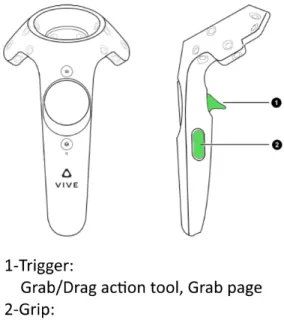
RealNodes can be controlled with one controller. Only two buttons are used: T rigger
and Grip (see Figure 3.3). Using the T rigger simulates a grabbing action. This is used
to either grab objects or to manipulate switches in the environment (described in section
Interaction Objects). The Grip button is used as a mode toggle to turn N avigationM ode
on/off. This controls both the display of visual guidance UIs (described in Visual Guidance User Interface Methods) as well as the ability to use WIP (described in section Walking-in-Place Implementation).
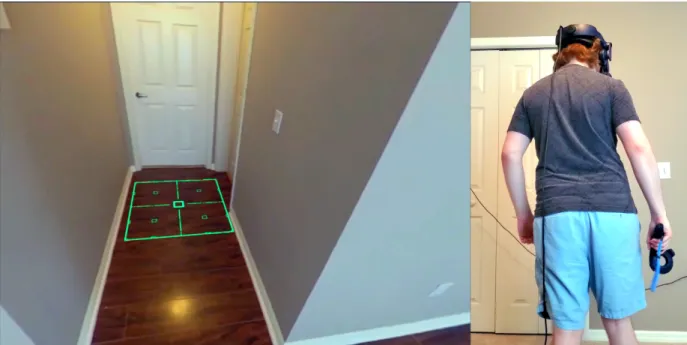
Figure 3.3: Simple instructions image produced for participants in our study, illustrating how to use the Vive controller in the software.
Software Design Overview
RealNodes was developed with Unity3D targeting Windows 10 desktops. It was made for SteamVR, targeting the HTC Vive. RealNodes minimally requires one controller
for grabbing and manipulation tasks, as well as toggling N avigationM ode On/Off. This
controls both the display of visual guidance UIs as well as the ability to use WIP. Since most of the scene is defined from 360-videos, there are fewer synthetic objects in the scene hierarchy compared to most VEs. Instead, these are dense with scripting logic to define the visuals and state based on user action. Major components include a video manager system for video playback and rendering, a waypoint state machine system, sensor data manager for interaction and WIP, and a simple file writer to produce experimental logs (timestamped event data, sensor data, etc.)
Scene Hierarchy
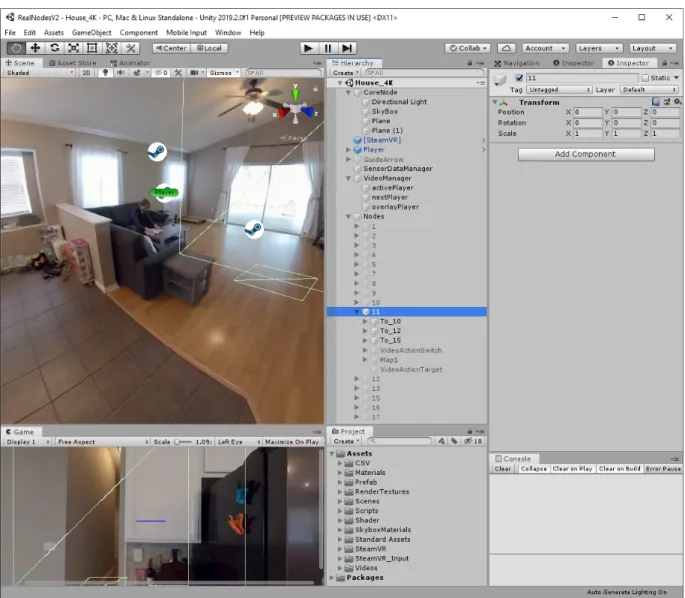
RealNodes organizes its VE scene graph hierarchy into several objects. These objects are defined by a mixture of 3D geometry, scripts with assets assigned, exposed configuration variables, and nested children objects. See Figure 3.4 for an image of the RealNodes software loaded in the Unity3D development environment. Since most of the scene is image-defined from the 360-videos, there are fewer objects defined in the scene compared to other VEs. However, these objects are dense with scripting logic to define the scene and control the state transformations that occur from player action. We describe this hierarchy below.
CoreN odeis the target object for the final processed 360 VR environment and lighting
for 3D objects. It primarily contains a large sphere acting as a render surface for the 360 VR environment. The player always interacts with the world inside this sphere. The sphere is large enough for the surface to appear far from the player, while close enough to allow for the viewpoint to change with minor player motion. Normally, we would use a skybox at infinite distance to do environment map rendering like this. However, if we used the skybox alone, the background would not realistically shift when the player moves. Thus, the sphere object was added for that small addition to realism. Both the sphere and skybox contribute IBL to any interaction objects contained in it.
[SteamV R] is the application programming interface (API) core rendering object to
support the VE to run on SteamVR hardware. It runs the default SteamV R Render script
as part of the SteamVR API.
P layer is the core collection of objects that define the user avatar. To support
SteamVR, this includes objects for the HMD and left/right hand controllers for tracking. Controller inputs and tracking data are collected by scripts attached to the VR related
objects and sent to the SensorDataM anager. Additionally, contained in the P layer are
the section Visual Guidance User Interface Methods).
Figure 3.4: View of the RealNodes software project development environment in the Unity3D game engine.
GuideArrowis the core environment object that defines the appearance and behavior
of the Arrow UI (explained in section Visual Guidance User Interface Methods).
SensorDataM anager is the central collector of tracking data from the HMD and
environment for state tracking and change.
V ideoM anager is the central controller for the state management and rendering of
the 360 VR environment. Based on where the player is, whether they are performing WIP, and whether they trigger an environment animation, the render pipeline changes video states to influence the final environment map rendering (described in the VideoManager section).
The N odesobject is the collection of waypoint node objects in the environment that
define the interaction and navigation in each location of the 360 VR environment. Rather than having these locations physically laid out in the VE, they are overlapped over each other and are made active only when the waypoint state has changed for the player. At minimum, each waypoint has objects for neighbor waypoints placed in accordance to where they are in the corresponding 360-video for that waypoint. These have scripts that dictate the transition states sent to the VideoManager, waypoint objects additionally contain core visual guidance UI objects for the Target and Ripple UIs respectively that are only active
when either of those UIs are enabled. In addition, a waypoint can contain an ActionT ool
and P age object, which are interaction objects for use as part of the search task (described
further in the section Interaction Objects).
Assets
RealNodes includes a mixture of custom developed assets and leveraged/extended standard assets from the SteamVR library and Unity3D game engine. Custom scenes, scripts, shaders, render materials, and video assets are organized in their own folders for the scene hierarchy to reference. Prefab objects, or scene graph objects with a specific definition intended for reuse and instancing, are also organized here. Note that other than test scenes, the operation of RealNodes takes place in only one scene definition.
Scripts and Shaders
Unity3D’s primary programming language for its API is C#. Most of these scripts
inherit Unity3D’s M onoBehaviour API class, which allows them to be attached to objects
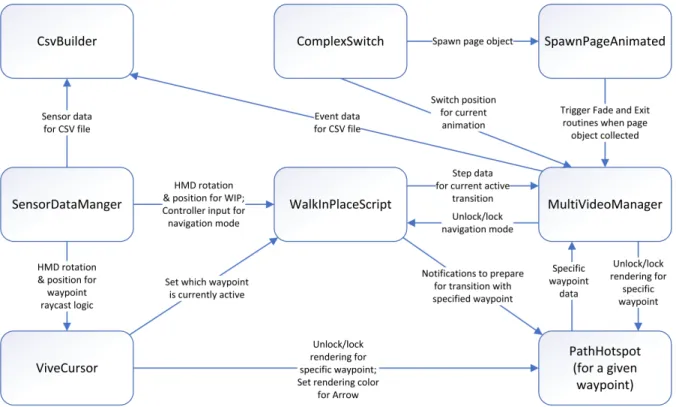
in the scene graphs, communicate with other scripts through message passing, and trigger periodic update threads every frame. Unity additionally uses shaders in a custom language called ShaderLab, though the syntax is similar enough to common shader language formats like GLSL to allow for implementing common algorithms from the literature.Figure 3.5 il-lustrates the high-level architecture of RealNodes, showing the relationship between major scripts as well as their inputs and outputs, showing a principle of closely linked systems. Below are high-level descriptions of the custom scripts and shaders we developed.
M ultiV ideoM anageris the densest class definition in the project. Due to the
impor-tance of the logic for video playback and rendering, it acts as the focal point of almost all software logic, receiving inputs from many other scripts in the system. Based on the current state of the script, and inputs received from the rest of the system, it sends new inputs to the
SkyboxP anoramicBlended shader. This shader synthesizes the state inputs and currently
active 360-video data into the final 360 VR environment map. CommonEnums holds the
enumeration definitions for all the videos for location, transitions, and action videos, as well
as the visual transition mode. P athHotspotV2 is the state machine attached to each
way-point object, storing configuration data on which wayway-point it is departing and which one it is going to. It also controls render logic based on N avigationM ode state and which visual
guidance UI is set. V iveCursor controls ray casting logic for the HMD, which indicates
which waypoint the player is facing. Based on this data, different states are triggered for the
correspondingP athHotspotV2 script and theM ultiV ideoM anager. The above scripts and
shader are detailed further in the section Video Manager.
left/right controllers. It additionally receives button states for the controllers captured from
SimpleInput. This data is sent to other scripts in the system that require tracking and
controller input. Primarily, the W alkInP laceScript get raw HMD tracking data and
pro-cesses it to determine whether WIP is being performed. This calculated step data is sent to
M ultiV ideoM anager to trigger transition playback.
Figure 3.5: High-level architecture diagram of the different script modules in RealNodes and their inputs/outputs to each other.
SimpleT extureScrollis used to control theMaskedRipple shader, which controls the
animation of the Ripple visual guidance UI. SimpleF ixRotation dictates the behavior of
the Path visual guidance UI. ArrowColor, P ointArrow, and BezierCurve all dictate the
behavior of the Arrow visual guidance UI. The above scripts and shader are detailed further in the section Visual Guidance User Interface Methods.
ComplexSwitch tracks the state of the ActionT ool that it is attached to. Spawn-PageAnimatedhandles both the spawning and pickup behavior of the P age object that it is
attached to. The above scripts are detailed further in the section Interaction Objects.
CsvBuilderis used to write timestamped metrics for a specified logging file (described
in the section Metrics Recording).
Video Manager
A major feature of RealNodes is a multi-video management system for changing the active video based on event triggers and providing layered video effects. Unity3D Render Textures are used as targets for our videos. A Render Texture can be modified and updated at run time. This allows for receiving dynamic data like video frames while being treated
as a standard texture by ourSkyboxP anoramicBlended shader and merged with graphical
effects that are finally sent to the user’s view. M ultiV ideoM anager holds references to
Unity3D Video Player objects, all the video files, and all the Render Textures. Our system allows for smoothly fading between two videos as they are simultaneously playing, such as the current location video and a transition video. It also supports preprocessed videos with a green “alpha” mask color to place an animation on top of the background. This allows for animating partial regions of video based on event triggers, such as opening a closet on
command. Additionally, the V ideoM anager has a CsvBuilder script attached to handle
writing the event data file (described further in Metrics Recording).
Render Pipeline
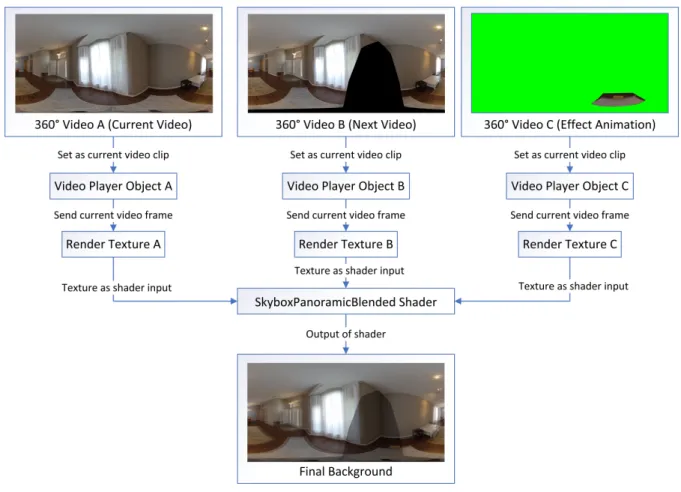
Figure 3.6 illustrates the high-level render pipeline for the VideoManager, which dictates the appearance of the 360 VR environment around the player. At any given time, there is up to three videos actively loaded into memory. These videos are tied to one of
three Video Player objects: activeP layer, nextP layer, and overlayP layer. Every frame of
playback of the Video Player objects is sent to a different Render Texture, which acts as
input to theSkyboxP anoramicBlended shader. See Figure 3.7 for an example of a location
video frame in equirectangular format.
Figure 3.6: The Video Manager render pipeline, illustrating the high-level process of how the 360 VR environment is made.
The image data combined with instructions from M ultiV ideoM anager dictates the
final environment background. M ultiV ideoM anager can intervene at each level of this
process: which video clips are loaded and prepared, which videos are playing or paused, and
and the Render Texture asset type from the Unity3D API. The Video Player object controls playback of a provided video clip. Video can be played, paused, and even set to a specific frame. It supports several render modes to allow the frame data to be output to a specified render target. Since we needed flexibility to perform custom operations with the frame data, we used Render Textures. A Render Texture is a special kind of texture that can be modified and updated at run time, allowing it to receive dynamic data like video frames while being treated as a standard texture by a shader.
The activeP layer plays the primary video for the current situation. Usually, this is
the location video for the current waypoint node the player is in. Whenever a new video is needed, it is swapped from the nextP layer into the activeP layer, at which point playback
of the new video can occur.
The nextP layer contains the next planned video. Rather than load in video right
when a change is needed, RealNodes is configured to dynamically load the next possible transition video every time the player looks at a new waypoint. This allows the likely chance that once WIP is initiated, the transition video will already be loaded and prepared.
The overlayP layer is loaded with the effect animation for the current waypoint the
player is in. Unlike the other Video Player objects, the playback of the video is not automatic,
but is instead dictated by the ActionT ool (described in Interaction Objects). When there
is no animation in the waypoint node, this is empty and any functions regarding its use are skipped.
MultiVideoManager Script
M ultiV ideoM anagercontrols all behavior for the Video Manager. Its three most
im-portant functions are theU pdatethread and the two coroutinesBlendandPlayOneShotVideo.
They are fundamental to performing the playback and combination of video data.
Figure 3.7: Example of an equirectangular image from one of the location videos. This defines the background of the 360 VR environment.
Its primary function is to wait for signals to start a new instance of the Blend coroutine, as well as trigger playback of animations.
Blend is the core coroutine thread that facilitates switching between two videos.
It performs a fade transition between the videos in activeP layer and nextP layer, until
nextP layer is the dominant video being played. At which point the clips are swapped and
the next video has now been set to the primary video.
P layOneShotV ideois the main coroutine thread that performs a transition from one
waypoint location to another, primarily when WIP is executed. First, it calls Blendto fade
between the current location video to the transition video. Then it blocks until the script receives step data from theW alkInP laceScript, at which point it progresses playback of the
transition video if it receives step data. Playback of the transition stops and the coroutine continues to block if step data stops being received. Once the playback of the transition has
finished, the next location clip is prepared ending the coroutine. The script is now in a state where the next time U pdate is called, it will trigger a new instance of Blendthat will fade
from the finished transition video into the newly prepared location video.
There are several publicly available functions in M ultiV ideoM anagerallowing other
objects to trigger state changes (refer to Figure 3.5). These include receiving step data from the WIP system, receiving triggers to prepare the next video clip, executing the next transition, manipulating the animation overlay, and performing a fade to black and exiting
the application. M ultiV ideoM anager contains a state machine of which locations map to
each possible transition video. Based on the inputs received, the correct transition and location videos will be loaded into the appropriate Video Player objects.
M ultiV ideoM anager also contains references to several environment objects to
trig-ger state changes outside of itself (again, refer to Figure 3.5). Primarily, it togglesN avigationM ode
and rendering of visual guidance UI to avoid player control conflicts during video transitions. Additionally, it writes data to an event log every time a transition occurs, or when the ap-plication ends.
Transitions
One of the most important capabilities of M ultiV ideoM anageris performing
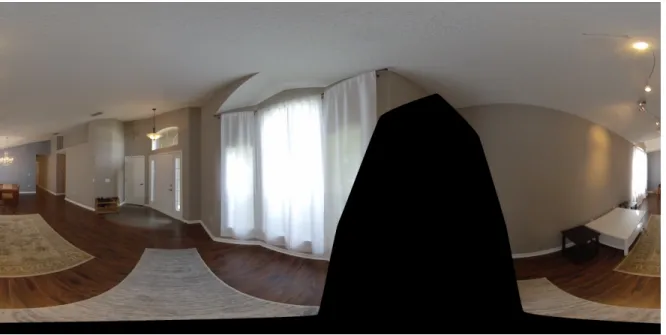
transi-tions between multiple videos. The script allows for smoothly fading between two videos as they are both simultaneously playing, such as the current location video and the transition video to be played back. See Figure 3.8 for an example of a transition video frame.
As described above, theU pdate,Blend, andP layOneShotV ideofunctions, combined
with external state change commands, are key to this occurring. Below is pseudocode of the primary functions for performing the video transition sequence:
/*
Figure 3.8: Example of an equirectangular image from one of the transition videos. Note the masked out black region removes the cameraperson from view.
,→ video prepared, d) donePreparing = false. If true, start a new Blend. */
void Update ()
{
if (!playingTransition && switching_video && nextPlayer.isPrepared && !donePreparing)
{ donePreparing = true; StartCoroutine("Blend"); } CheckOverlayPlayback(); }
// Externally called to prepare next transition clip for current location and next location.
public void PrepareNextClip(LOCATIONS next_index)