A Conversational User Interface for
Software Visualization
(preprint)
Stefan Bieliauskas
Intelligent and Distributed Systems German Aerospace Center (DLR)
Bremen, Germany Email: [email protected]
Andreas Schreiber
Intelligent and Distributed SystemsGerman Aerospace Center (DLR) K¨oln, Germany
Email: [email protected]
Abstract—Software visualizations provide many different com-plex views with different filters and metrics. But often users have a specific question to which they want to have an answer or they need to find the best visualization by themselves and are not aware of other metrics and possibilities of the visualization tool. We propose an interaction with software visualizations based on a conversational interface. The developed tool extracts meta information from natural language sentences and displays the best fitting software visualization by adjusting metrics and filter settings.
Index Terms—software visualization, conversational interface, interactive visualization, chatbot, human computer interaction
I. INTRODUCTION
In modern software development processes, projects tend to grow in complexity over time. One challenge is to preserve an overview over the software architecture and the internal struc-ture of the application. A method to understand and explore the architecture is to generate dynamic visualizations based on the source code of the application. These visualizations provide different views based on the current question and role of the observers. A potential problem is that these views are often too complex and the user is not sure how to reduce complex visualizations to the current relevant subset of information.
To interact more easily with the user, we developed an interactive visualization to display an abstract representation of an component-based software architecture using a conver-sational user interface [1]. The conversational user interface understands natural language sentences and adjusts metrics and filters based on the content of that sentences. It provides a potential solution to address the problem that the user has a concrete question and wishes to reduce the visualization to the best fitting subset of information. Furthermore, such an user interface can be integrated into existing infrastructure for communication in software development teams, such asSlack. To have a specific tool for testing and evaluating a conver-sational user interface for software visualization, we used a previously developed visualization of OSGi-based projects [2]. OSGi (Open Service Gateway initiative) [3] is a specification that defines a Java-based component system. OSGi defines two structures: Bundles (a set of packages) and services (a shared instance between bundles). For example, one of the
visualization illustrates the dependencies of OSGi bundles (Figure 1).
Fig. 1. Two dimensional visualization of relations between OSGi bundles [2]. The color of the edges defines the relation between the bundles. The export of functionality is orange and the usage of a bundle is marked in blue.
We describe the particular contributions of this approach in the remaining paper as follows:
• A summary of conversational interfaces, such as assistant systems and chatbots (Section II).
• Our system architecture based on micro-services (Sec-tion IV).
• Description of the conversational interface using a chatbot (Section V).
II. CONVERSATIONAL-BASEDINTERFACES
During the last decades, software engineers developed dif-ferent kinds of interfaces to interact with various kinds of computer systems. We saw the development of new interaction methods like touch gestures and voice commands [4].
A conversational-based interface is an approach that pro-vides a more natural way to interact with computer systems
compared to a classic graphical user interface. Conversational interfaces support the ability to interact with a computer system like humans interact with each other. The computer system tries to understand the natural language sentence and do actions based on the user input [5]. There are different kinds of conversational based interfaces:Assistant systemsand
Chatbots.
A. Assistant Systems
Assistant systems are software agents that are more general than a chatbot. They try to direct the questions to the right sub-system instead of solve the problem themselves.1 They often provide a platform to integrate third-party functions into the assistant. For example, Google’sAssistant Platformprovide a programming interface to integrate custom applications into the assistant.2. Assistant systems became popular with the rise of virtual private assistants [1], such as Apple’s Siri, Microsoft’s Cortana, or Amazon’s Alexa.
B. Chatbots
With the rise of chat platforms such as Slack or Skype and the ability to integrate third-party software components via API’s, we see many attempts to interact with the user inside these platforms [6].
A chatbot acts in many ways like a human in a chat conver-sation. Chatbots respond to natural language sentences and try to do actions based on the user input [7]. Normally, a chatbot is designed for a more specific task than an assistant system (e.g., “The weather information bot”). During a conversation, the chatbot keeps track of the context to do more complex actions [5]. For example, a weather bot uses information from previous requests for a new request without asking the user for the location again (Figure 2).
Fig. 2. Schematic representation of the context information extraction process of a chatbot agent [8]. The chatbot agent ask the user for the required information.
1https://chatbotsmagazine.com/intelligent-assistants-i-a-85c21f9d3b8e 2https://developers.google.com/actions/
III. USECASES
The field of application for our interaction with the software visualization was defined by the following use cases:
1) Simple access to visualizations. For example, a project manager would like to access information about the structure of the software, within the daily used commu-nication platform. In this case a visual representation of the software could be integrated easily into a conversa-tion with other developers or stakeholders of the project. Also the project manager could find first insights that an architecture decision has been implemented (e.g., the decision to split a bundle into two separate bundles). 2) Find information as a new team member. New team
members of a software project need to learn about the architecture and structure of the project. Based on this conversation with a chatbot agent a new team member could get first indications where to look for a specific function in the code base and get an impression of the dependencies between software components. This interaction could also led to the insight that a problem with a feature of the project (e.g., a bug within the login function) would probably come from one of the highlighted bundles. The alternative to access these kind of information is often to ask the college that developed these function or read documentation about the intended architecture and dependencies.
Also a new team member can ask other team members and discuss questions about the architecture directly with the support of a visual representation of the conversation. 3) Distributed team communication. A distributed team, for example in an open source project, needs to com-municate about issues and features. To discuss a specific issue all team members of the conversation need to be at the same information level. A visualization of the current conversation addresses this problem.
IV. SYSTEMARCHITECTURE
The system architecture is based on several components (micro-services) that interact with each other (Figure 3). The components and fundamental interactions are as follows:
• Chat Software: The Open Source software ROCKET.CHAT3 provide chat functions for this prototype. ROCKET.CHAT is a modern messenger software with the ability to display custom applications inside a chat room (Figure 4). The software embeds the visualization component and sends all messages of a conversation to the chatbot component. The Visualization and the Chatbot component are independent software products that are running independently.
• Chatbot: The chatbot handles the incoming messages from the chat software and tries to extract metadata by scanning for particular keywords and regular expressions. If the chatbot detects such metadata it performs actions based on the information. For example, the chatbot 3https://rocket.chat
queries data from the API or send an event to the visualization to display a bundle.
To extract metadata, we use regular expressions to iden-tify the interesting parts of an incoming sentence. For example, the OSGi bundle names are identified by two different approaches:
– Search for the possible bundle direct before the key-word bundle: “show me all about the gui bundles”.
– Find all bundles based on a naming convention. This convention corresponds to the java package name pattern:“find com.gui”.
If the chatbot identifies a bundle name, the agent config-ures the search parameter for the visualization by sending a filter event with the bundle name via the full-duplex Websocket protocol [9].
At the current state of the prototype the metrics for the visualization are set to the number of packages as the scale of a node (Figure 1) and the import and export relations for the edges between the nodes.
• Visualization: The visualization display bundles as a graph. The graph can be adjusted by a filter for bundle names and also change some metrics (e.g., lines of code or number of packages as metric for the size of each node). This visualization receives events from the chatbot to filter and adjust the visualization based on the event.
• OSGi-API: The OSGi API provides an interface to get
data about the structure of the project. For example get all methods, classes, packages and bundles of the project.
Fig. 3. Overview of the system architecture and communication between the different software artifacts.
We implemented the proposed software architecture in JAVASCRIPT. The prototype implementation4 [10] integrates the 2D visualization of OSGi-based applications (Figure 1) and provide the ability to modify the view based on the user input.
V. CONVERSATIONALINTERFACE
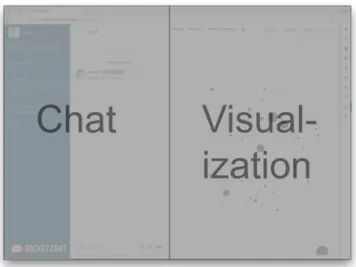
We show the general interface of the software (Figure 4). In the left area, the user interacts with the open source chat software ROCKET.CHATto write messages and discuss topics with other people. On the right side, the visualization shows
4https://github.com/DLR-SC/conversational-software-visualization
Fig. 4. Mookup of the user interface. The left side is based on the third party software ROCKET.CHAT. On the right side we integrated the interactive software visualization for OSGi projects [2].
up and displays the best fitting result based on the user input. To get the best fitting result the chatbot adjust the metrics and filters of the visualization:
• selection of bundles,
• filter for bundle names, and
• metrics such as lines of code or number of packages. A. Direct Question
To interact with the chatbot, the user can mention the bot in the question. In this case, the user prepends the question with the name (“Sofia”) of the chatbot:
@Sofia show me all io bundles
For this kind of direct questions, there are two scenarios:
• If the user already knows what kind of module (bundle
or class) to show, she can ask a very specific question such as “Show me all about the gui bundles”. In this case, the user provides context information about the type (bundle) and the search term (gui). This kind of question translates directly into a visualization. The visualization shows the view of bundle relations reduced by the search term “com.gui” and highlights all bundles that contain “com.gui” in the bundle name. The relations between two highlighted bundles are more visible than others (Figure 6).
• The second scenario demonstrates a more general kind of questions such as “Show me information about the Login function”. For this kind of question the context in-formation of the type is missing and only the search term (“Login”) is specified. To get the missing information, the bot searches for all bundles that contain the search term and also collect all bundles that contain classes, which contain the search term in the class name. Figure 7 illustrates the result of the conversation about a certain function and the best fitting visualization.
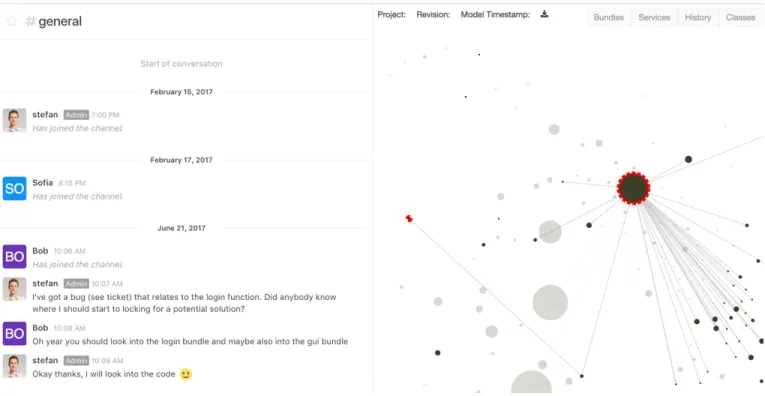
Fig. 5. An example of a conversation with the other developer about a ticket. The chatbot agent reacts on the message from Stefan and extracts the login function as an interesting subject. For this subject, the agent adjusts the visualization to highlight the bundles which contain classes with login in their name.
Fig. 6. The representation of the search request for a specific bundle via a conversation with the chatbot agent. The visualization highlights all bundles which contains “core.gui” in their name.
If the chatbot agent is directly asked (Figure 7) and does not understand the input message, the chatbot responds with a fall back sentence to give the user feedback and the option to rephrase the question.
B. Passive Visualization
Passive visualization means that users do not interact with the chatbot directly. The chatbot observes the conversation and provides context information in form of a visualization. During a group conversation between users, all chat messages are constantly observed and the software tries to extract meta information from each sentence (Figure 2). Instead of the
Fig. 7. An example of the conversational user interface that searches for the login function in a software project. The conversation on the left side produced the filtered output of the visualization and the chatbot agent responds with a proper answer.
direct conversation with the chatbot (Figure 7), in this case, the software offers a visualization for all group conversation attendees. The difference to the direct communication is that the chatbot does not ask the users for more context information or respond to the user (Figure 7).
Figure 5 illustrate a possible visualization about a bug. In this szenario, the bot marked a bundle to illustrate that the conversations are now about this part of the software. Also the required and imported bundles are highlighted to show more about the structure of the software.
VI. RELATEDWORK
There are several different approaches to control a visu-alization via a conversational interface [11], [12], [13]. For example, Lange et al. [12] proposes a system to control a vir-tual reality environment in the field of air traffic management. They describe a method to control the environment via voice commands (e.g., “focus on flight S K 23 1”). During their tests, 95% of the voice command resulted in a direct action. However, for more complex interactions within the VR scene, they used a controller input.
Lyons et al. [14] demonstrated that a conversational based interface is more effective to modify the view of a software interface rather than the manual input. For this wizard of oz test, they used a mobile calendar application to test whether the manual input is more effective than a speech based input. The test implies that the conversational based speech input is slightly slower than the manual input. But the test participants used two navigation steps less to archive there goals; where a navigation step is a user interface interaction inside the application (e.g., change to week view).
VII. CONCLUSIONS ANDFUTUREWORK
We presented a tool to interact with software visualizations based on a conversation with a bot. The different use cases presented the possible benefits of such an interaction. Among others, the interaction within a group shows the ability to support a discussion between two developers with a specific visualization (Figure 5). On a direct conversation with the chatbot agent, the prototype showed that a new member of the team can access visualizations and information by asking natural language questions. Even with this restricted set of questions and answers, the chatbot shows some potential to access software visualizations in a more natural way and get the best fitting information at the right time. Nevertheless, an user study to support these claims is still to be conducted.
There are topics for the future development. For example extending the chatbot with a more complex set of questions or the ability to send the project manager push messages if the software found some abnormalities. Another interesting field of future development is the integration of voice control to control a virtual reality (VR) software visualization.
REFERENCES
[1] L. C. Klopfenstein, S. Delpriori, S. Malatini, and A. Bogliolo, “The rise of bots: A survey of conversational interfaces, patterns, and paradigms,” in Proceedings of the 2017 Conference on Designing Interactive Systems, ser. DIS ’17. New York, NY, USA: ACM, 2017, pp. 555– 565. [Online]. Available: http://doi.acm.org/10.1145/3064663.3064672 [2] D. Seider, A. Schreiber, T. Marquardt, and M. Br¨uggemann, “Visualizing
modules and dependencies of OSGi-based applications,” in2016 IEEE Working Conference on Software Visualization (VISSOFT), Oct 2016, pp. 96–100.
[3] A. L. Tavares and M. T. Valente, “A gentle introduction to OSGi,”
SIGSOFT Softw. Eng. Notes, vol. 33, no. 5, pp. 8:1–8:5, Aug. 2008. [Online]. Available: http://doi.acm.org/10.1145/1402521.1402526 [4] B. A. Myers, “A brief history of human-computer interaction
technology,”interactions, vol. 5, no. 2, pp. 44–54, Mar. 1998. [Online]. Available: http://doi.acm.org/10.1145/274430.274436
[5] V. W. Zue and J. R. Glass, “Conversational interfaces: Advances and challenges,”Proceedings of the IEEE, vol. 88, no. 8, pp. 1166–1180, 2000.
[6] M.-A. Storey and A. Zagalsky, “Disrupting developer productivity one bot at a time,” in Proceedings of the 2016 24th ACM SIGSOFT International Symposium on Foundations of Software Engineering, ser. FSE 2016. New York, NY, USA: ACM, 2016, pp. 928–931. [Online]. Available: http://doi.acm.org/10.1145/2950290.2983989
[7] A. Følstad and P. B. Brandtzæg, “Chatbots and the new world of HCI,”
interactions, vol. 24, no. 4, pp. 38–42, Jun. 2017. [Online]. Available: http://doi.acm.org/10.1145/3085558
[8] K. Branting, J. Lester, and B. Mott, “Dialogue management for conver-sational case-based reasoning,”Advances in Case-Based Reasoning, pp. 77–90, 2004.
[9] A. M. I. Fette, Google Inc and I. Ltd., “The WebSocket Protocol,” Internet Requests for Comments, Internet Engineering Task Force (IETF), RFC 7936, December 2011. [Online]. Available: https: //tools.ietf.org/html/rfc6455
[10] S. Bieliauskas, “conversational-software-visualization-0.6,” Aug. 2017. [Online]. Available: https://doi.org/10.5281/zenodo.838681
[11] H. Lieberman, “Integrating user interface agents with conventional applications,” Knowledge-Based Systems, vol. 11, no. 1, pp. 15–23, 1998.
[12] M. Lange, J. Hjalmarsson, M. Cooper, A. Ynnerman, and V. Duong, “3d visualization and 3d and voice interaction in air traffic management,” in
The Annual SIGRAD Conference. Special Theme-Real-Time Simulations. Conference Proceedings from SIGRAD2003, no. 010. Link¨oping University Electronic Press, 2003, pp. 17–22.
[13] S. Kopp, L. Gesellensetter, N. C. Kr¨amer, and I. Wachsmuth, “A conversational agent as museum guide–design and evaluation of a real-world application,” in International Workshop on Intelligent Virtual Agents. Springer, 2005, pp. 329–343.
[14] K. Lyons, C. Skeels, and T. Starner, “Providing support for mobile calendaring conversations: A wizard of oz evaluation of dual–purpose speech,” inProceedings of the 7th International Conference on Human Computer Interaction with Mobile Devices & Services, ser. MobileHCI ’05. New York, NY, USA: ACM, 2005, pp. 243–246. [Online]. Available: http://doi.acm.org/10.1145/1085777.1085821
![Fig. 1. Two dimensional visualization of relations between OSGi bundles [2].](https://thumb-us.123doks.com/thumbv2/123dok_us/811614.2602630/1.918.476.843.398.723/fig-dimensional-visualization-relations-osgi-bundles.webp)
![Fig. 2. Schematic representation of the context information extraction process of a chatbot agent [8]](https://thumb-us.123doks.com/thumbv2/123dok_us/811614.2602630/2.918.90.419.691.960/schematic-representation-context-information-extraction-process-chatbot-agent.webp)