c e-ISSN: 2348-6848, p- ISSN: 2348-795X Volume 3, Issue 05, March 2016
International Journal of Research (IJR)
Available at http://internationaljournalofresearch.org
“Six Sense Technology Using Hand Gesture”
[1] Chandni Motwani; [2] Durga Motwani & [3] Amruta Kasatwar
Department Of Electronics& Telecommunication Engineering Datta Meghe Institute Of Engineering, Technology & Research ,Salod,Wardha
;
[email protected]Abstract- This project is based on sixth sense
technology. Sixth Sense technology is a device which works on the principles of hand gesture recognition and image processing to capture, zoom (in and out), control mouse pointer and writing, drawing with ease just by the help of colored caps worn on the fingertips of the user. Sixth Sense can also obey hand gestures. The camera recognizes objects around a person instantly and performs various gesture related applications depending upon the scenario. Also can access or manipulate the information using finger. We use our five natural senses to perceive any information; that information helps us make decisions and choose the right actions to take. The implantation of image processing and gesture recognition using MATLAB is practically proved. The drawing application lets user draw on any surface by observing the movement of index finger. Mapping can also be done anywhere with the features of zooming in or zooming out. The camera also helps user to take pictures of the scene is viewing and later can arrange them on any surface. Sixth Sense can also obey hand gestures. Sixth Sense technology is implemented in 'Sixth Sense/WUW (wear your world) using gesture recognition, augmented reality, computer vision and radio frequency identification. The device has a huge number of applications , it is portable and easily to carry as can wear it in neck. The drawing application lets user draw on any surface by observing the movement of index finger. Mapping can also be done anywhere with the features of zooming in or
arrange them on any surface. Some of the more practical uses are reading a newspaper. reading a newspaper and viewing videos instead of the photos in the paper. Or live sports updates while reading the newspaper.
I. INTRODUCTION
Sixth sense is a wearable gestural interface that augments the physical world around us with digital information and lets us use natural hand gestures to interact with that information.
In virtual reality idea is to remove standard input and output devices and building a wearable computer system to create realistic environment for user and software interaction this Is what we also called computer human interaction. To create virtual reality many different devices are used like camera, mike, and sensors are used even it sounds easy but developing these system are more difficult for developer.
c e-ISSN: 2348-6848, p- ISSN: 2348-795X Volume 3, Issue 05, March 2016
International Journal of Research (IJR)
Available at http://internationaljournalofresearch.org
interface for accessing information about everything around us. If they can get rid of the colored finger caps and it ever goes beyond the initial development phase, that is. But as it is now, it may change the way we interact with the real world and truly give everyone complete awareness of the environment around us. In our everyday lives, we are using our 5 senses to take in information in the world around us and to respond to it: touching, seeing, hearing, smelling, tasting. Have you ever thought about what could be the sixth sense, particularly when living in 21st century, in the age of information technologies, where everything is going online and mobile.
Sixth Sense is a wearable gestural interface that augments the physical world around us with digital information and lets you use natural hand gestures to interact with that information. By using a camera and a tiny projector mounted in a pendant like wearable device, Sixth Sense sees what you see and visually augments any surfaces or objects we are interacting with. It projects information onto surfaces, walls, and physical objects around us, and lets you interact with the projected information through natural hand gestures, arm movements, or your interaction with the object itself. Sixth Sense attempts to free information from its confines by seamlessly integrating it with reality, and thus making the entire world your computer.
II. WORKING
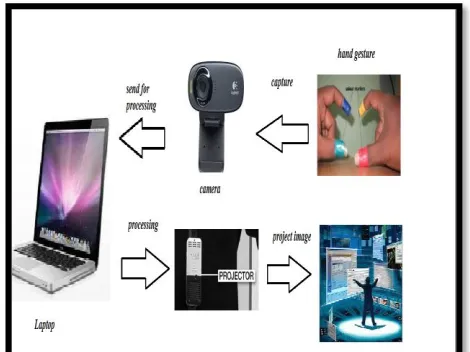
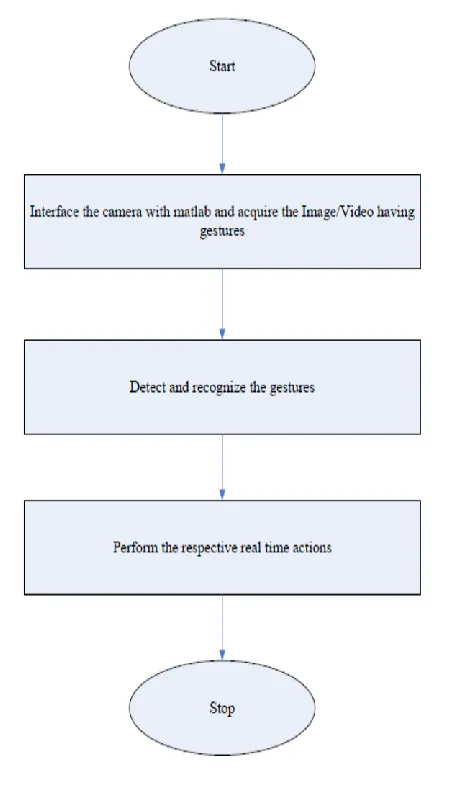
The methodology shown below in the algorithm used is based on the Sixth Sense Technology where user has to make several gestures using the finger worn colour markers and perform real time action whose images are preloaded in the program. Our aim is to move mouse cursor as the user moves her fingers,
zooming of images .The components used in our project are Camera, Coloured Caps and MATLAB installed in Laptop
c e-ISSN: 2348-6848, p- ISSN: 2348-795X Volume 3, Issue 05, March 2016
International Journal of Research (IJR)
Available at http://internationaljournalofresearch.org
fig 2.2 flowchart
The approach works in a continuous manner where camera takes the live video, sending to the laptop, and MATLAB installed in laptop processes the input and recognizes the colours at the finger tips of the user. Following figure shows the algorithm we used in our approach to move mouse cursor on screen, capturing images using gestures and interfacing the image.
In our proposed methodology, first interaction with the physical world is done by camera. Camera takes the video and starts recording the live video and in continuation of recording it sends the live video to MATLAB which is already installed in laptop which is connected with the camera. In MATLAB, code is prepared which convert the incoming live video from camera into frames of images or slicing of video is done in the form of images.
These images that are obtained from the slicing of video are then processed for colour recognition process. The output of the colour recognition process are the images that contains those colours of which colour caps are present at the finger tips of the user, the background of the image and shadow if present. The fingers of user are not shown in the output images. For this purpose, RGB values of the colour caps are set prior in the code so that no other colour will be detected in the image after colour recognition except the caps colours and the background.
c e-ISSN: 2348-6848, p- ISSN: 2348-795X Volume 3, Issue 05, March 2016
International Journal of Research (IJR)
Available at http://internationaljournalofresearch.org
III. WORKING AREA DETAILS
3.1 SOFTWARE
What is MATLAB?
MATLAB is being used as a platform for laboratory exercises and the problems classes in the Image Processing half of the Computer Graphics and Image Processing course unit. This handout describes the MATLAB development environment you will be using, you are expected to have read it and be familiar with it before attempting the Laboratory and Coursework Assignments.
MATLAB is a data analysis and visualisation tool designed to make matrix manipulation as simple as possible. In addition, it has powerful graphics capabilities and its own programming language. The basic MATLAB distribution can be expanded by adding a range of toolboxes, the one relevant to this course is the image-processing toolbox (IPT). The basic distribution and all of the currently available toolboxes are available in the labs. The basic distribution plus any installed toolboxes will provide a large selection of functions, invoked via a command line interface.
GUIDE
GUIDE is MATLAB’s Graphical User Interface (GUI) Development Environment
1. GUIDE stores GUIs in two files: –
1.fig file - Contains a complete description of the GUI figure layout and the GUI components
1. Changes to this file are made in the Layout Editor –
2. 2.m file - Contains the code that controls the GUI
3. Initialization code and callbacks
4. You can program the behavior of the GUI
in this file using the M-file Editor .
GUI
1. A GUI (Graphical User Interface) is useful for presenting your final software.
2. It also makes it easier to adjust
parameters and visualize your programs.
CREATING GUI
Typical stages of creating a GUI are:
1. Designing the GUI
2. Laying out the GUI – Using the Layout Editor
3. Programming the GUI – Writing callbacks in the M-file Editor
4. Saving and Running the GUI
Basic Controls
1. axes: something to draw upon
2. static text: text that is stuck on the
screen, the user can't edit it
3. edit box: a white box that the user can
c e-ISSN: 2348-6848, p- ISSN: 2348-795X Volume 3, Issue 05, March 2016
International Journal of Research (IJR)
Available at http://internationaljournalofresearch.org
4. button: performs an action when user
clicks on it
3.2HARDWARE
The hardware components are coupled in a pendant like mobile wearable device.
1. Camera
2. Projector
3. Color Markers
3.1CAMERA
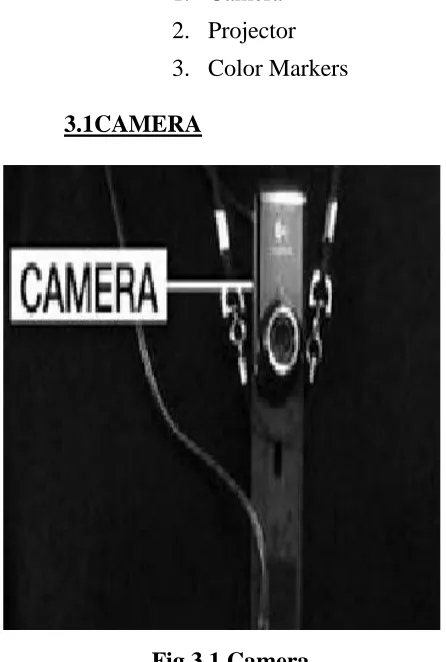
Fig 3.1 Camera
A webcam captures and recognises an object in view and tracks the user’s hand gestures using computer-vision based techniques. It sends the data to the smart phone. The camera, in a sense, acts as a digital eye, seeing what the user sees. It also tracks the movements of the thumbs and index fingers of both of the user's hands. The camera recognizes objects around you instantly,
with the micro-projector overlaying the
information on any surface, including the object itself or your hand.
3.2PROJECTOR
Fig 3.2 Projector
Also, a projector opens up interaction and sharing. The project itself contains a battery inside, with 3 hours of battery life. The projector projects visual information enabling surfaces, walls and physical objects around us to be used as interfaces. We want this thing to merge with the physical world in a real physical sense. You are touching that object and projecting info onto that object. The information will look like it is part of the object. A tiny LED projector displays data sent from the smart phone on any surface in view–object, wall, or person.
c e-ISSN: 2348-6848, p- ISSN: 2348-795X Volume 3, Issue 05, March 2016
International Journal of Research (IJR)
Available at http://internationaljournalofresearch.org
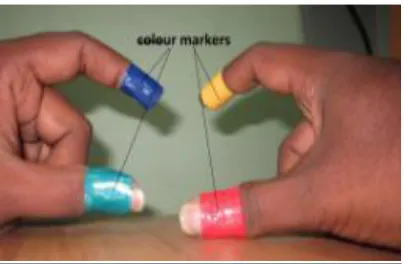
Fig 3.3 Color marker
It is at the tip of the user’s fingers. Marking the user’s fingers with red, yellow, green, and blue tape helps the webcam recognize gestures. The movements and arrangements of these makers are interpreted into gestures that act as interaction instructions for the projected application interfaces.
IV. ADVANTAGES
Sixth Sense is an user friendly interface which integrates digital information into the physical world and its objects, making the entire world your computer.
1. It uses hand gestures to interact with digital information.
2. Supports multi-touch and multi-user
interaction
3. Data access directly from machine in real time
4. It is an open source and cost effective and we can mind map the idea anywhere
5. It is gesture-controlled wearable
computing device that feeds our relevant information and turns any surface into an interactive display.
6. It is portable and easy to carry as we can wear it in our neck.
7. The device could be used by anyone without even a basic knowledge of keyboard or mouse.
I. APPLICATION
The SixthSense prototype implements several applications that demonstrate the usefulness, viability and flexibility of the system.
The Sixth Sense device has a huge number of applications. The following are few of the applications of Sixth Sense Technology.
1. Drawing application
2. Zooming features
3. Take pictures
4. Moving mouse pointer using fingers
V. FEATURE SCENARIO
1. To get rid of color markers
2. To incorporate camera and projector
inside mobile computing device.
3. Whenever we place pendant- style
wearable device on table, it should allow us to use the table as multi touch user interface.
4. Applying this technology in various
interest like gaming, education systems etc.
5. To have 3D gesture tracking.
c e-ISSN: 2348-6848, p- ISSN: 2348-795X Volume 3, Issue 05, March 2016
International Journal of Research (IJR)
Available at http://internationaljournalofresearch.org
CONCLUSION
The key here is that Sixth Sense recognizes the objects around you, displaying information automatically and letting you access it in any way you want, in the simplest way possible. Clearly, this has the potential of becoming the ultimate "transparent" user interface for accessing information about everything around us. If they can get rid of the colored finger caps and it ever goes beyond the initial development phase, that is. But as it is now, it may change the way we interact with the real world and truly give everyone complete awareness of the environment around us.
REFERENCES
[1]Relevant feature for video based continuous sign language recognition. Department of
Technical Computer Science, Aachen
University of Technology Aachen, Germany, 2000.
[2]Building temporal models for gesture
recognition. In proceedings British Machine Vision Conference, 2000, pages 32-41.
[3]Use your hand as a 3-D mouse or relative orientation from extended sequences of sparse point and line correspondences using the affine trifocal tensor. In proceedings 5th European Conference on Computer Vision, 1998, pages 141-157.
[4]O. Castillo, O. and P. Melin, "A New Approach for Plant Monitoring using Type-2 Fuzzy Logic
and Fractal Theory", International Journal of General Systems, Taylor and Francis, Vol. 33, 2004, pp. 305- 319.
[5]S. Furui, "Cepstral analysis technique for
automatic speaker verification", IEEE
Transactions on Acoustics, Speech and Signal Processing, 29(2), 1981, pp. 254- 272.