683
Volume 63 79 Number 2, 2015
http://dx.doi.org/10.11118/actaun201563020683
CONTROLLING MULTIPLE VIRTUAL
MACHINES IN COMPUTER CLASSROOMS
Petr Zach
1, Martin Pokorný
1, Jiří Balej
1, Michal Šturma
11 Department of Informatics, Faculty of Business and Economics, Mendel University in Brno, Zemědělská 1, 613 00 Brno, Czech Republic
Abstract
ZACH PETR, POKORNÝ MARTIN, BALEJ JIŘÍ, ŠTURMA MICHAL. 2015. Controlling Multiple Virtual Machines in Computer Classrooms. Acta Universitatis Agriculturae et Silviculturae Mendelianae Brunensis, 63(2): 683–691.
A management of computer classroom is undoubtedly a diffi cult task for the administrator which has to prepare virtual operating systems for education. It is quite common that lectors need to edit the particular machine during the semester, and that is the case where the main problems can appear. The process of changes deployment is not just very time-consuming but during it a virtual machine inconsistency can appear.
The main part of this paper focuses on system process diagrams and its pseudocode. At fi rst, the machine is created on the remote server by lector or administrator. A er a proper approval, the machine is able to be deployed. The lector then specifi es the details about date, time and destinations of the virtual machine deployment. Once these details are approved, the virtual machine will be automatically deployed at the specifi ed time. The automatic deployment includes also an initial confi guration of the virtual machine at remote desktop and its post-install confi guration (hostname, MAC address, etc.). Once all steps are completed, the process will be marked as succeed.
We present an automatized solution which provides a possibility how to easily manage computer classroom with virtual operating systems. The proposed solution should deliver a greater fl exibility, more reliability and faster deployment in comparison with the current solution used in our computer classroom. The proposal is also able to manipulate with already deployed machines for easy changes (e.g. so ware updates). The main advantage is the improvement of classroom management process automation.
Keywords: computer classroom, VirtualBox, workstation management, virtual machine, workstation virtualization, virtualization, student workstations
INTRODUCTION
There are many operating systems available today, therefore colleges and universities try to acquaint students with a number of them. This can be ensured easily with the expansion of virtualization. On the other hand, a virtual machine management system should be employed to cover the administration of the virtual machines. The proposed management system of computer classroom is designed especially for computer network laboratory at the Department of
Informatics (Faculty of Business and Economics, Mendel University in Brno) founded in 2009 in order to support courses specialized in computer networking (Pokorný and Zach, 2013). The proposed system can also be used in other university computer classrooms using virtualization without major modifi cations.
The basic laboratory requirement – multiple operating systems on one student workstation – was recently solved using GRUB1 boot-loader
allowing a multi-boot. The management of multiple
operating systems on the one workstation was very time consuming, even when operations were trivial, more details about the previous solution was described by Pokorný and Zach (2013). A method of virtual image cloning was used to apply changes on all workstations in the past. We consider these prolonged operations as weak spot of the management of network laboratory at FBE MENDELU.
There are other solutions dealing with the management of desktop operation systems as well. Especially the Virtual Desktop Infrastructure (VDI) is the product providing a remote access to the virtualized desktop operating systems gathered in data center. Another method is using a terminal server (e.g. Remote Desktop Solution – RDS). Both of these approaches need a stable connection to the server which we are not able to provide. The current design of the operating system architecture in our computer laboratory uses one natively installed base system (host system) and a set of virtualized educational operating systems held in particular workstations as virtual images. This solution lets students to work with the base and educational at the same time and moreover, copying of virtual images is more convenient for the classroom administrator than a disk partition cloning. There is the VlizedLab so ware, a complex system for controlling virtual machines running locally, but unfortunately, this solution does not suit all our requirements.
Our goal is to design a solution which will be able to remotely control multiple virtual machines running locally on multiple workstations with the Windows 8 base operating system. The virtual machines must be virtualized in VirtualBox, because of its advantages for the computer network laboratory (GNU GPL license, CLI management) as was described by Aulehlová, Pokorný and Zach (2012). The aim of this article is to provide a proposal of the system able to facilitate complete management process of the virtual machines including their deployment on all computers in classroom and necessary remote modifi cations.
MATERIALS AND METHODS
Current State
The current network laboratory contains 17 educational computers. These are running the Windows 8 operating system where the students have only standard user rights with many features locked to prevent the security issues. The host system also has an internet access (depends on teacher’s decision). The crucial so ware equipment of host system is the Oracle VirtualBox where the virtualized operating systems prepared for education are running. There are several types of virtual machines, their platform and so ware equipment depends on the courses for which they are intended. Detail description of possible virtual
machine adjustment is described by Pokorný and Zach (2013).
There are also additional user services as LDAP used for the centralized authentication in couple of operating systems, NFS used for centralized users home folders for more operating systems, FTP employed as centralized data storage space, etc. These are ensured by laboratory server, which is managed via the administrator’s computer.
The process of the specifi c virtual machine creation is very demanding and time consuming process. It currently consists of following steps: 1a. Teacher creates the virtual machine for education
directly in classroom. Usually the creation is done at teacher’s computer. The main advantage is that the teacher can always be sure that his virtual machine is able to run on target computers (all computers have the same hardware confi guration in the classroom). On the other hand, the direct participation of teacher and absence of any communication channel between the teacher and administrator can be considered as disadvantages.
1b. Teacher creates the virtual machine on his own computer and forwards a copy of virtual machine to the administrator a er its completion. This solution provides the comfort ambience for the teacher but in comparison with the fi rst case of virtual machine creation (1a), this way provides verifi cation whether the destination computer meets the hardware requirements of created virtual machine. Moreover, more signifi cant problem is how to deploy the created virtual machine to the each destination computer. 2. Once the classroom administrator confi rms
the virtual machine runs properly, he will take a portable drive and sequentially copy the image fi le to the all computers. The basic confi guration change of VirtualBox has to be made as well. 3. The fi nal part of virtual machine creation consists
of modifi cation of the virtual machines one by one. This step is also called the post processing. It originates from our previous experiences, for instance, a hostname change is necessary in virtual machines running Windows and change of network interface names is needed in Unix-based virtual systems.
As noticeable from the previous text, the current process of virtual machines management has a number of drawbacks. The main disadvantage of this solution is the very time-consuming management because the administrator needs to repeat every step on each particular workstation. Furthermore, a discrepancy of VirtualBox settings and post processing can occur across the classroom because there is no solution how to check their proper state remotely.
User Requirements
laboratory. They are composed from basic needs, and the fi nal proposed model has to fulfi ll them as much as possible.
1. Creation and management of the virtual machines – The virtual machine should be created by administrator and has to meet the basic requirements depending on the machine purpose. A one sample copy of the each virtual machine must be held at a centralized storage prepared for deploying. The confi guration fi les including the confi guration of VirtualBox and the post processing guidelines must be the part of the sample copy.
2. Teacher’s adjustment of the virtual machine – In the next step, the lector chooses the virtual machine that best suits his needs and edits it to the specifi c educational purposes. This process usually includes an installation of additional so ware and copying of fi les that must be available for education. This step has to be done without unnecessary moving of the virtual machine; must be fast and reliable.
3. System approval with the corresponding security settings – As described in previous paragraph, the virtual machine is edited by teacher. This possibility can result into the potential security, hardware compatibility and license issues which have to be revealed and fi xed before the fi nal deployment. 4. Reliable and fast deployment including the post
processing – The process of deployment has to be fast as possible. The required changes could appear at once and it is important to prepare the classroom for teaching in limited time. The deployment part must include also the post processing – the setting up the virtual machine on the destination computer.
Used Technology
The currently used technologies were already described. In the fi nal proposed solution we assume the usage of the following technologies:
1. Virtualization so ware to run the virtualized operating systems – We tend to use the Oracle VirtualBox, especially because of its possibility of command-line confi guration. This tool also off ers wide spectrum of possible settings and exactly fi ts the needs of our education network laboratory. 2. Relational database for metadata – The relational
database must provide a place for saving the metadata about off ered virtual machines. It must be reliable, scalable and easy to backup. 3. Storage for the virtual machine images – The storage of
virtual machines has to provide accessibility for more users, possibility to work at same time and separately. These needs are met by the Windows Server 2012, which is the available solution for the university. Another advantage is user-friendly interface for non-Linux users.
4. Replication so ware for batch downloads – A multicast protocol could be deployed for the effi cient and fast distribution of virtual
image from the server to destination machines. The BitTorrent or the UDPcast suit this purpose best. The diff erences between these two ways are negligible; however, the BitTorrent is little bit faster as shown by Laurikainen (2012).
5. Necessary confi guration a er the image replication – A direct remote access to Windows workstation using SSH is not possible at fresh install, so additional so ware (called Cygwin) has to be deployed on these host systems to enable the application of VirtualBox and post processing confi guration.
Other Solutions
There are a lot of approaches to manage batch of computers in school classroom. The solution to management can be the terminal approach using the PCoIP, RDP or ICA protocol as Horizon View, Citrix XenDesktop, etc. Also already mentioned solution using machine cloning is a possibility. These solutions are great for common classrooms, but laboratory of computer network or other special cases may require some additional features to be tuned.
The issue of centralized computer classroom management is also discussed in several articles. Only few of them deal with a solution based on desktop virtualization with VMs images stored locally on the workstation. During November 2013 we have searched in main databases (IEEE explore, CiteSeerX, ISI Web of knowledge, Scopus, Google Scholar and Google) using diff erent combinations of keywords (workstation, workstation virtualization, desktop virtualization, virtual machine, workstation management, classroom management, workstation deployment) to provide objective view on current state of computer classroom management based on desktop virtualization.
Jelínek et al. (2010) published the system for management of network laboratory, where a web server manages the virtual machines (VM) repository. The system works only on Linux based workstations and the UDPcast is used for distribution of VM to particular workstations. Unfortunately, this system is no longer working.
Jirků (2012) describes the so ware, which is able to remotely duplicate a VM image and confi guration fi le to the target PC. The access rights on target PCs are changed to prevent VMs settings modifi cation by students. Unfortunately, this solution does not deal with ISO images in terms of central repository as described in our own solution below.
(2008) does not solve a management of these workstations and a central repository.
VlizedLab tool proposed by Matzinger (2013) enables a VM replication from teacher’s PC to the selected student computers. It uses a Linux server for machine distribution using UDPcast and off ers prepared Linux workstation images, which are easy to confi gure. This solution does not provide the possibility to use the host operating system as a full computer, but provides the possibility to run more operating systems simultaneously.
Performance of VMs is important as well. Huang et al. (2012) deals with performance evaluation of virtualization technologies – VMware, Longene, Wine. The paper written by Shirvaikar and Satyla (2007) provides performance comparison in terms of several criteria, e.g. boot time and fi le transfer speed.
This paper deals with solution where the VM images are stored locally, but there are also publications, for example Border (2007) or Faměra (2011), which are discussing the solutions based on desktop virtualization on remote server.
As the review of related works shows, none of known solution meets all our requirements for management system for multiple virtual systems in the specialized network laboratory. VlizedLab developed by Matzinger (2013) is the system, which is very close to meet our requirements in comparison with the other solutions. However the drawback of VlizedLab is the impossibility to use a host system for basic work. Despite this, Matzinger (2010), Jelínek et al. (2010) and O’Donnell (2008) can inspire us in a way of VM distribution. As well Jirků (2010) and Wu et al. (2010) can contribute with the solution to remote control.
RESULTS AND DISCUSSION
Used Terminology
Following terminology is used in this chapter: • Virtual Machine (VM) – a virtualized computer
system running inside a virtualized engine (e.g. VirtualBox) on a host system which is installed on a workstation.
• VM Template (VMT) – a prototype of VM with a basic set of so ware equipment and initial settings. The template VM can be used as a sample for a new specifi c adjustable VM which is intended to be deployed on workstations.
• VM Repository (VMR) – a database of all VMs, either VMTs, VM proposals or deployed VMs.
• Deployment Task (DT) – a scenario stipulating which VM is to be deployed on which workstations in a scheduled time.
System Design
The main system processes in the virtual classroom management model have two entities (roles) interacting with the system – an administrator
and a teacher. The teacher (as a user) prepares a specifi c VM according to course needs (by means of the VM Repository Management process), and issues a DT request (using the Deployment Task Management process). The administrator holds responsibility for the whole system and performs specifi c management tasks, e.g. preparation of a VMT in the VMR and approval of a modifi ed VM as well as approval of a DT request. The Workstation Management process represents the actual deployment of VMs onto course workstations, post-installation processing, and it provides both of the entities with a result of the VM deployment.
Description of Subprocesses
VM Repository Management Process
VM Repository Management Process (scheme in Fig. 1) can be decomposed into three subprocesses – VM Template Creation, VM Template Modifi cation and VM Proposal Approval.
The key term in the VMR is the VM, which can get into several VM states:
1. VM Template (VMT) – a new sample VM as described in the terminology section above. 2. VM Preparing Proposal (VM PP) – a modifi ed
VMT, typically with new so ware added by the teacher, but not fi nished yet.
3. VM Waiting Proposal (VM WP) – a modifi ed VMT, which is fi nished and waiting to be approved by administrator.
4. VM Approved (VMA) – a verifi ed VM (previously in the state VM WP), which was checked by the administrator for VM’s consistency and was approved for deployment.
5. VM Denied Proposal (VM DP) – VM WP was checked by the administrator for VM’s consistency and was not approved for deployment. Teacher has to modify it (get it into VM PP state) or delete it.
The VM Template Creation process is used by an administrator to create new VMT. The administrator can prepare VM locally and then import it into the system. Other option is to create a VM on the server with setting all HW properties, installing OS and all necessary so ware. In both cases it is important to set a network card mode (bridge or NAT) and related security settings (fi rewall, antivirus, update policy, administrator rights for students, etc.) according to station purposes. For post-install confi guration, it is also useful to add management interface, which has connection only with host workstation. When all these conditions are met, the new VMT created. The pseudocode of VM Template Creation process is as follows:
IF import existing VM THEN
upload and register in the system ELSE
set HW requirements - CPU, RAM, HDD, CD-ROM, USB, INET MODE,…
install OS and SW
IF VM OS/Software needs license THEN
add appropriate licence for OS END
add management interface IF VM has access to Internet
THEN
set NAT mode
install security SW perform security settings create non-root account ELSE
set BRIDGE mode
set network card MAC and interface name
END
check VM functionality and security (antivirus, FW, admin rights)
END
write a comment for terms of usage mark VM as VM Template (VMT)
Teacher can choose any VMT or VMA as a template for his/her own VM and possibly install additional application so ware according to course needs. This process follows the VM Template Modifi cation process shown in pseudocode:
choose VM to modifi cation (VMT, VMA, VM DP)
mark VM as Preparing Proposal (VM PP) WHILE VM is NOT fi nished
DO
make desired changes (increase HW requirements, install own SW)
check added software license usability
DONE
write changes into comment
mark VM as Waiting Proposal (VM WP)
Until the VM is fi nished, it is marked as VM PP. Once the teacher fi nishes the VM modifi cation, he/she designates the VM as a VM WP. A er that, the VM WP enters into VM Proposal Approval process, where the administrator checks/ensures the VM’s consistency and if the VM meets all the deployment requirements, it gets an approval status (VMA). The VMA is now ready to be delivered onto the end workstations. Otherwise the VM WP is rejected and marked as VM DP. Then the teacher has to fi x the VM DP according to the administrator’s notes and then issue a new VM Proposal Approval process. The pseudocode of VM Proposal Approval process is as follows:
choose VM WP to approve
IF HW requirements AND security settings AND installed SW licenses ARE acceptable
THEN
change VM state to Approved (VMA) ELSE
write a comment
set VM state to Denied Proposal (not accepted)
END
Summary of the VM’s consistency and VM deployment requirements:
• VM hardware resource allocation (CPU, RAM, HDD) according to OS and so ware needs.
• Specifi c VM settings (network mode: NAT by default, Bridge as a special case is possible).
• Security so ware and settings (fi rewall, update policy, antivirus) in case of Internet access.
• Valid so ware licenses for operating system and applications.
• User logon policy (local admin privileges, local non-admin, Active Directory or LDAP).
Deployment Task Management
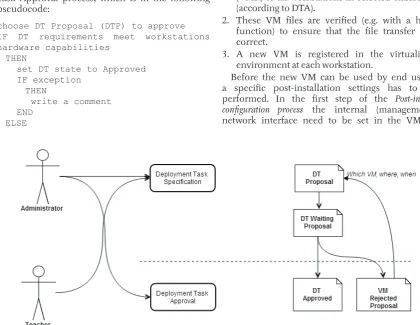
Deployment Task Management in Fig. 2 is composed of two subprocesses − fi rst is the Deployment Task Specifi cation process, where the teacher or the administrator specifi es which VMAs are to be deployed to which classroom (workstations) and when. This will create a Deployment Task (DT) which has a Proposal state because it has to be approved by the administrator. The pseudocode of Deployment Task Specifi cation process is described bellow:
choose VM for DT specifi cation IF VM state is VM Approved (VMA)
THEN
choose destination classroom (workstations)
choose date and time of deployment create new DT with state Proposal (DTP)
END
The DT Proposal enters into the Deployment Task Approval process, which is in the following pseudocode:
choose DT Proposal (DTP) to approve
IF DT requirements meet workstations hardware capabilities
THEN
set DT state to Approved IF exception
THEN
write a comment END
ELSE
set DT state to Rejected write a comment
END
The administrator verifi es if hardware requirements of the VMA meet hardware capabilities of workstations in the classroom. This can be done automatically as well but a database of hardware equipment (incl. storage space that is currently used on the workstations) would be necessary in this case. If the intended target workstations cannot run the VMA the administrator rejects the DT Proposal. Then the teacher can issue a new DT Proposal, which will follow administrator’s notes (e.g. specify a diff erent classroom with more powerful workstations). If the DT Proposal is correct, the administrator will set the state to DT Approved.
Workstation Management
The Workstation management process is described in Fig. 3 which comprises all subprocesses needed for successful VM deployment on real workstations.
At fi rst the Replication process receives two key inputs − the VM Approved (VMA) and the DT Approved (DTA) with the instructions how to deploy the new VM. The Replication process performs these steps:
1. The VMA is copied from the VM repository (VMR) to all workstations in selected classroom (according to DTA).
2. These VM fi les are verifi ed (e.g. with a hash function) to ensure that the fi le transfer was correct.
3. A new VM is registered in the virtualized environment at each workstation.
Before the new VM can be used by end users, a specifi c post-installation settings has to be performed. In the fi rst step of the Post-install confi guration process the internal (management) network interface need to be set in the VM. It
is used to perform specifi c remote post-install confi guration.
In Fig. 4 there is an example of possible situation a er image upload to a workstation. A connection to the host operating system is accomplished through the interface NIC1, a er that the guest system can be booted up using VirtualBox’s command line. Then it is possible to use the internal network interface card for connection into the guest system and accomplish post-install confi guration.
In the VM confi guration a primary network card mode has to be chosen. The most usual is the NAT mode with no additional VM settings needed. This mode suits requirements for VMs that require internet access, students don’t have administrator privileges in this mode. But in special cases (e.g. network laboratory), it is necessary for the students
to have administrator privileges to be able to modify the VM’s network interface card IP settings, and to expose the VM to an experimental educational network. Then the network card mode is the Bridge mode, and a few confi guration adjustments are needed:
• The VM’s MAC address has to be unique (usually set in the virtualized engine environment). • The VM’s unique IP confi guration and hostname
may be necessary (set inside the VM).
• Other VM’s OS specifi c settings may be needed (e.g. Linux interface mapping, ethX).
• Also the VM’s virtual disk should be mounted as immutable to return all VM changes made by students to the VM’s initial consistent state. 3: Decomposition of the Workstation Management subprocess
Both the teacher and the administrator need to know the result of the deployment task. Using the Deployment Task Status process (as described in pseudocode below) the administrator fi nds out whether the replication and post-install confi guration sub-processes reached their fi nal positive states − then the administrator closes the case as a successful one and the teacher is ready to start teaching his/her course. In case of problems the administrator needs to reveal the cause of the problem and try to solve it manually, or to start the whole deployment process from scratch. The pseudocode of Deployment Task Status process is shown bellow:
Choose DT Result IF DT result IS failed
THEN
IF reason of failure IS problem in replication process
THEN
repeat image upload to this workstations
END
IF reason of failure IS problem in Post-install confi guration
THEN
repeat confi guration on this workstations
END END
The Entity Relationship Model of the Management System
The entity relationship model was created using a knowledge acquired in creating function processes of the whole system. It includes a possibility to deploy the management system to more classrooms as well.
In the center of the entity relationship diagram (Fig. 5) there is the VM which keeps all information about VMs described in the VM repository management. This includes VMs’ hardware requirements (stored in the HW requirements table) and network card properties (stored in the NAT/Bridge mode table). The table Logins keeps information about login accounts to a particular VM’s operating system. The VM State change table tracks changes during the repository management process, the VM state table contains all the individual VM states.
Main table for the VM deployment is the Deployment task (DT) table which is followed by the Classrooms and the Workstations tables. The Deployment task (DT) state table contains possible DT states, and the DT State change table tracks every state change during the deployment confi rmation (by admin) and its application on real workstations. The tables Users and User groups store all registered users in the system. The Deployment task (DT) process table is used for the fi nal state of the deployment task assignment.
5: Entity relationship diagram
CONCLUSION
user requirements based on the environment at the Department of Informatics at FBE MENDELU in Brno, and described key ideas of the design of a new system that we are going to implement in the near future. The design contains mainly description of system processes in graphical form, all the main processes are described with a pseudocode as well. In the end, the design is completed with description of the data model using the ERD diagram. A er implementing the system, we would like to expand this system beyond our network laboratory and deploy the system in a larger scale at our university.
REFERENCES
AULEHLOVÁ, B., POKORNÝ, M. and ZACH, P. 2012. Implementace virtualizovaných výukových stanic v Síťové laboratoři ÚI PEF MENDELU. In: PEFnet 2012. [CD-ROM]. Brno: Mendelova univerzita v Brně.
BORDER, C. 2007. The Development and Deployment of a Multi-User, Remote Access Virtualization System for Networking, Security, and System Administration Classes. In: Proceedings of the 38th SIGCSE technical symposium on Computer
science education. New York: ACM, 576–580.
FAMĚRA, O. 2011. Virtual machine management so ware. [online]. Bachelor’s thesis. Brno: Masaryk University. Supervisor: Jan Kasprzak. Accessible on the Internet: <http://is.muni.cz/th/324964/ fi _b/>. [cit. 2nd February 2014].
HUANG, C. et al. 2012. Performance Evaluation of Virtualization Technologies for Windows Programs Running on Linux Operating System. In: NCIS 2012: Communications in Computer and Information Science. Berlin, 345: 759–766.
JELÍNEK, M. et al. 2010. Správa počítačových učeben na vysokých školách. Elektrorevue – Internetový časopis, 31: 1–5. [online]. Accessible on the Internet: <http://elektrorevue.cz/cz/ download/sprava-pocitacovych-uceben-na-vysokych-skolach-1/>. [cit. 2nd February 2014].
JIRKŮ, M. 2012. Automatic confi guration of VirtualBox in KIV laboratories. [online]. Bachelor’s thesis. Plzeň: University of West Bohemia. Supervisor: Ladislav Pešička. Accessible on the
Internet: <https://otik.uk.zcu.cz/bitstream/ handle/11025/5482/Bakalarska%20prace%20-%20 Jirku.pdf?sequence=1>. [cit. 2nd February 2014].
LAURIKAINEN, R. 2012. Improving the effi ciency of deploying virtual machines in a cloud environment. [online]. Master’s thesis. Espoo: Aalto University. Supervisor: Jukka K. Nurminen. Accessible on the Internet: <http://lib.tkk.fi /Dipl/2012/urn100558. pdf>. [cit. 2nd February 2014].
MATZINGER, R. 2013. VlizedLab Project − An Open Source Solution for Running PC Labs in Schools and Educational Institutions. [online]. Accessible on the Internet: <http://www.vlizedlab.at/>. [cit. 2nd February 2014].
O’DONNELL., C. 2008. Using BitTorrent to distrib ute virtual machine images for classes. In: Proceedings of the 36th annual ACM SIGUCCS
fall conference: moving mountains, blazing trails (SIGUCCS ‘08). New York: ACM, 287–290.
POKORNÝ, M. and ZACH, P. 2013. Design, implementation and security of a typical educational laboratory computer network. Acta Universitatis Agriculturae et Silviculturae Mendelianae Brunensis, LXI(4): 1077–1087.
SHIRVAIKAR, M. and SATYALA, N. 2007. A virtual machine environment for real-time systems laboratories. In: Proceedings of ASEE Annual Conference and Exposition: Digital and Embedded System Design. Washington: ASEE, 16(6): 904–926.
WU, S. et al. 2010. Virtual Machine Management Based on Agent Service. In: Parallel and Distributed Computing, Applications and Technologies (PDCAT). Wuhan, China, 199–204.
Contact information Petr Zach: [email protected]
Martin Pokorný: [email protected] Jiří Balej: [email protected]