Cloudtarun: Application Simulated over GAE using
Android Emulators
Tarun Goyal
CSE Department BTKIT, Dwarahat Uttarakhand, INDIAAjit Singh
CSE Department BTKIT, Dwarahat Uttarakhand, INDIAAakanksha Agrawal
CSE Department BTKIT, Dwarahat Uttarakhand, INDIAABSTRACT
Cloud Platform is a platform where cloud applications runs. It is an online platform, which works over internet. Cloud Platform has been constructed of three layers: “SaaS”, “PaaS”, and “IaaS”. Many companies in market i.e. Google, Microsoft, IBM etc used to provide cloud platform on per click basis and as well free of cost. The Google cloud platform is used to deploy cloud applications and then runs over sandbox provided by GAE up to yet. In this research work, Google cloud platform is used for deploying our application “cloudtarun”. Cloudtarun is a cloud based chat messenger which is deployed over Google cloud platform using GAE and it runs over Android devices. The simulation has been also done of the data transaction and application uses over cloud platform on daily and monthly basis.
General Terms
Cloud Application, Simulation and Android Devices.
Keywords
Google application engine, Cloud Platform, Android Emulator and Eclipse Indigo.
1.
INTRODUCTION
Cloud Computing is technology which used to provide the facility of virtualization of the whole system for making that system ready for data sharing/access completely to other user by using the internet.
The application development for GAE is a dominant programming model of this time. Up to yet in the market applications deployed over the GAE used to run over the Sandbox as provided by Google for the execution of it and for simulation work done [10].
“Cloudtarun” is a standards-based, integrated and scalable application for android users who want use chat system over the cloud environment without any headaches of administration and data memory uses. It is an application which runs over Google cloud platform [1]. The applications on GAE run in the Java Platform as a Service (PaaS) sector. The users can use GAE applications in the Java Software as a Service (SaaS) sector. It is a coded in the Java language & web languages. It has the potential to significantly reduce the load of application administration and data management complexities associated with the use of chat messaging software used on android devices.
Google application engine also used to simulate the system and memory uses by the application over Google Cloud
Platform. It also used to maintain the log files of the queries processed during the use of the application [5].
In this paper, the development & deployment of the “cloudtarun” application for android devices over Google cloud platform using Google application Engine has been described. Also the simulation results of the system and memory uses by the application has been shown out with the log files of the queries processed during the use of the application cloudtarun over the android devices.
2.
WHAT IS GOOGLE CLOUD
PLATFORM?
The Google Cloud Platform is actually known as Google App engine or Google Appengine. Google App Engine provides the facility to developers to run web based applications on Google Cloud environment [10]. Developers deploy their applications on the same environment platform where Google application software like Google Docs runs. According to the developers view, the Google cloud platform appears to be a platform where application runs over internet with unlimited hardware, the latest software and abundant storage. Some of the features of the Google App Engine [2]:
Google Cloud Platform provides complete support for servlets and JSP.
It also provides load balancing and automatic horizontal scaling.
It provides APIs for authenticating users with Google accounts and for sending emails. User doesn’t need any administration for set up or allowing access to these APIs.
Provides endless storage and support for transactions and queries using the standard JDO and JPA application programming interface.
It allows the creation of 10 applications free of cost. Each application can have 10 different versions for an effective development environment of 100 applications. The free account allows 6.5 CPU hours a day, 1 gigabyte of stored data, sending email to 2000 recipients a day and a max of 5 million page views a month [6].
The Google cloud platform is designed for providing cloud based facilities in secure and reliable manner. It places each application in a sandbox with many limitations for application uses process, transaction processes and queries [8]. The sign up process for Google App Engine is very simple, automated
and needs seconds of time. The user can create his/her account by using, http://appengine.google.com, web page. The user can use and create application in the “My Application” field, as shown in Figure 1.
Fig 1: List of GAE registered Applications
3.
CLOUD APP. DEVELOPMENT
USING ECLIPSE INDIGO 3.7
The application “cloudtarun” is used to be designed using the Eclipse Indigo 3.7 software, Google Web Toolkit, Android SDK, ADT-20.0.0 and JDK 1.6. These software are used for the development of the cloudtarun application (messaging system), which runs over Google Cloud Platform.
3.1
Cloud Based Application Development
Platform Development
For developing the Platform for the application designing, the following steps used to be followed out one by one:
For running Eclipse & GWT successfully installed JDK 1.6.
Then downloaded and installed Eclipse Indigo 3.7, version “eclipse-jee-indigo-SR2-win32” in the system. As Eclipse can be downloaded free of cost from the IBM Eclipse website.
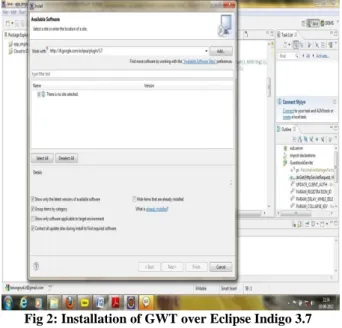
The Google Web Toolkit (GWT) version “com.google.gdt.eclipse.suite.3.7.update.site_2.5.2” for establishing connection with Google cloud platform had been installed in Eclipse Indigo 3.7 as shown in Figure 2.
Fig 2: Installation of GWT over Eclipse Indigo 3.7
Then Android SDK 4.1 and ADT-20.0.0 had been installed in the Eclipse Indigo 3.7 for making GWT compatible with Android devices i.e. Phones, Emulator
After the installation of all these software and plug-in packages, the platform for the designing of the cloud based application for Google cloud platform become ready [3].
3.2
Application Coding
The coding for designing the application has been done in the Cloud based JAVA language by using some all ready available APIs in the market. The coding of the application “cloudtarun” has been done by using JAVA language, JSP and Servlet.
3.2.1
Functionality Coding
Cloudtarun used to provide three functionalities namely user login system, list of already registered users and messaging facility. The application is coded in “New Web Application” field provided by GAE.
3.2.1.1
Registration of Application
Firstly, the registration system for the application registration over the android devices was coded:
package cloud.test;
private static string registration_key = "registrationkey"; public void get_id(view v)
{ if(edt_user.gettext().tostring().length()>0) { editor editor = getsharedpreferences(key, context.mode_private).edit(); editor.putstring("user", edt_user.gettext().tostring()); editor.commit(); startregistrationnotification(); this.finish(); }
intent registrationintent = new intent("com.google.android.c2dm.intent.register");
registrationintent.putextra("app", pendingintent.getbroadcast(this, 0, new intent(), 0));
registrationintent.putextra("sender", "[email protected]");//"tarun09091988");
this.startservice(registrationintent); }
}
3.2.1.2
User Login system
The login system for the user was coded secondly, as to provide the login facility to the new user over its device. The important API function used for coding user login is as such: package cloud.test;
string registration = intent.getstringextra("registration_id");
if (intent.getstringextra("error") != null) { // registration failed, should try again later.
log.d("c2dm", "registration failed"); showtoast("error while retreiving reg id"); string error = intent.getstringextra("error"); log.d("c2dm", "error="+error); if(error == "service_not_available"){ log.d("c2dm", "service_not_available");
}else if(error == "account_missing"){ log.d("c2dm", "account_missing"); }else if(error == "authentication_failed"){ log.d("c2dm", "authentication_failed"); }else if(error == "too_many_registrations"){ log.d("c2dm", "too_many_registrations");
}else if(error == "invalid_sender"){ log.d("c2dm", "invalid_sender"); }else if(error == "phone_registration_error"){ log.d("c2dm", "phone_registration_error"); } } else if (intent.getstringextra("unregistered") != null) {
// unregistration done, new messages from the authorized sender will be rejected
log.d("c2dm", "unregistered"); }
public void sendmsg(string user,string msg) { httpclient client = new defaulthttpclient(); httpget post = new httpget(
"http://cloudtarun.appspot.com/asd?reg_id="+user+"&id="+m sg);
try {
httpresponse response = client.execute(post); bufferedreader rd = new bufferedreader(new inputstreamreader(
response.getentity().getcontent())); string line = "";
while ((line = rd.readline()) != null) { log.e("httpresponse", line); }
}
3.2.1.3
List of all Ready Registered Users
After the registration of the new user, here the list of the old already registered users used to be shown:
package cloud.test; import java.io.bufferedreader; import java.io.ioexception; import java.io.inputstreamreader; import java.io.outputstream; import java.net.url; import java.net.urlencoder; import java.util.arraylist; import java.util.list; toast.maketext(this, "please enter message", toast.length_long).show();
} }
public void sendmsg(string user,string msg) { httpclient client = new
defaulthttpclient();
httpget post = new httpget( "http://cloudtarun.appspot.com/asd?send="+user+"&message ="+msg);
try {
httpresponse response =client.execute(post); bufferedreader rd = new bufferedreader(new inputstreamreader(
response.getentity().getcontent())); string line = "";
while ((line = rd.readline()) != null) { log.e("httpresponse", line); httpclient client = new
defaulthttpclient();
httppost post = new httppost( "https://www.google.com/accounts/clientlogin");
//post.setheader(name, value) try {
list<namevaluepair> namevaluepairs = new arraylist<namevaluepair>(1);
namevaluepairs.add(new basicnamevaluepair("email", user)); namevaluepairs.add(new
basicnamevaluepair("passwd",pass));
namevaluepairs.add(new basicnamevaluepair("accounttype", "google"));
url url = new
url("https://android.clients.google.com/c2dm/send"); httpsurlconnection conn.setdooutput(true); conn.setusecaches(false); conn.setrequestmethod("post"); conn.setrequestproperty("content-type", "application/x-www-form-
int responsecode = conn.getresponsecode(); return responsecode; } class viewholder { textview text; imageview icon; } }
arraylist<string> ar=new arraylist<string>(); }
3.2.1.4
Messaging Facility
The messaging is used to be coded like that the messaging has to be done between many android devices and as well web browsers. The messaging system is coded using the JAVA language:
package cloud.test;
import java.io.bufferedreader; import java.io.ioexception; import java.io.inputstreamreader; import java.util.arraylist;
public view getview(int position, view convertview, viewgroup parent) {
if (convertview == null) { convertview =
minflater.inflate(r.layout.list_item_icon_text, null); intent i=new intent(this,notificationalert.class); i.putextra("user", ar.get(pos));
startactivity(i); }
public string sendmsg() { string all="";
httpclient client = new defaulthttpclient(); httpget post = new httpget
("http://cloudtarun.appspot.com/asd?display=90"); try {
httpresponse response = client.execute(post); bufferedreader rd = new bufferedreader(new inputstreamreader(
response.getentity().getcontent())); out=sendmsg();
return out; } } }
3.2.2
Working Methodology of Coded Application
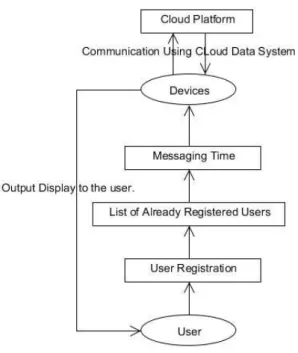
The application “Cloudtarun” works by following the steps in a set of format of process. The working process of the cloudtarun is shown in the Figure 3. The Cloud Platform used to store the whole data used by the user registration process and messaging system.
Fig 3: Work Flow of Cloudtarun Application
Here firstly user has to register himself/herself over the Cloudtarun using the Android device and then after registration he/she will see the list of the all ready registered users over this application for sending the message to them. Then user will use to send the message to any of the all ready
registered user of Cloudtarun. The data storage of the whole process has to be done over the Google Cloud Platform and in last the simulation work is to be performed by the GAE over the Google Cloud Platform.
4.
WORKING AND DEPLOYMENT OF
THE APPLICATION
The application “Cloudtarun” is deployed over the Google Cloud Platform using GAE for using it over cloud based platform firstly and then it is also installed over the android devices (i.e. Mobiles, Emulators) [11].The deployment and installation process both are explained below.
4.1
Application Deployment over GAE
The application “Cloudtarun” is deployed over the Google Cloud Platform using GWT plug-in for application deployment. Following steps were followed in deployment process:
Click on the “Deploy to the App Engine” field in the GWT for starting the deployment process.
Then fill all the details as needed i.e. name of project, cloud SDK and etc, then click on the “OK” button for starting the deployment process.
The deployment process takes some time for the deployment (around 2-3 minutes).
Now, the application “Cloudtarun” is finally deployed over the Google Cloud Platform [3] [9].
4.2
Working and Installation over Android
Device
The installation of “Cloudtarun” over the android emulator primarily needs emulator to be installed firstly over the operating system. As the android emulator is virtual mobile device software for using android platform over systems [7].
Installation of the emulator over the system by using Android SDK and ADT plug-in.
Login to the Google account over the emulator as to install “Cloudtarun” over android emulator, as GAE needs Google account access for application installation.
Installation of the “Cloudtarun” over the Android Emulator as an application package software/application for android devices.
User registration to be performed over the cloudtarun using the unique id for the user of that Emulator[4]. After following all these steps the application “Cloudtarun” is ready for sending messages between other android devices.
4.3
Working of Application over Web
Browser
The application “Cloudtarun” used to be run over web browsers (i.e. IE, Firefox, Safari, etc.) by using the following links [12]:
User registration with unique id over browser done by using following link over the task bar (http://cloudtarun.appspot.com/asd?reg_id=1234&id= taruntest).
List of the already registered users to be shown by the
use of the following link
(http://cloudtarun.appspot.com/asd?display=90).
For sending messages between different users and devices (i.e. browser to browser and browser to device) the following link is used over task bar (http://cloudtarun.appspot.com/asd?send=taruntest& message=thisis test mee). Here message “thisis test mee” is sending to the user “taruntest”.
5.
APPLICATION USES SIMULATION
RESULT
The application “Cloudtarun” uses of data and transaction process over Google Cloud Platform as shown by simulation graphs of the data transaction on daily and monthly basis and also by making log files of the transaction process and commands used by the user [12].
The simulation graph of the data transaction and commands during the use of application are maintained over Google Cloud Platform on the daily and monthly basis, as shown in Figure 4.
Fig 4: Simulation Graph of the Application on daily and monthly basis
The log files of the data transaction and commands given by user during the use of application are maintained over Google Cloud Platform on per click basis with all timing and memory used details of the Google Cloud Platform. Total 20 logs files used to be visible at a time to the user.
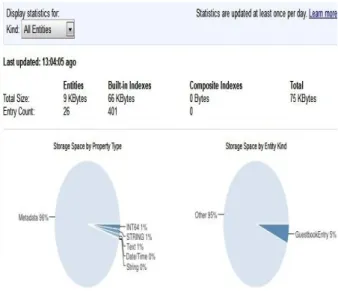
The Dash board here used to maintain the record of the read and write operations performed in the data store and also representing the use of the bandwidth by the application during its use, as the bandwidth is used for the maintaining the record and as well for running the application successfully. The total amount of memory size used by the data transaction and the queries execution used to be shown in the field Data-store statistics by dividing its properties into six different property types (i.e. INT64, STRING, Text, Date/Time, String and Metadata), these six different fields maintaining the statistics on the basis of the total size and entry counts of the
Entities, Built in Indexes and the Composite Indexes as shown in Figure 5.
Fig 5: Representation of the Data-store Statistics
The above diagrams used to show the simulation work of the data transaction and queries executed over GAE using Android Emulator.
6.
CONCLUSION AND FUTURE WORK
The application “Cloudtarun” is working properly over the web browsers and android devices (i.e. mobiles and emulators) using the Google Cloud Platform for data storage. And also the simulation work of the data transaction and queries processed over Google Cloud Platform also done successfully as shown in Figure 4-5.
Presently this application only works over android device in it has to be design for i-phone and windows based devices and most important factor is to work over the security of this application from hackers, so tremendous work to be done over its security process. Design it in more users’ friendly way for users of it by adding some new features in it like (new chat view system, friend’s login list & etc.).
7.
ACKNOWLEDGMENTS
We like to give our Vigorous thanks to Mr. Maneesh Sharma, Sr. Program Analyst, Sunarc Technologies Pvt. Ltd., Bikaner, Rajasthan, India and Prof. Shailendra Mishra, Head, Department of Computer Science, BTKIT, Dwarahat, Uttarakhand, India for providing use regular advices and suggestions on this research work, his suggestions helps use a lot in our research work. We also want to thank our friends and colleagues for motivating us regularly for this research work.
8.
REFERENCES
[1] Joel Hollingsworth, David J. Powell, “Teaching web programming using the Google cloud”, ACMSE ’10, Oxford, MS, USA, April 15-17, 2010..
[2] Google App Engine – What is Google Appengine. http://code.google.com/appengine/docs/whatisgoogleapp engine.html.
[3] Romin K. Irani, “Google app engine java experiments”,
version 1.0, March 2010,
http://gaejexperiments.wordpress.com.
[4] Android Developers – Advanced Training. http://developer.android.com/training/cloudsync.html. [5] Gundotra, V., Google I/O 2009 ± Keynote Day 1.
http:///www.youtube.com/watch?v=S5aGZIvk&feature= channel.
[6] Google App Engine ± Quotas.
http://code.google.com/appengine/docs/quotas.html. [7] Android Developers – Android Emulators.
http://developer.android.com/tools//help/emulator.html.
[8] Google App Engine - White List. http://code.google.com/appengine/docs/java/jrewhitelist. html.
[9] Ian Hardenburgh, “The Enterprise Cloud – Google cloud provides service and tech partners”, August 30, 2012, http://www.techrepublic.com.
[10] Alexander Zahariev, “Google App Engine”, TKK T-110.5190 seminar on Internetworking, April 27, 2009. [11] Bo Peng, Bin Cui and Xiaoming Li, “Implementation
Issues of A Cloud Computing Platform”, 25th IEEE International Conference on Data Engineering, Shanghai, China, 2009.
[12] Charles Severance, “Using Google App Engine”, O’Reilly Media, Inc., May, 2009.