Interactive Electronic Board Using ARM Processor
Mrs. Mayuri Joshi
*, Prof. Sunil .S. Morade
***
E&TC Department, K.K.Wagh Institute of Engineering Education & Research, Nashik, India
**
Associate Professor, E&TC Department, K.K. Wagh Institute of Engineering Education & Research, Nashik, India.
Abstract- At present, multimedia is widely used in classroom for teaching , using chalk is not only laborious, but it also produces a lot of chalk dust, polluting the air and adversely affecting the health of the students and teachers, also the use of multimedia helps in better teaching learning process. At present the traditional black board is replaced by smart electric boards produced by companies like Hitachi, Panasonic, which are very costly. This design uses ARM 9 processor for hand-held terminal hardware and Embedded Linux operating system for hand-held terminal software. When teacher writes on a book-size touch screen with an electrical pen, handwriting signal will be transferred to the PC terminal by wireless transmission module. Thus it makes classroom teaching be more efficient.
Index Terms- ARM 9, LINUX, Qt, VNC, Kernel, Uboot
I. INTRODUCTION
ifferent multimedia equipments are widely used in classroom for better teaching learning process. At present the traditional black board is replaced by smart white electric boards produced by companies like Hitachi, Panasonic [16], [17] which are very costly around 50,000 to 80,000 INR.
In this design, Wireless Electric Board is designed which costs just one-fifth of the ordinary electric board. This design uses ARM processor as a heart of this hand-held terminal hardware and Linux operating system for hand-held terminal software. Handwriting signal written touch screen will be transferred to the PC terminal by wireless transmission module to PC and will be display by projector.
In many embedded operating systems, Linux, with its unique advantages, takes a large share of the embedded field. Linux owns open source and rich software resources, supports multi-thread, multi-user, multi-process, and has good portability, powerful functions and stability. It supports a large number of microprocessor architecture, hardware devices, and graphics support and communication protocols.
Virtual Network Computing (VNC) is a simple remote display protocol. VNC protocol is totally independent of operating system, windowing system, and applications. VNC requires only a reliable transport medium and the simplest of display capabilities. The virtual network computing (VNC) system, server machines supply not only applications and data but also an entire desktop environment that can be accessed from any Internet-connected machine using simple software. VNC allows a single desktop to be accessed from several places simultaneously, thus supporting application sharing [6].
Qt is a framework to create cross-platform applications. Qt is used to create amazing GUI applications. Qt helps to design and code an application, but the real advantage of Qt lies in the
fact that an application can be made to run on a variety of operating systems without changing the code [18].
II. SYSTEM OVERVIEW
[image:1.612.343.542.338.514.2]This design uses ARM processor board for hand-held terminal hardware with has been interfaced to different memories like SRAM and Flash memory and varies input output interface like Touch screen, Keyboard, USB. It uses Linux operating system for hand-held terminal software. The data written on the book size touch screen by a stylus touch screen will be transferred to the PC terminal by wireless transceiver module and display it in a larger form by projector [1]. The structure diagram of this system is shown in Figure 2.1.
Figure 2.1: Block Diagram of the system.
2.1 Hand Handled terminal Hardware Structure Hardware design includes hand-held terminal hardware and PC terminal. Hand-held terminal hardware consists of ARM 9 Processor, on board. NANAD and NOR Flash memory. The processor is interfaced to 7 inch Touch Screen, memories, and various input output modules along with the wireless transceiver. The hand-held terminal hardware structure for the system is shown in Figure2.2.
Figure2.2: Hand Handled Terminal Hardware Structure
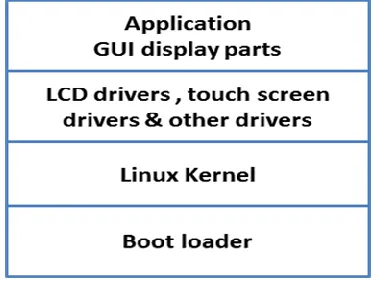
[image:2.612.73.262.422.564.2]2.2 Hand-held terminal software architecture Hand-held terminal software architecture Hand-held terminal software is divided into four parts: Boot Loader, Drivers, Kernel, and Applications. Primarily, Boot Loader is used for initializing necessary peripherals and interrupt vector table in processor. Secondly, Drivers, which refer to LCD driver, touch screen driver, NAND Flash driver and wireless module driver are used for supporting communication with Kernel. Thirdly, Kernel chooses real time multitasking kernel for Linux. Finally, Application can be available based on these above mentioned three dispensable parts: Boot Loader, Kernel and Drivers. Software architecture is shown in Figure 2.3
Figure: 2.3: Hand –held Software architecture
2.2.1 Boot Loader design
After connecting the power supply, the NAND Flash controller of SOC will automatically copy the primary 4KB of data to Stepping Stone, while the Boot Loader will be preserved in the beginning 4KB of NAND Flash. Here as Boot Loader will realize these functions: shutting off watchdog, setting system timer, initializing MMU, defining stack and modifying NAND Flash controller.
2.2.2 Transplantation of Linux Kernel Linux is a real-time multitasking kernel, responsible for
Embedded Linux is divided into the following steps: obtaining source codes; building cross compiler environment; porting Linux boot loader (Uboot or VIVI), then configure and compile the kernel, porting and loading the embedded file system, developing and debugging of application program, program downloading. In this paper, we mainly introduce the porting technology of Linux kernel. [5]
2.2.3 Drives design
Drivers provide the interfaces of hardware operating modules for Kernel and Application, including LCD driver, touch screen driver, USB drivers, NAND Flash driver, and wireless transmission module driver.
2.2.4 Application Design
Application is composed of four parts: Qt GUI display, touch information gathering, processing program and wireless sending.
III. PORTING OF LINUX KERNEL TO ARM PROCESSOR
Algorithm for updating the boot loader
i. Update boot loader, kernel or file system images with our customized images by using commands of uboot: install boot loader, install-kernel and install-file system ii. Update boot loader , Kernel and File system
iii. Make file system image by, Assume rootfs is the directory of your root file system on host PC
iv. Load the boot loader image into NAND flash
3.1 Algorithm for porting the Linux kernel and device delivers
The porting of Embedded Linux is divided into the following steps: obtaining source codes; building cross compiler environment; porting Linux boot loader (Uboot) , then configure and compile the kernel, porting and loading the embedded file system, developing and debugging of application program, program downloading. In this paper, we mainly introduce the porting technology of Linux kernel. [5]
i. Modify Make file ii. Set Flash Partition iii. Prohibit Flash ECC check iv. Configuring Kernel
v. Kernel Compilation vi. Kernel downloads
3.2 Installation of tool chain
i. To download the GNU tool chain, from the Code Source download and choose the IA32 GNU/Linux TAR file.
ii. Extracting the downloaded GNU tool chain.
iii. Modify The PATH environment variable to access the bin directory of the tool chain, and the tools are ready to use.
iv. Set up symbolic links to ARM tools.
IV. APPLICATION SOFTWARE
4.1 Basics of GUI
A Graphical user interface (GUI) is a pictorial interface to a program. A good GUI can make program easier to use by providing them with a consistent appearance, and with intuitive controls such as pushbuttons, edit boxes, text boxes sliders and menus. The GUI should behave in an understandable and predictable manner, so that user knows what to expect when he or she performs an action. The Graphical User Interface, or GUI, refers to the now universal idea of icons, buttons, etc., that are visually presented to a user as a “front-end” of a software application.
4.2 Introduction to Qt
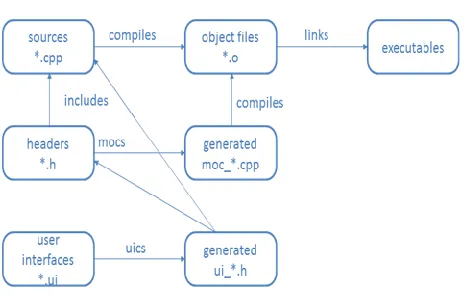
Qt is a cross platform development framework written in C++, but makes extensive use of a special code generator (called the Meta Object Compiler, or moc) together with several macros to enrich the language. It runs on the major desktop platforms and some of the mobile platforms.All modules have a common scheme and are built from the same API design ideas. Qt extends C++ with macros and introspection , all code is still plain C++. Qt has Cross platform applications built from one source. It builds native applications with native look and feel. Easy to (re)use API, high developer productivity, openness,. Qt is open source software, but the development is led by Qt Development Frameworks Embedded target platforms: Windows CE, Symbian, Maemo, Embedded Linux (Direct frame buffer access) [18].
[image:3.612.52.288.524.672.2]4.2.1 User Interface Design Flow
Figure 4.1: Flow graph for design
4.3 Creating Scrabble in QT
The Scribble example shows how to re-implement some of QWidget's event handlers to receive the events generated for the application's widgets. We re-implement the mouse event handlers to implement drawing, the paint event handler to update the application and the resize event handler to optimize the application's appearance. In addition we re-implement the close event handler to intercept the close events before terminating the application. We also use QPainter to draw an image in real time, as well as to repaint widgets. With the Scribble application the users can draw an image. The File menu gives the users the possibility to open and edit an existing image file, save an image and exit the application. While drawing, the Options menu allows the users to to choose the pen color and pen width, as well as clear the screen. In addition the Help menu provides the users with information about the Scribble example in particular, and about Qt in general. It has two main parts:
a. ScribbleArea is a custom widget that displays a QImage and allows to the user to draw on it. b. MainWindow provides a menu above the Scribble
Area.
4.4 Algorithm for scrabble pad
4.4.1 Main Window
i. Initialize the required header files for main window and scrabble area.
ii. Set the area size for scrabble pad and name for the window as “Finger Paint”
iii. Add the various tools for the file menu that is file open, save print, exit by using the various QAction .
iv. Implement the various event handlers form Qwidgets like mouse event handler, close event handler
v. Create various actions to open file, save file in various image formats, print, exit, clear screen and help.
vi. Add the menus for these various events in the tool bar. vii. We use close event to save the written data on the
scrabble pad in the various image formats. By default the image will be saved in “png” format.
viii. Save the file to the desired path or directory.
4.4.2 Scrabble Area
i. Initialize the required header files for scrabble area, Widgets and PrintDialog.
ii. Accept the touch event and set the colour for the pen for the new image which is open and save the image with the specified size.
iii. Foe new image clear the screen using the given option in tool bar to ckear screen
iv. Define the height, width for the image size by using resize event of QWidget.
v. Set the Printer option using QPrint and QPrintDialog for printing the image.
4.5 Virtual Network Computing (VNC)
The technology underlying Virtual Network Computing (VNC) is a simple remote display protocol.. VNC protocol is totally independent of operating system, windowing system, and applications. The VNC system is freely available for download. Host and client computers must be connected to the same TCP/IP network. This can be a private network such as a LAN or VPN, or a public network such as the Internet. Note that firewalls and routers must typically be configured before an Internet connection can be established.
To start a remote control session, run VNC Viewer and identify VNC Server on the host computer you want to control. Once authenticated, VNC Viewer displays the host computer’s desktop in a new window, and you can take control using the client computer’s keyboard and mouse. You can run applications, change settings, and access data on the host computer exactly as you would be permitted to do were you sitting in front of it .By default, VNC Server permits other users to connect to the host computer at the same time as we may be sharing control.
V. SYSTEM OPERATION AND RESULTS
5.1 System Operation
i. We have to download the uboot, kernel and the file system of so that the entire operating system is present and ready to use.
ii. The device drivers for various interfaces are configured in kernel.
iii. We compile these using tool chain and the download it through the serial port step wise by configuring the HyperTerminal for 115200 baud rate and at com1 port. iv. Once the HyperTerminal is configured we give the
various commands on the command prompt (#) of the serial port and thus entire Operating system is downloaded.
v. We compile the Code for Qt and then download the application through the USB ports on the PC and the board.
vi. The board is power on and first configures the board for the Wireless communication.
vii. We turn of the board Ethernet connection and connect it to Wi-Fi network through the wireless dongle which connects to Wi-Fi router
viii. The Wi-Fi router is connected to PC wirelessly by setting the wireless network. Thus a network is formed between PC, router and the board.
ix. Once the connection is established we turn on the serial for and give the command on the root # prompt as #./start.sh to start the application on the board by terminating the server.
x. Then we use the VNC Viewer on the client PC to see the data written on the VNC server that is our Application.
xi. For VNC Viewer we have to give the IP address of the board and connect it to port 5900 which is open when we start our application.
xii. After the connection has been established between the server and client we can seen what is written on the
xiii. The PC is connected to projector and the written data is projected.
Figure 5.1: Hyper Terminal Command Prompt
VI. RESULTS
The hardware is build around the ARM 9 Processor by interfacing the Touch screen, memories, wireless module and other input output devices. The Linux operating system is downloaded on the ARM processor and then the application is downloaded in the OS whose program is written in Qt and the VNC server is initialized in the application. The VNC client setup is installed in PC. Here we are using ultra VNC on the client side.
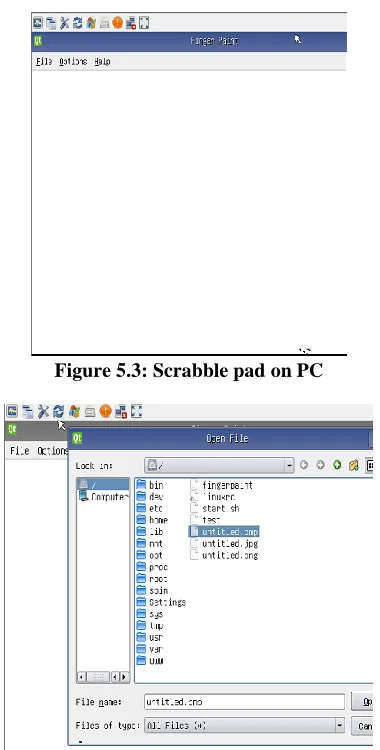
The data is written on the 7 inch touch screen and is the transferred to PC wirelessly which is seen on PC terminal using Ultra VNC viewer. For transferring the data the wireless network is setup between boards, PC by a Wi-Fi router. The board has a wireless dongle attached to USB port and the wireless connection of PC is turned on thus data can be transferred from board to PC wirelessly.
Figure 5.3: Scrabble pad on PC
Figure 5.4: Data transferred from Board to PC
VII. CONCLUSION
This design of hand held equipment is build using ARM 9 processor S3C2240 which can interface to wireless module and 7 inch touch screen. The data written on the screen is transferred to PC through wireless medium (Wi-Fi). The use of Linux operating system helps in specification for multitasking and also for writing the application software on the kernel. The application software is written in Qt which is ported to the operating system. The programming in ‘Qt’ is similar to C++ which can be easily compiled. VNC server is also implemented in the application and VNC viewer is used for the PC through which data written on the hand held equipment is transferred to PC which is displayed on projector.
Moreover this technology helps in avoiding use of traditional chalk & board thus eliminating health issues caused
by chalk dust. This hand-held equipment is cost effective compared to present interactive white boards and is portable many features.
REFERENCES
[1] Di WU,Yang Zhang, Baoding Zhou “Wireless Electric Board Based on an ARM-based Embedded System “, IEEE International conference computer science and information technology (ICCSIT) Volume 5, pp 268-270 ,September 2010.
[2] Ian McLoughlin, Anton Aendenroomer “Linux as a Teaching Aid for Embedded Systems”, IEEE, 978-1-4244-1890- July 2007.
[3] Shao Guojin, Shen Yunqin “Embedded Linux Core Transplantation and Development of Handheld Terminals System” IEEE, Volume 5,pp 583- 586 978-1-4244-5586-October 2010.
[4] Christof Ebert, “Using Linux for Real-Time Applications”, Published by the
IEEE Computer Society, 0740 -7459 April 2004.
[5] Chun-yue Bi, Yun-peng Liu , Ren-fang Wang ,“Research of Key Technologies for Embedded Linux Based on ARM” , International Conference on Computer Application and System Modeling (ICCASM ), Volume 8 , pp 373 -378, June 2010.
[6] Tristan Richardson, Quentin Stafford-Fraser, Kenneth R. Wood and Andy Hopper “Virtual Network Computing”, IEEE Internet Computing, Volume 2, January/February 1998
[7] IEEE. Information technology “Portable Operating System Interface (POSIX)-Part1: System Application: Program Interface (API) [C Language]”, ANSI/IEEE Std 1003.1,1996 Edition.
[8] Seongsoo Hong “Embedded Linux Outlook in the PostPC Industry”,
Proceedings of the Sixth IEEE International Symposium, on Object-Oriented Real-Time Distributed Computing (ISORC’03) 0-7695-1928-8/03 $17.00 © 2003 IEEE
[9] A White Paper “Survey of Real -time operating system”
[10] A White Paper by Bob Japenga “Why Use Linux for Real-Time Embedded Systems”
[11] A White Paper by Catherine Lingxia Wang, Bo Yao, Yang Yang, Zhengyong Zhu “A Survey of Embedded Operating System”.
[12] ARM9 Processor S3C2240A datasheet http://www.samsungsemi.com
[13] Single computer board specifications http://www.embedinfo.com
[14] Installation Manual for S3C2240 using Linux [15] U-Boot: http://www.denx.de/wiki/UBoot
[16] Interactive white board http://panasonic.com/panaboard
[17] Interactive white board www.hitachi-soft.com
[18] QT GUI http://www.qt-project.org
AUTHORS
First Author – Mrs. Mayuri Joshi, E&TC Department, K.K.Wagh Institute of Engineering Education & Research Nashik, India, [email protected]