ISSN: 1992-8645 www.jatit.org E-ISSN: 1817-3195
339
IMPLEMENTATION OF SINGLE SIGN ON USING THE
CONCEPT OF METHOD OAUTH (OPEN AUTHORIZATION)
ON THE WEB PORTAL
1AWAN SETIAWAN, 2MOKH. HENDAYUN, 3SUCI FITRI YANTI
1
Informatics Program, Faculty Engineering, Langlangbuana University, Bandung, Indonesia 2
Informatics Program, Faculty Engineering, Langlangbuana University, Bandung, Indonesia 3
Informatics Program, Faculty Engineering, Langlangbuana University, Bandung, Indonesia
Email: [email protected], [email protected], [email protected]
ABSTRACT
Along with the development of the Internet, many system have been built that operates in real-time and online, which allows one to access data from anywhere and get the latest information. One system, that is used to provide data services are the portals. Portal is a medium that is used to represent complex information through the Internet in an integrated way. Single Sign On (SSO) is a method to incorporate web applications with the aim of combining the existing applicationinto a site called Web Portal. With the Web Portal using Single Sign On (SSO) with OAuth method, meaning each user only needs to have one username, one password. If you want to get the service in the Web portal, the user only needs to login once be able to use all of the services of existing applications in the Web portal. It can also facilitate in organizing existing user data, so that the security of user data is more secure, because using a centralized storage of user data.
Keywords: Single Sign On, SSO, OAUTH Method, Web Portal
1 INTRODUCTION
1.1 Backgrounds
Most of the services from higher institution to its academic members are offered partially or are not using an integrated application service. The most common service applications for higher institution
are Academic Information System, Library
Information System, and other information systems. Managing these systems are still a difficult task due to every user has different username and login ID for each system. Every user need to memorize too many usernames and passwords. Therefore, a portal for integrated system and manage all authentication process is required. The authentication process in an integrated system needs an additional system which acts as a connector between integrator system and service application system. This system handles all authenticating processes in each service application system and known as Single Sign-On (SSO) [4,5, 7]. SSO is a mechanism of centralized authenticating system which lets user to access all applications and other services with only one authenticating process
[1,5,7]. User will only need to memorize one username and password to get into every service. Langlangbuana University Bandung (UNLA) has several applications to serve it academic members. However, each application still runs in its own way and not integrated yet. Having that said, author is challenged to apply this system into UNLA’s Service Application System.
1.2 Research Questions
The research questions in this research are as follow:
1. How to integrate several applications with
different username logins and passwords?
2. How to manage data in each applications to
build an integrated system?
3. How to make the data management easier for
students and to avoid data inconsistencies?
4. How to manage data centrally?
ISSN: 1992-8645 www.jatit.org E-ISSN: 1817-3195
340
1. Portal System will be designed on web based
under the JSON (Javascript Object Notation) Standard which works as a format of data exchange, as well as XML.
2. Data Exchange only valid for login access,
member data, and member report.
3. MYSQL database and PHP Programming
Language will be utilized.
4. There would be 3 systems, which are Portal
Web, Library Web, and Assessment Web, to be utilized to try the data integration process.
5. Share Data Concept using modified Oauth
method to enable to have its own Class function.
Objectives and Benefits of this research are as follow:
1. To facilitate easier access for user in using
different applications with one authenticating process (data verification).
2. To enable easier data exchange or integration
between applications.
3. To simplify user data management by using a
centralized database.
2 RESEARCH METHODOLOGY
2.1. Elicitating the Software Specification
During this stage, a series of interviews to user of Portal Web in Faculty of Technology UNLA will be conducted. A list of interview questions have been prepared in order to reveal what requirements are needed by using SSO [5]. Therefore, output of this stage is the series of answer to be analyzed and the result will serve as reference to create a document on Software Required Specification (SRS) [2].
2.2 Designing the Software
The input for this stage is requirements from user in form of SRS document, based on defining stage of software requirements. The software design process will include database design, interface design, and system design by translating software requirement specifications to UML design. The output of this stage would be an UML Diagrams, which includes: Usecase Diagram, Activity Diagram, Sequence
Diagram, and Class Diagram. All of those diagrams are the main part of design document.
2.3. Implementing Design
This stage will deliver the beta version of the software, which is tested with black-box method. Software testing is used mainy to ensure that all functions runing well according to the designs made in the previous stage. The output of this stage is a code which is corresponding to the design of the software.
3 BIBLIOGRAPHY/SCHOLARLY
RESEARCH
3.1 Single Sign On (SSO)
Single Sign On (SSO) technology is a technology which lets network user to access all resources inside the network with only one user account [1,5,7]. This technology is highly in demand, especially in a very broad and heterogenic network (where operating system and applications used in a computer are facilitated by many vendors, and users are asked to fill information in each of different platform they are intended to use). With SSO, a user will only need to do one authenticating process to gain access to all service in the network.
3.2 OAUTH Method
OAuth is an open protocol which lets users to share their personal resources (e.q. pictures, videos, list of addresses) which are saved in a particular web to another site without any username and password necessary. This process is done by providing a token, instead of username and password, to access their data which under a particular service provider. Each token gives access to a particular site (e.q. a video editing site), from a specified resource (forexample a video from particular album), and with specified duration (for example, for the next two hours).
ISSN: 1992-8645 www.jatit.org E-ISSN: 1817-3195
341 authorization nor all their data [8,9]. Its working method is similar to credit card method which asks user to put signature on transaction slip, instead putting ATM Card and its PIN.
3.3 Unified Modeling Language (UML)
UML is a visualization of language on object-based software development modeling which illustrates a system in an easily understood and standardized format [10]. It provides a mechanism to simplify communication with other party. Some diagrams related to UML manufacturing are as follow:
- Usecase Diagram
Usecase is a illustration of process which shows attitude or habit of the system
- Activity Diagram
Activity Diagram visualizes activity streams in the system on progress. It shows how each stream started, a potential decision, and how it ends. This diagram also show potential parallel process happens in some executions.
- Class Diagram
Class Diagram shows a structure and description of class, package, and object, along with how it corresponds one to another, such as containment, hereditary, association, etc.
- Statechart Diagram
Statechart diagram illustrates a transition and changes of condition (from one state to another one) of an object in the system, as a result from received stimuli. Generally, statechart diagram shows a particular class.
- Sequence Diagram
Sequence Diagram shows interaction between objects inside and around the system
(including user, display, etc) in a form of message towards time. Sequence diagram consist of vertical dimension (time) and horizontal dimension (related objects)
- Collaboration Diagram
Collaboration diagram also illustrates interaction between objects as well as sequence diagram, but this diagram focuses more to the role of each object instead of message delivering time.
4 RESULT AND DISCUSSION
3.1 Requirements Analysis
The expected requirement for the web portal is the ability to:
1. Do a Single Sign On and share session in
multiple subdomain. Therefore, when we
open application in a web portal
subdomain, there will be no login required.
2. Give Access Authorization (Public Key
and Private Key) to the third party (another application which would be processed under SSO)
3. Provide students data and information to
authenticated subdomain.
3.2 Functional Requirement
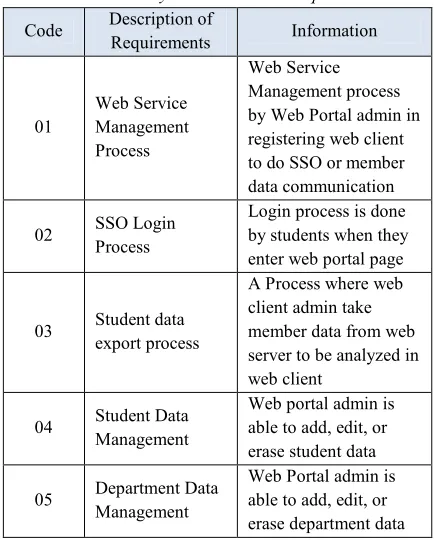
[image:3.612.309.526.393.663.2]Functional Requirement will give details of all main features of application system and are as follow:
Table 1: System Functional Requirements
Code Description of
Requirements Information
01
Web Service Management Process
Web Service Management process by Web Portal admin in registering web client to do SSO or member data communication
02 SSO Login
Process
Login process is done by students when they enter web portal page
03 Student data export process
A Process where web client admin take member data from web server to be analyzed in web client
04 Student Data Management
Web portal admin is able to add, edit, or erase student data
05 Department Data Management
Web Portal admin is able to add, edit, or erase department data
ISSN: 1992-8645 www.jatit.org E-ISSN: 1817-3195
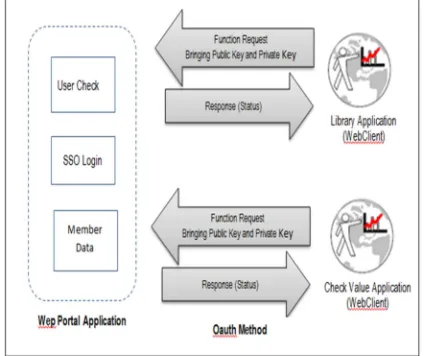
342 Based on all requirements stated previously, there is one solution, which is to create a web portal application service to bridge many applications in sharing their data. A modified OAuth technology will be utilized in building a web portal, in order to simplify SSO Login checking, which will resulted JSON as a data exchange format.
In this research, there would be 3 applications used, which are web portal (as a data exchange web server and SSO), Library Application (web client) and Assessment Application (web client). Web server application in the in the web portal will run under function of response upon request from web client. Web client application which is located in Library App and Assessment App will have task to call the functions that already provided by web server application. The data that will be utilized as SSO is student data which is located in web server database. If login is successfully done, there would be no need to log into another web client application. Later on, when web client has authority to take student data from web server, this web server will provide member data requested by web client. The application design consists of two designs, which are:
1. Server Application Design.
Server application is design to provide several functions. These functions will be requested by client application to be executed. There are two main functions to be designed:
a. User Checking Function
This function will do a preliminary check to appID and appKunci which are given by server to client at registration process in web service. Registration is used as a method of OAuth which provides Public Key and Private Key to a third party (client), which will be authenticated later. If URL, appID, and appKunci from the client is suitable with the data saved in the server, then client will be able to continue to further function. If it is not, then the authorized access will be disconnected.
b. Login Function
This function will be enabled only after a client is authenticated when it is being checked in CekUser function. Client will gain access to get member data in server
application. Member data will be
adaptable to client’s requirement, whether client wants it to be saved in client database, or just to be shown upon access. However, client is not authorized to delete any data in the server.
2. Client Application Design
[image:4.612.315.527.376.554.2]Client application works to check a service provided in the web portal (server). Client application is intended for user who wants to access web portal. User will request to web client application through internet browser, and then the request will be sent through accessing functions in web portal application. Afterwards, data will received once more by web client in JSON format.
Figure 1: Sistem Design
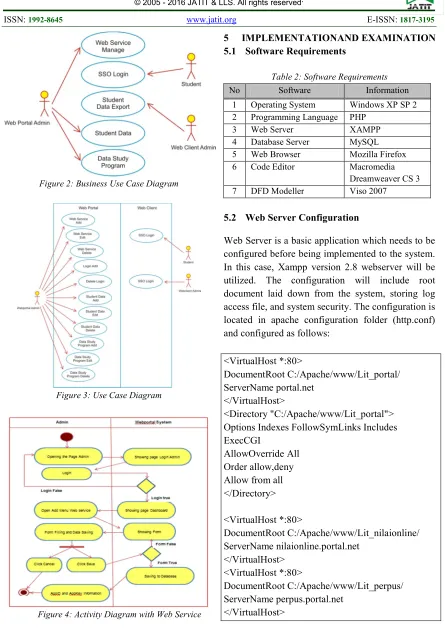
3.4 Business Process Modeling
ISSN: 1992-8645 www.jatit.org E-ISSN: 1817-3195
343
Figure 2: Business Use Case Diagram
[image:5.612.87.532.62.690.2]Figure 3: Use Case Diagram
Figure 4: Activity Diagram with Web Service
5 IMPLEMENTATIONAND EXAMINATION
5.1 Software Requirements
Table 2: Software Requirements
No Software Information
1 Operating System Windows XP SP 2 2 Programming Language PHP
3 Web Server XAMPP
4 Database Server MySQL
5 Web Browser Mozilla Firefox
6 Code Editor Macromedia
Dreamweaver CS 3
7 DFD Modeller Viso 2007
5.2 Web Server Configuration
Web Server is a basic application which needs to be configured before being implemented to the system. In this case, Xampp version 2.8 webserver will be utilized. The configuration will include root document laid down from the system, storing log access file, and system security. The configuration is located in apache configuration folder (http.conf) and configured as follows:
<VirtualHost *:80>
DocumentRoot C:/Apache/www/Lit_portal/ ServerName portal.net
</VirtualHost>
<Directory "C:/Apache/www/Lit_portal"> Options Indexes FollowSymLinks Includes ExecCGI
AllowOverride All Order allow,deny Allow from all </Directory>
<VirtualHost *:80>
DocumentRoot C:/Apache/www/Lit_nilaionline/ ServerName nilaionline.portal.net
</VirtualHost> <VirtualHost *:80>
DocumentRoot C:/Apache/www/Lit_perpus/ ServerName perpus.portal.net
</VirtualHost>
After Apache configurationand host host (if
ISSN: 1992-8645 www.jatit.org E-ISSN: 1817-3195
344 file:\\Windows\System32\drivers\etc\hosts; and add the host:
127.0.0.1 nilaionline.portal.net 127.0.0.1 perpus.portal.net 127.0.0.1 portal.net
Figure 5: System Design
5.3 Database Implementation
Database building is done by means of DBMS MySQL application
Figure 6:Database Structure
5.4 Interface Implementation
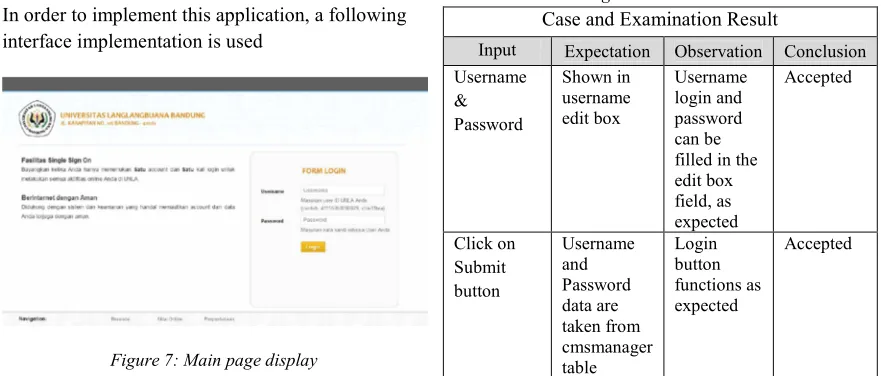
[image:6.612.90.290.392.493.2]In order to implement this application, a following interface implementation is used
Figure 7: Main page display
Figure 8: Page display after web portal login
Figure 9:Page display after admin web portal login
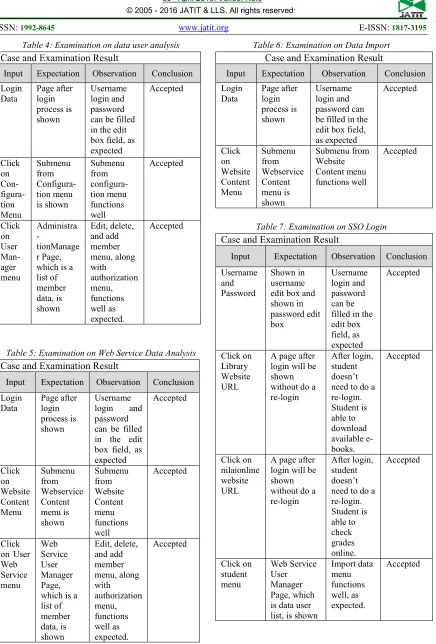
6 TESTING RESULT
Based on the result of overall testing of the system, it is concluded that this application has already passed improvement stage and already optimized towards above processes. Functionally, system works according to expected result.
Table 3: Login Trial as Administrator
Case and Examination Result
Input Expectation Observation Conclusion Username
& Password
Shown in username edit box
Username login and password can be filled in the edit box field, as expected
Accepted
Click on Submit button
Username and Password data are taken from cmsmanager table
Login button functions as expected
[image:6.612.89.532.543.731.2]ISSN: 1992-8645 www.jatit.org E-ISSN: 1817-3195
[image:7.612.95.531.54.698.2]345
Table 4: Examination on data user analysis
Case and Examination Result
Input Expectation Observation Conclusion
Login Data Page after login process is shown Username login and password can be filled in the edit box field, as expected Accepted Click on Con- figura-tion Menu Submenu from Configura-tion menu is shown Submenu from configura-tion menu functions well Accepted Click on User Man-ager menu Administra -tionManage r Page, which is a list of member data, is shown Edit, delete, and add member menu, along with authorization menu, functions well as expected. Accepted
Table 5: Examination on Web Service Data Analysis
Case and Examination Result
Input Expectation Observation Conclusion
Login Data Page after login process is shown Username login and password can be filled in the edit box field, as expected Accepted Click on Website Content Menu Submenu from Webservice Content menu is shown Submenu from Website Content menu functions well Accepted Click on User Web Service menu Web Service User Manager Page, which is a list of member data, is shown Edit, delete, and add member menu, along with authorization menu, functions well as expected. Accepted
Table 6: Examination on Data Import
Case and Examination Result
Input Expectation Observation Conclusion
Login Data Page after login process is shown Username login and password can be filled in the edit box field, as expected Accepted Click on Website Content Menu Submenu from Webservice Content menu is shown Submenu from Website Content menu functions well Accepted
Table 7: Examination on SSO Login
Case and Examination Result
Input Expectation Observation Conclusion
Username and Password
Shown in username edit box and shown in password edit box Username login and password can be filled in the edit box field, as expected Accepted Click on Library Website URL
A page after login will be shown without do a re-login
After login, student doesn’t need to do a re-login. Student is able to download available e-books. Accepted Click on nilaionline website URL
A page after login will be shown without do a re-login
After login, student doesn’t need to do a re-login. Student is able to check grades online. Accepted Click on student menu Web Service User Manager Page, which is data user list, is shown
ISSN: 1992-8645 www.jatit.org E-ISSN: 1817-3195
346
REFERENCES
[1]. Awan Setiawan (2012), Development on an
Identity Management System using SSO With The Central Authentification Service
Methods, Proceeding KNASTIK2012,
Universitas Kristen Dutawacana, ISBN 978-602-95792-0-8. Page 59-68
[2]. Presssman, R. (2001), Software Engineering
APractioners Approach, 5th Edition.
McGraw Hill,.Newyork.
[3]. Raymond Philip Causton (2002), Smardcard
usage for Authentication in Web Sign Sign
on System, Helsinki University of
Technology.
[4]. Helge Wiemann (2007), Identity
Management.
[5]. Brian Ricardson (2005), an Architecture for
Identity Management, University of
Sascatchewan.
[6]. Sri Dharwanti (2003), Intoduction to
Unified Modeling Language (UML).
[7]. Yuchen Zhou David Evans (2014),
SSOScan: Automated Testing of Web
Applications for Single Sign-On
Vulnerabilities, In 23rd USENIX Security Symposium, San Diego.
[8]. Eric Chen, Yutang Pei, Shuo Chen, Robert
Kotcher, Patrick Tague, OAuth Demystified for Mobile Application Developers, http://research.microsoft.com/pubs/231728/ OAuthDemystified.pdf.
[9]. San-tsai Sun and Konstantin Beznosoft
(2012), The Devil is in the
(Implementation) Details: An Empirical Analysis of OAuth SSO Systems.
[10]. Howard Podeswa (2005), UML for the IT