21.1
Chapter 21
Network Layer:
Address Mapping,
Error Reporting,
and Multicasting
21.2
21-1 ADDRESS MAPPING
21-1 ADDRESS MAPPING
The delivery of a packet to a host or a router requires
The delivery of a packet to a host or a router requires
two levels of addressing:
two levels of addressing: logicallogical and physical and physical. We need . We need to be able to map a logical address to its corresponding
to be able to map a logical address to its corresponding
physical address and vice versa. This can be done by
physical address and vice versa. This can be done by
using either static or dynamic mapping.
using either static or dynamic mapping.
Mapping Logical to Physical Address Mapping Physical to Logical Address
Topics discussed in this section:
21.3
21.4
21.5
21.6
21.7
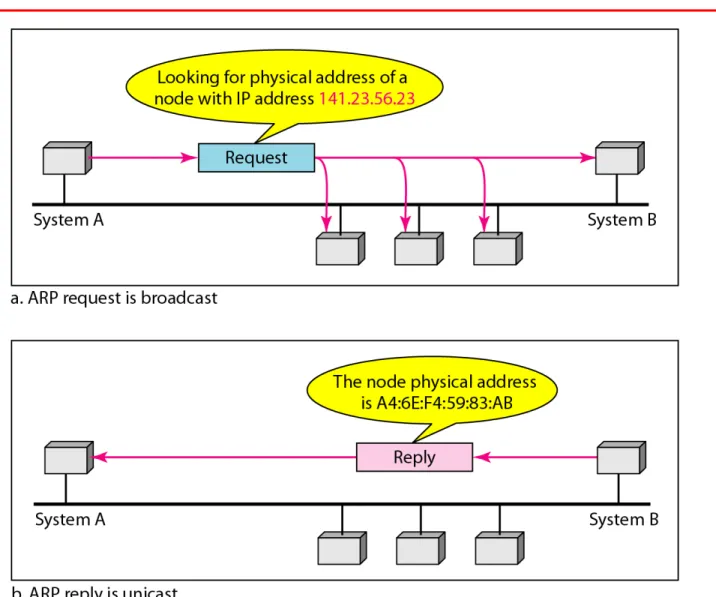
An ARP request is broadcast;
an ARP reply is unicast.
21.8
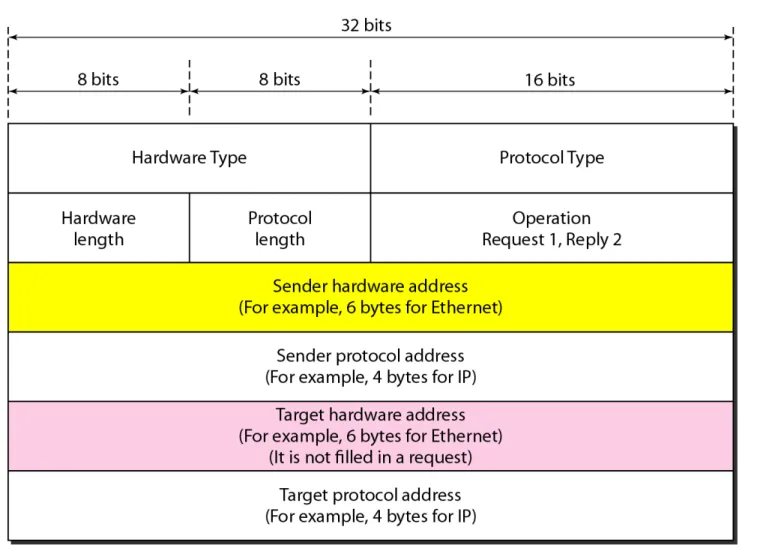
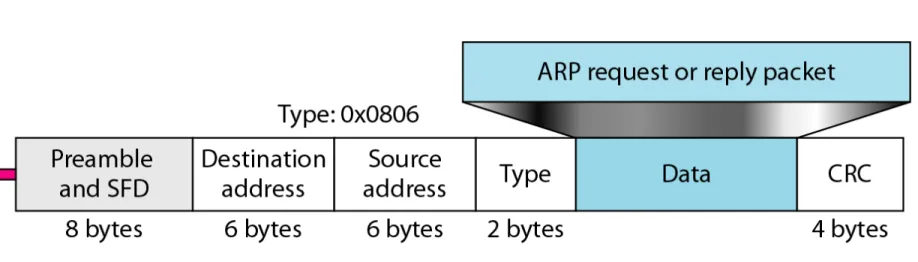
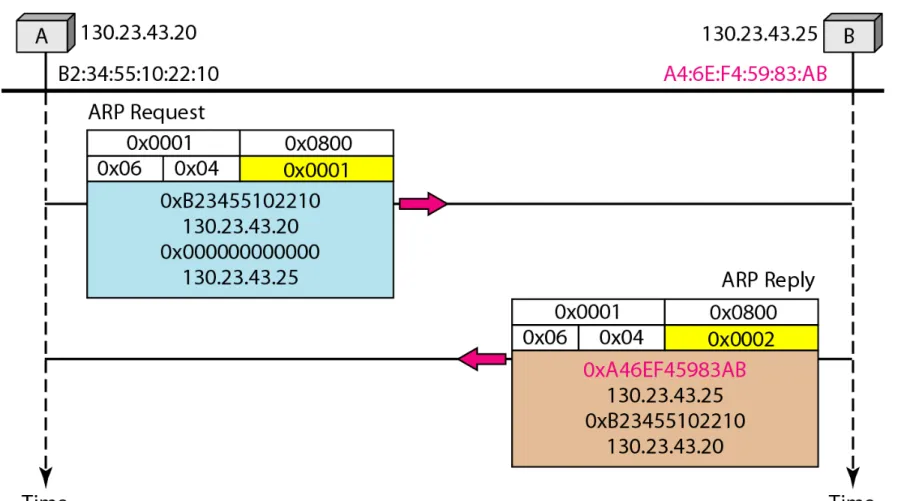
A host with IP address 130.23.43.20 and physical address B2:34:55:10:22:10 has a packet to send to another host with IP address 130.23.43.25 and physical address A4:6E:F4:59:83:AB. The two hosts are on the same Ethernet network. Show the ARP request and reply packets encapsulated in Ethernet frames.
Solution
Figure 21.5 shows the ARP request and reply packets. Note that the ARP data field in this case is 28 bytes, and that the individual addresses do not fit in the 4-byte boundary. That is why we do not show the regular 4-byte boundaries for these addresses.
21.9
21.10
21.11
21.12
DHCP provides static and dynamic
address allocation that can be
21.13
21-2 ICMP
21-2 ICMP
The IP protocol has no reporting or
The IP protocol has no reporting or
error-correcting mechanism. The IP protocol also lacks a
correcting mechanism. The IP protocol also lacks a
mechanism for host and management queries. The
mechanism for host and management queries. The Internet Control Message Protocol (ICMP)
Internet Control Message Protocol (ICMP) has been has been designed to compensate for the above two deficiencies.
designed to compensate for the above two deficiencies.
It is a companion to the IP protocol.
It is a companion to the IP protocol.
Types of Messages Message Format
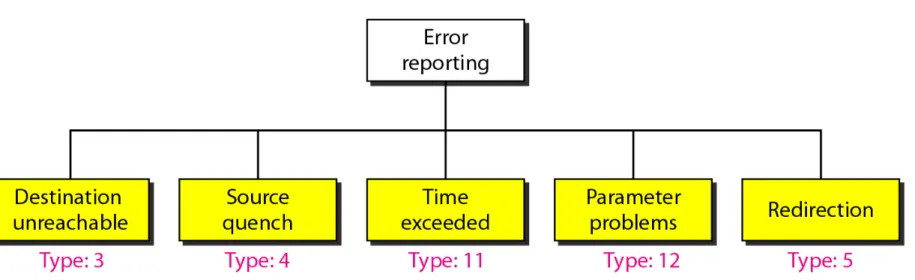
Error Reporting and Query Debugging Tools
Topics discussed in this section:
21.14
21.15
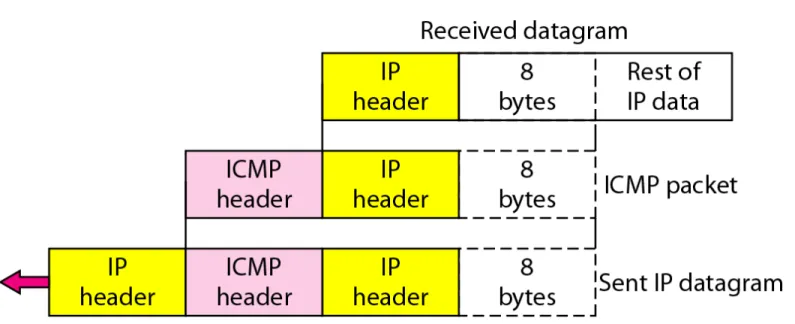
ICMP always reports error messages to
the original source.
21.16
21.17
Important points about ICMP error messages
:
❏ No ICMP error message will be generated in response to a datagram carrying an ICMP error message.❏ No ICMP error message will be generated for a fragmented datagram that is not the first fragment.
❏ No ICMP error message will be generated for a datagram having a multicast address.
❏ No ICMP error message will be generated for a datagram having a special address such as 127.0.0.0 or 0.0.0.0.
21.18
21.19
21.20
21.21
21.22
Figure 21.14 shows an example of checksum calculation for a simple echo-request message. We randomly chose the identifier to be 1 and the sequence number to be 9. The message is divided into 16-bit (2-byte) words. The words are added and the sum is complemented. Now the sender can put this value in the checksum field.
21.23
21.24
We use the ping program to test the server fhda.edu. The result is shown on the next slide. The ping program sends messages with sequence numbers starting from 0. For each probe it gives us the RTT time. The TTL (time to live) field in the IP datagram that encapsulates an ICMP message has been set to 62. At the beginning, ping defines the number of data bytes as 56 and the total number of bytes as 84. It is obvious that if we add 8 bytes of ICMP header and 20 bytes of IP header to 56, the result is 84. However, note that in each probe ping defines the number of bytes as 64. This is the total number of bytes in the ICMP packet (56 + 8).
21.25
21.26
21.27
We use the traceroute program to find the route from the computer voyager.deanza.edu to the server fhda.edu. The following shows the result:
Example 21.4
21.28
The first line shows the first router visited. The router is named Dcore.fhda.edu with IP address 153.18.31.254. The first round-trip time was 0.995 ms, the second was 0.899 ms, and the third was 0.878 ms. The second line shows the second router visited. The router is named Dbackup.fhda.edu with IP address 153.18.251.4. The three round-trip times are also shown. The third line shows the destination host. We know that this is the destination host because there are no more lines. The destination host is the server fhda.edu, but it is named tiptoe.fhda.edu with the IP address 153.18.8.1. The three round-trip times are also shown.
21.29
In this example, we trace a longer route, the route to xerox.com (see next slide). Here there are 17 hops between source and destination. Note that some round-trip times look unusual. It could be that a router was too busy to process the packet immediately.
21.30
21.31
21-3 IGMP
21-3 IGMP
The IP protocol can be involved in two types of
The IP protocol can be involved in two types of
communication: unicasting and multicasting. The
communication: unicasting and multicasting. The
Internet Group Management Protocol (IGMP) is one
Internet Group Management Protocol (IGMP) is one
of the necessary, but not sufficient, protocols that is
of the necessary, but not sufficient, protocols that is
involved in multicasting. IGMP is a companion to the
involved in multicasting. IGMP is a companion to the
IP protocol.
IP protocol.
Group Management
IGMP Messages and IGMP Operation Encapsulation
Netstat Utility
Topics discussed in this section:
21.32
21.33
21.34
21.35
21.36
In IGMP, a membership report is sent
twice, one after the other.
21.37
The general query message does not
define a particular group.
21.38
Imagine there are three hosts in a network, as shown in Figure 21.19. A query message was received at time 0; the random delay time (in tenths of seconds) for each group is shown next to the group address. Show the sequence of report messages.
Example 21.6
Solution
The events occur in this sequence:
21.39
Example 21.6 (continued)
b. Time 30: The timer for 225.14.0.0 in host A expires, and a membership report is sent which is received by the
router and every host including host C which cancels its timer for 225.14.0.0.
c. Time 50: The timer for 238.71.0.0 in host B expires, and a membership report is sent, which is received by the router and every host.
21.40
21.41
21.42
21.43
21.44
21.45
An Ethernet multicast physical address
is in the range
21.46
Change the multicast IP address 230.43.14.7 to an Ethernet multicast physical address.
Solution
We can do this in two steps:
a. We write the rightmost 23 bits of the IP address in hexadecimal. This can be done by changing the
rightmost 3 bytes to hexadecimal and then subtracting 8 from the leftmost digit if it is greater than or equal to 8. In our example, the result is 2B:0E:07.
21.47
b. We add the result of part a to the starting Ethernet multicast address, which is 01:00:5E:00:00:00. The result is
21.48
Change the multicast IP address 238.212.24.9 to an Ethernet multicast address.
Solution
a. The rightmost 3 bytes in hexadecimal is D4:18:09. We need to subtract 8 from the leftmost digit, resulting in 54:18:09.
Example 21.8
21.49
21.50
We use netstat (see next slide) with three options: -n, -r, and -a. The -n option gives the numeric versions of IP addresses, the -r option gives the routing table, and the -a option gives all addresses (unicast and multicast). Note that we show only the fields relative to our discussion. “Gateway” defines the router, “Iface” defines the interface.
Note that the multicast address is shown in color. Any packet with a multicast address from 224.0.0.0 to 239.255.255.255 is masked and delivered to the Ethernet interface.
21.51
21.52
21-4 ICMPv6
21-4 ICMPv6
We discussed IPv6 in Chapter 20. Another protocol
We discussed IPv6 in Chapter 20. Another protocol
that has been modified in version 6 of the TCP/IP
that has been modified in version 6 of the TCP/IP
protocol suite is ICMP (ICMPv6). This new version
protocol suite is ICMP (ICMPv6). This new version
follows the same strategy and purposes of version 4.
follows the same strategy and purposes of version 4.
Error Reporting Query
Topics discussed in this section:
21.53
21.54
21.55