© 2016 IJSRST | Volume 2 | Issue 3 | Print ISSN: 2395-6011 | Online ISSN: 2395-602X Themed Section: Science and Technology
Mitigation of Security Attack in Android Application Using Pin Tool
Sisara Lalji C., Prof. B. V. Buddhadev
Department of Information Technology, Shantilal Shah Government Engineering College, Bhavnagar, Gujarat, India
ABSTRACT
The popularity and adoption of smartphones has greatly stimulated the spread of mobile malware, especially on the popular platforms such as Android. In light of their rapid growth, there is a pressing need to develop effective solutions. In the past few years, mobile devices (smartphones, PDAs) have seen both their computational power and their data connectivity rise to a level nearly equivalent to that available on small desktop computers, while becoming ubiquitous. On the downside, these mobile devices are now an extremely attractive target for large-scale security attacks. Mobile device middleware is thus experiencing an increased focus on attempts to mitigate potential security compromises. In particular, Android incorporates by design many well-known security features such as privilege separation. In this thesis the Android security model and some potential weaknesses of the model is described. Thesis provides taxonomy of attacks to the platform demonstrated by real attacks that in the end guarantee privileged access to the device and mitigation technique for the same attack would be proposed. The result analysis and testing would be done on mitigation technique.
Keywords: Dynamic Analysis, Runtime, Binary Instrumentation, Pin, Pin tool, Intel, Just-in-time compiler, security attack, android Attack.
I.
INTRODUCTION
Instrumentation is a simple technique for inserting any extra line of code in to an application to observe its behavior. It can be performed at various stages – inside the source code, at compile time, post link time, or even at run time. Source Code Instrumentation is a way to instrument source programs and Binary Instrumentation is to instrument binary executable directly Static binary instrumentation (SBI) occurs before the program is run phase, a phase in which we can rewrite executable code or object code. Dynamic binary instrumentation (DBI) is done at run time.
Program Analysis
Static Analysis and Dynamic Analysis:
Static analysis is the process of analysing the source code or machine code of the program without need of running it Dynamic analysis is the process of analysing program as it executes or at the runtime.
Source Analysis and Binary Analysis:
Source analysis is the process of analysing programs at the level of source code. Source analysis are generally done for the points of programming language constructs such as expressions, statements, functions, and variables.
machine entities, such as registers, memory locations, procedures, and instructions.
Pin
Pin has been the framework of choice for researchers working on program analysis and related tools. It can be used for several purposes, but mostly for program analysis (memory allocation analysis, error detection, performance profiling, etc...) and for architectural study (processor and cache simulation, trace collection, etc…). PIN is a dynamic binary instrumentation engine or framework. Pin is used for the instrumentation of software programs. It supports many platforms like Windows, Linux, Mac OS and Android executable for IA-32, and Intel(R) 64[4]. The Pin allows a programmer to insert any arbitrary code (written in C or C++) at arbitrary places in the executable (run time of any program). The code is added dynamically while the executable (program) is in the running phase. The input to this compiler is not byte code, but a regular executable. Pin dynamically re-compiles the application during execution. The Pin kit includes many tools (they can be found at: pin-w-x-y-android/source/tools). The tools are provided as source files .Pin provides the framework and API.
Pin Architecture
Figure 1. Pin architecture [1]
Pin consists of a virtual machine (VM), a code cache, and an instrumentation API invoked by Pin tools. The VM consists of a just-in-time compiler (JIT), an emulator, and a dispatcher. After Pin control of the application, the VM coordinates its components to execute the application. The JIT compiles and
instruments application code, which is then launched by the dispatcher. The compiled code is stored in the code cache. The emulator interprets instructions that cannot be executed directly. It is used for system calls which require special handling from the VM. (E.g. system calls)
II.
METHODS AND MATERIAL
A. Pin Tool
Applying pin tool to application
After developing pin tool, next step is to apply it to an application as follows:
Pin [pin-option]... -t [tool name] [tool-options]... -- [application] [application- option]
The following options are the ones that are frequently used:
• -t tool name: defines the specific pin tool to use. • -pause tool n: an option which prints out the process
id and then pause Pin for n Seconds to allow it attaching with gdb.
• -pid pid: used to attach pin tool to an already running process (executable) with the Given process id.
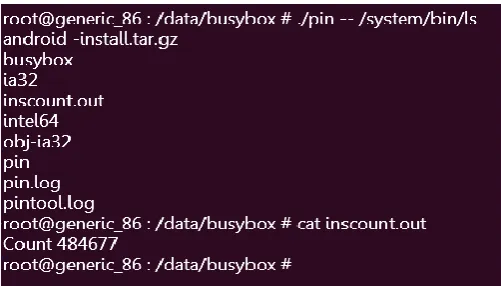
Pin tool is the instrumentation program. Pin tools run on Pin to perform meaningful tasks. The inscount pin tool is used to find out the number of instructions in the running program.
Instrumentation consists of two components:
1. A mechanism that decides where and what code is inserted
2. The code to execute at insertion points
These two components are instrumentation and analysis code.
III. LITERATURE REVIEW
1. Pin: Building Customized Program Analysis
Tools with Dynamic Instrumentation
1) Profiling
2) Performance Evaluation 3) Bug Detection
2. Behavioral Analysis of Android Applications
Using Automated Instrumentation
In this paper, they present efforts on effective security inspection mechanisms for identification of malicious applications for Android mobile applications.
1) Count the number of Instruction in the original Application.
2) Count the number of Instruction in the Malicious Application.
3) If Number of Instruction are different then know there are some extra line of code in the application code
3. All Your Droid Are Belong to Us: A Survey of
Current Android Attacks
In this paper we look to Android as a specific instance of mobile computing. We first discuss the Android security model and some potential weaknesses of the model. We then provide taxonomy of attacks to the platform demonstrated by real attacks that in the end guarantee privileged access to the device. Where possible, we also propose mitigations for the identified vulnerabilities.
4. Analysis and Research of System Security Based
on Android
In this paper, it has analysis Android system's security mechanisms with widely used in mobile platforms. It has separately introduced its system architecture, security mechanism and safety problems. Through it has analysis Android security mechanisms and its components; it has set to the Android security, safety mechanism side, system security and data security. It has promoted system security to system permission. At the same time it analysis the Android security risks, it has deeply researched the attack based on Linux kernel. It has proposed security mechanisms based on SELinux policy theory to ensure system security on application program framework layer.
5. Patch droid: scalable third party security patches
for android devices.
In this paper they have presented patch droid, a System to patch security vulnerabilities on legacy android
Android devices, Patch droid uses dynamic
instrumentation techniques to patch vulnerabilities in memory, and uses a path distribution service so that patches only have to be created once and can be deployed on every devices. Because patches are injected directly into the processes, Patch droid does not need to flash or modify system partitions or binaries, making it universally deployable even on tightly controlled devices.
Proposed System
6. Mitigation of security attack in android
application using pin tool
Figure 3. Proposed steps
IV.
RESULT AND DISCUSSION
Getting the system ready
Table 2. System Specification
Installation on Ubuntu
Figure 4. Install Ubuntu in my system
Install Android SDK and AVD, Eclipse
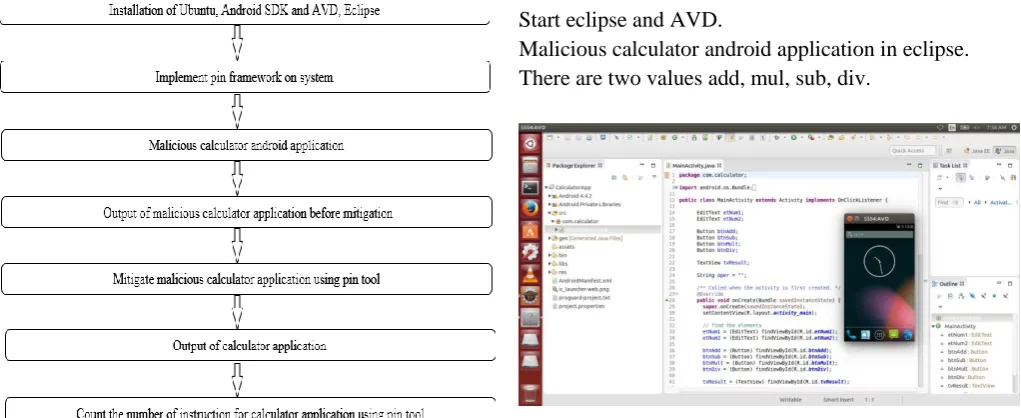
Start eclipse and AVD.
Malicious calculator android application in eclipse. There are two values add, mul, sub, div.
Figure 5. Install Android SDK and AVD, Eclipse in
Implement pin framework on system
Start the terminal and use to command
Run on pin this command. /pin –version and. /pin -- /system/bin/ls.
Figure 6. The pin framework version on android avd
Before output of malicious calculator application
Figure 7. Output of malicious calculator application
Mitigate malicious calculator application using pin tool
We have compiled the mitigation pin tool in the android avd and then attached it to the running android
application. The application we used is
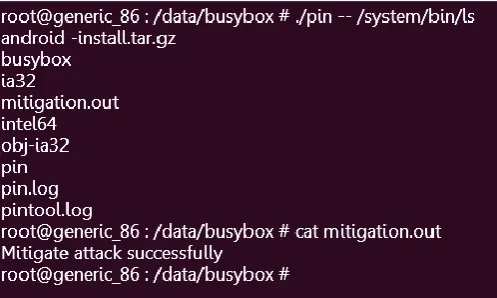
CalculatorApp.apk. As we can see the image that the directory of the bin in the android avd contains a file name “mitigation.out”. This file is made when we have compiled and attached the pin tool to the application process. When we open that file we can see mitigate attack during the running of the Malicious Calculator Application.
Figure 8. Mitigate attack in malicious calculator application using pin tool
Final output of calculator application
Figure 9. Mitigate attack in malicious calculator application using pin tool
Count the number of instruction for calculator application using pin tool
Inscount pin tool
Figure 10. Output of inscount count pin tool
V.
CONCLUSION
We have presented a method of mitigation of security attack in Android Applications using Pin tool which allows the user to instrument an Android Application. Instrumented code alters the behaviour of the original application and the attacker can’t find the right way to inject his own code into the running Application. Moreover instrumentation can also be used as a protecting weapon. So here we have used pin tool to mitigation of security attack in android application.
VI. FUTURE WORK
• In future on any malicious android application and mitigate this malicious android application using pin tool,
• Any android application counts the number of instructions and run on pin framework.
VII.
REFERENCES
[1] Chi-Keung Luk, Robert Cohn, Robert Muth, Harish Patil, Artur Klauser, Geoff Lowney , Steven
Wallace, Vijay Janapa Reddi, Kim
Hazelwood,"Pin: Building Customized Program Analysis Tools with Dynamic Instrumentation" PLDI '05 Proceedings of the 2005 ACM SIGPLAN conference on Programming language design and
implementation Pages 190-200. and
www.pintool.org
[2] Android Kernel Issues.http://www.kandroid.org.
[3] Intel. IA-32 Intel Architecture Software
Developer’s Manual Vols 1-3, 2003.
[4] Just because it’s signed doesn’t mean it isn’t spying
on you. http://www.f-secure.com/weblog/
archives/00001190.html, May 2007.
[5] J. Oberheide. Remote kill and install on google android.
http://jon.oberheide.org/blog/2010/06/25/remote-kill-and-installon- google-android/