-- -- --
-- -- -- --
- - - -
-
-
-
-
-
-
-
---
- - -
-
---
----
- -
-
- : -- _ .
- - -
-- -- --
- - -
- - -
-
-
--
--
--
-
-
-
-
---~- - -
- -
--
--
----
-
-
----
-
-
---==
== ';'
==
Maintenance Library
Control Unit
Models 1A, 18, 1C, 10, 21A, 218, 21C, 210, 31A, 31C, 310, 41A, 41C, 410
Maintenance Concepts
Preface
This manual contains the information needed by the sup-port Field Engineering (FE) Customer Engineer to maintain the 3274 Control Unit Models lA, lB, lC, lD, 21A, 21B, 21C, 21D, 31A, 31C, 31D, 41A, 41C,41D.
Note: For purposes of brevity and clarity, the one- and two-digit numbers associated with the 3274 Models A, B,
C, and 0 units are not used in this manual. All unit desig-nations are abbreviated by model type only, such as: 3274
Model A, 3274 Model B, 3274 Model C and 3274 Model D.
The maintenance procedures described in this manual and performed by the Support Customer Engineer represent a part of the overall support structure for the 3274 Control Unit. This support structure begins at the 3274 operator level and is briefly described as follows:
• 3274 Operator - Performs initial problem isolation and recording of 3274 status indications by following the procedure in the 3274 Problem Determination Guide,
GA27-2854. If the problem involves other than a cus-tomer operating procedure or cuscus-tomer-supplied power, the operator completes the 3274 Problem Report Form
and requests I BM service.'
Seventh Edition (Dec 1983)
This is a major revision of,;md obsoletes, SY27-2512-5. The draw-ings and specifications contained herein shall not be reproduced in whole or in part without written permission.
IBM has prepared this maintenance manual for the use of IBM cus-tomer engineers in' the installation, maintenance, or repair of the specific machines indicated. IBM makes no representations that it is suitable for any other purpose.
It is possible that this material may contain reference to, or informa-tion about, IBM products (machines and programs), programming, or services that are not announced in your country. Such references or information must not be construed to mean that I BM intends to announce such I BM products, programming, or services in your country.
Requests for IBM publications should be made to your IBM repre-sentative or to the I BM branch office serving your locality. ©Copyright International Business Machines Corporation 1978,
1979,1980,1981,1983
• Product Customer Engineer - Performs the maintenance
procedures described in this manual to isolate the prob-lem to a field replaceable unit (FRU). The 3274 Prob-lem Report Form prepared by the operator gives the 3274 'indications necessary for performing these proce· dures. If the problem cannot be isolated and corrected, the Product Customer Engineer requests assistance from the next level of the support structure.
• Support Customer Engineer - Verifies the results obtained by the Product Customer Engineer and thor-oughly analyzes the problem by means of the following:
• Tests
• Log Information
• Error Code Definitions
• Result of Host Test Routines
• Special Tools and Test Equipment
If the problem cannot be isolated and resolved using these service aids, the Support Customer Engineer records the problem indications and supporting information on the 3274 Problem Checklist and requests assistance from the next level of the support structure.
A form for readers' comments is provided at the back of this publi-cation. If the form has been removed, address comments to IBM Corporation, Department 52Q, Neighborhood Road, Kingston, N.Y. 12401. IBM may use or distribute any of the information you supply in any way it believes appropriate without incurring any obligation whatever. You may, of course, continue to use the information you supply.
Organization
This manual is organized as follows:
• Chapter 1 - Maintenance Approach and System Overview
• Chapter 2 - Subsystem Indicators, Symbols, and Messages
• Chapter 3 - Subsystem Error Logs and Test Formats
• Chapter 4 - Subsystem Tests, External Tests, and Sub-system Service Aids
• Chapter 5 - Reference Data
• Chapter 6 - Tools and Test Equipment
• Appendix A - Support Structure Information Form
• Appendix B - Models A, B, C, and D Error Codes
• Appendix C - X.25
• List of Abbreviations
Federal Communications Commission (FCC) Statement
Warning: This equipment generates, uses, and can radiate radio frequency energy and, if not installed and used in accordance with the instructions manual, may cause inter-ference to radio communications. It has been tested and found to comply with the limits for a Class A computing device pursuant to Subpart J of Part 15 of FCC Rules, which are designed to provide reasonable protection against such interference when operated in a commercial environ-ment. Operation of this equipment in a residential area is likely to cause interferimce, in which case the user at his own expense will be required to take whatever measures may be required to correct the interference.
Contents
Chapter 1. Maintenance Approach and System Overview 1-1 1.1 Maintenance Approach 1-1
1.2 Subsystem Data Flow 1-2 1.2.1 IML Test Data Path 1-2 1.2.2 IML of Unit Code 1-2
1.2.3 Message Data Flow between 3274 Control Unit and Attached Devices 1-3
1.2.4 Messa~e Data Flow between 3274 Control Unit and Host System 1-3
1.2.5 Status, Error, and Log Data Flow 14 1.3 Subsystem Functions 1-5
1.3.1 Control Unit Power-On Reset (Except 41X Models) 1-6 1.3.2 Keystroke Handling 1-6
1.3.3 Sending to Host 1-8 1.3.4 Receiving from Host 1-8 1.3.5 Error Handling and Logging 1~8 1.3.6 Internal Testing 1-8
1.3.7 Function Priority 1-8
1.3.8 Local Channel Data Flow (Model A) 1-9 1.3.9 Type A Adapter Coax Data Path 1-10 1.4 Supporting Publications 1-10
Chapter 2. Subsystem Indicators, Sym bois, and Messages 2-1 2.1 Introduction 2-1
2.2 8 4 2 1 Indicators 2-1 2.3 DC ON Indicator 2-1
2.4 ONLINE/OFFLINE Indicator and Switch for Models A,
2.4.1 2.4.2
B, and D 2-2 Model A 2-2 Models Band D 2-2
2.5 Operator Information Area Layout 2-3 2.5.1 Readiness and System Connection Symbols 2-3 2.5.2 Do Not Enter (Input Inhibited) Symbols 24 2.5.3 Communication Reminder Symbol 2-5 2.5.4 Programmed Symbols 2-6
2.5.5 Shifts and Modes Symbols 2-6 2.5.6 Extended Highlighting 2-6 2.5.7 Printer Messages 2-6 2.5.8 Machine Check Numbers 2-6 2.5.9 Communication Check Numbers 2-6
Chapter 3. Subsystem Error Logs and Test Formats 3-1 3.1 Introduction 3-1
3.2 Test 0: Communication Path Test and 3278 Display Test 3-1
3.2.1 3.2.2 3.3 3.3.1 3.3.2 3.3.3 3.3.4 3.3.5 3.3.6 3.3.6.1 3.3.6.2 3.3.7 3.3.8
Description 3-1
Procedure for Requesting Test 0 3-1 Test 1: Overview 3-1
Tes,t 1 Device Logs 3-2 Test 1 Host Adapter Logs 3-2
Test 1 Common Communications Adapter (CCA) Log for BSC 3-3
Test 1 Common Communications Adapter (CCA) Log and High-Performance Communications Adapter (HPCA) Log for SDLC 3-7
Test 1 Local Channel Attachment (Model A) Log 3-10 Test 1 Local A ttachment (Models B and D) 3-11 Model B 3-11
Model D 3-11
Test 1 Device Adapter Logs 3-12 Test 1 Type A Adapter Log 3-12
3.3.9 3.3.10 3.3.11 3.3.12 3.3.13 3.4 3.4.1 3.4.1.1 3.4.1.2 3.4.1.3 3.4.1.4 3.4.1.5 3.5 3.6 3.7 3.8 3.9 3.10 3.10.1 3.10.2 3.11 3.12 3.13 3.14 3.15 3.16 3.16.1 3.16.2
Test 1 Type B Adapter Log 3-13 Control Logic Error Log 3-13
Display Response Time Monitor Data (A4/1) 3-14 Reset Response Time Monitor (A4/4) 3-14
Test A5/1 Microcode Error Correcting (ECC) Data 3-14 X.25 AO/l Test 3-15
X.25 Counters 3-16 HPCA Counters 3-16
X.25 Auxiliary Counters (Link-Level) 3-16 X.25 Auxiliary Counters (Circuit-Level) ·3-16 X.25 Statistical Counters (Link-Level) 3-17 X.25 Statistical Counters (Circuit-Level) 3-17 Test 2: Display Configuration Information 3-18 Test 3: Display the Status of All Configured Terminals and Display the Control Unit Summary Counters 3-24 X.25/3 Test 3-24
Test 4: Reset Any Test 1 Log 3-25 Test 5: Register Page Display 3-25 Test 6: Device Control Block Display 3-25 Test 6 Byte Identification 3-25
DCB Bit Definition 3-26
/B Test: Device Address Assignment Table 3-28 Test 7: Dynamic Convergence (Color) 3-28 Test 8: PSs, Highlighting, and Color 3-28 / A Test - Operator Originated Alerts (Configuration Supports C and D) 3-28
/D Test - Request 3290 Dump 3-28 3277 Path Test and Test Request Key 3-29 BSC or Local Host Attached 3-29 SNA Attached 3-29
Chapter 4. Subsystem Tests, External Tests, and Subsystem Service Aids 4-1
4.1 Introduction 4-1
4.2 Initial Machine Load (IML) Tests 4-1 4.2.1 ALT 1 IML Mode 4-1
4.2.2 ALT 2 IML Mode, Model C with Wrappable Modem (Test/Operate Switch in Operate Position) 4-1 4.2.3 ALT 2 IML Mode, Model C without Wrappable Modem
(Test/Operate Switch in Test Position) 4-1 4.2.4 ALT 2 IML Mode, Model A Local Channel
Attachment 4-2
4.2.5 ALT 2 IML Mode, Model B Local Host Attachment 4-2 4.2.6 ALT 2rIML Mode, Model D Local Host Attachment 4-2 4.2.7 ALT 2 IML Mode, Modem Self-Test for Mode131C
Only 2400-,4800-, 9600-bps Integrated Modem 4-2 4.3 Local Model A Display System Online Tests
(T3274B) 4-2 4.3.1 Purpose 4-2
4.3.2 Applicable Executive Control Programs 4-2 4.3.3 Composite Error Message Description 4-3 4.3.4 OLT Routines 4-3
4.3.5 CDS Card Format, Model A 4-3
4.4 Local Models Band D Display System Online 4-3 4.4.1 Purpose 4-3
4.4.2 Applicable Executive Control Programs 4-3 4.4.3 Composite Error Message Description 44 4.4.4 OLT Routines 44
4.4.5 CDS Card Format, Models Band D 44 4.5 Model C Display System Online Test 44 4.5.1 Purpose 44
SY27-2512-6
4.5.2 4.5.3 4.6 4.6.1 4.6.2 4.6.3 4.6.4 4.6.5 4.6.6 4.6.7 4.6.8 4.6.8.1 4.6.8.2 4.6.8.3 4.6.9 4.6.9.1 4.6.9.2Applicable Executive Control Programs 44 Model C Online Tests 44
Serviceability Aids 4-5
Monitoring of EIA Interface Lines (Model C) 4-5 Monitoring of Bus/Tag Interface Lines (Models A, B, and D) 4-5
Isolate Feature Board 01A-A2 4-5 Diskette Patching Procedure 4-5 Dump Procedure 4-9
Backup System Diskette Generation 4-10 Display Customizing Responses 4-10 Coax Cables (h and 1) 4-10 Cable h (Indoor) 4-10 Cable I (Outdoor) 4-10 Coax Cable Splicing 4-10 Coax Testing with Scope 4-10 Testing for Discontinuities 4-10 Setup and Test Procedures 4-10
Chapter 5. Reference Data 5-1 5.1 Introduction 5-1 5.2 5.2.1 5.2.2 5.2.3 5.2.4 5.2.5 5.2.6 5.2.6.1 5.2.6.2 5.2.6.3 5.2.7 5.2.8 5.2.9 5.2.10 5.2.11 5.3 5.3.1 5.3.2 5.3.3 5.3.4 5.3.5 5.3.6 5.3.7 5.3.8 5.3.9 5.3.10 5.3.11 5.3.12 5.3.13 5.3.13.1 5.3.13.2 5.3.13.3 5.4 5.4.1 5.4.2 5.5 5.6 5.6.1 5.6.2 5.7
Control Unit Command Summary 5-1 Write 5-1
Erase/Write 5-1
Erase/Write Alternate 5-1 Erase All Unprotected 5-1 Read Buffer 5-1
Read Modified 5-1 Read Modified Read 5-1 Short Read Read 5-1
Test Request Read [Models B, C (BSC), and DJ 5-1 Read Modified All (SNA Only) 5-1
No Operation (Models Band D Only) 5-1 Write Structured Field 5-1
Sense (Models Band D Only) 5-1 Copy [Model C (BSC)] 5-1 Control Unit Order Summary 5-2 Set Buffer Address (SBA) 5-2 Start Field (SF) 5-2
Insert Cursor (Ie) 5-2 Repeat to Address (RA) 5-2
Erase Unprotected to Address (EUA) 5-2 Program Tab (PT) 5-2
New Line (NL) 5-2 End of Message (EM) 5-2 Duplicate (DUP) 5-2 Field Mark (FM) 5-2
Forms Feed (FF) (Category A and 3288 Printers) 5-2 Carriage Return (CR) (Category A Printers) 5-3 Structured Field and Attribute Processing Orders 5-3 Start Field Extended (SFE) 5-3
Modify Field (MF) 5-3 Set Attribute (SA) 5-3
I/O Interface Codes 5-3
Examining 3278 Attributes and Modified Data Tags 5-7 Examining 3279 Attributes and Modified Data Tags 5-7 Sequence/Response Diagrams, Models B and D 5-9 Status and Sense Byte Definitions 5-10
Description 5-10
Error Recovery Procedures 5-13
Sequence/Response Diagrams, Model C, BSC 5-14
5.8 Remote Status and Sense Byte Definitions, Model C, BSC 5-19
5.8.1 Error Recovery Procedures, Model C, BSC 5-21 5.8.2 Supplementary Procedures 5-22
5.9 Model A, Local Attachment (SNA Version) 5-22 5.9.1 Commands 5-22
5.9.1.1 Write Command 5-22
-5.9.1.2 Read Command 5-22 5.9.1.3 No Operation Command 5-22 5.9.1.4 Sense Command 5-22 5.9.1.5 Control Command 5-22 5.9.1.6 Write Break Command 5-23 5.9.1.7 Write Start 0 Command 5-23 5.9.1.8 Read Start 0 Command 5-23 5.9.1.9 Write Start 1 Command 5-23 5.9.1.10 Read Start 1 Command 5-23 5.9.1.11 Restart Reset Command 5-23 5.9.1.12 Sense ID Command 5-23 5.9.2 Status and Sense Definitions 5-23 5.9.2.1 Status Bits 5-23
5.9.2.2 Sense Bits 5-24
5.9.3 Error Recovery Procedures 5-25 5.9.3.1 Model-A-Detected Errors 5-25 5.9.3.2 Channel-Detected Errors 5-25
5.10 SDLC Sequence/Response Descriptions 5-25 5.10.1 SDLC Transmission Frames 5-25
. 5.10.1.1 Response Modes 5-25 5.10.1.2 Control Field 5-25
5.10.2 Sequence Error Recovery Procedures 5-26 5.10.2.1 Abort Function 5-26
5.1 0.2.2 Timeout Controls 5-26
5.10.3 Hexadecimal Notation and Frame Summary 5-26 5.11 SNA Information 5-26
5.11.1 Session Control 5-26 5.11.2 Data Flow Control 5-26 5.11.3 Transmission Header 5-27 5.11.4 Request/Response Header 5-27 5.11.5 SNA Definitions 5-28
5.11.6 SDLC/SNA Command to Start a Session 5-28 5.12 SDLC/SNA Error Information 5-29
5.12.1 Exception Response with Sense Data Included 5-29 5.12.2 SNA Sense Codes 5-29
5.12.3 Logical Unit Status (LUSTAT) 5-30 5.12.4 Command Reject 5-31
5.12.5 Request Maintenance Statistics (REQMS) Command 5-31
5.12.5.1 Record Formatted Maintenance Statistics (RECFMS) 5-31
5.12.5.2 RECFMS Formats 5-32 5.13 Switches and Controls 5-32
5.14 BSC and SNA Readiness Symbols 5-33 5.15 Digital Data Service (DDS) Adapter 5-35
Chapter 6. Tools and Test Equipment 6-1 6.1 Introduction 6-1
6.2 Buffered Teleprocessing Diagnostic Analyzer and Tester 6-1
6.3 NU Data Tester 6-1 6.4 Maintenance Device 6-1
6.5 PT-2 Attachment to Non-EIA Interfaces 6-1
iii
Appendix A. Support Structure Information Form A-I Appendix B. Models A, B, C, and D Error Codes B·I Appendix C. :x.25 Adapter Feature
C.l Introduction C-l C.2 X.25 Elements C-I C.2.! Physical Level C-l C.2.2 Link Level C-I C.2.3 Packet Level C-l
C.3 Hardware/Configuration Support C-l C.3.l Configuration Support C-l
C.3.2 Hardware Support C-l C.3.2.1 Hardware Required C-I C.3.2.2 Mutually-Exclusive Feature C-l CA Timers C-I
C.5 The X.25 Network C-l C.5.l Virtual Circuits C-l C.5.2 Logical Channels C-l C.6 Packet Types C-l C.6.l Call Request (SVC) C-l C.6.2 Incoming Call (SVC) C-l C.6.3 Call Accepted (SVC) C-l C.6A Call Connected (SVC) C-2 C.6.5 Clear Request (SVC) C-2 C.6.6 Clear Indication (SVC) C-2 C.6.7 Clear Confirmation (SVC) C-2 C.6.B Reset Request (SVC) C-2 C.6.9 Reset Indication (PVC/SVC) C-2 C.6.10 Reset Confirmation (PVC) C-2 C.6.11 Restart Request (PVC/SVC) C-2 e.6.l2 Restart Indication (PVC/SVC) C-2 C.6.13 Restart Confirmation (PVC/SVC) C-2 C.6.l4 Data (PVC/SVC) C-2
C.6.l5 Receiver Not Ready (PVC/SVC) C-2 C.6.l6 Receiver Ready (PVC/SVC) C-2 C.6.l7 Diagnostic (PVC/SVC) C-2
C.7 Switched Virtual Circuit (SVC) Description C-2 C.7.l Key Functions C-2
C.7.2 Indicators C-2 C.B X.2S States C-2
C.9 Normal Operating Procedure C-3 C.9.l Call Ready C-3
e.9.2 Dialing C-3 C.9.3 Data Ready C-3 C.9 A Disconnection C-3
C.9.5 Cause and Diagnostic Indicators C-4 e.9.6 Incoming Call C-4
C.9.7 Local Mode C-4
C.9.B Exceptional Case Handling C-4 C.lO X.2S SVC States and Key Operation C-4 C.ll Indicators C-7
e.ll.1 Call Ready C-7 C.I1.2 Dial In C-7
C.l1.2.1 At Dial-Originating Station C-7 C.ll.2.2 At Other Stations C-7 C.Il.3 Outgoing Call in Process C-7 C.lIA Incoming Call in Process C-7 C.Il.5 Data Ready (In-Use) C-7 C.1l.6 Disconnect in Process C-7 C.Il.7 Local C-7
C.ll.B C.12 C.I2.1 C.I2.2 C.13 C.14
X.25 Communication Reminder Indicator C-7 Extension Key C-7
Extension Mode C-7
Extension Key and X.25 Function Keys C-B Dial Mode Screen Description
Permanent Virtual Circuit (PVC) Description C-9
C.14.1 PVC Indicators C-9 C.14.2 PVC Keys C-9 C.14.2.1 Local Key C-9 e.14.2.2 COMM Key C-9
C.IS Summary of States and Indicators C-lO C.IS.1 Primary Virtual Circuit ColO
e.15.2 Switched Virtual Circuit C-IO Appendix D. Abbreviations D·I
Figures
Figure 1-1.
Figure 1-2. Figure 1-3. Figure 1-4.
Figure 1-5.
Figure 1-6. Figure 1-7. Figure I-B.
Figure 1-9. Figure 1-10. Figure 1-11. Figure 1-12. Figure 1-13. Figure 2-1. Figure 2-2. Figure 2-3.
Figure 2-4.
Figure 2-5.
Figure 2-6.
Figure 2-7. Figure 2-B. Figure 2-9. Figure 2-10.
Figure 2-11. Figure 2-12. Figure 2-13. Figure 2-14. Figure 2-15. Figure 2-16.
Figure 3-1.
Figure 3-2.
Figure 3-3.
Figure 3-4.
Figure 3-5.
Figure 3-6.
Figure 3-7.
Figure 3-8.
Figure 3-9.
Figure 3-10. Figure 3-11. Figure 3-12.
Support Customer Engineer Maintenance Approach 1-1
3274 Subsystem Overview 1-2 Initial Machine Load Data Flow 1-2
Message Data Flow between 3274 Control Unit and Devices 1-3
Message Data Flow between 3274 Control Unit and Host System 1-3
Status, Error, and Logic Data Flow 1-4
3274 Subsystem Functions 1-5
Keystroke Handling, Type A Adapter (without 3299) 1-7
Inbound Messages 1-8 Outbound Messages 1-8
3274 Subsystem Functional Priorities 1-8 Local Channel Attachment Data Flow 1-9 Coax to Type A Adapter Data Flow 1-10
8 4 2 1 Indicator Control Logic 2-1
ONLINE/OFFLINE Control Logic, Model A 2-2 ONLINE/OFFLINE Control Logic, Models Band
D 2-2
Operator Information Area Layout (without Extended Data Stream) 2-3
Operator Information Area Layout (with Extended Data Stream) 2-3
Readiness and System Connection Symbols (Locations 1 through 7) 2-3
Do-Not-Enter Symbols (Locations 9 through 17) 24 Reminders (Locations 31 through 34) 2-5
Programmed Symbols (Locations 31 through 34) 2-6 Shifts and Modes (Locations 36 through 44 and Location 52); (Locations 32 through 41) - Without Extended Data Stream 2-6
Extended Highlighting (Locations 44 and 46) 2-6 Printer Status (Locations 60 through 64) 2-7 Diagnostic Code Modifiers 2-7
Cause Codes (Use Field Received from the DC E) 2-B Diagnostic Code Fields Received from the DCE 2-8 Diagnostic Code Fields Generated by an IBM (SNA) DTE 2-B
Summary of Counter Definitions by Device Log Type 3-3
CCA BSC Operation Attempted Chart (Code FF) 3-4
CCA BSC Operation Ending Chart (Code CCCC) (2 parts) 3-5
Sense Byte Breakdown Chart for CCA BSC (Code SSSS) 3-7
CCA/HPCA SDLC Operation Attempted Chart (Code FF) 3-7
CCA/HPCA SDLC Operation Ending Chart (Code CCCC) 3-8
Sense Byte Breakdown Chart for CCA/HPCA SDLC (Code SSSS) 3-9
3274 Model A Attachment Information Breakdown Chart 3-10
3274 Model B Operation Attempted Chart (Code RR) 3-11
HH Byte Definitions 3-11 Sense (SS) Byte Definitions 3-12
Category B Adapter Operation Attempted Chart (Code FF) 3-13
Figure 3-13. Category B Adapter Operation Ending Chart (Code CCCC) 3-13
Figure 3-14. Figure 3-15. Figure 3-16. Figure 4-1. Figure 4-2. Figure 4-3. Figure 4-4. Figure 4-5. Figure 4-6. Figure 4-7. Figure 4-8. Figure 4-9.
Subsystem Configuration (6 parts) 3-18 Test 6 Byte ID Chart 3-25
DCB Bit Definition Chart (2 parts) 3·26 IML Test Error Indications 4-1 ALT 1 IML Sequence 4-1
AL T 2 IML Sequence, Model C with Wrappable Modem 4-1
ALT 2 IML Sequence, Model C without Wrappable Modem 4-2
ALT 2 IML Sequence, Model A Local Channel Attachment 4-2
ALT 2 IML Sequence, Model B Local Host Attachment 4-2
ALT 2 IML Sequence, Model D Local Host Attachment 4-2
A2B2 Card Indicator for 2400-bps Integrated Modem 4-2
A2B2 Card Indicator for 4800-bps Integrated Modem 4-2
Figure 4-10. A2B2 Card Indicator for 9600-bps Integrated Modem 4-2
Figure 4-11. Example of Maximum Configuration of Error Message Content, Model A 4-3
Figure 4-12. T3274B OLT Routines 4-3 Figure 4-13. CDS Card Format, Model A 4-3
Figure 4-14. Example of Maximum Configuration of Error
Figure 4-15. Figure 4-16. Figure 4-17. Figure 4-18. Figure 4-19. Figure 4-20. Figure 4-21. Figure 4-22. Figure 5-1. Figure 5-2. Figure 5-3. Figure 5-4. Figure 5-5. Figure 5-6. Figure 5-7. Figure 5-B. Figure 5-9. Figure 5-10.
Figure 5 -11. Figure 5-12. Figure 5-13. Figure 5-14. Figure 5-15. Figure 5-16. Figure 5-17. Figure 5-18. Figure 5-19. Figure 5-20. Figure 5-21.
Message Content, Model B 4-4 T3274A OLT Routines 4-4 CDS Card Format, Models Band D 3274 Model C Online Tests 4-4 Operator Codes (2 parts) 4-6 Incident and Reflected Waves 4-10 Scope Setup 4-11
Measurement Points 4-11 Display Examples (2 parts) 4-11 Command Codes 5-1
4-4
Buffer Control Orders and Order Codes 5-2 United States EBCDIC I/O Interface Code for 3274 Control Unit and Attached 3277 Display
Stations 5-4
United States EBCDIC I/O Interface Code for 3274 Control Unit and Attached Category A Devices 5-4 United States ASCII I/O Interface Code for 3274 Control Unit and Attached Category A Devices 5-5 Format of Write Control Character (WCC) Byte 5-5 Function of Write Control Character (WCC) Bits 5-5 Format of Copy Control Character (CCC) Byte 5-5 Function of Copy Control Character (CCC) Bits 5-5 Buffer Transfers for 3274 Model C (BSC) Copy Command Operation 5-6
Attention ID (AID) Configurations 5-6 Attribute Character Bits 5-7
327B Top-Card Connector CE Jumper (Three Base Cards) 5-7
327B Top-Card Connector CE Jumper (Two Base Cards) 5-7
3279 Top-Card Connector CE Jumper 5-7 3279 Base Field Attributes 5-7
Extended Field and Character Attributes 5-8 Attribute Character Bit Assignments for 3277s 5-8 Control Character I/O Codes 5-8
Initial Selection (Models B and D) 5-9
Figure 5-22. Read - After Selection with Read Command (Models B and D) 5-9
Figure 5-23. Sense - After Selection with Sense Command (Issued in Response to Unit Check Status) (Models B and D) 5-9
Figure 5-24. Status Byte Bit Assignments for 3274 Models Band
D 5-10
Figure 5-25. Sense Bit Description 5-10
Figure 5-26. Initial Status and Sense Conditions for 3274 Models Band D 5-11
Figure 5-27. Ending Status and Sense Conditions for 3274 Models Band D 5-11
Figure 5-28. Asynchronous Status and Sense Conditions for 3274 Models Band D 5-12
Figure 5-29. General Poll and Specific Poll, Sequence/Response Diagram 5-14
Figure 5-30. 3274 Message Response to Polling or Read Modified Command 5-15
Figure 5-31. Selection Addressing, Sequence/Response Diagram 5-16
Figure 5-32. Write-Type and Control-Type Commands, Sequence/ Response Diagram 5-17
Figure 5-33. Read-Type Command, Sequence/Response Diagram 5-18
Figure 5-34. Remote Status and Sense Byte Definitions, BSC 5-19
Figure 5-35. Remote Error Status and Sense Responses, BSC 5-20
Figure 5-36. Remote 3270 BSC Status and Sense Conditions 5-21 Figure 5-37. 3274 Model A Local Command Codes 5-22 FigUi:e 5-38. Status Definitions 5-23
Figure 5-39. Sense Definitions 5-23 Figure 5-40. Status Bit Conditions 5-23 Figure 5-41. Sense Bit Conditions 5-24
Figure 542. Initial Status and Sense Conditions, 3274 Model A 5-24
Figure 543. Ending Status and Sense Conditions, 3274 Model A 5-24
Figure 544. Asynchronous Status and Sense Conditions, 3274 Model A 5-25
Figure 5-45. Nonsequenced Commands and Responses Supported by 3274 5-26
Figure 546. SDLC Commands and Responses in Hexadecimal Notation 5-26
Figure 5-47. Session Control Functions Supported by 32 7 4 5-26 Figure 5-48. Data Flow Control Requests Supported by
3274 5-26
Figure 549. Transmission Header Format 5-27 Figure 5-50. Request/Response Header Format 5-27 Figure 5-51. SDLC/SNA Commands Required to Start Session
with LU2 5-28 Figure 5-52.
Figure 5-53. Figure 5-54. Figure 5-55. Figure 5-56. Figure 5-57. Figure 5-58.
Figure 5-59. Figure 6-1.
SDLC/SNA Exception Responses 5-29 Summary Table of LUSTATs 5-31
Command Reject (CMDR) Message Format 5-32 Switch and Control Explanation 5-32
BSC Readiness Symbols 5-33 SNA Readiness Symbols 5-34
Connection of 3274 Control Unit Model C with DDS Adapter Feature 5-35
Digital Data Waveshapes 5-35 TPLM Tab Pin Locations 6-1
Figure Col. Control Unit/Terminal Responses in Dial-In State C-3 Figure C-2. Key Operations during X.25 States (4 parts) C-4 Figure C-3. Extension Mode Definition C-8
Figure C-4. Extension Key and X.25 Function Keys C-8 Figure C-5. Dial Mode Display Layout C-9
Figure C-6. PVC States and Indicators ColO Figure C-7. SVC States and Indicators C-7
CE Safety Practices
All Customer Engineers are expected to take every safety precaution possible and observe the following safety prac-tices while maintaining I BM equipment:
1. Do not work alone under hazardous conditions or around equipment with dangerous voltage. Always advise your manager if you MUST work alone. 2. Remove all AC and DC power when removing or
assembling major components, working in immediate area of power supplies, performing mechanical inspection of power supplies and installing changes in machine circuitry. Pull the power plug from the receptacle to remove power source.
3. Wall box power switch, when used to disconnect power, should be locked or tagged in off position. "Do not Operate" tags, form 229-1266, should be securely attached to power switch or to outside of power box. 4. When it is absolutely necessary to work on equipment having exposed operating mechanical parts or exposed live electrical circuitry anywhere in the machine, the following precautions must be followed :
a. At least one other person familiar with power-off controls, emergency power-off procedures, and the location of the Willi box power switch, must be in the immediate vicinity at all times.
b. Never wear rings, wrist watches, chains, bracelets, metal cuff I inks, etc.
c. Use only insulated pliers and screwdrivers. d. Keep one'hand in pocket.
e. When using test instruments be certain they are of proper capacity and controls are set correctly. Use only insulated probes.
f. Avoid contacting ground potential (metal floor strips, machine frames, etc.; use suitable rubber mats, purchased locally if necessary).
5. Safety Glasses must be worn when:
a. Using a hammer to drive pins, riveting, staking, etc. b. Power hand drilling, reaming, grinding, etc. c. Using spring hooks, attaching springs. d. Soldering, wire cutting, removing steel bands. e. Using solvents, sprays, cleaners, chemicals, etc., to
clean parts.
f. All other conditions that may be hazardous to your eyes. REMEMBER, THEY ARE YOUR EYES. 6. Special safety instructions such as handling Cathode
Ray Tubes and extreme high voltages must be followed as outlined in CEMs and Safety Section of the Mainte-nance Manuals.
7. Do not use solvents, chemicals, greases or oils that have not been approved by IBM.
8. Avoid using tools or test equipment that have not been approved by IBM.
9. Replace worn or broken tools and test equipment. 10. The maximum load to be lifted is that which in your
opinion and that of management does not jeopardize your own health or well-being or that of other employees.
11. All safety devices such as guards, shields, signs, ground wires, etc., shall be restored after maintenance. 12. Each Customer Engineer is responsible to ensure that no
,action on his pa'rt renders a product unsafe or exposes "hazards to customer personnel.
13. Place removed machine covers in a safe, inaccessible place where no one can trip over them.
14. All machine covers must be in place before machine is returned to customer.
15. Always place CE tool kit away from walk areas (i.e., under desk or table) where no one can trip over it. 16. Avoid touching mechanical moving parts (when
lubri-cating, checking for play, etc.).
17. When using stroboscope, do not touch ANYTHING ---it may be movi ng.
18. Avoid wearing loose clothing that may be caught in machinery. Shirt sleeves must be left buttoned or rolled above the elbow.
19. Ties must be tucked in shirt or held by a tie clasp (preferably nonconductive) approximately 3 inches from end. Tie chains are not recommended. 20. Before powering up or starting equipment, make
certain other CEs and customer personnel are not in a hazardous position.
21. Maintain good housekeeping in area of machines while performing and after completing maintenance. 22. Even though preventive measures are taken; accidents
do occur. CEs and support personnel should be pre-pared to follow emergency first aid procedures as outlined below.
First Aid - General
1. If accidental electrocution occurs:
a. Remove power source before touching victim. b. If power cannot be removed, pull victim away from
equipment by using non-conductive material such as a broom handle, leather belt, or necktie.
c. Immediately begin rescue breathing (see below). d. Begin CPR if necessary and only if trained person is
available.
e. Call a doctor - Have someone summon medical aid. f. Remain in position - After victim revives, be ready
to resume respiration if necessary. 2. For serious injury:
a. Summon medical aid.
b. Do not move victim unless absolutely necessary to remove from danger.
c. Attempt to stop serious bleeding by using pressure points or a pressure bandage.
d. Loosen clothing and keep victim warm.
Artificial Respiration
General Considerations
1. Start immediately - seconds count.
Do not wait or look for help or stop to loosen clothing. Warm the victim or apply stimulants.
2. Check mouth for obstructions; remove foreign objects; pull tongue forward.
Rescue Breathing for Adults - Place Victim on His Back Immediately
1. Clear throat of water, food, or foreign matter. 2. Tilt head back to open air passage.
3. Lift jaw up to keep tongue out of air passage, 4. Pinch nostrils to prevent air leakage when you blow. 5. Blow until you see chest rise.
6. Remove your lips and allow lungs to empty. 7. Listen for snoring and gurglings, signs of throat
obstruction.
8. Repeat mouth-to-mouth breathings 10-20 times a minute. Continue rescue breathing until he breathes for himself, or medical aid arrives.
~
~inal
mouth-Wf """"
to-mouthThumb and ' • _position finger positions
Chapter
1.
Maintenance Approach and System Overview.
This chapter contains information to assist the support customer engineer in isolating and correcting 3274
sub-system problems that cannot be attributed to a failing field replaceable unit (FRU). The information supplements existing documentation covering problem isolation, use of serviceability aids, specialized tools, and test equipment. The topics presented include the following:
• Overall Maintenance Approach: The maintenance
approach is outlined to provide flexibility both in the type of approach taken and in the selection of support-ing serviceability aids. The maintenance approach identifies and refers to procedures, tests, specialized tools, and test equipment that will most likely help isolate various types of 3274 problems. Detailed descrip-tions of these serviceability aids and their use are con-tained in other chapters in this publication. In addition" examples using these serviceability aids are given for typical 3274 problems.
• Subsystem Operation Overview: This overview gives a general description of 3274 operations and functions.
• Serviceability Aids: A general description of service-ability aids and their use is given. These aids include the operational indicators, display symbols, error suffix codes, logouts, tests, test equipment, and host error recording.
• Reference Material: All supporting reference material in . this publication is identified and described. This refer-ence material provides detailed descriptions of error recording and indications, tests, error recovery pro-cedures, 3270/3274 operational differences, error suffix code action chart, and tools and test equipment.
• Supporting Publications: Supporting IBM publications are identified, and their contents briefly described.
• Procedure for Requesting Assistance: A procedure for requesting assistance from the next level of the support structure is outlined. This procedure includes 3274 problem recording which will aid the support structure in problem determination.
1.1 MAINTENANCE APPROACH
This maintenance approach is outlined to provide flexibil-ity both in the type of approach taken and in the selection of supporting service aids. The approach used to isolate a· specific 3274 problem may vary because of multiple error
indications and the type of operation being performed at the time the error occurred. Therefore, the maintenance approach to typical problems described in the following is not necessarily the only effective approach that could be used.
The suggested maintenance approach identifies and refers to various procedures, tests, tools, and test equipment that will most likely aid in isolation of the problem. This approach has four basic steps, which are performed in sequence:
Step 1
Review and verify the results obtained by the product cus-tomer engineer by using the following reference material:
• 3274 Problem Report Form
• 3274 Control Unit Maintenance Information
Step 2
Analyze operational indicators (842 1), display symbols, and error suffix codes (nnn codes).
Step 3
Analyze logouts, hang conditions, and failing operation sequences.
Step 4
Record all problem symptoms, and complete the Support Structure Information Form in preparation for requesting assistance. The effectiveness of the assistance will depend largely on the information that you provide.
These four steps are illustrated in Figure 1-1.
Step 1
Review/Verify Results Obtained by the Product Customer Engineer
Step 2
Analyze:
Problem
-Isolated
and
Corrected
• Operational Indicators • Display Symbols
' . Error Suffix Codes
Perform Machine Checkout MAP 100 (in the 3274 MIM) to Verify Correct Operation/Return 3274 to Customer
Step 3
Analyze:
• Logouts
Material
3274 Problem Report Form
• Complete If Necessary
3274 Maintenance Information
• Perform Isolation Procedure
Material
Chapter 2. Subsystem Indicators, Symbols, and Messages
- Chapter 3. Subsystem Error Logs and Test Formats
Chapter 4. Subsystem Tests, External Tests, and Subsystem Service Aids Chapter 5. Reference Data
I
I
I
I
I
• Hang Conditions
--.I
• Failing SequenceStep 4
Assistance Preparation Effective assistance will depend largely on com-plete and accurate • Record Symptoms
• Complete the Support Structure Information Form
• Contact the next level of the support structure for assistance.
. recording of problem symptoms, and on completion of the Support Structure Information Form. See Appendix A.
The Support Structure will assist you in prob-lem determination. This assistance may include:
• Symptom/Fix Search ,. Special Testing
Equipment • On-Site Assistance
Figure 1-1. Support Customer Engineer Maintenance Approach
1.2 SUBSYSTEM DATA FLOW
The 3274 subsystem data flow consists of test data, con-trol data (unit code); status, error, and log data; and mes-sage data between the components of the subsystem. Figure 1-2 illustrates the 3274 subsystem configuration including use of the 3299 Terminal Multiplexer. The data flow is described as follows:
• Initial Machine Load (IML) of Test Data - Loading the 1M L test data residing on the system diskette into con-trol storage (paragraph 1.2.1 and Figure 1-3).
• Initial Machine Load (IML) of Unit Code - Loading the unit code residing on the system diskette into control storage (paragraph 1.2.2 and Figure 1-3).
Remote Attachmen
3274 Model C
Control Logic
I
HPCACCA I--V) :::J (l) CCA Control
• Message Data Flow between 3274 Control Unit and Attached Devices - The flow of message data between the 3274 Control Unit and attached devices (paragraph
1.2.3 and Figure 1-4).
• Message Data Flow between 3274 Control Unit and Host System - The flow of message data between the 3274
Control Unit and the host system (paragraph 1.2.4 and Figure 1-5).
• Status, Error, and Log Data Flow - The flow of data from the 3274 Control Unit, the~ host system, and attached devices to the data control block area of con-trol storage (paragraph 1.2.5 and Figure 1-6).
SNA/SDLC
S
BSC
s
Storage
Local Cilannel Attachment
Host System
Diskette Diskette Drive f -Drive Adapter t
-Figure 1-2_ 3274 Subsystem Overview
3274 Model A SNA Version
Local Host Attachment 3274 Models Band D
3272 Version
3299 Adapter
Type A Adapter
Type B Adapter
(1/21/31 only)
Channel
Ch'.Jnnel
3299 Terminal Mult iplexer
Category A Devices 3178 3278 3279 3230 3262 3268 3287 3289 3290 4250 5210
Category B Devices 3277 3284 3286 3287 3288
1.2.1 IML Test Data Path
The IML test data path is shown in Figure 1-3, IML test data is retrieved from the diskette drive adapter after IML tests 0000, 0001, and 0002 have been successfully com-pleted. IML test 0002 verifies that the diskette drive and adapter are functionally operational. The data path, from origin to destination, is identified as follows:
• Diskette Drive
• Diskette Drive Adapter
• Bus
• Control logic
• Control storage
Control Logic
Control Storage
)
Control Code
~=:::::~~=~
AreaRemote Attachment
3274 Model C
HPCA
CCA
CCA
1.2.2 1M L of Unit Code
The data path of IML (loading of unit code) is the same as the IML test data path. Unit code is normally loaded after the t M L tests have been successfully completed. Placing the ALT switch in the AL T 1 position and pressing the IML pushbutton will cause the 1M L test to be ~ypassed and initi-ate loading of the unit code.
SNA/SDLC
S
BSC
s
Local Channel Attochment 3274 Model A
Host System
Adapter
Figure 1-3. Initial Machine Load Data Flow·
SNA Version
Local Host Attachment 3274 Models Band 0
3272 Version
3299 Adapter
Type A Adapter
Type B Adapter
(1/21/31 only)
Channel
ChiJnnel
3299
Terminal Mult iplexer
Category A Devices 3178 3278 3279 3230 3262 3268 3287 3289 3290 4250 5210
1.2.3 Message Data Flow between 3274 Control
Unit and Attached Devices
Message data flow between the 3274 Control Unit and attached devices is shown in Figure 1-4. The message data paths, from origin to destination, are identified as follows:
Remote Attachment Control Logic
III 3274 Model C
,
I
HPCA~
~
~"
I
CCA-Control
c6l
Storage CCA
~
3271Buffer
•
Version3274 Control Unit to Device
• Control storage (message buffer area)
• Control logic
• Bus
• Type A or B adapter • Category A or B device
SNA/SDLC
S
BSC
S
)
M",a"
Area
I
LOCal Channel AttachmentI
3274 Model A SNACh<lnnel
~ Version
~
Local Host Attachment~
3274 Models Band D3272
Channel
•
VersionDiskette Drive I"
,
DisketteDrive Adapter
,.
r'
•
l1li 3299 3299
Adapter Terminal
I
Multiplexer,
I
•
Type A.-r~
Adapter
. - r _ _ . - r _ _ _ _ _
I
III Type B
...
-
Adapter-(1/21/31 only)
...
,...
Device to 3274 Control Unit
• Category A or B device
• Type A or B adapter
• Bus
• Control logic
• Control storage (message buffer area)
Host System
Category A Devices 3178 3278 3279 3230 3262 3268 3287 3289 3290 4250 5210 Category B Devices 3277 3284 3286 3287 3288
1.2.4 Message Data Flow between 3274 Control
Unit and Host System
Message data flow between the 3274 Control Unit and the host system is shown in Figure 1-5. The message data paths, from origin to destination, are identified as follows:
Control Logic Remote Attachment 3274 Model C
-
I
HPCA-
.----
CCA•
..
~
I
I-Control
c6 ,
Storage CCA
) M""ge Buff"
~
....
3271-..
--~
•
,~~.
Area Version
--3274 Control Unit to Host
• Control storage (message buffet area)
• Control logic
• Bus
• Remote host adapter/ local channel attachment or local host attachment
• Host system
SNA/SDLC
S;
....
SSC
S
.,~Local Channel Attachment 3274 Model A
SNA
- - -
ChannelI
Local Host Attachment Version~
3274 Models Band D I11III 3272Channel Version
Diskette Diskette Drive I Drive Adapter
3299 3299
Adapter Terminal
Multiplexer
Type A Adapter
Type B Adapter (1/21/31 only)
Host to 3274 Control Unit
• Host system
• Remote host adapter/ local channel attach-ment or local host attachment
• Bus
• Control logic
• Control storage (message buffer area)
Host System
Category A Devices 3178 3278 3279 3230 3262 3268 3287 3289 3290 4250 5210 Category B Devices 3277 3284 3286 3287 3288 Figure 1-4. Message Data Flow between 3274 Control Unit and Devices Figure 1-5. Message Data Flow between 3274 Control Unit and Host System
1.2.5 Status, Error, and Log Data Flow
Status, error, and log data flow is shown in Figure 1-6. The data paths, from origin to destination, are identified as follows:
Host System
• Remote host adapter /Iocal channel attach-ment or local host attachment
Category A and B Devices Diskette Drive
• Type A or B adapter • Diskette Drive adapter
,
• Bus
• Control logic • Control storage
(control block area)
Control Logic
,
Control Storage
)
---
---
-en
:l
co
Diskette Diskette Drive
~
Drive Adapter
Figure 1-6. Status, Error, and Logic Data Flow
Remote Attachment 3274 Model C
IHPCA SNA/SDLC
CCA
,
-BSC CCA
S
3271
Version Host
System Local Channel Attachment
3274 Model A
SNA
Channel Version
Local Host Attachment 3274 Models Band D
3272
Version Channel
3299 Category A
3299
Terminal Devices Adapter
Multiplexer
3178 3278 3279 3230 3262 3268 3287
Type A 3289
3290 Adapter
4250 5210 Category B Devices
Type B 3277
3284 Adapter
3286
(1/21/31 3287
1.3 SUBSYSTEM FUNCTIONS
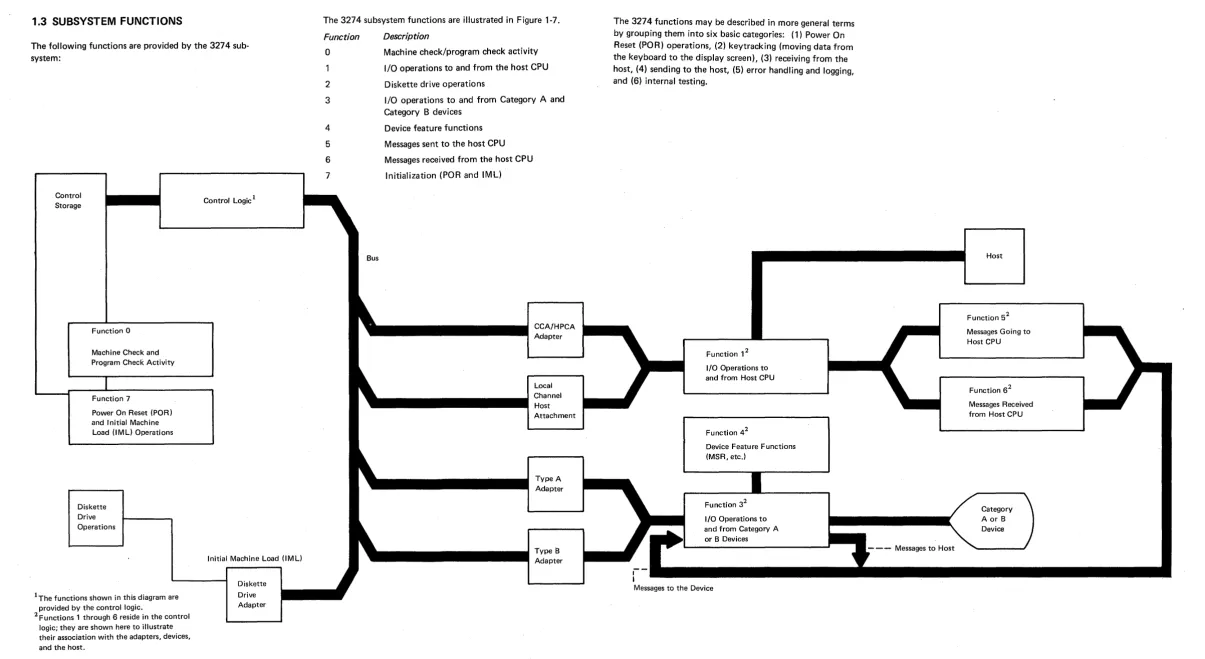
The following functions are provided by the 3274 sub-system:
Control Storage
Function
a
Machine Check and Program Check ActivityFunction 7
Power On Reset (POR) and Initial Machine
Load (lMU Operations
Diskette Drive Operations
IThe functions shown in this diagram are provided by the control logic.
[image:11.1227.19.1224.69.728.2]2 Functions 1 through 6 reside in the control logic; they are shown here to illustrate their association with the adapters, devices, and the host.
Figure 1-7. 3274 Subsystem Functions
Control Logic 1
Initial Machine Load (lMU
Diskette Drive Adapter
The 3274 subsystem functions are illustrated in Figure 1-7.
Function
o
1
2
3
4
5
6
Bus
Description
Machine check/program check activity
I/O operations to and from the host CPU
Diskette drive operations
I/O operations to and from Category A and Category B devices
Device feature functions
Messages sent to the host CPU
Messages received from the host CPU
Initialization (POR and IML)
The 3274 functions may be described in more general terms by grouping them into six basic categories: (1) Power On Reset (POR) operations, (2) key tracking (moving data from the keyboard to the display screen), (3) receiving from the host, (4) sending to the host, (5) error handling and logging, and (6) internal testing.
Function 12
I/O Operations to and from Host CPU
Function 42
Device Feature Functions (MSR, etc.)
Function 32
I/O Operations to and from Category A or B Devices
Messages to the Device
SY27-2512-6
- - - Messages to Host
Host
Function 52
Messages Going to Host CPU
Function 62
Messages Received from Host CPU
1.3.1 Control Unit Power-On Reset (Except41X
Models)
When the 3274 is powered on, the +5 V dc supply origin-ating at the low-voltage power supply (LVPS) provides input to the paR circuit at LVPS card point E15. The PO R signal is then generated to the 01 A-A 1 boa rd as out-put from LVPScard point E1. paR to the A1 board generates a restart to the control logic and subsequently starts a normal 1M L sequence.
1.3.2 Keystroke Handling
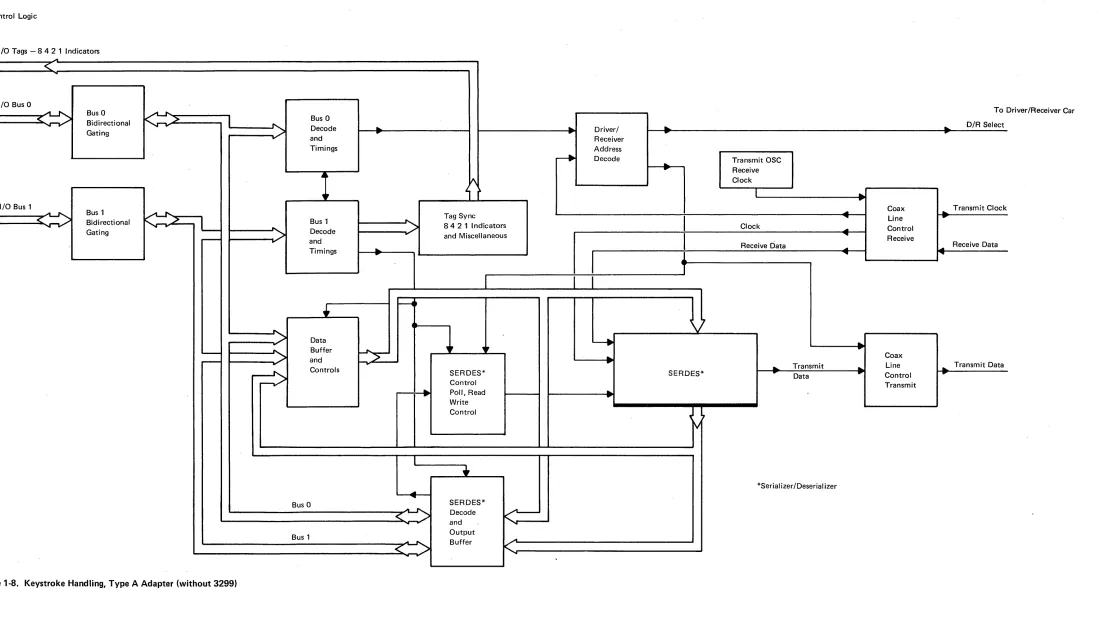
The requests and status from the attached devices are handled by the Keystroke control function. When an operator presses a key, the keyed data is read by the dis-play base card 1, which, if it receives a poll, sends the data to the terminal adapter (Category A devices only). The terminal adapter then loads the status and scan code of the actuated key into a queue. The terminal adapter control retrieves this infor-mation from the buffer queue.
Keystroke control converts the scan code and distributes the data to the appropriate functions. See Figure 1-8 for an illustration of Type A adapter keystroke handling.
As an example of keystroke handling, when a graphic char-acter key is pressed, the graphic key scan code is converted into internal code and then into regen code by means of a language code conversion table. The converted regen code is moved into the device regen buffer, after which the graphic character keyed may be seen displayed on the screen.
When a device is polled, if it has an error condition or request from a feature (selector pen, MSR), it sends status to the termi nal adapter, and key tracking control handles the status as it does a status preceding keyed data.
An error condition detected by the device is signaled to the terminal adapter when the device is polled. Error condi-tions are (1) device check (a parity error was detected in the regen buffer), (2) keyboard overrun (keystrokes too close together), and (3) feature timeout (no response from the feature card within the expected time).
Special keyboard scan codes are used for the device paR
To Control Logic
1/0 Tags - 842 1 Indicators ..-L
<
-I/O Bus 0
To
<~
Bus 0K'-">
Bus 0Bidirectional
-")
..
..
D/R Select"'" .... Gating
'"
.... Decode...
.
...
-
Driver/-
r..
and ReceiverDriver/Receiver Car
Timings Address
~ Decode
.
Transmit OSC..
Receive4~
~ Clock
~,
'1
I
---..
I/O Bus 1
..
Coax...
Transmit ClockA~ Bus 1 ~ Tag Sync
I
"" Line..
L
Bus 1..
< _ /
Bidirectional fo,...2-:>
84 2 1 Indicators Clock Control....
.......
-
...
Decode
....
Gating
:>
and MiscellaneousI
....
Receive-
...
andReceive Data
....
Receive Data~
Timings
..
1
... ...•
~1
'1
....
~
\ j>
Data ~....
L...--
..
Buffer..
1,
Coax
>
L:
...
-
and..
Transmit Line Transmit Data
r
....
...
...
~
Controls SERDES* SERDES* rData
..
Control..
Control Transmit
..
..
Poll, Read...
..
WriteControl
~ 7
rv
I
•
*Serial izer/Deserial izer...
....SERDES* BusO
.AI
~ Decode
....
<
../ andK
-
...Bus 1 Output
...
...
Buffer...
K
[image:13.1224.71.1184.69.686.2]<
""..
;,
""Figure 1-8. Keystroke Handling, Type A Adapter (without 3299)
1.3.3 Sending to
Hos~Data from Category A devices is queued via function 3 into various buffer formats, depend ing on the type of host attachment used, by the device control code. The data is then handled, again in queued buffer formats, by the data stream control code. The host processing control code then forwards the appropriate data from another queued buffer to the host. (See Figure 1-9.)
Input Messages from Device
Function 3
...
~
,.
Device I/O Operation
~ Function 5
Outbound Message
Function 1
...
~
I"'"
Host Adapter
- +
Output Message to Host CPUFigure 1·9. Inbound Messages
1.3.4 Receiving from Host
Data from the host is queued via function 1 into common transmit/receive buffers of various formats, depending on the type of host attachment used, by the host processing control code. The data is then handled in queued buffer formats by the data stream control code. The device con-trol code then forwards the data to the device. (See Figure 1-10.)
Host Line Interface Inbound Message
Function 1
.JL
, - - - ~
Host Adapter
~ Function 6
Inbound Message
Function 3 ~ Device I/O Operation I'"
.~ Output Message to Device
Figure 1-10. Outbound Messages
1.3.5 Error Handling and Logging
Error handling and logging is performed by the control logic and storage. Log statistics and information are available for each device and host adapter by means of test procedures.
1.3.6 Internal Testing
All internal tests are performed by the control logic, and indicators are provided for test results. Host support is not required for internal testing.
1.3.7 Function Priority
The priority scheme used by the 3274 subsystem is illus-trated in Figure 1-11. Function 0 has the highest priority, and function 7 has the lowest priority. For example, if a machine check (function 0) and a diskette drive operation (function 2) are both pending, the 3274 control logic per-forms function 0 followed by function 2.
Function 0 Machine Check and Program Check ActivitY
Function 1 Setup Operations to and from Host CPU
Function 2 Diskette Drive Operations
Function 3
Setup Operations to and from Category A or B Devices
Figure 1-11. 3274 Subsystem Functional Priorities
Function 4
Device Feature Functions (MSR, etc.)
Function 5 Messages Going to Host CPU
Function 6 Messages Received from Host CPU
1.3.8 Local Channel Data Flow (Model A)
Figure 1-12 illustrates local channel data flow.
==>
=>
¢
~
K
H-
-1-1* NCSelect Out (Outgoing,)
K3-1 * NC
Select Out (lncomingl
K2-1 * NO
V
~
.,
370
k:=
DataBus
/"
"
'"(Wired Address)
-370
/
Tags i".... ~
-Driver Degate ~. and
Power On Reset
~
Driver I..
-Receiver
*Relay Control for Select Out (on the A 1 N2 card) Power On/Off Sequence
K3 Pick K1 Pick 'K2 Pick Power On
Figure 1-12. Local Channel Attachment Data Flow
370
~
5-Bit
"-ir=>
Buffer "370
=>
....
4-Bit
~
Buffer
;.
-+
' - --
-r - -
--=>
AddressC-Compare
D
'r
-•
Disconnect • Status Control•
Enable•
Data Control • SelOut•
CU Busy• Select Control
'---•
Poll CU E Stack '-+
~,SY27 ·2512·6
• Command Decode
~
• Controlb
Logic=>
ControlReg
=>
4~
I/O Bus 1A ,...
~
J'-..s..
.>
Bus 1~ ~ v ....
t. )
-=>
=>
! - - --M'
Basic-! - - -
-Reg ,... Status
-=>
3f - - -
~.
~
!
-Bus 1 I/O Bus 0
' - - f - -
----
s,.~
~:>
['211
r-------
-
Y\
~..
•
Address,
Compare .... ....
~
Reg .... t. )~ . / 2
:-i.
~
CTR-U
...
~
>
... Reg I/O Tags
1
r
Data ... ...I/O Tag ... ,... ....
"2
<
.>
<
>
-
Control .... .... Control "" v1.3.9 Type A Adapter Coax Data Path
Figure 1·13 ill ustrates the! bit path from the coax to the Type A adapter.
Adapter States 1. Disabled
2. Enabled but Idle (Normal Polling)
3. Enabled Working (Passing Normal Data/Keystroke Activi ty)
Note: When a 3299 Terminal Multi· plexer is attached (TM Type A Adapter) the Driver IReceiver is modified and a single coax cable connects the Type A adapter and the 3299 unit.
Control
Logic and t - - - I
Storage
Operator Panel Indicators
Type A Adapter
FO Buffer
SERDES
Driver/Receiver
Bit Serial Coax
~I
To Devices
Figure 1·13. Coax to Type A Adapter Data Flow
Bit Parallel
1.4 SUPPORTING PUBLICATIONS
Additional information relating to the IBM 3274 Control Unit, Models A, B, C, and D is presented in IBM 3270 Information Display System Library Users Guide,
Chapter 2. Subsystem Indicators, Symbols, and Messages
2.1 INTRODUCTION
This chapter provides information concerning the operator panel indicators and the display symbols and messages used to convey error and subsystem status conditions to the user and to the customer engineer. The operator panel indicators include the 84 2 1 indicators, the DC ON indi-cator, and the ONLINE/OFFLINE indicator (3274 Models A, B, and 0 only).
The subsystem symbols and messages displayed on the status line include the Readiness and System Connec-tion symbols, Do Not Enter messages, CommunicaConnec-tion Reminders, Shifts and Modes symbols, Printer Status mes-sages, and Machine, Program, and Communication Check numbers. The functional details of each item are described.
2.2 842 1 INDICATORS
The four indicators labeled 842 1 (Figure 2-1) are located on the operator panel. They are activated by the control logic to serve as prompting, progress, and/or success/fail ure indicators during the following operations:
• IML Bus Test: All four indicators are turned on by the IML pushbutton via the control logic and the Type A adapter card (01 A 1 S2) if there is no activity on the internal logic bus.
• IML Tests: As the test routines are run, the control logic turns on and turns off each of the four indicators. A failure condition is indicated by a constant or flashing code displayed in the 84 2 1 indicators. The success of a given test is indicated by the 8 4 2 1 indicators pro-gressing to the next hexadecimal value.
• Operational Mode: During online operations with the host CPU, the 84 2 1 indicators are turned on by -::he control logic when an error condition is detected by the control logic. Hexadecimal values are used to indicate the most likely failing component. If additional errors are detected the control logic writes over the prior indi-cation with the new hexadecimal value. The indicators turned on by the control logic may represent recoverable errors or nonrecoverable errors. The error remains dis-played in the 842 1 indicators until the machine is powered off or until the IML pushbutton is pressed.
• Customizing Mode: During customizing, the 842 1 Indicators display the type of customizing operation in progress, as well as serving as progress and procedural-failure indicators. They also prompt the user to change diskettes during customizing and notify the user when customizing is completed.
• Installation Mode: During initial installation, the 84 2 1 indicators are used to indicate a successful test run after initial machine power-on has occurred. They are also used to show the state of the local channel interface when attempting to run online tests (OL Ts) during initial installation.
2.3 DC ON INDICATOR
The DC ON indicator is located on the operator panel PC board. It is turned on by +5 Vdc from fuse F 1 (20A circuit) on the LVPS PC board via the Z1 cable to the operator panel. On the 41X models, +5 Vdc to the board is not fused; the only fuses are for +5 Vdc to the file and -5 vdc to the board. Loss of +5 Vdc at the 01 A 1 logic board will turn off the indicator. This indicator is not related to the POR circuit and does not indicate the status of +5 Vdc to the diskette drive or the 01 A2 feature board.
SY27-2512-6
Bus Test
Control
IML Pushbutton S2
r---
-8 OnLogic Card
f - - - --4 On
-
-2 On-
-
-1 On [image:17.1227.284.1141.91.765.2]IML Tests Operational Mode Customizing Mode Installation Mode
Figure 2-1. 8 4 2 1 I ndicator Control Logic
2.4 ONLINE/OFFLINE INDICATOR AND
SWITCH FOR MODE LS A, B, AND D
(EXCEPT MODELS 41A AND 41D. REFER
TO MAINTENANCE INFORMATION
MANUAL (MIM) SY27-2554 FOR MODELS
41A AND 41D.
A description of the switch and indicator function for Models A, B, and D follows. There are no rotary switches on the Model C units.
.2.4.1 Model A
Positioning the Power/Interface rotary switch to ON LI NE causes the following (Figure 2-2):
• An exclusive OR function
fI
gives output because the triggerD
and the Online/Offline switch do not agree. • The output is interpreted as a request for change in thestate of the trigger
D.
• A function is, in turn, sent and interpreted to toggle the trigger
D .
IML Pushbutton >
> ;
-OFFLINE Indicator
P2U10
A
r
Ta
PORD
P2D10
ONLINEIOFFLINE Switch
N2M13 P2J09
Toggle ONLINE/OFFLINE trigger Notes:
[image:18.1227.553.1174.72.712.2]1. If latch and switch do not agree, interrupt microcode. 2. Only accept toggle control code if latch and switch agree.
Figure 2·2. ONLINE/OFFLINE Control Logic, Model A
• Toggling the trigger
D
causes the OFFLINE indicator to turn off and deactivates the 1M L pushbutton.A
Positioning the Power/Interface rotary switch to OFFLINE causes the same operation; this time, however, toggling the trigger
D
to the opposite state turns on the OFFLINE indicator and enables the IML pushbutton to function.Use one of the following procedures to force the 3274 offline:
1. If the 3274 will not go offline (the OFFLINE indicator will not come on), request that the host CPU be stopped. Power the 3274 off, and restart the host CPU.
2. Momentarily ground the pin:
Model A: Al-P2Dl0
Note: Even though these paragraphs do not apply to Models 41 A and 41 D, do not perform the grounding procedure on Models 41 A and 41 D.
IML Load
W
S2M07II
Interrupt to
(1)
Microcode iJ 0
-
ue
XOR u
~
fJ
-2.4.2 Models Band D
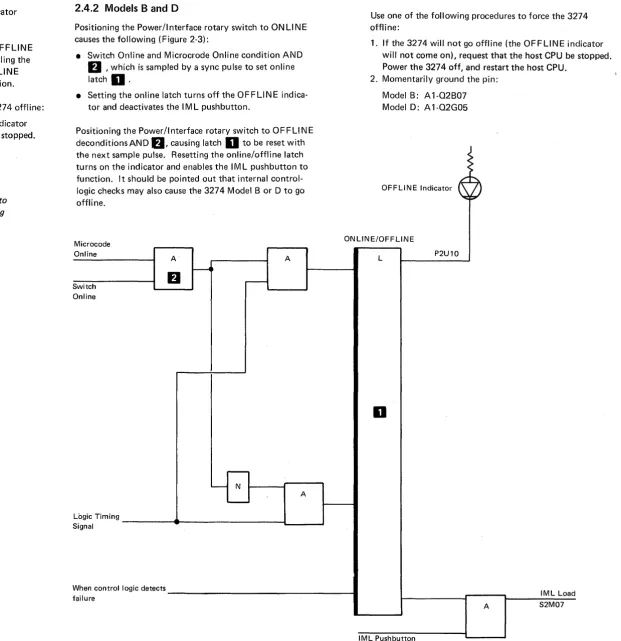
Positioning the Power/Interface rotary switch to ONLINE causes the following (Figure 2-3):
• Switch Online and Microcrode Online condition AND
D '
which is sampled by a sync pulse to set online latchD.
• Setting the online latch turns off the OFFLI N E indica-tor and deactivates the 1M L pushbutton.
Positioning the Power/Interface rotary switch to OFFLINE deconditionsAND
fJ,
causmg latchD
to be reset with the next sample pulse. Resetting the online/offline latch turns on the indicator and enables the 1M L pushbutton to function. It should be pointed out that internal control-logic checks may also cause the 3274 Model B or D to go offline.Use one of the following procedures to force the 3274 offline:
1. If the 3274 will not go offline (the OFFLINE indicator will not come on), request that the host CPU be stopped . Power the 3274 off, and restart the host CPU.
2. Momentarily ground the pin:
Model B: Al-Q2B07 Model D: A l-Q2G05
OFFLINE Indicator
Microcode Online
ON LINE/OFFLINE
Switch Online
A
fJ
A
A
Logic Timing ----~~---Il...
__
...JSignal
When control logic detects _ _ _ _ _ _ _ _ _ _ _ _ _ _ _ _ _ 1 failure
Figure 2-3. ONLINE/OFFLINE Control Logic, Models Band D
L P2U10
D
IML Load
A S2M07
2.5 OPERATOR INFORMATION AREA
LAYOUT
The operator information area consists of individual fields located below the 3178/3278/3279 status line. These fields are not displayed on any category B device (3277). The field names and lengths are shown in figures 2-4 and 2-5.
Note: If you are operating a device other than a 3178, 3278, or 3279 and a symbol is displayed other than the symbols defined in the following figures, consult docu-mentation for that specific device.
Note: The X.25 indicators defined in this chapter will not
be displayed in the Operation Information Area of the 3290 or other variable function devices.
Readiness and Do Not Enter Reminders System Connection (Input Inhibited)
1 7 9 17 21
Shifts arid Modes
27 32
Figure 2-4. Operator Information Area Layout (without Extended Data Stream)
Readiness Do Not Reminders Programmed Shifts Extended and System Enter Input Symbols & Modes Higlighting Connection Inhibited
1 7 9 17 21 27 31 34 36 44 46 47
Figure 2-5. Operator Information Area Layout (with Extended Data Stream)
Printer Status
41 60 64
Extended Insert Printer Color Mode Status
49 50 52 60 64
2.5.1 Readiness and System Connection Symbols
The first seven positions of the status line are allocated to Subsystem Ready, Host Ready, Appl ication Ready, and Test. See Figure 2-6.
Symbol
•
TEST
N (appears in column 7)
Name
3274 Ready
Online A Online B
My Job
System Operator
Unowned
Test
In-use indicator (X.25 only)
Explanation
1 of the operator information area when the 3274
BI
Control Unit to which the display is attached is ready (functional) and the display is ready.The Online 8.and Online §. symbols govern transactions with the host system. Certain key-board functions and the meaning of some operator information area symbols differ depend-ing upon which set of rules is applicable.
~. The control unit is connected to the system under 8. rules. The 8. symbol appears in remote systems using BSC protocol, in locally attached systems that use 3274 Models B and D. It is turned on by receipt of the following commands: Write, Erase/Write, Erase All Unprotected, Copy, Read Modified, and Read Buffer.
The ~ symbol is turned off when
1. An operator action causes host communication.
2. The display station is turned off,
3. The Normal/Test switch is placed in Test, or the TEST key is pressed to place the 3274 in the Test mode.
Online B. The control unit is connected to the system under!:!. rules. The ~ symbol appears in systems that use SNA protocol. It is turned on by completion of an ACTPU/ACTLU com-mand sequence, and is turned off by execution of DACTPU or DACTLU, including an internal DACTPU sequence, and when the Normal/Test switch is placed in Test or the TEST key is pressed.
The display station is connected to the operator's application program. This symbol is dis-played in position 3. This symbol appears in systems that use BSC or SNA protocol, or in systems that use 3274 Models Band D. In systems using BSC or the 3274 Models Band 0, it is turned on with the A symbol, and is turned off when power is removed, and wAen the Normal/Test switch is placed in Test. When using SNA protocol, it is turned on when the operator's application session owns the screen.
This symbol is used with SNA protocol and indicates that the system operator (SSCP Control Program) session owns the display screen. Except for the ENTER key, the Program Attention keys are not functional when this symbol is displayed.
The display station is connected to the system (using SNA only), but not to the operator's application program or to the system operator (control program). The SYS REQ key is used if LOGON is required. This symbol is displayed in position 3.
The display station is in Test mode. Test mode is initiated or terminated by pressing the TEST key while holding the A L T key. TEST is displayed in positions 3 through 6. Test procedures are described in the IBM 3270 Information Displav System: 3278 Displav Station Problem Determination Guide, for the specific display attached.
Data transfer is taking place between the 3274 control unit and the host. The In-use indicator is displayed on all attached 3178, 3278, and 3279 displays, when the control unit has entered the X.25 data transfer state.
The X.25 disconnect key ()DISC) is the only key honored in the data transfer state. Pressing the )DISC key disconnects the line and causes the "Disconnect In Process" indicator to be dis-played followed by the "Call Ready" indicator when the disconnect process is complete. Both Disconnect in Process and Call Read