THE MODELLING OF INFORMATION DISTRIBUTION
SYSTEM ON THE ANDROID-BASED: POWER OUTAGE
APPLICATION
1AFAN GALIH SALMAN, 2SABLIN YUSUF, 3ADRIANUS, 4R.TANTIE K
123.
Dept. of Computer Science, Bina Nusantara University, Jalan KH. Syahdan No. 9 Palmerah Jakarta 11480, Indonesia
E-mail: [email protected] , [email protected]
ABSTRACT
Currently, delays in dealing with power outage by Nationl Electricity Company (PT PLN) largely due to ineffectiveness of information distribution system in the departement who receive complaints from customer and deliver it to the repair team in the fields. Therefore we need such a application for distribution of power outage information based on Android that capable of facilitating power outage service system in receiving problem report and deliver process of power outage evaluation which is ongoing or is done. Google Map Usage provides lots of assistance in mapping the nearest repair team location to where area of the power outage happened. The application is designed preceded by conducting analysis method of user requirement including analysis of the ongoing system, analysis of the findings of interview result as well as indentification of information necessity and system requirements. Designing focused on the Interface User Screen Design of mobile device and Web Admin Design. The research has resulted in a system modelling that capable of supporting the smooth running of distribution process of information on power outage in National Electricity Company.
Keywords: Distribution of Electricity Problem Information, Android.
1. INTRODUCTION
Now a days the technological advancement develops very rapidly. One of technologies which has continuous development until now is information technology in mobile device. In the past mobile device only able to be used for the oral communication between human. But recently the capability of mobile device is highly sophisticated, where the work which previously only can be done by computer now can be carried out by mobile device.
One of operating systems which used by mobile device is Android. Android is a linux-based operating system for mobile device. The superiority of Android over other mobile device operating syatem is that Android has the characteristic of open source code so people can customize the features which has not existed in the Android operating system in accordance with their demands and desire.
This capability of Android attract National Electricity Company’s (PT. PLN) attention and make they is interested to use Android-based application for dealing with information on power outage which has been managed on manual so far they still use Handy Talky (HT).
National Electricity Company (PT PLN) is a company that provide the biggest electricity supply service in Indonesia. As one of Stated Owned Enterprise (BUMN) in Indonesia, PT. PLN is required to run the bussiness as well as possible in order to make people’s prosperity and do not charge to the state budget for the financial loss that made on the business.
complaints report management by call center officer and working team and facilitate process of problem evaluation that has been done or is ongoing. The expectation is that the Andorid-based application can improve quality of customer service to become better and efficient. This system is indirectly aimed at improving customer satisfaction .
Moreover, National Electricity Company (PT. PLN (Persero) face the problem of distributing information on the power outage can be elucidated as follow:
1. Frequently problem with communication device such as signal failure and HT’s battery that is quickly run down when the admin need to send information on the area where the power outerage happened to the repair team in the fields.
2. The repairs team had difficulties in searching location where the power outrage happened so that they need method to find the location quickly and accurately.
The objective of this paper that is expected to be reached and the desired advantages to be developed shall be as follow:
Design and makeAndrois-based application for distributing information on power outrage that able to facilitate providing service system of power outage in receiving report on power outrage and send evaluation process of power outrage that is ongoing or have been done. The advantages of this paper shall be as follow:
a. Assist people to get immediate and quick service on dealing with power outage that managed by PT. PLN (PERSERO) in the distribution area of Jakarta Raya and Tangerang. b. Facilitate immediate and quick
service probided by PT. PLN (PERSERO) in the distribution area of Jakarta and Tangerang to deal with power outage.
2. RELATED WORKS
Han Qi, 2012 [4] introduced Mobile Cloud Computing (MCC) which combines mobile computing and cloud computing, has become one of the industry buzz words and a major discussion
thread in the IT world since 2009. As MCC is still at the early stage of development, it is necessary to grasp a thorough understanding of the technology in order to point out the direction of future research
Ramanamurthy, 2012 [9] introduced methods and systems for indoor navigation utilize a smartphone equipped with various sensors. When a person whose initial position is unknown, and in some circumstances whose sight has been impaired, specifies a destination, the navigation system will calculate the coordinates of his/her present location from the sensor readings. It will then calculate the distance to be traveled to the destination and form routes to direct him/her towards the desired location. These steps are carried out using sensor readings and in some cases magnetic maps of the interiors of buildings stored on the smartphone. In some cases dynamic time warping (“DTW”) is used to align a recorded signature of the person's movement through the building with a stored magnetic map in order to identify the person's location within the building.
Sighal, 2012 [11] introduced the help of A-GPS in phones and through Web Services using GPRS, Location based Services can be implemented on Android based smart phones to provide these value-added services: advising clients of current traffic conditions, providing routing information, helping them find nearby hotels.
3. METODOLOGY
• The Preceding research
The peceding research carried out by interviewing National Electricity Company (PT. PLN (Persero) management to find out what function needed in this application and interviewing National Electricity Company’s employee who will have an advantage of this Android-based application in distributing power outage information
• Reference
Many related information are collected from reference books and websites that provide literature on topic that studied in this research.
• Requirements Analysis
We need to carry out requirement analysis to find out what kind of application that meet user demand.
• The Following Design Method are used in
-Use Case Diagram -Class Diagram Design -Sequence Diagram Design -Database Design
-Screen Display Design
• Writing Program Code
Write the program code of the application that need to be made. In this activity, program code is made by adjust programming language to the application that can be used to create application in accordance with illustration on design.
• Program Test and Improvement
Having been written the program tested by running it and review the program evaluation. If the program has comply with the objection and the required functions it will ready to be applied. Conversely, the faulty program will be improved.
• Final Report
Having been tested and the desired result achieved, all procedure compiled and completed in written report.
[image:3.595.126.281.474.642.2]3. DESIGN & IMPLEMENTATION
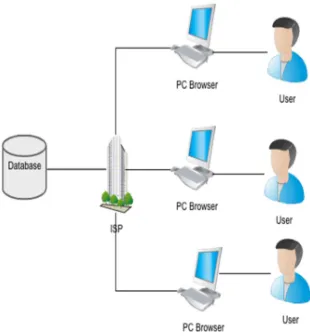
Figure 1 Web Admin System configuration
The following is configuration guidance on hosting server that has to do in order to make the web application running well. The configuration process shall be as follow :
• Make database in hosting server
• Import the file sql containing
table for the required database
• Upload file html and php to
hosting server
Figure 2 Android System Configuration
To make the application can be applied, the android mobile device need the starting installation. The following is installation stages:
• Copy this application installation
software package in the form of .apk into my file folder on the Android mobile device
• Open the .apk file then the
application will be automatimatically installed
• Having the Android mobile
devide been installed, page of the application interface showed. The
interface page is the first page that showed after the user open the mobile application.
4. EXPERIMENTS AND RESULT
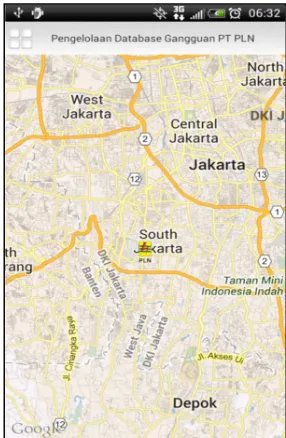
Display page of Show the location of Power outage
Figure 3.Display of Power Outage Location
Green Pin on the boardsign PLN of the Figure above indicate Power Outage location. There are option View Direction to see the repair team location (user) and the power outage location in the form of map.
[image:4.595.129.252.487.706.2]Display of View Direction page
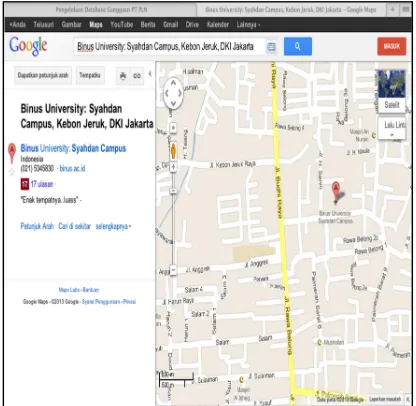
Figure 4. Display of View Direction Page
Pointer A indicates location of repairs team (user) who use the Android-base meanwhile pointer B indicate the power outage location. If the repairs team press The Directions List button the direction pointer of power outage location will show. This feature facilitate the repais team finding the power outage location accurately and quickly.
Display Page of My Position
Figure 5. Display Page of My Position
Display Page of Get Direction
[image:4.595.334.477.502.721.2]Display Page of Update Status
Figure 7. Display Page of Update Status of The Power Outage
On the page of Update The Power Outage there are options of the Power Outage Status that can be choosed by the repairs Team. There are also explanation box to clarify status of the power outage. On the bottom side there is the Sending Message button to deliver information the power outage status to the admin post.
How To Use Web Application
The Admin post has task to send information concerning the power outage to the Repairs Team in the fields by using the modified web application with addition function to determine the power outage location accurately to send information of the power outage (both power outage location and the power outage problem) to the Repairs Team. The first process that has to be done by admin before using the web application is login in accordance with the username and the made password. On this page, only the user who has the access right to login.
The Home Page
The Home Page on this web application contains data of the power outage that come and processes by PT PLN. The following is display of home page indicating feature to open Google Maps.
Figure 8. Home Web Page
The Feature Page of Google Maps
[image:5.595.303.511.505.708.2]This Feature has function to know degree of Latitude and Longitude of location. The Latitude and Longitude degree that is used on the Android-based application to see the power outage location. .
Click right on the location sign then press the button option of “What is the problem here?”
[image:6.595.305.526.225.457.2]Having been input The fields will change to the degree of Latitude and Longitude of the adress.
Figure 10. Copy Location of the Power Outage in the form of Latitude and Longitude.
Menu of the Repairs Team Data
This display function is to see data of the Listed Repairs Team. The Web Admin has authorization to add, change, or delete the The team data.
Figure 11. Page Display to See The Repairs Team Data
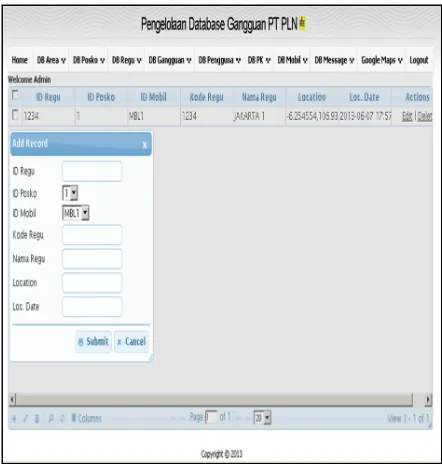
If the Admin Web want to add record press the button ‘+’ in the bottom left application then the popup window will be show the field that has to input.
The following is display page to add the repairs team data.
Figure 12. The Page Display to Add The Repairs Team Data
To delete the existing data choose the icon in the left side application or on the written delete on the field Actions. The following is confirmation display to delete data.
The Confirmation Page to Delete Data
Figure 13. The Page Display for Adding Record
The second way is choosing ‘Edit’ on the Actions field. This way enable the Admin Web to do the direct change on the data line.
Menu the Data of Power Outage
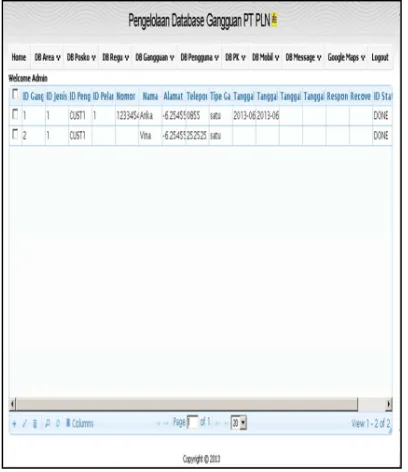
[image:7.595.298.492.202.502.2]This page show data and status of the power outage. The status containing information whether the power outage or is still waiting to be handled (PENDING), is handling (IN PROGRESS) has been handled (DONE).
Figure 14. The Display Page of the Power Outage Menu
Menu of Message Database
This page show the message that will be sent or received by The Repairs Team. Status on the data line show both type of message. The following are the status explanation :
SENT : message has been sent to the repairs team.
RECEIVED : message has been received by the repairs team.
[image:7.595.90.294.498.734.2]FAILED : message has been failed sent.
Figure 15. Display of Message Database Page Menu
Sending message can be done by pressing icon ‘+’ to add data, then choose menu ‘Push Message’. This menu will send every line of message excluding message regarding the SENT and RECEIVED status.
5. CONCLUSION
After completing the design and development of the system, as well as through the implementation and evaluation
• This application facilitate admin sending data
of the power outage location by Google Maps aid to the the repairs team on the fields so that the point of the power outage location will be found quickly and accurately.
• This application also facilitate the repairs team
REFRENCES:
[1] Connolly, Thomas M., & Carolyn E. Begg (2010). Database Systems : A Practical Approach To Design, And Management. London: Addison-Wesley Professional. [2] Debbabi, M., Hassaine, F., Jarraya, Y., Soeanu,
Ai., & Alawneh, L. (2010). Verification and Validation in System Engineering : Assessing UML/SysML Design Models. New York: Springer.
[3] DiMarzio, J.F. (2008). Android, A Programmer’s Guide. McGraw Hill, New-York.
[4] Han Qi. (2012).Research On Mobile Cloud Computing:Review, Trend And Perspectives:Digital Information and Communication Technology and it's Applications (DICTAP), Second International Conference on Bangkok.
[5] Huang, F., & Wang, R. C. (2010). Arts and Technology. Germany: ICST.
[6] McNamara, Joel. (2008). GPS For Dummies. Indiana: Wiley Publishing, Inc.
[7] Olsson, Tommy & O’Brien, Paul. (2008). The CSS : The Ultimate Reference. Melbourne: SitePoint Pty Ltd .
[8] Pressman, Roger. S. (2011). Software Engineering A Practioner’s Approach. St. Louis: The M cGraw-Hill Companies.
[9] Ramanamurthy.(2012). Methods and Systems for Indoor Navigation US20120143495 A1 USA.
[10] Shneiderman & Plaisant (2010). Designing The User Interface : Strategies for Effective Human – Computer Interaction. USA: Addison-Wesley Longman, Michigan.